# how to build and run an army of AI UGC accounts
**作者**: Tibo
**日期**: 2026-10-23T14:06:16.000Z
**来源**: [https://x.com/tibo_maker/status/2113633105776890343](https://x.com/tibo_maker/status/2113633105776890343)
---
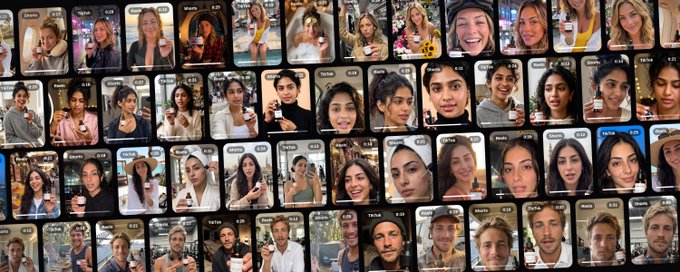
in this article I'll walk you through all 9 steps of the setup, with the 12 prompts I use, ready to copy, in the order you'll need them.
you've probably scrolled past a few of them this week.
a girl talking through her skincare in the car, another woman showing what's in her gym bag, someone getting ready on a plane an hour before landing. they look like normal people filming normal parts of their day, which is exactly why you watched.
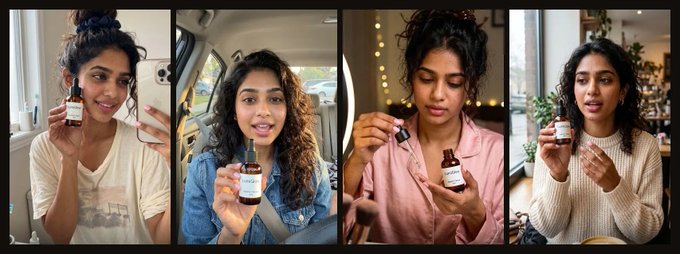
a lot of them aren't real people. they're AI creators, and some brands now run several of these accounts at once, each one with its own face, its own life and its own audience.
most people picture AI UGC as one fake face reading a script about a product, and that version is easy to spot and easy to skip. the version I'm talking about is different. it's a small group of creators who each have a believable life, and your product shows up for a few seconds inside that life, the same way a real person mentions something they use.
this article is the full setup for running that with an AI agent:
- how to design the creators, starting from who actually buys your product
- how to keep their faces exactly the same across hundreds of videos
- how to find what's already working in each creator's niche
- how to turn those winners into original videos in each creator's voice
- how to keep every account posting on a schedule, with a review window before anything goes live
- how to read the results every week and tune the whole thing
every prompt is in here, ready to copy. there are 12 of them, and they're numbered in the order you'll use them.
here's the whole thing, in the order you'd set it up.
why UGC works, and why it's so hard to run
UGC works because it doesn't look like an ad. a normal person talking about something they use gets watched, and a brand video gets skipped. nobody really argues with that part anymore.
the hard part is running it, and it breaks in the same four places.
1. it's an operations job.
you're finding creators, briefing them, chasing them for drafts, sending notes, approving, paying, and then doing it all again with the next group, because creators rotate. most of the work isn't creative at all. it's managing people, and it scales with headcount.
2. you pay per video.
every new hook is another invoice. every variation is another invoice. a reshoot because the lighting was off is another invoice. that would be fine if you only needed a few videos, but testing is the whole game on short-form. you find the hook that works by trying a lot of hooks that don't, and per-video pricing makes every one of those tries expensive, so testing is usually the first thing that gets cut.
3. it's slow.
a creator needs a brief, a few days to film, and a round of edits. by the time the video comes back, the trend it was riding has often moved on, and you're posting last week's format into this week's feed.
4. you don't own it.
the face, the account and the audience all belong to the creator. usage rights expire. when the creator stops working with you, everything they built while promoting your product leaves with them, and you start again from zero.
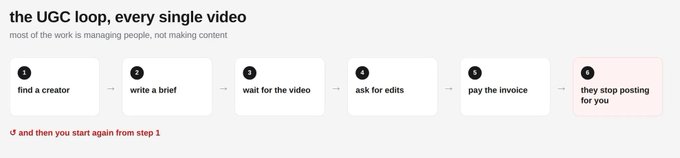
put those four together and it turns into a loop: find a creator, brief them, wait, do edits, pay, they stop posting, start again.
what changed
three things are true now that weren't true a year ago.
AI faces stay the same now.
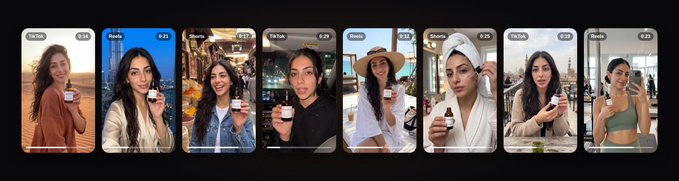
until recently, an AI person looked slightly different in every clip. the jaw shifted, the hair changed, the freckles moved around, and no audience could form around someone who kept turning into someone else. with saved characters you get the same face, hair and skin across hundreds of videos, which means people can actually recognise and follow a creator.
you can search what's working instead of guessing.
Revid's viral search lets you look up any topic and get the top-performing short videos on it, with transcripts, hooks and engagement data. that used to be a strategist's job: scrolling, saving, transcribing and writing up why something worked. now it's one search.
agents can run the whole loop.
an agent like Claude, Hermes, OpenClaw or Squad can call these tools directly. it can search, pick a reference, write the script, render the video and schedule it, then report back to you with what it did.
put those three together and one person can now run what used to need a small team.
the model: creators you own
the idea behind this whole article is simple.
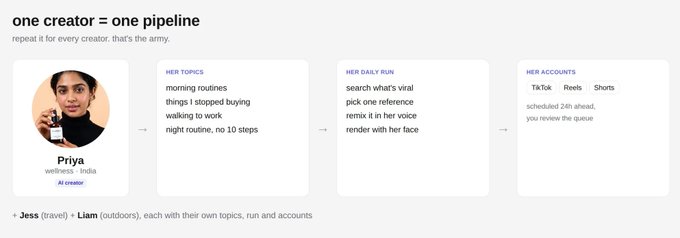
instead of renting creators, you build a few of your own. each one is a believable person with a face that never changes, a normal life, and a set of topics they'd actually post about. your product shows up inside that life, and it's never the subject of every video.
each creator gets their own accounts and their own daily pipeline. your agent runs all of them, and you review what's going out before it goes live.
one creator is a channel. three or four of them, each speaking to a different kind of buyer, is the army.
this fixes all four problems from before. there's no one to manage, because the agent does the work. there's no creator invoice per video, just render credits, so testing a new hook means one more render instead of one more brief. it's fast, because research to scheduled post happens in one run. and you own everything: the face, the accounts and the audience.
who this works for (and who it doesn't)
before you build anything, check the fit. this works best when:
- your product is used in everyday life (consumer apps, skincare, food, fitness, travel, productivity tools)
- the "aha" can be shown in a few seconds on a phone
- your buyers already watch short videos to decide what to try
it works badly when:
- the purchase depends on deep trust in a specific person (medical, legal, financial advice)
- your category is regulated, or the platforms restrict claims in it
- the product only makes sense after a long explanation
if you're in the second list, you can still use the research and scripting parts of this system for your own content. just skip the AI faces.
the system
the whole thing is six jobs, and each one can be done by more than one tool.
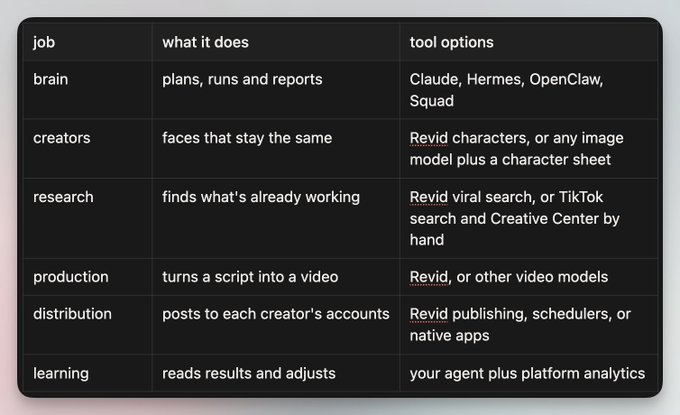
the brain is the only part that touches everything else. it reads each creator's file, calls the research, production and distribution tools in order, and writes back what it did. if you swap one tool for another later, the brain and the prompts stay the same.
the rest of this article is the setup, in nine steps.
step 1: connect Revid to your agent
what it does: gives your agent the ability to actually call the tools, instead of just talking about them.
why it matters: an agent that can only write you a plan still leaves you doing the work. an agent that can search, render and schedule does the work and shows you the result.
how to do it:
Revid has an MCP server, so any agent that supports MCP can use it directly. in Claude Code it's one line:
> claude mcp add --transport http revid [https://www.revid.ai/api/mcp](https://www.revid.ai/api/mcp)
then run /mcp in Claude Code, pick revid and choose Authenticate. other MCP clients use the same server URL with your API key.
once it's connected, your agent can search viral videos, manage characters, render videos and schedule posts.
then give your agent its brain file.
this is the standing brief it reads before every single run. it tells the agent what the product is, who the creators are, what the daily job looks like, and the rules it can never break. you write it once and only touch it when something changes.
keep it next to one file per creator, so the agent always knows where to look:
> ugc/ [brain.md](http://brain.md) creators/ [priya.md](http://priya.md) [jess.md](http://jess.md) [liam.md](http://liam.md) [layla.md](http://layla.md)
prompt 1: the agent brain file
> you run a small team of AI UGC creators for [PRODUCT]. product: [one line on what it does and who it's for] creators: [name and one line for each]. each creator has a file with their persona, topics, past posts and results. your job, every day: for each creator, pick one topic, find what's working on it with Revid viral search, write an original script in their voice, render it with their saved character, and schedule it on their own accounts at least 24 hours out. rules: - every account says it's an AI creator in the bio - never write fake reviews, testimonials or before/after claims - no health, income or medical claims - the product appears inside the creator's life, never as the whole video - never publish directly. schedule only, so I can review - log everything you do in the creator's file
the two rules that matter most are "schedule only" and "log everything". the first one is what gives you a review window. the second one is what lets the agent avoid repeating itself and learn from what it posted.
step 2: design your creators from your buyers
what it does: turns what you know about your customers into a small set of creators, one per type of buyer.
why it matters: the most common mistake is starting with a face. a nice-looking creator who speaks to nobody in particular gets views and no customers. if you start with who buys, every creator has a reason to exist.
how to do it:
split your buyers into a few segments that use the product for different reasons, then design one creator per segment. a wellness person, a frequent traveller, an outdoorsy guy and a city girl can all use the same serum, and each one reaches people the others never would.
for the examples in this article we'll use four creators for a vitamin C serum called LumiGlow:
- Priya is a wellness creator in India. she posts about slow mornings and simple routines, and gives honest updates on her skin.
- Jess is a travel creator in the USA. she's always packing and always on a plane, so her skincare happens on the move.
- Liam is an outdoors creator in Australia. his life is surf, the ute and the van, and he's the guy who owns two products total.
- Layla is a lifestyle creator in Dubai. her life is the city, pilates and weekend trips to the desert, and her skincare is part of getting ready.
notice that none of them is "a skincare creator". the serum fits into each of their lives, but it isn't what their lives are about.
prompt 2: from buyer segments to creators
> here's my product: [description]. here's what I know about who buys it: [customer notes, reviews, survey answers]. split my buyers into 3 or 4 segments that use the product for different reasons. for each segment, design one creator who would naturally reach those people: - name, age, city, what they do - what a normal week looks like for them - 3 things they'd post about that have nothing to do with my product - the one moment in their life where my product shows up naturally keep them believable and ordinary. no influencer stereotypes.
what you get: 3 or 4 creator outlines, each tied to a buyer segment, each with a normal week, three non-product topics and one natural product moment. pick the ones that feel most real and move on.
then write each creator's bible. this is the document that makes every script sound like the same person, whether it's their first video or their two-hundredth.
prompt 3: the creator bible
> write the full bible for [creator] so every script sounds like the same person. include: how they talk (sentence length, slang, words they'd never use), what they care about, their recurring places (home, work, the spots they go every week), habits and running jokes, what they wear, how they film (selfie, handheld, phone propped up), and what they'd never say or do on camera. end with 5 example opening lines in their voice.
the bible goes at the top of the creator's file. here's the shape of a full creator file once everything in this article is set up, using Jess:
> # jess persona: travel creator in the USA, always packing, always on a plane, skincare happens on the move. bible: [output of prompt 3] character: [her saved Revid character] accounts: [her own TikTok, Instagram, YouTube] topics: [output of prompt 6, product beats marked] posting time: [her usual time] log: [date, topic, reference, script, video link, post time] results: [weekly numbers from the review]
step 3: give them a face that never changes
what it does: builds each creator's face once and locks it, so every video after that uses the same person.
why it matters: consistency is everything here. if your creator looks a little different in every video, nobody recognises them, and recognition is the reason people follow an account in the first place.
how to do it:
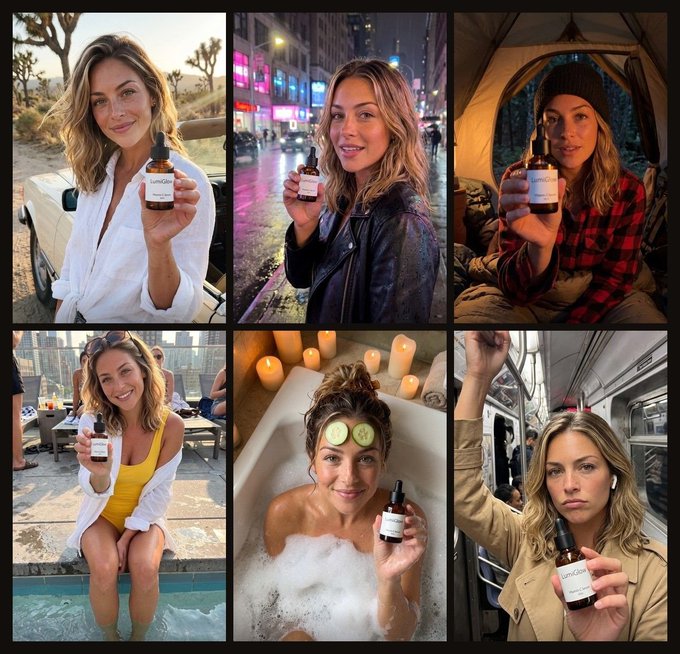
build the face once, from a detailed description. the details in the prompt below are there for a reason. one distinctive detail like freckles or a small scar is what makes a face recognisable at thumbnail size. natural skin texture with visible pores and no retouching is what keeps it from looking like an AI render. arm's-length framing that's slightly off is what makes it look like a phone photo.
prompt 4: the base portrait
> a realistic smartphone photo of [creator]: [age], [heritage], [hair: colour, length, texture], [face: shape, eyes, one distinctive detail like freckles or a small scar], natural skin texture with visible pores, no retouching. [setting], [natural light source], shot on a phone at arm's length, slightly imperfect framing. [outfit]. relaxed, candid expression.
generate a few, pick the one that feels like the person in the bible, then turn it into a character sheet so the model has every angle to work from.
prompt 5: the character sheet
> using this exact person as the reference, create a character sheet: front, three-quarter left, three-quarter right, profile, and one full-body shot. three expressions: neutral, laughing, and talking mid-sentence. keep the face, hair, skin texture and build exactly the same in every frame. plain light background.
check the sheet frame by frame before you save it. if the face, hair, skin texture or build drifts in any frame, regenerate that frame. whatever gets saved here is what every future video inherits.
then save it as a character in Revid, so every render after this uses the same person. if you're using a different image model, the character sheet itself is your reference, and you attach it to every generation.
step 4: give each creator their topics
what it does: gives each creator a list of things they'd genuinely post about, and marks the few where your product can appear.
why it matters: a creator who only talks about your product is an ad with a face. people follow creators for their life, so most of what they post should have nothing to do with you. the non-product videos are what build the audience. the product videos are what that audience is for.
how to do it:
start each creator with a short list, and mark where the product fits:
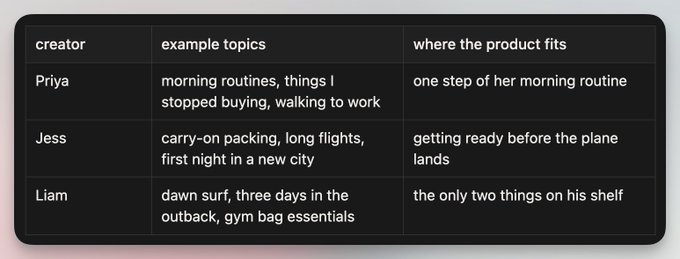
then have the agent expand it into a full month, with a search query for each topic. the search query matters as much as the topic, because it's what the agent will use in step 5 to find what's already working.
prompt 6: from creator to topics and search queries
> here is [creator]'s bible: [paste]. list 20 topics they would genuinely post about in a normal month. at least 15 should have nothing to do with [product category]. for each topic, write the search query you'd use to find viral short videos on it: plain words a viewer would type, 3 to 7 words. mark the 5 topics where [product] could appear naturally for one beat.
what you get: 20 topics per creator, each with a 3 to 7 word search query, and 5 of them marked as product beats. that's a month of posting for one creator. it goes into their file under topics.
step 5: find what's already working
what it does: for every topic, finds the short videos that already performed and breaks down why.
why it matters: don't start from a blank page. for every topic, someone has already made a video that worked, and the structure of that video is the most useful thing you can learn from. you're not guessing what the hook should be. you're looking at hooks that already worked on a real audience.
how to do it:
your agent searches each creator's topics and looks at the top results: the hook, the structure, the pacing, the camera style, and why people watched to the end.
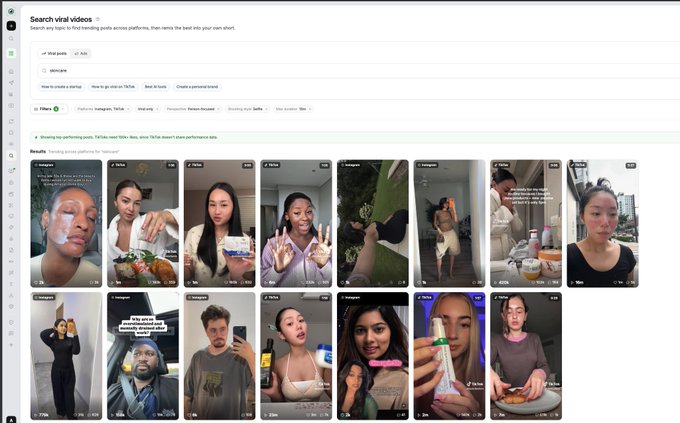
with Revid connected, that's the search_viral_videos tool. it returns the top videos for a query across TikTok, Instagram, YouTube and more, with transcripts, engagement and style labels like selfie, handheld or tutorial. you can do the same thing by hand in TikTok search, it just takes a lot longer.
two settings make a big difference:
1. sort by most popular, with viral-only switched on. this cuts out everything that's just recent and leaves what actually spread.
2. filter for person-focused, selfie-style videos. that's what UGC looks like, and it's what your creators will be making. a winning video with a voiceover over stock footage teaches you very little about how your AI creator should film its morning.
open any result and you get the detail panel: plays, the full transcript, and a breakdown of why it works.
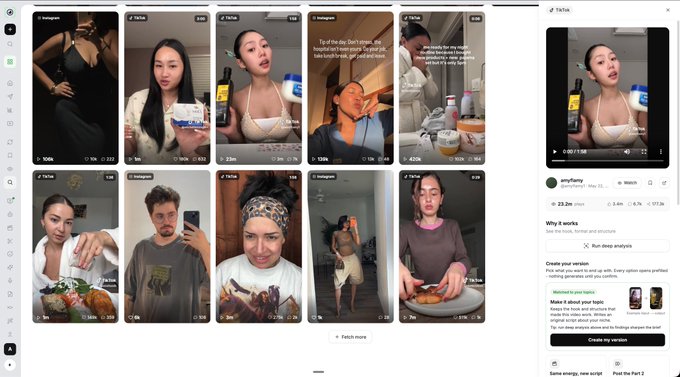
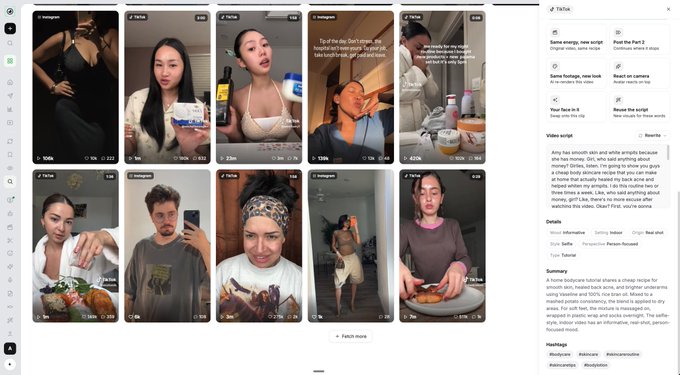
then hand the results to your agent and have it break down the winners properly.
prompt 7: breaking down the winners
> here are the top videos for "[query]", with transcripts and engagement: [paste results]. for each one, break down: the hook (first 2 seconds, words and visual), the structure beat by beat, roughly how long each beat runs, the camera style, and why someone would watch to the end. then pick the one that fits [creator] best and explain why in two sentences. prefer one continuous, selfie-style video over edited lists.
what you get: a beat-by-beat breakdown of every top video, and one pick for the creator with a two-sentence reason. the last line of the prompt matters. edited lists are hard to make feel like a real person filmed them, while one continuous selfie take is exactly what a real person would post.
step 6: turn the winner into their video
what it does: rewrites the winning video as an original video by your creator.
why it matters: this is the line between learning from a format and copying someone's video. you want the first one. the structure of a video is a pattern anyone can use. the words, the story and the person are someone else's.
how to do it:
the rule for remixing is keep the structure, change everything else.
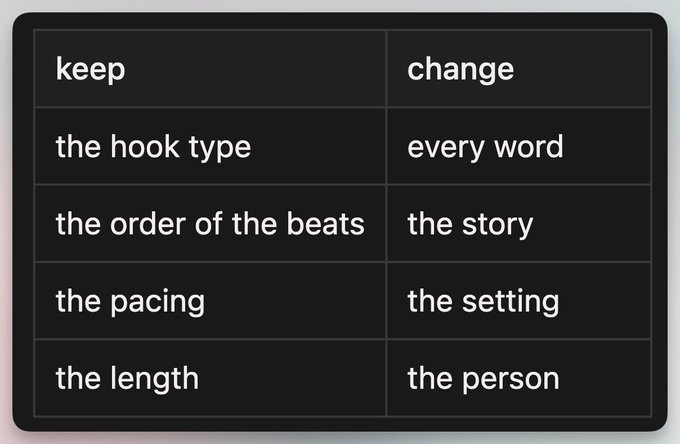
the result is clearly an original video by your creator, built on a structure that's already proven to hold attention.
the product goes into one beat, the way a real person mentions something they use. no claims, no discount codes, no "link in bio". if you read the script out loud and it sounds like the creator is being paid, it's wrong.
prompt 8: the remix script
> rewrite this video as [creator]. original transcript: [paste] keep: the hook type, the structure, the pacing, the length. change: every word, the setting details, and the personal story, so it's clearly theirs. place [product] in exactly one beat, the way a real person mentions something they use. no claims, no discount talk, no "link in bio". write it in their voice from the bible. spoken, not written. under [length] seconds.
what you get: a spoken script in the creator's voice, on the same structure as the winner, with the product in exactly one beat. you'll see a full example in the Jess run below.
step 7: put it on a schedule
what it does: runs steps 5 and 6, plus rendering and scheduling, for every creator, every day, without you starting it.
why it matters: this is where it becomes a system instead of a pile of prompts. everything up to here, you could do by hand once. the daily run is what makes it an army.
how to do it:
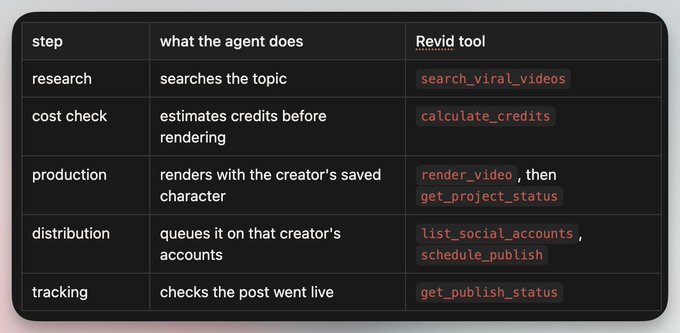
once a day, your agent runs the whole loop for every creator. it reads their file, picks a topic, searches, picks a reference, writes the script, renders with their character, and schedules it on their accounts. then it sends you one message with everything it queued.
this assumes each creator's accounts are already connected, so the agent has somewhere to schedule to. setting those up is covered in step 8.
every step maps to a Revid tool, so nothing here is hand-waving:
you can run the schedule from whichever agent you use: Claude's scheduled tasks, a cron job for OpenClaw or Hermes, or a scheduled task in Squad, which is what I use.
this is the most important prompt in this article. it's the one that runs every day.
prompt 9: the daily run
> it's the daily run. for each creator: 1. read their file: persona, topics, the last 14 posts, what performed. 2. pick today's topic. don't repeat a topic used in the last 10 days. 3. call search_viral_videos with that topic's query. platforms tiktok and instagram, person-focused, viral only, sorted by popular. 4. pick one reference you haven't used before. note why. 5. write the script with the remix rules. 6. call calculate_credits, then render_video with the creator's characterIds. poll get_project_status until there's a videoUrl. 7. call schedule_publish to that creator's own accounts, at least 24 hours from now, at their usual posting time. 8. write the reference, script, video link and post time to their file. when you're done, send me one message: each creator, the topic, the reference you used, the scheduled time, and the video link.
context on this prompt:
- "the last 14 posts" gives the agent enough history to avoid sounding repetitive, without loading the whole archive every day.
- "don't repeat a topic used in the last 10 days" keeps each creator's feed varied.
- "one reference you haven't used before" stops the agent from remixing the same winner over and over.
- "calculate_credits" before "render_video" means you know the cost before anything gets made.
- "at least 24 hours from now" is your review window. more on that in step 8.
- step 8 of the prompt is what makes tomorrow's run smarter than today's, because everything it did is now in the file it reads first.
the army in action
here's one run for Jess, start to finish.
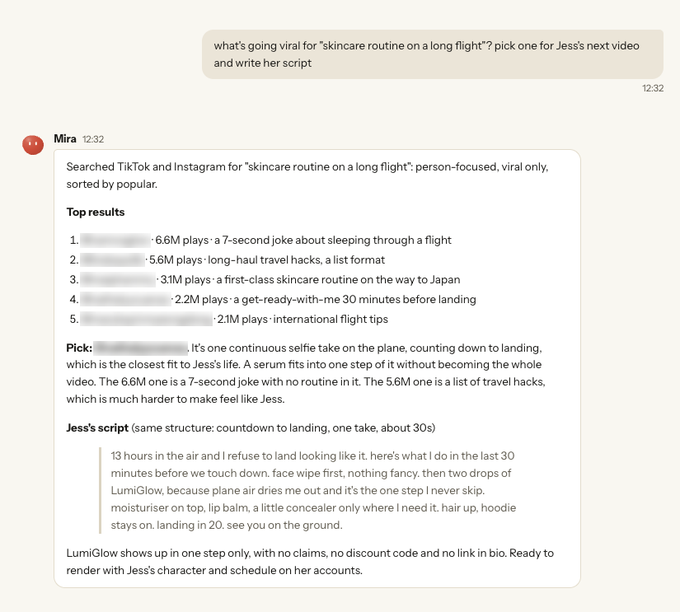
the ask. I asked for what's going viral on "skincare routine on a long flight" and a pick for her next video.
the search. the agent searched TikTok and Instagram, person-focused, viral only, sorted by popular. the top five results had 6.6M, 5.6M, 3.1M, 2.2M and 2.1M plays.
the pick. it picked a get-ready-with-me video filmed in one continuous selfie take on a plane. it skipped the two most-viewed results: the 6.6M one is a 7-second joke with no routine in it, and the 5.6M one is a list of travel hacks, which is much harder to make feel like Jess. that's the "prefer one continuous, selfie-style video" rule from prompt 7 doing its job.
the script. then it wrote her script on the same structure, with the serum in exactly one step:
> 13 hours in the air and I refuse to land looking like it. here's what I do in the last 30 minutes before we touch down. face wipe first, nothing fancy. then two drops of LumiGlow, because plane air dries me out and it's the one step I never skip. moisturiser on top, lip balm, a little concealer only where I need it. hair up, hoodie stays on. landing in 20. see you on the ground.
look at where the product sits. it's step two of six, it gets one reason that's about her life (plane air), and then the video moves on. there's no claim about what it does to your skin, no code, no link. the video is about landing on a long flight without looking like it, and the serum is just part of how Jess does that.
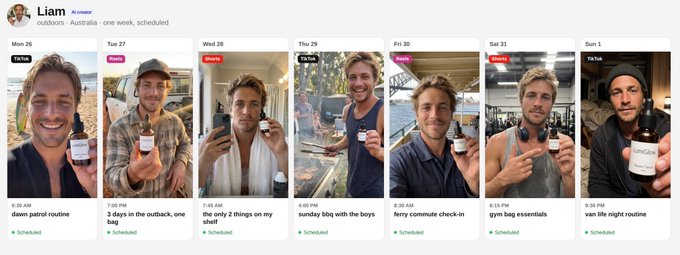
the same thing happens for Priya, Liam and Layla every day, each with their own topics. here's what a week of Liam's posts looks like once it's queued:
step 8: accounts and the review window
what it does: gives every creator their own home on each platform, and gives you a daily window to catch anything before it goes live.
why it matters: the whole point of this system is that people follow a person, and that only works if each person has their own accounts. scheduling 24 hours out is what keeps you in control without approving every video by hand.
how to do it:
each creator gets their own TikTok, Instagram and YouTube. never mix two creators on one account. Priya's followers followed Priya, and a Liam video in her feed breaks that.
say they're AI in the bio. it costs you less than you'd think, and it protects every account you build.
prompt 10: profile setup
> write a profile for [creator] for TikTok, Instagram and YouTube: display name, 5 handle ideas, and a bio under 80 characters in their voice. the bio must say they're an AI creator in a natural way, for example: "AI creator. carry-ons, long flights, too many airports."
what you get: a display name, 5 handle ideas and a short bio per creator, with the AI disclosure written in their own voice instead of a legal-sounding line.
the review window.
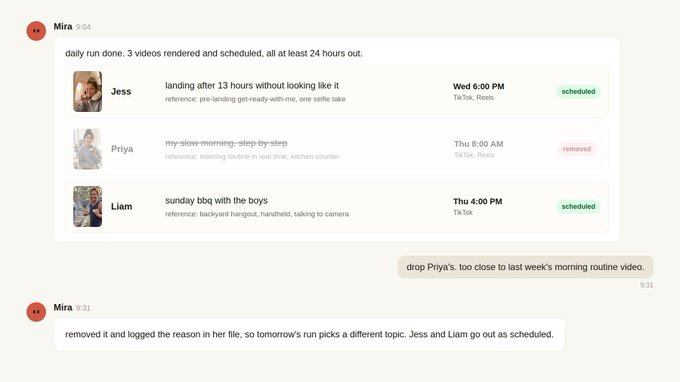
the review window is the 24 hours between the agent scheduling a video and it going live. you don't approve every video one by one. you look at the queue once a day and remove anything that's off: a face that drifted, a script that leans too hard on the product, a topic that's too close to last week's.
that's how you stay in control without becoming the bottleneck again, which was the whole problem with running UGC the old way.
step 9: measure and improve
what it does: once a week, reviews every creator's posts, decides what to do more of and what to drop, and updates their files.
why it matters: views alone will mislead you. what matters is whether people watch to the end, save it, and tap through to the profile, because that's what turns a viewer into a follower and a follower into a customer.
how to do it:
once a week, your agent reviews each creator: what worked, what to drop, and what to test next. give it the numbers from your analytics, or connect it to them if your setup allows. Revid's get_publish_status confirms a post went live, but the performance numbers come from each platform's analytics.
prompt 11: the weekly review
> it's the weekly review. here are the stats for each creator's posts from the last 7 days: [paste or pull]. rank posts by watch-through and saves, not just views. for each creator, tell me which topics to post more of, which to drop, and 5 new topics or search queries to test. update each creator's topic list and file. if a creator has had 3 flat weeks in a row, flag them so we can rethink the persona instead of posting more of the same.
what you get: a ranked list of the week's posts per creator, the topics to double down on, the ones to drop, 5 new topics or queries to test, and updated creator files. the next daily run reads those files, so the review changes what gets made the very next day.
the "3 flat weeks" line is there for a reason. when a creator isn't working, the instinct is to post more. usually the persona is the problem, and more posts of the wrong person just gives you more of the same result.
and when one video underperforms, don't rewrite everything. find the one thing that broke.
prompt 12: when a video flops
> this video underperformed: [link, stats, script, reference used]. compare it to the reference and to this creator's best post. was it the hook, the topic, the length, the moment the product appears, or the visuals? give me one change to test next time, not five.
what you get: one diagnosis and one change to test. one change at a time is the only way to know what actually fixed it.
what to watch out for
none of this runs perfectly on its own. these are the things that go wrong, and what to do about each one.
product-first scripts. if the product is the topic of every video, the account turns into an ad and people stop watching. keep it to one beat, and keep most videos about the creator's life. the 15 out of 20 rule from step 4 is what protects this.
too many topics per creator. a creator who posts about everything reads as nobody in particular. stay inside their world. Jess talks about flights and packing, and she doesn't suddenly start reviewing protein powder.
views without buyers. a video can go viral and sell nothing. watch profile visits and clicks, not just plays.
the full setup
1. connect Revid to your agent like Squad and give it the brain file
2. split your buyers into segments and design one creator per segment
3. build each face once and save it as a character
4. give each creator their own topics and search queries
5. find what's already working on each topic
6. remix the winner into their video, with the product in one beat
7. put the daily run on a schedule
8. one creator, their own accounts, AI in the bio, and a 24-hour review window
9. a weekly review that tunes topics and flags weak creators
start with one creator. get their videos right, then add the next.
if this was useful:
- repost it for anyone still paying for every single video
- follow me for more on running marketing with agents
tools used in this setup: [Revid.ai](https://Revid.ai) and [Squad.so](https://Squad.so)
## 相关链接
- [Tibo](https://x.com/tibo_maker)
- [@tibo_maker](https://x.com/tibo_maker)
- [45K](https://x.com/tibo_maker/status/2113633105776890343/analytics)
- [https://www.revid.ai/api/mcp](https://www.revid.ai/api/mcp)
- [brain.md](http://brain.md/)
- [priya.md](http://priya.md/)
- [jess.md](http://jess.md/)
- [liam.md](http://liam.md/)
- [layla.md](http://layla.md/)
- [Revid.ai](https://revid.ai/)
- [Squad.so](https://squad.so/)
- [Upgrade to Plus](https://x.com/i/premium_sign_up)
- [10:06 PM · Oct 23, 2026](https://x.com/tibo_maker/status/2113633105776890343)
- [45.7K Views](https://x.com/tibo_maker/status/2113633105776890343/analytics)
- [View quotes](https://x.com/tibo_maker/status/2113633105776890343/quotes)
---
*导出时间: 2026/10/24 14:09:52*
---
## 中文翻译
# 如何搭建并运营一支 AI UGC 账号大军
**作者**: Tibo
**日期**: 2026-10-23T14:06:16.000Z
**来源**: [https://x.com/tibo_maker/status/2113633105776890343](https://x.com/tibo_maker/status/2113633105776890343)
**阅读**: 45K
**点赞**: 415
**转发**: 50
**回复**: 50
---

在这篇文章中,我会带你走完整套搭建的全部 9 个步骤,附上我使用的 12 条提示词,可直接复制,并按照你需要使用的先后顺序排列。
这周你很可能已经刷到过几个这样的视频了。
一个女孩在车里分享她的护肤流程,另一位女性展示她健身包里的东西,还有人在飞机降落前一小时化妆收拾。他们看起来就像普通人记录自己日常生活的片段,而这正是你会停下来看的原因。

他们中的很多并不是真人。他们是 AI 创作者,现在一些品牌同时在运营多个这样的账号,每一个都有自己的脸、自己的生活和自己的受众。
大多数人对 AI UGC 的想象是一个假脸念一段产品文案,这种版本很容易被识破也容易被划走。而我说的版本不一样。它是一小组创作者,每个人都有一段可信的生活,你的产品只是在那段生活里出现几秒钟,就像真人提到自己在用的东西一样。
这篇文章就是用 AI 智能体来运行这套体系的完整搭建指南:
- 如何设计创作者,从真正购买你产品的人出发
- 如何在数百个视频里保持他们的脸完全一致
- 如何找到每个创作者所在领域里已经奏效的内容
- 如何把这些爆款改写成每位创作者自己口吻的原创视频
- 如何让每个账号按排期稳定发布,并在发布前留出审核窗口
- 如何每周复盘数据并调整整套体系
每条提示词都在文中,可直接复制。共 12 条,按使用顺序编号。
下面就是完整流程,按你会搭建的顺序展开。
为什么 UGC 有效,又为什么这么难运营
UGC 有效是因为它不像广告。普通人聊自己在用的东西会被看完,品牌宣传片则会被划走。这一点已经没什么争议了。
难点在于运营,而且它总是在同样的四个地方出问题。
1. 这是一项运营工作。
你要找创作者、写需求、催初稿、提修改意见、审核、付款,然后对下一批人重复这一切,因为创作者会流动。大部分工作根本不是创意工作,而是管理人,而且规模随人手增长。
2. 你按条付费。
每一条新钩子都是一张新账单。每一个变体都是一张新账单。因为光线不对而重拍又是一张账单。如果你只需要几条视频,这还好,但短视频的核心就是测试。你是在试出大量无效钩子的过程中,才找到有效的那一个,而按条计价让每次尝试都很贵,所以测试往往是最先被砍掉的。
3. 太慢。
创作者需要需求文档、几天拍摄时间,再加一轮剪辑。等视频交回来,它蹭的热点往往已经过去了,你是在用上周的格式发这一周的信息流。
4. 你不拥有它。
脸、账号和受众都属于创作者。使用授权会到期。当创作者不再和你合作,他们推广你产品期间积累的一切都会随他们离开,你又得从零开始。

把这四点放在一起,就变成了一个循环:找创作者、写需求、等待、改稿、付款、对方停更、重新开始。
发生了什么变化
现在有三件事是一年前不成立的。
AI 的脸现在可以保持一致了。
直到不久前,AI 人物在每段视频里都长得稍有不同。下颌变了、发型变了、雀斑挪了位置,没有受众能围绕一个不断变成别人的人形成。有了保存角色功能,你在数百个视频里都能得到同一张脸、同样的发型和皮肤,这意味着人们可以真正认出并关注一位创作者。

你可以直接搜索什么内容有效,而不用猜。
Revid 的爆款搜索让你查询任何主题,获得该主题下表现最好的短视频,包括字幕文本、钩子和互动数据。这以前是策略师的活:刷视频、收藏、转录、写分析。现在就是一次搜索。
智能体可以跑通整个循环。
像 Claude、Hermes、OpenClaw 或 Squad 这样的智能体可以直接调用这些工具。它可以搜索、挑选参考、写脚本、渲染视频、排期发布,然后向你汇报它做了什么。
把这三件事放在一起,一个人现在就能跑起过去需要一个小团队的活。
模式:你拥有的创作者
整篇文章背后的想法很简单。
不是租用创作者,而是自己搭建几个。每一个都是可信的人,有一张永不变的脸、一段正常的生活,以及一组他们真的会发布的话题。你的产品出现在那段生活里,而且绝不是每个视频的主角。
每个创作者都有自己的账号和自己的每日流水线。你的智能体负责运行全部,你在内容发布前进行审核。
一个创作者就是一个渠道。三四个创作者,各自面向不同类型的买家,就是一支大军。
这解决了之前的全部四个问题。没人需要管理,因为智能体干活。没有每条视频的创作者账单,只有渲染点数,所以测试一条新钩子意味着多一次渲染,而不是多一份需求。速度快,因为从调研到排期发布在一次运行中完成。而且一切都归你所有:脸、账号和受众。

适用于谁(以及不适用于谁)
在你动手搭建之前,先确认匹配度。这套体系最适合:
- 你的产品用于日常生活(消费类应用、护肤品、食品、健身、旅行、效率工具)
- “啊哈时刻”能在手机上几秒内展示出来
- 你的买家已经在通过刷短视频来决定尝试什么
这套体系效果差的情况:
- 购买决策依赖于对特定个人的深度信任(医疗、法律、理财建议)
- 你的品类受监管,或平台限制相关宣称
- 产品需要长时间解释才能被理解
如果你属于第二种情况,你仍然可以用这套体系的调研和脚本部分来服务你自己的内容创作。只是跳过 AI 脸的部分。
这套体系
整个体系是六项工作,每一项都可以由不止一种工具完成。

“大脑”是唯一与其他一切都相连的部分。它读取每个创作者的档案,按顺序调用调研、制作和分发工具,并回写它做了什么。如果你以后把某个工具换成别的,大脑和提示词都不用变。
本文接下来是九步搭建指南。
第 1 步:把 Revid 连接到你的智能体
作用:让你的智能体真正具备调用工具的能力,而不是只会纸上谈兵。
为什么重要:一个只能给你写计划的智能体,活还是要你自己干。一个能搜索、渲染、排期的智能体才能干活并把结果交给你。
怎么做:
Revid 提供 MCP 服务器,任何支持 MCP 的智能体都可以直接使用。在 Claude Code 中只需一行:
> claude mcp add --transport http revid [https://www.revid.ai/api/mcp](https://www.revid.ai/api/mcp)
然后在 Claude Code 里运行 /mcp,选择 revid 并选择 Authenticate。其他 MCP 客户端使用相同的服务器 URL 加你的 API key。
连接完成后,你的智能体就能搜索爆款视频、管理角色、渲染视频和排期发布。
然后给你的智能体它的“大脑”文件。
这是它每次运行前都会读取的常设简报。它告诉智能体产品是什么、创作者是谁、每日工作是什么样的,以及绝不能违反的规则。你写一次,只在有变化时修改。
把它和每个创作者各自的档案文件放在一起,这样智能体始终知道去哪里找信息:
> ugc/ [brain.md](http://brain.md) creators/ [priya.md](http://priya.md) [jess.md](http://jess.md) [liam.md](http://liam.md) [layla.md](http://layla.md)
提示词 1:智能体大脑文件
> 你为一个 [产品] 运营一支小型 AI UGC 创作者团队。产品:[一句话说明它做什么、面向谁]。创作者:[每个人的名字和一句话介绍]。每位创作者都有一个档案,包含人设、话题、过往发布和结果。你的每日任务:为每位创作者选一个话题,用 Revid 爆款搜索找到该话题下正在有效的内容,以他们的口吻写一条原创脚本,用他们保存的角色渲染,并在他们自己的账号上至少提前 24 小时排期发布。规则: - 每个账号都在简介中说明自己是 AI 创作者 - 绝不撰写虚假评价、证言或前后对比宣称 - 不做健康、收入或医疗类宣称 - 产品出现在创作者的生活中,绝不做整条视频的主角 - 绝不直接发布。只允许排期,供我审核 - 把你做的每件事记录到创作者的档案里
最重要的两条规则是“只排期”和“记录一切”。前者给了你审核窗口,后者让智能体避免自我重复,并从它发布的内容中学习。
第 2 步:从买家出发设计创作者
作用:把你对客户的了解转化为一小组创作者,每种买家对应一个。
为什么重要:最常见的错误是从脸开始。一个漂亮但对任何特定人群都没有针对性的创作者,会有播放量却没有客户。从买家出发,每个创作者才有存在的理由。
怎么做:
把你的买家按使用产品的不同原因分成几个细分人群,然后为每个人群设计一个创作者。一个养生型的人、一个常旅客、一个户外型男生和一个都市女孩都可以用同一款精华,而每个人都能触达其他人永远触达不了的人。
在本文的示例中,我们为一款叫 LumiGlow 的维生素 C 精华设计四个创作者:
- Priya 是印度的养生类创作者。她发布慢节奏清晨和简单日常的内容,并如实更新自己的皮肤状态。
- Jess 是美国的旅行类创作者。她永远在收拾行李、永远在飞机上,所以她的护肤都发生在移动中。
- Liam 是澳大利亚的户外类创作者。他的生活是冲浪、皮卡和面包车,他是那种总共只有两件用品的人。
- Layla 是迪拜的生活方式类创作者。她的生活是城市、普拉提和周末沙漠之旅,护肤是她出门准备的一部分。
注意他们中没有任何一个是“护肤创作者”。精华融入了他们各自的生活,但那不是他们生活的主题。
提示词 2:从买家细分到创作者
> 这是我的产品:[描述]。这是我了解到的购买者信息:[客户笔记、评论、调研回答]。把我的买家按使用产品的不同原因分成 3 或 4 个人群。为每个人群设计一个能自然触达那类人的创作者: - 名字、年龄、城市、职业 - 他们平常一周是什么样的 - 3 个他们会发布、但和我的产品完全无关的话题 - 他们生活中我的产品能自然出现的那一个时刻
让他们可信、普通。不要网红刻板印象。
你会得到:3 或 4 个创作者轮廓,每个绑定一个人群,各有平常的一周、三个非产品话题和一个自然的产品时刻。选最像真人的那些,继续往下走。
然后为每位创作者撰写“圣经”。这份文件让每条脚本听起来都像同一个人,无论是第一条视频还是第两百条。
提示词 3:创作者圣经
> 为 [创作者] 写完整的圣经,让每条脚本听起来都像同一个人。包括:他们怎么说话(句子长度、俚语、绝不会用的词)、他们在意什么、他们常去的地方(家、工作场所、每周固定去的地点)、习惯和反复出现的梗、他们穿什么、他们怎么拍摄(自拍、手持、手机支起来),以及他们在镜头前绝不会说什么、做什么。最后用他们的口吻写 5 句示例开场白。
圣经放在创作者档案的顶部。下面是本文所有内容搭建完成后,一份完整创作者档案的形态,以 Jess 为例:
> # jess 人设:美国旅行类创作者,永远在收拾行李、永远在飞机上,护肤发生在移动中。圣经:[提示词 3 的输出] 角色:[她保存的 Revid 角色] 账号:[她自己的 TikTok、Instagram、YouTube] 话题:[提示词 6 的输出,标注产品植入点] 发布时间:[她的惯常时间] 日志:[日期、话题、参考、脚本、视频链接、发布时间] 结果:[每周复盘数据]
第 3 步:给他们一张永不变的脸
作用:一次性建立每个创作者的脸并锁定它,之后的每个视频都用同一个人。
为什么重要:一致性在这里就是一切。如果你的创作者在每条视频里都稍有不同,就没人能认出他们,而“被认出”正是人们关注一个账号的根本原因。

怎么做:
从一段详细描述出发,一次性建立这张脸。下面提示词里的细节都是有原因的。一个独特细节(雀斑或一道小疤痕)是让一张脸在缩略图尺寸下能被认出的关键。带可见毛孔的自然皮肤质感、不加修图,是让它不像 AI 渲染图的关键。稍微不正的手臂长度取景,是让它看起来像手机拍照的关键。
提示词 4:基础肖像照
> 一张 [创作者] 的逼真手机照片:[年龄]、[族裔背景]、[头发:颜色、长度、质感]、[脸型:脸型、眼睛、一个独特细节如雀斑或小疤痕],自然皮肤质感、毛孔可见、无修图。[场景]、[自然光源],手机手臂长度拍摄,取景略有不完美。[服装]。表情放松、自然。
生成几张,选出最符合圣经中人物的那张,然后把它转成角色设定表,让模型有每个角度可以参照。
提示词 5:角色设定表
> 用这个完全相同的人作为参考,创建一张角色设定表:正面、左侧四分之三、右侧四分之三、侧面,以及一张全身照。三种表情:中性、大笑、说话到一半。每一帧的脸、发型、皮肤质感和体型必须完全一致。纯色浅色背景。
保存之前逐帧检查设定表。如果任何一帧的脸、发型、皮肤质感或体型出现漂移,就重新生成那一帧。这里保存下来的东西,就是未来每一条视频继承的东西。
然后把它保存为 Revid 中的一个角色,之后每次渲染都用同一个人。如果你用的是别的图像模型,角色设定表本身就是你的参考图,每次生成都附上它。
第 4 步:给每个创作者他们的选题
作用:给每个创作者一份他们真正会发布的话题清单,并标出其中你的产品可以出现的少数几个。
为什么重要:一个只聊你产品的创作者就是一张长了脸的广告。人们关注创作者是因为他们的生活,所以他们发布的大部分内容应该和你无关。非产品视频是用来积累受众的,而产品视频是给这份受众看的。
怎么做:
先给每个创作者一份简短的清单,标出产品适合出现的位置:

然后让智能体把它扩展成一整个月,并为每个话题配一条搜索查询。搜索查询和话题一样重要,因为智能体在第 5 步就是靠它来找已经有效的内容。
提示词 6:从创作者到话题和搜索查询
> 这是 [创作者] 的圣经:[粘贴]。列出他们在平常一个月里真正会发布的 20 个话题。至少 15 个要与 [产品品类] 完全无关。为每个话题,写一条你用来搜索该主题爆款短视频的搜索查询:用观众会输入的平实词语,3 到 7 个词。标出 [产品] 能自然出现一拍的 5 个话题。
你会得到:每个创作者 20 个话题,每个配一条 3 到 7 词的搜索查询,其中 5 个标注为产品植入点。这就是一个创作者一个月的发布量。放进他们档案的“话题”部分。
第 5 步:找到已经有效的内容
作用:为每个话题找出已经跑出成绩的短视频,并拆解原因。
为什么重要:不要从空白页开始。每个话题上,都已经有人做出过有效的视频,而那条视频的结构是你能学到的最有价值的东西。你不是在猜钩子应该是什么,你是在看那些已经在真实受众身上奏效过的钩子。
怎么做:
你的智能体搜索每个创作者的话题,查看头部结果:钩子、结构、节奏、镜头风格,以及人们为什么看完。
连接 Revid 后,对应的是 search_viral_videos 工具。它返回一条查询在 TikTok、Instagram、YouTube 等平台上的头部视频,包括字幕文本、互动数据和“自拍”、“手持”、“教程”等风格标签。你也可以在 TikTok 搜索里手动做同样的事,只是要花长得多的时间。
两个设置影响很大:
1. 按最热门排序,并开启“仅爆款”。这会过滤掉只是新近的内容,留下真正传播开的东西。
2. 筛选以人物为主、自拍风格的视频。这才是 UGC 的样子,也是你的创作者要做的。一条用素材库画面配音的爆款视频,几乎教不了你你的 AI 创作者该怎么拍它的清晨。

打开任何一条结果,你会看到详情面板:播放量、完整字幕文本,以及它为什么有效的拆解。


然后把结果交给你的智能体,让它正式拆解这些爆款。
提示词 7:拆解爆款
> 以下是 "[查询词]" 的头部视频,附字幕文本和互动数据:[粘贴结果]。对每一条,拆解:钩子(前 2 秒,语言和画面)、逐拍的结构、每一拍大约持续多久、镜头风格,以及为什么有人会看到最后。然后选出最适合 [创作者] 的一条,用两句话说明原因。优先选一镜到底的自拍式视频,而非剪辑过的清单类视频。
你会得到:每条头部视频逐拍的拆解,以及为该创作者选出的一条,附两句理由。提示词最后一句很重要。剪辑过的清单类视频很难做出“真人拍摄”的感觉,而一镜到底的自拍镜头正是真人会发布的东西。
第 6 步:把爆款变成他们自己的视频
作用:把爆款视频改写为你的创作者的原创视频。
为什么重要:这就是“学习一个格式”和“抄袭一条视频”之间的界线。你要的是前者。一条视频的结构是任何人都能用的模式,而其中的文字、故事和人物是别人的。
怎么做:
改写的规则是:保留结构,改变其余一切。

结果就是一条明显属于你创作者的原创视频,建立在已被证明能留住注意力的结构之上。
产品只进入一拍,就像真人提到自己在用的东西。不做宣称、不给折扣码、不说“链接在主页”。如果你把脚本读出声,感觉像创作者收了钱,那就是错的。
提示词 8:改写脚本
> 以 [创作者] 的身份重写这条视频。原字幕文本:[粘贴]。保留:钩子类型、结构、节奏、时长。改变:每一个字、场景细节和个人故事,让它明显是他们的。把 [产品] 放在恰好一拍里,就像真人提到自己在用的东西。不做宣称、不谈折扣、不说“链接在主页”。用圣经里的口吻写。口语化,不要书面语。[时长] 秒以内。
你会得到:一条以创作者口吻写就的口语脚本,结构与爆款相同,产品只出现在一拍里。下面 Jess 的运行示例里你会看到完整的例子。
第 7 步:把它排上日程
作用:为每个创作者、每天运行第 5 和第 6 步,加上渲染和排期,无需你手动启动。
为什么重要:这一步让它从一堆提示词变成一套体系。到此为止的一切,你都可以手动做一次。每日运行才是让它成为一支大军的关键。
怎么做:
每天一次,你的智能体为每个创作者跑完整个循环。它读取他们的档案、选一个话题、搜索、选一条参考、写脚本、用他们的角色渲染,并在他们的账号上排期。然后给你发一条消息,汇报它排期的全部内容。
这里假设每个创作者的账号都已连接,智能体才有地方排期。账号设置在第 8 步讲。
每一步都对应一个 Revid 工具,所以这里没有任何含糊之处:

你可以用你使用的任何智能体来运行排期:Claude 的定时任务、OpenClaw 或 Hermes 的 cron 任务,或 Squad 里的定时任务(我就是这么用的)。
这是本文最重要的提示词。它是每天运行的那一个。
提示词 9:每日运行
> 到每日运行时间了。为每位创作者: 1. 读取他们的档案:人设、话题、最近 14 条发布、什么跑出了成绩。 2. 选今天的话题。不要重复最近 10 天用过的话题。 3. 用该话题的查询词调用 search_viral_videos。平台选 tiktok 和 instagram,以人物为主,仅爆款,按热门排序。 4. 选一条你没用过的参考。注明原因。 5. 按改写规则写脚本。 6. 调用 calculate_credits,然后用创作者的 characterIds 调用 render_video。轮询 get_project_status 直到拿到 videoUrl。 7. 调用 schedule_publish,发布到该创作者自己的账号,至少距现在 24 小时,按其惯常发布时间。 8. 把参考、脚本、视频链接和发布时间写入他们的档案。 完成后,给我发一条消息:每位创作者、话题、你用的参考、排期时间和视频链接。
关于这条提示词的一些说明:
- “最近 14 条发布”给智能体足够的历史来避免口吻重复,又不用每天加载整个档案。
- “不要重复最近 10 天用过的话题”让每个创作者的信息流保持多样。
- “一条你没用过的参考”防止智能体反复改写同一条爆款。
- 在 "render_video" 之前先 "calculate_credits",意味着在产出任何东西之前你就知道成本。
- “至少距现在 24 小时”就是你的审核窗口。第 8 步会细讲。
- 提示词的第 8 步是让明天的运行比今天更聪明的原因,因为它做的每件事都写进了它下次最先读取的档案里。
大军实战
这里是 Jess 的一次运行,从头到尾。
需求。我让它查一下“长途飞行护肤流程”上什么在爆,并为她的下一条视频选一条参考。
搜索。智能体搜索了 TikTok 和 Instagram,以人物为主,仅爆款,按热门排序。前五条结果分别有 660 万、560 万、310 万、220 万和 210 万播放。
选择。它选了一条在飞机上一镜到底自拍拍摄的"GRWM"(跟我一起准备)视频。它跳过了播放量最高的两条:660 万那条是 7 秒的搞笑视频,里面根本没有护肤流程;560 万那条是一份旅行妙招清单,很难做出 Jess 的感觉。这正是提示词 7 里“优先一镜到底自拍式视频”那条规则在起作用。
脚本。然后它按相同的结构写了她的脚本,精华只出现在其中一步:
> 在天上飞了 13 个小时,我可不想落地时还一脸疲态。这是我们落地前最后 30 分钟我会做的事。先来一片卸妆巾,没什么花哨的。然后两滴 LumiGlow,因为机舱空气太干了,这是我从不跳过的一步。再涂面霜、润唇膏,只在需要的地方上一点遮瑕。头发扎起来,卫衣帽子继续戴。20 分钟后落地,地面见。
看看产品的位置。它是六步中的第二步,只有一个和她生活相关的理由(机舱空气干燥),然后视频就继续往下走了。没有关于它对你皮肤有什么作用的宣称,没有优惠码,没有链接。这条视频是关于长途飞行落地时不显疲态,精华只是 Jess 做到这一点的方式之一。

同样的事每天也发生在 Priya、Liam 和 Layla 身上,各有各的选题。这是 Liam 排期后一周的发布样子:

第 8 步:账号与审核窗口
作用:给每个创作者在每个平台上自己的家,并给你一个每日窗口,在内容上线前拦住任何不对的东西。
为什么重要:这套体系的核心是让人们关注一个人,而只有每个人有自己独立的账号,这才成立。提前 24 小时排期让你不用逐条审批也能掌控一切。
怎么做:
每个创作者有自己的 TikTok、Instagram 和 YouTube。绝不在一个账号上混两个创作者。Priya 的粉丝关注的是 Priya,她的信息流里突然出现一条 Liam 的视频会破坏这一切。
在简介里说明他们是 AI。这比你想象的代价小,而且能保护你建立的每一个账号。
提示词 10:主页设置
> 为 [创作者] 写 TikTok、Instagram 和 YouTube 的主页:显示名、5 个用户名创意,以及一条 80 字符以内、用他们口吻写的简介。简介必须以自然的方式说明他们是 AI 创作者,例如:"AI 创作者。登机箱、长途航班、太多机场。"
你会得到:每位创作者的显示名、5 个用户名创意和一条简短简介,AI 声明用他们自己的口吻写出,而不是一句法律腔的话。
审核窗口。
审核窗口是智能体排期一条视频到它上线之间的 24 小时。你不需要逐条审批。你每天看一次排期队列,删掉任何不对的东西:一张漂移的脸、一条过于推销产品的脚本、一个和上周太接近的话题。
这就是你保持掌控、又不重新成为瓶颈的方式,而这正是老式 UGC 运营的整个问题所在。

第 9 步:复盘并改进
作用:每周一次,复盘每个创作者的发布,决定哪些多做、哪些放弃,并更新他们的档案。
为什么重要:只看播放量会误导你。真正重要的是人们是否看完、收藏、点进主页,因为这才是把观众变成粉丝、把粉丝变成客户的东西。
怎么做:
每周一次,你的智能体复盘每位创作者:什么有效、什么该放弃、下一步该测试什么。把分析数据给它,或者如果你的配置允许,直接把它连接到数据。Revid 的 get_publish_status 能确认发布已上线,但表现数据来自各平台的分析后台。
提示词 11:每周复盘
> 到每周复盘时间。以下是每位创作者过去 7 天发布的数据:[粘贴或拉取]。按完播率和收藏排序,而不只是播放量。对每位创作者,告诉我哪些话题要多发、哪些该放弃,以及 5 个值得测试的新话题或新查询词。更新每位创作者的话题清单和档案。如果某位创作者连续 3 周数据平淡,标记出来,以便我们重新思考人设,而不是继续发更多同样的东西。
你会得到:每位创作者本周发布的排名清单、该加码的话题、该放弃的、5 个待测试的新话题或查询词,以及更新后的创作者档案。下一次每日运行会读取这些档案,所以复盘会直接改变第二天生产的内容。
“连续 3 周平淡”那一句是有原因的。当一位创作者不奏效时,直觉是发更多。但通常问题出在人设上,错误的人发再多内容,结果也只是更多的同样结果。
而当某条视频表现不佳时,不要重写一切。找出坏掉的那一件事。
提示词 12:当一条视频扑街
> 这条视频表现不佳:[链接、数据、脚本、所用参考]。把它与参考视频、以及这位创作者表现最好的发布对比。问题出在钩子、话题、时长、产品出现的时刻,还是画面?给我下一次要测试的一个改变,不是五个。
你会得到:一个诊断和一个待测试的改变。一次只改一个变量,是唯一能知道究竟是什么起了作用的方法。
需要注意的事项
这一切都不会自动完美运行。以下是容易出问题的地方,以及应对方法。
产品优先的脚本。如果产品是每条视频的主题,账号就变成广告,人们会停止观看。把产品限制在一拍里,让大部分视频围绕创作者的生活。第 4 步“20 个话题里 15 个与产品无关”的规则就是保护这一点的。
每个创作者话题太多。什么都发的创作者,读起来就像谁都不是。留在他们自己的世界里。Jess 聊的是航班和行李,她不会突然开始测评蛋白粉。
有播放量没有买家。一条视频可以爆了却什么也卖不出去。关注主页访问和点击,而不只是播放。
完整搭建清单
1. 把 Revid 连接到你的智能体(如 Squad),并给它大脑文件
2. 把买家分成人群,为每个人群设计一个创作者
3. 一次性建立每张脸并保存为角色
4. 给每个创作者自己的话题和搜索查询
5. 找到每个话题下已经有效的内容
6. 把爆款改写成他们自己的视频,产品只出现在一拍
7. 把每日运行排上日程
8. 每位创作者独立账号、简介注明 AI、24 小时审核窗口
9. 每周复盘,调整话题、标记疲软的创作者
从一位创作者开始。把他们的视频做对,再加下一个。
如果这篇文章对你有用:
- 转发给那些还在为每条视频付费的人
- 关注我,获取更多用智能体做营销的内容
本方案使用的工具:[Revid.ai](https://Revid.ai) 和 [Squad.so](https://Squad.so)
## 相关链接
- [Tibo](https://x.com/tibo_maker)
- [@tibo_maker](https://x.com/tibo_maker)
- [45K](https://x.com/tibo_maker/status/2113633105776890343/analytics)
- [https://www.revid.ai/api/mcp](https://www.revid.ai/api/mcp)
- [brain.md](http://brain.md/)
- [priya.md](http://priya.md/)
- [jess.md](http://jess.md/)
- [liam.md](http://liam.md/)
- [layla.md](http://layla.md/)
- [Revid.ai](https://revid.ai/)
- [Squad.so](https://squad.so/)
- [Upgrade to Plus](https://x.com/i/premium_sign_up)
- [10:06 PM · Oct 23, 2026](https://x.com/tibo_maker/status/2113633105776890343)
- [45.7K Views](https://x.com/tibo_maker/status/2113633105776890343/analytics)
- [View quotes](https://x.com/tibo_maker/status/2113633105776890343/quotes)
---
*导出时间: 2026/10/24 14:09:52*