# The Only GTM Playbook You'll Need in 2026
**作者**: Alex Vacca
**日期**: 2026-10-23T16:34:05.000Z
**来源**: [https://x.com/itsalexvacca/status/2113670303842963562](https://x.com/itsalexvacca/status/2113670303842963562)
---

A lot of the GTM advice you read online comes from people who've never built pipeline with it.
I'd skip about 90% of it.
At Frontal, we've worked with 300+ B2B companies and analyzed 1,000+ failed campaigns.
In audits, I keep finding teams spending weeks on 3 things that never move pipeline: rewriting copy when replies drop, open rates, and meetings that never turn into pipeline.
This playbook shows where I'd put those weeks, starting GTM from zero in 2026.
It's 12 moves across the 5 parts of GTM: AI search, outbound, content, ads and RevOps.
Every move comes with the reason it works, the tools we use and the steps to copy.
All 5 parts work on 1 account list, and every channel answers to 1 pipeline number.
By the end, you'll know how to:
→ get your company named in AI answers
→ reach the right accounts the week something changes
→ keep your emails in the inbox
→ turn your posts and ads into meetings
→ judge every channel on 1 pipeline number
You can follow it with zero GTM experience.
Here's the playbook.
## The framework: 12 moves in 5 parts:
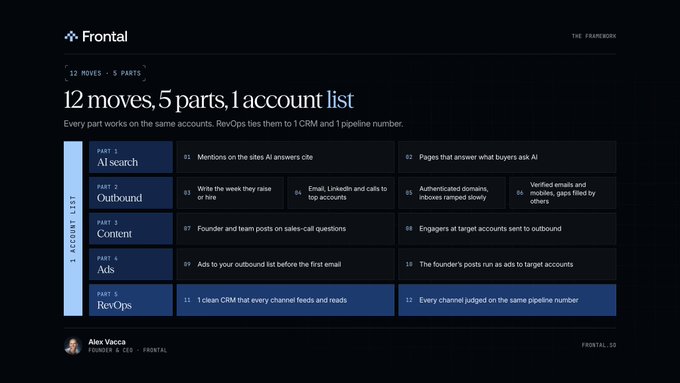
GTM (go-to-market) is everything that puts your product in front of buyers and turns them into pipeline.
In 2026 it has 5 parts, and all 5 work on the same list of accounts.
| Part | What it does | Moves |
| --- | --- | --- |
| AI search | Gets you named when buyers ask AI what to buy | 1 and 2 |
| Outbound | Reaches the right accounts at the right moment | 3 to 6 |
| Content | Gets buyers to know you before you write | 7 and 8 |
| Ads | Puts your name in front of the accounts on your list | 9 and 10 |
| RevOps | Connects every channel to 1 CRM and 1 number | 11 and 12 |
8 words you'll see in every part.
- ICP (ideal customer profile): the kind of company that buys from you and stays.
- Account list: every company that fits your ICP. All 5 parts work from this 1 list.
- Signal: a change at an account that makes this week a good time to reach out, like a funding round or a new hire.
- Sequence: a short series of messages over a few days, across email, LinkedIn and calls.
- CRM: the database that holds every account, contact, reply and deal. HubSpot and Salesforce are the common ones.
- Pipeline: the dollar value of the qualified deals your team is working.
- Closed-won: a deal the customer signed.
- Enrichment: Clay filling in each row's missing data, like a work email, a mobile number or a company's headcount.
Build the account list first.
Every move below starts from it, so it's worth an afternoon.
1. Pull your last 40 or 50 closed-won deals and write down what they share: industry, headcount, country and who signed.
2. In Clay, use Find companies with those filters and save the result as your account list.
3. Clay's free plan stops at 200 rows a table, so a full market needs the Launch plan ($185 a month).
4. Use Clay's Find people search on those companies with the job titles you sell to, and keep each person's name, title and LinkedIn URL.
## Part 1: AI search:
Your buyers now ask ChatGPT and Google's AI what to buy.
The answer names a few companies and links to its sources.
These 2 moves get your company into that answer.
Move 1: Get mentioned on the sites AI answers cite
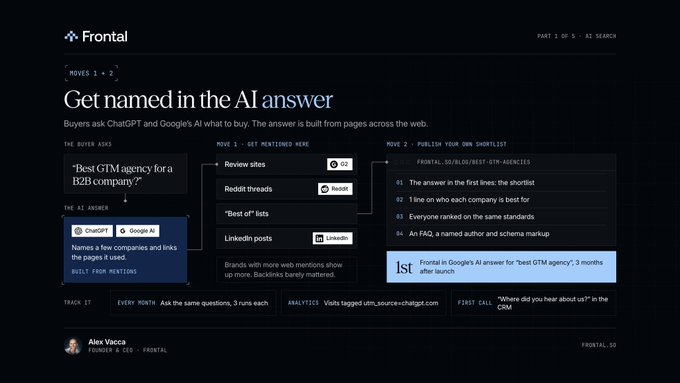
AI answers are built from pages across the web.
Ahrefs studied 75,000 brands and found the ones with more web mentions showed up more in ChatGPT, Google's AI Mode and AI Overviews.
Backlinks barely mattered.
Mentions scored 0.66 to 0.71 on a correlation scale, where 1 is a perfect match. Backlinks scored 0.19 to 0.24.
So the work is getting your name onto the pages they're already reading.
How to do it:
1. Write down 10 questions your buyers ask before they buy, like "best GTM agency" or "best [your category] for [your buyer]".
2. Ask each one in ChatGPT and in Google's AI Mode.
3. List every site the answers cite: review sites, Reddit threads, "best of" lists, news sites, LinkedIn posts.
4. Get your company onto those sites. Ask happy customers for G2 reviews, answer Reddit threads under your own name, pitch the people who write the lists, and post on LinkedIn.
5. Ask the same 10 questions again every month and note who gets named.
## Move 2: Publish pages that answer what buyers ask AI
Ahrefs looked at 750 prompts asking AI for recommendations and found "best X" lists made up 43.8% of the pages ChatGPT cited.
We published a shortlist for "best GTM agency" at frontal.so/blog/best-gtm-agencies.
Only 3 months after launch, Frontal showed up 1st in Google's AI answer for it.
We put 5 other agencies on the page next to us, wrote 1 line on who each is best for, and ranked everyone on the same 4 standards.
How to build yours:
1. Pick the buyer question with the most buying intent, like "best [your category] for [your buyer]".
2. Put the answer in the first lines of the page: the shortlist, with 1 line on who each company is best for.
3. Rank every company on the same standards, and name them. Our first standard is proof you can check: named clients and closed-won revenue.
4. Add an FAQ, a named author and schema markup (code that tells search engines what the page is about).
5. Then write comparison pages: you vs each of your main competitors.
Track it 3 ways:
- Ask the same buyer questions in Google's AI and ChatGPT every month, 3 runs each, since the answer changes from run to run.
- Look for visits tagged utm_source=chatgpt.com in your analytics. ChatGPT adds that tag to most links it cites.
- Ask every prospect on the first call where they heard about you, and log the answer in your CRM.
## Part 2: Outbound:
Outbound means you're the one reaching out first, by email, LinkedIn or phone.
It works best on a good list, at the right moment, from inboxes that land.
## Move 3: Write the week they raise or hire
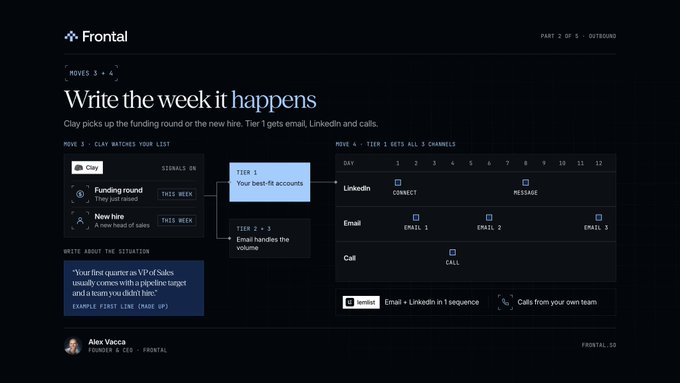
A funding round or a new hire changes what a company needs that month.
Clay picks up the funding round or the new hire, so you write the week it happens.
How to set it up in Clay:
1. Import your account list into a Clay table.
2. Add Clay's signals: Monitor for news & fundraising (funding rounds), Monitor for new hire (new people in the roles you sell to) and Monitor for job changes (people you already know, from their LinkedIn URLs). Signals start on Clay's Launch plan.
3. Clay adds every new signal to your table, with the account and the details.
4. Write to that account the same week.
What to write.
The signal tells you when to write.
The email talks about the situation behind it.
"Congrats on the Series B" lands in a pile of the same email that week.
A first line for a company that just hired its first VP of Sales (a made-up example):
"Your first quarter as VP of Sales usually comes with a pipeline target and a team you didn't hire."
## Move 4: Email, LinkedIn and calls to your top accounts
Split your account list into 3 tiers:
- Tier 1: your best fits, including the dream accounts you'd love to land.
- Tier 2: a good fit, grouped by industry, with messages written for each group.
- Tier 3: everyone else who fits. They're the bulk of your list.
Tier 1 accounts get all 3 channels: email, LinkedIn and calls.
lemlist runs email and LinkedIn in 1 sequence, and it can add call steps too. LinkedIn and calls need its Multichannel plan, $109 a month, or $87 a month billed yearly.
Your own team makes the calls.
Tiers 2 and 3 get email campaigns in Instantly, which handles the volume.
A Tier 1 sequence you can copy (the days are an example):
```
TIER 1 SEQUENCE (12 days)
Day 1 LinkedIn visit the profile, send a connection request
Day 2 Email 1 the situation behind the signal + 1 useful offer
Day 4 Call your rep calls and mentions the email
Day 6 Email 2 a new angle on the same problem
Day 8 LinkedIn a short message after they accept
Day 12 Email 3 close the loop, then stop
```
For automated email, our default is 3 emails per sequence, then we stop.
After email 3, almost nothing good comes back.
## Move 5: Authenticate your domains and ramp inboxes slowly
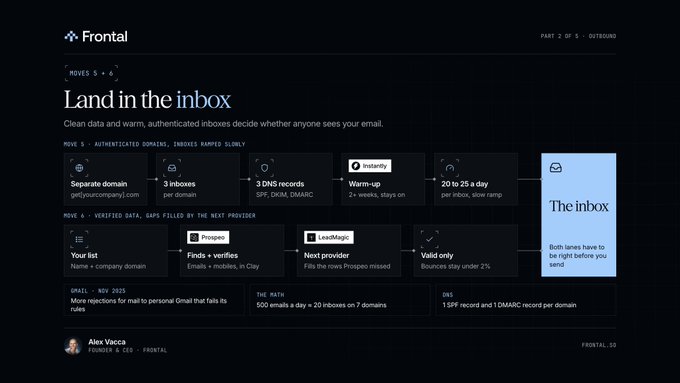
Gmail has been rejecting more mail that fails its sender rules.
In November 2025, it stepped up enforcement, with temporary and permanent rejections for mail to personal Gmail accounts that fails them.
The setup we use:
1. Buy separate domains for cold email, like get[yourcompany].com. Never send cold email from your main domain.
2. Create 3 Google Workspace inboxes per domain.
3. Add 3 DNS records to each domain: SPF, DKIM and DMARC. They prove to Gmail and Outlook that you're the real sender.
4. Connect every inbox to Instantly and warm it up for at least 2 weeks. Warm-up trades emails with other real inboxes, so each inbox builds a sending history.
5. Ramp slowly to 20 to 25 cold emails per inbox per day, and keep warm-up on after launch. Instantly recommends 30 a day per inbox.
6. Connect a few of the warmed inboxes to lemlist for your Tier 1 sequences.
At that pace, 500 emails a day takes about 20 inboxes on 7 domains.
The 3 records for 1 domain on Google Workspace:
```
TYPE HOST VALUE
TXT @ v=spf1 include:_spf.google.com ~all
TXT google._domainkey v=DKIM1; k=rsa; p=... (Google generates this key)
TXT _dmarc v=DMARC1; p=none; rua=mailto:dmarc@get[yourcompany].com
```
Google generates the DKIM key in your Admin console, under Apps > Google Workspace > Gmail > Authenticate email. Publish it, then click Start authentication.
Keep 1 SPF record and 1 DMARC record per domain. A second one of either breaks authentication for that domain.
## Move 6: Verified emails and mobiles, with gaps filled by others
Prospeo.io finds and verifies emails and mobiles inside Clay, and anything still missing goes to the next provider.
Every bounce hurts the domain it's sent from, so only verified emails go out.
Clay calls that a waterfall. It asks providers 1 at a time and stops at the first valid result.
How to set it up in Clay:
1. In your table, click Add enrichment and search for Work Email.
2. Put Prospeo first, then add your next provider. We use LeadMagic.
3. Map each person's full name and company domain.
4. Add a mobile waterfall the same way. Prospeo finds the mobile from each person's LinkedIn URL, and phone enrichment needs Clay's Launch plan or higher.
5. Send only to emails that come back valid, so bounces stay under 2%.
## Part 3: Content:
Move 7: Founder and team posts that answer what buyers ask on sales calls
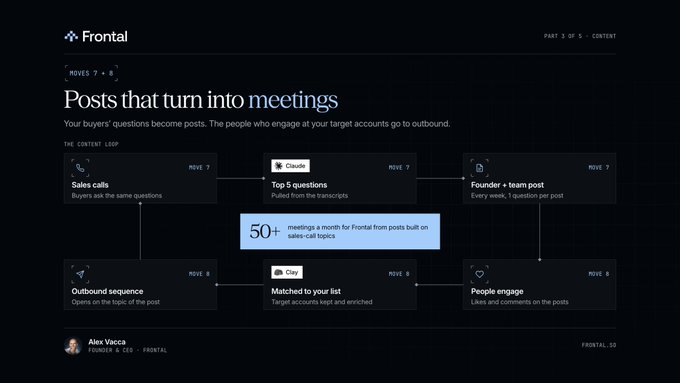
Your buyers ask the same questions on every sales call.
Each one is a post your founder can write.
We pull the topics from sales calls, and those posts book us 50+ meetings a month.
How to do it:
1. Collect the transcripts of last month's sales calls from your call recorder.
2. Give them to Claude with the prompt below.
3. Turn the top 5 questions into 5 posts. The founder writes in their own voice, with 1 example from your work in each.
4. The founder and the team post every week.
5. Reply to every comment.
```
Here are the transcripts of my last 20 sales calls.
1. List every question and objection the buyer raised, in their words.
2. Count how often each one came up.
3. For the top 5, give me 1 LinkedIn post idea each:
the question, our answer in 3 lines, and 1 example from our work.
Use the buyer's words. Keep each idea under 80 words.
```
## Move 8: Send engagers at target accounts to outbound
People who engage with your posts already know your name, so they're warm.
Anyone at your target accounts who engages gets enriched in Clay and goes into outbound.
How to do it:
1. Every week, pull the people who liked or commented on the founder's and the team's posts. Paste each post's URL into HarvestAPI's LinkedIn Post Reactions and Post Comments scrapers on Apify and export the results as a CSV. They need no LinkedIn login and cost $2 per 1,000 results on Apify's free plan.
2. Load the CSV into Clay and use Lookup Single Row in Other Table to check each person's company domain against your account list.
3. Keep the matches and run them through the Move 6 waterfall.
4. Add them to a sequence that opens on the topic of the post they engaged with.
## Part 4: Ads:
Move 9: Show ads to your outbound list before the first email
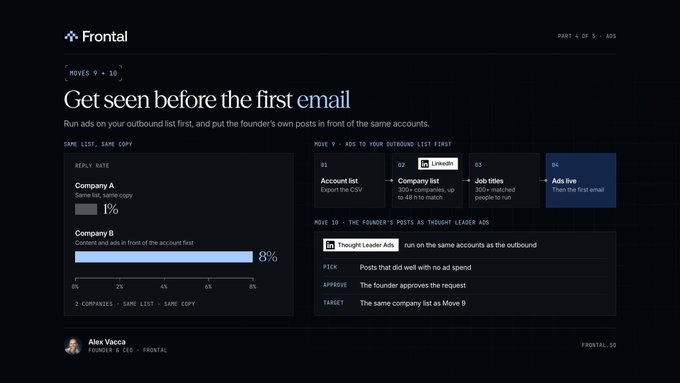
I've watched the same list and copy reply at 1% for 1 company and 8% for another.
The 8% one had content and ads in front of the account first.
A buyer who's seen your name a few times reads your email differently.
How to set it up on LinkedIn:
1. Export your account list as a CSV with each company's name and website.
2. In LinkedIn Campaign Manager, upload it as a company list. It needs at least 300 companies and can take up to 48 hours to match.
3. Target the job titles you sell to inside those companies. LinkedIn needs at least 300 matched people in an audience to run it.
4. Set a budget. LinkedIn's minimum is $10 a day.
5. Start the ads before the first email goes out.
## Move 10: Run the founder's own posts as ads to target accounts
LinkedIn calls them Thought Leader Ads.
We run them on the same accounts as the outbound.
LinkedIn lets you sponsor the founder's own post after the founder approves it, and you target it like any other ad.
How to do it:
1. Pick the founder's posts that already did well with no ad spend behind them.
2. In Campaign Manager, create a Thought Leader Ad and send the founder the approval request.
3. Point it at the same company list as Move 9.
4. Send the people who engage into Move 8.
## Part 5: RevOps:
RevOps (revenue operations) is the system under every channel: the CRM, the data and the reporting.
Move 11: 1 clean CRM that every channel feeds and reads
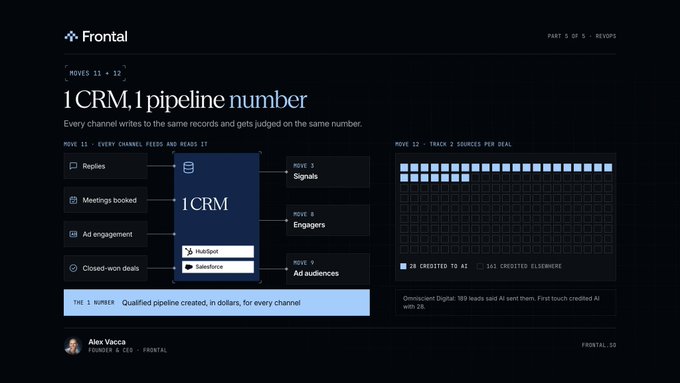
Every reply, meeting and closed-won deal goes back into it.
Your signals, your engagers and your ad audiences all read from the same records, so they're working off the same data.
How to set it up:
1. Pick 1 CRM: HubSpot or Salesforce.
2. Merge the duplicate companies and contacts. On HubSpot's free CRM, merge them by hand. Professional and Enterprise have a Manage duplicates tool.
3. Add the fields below as properties (in HubSpot, Settings > Properties), so every channel writes to the same place.
4. Connect lemlist, Instantly and your ad accounts through their HubSpot or Salesforce integrations, so replies, booked meetings and ad engagement land on the right record.
5. Mark every deal closed-won in the CRM the day it's signed.
```
FIELDS EVERY CHANNEL WRITES TO
Account tier, ICP fit, latest signal, signal date
Contact first source, "how did you hear about us?", last channel touched
Deal source channel, pipeline amount, stage, closed-won date
```
## Move 12: Judge every channel on the same pipeline number
Omniscient Digital checked its own pipeline: 189 leads wrote that an AI tool sent them, and HubSpot's first-touch tracking credited only 28 of them to AI.
The other 161 showed up as organic search, direct visits and referrals.
That gap is why you track 2 sources for every deal: what your software logged first, and what the buyer told you.
How to do it:
1. Pick 1 number for every channel: qualified pipeline created, in dollars.
2. Tag every deal with its source channel from both fields.
3. Every month, put the channels side by side on pipeline created and closed-won revenue.
4. Move budget toward the channels that create the most pipeline per dollar.
A made-up example: $5,000 of ads that created $60,000 of pipeline is $12 of pipeline for every $1 you spent.
## The skip list: 12 things that eat weeks:
These are the 12 I'd stop spending weeks on.
Each one takes time away from the 12 moves.
1. Rewriting the copy when replies drop. Copy might be the last thing that's broken. Check the list and the offer before you touch a word.
2. Open rates. Apple Mail can load the tracking pixel even when nobody opens the email.
3. Impressions from people who could never buy. Count the accounts on your list that saw you.
4. Meetings booked that never turn into pipeline. Any tool can inflate that number.
5. Personalizing the email for the wrong person. A great first line still lands on someone who can't buy.
6. Most of the GTM advice you read online. Test any tactic on 25 accounts before you roll it out to 5,000.
7. More SDRs (sales development reps) sending more cold email. More volume on a weak list gets you more of the same result.
8. 1 template sent to 10,000 people. Write for 1 situation at a time (Move 3).
9. Which team gets credit for the lead. Every channel answers to the same pipeline number (Move 12).
10. Adding another tool to the stack. Make the tools you have write to 1 CRM (Move 11).
11. A 12-step email sequence. 3 emails, then stop (Move 4).
12. Spam trigger word lists. Inbox placement comes from your domains, your warm-up and clean data (Moves 5 and 6).
## Your first 30 days:
Week 1: clean the CRM, build the account list in Clay, buy the domains, create the inboxes, add the 3 DNS records and start warm-up.
Week 2: split the list into 3 tiers, run the Move 6 waterfall, run your 10 buyer questions through ChatGPT and Google's AI, draft your shortlist page, and start posting from sales-call questions.
Week 3: upload the company list to LinkedIn, launch the ads plus Thought Leader Ads on your best Week 2 posts, turn on signals in Clay, and set up the Tier 1 sequence in lemlist.
Week 4: send the first Tier 1 sequences, route engagers to outbound, and run your first pipeline review.
## How it fits together:
Your posts and your ads warm up the accounts.
Your signals tell you when to write.
Your domains and your data get the email into the inbox.
Your CRM shows which of it turned into pipeline.
Run all 12 moves on 1 account list, and judge them all on 1 number.
Save this for the next time a campaign stops replying.
Frontal is the go-to-market partner for B2B tech companies past product-market fit.
We run GTM Services, Account-Based Marketing, Paid Media, Content Engineering and RevOps, and clients can start with 1 service.
Book a call at frontal.so
## 相关链接
- [Alex Vacca](https://x.com/itsalexvacca)
- [@itsalexvacca](https://x.com/itsalexvacca)
- [34K](https://x.com/itsalexvacca/status/2113670303842963562/analytics)
- [frontal.so/blog/best-gtm-agencies](http://frontal.so/blog/best-gtm-agencies)
- [Prospeo.io](http://prospeo.io/)
- [frontal.so](http://frontal.so/)
- [Upgrade to Plus](https://x.com/i/premium_sign_up)
- [12:34 AM · Oct 24, 2026](https://x.com/itsalexvacca/status/2113670303842963562)
- [34.9K Views](https://x.com/itsalexvacca/status/2113670303842963562/analytics)
- [View quotes](https://x.com/itsalexvacca/status/2113670303842963562/quotes)
---
*导出时间: 2026/10/26 09:58:26*
---
## 中文翻译
# 2026年你唯一需要的GTM实战手册
**作者**: Alex Vacca
**日期**: 2026-10-23T16:34:05.000Z
**来源**: [https://x.com/itsalexvacca/status/2113670303842963562](https://x.com/itsalexvacca/status/2113670303842963562)
**阅读**: 34937
**点赞**: 271
**转发**: 21
**回复**: 7
---

你在网上读到的很多GTM(进入市场)建议,都来自那些从未用它真正建立过销售管道的人。
我会跳过其中大约90%。
在Frontal,我们与300多家B2B公司合作过,并分析了1000多个失败的营销活动。
在审计中,我不断发现团队把几周时间花在3件永远无法推动销售管道的事情上:回复率下降时重写文案、打开率,以及永远无法转化为管道的会议。
这本手册展示了我会把这几周时间用在哪里,如何在2026年从零开始做GTM。
它包含GTM 5个部分中的12个动作:AI搜索、外呼、内容、广告和RevOps。
每个动作都附有其奏效的原因、我们使用的工具以及可复制的步骤。
所有5个部分都围绕1份客户名单运作,每个渠道都对1个管道数字负责。
读完之后,你将知道如何:
→ 让你的公司出现在AI的回答中
→ 在客户公司发生变化的当周触达正确的客户
→ 让你的邮件进入收件箱
→ 把你的帖子和广告转化为会议
→ 用1个管道数字评判每个渠道
即使你没有任何GTM经验也能照着执行。
以下是这本手册。
## 框架:5个部分中的12个动作:

GTM(进入市场)是指将你的产品呈现在买家面前并将他们转化为销售管道的一切工作。
在2026年,它有5个部分,所有5个部分都围绕同一份客户名单运作。
| 部分 | 作用 | 动作 |
| --- | --- | --- |
| AI搜索 | 当买家询问AI该买什么时,让你的公司被提及 | 1和2 |
| 外呼 | 在合适的时机触达正确的客户 | 3至6 |
| 内容 | 让买家在你写邮件之前就认识你 | 7和8 |
| 广告 | 把你的名字呈现在名单上的客户面前 | 9和10 |
| RevOps | 将每个渠道连接到1个CRM和1个数字 | 11和12 |
每个部分你都会看到8个术语。
- ICP(理想客户画像):会购买并留下来的那类公司。
- 客户名单:所有符合你ICP的公司。所有5个部分都基于这1份名单运作。
- 信号:客户公司发生的变化,使得这一周成为联系的好时机,比如融资轮次或新员工入职。
- 序列:几天内通过邮件、LinkedIn和电话发送的一系列简短消息。
- CRM:保存每个客户、联系人、回复和交易的数据库。HubSpot和Salesforce是常见的选择。
- 管道:你的团队正在处理的合格交易的金额价值。
- 成交:客户已签署的交易。
- 数据充实:Clay填补每一行缺失的数据,比如工作邮箱、手机号或公司的员工人数。
先建立客户名单。
下面的每个动作都从它开始,所以值得花一个下午来做。
1. 拉出你最近40到50笔成交的交易,写下它们的共同点:行业、员工人数、国家以及签署人。
2. 在Clay中,使用“查找公司”功能配合这些筛选条件,并将结果保存为你的客户名单。
3. Clay的免费方案每个表格最多200行,所以覆盖完整市场需要Launch方案(每月185美元)。
4. 使用Clay的“查找人员”功能在这些公司中搜索你销售对象所对应的职位,并保存每个人的姓名、职位和LinkedIn链接。
## 第1部分:AI搜索:
你的买家现在会问ChatGPT和Google的AI该买什么。
AI的回答会提到几家公司,并附上来源链接。
以下2个动作能让你的公司进入那个回答。
动作1:在AI回答引用的网站上获得提及

AI的回答是由全网各个页面构建的。
Ahrefs研究了75,000个品牌,发现网络提及更多的品牌在ChatGPT、Google的AI模式和AI Overviews中出现得更多。
反向链接的影响微乎其微。
在相关性量表上(1为完全相关),提及的得分为0.66到0.71。反向链接的得分只有0.19到0.24。
所以要做的工作,就是让你的名字出现在他们已经在阅读的页面上。
如何操作:
1. 写下你的买家在购买前会问的10个问题,比如“最佳GTM机构”或“针对[你的买家]的最佳[你的品类]”。
2. 在ChatGPT和Google的AI模式中分别提出每个问题。
3. 列出回答中引用的所有网站:评测网站、Reddit帖子、“最佳”榜单、新闻网站、LinkedIn帖子。
4. 让你的公司出现在这些网站上。请满意的客户写G2评价、以真名回答Reddit帖子、向撰写榜单的人自荐,以及在LinkedIn上发帖。
5. 每个月重新提出这10个问题,并记录哪些公司被提及。
## 动作2:发布回答买家AI提问的页面
Ahrefs分析了750个询问AI推荐方案的提示,发现“最佳X”类榜单占ChatGPT引用页面的43.8%。
我们在frontal.so/blog/best-gtm-agencies发布了一个“最佳GTM机构”榜单。
上线仅3个月后,Frontal就在Google对这个问题的AI回答中排名第一。
我们把另外5家机构也放在页面上与我们并列,为每家写了一句“最适合谁”,并按相同的4个标准对所有人排名。
如何构建你的页面:
1. 选择购买意向最强的买家问题,比如“针对[你的买家]的最佳[你的品类]”。
2. 把答案放在页面的前几行:简短榜单,每家公司配一句“最适合谁”。
3. 用相同的标准为每家公司排名,并写明这些标准。我们的第一条标准是可验证的证据:具名客户和成交收入。
4. 添加FAQ、具名作者和schema标记(告诉搜索引擎页面内容的代码)。
5. 然后撰写对比页面:你与你的每个主要竞争对手的对比。
用3种方式追踪效果:
- 每个月在Google的AI和ChatGPT中提出相同的买家问题,各跑3次,因为每次运行的回答会有所不同。
- 在你的分析工具中查找标记为utm_source=chatgpt.com的访问。ChatGPT会在它引用的大多数链接上添加这个标记。
- 在每次首通电话时询问每个潜在客户是从哪里听说你的,并把答案记录在你的CRM中。
## 第2部分:外呼:
外呼是指你主动先联系对方,通过邮件、LinkedIn或电话。
它在好的名单、合适的时机和能送达收件箱的邮箱上效果最好。
## 动作3:在客户融资或招聘的那一周写信

融资轮次或新员工入职会改变一家公司当月的需求。
Clay会捕捉融资轮次和新员工入职信息,让你在事件发生的当周写信。
如何在Clay中设置:
1. 将你的客户名单导入Clay表格。
2. 添加Clay的信号:Monitor for news & fundraising(融资轮次)、Monitor for new hire(你销售对象职位的新入职者)和Monitor for job changes(你已认识的人的职位变动,通过他们的LinkedIn链接追踪)。信号功能从Clay的Launch方案开始提供。
3. Clay将每个新信号连同客户和详细信息添加到你的表格中。
4. 在同一周给该客户写信。
写什么内容。
信号告诉你何时写信。
邮件谈论的是信号背后的处境。
“恭喜你们完成B轮融资”在那周会淹没在一堆相同的邮件里。
一家刚招了第一位销售VP的公司的首行示例(虚构例子):
“你作为销售VP的第一个季度,通常伴随着一个管道指标,以及一支不是你亲手招的团队。”
## 动作4:对你的重点客户进行邮件、LinkedIn和电话组合触达
将你的客户名单分为3个层级:
- 第1层:最匹配的客户,包括你最想拿下的梦想客户。
- 第2层:良好匹配的客户,按行业分组,并为每组撰写专属消息。
- 第3层:其余所有匹配的客户。他们占你名单的大部分。
第1层客户使用全部3个渠道:邮件、LinkedIn和电话。
lemlist可以在1个序列中运行邮件和LinkedIn,还可以添加电话步骤。LinkedIn和电话需要其Multichannel方案,每月109美元,年付每月87美元。
电话由你自己的团队来打。
第2层和第3层使用Instantly运行邮件营销活动,它负责处理大批量发送。
一个可复制的第1层序列(天数为示例):
```
第1层序列(12天)
第1天 LinkedIn 访问对方主页,发送好友请求
第2天 邮件1 信号背后的处境 + 1个有用的提议
第4天 电话 你的销售代表致电并提及邮件
第6天 邮件2 从新角度谈同一个问题
第8天 LinkedIn 对方通过好友请求后发送简短消息
第12天 邮件3 收尾,然后停止
```
对于自动化邮件,我们的默认设置是每个序列3封邮件,然后停止。
第3封邮件之后,几乎不会再有好结果。
## 动作5:验证你的域名并缓慢预热邮箱

Gmail一直在加大拒绝未遵守其发件人规则的邮件的力度。
2025年11月,它加强了执行力度,对发送到个人Gmail账户且不符合规则的邮件实施临时和永久拒收。
我们的配置方案:
1. 为冷邮件购买独立域名,比如get[你的公司].com。绝对不要从你的主域名发送冷邮件。
2. 每个域名创建3个Google Workspace邮箱。
3. 为每个域名添加3条DNS记录:SPF、DKIM和DMARC。它们向Gmail和Outlook证明你是真实的发件人。
4. 将每个邮箱连接到Instantly并预热至少2周。预热会与其他真实邮箱互发邮件,让每个邮箱建立发送历史。
5. 缓慢提升到每个邮箱每天20到25封冷邮件,上线后继续保持预热。Instantly建议每个邮箱每天30封。
6. 将几个已预热的邮箱连接到lemlist,用于你的第1层序列。
按这个节奏,每天500封邮件大约需要7个域名上的20个邮箱。
Google Workspace上1个域名所需的3条记录:
```
类型 主机 值
TXT @ v=spf1 include:_spf.google.com ~all
TXT google._domainkey v=DKIM1; k=rsa; p=... (Google生成此密钥)
TXT _dmarc v=DMARC1; p=none; rua=mailto:dmarc@get[你的公司].com
```
Google会在你的管理控制台的“应用 > Google Workspace > Gmail > 身份验证电子邮件”中生成DKIM密钥。发布密钥后,点击“开始身份验证”。
每个域名只保留1条SPF记录和1条DMARC记录。任何一条出现第二条都会破坏该域名的身份验证。
## 动作6:经过验证的邮箱和手机号,缺失部分由其他供应商补齐
Prospeo.io在Clay内部查找并验证邮箱和手机号,仍缺失的部分交给下一个供应商。
每一次退信都会损害发送域名的信誉,所以只有经过验证的邮箱才会被发送。
Clay称之为瀑布流。它逐一向供应商请求,并在第一个有效结果处停止。
如何在Clay中设置:
1. 在你的表格中,点击“添加充实”并搜索“Work Email”。
2. 将Prospeo放在首位,然后添加你的下一个供应商。我们使用LeadMagic。
3. 映射每个人的全名和公司域名。
4. 用同样的方式添加手机号瀑布流。Prospeo会从每个人的LinkedIn链接查找手机号,电话充实功能需要Clay的Launch方案或更高版本。
5. 只发送给返回有效状态的邮箱,这样退信率就能保持在2%以下。
## 第3部分:内容:
动作7:创始人和团队的帖子,回答买家在销售电话中提出的问题

你的买家在每次销售电话中都会问相同的问题。
每一个问题都是你的创始人可以写的一篇帖子。
我们从销售电话中提取这些话题,这些帖子每月为我们预约50多场会议。
如何操作:
1. 从你的通话录音工具中收集上个月的销售电话记录。
2. 将它们连同下面的提示词一起交给Claude。
3. 将排名前5的问题转化为5篇帖子。创始人用自己的语气写作,每篇中包含1个来自你们实际工作的例子。
4. 创始人和团队每周发帖。
5. 回复每一条评论。
```
以下是我最近20次销售电话的记录。
1. 用买家的原话列出他们提出的每个问题和异议。
2. 统计每个问题出现的频率。
3. 对于排名前5的问题,各给我1个LinkedIn帖子创意:
问题本身、我们的3行回答,以及1个来自我们工作的例子。
使用买家的原话。每个创意控制在80字以内。
```
## 动作8:将目标客户中的互动者导入外呼流程
与你的帖子互动的人已经知道你的名字,所以他们是warm leads(温热线索)。
目标客户中任何互动过的人,都会在Clay中进行数据充实,并进入外呼流程。
如何操作:
1. 每周,拉取对创始人和团队帖子点赞或评论的人。将每篇帖子的链接粘贴到Apify上HarvestAPI的LinkedIn Post Reactions和Post Comments抓取器中,并将结果导出为CSV。它们不需要LinkedIn登录,在Apify免费方案中每1000条结果收费2美元。
2. 将CSV加载到Clay中,使用“Lookup Single Row in Other Table”将每个人的公司域名与你的客户名单进行比对。
3. 保留匹配项,并通过动作6的瀑布流进行处理。
4. 将他们加入一个以他们互动的那篇帖子话题作为开场的序列。
## 第4部分:广告:
动作9:在第一封邮件之前向你的外呼名单展示广告

我见过同一份名单和同样的文案,一家公司的回复率是1%,另一家是8%。
8%的那家,先让内容和广告出现在客户面前。
见过你名字几次的买家,会以不同的方式阅读你的邮件。
如何在LinkedIn上设置:
1. 将你的客户名单导出为CSV,包含每家公司的名称和网站。
2. 在LinkedIn Campaign Manager中,将其上传为公司列表。它至少需要300家公司,匹配可能需要长达48小时。
3. 定向这些公司中你销售对象所对应的职位。LinkedIn要求受众中至少有300个匹配的人才能投放。
4. 设置预算。LinkedIn的最低预算是每天10美元。
5. 在第一封邮件发出之前启动广告。
## 动作10:将创始人的帖子作为广告投放到目标客户
LinkedIn称之为Thought Leader Ads(思想领袖广告)。
我们将它们投放到与外呼相同的客户名单上。
在创始人批准后,LinkedIn允许你赞助创始人自己的帖子,并且你可以像投放其他广告一样定向投放。
如何操作:
1. 挑选那些在没有任何广告投入的情况下已经表现良好的创始人帖子。
2. 在Campaign Manager中,创建一个Thought Leader Ad并向创始人发送批准请求。
3. 将其指向与动作9相同的公司列表。
4. 将互动者导入动作8的流程。
## 第5部分:RevOps:
RevOps(收入运营)是支撑每个渠道的底层系统:CRM、数据和报告。
动作11:1个干净的CRM,所有渠道向其写入并从中读取

每一次回复、每一场会议和每一笔成交都会回写到CRM。
你的信号、你的互动者和你的广告受众都从相同的记录中读取数据,因此它们基于相同的数据运作。
如何设置:
1. 选择1个CRM:HubSpot或Salesforce。
2. 合并重复的公司和联系人。在HubSpot的免费CRM中,需要手动合并。专业版和企业版有“管理重复项”工具。
3. 将下面的字段添加为属性(在HubSpot中:设置 > 属性),让每个渠道都写入同一个地方。
4. 通过HubSpot或Salesforce集成连接lemlist、Instantly和你的广告账户,让回复、预约的会议和广告互动都落到正确的记录上。
5. 在签署当天,就在CRM中将每笔交易标记为成交。
```
所有渠道写入的字段
客户 层级、ICP匹配度、最新信号、信号日期
联系人 首次来源、“你从哪里听说我们的?”、最后触达渠道
交易 来源渠道、管道金额、阶段、成交日期
```
## 动作12:用同一个管道数字评判每个渠道
Omniscient Digital检查了自己的管道:189个线索表明自己是被AI工具引导过来的,但HubSpot的首次触点归因只将其中28个归功于AI。
另外161个被记为自然搜索、直接访问和引荐。
这个差距就是为什么你要为每笔交易追踪2个来源:软件记录的来源,以及买家亲口告诉你的来源。
如何操作:
1. 为每个渠道选择1个数字:创造的合格管道金额(美元)。
2. 用这两个字段为每笔交易标记来源渠道。
3. 每个月,将各渠道在管道创造额和成交收入上进行横向对比。
4. 将预算向每美元创造最多管道的渠道倾斜。
一个虚构的例子:花费5,000美元的广告创造了60,000美元的管道,即每花1美元创造12美元的管道。
## 跳过清单:12件浪费数周时间的事:
以下是我会停止花费数周时间的12件事。
每一件都在挤占12个动作的时间。
1. 回复率下降时重写文案。文案可能是最后坏掉的东西。在改动任何文字之前,先检查名单和提议。
2. 打开率。即使没人打开邮件,Apple Mail也可能加载追踪像素。
3. 来自永远不可能购买的人的曝光。统计名单上看到过你的客户数量。
4. 预约了却永远无法转化为管道的会议。任何工具都能夸大这个数字。
5. 为错误的人写个性化邮件。再好的首行,落在无法购买的人身上也是白搭。
6. 你在网上读到的多数GTM建议。在推广到5,000个客户之前,先在25个客户上测试任何策略。
7. 更多SDR(销售开发代表)发送更多冷邮件。在薄弱的名单上加大数量,只会得到更多同样的结果。
8. 用1个模板发给10,000个人。一次只为1种处境写作(动作3)。
9. 争论哪个团队该为线索邀功。每个渠道都对同一个管道数字负责(动作12)。
10. 向工具栈中再添加一个工具。让你现有的工具都写入1个CRM(动作11)。
11. 12步邮件序列。3封邮件,然后停止(动作4)。
12. 垃圾邮件触发词列表。收件箱到达率来自你的域名、预热和干净的数据(动作5和6)。
## 你的前30天:
第1周:清理CRM,在Clay中建立客户名单,购买域名,创建邮箱,添加3条DNS记录并开始预热。
第2周:将名单分为3个层级,运行动作6的瀑布流,将你的10个买家问题输入ChatGPT和Google的AI,起草你的榜单页面,并开始根据销售电话中的问题发帖。
第3周:将公司列表上传到LinkedIn,基于你第2周表现最好的帖子启动广告和Thought Leader Ads,在Clay中开启信号,并在lemlist中设置第1层序列。
第4周:发送第一批第1层序列,将互动者导入外呼流程,并运行你的第一次管道复盘。
## 各部分如何协同:
你的帖子和广告让客户熟悉你。
你的信号告诉你何时写信。
你的域名和数据让邮件进入收件箱。
你的CRM显示哪些转化成了管道。
在1份客户名单上运行全部12个动作,并用1个数字评判所有动作。
收藏这篇文章,以备下次营销活动回复率下降时使用。
Frontal是越过产品市场契合阶段的B2B科技公司的进入市场合作伙伴。
我们提供GTM服务、基于客户的营销(ABM)、付费媒体、内容工程和RevOps,客户可以从1项服务开始。
在frontal.so预约通话
## 相关链接
- [Alex Vacca](https://x.com/itsalexvacca)
- [@itsalexvacca](https://x.com/itsalexvacca)
- [34K](https://x.com/itsalexvacca/status/2113670303842963562/analytics)
- [frontal.so/blog/best-gtm-agencies](http://frontal.so/blog/best-gtm-agencies)
- [Prospeo.io](http://prospeo.io/)
- [frontal.so](http://frontal.so/)
- [Upgrade to Plus](https://x.com/i/premium_sign_up)
- [12:34 AM · Oct 24, 2026](https://x.com/itsalexvacca/status/2113670303842963562)
- [34.9K Views](https://x.com/itsalexvacca/status/2113670303842963562/analytics)
- [View quotes](https://x.com/itsalexvacca/status/2113670303842963562/quotes)
---
*导出时间: 2026/10/26 09:58:26*