# How We Cracked Seedance 2.0 Prompting and NEVER Have to Regenerate AI UGC Videos...
**作者**: Adrian Solarz
**日期**: 2026-05-07T21:30:55.000Z
**来源**: [https://x.com/adriansolarzz/status/2052501455169568875](https://x.com/adriansolarzz/status/2052501455169568875)
---
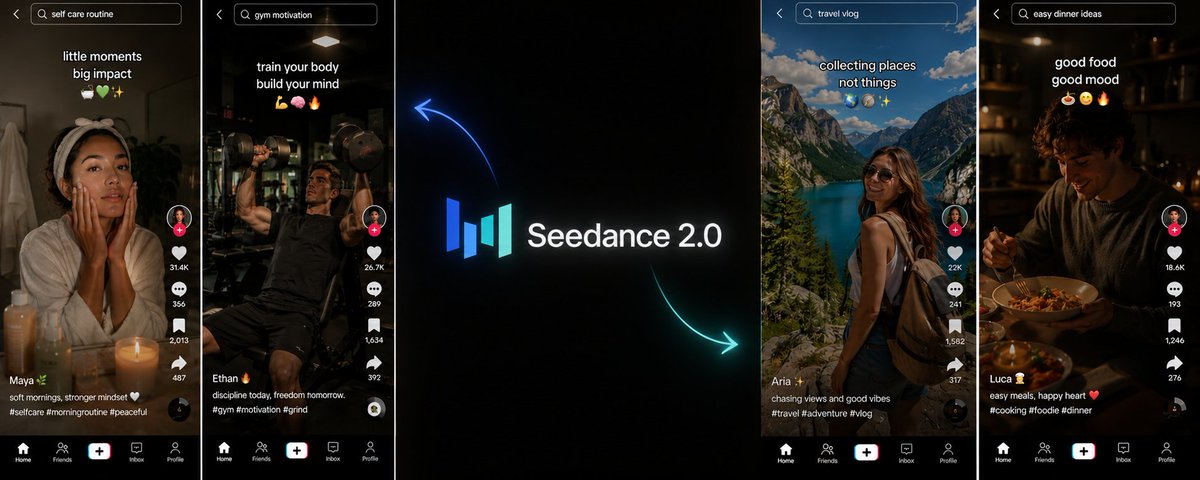
many operators using Seedance 2.0 are burning through credits regenerating the same clip 3 to 4 times before they get something usable.
but we figured out the prompting structure that gets us usable output on the first or second generation consistently.
so in this article, i'll be breaking down exactly how the Seedance 2.0 prompting structure works in production:
- the 5-beat formula
- the dialogue embedding rule
- the brand name pronunciation defense, the selfie POV framing
- and the real-brand prop strategy that's the biggest AI-detection defense.
if you've been running Seedance 2.0 with prompts that produce inconsistent output, this is what to do:
## The 15-Second Hard Limit Most Operators Misunderstand
before getting into the prompting structure, there's a hard technical limit that every operator needs to internalize because most people work against it without realizing.
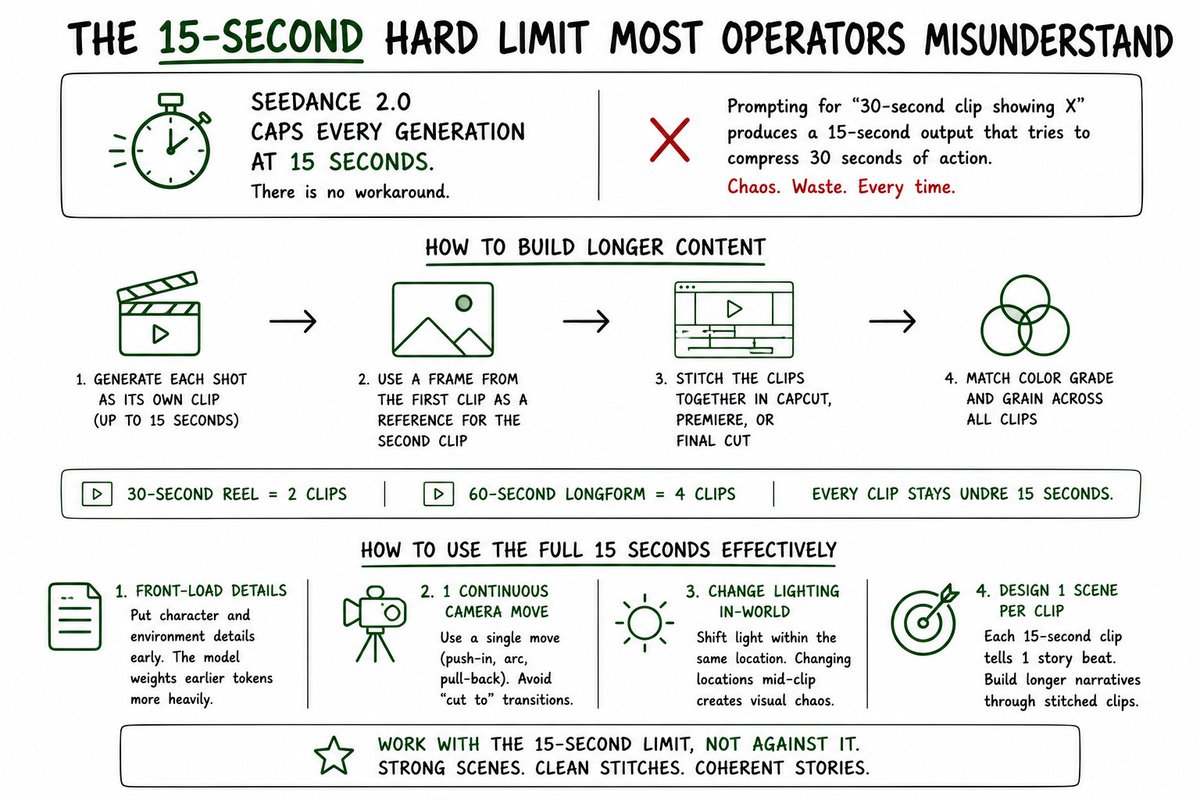
Seedance 2.0 caps every single generation at 15 seconds.
there's no workaround for this at the model level. you cannot prompt your way into a 30-second clip. every generation produces a 15-second output maximum and that's the ceiling.
operators trying to generate longer clips by prompting for "30-second clip showing X" produce 15-second outputs that try to compress 30 seconds of action into the available window, which produces visual chaos and wastes the generation entirely. the prompt fights the model's hard limit and loses every time.
How to Build Longer Content
longer content gets built by stitching multiple 15-second clips together in post.
generate each shot as its own clip up to 15 seconds. use a frame from the first clip as a reference image for the second clip (this locks character and location consistency across the stitched sequence). stitch the clips together in CapCut, Premiere, or Final Cut. match the color grade and grain across all clips so the assembled output reads as a single coherent piece.
a 30-second AI UGC reel is 2 stitched 15-second clips. a 60-second longform piece is 4 stitched clips. the workflow scales linearly with the desired duration, but every individual generation stays under the 15-second ceiling.
How to Use the Full 15 Seconds Effectively
within a single 15-second generation, the prompting structure also matters for how the duration gets used.
front-load all character and environment details early in the prompt because the model weights earlier tokens more heavily when constructing the visual baseline of the generation.
use 1 continuous camera move to carry the story arc (push-in, arc, pull-back) rather than describing "cut to" transitions. the model gets confused by transition descriptions and produces output that doesn't match either side of the cut cleanly.
change lighting in-world rather than changing locations. a 15-second generation that depicts dawn light bleeding through blinds gradually brightening the scene works cleanly. a 15-second generation that tries to move from a bedroom to a kitchen mid-clip produces visual chaos.
once you internalize the 15-second cap, your prompting structure changes. you stop trying to fit complex multi-beat narratives into single generations and start designing each generation as 1 specific scene that unfolds within the 15-second window, with longer narratives built through stitched sequences.
## The 5-Beat Prompt Formula Every Generation Follows
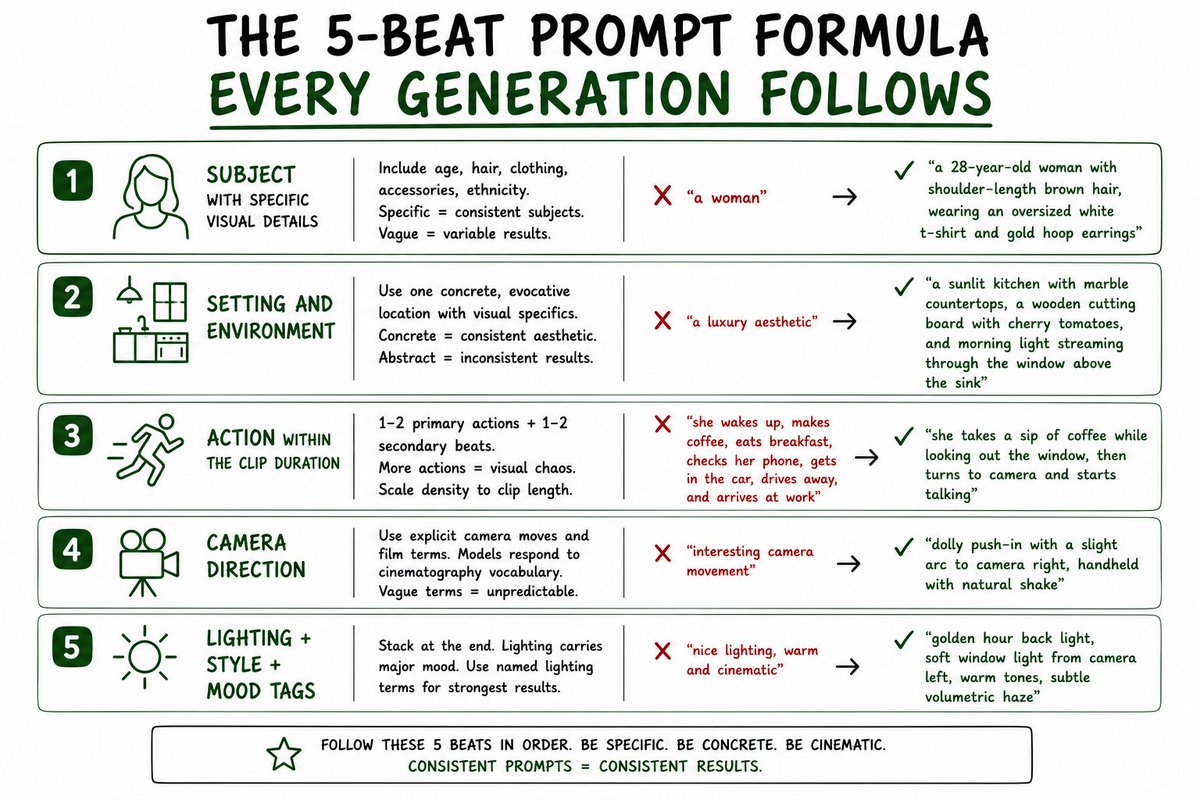
every Seedance 2.0 prompt that consistently produces usable output on the first generation follows the same 5-beat formula.
Beat 1: Subject With Specific Visual Details
every prompt opens with the subject and specific visual details: age, hair color and style, clothing, accessories, ethnicity.
vague subject descriptions produce variable subjects across regenerations. specific subject descriptions produce consistent subjects that match what the operator was actually trying to create.
"a woman" produces wildly different outputs across generations. "a 28-year-old woman with shoulder-length brown hair, wearing an oversized white t-shirt and gold hoop earrings" produces output that consistently lands in the visual ballpark of what was specified.
Beat 2: Setting and Environment
one concrete, evocative location rather than abstract style references.
abstract style references produce wildly inconsistent renderings because the model has to interpret what the abstract reference means visually. concrete location descriptions give the model a specific visual target.
"a luxury aesthetic" is abstract. "a sunlit kitchen with marble countertops, a wooden cutting board with cherry tomatoes, and morning light streaming through the window above the sink" is concrete.
the concrete description produces the luxury aesthetic the abstract description was trying to evoke, because specific visual elements compose into the aesthetic rather than the model having to guess what the aesthetic means.
Beat 3: Action Within the Clip Duration
1 to 2 clear primary motions plus a secondary beat or two, calibrated to the clip duration.
operators stuffing prompts with 6 to 8 different actions produce visual chaos because the model can't fit all the actions into the duration cleanly even with the 15-second ceiling.
the formula is 1 primary action that anchors the clip and 1 to 2 secondary beats that add dimension. for a longer clip approaching the 15-second cap, you can extend to 2 primary actions with smooth transitions between them. "she takes a sip of coffee while looking out the window, then turns to camera and starts talking" is 2 primary actions with a clean transition between them, which reads as natural rather than rushed.
for shorter clips (5 to 8 seconds), 1 primary action plus 1 secondary beat is the right density. the prompt structure stays the same regardless of clip duration. only the action density inside the prompt scales with duration.
Beat 4: Camera Direction
explicit camera moves using named cinematography terms, not vague adjectives.
models trained on film data respond to film vocabulary. "tracking shot," "dolly push-in," "orbit," "arc around," "crane up," "whip pan," "handheld with natural shake," "locked-off," "first-person POV" all produce predictable, controllable camera behavior.
vague terms like "interesting camera movement" produce unpredictable output because the model has to guess what "interesting" means in this context.
Beat 5: Lighting Plus Style Plus Mood Tags
stacked at the end of the prompt rather than scattered throughout.
lighting carries more mood information than almost any other variable. giving lighting its own dedicated section at the end of the prompt produces stronger output than burying it in a list of other scene descriptors.
named lighting terms work best: "golden hour," "blue hour," "magic hour," "rim light," "back light," "volumetric haze," "warm tungsten," "cool fluorescent," "neon accents," "soft window light from camera left."
## Dialogue Must Be Embedded Inline
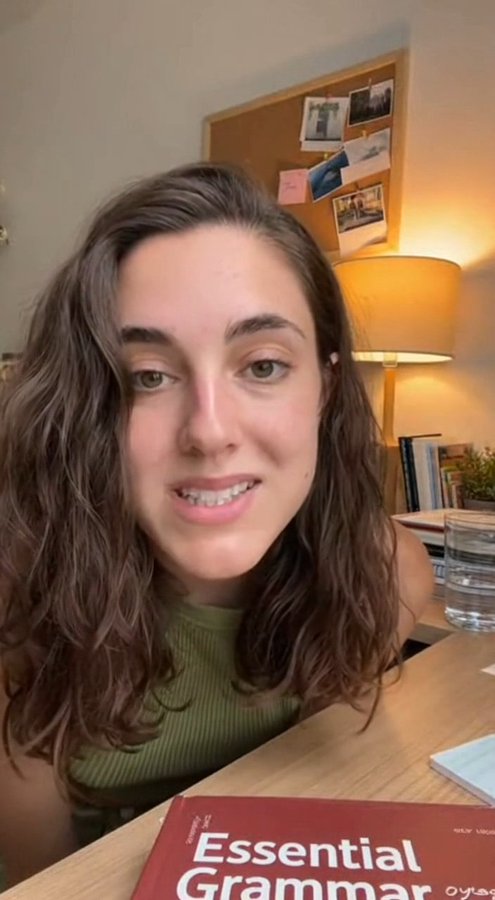
this is the most common failure mode for new Seedance 2.0 operators.
they write the visual scene description, then write a separate "voiceover script" section below. the model treats these as 2 separate inputs and produces output where the dialogue and visual don't sync correctly.
dialogue must be embedded inline using the "says [exact line]" attribution pattern.
the wrong approach:
"a 28-year-old woman in a sunlit kitchen takes a sip of coffee.
Voiceover script: 'I genuinely cannot believe how this product changed my routine.'"
the right approach:
"a 28-year-old woman in a sunlit kitchen takes a sip of coffee, sets the cup down, looks directly at the camera with excited wide eyes, and says, 'I genuinely cannot believe how this product changed my routine.'"
The Rules for Dialogue Embedding
use "says" attribution every time. she says, he asks, the voice finishes. tie each spoken line to its matching visual moment in the same sentence.
put brand names on visible-speaker beats where the camera sees the speaker's mouth. lip-sync forces cleaner pronunciation than voiceover-over-cutaway beats produce.
avoid voiceover-over-cutaway beats for brand names. the model mumbles brand names when the speaker isn't visible because there's no visual lip-sync constraint forcing clean pronunciation.
end punchy. one clean CTA line, not 3 redundant ones. cramming multiple CTAs into the clip duration produces audio that runs over the time limit and gets cut off, regardless of whether you're generating at 8 seconds or 15 seconds.
## The Brand Name Pronunciation Defense
this is the single biggest pronunciation problem in Seedance 2.0 production, and it has a structured solution.
TTS in Seedance 2.0 mispronounces brand names constantly. UGC becomes "UGG" (like the boots). new brand names get slurred into surrounding dialogue. short acronyms get parsed as words before letters. multi-syllable brand names get compressed into single mumbled words.
the fix is the 3-layer pronunciation defense applied to every brand name mention.
Layer 1: Phonetic Spelling
spell spoken acronyms phonetically: UGC becomes "You Gee See" or "U G Cee." UGCMaxxing becomes "U G Cee Maxxing" or "You Gee See Maxxing." SaaS becomes "Sass" (as a word) or "S. A. A. S." (as letters). AI becomes "A. I." with dots. CEO becomes "C. E. O."
multi-syllable brand names get split: Cantina becomes "Can Teena" (two words, not one). Klaviyo becomes "Klay Vee O." each syllable that the model tends to mumble gets explicit phonetic guidance.
Layer 2: Enunciation Direction
add enunciation direction before the spoken line:
"she slows down slightly to clearly enunciate the brand name and says..."
"the voice is clear and loud over the shot, each word distinct..."
"she says while clearly emphasizing each syllable..."
these directions tell the model to slow the audio specifically at the brand name position, which produces cleaner pronunciation than letting the audio run at default pace.
Layer 3: Repetition With Dash
say the brand name twice in the middle of the clip with a dash separating the repetitions:
"It's called Can Teena, Can Teena, and I'm literally obsessed."
this serves 3 functions simultaneously: it sounds natural in dialogue (real people repeat brand names when introducing them), it gives the TTS 2 chances to nail the pronunciation, and it teaches the viewer the correct pronunciation in case the model still mumbles slightly.
The Brand Name Placement Rule
brand names go on visible-speaker beats only.
the camera should see the speaker's mouth when the brand name is being said. lip-sync forces the model to produce cleaner audio because the visual constraint requires the lips to match the words.
voiceover-over-cutaway beats (where the speaker isn't visible) produce mumbled brand names because there's no visual constraint forcing clean pronunciation. never put a brand name in a voiceover beat. structure the script so brand names always land when the speaker is on camera.
## Selfie POV Framing That Actually Works
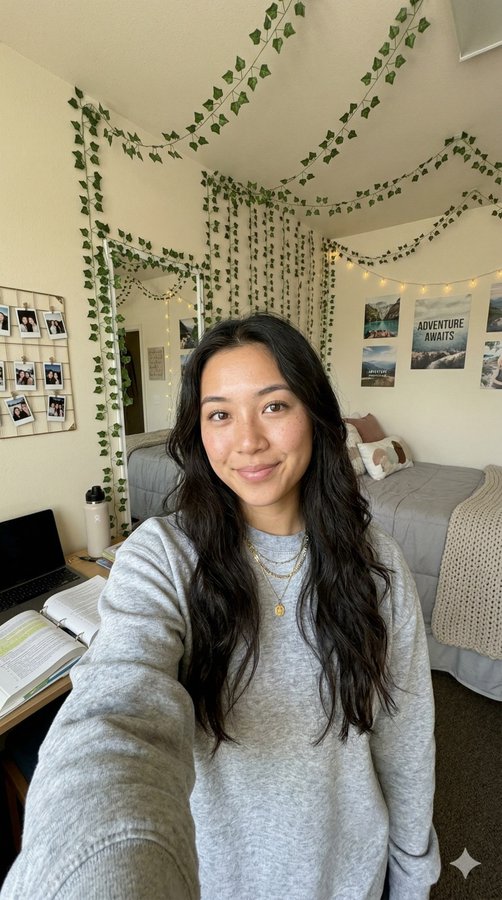
this is where most early Seedance 2.0 prompts fail in obvious ways.
operators write "phone held at arm's length" or "selfie shot of a woman" and get back a clip showing a woman literally holding a phone in front of her face. the model rendered the description literally.
the camera doesn't show the selfie POV. the camera shows a wide shot of someone holding a phone.
The Fix
phrase selfie POV explicitly:
"the camera IS her phone's front-facing selfie camera, we see her face filling the frame from the phone's perspective, no phone visible in the shot, just her looking directly into the lens as if talking to her followers."
every key phrase in that description matters:
"the camera IS her phone's front-facing selfie camera" establishes that the viewing perspective is the phone's perspective, not an external camera filming someone with a phone.
"face filling the frame from the phone's perspective" establishes the framing the selfie POV produces.
"no phone visible in the shot" explicitly removes the phone from the rendered output, preventing the literal interpretation that produces shots of someone holding a phone.
"looking directly into the lens" establishes eye contact with the camera, which is what selfie POV creates.
Stability Direction
for cloud phones in particular, real selfie videos are usually filmed with the phone propped up rather than handheld, which creates a specific stability characteristic.
for propped-phone stability: "subtle natural shake mimicking a propped-up phone."
for fully locked-off stability: "steady locked-off front-facing camera view."
for handheld instability (rare in real UGC, more common in vlog-style content): "subtle handheld shake, organic camera movement."
specifying the stability characteristic prevents the model from defaulting to either too-still (which reads as tripod-mounted production) or too-shaky (which reads as poorly-filmed amateur content).
## Real-Brand Props as the AI-Detection Defense
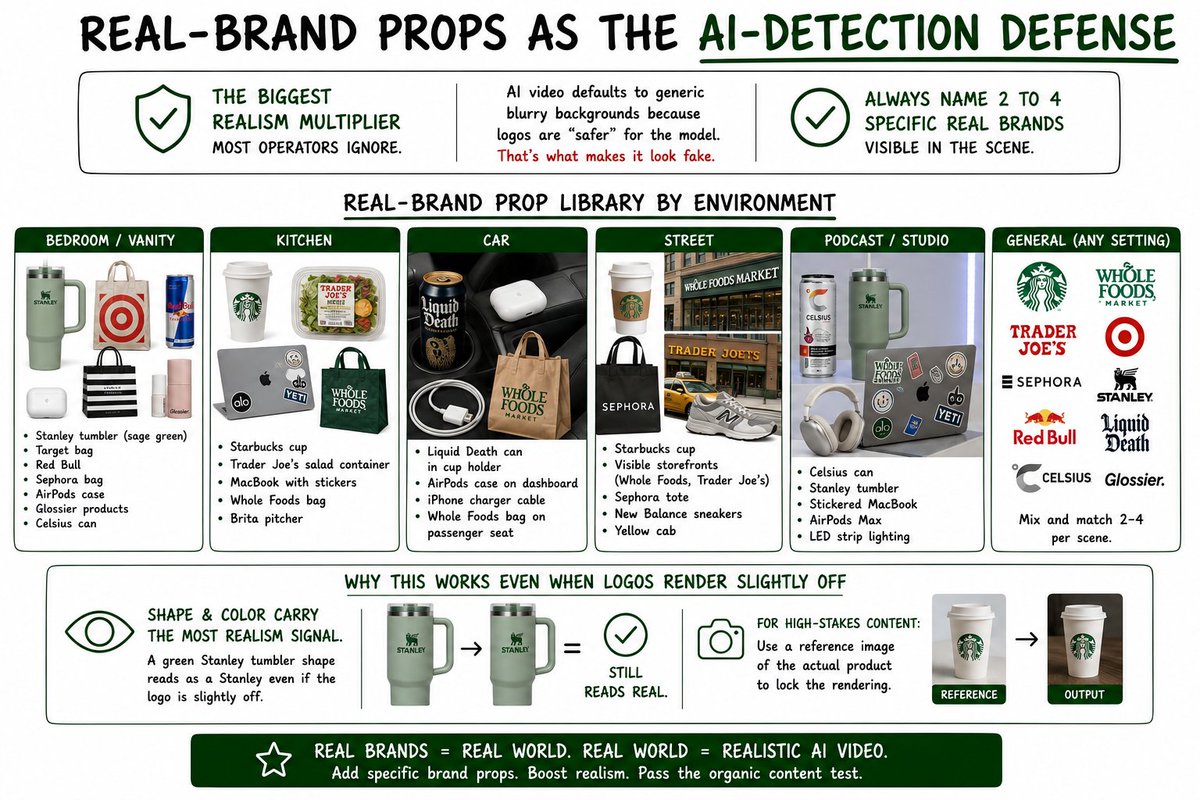
this is the single biggest realism multiplier in Seedance 2.0 prompting, and almost no operators use it correctly.
AI-generated video defaults to generic blurry backgrounds because logos are "safer" for the model to render. that exact safety is what tips viewers off as artificial. real environments contain visible brand logos everywhere: water bottles, coffee cups, product packaging, store signs, clothing tags, electronic devices.
always name 2 to 4 specific real brands visible in the scene.
Real-Brand Prop Library by Environment
bedroom or vanity scenes: Stanley tumbler (sage green), Target bag, Red Bull, Sephora bag, AirPods case, Glossier products, Celsius can.
kitchen scenes: Starbucks cup, Trader Joe's salad container, MacBook with stickers, Whole Foods bag, Brita pitcher.
car scenes: Liquid Death can in cup holder, AirPods case on dashboard, iPhone charger cable, Whole Foods bag on passenger seat.
street scenes: Starbucks cup, visible storefronts (Whole Foods, Trader Joe's), Sephora tote, New Balance sneakers, yellow cab.
podcast or studio scenes: Celsius can, Stanley tumbler, stickered MacBook, AirPods Max, LED strip lighting.
Why This Works Even When Logos Render Slightly Off
the shape and color carry most of the realism signal even if the logos render slightly off. a green Stanley tumbler shape on the desk reads as a Stanley tumbler even if the logo on the side is slightly distorted or simplified. the color and silhouette do the heavy lifting.
for high-stakes content where logo accuracy matters more, use a reference image of the actual product to lock the rendering. for most AI UGC content, the shape-and-color approach produces enough realism signal to pass the organic content test.
## On-Screen Text (Don't)
Seedance 2.0 cannot spell reliably. any request for readable text, logos, captions, or UI in frame renders as garbled gibberish.
never ask the model to render:
brand logos. add in post.
captions or subtitles. use CapCut auto-captions or equivalent.
app UIs. use a reference image and accept it'll be approximate.
website URLs in text. voiceover says it, the logo shows it in post.
platform logos. composite later.
The Workaround
generate the clip text-free. add logos, captions, and brand names in CapCut, Premiere, or After Effects. for karaoke-style word-at-a-time captions, CapCut auto-caption with the "bouncy" style works well.
for app reveal shots ("look at this app on my phone"), the production workflow is:
1. generate the selfie talking-head footage as one clip
2. film or screen-record the actual app separately
3. composite the real app screen into the insert beat in post
this is how 99% of real UGC creators handle app reveals anyway, so the assembled output reads as authentic.
## Trademark and Censorship Workarounds
named trademarked games and brands trigger censorship filters that either block the generation entirely or produce significantly degraded output.
the fix: describe the visual style, not the trademark name.
Common Trademark Workarounds
GTA 5 becomes: "stylized realism 3D animated cinematic in the visual language of an open-world crime drama video game cutscene."
Los Santos becomes: "sun-bleached West Coast city with palm trees."
Fortnite becomes: "battle royale aesthetic."
Marvel becomes: "superhero blockbuster look."
Nike becomes: "iconic striped sneakers" or use a generic real brand: "white New Balance sneakers."
The Underlying Principle
describe the visual DNA (proportions, shading, lighting, color grade) instead of naming the game or brand directly.
other phrases that produce the GTA aesthetic without triggering filters: "stylized realism 3D animation." "open-world video game cutscene aesthetic." "cel-shaded edges with realistic proportions." "early 2010s AAA action game cinematic." "neo-noir West Coast crime thriller rendered as stylized 3D game cinematic."
each of these communicates the visual style to the model without naming a specific trademarked property, which means the generation runs cleanly without censorship filter interference.
## Common Mistakes That Cause Regeneration Cycles
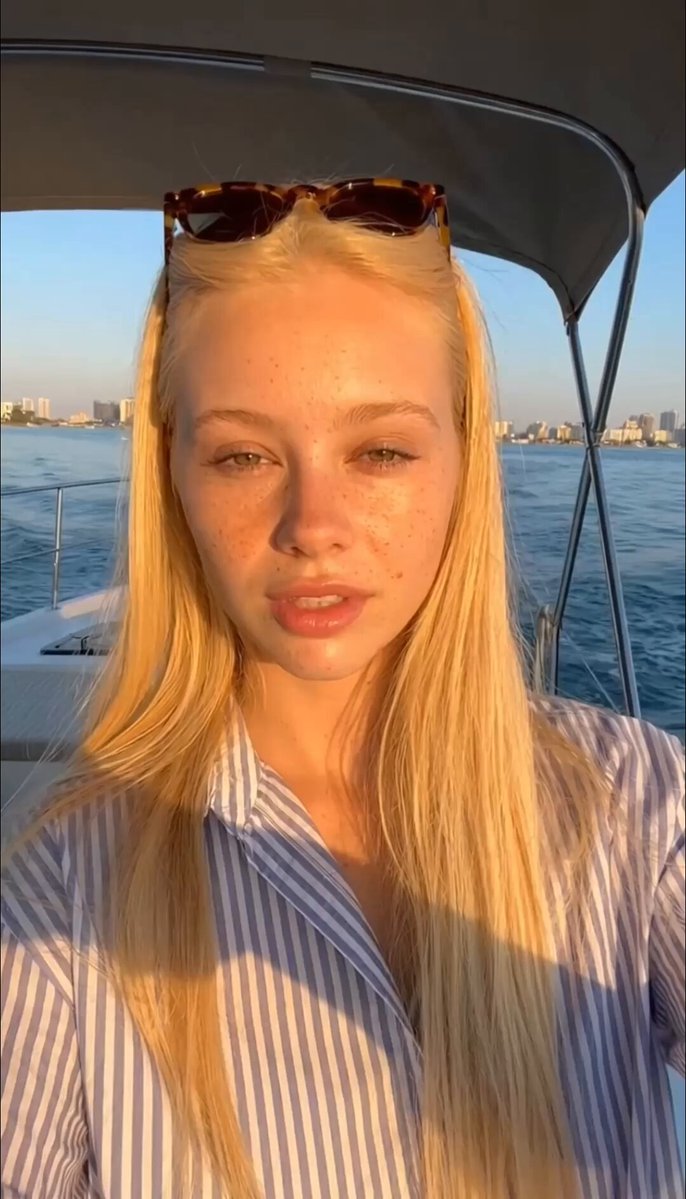
operators who can't get Seedance 2.0 to produce usable output on the first generation are typically making 1 or more of these specific mistakes:
stuffing too many micro-actions into a single clip. keep it to 1 primary action plus 1 to 2 secondary beats, calibrated to the duration. anything more produces visual chaos regardless of whether the clip is 5 seconds or 15 seconds.
writing scripts separately from the prompt. always embed dialogue inline using the "says [exact line]" pattern.
abstract style references. "Tesla Gigafactory meets heist movie" gets rendered as something completely different from what the operator imagined. describe concrete objects.
over-stacking style tags. pick 1 clear genre or aesthetic tag rather than combining 3 to 4 that conflict with each other.
polished lighting language in UGC prompts. just say "window light." cinematic lighting language produces cinematic results, which is the opposite of what AI UGC needs.
literal phone interpretation. write "the camera IS the phone's front-facing camera" rather than "phone held at arm's length."
expecting on-screen text to spell correctly. it won't. composite in post.
hyphenated acronyms. "U-G-C" gets read as "UGG." use "You Gee See" or "U G Cee."
voiceover brand names. put brand names on visible-speaker beats where the lip-sync constraint forces cleaner pronunciation.
generic backgrounds. always name 2 to 4 specific real visible brands in the scene.
## What This Means for Production Economics
operators running Seedance 2.0 with the prompting structure above generate usable output on the first or second generation consistently.
operators using the structure are producing 3 to 5x more finished clips per generation budget compared to operators producing through trial-and-error prompting that requires 4 to 6 regenerations per usable clip.
this changes the unit economics of AI UGC production significantly. at high production volumes, the difference between operators with mature Seedance 2.0 prompting disciplines and operators still figuring out the prompting structure compounds into thousands of dollars per month of differential generation costs.
building this prompting structure into the standard production workflow is what makes 30 to 50 reels per day per portfolio operationally and economically feasible. without the prompting discipline, the same production volume would require 3 to 5x the generation budget, which compresses margin to the point where the operation isn't sustainable at scale.
P.S. - if you just want us to implement this entire ai ugc structure for your campaigns instead...
DM me "SEE" on X (@adriansolarzz) and I'll show you exactly how we'd apply these principles to your specific offer.
- adrian
## 相关链接
- [Adrian Solarz](https://x.com/adriansolarzz)
- [@adriansolarzz](https://x.com/adriansolarzz)
- [5.6K](https://x.com/adriansolarzz/status/2052501455169568875/analytics)
- [@adriansolarzz](https://x.com/@adriansolarzz)
- [Upgrade to Premium](https://x.com/i/premium_sign_up)
- [5:30 AM · May 8, 2026](https://x.com/adriansolarzz/status/2052501455169568875)
- [5,618 Views](https://x.com/adriansolarzz/status/2052501455169568875/analytics)
---
*导出时间: 2026/5/8 13:34:11*
---
## 中文翻译
# 我们如何破解 Seedance 2.0 提示词写法,再也不用反复重新生成 AI UGC 视频……
**作者**: Adrian Solarz
**日期**: 2026-05-07T21:30:55.000Z
**来源**: [https://x.com/adriansolarzz/status/2052501455169568875](https://x.com/adriansolarzz/status/2052501455169568875)
---

许多使用 Seedance 2.0 的运营者都在疯狂烧 credits,同一段视频要重新生成 3 到 4 次才能得到勉强可用的结果。
但我们摸索出了一套提示词结构,能让我们稳定地在第一次或第二次生成时就拿到可用的输出。
所以在这篇文章里,我会详细拆解 Seedance 2.0 提示词结构在实际生产中是如何运作的:
- 五拍公式
- 对话嵌入规则
- 品牌名发音防御、自拍 POV 取景
- 以及真实品牌道具策略——这是抵御 AI 检测的最大防线。
如果你一直在用提示词运行 Seedance 2.0 却产出不稳定,下面就是解决方法:
## 大多数运营者误解的 15 秒硬性限制

在深入提示词结构之前,有一个每个运营者都必须内化于心的硬性技术限制,因为大多数人都在不知不觉中与它对抗。
Seedance 2.0 将每次生成的时长上限锁定在 15 秒。
在模型层面没有任何绕过方法。你无法通过提示词生成 30 秒的片段。每次生成的输出最长 15 秒,这就是天花板。
试图通过提示词生成更长片段(如“展示 X 的 30 秒片段”)的运营者,只会得到试图把 30 秒的动作压缩进可用窗口的 15 秒输出,结果就是画面混乱,整个生成完全浪费。提示词对抗模型的硬性限制,每次都会输。
如何构建更长的内容
更长的内容是通过在后期拼接多个 15 秒片段来实现的。
每个镜头单独生成,每段最多 15 秒。用第一个片段中的一帧作为第二个片段的参考图(这能锁定拼接序列中角色和场景的一致性)。在 CapCut、Premiere 或 Final Cut 中拼接片段。让所有片段的调色和颗粒感保持一致,这样组装出来的成品看起来才像一个连贯的整体。
30 秒的 AI UGC 短视频就是 2 个拼接的 15 秒片段。60 秒的长视频就是 4 个拼接片段。工作流程随所需时长线性扩展,但每次单独生成都不会超过 15 秒的上限。
如何高效利用完整的 15 秒
在单次 15 秒生成内,提示词结构对时长的利用方式同样重要。
把所有角色和环境细节放在提示词的前面,因为模型在构建生成的视觉基线时,会更重视靠前的 token。
用 1 个连续的镜头运动来承载故事弧线(推近、环绕、拉远),而不是描述“切到”之类的转场。模型会被转场描述搞糊涂,产出的画面无法干净地匹配切点的任何一侧。
通过场景内的光线变化来推进,而不是更换地点。一段 15 秒的生成,描绘晨光透过百叶窗逐渐照亮房间,效果很干净。而一段试图在中途从卧室切换到厨房的 15 秒生成,只会产生视觉混乱。
一旦你内化了 15 秒的上限,你的提示词结构就会随之改变。你不再试图把复杂的多拍叙事塞进单次生成,而是开始把每次生成设计为在 15 秒窗口内展开的 1 个具体场景,更长的叙事则通过拼接序列来构建。
## 每次生成都遵循的五拍提示词公式

每一套能在首次生成时就稳定产出可用结果的 Seedance 2.0 提示词,都遵循同一个五拍公式。
第 1 拍:带有具体视觉细节的主体
每个提示词都以主体和具体视觉细节开头:年龄、发色和发型、服装、配饰、族裔。
模糊的主体描述会在多次生成中产生千变万化的主体。具体的主体描述则会产出一致的、符合运营者真正想创建的形象的主体。
“一个女人”在多次生成中会产生千差万别的输出。“一位 28 岁的女性,留齐肩棕发,穿宽松的白色 T 恤,戴金色圆环耳环”则会产出稳定落在所指定视觉范围内的结果。
第 2 拍:场景与环境
用一个具体、有画面感的位置,而不是抽象的风格引用。
抽象的风格引用会导致极不一致的渲染结果,因为模型必须自行解读抽象引用在视觉上的含义。具体的位置描述则给模型一个明确的视觉目标。
“奢华美学”是抽象的。“一间阳光洒落的厨房,有大理石台面、放着樱桃番茄的木质砧板,晨光从水槽上方的窗户倾泻进来”是具体的。
具体描述恰恰能产出抽象描述想要唤起的那种奢华美学,因为具体的视觉元素组合成了美学本身,而不是让模型去猜测美学是什么意思。
第 3 拍:片段时长内的动作
1 到 2 个清晰的主要动作,加上一两个次要节拍,并根据片段时长进行校准。
在提示词里塞进 6 到 8 个不同动作的运营者会得到视觉混乱,因为即使有 15 秒的上限,模型也无法在时长内干净地容纳所有动作。
公式是:1 个锚定片段的主要动作,加上 1 到 2 个增加层次感的次要节拍。对于接近 15 秒上限的较长片段,你可以扩展为 2 个主要动作,并在它们之间加入平滑过渡。“她一边喝着咖啡一边望向窗外,然后转向镜头开始说话”就是 2 个主要动作,且它们之间有干净的过渡,这样读起来自然而不仓促。
对于较短的片段(5 到 8 秒),1 个主要动作加 1 个次要节拍才是合适的密度。无论片段时长如何,提示词结构保持不变。只有提示词内部的动作密度随时长缩放。
节拍 4:镜头调度
使用具名的电影术语明确指定镜头运动,而不是模糊的形容词。
基于电影数据训练的模型会对电影词汇做出响应。“跟踪镜头”、“推轨推进”、“环绕”、“弧形围绕”、“升降上摇”、“甩镜头”、“带自然抖动的手持”、“固定机位”、“第一人称 POV”都能产生可预测、可控的镜头行为。
像“有趣的镜头运动”这样的模糊术语会产生不可预测的输出,因为模型必须猜测“有趣”在这个语境中意味着什么。
节拍 5:光线 + 风格 + 氛围标签
堆叠在提示词的末尾,而不是分散在全文中。
光线携带的氛围信息几乎比任何其他变量都多。在提示词末尾给光线一个专属区块,比把它埋在其他场景描述符列表中能产生更强的输出。
具名的光线术语效果最好:“黄金时刻”、“蓝调时刻”、“魔幻时刻”、“轮廓光”、“逆光”、“体积雾”、“暖色钨丝灯”、“冷色荧光灯”、“霓虹点缀”、“来自镜头左侧的柔和窗光”。
## 台词必须内嵌写入

这是 Seedance 2.0 新手最常见的失败模式。
他们先写视觉场景描述,然后在下面另写一个独立的“旁白脚本”区块。模型会把这两者当作 2 个独立的输入,生成的输出中台词与画面无法正确同步。
台词必须使用“says(说)[确切台词]”的归属模式内嵌写入。
错误的做法:
“一个 28 岁的女人在阳光充足的厨房里喝了一口咖啡。
旁白脚本:‘我真心不敢相信这个产品改变了我的日常。’”
正确的做法:
“一个 28 岁的女人在阳光充足的厨房里喝了一口咖啡,放下杯子,睁大兴奋的眼睛直视镜头,说道:‘我真心不敢相信这个产品改变了我的日常。’”
台词嵌入的规则
每次都使用“says”归属。她说、他问、声音说完。把每句台词与同一句话中对应的画面时刻绑定。
把品牌名放在说话者可见、镜头能看到说话者嘴部的节拍上。唇形同步能迫使发音比“切出画面配旁白”节拍更清晰。
避免在切出画面配旁白的节拍上放品牌名。当说话者不可见时,模型会把品牌名念得含糊不清,因为没有视觉唇形同步的约束来迫使清晰发音。
结尾要有力。一句干净的 CTA,而不是 3 句冗余的。把多个 CTA 塞进片段时长内,会导致音频超出时限被截断,无论你生成的是 8 秒还是 15 秒的片段。
## 品牌名发音防御体系
这是 Seedance 2.0 制作中最大的发音问题,而它有一个结构化的解决方案。
Seedance 2.0 的 TTS 经常把品牌名念错。UGC 会变成“UGG”(像那款雪地靴)。新品牌名会被含糊地带入周围的对话中。短的首字母缩略词会先被当作单词解析而非逐字母念出。多音节品牌名会被压缩成一个含糊的单词。
解决方案是 3 层发音防御体系,应用于每一次品牌名提及。
第 1 层:拼读拼写
把口播的缩略词按拼读拼写:UGC 变成“You Gee See”或“U G Cee”。UGCMaxxing 变成“U G Cee Maxxing”或“You Gee See Maxxing”。SaaS 变成“Sass”(作为一个词)或“S. A. A. S.”(逐字母)。AI 变成带点的“A. I.”。CEO 变成“C. E. O.”。
多音节品牌名要拆分:Cantina 变成“Can Teena”(两个词,不是一个)。Klaviyo 变成“Klay Vee O”。模型容易念糊的每个音节都要给出明确的拼读指引。
第 2 层:吐字指示
在台词前加入吐字指示:
“她稍微放慢速度,清晰地念出品牌名,说道……”
“声音在画面上清晰响亮,每个字都清晰可辨……”
“她说道,同时清楚地强调每个音节……”
这些指示告诉模型在品牌名的位置特意放慢音频,比让音频以默认速度播放能产生更清晰的发音。
第 3 层:用破折号重复
在片段中间把品牌名说两遍,重复之间用破折号分隔:
“它叫 Can Teena——Can Teena,我真的太迷它了。”
这同时起到 3 个作用:它在对话中听起来自然(真人在介绍品牌名时也会重复),它给 TTS 两次机会念准发音,而且就算模型仍然念得稍有含糊,它也能教会观众正确的发音。
品牌名位置规则
品牌名只放在说话者可见的节拍上。
当品牌名被说出的那一刻,镜头应该能看到说话者的嘴部。唇形同步会迫使模型产生更清晰的音频,因为视觉约束要求嘴唇与词语匹配。
切出画面配旁白的节拍(说话者不可见)会产生含糊的品牌名,因为没有视觉约束迫使清晰发音。永远不要把品牌名放在旁白节拍上。设计脚本结构,让品牌名总是落在说话者在镜头画面中的时刻。
## 真正有效的自拍 POV 取景

这正是大多数早期 Seedance 2.0 提示词以明显方式失败的地方。
操作者写下"手臂伸直举着手机"或"女性自拍镜头",结果得到的是一段展示女性真的把手机举在脸前的视频。模型把描述按字面渲染了。
镜头没有展示自拍视角。镜头展示的是某人举着手机的广角镜头。
**修正方法**
明确地表述自拍视角:
"镜头就是她手机的前置自拍摄像头,从手机的视角我们看到她的脸充满整个画面,镜头中看不到手机,只有她直视镜头,就像在和粉丝说话。"
这段描述中的每个关键词都很重要:
"镜头就是她手机的前置自拍摄像头"确立了观看视角是手机的视角,而不是外部相机拍摄某人拿着手机。
"从手机的视角脸充满画面"确立了自拍视角产生的构图。
"镜头中看不到手机"明确地将手机从渲染输出中移除,防止产生某人举着手机镜头的字面解读。
"直视镜头"确立了与摄像头的眼神接触,这正是自拍视角所营造的效果。
**稳定性方向**
尤其是云端手机,真实的自拍视频通常是用支架撑着手机而不是手持拍摄,这会产生特定的稳定性特征。
支架撑机稳定性:"模仿支架撑起手机时轻微的自然抖动。"
完全固定的稳定性:"稳定的固定机位前置摄像头视角。"
手持不稳定性(真实 UGC 中较少见,在 vlog 风格内容中更常见):"轻微的手持抖动,自然的镜头移动。"
明确指定稳定性特征可以防止模型默认为过于静止(看起来像三脚架拍摄的专业制作)或过于晃动(看起来像拍得很差的业余内容)。
## 真实品牌道具作为 AI 检测防御

这是 Seedance 2.0 提示词中最强大的真实感倍增器,而几乎没有操作者能正确使用它。
AI 生成的视频默认使用模糊的通用背景,因为对模型来说渲染 logo "更安全"。而这种安全恰恰会让观众察觉其人工痕迹。真实环境中到处都是可见的品牌 logo:水瓶、咖啡杯、产品包装、商店招牌、服装标签、电子设备。
始终在场景中指定 2 到 4 个具体的真实品牌。
**按环境分类的真实品牌道具库**
卧室或梳妆台场景:Stanley 保温杯(鼠尾草绿)、Target 购物袋、红牛、丝芙兰袋、AirPods 充电盒、Glossier 产品、Celsius 罐装饮料。
厨房场景:星巴克杯子、Trader Joe's 沙拉盒、贴满贴纸的 MacBook、Whole Foods 购物袋、Brita 滤水壶。
车内场景:杯架里的 Liquid Death 罐、仪表盘上的 AirPods 充电盒、iPhone 充电线、副驾驶座上的 Whole Foods 购物袋。
街头场景:星巴克杯子、可见的店面(Whole Foods、Trader Joe's)、丝芙兰托特包、New Balance 运动鞋、黄色出租车。
播客或工作室场景:Celsius 罐、Stanley 保温杯、贴满贴纸的 MacBook、AirPods Max、LED 灯带。
**为什么即使 logo 渲染略有偏差也依然有效**
即使 logo 渲染略有偏差,形状和颜色也能承载大部分真实感信号。即使侧面的 logo 略有变形或简化,桌上的绿色 Stanley 保温杯形状看起来仍然像 Stanley 保温杯。颜色和轮廓承担了主要作用。
对于 logo 准确性更为重要的高风险内容,使用实际产品的参考图来锁定渲染效果。对于大多数 AI UGC 内容,形状加颜色的方法足以产生通过有机内容检测所需的真实感信号。
## 屏幕上的文字(不要)
Seedance 2.0 无法可靠地拼写。任何要求画面中出现可读文字、logo、字幕或 UI 的请求,都会渲染成乱码。
永远不要要求模型渲染:
品牌 logo。后期添加。
字幕。使用 CapCut 自动字幕或类似工具。
App 界面。使用参考图,并接受它只是近似效果。
文字形式的网站 URL。旁白念出来,logo 在后期展示。
平台 logo。后期合成。
**变通方法**
生成不含文字的视频片段。在 CapCut、Premiere 或 After Effects 中添加 logo、字幕和品牌名称。对于逐词显示的卡拉 OK 式字幕,CapCut 自动字幕的"弹跳"(bouncy)风格效果很好。
对于 App 展示镜头("看看我手机上的这个 App"),制作流程是:
1. 将自拍口播素材生成为一个片段
2. 单独拍摄或录屏实际的 App
3. 在后期将真实的 App 界面合成到插入镜头中
反正 99% 的真实 UGC 创作者就是这样处理 App 展示的,所以合成后的成品看起来很真实。
## 商标与审查规避方法
指名的商标游戏和品牌会触发审查过滤器,要么完全阻止生成,要么产生明显降质的输出。
解决方法:描述视觉风格,而不是商标名称。
**常见商标规避方法**
GTA 5 变为:"以开放世界犯罪剧情游戏过场动画视觉语言呈现的风格化写实 3D 动画电影感。"
洛圣都变为:"阳光褪色的西海岸城市,棕榈树环绕。"
堡垒之夜变为:"大逃杀美学。"
漫威变为:"超级英雄大片质感。"
耐克变为:"标志性条纹运动鞋",或使用通用的真实品牌:"白色 New Balance 运动鞋。"
**底层原理**
描述视觉 DNA(比例、阴影、光照、调色),而不是直接点名游戏或品牌。
其他在不触发过滤器的情况下产生 GTA 美学的表述:"风格化写实 3D 动画。""开放世界游戏过场动画美学。""赛璐璐风格边缘配写实比例。""2010 年代初 3A 动作游戏电影感。""新黑色西海岸犯罪惊悚片,以风格化 3D 游戏电影感呈现。"
这些方式都能将视觉风格传达给模型,而无需点名具体的注册商标作品,这意味着生成过程可以顺畅进行,不会受到审查过滤器的干扰。
## 导致反复重新生成的常见错误

无法让 Seedance 2.0 在首次生成时就产出可用结果的操作者,通常犯了以下一个或多个具体错误:
往单个片段里塞入太多微动作。保持 1 个主要动作加上 1 到 2 个次要节拍,并根据时长进行校准。无论片段是 5 秒还是 15 秒,超出这个范围都会造成视觉混乱。
将台词与提示词分开撰写。始终使用“says [原话台词]”的模式将对话内联嵌入。
抽象的风格引用。“特斯拉超级工厂遇上劫案电影”会被渲染成与操作者想象完全不同的东西。请描述具体物体。
风格标签堆砌过多。选择 1 个清晰的类型或美学标签,而不是组合 3 到 4 个互相冲突的标签。
在 UGC 提示词中使用精致的灯光语言。直接说“窗户光”就行。电影级灯光语言会产生电影级效果,而这恰恰与 AI UGC 的需求相反。
对手机的字面化解读。写“镜头就是手机的前置摄像头”,而不是“手臂伸直举着手机”。
期望屏幕文字拼写正确。不会的。后期合成。
带连字符的缩写。“U-G-C”会被读成“UGG”(雪地靴品牌)。使用“You Gee See”或“U G Cee”。
配音中的品牌名。把品牌名放在可见说话者的节拍上,因为唇形同步的约束会迫使发音更清晰。
通用的背景。始终在场景中点名 2 到 4 个具体的真实可见品牌。
## 这对生产经济学的意义
使用上述提示词结构运行 Seedance 2.0 的操作者,能够持续稳定地在第一次或第二次生成时就获得可用结果。
使用该结构的操作者,与那些通过反复试错提示词、每个可用片段需要 4 到 6 次重新生成的操作者相比,在同样的生成预算下能产出 3 到 5 倍的成品片段。
这显著改变了 AI UGC 生产的单位经济模型。在高产量下,掌握成熟 Seedance 2.0 提示词纪律的操作者与仍在摸索提示词结构的操作者之间的差距,会累积成每月数千美元的生成成本差异。
将这套提示词结构固化到标准生产流程中,才是让每个投资组合每天 30 到 50 条视频在运营和经济上可行的关键。没有提示词纪律,同样的产量将需要 3 到 5 倍的生成预算,这会压缩利润率,导致业务在规模化时无法持续。
附言——如果你只想让我们为你的营销活动直接落地这整套 AI UGC 结构……
在 X 上私信我"SEE"(@adriansolarzz),我会向你展示我们如何将这些原则精确应用到你的具体产品上。
—— adrian
## 相关链接
- [Adrian Solarz](https://x.com/adriansolarzz)
- [@adriansolarzz](https://x.com/adriansolarzz)
- [5.6K](https://x.com/adriansolarzz/status/2052501455169568875/analytics)
- [@adriansolarzz](https://x.com/@adriansolarzz)
- [升级至 Premium](https://x.com/i/premium_sign_up)
- [2026年5月8日 凌晨5:30](https://x.com/adriansolarzz/status/2052501455169568875)
- [5,618 次浏览](https://x.com/adriansolarzz/status/2052501455169568875/analytics)
---
*导出时间: 2026/5/8 13:34:11*