# I found 30+ useful GitHub repos and stopped losing track of them (Claude + Obsidian, Full Guide)
**作者**: Gipp
**日期**: 2026-07-20T10:06:18.000Z
**来源**: [https://x.com/gippp69/status/2079145870881325551](https://x.com/gippp69/status/2079145870881325551)
---
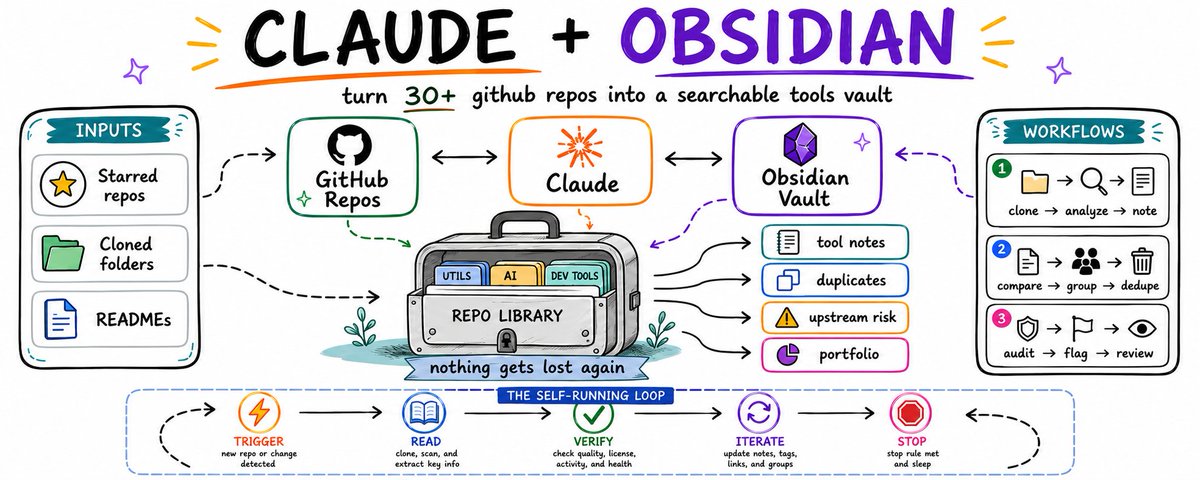
I star a repo, clone it, get it half-working, and move on to the next problem. Three months later I find the same folder again and can't remember why I grabbed it, whether I ever actually used it, or if I cloned the same kind of tool twice under a different name. Thirty-plus repos in, that stops being a joke and starts costing real time.
Why a README per repo isn't enough?
A README tells you what the author built it for. It says nothing about why you grabbed it, whether you're actually using it, or whether you already have three other tools doing the exact same job.
That's the part nobody writes down, because nobody writes it down for repos that aren't theirs. You clone something useful, get it running once, and the context for why disappears the moment you close the terminal. Multiply that by 30 repos sitting in the same folder and you get a graveyard you're scared to clean up, because you're not sure what's load-bearing and what's dead weight.
None of that shows up in any single README. It only shows up when something reads across everything you've collected, on a schedule, without you remembering to check.
What you'll end up with?
One vault, two folders:
```
found-tools-vault/
├── notes/ # one markdown note per repo you've grabbed
│ ├── some-scraper-tool.md
│ ├── some-telegram-lib.md
│ └── ...
└── memory/
└── PORTFOLIO.md # the four cross-repo passes write here
```
Plain markdown on disk. Open it in Obsidian, or cat it from the terminal. No database, nothing you can't read yourself.
Set it up?
On Mac or Linux:
```
mkdir -p ~/found-tools-vault/notes ~/found-tools-vault/memory
```
On Windows, PowerShell:
```
New-Item -ItemType Directory -Force -Path "$HOME\found-tools-vault\notes","$HOME\found-tools-vault\memory"
```
Point Loop 1 and Loop 2, below, at this folder and the setup is done. Everything past here is what you tell Claude to do inside it.
The stack: same three pieces, just pointed at other people's code?
The vault. One Obsidian folder, one note per tool you've cloned, plus a folder for cross-repo passes.
The source. Every repo sitting in your clone folder, whether you use it daily or forgot it exists.
The brain. Claude, split by job. Cheap model reads the repo and its README. Sonnet does the judgment calls: is this a duplicate of something else you already grabbed, and is it actually worth the disk space.
Loop 1: one note per tool, written by Claude, not by you?
Important, before you run this on anything real:
- Never let this loop push code, install dependencies, or run anything from the tool itself. Read-only, always.
- why_i_grabbed_it gets filled from your own notes, commits, or usage elsewhere in your projects, not guessed from the repo's own README.
- If you can't tell whether you're using a tool, write the note with status: unclear instead of skipping it.
```
TRIGGER: new repo cloned into the folder, or once daily
STEPS:
1. Read the repo: README, package.json / requirements.txt, last
upstream commit date, and check if it's referenced anywhere
in your other projects (imports, configs, scripts)
2. Write or update notes/<repo-name>.md with:
---
repo:
what_it_does:
why_i_grabbed_it:
last_upstream_commit:
referenced_in_my_projects: []
status: in-use | shelved | duplicate | unclear
---
## What it actually does
## Why I grabbed it
## Am I actually using it
VERIFY: every field filled, "referenced_in_my_projects" checked
against real usage, not assumed
STOP: verify passes, or 2 retries, then flag for manual review
```
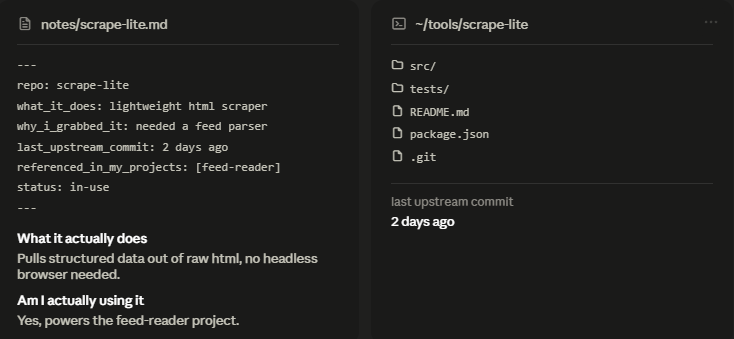
This alone is worth building even without Loop 2. The first time you read 30 of these back to back, half of them will surprise you, either because you forgot you were using the tool, or because you never were.
One generated tool note, next to the actual cloned folder it describes. This is the context you'd otherwise never write down.
What 30 found repos actually looks like once Loop 1 has run?
A list Claude regenerates every time you clone something new, pulled straight from the notes:
- github.com/author/scrape-lite - in-use, last upstream commit 2 days ago, referenced in: feed-reader project
- github.com/author/tg-bot-kit - in-use, last upstream commit 5 days ago, referenced in: two of my bots
- github.com/author/quick-scheduler - shelved, last upstream commit 41 days ago, referenced in: none
- github.com/author/api-wrapper-x - in-use, last upstream commit 1 day ago, referenced in: one project
- github.com/author/rss-to-json - duplicate, last upstream commit 3 days ago, referenced in: none (same job as scrape-lite)
- github.com/author/cheap-queue - in-use, last upstream commit 6 hours ago, referenced in: two projects
- github.com/author/webhook-relay-lib - shelved, last upstream commit 96 days ago, referenced in: none
- github.com/author/simple-cache - in-use, last upstream commit 2 days ago, referenced in: three projects
- github.com/author/old-scraper - abandoned upstream, last upstream commit 340 days ago, referenced in: none
- github.com/author/notify-me - unclear, last upstream commit 12 days ago, referenced in: not sure
- github.com/author/token-utils - in-use, last upstream commit 1 day ago, referenced in: one project
- github.com/author/quick-parser - duplicate, last upstream commit 8 days ago, referenced in: none (same job as rss-to-json)
- github.com/author/tiny-orm - shelved, last upstream commit 55 days ago, referenced in: none
- github.com/author/rate-limiter - in-use, last upstream commit 3 days ago, referenced in: two projects
- github.com/author/config-loader - in-use, last upstream commit 4 days ago, referenced in: most of my projects
- github.com/author/legacy-fetch - abandoned upstream, last upstream commit 400+ days ago, referenced in: none
- github.com/author/env-check - in-use, last upstream commit 9 days ago, referenced in: one project
- github.com/author/pretty-logs - shelved, last upstream commit 70 days ago, referenced in: none
- github.com/author/proxy-list - unclear, last upstream commit 20 days ago, referenced in: not sure
- github.com/author/backoff-lib - in-use, last upstream commit 6 days ago, referenced in: two projects
- github.com/author/dead-simple-db - shelved, last upstream commit 88 days ago, referenced in: none
- github.com/author/quick-hash - in-use, last upstream commit 1 day ago, referenced in: one project
- github.com/author/retry-wrapper - duplicate, last upstream commit 14 days ago, referenced in: none (same job as backoff-lib)
- github.com/author/format-time - in-use, last upstream commit 2 days ago, referenced in: most of my projects
- github.com/author/quick-mailer - shelved, last upstream commit 50 days ago, referenced in: none
- github.com/author/health-check-lib - in-use, last upstream commit 5 days ago, referenced in: two projects
- github.com/author/dotenv-plus - in-use, last upstream commit 3 days ago, referenced in: most of my projects
- github.com/author/simple-lock - unclear, last upstream commit 30 days ago, referenced in: not sure
- github.com/author/old-notify - abandoned upstream, last upstream commit 500+ days ago, referenced in: none
- github.com/author/tiny-scheduler - duplicate, last upstream commit 18 days ago, referenced in: none (same job as quick-scheduler)

(names above are placeholders, illustrating the shape of the list, not the actual tools)
Thirty lines is nothing to read manually. It's also enough to notice you have three separate retry-logic libraries doing the same job, and one of the repos you're actually depending on hasn't had an upstream commit in over a year.
The vault's graph view once all 30 notes exist: every tool as a node, the duplicates and shared-purpose repos pulled into visible clusters.
Loop 2: the passes that only work once you've collected 30+ tools?
A single tool's README can't tell you this. Only something that reads across everything you've grabbed can.
```
TRIGGER: every 12 hours
STEPS:
Pass 1, actually shelved:
flag any repo with status: in-use but not referenced in any of
your projects for 30+ days, cross-check against your own repos
for real usage, not assumptions
Pass 2, duplicate tools:
compare "what it actually does" across all notes, group anything
solving the same problem, confirmed by matching function names
or matching purpose, not just similar-sounding descriptions
Pass 3, upstream risk:
flag any tool you depend on where the last upstream commit is
120+ days old, so you know which dependencies could go stale
on you without warning
Pass 4, the honest read:
one line per tool on whether it earns the disk space and the
mental overhead of remembering it exists, no softening
VERIFY: each pass writes to memory/PORTFOLIO.md, Pass 2's groupings
backed by an actual shared function or purpose match
STOP: all four passes complete, or a pass fails and gets logged,
never silently skipped
```
Pass 3 is the one that actually changes how you work. You don't realize you're depending on three tools whose maintainers went quiet a year ago until it's sitting in a list in front of you.
A risk table generated from Pass 3: tools you're actually using, sorted by how long since their upstream project last moved.

Try the manual version first?
Same rule as always. Don't schedule anything you haven't proven by hand.
```
You will work in a loop until the task meets the bar.
TASK:
Read every repo folder in [path]. For each one, note what it does,
why you originally grabbed it, whether you're still actually using
it, and how long since the upstream project last committed. Then
compare across all repos: find duplicates and anything you depend
on that's gone quiet upstream.
SUCCESS CRITERIA (strict, no soft passes):
- every "duplicate" is backed by an actual matching function or
purpose, not similar-sounding descriptions
- every "shelved" repo includes days since you last referenced it
anywhere in your own projects
- upstream risk is based on real commit dates, not assumptions
LOOP PROTOCOL, repeat every turn:
1. PLAN - state the single next step
2. DO - produce or improve the output
3. VERIFY - score 1-10 on each criterion, be brutally honest
4. DECIDE - if every criterion is 8+, print "FINAL" and stop
RULES:
- Never call it done until every criterion is 8+
- Do not ask me questions, make a sensible assumption and continue
Begin. Run the loop until FINAL.
```
If the duplicate list or the upstream-risk list surprises you, it earns a schedule. If it just confirms what you already knew, don't automate it yet.
The order that actually works?
Get Loop 1 running until every cloned repo has a real note, not a placeholder.
Let it sit for a week or two. Every new tool you grab gets a note automatically from there on.
Only then turn on Loop 2. The duplicate and upstream-risk passes need enough notes to actually collide against.
Schedule it last, after you've watched it run clean by hand at least twice.
What it costs?
Loop 1 runs per new clone, so it scales with how much you actually grab, not with a fixed schedule. Most weeks that's a handful of cheap-model calls.
Loop 2 runs twice a day across 30+ notes. Move Pass 1 and Pass 3 to the cheap model, they're lookups, not judgment calls. Keep Pass 2 and Pass 4 on Sonnet, since spotting a real duplicate and giving an honest read both need a model that can actually reason about what it's comparing. Split that way, two runs a day across a 30-repo collection costs less than the time you'd spend doing the same audit by hand once.
The one thing to remember?
A README tells you what a tool does. This tells you which of the 30 tools you've found you're actually using, which ones are quietly duplicating each other, and which ones you're depending on that nobody's maintaining anymore.
The value was never in any single tool note. It's in the fact that nothing you've collected can quietly rot, quietly duplicate, or quietly go unmaintained without something writing that down where you'll actually see it.
Build Loop 1 first. Let it run for two or three weeks before you touch Loop 2. The duplicate and upstream-risk passes are useless with five repos. They start paying for themselves somewhere past twenty.
If you want more breakdowns like this, I post one every couple of days on Telegram and X. Both free.
X - https://x.com/gippp69
Telegram - https://t.me/GipArcAI
## 相关链接
- [Gipp](https://x.com/gippp69)
- [@gippp69](https://x.com/gippp69)
- [11K](https://x.com/gippp69/status/2079145870881325551/analytics)
- [github.com/author/scrape-lite](https://github.com/author/scrape-lite)
- [github.com/author/tg-bot-kit](https://github.com/author/tg-bot-kit)
- [github.com/author/quick-scheduler](https://github.com/author/quick-scheduler)
- [github.com/author/api-wrapper-x](https://github.com/author/api-wrapper-x)
- [github.com/author/rss-to-json](https://github.com/author/rss-to-json)
- [github.com/author/cheap-queue](https://github.com/author/cheap-queue)
- [github.com/author/webhook-relay-lib](https://github.com/author/webhook-relay-lib)
- [github.com/author/simple-cache](https://github.com/author/simple-cache)
- [github.com/author/old-scraper](https://github.com/author/old-scraper)
- [github.com/author/notify-me](https://github.com/author/notify-me)
- [github.com/author/token-utils](https://github.com/author/token-utils)
- [github.com/author/quick-parser](https://github.com/author/quick-parser)
- [github.com/author/tiny-orm](https://github.com/author/tiny-orm)
- [github.com/author/rate-limiter](https://github.com/author/rate-limiter)
- [github.com/author/config-loader](https://github.com/author/config-loader)
- [github.com/author/legacy-fetch](https://github.com/author/legacy-fetch)
- [github.com/author/env-check](https://github.com/author/env-check)
- [github.com/author/pretty-logs](https://github.com/author/pretty-logs)
- [github.com/author/proxy-list](https://github.com/author/proxy-list)
- [github.com/author/backoff-lib](https://github.com/author/backoff-lib)
- [github.com/author/dead-simple-db](https://github.com/author/dead-simple-db)
- [github.com/author/quick-hash](https://github.com/author/quick-hash)
- [github.com/author/retry-wrapper](https://github.com/author/retry-wrapper)
- [github.com/author/format-time](https://github.com/author/format-time)
- [github.com/author/quick-mailer](https://github.com/author/quick-mailer)
- [github.com/author/health-check-lib](https://github.com/author/health-check-lib)
- [github.com/author/dotenv-plus](https://github.com/author/dotenv-plus)
- [github.com/author/simple-lock](https://github.com/author/simple-lock)
- [github.com/author/old-notify](https://github.com/author/old-notify)
- [github.com/author/tiny-scheduler](https://github.com/author/tiny-scheduler)
- [https://x.com/gippp69](https://x.com/gippp69)
- [https://t.me/GipArcAI](https://t.me/GipArcAI)
- [Upgrade to Premium](https://x.com/i/premium_sign_up)
- [6:06 PM · Jul 20, 2026](https://x.com/gippp69/status/2079145870881325551)
- [11.6K Views](https://x.com/gippp69/status/2079145870881325551/analytics)
- [View quotes](https://x.com/gippp69/status/2079145870881325551/quotes)
---
*导出时间: 2026/7/20 23:27:16*
---
## 中文翻译
# 我找到了 30 多个有用的 GitHub 仓库,不再让它们失控(Claude + Obsidian 完整指南)
**作者**: Gipp
**日期**: 2026-07-20T10:06:18.000Z
**来源**: [https://x.com/gippp69/status/2079145870881325551](https://x.com/gippp69/status/2079145870881325551)
---

我给一个仓库点星标、克隆它、让它跑通一半,然后转向下一个问题。三个月后我再次发现同一个文件夹,却完全不记得当初为什么要拿它,我到底有没有用过它,或者我是否以另一个名字克隆了两次同样的工具。当仓库数量超过三十个时,这就不再是个玩笑,而是开始实实在在地浪费时间。
为什么每个仓库的 README 不够用?
README 告诉你作者构建它是为了什么。但它没说清楚你为什么要拿它,你是否真的在使用它,或者你是否已经有三个其他工具在做完全相同的工作。
这部分没人写下来,因为没人会为不属于自己的仓库写这些东西。你克隆了一些有用的东西,运行了一次,当你关闭终端的那一刻,关于“为什么”的上下文就消失了。把乘数放大到坐在同一个文件夹里的 30 个仓库,你会得到一个你不敢清理的“坟墓”,因为你不确定什么是支撑性的,什么是累赘。
这些信息不会出现在任何一个单一的 README 中。只有当某个东西按计划遍历你收集的所有内容时,并且不需要你记得去检查,它才会显现。
最终你会得到什么?
一个库,两个文件夹:
```
found-tools-vault/
├── notes/ # 每个你克隆的仓库对应一个 markdown 笔记
│ ├── some-scraper-tool.md
│ ├── some-telegram-lib.md
│ └── ...
└── memory/
└── PORTFOLIO.md # 四个跨仓库检查流程会写入这里
```
磁盘上的纯 markdown。用 Obsidian 打开,或者在终端里用 cat 查看。没有数据库,没有任何你自己读不懂的东西。
如何设置?
在 Mac 或 Linux 上:
```
mkdir -p ~/found-tools-vault/notes ~/found-tools-vault/memory
```
在 Windows 上,使用 PowerShell:
```
New-Item -ItemType Directory -Force -Path "$HOME\found-tools-vault\notes","$HOME\found-tools-vault\memory"
```
将下面的 Loop 1 和 Loop 2 指向这个文件夹,设置就完成了。之后的所有内容就是你要告诉 Claude 在里面做什么。
技术栈:还是那三部分,只是指向了别人的代码?
库。一个 Obsidian 文件夹,每个你克隆的工具一个笔记,外加一个用于跨仓库检查的文件夹。
来源。每一个坐在你克隆文件夹里的仓库,无论你是每天使用还是忘记了它的存在。
大脑。Claude,按任务分工。便宜的模型读取仓库及其 README。Sonnet 负责判断:这是否是你已有的其他东西的复制品,它是否真的值得占据磁盘空间。
Loop 1:每个工具一个笔记,由 Claude 写,而不是你?
重要的一点,在你对真实数据运行此操作之前:
- 永远不要让这个循环推送代码、安装依赖或运行工具本身的任何东西。只读,始终只读。
- `why_i_grabbed_it`(我为什么拿它)应从你自己的笔记、提交或项目中的其他使用情况填写,而不是从仓库自己的 README 中猜测。
- 如果你无法确定是否在使用某个工具,请将状态写为 `unclear`(不清楚),而不是跳过它。

```
TRIGGER: 新仓库克隆到文件夹,或每天一次
STEPS:
1. 读取仓库:README、package.json / requirements.txt、最后
的上游提交日期,并检查它是否被引用到你其他项目
的任何地方(imports、configs、scripts)
2. 写入或更新 notes/<repo-name>.md,内容如下:
---
repo:
what_it_does:
why_i_grabbed_it:
last_upstream_commit:
referenced_in_my_projects: []
status: in-use | shelved | duplicate | unclear
---
## What it actually does
## Why I grabbed it
## Am I actually using it
VERIFY: 每个字段都填好了,"referenced_in_my_projects" 对照
实际使用情况进行了检查,而非假设
STOP: 验证通过,或重试 2 次后标记为人工审查
```
即使没有 Loop 2,仅这一点也值得构建。当你第一次连续读完 30 个这样的笔记时,一半会让你感到惊讶,要么是因为你忘了自己在用这个工具,要么是因为你从未用过它。
一个生成的工具笔记,紧挨着它所描述的实际克隆文件夹。这是你永远不会写下来的上下文信息。
当 Loop 1 运行后,30 个发现的仓库实际上是什么样子的?
一个 Claude 每次你克隆新东西时重新生成的列表,直接从笔记中提取:
- github.com/author/scrape-lite - 使用中,上游最后提交 2 天前,引用于:feed-reader 项目
- github.com/author/tg-bot-kit - 使用中,上游最后提交 5 天前,引用于:我的两个机器人
- github.com/author/quick-scheduler - 搁置,上游最后提交 41 天前,引用于:无
- github.com/author/api-wrapper-x - 使用中,上游最后提交 1 天前,引用于:一个项目
- github.com/author/rss-to-json - 重复,上游最后提交 3 天前,引用于:无(与 scrape-lite 功能相同)
- github.com/author/cheap-queue - 使用中,上游最后提交 6 小时前,引用于:两个项目
- github.com/author/webhook-relay-lib - 搁置,上游最后提交 96 天前,引用于:无
- github.com/author/simple-cache - 使用中,上游最后提交 2 天前,引用于:三个项目
- github.com/author/old-scraper - 上游已放弃,上游最后提交 340 天前,引用于:无
- github.com/author/notify-me - 不清楚,上游最后提交 12 天前,引用于:不确定
- github.com/author/token-utils - 使用中,上游最后提交 1 天前,引用于:一个项目
- github.com/author/quick-parser - 重复,上游最后提交 8 天前,引用于:无(与 rss-to-json 功能相同)
- github.com/author/tiny-orm - 搁置,上游最后提交 55 天前,引用于:无
- github.com/author/rate-limiter - 使用中,上游最后提交 3 天前,引用于:两个项目
- github.com/author/config-loader - 使用中,上游最后提交 4 天前,引用于:我的大部分项目
- github.com/author/legacy-fetch - 上游已放弃,上游最后提交 400 多天前,引用于:无
- github.com/author/env-check - 使用中,上游最后提交 9 天前,引用于:一个项目
- github.com/author/pretty-logs - 搁置,上游最后提交 70 天前,引用于:无
- github.com/author/proxy-list - 不清楚,上游最后提交 20 天前,引用于:不确定
- github.com/author/backoff-lib - 使用中,上游最后提交 6 天前,引用于:两个项目
- github.com/author/dead-simple-db - 搁置,上游最后提交 88 天前,引用于:无
- github.com/author/quick-hash - 使用中,上游最后提交 1 天前,引用于:一个项目
- github.com/author/retry-wrapper - 重复,上游最后提交 14 天前,引用于:无(与 backoff-lib 功能相同)
- github.com/author/format-time - 使用中,上游最后提交 2 天前,引用于:我的大部分项目
- github.com/author/quick-mailer - 搁置,上游最后提交 50 天前,引用于:无
- github.com/author/health-check-lib - 使用中,上游最后提交 5 天前,引用于:两个项目
- github.com/author/dotenv-plus - 使用中,上游最后提交 3 天前,引用于:我的大部分项目
- github.com/author/simple-lock - 不清楚,上游最后提交 30 天前,引用于:不确定
- github.com/author/old-notify - 上游已放弃,上游最后提交 500 多天前,引用于:无
- github.com/author/tiny-scheduler - 重复,上游最后提交 18 天前,引用于:无(与 quick-scheduler 功能相同)

(上面的名称是占位符,用于说明列表的形状,不是实际工具)
三十行内容手动阅读完全没问题。这足以让你发现自己有三个单独的重试逻辑库在做同样的工作,而且你实际依赖的其中一个仓库已经一年多没有上游提交了。
当所有 30 个笔记都存在时,库的图谱视图:每个工具作为一个节点,重复项和共享用途的仓库被拉入可见的集群中。
Loop 2:只有当你收集了 30+ 工具时才起作用的检查?
单个工具的 README 无法告诉你这一点。只有遍历你收集的所有东西才能告诉你。
```
TRIGGER: 每 12 小时
STEPS:
Pass 1, 实际搁置:
标记任何状态为 in-use 但在你的项目中未被引用超过
30 天的仓库,对照你自己的仓库进行交叉检查,以确
认真实使用情况,而非假设
Pass 2, 重复工具:
比较所有笔记中的 "what it actually does",将解决
同一问题的内容分组,通过匹配函数名或匹配目的来确
认,而不仅仅是听起相似的描述
Pass 3, 上游风险:
标记你依赖的任何上游最后提交超过 120 天的工具,这
样你就知道哪些依赖可能会在没有警告的情况下对你失效
Pass 4, 诚实的评估:
每个工具一行,说明它是否配得上磁盘空间和记住它存
在的心理开销,不软化和稀泥
VERIFY: 每个检查 pass 都写入 memory/PORTFOLIO.md,Pass 2
的分组必须有实际的共享函数或目的匹配作为支持
STOP: 四个 pass 都完成,或者某个 pass 失败并被记录,
绝不静默跳过
```
Pass 3 是真正改变你工作方式的一个。直到它摆在你的列表面前,你才意识到自己依赖于三个维护者一年前就已保持沉默的工具。
从 Pass 3 生成的风险表:你实际使用的工具,按其上游项目上次移动的时间长短排序。

先试试手动版本?
一如既往的规则。不要调度任何你尚未亲手验证过的事情。
```
你将在循环中工作,直到任务达到标准。
任务:
读取 [path] 中的每个仓库文件夹。对于每个仓库,记下它的作用、
你最初为什么拿它、你是否仍在实际使用它,以及上游项目最后提交
有多久。然后在所有仓库之间进行比较:找到重复项以及你依赖的、
上游已沉寂的任何内容。
成功标准(严格,不宽松):
- 每个 "duplicate" 都有实际的匹配函数或目的支持,而
不仅仅是听起相似的描述
- 每个 "shelved" 仓库都包含你上次在自己的项目中引用它
的天数
- 上游风险基于真实的提交日期,而非假设
循环协议,每轮重复:
1. PLAN - 陈述下一个单一步骤
2. DO - 产生或改进输出
3. VERIFY - 在每个标准上打 1-10 分,要极其诚实
4. DECIDE - 如果每个标准都是 8 分以上,打印 "FINAL" 并停止
规则:
- 直到每个标准都是 8 分以上才能称之为完成
- 不要问我问题,做出合理的假设并继续
开始。运行循环直到 FINAL。
```
如果重复列表或上游风险列表让你感到惊讶,它就值得排程。如果它只是确认了你已经知道的事情,暂时不要自动化它。
真正有效的顺序是什么?
先运行 Loop 1,直到每个克隆的仓库都有一个真实的笔记,而不是占位符。
让它放一两周。从那时起,你拿的每个新工具都会自动获得一个笔记。
只有那时才打开 Loop 2。重复和上游风险检查需要足够的笔记才能真正碰撞出结果。
最后再排程,在你看着它至少干净地手动运行两次之后。
花费是多少?
Loop 1 针对每个新克隆运行,所以它根据你实际获取的数量扩展,而不是按固定时间表。大多数时候这只是几次便宜的模型调用。
Loop 2 每天两次在 30+ 个笔记上运行。将 Pass 1 和 Pass 3 移到便宜模型,它们只是查询,不是判断。将 Pass 2 和 Pass 4 保留在 Sonnet 上,因为发现真正的重复和给出诚实的评估都需要一个能真正对其比较内容进行推理的模型。这样分配,每天在一个 30 仓库的集合上运行两次的成本,低于你手动进行同样一次审计的时间。
唯一需要记住的事情是什么?
README 告诉你工具是做什么的。这会告诉你,在你发现的 30 个工具中,你实际在用哪些,哪些在悄悄重复,以及你依赖的哪些已经没有人在维护了。
价值从来不在任何一个单独的工具笔记中。它的价值在于,你收集的任何东西都不能悄悄腐烂、悄悄重复或悄悄无人维护,除非有什么东西把它写在你真正能看到的地方。
先构建 Loop 1。在你接触 Loop 2 之前让它运行两三个星期。只有五个仓库时,重复和上游风险检查毫无用处。它们会在二十个左右开始产生回报。
如果你想要更多这样的细分解析,我会每隔几天在 Telegram 和 X 上发一条。两者都是免费的。
X - https://x.com/gippp69
Telegram - https://t.me/GipArcAI
## 相关链接
- [Gipp](https://x.com/gippp69)
- [@gippp69](https://x.com/gippp69)
- [11K](https://x.com/gippp69/status/2079145870881325551/analytics)
- [github.com/author/scrape-lite](https://github.com/author/scrape-lite)
- [github.com/author/tg-bot-kit](https://github.com/author/tg-bot-kit)
- [github.com/author/quick-scheduler](https://github.com/author/quick-scheduler)
- [github.com/author/api-wrapper-x](https://github.com/author/api-wrapper-x)
- [github.com/author/rss-to-json](https://github.com/author/rss-to-json)
- [github.com/author/cheap-queue](https://github.com/author/cheap-queue)
- [github.com/author/webhook-relay-lib](https://github.com/author/webhook-relay-lib)
- [github.com/author/simple-cache](https://github.com/author/simple-cache)
- [github.com/author/old-scraper](https://github.com/author/old-scraper)
- [github.com/author/notify-me](https://github.com/author/notify-me)
- [github.com/author/token-utils](https://github.com/author/token-utils)
- [github.com/author/quick-parser](https://github.com/author/quick-parser)
- [github.com/author/tiny-orm](https://github.com/author/tiny-orm)
- [github.com/author/rate-limiter](https://github.com/author/rate-limiter)
- [github.com/author/config-loader](https://github.com/author/config-loader)
- [github.com/author/legacy-fetch](https://github.com/author/legacy-fetch)
- [github.com/author/env-check](https://github.com/author/env-check)
- [github.com/author/pretty-logs](https://github.com/author/pretty-logs)
- [github.com/author/proxy-list](https://github.com/author/proxy-list)
- [github.com/author/backoff-lib](https://github.com/author/backoff-lib)
- [github.com/author/dead-simple-db](https://github.com/author/dead-simple-db)
- [github.com/author/quick-hash](https://github.com/author/quick-hash)
- [github.com/author/retry-wrapper](https://github.com/author/retry-wrapper)
- [github.com/author/format-time](https://github.com/author/format-time)
- [github.com/author/quick-mailer](https://github.com/author/quick-mailer)
- [github.com/author/health-check-lib](https://github.com/author/health-check-lib)
- [github.com/author/dotenv-plus](https://github.com/author/dotenv-plus)
- [github.com/author/simple-lock](https://github.com/author/simple-lock)
- [github.com/author/old-notify](https://github.com/author/old-notify)
- [github.com/author/tiny-scheduler](https://github.com/author/tiny-scheduler)
- [https://x.com/gippp69](https://x.com/gippp69)
- [https://t.me/GipArcAI](https://t.me/GipArcAI)
- [Upgrade to Premium](https://x.com/i/premium_sign_up)
- [6:06 PM · Jul 20, 2026](https://x.com/gippp69/status/2079145870881325551)
- [11.6K Views](https://x.com/gippp69/status/2079145870881325551/analytics)
- [View quotes](https://x.com/gippp69/status/2079145870881325551/quotes)
---
*导出时间: 2026/7/20 23:27:16*