# FULL GUIDE to AI Agents (deploy your first agent swarm)
**作者**: AI Edge
**日期**: 2026-09-16T14:56:52.000Z
**来源**: [https://x.com/aiedge_/status/2100237488380117120](https://x.com/aiedge_/status/2100237488380117120)
---
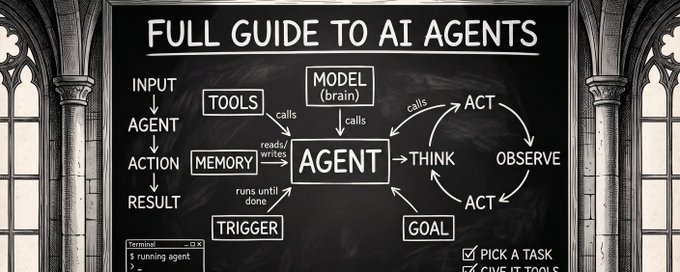
This is a complete productivity hack, and if you work at a computer, you need to read this.
Master these concepts, and you'll have your own mini AI employees working for you 24/7.
AI agents are the most important concept to master in tech right now.
The problem is everyone overcomplicates how to actually launch useful agent swarms.
In this article, I'm going to cut through the noise and outline what you actually need to know about how to launch useful agentic swarms.
By the time you're done reading, you'll have a team of AI agents working while you sleep (no matter how much of a beginner you are).
Table of Contents
I: AI Agents Explained Simply
II: Context
III: Memory
IV: Skills
V: Tools
VI: Putting Everything Together
## I: AI Agents Explained Simply
Before I teach you how to actually launch agentic swarms, you need to gain a basic understanding of what an agent actually is and what you can realistically expect your agent teams to do for you.
There is a lot of confusion around this, so let's set the record straight.
I like to think about it like this:
AI chatbots (like ChatGPT) = AI talks to you
AI agents = AI actually takes desktop actions for you
That's it, that's the whole distinction.
A concrete example (Email management)
In a normal AI chat, you could prompt AI to filter through your inbox and return a list of various messages to sort.
With an AI agent, you can actually prompt the agent to do the sorting/orginization on your behalf.
Harnesses
There are several AI harnesses worth using. Simply put, think of an agentic harness as just the vehicle in which an AI agent is used.
Some examples: ChatGPT agent, Claude Code subagents, Hermes agent, etc.
Each harness/AI provider has its own strengths.
Loops
Loops allow you to run agentic workflows in continuous streams.
Instead of hand-holding your agents through every step, you launch a loop, and your agents come back with a finished product.
Example: /loop I want you to vibe-code an entire website [insert spec].
Realistic expectations with agents
We're at the point where AI agents can pretty much complete any computer task.
However, they can't read your mind, and the output quality from your agents/loops will only be as good as the inputs and initial prompts.
By equipping your agents with the right tools (context, skills, memory, etc.), you give them the best chance of success.
Let's dive into that now.
## II: Context
Context is everything the agent should know about you and the task you want it to complete. This is a crucial first step in building effective agents.
Just a few months ago, this meant context engineering - writing massive, carefully structured prompts every single time, cramming in all the background information the model needed to give you a decent answer.
Context Engineering (in Claude):
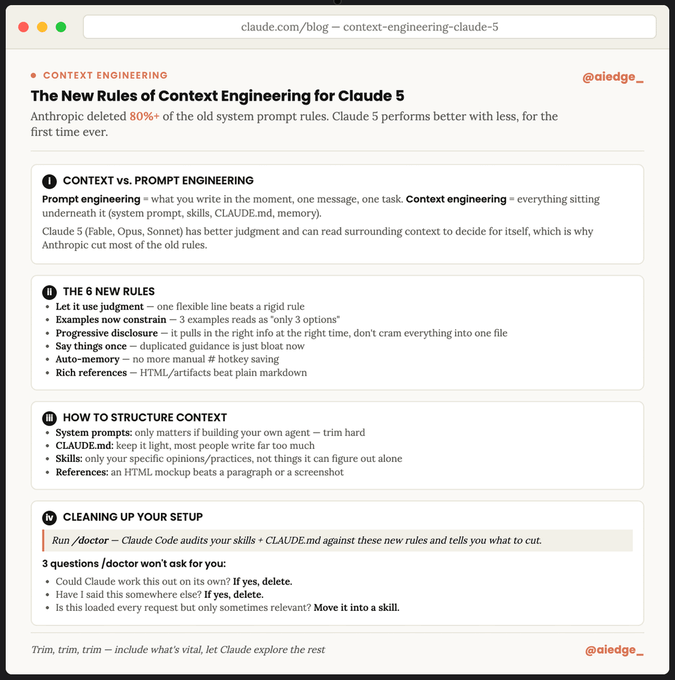
Context Engineering 101
For the average person, the above steps are great best practices, but for most tasks, they're mostly unnecessary now. The models have become extremely smart.
Instead, you can build a base memory system once and inject it into your agents.
Two ways to build proper agent memory:
1. A local folder on your machine
2. A cloud system (like Supabase or Supermemory)
Either works. The local folder is simpler to start with and is what most people should begin with.
Building your context file
The best way to build this is to sit down and use voice prompting in Claude Cowork - it will build an entire desktop folder for you.
Context Setup Prompt for Claude Cowork
```
Once your folder exists, open Cowork and use this prompt to have
it build the context file for you:
CONTEXT SETUP PROMPT
"I want to build a context file for my business/personal work that
you'll read at the start of every future session.
Interview me one question at a time, out loud, and keep going
until you have a genuinely complete picture. Cover:
- What my business does, who it's for, and how it makes money
- My role and how I actually operate day to day
- My team, key people, and who owns what
- My current priorities and goals
- My tools, platforms, and how they connect together
- My preferences: tone, style, and anything I care about in how
work gets done
Push me for specifics if I give you a vague answer. Once we're
done, compile everything into a single, dense markdown file called
context.md and save it in this folder.
Keep it short. Cut anything generic or obvious. I'd rather have
one tight page than five thorough ones."
```
Tip: You can create multiple files.
For example:
- General context file: contains all the context about you
- Specific task context file: context about a specific task you want a dedicated agent to run
- Instructions file: general instructions you want your agents to adhere to
And so on.
Once you build proper context files, you can move on to building a proper memory system.
## III: Memory
Context is what you hand your agents up front. Memory is what they pick up from working with you over time - a crucial component to ensure your workflows continuously get better.
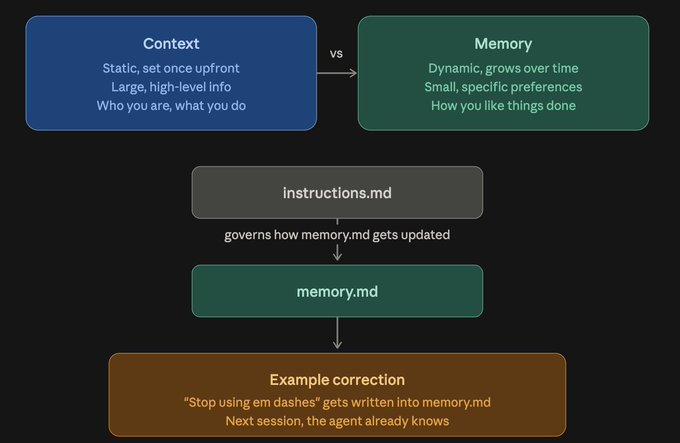
Context files are mostly static with large, high-level pieces of info, while memory files are dynamic with smaller preferences that grow as you use your agents.
Start simple
Your initial memory setup should be almost nothing.
At most, a few basic facts, saved in its own file (memory.md).
From there, let it grow. Every time you correct the agent or tell it something new about how you like things done, that gets added into the file.
Over weeks, this becomes a useful log of exactly how you operate.
Example
You tell an agent "stop using em dashes," and that instruction gets written directly into memory.md.
For your next session, your agent remembers and already knows your preferences.
Pair it with an instructions file
Alongside memory.md, keep a second file: instructions.md.
This is different from memory.
Instructions are the standing rules governing how change logs should be managed.
A good instructions file might include a line like: "every time I give you a new piece of relevant context, update memory.md, tell me you've updated it, and only save information that could materially affect my workflow or my business."
## IV: Skills
Skills allow you to automate repetitive workflows.
They are a step-by-step document for one specific task - the AI equivalent of an SOP you'd hand a new staff member.
Think about how you'd actually train someone. If you hired someone into your accounting team, you wouldn't just say "do the weekly accounting."
You'd give them an SOP: open this sheet first, reconcile it against the client database, get it checked by the senior accountant, report to your direct report.
A skill is that same SOP, except instead of a human following it every week, an agent reads it and executes the process itself.
Two ways to build effective agentic skills:
I personally like using Claude for building skills
1. Manual explanation
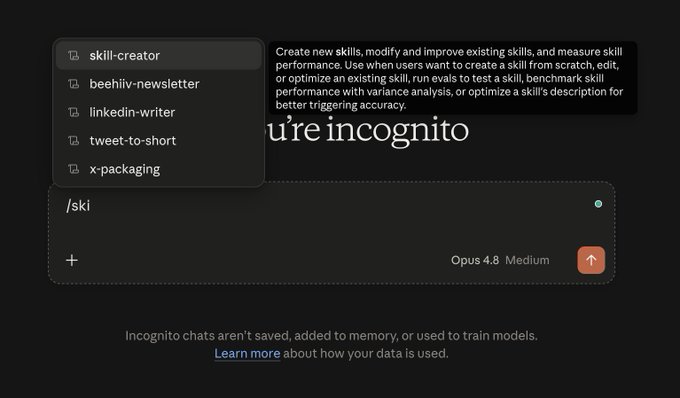
Use the skill creator - type /skillcreator, and it walks you through building the skill conversationally.
You manually explain the process, and Claude structures it into something reusable.
2. Screen record
This is the one I've been using more lately, and it's a game-changer.
Open Claude desktop → Cowork → Record-a-skill
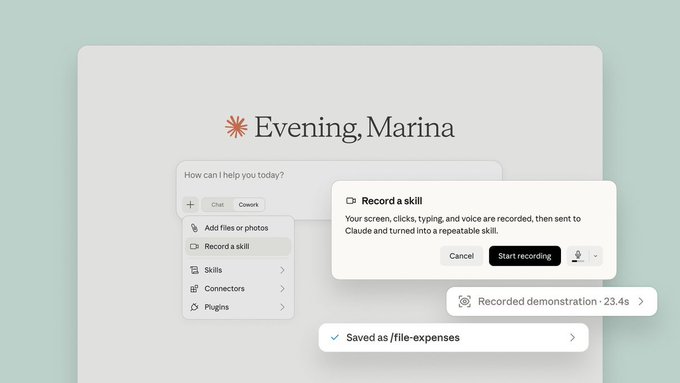
With this feature, you can record your work directly, and Claude will automatically build the skill from the footage.
Feel free to build as many agentic skills as you feel necessary at this stage.
## V: Tools
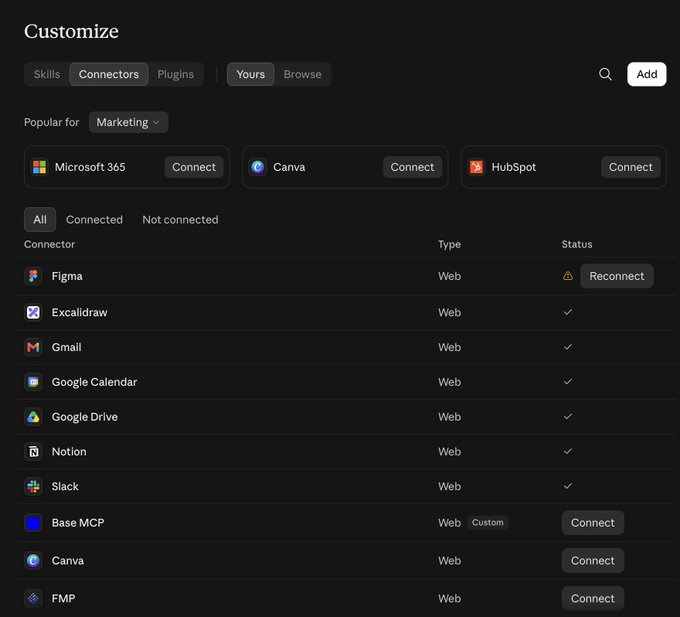
MCPs are an absolute must.
They give your agents connection access to external tools.
i.e., you connect the Google Calendar MCP, and your Claude subagents can now access and manage your calendar autonomously.
I highly recommend spending a few minutes to set up your essential MCPs.
In Claude → Customize → Connectors
I use: Notion, Gmail, Excalidraw, and a few others daily.
## VI: Putting Everything Together
With all of your essential files created, and additional tooling set up, this is where you actually start deploying useful agents.
There is a 5-step process to launching your first agent:
1. Pick your AI harness (I like Claude for beginners)
2. Prompt it: "I want to launch an agent"
3. Attach your local context files we built earlier
4. Send the agent its respective skills/SOPs/workflows
5. Start prompting (things like: "go through my calendar and book [x] meeting" - or whatever task you want it to complete)
It's that simple. I know AI agents seem overwhelming, but with this simple process, you can literally launch dozens of AI agents for a wide range of tasks.
You can follow this exact framework for Claude, Hermes, Codex, and any other AI harness.
Be sure to bookmark this article so you don't forget how to deploy effective AI agents.
## Closing Out
I hope you've found this article helpful.
If you did, be sure to follow me here [@aiedge_](https://x.com/@aiedge_) - every single week, I post articles/threads covering exactly how you can practically use AI.
If you enjoy AI content in a written format, feel free to subscribe to my free AI newsletter.
Every Wednesday, I send a practical AI guide you can implement. Whether it's a cool AI workflow or a prompting guide, I try to cover the things I'm actually using in AI each week.
Read my most recent publication here:
[https://newsletter.aiedgehq.co/](https://newsletter.aiedgehq.co/)

100% free, no spam ever & unsub anytime.
Thank you for making it this far. 💙
## 相关链接
- [AI Edge](https://x.com/aiedge_)
- [@aiedge_](https://x.com/aiedge_)
- [25K](https://x.com/aiedge_/status/2100237488380117120/analytics)
- [@aiedge_](https://x.com/@aiedge_)
- [https://newsletter.aiedgehq.co/](https://newsletter.aiedgehq.co/)
- [Upgrade to Premium](https://x.com/i/premium_sign_up)
- [10:56 PM · Sep 16, 2026](https://x.com/aiedge_/status/2100237488380117120)
- [25.1K Views](https://x.com/aiedge_/status/2100237488380117120/analytics)
- [View quotes](https://x.com/aiedge_/status/2100237488380117120/quotes)
---
*导出时间: 2026/9/17 09:11:53*
---
## 中文翻译
# AI 智能体完全指南(部署你的第一个智能体集群)
**作者**: AI Edge
**日期**: 2026-09-16T14:56:52.000Z
**来源**: [https://x.com/aiedge_/status/2100237488380117120](https://x.com/aiedge_/status/2100237488380117120)
---

这是一份完整的效率提升指南,如果你需要用电脑工作,就必须读一读。
掌握这些概念,你就将拥有 24/7 全天候为你工作的迷你 AI 员工。
AI 智能体是目前科技领域最需要掌握的核心概念。
问题在于,人们把如何实际启动有用的智能体集群这件事搞得过于复杂了。
在这篇文章中,我将拨开迷雾,梳理出你真正需要了解的、关于如何启动有用的智能体集群的知识。
读完本文后,无论你是多么彻底的新手,你都将拥有一支在你睡觉时仍在工作的 AI 智能体团队。
目录
一:简单解释 AI 智能体
二:上下文
三:记忆
四:技能
五:工具
六:整合一切
## 一:简单解释 AI 智能体
在教你如何实际启动智能体集群之前,你需要对智能体到底是什么、以及你能现实地期望智能体团队为你做什么有一个基本的了解。
这方面的困惑很多,所以让我们先澄清事实。
我是这样理解的:
AI 聊天机器人(如 ChatGPT)= AI 与你对话
AI 智能体 = AI 真正替你执行桌面操作
就这么简单,这就是全部的区别。
一个具体的例子(邮件管理)
在普通的 AI 聊天中,你可以提示 AI 筛选你的收件箱,并返回一个待分类消息列表。
而使用 AI 智能体,你可以直接提示智能体代表你完成分类和整理工作。
运行框架
有几个值得使用的 AI 运行框架。简单来说,可以把智能体运行框架理解为使用 AI 智能体的载体。
一些例子:ChatGPT agent、Claude Code 子智能体、Hermes agent 等。
每个框架/AI 提供商都有各自的优势。
循环
循环可以让你以持续流的方式运行智能体工作流。
你不必手把手引导智能体完成每一步,而是启动一个循环,然后智能体会带着成品回来。
示例:/loop 我要你用氛围编程方式做一个完整的网站 [插入规格说明]。
对智能体的合理预期
AI 智能体现在已经几乎可以完成任何电脑任务。
然而,它们无法读心,你的智能体/循环的输出质量完全取决于输入和初始提示的质量。
通过为你的智能体配备合适的工具(上下文、技能、记忆等),你能给它们最大的成功机会。
现在让我们深入探讨这些内容。
## 二:上下文
上下文是智能体应该了解的、关于你以及你希望它完成的任务的一切信息。这是构建有效智能体的关键第一步。
就在几个月前,这还意味着上下文工程——每次都要编写庞大且精心组织的提示词,把模型给出体面回答所需的全部背景信息都塞进去。
上下文工程(在 Claude 中):

上下文工程 101
对于普通人来说,上述步骤是很好的最佳实践,但对大多数任务而言,现在已经基本没有必要了。模型已经变得极其聪明。
相反,你只需一次性构建一个基础记忆系统,然后将其注入你的智能体。
两种构建合适的智能体记忆的方法:
1. 你电脑上的本地文件夹
2. 云端系统(如 Supabase 或 Supermemory)
两种方法都可行。本地文件夹上手更简单,也是大多数人应该采用的起步方式。
构建你的上下文文件
构建上下文文件的最佳方式是坐下来,在 Claude Cowork 中使用语音提示——它会为你构建一个完整的桌面文件夹。
Claude Cowork 的上下文设置提示词
```
Once your folder exists, open Cowork and use this prompt to have
it build the context file for you:
CONTEXT SETUP PROMPT
"I want to build a context file for my business/personal work that
you'll read at the start of every future session.
Interview me one question at a time, out loud, and keep going
until you have a genuinely complete picture. Cover:
- What my business does, who it's for, and how it makes money
- My role and how I actually operate day to day
- My team, key people, and who owns what
- My current priorities and goals
- My tools, platforms, and how they connect together
- My preferences: tone, style, and anything I care about in how
work gets done
Push me for specifics if I give you a vague answer. Once we're
done, compile everything into a single, dense markdown file called
context.md and save it in this folder.
Keep it short. Cut anything generic or obvious. I'd rather have
one tight page than five thorough ones."
```
提示:你可以创建多个文件。
例如:
- 通用上下文文件:包含关于你的所有上下文
- 特定任务上下文文件:关于你希望某个专用智能体运行的特定任务的上下文
- 指令文件:你希望智能体遵守的一般性指令
等等。
一旦你构建了合适的上下文文件,就可以着手构建合适的记忆系统了。
## 三:记忆
上下文是你预先交给智能体的内容。记忆则是它们在与你长期合作过程中积累的内容——这是确保你的工作流不断改进的关键组成部分。
上下文文件基本是静态的,包含大型的高层级信息,而记忆文件是动态的,包含随着你使用智能体而不断增长的小型偏好。
从简单开始
你最初的记忆设置应该几乎为零。
最多保存几条基本事实,存放在单独的文件中(memory.md)。
从那以后,让它自然增长。每当你纠正智能体或告诉它一些关于你喜欢的工作方式的新信息时,都会添加到该文件中。
几周之后,这将成为一份精确记录你工作方式的实用日志。
示例
你告诉智能体“不要使用破折号(em dashes)”,这条指令就会直接写入 memory.md。
在你下次会话时,智能体会记得并已经知道你的偏好。
搭配一个指令文件
在 memory.md 之外,再保留第二个文件:instructions.md。
这与记忆不同。
指令是管理变更日志如何更新的常设规则。
一个好的指令文件可能包含这样一行:“每当我给你提供新的相关上下文时,更新 memory.md,告诉我你已经更新了它,并且只保存可能实质性影响我的工作流或业务的信息。”

## 四:技能
技能可以让你自动化重复性的工作流。
技能是针对某个特定任务的分步操作文档——相当于你交给新员工的 SOP(标准操作程序)的 AI 版本。
想想你实际上会如何培训一个人。如果你雇了一个人加入你的会计团队,你不会只说“去做每周的会计工作”。
你会给他们一份 SOP:先打开这个表格,与客户数据库进行核对,让高级会计师审核,然后向你的直属上级汇报。
技能就是同样的 SOP,只不过不是由人类每周遵循它,而是由智能体阅读并自己执行整个流程。
构建有效智能体技能的两种方法:
我个人喜欢用 Claude 来构建技能
1. 手动讲解
使用技能创建器——输入 /skillcreator,它会以对话方式引导你构建技能。
你手动讲解流程,Claude 会将其整理成可复用的形式。

2. 录屏
这是我最近使用更多的方法,它彻底改变了游戏规则。
打开 Claude 桌面版 → Cowork → Record-a-skill(录制技能)

借助这个功能,你可以直接录制你的工作过程,Claude 会根据录像自动构建技能。
在这个阶段,你可以随心所欲地构建任意数量的智能体技能。
## 五:工具
MCP 是绝对必需的。
它们让你的智能体获得与外部工具的连接能力。
也就是说,你连接 Google Calendar MCP 之后,你的 Claude 子智能体就能自主访问和管理你的日历。
我强烈建议花几分钟时间设置你的必备 MCP。
在 Claude → 自定义 → 连接器
我每天都使用:Notion、Gmail、Excalidraw 以及其他几个工具。

## 六:整合一切
在创建了所有必备文件、并设置好额外的工具之后,接下来就是你真正开始部署有用智能体的时刻了。
启动你的第一个智能体有一个 5 步流程:
1. 选择你的 AI 运行框架(新手我推荐 Claude)
2. 提示它:“我想启动一个智能体”
3. 附上我们之前构建的本地上下文文件
4. 给智能体发送相应的技能/SOP/工作流
5. 开始下达提示(例如:“查看我的日历并预订 [x] 会议”——或者你希望它完成的任何任务)
就是这么简单。我知道 AI 智能体看起来让人望而生畏,但通过这个简单的流程,你真的可以为各种任务启动几十个 AI 智能体。
你可以将这个框架完全照搬用于 Claude、Hermes、Codex 以及任何其他 AI 运行框架。
请务必收藏这篇文章,以免忘记如何部署有效的 AI 智能体。
## 结语
希望这篇文章对你有所帮助。
如果有的话,请务必在这里关注我 [@aiedge_](https://x.com/@aiedge_)——每周我都会发布文章/推文串,讲解你如何在实践中使用 AI。
如果你喜欢文字形式的 AI 内容,欢迎订阅我的免费 AI 通讯。
每周三,我都会发送一份可以实际操作的 AI 实用指南。无论是酷炫的 AI 工作流还是提示词指南,我都尽量涵盖我每周在 AI 方面实际使用的内容。
在这里阅读我最近发布的通讯:
[https://newsletter.aiedgehq.co/](https://newsletter.aiedgehq.co/)

100% 免费,绝无垃圾信息,随时可退订。
感谢你读到这里。💙
## 相关链接
- [AI Edge](https://x.com/aiedge_)
- [@aiedge_](https://x.com/aiedge_)
- [25K](https://x.com/aiedge_/status/2100237488380117120/analytics)
- [@aiedge_](https://x.com/@aiedge_)
- [https://newsletter.aiedgehq.co/](https://newsletter.aiedgehq.co/)
- [Upgrade to Premium](https://x.com/i/premium_sign_up)
- [10:56 PM · Sep 16, 2026](https://x.com/aiedge_/status/2100237488380117120)
- [25.1K Views](https://x.com/aiedge_/status/2100237488380117120/analytics)
- [View quotes](https://x.com/aiedge_/status/2100237488380117120/quotes)
---
*导出时间: 2026/9/17 09:11:53*