What 200 Million Views Taught Us About AI and Creativity Sarah Chieng 2026-08-15 27.5 KB 80.8K 324 ☆ 收藏 𝕏 文章列表 Sarah Chieng和Cole Lee分享了他们如何利用AI工具优化内容创作流程,从创意生成、脚本撰写到视频制作与发布,累计获得2亿次观看。文章强调AI应辅助而非替代创作者,通过个性化技能和模板保持独特声音,并提供了具体的工具和策略。 AI内容创作工作流脚本视频制作社交媒体效率工具创意自动化个人品牌 81 强烈推荐 ▶ 文章提供了具体的工作流程和工具组合,实操性强,但深度和理论分析稍显不足。 # What 200 Million Views Taught Us About AI and Creativity **作者**: Sarah Chieng **日期**: 2026-08-12T22:12:57.000Z **来源**: [https://x.com/MilksandMatcha/status/2087663656926585124](https://x.com/MilksandMatcha/status/2087663656926585124) --- 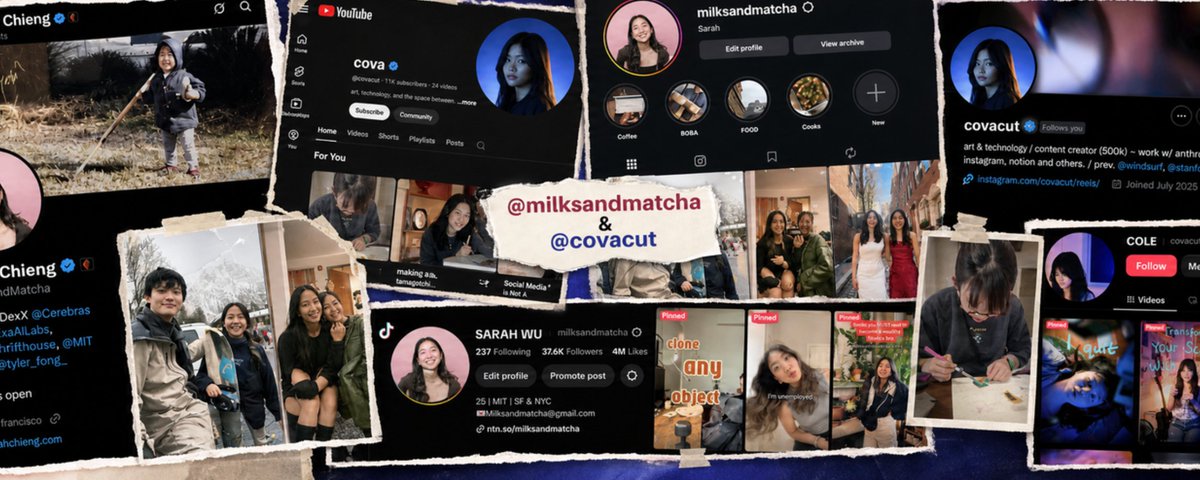 Written by Sarah Chieng and Cole Lee (@covacut) “Hear a piece of information, and three days later you’ll remember 10% of it. Add a picture and you’ll remember 65%.” - John Medina Content is powerful. You could change how a person sees the world. You could reach millions of people you will never meet. You could change your life. But making good content is hard. You have to find the idea, research, script, film, edit, package, and publish it. Then, after all that, you still have to capture--no, wrangle--attention and survive the fickle algorithm. Between the two of us, we’ve spent an unreasonable amount of time learning how to do this well. Across YouTube, Instagram, X, TikTok, and LinkedIn, we’ve built an audience of over 700,000 followers and generated over 200 million views. Follow our work: Sarah (@milksandmatcha) on X, Instagram, YouTube, TikTok, and LinkedIn; Cole (@covacut) on X, Instagram, YouTube, TikTok, and LinkedIn. In this piece, we’ve combined the way we think: - Sarah is an operator: she thinks about how systems can help good content reach more people. - Cova is an artist: she thinks about protecting the craft and making things that resonate. What we’ve both arrived at is the same philosophy: AI shouldn’t create for you. It should give you more time to focus on what matters to you in the creative process. By the end of this article, you’ll know how to use AI to find stronger ideas, turn them into scripts that sound like you, plan and produce your videos faster, and build a system that improves with every post. # Process In this piece, we’ll break down our entire 6 part content workflow: ideate, script, record, edit, repurpose, publish. Tools Mentioned - Codex / Claude: research, writing, skills, and automation - Obsidian: templates and creative guidelines - Wispr Flow: voice-to-text - Figma: building visual systems - Coast / OBS: capturing and finding footage - Premiere / HyperFrames: editing - HeyGen: video fixes and repurposing - Buffer: publishing and scheduling ## Ideate So, how do you come up with a good idea? Both of us maintain some form of a swipefile: a collection (‘dump’) of websites, videos, designs, quotes, writing that are the golden standard. We find these when we read, scroll twitter, go down a youtube rabbit hole, etc. This is also a running list of ideas: questions you have, questions you noticed others have asked you, topics that inspire you, references you would like to discuss. Pick your note-keeping tool of choice, such as Notes, Obsidian, and Notion. The goal is to always have raw material. Then, you study what works. While social media algorithms are proprietary, there is an unbounded amount of data and metrics to answer questions like: What are our favorite creators doing? What formats are driving the most views? This is where you use AI to build your own research tools. For example, we used Codex to build a YouTube tool that finds outlier videos across different channels. From there, you can study the titles and thumbnails, generate references, and compare new ideas against other winning videos to see whether they actually stand out. 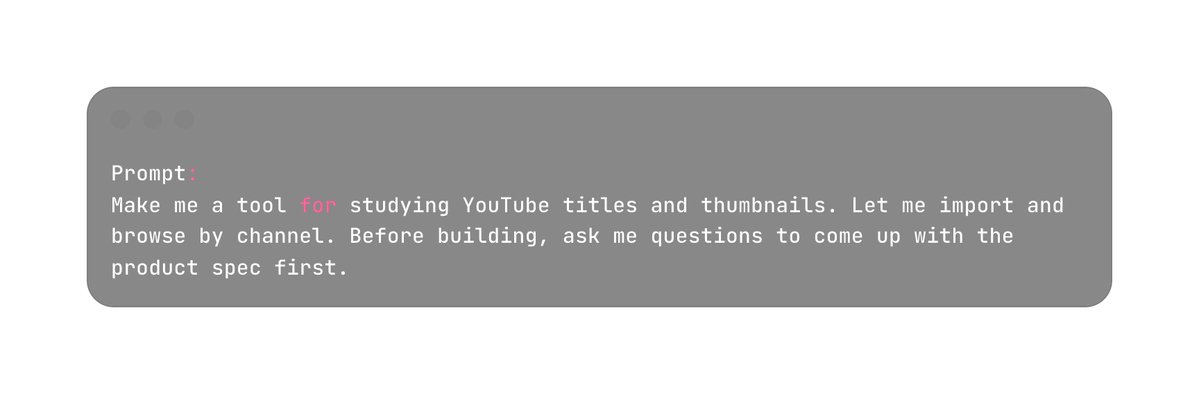 We use Channel Cat to spot videos that outperform a creator’s usual baseline. 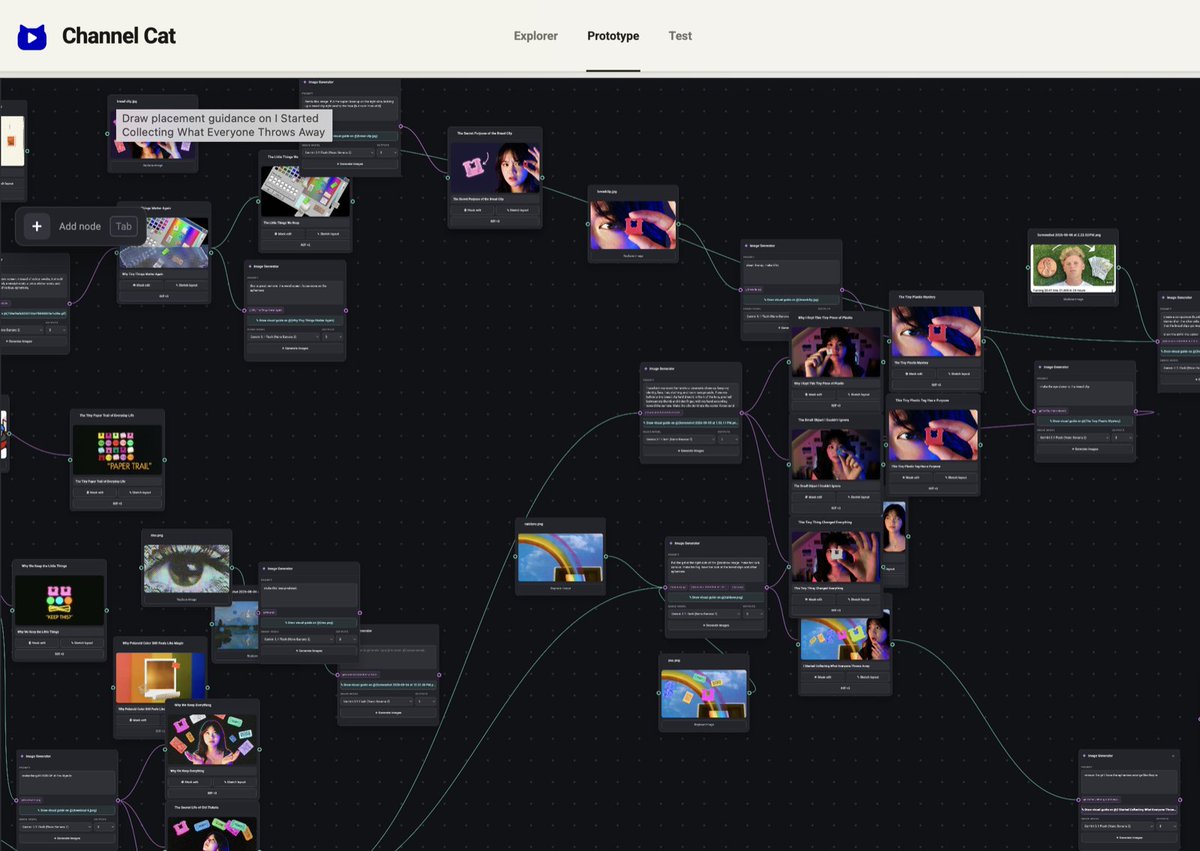 Then, we remix references until an idea clicks. 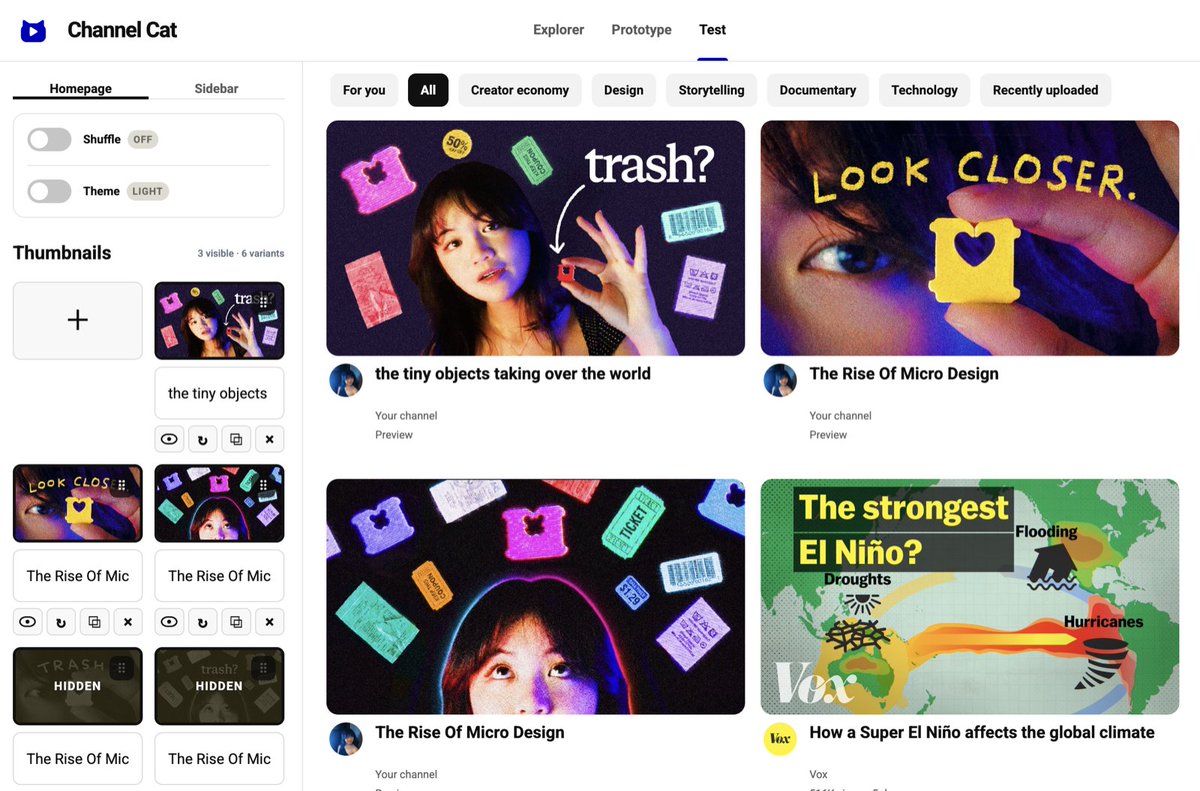 You can even test your thumbnails in a simulated feed! To clarify, we don’t want to copy winning content. We want to find repeatable patterns (e.g. topics, formats) that we can use as constraints for shaping our original ideas. This principle is applicable for thumbnails, writing captions, etc. ## Writing & Scripting Now, with your idea in hand, you’re ready to script! While scripting can feel like an unnecessary overhead, we promise it isn’t. Devising a good script will save you a lot of time during filming and editing, and ensure you get your idea across in the best way. You optimize your scripts for three things: - Clarity: can someone understand what you’re saying easily? - Educational value: are they learning something useful? - Attention: do they want to keep watching? AI is extremely useful here because it can pull ideas out of you, structure them, and handle the logistical work around them. The first step is to get the idea out of your head. ## Get the idea down Here are two approaches we love to use: - Approach 1: Brain-dump if you already know roughly what you want to say - Approach 2: Get Interviewed if you have the beginnings of an idea, but need help getting to the bottom of it. ## Approach 1: Brain-dump If the idea is already fairly clear in your head, the fastest thing to do is simply say it out loud. Open a speech-to-text tool like Wispr and explain the idea exactly as you would to a friend. Don’t worry about structure, repetition, or perfect wording. Just get the raw material down. In the next step, we’ll show you how we use AI to structure and refine it. ## Approach 2: Get interviewed If the idea is still a little fuzzy, have your AI agent interview you about it. Your AI interviewer will push on your claims, ask you what you actually mean, and pull out examples and stories you may not have thought to include. Here’s a prompt we like to use with Codex in Voice Mode: 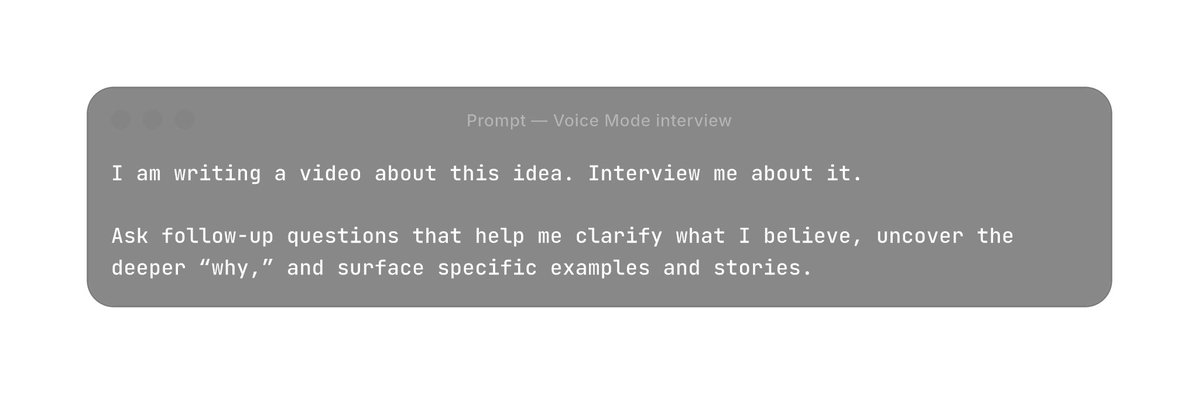 ## Structure your raw material Now that you’ve talked through your idea completely, let’s use AI to give that raw material some structure. Don’t ask the agent to simply ‘turn this into a viral, engaging script’. You will end up with radioactive AI slop. Instead, ask the agent to capture your voice and surface it as skills. We use dedicated skills built from our past scripts, videos, and performance data, so that our agents understand our voice and produce results that sound uniquely like us. If you already have a body of work, you can have AI study: - What is distinctive about your writing - What tends to perform best. Then have it turn those observations into a reusable skill. 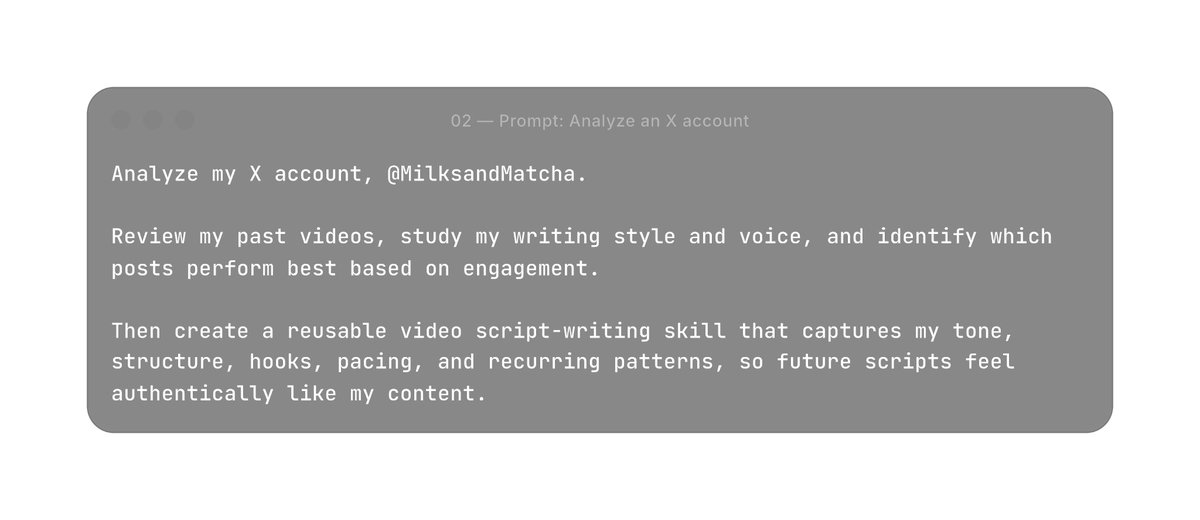 Sometimes you already know the very specific rules you want the agent to follow. One way to organize this into an easy to access format for agents is with tools like Obsidian, a local notes app. With Obsidian, you can store creative guidelines, examples, and reusable templates as simple Markdown (.md) files, which makes it easy for agents to read and reference. This gives the agent a consistent source of truth to work from. Inside Obsidian, we maintain templates for each content format, such as: - 1-minute video - 15-minute video - X post - LinkedIn post - …and so on Each template lays out the conventions for that format. 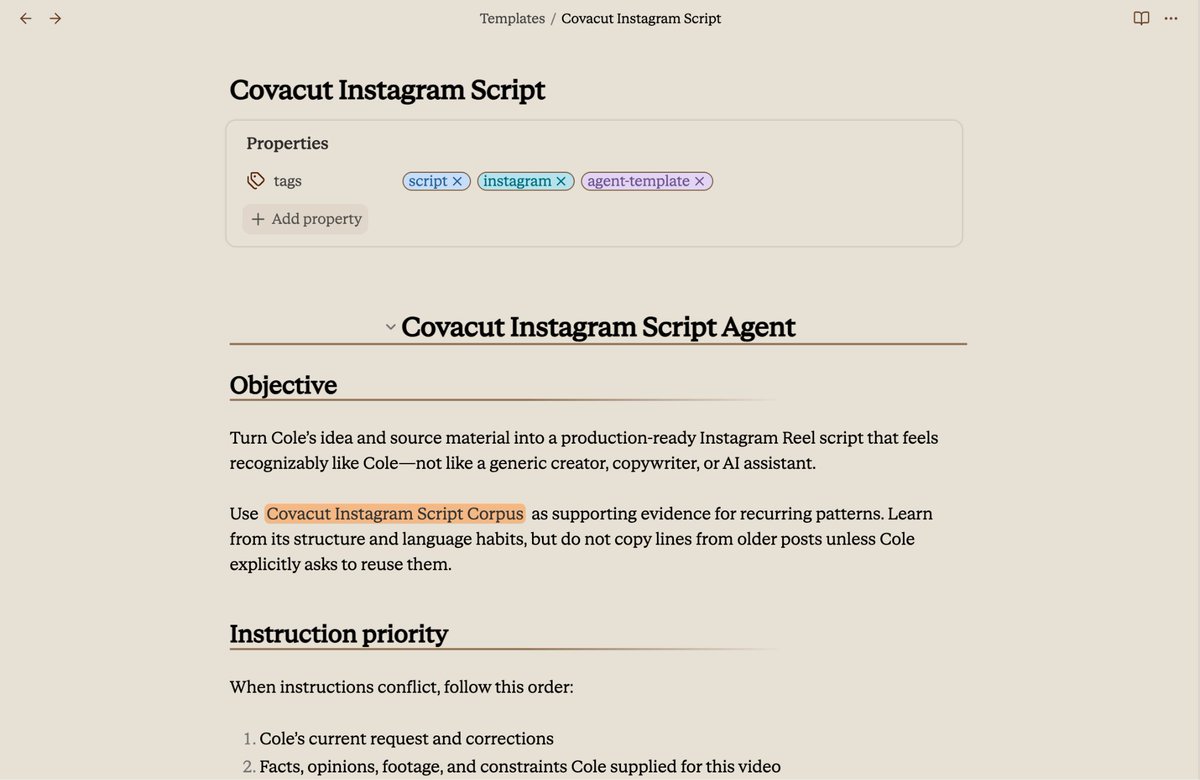 Cova uses this Obsidian scripting template, which she created using a Codex skill. Use the skill or template to structure your script Once the skill or template exists, you feed it the raw material from your voice-dump or interview. For example: 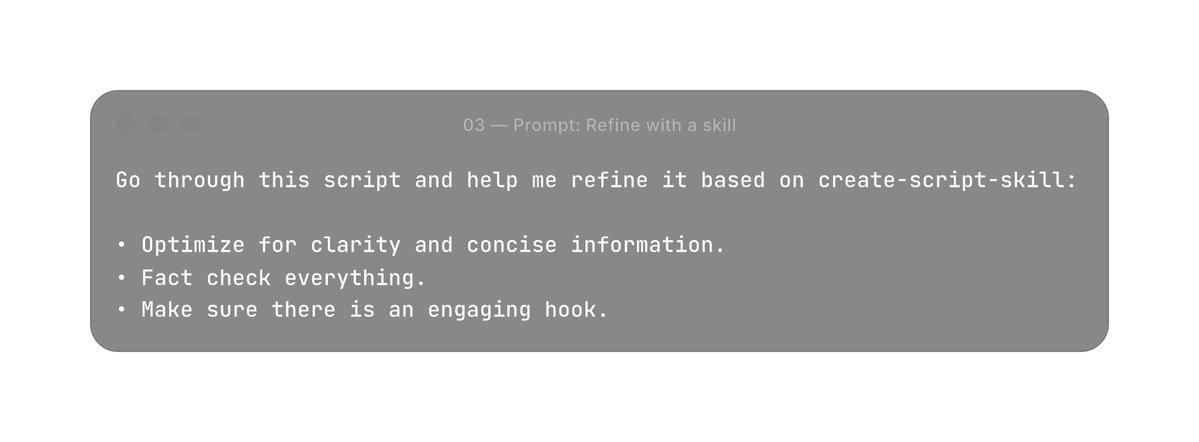 Prompt: Template 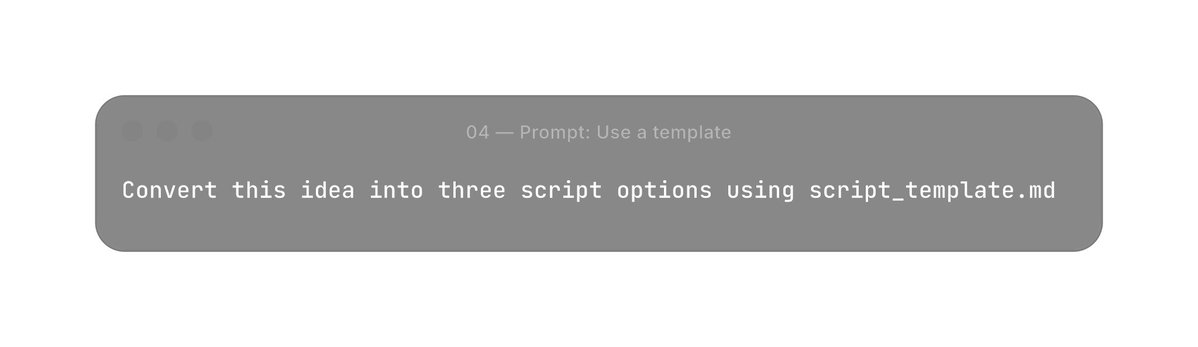 Even with these tools, take a final pass on whatever the AI generates. You can also hand your agent Signs of AI Writing and explicitly ask it to avoid every pattern on the list. # Recording Just like with scripting, planning your content before recording will save you time and help differentiate good content from great content. Time invested in filming is not linear, and while being intentional about recording might take 2x more time, it can lead to 100x outcomes. There are two types of content that you will record: - Filming A roll (i.e. your main footage needed to tell your story): Your talking head, screen-recorded demos - Filming B roll (i.e. filler moments, like you getting into your chair, a side shot of your laptop,) The most important lesson here is: plan your shots before you start filming. ## Creating a Shot List Recording can quickly become one of the most time-consuming parts of making content. A clear shot list prevents you from realizing halfway through the edit that you forgot an important screen recording, close-up, or transition. Before filming, annotate the script with all the A roll and B roll you need. You can again use a custom skill. Prompt: create a skill Create a reusable shot-list skill that transforms a finished script in two passes. First pass: Preserve the script. Add blockquoted annotations: #a-roll, #b-roll, #screen-recording, #motion-graphic, #graphic. Never invent anything. Second pass: Create a ## Shot List section. Deduplicate work by practical filming sessions. Include exact script context for every shot. Test on example_script.md, show me the result, and ask what feels off. Keep revising and testing until I say I like it. Prompt: invoke the skill /shot-list Turn this script into a recording checklist. Which turns into: 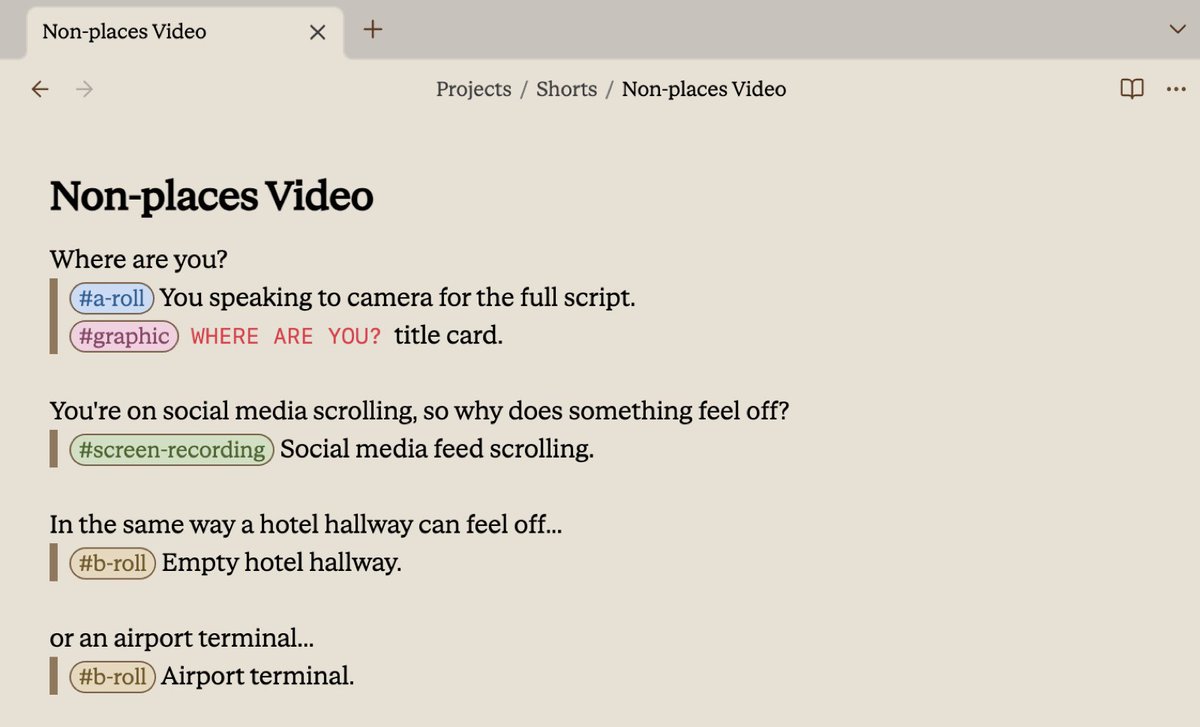 You could turn any script into a shot list so filming stays simple. ## Recording your screen You can use different screen-recording tools depending on what you need. Here are some of our favorites: - macOS Screen Recording for quick, simple demos - OBS when we want to compose multiple views at once - Coast when the moment already happened and we need to find it again - Cleanshot for quickly annotating recorded screen content macOS Screen Recording For quick demos, macOS Screen Recording is very underated. Press Command + Shift + 5 to capture screenshots or record your screen and audio. It’s great for product demos, walkthroughs, and quickly capturing something interesting as it happens. You can automatically save recordings to ~/Desktop, where they are easy to reference in Codex sessions or combine with other assets later. OBS When we want to record multiple views at once, OBS is a great choice. OBS lets you compose your camera, screen, windows, and other sources into a single recording. For example, you can record yourself talking alongside a live product demo instead of stitching the two together afterward. It is especially useful when the layout itself is part of the video. Coast Sometimes the best demo is something you already did, or you have so many demos that you don’t want to spend time hunting through them. Coast records your screen over time and makes that history searchable, so you do not have to recreate a workflow or manually hunt for the exact moment it happened. This is especially useful when you have already spent hours tinkering with something and want to pull out several moments afterward. We use the /coast skill in Claude or Codex to find and save those recordings. Prompt: /coast Find recordings where I demonstrated the following: - [demo 1] - [demo 2] - [demo 3] Save the clips for each one to ~/Desktop/Screen-recorded-demos. Which leads to something like: 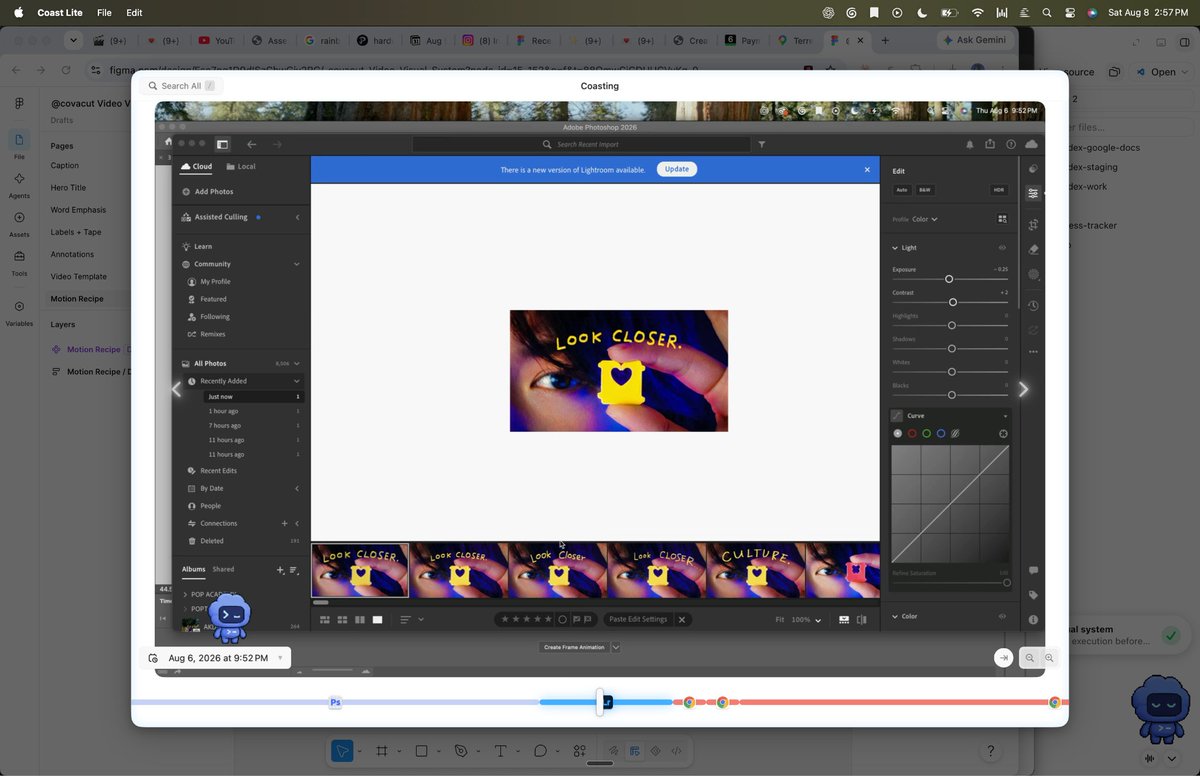 Coast records your computer activity and makes it searchable--down to the 45 minutes I spent editing this thumbnail in Lightroom on August 6. Cleanshot CleanShot is great when you want polished screen recordings fast, and you can easily annotate, blur, modify a screen recording. 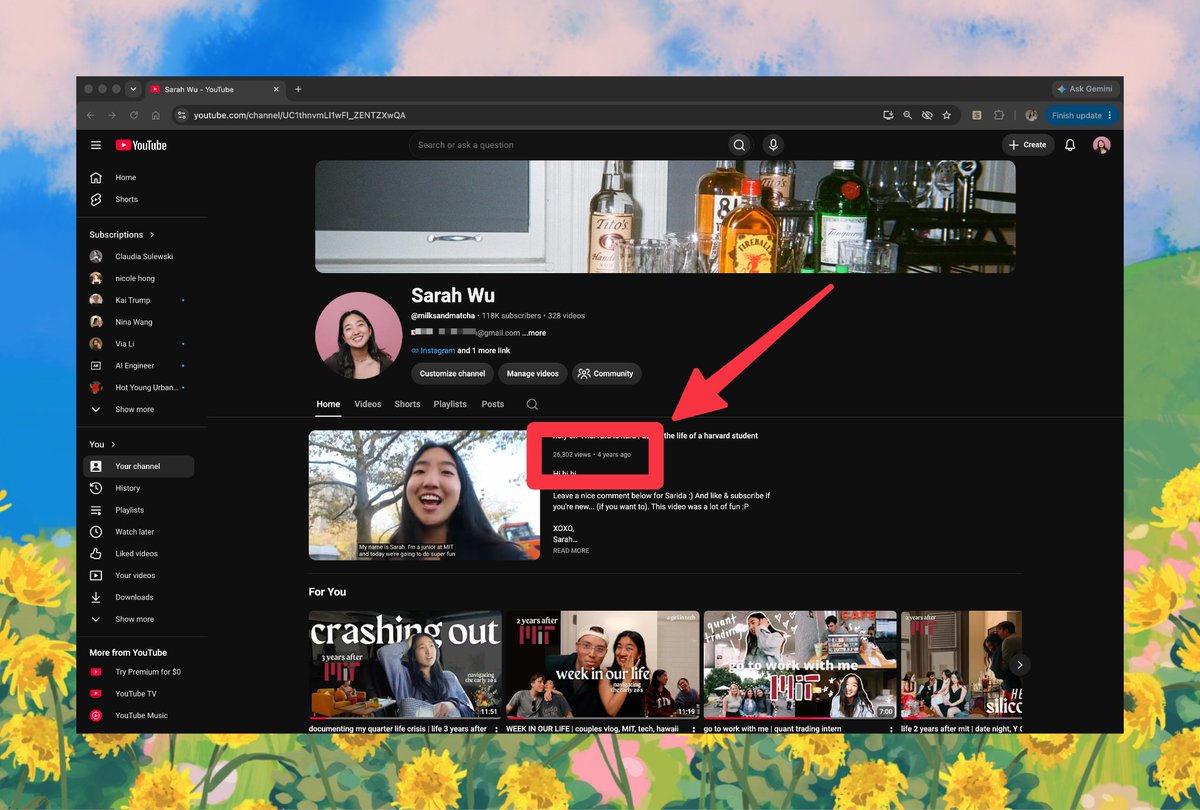 Cleanshot allows you to quickly record and screenshot, making modifications like callouts or blurring an email address. # Editing Now that you’ve recorded everything, it’s time to bring the pieces together. Editing is deeply personal, so there is no single best workflow and even the best creators will tell you that it’s impossible to find a good editor who can read their mind... Either way, the details of the edit matter. Captions, text animations, diagrams, pacing, and other small choices can make the difference between a video people scroll past and one they keep watching. So think of this section as a menu: pick the approaches that fit how you like to work. ## Organize your assets Before editing, get everything into one place. One way to do this is to keep a /content folder with one subfolder per project. Inside each project, you can organize assets into folders like: - A-roll - B-roll - Screen recordings - Music - Images - Graphics - References You can use an agent to help collect and organize everything. Prompt 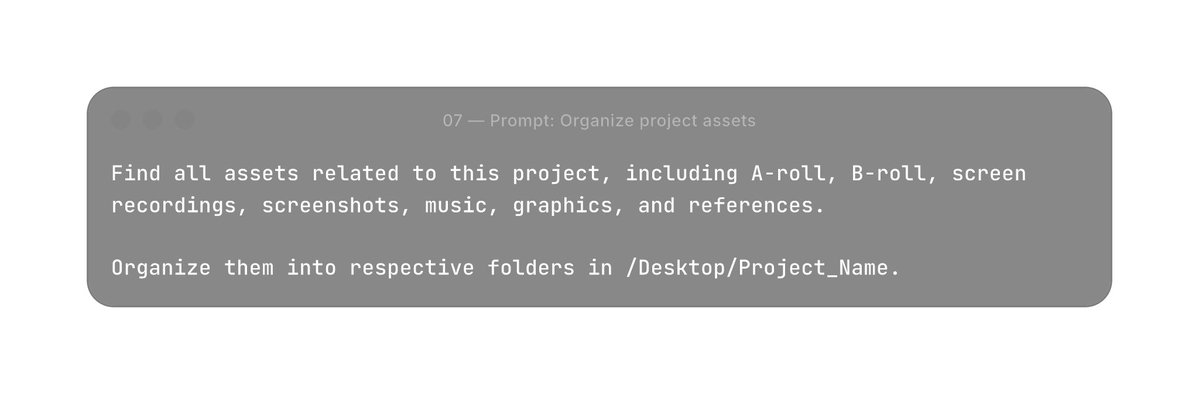 This is tedious, repetitive work, exactly why it’s perfect for AI. ## Create a design system Creating a design system for your content ensures your brand comes across authentically. If you don’t have one yet, you can ask an agent to help you create one. Prompt: create a design system from scratch 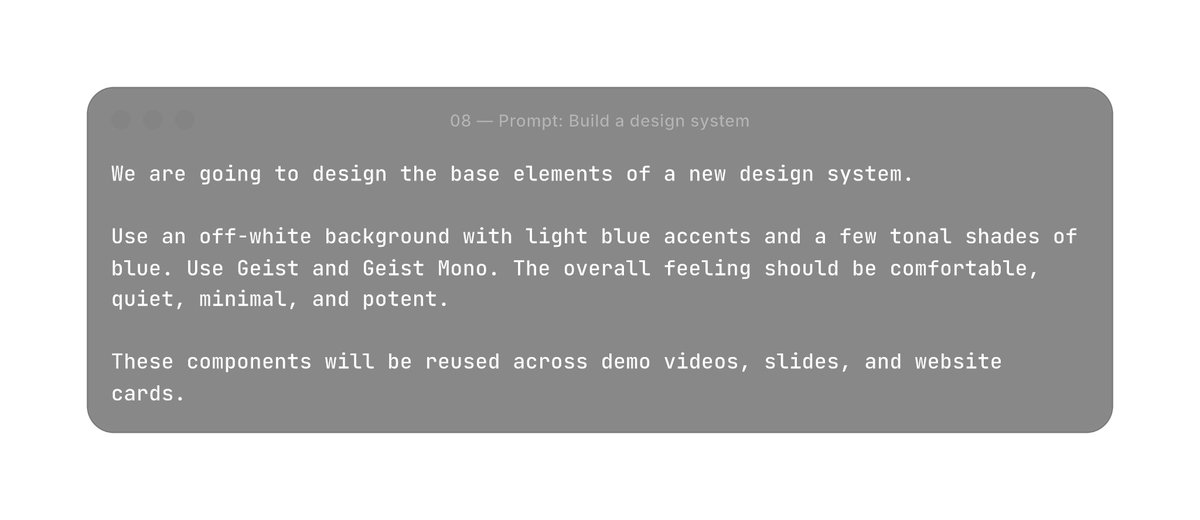 And this turns into, 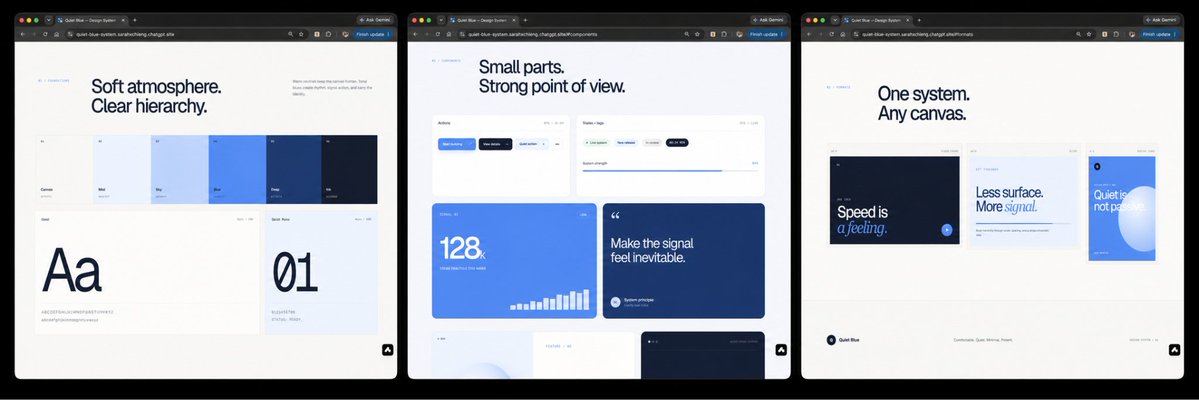 Prompt: create a design system from previous content 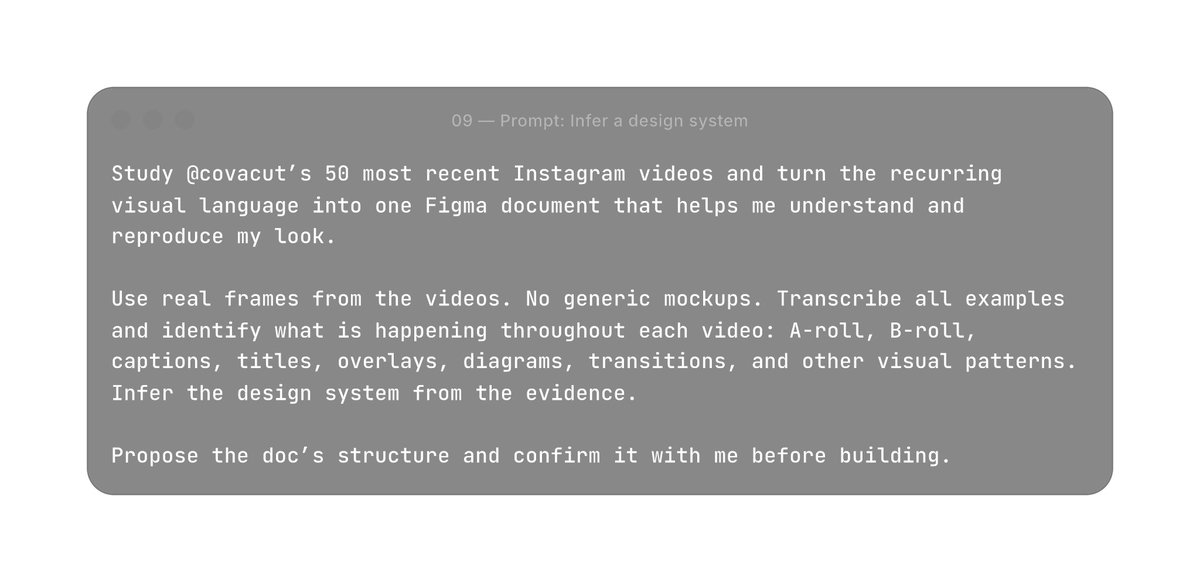 The key here is not to let AI invent your taste. We want you to turn your taste into a design system you can scale. Choose how you want to edit ## Approach 1: Edit with AI Now, you can edit directly inside of agents like Codex and Claude Code, but you can also connect tools like HyperFrames by HeyGen, an code-based video workflow with your editor. Instead of manually moving layers around a timeline, you describe the edit, render it, watch it, and give notes. Initial Codex/Claude Code Prompt 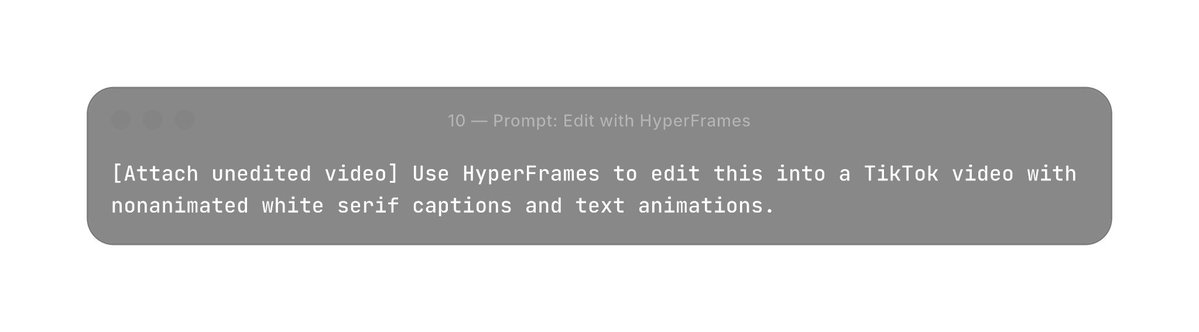 This leads to an output like, 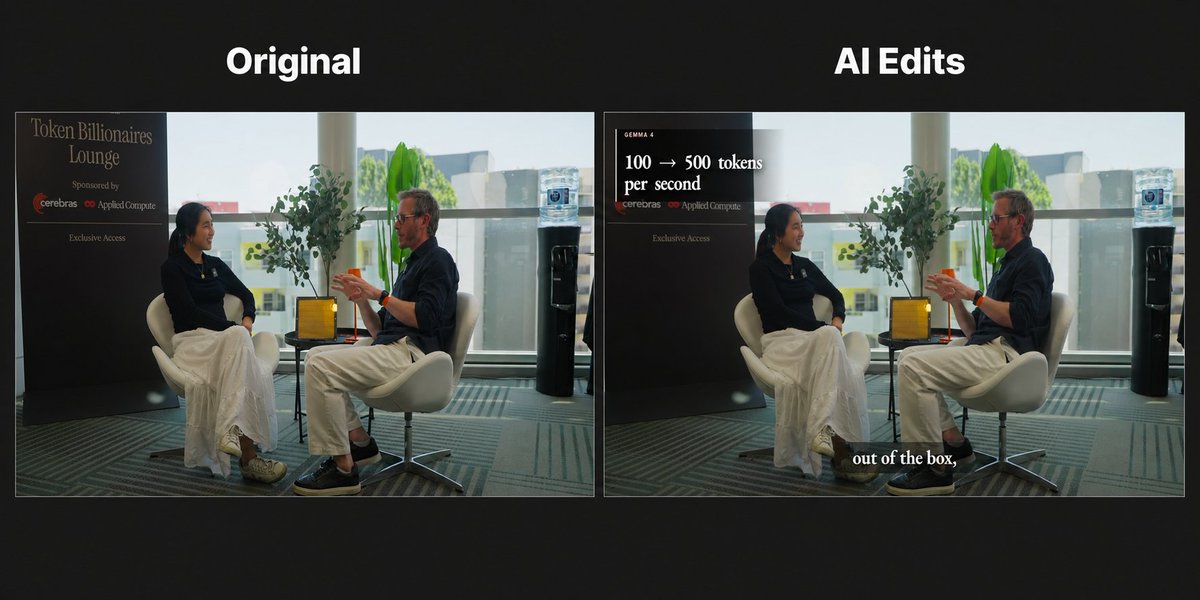 The workflow is simple: describe → render → review → revise This works well when your creative direction is already clear. ## Approach 2: Edit yourself (but with better tools!) Another option is to work directly in editors like Premiere (Although Final Cut Pro and Davinci Resolve are also great options).If you care about the exact timing of cuts, sounds, and transitions, you may want to keep those decisions in your hands. Instead of asking AI to edit for you, it can simply remove friction around the edit. For example: - A Premiere MCP that renames and organizes all your files and video sequences. - A custom soundpad that allows you to press a button and add SFX instantly - Small tools for repetitive actions we do often The goal is simple: keep the creative decisions, automate the annoying parts. These kinds of tools are great because they can encode our styles, and templatize our taste. 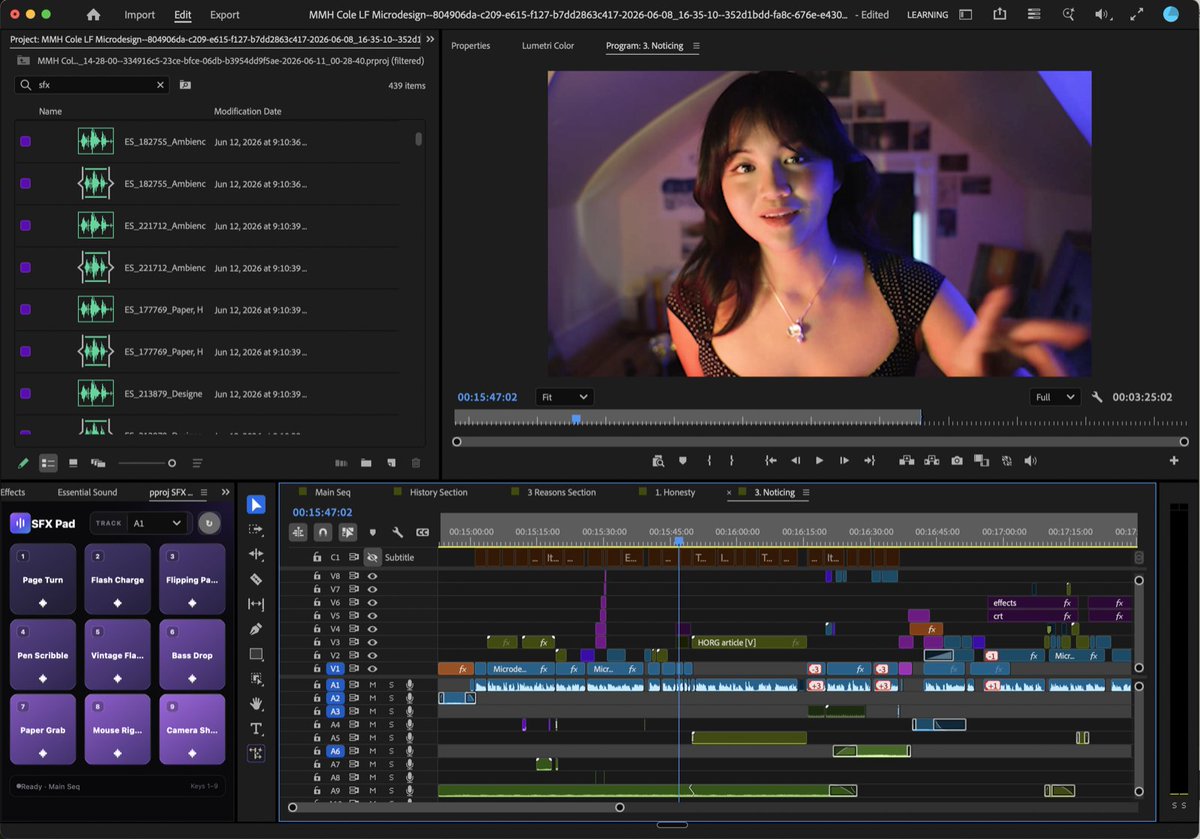 We build custom tools for editing our way, like this custom soundpad in Premiere. ## Create visuals with AI AI is also useful for creating individual visuals inside the edit. For example: - Background transform: boring background? Make it gorgeous. - Animated titles: turn a plain title into an amazing animated title. - Floating objects: because sometimes the answer is simply to add floating stuff. The fun part is that there really isn’t a ceiling here. If you can describe the visual you want, there is probably a way to make it. 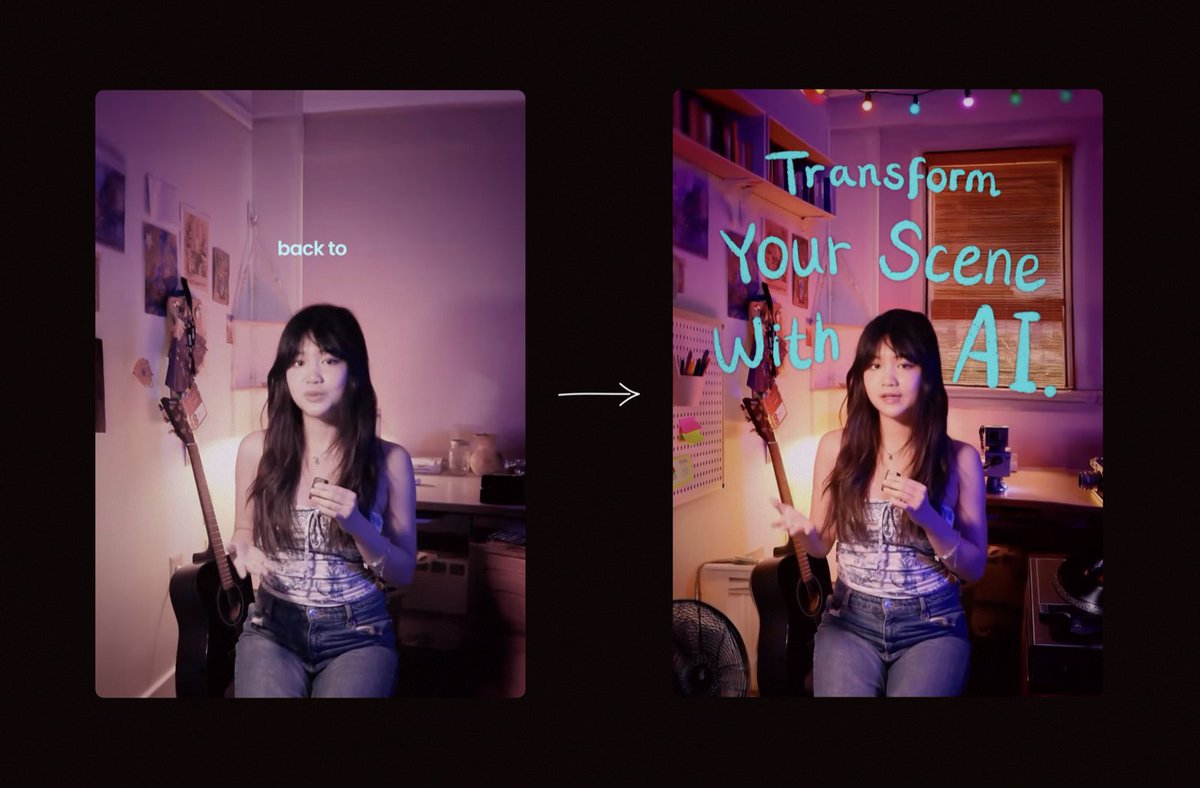 One of our favourite use cases of AI is using it to transform boring scenes. And if you want to nerd out about any of this, @covacut is always very happy to talk about weird video tricks. ## Fix mistakes without re-recording Even after filming, things change. For example, facts become outdated, a product changes, or you realize a line could be more clear. When this happens, AI tools can be very helpful for correcting small mistakes, without having to refilm everything. One tool that’s helpful and does a great job at generating avatars is HeyGen. With HeyGen, you can upload the initial video, create a digital avatar from the recording, then regenerate only the line that needs fixing. You can also use it before filming to preview how a script sounds and catch awkward phrasing early. # Publishing You are almost at the home stretch! Now that you have the script, footage, music, graphics and customizations in one finished video, it’s time to publish. This includes writing captions and posting your content. This step is arguably the most important, because before they watch even a second of what you’ve created, they’ll read your caption/title/thumbnail. Anyways, let’s talk about publishing. ## Write the caption It can be incredibly tedious to write separate captions for X, LinkedIn, Instagram, and TikTok and simply copying the same caption everywhere never works well. But the unfortunate truth is that going viral on each platform is its own unique game. And we can verify from years of experience, that even the smallest word change means 2K views versus 200K views. You also have to be careful because AI generated slop is very easy to detect, and will never lead to good outcomes. Here, a great way to use AI is to create a separate agent skill for each platform. To build them, have your agent study your previous posts, the media attached to them, and how each post performed. From that, the agent learns the patterns that work for each platform, while still preserving your voice. Prompt: create a platform specific caption skill 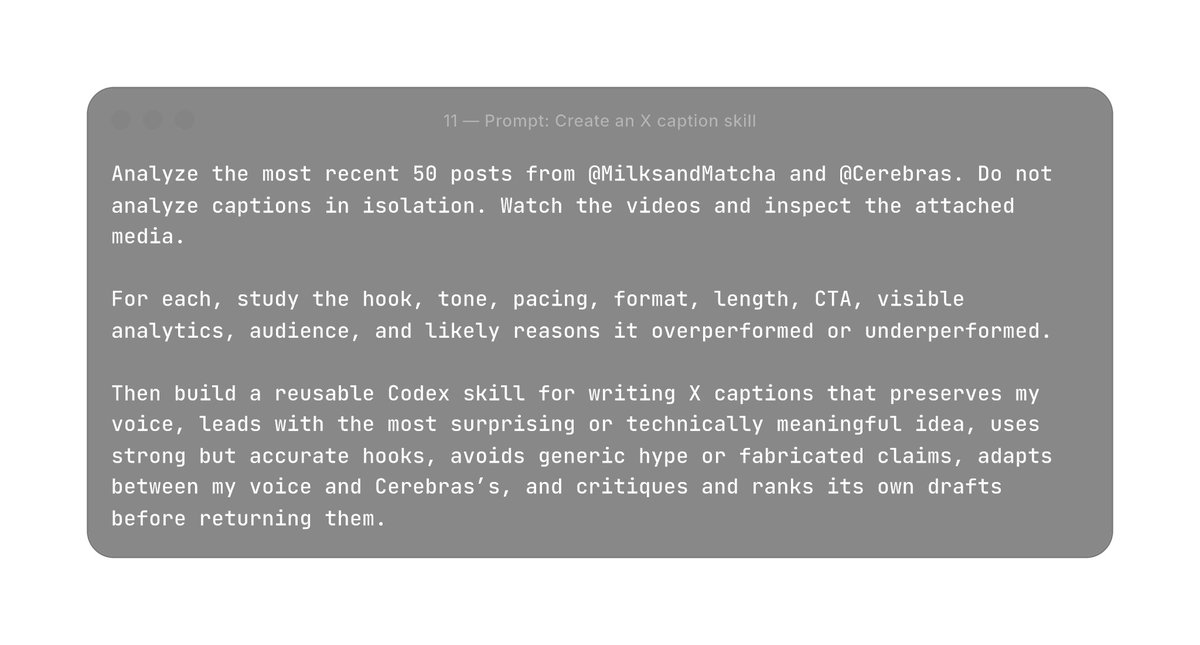 ## Schedule your content Just like with writing captions, posting on multiple channels (especially for schedule posting) is extremely tedious. If I’m extracting 8 shorts from an interview that I want to post on 5 platforms, that’s 40 manual posts that I need to schedule. Luckily, some great AI tools exist to help us automate this process, including tools like Buffer. Buffer is our personal favorite because it’s easy to use, automatically schedules for the best times or ‘next available posting slot’. But the BEST PART is that Buffer has an API that you can connect to agents like Codex or Claude Code. You can connect Buffer to Codex with a prompt like: Prompt: set up the Buffer API 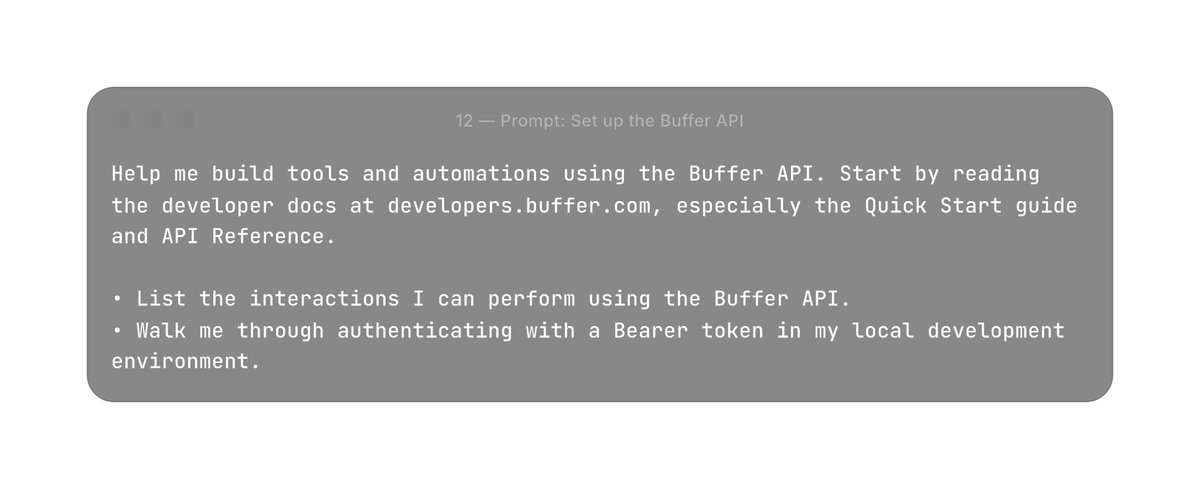 Prompt: prepare a publishing run Open the folder below and download every completed short form video into a new Desktop folder. For each video, write a TikTok, Instagram Reels, and YouTube Shorts caption tailored to the actual content itself. Mention and tag the relevant people where the platform supports it, and include relevant hashtags for each platform. Then create a posting calendar with one video published every Wednesday, starting on the next available Wednesday. Before scheduling anything, show me the full calendar and every caption for approval. Only schedule the posts after I approve them. # Repurposing Last but not least, you have re-purposing. This means taking any content you produce and remixing it or reformatting it for various platforms and mediums. For example, a podcast can become a short, can become a tweet, and combined with your last few tweets can become a blog. Content is both the end result of your effort, and substrate for the next creation. There are lots of ways to repurpose content. Here’s an example (and favourite) workflow. ## Remix long-form content One example is turning one long video into multiple short for videos. Long-form content in particular takes a lot of time to make, so try to get as much as possible from every recording. The goal is not to simply crop a long video into smaller pieces; each short should still feel complete on its own. For something like a Big Chip Club interview, we might turn one conversation into multiple Shorts, Reels, TikToks, and X clips. Tools like HeyGen’s clip extraction are great for finding strong moments, cutting them into vertical clips, and producing a first edit. From there, you can polish each clip directly in HeyGen’s editor so it works as a standalone piece. 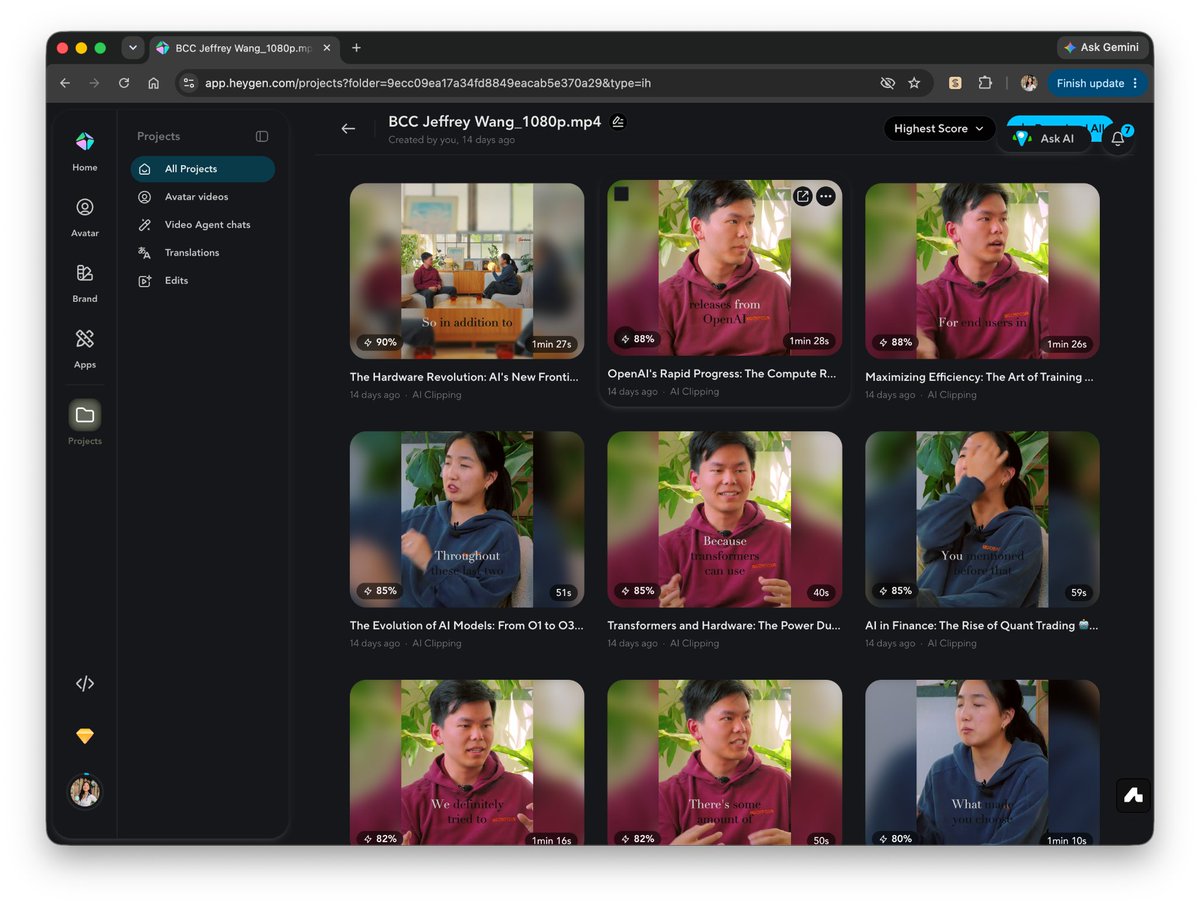 # Improving our system You published it! That alone is worth celebrating. Making something, finishing it, and sharing it with other people takes a lot of care and courage. Getting this far is already something to be proud of. You made the thing, you put it out into the world, and you’re one step closer to whatever comes next. When the numbers start coming in, try to treat them gently. They can tell you useful things, but they do not define whether the work was worth making--because it was :) We like to look at metrics with curiosity. What resonated, what surprised you, and what might you try differently next time? From there, you can improve the system in two ways: - Study how you worked - Study what worked ## Study how you worked Your workflow should get better over time. Making content is time-consuming, and it’s important to identify where you can improve the efficiency of your systems. As mentioned before, Coast CLI is a great tool for capturing history, in this case, for looking back at how we actually spent our time, then find the repetitive or annoying parts we can turn into tools, templates, or skills. Prompt: /coast-cli-skill Review my video creation process. Show me where I spend the most time, and suggest repetitive tasks I could automate or turn into tools. Which turns into, 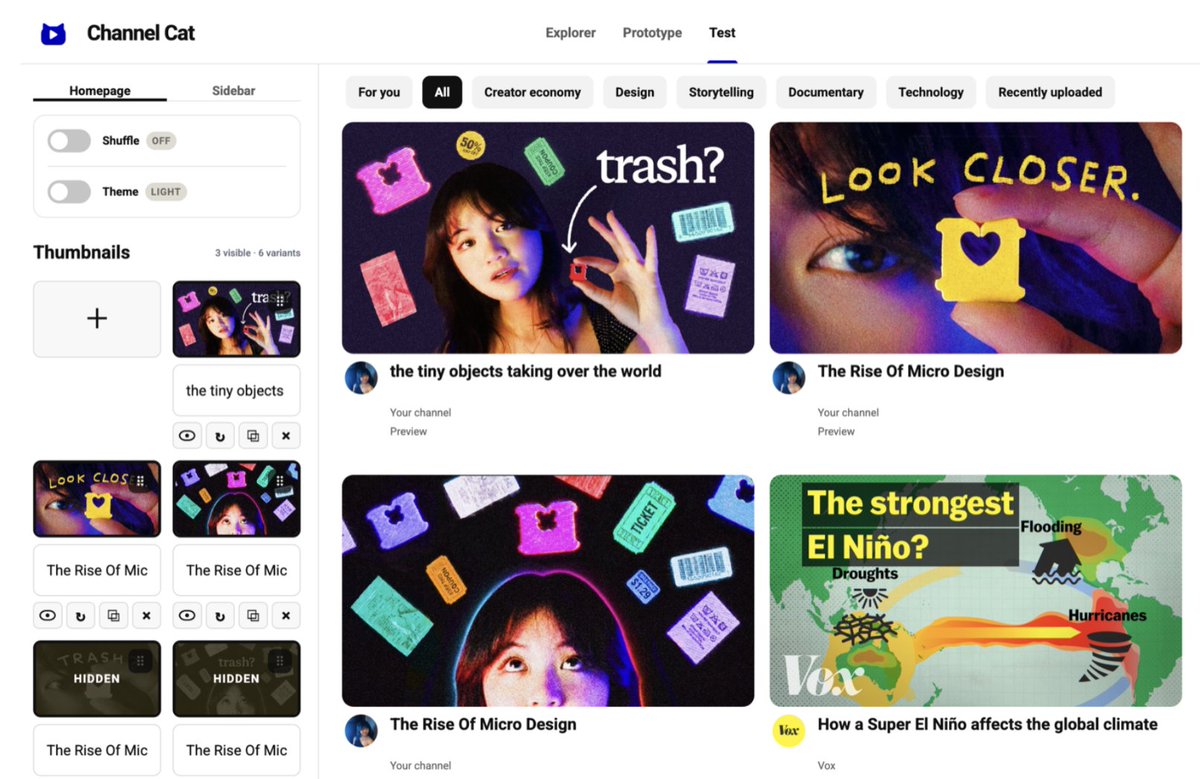 We use Coast to see where our time goes and identify repetitive work we can turn into tools. One audit showed Cova that she spent a lot of time searching for the same sound effects over and over, which led her to build a custom soundpad. ## Study what worked Earlier, you built skills for scripting, shot planning, captions, and platform-specific publishing. The exciting part is that those skills do not have to stay static. Now your system can start learning from what you make. Every first Monday of the month, review the previous month’s @covacut posts. Repeat this process separately for LinkedIn, Instagram, TikTok, and YouTube. Compare performance within each platform and identify which hooks, formats, topics, structures, and platform-native conventions worked best. Distinguish between patterns that are universal and those that are platform-specific. Then update my skills accordingly: - Script-writing skill - Caption skill - Other relevant content templates Now, your system learns from every piece of content you publish. That’s what creating at scale looks like to us: not simply making things faster, but building a workflow that gets smarter the more you use it. # An ending note If you made it here, thank you for spending time with us! We hope you leave with a clearer sense of how AI can fit into your creative workflow, and how that system can grow with you over time. We’ve covered a lot here, but remember the most important thing is: Just start. Make the thing you are excited about. Start building a system that makes it easier to do again. Then keep going. Making content has brought so much into both of our lives: new people, new opportunities, and a much clearer sense of what we actually care about making. You never really know where one good piece might take you. We hope this was useful! Let us know if any of these tips resonate, and feel free to send us any questions. An additional thanks to @0xSero for his contributions. Find us everywhere: Sarah · @milksandmatcha — Website · X · Instagram · YouTube · TikTok · LinkedIn Cole · @covacut — X · Instagram · YouTube · TikTok · LinkedIn ## 相关链接 - [Sarah Chieng](https://x.com/MilksandMatcha) - [@MilksandMatcha](https://x.com/MilksandMatcha) - [68K](https://x.com/MilksandMatcha/status/2087663656926585124/analytics) - [@covacut](https://x.com/@covacut) - [Sarah](https://sarahchieng.com/) - [@milksandmatcha](https://x.com/MilksandMatcha) - [Instagram](https://www.instagram.com/milksandmatcha/) - [YouTube](https://www.youtube.com/@milksandmatcha) - [TikTok](https://www.tiktok.com/@milksandmatcha) - [LinkedIn](https://www.linkedin.com/in/milksandmatcha/) - [Cole](https://www.linkedin.com/in/covacut) - [@covacut](https://x.com/covacut) - [Instagram](https://www.instagram.com/covacut/) - [YouTube](https://www.youtube.com/@covacut) - [TikTok](https://www.tiktok.com/@covacut) - [LinkedIn](https://www.linkedin.com/in/covacut) - [Codex](https://openai.com/codex/) - [Claude](https://claude.ai/) - [Obsidian](https://obsidian.md/) - [Wispr Flow](https://wisprflow.ai/) - [Figma](https://www.figma.com/) - [Coast](https://coast.app/) - [Premiere](https://www.adobe.com/products/premiere.html) - [HyperFrames](https://hyperframes.heygen.com/) - [HeyGen](https://www.heygen.com/) - [Buffer](https://buffer.com/) - [Codex](https://openai.com/index/openai-codex/) - [Wispr](https://www.wispr.ai/) - [Obsidian](https://obsidian.md/) - [Signs of AI Writing](https://en.wikipedia.org/wiki/Wikipedia:Signs_of_AI_writing) - [#screen](https://x.com/search?q=%23screen&src=hashtag_click) - [#motion](https://x.com/search?q=%23motion&src=hashtag_click) - [#graphic](https://x.com/search?q=%23graphic&src=hashtag_click) - [Coast](https://coast.app/) - [HyperFrames](https://hyperframes.heygen.com/) - [Background transform](https://www.instagram.com/reel/DJN0OgcxivE/) - [Animated titles](https://www.instagram.com/reel/DUaI0ztjn73/) - [Floating objects](https://www.instagram.com/reel/DSY1P9hDRO6/) - [@covacut](https://x.com/@covacut) - [HeyGen](https://www.heygen.com/) - [Buffer](https://buffer.com/) - [Big Chip Club](https://x.com/MilksandMatcha/status/1988705403543388352) - [@covacut](https://x.com/@covacut) - [@0xSero](https://x.com/@0xSero) - [Sarah](https://sarahchieng.com/) - [@milksandmatcha](https://x.com/MilksandMatcha) - [Website](https://sarahchieng.com/) - [Instagram](https://www.instagram.com/milksandmatcha/) - [YouTube](https://www.youtube.com/@milksandmatcha) - [TikTok](https://www.tiktok.com/@milksandmatcha) - [LinkedIn](https://www.linkedin.com/in/milksandmatcha/) - [Cole](https://www.linkedin.com/in/covacut) - [@covacut](https://x.com/covacut) - [Instagram](https://www.instagram.com/covacut/) - [YouTube](https://www.youtube.com/@covacut) - [TikTok](https://www.tiktok.com/@covacut) - [LinkedIn](https://www.linkedin.com/in/covacut) - [Upgrade to Premium](https://x.com/i/premium_sign_up) - [6:12 AM · Aug 13, 2026](https://x.com/MilksandMatcha/status/2087663656926585124) - [68K Views](https://x.com/MilksandMatcha/status/2087663656926585124/analytics) - [View quotes](https://x.com/MilksandMatcha/status/2087663656926585124/quotes) --- *导出时间: 2026/8/15 20:56:25* --- ## 中文翻译 # 两亿次观看教会我们的AI与创意之道 **作者**: Sarah Chieng **日期**: 2026-08-12T22:12:57.000Z **来源**: [https://x.com/MilksandMatcha/status/2087663656926585124](https://x.com/MilksandMatcha/status/2087663656926585124) ---  作者:Sarah Chieng 和 Cole Lee (@covacut) “听到一条信息,三天后你只会记住其中的10%。加上一张图片,你能记住65%。”——约翰·梅迪纳 内容是有力量的。 你可以改变一个人看待世界的方式。你可以触达数百万素未谋面的人。你可以改变自己的人生。 但做出好内容很难。 你必须找到创意、调研、写稿、拍摄、剪辑、包装,然后发布。做完这一切之后,你还要抓住——不,是驯服——注意力,并在善变的算法中存活下来。 我们两个人花了难以想象的大量时间来学习如何做好这件事。在YouTube、Instagram、X、TikTok和LinkedIn上,我们积累了超过70万粉丝,创造了超过2亿次观看。 关注我们的作品:Sarah (@milksandmatcha) 在 X、Instagram、YouTube、TikTok 和 LinkedIn 上;Cole (@covacut) 在 X、Instagram、YouTube、TikTok 和 LinkedIn 上。 在这篇文章中,我们融合了彼此的思维方式: - Sarah 是一位运营者:她思考系统如何帮助好内容触达更多人。 - Cova 是一位艺术家:她思考如何保护创作工艺,做出能引起共鸣的作品。 我们最终得出了相同的理念: AI 不应该替你创作。它应该给你更多时间去专注于创作过程中对你真正重要的事情。 读完这篇文章,你将学会如何用AI找到更强的创意,把它们变成听起来像你自己的脚本,更快地规划和制作视频,并建立一个随着每次发布而不断进步的系统。 # 流程 在这篇文章中,我们将拆解我们完整的内容创作六步工作流:构思、写稿、录制、剪辑、复用、发布。 提到的工具 - Codex / Claude:研究、写作、技能和自动化 - Obsidian:模板和创作指南 - Wispr Flow:语音转文字 - Figma:构建视觉系统 - Coast / OBS:捕捉和查找素材 - Premiere / HyperFrames:剪辑 - HeyGen:视频修复和内容复用 - Buffer:发布和排期 ## 构思 那么,如何想出一个好点子?我们两人都会维护某种形式的“灵感库”:一个收集(“倾倒”)网站、视频、设计、引文、文章的地方,这些都是黄金标准。我们在阅读、刷推特、在YouTube上漫游时发现这些素材。 这也是一个持续更新的想法清单:你提出的问题、你注意到别人问过你的问题、启发你的话题、你想讨论的参考资料。选择你喜欢的笔记工具,比如Notes、Obsidian或Notion。目标是始终保持有原材料可用。 然后,你研究什么有效。虽然社交媒体算法是专有的,但有无限的数据和指标可以回答以下问题: 我们最喜欢的创作者在做什么?哪些格式带来了最多的观看量? 这就是你使用AI构建自己的研究工具的地方。 例如,我们用Codex构建了一个YouTube工具,可以跨不同频道发现异常视频。从中,你可以研究标题和缩略图,生成参考,并将新想法与其他获胜视频进行比较,看看它们是否真的脱颖而出。  我们用Channel Cat来发现那些超出创作者常规基线的视频。  然后,我们混搭参考,直到一个想法灵光一现。  你甚至可以在模拟信息流中测试你的缩略图! 需要说明的是,我们不是要复制那些成功的內容。我们要找到可复现的模式(例如话题、格式),把它们作为塑造我们原创想法的约束条件。这个原则同样适用于缩略图、撰写文案等。 ## 写作与脚本 现在,有了你的想法,就可以开始写脚本了!虽然写脚本感觉像是不必要的额外工作,但我们保证它不是。一个好的脚本会在拍摄和剪辑过程中为你节省大量时间,并确保你以最佳方式传达你的想法。 你为三件事优化脚本: - 清晰度:别人能轻松理解你在说什么吗? - 教育价值:他们能学到有用的东西吗? - 吸引力:他们想继续看下去吗? AI在这里非常有用,因为它可以帮你把想法引出来、组织起来,并处理围绕它们的后勤工作。第一步是把想法从脑子里倒出来。 ## 把想法写下来 我们喜欢用两种方法: - 方法一:如果你大致知道想说什么,就直接做“大脑倾倒” - 方法二:如果你只有一个想法的雏形,但需要帮助深入挖掘,就让AI“采访”你 ## 方法一:大脑倾倒 如果想法在你脑中已经相当清晰,最快的方法就是直接说出来。 打开一个语音转文字工具,比如Wispr,然后像对朋友解释一样把你的想法说出来。不要担心结构、重复或措辞是否完美。只要把原始素材记录下来就行。 在下一步中,我们会展示如何用AI来组织和润色它。 ## 方法二:接受采访 如果想法还有点模糊,让你的AI代理采访你。你的AI采访者会追问你的观点,问你到底是什么意思,并挖掘出你可能没想到要包含的例子和故事。 这是我们喜欢在Codex语音模式中使用的提示词:  ## 组织你的原始素材 现在你已经完整地讲完了你的想法,让我们用AI给这些原始素材一些结构。 不要只是让代理“把这个变成病毒式传播的、引人入胜的脚本”。你最终会得到一堆AI味十足的垃圾。相反,让代理捕捉你的声音,并将其转化为技能。 我们使用基于过去脚本、视频和表现数据构建的专属技能,这样我们的代理就能理解我们的声音,并产出听起来独特像我们的结果。 如果你已经有了一批作品,可以让AI研究: - 你的写作有什么独特之处 - 什么内容往往表现最好 然后让它把这些观察转化为一个可复用的技能。  有时候你已经很清楚希望代理遵循的非常具体的规则。将这些组织成代理易于访问的格式的一种方法是使用像Obsidian这样的工具,一个本地笔记应用。 使用Obsidian,你可以将创作指南、示例和可复用模板存储为简单的Markdown(.md)文件,这使得代理可以轻松读取和引用。这为代理提供了一个一致的事实来源。 在Obsidian中,我们为每种内容格式维护模板,例如: - 1分钟视频 - 15分钟视频 - X帖子 - LinkedIn帖子 - ……等等 每个模板都列出了该格式的惯例。  Cova使用这个Obsidian脚本模板,这是她用Codex技能创建的。 使用技能或模板来构建你的脚本 一旦技能或模板存在,你就把来自语音倾倒或采访的原始素材喂给它。 例如:  提示词:模板  即使有了这些工具,也要对AI生成的任何内容做最后一遍检查。你还可以把“AI写作的迹象”交给你的代理,并明确要求它避免列表中的每一个模式。 # 录制 和写脚本一样,在录制前规划内容会节省你的时间,并帮助区分好内容和优秀内容。投入在拍摄上的时间不是线性的,虽然在录制上刻意用心可能需要多花2倍的时间,但可能带来100倍的结果。 你需要录制两种类型的内容: - 拍摄A卷(即讲述故事所需的主要素材):你的出镜画面、屏幕录制演示 - 拍摄B卷(即填充镜头,比如你坐到椅子上、笔记本电脑的侧面镜头) 这里最重要的教训是:在开始拍摄之前规划好你的镜头。 ## 创建镜头清单 录制很快就会成为制作内容中最耗时的部分之一。一个清晰的镜头清单可以防止你在剪辑中途才意识到忘记了一个重要的屏幕录制、特写或转场。 拍摄前,在脚本上标注所有你需要的A卷和B卷。 你可以再次使用自定义技能。 提示词:创建技能 创建一个可复用的镜头清单技能,分两遍处理完成的脚本。 第一遍:保留脚本。添加引用格式的注释:#a-roll、#b-roll、#screen-recording、#motion-graphic、#graphic。绝不凭空编造。 第二遍:创建“## 镜头清单”部分。按实际拍摄场次去重。为每个镜头包含确切的脚本上下文。 在example_script.md上测试,展示结果,并询问哪里感觉不对。不断修改和测试,直到我说满意为止。 提示词:调用技能 /shot-list 把这个脚本变成一份录制检查清单。 结果变成:  你可以把任何脚本变成镜头清单,让拍摄保持简单。 ## 录制你的屏幕 你可以根据需求使用不同的屏幕录制工具。以下是我们最喜欢的一些: - macOS屏幕录制:用于快速、简单的演示 - OBS:当我们想同时组合多个视图时 - Coast:当事情已经发生,我们需要重新找到它时 - Cleanshot:用于快速注释录制的屏幕内容 macOS屏幕录制 对于快速演示,macOS屏幕录制非常被低估。 按Command + Shift + 5即可截屏或录制屏幕和音频。它非常适合产品演示、操作指南,以及快速捕捉正在发生的有趣事情。 你可以自动将录制保存到~/Desktop,这样在Codex会话中引用或稍后与其他素材合并都很方便。 OBS 当我们想同时录制多个视图时,OBS是一个很好的选择。 OBS允许你将摄像头、屏幕、窗口和其他来源组合成一次录制。例如,你可以一边录制自己讲话,一边进行实时产品演示,而不必事后拼接两者。 当布局本身就是视频的一部分时,它特别有用。 Coast 有时候最好的演示是你已经做过的事情,或者你有太多演示,不想花时间一个个翻找。 Coast会持续录制你的屏幕并使历史记录可搜索,这样你就不必重新创建工作流程或手动寻找确切发生的时刻。 当你已经花了几个小时摆弄某样东西,之后想提取几个片段时,这特别有用。 我们在Claude或Codex中使用/coast技能来查找和保存这些录制。 提示词: /coast 查找我演示了以下内容的录制: - [演示1] - [演示2] - [演示3] 将每个剪辑保存到~/Desktop/Screen-recorded-demos。 结果大致如下:  Coast记录你的电脑活动并使其可搜索——精确到8月6日我在Lightroom里花了45分钟编辑这个缩略图。 Cleanshot 当你想要快速获得精致的屏幕录制时,CleanShot非常棒,你可以轻松注释、模糊、修改屏幕录制。  Cleanshot允许你快速录制和截屏,进行标注或模糊电子邮件地址等修改。 # 剪辑 现在你已经录制了所有内容,是时候把各个部分组合在一起了。剪辑是非常个人化的事情,所以没有唯一的最佳工作流,即使是最好的创作者也会告诉你,找到一个能读懂你心思的好剪辑师是不可能的……无论如何,剪辑的细节很重要。字幕、文字动画、图表、节奏和其他小选择,可以决定一个视频是被人们划走还是被他们一直看下去。 所以把这一节看作一个菜单:选择适合你工作方式的方法。 ## 整理你的素材 剪辑之前,把所有东西放到一个地方。 一种方法是保留一个/content文件夹,每个项目一个子文件夹。在每个项目中,你可以将素材组织到这样的文件夹中: - A卷 - B卷 - 屏幕录制 - 音乐 - 图片 - 图形 - 参考资料 你可以使用代理来帮助收集和整理所有内容。 提示词  这是繁琐、重复的工作,正是AI的理想用武之地。 ## 创建设计系统 为你的内容创建设计系统可以确保你的品牌真实地传达出来。如果你还没有,可以请代理帮你创建一个。 提示词:从零开始创建设计系统  然后变成:  提示词:从以往内容创建设计系统  这里的关键是不要让AI发明你的品味。我们希望你把你的品味变成一个可以扩展的设计系统。 选择你的剪辑方式 ## 方法一:用AI剪辑 现在,你可以直接在Codex和Claude Code这样的代理中剪辑,但你也可以将HeyGen的HyperFrames等工具与你的编辑器连接起来,这是一种基于代码的视频工作流。你不再需要手动在时间线上移动图层,而是描述剪辑、渲染、观看、给出反馈。 初始Codex/Claude Code提示词  这会产生类似这样的输出:  工作流很简单: 描述 → 渲染 → 审查 → 修改 当你的创作方向已经清晰时,这种方法效果很好。 ## 方法二:自己剪辑(但用更好的工具!) 另一个选择是直接在Premiere等编辑器中工作(虽然Final Cut Pro和Davinci Resolve也是很棒的选择)。如果你在意剪辑、声音和转场的精确时机,你可能想把那些决定握在自己手中。 与其让AI替你剪辑,不如让它简单地消除剪辑过程中的摩擦。 例如: - 一个Premiere MCP,可以重命名和组织你所有的文件和视频序列。 - 一个自定义音效板,让你按一下按钮就能即时添加音效。 - 为我们经常做的重复性动作制作的小工具。 目标很简单:保留创作决策,自动化烦人的部分。 这类工具很棒,因为它们可以编码我们的风格,把我们的品味模板化。  我们构建自定义工具来按我们的方式剪辑,比如Premiere中的这个自定义音效板。 ## 用AI创建视觉元素 AI在剪辑中创建单个视觉元素时也很有用。 例如: - 背景转换:背景太无聊?让它变得华丽。 - 动画标题:把普通标题变成惊艳的动画标题。 - 漂浮物体:因为有时候答案就是添加漂浮的东西。 有趣的是,这里真的没有上限。如果你能描述你想要的视觉效果,很可能就有办法实现它。  我们最喜欢的AI用例之一是用它来转换无聊的场景。 如果你想深入了解这些内容,@covacut 总是很乐意谈论各种奇特的视频技巧。 ## 无需重拍即可修复错误 即使拍摄完成后,事情也会变化。例如,事实过时了,产品变了,或者你意识到某句话可以更清晰。当这种情况发生时,AI工具对于纠正小错误非常有用,而不必重新拍摄所有内容。一个有用且擅长生成数字人的工具是HeyGen。使用HeyGen,你可以上传原始视频,从录制中创建数字人分身,然后只重新生成需要修复的那句台词。 你也可以在拍摄前使用它来预览脚本听起来的效果,及早发现别扭的措辞。 # 发布 你快要到终点了!现在你有了脚本、素材、音乐、图形和定制化内容,组成一个完成的视频,是时候发布了。这包括撰写文案和发布你的内容。这一步可以说是最重要的,因为在人们观看你创作的内容哪怕一秒钟之前,他们会先读到你的文案/标题/缩略图。 无论如何,让我们谈谈发布。 ## 撰写文案 为X、LinkedIn、Instagram和TikTok分别撰写文案可能非常繁琐,而简单地在每个平台复制相同的文案从来不会有好效果。但不幸的事实是,在每个平台走红都是各自独特的游戏。我们可以从多年经验中验证,即使是最小的措辞变化也意味着2000次观看和20万次观看的区别。你还必须小心,因为AI生成的垃圾内容很容易被识别出来,永远不会带来好结果。 在这里,使用AI的一个好方法是为每个平台创建单独的代理技能。 要构建它们,让你的代理研究你过去的帖子、附带的媒体以及每个帖子的表现。从中,代理学会每个平台有效的模式,同时保留你的声音。 提示词:创建平台特定的文案技能  ## 排期你的内容 和撰写文案一样,在多个渠道发布(尤其是定时发布)极其繁琐。如果我要从一次采访中提取8个短视频,发布到5个平台,那就是40个需要手动排期的帖子。 幸运的是,有一些很棒的AI工具可以帮助我们自动化这个过程,包括Buffer这样的工具。Buffer是我们个人最喜欢的,因为它易于使用,自动在最佳时间或“下一个可用发布时段”排期。但最棒的是Buffer有一个API,你可以连接到Codex或Claude Code这样的代理。 你可以用这样的提示词将Buffer连接到Codex: 提示词:设置Buffer API  提示词:准备一次发布运行 打开下面的文件夹,将每个已完成的短视频下载到一个新的桌面文件夹中。 对于每个视频,根据实际内容撰写TikTok、Instagram Reels和YouTube Shorts的文案。在平台支持的地方提及并标记相关人员,并为每个平台包含相关的标签。 然后创建一个发布日历,从下一个可用的周三开始,每周三发布一个视频。在排期任何内容之前,向我展示完整的日历和每条文案以供批准。只有在我批准后才安排发布。 # 内容复用 最后但同样重要的是内容复用。这意味着把你制作的任何内容进行混搭或重新格式化,以适应各种平台和媒介。例如,一个播客可以变成短视频,可以变成推文,再和你最近几条推文结合可以变成一篇博客。内容既是你努力的最终成果,也是下一次创作的基质。 有很多种内容复用的方式。这里有一个例子(也是我们最喜欢的)工作流。 ## 混搭长视频内容 一个例子是把一个长视频变成多个短视频。长视频尤其需要大量时间制作,所以尽量从每次录制中获取尽可能多的内容。目标不是简单地把长视频裁剪成小块;每个短视频仍然应该自成一体。 对于像Big Chip Club访谈这样的内容,我们可能会把一次对话变成多个Shorts、Reels、TikToks和X片段。 像HeyGen的片段提取这样的工具非常适合找到精彩时刻,将它们剪成竖屏片段,并生成初剪。然后,你可以直接在HeyGen的编辑器中润色每个片段,使其成为独立的作品。  # 改进我们的系统 你发布了!这本身就值得庆祝。 做出东西、完成它、并与他人分享需要很多用心和勇气。走到这一步已经值得骄傲。你做出了作品,把它发布到了世界上,你离下一步更近了一步。 当数据开始出现时,试着温柔地对待它们。它们可以告诉你有用的信息,但它们不能定义这个作品是否值得做——因为它值得:) 我们喜欢带着好奇心看待数据。 什么引起了共鸣?什么让你惊讶?下次你可能尝试什么不同的做法? 从这里,你可以通过两种方式改进系统: - 研究你是如何工作的 - 研究什么有效 ## 研究你是如何工作的 你的工作流应该随着时间不断改进。制作内容很耗时,识别可以在哪里提高系统效率非常重要。 如前所述,Coast CLI是一个捕捉历史的好工具,在这种情况下,用于回顾我们实际如何花费时间,然后找到可以转化为工具、模板或技能的重复或烦人的部分。 提示词: /coast-cli-skill 审查我的视频创作过程。告诉我我在哪里花费了最多时间,并建议我可以自动化或转化为工具的重复性任务。 结果变成:  我们用Coast来查看我们的时间花在哪里,并识别可以转化为工具的重复性工作。 一次审查让Cova发现她花了大量时间反复搜索相同的音效,这促使她构建了一个自定义音效板。 ## 研究什么有效 之前,你为脚本撰写、镜头规划、文案和平台特定发布构建了技能。 令人兴奋的是,这些技能不必保持不变。 现在你的系统可以开始从你制作的内容中学习了。 每个月的第一个周一,回顾上个月@covacut的帖子。 分别对LinkedIn、Instagram、TikTok和YouTube重复这个过程。 在每个平台内比较表现,识别哪些钩子、格式、话题、结构和平台原生惯例效果最好。 区分普遍适用的模式和平台特定的模式。 然后相应地更新我的技能: - 脚本撰写技能 - 文案技能 - 其他相关内容模板 现在,你的系统从你发布的每一个内容中学习。 这就是我们眼中的规模化创作:不仅仅是更快地制作东西,而是建立一个用得越多越聪明的系统。 # 结语 如果你读到了这里,感谢你花时间陪伴我们! 我们希望你在离开时对AI如何融入你的创作工作流,以及这个系统如何随着时间与你一起成长,有了更清晰的认识。 我们在这里涵盖了很多内容,但记住最重要的事情是: 开始吧。 做出让你兴奋的东西。开始建立一个让再次创作变得更容易的系统。 然后继续前进。 制作内容给我们的生活带来了太多东西:新的人、新的机会,以及对我们真正关心创作什么的更清晰的认识。 你永远不会真正知道一个好作品会把你带向何方。 希望这对你有用!如果这些建议中有任何一条引起了你的共鸣,请告诉我们,也随时向我们提问。另外感谢@0xSero的贡献。 在所有平台找到我们: Sarah · @milksandmatcha — 网站 · X · Instagram · YouTube · TikTok · LinkedIn Cole · @covacut — X · Instagram · YouTube · TikTok · LinkedIn ## 相关链接 - [Sarah Chieng](https://x.com/MilksandMatcha) - [@MilksandMatcha](https://x.com/MilksandMatcha) - [68K](https://x.com/MilksandMatcha/status/2087663656926585124/analytics) - [@covacut](https://x.com/@covacut) - [Sarah](https://sarahchieng.com/) - [@milksandmatcha](https://x.com/MilksandMatcha) - [Instagram](https://www.instagram.com/milksandmatcha/) - [YouTube](https://www.youtube.com/@milksandmatcha) - [TikTok](https://www.tiktok.com/@milksandmatcha) - [LinkedIn](https://www.linkedin.com/in/milksandmatcha/) - [Cole](https://www.linkedin.com/in/covacut) - [@covacut](https://x.com/covacut) - [Instagram](https://www.instagram.com/covacut/) - [YouTube](https://www.youtube.com/@covacut) - [TikTok](https://www.tiktok.com/@covacut) - [LinkedIn](https://www.linkedin.com/in/covacut) - [Codex](https://openai.com/codex/) - [Claude](https://claude.ai/) - [Obsidian](https://obsidian.md/) - [Wispr Flow](https://wisprflow.ai/) - [Figma](https://www.figma.com/) - [Coast](https://coast.app/) - [Premiere](https://www.adobe.com/products/premiere.html) - [HyperFrames](https://hyperframes.heygen.com/) - [HeyGen](https://www.heygen.com/) - [Buffer](https://buffer.com/) - [Codex](https://openai.com/index/openai-codex/) - [Wispr](https://www.wispr.ai/) - [Obsidian](https://obsidian.md/) - [Signs of AI Writing](https://en.wikipedia.org/wiki/Wikipedia:Signs_of_AI_writing) - [#screen](https://x.com/search?q=%23screen&src=hashtag_click) - [#motion](https://x.com/search?q=%23motion&src=hashtag_click) - [#graphic](https://x.com/search?q=%23graphic&src=hashtag_click) - [Coast](https://coast.app/) - [HyperFrames](https://hyperframes.heygen.com/) - [Background transform](https://www.instagram.com/reel/DJN0OgcxivE/) - [Animated titles](https://www.instagram.com/reel/DUaI0ztjn73/) - [Floating objects](https://www.instagram.com/reel/DSY1P9hDRO6/) - [@covacut](https://x.com/@covacut) - [HeyGen](https://www.heygen.com/) - [Buffer](https://buffer.com/) - [Big Chip Club](https://x.com/MilksandMatcha/status/1988705403543388352) - [@covacut](https://x.com/@covacut) - [@0xSero](https://x.com/@0xSero) - [Sarah](https://sarahchieng.com/) - [@milksandmatcha](https://x.com/MilksandMatcha) - [Website](https://sarahchieng.com/) - [Instagram](https://www.instagram.com/milksandmatcha/) - [YouTube](https://www.youtube.com/@milksandmatcha) - [TikTok](https://www.tiktok.com/@milksandmatcha) - [LinkedIn](https://www.linkedin.com/in/milksandmatcha/) - [Cole](https://www.linkedin.com/in/covacut) - [@covacut](https://x.com/covacut) - [Instagram](https://www.instagram.com/covacut/) - [YouTube](https://www.youtube.com/@covacut) - [TikTok](https://www.tiktok.com/@covacut) - [LinkedIn](https://www.linkedin.com/in/covacut) - [Upgrade to Premium](https://x.com/i/premium_sign_up) - [6:12 AM · Aug 13, 2026](https://x.com/MilksandMatcha/status/2087663656926585124) - [68K Views](https://x.com/MilksandMatcha/status/2087663656926585124/analytics) - [View quotes](https://x.com/MilksandMatcha/status/2087663656926585124/quotes) --- *导出时间: 2026/8/15 20:56:25*
如 如何在2026年建立你的第一个AI团队 文章介绍了2026年构建AI团队的完整指南,强调多智能体协作模式。通过设定研究员、起草人、批评家和润色者四种角色,利用Bloome等工具实现高效的AI工作流。涵盖市场调研、内容创作、文档审查等实际应用场景,并提供任务路由系统的具体配置方法,帮助用户低成本提升效率。 技术 › Agent Rahul 2026-07-14 AIAgent多智能体工作流效率工具Bloome自动化团队管理路由系统内容创作
A AI 不该是一次性的:利用 CREAO 将成功对话沉淀为 Agent 文章介绍了利用 CREAO AI 将一次性的 AI 对话转化为可复用 Agent 的方法。作者通过小红书爆款挖掘、热点内容策划和产品拆解三个案例,展示了如何将调教好的工作流沉淀下来,实现定时自动执行,从而提升效率,从“借用 AI”转变为“复制自己”。 技术 › Agent 余温 2026-04-22 AIAgent工作流效率工具内容创作自动化CREAO
网 网红已死,体验时代来临 文章探讨了社交媒体创作者生态的演变:随着普通人在数字产品发布中取得成功,传统网红模式正在衰落。作者将创作者分为三类——追求流量的网红、以变现为目的的个人品牌,以及以作品为核心的手艺人(artisan)。作者认为,在AI能够轻易生成内容的时代,独特的个人视角和长期积累的思想作品才是真正的护城河。未来属于那些利用社交媒体推广自己作品体系的手艺人,而非追逐短期流量的人。文章建议读者记录并构建自己的观点体系,把社交媒体作为传播作品的载体。 职场 › 职业发展 Dan Koe 2026-10-21 个人品牌内容创作社交媒体自媒体AI创作者经济网红职业发展
如 如果今天从零开始,我会如何用 AI 打造个人品牌(完整90天 playbook) 作者分享在9个月内将X账号从零做到3.5万粉丝的经验,并给出今天从零开始打造个人品牌的完整方法论。核心是一个内容创作循环:确定受众→研究→结合自身经验→创作→发布→复盘。文章介绍了如何借助AI助手Stanley完成竞品内容研究、结构分析、素材整理、语音转文稿等环节,包括如何定位账号方向、拆解爆款内容、建立个人素材库、制定发布节奏和每周复盘。作者强调AI放大个人经验而非替代,最终目标是成为目标人群在需要帮助时会想起的人,从而带来咨询、合作和人脉机会。 技术 › 工具与效率 J.B. 2026-10-01 AI个人品牌内容创作X社交媒体Stanley内容营销自我成长AI助手
O OpenMontage:一句话让AI Agent接管整个视频制作流程 文章介绍GitHub上57.3K Stars的开源项目OpenMontage。它并非简单的文生视频工具,而是将Claude Code、Codex、Cursor等AI Coding Agent改造成完整视频制作团队。用户只需一句话,Agent即可自主完成从资料研究、脚本、分镜、素材生成、配音、字幕、音乐到剪辑渲染的全流程,甚至能分析参考视频的节奏和视觉语言来规划制作方案。项目包含12套制作Pipeline、100+工具、700+ Agent Skill,接入Remotion、FFmpeg及多种AI模型。作者认为这代表了AI从'帮你做素材'到'替你完成工作'的转变,未来将是管理Agent而非操作工具的时代。 技术 › Agent Lishawn 2026-09-14 OpenMontageAgentAI视频Claude CodeCodex视频制作自动化开源项目工作流内容创作
R RedFox:打通100多个新媒体工作流的Codex Skill实战指南 本文介绍了RedFox这一集成超过100个新媒体数据接口的Codex Skill,涵盖公众号爆文搜索、账号诊断、违禁词检测等功能。作者详细讲解了如何获取API Key、安装Skill,并通过三个核心Skill(wechat-search、wechat-account-analyzer、wechat-prohibited-word)实现从选题到发布的自动化工作流。文章还提供了故障排查方法和使用建议,强调AI辅助人工决策的价值。 技术 › Codex 李岳 2026-08-20 RedFoxCodexSkill新媒体公众号工作流API自动化内容创作效率工具
本 本地部署:0成本的数字人口播教程 本文介绍了一套基于本地显卡的数字人口播视频生成方案,旨在替代成本较高的云端服务。文章详细讲解了从电脑配置检查、一键启动工作流,到接入 Duix.Avatar 本地数字人、调整动画画风的完整步骤,并分享了如何构建长期复用的工作流及多平台内容变现策略。 技术 › 工具与效率 黄小木 2026-08-17 数字人本地部署视频制作AICodexDuix.Avatar工作流开源教程自动化
1 10w 粉博主的阅读流程:用顶级 AI Newsletter 治好信息焦虑 本文介绍了作者“低能量三步法”的阅读流程:通过筛选高质量 Newsletter 换取信息选择权,利用 AI 每天精读 3 篇并归档 97 篇至知识库,最后结合知识库与 AI 辅助实现低能量输出,帮助缓解信息焦虑,提升创作效率。 技术 › 工具与效率 铁锤人 2026-08-17 AINewsletter信息管理知识库工作流阅读方法效率工具MailAgent内容创作
小 小白也可以5分钟用Workbuddy搓出个人工作台 本文介绍了如何使用WorkBuddy快速搭建个人工作台,并重点强调了工作台应服务于日常重复流程而非仅作展示。作者以内容创作者为例,详细说明了如何梳理工作流程、设计第一版模块(今天要处理、内容看板、发布记录、待处理问题),并提供了两个可直接使用的提示词模板。文章还涵盖了功能测试清单、数据备份方法以及通过参考图调整样式等实用技巧,旨在帮助用户打造一个真正能提升效率、可持续使用的个人工作台。 技术 › 工具与效率 宋宋 2026-08-12 WorkBuddy个人工作台效率工具提示词内容创作工作流数据备份AI工具自动化生产力
我 我把 AI 每日简报重做成了一个 Codex Skill:安装和用法全开源 作者将AI每日简报重构为Codex Skill并开源,解决了信息入口繁琐、消息易丢失、热点与写作脱节的问题。新版通过Python负责稳定抓取与过滤,Codex负责判断与表达,支持生成带来源链接的Markdown早报,并记录跨日变化与用户反馈,自动生成周复盘。文章详细介绍了安装步骤、使用方式及未来计划,旨在将信息获取、选题和写作流程系统化。 技术 › Codex Rion Wu 2026-08-11 CodexSkillAI简报开源工作流Python内容创作信息聚合自动化效率工具
装 装完 Codex 不知道干什么?这 6 个 GitHub Skills 让你做视频搞钱 文章介绍了 6 个适用于 Codex 的 GitHub Skills,涵盖动效生成、视频剪辑、批量制作、AI 生成及中文剪辑等工具,帮助用户构建自动化视频工作流以提升效率。 技术 › Codex Kay 2026-07-30 Codex视频制作AgentSkill自动化HyperFramesRemotionAI剪辑工作流
C Codex + Hyperframes + HeyGen +声音克隆:零基础自媒体变现全开源 作者分享了利用 Codex、Hyperframes、HeyGen 和 IndexTTS2 等工具构建的自动化视频工作流,实现了零基础、低成本的短视频制作与变现。文章详细介绍了各工具的选型理由、工作流架构及成本账单,旨在帮助读者通过 AI 技术解决内容生产的效率问题。 技术 › 工具与效率 雪踏乌云 2026-07-27 AI自媒体视频制作HeyGen声音克隆CodexHyperFrames自动化变现工作流