# This 1 Claude Skill fully replaces your Higgsfield subscription (FULL BREAKDOWN)
**作者**: Sabrina Ramonov
**日期**: 2026-08-18T17:07:57.000Z
**来源**: [https://x.com/Sabrina_Ramonov/status/2089761229418221683](https://x.com/Sabrina_Ramonov/status/2089761229418221683)
---
TLDR
Here’s the exact 5 step setup to make faceless AI videos without a monthly Higgsfield subscription to market your app: 1 free Claude skill that generates viral videos through Kie for ~75 cents and 1 app that publishes everywhere, without getting your social media account banned. I show every step, the cost per video, and how to post successfully on socials.
If you want to make viral faceless AI videos, everyone sends you to Higgsfield. It’s good. But way overpriced. Roughly $15 to $129 a month, monthly billing, depending on your tier.
You don’t need it.
One free Claude skill makes the SAME videos, using the SAME AI models, and you only pay for what you generate.
Already proven that it can make viral videos getting millions of views.
An image costs a few cents.
A video costs about $0.75.
No monthly bill.
Here's what $1 buys:
| | KIE.ai | Higgsfield |
| --- | --- | --- |
| $1 gets you | 1 finished 10 second clip at 1080p, with change | Nothing. There is no $1 plan |
| 5 finished clips cost | $3.75, at 1080p and 10 seconds | $15 a month, at 720p and 8 seconds |
| Unused credits | Carry over forever | Reset to zero every month |
You’ve seen the faceless videos. ‘POV: you wake up as a caveman.’
Millions of views.
Meanwhile, the product you spent months building is sitting at 9 signups and $90 MRR 😭
You shipped.
And then nothing.
Posting into the void.
Getting people to see the thing you built is hard... nobody teaches you.
By the end of this guide, you’ll have your own viral faceless video engine: cinematic videos that put your product in front of millions, without ads, without showing your face and without becoming a marketer.
Some context first
I own this [faceless channel](https://www.tiktok.com/@dayli.pov) with 260.5k followers and over 100M+ views, 100% faceless.
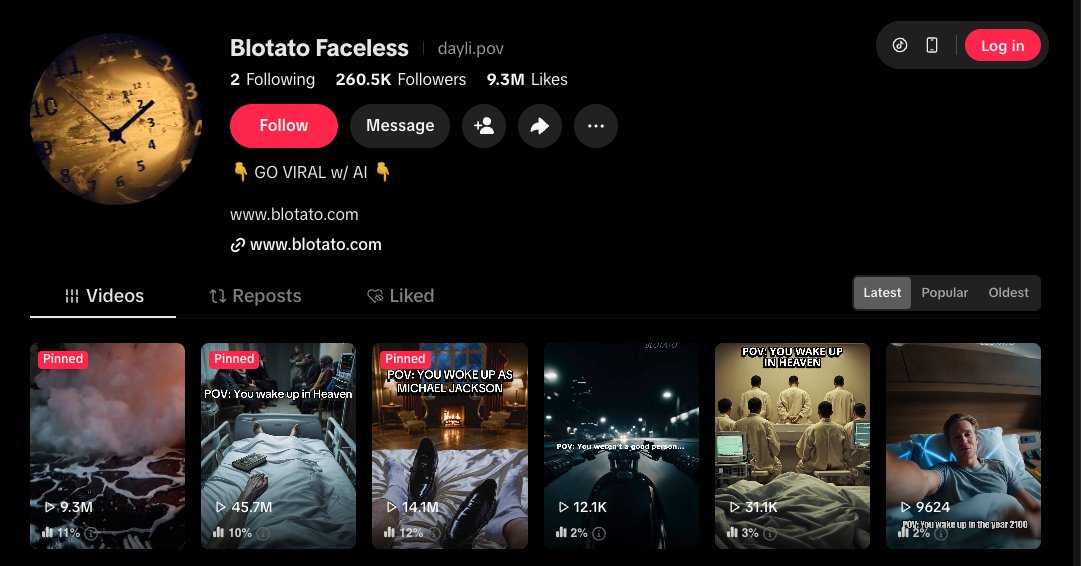
Screenshot 1. Tiktok Profile Faceless latest
Today, you can build the same thing with Claude, one free skill and media generation that costs about $0.75 per clip.
Same format, much cheaper engine.
If I were starting from zero this week, here's exactly how I'd do it.
And btw, "POV first person cinematic" is just one format. I'm using it as an example throughout this guide, but you can generate ANY faceless format.
So, I created a few different presets you can start with:
- A problem then a solution clip where your app is the fix.
- A before and after that shows the result.
- A ‘5 tools for [x] countdown’ with your product at number 1.
- A relatable short story.
Match the format to what you’re selling.
A faceless channel is great cheap advertising for your own product.
Put a small watermark on every video, then when one pops, that’s millions of impressions for whatever you’re building. Then replicate multiple similar videos with the proven viral format.
However, one caveat: if you're chasing platform rewards, Tiktok's Creator Rewards Program only pays on videos 60+ seconds. YouTube Shorts has no minimum.
So, this article is about the other route, i.e. using faceless videos to market your own stuff, so everything here is built for short clips.
Or even better, skip the watermark and just show your product in the video. CalAI does this better than anyone, always organically showing their product within the first 12 seconds, instead of overtly talking about it. This converts better than watermarks.
Or keep the video clean and just put the offer in your bio.
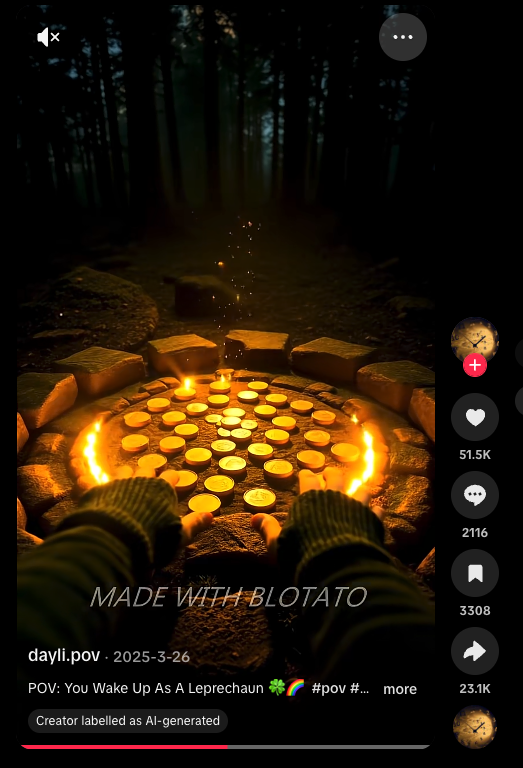
Screenshot 2: you can show your watermark like this
What you need
- An AI agent. Claude Code, Codex, Hermes, or Openclaw, all work great . Any agent can read the skill, OpenClaw included. The skill is a SKILL.md file on the [agentskills.io](//agentskills.io) open standard, so it also runs in OpenClaw, Codex CLI and Hermes. Drop the folder into that agent's skills directory.
- The /generate skill, download below. One free skill I built from RoboNuggets' guide (shout out [@robonuggets](https://x.com/@robonuggets)). It takes your prompt, picks the cheapest model that can do the job, generates the image or clip, and saves every file in one folder so you own it. I extended it so that it also quotes the cost, waits for your approval before running, and has a few video template presets.
- 1 API key to access the best video, image and music models. There are optional fallbacks. All pay as you go, you only pay per generation:
- [KIE.ai](//KIE.ai), the cheapest route, and the best one to start. Credits don’t expire.
- [fal.ai](//fal.ai), the biggest model catalog and the best docs, your first fallback. Credits expire after a year.
- WaveSpeed, a broad catalog fallback if others fail. Credits never expire.
- [Blotato.com](https://blotato.com/?ref=x-aug2026-generate-skill) to publish. Posts to every platform (TikTok, Instagram, YouTube, Facebook, Threads, Bluesky, Pinterest, X) through a REST API or MCP, so your agent drives it. It also includes DM automation, messaging, comments, and social media analytics.
- A warmup routine. Keeps a brand new account from getting flagged the second you automate it. Free playbook at the end.
That's it.
Let’s get into it.
Step 1: The generation tool ([KIE.ai](https://www.google.com/url?q=http://kie.ai&sa=D&source=editors&ust=1787070495848456&usg=AOvVaw2GriFm5bhr3Ck8libIu3A3)) + 1 free Claude Skill
[KIE.ai](https://www.google.com/url?q=http://kie.ai&sa=D&source=editors&ust=1787070495848598&usg=AOvVaw03tBTQkwumk_T8wgxSjg3s) is a pay as you go aggregator to most of the same models that tools like Higgsfield run under the hood.
You just load credits and spend as you generate.
Credits don’t expire. KIE only charges you when a generation SUCCEEDS.
If it fails? FREE.
Say you post 5 videos a week. That's 20 videos a month, 10 seconds each.
Here’s what it would cost you:
| 20 videos | KIE.ai | Higgsfield Starter | Higgsfield Plus |
| --- | --- | --- | --- |
| Does it cover 20? | Yes | No. 5 clips, then you stop | Yes, up to 27 |
| What you pay | $15.00 | $15.00 | $49.00 |
| What you get | 1080p, 10 seconds | 720p, 8 seconds | 720p, 8 seconds |
| Cost per finished video | $0.75 | $3.00 | $2.45 |
| A month you make nothing | $0.00 | $15.00 | $49.00 |
| Credits you did not spend | Carry over forever | Reset to zero | Reset to zero |
Look at what the same $15 buys.
KIE: 20 clips at 1080p.
Higgsfield Starter: 5 clips at 720p and then you wait for the next month.
And if you don’t make any videos, you STILL pay full price.
And the credits you didn’t use are GONE.
Higgsfield prices are monthly billing.
KIE delivers 1080p for less than Higgsfield charges for 720p!! 🙄
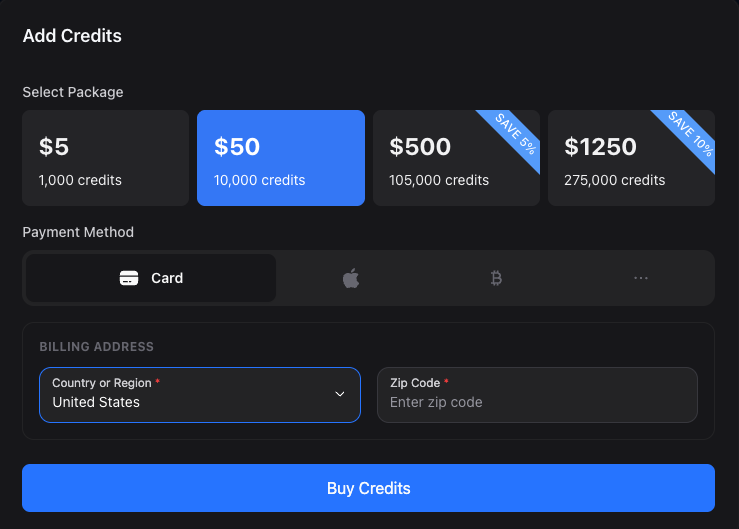
Screenshot 3. KIE add credits page
If you’re using image to video generation like I did (it’s cheaper this way), then you’d need 2 models for the two jobs.
And the /generate skill picks between them for you:
- Image: Nano banana for most frames cost a few cents each. Use gpt when there is readable text or an app screen in the shot. It holds letters and UI without smearing them.
- Video: Seedance. The skill routes to 1.0 Pro for standard clips at about 7 cents a second, and steps up to 2.5 when you want the newest model.
The /generate skill reads your prompt, routes to the cheapest best-fit model, generates the image, and saves it in a local folder, so you own everything.
Before spending money, it gives you the exact price and waits for your approval. No surprises!
How to set up
1. Get a KIE API key from [KIE.ai](https://www.google.com/url?q=http://kie.ai&sa=D&source=editors&ust=1787070495853116&usg=AOvVaw0WadGNVQnQ6vXj72b12My9), then top up billing $5 to prove it works or $50 if you plan to run a channel, since the credits never expire.
2. Install the /generate skill into Claude code. This lives in your skills folder and loads in every project automatically.
3. Ask Claude to create a folder for your generations and paste your KIE key into its .env file.
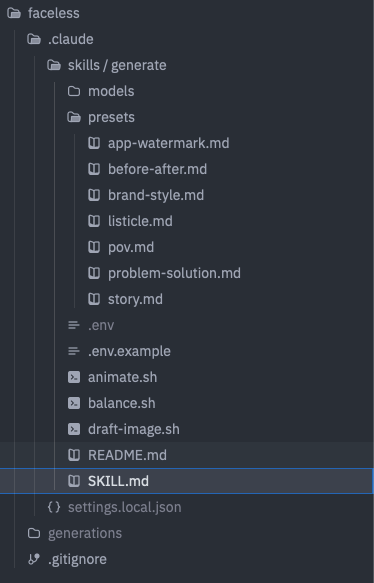
Screenshot 4. Folder tree of faceless project
```
---
name: generate
description: Generate faceless video content cheaply and consistently. Draft a still on a cheap model, run a pre-animate quality check, then animate the approved still through kie.ai, always routing to the lowest cost model. Enforces a running spend cap with a cost ledger, applies reusable style and character presets so a whole channel stays consistent, and outputs a publish-ready clip that hands off to Blotato for scheduling. Triggers on /generate, generate image, generate video, make a POV clip, animate this.
allowed-tools: Read, Write, Edit, Bash, Glob
---
# /generate
Make faceless video content for pennies, keep a channel visually consistent, and never blow the budget. Draft a cheap still, check it before you spend on animation, then animate only the still you approve. Output lands publish-ready.
Built for vertical social video (9:16). It includes: a running budget ceiling, reusable presets, and a quality gate plus a Blotato publish hand-off.
## Models
| Task | Default model | Provider | Recipe |
|---|---|---|---|
| Image (default) | nano-banana-2 | kie.ai | models/nano-banana-2.md |
| Image (text or UI in frame) | gpt-image-2-text-to-image | kie.ai | models/gpt-image-2.md |
| Video (DEFAULT) | Seedance 1.0 Pro `bytedance/v1-pro-image-to-video` | kie.ai | models/seedance-1-0-pro-image-to-video.md |
| Video (budget) | Seedance 1.0 Lite `bytedance/v1-lite-image-to-video` | kie.ai | models/seedance-1-0-lite-image-to-video.md |
| Video (newest, EXPLICIT ONLY) | Seedance 2.5 `bytedance/seedance-2-5` | kie.ai | models/seedance-2-5-image-to-video.md |
Read the recipe file before every generation. Use gpt-image-2-text-to-image whenever the frame has readable text, a sign, a poster, or an app UI mockup. Use nano-banana-2 for everything else.
**Video model routing.** Default every standard short vertical clip to **Seedance 1.0 Pro**. Use **Seedance 1.0 Lite** as the budget option. Use **Seedance 2.5 only** when I explicitly ask for it.
**Duration.** Seedance 1.0 accepts **5 or 10 second clips only** — there is no 8-second option. **Default to 10 seconds.** If any other value is requested, **round to 5 or 10 and tell me what you did** (do not fail silently, do not stop).
**Aspect ratio / dimensions.** The clip inherits the input still's exact dimensions. So **the still IS the aspect ratio and the resolution**: generate the still at **1080x1920** (9:16). If the still isn't 1080x1920 the clip won't be either. Seedance 1.0 has no aspect ratio parameter. Do not send one.
## Budget and ledger (never blow the spend)
Keep a running ledger at `generations/ledger.json`. Every generation appends one line: timestamp, model, type, cost_credits, cost_usd, description.
Two caps, editable here:
- SESSION_CAP: $10 per run of work.
- MONTHLY_CAP: $50 per calendar month.
Before ANY paid generation:
1. Sum the ledger for this session and this month.
2. If this run would cross a cap, STOP and tell me how far over, do not generate.
3. Otherwise, quote it like this: "This clip is 140 credits, about $0.70. Spent this session $4.10, remaining $5.90 of the $10 cap. Go?"
One approval equals one run. Never batch paid videos past the cap without a fresh go.
## Pre-animate QA gate (stop wasting video spend)
Video is the expensive lane, so check the still BEFORE animating. These are the real failure modes (wrong ratio gives black bars, drift breaks the illusion):
- Aspect ratio is vertical 9:16.
- Still dimensions are exactly 1080 x 1920 (the clip inherits them).
- No text baked into the image, unless it was made on gpt-image-2-text-to-image on purpose.
- Subject and point of view match the concept and the preset. First person stays first person.
- Requested duration fits the platform (TikTok, Reels, Shorts all take 5 or 10 seconds comfortably).
If any check fails, stop, say which one, and offer to re-draft the still (cheap) rather than animate a broken frame.
```
You don’t have to build this from scratch.
You can download the whole skill and reference files here:
> [https://github.com/Blotato-Inc/blotato-skills](https://github.com/Blotato-Inc/blotato-skills)
Where we are: a video generation engine, the free skill that drives it and a REASONABLE price per video!
Next stop, give Claude a format, generate an image, animate it.
My first throwaway test was a POV as a Roman senator waking up.

Screenshot 5. Roman senator POV still
Step 2: Create your image
Draft your image first, then animate the still.
It sounds like an extra step but it saves you money and puts you in control of the resulting video.
On KIE, an image, depending on the model, is a few cents. A finished clip is under a dollar.
Text to video costs the same whether the resulting frame is right or wrong.
Drafting the image first means you can iterate the frame for pennies and only pay for motion once the frame is exactly what you want.
> /generate a POV of you waking up as a Roman senator, vertical, cinematic
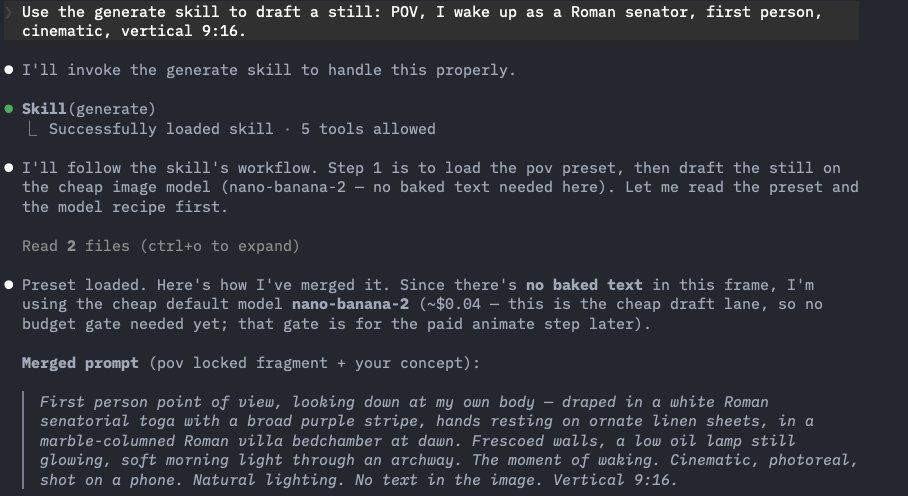
Screenshot 6. how the "generate" skill enhances your prompt using presets
This image cost 8 credits which is 4 cents.
This frame had no text, so it routed to the cheap model.
And the Claude skill captures the cost in your ledger so you can keep track.
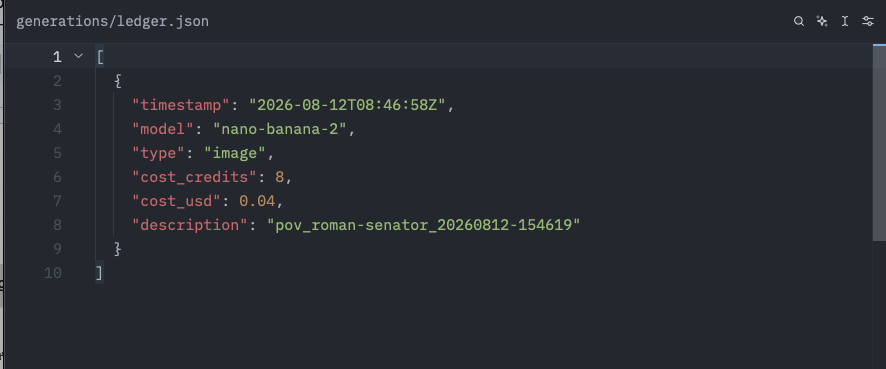
Screenshot 7. ledger - pov roman senator
ledger entry for 1 image
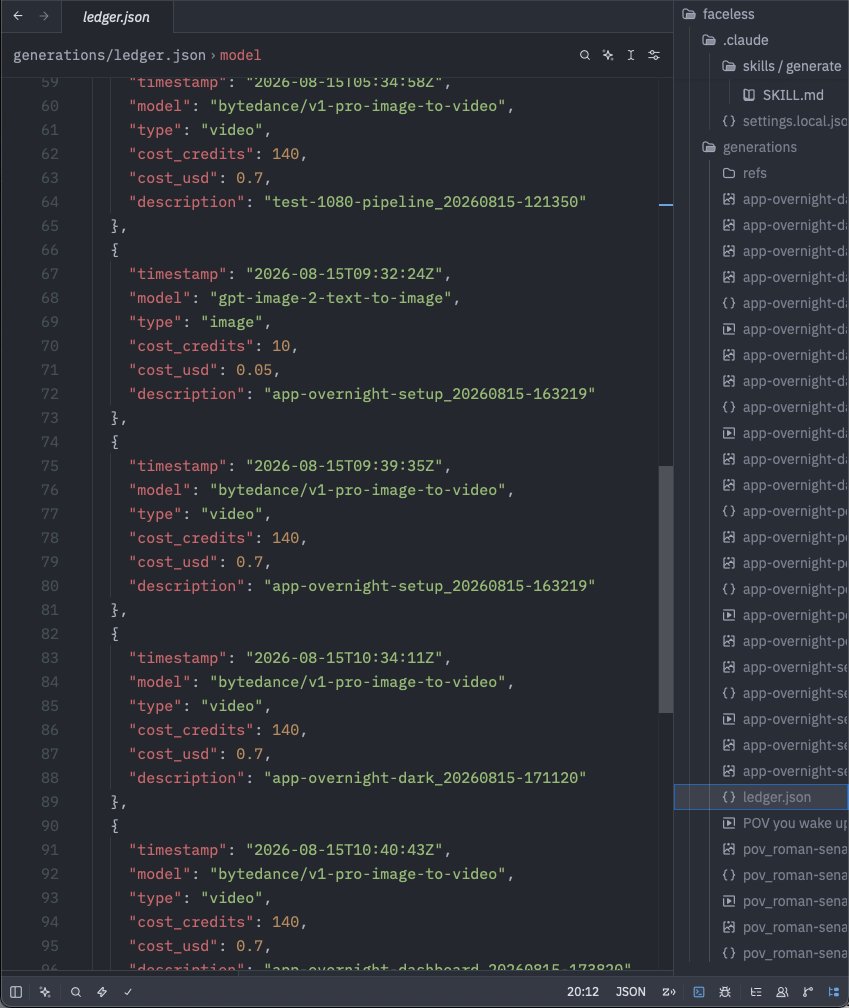
Screenshot 8. full ledger entry tracking multiple generations
Where we are: a frame you actually like, for 4 cents, before you have spent anything on motion.
Step 3: Animate your image
When it came to animate the senator image, my first video failed.
The clip came back as a random landscape. Nothing to do with my senator and KIE still charged me for it.
Technically, the job SUCCEEDED.
It just never read my image.
KIE only charges you when a generation succeeds. Succeeds means the API returned a video.
So the skill checks twice now.
Before it spends, it confirms the still is vertical and 1080 x 1920, because the clip inherits the still's shape.
After the download, it reads the mp4's real dimensions and pulls a frame so you can see the clip shows what you asked for.
If either check fails it stops and tells you instead of handing you a file.
I updated the /generate skill to include a check before generating video so you don’t have to worry about that.
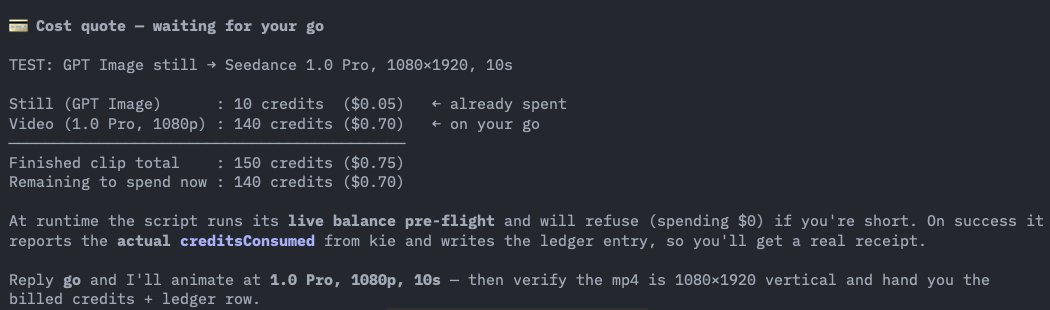
Screenshot 9. Cost quote for test clip 150 credits
Where we are: the end to end works. An image goes in and a matching vertical clip comes out
Step 4: Market your app with it
Now for an actual clip you can sell your product with.
This one is meta on purpose. It shows the exact thing this setup does.
You wake up, reach for your phone and the screen reads,
‘Overnight. 6 posts published. 3 new signups.’
Let’s start with the image.
There is a little dashboard on the phone screen, so this is a gpt-image-2.
I asked the /generate skill for the POV and the first image was wrong. The figure was lying flat as expected but the pose was unnatural.
So we corrected the prompt.
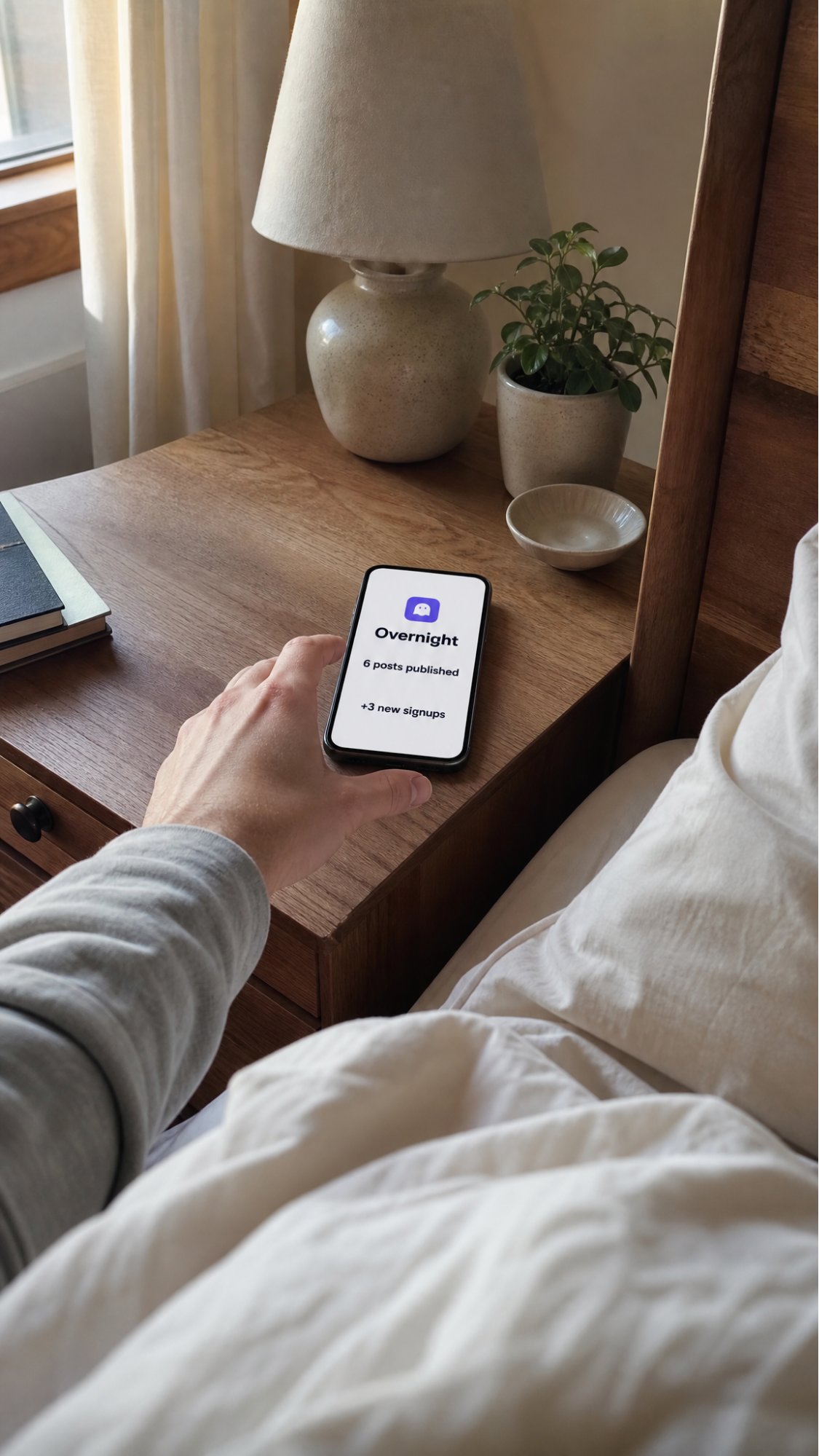
Prompt:
iPhone photo, first person POV, lying in bed just waking, one hand reaching for a phone on a wooden nightstand, soft morning light from a window. The phone screen is on and clearly legible, showing a clean minimal app dashboard: a small rounded app icon at the top, the heading 'Overnight', and two lines, '6 posts published' and '3 new signups'. Cozy bedroom, shallow depth of field, photoreal, shot on a phone. Portrait 9:16, 2K resolution for crisp on-screen text.
In a real POV, you are looking forward so you see your own legs. To see your phone, you turn towards your side.
Improved prompt:
iPhone photo, first person POV, lying in bed with my head on the pillow, turned to look toward a window on my left where soft morning light comes in. My hand holds my phone, just lifted from the nightstand beside me, raised close to my face with the screen facing me and clearly legible, and not backlit: a small rounded app icon at the top, the heading 'Overnight', and two lines, '6 posts published' and '3 new signups'. The white pillow and rumpled duvet fill the foreground, the cozy bedroom and window softly blurred behind the phone. Shot on a phone, shallow depth of field, photoreal, warm morning light. Portrait 9:16, 2K resolution for crisp on-screen text.
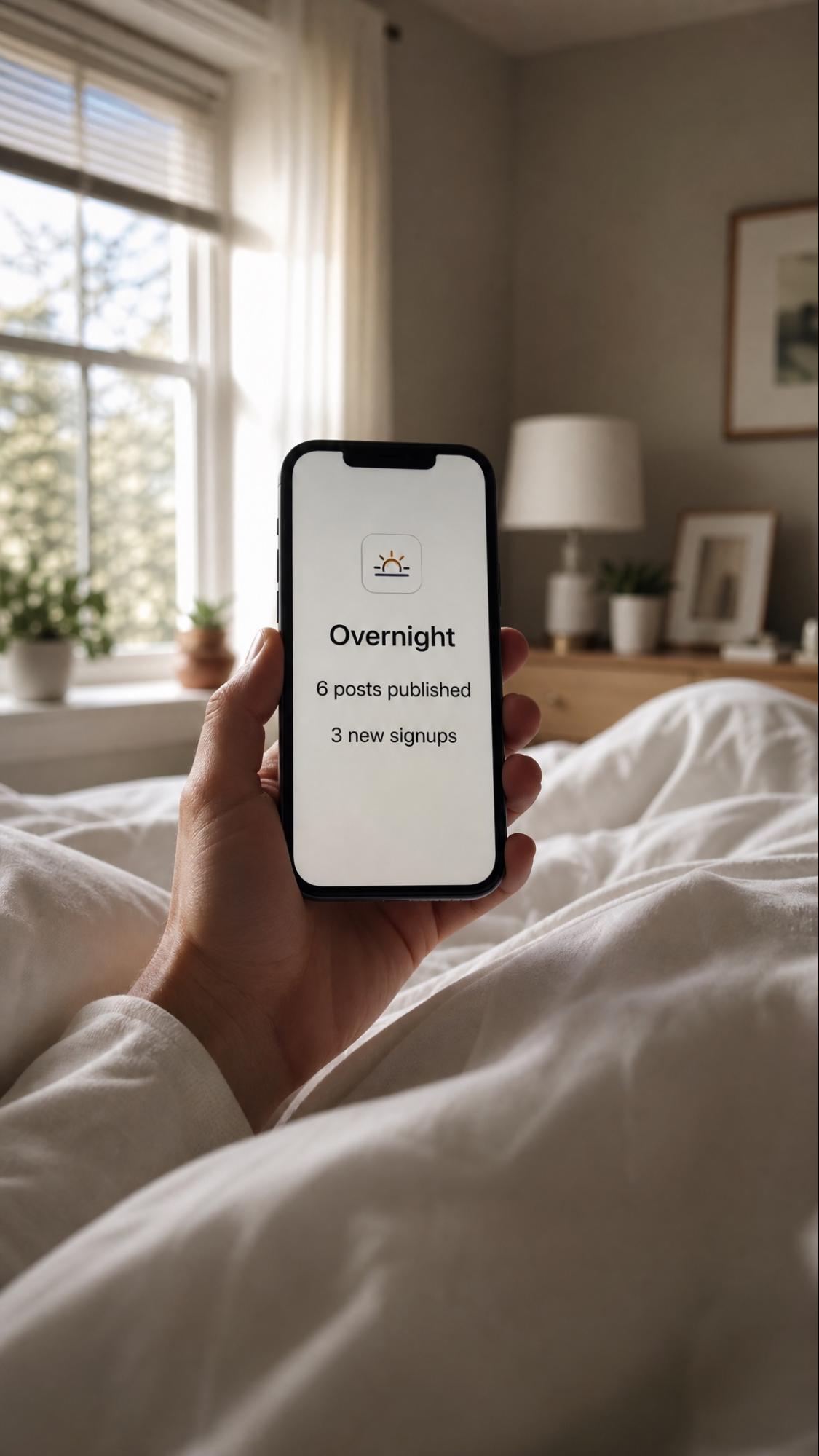
Screenshot 11. Overnight corrected still, hand holding phone, dashboard legible
That still cost 10 credits.
5 cents 😍
Now animate it.
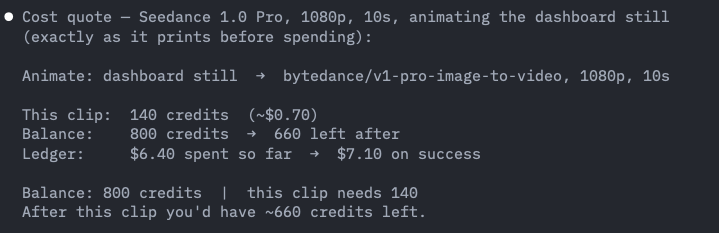
Screenshot 12. Cost quote for dashboard animation 140 credits
The /generate skill quoted the cost first, 140 credits, about $0.70 at 1080p and waited for my approval.
In image to video, the first frame IS the still so it is also your thumbnail. You can adapt this however you want so you don’t give away the payoff but keep the hook.
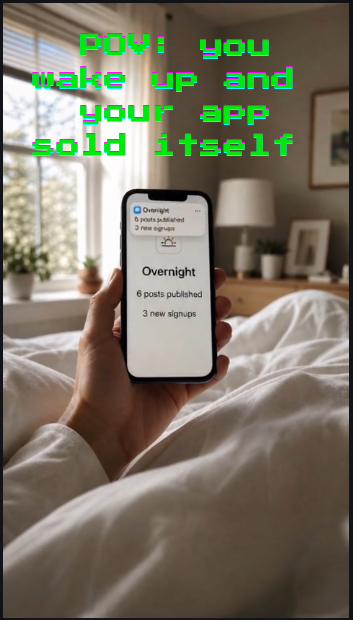
Screenshot 13.POV you wake up and your app sold itself
Where we are: you have a finished vertical clip, 1080p, 10 seconds, made for about $0.75 all in.
Step 5: Publish everywhere (warm up first so you don’t get shadowbanned)
Do NOT connect a brand new account straight to automation. That is the fastest way to get flagged as a bot.
Before you automate anything, treat the account the way a real person would:
- Log in daily
- Scroll, like, comment and save
- Follow accounts in your niche
- Post 1 piece of content a day, manually
Then, connect [Blotato](https://blotato.com/?ref=x-aug2026-generate-skill) so your AI agent can publish for you.
- [Claude.ai](//Claude.ai) chat or Claude Cowork: install the Blotato connector from the [Claude.ai](//Claude.ai) Connectors page.
- Claude Code, run this in the terminal:
```
claude mcp add --transport http Blotato https://mcp.blotato.com/mcp
```
then run `/mcp`, pick Blotato, and authenticate in the browser.
- Codex:
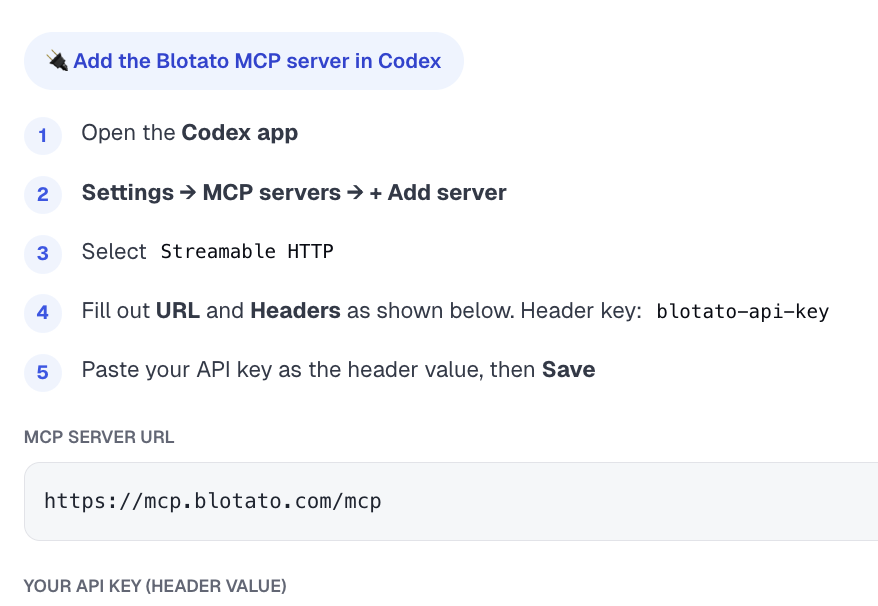
Where we are: a warmed account and Blotato connected, so your agent can publish without being flagged.
Publish 1 video to 1 platform
Just prompt your AI agent:
> Publish overnight.mp4 from my generations folder to Instagram. Caption: POV: you wake up and your app ran itself overnight. Schedule it for 5:27pm tomorrow.
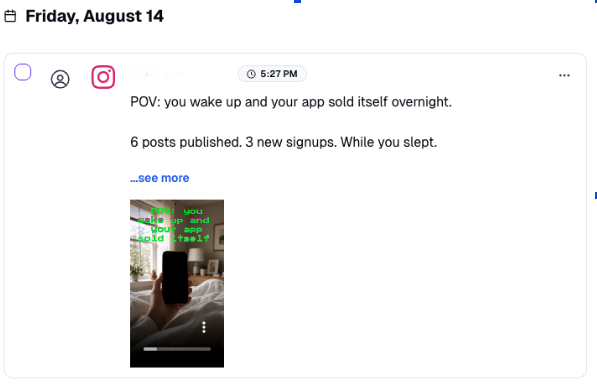
Screenshot 14. Blotato scheduled post Aug 14
Now publish everywhere
Just tell your AI Agent:
> Publish to YT shorts, Tiktok, Threads, and Facebook too.
Blotato handles it all automatically.
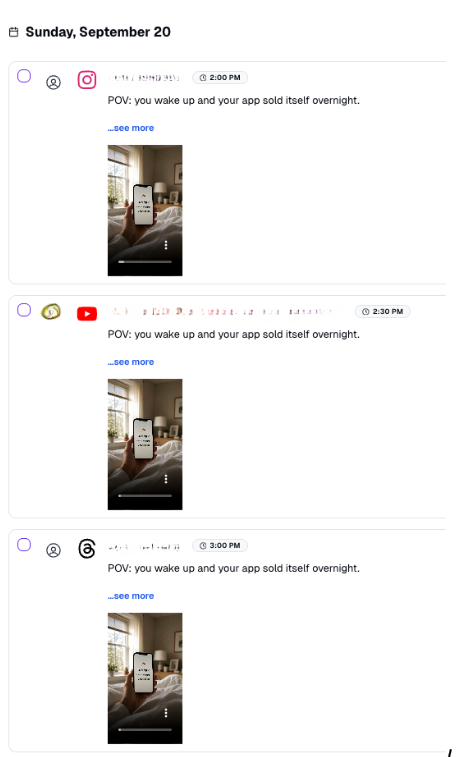
Screenshot 15. Blotato queue IG YT Threads Sept 20
One link is all your agent needs
Blotato ships a page written for AI agents to read:[ help.blotato.com/api/llm](https://help.blotato.com/api/llm).
It is the whole API spec formatted for an LLM to consume, every endpoint, header, payload shape, and platform specific field, in context.
Point your agent at it and just say what you want to build.
Where we are: 1 video clip scheduled on all your platforms and a bookmark that lets your agent build the rest with Blotato without you.
# The numbers (as of today)
- 45.7M views on 1 video
- 260.5k followers
- 9.3M likes
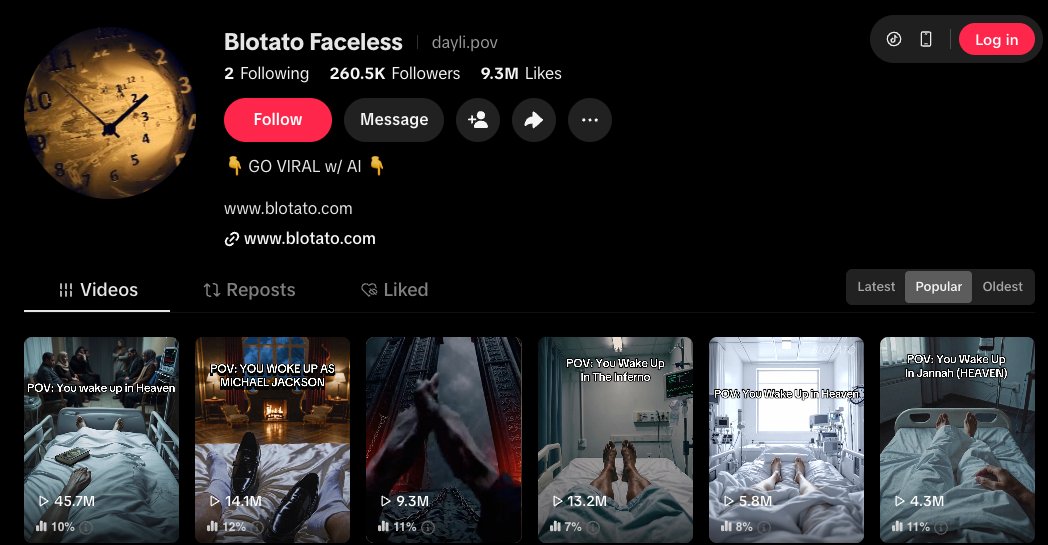
Screenshot 16. Tiktok Profile Blotato Faceless Popular
# Set this up yourself (copy this)
Here’s your worksheet, start to finish:
1. Get a [KIE.ai](//KIE.ai) key and top up under Billing. $5 to test, $50 to run a channel. Credits never expire, and KIE only charges when a generation succeeds.
2. Download [my /generate skill](https://github.com/Blotato-Inc/blotato-skills). Install it into ~/.claude/skills/ (or ~/.openclaw/skills/, ~/.codex/skills/, ~/.hermes/skills/). It routes to the cheapest model, tells you the cost, waits for your approval, and stores every image/video in one folder.
3. Draft an image for a few cents, then animate with Seedance. Roughly $0.75 per finished clip.
4. Connect [Blotato](https://blotato.com/?ref=x-aug2026-generate-skill) to automate social media posting & analytics: `claude mcp add --transport http Blotato [https://mcp.blotato.com/mcp](https://mcp.blotato.com/mcp)`, run `/mcp`, hit Authenticate. Then just say "schedule this to TikTok, Reels, and Shorts."
5. Building your own agent? Point it at [help.blotato.com/api/llm](//help.blotato.com/api/llm) and it has the whole publishing API in context.
If you need help setting this up or have any questions, feel free to email me [sabrina at blotato dot com].
## P.S.
## Should I make a part 2? using ai agents to combine scenes, add captions, and music? COMMENT BELOW if you want that
## 相关链接
- [Sabrina Ramonov](https://x.com/Sabrina_Ramonov)
- [@Sabrina_Ramonov](https://x.com/Sabrina_Ramonov)
- [68K](https://x.com/Sabrina_Ramonov/status/2089761229418221683/analytics)
- [faceless channel](https://www.tiktok.com/@dayli.pov)
- [agentskills.io](https://agentskills.io/)
- [@robonuggets](https://x.com/@robonuggets)
- [KIE.ai](https://kie.ai/)
- [fal.ai](https://fal.ai/)
- [Blotato.com](https://blotato.com/?ref=x-aug2026-generate-skill)
- [KIE.ai](https://www.google.com/url?q=http://kie.ai&sa=D&source=editors&ust=1787070495848456&usg=AOvVaw2GriFm5bhr3Ck8libIu3A3)
- [KIE.ai](https://www.google.com/url?q=http://kie.ai&sa=D&source=editors&ust=1787070495848598&usg=AOvVaw03tBTQkwumk_T8wgxSjg3s)
- [KIE.ai](https://www.google.com/url?q=http://kie.ai&sa=D&source=editors&ust=1787070495853116&usg=AOvVaw0WadGNVQnQ6vXj72b12My9)
- [https://github.com/Blotato-Inc/blotato-skills](https://github.com/Blotato-Inc/blotato-skills)
- [Blotato](https://blotato.com/?ref=x-aug2026-generate-skill)
- [Claude.ai](https://claude.ai/)
- [Claude.ai](https://claude.ai/)
- [help.blotato.com/api/llm](https://help.blotato.com/api/llm)
- [KIE.ai](https://kie.ai/)
- [my /generate skill](https://github.com/Blotato-Inc/blotato-skills)
- [Blotato](https://blotato.com/?ref=x-aug2026-generate-skill)
- [https://mcp.blotato.com/mcp](https://mcp.blotato.com/mcp)
- [help.blotato.com/api/llm](https://help.blotato.com/api/llm)
- [Upgrade to Premium](https://x.com/i/premium_sign_up)
- [1:07 AM · Aug 19, 2026](https://x.com/Sabrina_Ramonov/status/2089761229418221683)
- [68.4K Views](https://x.com/Sabrina_Ramonov/status/2089761229418221683/analytics)
- [View quotes](https://x.com/Sabrina_Ramonov/status/2089761229418221683/quotes)
---
*导出时间: 2026/8/19 09:37:19*
---
## 中文翻译
# 这个 Claude Skill 完全取代你的 Higgsfield 订阅(完整解析)
**作者**: Sabrina Ramonov
**日期**: 2026-08-18T17:07:57.000Z
**来源**: [https://x.com/Sabrina_Ramonov/status/2089761229418221683](https://x.com/Sabrina_Ramonov/status/2089761229418221683)
---

太长不看版
这是制作无脸 AI 视频的精确 5 步设置,无需每月订阅 Higgsfield,就能推广你的应用:1 个免费的 Claude skill 通过 Kie 生成爆款视频,每条约 75 美分;再加 1 个能发布到所有平台的应用,且不会导致你的社交媒体账号被封。我会展示每个步骤、每条视频的成本,以及如何在社交媒体上成功发布。
如果你想制作爆款无脸 AI 视频,所有人都会推荐你去 Higgsfield。它确实不错,但价格过高。根据套餐不同,大约每月 15 至 129 美元,按月计费。
你根本不需要它。
一个免费的 Claude skill 能用同样的 AI 模型制作完全相同的视频,而且你只需为实际生成的内容付费。
已经证明它可以制作获得数百万播放量的爆款视频。
一张图片只需几美分。
一条视频大约 0.75 美元。
没有月度账单。
以下是 1 美元能买到什么:
| | KIE.ai | Higgsfield |
| --- | --- | --- |
| 1 美元能买到 | 1 条完成的 1080p 10 秒视频,还有找零 | 什么都没有。没有 1 美元的套餐 |
| 5 条完成的视频 | 3.75 美元,1080p、10 秒 | 每月 15 美元,720p、8 秒 |
| 未使用的额度 | 永久结转 | 每月清零 |
你肯定见过那些无脸视频。“POV:你一觉醒来变成了原始人。”
数百万的播放量。
与此同时,你花了几个月打造的产品只有 9 个注册用户和 90 美元的 MRR(月经常性收入)😭
你发布了产品。
然后就没了。
在虚空中发布。
让人们看到你做的东西很难……没人教你这个。
读完本指南,你将拥有自己的爆款无脸视频引擎:电影级的视频让你的产品出现在数百万人面前,无需广告、无需露脸、也无需成为营销专家。
先说点背景
我拥有这个[无脸频道](https://www.tiktok.com/@dayli.pov),260.5k 粉丝,超过 1 亿播放量,100% 无脸。

截图 1. TikTok 无脸频道最新主页
如今,你可以用 Claude、一个免费的 skill 和每条约 0.75 美元的媒体生成成本,做出同样的东西。
同样的形式,便宜得多的引擎。
如果我本周从零开始,我会这样做。
顺便说一下,“POV 第一人称电影感”只是一种形式。我在整篇指南中用它举例,但你可以生成任何无脸形式。
所以我创建了几个不同的预设供你入门:
- 先展示问题再展示解决方案的短片,你的应用就是解决方案。
- 展示结果的前后对比。
- “[某领域] 5 大工具倒数”,你的产品排第 1。
- 一个能引起共鸣的小故事。
让形式匹配你要卖的东西。
无脸频道是你自己产品极佳的廉价广告。
在每个视频上放一个小水印,当某个视频爆了,就是数百万次曝光,为你正在做的任何东西带来曝光。然后利用已验证的爆款形式复制多个类似视频。
不过有一点需要注意:如果你在追求平台奖励,TikTok 的创作者奖励计划只对 60 秒以上的视频付费。YouTube Shorts 没有最低时长要求。
所以本文讲的是另一条路线,即用无脸视频推广你自己的产品,因此这里的一切都是为短片段构建的。
或者更好的做法是,跳过水印,直接在视频中展示你的产品。CalAI 这一点做得比谁都好,总是在前 12 秒内以自然的方式展示他们的产品,而不是直白地谈论它。这比水印的转化率更高。
或者保持视频干净,只在个人简介中放上你的产品信息。

截图 2:你可以这样展示你的水印
你需要准备什么
- 一个 AI 智能体。Claude Code、Codex、Hermes 或 Openclaw 都很好用。任何智能体都能读取这个 skill,包括 OpenClaw。这个 skill 是基于 [agentskills.io](//agentskills.io) 开放标准的 SKILL.md 文件,因此也可以在 OpenClaw、Codex CLI 和 Hermes 中运行。把文件夹放进该智能体的 skills 目录即可。
- /generate skill,在下方下载。这是我基于 RoboNuggets 的指南构建的免费 skill(感谢 [@robonuggets](https://x.com/@robonuggets))。它会读取你的提示词,选择能完成任务的最便宜模型,生成图片或视频,并把所有文件保存在一个文件夹中,让你完全拥有它们。我还扩展了它,使其能报价成本、在运行前等待你的批准,并内置了几个视频模板预设。
- 1 个 API 密钥,可访问最好的视频、图片和音乐模型。有可选的备选方案。全部按量付费,只为每次生成付费:
- [KIE.ai](//KIE.ai),最便宜的路线,也是最佳起步选择。额度永不过期。
- [fal.ai](//fal.ai),模型目录最丰富,文档最好,是你的第一备选。额度一年后过期。
- WaveSpeed,其他平台失败时的广泛备选。额度永不过期。
- [Blotato.com](https://blotato.com/?ref=x-aug2026-generate-skill) 用于发布。通过 REST API 或 MCP 发布到每个平台(TikTok、Instagram、YouTube、Facebook、Threads、Bluesky、Pinterest、X),因此你的智能体可以驱动它。它还包括私信自动化、消息、评论和社交媒体分析功能。
- 一套养号流程。防止全新账号在你自动化操作的那一刻就被标记。文末有免费的操作手册。
就这些。
开始吧。
第 1 步:生成工具([KIE.ai](https://www.google.com/url?q=http://kie.ai&sa=D&source=editors&ust=1787070495848456&usg=AOvVaw2GriFm5bhr3Ck8libIu3A3))+ 1 个免费 Claude Skill
[KIE.ai](https://www.google.com/url?q=http://kie.ai&sa=D&source=editors&ust=1787070495848598&usg=AOvVaw03tBTQkwumk_T8wgxSjg3S) 是一个按量付费的聚合平台,提供 Higgsfield 等工具底层使用的大部分相同模型。
你只需充值额度,随生成随消费。
额度永不过期。KIE 只在生成成功时才收费。
如果失败?免费。
假设你每周发布 5 条视频,即每月 20 条,每条 10 秒。
以下是你的成本:
| 20 条视频 | KIE.ai | Higgsfield Starter | Higgsfield Plus |
| --- | --- | --- | --- |
| 能覆盖 20 条吗? | 能 | 不能。5 条之后你就得停 | 能,最多 27 条 |
| 你支付 | 15.00 美元 | 15.00 美元 | 49.00 美元 |
| 你得到什么 | 1080p、10 秒 | 720p、8 秒 | 720p、8 秒 |
| 每条成品视频成本 | 0.75 美元 | 3.00 美元 | 2.45 美元 |
| 某月一条没做 | 0.00 美元 | 15.00 美元 | 49.00 美元 |
| 未使用的额度 | 永久结转 | 清零 | 清零 |
看看同样的 15 美元能买到什么。
KIE:20 条 1080p 视频。
Higgsfield Starter:5 条 720p 视频,然后你就得等下个月。
而如果你一条视频都不做,你仍然要支付全价。
没用完的额度就没了。
Higgsfield 是按月计费。
KIE 的 1080p 价格比 Higgsfield 的 720p 还低!!🙄

截图 3. KIE 充值页面
如果你像我一样使用图生视频(这样更便宜),你需要 2 个模型来完成两项任务。
/generate skill 会替你在两者之间进行路由:
- 图片:大多数画面使用 Nano banana,每张只要几美分。当画面中有可读文字或应用屏幕时使用 gpt,它能保持字母和 UI 不被涂抹变形。
- 视频:Seedance。该 skill 对标准短片路由到 1.0 Pro,约每秒 7 美分;当你想要最新模型时升级到 2.5。
/generate skill 读取你的提示词,路由到最便宜且最合适的模型,生成图片并保存到本地文件夹,所以一切归你所有。
在花钱之前,它会给出确切价格并等待你的批准。没有意外!
如何设置
1. 从 [KIE.ai](https://www.google.com/url?q=http://kie.ai&sa=D&source=editors&ust=1787070495853116&usg=AOvVaw0WadGNVQnQ6vXj72b12My9) 获取 KIE API 密钥,然后充值 5 美元验证可用性;如果你打算运营频道,就充 50 美元,因为额度永不过期。
2. 将 /generate skill 安装到 Claude Code 中。它位于你的 skills 文件夹中,会在每个项目中自动加载。
3. 让 Claude 为你的生成内容创建一个文件夹,并将你的 KIE 密钥粘贴到其 .env 文件中。

截图 4. 无脸项目的文件夹结构
```
---
name: generate
description: Generate faceless video content cheaply and consistently. Draft a still on a cheap model, run a pre-animate quality check, then animate the approved still through kie.ai, always routing to the lowest cost model. Enforces a running spend cap with a cost ledger, applies reusable style and character presets so a whole channel stays consistent, and outputs a publish-ready clip that hands off to Blotato for scheduling. Triggers on /generate, generate image, generate video, make a POV clip, animate this.
allowed-tools: Read, Write, Edit, Bash, Glob
---
# /generate
Make faceless video content for pennies, keep a channel visually consistent, and never blow the budget. Draft a cheap still, check it before you spend on animation, then animate only the still you approve. Output lands publish-ready.
Built for vertical social video (9:16). It includes: a running budget ceiling, reusable presets, and a quality gate plus a Blotato publish hand-off.
## Models
| Task | Default model | Provider | Recipe |
|---|---|---|---|
| Image (default) | nano-banana-2 | kie.ai | models/nano-banana-2.md |
| Image (text or UI in frame) | gpt-image-2-text-to-image | kie.ai | models/gpt-image-2.md |
| Video (DEFAULT) | Seedance 1.0 Pro `bytedance/v1-pro-image-to-video` | kie.ai | models/seedance-1-0-pro-image-to-video.md |
| Video (budget) | Seedance 1.0 Lite `bytedance/v1-lite-image-to-video` | kie.ai | models/seedance-1-0-lite-image-to-video.md |
| Video (newest, EXPLICIT ONLY) | Seedance 2.5 `bytedance/seedance-2-5` | kie.ai | models/seedance-2-5-image-to-video.md |
Read the recipe file before every generation. Use gpt-image-2-text-to-image whenever the frame has readable text, a sign, a poster, or an app UI mockup. Use nano-banana-2 for everything else.
**Video model routing.** Default every standard short vertical clip to **Seedance 1.0 Pro**. Use **Seedance 1.0 Lite** as the budget option. Use **Seedance 2.5 only** when I explicitly ask for it.
**Duration.** Seedance 1.0 accepts **5 or 10 second clips only** — there is no 8-second option. **Default to 10 seconds.** If any other value is requested, **round to 5 or 10 and tell me what you did** (do not fail silently, do not stop).
**Aspect ratio / dimensions.** The clip inherits the input still's exact dimensions. So **the still IS the aspect ratio and the resolution**: generate the still at **1080x1920** (9:16). If the still isn't 1080x1920 the clip won't be either. Seedance 1.0 has no aspect ratio parameter. Do not send one.
## Budget and ledger (never blow the spend)
Keep a running ledger at `generations/ledger.json`. Every generation appends one line: timestamp, model, type, cost_credits, cost_usd, description.
Two caps, editable here:
- SESSION_CAP: $10 per run of work.
- MONTHLY_CAP: $50 per calendar month.
Before ANY paid generation:
1. Sum the ledger for this session and this month.
2. If this run would cross a cap, STOP and tell me how far over, do not generate.
3. Otherwise, quote it like this: "This clip is 140 credits, about $0.70. Spent this session $4.10, remaining $5.90 of the $10 cap. Go?"
One approval equals one run. Never batch paid videos past the cap without a fresh go.
## Pre-animate QA gate (stop wasting video spend)
Video is the expensive lane, so check the still BEFORE animating. These are the real failure modes (wrong ratio gives black bars, drift breaks the illusion):
- Aspect ratio is vertical 9:16.
- Still dimensions are exactly 1080 x 1920 (the clip inherits them).
- No text baked into the image, unless it was made on gpt-image-2-text-to-image on purpose.
- Subject and point of view match the concept and the preset. First person stays first person.
- Requested duration fits the platform (TikTok, Reels, Shorts all take 5 or 10 seconds comfortably).
If any check fails, stop, say which one, and offer to re-draft the still (cheap) rather than animate a broken frame.
```
你不必从零开始构建。
你可以在这里下载整个 skill 和参考文件:
> [https://github.com/Blotato-Inc/blotato-skills](https://github.com/Blotato-Inc/blotato-skills)
目前进展:视频生成引擎、驱动它的免费 skill,以及每条视频合理的价格!
下一站:给 Claude 一个形式,生成图片,然后制作动画。
我的第一个测试是一个“你作为罗马元老醒来”的 POV。

截图 5. 罗马元老 POV 静帧
第 2 步:创建你的图片
先起草图片,然后为静帧制作动画。
这听起来像多了一步,但它能省钱,并让你掌控最终视频的效果。
在 KIE 上,一张图片(取决于模型)只需几美分。一条成品视频不到 1 美元。
文生视频的成本相同,无论生成的画面是对还是错。
先起草图片意味着你可以只花几美分反复调整画面,只有当画面完全符合你的要求时才为动态效果付费。
> /generate 一个 POV:你作为罗马元老醒来,竖屏,电影感

截图 6. "generate" skill 如何使用预设增强你的提示词
这张图片花了 8 个额度,也就是 4 美分。
这个画面没有文字,所以它路由到了便宜模型。
Claude skill 会在你的账本中记录成本,方便你追踪。

截图 7. 账本 - POV 罗马元老
1 张图片的账本条目

截图 8. 追踪多次生成的完整账本条目
目前进展:一个你真正喜欢的画面,只花了 4 美分,而且你还没在动态效果上花一分钱。
第 3 步:为图片制作动画
在为元老图片制作动画时,我的第一个视频失败了。
返回的视频是一段随机的风景,和我的元老毫无关系,但 KIE 还是收了我的钱。
从技术上讲,任务“成功”了。
只是它根本没读我的图片。
KIE 只在生成成功时收费。“成功”意味着 API 返回了一段视频。
所以这个 skill 现在会检查两次。
在花钱之前,它会确认静帧是竖屏且为 1080 x 1920,因为视频会继承静帧的形状。
下载完成后,它会读取 mp4 的实际尺寸并抽取一帧,让你确认视频内容符合你的要求。
如果任一检查失败,它会停下来并告诉你,而不是直接给你一个文件。
我更新了 /generate skill,在生成视频前加入了检查,这样你就不用担心这个问题了。

截图 9. 测试视频的成本报价 150 额度
目前进展:端到端流程跑通了。图片输入,匹配的竖屏视频输出。
第 4 步:用它推广你的应用
现在来做一个真正能推销你产品的视频。
这个视频故意做得很“元”。它展示的正是这套设置所做的事情。
你醒来,伸手拿手机,屏幕上写着:
“夜间:6 条帖子已发布,3 个新注册。”
先从图片开始。
手机屏幕上有一个小仪表盘,所以这里使用 gpt-image-2。
我让 /generate skill 生成 POV,但第一张图是错的。人物如预期般躺着,但姿势不自然。
于是我们修正了提示词。

提示词:
iPhone photo, first person POV, lying in bed just waking, one hand reaching for a phone on a wooden nightstand, soft morning light from a window. The phone screen is on and clearly legible, showing a clean minimal app dashboard: a small rounded app icon at the top, the heading 'Overnight', and two lines, '6 posts published' and '3 new signups'. Cozy bedroom, shallow depth of field, photoreal, shot on a phone. Portrait 9:16, 2K resolution for crisp on-screen text.
在真实的 POV 中,你是朝前看的,所以会看到自己的腿。要看手机,你需要侧过身。
改进后的提示词:
iPhone photo, first person POV, lying in bed with my head on the pillow, turned to look toward a window on my left where soft morning light comes in. My hand holds my phone, just lifted from the nightstand beside me, raised close to my face with the screen facing me and clearly legible, and not backlit: a small rounded app icon at the top, the heading 'Overnight', and two lines, '6 posts published' and '3 new signups'. The white pillow and rumpled duvet fill the foreground, the cozy bedroom and window softly blurred behind the phone. Shot on a phone, shallow depth of field, photoreal, warm morning light. Portrait 9:16, 2K resolution for crisp on-screen text.

截图 11. 修正后的“夜间”静帧,手持手机,仪表盘清晰可读
这张静帧花了 10 个额度。
5 美分 😍
现在为它制作动画。

截图 12. 仪表盘动画的成本报价 140 额度
/generate skill 先报了价:140 额度,1080p 约 0.70 美元,然后等待我的批准。
在图生视频中,第一帧就是静帧,所以它也是你的封面图。你可以随意调整,既不剧透结果,又保留悬念钩子。

截图 13. POV:你醒来,你的应用自己完成了销售
目前进展:你有一条完成的竖屏视频,1080p、10 秒,总成本约 0.75 美元。
第 5 步:发布到所有平台(先养号,免得被限流)
千万不要把一个全新账号直接连接到自动化工具。这是被标记为机器人的最快方式。
在自动化任何操作之前,像真人一样对待这个账号:
- 每天登录
- 浏览、点赞、评论和收藏
- 关注你所在领域的账号
- 每天手动发布 1 条内容
然后连接 [Blotato](https://blotato.com/?ref=x-aug2026-generate-skill),让你的 AI 智能体替你发布。
- [Claude.ai](//Claude.ai) 聊天或 Claude Cowork:从 [Claude.ai](//Claude.ai) 连接器页面安装 Blotato 连接器。
- Claude Code,在终端运行:
```
claude mcp add --transport http Blotato https://mcp.blotato.com/mcp
```
然后运行 `/mcp`,选择 Blotato,并在浏览器中完成认证。
- Codex:

目前进展:账号已养好,Blotato 已连接,你的智能体可以发布内容而不被标记。
发布 1 条视频到 1 个平台
只需提示你的 AI 智能体:
> 把我 generations 文件夹里的 overnight.mp4 发布到 Instagram。文案:POV:你醒来,你的应用一夜之间自动运行了。安排在明天下午 5:27 发布。

截图 14. Blotato 已安排 8 月 14 日的帖子
现在发布到所有平台
只需告诉你的 AI 智能体:
> 也发布到 YT Shorts、TikTok、Threads 和 Facebook。
Blotato 会自动处理一切。

截图 15. Blotato 队列:IG、YT、Threads,9 月 20 日
你的智能体只需要一个链接
Blotato 提供了一个专为 AI 智能体编写的页面:[help.blotato.com/api/llm](https://help.blotato.com/api/llm)。
这是为 LLM 消费而格式化的完整 API 规范,包括所有端点、请求头、载荷结构和平台特定字段,都在上下文中。
把你的智能体指向它,然后直接说出你想构建什么。
目前进展:1 条视频已安排在你的所有平台上,还有一个书签让你的智能体无需你参与就能用 Blotato 构建其余的一切。
# 数据(截至今天)
- 1 条视频 4570 万播放
- 260.5k 粉丝
- 930 万点赞

截图 16. TikTok Blotato 无脸频道热门内容主页
# 自己动手搭建(照抄即可)
这是你的操作清单,从头到尾:
1. 获取 [KIE.ai](//KIE.ai) 密钥并在 Billing 下充值。5 美元测试,50 美元运营频道。额度永不过期,且 KIE 只在生成成功时收费。
2. 下载[我的 /generate skill](https://github.com/Blotato-Inc/blotato-skills)。安装到 ~/.claude/skills/(或 ~/.openclaw/skills/、~/.codex/skills/、~/.hermes/skills/)。它会路由到最便宜的模型,告诉你成本,等待你的批准,并将每张图片/视频存储在一个文件夹中。
3. 用几美分起草一张图片,然后用 Seedance 制作动画。每条成品视频约 0.75 美元。
4. 连接 [Blotato](https://blotato.com/?ref=x-aug2026-generate-skill) 以自动化社交媒体发布和分析:`claude mcp add --transport http Blotato [https://mcp.blotato.com/mcp](https://mcp.blotato.com/mcp)`,运行 `/mcp`,点击认证。然后直接说“把这个安排到 TikTok、Reels 和 Shorts”。
5. 在构建你自己的智能体?把它指向 [help.blotato.com/api/llm](//help.blotato.com/api/llm),它就拥有完整的发布 API 上下文。
如果你在搭建过程中需要帮助或有任何问题,欢迎给我发邮件 [sabrina at blotato dot com]。
## 附言
## 我应该写第 2 部分吗?用 AI 智能体合并场景、添加字幕和音乐?如果你想要,请在下方评论
## 相关链接
- [Sabrina Ramonov](https://x.com/Sabrina_Ramonov)
- [@Sabrina_Ramonov](https://x.com/Sabrina_Ramonov)
- [68K](https://x.com/Sabrina_Ramonov/status/2089761229418221683/analytics)
- [faceless channel](https://www.tiktok.com/@dayli.pov)
- [agentskills.io](https://agentskills.io/)
- [@robonuggets](https://x.com/@robonuggets)
- [KIE.ai](https://kie.ai/)
- [fal.ai](https://fal.ai/)
- [Blotato.com](https://blotato.com/?ref=x-aug2026-generate-skill)
- [KIE.ai](https://www.google.com/url?q=http://kie.ai&sa=D&source=editors&ust=1787070495848456&usg=AOvVaw2GriFm5bhr3Ck8libIu3A3)
- [KIE.ai](https://www.google.com/url?q=http://kie.ai&sa=D&source=editors&ust=1787070495848598&usg=AOvVaw03tBTQkwumk_T8wgxSjg3S)
- [KIE.ai](https://www.google.com/url?q=http://kie.ai&sa=D&source=editors&ust=1787070495853116&usg=AOvVaw0WadGNVQnQ6vXj72b12My9)
- [https://github.com/Blotato-Inc/blotato-skills](https://github.com/Blotato-Inc/blotato-skills)
- [Blotato](https://blotato.com/?ref=x-aug2026-generate-skill)
- [Claude.ai](https://claude.ai/)
- [Claude.ai](https://claude.ai/)
- [help.blotato.com/api/llm](https://help.blotato.com/api/llm)
- [KIE.ai](https://kie.ai/)
- [my /generate skill](https://github.com/Blotato-Inc/blotato-skills)
- [Blotato](https://blotato.com/?ref=x-aug2026-generate-skill)
- [https://mcp.blotato.com/mcp](https://mcp.blotato.com/mcp)
- [help.blotato.com/api/llm](https://help.blotato.com/api/llm)
- [Upgrade to Premium](https://x.com/i/premium_sign_up)
- [1:07 AM · Aug 19, 2026](https://x.com/Sabrina_Ramonov/status/2089761229418221683)
- [68.4K Views](https://x.com/Sabrina_Ramonov/status/2089761229418221683/analytics)
- [View quotes](https://x.com/Sabrina_Ramonov/status/2089761229418221683/quotes)
---
*导出时间: 2026/8/19 09:37:19*