# How to run your first AI UGC campaign (step-by-step guide)
**作者**: Jason Zhou
**日期**: 2026-09-15T12:25:59.000Z
**来源**: [https://x.com/jasonzhou1993/status/2099837130927427989](https://x.com/jasonzhou1993/status/2099837130927427989)
---
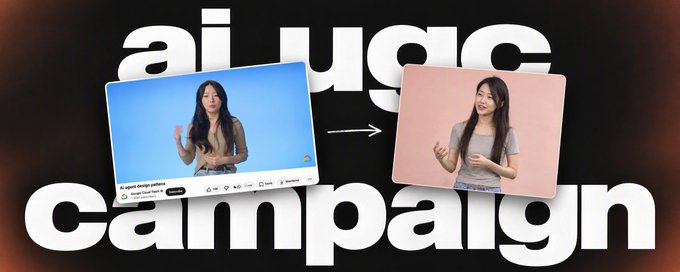
<video controls preload="metadata" poster="/doc/6683/image/img_864bc3faf895.jpg" src="/videos/0679.mp4"></video>
You've seen these videos on TikTok and Instagram. A normal-looking person, talking about an app they "just found." Not posted by the brand. Posted by some personal account with 40 followers.
That's UGC.
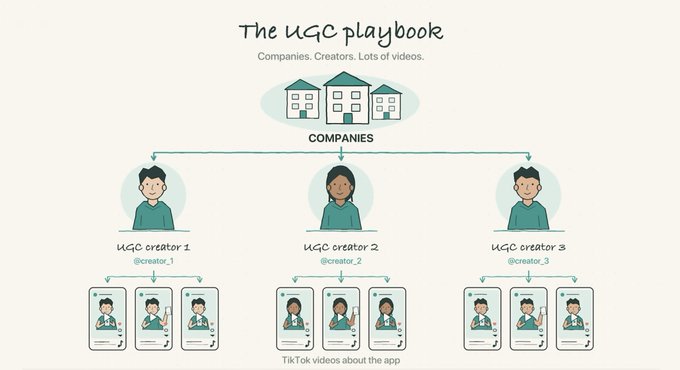
Image source: Joma 2nd Channel
Typically companies hire people who have time but no following -> spin up new accounts and create video content about your product.
You are not paying for their audience, because they don't have one. You are paying for content that look like geniue user sharing a product they like.
And normally you pay $20~50/video, so It gets expensive fast.
I've spent past 2 days exploring whether we can use AI to fully generate those videos, and drive cost from $20~50/video to $4~6?
I think I got a workflow that produce AI UGC actually works and hyper realistic, I will walk you through step by step
<video controls preload="metadata" poster="/doc/6683/image/img_38ae32e332a4.jpg" src="/videos/0680.mp4"></video>
## Step 1: Find what's already working in your vertical
A UGC video is two parts:
1. The hook: the first 3 seconds. Probably the most important thing.
2. The demo: showing the product.
The way you scale it is one demo paired with 5 to 10 different hooks. Then you test which one lands.
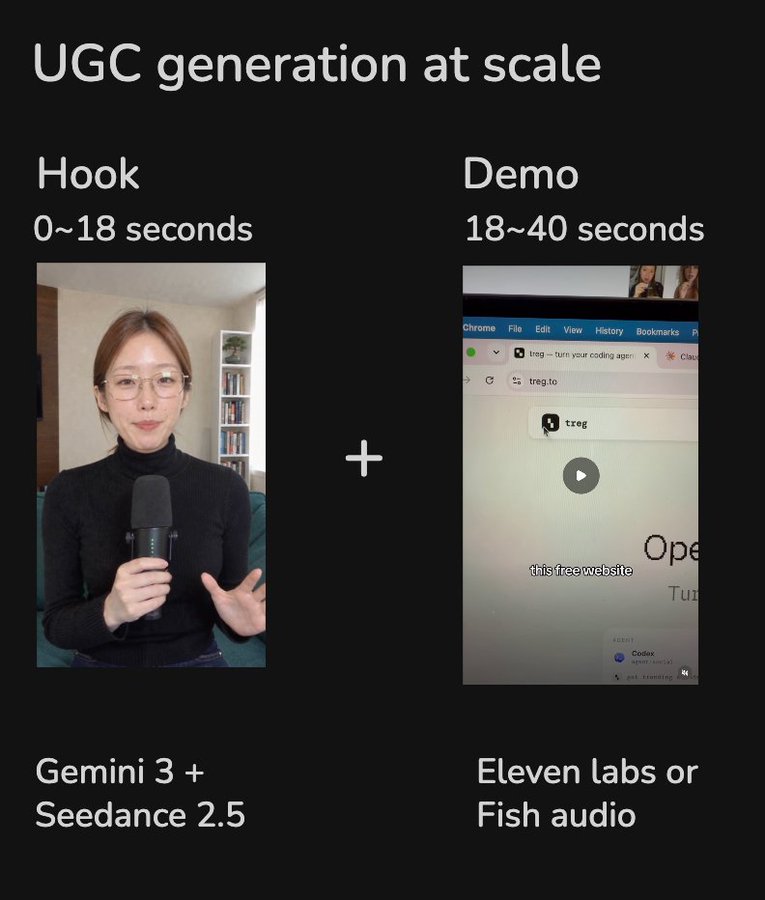
So before generating anything, I pull trending videos in my vertical and study two things: how the hooks are built, and which faces/characters resonate. Same script, different person, completely different impression. That part surprised me.
I use [@treg_ai](https://x.com/@treg_ai) for this (context: I built it). It is like OpenRouter for data & tools, so you can connect to 3000+ premium data & tools. With no subscription, Pay for usage only.
Just paste the [https://treg.to/llms.txt](https://treg.to/llms.txt) to your agent and it will setup in 1 min, then you can prompt it:
"Pull recently trending toktok/instagram videos in our vertical."
A minute later I have a list of what's trending on TikTok for my niche, with hooks I can read and characters I can look at.
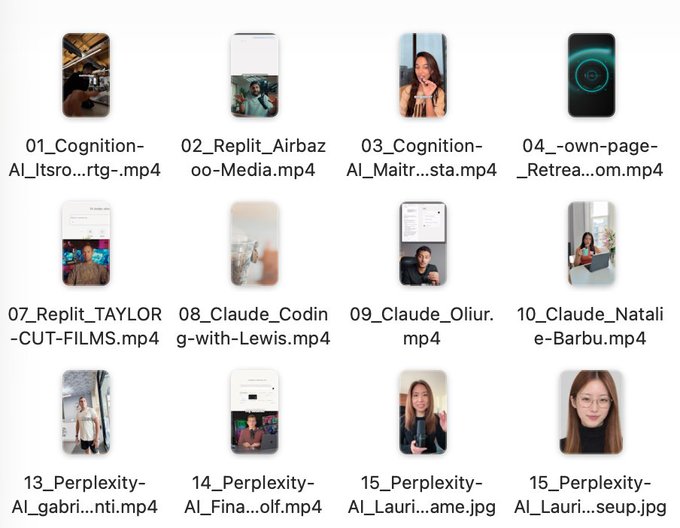
Then it comes the hard part: take a person who exists and whose vibe works, and generate a different person with the same vibe. Then build an account around that character.
## Step 2: Generate a character with certain vibe (the hard part)
This is genuinely difficult, and it took me a while to understand why.
I tried GPT Image 2.5 and Gemini 3 Pro on a screenshot of a presenter from the Google Cloud channel. Both state of the art. Both looked wrong.
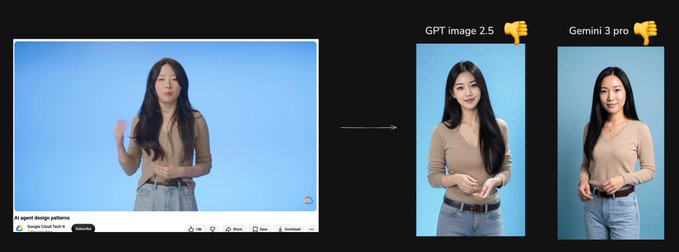
Then my friend [@henry19840301](https://x.com/@henry19840301) sent me a prompt that changed the output completely. Same models, and now the character looks like a real person, different from the reference, but with the same vibe.
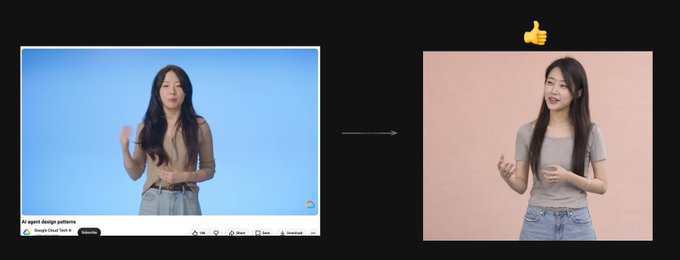
The trick:
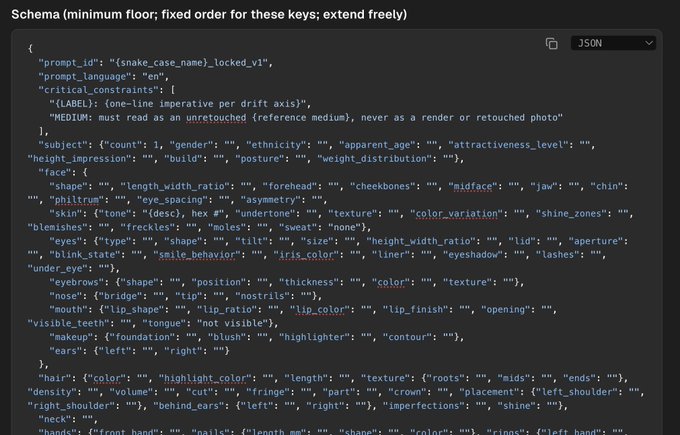
> Restrict the model's exploration space. Force it to define every detail it would otherwise fill in with default in JSON format
Every image model has out-of-box defaults. Eyes slightly too big. A doll-ish face. And if your prompt has "4K, 8K, ultra detailed" in it, you get that HDR, over-sharpened look that screams AI.
The fix is a JSON-based prompt that specifies everything: face structure, skin texture, lighting, camera, expression, clothing, background. When the model has no room to revert to its defaults, you stop getting slop.
I tested it on a well-known Chinese tech vlogger, a Chinese podcaster, and Jin Yang from Silicon Valley. Each time: a new person, clearly different, same vibe, looks real.
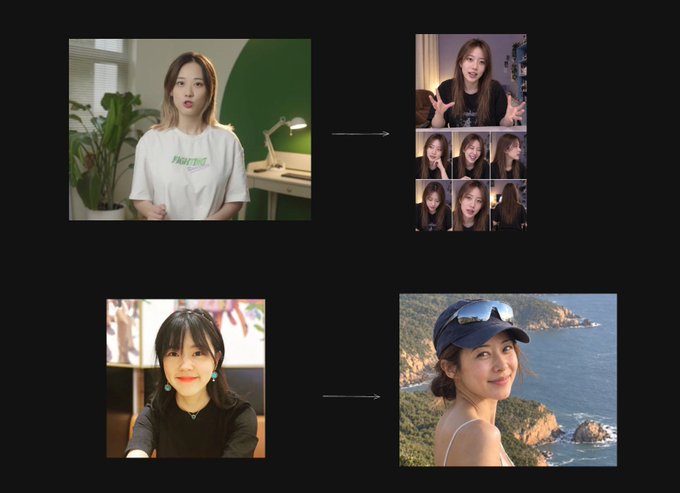
[@henry19840301](https://x.com/@henry19840301) turned this into a reusable skill: feed it a screenshot, get a new character.
Skill: [https://github.com/agentara/skills/blob/main/skills/aigc/portrait-clone/SKILL.md](https://github.com/agentara/skills/blob/main/skills/aigc/portrait-clone/SKILL.md)
Second trick: the model matters even with the right prompt. I ran the same JSON prompt across five models. GPT Image 2.5 should technically be the best, but its faces still have that doll-face pattern in the eyes. Gemini 3 Pro gave me the most realistic result.
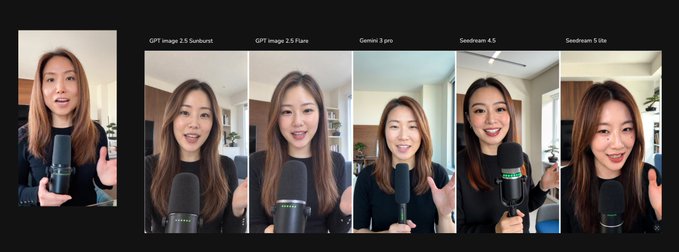
All the major image and video models are on [@treg_ai](https://x.com/@treg_ai) with no markup, so I just tell Claude Code:
> "Generate the character with the portrait-clone skill on GPT Image 2.5, Gemini 3 Pro, and Seedream, so I can compare."
It calls all three, I pick the winner.
## Step 3: Make the character talk
Now feed the character image to Seedance 2.5 as an image reference and give it a script. It does a good job from a single image.
One problem: Seedance 2.5 refuses hyper-realistic reference images by default, to stop people from impersonating real humans.
Two ways around it:
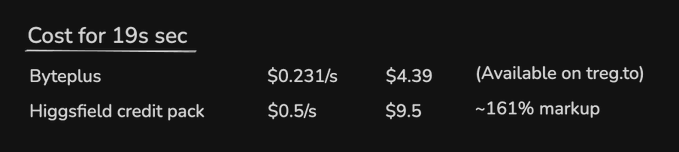
- Platforms like Higgsfield expose an endpoint that bypasses this, but they charge a margin that doubles or triples your cost.
- The proper way is BytePlus directly. Their advanced creation rights (there's a premium creation package even on the free tier) let you upload an image, register it as a digital character, and generate from it. But it takes several hurdles to get approved.
On treg we wrapped that whole process: the Seedance 2.5 less-restricted endpoint takes your image, registers it as a character asset, and generates. Same price as buying from BytePlus directly.
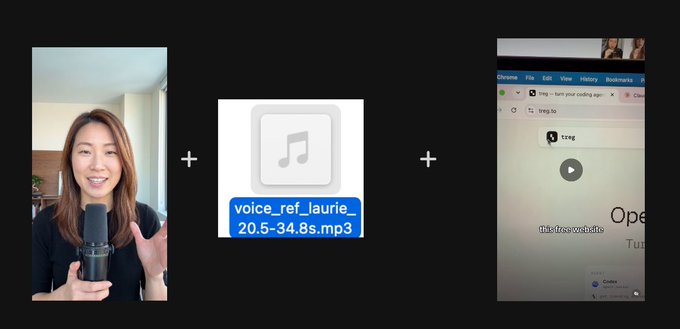
The voice trick. The default voice sounds wrong. Not fake exactly, just off in rhythm. The shortcut: clip the audio from the original trending video you liked and pass it as an audio reference. The rhythm and delivery come through. There are too many details in speech to describe in text, so let the model copy them instead.
## Step 4: The demo, and why the character doesn't need to be in it
To cut cost, the demo section doesn't show the character at all. I just recorded the product on my phone. In my case, treg getting Codex to do GTM work: find leads, run outreach.
Then I cloned a voice on Fish Audio from the same original audio clip, generated the voiceover, and stitched it with the screen recording plus captions.
Now I have one demo clip. Time to pair it with hooks.
## Step 5: Generate hooks at scale
Back to Claude Code with treg. I gave it a few reference accounts doing this well and asked it to pull their top videos and extract the hooks.
Models are good at analyzing transcripts now. One Composio video with 3.3M impressions opened with: "They emailed over five million people and asked each for one dollar. What if you emailed every millionaire in the world and asked for just one dollar?" That's showing off a Gmail integration.
The pattern: a stunning claim, a specific number, and a result.
I asked it to brainstorm in that pattern and picked this one:
> "3 AM last night, my agent was researching hundreds of customers and emailing each of them to book meetings for me. I woke up to 12 replies and 4 meetings on my calendar. Here's exactly how I set it up."
Then one prompt: use Seedance 2.5 with the character image and the audio reference, generate the video.
I built a UGC talking-head skill for this. It takes the request, writes the script and sets the duration, grabs the voice reference, writes the Seedance prompt, and adds captions and headers to produce the final video. It's in the treg GitHub repo.
A few minutes later: 4 UGC clips for $2.67 total. Under 20 to $50 per video for a human creator.
## What I'd do differently for harder videos
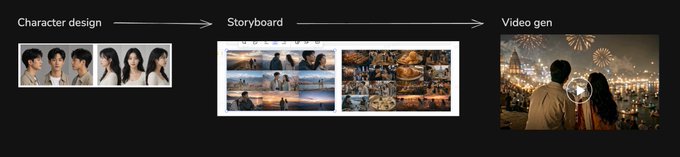
Software demos are simple, so one character image is enough. If your video is more complex, the flow becomes: design the character from multiple angles, use an image model to build a storyboard, then feed storyboard plus character to Seedance 2.5 for the final cut. For most software UGC I never needed this.
## The full loop
1. Pull trending videos in your vertical, study hooks and faces
2. Generate a new character with the vibe you want (JSON prompt, Gemini 3 Pro)
3. Register the character on Seedance 2.5, use the original audio as reference
4. Record the demo yourself, clone the voice, stitch
5. Extract hooks from top performers, generate 5 to 10 variants, A/B test
Links:
- Henry's portrait-clone skill: [https://github.com/agentara/skills/blob/main/skills/aigc/portrait-clone/SKILL.md](https://github.com/agentara/skills/blob/main/skills/aigc/portrait-clone/SKILL.md)
- UGC talking-head skill: [https://github.com/superdesigndev/treg](https://github.com/superdesigndev/treg)
- treg (OpenRouter for data and agent tools): [http://treg.to](http://treg.to)
## 相关链接
- [Jason Zhou](https://x.com/jasonzhou1993)
- [@jasonzhou1993](https://x.com/jasonzhou1993)
- [10K](https://x.com/jasonzhou1993/status/2099837130927427989/analytics)
- [@treg_ai](https://x.com/@treg_ai)
- [https://treg.to/llms.txt](https://treg.to/llms.txt)
- [@henry19840301](https://x.com/@henry19840301)
- [@henry19840301](https://x.com/@henry19840301)
- [https://github.com/agentara/skills/blob/main/skills/aigc/portrait-clone/SKILL.md](https://github.com/agentara/skills/blob/main/skills/aigc/portrait-clone/SKILL.md)
- [@treg_ai](https://x.com/@treg_ai)
- [https://github.com/agentara/skills/blob/main/skills/aigc/portrait-clone/SKILL.md](https://github.com/agentara/skills/blob/main/skills/aigc/portrait-clone/SKILL.md)
- [https://github.com/superdesigndev/treg](https://github.com/superdesigndev/treg)
- [http://treg.to](http://treg.to/)
- [Upgrade to Premium](https://x.com/i/premium_sign_up)
- [8:25 PM · Sep 15, 2026](https://x.com/jasonzhou1993/status/2099837130927427989)
- [10.4K Views](https://x.com/jasonzhou1993/status/2099837130927427989/analytics)
- [View quotes](https://x.com/jasonzhou1993/status/2099837130927427989/quotes)
---
*导出时间: 2026/9/16 09:30:33*
---
## 中文翻译
# 如何开展你的第一个 AI UGC 活动(分步指南)
**作者**: Jason Zhou
**日期**: 2026-09-15T12:25:59.000Z
**来源**: [https://x.com/jasonzhou1993/status/2099837130927427989](https://x.com/jasonzhou1993/status/2099837130927427989)
---

<video controls preload="metadata" poster="/doc/6683/image/img_864bc3faf895.jpg" src="/videos/0679.mp4"></video>
你在 TikTok 和 Instagram 上见过这类视频。一个看起来很普通的人,谈论他们“刚发现”的一个 App。不是品牌方发的,而是一个只有 40 个粉丝的个人账号发的。
这就是 UGC。

图片来源:Joma 2nd Channel
通常,公司会雇用那些有时间但没有粉丝的人 -> 开设新账号,围绕你的产品制作视频内容。
你付钱买的不是他们的粉丝,因为他们根本没有粉丝。你付钱买的是那种看起来像真实用户在分享自己喜欢的产品一样的内容。
通常你每条视频要付 20~50 美元,所以成本很快就会变得很高。
过去两天我一直在探索能否用 AI 完全生成这类视频,把成本从每条 20~50 美元降到 4~6 美元?
我想我已经摸索出一套能制作出真正有效、极其逼真的 AI UGC 的工作流,下面我来一步步讲解
<video controls preload="metadata" poster="/doc/6683/image/img_38ae32e332a4.jpg" src="/videos/0680.mp4"></video>
## 第 1 步:找出你的细分领域里已经有效的东西
一条 UGC 视频由两部分组成:
1. 开场钩子:前 3 秒。可能是最重要的部分。
2. 产品演示:展示产品。
扩展的方式是:一个演示搭配 5 到 10 个不同的钩子。然后测试哪个效果最好。

所以在生成任何内容之前,我会先拉取我所在领域的热门视频,研究两件事:这些钩子是如何构建的,以及哪些面孔/角色更能引起共鸣。同样的脚本,不同的人,效果完全不同。这一点让我很惊讶。
我用 [@treg_ai](https://x.com/@treg_ai) 来做这件事(背景:这是我开发的)。它就像数据和工具领域的 OpenRouter,可以连接到 3000 多个高级数据和工具。无需订阅,按用量付费。
只需把 [https://treg.to/llms.txt](https://treg.to/llms.txt) 粘贴给你的智能体,1 分钟内即可完成设置,然后你就可以提示它:
“拉取我们所在领域最近在 TikTok/Instagram 上的热门视频。”
一分钟后,我就得到了一份我这个细分领域 TikTok 热门内容的列表,可以查看钩子文案和角色形象。

接下来是难点:找到一个真实存在且气质合适的真人,生成一个具有同样气质的全新人物。然后围绕这个角色打造一个账号。
## 第 2 步:生成具有特定气质的角色(难点)
这一步确实很难,我花了一段时间才明白为什么。
我用 Google Cloud 频道一位主讲人的截图,分别测试了 GPT Image 2.5 和 Gemini 3 Pro。两者都是最先进的模型,但生成的结果都不对劲。

后来我的朋友 [@henry19840301](https://x.com/@henry19840301) 发给我一个提示词,彻底改变了输出结果。同样的模型,现在生成的角色看起来像一个真人,与参考人物不同,但气质相同。

诀窍在于:
> 限制模型的探索空间。强制它以 JSON 格式定义所有细节,否则模型会用默认值来填补
每个图像模型都有开箱即用的默认风格。眼睛稍大。娃娃般的脸。如果你的提示词里包含“4K、8K、超高清细节”,你就会得到那种 HDR、过度锐化、一看就是 AI 的效果。
解决办法是使用基于 JSON 的提示词,明确规定一切:脸型、皮肤质感、光线、相机、表情、服装、背景。当模型没有空间退回到默认值时,你就不会再得到那种廉价的 AI 感。

我在一位知名中国科技视频博主、一位中国播客主持人以及《硅谷》里的 Jin Yang 身上做了测试。每次结果都是:一个全新的人,明显不同,但气质相同,看起来很真实。

[@henry19840301](https://x.com/@henry19840301) 把这个方法做成了一个可复用的技能:输入一张截图,就能得到一个新角色。
技能:[https://github.com/agentara/skills/blob/main/skills/aigc/portrait-clone/SKILL.md](https://github.com/agentara/skills/blob/main/skills/aigc/portrait-clone/SKILL.md)
第二个诀窍:即使提示词正确,模型的选择也很重要。我用同一个 JSON 提示词在五个模型上运行。从技术上讲 GPT Image 2.5 应该是最好的,但它的脸部在眼睛部分仍然有那种娃娃脸的模式。Gemini 3 Pro 给了我最逼真的结果。

所有主流图像和视频模型都在 [@treg_ai](https://x.com/@treg_ai) 上,没有加价,所以我只需告诉 Claude Code:
“用 portrait-clone 技能在 GPT Image 2.5、Gemini 3 Pro 和 Seedream 上分别生成这个角色,方便我对比。”
它会调用这三个模型,然后我挑出最好的。
## 第 3 步:让角色开口说话
现在把这个角色图像作为图像参考输入 Seedance 2.5,并给它一个脚本。仅凭一张图像,它的表现就相当不错。
有一个问题:Seedance 2.5 默认拒绝超逼真的参考图像,以防止人们冒充真人。
有两种绕过方法:
- Higgsfield 这类平台提供了一个可以绕过此限制的接口,但它们收取的加价会让你的成本翻倍甚至三倍。
- 正规的方法是直接使用 BytePlus。它们的高级创作权限(即使免费层也有高级创作包)允许你上传一张图像,将其注册为数字角色,并据此生成内容。但需要通过好几道审批关卡。
在 treg 上,我们把整个流程都封装好了:Seedance 2.5 限制更少的接口会接收你的图像,将其注册为角色资产,然后进行生成。价格与直接从 BytePlus 购买相同。

声音的诀窍。默认的语音听起来不对劲。不完全是假的,只是节奏上有点怪。捷径是:从你喜欢的原热门视频中截取音频,作为音频参考传入。这样节奏和语调就能保留下来。语音中的细节太多,无法用文字描述,所以不如让模型直接模仿。

## 第 4 步:产品演示,以及为什么角色不需要出镜
为了节省成本,演示部分完全不需要角色出镜。我只是用手机录制了产品。以我为例,就是让 treg 驱动 Codex 做 GTM 工作:寻找潜在客户、进行外联。
然后我在 Fish Audio 上用同一段原始音频克隆了一个声音,生成配音,再把它和录屏加上字幕拼接起来。
现在我有一条演示片段了。接下来是搭配钩子。
## 第 5 步:批量生成钩子
再次回到 Claude Code 和 treg。我给了它几个在这方面做得很好的参考账号,让它拉取这些账号最火的视频并提取钩子。
现在模型很擅长分析字幕文本。一条有 330 万曝光的 Composio 视频是这样开头的:“他们给五百万人发了邮件,每人要一美元。如果你给世界上每一位百万富翁发邮件,每人只要一美元,会怎么样?”这是在展示一个 Gmail 集成功能。
模式是:一个惊人的说法,一个具体的数字,一个结果。
我让它按这个模式头脑风暴,并选定了这一条:
“昨晚凌晨 3 点,我的智能体在研究数百个客户,并给每个人发邮件,为我约会议。我一觉醒来,收到了 12 条回复,日历上多了 4 场会议。下面是我具体的搭建方法。”
然后一条提示词:用 Seedance 2.5、角色图像和音频参考,生成视频。
我为此构建了一个 UGC 说话头像技能。它接收请求,编写脚本并设定时长,获取语音参考,编写 Seedance 提示词,然后添加字幕和标题,输出最终视频。它已放在 treg 的 GitHub 仓库里。
几分钟后:4 条 UGC 视频总共花了 2.67 美元。而人类创作者每条要 20 到 50 美元。
## 对于更复杂的视频,我会怎么改进
软件演示很简单,所以一张角色图像就够了。如果你的视频更复杂,流程就变成:设计角色的多个角度图像,用图像模型制作分镜,然后把分镜和角色一起输入 Seedance 2.5 进行最终生成。对于大多数软件类 UGC,我从不需要这一步。

## 完整流程
1. 拉取你所在领域的热门视频,研究钩子和人物形象
2. 生成一个具有你想要的气质的新角色(JSON 提示词,Gemini 3 Pro)
3. 在 Seedance 2.5 上注册该角色,使用原始音频作为参考
4. 自己录制演示,克隆声音,拼接
5. 从爆款视频中提取钩子,生成 5 到 10 个变体,进行 A/B 测试
链接:
- Henry 的 portrait-clone 技能:[https://github.com/agentara/skills/blob/main/skills/aigc/portrait-clone/SKILL.md](https://github.com/agentara/skills/blob/main/skills/aigc/portrait-clone/SKILL.md)
- UGC 说话头像技能:[https://github.com/superdesigndev/treg](https://github.com/superdesigndev/treg)
- treg(数据和智能体工具的 OpenRouter):[http://treg.to](http://treg.to)
## 相关链接
- [Jason Zhou](https://x.com/jasonzhou1993)
- [@jasonzhou1993](https://x.com/jasonzhou1993)
- [10K](https://x.com/jasonzhou1993/status/2099837130927427989/analytics)
- [@treg_ai](https://x.com/@treg_ai)
- [https://treg.to/llms.txt](https://treg.to/llms.txt)
- [@henry19840301](https://x.com/@henry19840301)
- [@henry19840301](https://x.com/@henry19840301)
- [https://github.com/agentara/skills/blob/main/skills/aigc/portrait-clone/SKILL.md](https://github.com/agentara/skills/blob/main/skills/aigc/portrait-clone/SKILL.md)
- [@treg_ai](https://x.com/@treg_ai)
- [https://github.com/agentara/skills/blob/main/skills/aigc/portrait-clone/SKILL.md](https://github.com/agentara/skills/blob/main/skills/aigc/portrait-clone/SKILL.md)
- [https://github.com/superdesigndev/treg](https://github.com/superdesigndev/treg)
- [http://treg.to](http://treg.to/)
- [升级到 Premium](https://x.com/i/premium_sign_up)
- [2026年9月15日 20:25](https://x.com/jasonzhou1993/status/2099837130927427989)
- [10.4K 次浏览](https://x.com/jasonzhou1993/status/2099837130927427989/analytics)
- [查看引用](https://x.com/jasonzhou1993/status/2099837130927427989/quotes)
---
*导出时间: 2026/9/16 09:30:33*