# Graphs build Dynamic Agent Orgs
**作者**: Shubham Saboo
**日期**: 2026-08-04T03:01:56.000Z
**来源**: [https://x.com/Saboo_Shubham_/status/2084474890812338252](https://x.com/Saboo_Shubham_/status/2084474890812338252)
---
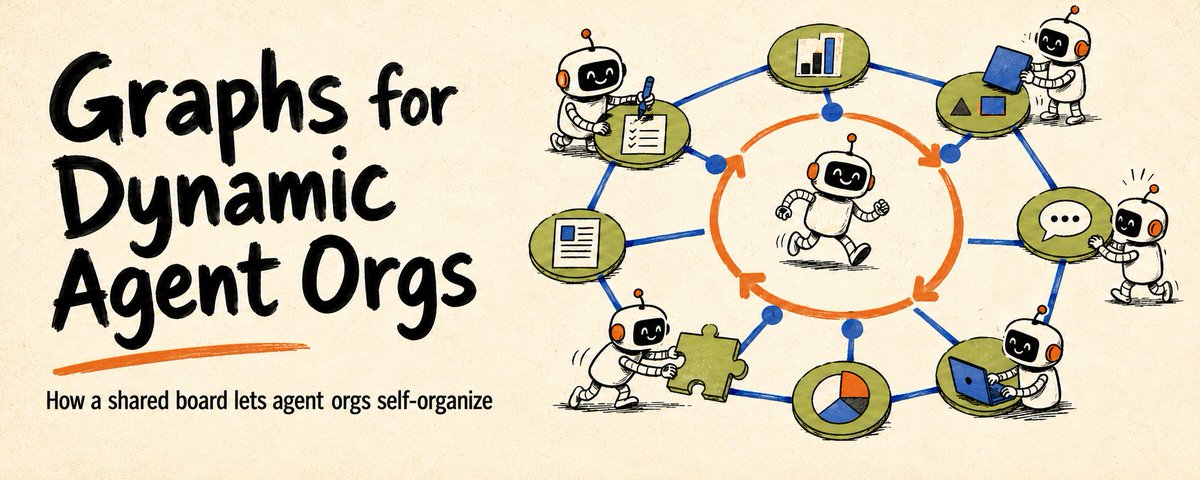
Loops made agent behavior programmable. Graphs make agent orgs programmable.
And a dynamic agent org is where the graph rewrites itself while the work is happening.
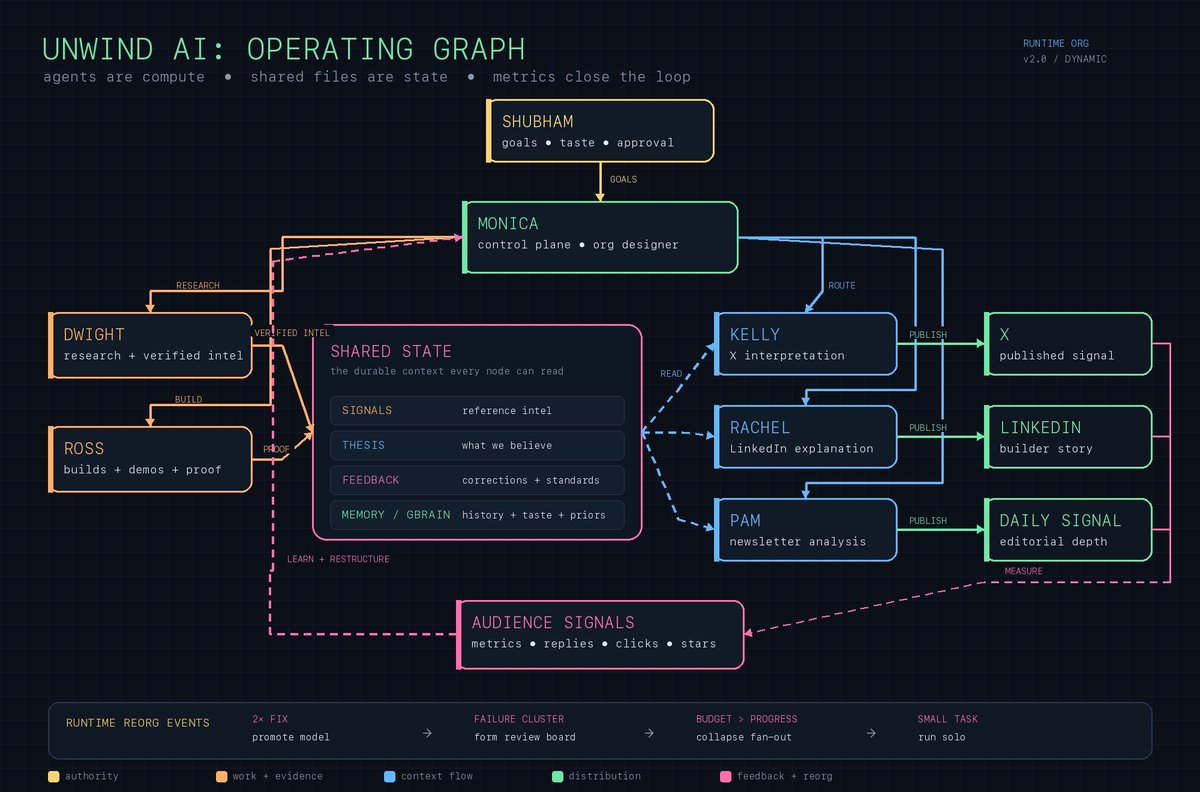
Here's what that looks like in my own setup: six agents, a shared state layer they all read from, and a coordinator that restructures the team based on what comes back.
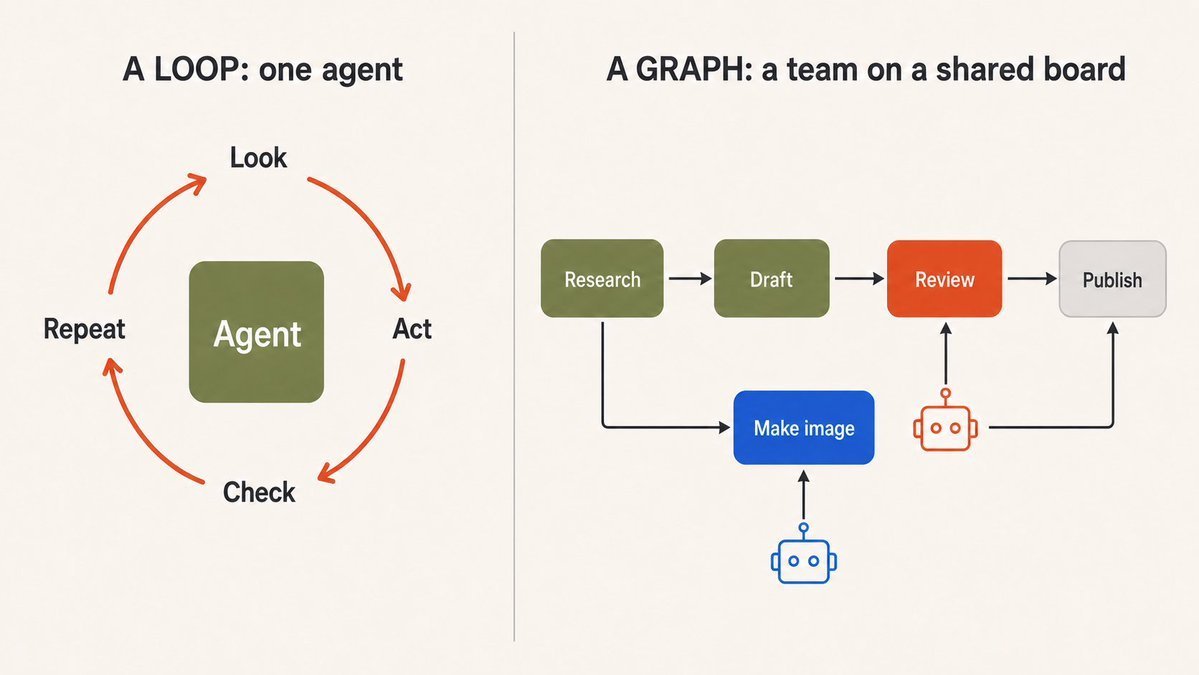
A loop is how one agent works. A graph is how the work connects.
Everything else here is that one sentence with the details filled in.
## Why "graph" confuses everyone
Peter Steinberger asked a few weeks ago whether we're still talking loops or shifted to graphs yet. The replies went in five directions at once, which tells you the word isn't doing its job.
A graph is just things and how they relate to each other. Which task blocks which. Which one belongs to which. What has to finish before the next thing starts.
That's not the confusing part. The confusing part is whether the graph holds still.
Most workflow graphs don't move. You lay out the boxes and arrows before anything runs, and that's the shape you get. This is the flowchart most people picture when they hear the word.
A dynamic graph changes while it's running. Think of a social network. People add friends and drop them. Groups form and fall apart. New people show up, others leave. The relationships are the whole point, and not one of them holds still.
Task graphs work the same way. An agent finds work nobody planned for and adds it. Something gets unblocked. A task finishes and drops off the board.
So the real question isn't "are we doing graphs." It's whether yours can change while the work is happening.
## A loop: one agent, one mental checklist
Start with the simplest thing. A loop is a single agent working by itself. It looks at the situation, does one thing, checks the result, then decides what to do next. Round and round until the job is done.
look → do a thing → check result → repeat or stop
A loop works because the agent doesn't need the whole plan up front. It figures out the next step from what just happened.
For one agent doing one clear job, a loop is all you need. Give it a goal, some tools, and a way to check its own work. Don't build a tiny org chart around a task one agent could finish in three steps.
A loop starts to strain when the job is too big for one agent to hold in its head, or when you have several agents and the work has to survive one of them stopping and another picking it up. Nobody has the full picture. Things fall through the cracks.
That's when the plan needs to leave everyone's head and go somewhere shared.
## A graph: the plan lives on a board, not in agent's head
Picture a wall of sticky notes. Each note is a task. An arrow from one note to another means "this one has to finish before that one can start." Any agent can walk up, take a note that's ready, do the work, and move it to done.
That's a graph. And the jargon maps to plain things:
- A node is a sticky note. One task.
- An edge is an arrow between notes. It's the relationship: blocks, belongs to, comes first.
- State is what's written on each note right now (ready, in progress, done).
- Claiming a task is an agent putting its name on a note so two agents don't grab the same one.
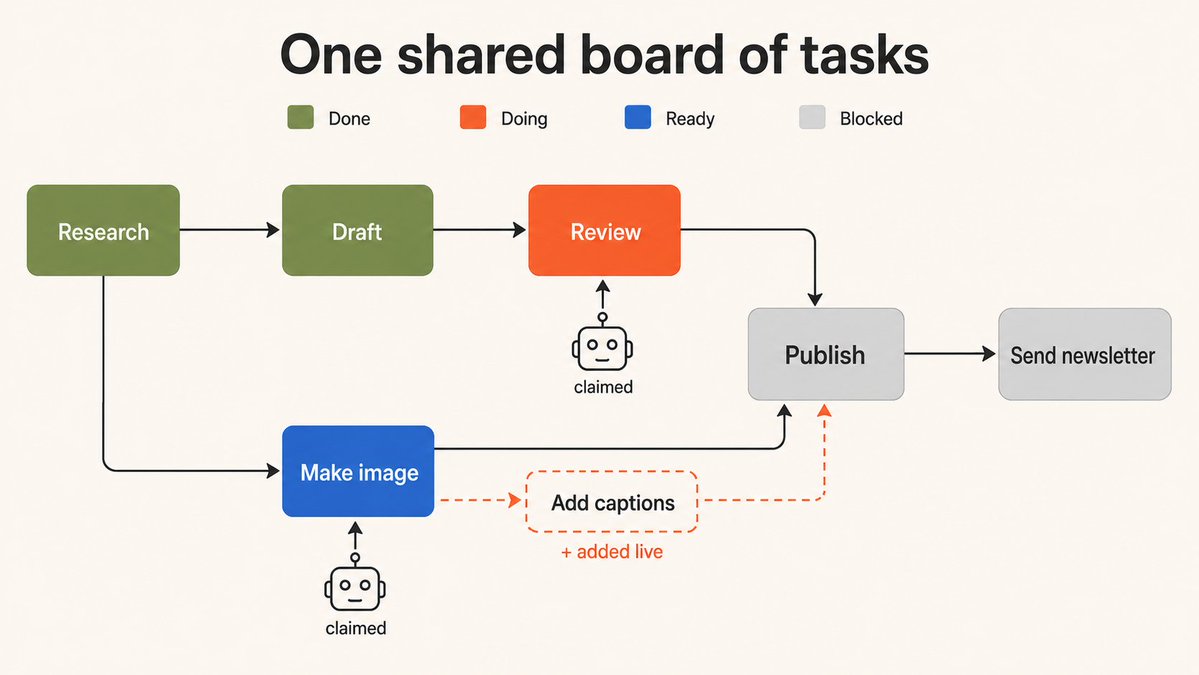
The board is what makes many agents possible. The plan survives any single agent finishing, because nobody has to hold it in their head. It's written down where everyone can see it.
This isn't a new shape. It's a DAG with a work queue on top, the thing build systems and job schedulers have run on for decades. The new part is pointing agents at it instead of humans or CI jobs.
One project doing exactly that is FarmTable, built by my friend Preston (@ptone). Instead of cramming a plan into one agent's prompt, you put the tasks on a shared board that every agent can read and write. Agents walk up, grab a task that's ready, do it, and mark it done.
FarmTable tracks which tasks are ready, which are blocked, what depends on what, and who's working on which. Two agents can't grab the same note, because claiming a task is atomic. And an agent can add a brand-new note mid-run when it discovers work nobody planned for.
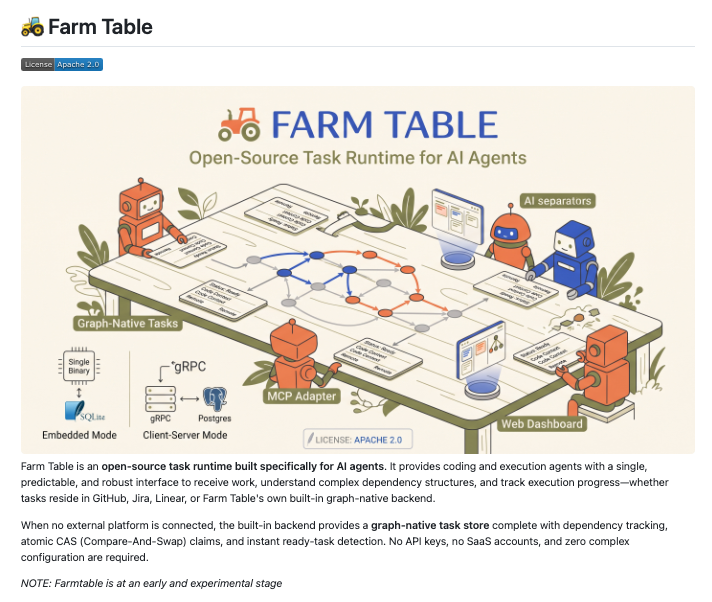
Ready work also sets your ceiling. You can't run five agents when only two tasks are unblocked. The board tells you how many agents the work can actually absorb.
The plan is shared state, not a doc everyone quietly stops following.
This is where it splits from most graph-based agent frameworks. There you lay out the steps in advance, and the boxes are functions. Here the boxes are tasks, and the agents add them as the work reveals itself. The two can live together: one runs a single agent's internal steps, the other coordinates many agents on top.
## The board changes while the work happens
Most new work comes from doing the work. You're building a feature and you spot a bug. The instinct is to either stop and fix it, which derails you, or make a mental note, which means losing it. On a board, the agent that finds it writes it down as a new task and keeps going. Work gets captured by whoever discovers it, at the moment they discover it.
Once the plan is data on a board, the same thing happens to the team. Not just the tasks. The org itself.
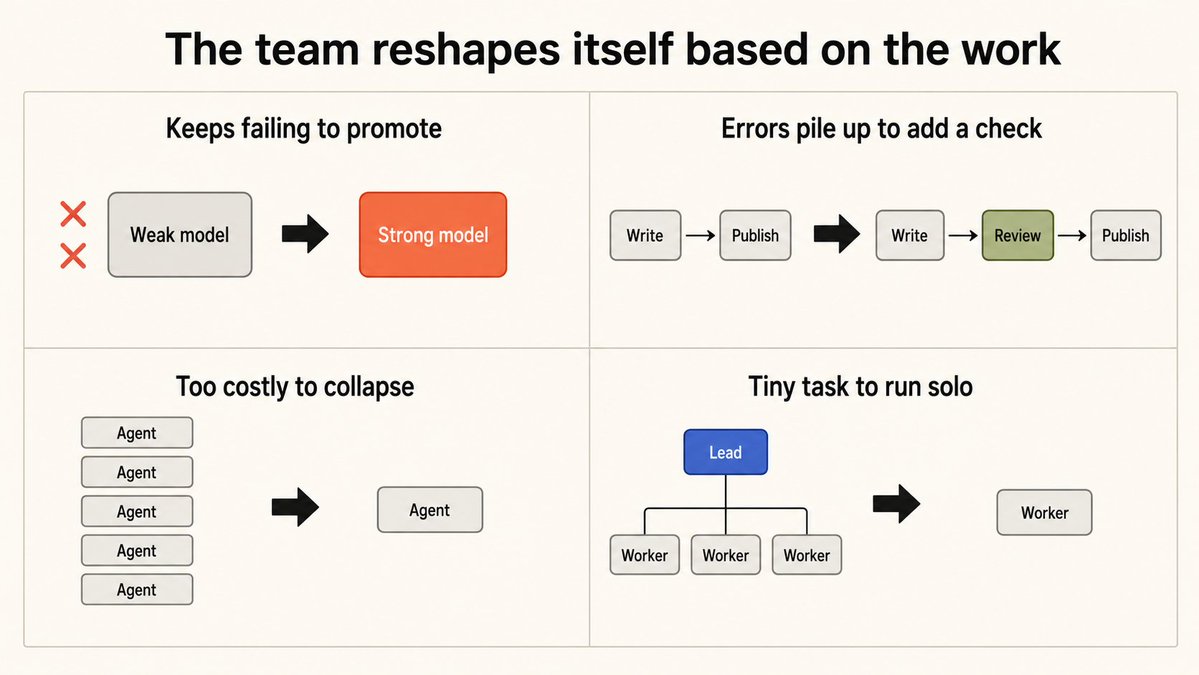
I run six agents around the clock for research, engineering, and content. A coordinator sits on top and watches how the work is going. When the signals change, it restructures the team. A few concrete rules:
- Same mistake twice, switch to a stronger model. If an agent needs correcting on the same kind of task twice, that work automatically routes to a better model.
- Errors piling up in one area, add a reviewer. A temporary checking step appears between "done" and "published." When quality settles, it disappears.
- Burning more money than the work is worth, collapse the team. If five agents running in parallel cost more than the job justifies, it drops back to one strong agent doing it solo.
- Tiny task, skip the whole thing. A one-line fix doesn't need an org. One agent handles it.
The extra structure only exists while the work needs it. When the work settles, the structure dissolves.
The org chart stopped being a setting you configure. It's something the system edits while it runs. This is what "dynamic" actually means. Not an agent picking between two branches someone wrote in advance. The team visibly changes because the work changed.
## Three ways a board drifts from reality
A board is only useful if it matches the real world. When it doesn't, agents work hard on the wrong things and report success that isn't real. Preston's run hit all three of the ways this happens, and any agent system on a shared plan will hit them too.
1. A tidy board can still be out of date. Those 57 tasks looked perfect. The planner never checked the code, so a third were already done. Read reality before you build the plan.
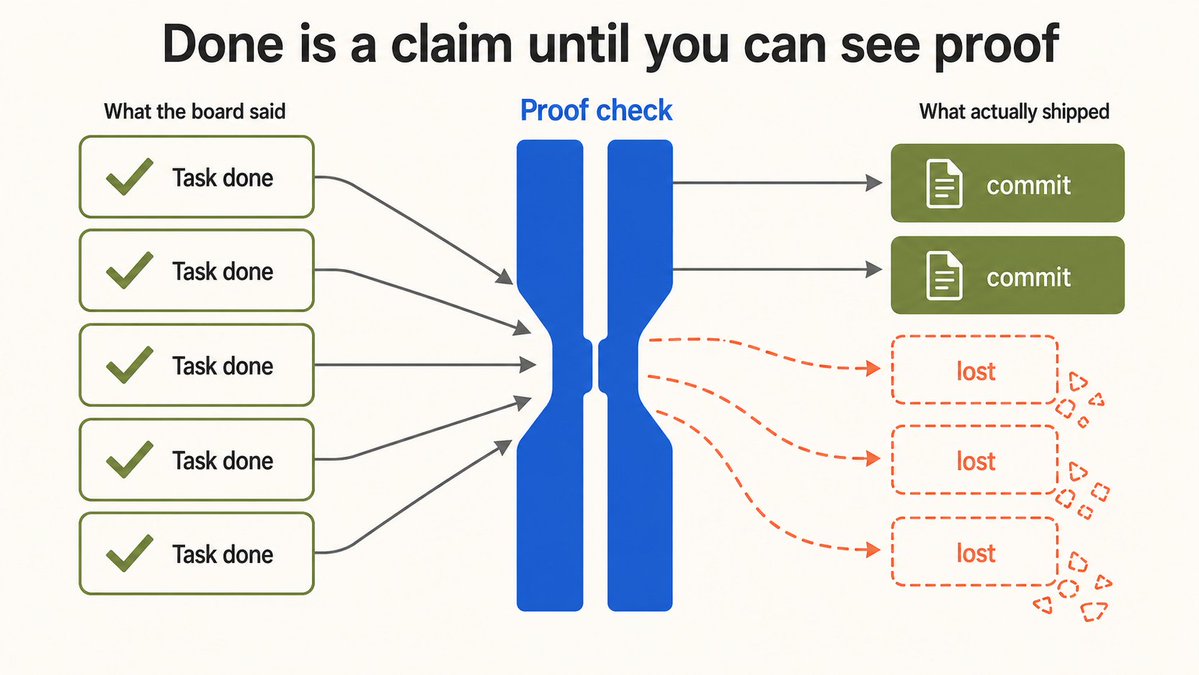
2. "Done" is a claim until you see proof. Five marked done, two actually shipped. Marking a task done is just editing a row in a database, it doesn't make the code exist. Re-run the tests instead of trusting the status. And check the tests actually cover what was supposed to be built.
3. Bookkeeping can't live in the agent's memory. One agent fixed a bug but skipped claiming the task, so nothing recorded who did it. Claiming is what stops two agents grabbing the same work. The board should record it automatically, or it will drift.
All three come down to one rule: trust the board only as far as it's tied to something real.
## When you don't need any of this
- Use a loop when one agent can hold the whole job in its head, use its tools, and check its own work.
- Use a fixed flowchart (like LangGraph) when the steps are stable and you want them predictable.
- Use a shared board when the work branches, when finishing one task creates or cancels others, when different tasks need different skill levels, when "done" needs real proof, and when the team should grow or shrink as it goes.
Use the smallest thing that keeps the mess manageable.
Before you reach for a graph, answer three questions:
1. What does each task produce?
2. What does each arrow mean?
3. What proof lets the next task start?
If one agent can hold it all, keep the loop. If the work has to survive handoffs and change shape as you learn, put it on a board. Then let the agents loop away inside it.
Loops made agent behavior programmable. Graphs make agent orgs programmable. And the interesting part is what happens next, when the team stops being something you wire up in advance and starts shaping itself around the work.
____
100+ AI Agents, Agent Skills, and Agent teams (free and open-source with 130,000+ stars): https://github.com/Shubhamsaboo/awesome-llm-apps
Follow me → @Saboo_Shubham_ for more such content on AI Agents and Agent skills.
Thanks to @ptone for the review and feedback.
## 相关链接
- [Shubham Saboo](https://x.com/Saboo_Shubham_)
- [@Saboo_Shubham_](https://x.com/Saboo_Shubham_)
- [2.5K](https://x.com/Saboo_Shubham_/status/2084474890812338252/analytics)
- [FarmTable](https://github.com/scion-frontiers/farmtable)
- [@ptone](https://x.com/@ptone)
- [https://github.com/Shubhamsaboo/awesome-llm-apps](https://github.com/Shubhamsaboo/awesome-llm-apps)
- [@Saboo_Shubham_](https://x.com/@Saboo_Shubham_)
- [@ptone](https://x.com/@ptone)
- [Upgrade to Premium](https://x.com/i/premium_sign_up)
- [11:01 AM · Aug 4, 2026](https://x.com/Saboo_Shubham_/status/2084474890812338252)
- [2,523 Views](https://x.com/Saboo_Shubham_/status/2084474890812338252/analytics)
- [View quotes](https://x.com/Saboo_Shubham_/status/2084474890812338252/quotes)
---
*导出时间: 2026/8/4 15:02:50*
---
## 中文翻译
# 图构建动态智能体组织
**作者**: Shubham Saboo
**日期**: 2026-08-04T03:01:56.000Z
**来源**: [https://x.com/Saboo_Shubham_/status/2084474890812338252](https://x.com/Saboo_Shubham_/status/2084474890812338252)
---

循环让智能体的行为可编程。图让智能体组织可编程。
而动态智能体组织是指图在工作进行过程中重写自身的结构。
以下是我的个人设置:六个智能体,它们都从中读取的共享状态层,以及一个根据返回结果重组团队的协调器。

循环是单个智能体的工作方式。图是工作连接的方式。
这里剩下的所有内容就是填充了细节的那一句话。
## 为什么“图”让每个人都困惑

Peter Steinberger 几周前问,我们是在谈论循环还是已经转向图了。回复立刻指向了五个不同的方向,这说明这个词并没有起到应有的作用。
图只是事物及其相互关系。哪个任务阻塞了哪个。哪个属于哪个。什么必须在下一个开始之前完成。
这不是令人困惑的部分。令人困惑的部分是图是否保持静止。
大多数工作流图是不动的。你在任何东西运行之前就布置好了框和箭头,这就是你得到的形状。这是大多数人听到这个词时想到的流程图。
动态图在运行时会发生变化。想象一个社交网络。人们添加和删除朋友。群体形成和解散。新人出现,其他人离开。关系是全部意义所在,但没有一个是一成不变的。
任务图的工作方式也是一样的。智能体发现没人计划的工作并将其添加进去。某个东西被解除阻塞。任务完成并从板上消失。
所以真正的问题不是“我们在做图吗”。而是你的图能否在工作进行时发生变化。
## 循环:一个智能体,一份思维清单
从最简单的事情开始。循环是一个单独工作的智能体。它观察情况,做一件事,检查结果,然后决定下一步做什么。一圈又一圈,直到工作完成。
观察 → 做事 → 检查结果 → 重复或停止
循环之所以有效,是因为智能体不需要一开始就有完整的计划。它根据刚刚发生的事情推断出下一步。
对于一个做一个明确工作的智能体,循环就是你需要的全部。给它一个目标、一些工具和一种检查自己工作的方法。不要在一个智能体三步就能完成的任务周围构建一个小型组织图。
当工作太大,一个智能体无法在脑海中完全掌握,或者当你有多个智能体且工作必须能够在一个停止而另一个接手时继续存在时,循环就会变得吃力。没有人拥有全貌。事情会从缝隙中漏掉。
这时计划需要离开每个人的大脑,去到一个共享的地方。
## 图:计划活在板上,而不是在智能体的脑子里
想象一墙面的便利贴。每张便利贴都是一个任务。从一张便利贴到另一张的箭头意味着“这个必须在那个开始之前完成”。任何智能体都可以走上前,拿走一张准备好的便利贴,做工作,然后将其移至完成。
这就是一个图。这些术语对应着普通的事物:
- 节点是一张便利贴。一个任务。
- 边是便利贴之间的箭头。它是关系:阻塞、属于、先于。
- 状态是现在每张便利贴上写的内容(就绪、进行中、完成)。
- 认领任务是智能体在便利贴上写上它的名字,这样两个智能体就不会抢同一个。

这个板使得多个智能体成为可能。计划在任何单个智能体完成时都能存续,因为没有人需要把它记在脑子里。它写在那里,每个人都能看到。
这不是一个新的形状。这是一个带有工作队列的有向无环图(DAG),构建系统和作业调度器几十年来一直在运行这东西。新的部分是指向它的不是人类或 CI 作业,而是智能体。
一个完全这样做的项目是 FarmTable,由我的朋友 Preston (@ptone) 构建。你不是把计划塞进一个智能体的提示词中,而是把任务放在每个智能体都可以读写的共享板上。智能体走上前,抓取一个准备好的任务,做它,并标记为完成。
FarmTable 跟踪哪些任务准备就绪,哪些被阻塞,什么依赖于什么,以及谁在做什么。两个智能体不能抓取同一张便利贴,因为认领任务是原子性的。而且智能体可以在运行中添加一张全新的便利贴,当它发现没人计划的工作时。

就绪的工作也决定了你的上限。当只有两个任务解除阻塞时,你不能运行五个智能体。板会告诉你工作实际上可以吸收多少个智能体。
计划是共享状态,而不是每个人都悄悄停止遵循的文档。
这就是它与大多数基于图的智能体框架分道扬镳的地方。在那里,你提前布置步骤,框是函数。在这里,框是任务,智能体在工作显现时添加它们。两者可以共存:一个运行单个智能体的内部步骤,另一个在顶层协调多个智能体。
## 板在工作进行时发生变化
大多数新工作来自于做工作。你正在构建一个功能,你发现了一个 bug。本能的反应要么是停下来修复它,这会让你偏离轨道,要么是记在脑子里,这意味着会丢失它。在板上,发现它的智能体将其写成一个新任务并继续工作。工作被发现它的人在发现的瞬间捕获。
一旦计划是板上的数据,团队也会发生同样的事情。不仅仅是任务。组织本身。
我全天候运行六个智能体用于研究、工程和内容。一个协调器坐在上面,观察工作进展。当信号发生变化时,它重组团队。几个具体的规则:
- 同样的错误犯了两次,切换到更强的模型。如果一个智能体在同种类型的任务上需要被纠正两次,该工作会自动路由到更好的模型。
- 错误在一个区域堆积,添加一个审查者。在“完成”和“发布”之间出现一个临时的检查步骤。当质量稳定下来时,它就会消失。
- 烧的钱超过了工作的价值,压缩团队。如果五个智能体并行运行的成本超过了工作所证明的合理性,它会降级回一个强大的智能体单独做。
- 微小的任务,跳过整个过程。一行代码的修复不需要一个组织。一个智能体处理它。
额外的结构只在工作需要它的时候存在。当工作稳定下来时,结构就会消解。
组织图不再是你要配置的设置。它是系统在运行时编辑的东西。这就是“动态”真正含义。不是智能体在别人预先写好的两个分支之间做选择。团队明显地发生变化,因为工作变了。

## 板偏离现实的三种方式
一个板只有在与现实匹配时才有用。如果不匹配,智能体会在错误的事情上努力工作,并报告不真实的成功。Preston 的运行遇到了所有这三种情况,任何基于共享计划的智能体系统也会遇到它们。
1. 整洁的板仍然可能过时。那 57 个任务看起来很完美。规划者从未检查过代码,所以三分之一已经完成了。在构建计划之前先读取现实。
2. “完成”只是一个声明,直到你看到证明。五个标记为完成,两个实际发布了。将任务标记为完成只是编辑数据库中的一行,它并不能让代码存在。重新运行测试而不是信任状态。并检查测试是否实际覆盖了应该构建的内容。
3. 记账不能存在于智能体的记忆中。一个智能体修复了一个 bug 但跳过了认领任务,所以没有任何记录是谁做的。认领是阻止两个智能体抓取同一工作的东西。板应该自动记录它,否则它会偏离。
这三点都归结为一条规则:只信任板到它与现实事物相关联的程度。

## 当你不需要任何这些时
- 当一个智能体可以将整个工作记在脑子里、使用它的工具并检查自己的工作时,使用循环。
- 当步骤稳定且你希望它们可预测时,使用固定流程图(如 LangGraph)。
- 当工作分支、完成一个任务会创建或取消其他任务、不同的任务需要不同的技能水平、“完成”需要真正的证明、以及团队应该随着进行而增长或缩小时,使用共享板。
使用保持混乱可控的最小事物。
在你求助于图之前,回答三个问题:
1. 每个任务产生什么?
2. 每个箭头意味着什么?
3. 什么证明允许下一个任务开始?
如果一个智能体可以掌握所有事情,保持循环。如果工作必须在交接中存续并随着你的学习而改变形状,把它放在板上。然后让智能体在其中循环。
循环让智能体行为可编程。图让智能体组织可编程。有趣的部分是接下来会发生什么,当团队不再是提前连接的东西,并开始围绕工作塑造自己时。
____
100+ AI 智能体,智能体技能和智能体团队(免费和开源,拥有 130,000+ 星):https://github.com/Shubhamsaboo/awesome-llm-apps
关注我 → @Saboo_Shubham_ 获取更多关于 AI 智能体和智能体技能的内容。
感谢 @ptone 的审查和反馈。
## 相关链接
- [Shubham Saboo](https://x.com/Saboo_Shubham_)
- [@Saboo_Shubham_](https://x.com/Saboo_Shubham_)
- [2.5K](https://x.com/Saboo_Shubham_/status/2084474890812338252/analytics)
- [FarmTable](https://github.com/scion-frontiers/farmtable)
- [@ptone](https://x.com/@ptone)
- [https://github.com/Shubhamsaboo/awesome-llm-apps](https://github.com/Shubhamsaboo/awesome-llm-apps)
- [@Saboo_Shubham_](https://x.com/@Saboo_Shubham_)
- [@ptone](https://x.com/@ptone)
- [升级到 Premium](https://x.com/i/premium_sign_up)
- [11:01 AM · Aug 4, 2026](https://x.com/Saboo_Shubham_/status/2084474890812338252)
- [2,523 次观看](https://x.com/Saboo_Shubham_/status/2084474890812338252/analytics)
- [查看引用](https://x.com/Saboo_Shubham_/status/2084474890812338252/quotes)
---
*导出时间: 2026/8/4 15:02:50*