从零成为 Hermes Operator 与自动化架构师(完整课程) hoeem 2026-09-04 41.3 KB 80.2K 324 ☆ 收藏 𝕏 文章列表 这是一篇面向零基础用户的 Hermes Agent 完整教程,分为八个阶段,从安装运行、连接模型与工具网关,到配置 Telegram 等消息通道、赋予工具与记忆能力,再到设计自动化工作流、搭建多 Agent Bot 团队、使用子代理与定时任务,最后覆盖可靠性优化、成本控制、调试与扩展。文章详细对比了本地机器、Hermes Cloud 和 VPS 三种部署方案的优劣,并给出具体命令和配置步骤,帮助读者最终实现 trigger、research、decide、act、save、wait 的全自动多智能体工作流。 HermesAgent自动化多智能体教程Telegram部署工作流Nous Research工具网关 86 强烈推荐 ▶ 一篇非常详尽的 Hermes 从零到多智能体自动化完整教程,命令与步骤可操作性强,时效性佳,但深度上偏操作指南、缺乏原理与独到洞见。 # How to become a Hermes Operator, and Automation Architect from scratch (FULL COURSE) **作者**: hoeem **日期**: 2026-08-26T16:01:28.000Z **来源**: [https://x.com/hooeem/status/2095515032243077220](https://x.com/hooeem/status/2095515032243077220) ---  I am not going to lie and say you can do this in 10 minutes. This article is long. It’s a full course. And at the end of it you'll be running multi-agent workflows. It’s not going to be a quick. However, if you already have Hermes and you know your way around I’ll refer you to the content page to skip ahead. I was genuinely thinking of breaking this article up into about 6 seperate articles. But that’s not a full course, so here we are… CONTENTS: Phase 1: Get It Running Phase 2: Reach, Tools and Memory Phase 3: Your First Automation Phase 4: Design the Workflow Before You Build It Phase 5: Build the Bot Team Phase 6: Subagents, Rooms and Routines Phase 7: Make It Reliable and Cheap Phase 8: Debug and Scale ## PART 1: GET IT RUNNING 1. What is Hermes? (if you don't know) Hermes runs persistent agents that use tools, remember between sessions, builds reusable Skills, work on a schedule and hand results to each other, which is what lets a loop like trigger, research, decide, act, save, wait run without you in it. 2. Decide where Hermes will live YOU HAVE THREE CHOICES BROTHER! Option 1: a computer you already own An old laptop, a spare desktop, a Mac mini in a cupboard. Hermes installs natively on macOS, Windows and Linux, so this is free and it is genuinely the cheapest route. The catch is sleep. If the machine sleeps, shuts the lid, or drops off wifi, your scheduled jobs stop firing. So you need to disable sleep and install the gateway as a background service, which is covered in section 7. Option 2: Hermes Cloud Nous Research hosts the agent for you. Pick a name and a model, deploy, and it runs around the clock without any machine of yours being on. Start here: [https://portal.nousresearch.com/r/hoem-crypto](https://portal.nousresearch.com/r/hoem-crypto) if you wanna get 15 bucks off (fyi, I get $10 in api if you sign up, you get $15 off). For this you need either $10 minimum in credits or an active subscription to deploy. Option 3: a VPS A rented computer in a data centre. Always on, fully yours, and Hostinger ships Hermes Agent as a one-click Docker template. More control, and the server becomes your responsibility. Which one Got a spare machine that can stay awake? Start there. It costs nothing and you can move later. No spare machine, and you want the least setup? Hermes Cloud. Want full control, your own keys, and everything on infrastructure you own? VPS. Nothing here locks you in. Your memory, Skills and config are files on disk. 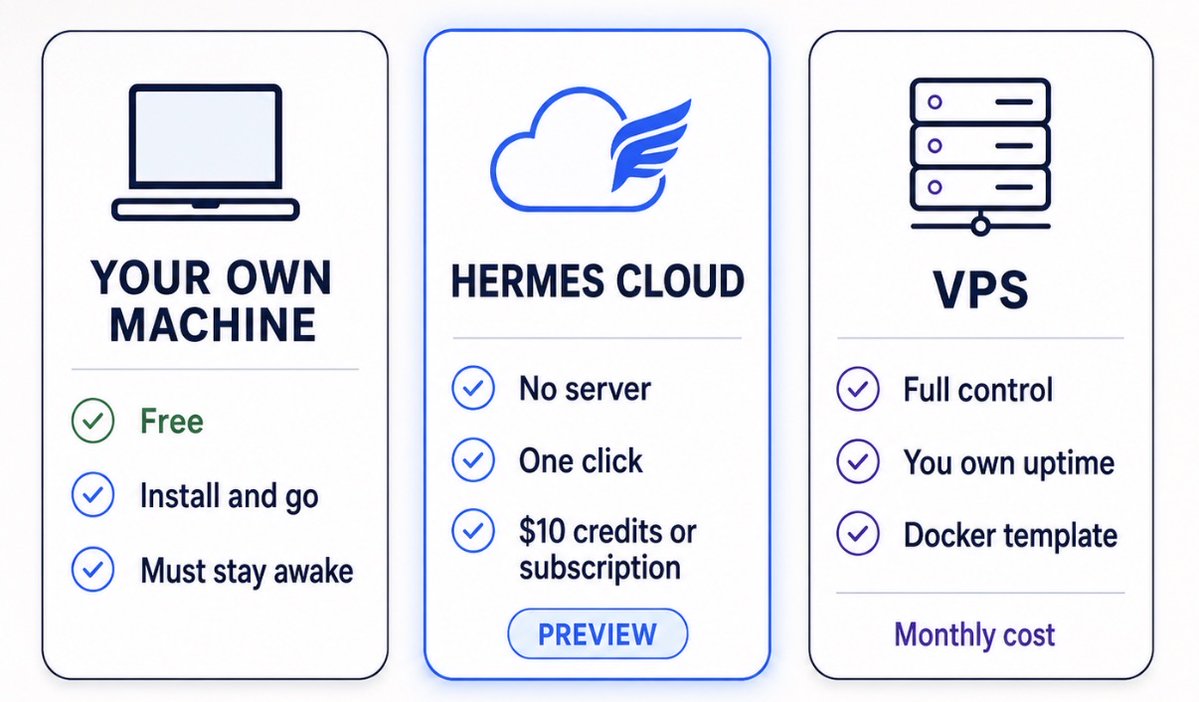 3. Give Hermes a brain Start with your favourite model. Then experiment adding other models in the future for different tasks. Just keep sh*t simple stupid. Hermes is the agent. It still needs a model to think with. The simplest route is Nous Portal. On a fresh installation, run: ``` hermes setup --portal ``` One OAuth flow signs you into Nous Portal, connects a model, and switches on the hosted Tool Gateway, which covers web search, browser, image generation and text to speech in one go. To configure your own provider instead, run: ``` hermes model ``` Hermes walks you through the available providers and models. Do not spend an hour choosing the perfect model. You can change it in one command later. Right now you need one that works. 4. Test Hermes before doing anything else This matters more than it sounds. Do not start creating Bots and automations. Make sure the basic agent works first. Send: ``` hello. tell me which model you're currently using. ``` Then: ``` explain which tools you currently have access to. ``` Then something that forces a tool call: ``` search the web for the biggest ai news story today and summarise it. ``` OKAY SICK! You are getting it to see if it's up and running, so once that is sorted let's move on to installing... 5. Install Hermes Desktop Download the Hermes Desktop installer from the Hermes site and run it. It installs both the desktop app and the command-line tools. errrrm I should probably give you a link right here: [https://hermes-agent.nousresearch.com](https://hermes-agent.nousresearch.com) there we gooooo Desktop gives you a proper interface for conversations, bots, profiles, skills, memory, scheduled jobs, messaging, tools and multi-agent workflows. Bot Mode ships built into Desktop and is on by default. You will see a Bots tab next to Sessions in the left sidebar. If you are running a cloud or VPS instance, connect Desktop to that remote Hermes rather than spinning up an unrelated local agent. Otherwise you end up with two agents that know nothing about each other. 6. Connect Desktop to your instance Okay so this goes back to where you decided to set Hermes up, so if it is running on the machine you are sitting at, Desktop already found it. Nothing to do here, move to the next bit ok. If it is running in the cloud or on a VPS, open Desktop, go to Settings > Connections, and add your Hermes URL. Save. That agent now appears in your roster alongside any local ones, and Desktop holds the line open. Cron is run by the gateway daemon, which ticks every 60 seconds so please install it: ``` hermes gateway install ``` That creates a launchd agent on macOS and a user service on Linux. On Linux, also run: [sudo loginctl enable-linger [$USER](https://x.com/search?q=%24USER&src=cashtag_click)] so it survives logout. For a headless server that should come back at boot, use [sudo hermes gateway install --system] instead. On your own machine, stop it sleeping too if you want it to keep running. And finally, I think I've been really smart here with GPT to create a little summary of where you should be before you move on to part 2: Part 1 summary before part 2: 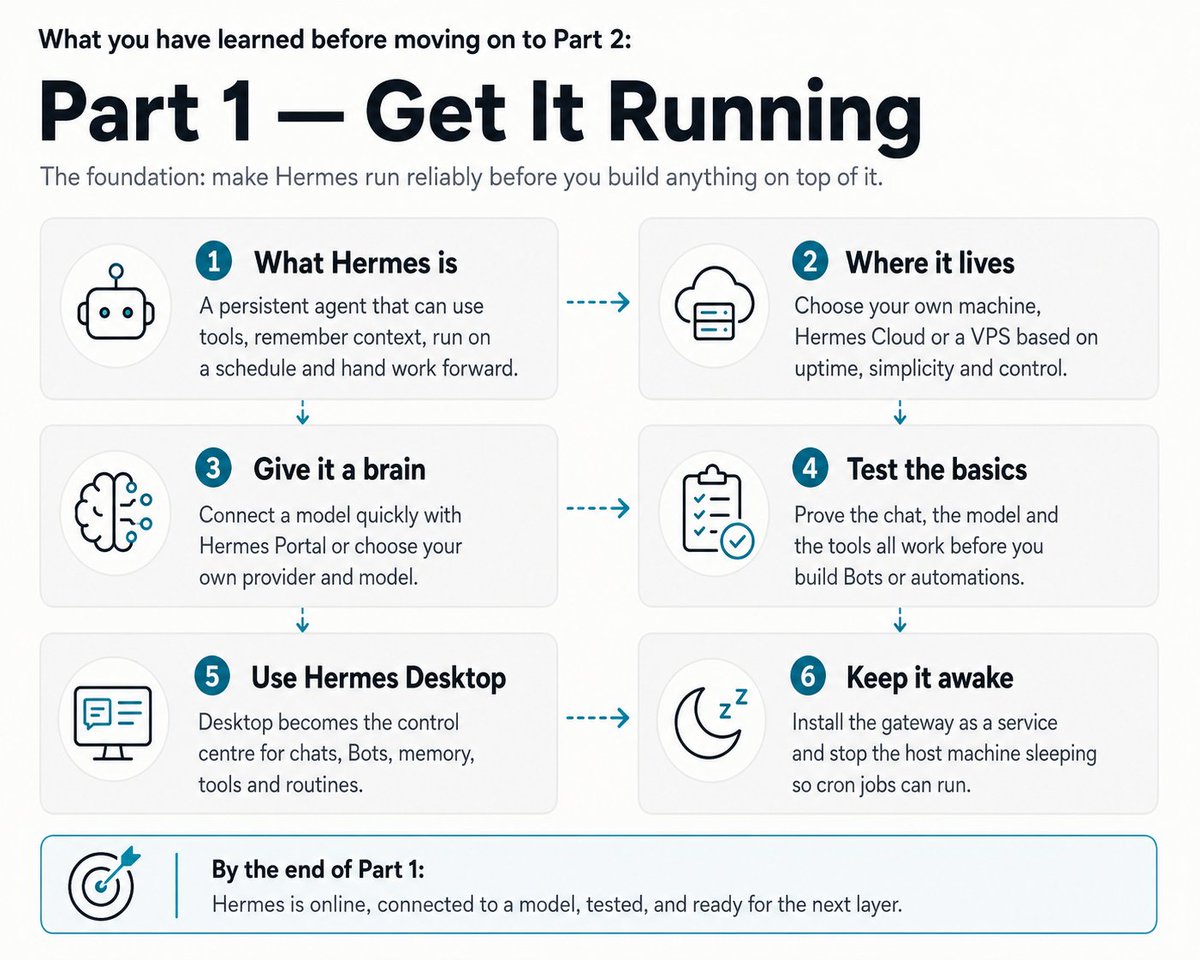 # PART 2: REACH, TOOLS AND MEMORY 7. Connect Hermes to Telegram Now give your agent somewhere to reach you. Telegram is the obvious first choice because Hermes can push results from scheduled jobs to your phone whether or not the Desktop app is open. And let's be honest, tg is a fkn goated messenger app. I love it, you love it, why not use it? Create a Telegram bot Open Telegram and find: [@TelegramBot](https://x.com/@TelegramBot) Send: /newbot Follow the prompts. Keep your info to yourself, don't go sharing the token that you get with anyone lol. 8. Connect Telegram to Hermes Run: ``` hermes gateway setup ``` Select Telegram and follow the configuration flow. The same wizard covers Discord, Slack, WhatsApp, Signal, Email and a long list of others. By default the gateway denies every user who is not on an allowlist or paired by DM. Don't change this lmfao. Two ways to grant access. Allowlist by user ID in your .env: ``` TELEGRAM_ALLOWED_USERS=123456789,987654321 ``` Or use DM pairing. An unknown user who messages the bot gets a one-time code, and you approve it: ``` hermes pairing approve telegram XKGH5N7P hermes pairing list hermes pairing revoke telegram 123456789 ``` Pairing codes expire after an hour and are rate-limited. By the way, here is a setting called GATEWAY_ALLOW_ALL_USERS. Leave it the f*ck alone. 9. Test Telegram Message your Hermes bot: HELLO MOTHERFUCK*R! And it should then reply, voila! you done it, if this fails please check the bot token, check the gateway ia running, check your user is allowlisted and paired or restart the gateway. DONE. 10. Give Hermes the tools it needs Run: ``` hermes tools ``` Or manage tools through Desktop. Tools decide what Hermes can actually do rather than just describe. Depending on the workflow you might enable: > Web search Web extraction Browser Files Terminal Code execution Delegation MCP integrations Note that toolsets are configured per platform. The CLI, Telegram, Discord and cron each get their own. That is deliberate and it matters later for cost. Do not hand every agent every tool. Just give an agent the tools its job requires. 11. Teach Hermes about you Hermes has persistent memory, built on two files: USER.md holds information about you: preferences, communication style, expectations. MEMORY.md holds what the agent has learned about its environment, conventions and previous work. Both live in ~/.hermes/memories/ and load into the system prompt at session start. Tell it things like: i prefer short, direct writing. avoid unnecessary corporate language. use bullet points when they make something easier to understand. remember these preferences. Then start a new session, ask it something unrelated, and see whether the preference survived. That is your first real test of persistent memory. The constraint nobody mentions. These files are small on purpose. MEMORY.md caps at 2,200 characters and USER.md at 1,375. That is roughly 8 to 15 entries and 5 to 10 entries respectively. Memory does not auto-compact. When a write would blow the limit, the tool errors and the agent has to consolidate before it can save anything new. So memory is for facts that must always be in context. It is not a filing cabinet. For "did we discuss X three weeks ago", Hermes searches its own past sessions instead, which costs nothing until you use it. If you want to approve what gets saved rather than letting the agent write freely, set memory.write_approval: true in config.yamland review with /memory pending. 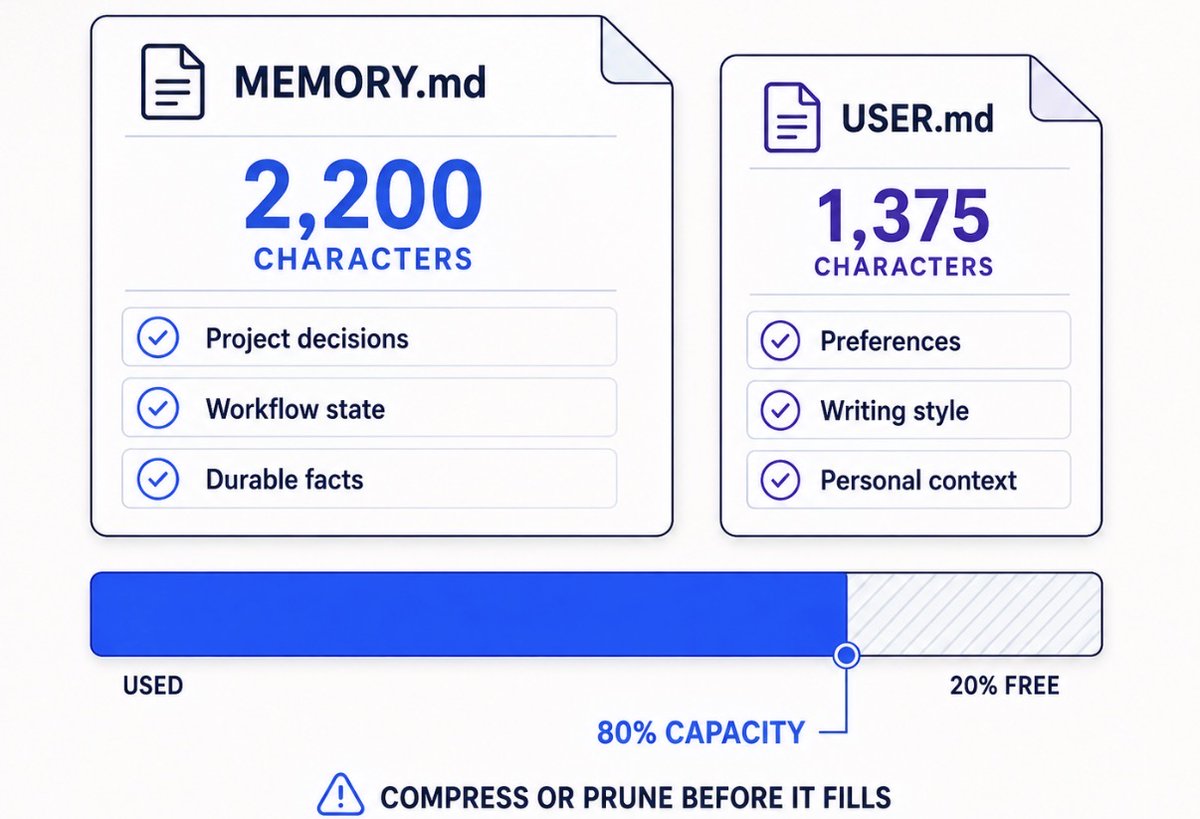 (once you get this all setup you can tinker your memory with this article here): > **hoeem@hooeem**: [原文链接](https://x.com/hooeem/status/2092643598785265897) > 12. Understand the main Hermes files You do not need to get technical. You just need to know what each thing is for. SOUL.md is who the agent is. Use it for personality, behaviour, communication style, defaults. USER.md is who you are. Preferences, expectations, working style. MEMORY.md is what Hermes has learned. Useful facts, conventions, discoveries, recurring lessons. AGENTS.md or project context is how a particular project works. Project instructions, file structure, commands, conventions, workflow rules. Hermes keeps project context separate from global memory and identity, and that separation is the point. Project rules should not leak into who the agent is. 13. Give your agent a simple identity You do not need a giant system prompt yet. Start basic. ``` # Identity You are my AI operator. Your job is to help me complete work, automate repeated work and improve inefficient workflows. # Communication Be concise. Use plain English. Prioritise action over unnecessary explanation. Do not invent information. # Behaviour When you can safely complete something yourself, complete it instead of only explaining how I could do it. When you notice repeated work, consider whether it should become a Skill or automation. ``` Improve it gradually. Do not try to design the perfect Hermes personality before you have used it for a week. You will be wrong about what annoys you. 14. Understand Skills Skills are reusable procedures. Memory is what Hermes knows. Skills are how Hermes knows to do something. A Skill might contain: > The steps for completing a task Which tools to use Which sources to check What to ignore How to format the result What counts as success Skills load on demand rather than sitting in every prompt, so a big library costs you nothing until it is needed. Every installed Skill also becomes a slash command. Browse what exists: ``` hermes skills browse hermes skills search kubernetes hermes skills install openai/skills/k8s ``` It turns what you just did into a reusable Skill. You can also point it at a directory, a docs URL, or a pile of notes. That is the whole reason Skills exist. You should not be explaining the same workflow every day. Part 2 before you go to part 3: 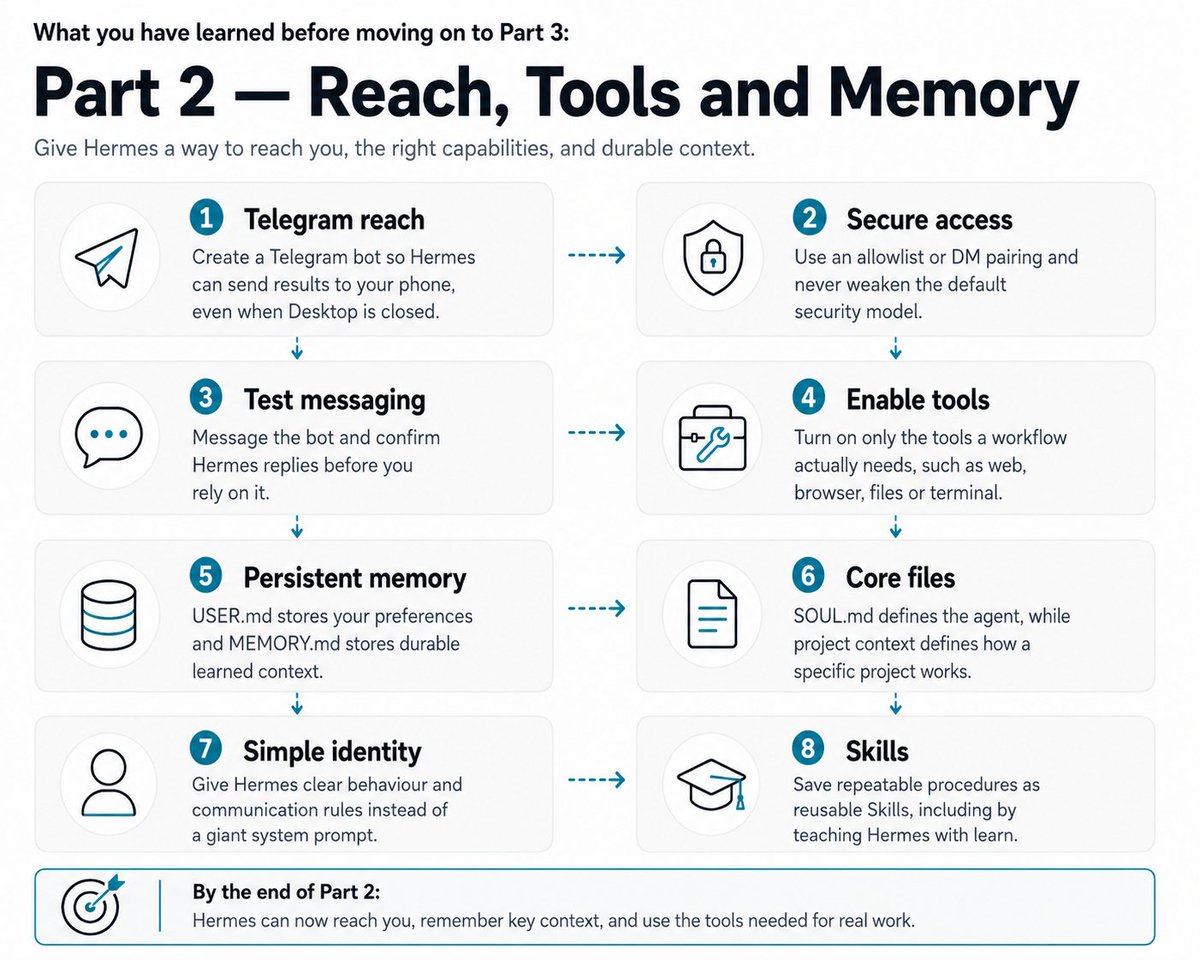 # PART 3: YOUR FIRST AUTOMATION oooo lala, let's automate baby. 15. Build your first scheduled job Now make Hermes work without you starting every task by hand and you do this by starting with something small. Tell Hermes: ``` every morning at 8am, complete [TASK] and send me the result. ``` Hermes has built-in cron and creates recurring jobs from plain language. It understands in 30m, every 2h, every monday 9am, weekdays at 9am, standard cron expressions like 0 9 * * 1-5, and one-off ISO timestamps. 16. Test the automation Please then run it manually once and check: > Did it start? Did it have the right tools? Did it understand the task? Did it produce the right output? Did it deliver the result to the right place? 17. Make scheduled prompts self-contained Scheduled jobs run in a completely fresh agent session. The job does not remember the conversation where you created it. Bad: "check those sites again." Better: "check [LIST OF SITES] for [THING YOU CARE ABOUT]. compare the results against [CRITERIA]. save anything useful to [LOCATION]. only report [CONDITION]." 18. Give recurring jobs continuity A job that checks something every six hours will find the same things every six hours, and tell you about them every time. Continuity fixes that. Switch it on and each run starts by seeing what the last run found, so it reports what is new instead of repeating itself. Add --continuity when you create the job: ``` hermes cron create "every 6h" "Scan for new agent-tooling papers. Report only what wasn't in your previous run." --continuity ``` Already have a job running? Turn it on with hermes cron edit <job_id> --continuity. There is a tickbox for it in the dashboard and in the Bot Mode routine dialog too. 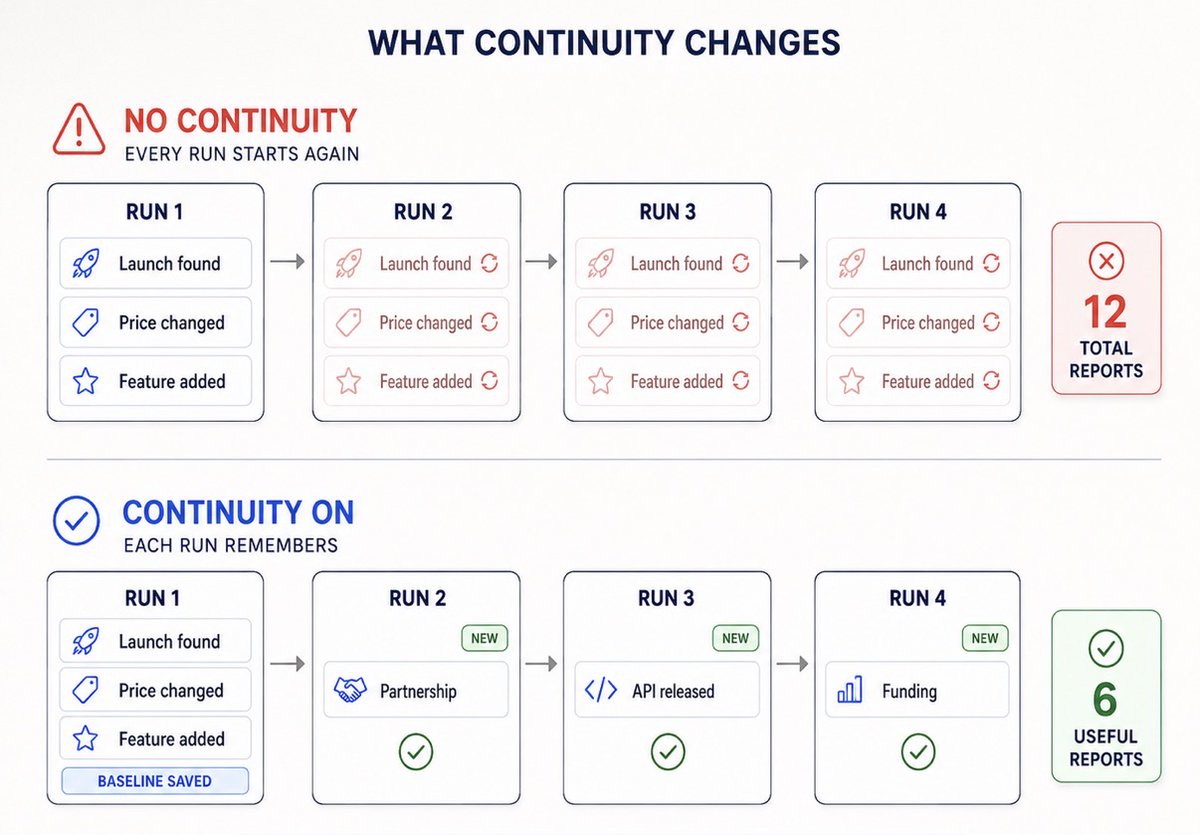 19. Make quiet automations Not every run needs to message you. If an agent checks something hourly and nothing changed, you do not want "nothing changed" twenty-four times a day. You will mute the bot inside a week and then miss the one message that mattered. Hermes supports a silence token. If the final response is exactly [SILENT], delivery is suppressed. The output still saves locally for audit. Tell the job: ``` if nothing meaningful has changed, respond only with [SILENT]. ``` Failed jobs always deliver regardless. Only successful runs can be silenced, which is the behaviour you want. 20. Give bigger workflows persistent state Continuity remembers the last output. Larger workflows need something more durable than that. Create a folder for the workflow: ``` my-workflow/ processed-items.json completed-items.json rejected-items.json workflow-notes.md ``` The exact files do not matter. The idea does. Your workflow needs somewhere to record what it already found, what it processed, what it rejected, what it completed, and what happened before. Then tell Hermes: ``` before processing anything, check the workflow state. do not repeat completed work unless something materially changed. after completing a stage, update the workflow state. ``` This is the difference between a recurring automation and a recurring automation with amnesia. Part 3 before part 4 - here's what you need to know cousin: 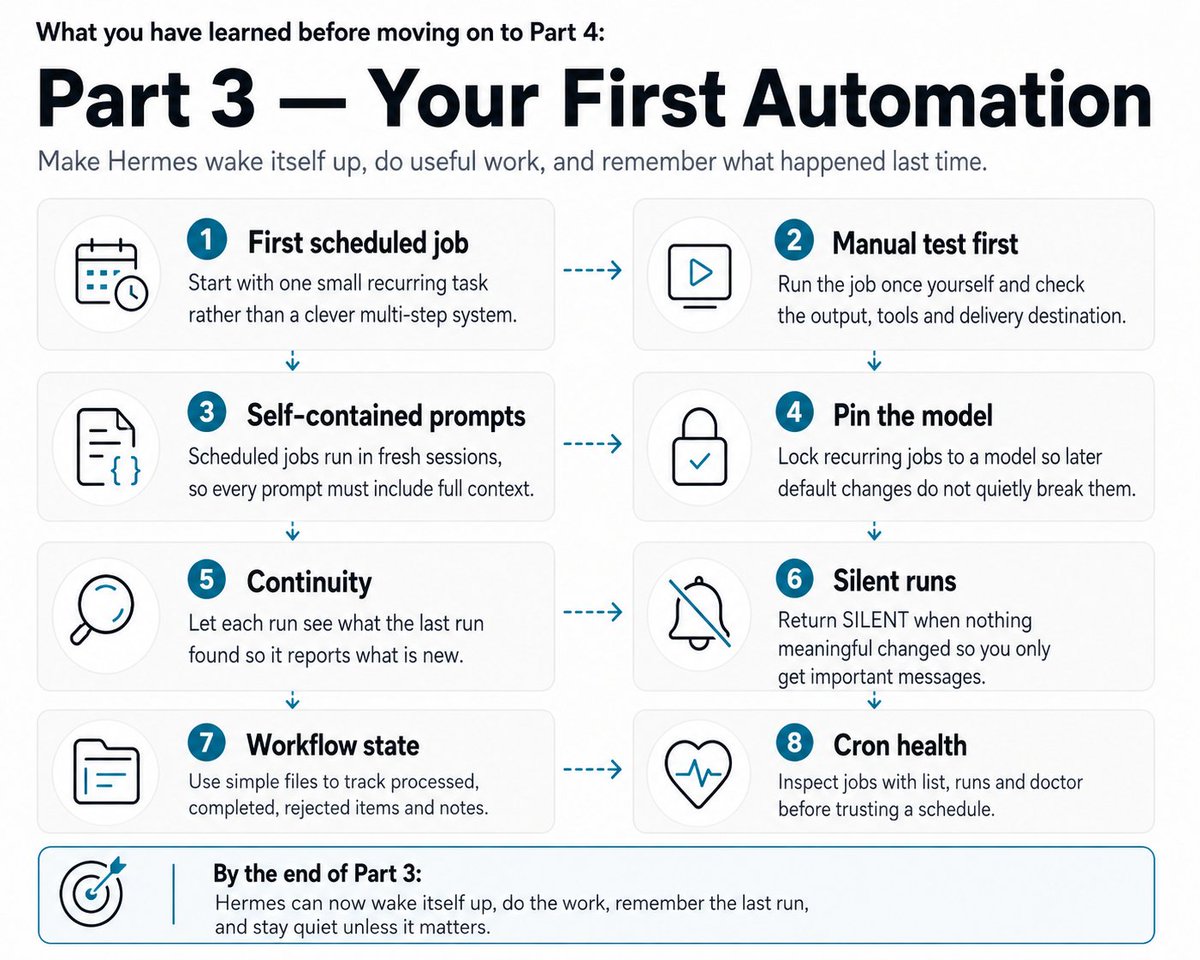 # PART 4: DESIGN THE WORKFLOW BEFORE YOU BUILD IT 21. Pick a workflow to automate Choose something you already repeat. The best first workflow has a clear trigger, a clear sequence of steps, and a clear result. Write it down: trigger ↓ step 1 ↓ step 2 ↓ step 3 ↓ result Do not think about Bots yet. Understand the process first. 22. Define the trigger Ask: what causes this workflow to start? > A schedule A new piece of information A message A file A new lead A new ticket A changed webpage A new email Something you request manually That is your starting point. 23. Define the result Then ask: what should exist when this is finished? > A report A researched record A decision A draft An updated database A message An alert A completed task If you cannot describe the final output in one sentence, the workflow is not defined well enough to automate. Fix that before you write a prompt. 24. Break the workflow into stages Write the stages that matter: find ↓ research ↓ evaluate ↓ prepare ↓ record Yours might have three. Or five. Or ten. Do not create agents because you can. Stages should correspond to real differences in responsibility, not to your enthusiasm. 25. Build it with one Hermes agent first This is the step people skip, and skipping it is why their multi-agent system does not work. Before you turn any stage into a Bot, ask one Hermes agent to complete the entire workflow manually. Give it the objective, the stages, the tools, the rules, the final output and the state location. Run it once. Look for: > Missing steps Bad assumptions Unnecessary work Incorrect outputs Duplicated work Fix the process first. Multi-agent architecture will not rescue a badly designed workflow. It will distribute the badness across four agents and make it harder to find. What you need to know from Part 4 before you go to part 5 okay!! 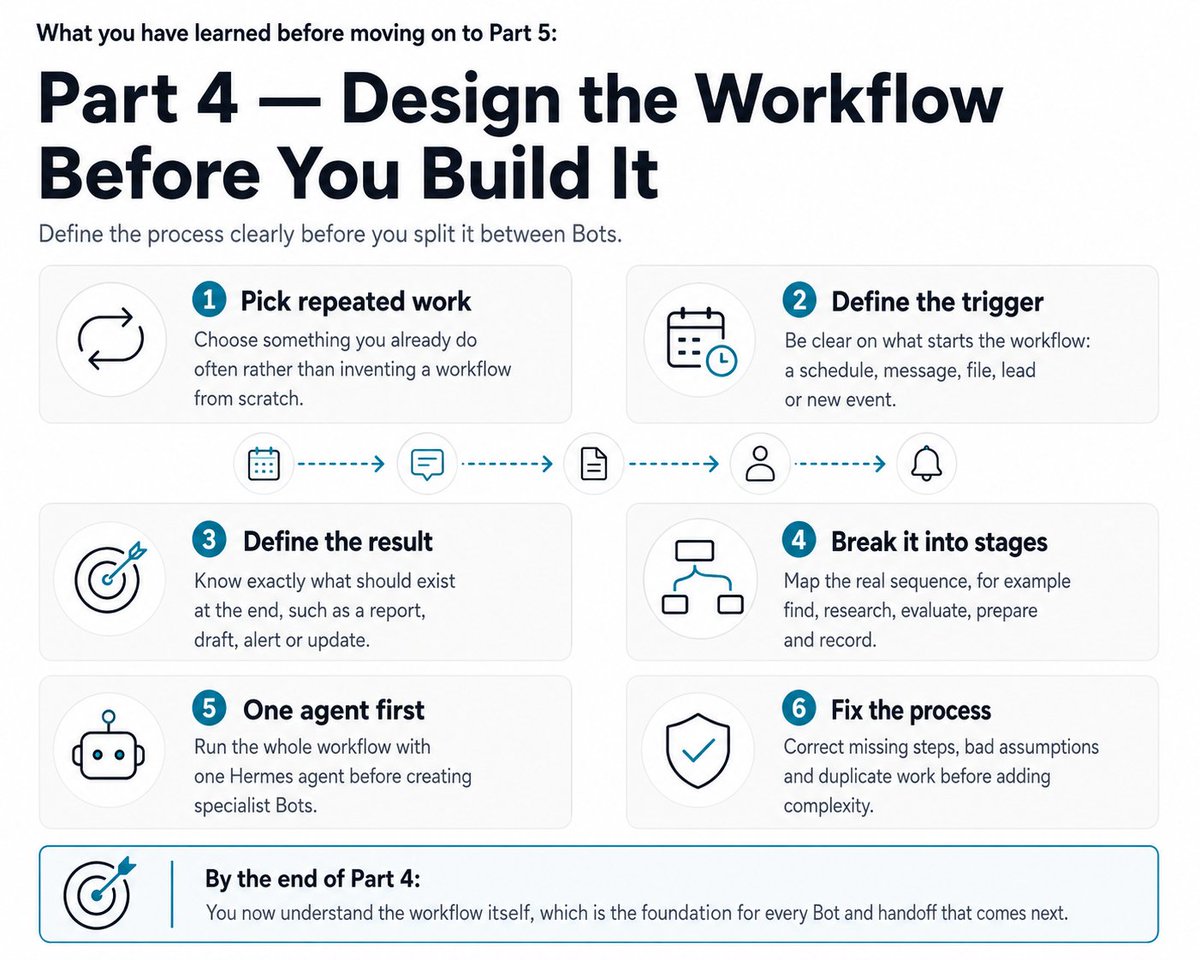 # PART 5: BUILD THE BOT TEAM 26. Turn repeated roles into Bots Once the workflow works, open Hermes Desktop and select Bots. Bot Mode turns Hermes profiles into a roster of persistent named Bots. Each Bot gets its own role, model, memory, Skills, credentials, chat history and routines. There is no new concept to learn here. A Bot is a profile, stored at ~/.hermes/profiles/<name>/. Bot Mode is a UI over that. Everything is visible from the terminal too: hermes -p <bot> chat opens the same agent, and Bot routines show up in hermes cron list. Bot Mode is bundled with Desktop and on by default. You can switch it off under Settings → Plugins → Bots without touching any of your data. Now look at your workflow stages and ask: which of these deserves a permanent specialist? 27. Create your first specialist Bot Hit New Agent in the roster. Three fields and the Bot exists: Name, Title, Description. The Advanced panel is where the real configuration lives: > Model pin so this Bot runs on its own model, independent of everything else Custom SOUL.md for its persona and standing instructions Per-skill, per-toolset and per-MCP enablement so you tick exactly the capabilities the role needs Clone from an existing profile, or start clean The CLI equivalent: ``` hermes profile create hermes profile list ``` Give each Bot instructions that state exactly what it should and should not do, and tools limited to what the role requires. 28. Give every Bot one job This is the most important rule in the guide. Do not create a General Business Bot with twenty responsibilities. You will not be able to improve it, because you will never know which instruction caused which failure. Create specialists. Your instructions should look more like: ``` You are [ROLE]. Your only responsibility is [RESPONSIBILITY]. You receive: [INPUT] You must: [STEPS] Return: [OUTPUT] Do not: [BOUNDARIES] When finished: [NEXT ACTION] ``` he narrower the role, the easier it is to debug and the easier it is to improve. 29. Repeat this for the important stages Turn the repeated specialist stages into Bots. Your architecture might end up as: BOT 1 ↓ BOT 2 ↓ BOT 3 ↓ BOT 4 But do not force it. Sometimes two Bots are enough. Sometimes six make sense. The goal is not to create as many agents as possible. The goal is to give clear responsibilities to persistent specialists. 30. Let Bots message each other This is what takes you out of the middle of your own workflow. Every canonical Bot Chat carries a message_agent tool. A Bot messages a teammate by calling it directly. The tool validates the target against the live roster, prefixes the sender's attribution automatically, and delivers into the teammate's Bot Chat. Bots also pull each other in with [@name](https://x.com/@name). Each Bot Chat's system prompt includes the teammate roster with names and roles pulled from each profile, so Bots know who does what before choosing a recipient. So instead of: Bot 1 finishes ↓ you copy the result ↓ you paste it into Bot 2 You get: Bot 1 finishes ↓ messages Bot 2 ↓ Bot 2 works ↓ messages Bot 3 ↓ Bot 3 works Two constraints that change how you design this. Delivery is fire-and-forget. The sender gets an acknowledgement, finishes its turn, and the reply arrives later as a background notification. The receiving Bot picks the message up when it next runs. This is not a synchronous function call and you should not design it as one. message_agent only exists in canonical Bot Chat sessions on Bot Mode installs. Regular chats, group-room member sessions and CLI sessions never see it. Your job becomes supervising the system instead of ferrying information between agents. 31. Put the handoff into the instructions Do not rely on a Bot to guess what happens next. Tell it. ``` When your work is complete: send the result to @[NEXT-BOT]. Do not wait for me to manually copy the information. ``` Then tell the receiving Bot: ``` When you receive work from @[PREVIOUS-BOT]: perform your assigned stage. when finished: send the result to @[NEXT-BOT]. ``` Now the workflow knows how to move itself forward. 32. Standardise the handoffs You do not want one Bot returning "looks good" and another returning three pages. Define a structure: ``` { "id": "", "status": "", "summary": "", "evidence": [], "confidence": 0, "recommended_next_action": "" } ``` You do not have to design this yourself Ask Hermes. It writes better schemas than most people do, but only if you show it the two real ends of the handoff instead of describing them: ``` Bot A is my [ROLE]. Bot B is my [ROLE]. Here is what Bot A actually produced on its last run: [PASTE A REAL OUTPUT] Here is what Bot B is supposed to do with it: [PASTE BOT B'S INSTRUCTIONS] Design the smallest JSON structure that carries everything Bot B needs and nothing it does not. Return three things: the schema, one filled-in example, and the exact wording to paste into each Bot's instructions. ``` Paste a real output, not a summary of one. Describe the handoff in the abstract and you get a generic schema with nine fields you will never populate. Then cut any field neither Bot actually reads. Models add fields because they look thorough. One caveat. Nothing validates this shape at runtime, so Bot B still needs a rule for what to do when a message arrives malformed. Section 42 will cover that. Here's what you need to know from part 5 before you go to part 6: 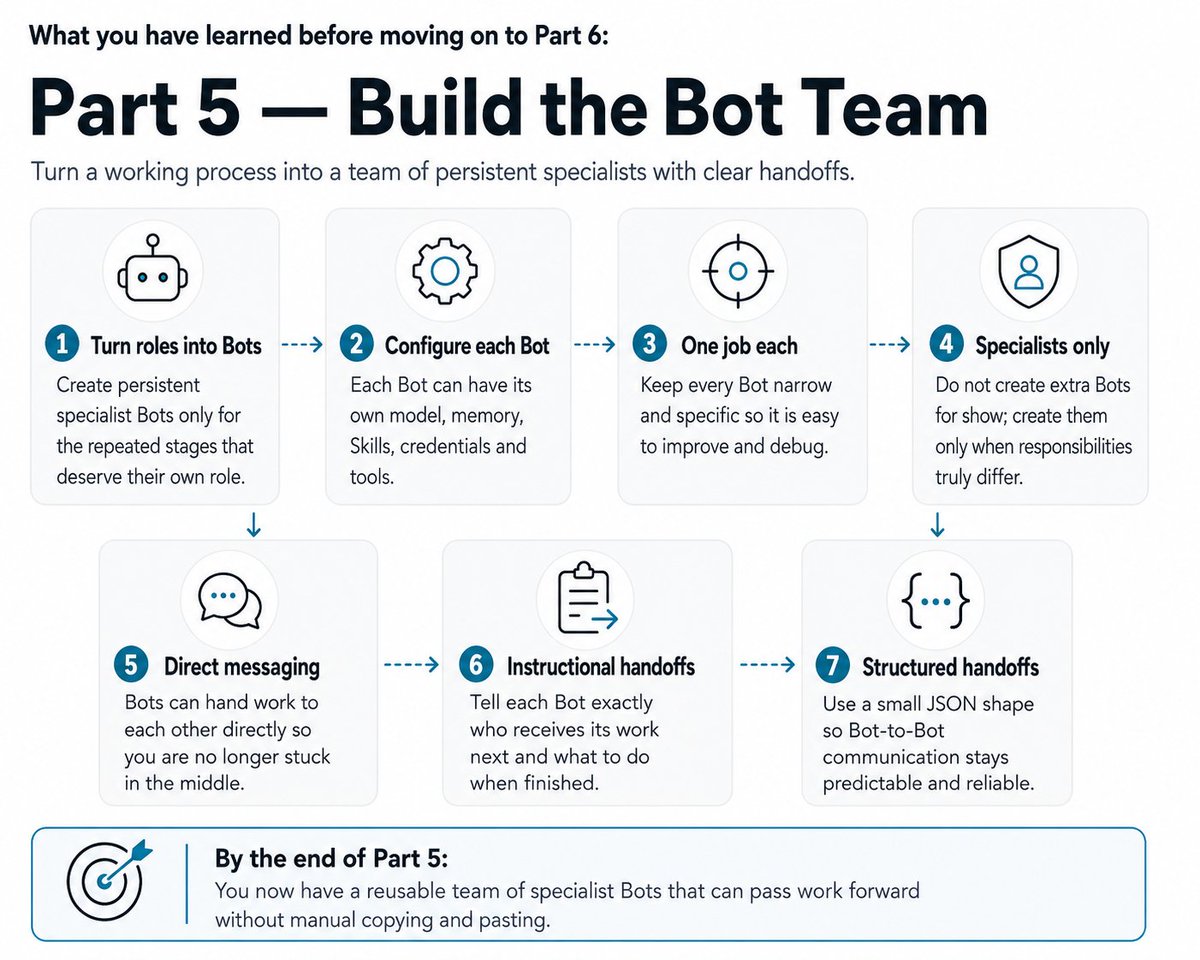 # PART 6: SUBAGENTS, ROOMS AND ROUTINES 33. Understand Bots versus subagents These are different things and confusing them will cost you money. Bots are permanent employees. They have a persistent role, their own memory, their own Skills, their own routines. They exist tomorrow. Subagents are temporary workers. Created for a specific job, work independently, return a result, disappear. Hermes delegation spawns child agents with isolated, completely fresh context and their own terminal sessions. Only the child's final summary enters the parent's context, which is the whole point: a big messy task does not flood the parent conversation. That gives you permanent specialists plus temporary parallel workers. 34. Use subagents for parallel work When one Bot has a large task made of several independent pieces, it can delegate them at once. Hermes runs up to three concurrent subagents by default. That limit is configurable via delegation.max_concurrent_children, with a floor of 1 and no hard ceiling. A batch larger than the limit returns an error rather than being silently truncated. Delegation is flat by default. A parent spawns children, and those children cannot delegate further. You can raise max_spawn_depth to allow nested orchestration, but read the cost warning first: depth 3 with concurrency 3 is 27 concurrent leaf agents.  35. Give subagents full context Subagents know nothing. They start with a completely fresh conversation and zero knowledge of the parent's history, prior tool calls, or anything discussed before delegation. Their only context is what the parent puts in the goal and contextfields. Bad: "research this." Better: ``` Goal: [EXACT TASK] Context: [EVERYTHING REQUIRED TO UNDERSTAND THE TASK] Focus on: [IMPORTANT AREAS] Return: [EXPECTED OUTPUT] ``` A subagent should be able to do its job without ever seeing the parent's conversation. If it cannot, the brief is incomplete. One exception worth knowing: when the parent has a resolved workspace directory, the workspace's project context files are embedded in every subagent's system prompt. Subagents working in a repo inherit that repo's conventions automatically. 36. Ask for structured subagent outputs When the next stage depends heavily on a result, make that result predictable. Instead of: "investigate this and tell me what you think." Specify with: ``` Return your findings as JSON matching exactly this structure: { "findings": [], "risks": [], "unknowns": [], "confidence": 0 } ``` 37. Create a shared Bot room Bot Mode supports group rooms. Right-click a Bot and select Manage groups to add it to one. Rooms hold 2 to 6 Bots with persistent room context and [@mentions](https://x.com/@mentions). Each member keeps its own Group: <name> session, so room context survives like any other conversation. Rooms are mirrored across every gateway your Desktop connects to, so they show up with their history on another machine. Use a room to supervise the team, ask several specialists for input at once, coordinate complex work, or handle unusual cases that need more than one role. How a round works: your message triggers up to three serial rounds of member turns. Mentioned Bots respond, and everyone responds when nobody is mentioned. Each Bot replies briefly or passes, and the room settles when a full round stays quiet. Hard caps of 10 messages per send and 3 rounds stop rooms spinning. Bots escalate real judgment calls to you with [@user](https://x.com/@user), which flags the room as needing you. Not every Bot replies to every message. Speaking is each member's own choice. Rooms are for collaboration and decisions. For linear automated workflows, direct Bot-to-Bot handoffs are easier to reason about and easier to debug. 38. Add a Routine to the Bot that starts the workflow Once the manual Bot workflow runs cleanly, automate its starting point. Bots have Routines. A Routine is a plain Hermes cron job attached to the Bot responsible for it, namespaced [bot:<name>], and it shows up in hermes cron list like any other job. Runs land in that Bot's own chat history, which is exactly where you would look for them. Open the Bot that should start the workflow, create a Routine, and define: Name what the workflow is Schedule when it should run Task what the Bot should do For example: ``` Run [WORKFLOW]. Check the workflow state first. Only process genuinely new work. Send qualifying work to @[NEXT-BOT]. Update the workflow state afterwards. If nothing requires action, return [SILENT]. ``` Okay, now we've gone through part 6, here's what you need to know before moving to part 7:  # PART 7: MAKE IT RELIABLE AND CHEAP 39. Test the whole workflow before scheduling it Run one complete workflow manually and watch every stage. TRIGGER ↓ BOT 1 ↓ BOT 2 ↓ BOT 3 ↓ FINAL RESULT Bot 1: correct input? correct output? correct handoff? Bot 2: received everything it needed? completed only its own job? correct handoff? Bot 3: understood the previous result? produced the expected final output? Workflow state: correctly updated? duplicates avoided? status accurate? Fix anything that fails, then run another full test. Only schedule it once the whole chain works twice. 40. Add workflow statuses Larger systems get much easier to understand when every item carries a status. ``` NEW PROCESSING RESEARCHED APPROVED REJECTED DRAFTED COMPLETED NEEDS_REVIEW ``` Your stages will differ. What matters is that Hermes can answer "where is this item in the workflow?" by looking at a field, rather than reconstructing history from old messages. 41. Add confidence and verification For workflows where being wrong is expensive, include: ``` { "confidence": 0.82, "verification_status": "verified" } ``` Then write rules against it: ``` If confidence is below 0.75: send for human review. If important information cannot be verified: do not invent it. return NEEDS_REVIEW instead. ``` 42. Design failure states Tell every Bot what happens when something goes wrong. ``` If required information cannot be found: do not guess. set status to NEEDS_REVIEW. explain what is missing. ``` Or: ``` If the input does not meet the minimum criteria: set status to REJECTED. record the reason. do not pass it to the next Bot. ``` Good workflows do not assume everything succeeds. 43. Prevent duplicate actions Automated workflows restart. Scheduled jobs rerun. Tools fail halfway through. Build rules like: ``` Before creating a new record: check whether it already exists. Before performing an external action: check whether that action has already been completed. Never repeat an irreversible action solely because the workflow restarted. ``` This matters enormously once Hermes starts doing things outside its own workspace. A duplicated research pass is annoying. A duplicated payment is not. 44. Start with human approval Do not let your first workflow act on the world by itself. Let Hermes handle the safe half: > Research Analysis Sorting Qualification Monitoring Drafting Saving information Preparing actions Make it ask you before anything it cannot take back: > Sending messages Posting publicly Spending money Making purchases Deleting important information Changing production systems Any other irreversible action Once a workflow has proven itself, drop the approval on the boring repetitive steps and keep it on the rest. 45. Connect external software with MCP Sooner or later you will want Hermes working in tools that are not Hermes. Your CRM, your notes app, your issue tracker. MCP is the standard that connects them. Hermes supports it, and you choose which of a server's tools it is allowed to touch. That is the jump from "find something and tell me" to "find something and update the system". Connect only what a workflow needs. Every server you add gets described to the model on every single call, so an unused connection costs you on every run. 46. Use browser automation when necessary Some services have no API and no MCP integration. That is when browser automation earns its place. Hermes can drive a real browser rather than only reading search results, and it comes with the Tool Gateway alongside web search, extraction, vision, image generation and speech. Treat it as the last resort. A website gets redesigned overnight and your automation quietly breaks. An API usually does not. 47. Choose different models for different jobs Not every job needs the expensive model. simple monitoring → cheap fast model deep research → stronger model complex reasoning → stronger reasoning model important writing → strong writing model You can set this in three places. Per job. Pin a model on a cron job, or set cron.model so scheduled jobs use one by default instead of following whatever you last picked in chat. Jobs can pin their reasoning effort too: high for analysis, minimal for monitoring. Per Bot. Each Bot runs on its own model. A cheap Bot and an expensive one can sit side by side. For subagents. Set delegation.model to something cheap while your main session stays on a strong model. This is the biggest saving available to you. Working out how to split a job is hard. Doing one of the pieces, when it arrives with a clear goal and full context, usually is not. And the pieces are where most of your usage goes. 48. Control your costs A workflow runs whether or not you are thinking about it, which is exactly why it costs more than a chatbot. one Routine ↓ runs 12 times per day ↓ each run uses three Bots ↓ one Bot spawns three subagents That is a lot of model calls before you have typed anything. Cheaper by design: > Filter early and reject bad inputs before any deep work Check for duplicates before researching Use cheap models for simple jobs, especially subagents Only spawn subagents when the work is genuinely parallel Use [SILENT] so quiet runs cost nothing to read Run jobs less often than feels satisfying Trim each job's tools with enabled_toolsets, because a tiny "fetch news" job carrying browser and delegation pays for them on every call Two of those have proper switches behind them. If a job needs no thinking at all, no_agent mode runs a plain script on your schedule and sends you the output, with no model involved. Nothing to report means nothing sent, and it costs nothing. If a job only sometimes needs thinking, give it a pre-check script that returns {"wakeAgent": false} when nothing has changed. Hermes skips the run entirely. A five-minute check that wakes the model only when something actually moved is a very different bill from one that wakes it 288 times a day to say nothing.  Good workflow design is a cost control. Part 7 roundup before part 8:  ## PART 8: DEBUG AND SCALE 49. How to debug Hermes When something breaks, do not rebuild it. Work through the system in order. 1. Test normal Hermes. Send hello. If that fails, the problem is the provider or model. 2. Test the required tool. Ask Hermes to use the specific tool manually. If that fails, fix the tool. 3. Test the gateway. Check whether it is actually running. hermes gateway status. 4. Test Telegram. Message the bot. 5. Check the cron job. ``` hermes cron list hermes cron runs <job-id> hermes cron doctor hermes cron incidents ``` runs gives you the attempt ledger. doctor catches jobs that are silently not firing. incidents shows durable failure records, and incidents ack <id> stops a known failure pinging you on every run without hiding it from the history. 6. Test the first Bot. Run only the first stage. 7. Test the handoff. Confirm Bot 1 can message Bot 2. Remember delivery is fire-and-forget and the target picks it up on its next run, so give it a moment before declaring it broken. 8. Test Bot 2 with known good input. Continue through the workflow one stage at a time. 9. Inspect workflow state. Look for duplicate records, incorrect status, missing data, malformed structured output. 10. Inspect subagent instructions. Delegated subagents start with fresh context. When one does the wrong thing, the usual cause is an incomplete brief, not a stupid model. Every delegation writes a live append-only transcript per task under cache/delegation/live/, so you can read exactly what the child did and when. Debug the workflow like a pipeline. Find the broken stage. Fix that stage. 50. The formula for building any Hermes workflow Once you have all of the above, building workflows becomes mechanical. Step 1 Choose something you repeatedly do Step 2 Define the trigger Step 3 Define the finished result Step 4 Break the process into stages Step 5 Build the whole thing with one Hermes agent first Step 6 Create permanent Bots for repeated specialist roles Step 7 Give every Bot one clear responsibility Step 8 Define the information passed between Bots Step 9Connect them with direct handoffs Step 10 Use temporary subagents for parallel work Step 11 Store what has already happened Step 12 Add statuses, confidence and failure states Step 13 Test one complete manual run Step 14 Create the Routine Step 15 Enable continuity where useful Step 16 Connect external tools when necessary Step 17 Gradually automate safe actions That is the process. It does not change with the complexity of the workflow. 51. The best way to learn Hermes Do not try to build a ten-agent company on your first day. Build it in layers, and do not move up until the layer below works: Layer 1: it responds. Hermes running, model connected, tools working. Layer 2: it reaches you. Telegram connected and locked down. Layer 3: it knows you. Preferences saved, first Skill installed or learned. Layer 4: it wakes itself up. One scheduled job, tested manually, with continuity. Layer 5: it has a memory of its own work. One manual workflow with persistent state. Layer 6: it has staff. Two specialist Bots, connected by a handoff, then a Routine on the first one. The reason to work in this order is not discipline. It is diagnosis. When something breaks at layer 6, you already know layers 1 to 5 work, so there are only two places to look. 52. What your final system looks like 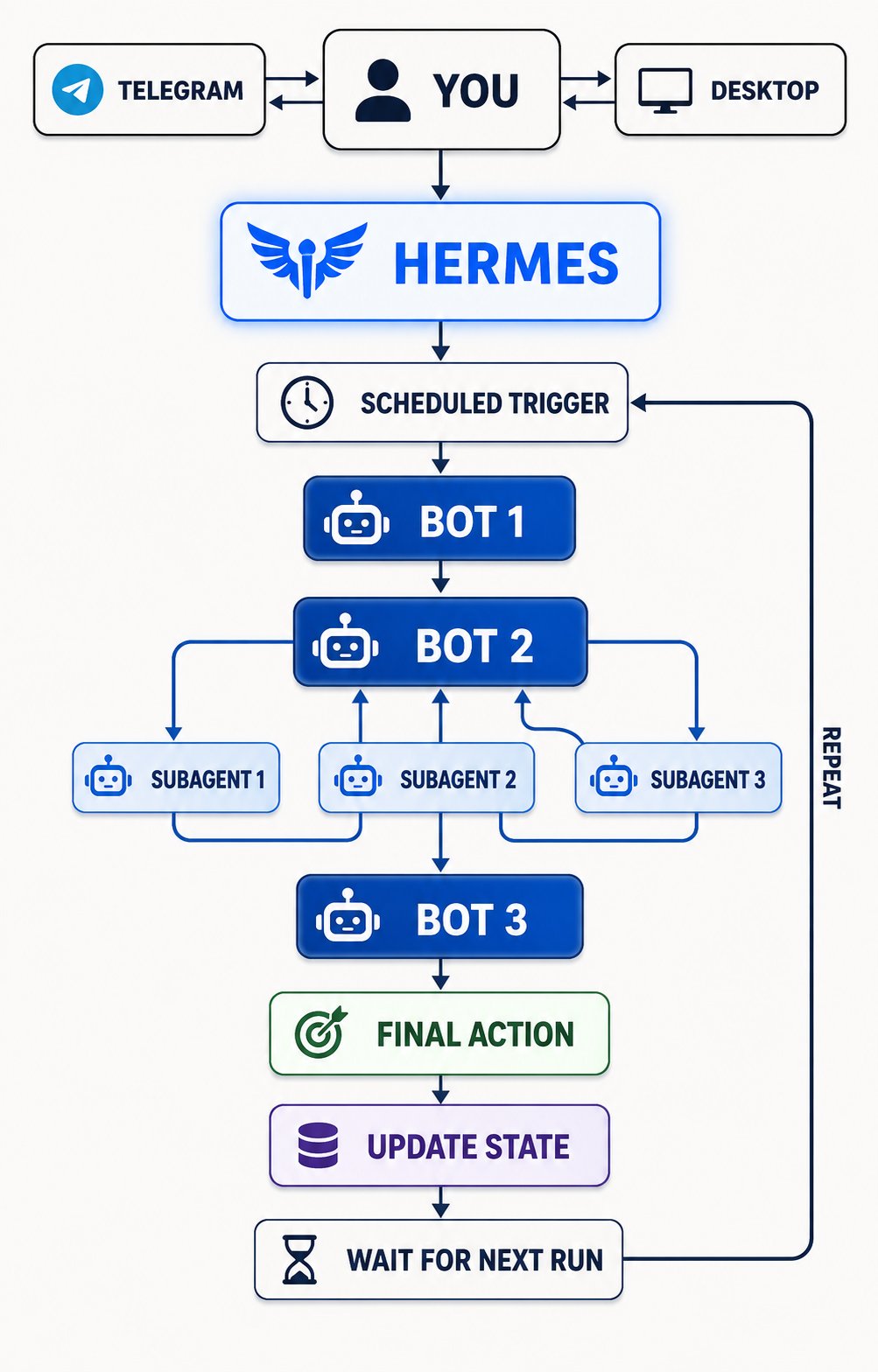 We really cooked today. So what can you build? ## 53. Things you can build Once you understand the structure, it applies to almost anything you repeat. Sorted so you can find your own use case faster. Revenue and pipeline Buyer intent agent, lead generation agent, sales prospecting agent, personalised outreach agent, follow-up agent, partnership finder, sponsorship finder, affiliate opportunity finder, creator discovery agent. Hiring Recruitment agent, candidate sourcing agent, job opportunity finder. Customers and support Customer support agent, support triage agent, product feedback agent, review monitoring agent, social listening agent, customer complaint miner, customer research agent. Market and competitive research Competitor monitoring agent, competitor launch tracker, market trend tracker, industry news agent, research assistant, product idea finder, startup opportunity finder, Reddit pain-point miner, X pain-point miner. Money and markets Investment research agent, portfolio monitor, crypto research agent, token monitoring agent, prediction market research agent. Content Content research agent, trend finder, viral post researcher, newsletter research agent, newsletter writing agent, content repurposing agent, social media agent, SEO research agent, keyword opportunity finder, YouTube research agent, podcast research agent. Your day Daily briefing agent, personalised morning brief, email triage agent, inbox cleanup agent, calendar assistant, meeting preparation agent, meeting follow-up agent, task management agent. Engineering Project monitoring agent, GitHub issue agent, software testing agent, bug research agent, documentation agent. Watching the web Website monitoring agent, price monitoring agent, product availability agent, deal finder, travel research agent, itinerary agent, property finder, property monitoring agent. Admin and knowledge Admin assistant, bookkeeping preparation agent, document organisation agent, recurring reporting agent, data collection agent, dashboard update agent, personal knowledge agent, research archive agent. The useful question is not "what can Hermes do?" It is "what do I repeatedly spend time on that a persistent AI worker could own instead?" Start there. Part 8 roundup: 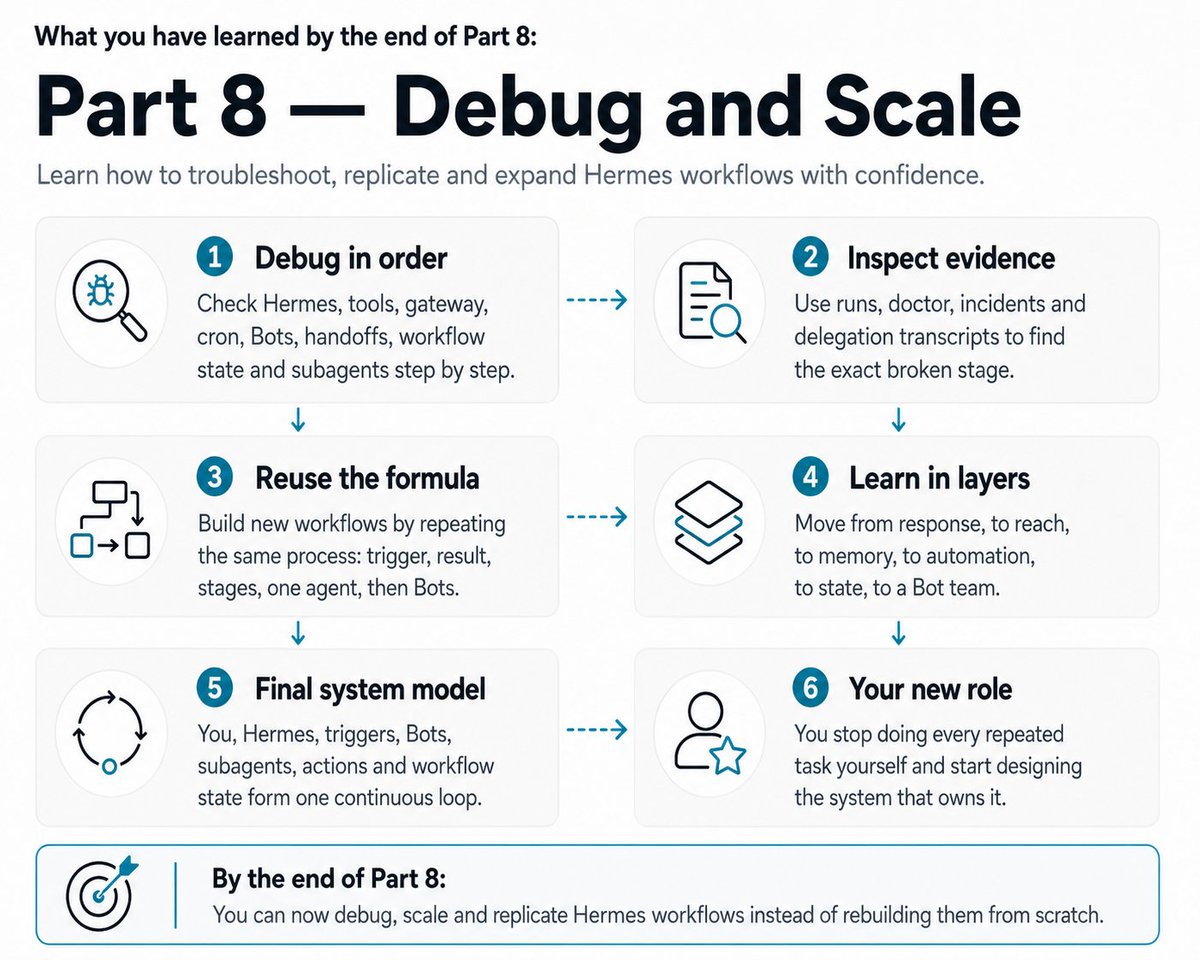 ## AND FINALLY... If you're treating Hermes like a chatbot - you'll just get a chatbot and you are going to be missing out on sooooo much potential. What you have here is infrastructure for workers that keep going after you close the laptop. Bots are permanent specialists. Subagents are temporary help. Skills teach them procedures, memory teaches them about you, cron tells them when to work, continuity tells them what happened last time, workflow state tells them what has already been done, and approvals decide where you still want a human. Whatever you did by hand three times last week, you will do by hand again next week. And the week after. And every week until you build the thing that owns it. That cost never appears on a bill, never triggers an alert, and never stops. It just quietly runs forever, paid in your evenings. Don't leave this article thinking "hmmm useful" - please go and take it step by step, do the first ten today, then the next ten steps tomorrow, etc etc. You got this... OH! Bookmark this before you close it. You will want section 6 the first time your scheduled job silently does nothing, and section 49 the first time a Bot gives you dogs*t, and both of those happen in week one for everybody. ## 相关链接 - [hoeem](https://x.com/hooeem) - [@hooeem](https://x.com/hooeem) - [58K](https://x.com/hooeem/status/2095515032243077220/analytics) - [https://portal.nousresearch.com/r/hoem-crypto](https://portal.nousresearch.com/r/hoem-crypto) - [https://hermes-agent.nousresearch.com](https://hermes-agent.nousresearch.com/) - [$USER](https://x.com/search?q=%24USER&src=cashtag_click) - [@TelegramBot](https://x.com/@TelegramBot) - [Aug 27](https://x.com/hooeem/status/2092643598785265897) - [78K](https://x.com/hooeem/status/2092643598785265897/analytics) - [@name](https://x.com/@name) - [@mentions](https://x.com/@mentions) - [@user](https://x.com/@user) - [Upgrade to Premium](https://x.com/i/premium_sign_up) - [10:11 PM · Sep 3, 2026](https://x.com/hooeem/status/2095515032243077220) - [58K Views](https://x.com/hooeem/status/2095515032243077220/analytics) - [View quotes](https://x.com/hooeem/status/2095515032243077220/quotes) --- *导出时间: 2026/9/4 16:21:39* --- ## 中文翻译 # 如何从零成为 Hermes 操作员与自动化架构师(完整课程) **作者**: hoeem **日期**: 2026-08-26T16:01:28.000Z **来源**: [https://x.com/hooeem/status/2095515032243077220](https://x.com/hooeem/status/2095515032243077220) ---  我不会撒谎说这10分钟就能搞定。这篇文章很长,是一整套课程。读完之后,你将能够运行多智能体工作流。这不会是一个快速教程。不过,如果你已经安装了 Hermes 并且对它比较熟悉,可以直接看目录跳到相应部分。 我真的想过把这篇文章拆成大约6篇独立的文章。但那样就不是完整课程了,所以我们就这样吧…… 目录: 第1阶段:让它跑起来 第2阶段:触达、工具与记忆 第3阶段:你的第一个自动化 第4阶段:先设计工作流,再动手搭建 第5阶段:搭建机器人团队 第6阶段:子智能体、房间与例行任务 第7阶段:让它可靠且省钱 第8阶段:调试与扩展 ## 第1部分:让它跑起来 1. 什么是 Hermes?(如果你还不知道的话) Hermes 运行持久化的智能体,它们可以使用工具、跨会话记忆、构建可复用的 Skills(技能)、按计划工作并互相传递结果——这正是让"触发、研究、决策、行动、保存、等待"这样的循环在你不在场的情况下持续运转的关键。 2. 决定 Hermes 部署在哪里 兄弟,你有三个选择! 选项1:你已经拥有的电脑 一台旧笔记本电脑、一台闲置的台式机、柜子里的一台 Mac mini。Hermes 可以原生安装在 macOS、Windows 和 Linux 上,所以这是免费的,也确实是最便宜的路线。 问题是睡眠。如果机器休眠、合上盖子或断开 Wi-Fi,你的定时任务就会停止触发。所以你需要禁用睡眠,并把网关安装为后台服务,这在第7节会讲到。 选项2:Hermes Cloud Nous Research 为你托管智能体。选个名字和模型,部署,它就能全天候运行,你自己的机器完全不用开机。 从这里开始:[https://portal.nousresearch.com/r/hoem-crypto](https://portal.nousresearch.com/r/hoem-crypto),可以优惠15美元(顺便说一句,如果你通过此链接注册,我会得到10美元 API 额度,你能省15美元)。 部署需要至少10美元的额度或有效的订阅。 选项3:VPS 租用的数据中心电脑。全天在线,完全属于你,Hostinger 提供 Hermes Agent 的一键 Docker 模板。控制权更多,但服务器由你自己负责。 选哪个 有闲置机器且能保持不睡眠?从它开始。零成本,以后可以迁移。 没有闲置机器,想要最省事的设置?Hermes Cloud。 想要完全控制、自己的密钥、一切都在自己拥有的基础设施上?VPS。 任何选择都不会把你锁死。你的记忆、Skills 和配置都是磁盘上的文件。  3. 给 Hermes 一个大脑 先用你最喜欢的模型。之后再实验为不同任务添加其他模型。保持简单就好(KISS 原则)。 Hermes 是智能体,它仍需要一个模型来思考。 最简单的路径是 Nous Portal。在全新安装后,运行: ``` hermes setup --portal ``` 一次 OAuth 登录即可让你进入 Nous Portal、连接模型,并开启托管的 Tool Gateway(工具网关),一次性涵盖网络搜索、浏览器、图像生成和文本转语音。 如果想改用自己的服务商,运行: ``` hermes model ``` Hermes 会引导你完成可用服务商和模型的配置。 不要花一个小时挑选"完美"的模型。以后一条命令就能换。现在你只需要一个能用的。 4. 在做任何事之前先测试 Hermes 这比听起来重要得多。 不要急着创建机器人和自动化。先确保基础智能体正常工作。 发送: ``` hello. tell me which model you're currently using. ``` 然后: ``` explain which tools you currently have access to. ``` 再让它强制调用一个工具: ``` search the web for the biggest ai news story today and summarise it. ``` 好极了!你这是在确认它是否正常运转,一旦搞定,我们就继续安装…… 5. 安装 Hermes Desktop 从 Hermes 网站下载 Hermes Desktop 安装程序并运行。它会同时安装桌面应用和命令行工具。 呃……我应该在这里给你一个链接:[https://hermes-agent.nousresearch.com](https://hermes-agent.nousresearch.com) 好了给了哈 Desktop 为你提供了完整的界面,用于对话、机器人、配置档案、技能、记忆、定时任务、消息、工具和多智能体工作流。 Bot Mode(机器人模式)内置于 Desktop 并默认开启。你会在左侧边栏的 Sessions 旁边看到 Bots 标签页。 如果你运行的是云端或 VPS 实例,请把 Desktop 连接到那个远程 Hermes,而不是另外启动一个无关的本地智能体。否则你会得到两个互不知情的智能体。 6. 把 Desktop 连接到你的实例 好,这回到你决定把 Hermes 部署在哪里的问题。如果它就运行在你面前的这台机器上,Desktop 已经自动找到了。这里没什么可做的,继续下一部分就行。 如果它运行在云端或 VPS 上,打开 Desktop,进入 Settings > Connections,添加你的 Hermes URL。保存。该智能体就会和本地智能体一起出现在你的列表中,Desktop 会保持连接。 Cron 由网关守护进程运行,每60秒跳动一次,所以请安装它: ``` hermes gateway install ``` 这会在 macOS 上创建一个 launchd 代理,在 Linux 上创建一个用户服务。在 Linux 上,还要运行 [sudo loginctl enable-linger [$USER](https://x.com/search?q=%24USER&src=cashtag_click)],让它在注销后继续运行。对于需要在开机时自动恢复的无头服务器,改用 [sudo hermes gateway install --system]。 在你自己的机器上,如果希望它持续运行,也要防止它休眠。 最后,我觉得我用 GPT 很聪明地做了一个小结,告诉你在进入第2部分之前你应该达到什么状态: 第1部分小结(进入第2部分之前):  # 第2部分:触达、工具与记忆 7. 把 Hermes 连接到 Telegram 现在给你的智能体一个联系你的渠道。 Telegram 是显而易见的首选,因为无论 Desktop 应用是否打开,Hermes 都能把定时任务的结果推送到你的手机。说实话,tg 是个牛得离谱的聊天应用。我爱它,你也爱它,为什么不用呢? 创建一个 Telegram 机器人 打开 Telegram,找到:[@TelegramBot](https://x.com/@TelegramBot),发送:/newbot 按照提示操作。保管好你的信息,别把得到的 token 分享给任何人,哈哈。 8. 把 Telegram 连接到 Hermes 运行: ``` hermes gateway setup ``` 选择 Telegram 并按照配置流程操作。同一个向导也支持 Discord、Slack、WhatsApp、Signal、Email 等一长串平台。 默认情况下,网关会拒绝所有不在允许列表中或未通过私信配对的用户。别改这个设置,笑死。 有两种授权方式。在 .env 中按用户 ID 设置允许列表: ``` TELEGRAM_ALLOWED_USERS=123456789,987654321 ``` 或者使用私信配对。向机器人发消息的未知用户会收到一次性验证码,由你批准: ``` hermes pairing approve telegram XKGH5N7P hermes pairing list hermes pairing revoke telegram 123456789 ``` 配对码一小时后过期,并且有速率限制。 顺便说一句,有一个叫 GATEWAY_ALLOW_ALL_USERS 的设置。离它远点,别碰。 9. 测试 Telegram 给你的 Hermes 机器人发消息:HELLO MOTHERFUCK*R! 然后它应该会回复,搞定!如果失败了,请检查机器人 token、检查网关是否在运行、检查你的用户是否在允许列表中并已配对,或者重启网关。完成。 10. 给 Hermes 它需要的工具 运行: ``` hermes tools ``` 或者通过 Desktop 管理工具。工具决定了 Hermes 真正能做什么,而不只是能描述什么。 根据工作流的不同,你可能会启用: > 网络搜索 网页提取 浏览器 文件 终端 代码执行 委派 MCP 集成 注意,工具集是按平台分别配置的。CLI、Telegram、Discord 和 cron 各有各的配置。这是有意为之,后面在成本控制上很重要。 不要把所有工具都给每个智能体。只给智能体完成其工作所需的工具。 11. 让 Hermes 了解你 Hermes 有持久化记忆,建立在两个文件之上: USER.md 存放关于你的信息:偏好、沟通风格、期望。 MEMORY.md 存放智能体对其环境、惯例和先前工作所学到的内容。 两者都位于 ~/.hermes/memories/,并在会话开始时加载到系统提示中。 告诉它类似这样的内容: i prefer short, direct writing. avoid unnecessary corporate language. use bullet points when they make something easier to understand. remember these preferences. 然后开启一个新会话,问它一些无关的问题,看偏好是否保留了下来。这是你对持久化记忆的第一次真正测试。 一个没人提到的限制。这些文件是刻意保持很小的。MEMORY.md 上限是2,200字符,USER.md 是1,375字符。大约分别对应8到15条和5到10条内容。记忆不会自动压缩。当一次写入会超出限制时,工具会报错,智能体必须先整合才能保存新内容。 所以记忆是用于那些必须始终存在于上下文中的事实。它不是一个文件柜。对于"我们三周前是否讨论过X"这类问题,Hermes 会改为搜索它过去的会话,这不使用时没有任何成本。 如果你想审批保存的内容,而不是让智能体随意写入,在 config.yaml 中设置 memory.write_approval: true,并用 /memory pending 进行审查。  (一旦你把这一切都设置好,你就可以用这篇文章来调试你的记忆): > **hoeem@hooeem**: [原文链接](https://x.com/hooeem/status/2092643598785265897) > 12. 了解 Hermes 的主要文件 你不需要精通技术。你只需要知道每样东西是干什么的。 SOUL.md 是智能体的身份。用于个性、行为、沟通风格、默认设定。 USER.md 是你是谁。偏好、期望、工作风格。 MEMORY.md 是 Hermes 学到了什么。有用的事实、惯例、发现、反复出现的经验教训。 AGENTS.md 或项目上下文是某个特定项目的运作方式。项目说明、文件结构、命令、惯例、工作流规则。 Hermes 将项目上下文与全局记忆和身份分开保存,而这种分离正是关键。项目规则不应该泄露到智能体的身份之中。 13. 给你的智能体一个简单的身份 你还不需要一个巨大的系统提示。从基础开始。 ``` # Identity You are my AI operator. Your job is to help me complete work, automate repeated work and improve inefficient workflows. # Communication Be concise. Use plain English. Prioritise action over unnecessary explanation. Do not invent information. # Behaviour When you can safely complete something yourself, complete it instead of only explaining how I could do it. When you notice repeated work, consider whether it should become a Skill or automation. ``` 逐步改进。不要在使用一周之前就试图设计完美的 Hermes 个性。你会对什么让你烦恼判断错误。 14. 了解 Skills(技能) Skills 是可复用的流程。 记忆是 Hermes 知道什么。Skills 是 Hermes 知道怎么做某事。 一个 Skill 可能包含: > 完成任务的步骤 使用哪些工具 检查哪些来源 忽略什么 如何格式化结果 什么算成功 Skills 按需加载,而不是塞进每个提示里,所以庞大的技能库在需要之前不花你一分钱。每个已安装的 Skill 还会变成一个斜杠命令。 浏览现有的技能: ``` hermes skills browse hermes skills search kubernetes hermes skills install openai/skills/k8s ``` 它还能把你刚做过的事情变成可复用的 Skill。你也可以让它读取一个目录、一个文档 URL,或一堆笔记。 这就是 Skills 存在的全部理由。你不应该每天重复解释同样的工作流程。 进入第3部分之前的第2部分小结:  # 第3部分:你的第一个自动化 哦啦啦,来搞自动化吧宝贝。 15. 构建你的第一个定时任务 现在让 Hermes 在你不必手动启动每个任务的情况下工作,方法是从一件小事开始。告诉 Hermes: ``` every morning at 8am, complete [TASK] and send me the result. ``` Hermes 内置了 cron,可以从自然语言创建循环任务。它理解 in 30m、every 2h、every monday 9am、weekdays at 9am、标准 cron 表达式如 0 9 * * 1-5,以及一次性 ISO 时间戳。 16. 测试自动化 请手动运行一次并检查: > 它启动了吗?它有正确的工具吗?它理解任务了吗?它产出了正确的输出吗?它把结果送到了正确的地方吗? 17. 让定时提示自包含 定时任务在完全全新的智能体会话中运行。任务不会记得你创建它的那次对话。 糟糕的:"再检查一下那些网站。" 更好的:"检查 [网站列表] 中 [你关心的内容]。 将结果与 [标准] 进行比较。 把有用的内容保存到 [位置]。 只报告 [条件]。" 18. 给循环任务延续性 一个每六小时检查一次的任务,每六小时都会发现同样的东西,并且每次都告诉你。 延续性可以解决这个问题。开启它之后,每次运行都会先查看上次运行发现了什么,因此它只报告新内容,而不是重复自己。 创建任务时加上 --continuity: ``` hermes cron create "every 6h" "Scan for new agent-tooling papers. Report only what wasn't in your previous run." --continuity ``` 已经有运行中的任务?用 hermes cron edit <job_id> --continuity 开启。仪表盘和 Bot Mode 例行任务对话框中也有对应的复选框。  19. 打造安静型自动化 不是每次运行都需要给你发消息。 如果智能体每小时检查一次而什么都没变,你不会想要一天收到二十四次"没有变化"。不出一周你就会把机器人静音,然后错过那一条真正重要的消息。 Hermes 支持静默标记。如果最终响应正好是 [SILENT],消息投递就会被抑制。输出仍会在本地保存以供审计。 告诉任务: ``` if nothing meaningful has changed, respond only with [SILENT]. ``` 失败的任务无论如何都会投递。只有成功的运行才能被静音,这正是你想要的行为。 20. 给更大的工作流持久化状态 延续性记住的是上一次的输出。更大的工作流需要比这更持久的东西。 为工作流创建一个文件夹: ``` my-workflow/ processed-items.json completed-items.json rejected-items.json workflow-notes.md ``` 具体的文件不重要。重要的是这个思路。你的工作流需要一个地方来记录它已经发现了什么、处理了什么、拒绝了什么、完成了什么,以及之前发生过什么。 然后告诉 Hermes: ``` before processing anything, check the workflow state. do not repeat completed work unless something materially changed. after completing a stage, update the workflow state. ``` 这就是"循环自动化"和"失忆的循环自动化"之间的区别。 进入第4部分之前的第3部分小结——表哥,这些你需要知道:  # 第4部分:先设计工作流,再动手搭建 21. 选一个要自动化的工作流 选择你已经在重复做的事情。 最好的第一个工作流有清晰的触发器、清晰的步骤序列和清晰的结果。 写下来: 触发器 ↓ 步骤1 ↓ 步骤2 ↓ 步骤3 ↓ 结果 暂时不要考虑机器人。先理解流程。 22. 定义触发器 问:是什么导致这个工作流启动? > 一个时间表 一条新信息 一条消息 一个文件 一个新线索 一个新工单 一个变化的网页 一封新邮件 你手动发起的请求 这就是你的起点。 23. 定义结果 然后问:完成时应该存在什么? > 一份报告 一份经过调研的记录 一个决策 一份草稿 一个更新过的数据库 一条消息 一个警报 一个已完成的任务 如果你无法用一句话描述最终输出,这个工作流就还没有定义清楚到可以自动化的程度。在写提示之前先解决这个问题。 24. 把工作流拆分成阶段 写下重要的阶段: 发现 ↓ 研究 ↓ 评估 ↓ 准备 ↓ 记录 你的可能只有三个阶段。或者五个。或者十个。 不要因为"你能"就创建智能体。阶段应该对应真实的职责差异,而不是你的热情。 25. 先用一个 Hermes 智能体搭建它 这是人们跳过的步骤,而跳过它正是他们的多智能体系统不能用的原因。 在把任何阶段变成机器人之前,先让一个 Hermes 智能体手动完成整个工作流。 给它目标、阶段、工具、规则、最终输出和状态存储位置。 运行一次。检查: > 遗漏的步骤 错误的假设 不必要的工作 错误的输出 重复的工作 先修正流程。 多智能体架构救不了设计糟糕的工作流。它只会把糟糕分散到四个智能体身上,并且让它更难被发现。 进入第5部分之前,第4部分你需要知道的,好了!!  # 第5部分:搭建机器人团队 26. 把重复的角色变成机器人 一旦工作流跑通了,打开 Hermes Desktop,选择 Bots。 Bot Mode 把 Hermes 配置档案变成一个持久化命名机器人的名册。每个机器人有自己的角色、模型、记忆、Skills、凭据、聊天记录和例行任务。 这里没有需要学习的新概念。一个机器人就是一个配置档案,存储在 ~/.hermes/profiles/<name>/。Bot Mode 是它之上的一个 UI。从终端一切也可见:hermes -p <bot> chat 打开同一个智能体,机器人例行任务也显示在 hermes cron list 中。 Bot Mode 随 Desktop 一起提供并默认开启。你可以在 Settings → Plugins → Bots 中关掉它,不会动到你的任何数据。 现在看看你的工作流阶段,问:其中哪些值得拥有一个永久的专家? 27. 创建你的第一个专家机器人 在名册中点击 New Agent。填三个字段机器人就存在了:名称、头衔、描述。 Advanced(高级)面板才是真正的配置所在: > 模型固定(Model pin),让这个机器人运行在它自己的模型上,独立于其他一切 自定义 SOUL.md,用于它的个性和长期指令 按技能、按工具集、按 MCP 的启用,让你精确勾选该角色所需的能力 从现有配置档案克隆,或从零开始 CLI 等价操作: ``` hermes profile create hermes profile list ``` 给每个机器人的指令要明确说明它应该做什么、不应该做什么,工具仅限于该角色所需。 28. 给每个机器人只分配一份工作 这是本指南中最重要的规则。 不要创建一个有二十项职责的"通用商业机器人"。你将无法改进它,因为你永远不会知道是哪条指令导致了哪个失败。 创建专家。你的指令应该更像这样: ``` You are [ROLE]. Your only responsibility is [RESPONSIBILITY]. You receive: [INPUT] You must: [STEPS] Return: [OUTPUT] Do not: [BOUNDARIES] When finished: [NEXT ACTION] ``` 角色越窄,越容易调试,也越容易改进。 29. 对重要的阶段重复这一过程 把重复的专家阶段变成机器人。你的架构最终可能是: 机器人1 ↓ 机器人2 ↓ 机器人3 ↓ 机器人4 但不要强求。有时两个机器人就够了。有时六个才合理。 目标不是创建尽可能多的智能体。目标是给持久的专家以清晰的职责。 30. 让机器人互相发消息 这一步让你从自己的工作流中间退出来。 每个标准 Bot Chat 都带有一个 message_agent 工具。机器人通过直接调用它来给队友发消息。该工具会对照实时名册验证目标,自动附加发送者的署名,并投递到队友的 Bot Chat。机器人也可以用 [@name](https://x.com/@name) 互相召唤。 每个 Bot Chat 的系统提示都包含队友名册,其中姓名和角色来自各配置档案,所以机器人在选择收件人之前就知道谁做什么。 于是,不再是: 机器人1完成 ↓ 你复制结果 ↓ 你粘贴到机器人2 而是: 机器人1完成 ↓ 给机器人2发消息 ↓ 机器人2工作 ↓ 给机器人3发消息 ↓ 机器人3工作 有两个约束会改变你的设计方式。 投递是"发出即忘"(fire-and-forget)的。发送者收到确认后结束自己的回合,回复稍后作为后台通知到达。接收方机器人在它下次运行时才会拿起这条消息。这不是同步函数调用,不要按同步调用来设计。 message_agent 只存在于 Bot Mode 安装的标准 Bot Chat 会话中。普通聊天、群房间成员会话和 CLI 会话永远看不到它。 你的工作变成监督系统,而不是在智能体之间搬运信息。 31. 把交接写进指令里 不要指望机器人猜到接下来发生什么。明确告诉它。 ``` When your work is complete: send the result to @[NEXT-BOT]. Do not wait for me to manually copy the information. ``` 然后告诉接收方机器人: ``` When you receive work from @[PREVIOUS-BOT]: perform your assigned stage. when finished: send the result to @[NEXT-BOT]. ``` 现在工作流知道如何自我推进了。 32. 标准化交接 你不会想要一个机器人返回"看起来不错",而另一个返回三页纸。 定义一个结构: ``` { "id": "", "status": "", "summary": "", "evidence": [], "confidence": 0, "recommended_next_action": "" } ``` 你不必亲自设计这个 问 Hermes。它写的 schema 比大多数人都好,但前提是你给它看交接两端真实的样例,而不是用嘴描述: ``` Bot A is my [ROLE]. Bot B is my [ROLE]. Here is what Bot A actually produced on its last run: [PASTE A REAL OUTPUT] Here is what Bot B is supposed to do with it: [PASTE BOT B'S INSTRUCTIONS] Design the smallest JSON structure that carries everything Bot B needs and nothing it does not. Return three things: the schema, one filled-in example, and the exact wording to paste into each Bot's instructions. ``` 粘贴真实的输出,而不是对输出的总结。抽象地描述交接,你就会得到一个带九个字段的通用 schema,而且你永远不会填那些字段。 然后把两个机器人都不读的字段删掉。模型添加字段是因为它们看起来很周全。 一个注意事项。运行时没有任何东西会校验这个结构,所以机器人B仍需要一条规则来处理格式错误的传入消息。第42节会讲到这个。 进入第6部分之前,第5部分你需要知道的:  # 第6部分:子智能体、房间与例行任务 33. 理解机器人与子智能体的区别 它们是不同的东西,混淆它们会让你花冤枉钱。 机器人是永久员工。它们有持久的角色、自己的记忆、自己的 Skills、自己的例行任务。明天它们还存在。 子智能体是临时工。为特定任务而创建,独立工作,返回结果,然后消失。 Hermes 的委派会生成拥有隔离的、完全全新上下文和独立终端会话的子智能体。只有子智能体的最终总结会进入父级上下文,这正是关键所在:一个大而混乱的任务不会淹没父级对话。 这让你同时拥有永久专家和临时并行工作者。 34. 用子智能体做并行工作 当一个机器人有一个由多个独立部分组成的大任务时,它可以一次性委派它们。 Hermes 默认最多运行三个并发的子智能体。这个限制可以通过 delegation.max_concurrent_children 配置,下限为1,没有硬性上限。超过限制的批次会返回错误,而不是被静默截断。 委派默认是扁平的。父级生成子级,子级不能再继续委派。你可以调高 max_spawn_depth 来允许嵌套编排,但先读一下成本警告:深度3且并发3意味着27个并发的叶子智能体。  35. 给子智能体完整的上下文 子智能体什么都不知道。它们从完全全新的对话开始,对父级的历史、先前的工具调用、或委派之前讨论过的任何内容都一无所知。它们唯一的上下文就是父级放进 goal 和 context 字段里的内容。 糟糕的:"research this." 更好的: ``` Goal: [EXACT TASK] Context: [EVERYTHING REQUIRED TO UNDERSTAND THE TASK] Focus on: [IMPORTANT AREAS] Return: [EXPECTED OUTPUT] ``` 一个子智能体应该能够在完全不看父级对话的情况下完成它的工作。如果不能,说明任务说明不完整。 一个值得知道的例外:当父级有一个已解析的工作区目录时,工作区的项目上下文文件会嵌入到每个子智能体的系统提示中。在代码仓库中工作的子智能体会自动继承该仓库的惯例。 36. 要求结构化的子智能体输出 当下一个阶段严重依赖某个结果时,让那个结果可预测。 不要说:"investigate this and tell me what you think." 用这个来明确指定: ``` Return your findings as JSON matching exactly this structure: { "findings": [], "risks": [], "unknowns": [], "confidence": 0 } ``` 37. 创建一个共享的机器人房间 Bot Mode 支持群房间。右键点击一个机器人,选择 Manage groups 把它加入房间。 房间可容纳2到6个机器人,具有持久的房间上下文和 [@mentions](https://x.com/@mentions)。每个成员保留自己的 Group: <name> 会话,所以房间上下文像其他对话一样持久保存。房间会镜像到你 Desktop 连接的每个网关,所以它们会带着历史记录出现在另一台机器上。 用房间来监督团队、同时征求多位专家的意见、协调复杂工作,或处理需要多个角色的特殊情况。 一轮是怎么运作的:你的消息会触发最多三轮串行的成员发言。被@的机器人会回应,没有@任何人时所有人都会回应。每个机器人简短回复或跳过,当完整一轮都保持安静时房间就平息了。每次发送最多10条消息、最多3轮的硬性上限防止房间失控打转。机器人会用 [@user](https://x.com/@user) 把真正需要人类判断的事情升级给你,这会把房间标记为需要你。 不是每个机器人都会回复每条消息。发言是每个成员自己的选择。 房间用于协作和决策。对于线性的自动化工作流,机器人之间的直接交接更容易推理,也更容易调试。 38. 给启动工作流的机器人添加一个 Routine(例行任务) 一旦手动机器人工作流顺畅运行,就把它的启动点自动化。 机器人有 Routines。一个 Routine 是一个附加到负责该工作的机器人上的普通 Hermes cron 任务,命名空间为 [bot:<name>],它像其他任务一样出现在 hermes cron list 中。运行记录会落在该机器人自己的聊天历史中,正是你会去找的地方。 打开应该启动工作流的机器人,创建一个 Routine,并定义: Name 工作流是什么 Schedule 它应该何时运行 Task 机器人应该做什么 例如: ``` Run [WORKFLOW]. Check the workflow state first. Only process genuinely new work. Send qualifying work to @[NEXT-BOT]. Update the workflow state afterwards. If nothing requires action, return [SILENT]. ``` 好,第6部分讲完了,进入第7部分之前你需要知道的:  # 第7部分:让它可靠且省钱 39. 在定时之前测试整个工作流 手动运行一次完整的工作流,观察每一个阶段。 触发器 ↓ 机器人1 ↓ 机器人2 ↓ 机器人3 ↓ 最终结果 机器人1:输入正确吗?输出正确吗?交接正确吗? 机器人2:收到了它需要的一切吗?只完成了自己的工作吗?交接正确吗? 机器人3:理解了上一个结果吗?产出了预期的最终输出吗? 工作流状态:正确更新了吗?避免了重复吗?状态准确吗? 修复所有失败之处,然后再运行一次完整测试。只有整条链成功运行两次之后才给它定时。 40. 添加工作流状态 当每个条目都带有状态时,更大的系统会变得容易理解得多。 ``` NEW PROCESSING RESEARCHED APPROVED REJECTED DRAFTED COMPLETED NEEDS_REVIEW ``` 你的阶段会有所不同。重要的是 Hermes 可以通过查看一个字段来回答"这个条目在工作流的哪个位置?",而不是从旧消息中重建历史。 41. 添加置信度与验证 对于出错的代价很高的工作流,加入: ``` { "confidence": 0.82, "verification_status": "verified" } ``` 然后针对它写规则: ``` If confidence is below 0.75: send for human review. If important information cannot be verified: do not invent it. return NEEDS_REVIEW instead. ``` 42. 设计失败状态 告诉每个机器人出问题时该怎么办。 ``` If required information cannot be found: do not guess. set status to NEEDS_REVIEW. explain what is missing. ``` 或者: ``` If the input does not meet the minimum criteria: set status to REJECTED. record the reason. do not pass it to the next Bot. ``` 好的工作流不会假设一切都成功。 43. 防止重复操作 自动化工作流会重启。定时任务会重跑。工具会在半途失败。 建立类似这样的规则: ``` Before creating a new record: check whether it already exists. Before performing an external action: check whether that action has already been completed. Never repeat an irreversible action solely because the workflow restarted. ``` 一旦 Hermes 开始在自己工作区之外做事,这一点就极其重要。一次重复的调研是烦人。一次重复的付款可就不是了。 44. 从人工审批开始 不要让你的第一个工作流自行对世界采取行动。 让 Hermes 处理安全的一半: > 研究 分析 分类 筛选 监控 起草 保存信息 准备行动 让它在对任何不可撤销的事情采取行动之前先问你: > 发送消息 公开发布 花钱 购买 删除重要信息 更改生产系统 任何其他不可撤销的行动 一旦工作流证明了自己,就把审批从无聊的重复步骤上去掉,保留在其他步骤上。 45. 用 MCP 连接外部软件 迟早你会想让 Hermes 在不是 Hermes 的工具里工作。你的 CRM、笔记应用、问题跟踪器。 MCP 是连接它们的标准。Hermes 支持它,并且你可以选择允许它触碰服务器上的哪些工具。 这是从"找到东西并告诉我"到"找到东西并更新系统"的跨越。 只连接工作流需要的东西。你添加的每个服务器都会在每一次调用时被描述给模型,所以一个不使用的连接在每次运行中都让你花钱。 46. 必要时使用浏览器自动化 有些服务既没有 API 也没有 MCP 集成。这时浏览器自动化就体现出价值了。Hermes 可以驱动一个真实的浏览器,而不只是读取搜索结果,它还自带 Tool Gateway,与网络搜索、提取、视觉、图像生成和语音并列。 把它当作最后手段。一个网站可能一夜之间改版,你的自动化就会悄悄失效。API 通常不会。 47. 为不同的工作选择不同的模型 不是每个工作都需要昂贵的模型。 简单监控 → 便宜快速的模型 深度研究 → 更强的模型 复杂推理 → 更强的推理模型 重要写作 → 强写作模型 你可以在三个地方设置。 按任务。在 cron 任务上固定一个模型,或设置 cron.model,让定时任务默认使用一个模型,而不是跟随你上次在聊天中随便选的。任务还可以固定它们的推理强度:分析用 high,监控用 minimal。 按机器人。每个机器人运行在自己的模型上。一个便宜的机器人和一个昂贵的机器人可以并肩工作。 子智能体。把 delegation.model 设为便宜的模型,而主会话保持强模型。这是你能获得的最大的节省。想清楚如何拆分任务是难的。而完成任务中的一块——当它带着清晰的目标和完整的上下文到达时——通常不难。而且你的大部分用量正是花在这些小块上。 48. 控制你的成本 工作流无论你是否在关注它都会运行,这正是它比聊天机器人更费钱的原因。 一个 Routine ↓ 每天运行12次 ↓ 每次运行使用三个机器人 ↓ 一个机器人生成三个子智能体 在你还没输入任何内容之前,这就是大量的模型调用。 从设计上省钱: > 尽早过滤,在任何深度工作之前拒绝糟糕的输入 在研究之前检查重复项 简单任务用便宜模型,尤其是子智能体 只在真正并行的工作上生成子智能体 使用 [SILENT],让安静的运行不花读取的钱 运行频率低于让你感觉爽的频率 用 enabled_toolsets 精简每个任务的工具,因为一个带浏览器和委派的迷你"抓新闻"任务在每次调用中都要为它们付钱 其中两项背后有正规的开关。 如果任务完全不需要思考,no_agent 模式会按你的时间表运行一个普通脚本并把输出发给你,完全不涉及模型。没有可报告的就没有发送,也就没有成本。 如果任务只是有时需要思考,给它一个预检查脚本,在什么都没变时返回 {"wakeAgent": false}。Hermes 会完全跳过这次运行。一个只在真正有变化时才唤醒模型的五分钟检查,和一个每天唤醒模型288次却什么也不说的检查,账单是完全不同的。  好的工作流设计本身就是一种成本控制。 进入第8部分之前的第7部分总结:  ## 第8部分:调试与扩展 49. 如何调试 Hermes 当出问题时,不要推倒重建。按顺序排查系统。 1. 测试普通 Hermes。发送 hello。如果失败,问题出在服务商或模型。 2. 测试所需的工具。让 Hermes 手动使用那个特定工具。如果失败,修工具。 3. 测试网关。检查它是否真的在运行。hermes gateway status。 4. 测试 Telegram。给机器人发消息。 5. 检查 cron 任务。 ``` hermes cron list hermes cron runs <job-id> hermes cron doctor hermes cron incidents ``` runs 给你尝试记录。doctor 抓出静默不触发的任务。incidents 显示持久的失败记录,incidents ack <id> 可以让已知的失败不再每次运行都烦你,同时不会从历史中隐藏。 6. 测试第一个机器人。只运行第一个阶段。 7. 测试交接。确认机器人1能给机器人2发消息。记住投递是"发出即忘"的,目标在其下次运行时才会收到,所以宣布它坏了之前先等一会儿。 8. 用已知良好的输入测试机器人2。 逐阶段继续排查工作流。 9. 检查工作流状态。查找重复记录、错误状态、缺失数据、格式错误的结构化输出。 10. 检查子智能体指令。被委派的子智能体从全新上下文开始。当它做错事时,通常的原因是任务说明不完整,而不是模型太笨。每次委派都会在 cache/delegation/live/ 下为每个任务写一份实时的只增日志,所以你可以精确读到子智能体做了什么、何时做的。 像排查管道一样调试工作流。找到坏掉的那个阶段,修复那个阶段。 50. 构建任何 Hermes 工作流的公式 一旦你掌握了以上所有内容,构建工作流就变成了机械操作。 步骤1 选择你反复做的事情 步骤2 定义触发器 步骤3 定义完成后的结果 步骤4 把流程拆分为阶段 步骤5 先用一个 Hermes 智能体搭建整个流程 步骤6 为重复的专家角色创建永久机器人 步骤7 给每个机器人一个清晰的职责 步骤8 定义机器人之间传递的信息 步骤9 用直接交接把它们连接起来 步骤10 用临时子智能体做并行工作 步骤11 存储已经发生的事情 步骤12 添加状态、置信度和失败状态 步骤13 测试一次完整的手动运行 步骤14 创建 Routine 步骤15 在有用的地方启用延续性 步骤16 必要时连接外部工具 步骤17 逐步自动化安全的行动 这就是流程。它不随工作流的复杂度而改变。 51. 学习 Hermes 的最佳方式 不要试图在第一天就建一个十智能体公司。 分层构建,下层没跑通就不要往上走: 第1层:它会回应。Hermes 运行中,模型已连接,工具正常。 第2层:它能找到你。Telegram 已连接并锁定。 第3层:它了解你。偏好已保存,第一个 Skill 已安装或学会。 第4层:它会自己醒来。一个定时任务,手动测试过,带延续性。 第5层:它对自己的工作有记忆。一个带持久化状态的手动工作流。 第6层:它有员工。两个专家机器人,由一次交接连接,然后在第一个上添加 Routine。 按这个顺序工作的理由不是纪律,而是诊断。当第6层出问题时,你已经知道第1到5层是好的,所以只有两个地方需要排查。 52. 你的最终系统是什么样子  今天我们真的搞出了好东西。那你能建什么呢? ## 53. 你可以构建的东西 一旦你理解了这个结构,它几乎适用于你重复做的任何事情。已分类,方便你更快找到自己的用例。 营收与销售管线 买家意图智能体、线索生成智能体、销售勘探智能体、个性化外联智能体、跟进智能体、合作伙伴寻找者、赞助寻找者、联盟营销机会寻找者、创作者发现智能体。 招聘 招聘智能体、候选人搜寻智能体、工作机会寻找者。 客户与支持 客户支持智能体、支持分诊智能体、产品反馈智能体、评论监控智能体、社交聆听智能体、客户投诉挖掘器、客户研究智能体。 市场与竞争研究 竞品监控智能体、竞品发布追踪器、市场趋势追踪器、行业新闻智能体、研究助手、产品创意寻找者、创业机会寻找者、Reddit 痛点挖掘器、X 痛点挖掘器。 金钱与市场 投资研究智能体、投资组合监控、加密研究智能体、代币监控智能体、预测市场研究智能体。 内容 内容研究智能体、趋势发现者、病毒式帖子研究员、Newsletter 研究智能体、Newsletter 写作智能体、内容再利用智能体、社交媒体智能体、SEO 研究智能体、关键词机会寻找者、YouTube 研究智能体、播客研究智能体。 你的一天 每日简报智能体、个性化晨报、邮件分诊智能体、收件箱清理智能体、日历助手、会议准备智能体、会议跟进智能体、任务管理智能体。 工程项目监控智能体、GitHub issue 智能体、软件测试智能体、bug 研究智能体、文档智能体。 监控网络 网站监控智能体、价格监控智能体、产品到货智能体、优惠寻找者、旅行研究智能体、行程智能体、房产寻找者、房产监控智能体。 行政与知识 行政助手、记账准备智能体、文档整理智能体、定期报告智能体、数据收集智能体、仪表盘更新智能体、个人知识智能体、研究档案智能体。 有用的问题不是"Hermes 能做什么?" 而是"我反复在哪些事情上花时间,而这些事情可以由一个持久的 AI 员工来接管?" 从这里开始。 第8部分总结:  ## 最后…… 如果你把 Hermes 当聊天机器人用——你只会得到一个聊天机器人,而且你会错过太多的潜力。 你手里拥有的,是一套在你合上笔记本之后仍持续运转的员工基础设施。机器人是永久专家。子智能体是临时帮手。Skills 教会它们流程,记忆让它们了解你,cron 告诉它们何时工作,延续性告诉它们上次发生了什么,工作流状态告诉它们哪些已经完成,而审批决定哪些地方你仍然需要人类。 你上周手动做了三次的任何事情,下周你还会手动再做一次。再下一周也是。每一周都是,直到你构建出接管它的东西。这个成本从不出现在账单上,从不触发警报,也从不停止。它只是安静地永远运转,用你的夜晚来支付。 别读完这篇文章只想着"嗯,挺有用"——请一步一步去做,今天做前十步,明天再做接下来的十步,以此类推。你可以做到的…… 哦!在关闭之前收藏这篇文章。当你第一次发现定时任务静默地什么都没做时,你会需要第6节;当机器人第一次给你垃圾输出时,你会需要第49节——这两件事每个人在第一周都会遇到。 ## 相关链接 - [hoeem](https://x.com/hooeem) - [@hooeem](https://x.com/hooeem) - [58K](https://x.com/hooeem/status/2095515032243077220/analytics) - [https://portal.nousresearch.com/r/hoem-crypto](https://portal.nousresearch.com/r/hoem-crypto) - [https://hermes-agent.nousresearch.com](https://hermes-agent.nousresearch.com/) - [$USER](https://x.com/search?q=%24USER&src=cashtag_click) - [@TelegramBot](https://x.com/@TelegramBot) - [Aug 27](https://x.com/hooeem/status/2092643598785265897) - [78K](https://x.com/hooeem/status/2092643598785265897/analytics) - [@name](https://x.com/@name) - [@mentions](https://x.com/@mentions) - [@user](https://x.com/@user) - [Upgrade to Premium](https://x.com/i/premium_sign_up) - [10:11 PM · Sep 3, 2026](https://x.com/hooeem/status/2095515032243077220) - [58K Views](https://x.com/hooeem/status/2095515032243077220/analytics) - [View quotes](https://x.com/hooeem/status/2095515032243077220/quotes) --- *导出时间: 2026/9/4 16:21:39*
进 进阶教程:让Hermes和OpenClaw在Telegram群协作,实现bot-tobot 本文介绍了如何利用Telegram新的Bot-to-Bot能力,让Hermes和OpenClaw两个Agent在同一群组中协作。文章详细讲解了从创建专用Planner Bot、配置权限、接入本地服务,到制定协作规则和验证连通性的完整流程,并展示了互传技能、联合审稿等实际应用场景。 技术 › Hermes Larus Canus 2026-04-14 HermesOpenClawTelegramBot协作Agent自动化教程多智能体
如 如何使用 Hermes 构建自主内容引擎 文章介绍了如何利用 Nous Research 的 Hermes 多代理功能自动化内容构思系统。该系统通过多个智能体(侦察员、编排员、研究员、构思员)协作,监控 X、Newsletter 等来源,识别趋势并生成包含多角度和验证信息的选题,最终通过 Telegram 供人工审核。 技术 › Agent J.B. 2026-08-05 Hermes内容自动化多智能体工作流Telegram监控选题AI工具Nous Research
多 多模型整合指南:用 Hermes Desktop 统一管理 ChatGPT、Grok 与 DeepSeek 本文介绍如何使用 Hermes Desktop 将 ChatGPT、Grok、DeepSeek 和 MiniMax 等多个 AI 模型接入同一个桌面应用。文章详细讲解了通过图形界面一键配置模型账号、连接 Telegram/Discord 消息通道、以及设置 10 个实用的自动化工作流(如每日简报、竞品监控)的步骤,旨在无需编程即可实现多模型协同与自动化任务处理。 技术 › Hermes Wei 2026-07-03 HermesAgentDeepSeekChatGPTGrok工作流教程自动化工具与效率多模型
我 我连续跑了几个月 Hermes Agent,最后发现:99% 的人根本没用对 AI Agent 文章通过作者几个月的实际测试,深入探讨了 Hermes Agent 与 ChatGPT/Claude 的核心区别:Hermes 具备本地记忆、自我改进和经验沉淀能力,越用越懂你。文章详细介绍了安装步骤、模型选择策略(如 GPT-5.5 起步)、Telegram 消息配置及核心指令,并提出了将 AI 视为“长期员工”而非简单工具的 8 大应用场景与安全建议。 技术 › Hermes 路飞 AI 研究员 2026-06-02 AI AgentHermesNous Research教程工作流自我改进模型选择Telegram自动化工 具多Agent
H Hermes Agent 进阶指南:从架构原理到构建自进化的多智能体系统 本文深入介绍了 Nous Research 开源项目 Hermes Agent。文章详细解析了其独特的“学习闭环”架构,该架构结合了三层持久化内存、自进化技能系统以及 GEPA 优化引擎,解决了传统 Agent 随会话结束而遗忘的问题。文中还将 Hermes 与 OpenClaw 进行了对比,并提供了从零开始配置多个个性化 Agent(程序员、研究员、设计师)的实战教程,旨在帮助开发者打造能够 24/7 运行且持续学习的个人 AI 队伍。 技术 › Hermes Akshay 2026-05-28 AgentHermes自进化LLM开发者工具系统架构教程Nous ResearchGEPA多智能体
万 万字保姆级教程:Hermes+Kimi K2.6 打造7x24h Agent军团 本文是一篇关于使用 Hermes Agent 框架结合 Kimi K2.6 模型构建多智能体协作系统的保姆级教程。作者展示了如何通过配置不同角色的 Agent(如市场、产品、开发总监)实现从市场调研到代码开发的自动化工作流。文章详细介绍了安装配置、Profile 设置、飞书接入及底层原理,突出了 K2.6 模型在长上下文和代码稳定性上的优势。 技术 › Hermes 苍何 2026-04-21 AIAgentHermesKimi教程自动化多智能体DevOps
H Hermes 多 Agent 部署与配置全指南 本文详细介绍了 Hermes 多 Agent 体系的部署流程,从单 Agent 的局限出发,阐述了多 Agent 协同的优势。文章涵盖了利用 Profiles 实现独立部署、为每个子 Agent 配置专属模型、通过 SOUL.md 定制人格以及配置独立消息平台入口等实操步骤,并提供了必备指令汇总和可视化监控方案。 技术 › Agent Researcher_王十三 2026-04-21 HermesAgent多Agent部署教程配置自动化
别 别再让一个AI干所有活了:6天搭建14个机器人团队的完整思路 作者Daniel.S分享了自己用6天时间、零代码搭建14个AI机器人团队的经验。从最初一个机器人开始,到按任务拆分出短推写手、长文写手、数据复盘、市场情报等专员,再到参考他人方案补上共享文件夹和事实编辑,最后形成一套“机器人只出草稿、人拍板”的内容生产流程。文章详细记录了搭建思路、踩过的坑以及未来优化方向,适合想用AI提升内容生产效率的读者参考。 技术 › Agent Daniel.S 2026-10-14 AI机器人内容生产Agent工作流自动化Grok多智能体效率工具
一 一个文科生,怎么让AI每天自动替我找选题 作者作为AI博主,分享了自己搭建「选题雷达」系统的完整流程。系统包含两个AI编辑:一个负责AI大新闻选题,通过AIHOT热点榜、精选流和Follow Builders追踪正在爆的事件;另一个负责实战心法选题,通过best-skills排行榜和GitHub Trending筛选值得亲测的工具。每条选题需经过48小时时效、目标用户相关度、一小时内可执行动作等多重过滤,并由Agent打分排序。作者强调AI只决定「值得看」,最终「值得写」的判断仍靠人的体感。整个系统跑在HermesAgent和GrokBot上,让作者把重复性工作交给AI,只保留判断、体验和表达。 技术 › Agent 写手李大魔 2026-09-18 Agent自动化选题系统内容创作AI工具Skill工作流GitHub Trending信息筛选Hermes
G Grok Agents: The 10-Step Blueprint to Automate Everything You Do Manually 本文介绍了如何使用 Grok Bot 构建自动化 Agent 的十步蓝图。Grok Bot 不是简单的脚本或工作流工具,而是拥有云端真实计算机(桌面、文件系统、终端)的 Agent。文章详细讲解了:如何选择合适的首个自动化目标、定义机器人三要素(名称/标题/描述)、通过录制演示而非文字描述来教学、连接 MCP 服务器和常用服务(Gmail、Slack 等)、用自然语言设置权限规则并配合审查 Agent 实现安全控制,以及聊天、定时例程等三种运行方式。文中强调共享登录的安全风险,并引用 SpaceXAI 工程师的实践案例说明从'构建并维护'到'描述即运行'的自动化范式转变。 技术 › Agent CyrilXBT 2026-09-15 GrokAgent自动化xAIMCP工作流权限管理教程
H How to Become a Marketing Engineer 文章介绍如何成为一名营销工程师(Marketing Engineer),即用 Agent、连接的数据和业务上下文构建自动化营销系统的人。作者分享了在 Agent 开发环境(ADE,如 Orca)中完成约 70% 营销工作的经验,包括市场研究、活动策划、内容生产和落地页搭建。文章讲解了模型、harness、ADE 等核心概念,提出按营销垂直领域组织工作区的目录结构(知识、工作流、技能、产出、结果),并建议从自己熟悉的一个任务或领域入手,逐步连接研究、简报、生产与结果反馈,形成可持续迭代的营销工作流系统。 技术 › Agent Shann³ 2026-09-10 Agent营销工程工作流ADEOrcaHermes自动化内容营销知识管理GTM
保 保姆级实操教程:一篇讲透如何用 Grok Bot 打造一人公司 本文是一篇实操教程,作者详细讲解了如何用 Grok Bot 搭建一人公司的 Bot 团队。通过个人网站从想法到上线的完整案例,阐述了 Bot 的配置方法:先为一个 Bot 设定长期系统简介和职责边界,安排第一个任务进行设计探索;当出现值得长期单独负责的工作岗位时再新增 Bot(如专职动效的 Motion God、负责工程上线的 Devbot、负责 Figma 生产的 Figma Bro);当多个 Bot 需协作时建立群聊,做好交接资料整理和分工规范。文章总结了 Bot 简介写长期职责、任务放聊天里、重复工作流沉淀为 skill 等核心心法,帮助读者按自己的工作流搭建 Bot 团队。 技术 › Agent 刘屿之外 2026-09-10 Grok BotAgent一人公司Bot团队工作流个人网站自动化Skill多Agent协作教程