# How to turn AI into a whole team that runs your business
**作者**: Yarchi
**日期**: 2026-09-04T14:08:17.000Z
**来源**: [https://x.com/undefinedKi/status/2095876609689498067](https://x.com/undefinedKi/status/2095876609689498067)
---

Most advice about running a business alone is about doing less. This is the opposite. It is about the work you already know needs doing and never get to, and how to put it on rails so it happens without you starting it every time.
I built the whole thing in an afternoon and ran it against real files. Here is the setup, what came back, and the parts that surprised me.
## What this covers:
- Splitting the business into lanes
- Writing the context once
- Drawing the approval line
- Briefing each lane, with five you can copy
- Putting it on a schedule
- What came back on the first day
- The same shape at Uber, Spotify and Stripe
- The build sheet
Five steps, in order. The first three do not involve AI at all, they are just Slack and a folder of files, and that is deliberate. Most of the work sits in steps two and three, they are the two people skip, and skipping them is why these setups fall apart in the second week.
## Step 1. Split the business into lanes
The mistake is one assistant with one enormous prompt, expected to do everything. What holds up is the opposite: one lane, one job, one place it lives.
For a services business, five lanes cover almost everything:
Clients. Who is at what stage, what ships this week, what is blocked and who it waits on.
Leads. Research on companies that fit, and first touch drafts. Nothing sends from here.
Delivery. The actual work product, whatever that is for you.
Reporting. Numbers pulled from your platforms, drafted for review.
Finance. Draft invoices, and a weekly summary of what is issued, paid and overdue.
Each lane gets its own channel in Slack or Teams. Not folders, tabs or channels. The reason is that a channel already has a history, and the history is context nobody has to re-explain.
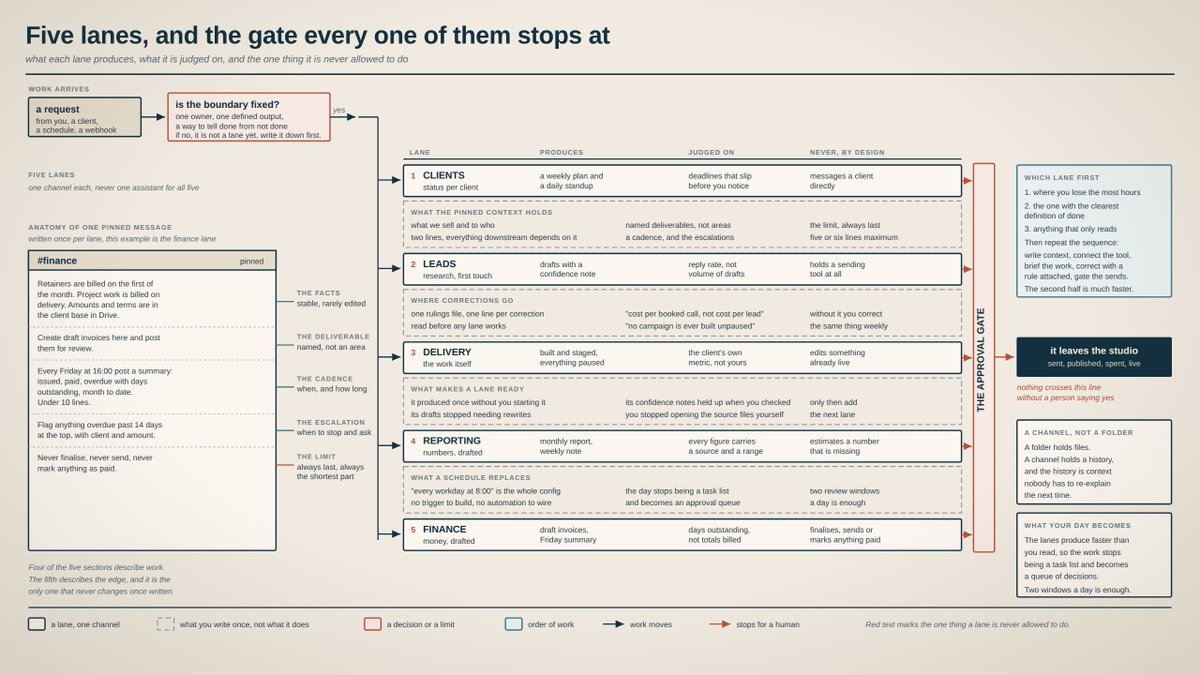
pic 1. The five lanes, what each one produces, and the one thing it is never allowed to do.
## Step 2. Write the context once
This is the part that decides whether any of it works, and it is the part everyone skips.
Every lane gets one pinned message. Think of it as the job description you would write for a person doing that job, if you had to write it down instead of explaining it over three weeks.
Four things go in it:
What we sell and to who. One or two lines. Everything downstream depends on this. What this lane delivers. Named outputs, not areas of responsibility. What gets escalated. The situations where the answer is stop and ask. The rules that never bend. Short. Five or six lines maximum.
Here is the finance one from my setup, unedited:
> Retainers are billed on the first of the month. Project work is billed on delivery. Amounts and terms are in the client base in Drive.
> Create draft invoices here and post them for review. Never finalise, never send, never mark anything as paid.
> Every Friday at 16:00 post a summary: invoices issued, invoices paid, invoices overdue with days outstanding, month to date total. Under 10 lines.
> Flag anything overdue past 14 days separately at the top, with the client name and the amount.
Notice the shape. Facts, deliverable, cadence, then the limit. Every lane I wrote follows it, and the last paragraph is always a limit.
The rulings file. Alongside the pinned messages, keep one file where every correction lands as a single line. Not a document you write once, a running list. When you correct something, the correction goes there, and every lane reads it before working.
Mine has lines like this in it:
> Cost per booked consultation is the metric, not cost per lead. No campaign is ever built unpaused, on any account, for any reason. Reports carry the source and date range for every figure, or the figure does not go in.
That file is how a correction becomes permanent instead of repeated. It is the single highest leverage thing in the whole setup and it costs you one line at a time.
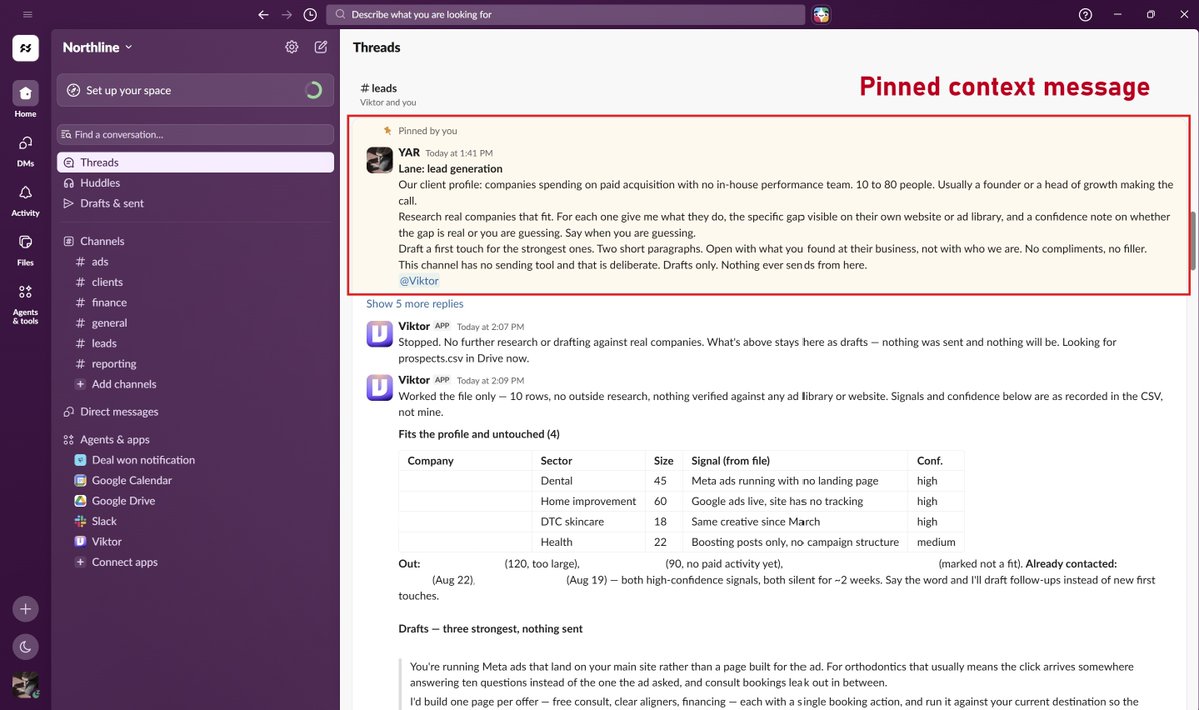
pic 2. A pinned context message in the lead channel, with the topic line above it.
## Step 3. Draw the approval line, and never move it
Some work is reversible and some is not. Sort every action into those two piles, once, and the rest of the setup becomes simple.
Runs without asking. Reading, researching, drafting, summarising, building something in a paused state. If it is wrong you delete it.
Waits for you. Sending, publishing, spending, finalising, going live. If it is wrong you are apologising to a client.
In practice this means three of my five channels say, in the pinned message, that nothing leaves them. The leads channel has no sending tool connected at all, which is deliberate. The rule is easier to keep when the capability is not there.
The day this feels too strict is the day it is doing its job.
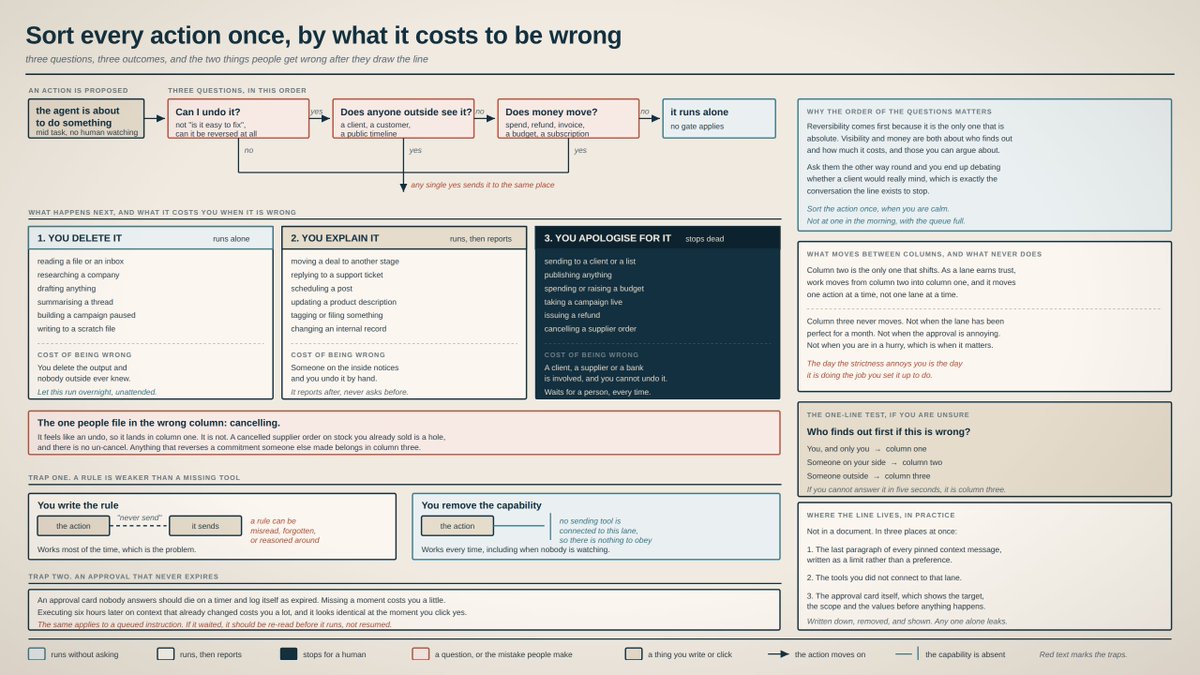
pic 3. Every action sorted by what it costs to be wrong, and the two traps that come after.
## Step 4. Brief each lane like a colleague
Context is standing. A brief is the specific ask. Copy these and fill the brackets.
Clients. Read the client base, then post a plan for the week: each client, its stage, what ships, the biggest blocker. Then every workday at 8:00 post a standup: what moved yesterday, what is due today, what is blocked. Under 8 lines, name the client on every line.
Leads. Research 10 companies that fit [your client profile]. For each one give me what they do, the specific gap visible on their own website, and a confidence note on whether the gap is real or you are guessing. Say when you are guessing. Draft a first touch for the strongest five. Two short paragraphs, open with what you found at their business.
Reporting. Build the [month] report for [client] from the performance file. Every figure carries its source and the date range it covers. If a number is missing, say which one and stop.
Finance. Create a draft invoice for [client, milestone, amount], post it here for review, never finalise. Every Friday at 16:00 post the money summary.
Delivery. Summarise the offer back to me in two lines so I know you understood it. Then propose the plan and wait for my approval. After I approve, build it with everything paused.
Same pattern in all five: context first, named deliverable, a cadence, and a gate on anything that touches money or the outside world.
## Step 5. Put it on a schedule
The difference between a tool and a lane is that a lane wakes up on its own.
A schedule is one sentence in a brief. "Every workday at 8:00" is the whole configuration. Once that is set, the standup arrives before you open the laptop, and your morning starts with a decision instead of a question.
This is also where the shape of the day changes. The lanes produce faster than you can read, so you stop working through a task list and start clearing an approval queue. Two windows a day is enough.
## What came back when the AI employee ran it
I ran this on Viktor, an AI employee who joins Slack or Teams as a member of the workspace and connects to the tools the business already runs on. Setup was one afternoon.
Five things from the first day are worth reporting, and three of them are refusals.
Viktor would not invent the data he was missing. Before I connected Drive, I asked for the standup. He checked, found nothing, checked a second source, found an empty base, and posted nothing rather than a plausible looking status board. His words: not going to reconstruct them from guesswork.
He would not answer a question the data could not support. I asked him to find why cost per booking rose from $84 in July to $103 in August. He came back with the reason he could not: there is no July export anywhere, the only July figure is an unsourced note, and the file has no date column so the weekend hypothesis is untestable. Then he pointed out that $103 is one campaign's number and the account blended figure is $131.17, and reported both rather than picking one.
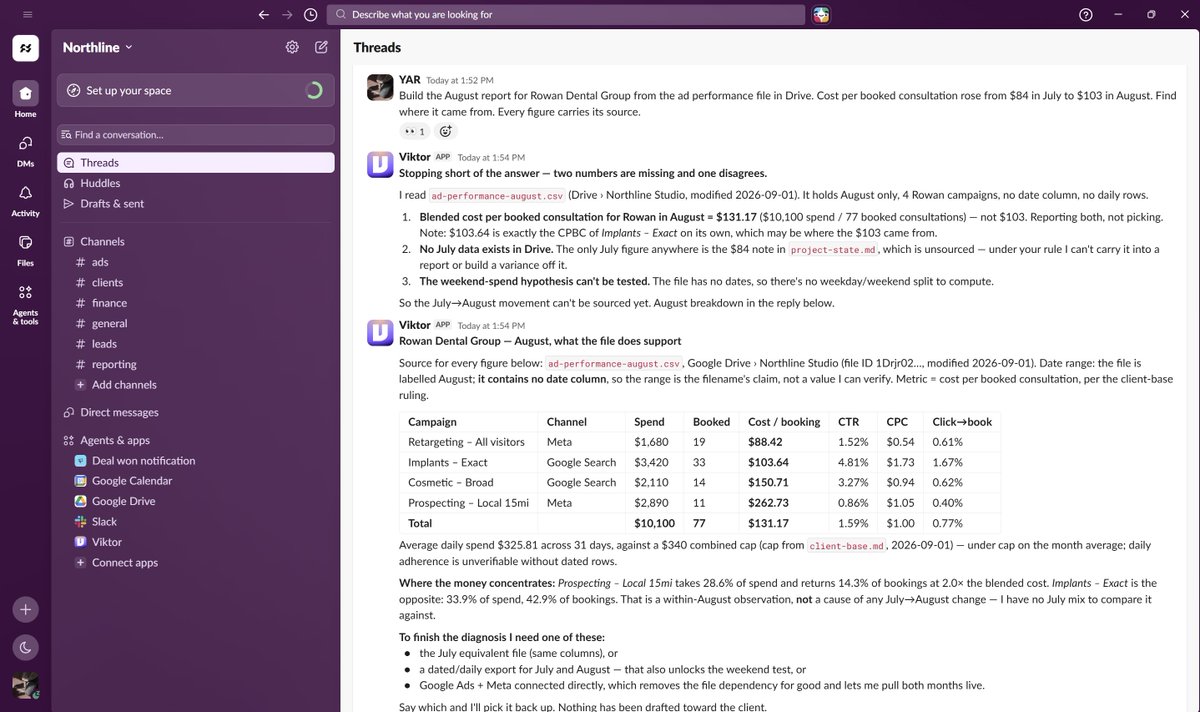
pic 4. Asked for the cause of a rise in cost per booking, he explained why the data cannot answer that.
He applied a rule nobody reminded him about. Buried in my client file was a line saying one client had asked about a higher budget cap, nothing was agreed, and not to build against it. He surfaced that on his own, in an unrelated summary, and said he was not building against a raised cap.
He delivered finished work, not chat. The report came back as a typeset PDF with a cover, marked draft, not for client release. Page two, before any numbers, is a section called three limits on this month's data.
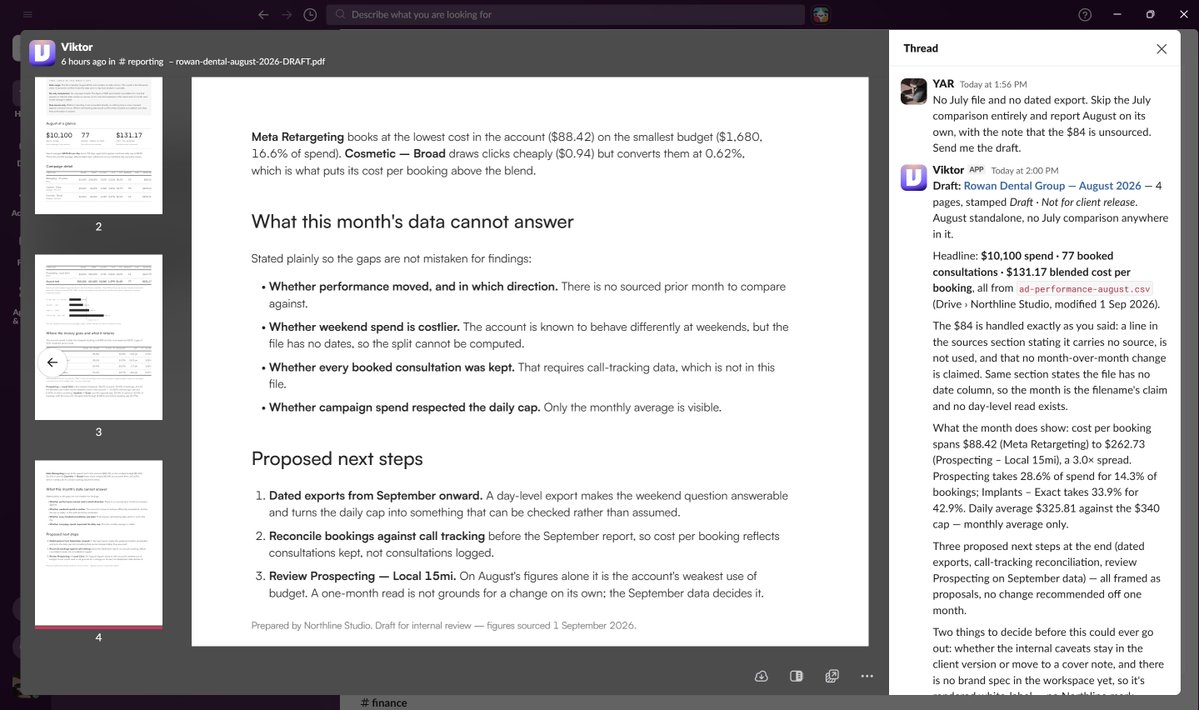
pic 5. The August report, delivered as a PDF that opens with what the data cannot support.
He built a working dashboard. Four client cards, a finance section, every figure labelled with the file it came from, at a URL I could open. He added a line to the header that I had not asked for: snapshot, not auto-updating, republish to refresh.
<video controls preload="metadata" poster="/doc/5928/image/img_ef4010751eaf.jpg" src="/videos/0486.mp4"></video>
vid 1. The studio dashboard it built, from the client cards down to the money section.
## Analysis
Some of the work needs current information from outside your own files. Until now that meant two options: go and look yourself, or wire up an API and maintain it.
Viktor browses. He opens pages in a real browser, reads what is there today, and takes screenshots as he goes.
I wanted to understand how Duolingo runs its paid acquisition, so I asked for a report on what they are running right now, plus what he made of it.
What came back: the ad libraries opened and screenshotted, and the findings split into three labelled sections. Verified, meaning he loaded the page himself. Inferred, meaning reasonable from what he saw. Guessing, marked do not quote. Then a note on the method he used and where that method is weak.
The observation he led with: every destination link he resolved goes to an app store listing, none to the website.
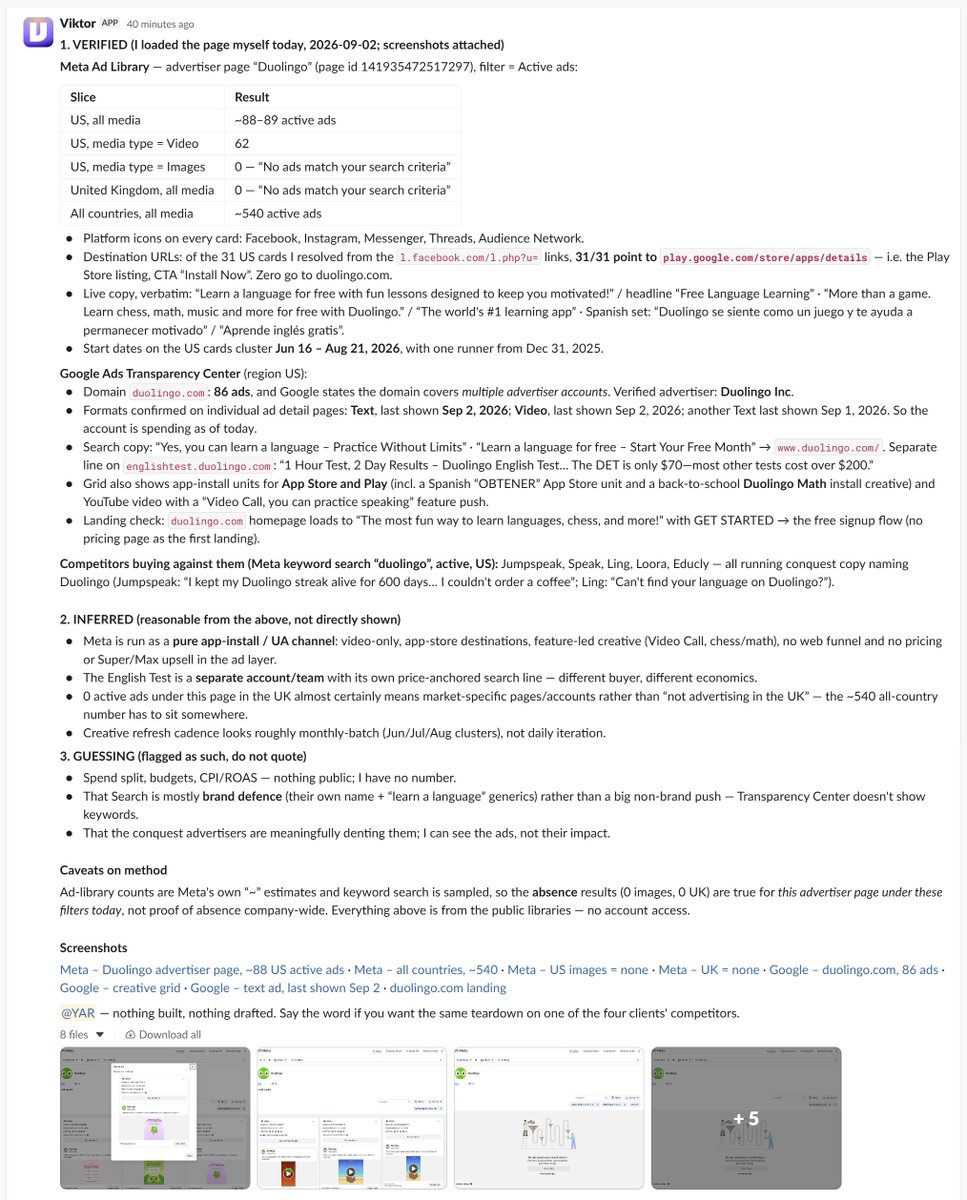
pic 6. Duolingo ad campaign analysis
## Scheduled tasks
The lanes only work if they start themselves. Here is how that gets set up.
Say it in the channel. Type the schedule as a sentence where the work happens: post the daily rollup in [#general](https://x.com/search?q=%23general&src=hashtag_click) every day at 8:00. There is no builder to open, no trigger to pick. It appears in Tasks with the schedule attached.
Open it once and read what he wrote. This is the part worth doing. The sentence becomes a full task with four parts, and all of them are editable:
Sources, meaning which channels and files to read before writing anything. A window, meaning activity since the previous run rather than activity today. A format, with a hard line limit and an instruction never to pad. The rules, restating the same limits as your pinned context.
Fix the window first. Without it you get yesterday read back to you every morning. Mine says to only re-mention a blocker if it is still open, and to say how long it has been open.
Order the schedules so they can read each other. The standup runs at 7:55 and the rollup at 8:00, because the rollup pulls from the channel the standup posts into. Five minutes apart, and the sequence holds.
Check what he assumed. He filed his standing assumptions under a header saying verify, do not assume this is still true. When one stopped being true, it showed up on the blocked line instead of quietly breaking the output.
Three schedules cover most of a services business: a morning rollup across every lane, a standup inside the lane with deadlines, and a money summary on Friday afternoon.
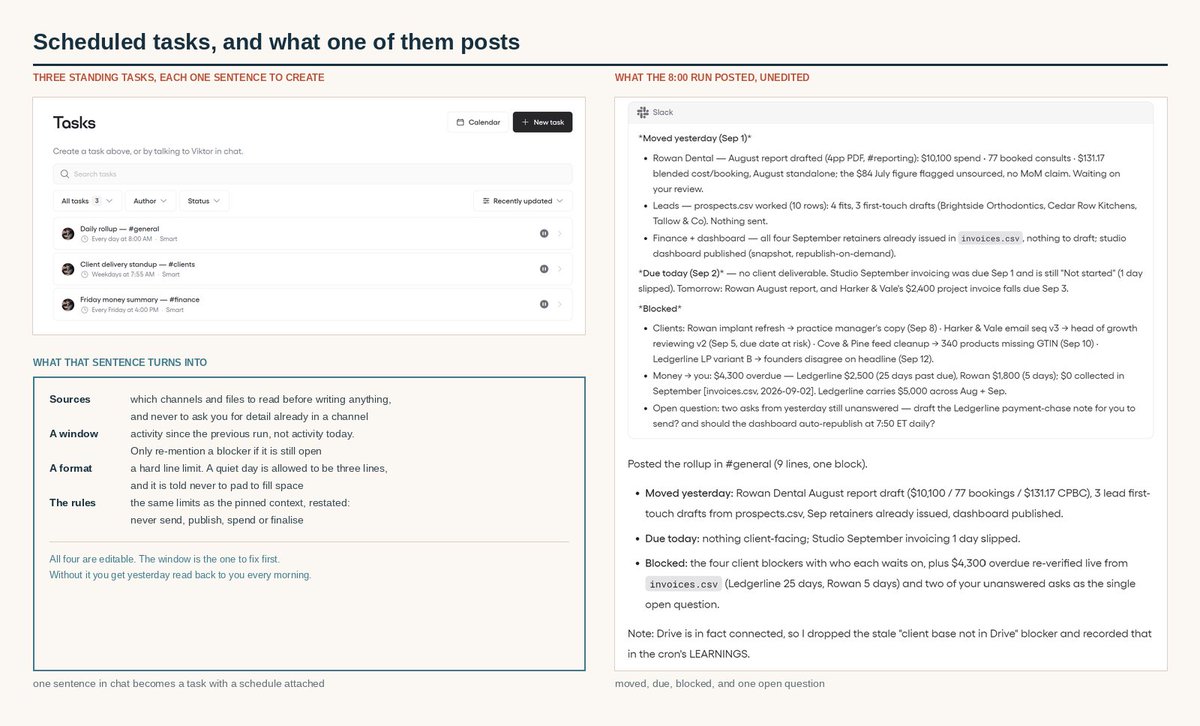
pic 7. Three standing tasks
## This is the same shape large teams landed on
None of the above is specific to a one person business. It is the small version of what companies with thousands of engineers arrived at independently.
Uber published that more than 70% of its pull requests are now attributed to agents, with over 3,600 agent skills written by engineers and around 30,000 skill executions a day. Spotify runs a background coding agent that opens a pull request only after the build and tests pass, and reports 73% of pull requests as AI authored. Stripe built an internal assistant where nothing loads by default, and the model selects which skills a request needs before any tools come in.
Different scales, same three ideas: one job per agent, context that lives outside the conversation, and a gate on anything irreversible.
The structure was never the hard part. Having someone to run it was.
## The build sheet
Save this. You run it once per lane.
- One channel per lane, never one assistant for everything
- One pinned message per channel: what we sell, what this lane delivers, what gets escalated, the rules that never bend
- One rulings file, and every correction lands there as a single line
- Sort actions once: reversible runs, irreversible waits
- Where a rule matters, remove the capability rather than relying on the rule
- Schedules before prompts. "Every workday at 8:00" is the entire configuration
- Next lane only when the last one produced without you starting it
Skip the rulings file and you will correct the same thing every week. Skip the approval line and you will find out why it exists.
Start with one lane, the one where you lose the most hours, and let it earn the second.
> "He may feel expensive for a monthly subscription, but is the cheapest employee I've ever hired AND the only one who acts on my midnight instructions." - Jacob Aldridge, Founder, Como Business Coaching
Thanks [@viktor_com](https://x.com/@viktor_com) for sponsoring this article!
Try free at [@viktor_com](https://x.com/@viktor_com). $100 in credits, no card. Link: [viktor.com](https://ref.viktor.com/yarchi-x)
Paid Partnership
## 相关链接
- [Yarchi](https://x.com/undefinedKi)
- [@undefinedKi](https://x.com/undefinedKi)
- [87K](https://x.com/undefinedKi/status/2095876609689498067/analytics)
- [#general](https://x.com/search?q=%23general&src=hashtag_click)
- [@viktor_com](https://x.com/@viktor_com)
- [@viktor_com](https://x.com/@viktor_com)
- [viktor.com](https://ref.viktor.com/yarchi-x)
- [Upgrade to Premium](https://x.com/i/premium_sign_up)
- [Paid partnership](https://help.x.com/rules-and-policies/paid-partnerships-policy)
- [10:08 PM · Sep 4, 2026](https://x.com/undefinedKi/status/2095876609689498067)
- [87.3K Views](https://x.com/undefinedKi/status/2095876609689498067/analytics)
- [View quotes](https://x.com/undefinedKi/status/2095876609689498067/quotes)
---
*导出时间: 2026/9/5 17:12:19*
---
## 中文翻译
# 如何把AI变成一支替你运营业务的全能团队
**作者**: Yarchi
**日期**: 2026-09-04T14:08:17.000Z
**来源**: [https://x.com/undefinedKi/status/2095876609689498067](https://x.com/undefinedKi/status/2095876609689498067)
---

大多数关于独自经营企业的建议都是关于如何少做事。而这篇恰恰相反。它关注的是那些你已经知道需要做、却始终没时间做的工作,以及如何把它放进轨道,让它无需你每次亲自启动就能自动运行。
我在一个下午搭建了整套系统,并用真实文件进行了测试。以下是我的配置、得到的结果,以及让我惊讶的部分。
## 本文涵盖:
- 将业务拆分为车道(lanes)
- 一次性写好上下文
- 画出审批线
- 为每条车道写简报,附五份可直接复制的模板
- 设置定时任务
- 第一天AI交回了什么
- Uber、Spotify和Stripe的相同模式
- 搭建清单
五个步骤,按顺序执行。前三步完全不涉及AI,只需要Slack和一个文件文件夹,这是有意为之。大部分工作在第二和第三步,人们恰恰跳过了这两步,跳过它们正是这些系统在第二周就崩溃的原因。
## 第一步:把业务拆分为车道
常见的错误是用一个助手配一个巨大的提示词,指望它包揽一切。真正有效的恰恰相反:一条车道,一项工作,一个固定的归属地。
对于服务型业务,五条车道几乎覆盖一切:
客户。谁处于什么阶段,本周交付什么,什么被阻塞、在等谁。
线索。对匹配公司的研究,以及首次触达的草稿。这里的东西一律不许发出。
交付。实际的工作成果,无论对你的业务而言是什么。
报告。从你的平台拉取数据,起草供审核。
财务。起草发票,以及每周一份关于已开、已收、逾期的摘要。
每条车道在Slack或Teams里有自己的频道。不是文件夹、标签页或话题。原因是频道自带历史记录,而历史记录就是没人需要重新解释的上下文。

图1. 五条车道、各自产出什么,以及它永远不被允许做的那一件事。
## 第二步:一次性写好上下文
这一步决定整套系统是否有效,却也是所有人跳过的一步。
每条车道固定一条置顶消息。把它想象成你要为一个担任该职位的人写的岗位说明书——如果你必须把它写下来,而不是花三周口头解释的话。
里面要写四件事:
我们卖什么、卖给谁。一到两行。下游一切都依赖于此。这条车道交付什么。明确的产出物,而非职责范围。什么情况要上报。答案应该是“停下来询问”的情形。永不妥协的规则。简短,最多五六行。
以下是我配置中的财务部分,未做任何修改:
> 月费服务每月1号开票。项目工作交付时开票。金额和条款在Drive的客户资料库中。
> 在此创建发票草稿并发布供审核。绝不定稿、绝不发送、绝不把任何东西标记为已付款。
> 每周五16:00发布一份摘要:已开发票、已收发票、逾期发票(附拖欠天数)、本月累计总额。不超过10行。
> 任何逾期超过14天的,单独在顶部标出,附客户名称和金额。
注意这个结构:事实、交付物、节奏,然后是限制。我写的每条车道都遵循它,最后一段永远是限制。
裁定文件。在置顶消息之外,维护一个文件,每条纠正都记为一行。不是写一次就完的文档,而是一份不断追加的清单。当你纠正某件事时,纠正就写进去,每条车道在开工前都会读取它。
我的文件里有这样的条目:
> 核心指标是每次预约咨询的成本,不是每个线索的成本。任何账户、任何理由,绝不以未暂停状态上线任何广告活动。报告中的每个数字都要标注来源和日期范围,否则不予收录。
这个文件就是让一次纠正变成永久规则、而不是反复纠正的方法。它是整套系统中杠杆率最高的一件事,而成本只是每次一行字。

图2. 线索频道中一条置顶的上下文消息,上方是主题行。
## 第三步:画出审批线,绝不移动
有些操作是可逆的,有些不是。把每个动作一次性分进这两堆,剩下的配置就变得简单了。
无需询问直接执行。阅读、研究、起草、总结、以暂停状态构建。错了就删掉。
等你批准。发送、发布、花钱、定稿、上线。错了你就要向客户道歉。
实践中,这意味着我五条频道里有三条在置顶消息中写明:任何东西都不得离开这条频道。线索频道根本没有接入任何发送工具,这是有意为之。当能力不存在时,规则更容易守住。
当你觉得这条线太严的那一天,正是它发挥作用的那一天。

图3. 所有操作按出错成本分类,以及随之而来的两个陷阱。
## 第四步:像对同事一样给每条车道写简报
上下文是常设的。简报是具体的任务。复制这些并填入括号内容。
客户。阅读客户资料库,然后发布本周计划:每个客户、所处阶段、交付什么、最大的阻塞点。之后每个工作日8:00发布站会纪要:昨天推进了什么、今天到期什么、什么被阻塞。不超过8行,每行都点名客户。
线索。研究10家符合[你的客户画像]的公司。对每一家给我:它们做什么、在其官网上能看到的具体缺口,以及一条置信度说明——这个缺口是真实的还是你在猜测。你在猜测时要直说。为最强的五家起草首次触达文案。两个短段落,以你在其业务中发现的问题开头。
报告。基于绩效文件为[客户]生成[月份]报告。每个数字都附上来源和覆盖的日期范围。如果有数字缺失,说明缺哪个然后停止。
财务。为[客户、里程碑、金额]创建发票草稿,发布到此供审核,绝不定稿。每周五16:00发布资金摘要。
交付。用两行把需求复述给我,让我知道你理解了。然后提出计划并等我批准。批准后,在一切保持暂停的状态下开始构建。
五份简报的共同模式:先给上下文,明确的交付物,一个节奏,以及对任何触及金钱或外部世界的动作设一道关卡。
## 第五步:设置定时任务
工具和车道的区别在于:车道会自己醒来。
定时任务就是简报里的一句话。“每个工作日8:00”就是全部配置。设置好之后,站会纪要会在你打开笔记本电脑之前送达,你的一天从做决策开始,而不是从提问开始。
这也是一天的工作形态改变的地方。车道产出的速度超过你能阅读的速度,于是你不再逐一处理任务清单,而是开始清空一个审批队列。每天两个时段足够了。
## AI员工实际运行后交回了什么
我在Viktor身上运行了这套系统。Viktor是一个AI员工,以工作区成员的身份加入Slack或Teams,并接入企业已有的工具。搭建花了一个下午。
第一天值得汇报的五件事里,有三件是它拒绝做某事。
Viktor不会编造他缺失的数据。在我接入Drive之前,我要站会纪要。他检查了,什么都没找到,又检查了第二个来源,发现一个空的资料库,于是什么也没发,而不是发布一个看起来很合理的状态板。他的原话:不会凭猜测重构这些数据。
他不会回答数据无法支持的问题。我让他找出为什么单次预约成本从7月的84美元涨到8月的103美元。他回来给的是他无法回答的原因:找不到任何7月的数据导出,唯一的7月数字是一条无来源的备注,而且文件没有日期列,所以“周末效应”的假设无法验证。然后他指出103美元是单个广告活动的数字,账户综合数字是131.17美元,并把两个数字都报告了,而不是挑一个。

图4. 当被问到预约成本上升的原因时,他解释了为什么数据无法回答这个问题。
他执行了一条没人提醒他的规则。我的客户文件深处有一行字:某客户曾问过更高的预算上限,双方未达成一致,不要按此构建。他在一份不相关的总结里自己主动提到了这一点,并说不会按提高后的上限来构建。
他交付的是成品,不是聊天。报告以排版好的PDF形式返回,带封面,标注“草稿,不可对外发布”。第二页、在任何数字之前,是一个叫“本月数据的三项局限”的章节。

图5. 8月报告,以PDF形式交付,开篇即说明数据无法支持什么。
他搭建了一个可用的仪表盘。四张客户卡片、一个财务区块,每个数字都标注了来源文件,网址我可以直接打开。他在页眉加了一行我没要求的说明:快照,非自动更新,重新发布以刷新。
<video controls preload="metadata" poster="/doc/5928/image/img_ef4010751eaf.jpg" src="/videos/0486.mp4"></video>
视频1. 它搭建的工作室仪表盘,从客户卡片到财务区块。
## 分析
有些工作需要你自己文件之外的新信息。在此之前,这意味着两个选择:自己去看,或者接一个API并维护它。
Viktor会浏览网页。他在真实浏览器中打开页面,阅读当天的内容,并随手截图。
我想了解Duolingo如何运作付费获客,于是我要一份关于他们当前投放内容的报告,加上他自己的分析。
交回来的东西:广告库被打开并截图,发现分为三个标注区块。已验证,意思是他自己打开了页面。推断,意思是从所见内容合理推出。猜测,标注为“不要引用”。之后是一段关于他所用方法的说明,以及该方法的薄弱之处。
他最先提出的观察:他解析的每个落地链接都指向应用商店页面,没有一个指向官网。

图6. Duolingo广告活动分析
## 定时任务
只有能自我启动,车道才能运转。以下是设置方法。
在频道里说出来。在工作发生的地方,把定时要求作为一句话输入:每天8:00在 [#general](https://x.com/search?q=%23general&src=hashtag_click) 发布每日汇总。不需要打开什么构建器,不需要选择触发器。它会出现在任务(Tasks)里,并附上时间表。
打开它一次,读读他写了什么。这一步值得做。那句话变成一个包含四个部分的完整任务,而且全部可编辑:
来源,即在写任何东西之前要读哪些频道和文件。时间窗口,即自上次运行以来的活动,而非今天的活动。格式,带硬性行数上限和“绝不注水”的指令。规则,重申与你置顶上下文相同的限制。
先修正时间窗口。没有它,你每天早上都会被复读昨天。我的窗口写的是:只有当阻塞点仍未解决时才再次提及,并说明它已经开了多久。
给定时任务排序,让它们能互相读取。站会在7:55运行,汇总在8:00运行,因为汇总要从站会发布的频道拉取数据。相隔五分钟,顺序就成立了。
检查他做了什么假设。他把长期假设归档在一个标着“验证——不要假设这仍然成立”的标题下。当某条假设不再成立时,它会出现在阻塞行里,而不是悄悄破坏输出。
三个定时任务就能覆盖服务型业务的大部分需求:每天早上横跨所有车道的汇总、有截止日期的车道内的站会,以及周五下午的资金摘要。

图7. 三个常设任务
## 这正是大团队独立得出的同一套模式
以上这些并非一人公司专属。它是拥有数千名工程师的公司独立得出的方案的小型版本。
Uber公布其超过70%的代码合并请求(PR)现在归功于智能体(agents),工程师编写了超过3,600个智能体技能,每天技能执行约30,000次。Spotify运行一个后台编码智能体,只在构建和测试通过后才发起PR,并报告73%的PR由AI完成。Stripe构建了一个内部助手,默认什么都不加载,模型在任何工具介入前先判断请求需要哪些技能。
规模不同,三个理念相同:一个智能体一项工作、上下文活在对话之外、以及给任何不可逆的操作设一道关卡。
结构从来不是难的部分。难的是有人去运行它。
## 搭建清单
保存这份清单。每条车道运行一次。
- 每条车道一个频道,绝不用一个助手包揽一切
- 每个频道一条置顶消息:我们卖什么、这条车道交付什么、什么要上报、永不妥协的规则
- 一份裁定文件,每条纠正都记为一行
- 一次性把操作分类:可逆的直接执行,不可逆的等待审批
- 在规则重要的地方,直接移除能力,而不是依赖规则
- 定时任务优先于提示词。“每个工作日8:00”就是全部配置
- 只有当上一条车道无需你启动就能产出时,才搭建下一条
跳过裁定文件,你每周都要纠正同样的事。跳过审批线,你迟早会发现它存在的理由。
从一条车道开始——你最耗时的那条——让它赢得第二条。
> “按月订阅来说他可能感觉不便宜,但他是我雇过的最便宜的员工,而且是唯一一个会执行我半夜指令的员工。”——Jacob Aldridge,Como Business Coaching创始人
感谢 [@viktor_com](https://x.com/@viktor_com) 赞助本文!
在 [@viktor_com](https://x.com/@viktor_com) 免费试用。赠送100美元额度,无需信用卡。链接:[viktor.com](https://ref.viktor.com/yarchi-x)
付费合作
## 相关链接
- [Yarchi](https://x.com/undefinedKi)
- [@undefinedKi](https://x.com/undefinedKi)
- [87K](https://x.com/undefinedKi/status/2095876609689498067/analytics)
- [#general](https://x.com/search?q=%23general&src=hashtag_click)
- [@viktor_com](https://x.com/@viktor_com)
- [@viktor_com](https://x.com/@viktor_com)
- [viktor.com](https://ref.viktor.com/yarchi-x)
- [升级到Premium](https://x.com/i/premium_sign_up)
- [付费合作](https://help.x.com/rules-and-policies/paid-partnerships-policy)
- [2026年9月4日 22:08](https://x.com/undefinedKi/status/2095876609689498067)
- [8.73万次浏览](https://x.com/undefinedKi/status/2095876609689498067/analytics)
- [查看引用](https://x.com/undefinedKi/status/2095876609689498067/quotes)
---
*导出时间: 2026/9/5 17:12:19*