# Sandboxes are coming to the Agents SDK
**作者**: jason liu
**日期**: 2026-04-15T17:33:19.000Z
**来源**: [https://x.com/jxnlco/status/2044469127696556153](https://x.com/jxnlco/status/2044469127696556153)
---

Today OpenAI is adding first-party sandbox support to the Agents SDK.
Developers do not build agents just to answer questions. They build them to deliver work. And real work needs a place to happen: somewhere it can be tracked, resumed, inspected, and kept on course over time.
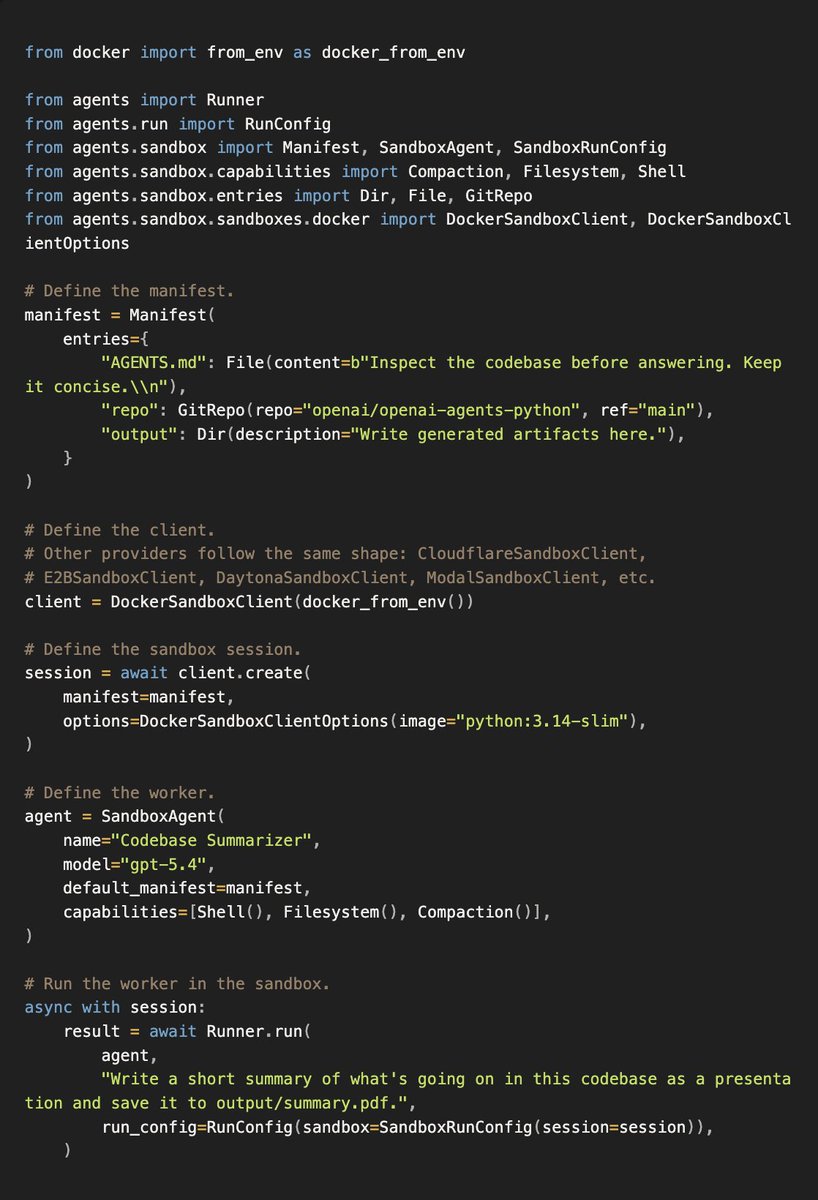
building agents
By the end of this post, you'll understand:
What it means for the Agents SDK to be in distribution.
- We used to beg models for JSON until function calling gave us a real place to put it.
- Built-in tools like shell work better than hand-rolled bash or shell lookalikes.
- Compaction and memory are not prompt tricks. They work best when they are part of the harness.
Why "everything is computer," but not every task needs one.Some tasks should stay lightweight.
- Some tasks need files, processes, browsers, credentials, or persistent state.
- Isolation matters when model-generated code can read files, run commands, or touch credentials.
- Separating orchestration from compute lets you choose the right amount of computer for the job.
How sandboxes help agents leave behind real work.Pull requests, migrations, and vibe-coded apps.
- Data rooms turned into memos, spreadsheets, and evidence tables.
- Artifacts like PDFs, decks, charts, and reports.
- Browser workflows, app debugging, and computer use.
- Autonomous research runs, including GPU-backed experiments.
If you just want to see the docs, you can check them out here: https://developers.openai.com/api/docs/guides/agents/sandboxes
## What does it mean to be in distribution?
Remember structured outputs before structured outputs?
Structured outputs
Before function calling, you had to beg for JSON. You asked for things in quotes, maybe in a code block, maybe in XML, maybe in something else, and then figured out where in the prompt you could stuff examples and all that good stuff.
> "Please return only JSON in <json> tags. No commentary. No markdown. No explanation."
I was one of the creators of Instructor, and a lot of that work came from thinking about what it means to be in distribution for the model.
At the time, a lot of the work was basically about using function calling to trick the model into giving me JSON.
Eventually we got function calling, which was the first time there was actually a place we could expect JSON. We used that heavily. Later, we got things like output schemas, and things got a lot better and a lot more reliable. There was less tricking the model and more using interfaces the model actually understood well.
That is what I mean by being in distribution.
Shell tool
Being in distribution is also as simple as using the right tools. We now have our own batch of raw tools, our own compaction tools, and our own memory tools, and those have been reinforced into the system. That might sound like a small difference, but maybe we name our tool bash and somebody else names their tool shell. That can actually matter for performance.
> With shell access, you can spend a lot of time debating whether the tool should be called run_command, bash, or shell, what the docstring should say, and how to prompt it to be more creative with piping, composition, and interacting with other Unix commands. A lot of that can be captured much more cleanly by using OpenAI's built-in shell capability instead. The point is not just convenience. The point is that the model already understands that tool shape better.
Compaction and prompt caching
On Twitter, I have seen a lot of people talk about how much they love Codex's ability to compact and keep going. Not only is it not a prompt trick, it is a real path in the harness, and it is in distribution to these models.
The same thing applies to memory and prompt caching. Long-running agents need to carry state forward without replaying the whole world every turn, and prompt caching matters because it improves price performance.
All of these things add up to incredibly good price performance across long-running tasks. It is not only about fitting more into context. It is about making the work cheaper, faster, and less brittle.
Where is this headed? I'm not really sure, but I know that by using an in-distribution harness, you can see where the puck is going with us, rather than having to chase it from behind.
## Why is everything computer?
There have been a lot of conversations lately about how coding agents are actually the precursor to a much broader set of knowledge-work skills. Code is the easiest way to learn this because it gives you a very concrete environment to act in.
Coding Becomes Knowledge Work
That can start with something as simple as running a Python script. Then it graduates to writing tools that call Playwrightto control a browser, generate Excel spreadsheets with common Python libraries like openpyxl or XlsxWriter, or generate slides that export to PDF and PowerPoint with Slidev.
As things get even more advanced, computer use and browser use let the agent do even more, whether that is in a browser or its own Linux box.
Separating orchestration vs compute
That also does not mean every single task you want an agent to do needs to be provisioned with 2 GB of RAM.
By separating the computer, or in this case the sandbox, from the agent orchestration layer, you get the benefits of using AI while still having the flexibility to mount a sandbox only when you need it. You can think without turning the laptop on every time. The computer is there when the work actually requires it.
Isolation and security
That separation matters for security too. You are much less likely to leak something like your OpenAI API credentials on the machine running the agent if the code is actually executing inside a separate sandbox.
We effectively separate the brain and the hands.
This matters because agentic code execution is not theoretical anymore. If the agent can read files, run commands, install packages, open browsers, and keep going over a long task, then the execution boundary becomes part of the product. You do not want that boundary to be an accident of whatever machine happened to run the agent loop.
Some tasks need no sandbox. Some need one small workspace. Some are better served by many isolated workspaces. The important part is that the harness can decide what needs compute, while the sandbox defines what that compute is allowed to touch.
## What are the applications of sandboxes?
The point of a sandbox is not just that the agent can run commands. The point is that the agent can leave behind work.
The way I think about this is: what is the work that needs to get done, where does it need to get done, and what should the agent leave behind? Once you know the deliverable, it becomes much easier to scaffold the agent, build evals around it, and move forward.
Code generation for pull requests, migrations, and vibe coding
Code generation gets much more useful when the agent can work inside the repo instead of describing changes from the outside. Give it a real checkout, shell and filesystem tools, validation commands, and a resumable workspace where it can leave behind a patch or pull request.
Sample prompt:
> The repo is cloned at repo/. Read AGENTS.md, make the smallest safe change, run tests, and prepare a PR summary. If there is an app, serve it and use the browser to verify it.
Data room extraction
Data rooms are where a messy folder becomes a real work product. Mount the PDFs, spreadsheets, contracts, filings, or exports, then ask the agent to turn unstructured data into a memo, evidence table, workbook, risk register, or database. The workspace does not have to be local either: it can mount S3, Google Cloud Storage, Azure Blob Storage, or Cloudflare R2 and inspect only what it needs.
Sample prompt:
> Read everything in data-room/. Create output/customers.xlsx with two tabs: Contracts and Risks. Include source files for every row.
Creating artifacts like PDFs, spreadsheets, and more
Artifacts are the part I keep coming back to because the output of an agent does not have to be a string. It can be a spreadsheet, PDF, dataset, chart, report, PowerPoint, or folder of generated files, and skills make those outputs much easier to produce reliably.
Sample prompt:
> Use the Slidev skill to turn brief.md and figures/ into a short investor update deck. Write the source to output/deck/, export output/investor-update.pdf, and list the files created.
Computer use and browser use for debugging
A generated app is only really useful once someone can run it. If the sandbox can expose a port, the agent can build a Vite app, serve it, open it in a browser, click around, take screenshots, and fix what it sees.
Sample prompt:
> Use user.json and task.md to complete the browser workflow. Fill out the form, upload files from attachments/, stop if anything is ambiguous, then call mark_task_done with the confirmation number.
Autonomous research, including GPUs
Autonomous research needs somewhere to accumulate evidence, attempts, and intermediate results. The sandbox can hold data, scripts, logs, evaluation outputs, and a durable run ledger; compaction, memory, and resumability keep the work alive when it needs to fan out, pause, or continue later.
Sample prompt:
> Run a parameter-golf search over experiments/. Fan out GPU-backed candidates, write every attempt to runs/ledger.csv, keep the best valid runs in output/best-runs.json, and write a short memo on what mattered.
## Meeting you where you are today, taking you to where we will be tomorrow
The thing I want you to take away is pretty simple: use the Agents SDK because it helps you build toward where agents are going, not where they are today.
Build something that might not 100% work today and in five or six months, not only might that agent work, it might work well, because the capabilities underneath it keep getting better.
You get those benefits because you are separating the harness from execution, investing in sandbox infrastructure, and using a harness that is in distribution to the models.
That is why I keep coming back to the work you want to deliver, not just how the work gets done. If you build ambitiously, we will do our best to meet you where you are and help take you to where we all need to be.
If you want to learn more about how customers are using it check out our blog: https://openai.com/index/the-next-evolution-of-the-agents-sdk/
## 相关链接
- [jason liu](https://x.com/jxnlco)
- [@jxnlco](https://x.com/jxnlco)
- [51K](https://x.com/jxnlco/status/2044469127696556153/analytics)
- [https://developers.openai.com/api/docs/guides/agents/sandboxes](https://developers.openai.com/api/docs/guides/agents/sandboxes)
- [Playwright](https://playwright.dev/)
- [openpyxl](https://openpyxl.readthedocs.io/)
- [XlsxWriter](https://xlsxwriter.readthedocs.io/)
- [Slidev](https://sli.dev/)
- [https://openai.com/index/the-next-evolution-of-the-agents-sdk/](https://openai.com/index/the-next-evolution-of-the-agents-sdk/)
- [Upgrade to Premium](https://x.com/i/premium_sign_up)
- [1:33 AM · Apr 16, 2026](https://x.com/jxnlco/status/2044469127696556153)
- [51.1K Views](https://x.com/jxnlco/status/2044469127696556153/analytics)
- [View quotes](https://x.com/jxnlco/status/2044469127696556153/quotes)
---
*导出时间: 2026/4/16 15:09:57*
---
## 中文翻译
# 沙盒即将登陆 Agents SDK
**作者**:jason liu
**日期**:2026-04-15T17:33:19.000Z
**来源**:[https://x.com/jxnlco/status/2044469127696556153](https://x.com/jxnlco/status/2044469127696556153)
---

今天,OpenAI 正式为 Agents SDK 增加了第一方沙盒支持。
开发者构建智能体不仅仅是为了回答问题,而是为了交付实际工作。而真正的工作需要一个发生的场所:一个可以被追踪、恢复、检查,并能长期保持正轨的地方。

构建智能体
读完这篇文章,你将了解:
Agents SDK "处于分布内"(in distribution)意味着什么。
- 我们曾经苦苦哀求模型输出 JSON,直到函数调用(function calling)给了我们一个真正存放它的地方。
- 像 shell 这样的内置工具比手写的 bash 或仿 shell 工具效果更好。
- 压缩(compaction)和记忆(memory)不是提示词的把戏。它们只有在作为执行框架(harness)的一部分时才能发挥最佳效果。
为什么"一切都是计算机",但并非每个任务都需要一台计算机。有些任务应该保持轻量。
- 有些任务需要文件、进程、浏览器、凭据或持久状态。
- 当模型生成的代码可以读取文件、运行命令或接触凭据时,隔离就变得至关重要。
- 将编排与计算分离,可以让你为任务选择合适规模的计算机资源。
沙盒如何帮助智能体留下真正的工作成果。Pull Request、迁移,以及凭感觉写出来的应用。
- 将数据室转化为备忘录、电子表格和证据表格。
- 生成 PDF、演示文稿、图表和报告等产物。
- 浏览器工作流、应用调试,以及计算机操作。
- 自主研究运行,包括基于 GPU 的实验。
如果你只想看文档,可以在这里查阅:https://developers.openai.com/api/docs/guides/agents/sandboxes
## "处于分布内"意味着什么?
还记得结构化输出(structured outputs)出现之前的日子吗?
结构化输出
在函数调用出现之前,你不得不苦苦哀求模型输出 JSON。你用引号提出要求,可能放在代码块里,可能用 XML,也可能用其他格式,然后还要琢磨该把示例和那些好东西塞到提示词的哪个位置。
> "请只在 <json> 标签内返回 JSON。不要评论。不要 markdown。不要解释。"
我是 Instructor 的创建者之一,我们的很多工作都源于思考"处于分布内"对模型来说意味着什么。
在当时,很多工作的本质其实就是利用函数调用来诱导模型给我输出 JSON。
最终我们迎来了函数调用,这是第一次真正有了一个我们可以预期 JSON 出现的地方。我们大量使用了它。后来,我们又有了输出模式(output schema)之类的功能,一切都变得更好、更可靠了。我们不再需要欺骗模型,而是使用模型本身真正理解的接口。
这就是我所说的"处于分布内"。
Shell 工具
"处于分布内"也可以简单到只是使用正确的工具。我们现在拥有自己的一批原生工具、自己的压缩工具和记忆工具,它们已经被强化到系统之中。这听起来可能只是微小的差别,但比如我们把工具命名为 bash,而别人把他们的工具命名为 shell——这实际上可能对性能产生影响。
> 有了 shell 访问能力后,你可能会花很多时间争论这个工具应该叫 run_command、bash 还是 shell,docstring 该怎么写,以及如何提示它更灵活地使用管道、组合和其他 Unix 命令进行交互。其实,使用 OpenAI 内置的 shell 能力可以更干净地解决这一切。关键不只是方便,而是模型本来就更理解这种工具形态。
压缩与提示词缓存
在 Twitter 上,我看到很多人谈论他们有多喜欢 Codex 的压缩并继续运行的能力。这不仅不是提示词的把戏,它还是执行框架中的一条真实路径,并且处于这些模型的分布之内。
记忆和提示词缓存也是如此。长时间运行的智能体需要在每一轮对话中携带状态前进,而不必重放全部上下文;提示词缓存也很重要,因为它能提升性价比。
所有这些加在一起,为长时间运行的任务带来了极其出色的性价比。这不仅仅是在上下文里塞进更多内容,而是让工作更便宜、更快速、更不容易出问题。
这一切会走向何方?我也不太确定,但我知道,通过使用处于分布内的执行框架,你能和我们一起看清冰球即将滑向的方向,而不必在后面苦苦追赶。
## 为什么说"一切都是计算机"?
最近有很多讨论认为,编程智能体实际上是一个更广泛的知识工作技能集合的先导。代码是学习这一点的最简单途径,因为它为你提供了一个非常具体的可操作环境。
编程成为知识工作
这可以从运行一个 Python 脚本这样简单的事情开始。然后逐步进阶到编写调用 Playwright 来控制浏览器的工具、用 openpyxl 或 XlsxWriter 等常见 Python 库生成 Excel 电子表格,或者用 Slidev 生成可导出为 PDF 和 PowerPoint 的幻灯片。
随着复杂程度的进一步提升,计算机操作(computer use)和浏览器操作(browser use)能让智能体做得更多,无论是在浏览器里还是在它自己的 Linux 机器上。
编排与计算的分离
这并不意味着你希望智能体执行的每一个任务都需要配备 2 GB 内存。
通过将计算机(在这里就是沙盒)与智能体编排层分离,你既能享受使用 AI 的好处,又保留了只在需要时才挂载沙盒的灵活性。你可以思考,而不必每次都打开笔记本电脑。只有当工作真正需要时,计算机才会在那里。
隔离与安全
这种分离对安全性也很重要。如果代码实际上是在一个独立的沙箱中执行的,那么在运行 agent 的机器上泄露诸如 OpenAI API 凭证之类的信息的可能性要小得多。
我们实际上是分离了大脑和双手。
这一点很重要,因为 agentic 代码执行已经不再是理论上的东西了。如果 agent 能够读取文件、运行命令、安装包、打开浏览器,并在一个长任务中持续工作,那么执行边界就成了产品的一部分。你不会希望这个边界变成运行 agent 循环的那台机器的偶然产物。
有些任务不需要沙箱。有些需要一个小的独立工作区。有些则更适合用多个隔离的工作区来处理。重要的是,harness 可以决定哪些任务需要计算,而沙箱定义了这些计算被允许触碰的内容。
## 沙箱有哪些应用场景?
沙箱的意义不仅在于 agent 可以运行命令,更在于 agent 能够留下工作成果。
我的思考方式是:需要完成的工作是什么?需要在什么地方完成?agent 应该留下什么?一旦你明确了交付物,为 agent 搭建脚手架、围绕它构建评估并向前推进就变得容易得多。
用于 pull request、迁移和 vibe coding 的代码生成
当 agent 能够在代码仓库内部工作时,代码生成的用处会大大提升,而不是从外部描述更改。给它一个真实的 checkout、shell 和文件系统工具、验证命令,以及一个可恢复的工作区,让它可以留下补丁或 pull request。
示例提示:
> 代码仓库已克隆到 repo/。阅读 AGENTS.md,进行最小的安全更改,运行测试,并准备一份 PR 摘要。如果有应用程序,将其部署运行并用浏览器验证。
数据室(Data Room)提取
数据室是把一个杂乱的文件夹变成真正工作成果的地方。挂载 PDF、电子表格、合同、申报文件或导出数据,然后让 agent 把非结构化数据转化为备忘录、证据表格、工作簿、风险登记册或数据库。工作区也不必是本地的:它可以挂载 S3、Google Cloud Storage、Azure Blob Storage 或 Cloudflare R2,并且只检查它需要的内容。
示例提示:
> 阅读 data-room/ 中的所有内容。创建 output/customers.xlsx,包含两个工作表:Contracts 和 Risks。每一行都要注明来源文件。
创建 PDF、电子表格等工件
工件是我反复强调的部分,因为 agent 的输出不必是一串文本。它可以是一个电子表格、PDF、数据集、图表、报告、PowerPoint 或一个包含生成文件的文件夹,而技能(skills)让这些输出的可靠生成变得容易得多。
示例提示:
> 使用 Slidev 技能将 brief.md 和 figures/ 转化为一份简短的投资者更新演示文稿。将源文件写入 output/deck/,导出 output/investor-update.pdf,并列出创建的文件。
用于调试的计算机使用和浏览器使用
一个生成的应用只有当有人能运行它时才真正有用。如果沙箱能够暴露一个端口,agent 就可以构建一个 Vite 应用、部署它、在浏览器中打开、四处点击、截图,并修复它看到的问题。
示例提示:
> 使用 user.json 和 task.md 完成浏览器工作流。填写表单,上传 attachments/ 中的文件,如果遇到任何不明确之处则停止,然后调用 mark_task_done 并附上确认编号。
自主研究,包括 GPU
自主研究需要一个地方来积累证据、尝试和中间结果。沙箱可以保存数据、脚本、日志、评估输出和持久的运行记录;压缩、记忆和可恢复性让工作在需要扩散、暂停或稍后继续时得以延续。
示例提示:
> 在 experiments/ 上运行参数搜索。分发基于 GPU 的候选项,将每次尝试写入 runs/ledger.csv,将最佳有效运行保留在 output/best-runs.json 中,并撰写一份简短的备忘录说明哪些因素起作用。
## 从你今天所在的位置出发,带你走向我们明天的方向
我想让你带走的信息很简单:使用 Agents SDK,因为它帮助你朝着 agent 未来的方向发展,而不是停留在它们今天的状态。
构建一些今天可能不能百分之百运行的东西,五六个月后,不仅那个 agent 可能可以运行,而且可能运行得很好,因为它底层的 Capabilities 在不断进步。
你能获得这些好处,是因为你把 harness 与执行分离开来,在沙箱基础设施上投入,并使用一个与模型在分布内的 harness。
这就是为什么我不断强调你想交付的工作,而不仅仅是工作如何完成。如果你满怀雄心地构建,我们会尽力与你当前的位置对接,帮助你到达我们都需要到达的地方。
如果你想了解更多客户是如何使用它的,请查看我们的博客:https://openai.com/index/the-next-evolution-of-the-agents-sdk/
## 相关链接
- [jason liu](https://x.com/jxnlco)
- [@jxnlco](https://x.com/jxnlco)
- [51K](https://x.com/jxnlco/status/2044469127696556153/analytics)
- [https://developers.openai.com/api/docs/guides/agents/sandboxes](https://developers.openai.com/api/docs/guides/agents/sandboxes)
- [Playwright](https://playwright.dev/)
- [openpyxl](https://openpyxl.readthedocs.io/)
- [XlsxWriter](https://xlsxwriter.readthedocs.io/)
- [Slidev](https://sli.dev/)
- [https://openai.com/index/the-next-evolution-of-the-agents-sdk/](https://openai.com/index/the-next-evolution-of-the-agents-sdk/)
- [升级到 Premium](https://x.com/i/premium_sign_up)
- [1:33 AM · Apr 16, 2026](https://x.com/jxnlco/status/2044469127696556153)
- [51.1K 次浏览](https://x.com/jxnlco/status/2044469127696556153/analytics)
- [查看引用](https://x.com/jxnlco/status/2044469127696556153/quotes)
---
*导出时间: 2026/4/16 15:09:57*