# 15 Hermes Agent features you've never touched
**作者**: Sharbel
**日期**: 2026-04-28T16:05:49.000Z
**来源**: [https://x.com/sharbel/status/2049158152709382177](https://x.com/sharbel/status/2049158152709382177)
---
Most people install Hermes and treat it like a smarter ChatGPT. They wire up Telegram, point it at a model, type a request, get a response. Then they close the window and call it a day.
If that's you, you're using roughly 8% of what Hermes can actually do.
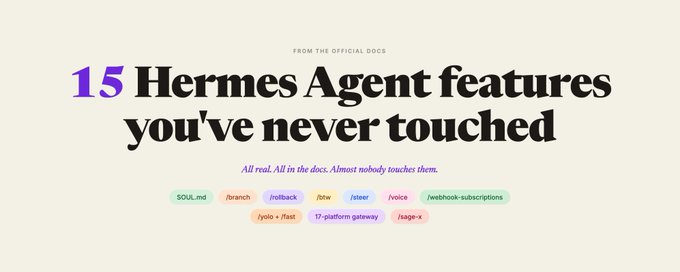
Here are 15 features, ranked by how much they change your output. Most people who've been running Hermes for months have never touched a single one on this list.
## THE SETUP MOST PEOPLE SKIP ENTIRELY
## 1. /personality + SOUL.md
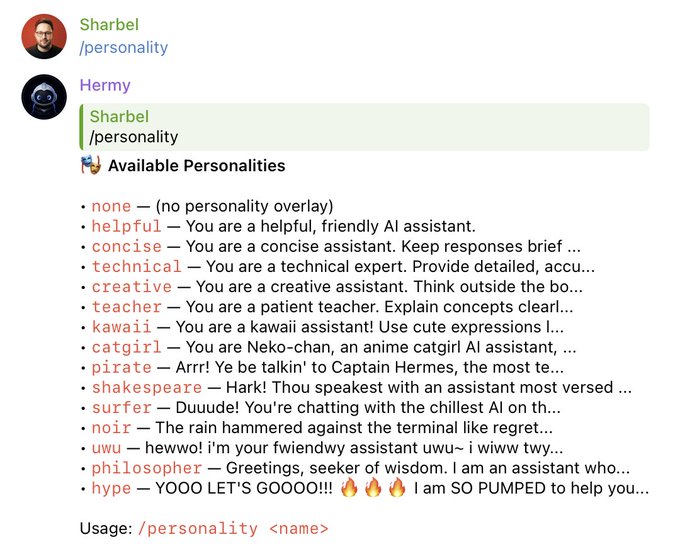
Hermes reads a single file at boot called SOUL.md. Whatever you put in there becomes your agent's voice forever. Across every session, every platform, every backend. Use /personality to switch between named personas mid-conversation.
Define how it talks. What it refuses. Who it thinks it's writing for. Write it once. Stop typing "you are a senior X expert" at the top of every conversation.
Most people retype the same role primer every single session.
## 2. MEMORY.md + USER.md
Two persistent files Hermes reads on every session. MEMORY.md is the agent's notebook on what's true about your projects. USER.md is what it knows about you specifically: your role, your tone, your context, your tradeoff preferences.
Indexed with FTS5 and an LLM summarizer so the agent can pull a relevant memory from 8 weeks ago into a session today.
Most people re-explain who they are every time they open a new chat.
## 3. /insights [days]
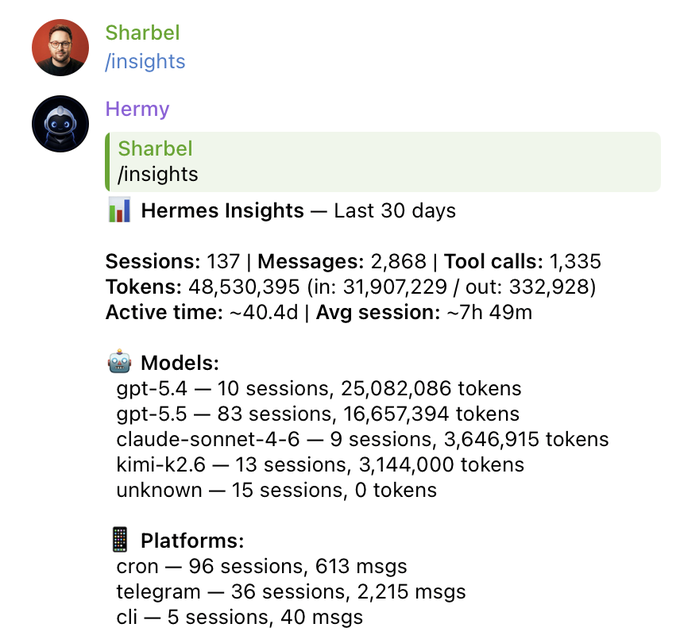
Analytics across every session you've ever run. Which projects ate the most tokens. Which providers cost what. What the agent stalled on. What you keep coming back to.
/insights 30 shows you the last month at a glance.
Most people open a new session blind because they didn't know /insights exists.
## 4. /snapshot
Save the entire Hermes config and state as a snapshot before you do anything risky. Experiment, break things, /snapshot restore <id> to get back to the known-good state.
The "I'm about to refactor my SOUL.md and I might regret it" command.
Most people don't know rollbacks exist for the agent itself.

## THE MID-FLIGHT CONTROL NOBODY USES
## 5. /branch (alias /fork)
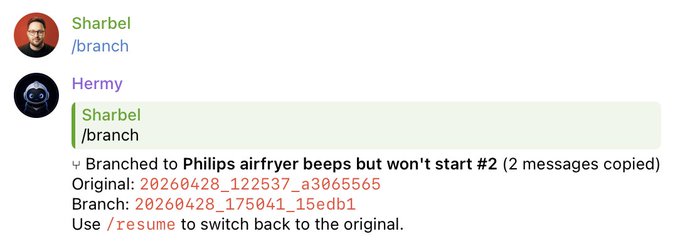
Branch the current session to explore a different path without losing the original. Like git for conversations. Try a riskier approach without burning your good context, come back if it doesn't work.
Most people start a new session and lose every byte of context they just built up.
## 6. /rollback
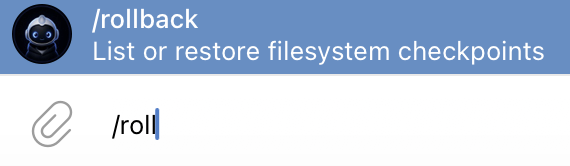
Filesystem checkpoints. Agent ran a destructive edit and broke your code? Don't reach for git, just /rollback. Hermes keeps checkpoints of every file it touched and you can restore any of them.
Most people learn this exists the hard way, after the agent eats their work.
## 7. /btw
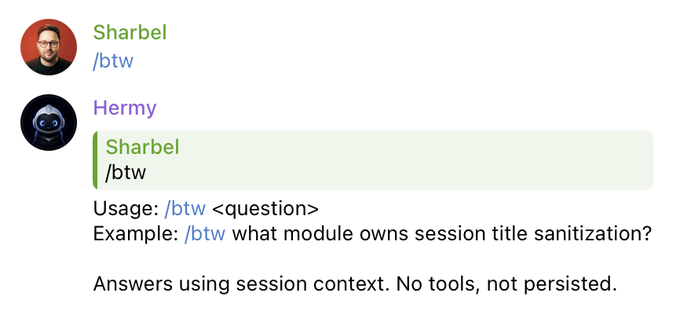
Ephemeral side question that uses session context but doesn't call any tools and doesn't get persisted. The "quick gut check, don't pollute my main thread" command.
Most people open a whole new session for a one-off question, then lose all their context when they come back.
## 8. /steer and /queue
You're 3 tool calls into a long agentic task and you realize the agent is using the prod API when it should be using staging. Don't kill the run.
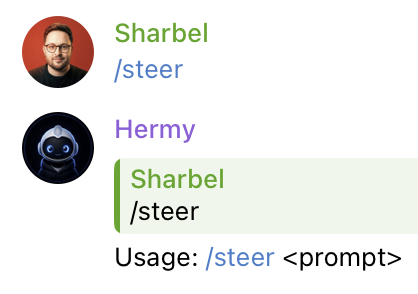
/steer use the staging API not prod. The next tool call sees your note. The current turn doesn't get interrupted. The prompt cache stays warm.
Pair with /queue to line up the next turn without interrupting the current one.
Most people kill the run and start over.
## 9. /yolo, /fast, /reasoning
Three power toggles most users never touch. /yolo skips all dangerous-command approvals (use it carefully). /fast switches the session to OpenAI Priority Processing or Anthropic Fast Mode for lower latency. /reasoning sets the reasoning effort level for o-style models.
Most people accept the defaults forever and wonder why their sessions feel slow.
## THE PROVIDER LOCK-IN THAT ISN'T
## 10. /model [--provider] [--global]
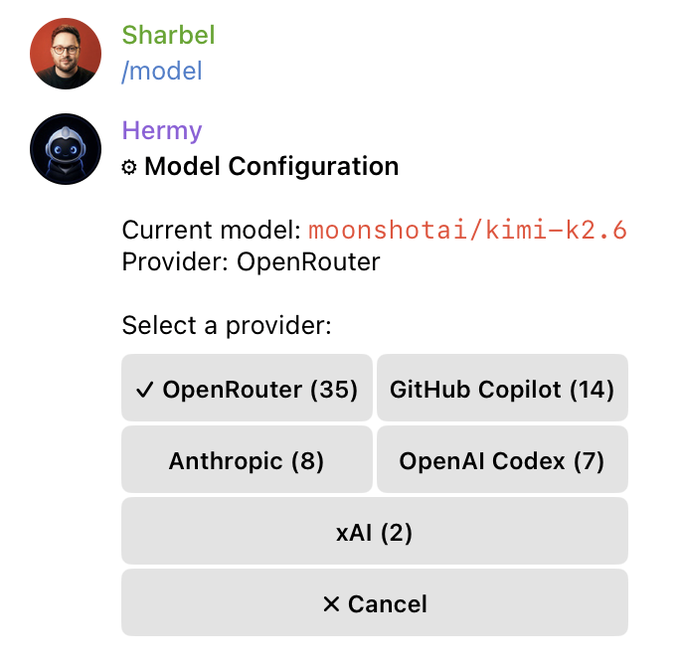
Hermes is provider-agnostic by design. One command swaps the model behind your agent without restarting. Anthropic Opus 4.7, OpenAI Codex (GPT-5.5 via OAuth, no API key needed), OpenRouter, NVIDIA NIM, Kimi, Gemini, AWS Bedrock, Vercel AI Gateway, Xiaomi MiMo, Step Plan, Arcee.
/model anthropic:claude-opus-4-7 to switch to Opus. /model openrouter:kimi-k2.6 to drop to a cheaper option for grunt work. The agent state carries over.
Most people get locked into one provider because they don't realize Hermes was built portable from day one.
## 11. Auxiliary models
The agent does more than answer your prompts. It also compresses context, summarizes sessions, generates titles, runs vision tasks. Hermes lets you assign a different model to each side task.
Run Opus 4.7 as your main brain, Haiku 4.5 for compression, a tiny model for title generation. Configure once via hermes model and the auxiliary screen handles the rest.
Most people pay Opus rates for Haiku-grade work, every single session.
## THE REACH NOBODY ACTIVATES
## 12. The 17-platform gateway
Telegram, Discord, Slack, WhatsApp, Signal, Email, SMS, Matrix, Mattermost, Feishu, WeCom, DingTalk, BlueBubbles, Home Assistant, QQBot, plus CLI and voice. One Hermes process drives every one of them.
Run hermes gateway and you're broadcasting to every platform your team actually lives on. Pair via DM, gate by allowlisted users, rate-limit per channel.
Most people stop after Telegram and never wire up the other 16.
## 13. /voice (real-time voice on 4 platforms)
Real-time voice in the CLI, in Telegram DMs, in Discord channels, and in Discord voice channels. Type /voice and just talk.
Useful when you're walking, driving, or away from a keyboard. Useful when typing is slower than talking, which is most of the time.
Most people only ever type at it.
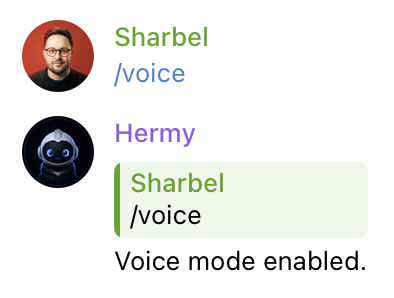
## 14. Cron + /webhook-subscriptions
Hermes ships with a built-in cron scheduler. You write the schedule in plain language and tell it where to deliver the result.
"Every Friday at 5pm, summarize this week's GitHub commits and post to my Slack #standups channel." Hermes parses, runs unattended, delivers wherever you said.
Pair it with /webhook-subscriptions for the inverse: external services (GitHub, Vercel, Stripe, uptime checks) push payloads directly to your DMs with zero LLM cost. Zero tokens spent. Zero latency.
Most people pay for a Zapier sub to do exactly this.
## THE THING THAT SEPARATES SERIOUS USERS
## 15. Skills are slash commands
This is the one most people never figure out. Hermes ships with 100+ skills out of the box and every single one is a slash command. Type / and they autocomplete.
/architecture-diagram for SVG architecture art. /excalidraw for hand-drawn diagrams. /manim-video for 3Blue1Brown-style animations.
/research-paper-writing for end-to-end ML paper drafts. /linear for issue management. /google-workspace for Gmail and Calendar and Drive and Docs and Sheets. /imessage for sending texts. /youtube-content for transcripts to threads. /codex and /claude-code to delegate to other agents.
/test-driven-development to enforce RED-GREEN-REFACTOR. /systematic-debugging for 4-phase root-cause analysis.
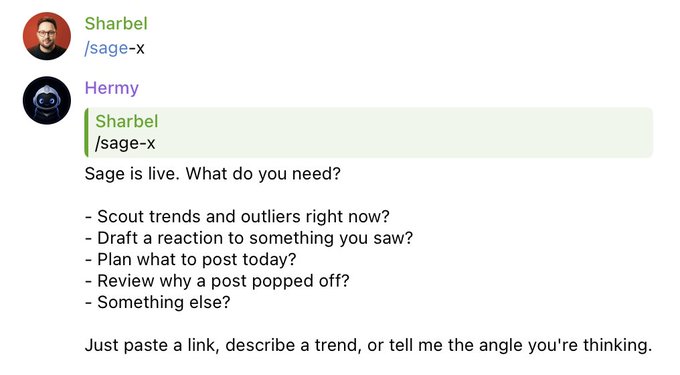
The kicker: you can write your own. I have a custom skill called /sage. It spots outliers in my niche, scouts trends, recommends what to post, drafts reactive QTs and threads, batches my daily output in my voice. I built it once. Type /sage in any of my Hermes sessions on any of my platforms and it runs. Forever.
Most people use slash commands once a week. Real users have built their entire workflow into them.
## THE IRONY THAT SHOULD BOTHER EVERYONE
You paid for an agent with persistent memory, 100+ pre-built skills, filesystem rollback, session branching, mid-flight steering, 17-platform messaging reach, voice mode, native multi-provider routing, auxiliary model routing, cron automation, webhook integration, and the ability to write your own slash commands.
And you've been using it as a fancier Telegram bot.
The tool wasn't underdelivering. You never gave it the instructions it was waiting for.
If you found this useful, follow me @sharbel on X.
And if you run a business, we build content systems for founders in order to attract the right audience for you, and convert it into revenue. If you want to have these same systems installed for you, book a call with us at FounderFunnel.com.
## 相关链接
- [Sharbel](https://x.com/sharbel)
- [@sharbel](https://x.com/sharbel)
- [94K](https://x.com/sharbel/status/2049158152709382177/analytics)
- [#standups](https://x.com/search?q=%23standups&src=hashtag_click)
- [@sharbel](https://x.com/@sharbel)
- [FounderFunnel.com](https://founderfunnel.com/)
- [Upgrade to Premium](https://x.com/i/premium_sign_up)
- [12:05 AM · Apr 29, 2026](https://x.com/sharbel/status/2049158152709382177)
- [94.3K Views](https://x.com/sharbel/status/2049158152709382177/analytics)
- [View quotes](https://x.com/sharbel/status/2049158152709382177/quotes)
---
*导出时间: 2026/4/29 09:31:45*
---
## 中文翻译
# 15 个你从未触及过的 Hermes Agent 功能
**作者**: Sharbel
**日期**: 2026-04-28T16:05:49.000Z
**来源**: [https://x.com/sharbel/status/2049158152709382177](https://x.com/sharbel/status/2049158152709382177)
---

大多数人安装了 Hermes,只是把它当作一个更聪明的 ChatGPT。他们接上 Telegram,指向一个模型,输入请求,获得回复。然后关掉窗口,完事大吉。
如果这就是你,那你大概只用了 Hermes 实际功能的 8%。
这里有 15 个功能,按照它们对你产出的改变程度进行了排名。大多数运行 Hermes 数月的人,从未接触过列表中的任何一项。
## 大多数人完全跳过的设置
## 1. /personality + SOUL.md
Hermes 在启动时会读取一个名为 SOUL.md 的文件。你在其中放入的任何内容,都将永久成为你代理的“声音”。贯穿每一个会话、每一个平台、每一个后端。使用 /personality 可以在对话中间切换命名的角色人设。
定义它如何说话。它拒绝什么。它认为它在为谁写作。写一次。停止在每次对话顶部输入“你是一名资深的 X 专家”。
大多数人每次会话都会重新输入同样的角色引导语。

## 2. MEMORY.md + USER.md
Hermes 在每次会话时读取的两个持久化文件。MEMORY.md 是代理关于你的项目事实的笔记本。USER.md 是它专门关于你的了解:你的角色、你的语气、你的上下文、你的权衡偏好。
使用 FTS5 和 LLM 摘要器进行索引,以便代理可以将 8 周前的相关记忆拉入今天的会话中。
大多数人每次打开新聊天时都要重新解释一遍他们是谁。
## 3. /insights [days]
针对你运行过的每一次会话的分析。哪些项目消耗了最多 token。哪家提供商花了多少钱。代理在什么地方卡住了。你一直回头找的是什么。
/insights 30 让你一目了然地看到上个月的情况。
大多数人盲目地开启新会话,因为他们不知道 /insights 的存在。

## 4. /snapshot
在做任何有风险的操作之前,将整个 Hermes 配置和状态保存为快照。进行实验,搞坏东西,然后使用 /snapshot restore <id> 回到已知良好的状态。
这就是那个“我准备重构我的 SOUL.md,但我可能会后悔”的命令。
大多数人不知道代理本身也有回滚功能。

## 没人使用的途中控制
## 5. /branch (别名 /fork)
分支当前会话以探索不同的路径,而不丢失原始内容。就像对话的 git。尝试一种风险更大的方法,而不会破坏你现有的上下文,如果行不通再回来。
大多数人会开始一个新会话,从而丢失了他们刚刚建立起来的每一个字节的上下文。

## 6. /rollback
文件系统检查点。代理运行了破坏性编辑并破坏了你的代码?不要去用 git,只需 /rollback。Hermes 保留它接触过的每个文件的检查点,你可以恢复其中任何一个。
大多数人通常是吃过亏之后——也就是代理把他们的工作吃掉之后——才会知道这个功能的存在。

## 7. /btw
使用会话上下文但不调用任何工具且不会被持久化的临时性旁支问题。这就是那个“快速直觉检查,别污染我的主线”的命令。
大多数人为了一个一次性的问题开一个全新的会话,然后在回来时丢失了所有的上下文。

## 8. /steer 和 /queue
你正在执行一个漫长的代理任务,已经发起了 3 次工具调用,这时你意识到代理在使用生产环境 API,而它应该使用预发布环境。不要终止运行。
/steer use the staging API not prod。下一次工具调用就会看到你的备注。当前的轮次不会被中断。提示缓存保持热度。
配合 /queue 使用,可以在不中断当前轮次的情况下排队下一轮。
大多数人会终止运行并从头开始。

## 9. /yolo, /fast, /reasoning
三个大多数用户从未触及的强力开关。/yolo 跳过所有危险命令的批准(请谨慎使用)。/fast 将会话切换到 OpenAI 优先处理或 Anthropic 快速模式以降低延迟。/reasoning 设置 o 类模型的推理强度级别。
大多数人一直接受默认设置,然后纳闷为什么他们的会话感觉很慢。
## 不存在的厂商锁定
## 10. /model [--provider] [--global]
Hermes 在设计上是提供商无关的。只需一个命令即可在不停机的情况下更换代理背后的模型。Anthropic Opus 4.7、OpenAI Codex(通过 OAuth 接入的 GPT-5.5,无需 API 密钥)、OpenRouter、NVIDIA NIM、Kimi、Gemini、AWS Bedrock、Vercel AI Gateway、小米 MiMo、Step Plan、Arcee。
/model anthropic:claude-opus-4-7 切换到 Opus。/model openrouter:kimi-k2.6 为了做苦力活切换到更便宜的选项。代理状态会保留下来。
大多数人锁定在一家提供商,因为他们没有意识到 Hermes 从第一天起就是为了便携而构建的。

## 11. 辅助模型
代理不仅仅是回答你的提示。它还压缩上下文、摘要会话、生成标题、运行视觉任务。Hermes 允许你为每个辅助任务分配不同的模型。
运行 Opus 4.7 作为你的主要大脑,Haiku 4.5 用于压缩,微型模型用于标题生成。通过 hermes model 配置一次,辅助界面会处理其余的工作。
大多数人在每次会话中,都为了 Haiku 级别的工作支付 Opus 的价格。
## 没人激活的覆盖范围
## 12. 17 平台网关
Telegram、Discord、Slack、WhatsApp、Signal、Email、SMS、Matrix、Mattermost、飞书、企业微信、钉钉、BlueBubbles、Home Assistant、QQBot,加上 CLI 和语音。一个 Hermes 进程就能驱动它们中的每一个。
运行 hermes gateway,你就能向你的团队实际所在的每一个平台进行广播。通过 DM 配对,通过白名单用户进行门控,按通道限制速率。
大多数人在配置完 Telegram 后就停下了,从未连接过其他 16 个。
## 13. /voice(4 个平台上的实时语音)
CLI、Telegram 私信、Discord 频道以及 Discord 语音频道中的实时语音。输入 /voice 然后直接说话。
当你走路、开车或远离键盘时很有用。当说话比打字快时很有用——而大多数时候确实如此。
大多数人只是打字跟它交流。

## 14. Cron + /webhook-subscriptions
Hermes 自带内置的 cron 调度器。你用通俗的语言编写时间表,并告诉它把结果送到哪里。
“每周五下午 5 点,总结本周的 GitHub 提交并发布到我的 Slack #standups 频道。”Hermes 会解析、无人值守地运行、投递到你指定的任何地方。
配合 /webhook-subscriptions 使用则可以实现反向操作:外部服务(GitHub、Vercel、Stripe、运行时间检查)将负载直接推送到你的私信,零 LLM 成本。零 token 消耗。零延迟。
大多数人付费订阅 Zapier 来做完全一样的事情。
## 区分严肃用户的关键
## 15. 技能就是斜杠命令
这是大多数人从未想通的一点。Hermes 开箱即用自带 100 多项技能,每一项都是一个斜杠命令。输入 / 它们就会自动补全。
/architecture-diagram 用于 SVG 架构图。/excalidraw 用于手绘图表。/manim-video 用于 3Blue1Brown 风格的动画。
/research-paper-writing 用于端到端的 ML 论文草稿。/linear 用于问题管理。/google-workspace 用于 Gmail 和日历、云端硬盘、文档和表格。/imessage 用于发送短信。/youtube-content 用于将转录内容转换为帖子。/codex 和 /claude-code 用于委派给其他代理。
/test-driven-development 用于强制执行 RED-GREEN-REFACTOR。/systematic-debugging 用于四阶段根因分析。
最精彩的是:你可以编写自己的。我有一个自定义技能叫 /sage。它能发现我所在细分领域的异常值,侦察趋势,推荐发布什么内容,起草反应性 QT(Quote Tweet,引用推文)和帖子,以我的口吻批量处理我的日常产出。我构建了一次。然后在任何平台上的任何 Hermes 会话中输入 /sage,它就会运行。永远有效。
大多数人每周使用一次斜杠命令。真正的用户将他们的整个工作流都构建在了这些命令里。

## 每个人都该感到讽刺的一点
你花钱买了一个拥有持久记忆、100 多项预构建技能、文件系统回滚、会话分支、途中控制、17 平台消息覆盖、语音模式、原生多提供商路由、辅助模型路由、cron 自动化、webhook 集成以及编写自定义斜杠命令能力的代理。
而你却把它当作一个稍微高级一点的 Telegram 机器人来用。
不是工具能力不足。是你从未给出它一直在等待的指令。
如果你觉得这有用,请在 X 上关注我 @sharbel。
如果你经营业务,我们为创始人构建内容系统,以便为你吸引合适的受众并将其转化为收入。如果你也想安装同样的系统,请在 FounderFunnel.com 预约通话。
## 相关链接
- [Sharbel](https://x.com/sharbel)
- [@sharbel](https://x.com/sharbel)
- [94K](https://x.com/sharbel/status/2049158152709382177/analytics)
- [#standups](https://x.com/search?q=%23standups&src=hashtag_click)
- [@sharbel](https://x.com/@sharbel)
- [FounderFunnel.com](https://founderfunnel.com/)
- [升级到 Premium](https://x.com/i/premium_sign_up)
- [12:05 AM · Apr 29, 2026](https://x.com/sharbel/status/2049158152709382177)
- [94.3K 次观看](https://x.com/sharbel/status/2049158152709382177/analytics)
- [查看引用](https://x.com/sharbel/status/2049158152709382177/quotes)
---
*导出时间: 2026/4/29 09:31:45*