# How Memory Works in Codex CLI
**作者**: mem0
**日期**: 2026-05-13T15:10:24.000Z
**来源**: [https://x.com/mem0ai/status/2054580022049198513](https://x.com/mem0ai/status/2054580022049198513)
---
Codex CLI ships a generated, async-summarized memory store at ~/.codex/memories/
It's a first-party feature:
- documented at developers.openai.com/codex
- and fully open-sourced at github.com/openai/codex.
In this In Context article, we walk through how memory is handled in Codex CLI.
Codex is OpenAI's coding agent and it ships in three variants: a CLI, an IDE extension, and a cloud workspace inside ChatGPT.
The CLI is the most heavily documented surface and its memory internals are open-sourced so that's the one we look at here. Most of what follows applies transitively to the IDE extension, which shares the same ~/.codex/ config and memory layout.
## The Memories architecture
Codex's memory lives in one directory: ~/.codex/memories/. The directory holds a fixed set of markdown files. No SQLite, no embedding index or opaque blobs.
The files that matter:
- memory_summary.md: the consolidated view the next session reads first
- MEMORY.md: the long-form merged memory file, grepped on demand
- raw_memories.md: pre-consolidation extraction output
- skills/<name>/SKILL.md: skill-specific memories
- rollout_summaries/<slug>.md: per-session summaries that feed the consolidation pass
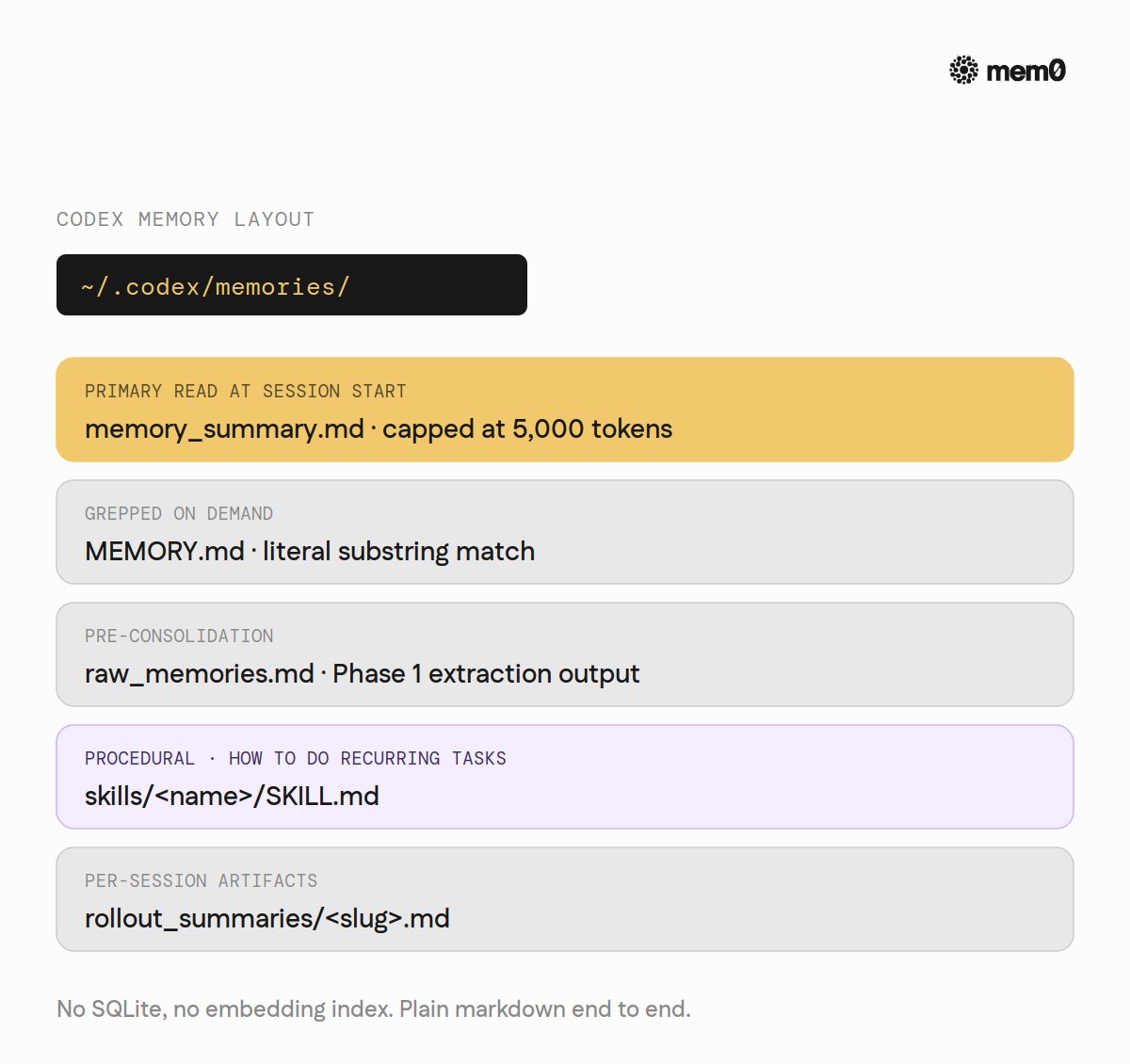
That's the whole memory layer. Everything else is the pipeline that fills it and the read path that pulls from it.
## How memories are written
The write path splits into two phases.
Phase 1 is per-rollout. When a session has been idle long enough (six hours by default), Codex claims a startup job, samples the conversation against a strict-schema extraction prompt, runs every output through a secret-redactor, and stores the result in a local state database. Nothing reaches the memory directory yet.
Phase 2 is global. It acquires a global lock (held in the state DB) so two consolidation passes never run in parallel. It loads recent Phase 1 outputs, syncs them to disk, checks whether the resulting workspace actually differs from what's there, and only then spawns a separate consolidation sub-agent. The sub-agent reads the candidates, decides what to merge, what to patch, what to drop, and writes the diff back to ~/.codex/memories/.
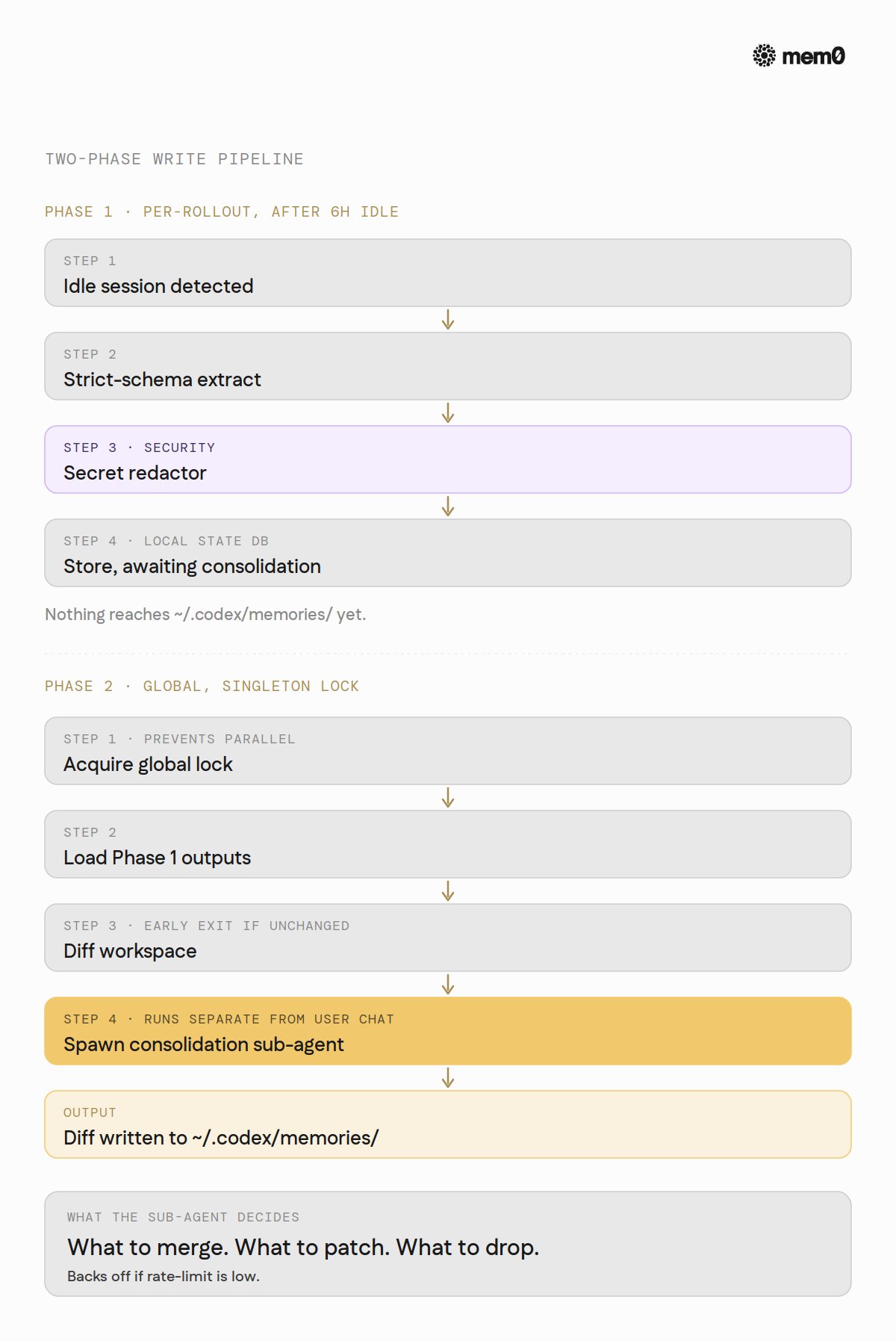
Both phases use configurable models (extract_model for Phase 1, consolidation_model for Phase 2), and the consolidation pass runs as a separate sub-agent rather than inline with the user's chat.
## How memories are loaded
At session start, Codex reads memory_summary.md whole, truncates it to fit a fixed 5,000-token budget (a constant defined in the read-path crate, not in the public docs), and injects the result into the developer instructions. That truncated summary is the entirety of what the agent gets pre-loaded.
For anything not in the summary, the agent is instructed to grep MEMORY.md directly. The read-path template tells the agent: extract keywords from the summary, search MEMORY.md, open relevant rollout-summary files if pointed to, stop if nothing matches. The whole search budget is kept under a small number of steps.
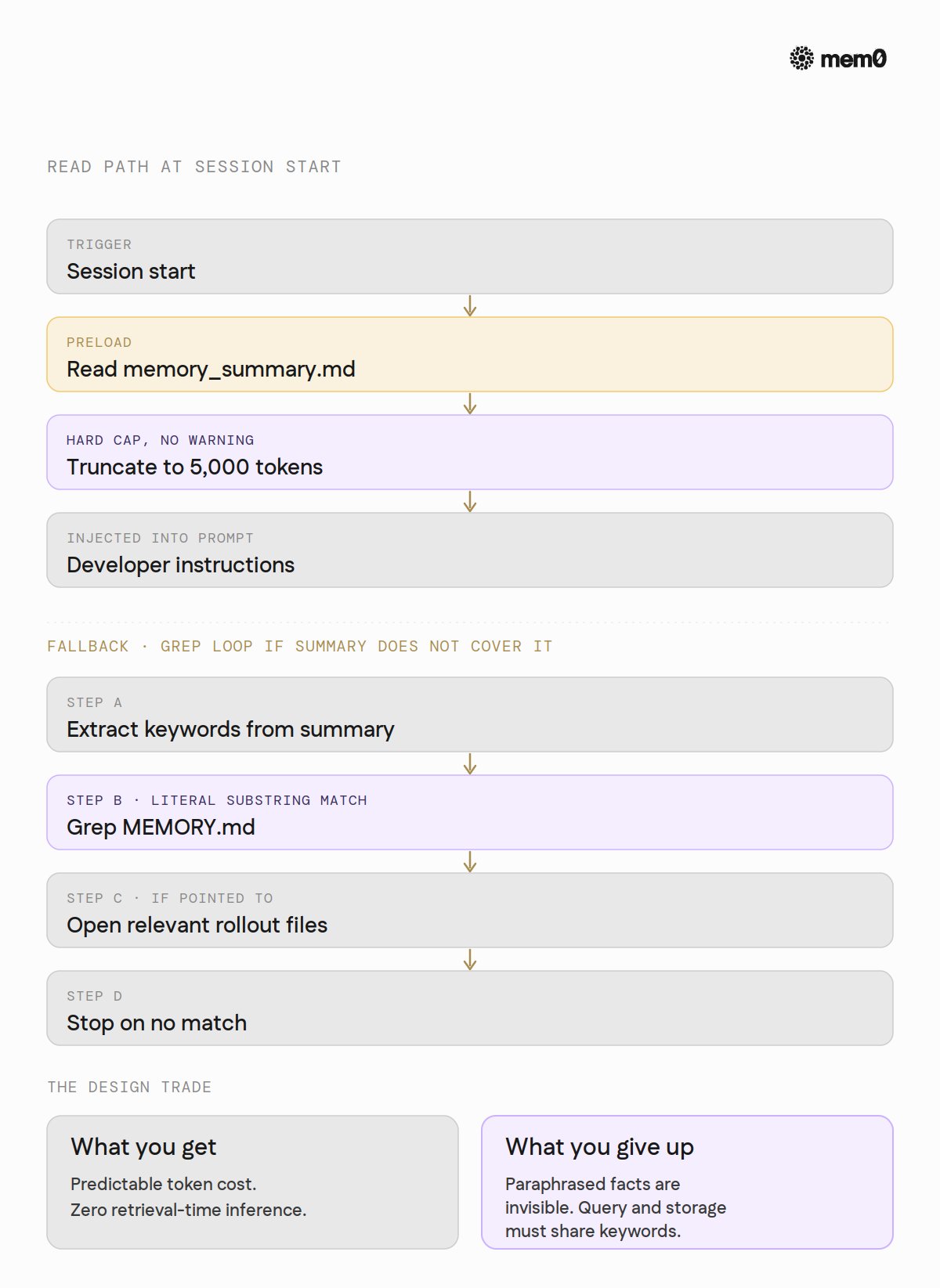
There is no embedding store, no similarity search, no rerank step. It's plain text and substring matching, by design. The trade is predictability and zero retrieval-time cost in exchange for not finding facts whose query and stored phrasing don't share keywords.
## The mechanics that govern it
A handful of configuration knobs control everything above. Worth knowing before relying on the system.
- Off by default. A master features.memories flag has to be turned on. Once on, two sub-switches govern the runtime: generate_memories (write) and use_memories (read). Both default to true after the feature is enabled.
- Idle threshold. min_rollout_idle_hours (default 6) sets the minimum idle time before a session is eligible for Phase 1. Active sessions never trigger it.
- Consolidation caps. max_raw_memories_for_consolidation (default 256, capped at 4,096) bounds how many recent rollouts the consolidation pass considers per run.
- Aging. max_rollout_age_days (default 30) stops considering threads older than that for memory generation. max_unused_days (default 30) makes memories that haven't been recalled in that window ineligible for the next consolidation pass.
- Rate-limit-aware. min_rate_limit_remaining_percent (default 25) backs off consolidation when the user's API quota is low, so background work never starves foreground requests.
- Secret redaction. Built-in scrubbing for credentials before any memory hits disk.
- Geographic limit. At launch, Memories is not available in the EEA, UK, or Switzerland. Users in those regions don't have access at all.
## Where it stops
The shortest framing: this memory system is not robust. It's a single user's markdown files inside a fixed token budget, and most of the failure modes follow from that.
- Hard token cap on what's loaded. memory_summary.md is truncated to 5,000 tokens at every session start. Anything past the cap is silently dropped. No warning, no log. The agent simply doesn't see it.
- Keyword-only fallback. Anything that didn't make it into the summary has to be findable in MEMORY.md by literal substring match. Paraphrased facts are invisible. "What's our deploy command?" will not find "production deploys go through make ship-prod" unless one of those exact terms is stored.
- Grep cost grows with the file. MEMORY.md is searched linearly. For a long-lived user with months of accumulated memories, every miss-then-grep costs more.
- Generated state only, not editable. The docs frame ~/.codex/memories/ as Codex-managed. Hand-editing memories is not the supported path. Anything the user actually wants the agent to always know goes in AGENTS.md instead.
- Idle-gate fragility. Sessions need to sit idle six hours before they become eligible for consolidation. A developer working in back-to-back coding sprints may never trigger it.
- Local-only state. ~/.codex/memories/ is per-user, per-machine filesystem state. No cross-machine sync, no team sharing, no remote backing store.
- Geographic gate. Memories is blocked in EEA, UK, and Switzerland at launch.
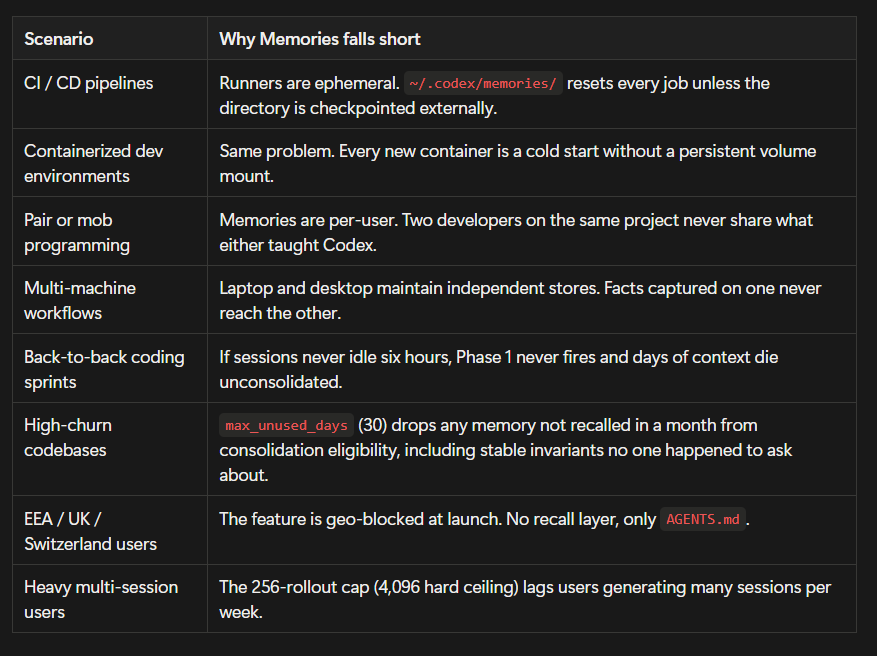
Production scenarios that hit these limits
The structural limits matter most in concrete cases that show up in real teams.
## How Mem0 fits
Mem0 is a memory layer that sits between the agent and a persistent store.
For Codex specifically, there is a MCP integration documented at docs.mem0.ai/integrations/codex.
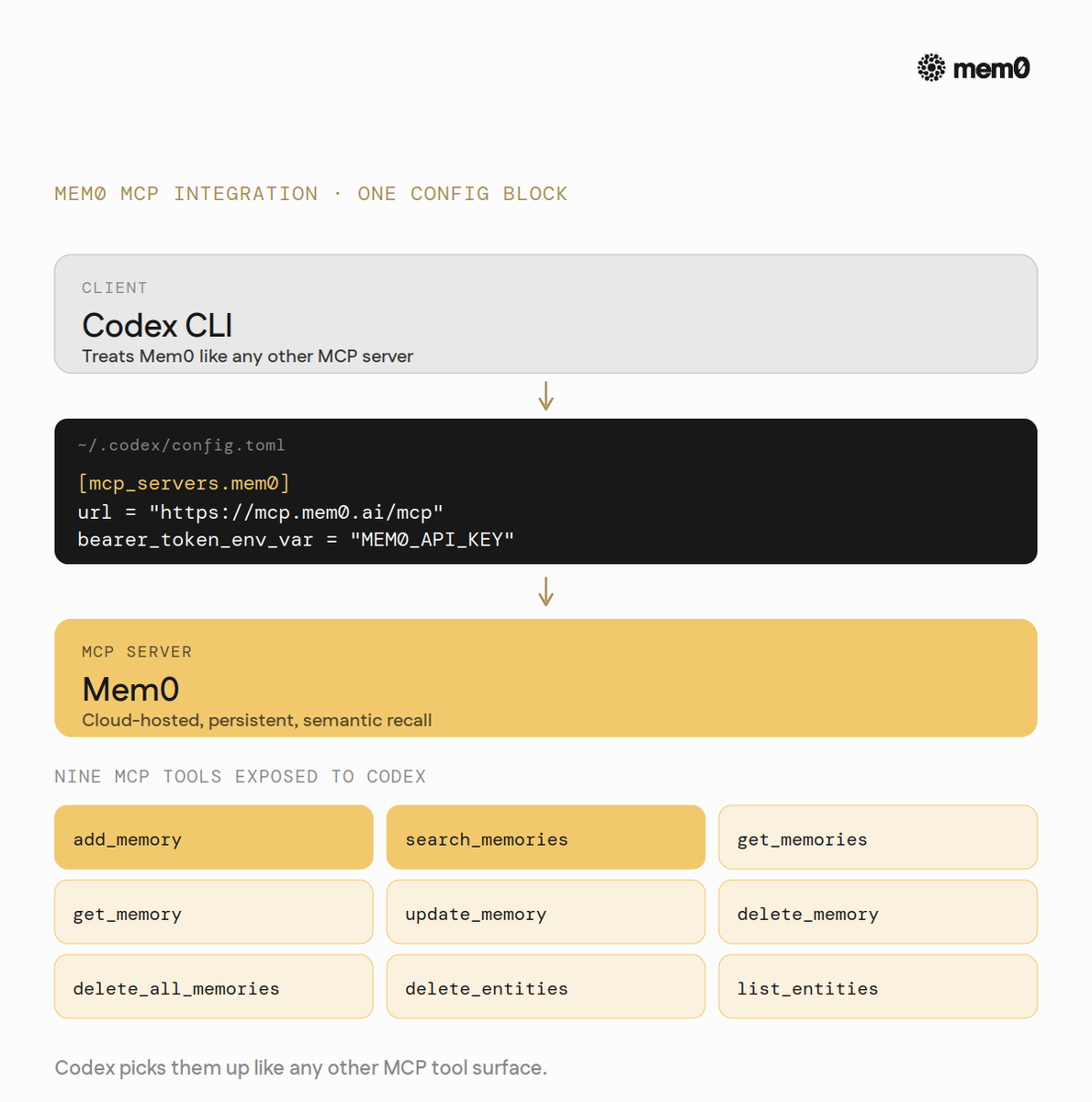
Codex CLI supports MCP servers natively. They're configured in ~/.codex/config.toml under [mcp_servers.<name>] (config-reference). The minimal Mem0 setup is one block:
```
[mcp_servers.mem0]
url = "https://mcp.mem0.ai/mcp"
bearer_token_env_var = "MEM0_API_KEY"
```
That single block exposes nine MCP tools to Codex: add_memory, search_memories, get_memories, get_memory, update_memory, delete_memory, delete_all_memories, delete_entities, list_entities.
Codex's agent picks them up the same way it picks up any other MCP tool surface.
What changes underneath:
- Persistent, cross-machine memory. The local ~/.codex/memories/ ceiling is gone. The same Mem0 store follows the user across laptops, servers, and CI environments. No regeneration from scratch on a new machine.
- Cross-tool memory. A user running Codex CLI for terminal work and Cursor for editor work can point both at the same Mem0 backend. A fact captured during a Codex CLI session ("the staging deploy script swallows errors silently, prefer the production-style output for the same diagnostic") surfaces inside the next Cursor Agent run on the same project. The user doesn't have to copy anything between the two tools.
- Semantic recall. Mem0 retrieves by meaning, via an embedding-backed search. Codex's native recall reads memory_summary.md whole and falls back to grep over MEMORY.md: fast and predictable, but unable to find a stored fact whose phrasing differs from the query. With Mem0, asking "what's our deploy command?" finds "production deploys go through make ship-prod" even though the words don't overlap.
- Per-user isolation. Each user's userId scopes their memory. Three teammates with the same Mem0 backend keep separate stores.
- No 5,000-token summary cap. Retrieval is ranked semantic search over the actual store, not a whole-file load of a single summary file. Large memory bases stay usable instead of being truncated to fit the developer-instructions budget.
- Real-time updates. Mem0 writes memories as the conversation happens, not on a six-hour idle gate. The next session sees what the last one taught it.
- Available where Memories isn't. EEA, UK, and Switzerland users get a memory layer that doesn't depend on Codex's regional rollout.
Codex CLI's memory layer is carefully designed in the coding agent space today: two-phase background consolidation, secret redaction, a grep-based read path with predictable token cost, and a pipeline that's open-source end-to-end.
If you're running Codex CLI today and any of those gaps look familiar, the Mem0 integration takes about a minute [docs.mem0.ai/integrations/codex]
In Context #9
This blog is part of In Context, a @mem0ai blog series covering AI Agent memory and context engineering.
@mem0ai is an intelligent, open-source memory layer designed for LLMs and AI agents to provide long-term, personalized, and context-aware interactions across sessions.
- Get your free API key here: app.mem0.ai
- or self-host mem0 from our open source github repository.
## 相关链接
- [mem0](https://x.com/mem0ai)
- [@mem0ai](https://x.com/mem0ai)
- [36K](https://x.com/mem0ai/status/2054580022049198513/analytics)
- [developers.openai.com/codex](https://developers.openai.com/codex)
- [github.com/openai/codex](https://github.com/openai/codex)
- [docs.mem0.ai/integrations/codex](https://docs.mem0.ai/integrations/codex)
- [config-reference](https://developers.openai.com/codex/config-reference)
- [docs.mem0.ai/integrations/codex](https://docs.mem0.ai/integrations/codex)
- [@mem0ai](https://x.com/@mem0ai)
- [@mem0ai](https://x.com/@mem0ai)
- [app.mem0.ai](https://app.mem0.ai/login?utm_source=x_article_mem0g&utm_medium=launch&utm_campaign=codex_memory&utm_content=codex_memory)
- [open source github repository](https://github.com/mem0ai/mem0)
- [Upgrade to Premium](https://x.com/i/premium_sign_up)
- [11:10 PM · May 13, 2026](https://x.com/mem0ai/status/2054580022049198513)
- [36.8K Views](https://x.com/mem0ai/status/2054580022049198513/analytics)
- [View quotes](https://x.com/mem0ai/status/2054580022049198513/quotes)
---
*导出时间: 2026/5/14 16:41:07*
---
## 中文翻译
# Codex CLI 中的记忆是如何工作的
**作者**: mem0
**日期**: 2026-05-13T15:10:24.000Z
**来源**: [https://x.com/mem0ai/status/2054580022049198513](https://x.com/mem0ai/status/2054580022049198513)
---

Codex CLI 在 ~/.codex/memories/ 下附带了一个生成的、经过异步汇总的记忆存储。
这是一个第一方功能:
- 在 developers.openai.com/codex 上有文档说明
- 并在 github.com/openai/codex 上完全开源。
在这篇《In Context》文章中,我们将介绍 Codex CLI 中的记忆是如何处理的。
Codex 是 OpenAI 的编码代理,它有三个版本:CLI、IDE 扩展程序以及 ChatGPT 内部的云工作区。
CLI 是文档最完善的版本,其记忆内部机制是开源的,因此这是我们在此处查看的对象。以下大部分内容也传递式适用于 IDE 扩展程序,因为它共享相同的 ~/.codex/ 配置和内存布局。
## 记忆架构
Codex 的记忆位于一个目录中:~/.codex/memories/。该目录保存一组固定的 markdown 文件。没有 SQLite,没有嵌入索引或不透明的二进制大对象。
重要的文件:
- memory_summary.md:下次会话首先读取的合并视图
- MEMORY.md:长格式的合并记忆文件,按需进行 grep 搜索
- raw_memories.md:合并前的提取输出
- skills/<name>/SKILL.md:特定于技能的记忆
- rollout_summaries/<slug>.md:供给合并过程的每个会话摘要

这就是整个记忆层。其他所有东西都是填充它的管道和从中提取数据的读取路径。
## 如何写入记忆
写入路径分为两个阶段。
阶段 1 是针对每个 rollout(部署/迭代)的。当会话空闲足够长的时间(默认为六小时)时,Codex 获取一个启动作业,根据严格的模式提取提示对对话进行采样,将每个输出通过密钥编辑器运行,并将结果存储在本地状态数据库中。此时还没有任何内容到达记忆目录。
阶段 2 是全局的。它获取一个全局锁(保存在状态 DB 中),因此两个合并过程永远不会并行运行。它加载最近的阶段 1 输出,将它们同步到磁盘,检查生成的工作区是否与现有的不同,只有在那时才生成一个单独的合并子代理。子代理读取候选项,决定合并什么、修补什么、丢弃什么,并将差异写回 ~/.codex/memories/。

这两个阶段都使用可配置的模型(阶段 1 使用 extract_model,阶段 2 使用 consolidation_model),并且合并过程作为一个单独的子代理运行,而不是内联于用户的聊天中。
## 如何加载记忆
在会话开始时,Codex 完整读取 memory_summary.md,将其截断以适应固定的 5,000 token 预算(在 read-path crate 中定义的常量,而非在公共文档中),并将结果注入到开发者指令中。该截断后的摘要是代理预先加载的全部内容。
对于摘要中未包含的任何内容,代理被指示直接 grep MEMORY.md。读取路径模板告诉代理:从摘要中提取关键字,搜索 MEMORY.md,如果指向则打开相关的 rollout-summary 文件,如果没有任何匹配则停止。整个搜索预算保持在很少的步骤内。

没有嵌入存储,没有相似性搜索,没有重排序步骤。设计上就是纯文本和子字符串匹配。这种权衡是以可预测性和零检索时间成本为代价,换取无法找到查询和存储措辞不共享关键字的事实。
## 控制记忆的机制
少数配置旋钮控制着上述所有内容。在依赖该系统之前值得了解。
- 默认关闭。必须打开主功能开关 features.memories。打开后,两个子开关控制运行时:generate_memories(写入)和 use_memories(读取)。启用功能后,两者默认都为 true。
- 空闲阈值。min_rollout_idle_hours(默认为 6)设置会话有资格进入阶段 1 之前的最短空闲时间。活动会话永远不会触发它。
- 合并上限。max_raw_memories_for_consolidation(默认为 256,上限为 4,096)限制了合并过程每次运行考虑的最近 rollout 数量。
- 老化。max_rollout_age_days(默认为 30)停止考虑超过该时间的线程用于记忆生成。max_unused_days(默认为 30)使得在该窗口内未被召回的记忆在下一轮合并中不合格。
- 感知速率限制。min_rate_limit_remaining_percent(默认为 25)在用户的 API 配额较低时推迟合并,因此后台工作永远不会使前台请求挨饿。
- 密钥编辑。在任何记忆写入磁盘之前,内置对凭据的擦洗。
- 地理限制。发布时,记忆功能在 EEA、英国或瑞士不可用。这些地区的用户根本无法访问。
## 它的局限性
最简单的概括:这个记忆系统并不健壮。它是一个固定 token 预算内的单个用户的 markdown 文件,大多数故障模式都源于此。
- 加载内容的硬 token 上限。memory_summary.md 在每次会话开始时都会被截断为 5,000 个 token。超过上限的任何内容都会被静默丢弃。没有警告,没有日志。代理根本看不到它。
- 仅关键字回退。任何未进入摘要的内容都必须可以通过字面子字符串匹配在 MEMORY.md 中找到。改写的事实是不可见的。“我们的部署命令是什么?”将找不到“生产部署通过 make ship-prod 进行”,除非存储了其中一个确切的术语。
- Grep 成本随文件增长。MEMORY.md 被线性搜索。对于拥有数月累积记忆的长期用户,每次未命中然后 grep 都会花费更多。
- 仅生成的状态,不可编辑。文档将 ~/.codex/memories/ 描述为由 Codex 管理。手动编辑记忆不是受支持的路径。用户实际上希望代理始终知道的任何内容都应放在 AGENTS.md 中。
- 空闲门控的脆弱性。会话需要空闲六小时才有资格进行合并。在连续的编码冲刺中工作的开发人员可能永远不会触发它。
- 仅限本地状态。~/.codex/memories/ 是每用户、每机器的文件系统状态。没有跨机器同步,没有团队共享,没有远程后备存储。
- 地理门控。发布时,记忆功能在 EEA、英国和瑞士被阻止。
达到这些限制的生产场景
结构限制在最具体的实际案例中最为重要。

## Mem0 如何适配
Mem0 是位于代理和持久存储之间的记忆层。
特别是对于 Codex,有一个在 docs.mem0.ai/integrations/codex 上记录的 MCP 集成。
Codex CLI 原生支持 MCP 服务器。它们在 ~/.codex/config.toml 中的 [mcp_servers.<name>] 下进行配置(config-reference)。最小的 Mem0 设置只需一个代码块:
```
[mcp_servers.mem0]
url = "https://mcp.mem0.ai/mcp"
bearer_token_env_var = "MEM0_API_KEY"
```
这单个代码块向 Codex 暴露了九个 MCP 工具:add_memory、search_memories、get_memories、get_memory、update_memory、delete_memory、delete_all_memories、delete_entities、list_entities。
Codex 的代理就像拾取任何其他 MCP 工具表面一样拾取它们。

底层发生了什么变化:
- 持久的、跨机器的记忆。本地 ~/.codex/memories/ 的天花板消失了。相同的 Mem0 存储跟随用户跨越笔记本电脑、服务器和 CI 环境。无需在新机器上从头重新生成。
- 跨工具记忆。运行 Codex CLI 进行终端工作和使用 Cursor 进行编辑器工作的用户可以将两者指向同一个 Mem0 后端。在 Codex CLI 会话期间捕获的事实(“暂存部署脚本默默地吞没错误,对于相同的诊断更喜欢生产风格的输出”)会在同一项目上的下一次 Cursor Agent 运行中浮现。用户不必在两个工具之间复制任何内容。
- 语义召回。Mem0 通过嵌入支持的搜索按含义检索。Codex 的原生召回完整读取 memory_summary.md 并回退到 grep 搜索 MEMORY.md:快速且可预测,但无法找到措辞与查询不同的存储事实。使用 Mem0,询问“我们的部署命令是什么?”即使单词不重叠也能找到“生产部署通过 make ship-prod 进行”。
- 每用户隔离。每个用户的 userId 限定其记忆范围。拥有相同 Mem0 后端的三个队友保持独立的存储。
- 没有 5,000 token 的摘要上限。检索是对实际存储的排名语义搜索,而不是对单个摘要文件的整文件加载。大型记忆库保持可用,而不是被截断以适应开发者指令预算。
- 实时更新。Mem0 在对话发生时写入记忆,而不是在六小时的空闲门控上。下一次会话能看到上一次会话教给它的内容。
- 在记忆功能不可用的地方可用。EEA、英国和瑞士的用户可以获得不依赖 Codex 区域发布的记忆层。
Codex CLI 的记忆层目前在编码代理领域设计得非常周到:两阶段后台合并、密钥编辑、具有可预测 token 成本的基于 grep 的读取路径,以及端到端开源的管道。
如果您今天正在运行 Codex CLI,并且这些差距中有任何看起来很熟悉,Mem0 集成大约需要一分钟 [docs.mem0.ai/integrations/codex]
In Context #9
本博客是《In Context》的一部分,这是一个 @mem0ai 博客系列,涵盖 AI Agent 记忆和上下文工程。
@mem0ai 是一个智能的、开源的记忆层,专为 LLM 和 AI 代理设计,以提供跨会话的长期、个性化和上下文感知的交互。
- 在此获取您的免费 API 密钥:app.mem0.ai
- 或从我们的开源 github 存储库自托管 mem0。
## 相关链接
- [mem0](https://x.com/mem0ai)
- [@mem0ai](https://x.com/mem0ai)
- [36K](https://x.com/mem0ai/status/2054580022049198513/analytics)
- [developers.openai.com/codex](https://developers.openai.com/codex)
- [github.com/openai/codex](https://github.com/openai/codex)
- [docs.mem0.ai/integrations/codex](https://docs.mem0.ai/integrations/codex)
- [config-reference](https://developers.openai.com/codex/config-reference)
- [docs.mem0.ai/integrations/codex](https://docs.mem0.ai/integrations/codex)
- [@mem0ai](https://x.com/@mem0ai)
- [@mem0ai](https://x.com/@mem0ai)
- [app.mem0.ai](https://app.mem0.ai/login?utm_source=x_article_mem0g&utm_medium=launch&utm_campaign=codex_memory&utm_content=codex_memory)
- [open source github repository](https://github.com/mem0ai/mem0)
- [Upgrade to Premium](https://x.com/i/premium_sign_up)
- [11:10 PM · May 13, 2026](https://x.com/mem0ai/status/2054580022049198513)
- [36.8K Views](https://x.com/mem0ai/status/2054580022049198513/analytics)
- [View quotes](https://x.com/mem0ai/status/2054580022049198513/quotes)
---
*导出时间: 2026/5/14 16:41:07*