# How to Build a Second Brain That Maintains Itself
**作者**: Axel Bitblaze
**日期**: 2026-05-25T23:24:41.000Z
**来源**: [https://x.com/Axel_bitblaze69/status/2059053069762228313](https://x.com/Axel_bitblaze69/status/2059053069762228313)
---
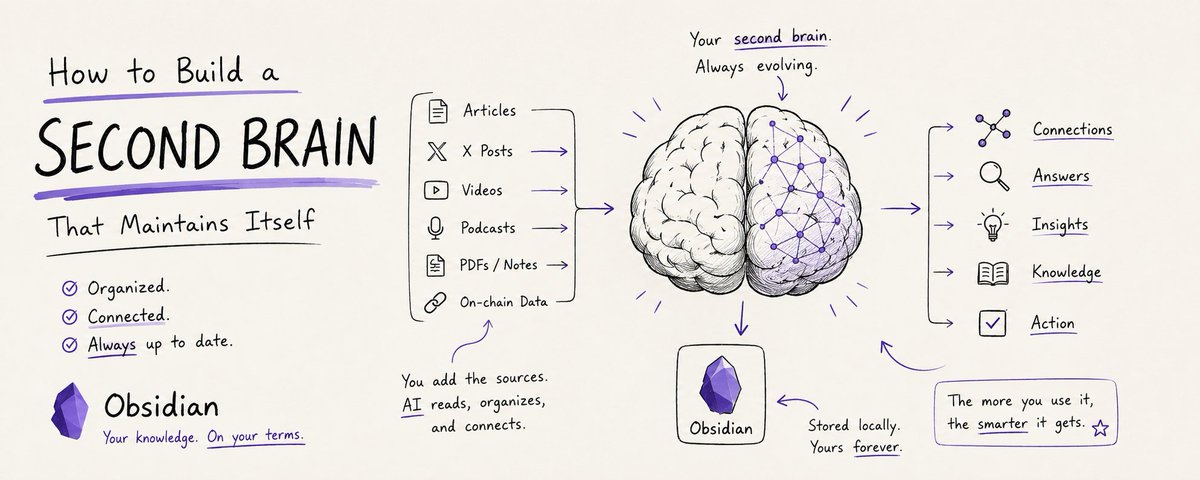
Your AI is brilliant. But every great answer it gives you dies in chat history.
Try finding what Claude told you 3 weeks ago about that token thesis. Try asking GPT what you discussed last quarter about anything. The conversation ends, the insight ends with it.
but there's a setup that fixes this.
This AI reads your sources, organizes them into a personal wiki on your machine, and keeps it current.. automatically. You stop losing the work AI does for you.
I went deep on this over the last two weeks and built a working setup from scratch. The graph view alone surfaces connections between articles I would have missed manually.
In this guide, I'll walk you through what this setup is, how to build it in under 10 minutes, the 5 workflows that make it self-maintaining, and what your knowledge stack looks like 90 days in.
By the time you're done, you'll have a personal knowledge base that gets sharper every time you use it.
Let's get into it.
𝗪𝗵𝗮𝘁 𝗶𝘀 𝗮 𝗦𝗲𝗹𝗳-𝗠𝗮𝗶𝗻𝘁𝗮𝗶𝗻𝗶𝗻𝗴 𝗦𝗲𝗰𝗼𝗻𝗱 𝗕𝗿𝗮𝗶𝗻?
𝗜𝗻 𝗼𝗻𝗲 𝗹𝗶𝗻𝗲: Obsidian is your second brain on disk. AI is the librarian that reads, organizes, and queries it for you.
Most AI chats are like talking to someone with amnesia. You explain something, they answer, the conversation ends, the knowledge disappears.
This setup is different. The AI reads your sources, builds a structured wiki of markdown files, and updates it every time you add something new. Knowledge gets compiled once and kept current.. not re-derived on every query.
For example: drop 6 months of articles, podcasts, and X posts about Ethereum into your vault.
The AI reads each one, creates pages for Restaking, Validators, Layer 2s, cross-references everything, and surfaces narrative shifts when you ask. A single ingest touches 10-15 pages in one pass.
Think of it this way: Obsidian is where you read. The AI is who writes. The wiki is what gets built.
𝗛𝗼𝘄 𝘁𝗼 𝗦𝗲𝘁 𝗨𝗽 𝗬𝗼𝘂𝗿 𝗩𝗮𝘂𝗹𝘁 𝗶𝗻 <𝟭𝟬 𝗠𝗶𝗻𝘂𝘁𝗲𝘀
This is the part to bookmark. Every working setup follows the same shape.
𝗦𝘁𝗲𝗽 𝟭: Download Obsidian (obsidian.md). Free, local-first, works offline.
𝗦𝘁𝗲𝗽 𝟮: Create a new vault on your desktop. Call it whatever fits.. research-vault, alpha-vault, brain.
𝗦𝘁𝗲𝗽 𝟯: Inside the vault folder, build this exact structure:
```
your-vault/
├── raw/ ← source files you collect
├── wiki/
│ ├── entities/ ← people, projects, tokens, accounts
│ ├── concepts/ ← frameworks, narratives, theses
│ ├── sources/ ← AI-written summaries of raw files
│ └── analysis/ ← your queries-turned-pages
├── hot.md ← rolling 500-char context cache
├── index.md ← live catalog of everything
├── log.md ← chronological action log
└── CLAUDE.md ← schema + rules for the AI
```
𝗦𝘁𝗲𝗽 𝟰: Inside CLAUDE.md, paste this template (this is the brain of your vault every AI session reads this first):
```
𝗖𝗟𝗔𝗨𝗗𝗘.𝗺𝗱 — 𝗠𝘆 𝗞𝗻𝗼𝘄𝗹𝗲𝗱𝗴𝗲 𝗩𝗮𝘂𝗹𝘁
𝗜𝗱𝗲𝗻𝘁𝗶𝘁𝘆
I work on AI tools and crypto markets. My focus:
- Daily alpha research from X and on-chain sources
- AI workflows (Claude, agents, prompting)
- Content creation and trading research
𝗩𝗮𝘂𝗹𝘁 𝗔𝗿𝗰𝗵𝗶𝘁𝗲𝗰𝘁𝘂𝗿𝗲
- raw/ — Source documents (immutable, never modify)
- wiki/entities/ — People, projects, tokens, X accounts
- wiki/concepts/ — Frameworks, narratives, theses
- wiki/sources/ — Your summaries of raw files
- wiki/analysis/ — Queries-turned-pages worth keeping
- hot.md — Rolling cache of recent context (500 chars max)
- index.md — Live catalog of all wiki pages
- log.md — Append-only record of all actions
𝗖𝗼𝗻𝘃𝗲𝗻𝘁𝗶𝗼𝗻𝘀
- Kebab-case filenames (andrej-karpathy.md, not "Andrej Karpathy.md")
- YAML frontmatter on every wiki page:
type: entity | concept | source | analysis
created: YYYY-MM-DD
tags: [tag1, tag2]
- Use [[wiki-links]] for every cross-reference. Non-negotiable.
- Every page ends with a ## Sources section linking back to raw/
𝗢𝗽𝗲𝗿𝗮𝘁𝗶𝗼𝗻𝘀
𝗜𝗻𝗴𝗲𝘀𝘁
When I drop a source in raw/:
1. Read carefully, extract entities + concepts
2. Create new pages for anything not yet in wiki/
3. Update existing pages with new claims
4. Create wiki/sources/[name].md summary
5. Update index.md and log.md
A single ingest touches 5-15 pages.
𝗤𝘂𝗲𝗿𝘆
1. Check hot.md first for recent context
2. Read index.md for relevant pages
3. Follow [[links]] to drill in
4. Synthesize with citations like (see [[entity-name]])
5. If non-trivial, save to wiki/analysis/
𝗟𝗶𝗻𝘁
- Find contradictions, orphans, stale claims, missing pages
- Output to wiki/analysis/[date]-lint-report.md
𝗛𝗼𝘁 𝗖𝗮𝗰𝗵𝗲 𝗨𝗽𝗱𝗮𝘁𝗲
After every meaningful session, update hot.md with:
[date] | [topic] | [key facts discussed in 500 chars max]
𝗢𝗽𝗲𝗿𝗮𝘁𝗶𝗻𝗴 𝗥𝘂𝗹𝗲𝘀
- Never delete files. Use status: archived in frontmatter.
- Never edit raw/ files. They are sources of truth.
- Always cite sources at the bottom of wiki pages.
- When uncertain about placement, use wiki/analysis/ and flag it.
𝗦𝘁𝘆𝗹𝗲 𝗳𝗼𝗿 𝗚𝗲𝗻𝗲𝗿𝗮𝘁𝗲𝗱 𝗖𝗼𝗻𝘁𝗲𝗻𝘁
- Concise. One claim per sentence.
- No corporate jargon. No "let's dive in."
- Parallel structure ("A. B. C.") liberally.
```
𝗦𝘁𝗲𝗽 𝟱: Install the Obsidian Web Clipper Chrome extension. Set the default folder to raw/. Now you can clip any web article into your vault with one click.
𝗦𝘁𝗲𝗽 𝟲: Open Claude Code in your terminal and cd into the vault folder. Run:
```
"Read my CLAUDE.md. Then guide me through ingesting my first source."
```
Claude reads your CLAUDE.md and walks you through the rest. Total setup time: under 10 minutes.
𝗧𝗵𝗲 𝟱 𝗪𝗼𝗿𝗸𝗳𝗹𝗼𝘄𝘀 𝗧𝗵𝗮𝘁 𝗠𝗮𝗸𝗲 𝗜𝘁 𝗦𝗲𝗹𝗳-𝗠𝗮𝗶𝗻𝘁𝗮𝗶𝗻𝗶𝗻𝗴
The vault only compounds if you actually run it. Five workflows handle everything.
Listed in reverse order. #1 is where the real leverage lives.
#𝟱: 𝗜𝗻𝗴𝗲𝘀𝘁
Drop a source into raw/. Tell the AI to process it.
The AI reads the source, extracts entities and concepts, creates new wiki pages, updates existing ones, and logs the action. A single ingest touches 10-15 wiki pages.
Try this:
```
"I just clipped a Vitalik post about staking economics
into raw/. Ingest it following the CLAUDE.md conventions."
```
#𝟰: 𝗤𝘂𝗲𝗿𝘆
Ask questions across the entire vault.
The AI checks hot.md for recent context, reads index.md for relevant pages, follows backlinks, and synthesizes an answer with citations. Good answers get filed back as new pages under wiki/analysis/.
Try this:
```
"What's the consensus on Restaking across my saved sources
in the last 30 days? Cite specific pages. Save the answer
to wiki/analysis/restaking-may-consensus.md."
```
#𝟯: 𝗟𝗶𝗻𝘁
Weekly health check on the vault.
The AI scans for contradictions between pages, orphan pages with no links, stale claims, and concepts mentioned in passing but lacking their own page. Output is a lint report.
Try this:
```
"Run a lint pass on the vault. Save findings to
wiki/analysis/2026-05-26-lint-report.md. Flag the top
3 most important gaps to fill this week."
```
#𝟭: 𝗧𝗵𝗲 𝗛𝗼𝘁 𝗖𝗮𝗰𝗵𝗲
The most underrated piece in the entire setup.
That hot.md file in your vault root is a rolling 500-character cache of your most recent context.. the topic you're focused on, the last thing you ingested, the question you just asked.
For routine queries, the AI checks hot.md first instead of crawling the full wiki. Cuts token usage on day-to-day queries by 80-90%.
The CLAUDE.md template above already has the "Hot Cache Update" rule baked in. The AI maintains it automatically after every meaningful session.
Stack the five. Ingest feeds Query. Query feeds Lint. Lint surfaces the next Ingest. Your vault sharpens itself.
𝗣𝗿𝗼 𝗧𝗶𝗽𝘀 𝗮𝗻𝗱 𝗖𝗼𝗺𝗺𝗼𝗻 𝗠𝗶𝘀𝘁𝗮𝗸𝗲𝘀
A few things worth knowing before you start.
𝗣𝗿𝗼 𝘁𝗶𝗽: One page = one claim. Atomic notes beat essays. Cross-referencing works 2-3x better when each page is tightly focused.
𝗣𝗿𝗼 𝘁𝗶𝗽: Install the Dataview plugin. Add YAML frontmatter to wiki pages. Dataview turns frontmatter into dynamic tables — "all active projects with deadlines this month" becomes a one-line query.
𝗣𝗿𝗼 𝘁𝗶𝗽: The vault is just a git repo. Run git init in the folder. Commit daily. Free version history and instant rollback when the AI does something weird.
𝗠𝗶𝘀𝘁𝗮𝗸𝗲: Never manually edit files inside wiki/. That's the AI's layer. If you want to add information, drop it in raw/ or update CLAUDE.md.
𝗠𝗶𝘀𝘁𝗮𝗸𝗲: One mega memory file. Split into one file per workflow.. memory-trading.md, memory-content.md, memory-research.md. Easier to inject only what's relevant.
𝗠𝗶𝘀𝘁𝗮𝗸𝗲: Skipping the weekly lint. Without it, your wiki silently rots. Set a Sunday calendar reminder.
𝗞𝗲𝗲𝗽 𝗶𝗻 𝗺𝗶𝗻𝗱: This setup works beautifully up to a few hundred notes. Past 500K total tokens, plain markdown search starts hitting a wall on multi-hop questions. When queries start returning generic answers or you find yourself searching for things you know are in the vault, that's the signal to graduate to a graph-based setup. But that's a problem for month 6, not day 1.
𝗪𝗵𝗮𝘁 𝟵𝟬 𝗗𝗮𝘆𝘀 𝗜𝗻 𝗔𝗰𝘁𝘂𝗮𝗹𝗹𝘆 𝗟𝗼𝗼𝗸𝘀 𝗟𝗶𝗸𝗲
Here's the timeline if you ship this weekend:
𝗗𝗮𝘆 𝟬 (𝘁𝗼𝗱𝗮𝘆): Set up the vault. 10 minutes.
𝗪𝗲𝗲𝗸 𝟭: Ingest 3-5 sources. Get used to dropping articles into raw/ and asking the AI to process them.
𝗪𝗲𝗲𝗸 𝟰: 30-50 sources. Patterns start emerging in the graph view. The AI starts surfacing connections you didn't know existed.
𝗗𝗮𝘆 𝟵𝟬: 200+ cross-referenced sources. Your daily alpha brief is generated from a knowledge network the AI maintains. Questions that used to take 30 minutes of scrolling take 30 seconds. The AI knows your voice, your watchlist, your trading biases. The vault is the smartest version of you that's ever existed.
That's the moat. not the markdown files, the network of relationships between them that you couldn't possibly maintain manually.
Build the foundation this weekend. The compounding starts the first time you ingest something.
I hope you found this guide valuable.
If you did, be sure to follow me @axel_bitblaze69 I post articles like this on AI and crypto 2-3x/week.
Lastly, if you can, please Like/Repost this article so others can find it. 💙
## 相关链接
- [Axel Bitblaze](https://x.com/Axel_bitblaze69)
- [@Axel_bitblaze69](https://x.com/Axel_bitblaze69)
- [7.3K](https://x.com/Axel_bitblaze69/status/2059053069762228313/analytics)
- [@axel_bitblaze69](https://x.com/@axel_bitblaze69)
- [Upgrade to Premium](https://x.com/i/premium_sign_up)
- [7:24 AM · May 26, 2026](https://x.com/Axel_bitblaze69/status/2059053069762228313)
- [7,306 Views](https://x.com/Axel_bitblaze69/status/2059053069762228313/analytics)
- [View quotes](https://x.com/Axel_bitblaze69/status/2059053069762228313/quotes)
---
*导出时间: 2026/5/26 17:23:51*
---
## 中文翻译
# 如何搭建一个能自我维护的第二大脑
**作者**: Axel Bitblaze
**日期**: 2026-05-25T23:24:41.000Z
**来源**: [https://x.com/Axel_bitblaze69/status/2059053069762228313](https://x.com/Axel_bitblaze69/status/2059053069762228313)
---

你的 AI 很聪明。但它给出的每一个精彩答案都会消亡在聊天记录里。
试着找找三周前 Claude 告诉你的那个代币投资逻辑。试着问 GPT 上个季度你讨论过什么。对话结束,洞见也随之消失。
但有一个方案可以解决这个问题。
这套 AI 会读取你的资料来源,把它们整理成你电脑上的个人维基,并自动保持更新。你不会再丢失 AI 为你完成的工作。
过去两周我深入研究了这个方法,从零搭建了一套可运行的方案。光是图谱视图就能呈现出我手动整理时可能会错过的文章之间的关联。
在本指南中,我会带你了解这套方案是什么、如何在 10 分钟内搭建它、让它自我维护的 5 个工作流,以及 90 天后你的知识体系会是什么样子。
读完之后,你将拥有一个每次使用都会变得更敏锐的个人知识库。
让我们开始吧。
𝗪𝗵𝗮𝘁 𝗶𝘀 𝗮 𝗦𝗲𝗹𝗳-𝗠𝗮𝗶𝗻𝘁𝗮𝗶𝗻𝗶𝗻𝗴 𝗦𝗲𝗰𝗼𝗻𝗱 𝗕𝗿𝗮𝗶𝗻?(什么是自我维护的第二大脑?)
𝗜𝗻 𝗼𝗻𝗲 𝗹𝗶𝗻𝗲(一句话概括): Obsidian 是你磁盘上的第二大脑。AI 是为你阅读、组织和查询它的图书管理员。
大多数 AI 对话就像在和失忆的人交谈。你解释了一件事,对方回答了,对话结束,知识也就消失了。
这套方案不同。AI 会读取你的资料来源,构建一个结构化的 markdown 文件维基,并在你每次添加新内容时进行更新。知识只需编译一次并保持最新,而不是每次查询时都重新推导。
例如:把 6 个月来关于以太坊的文章、播客和 X 帖子放进你的知识库。
AI 会逐个阅读,为再质押(Restaking)、验证者(Validators)、Layer 2 等创建页面,交叉引用所有内容,并在你提问时呈现叙事的转变。一次摄入会一次性更新 10-15 个页面。
可以这样理解:Obsidian 是你阅读的地方。AI 是执笔的人。维基是被构建出来的成果。
𝗛𝗼𝘄 𝘁𝗼 𝗦𝗲𝘁 𝗨𝗽 𝗬𝗼𝘂𝗿 𝗩𝗮𝘂𝗹𝘁 𝗶𝗻 <𝟭𝟬 𝗠𝗶𝗻𝘂𝘁𝗲𝘀(如何在 10 分钟内搭建你的知识库)
这部分值得收藏。每一套可运行的方案都遵循同样的结构。
𝗦𝘁𝗲𝗽 𝟭(第 1 步): 下载 Obsidian (obsidian.md)。免费、本地优先、可离线使用。
𝗦𝘁𝗲𝗽 𝟮(第 2 步): 在桌面上创建一个新的 vault(知识库)。随便起个名字,比如 research-vault、alpha-vault 或 brain。
𝗦𝘁𝗲𝗽 𝟯(第 3 步): 在 vault 文件夹内,搭建以下结构:
```
your-vault/
├── raw/ ← 你收集的源文件
├── wiki/
│ ├── entities/ ← 人物、项目、代币、账号
│ ├── concepts/ ← 框架、叙事、投资逻辑
│ ├── sources/ ← AI 撰写的源文件摘要
│ └── analysis/ ← 你的查询转化成的页面
├── hot.md ← 滚动的 500 字符上下文缓存
├── index.md ← 所有内容的实时目录
├── log.md ← 按时间顺序的操作日志
└── CLAUDE.md ← AI 的模式规范 + 规则
```
𝗦𝘁𝗲𝗽 𝟰(第 4 步): 在 CLAUDE.md 中粘贴以下模板(这是你知识库的大脑,每次 AI 会话都会首先读取它):
```
𝗖𝗟𝗔𝗨𝗗𝗘.𝗺𝗱 — 𝗠𝘆 𝗞𝗻𝗼𝘄𝗹𝗲𝗱𝗴𝗲 𝗩𝗮𝘂𝗹𝘁
𝗜𝗱𝗲𝗻𝘁𝗶𝘁𝘆(身份)
I work on AI tools and crypto markets. My focus:(我从事 AI 工具和加密市场研究。我的关注点:)
- Daily alpha research from X and on-chain sources(从 X 和链上来源进行每日 alpha 研究)
- AI workflows (Claude, agents, prompting)(AI 工作流(Claude、智能体、提示词))
- Content creation and trading research(内容创作与交易研究)
𝗩𝗮𝘂𝗹𝘁 𝗔𝗿𝗰𝗵𝗶𝘁𝗲𝗰𝘁𝘂𝗿𝗲(知识库结构)
- raw/ — Source documents (immutable, never modify)(源文档(不可变,绝不修改))
- wiki/entities/ — People, projects, tokens, X accounts(人物、项目、代币、X 账号)
- wiki/concepts/ — Frameworks, narratives, theses(框架、叙事、投资逻辑)
- wiki/sources/ — Your summaries of raw files(你对源文件的摘要)
- wiki/analysis/ — Queries-turned-pages worth keeping(值得保留的查询转化页面)
- hot.md — Rolling cache of recent context (500 chars max)(近期上下文的滚动缓存(最多 500 字符))
- index.md — Live catalog of all wiki pages(所有维基页面的实时目录)
- log.md — Append-only record of all actions(所有操作的只增不改记录)
𝗖𝗼𝗻𝘃𝗲𝗻𝘁𝗶𝗼𝗻𝘀(约定)
- Kebab-case filenames (andrej-karpathy.md, not "Andrej Karpathy.md")(kebab-case 文件名(andrej-karpathy.md,而不是 "Andrej Karpathy.md"))
- YAML frontmatter on every wiki page:(每个维基页面都要有 YAML frontmatter:)
type: entity | concept | source | analysis
created: YYYY-MM-DD
tags: [tag1, tag2]
- Use [[wiki-links]] for every cross-reference. Non-negotiable.(每个交叉引用都使用 [[wiki-links]]。不可妥协。)
- Every page ends with a ## Sources section linking back to raw/(每个页面都以 ## Sources 部分结尾,链接回 raw/)
𝗢𝗽𝗲𝗿𝗮𝘁𝗶𝗼𝗻𝘀(操作)
𝗜𝗻𝗴𝗲𝘀𝘁(摄入)
When I drop a source in raw/:(当我把一个源文件放入 raw/ 时:)
1. Read carefully, extract entities + concepts(仔细阅读,提取实体 + 概念)
2. Create new pages for anything not yet in wiki/(为 wiki/ 中尚不存在的内容创建新页面)
3. Update existing pages with new claims(用新的论断更新现有页面)
4. Create wiki/sources/[name].md summary(创建 wiki/sources/[名称].md 摘要)
5. Update index.md and log.md(更新 index.md 和 log.md)
A single ingest touches 5-15 pages.(一次摄入会更新 5-15 个页面。)
𝗤𝘂𝗲𝗿𝘆(查询)
1. Check hot.md first for recent context(首先查看 hot.md 获取近期上下文)
2. Read index.md for relevant pages(阅读 index.md 查找相关页面)
3. Follow [[links]] to drill in(通过 [[链接]] 深入挖掘)
4. Synthesize with citations like (see [[entity-name]])(以类似 (见 [[entity-name]]) 的引用方式进行综合)
5. If non-trivial, save to wiki/analysis/(如果不是琐碎内容,保存到 wiki/analysis/)
𝗟𝗶𝗻𝘁(检查)
- Find contradictions, orphans, stale claims, missing pages(找出矛盾、孤立页面、过时论断、缺失页面)
- Output to wiki/analysis/[date]-lint-report.md(输出到 wiki/analysis/[日期]-lint-report.md)
𝗛𝗼𝘁 𝗖𝗮𝗰𝗵𝗲 𝗨𝗽𝗱𝗮𝘁𝗲(热缓存更新)
After every meaningful session, update hot.md with:(每次有意义的会话结束后,用以下内容更新 hot.md:)
[date] | [topic] | [key facts discussed in 500 chars max]([日期] | [主题] | [讨论的关键事实,最多 500 字符])
𝗢𝗽𝗲𝗿𝗮𝘁𝗶𝗻𝗴 𝗥𝘂𝗹𝗲𝘀(操作规则)
- Never delete files. Use status: archived in frontmatter.(绝不删除文件。在 frontmatter 中使用 status: archived。)
- Never edit raw/ files. They are sources of truth.(绝不编辑 raw/ 文件。它们是事实的来源。)
- Always cite sources at the bottom of wiki pages.(始终在维基页面底部引用来源。)
- When uncertain about placement, use wiki/analysis/ and flag it.(不确定归类时,放入 wiki/analysis/ 并加以标记。)
𝗦𝘁𝘆𝗹𝗲 𝗳𝗼𝗿 𝗚𝗲𝗻𝗲𝗿𝗮𝘁𝗲𝗱 𝗖𝗼𝗻𝘁𝗲𝗻𝘁(生成内容的风格)
- Concise. One claim per sentence.(简洁。每句话一个论断。)
- No corporate jargon. No "let's dive in."(不要企业官话。不要“让我们深入探讨”。)
- Parallel structure ("A. B. C.") liberally.(大量使用平行结构("A. B. C.")。)
```
𝗦𝘁𝗲𝗽 𝟱(第 5 步): 安装 Obsidian Web Clipper Chrome 扩展。将默认文件夹设为 raw/。现在你可以一键将任何网页文章保存到你的知识库中。
𝗦𝘁𝗲𝗽 𝟲(第 6 步): 在终端中打开 Claude Code 并 cd 进入 vault 文件夹。运行:
```
"Read my CLAUDE.md. Then guide me through ingesting my first source."("阅读我的 CLAUDE.md。然后引导我摄入第一个源文件。")
```
Claude 会读取你的 CLAUDE.md 并引导你完成其余步骤。总搭建时间:不到 10 分钟。
𝗧𝗵𝗲 𝟱 𝗪𝗼𝗿𝗸𝗳𝗹𝗼𝘄𝘀 𝗧𝗵𝗮𝘁 𝗠𝗮𝗸𝗲 𝗜𝘁 𝗦𝗲𝗹𝗳-𝗠𝗮𝗶𝗻𝘁𝗮𝗶𝗻𝗶𝗻𝗴(让它自我维护的 5 个工作流)
只有真正运行起来,知识库才会产生复利效应。五个工作流负责处理一切。
按倒序列出。#1 才是真正的杠杆所在。
#𝟱: 𝗜𝗻𝗴𝗲𝘀𝘁(#5: 摄入)
把一个来源丢进 raw/ 目录,让 AI 去处理它。
AI 读取该来源,提取实体和概念,创建新的 wiki 页面,更新已有页面,并记录操作。一次摄入会涉及 10-15 个 wiki 页面。
试试这样:
```
"I just clipped a Vitalik post about staking economics
into raw/. Ingest it following the CLAUDE.md conventions."
```
#𝟰: 𝗤𝘂𝗲𝗿𝘆(查询)
在整个知识库范围内提问。
AI 检查 hot.md 获取最近上下文,读取 index.md 找到相关页面,追踪反向链接,然后综合出带引用的答案。好的答案会被归档为 wiki/analysis/ 下的新页面。
试试这样:
```
"What's the consensus on Restaking across my saved sources
in the last 30 days? Cite specific pages. Save the answer
to wiki/analysis/restaking-may-consensus.md."
```
#𝟯: 𝗟𝗶𝗻𝘁(检查)
对知识库进行每周健康检查。
AI 扫描页面之间的矛盾、没有任何链接的孤立页面、过时的陈述,以及只是被顺带提及但缺乏独立页面的概念。输出是一份检查报告。
试试这样:
```
"Run a lint pass on the vault. Save findings to
wiki/analysis/2026-05-26-lint-report.md. Flag the top
3 most important gaps to fill this week."
```
#𝟭: 𝗧𝗵𝗲 𝗛𝗼𝘁 𝗖𝗮𝗰𝗵𝗲(热缓存)
整套设置中最被低估的部分。
知识库根目录下的那个 hot.md 文件是一个滚动更新的 500 字符缓存,存放你最近的上下文……你正在关注的话题、最近一次摄入的内容、你刚问过的问题。
对于日常查询,AI 会先检查 hot.md,而不是爬取整个 wiki。这能将日常查询的 token 用量削减 80-90%。
上面的 CLAUDE.md 模板已经内置了"热缓存更新"规则。AI 会在每次有实质内容的会话后自动维护它。
把五个工作流叠加起来。摄入(Ingest)喂给查询(Query)。查询喂给检查(Lint)。检查发现下一次摄入的目标。你的知识库会自我打磨得越来越锋利。
𝗣𝗿𝗼 𝗧𝗶𝗽𝘀 𝗮𝗻𝗱 𝗖𝗼𝗺𝗺𝗼𝗻 𝗠𝗶𝘀𝘁𝗮𝗸𝗲𝘀(专业技巧与常见错误)
在开始之前,有几件事值得了解。
𝗣𝗿𝗼 𝘁𝗶𝗽(专业技巧):一个页面 = 一个论点。原子化笔记胜过长文。当每个页面都高度聚焦时,交叉引用的效果能提升 2-3 倍。
𝗣𝗿𝗼 𝘁𝗶𝗽:安装 Dataview 插件。为 wiki 页面添加 YAML frontmatter。Dataview 能把 frontmatter 变成动态表格——"本月截止日期前所有活跃项目"只需一行查询。
𝗣𝗿𝗼 𝘁𝗶𝗽:知识库就是一个 git 仓库。在文件夹里运行 git init。每天提交。免费的版本历史,当 AI 做出奇怪操作时可以即时回滚。
𝗠𝗶𝘀𝘁𝗮𝗸𝗲(常见错误):绝不要手动编辑 wiki/ 内部的文件。那是 AI 的层面。如果你想添加信息,把它放进 raw/ 或更新 CLAUDE.md。
𝗠𝗶𝘀𝘁𝗮𝗸𝗲:搞一个巨型记忆文件。应该按工作流拆分成一个工作流一个文件……memory-trading.md、memory-content.md、memory-research.md。这样更容易只注入相关内容。
𝗠𝗶𝘀𝘁𝗮𝗸𝗲:跳过每周检查。没有它,你的 wiki 会在无声中腐烂。设一个周日日历提醒。
𝗞𝗲𝗲𝗽 𝗶𝗻 𝗺𝗶𝗻𝗱(请记住):这套设置在几百条笔记以内运行极佳。总 token 超过 50 万后,纯 markdown 搜索在多跳问题上就会开始遇到瓶颈。当查询开始返回泛泛的答案,或者你发现自己在搜索明知就在知识库里的东西时,那就是升级到基于图的设置的信号。但那是第 6 个月才需要考虑的问题,不是第 1 天。
𝗪𝗵𝗮𝘁 𝟵𝟬 𝗗𝗮𝘆𝘀 𝗜𝗻 𝗔𝗰𝘁𝘂𝗮𝗹𝗹𝘆 𝗟𝗼𝗼𝗸𝘀 𝗟𝗶𝗸𝗲(90 天实际是什么样子)
如果你这个周末就动手,时间线是这样的:
𝗗𝗮𝘆 𝟬(今天):搭建知识库。10 分钟。
𝗪𝗲𝗲𝗸 𝟭(第 1 周):摄入 3-5 个来源。习惯把文章丢进 raw/ 并让 AI 处理它们。
𝗪𝗲𝗲𝗸 𝟰(第 4 周):30-50 个来源。图谱视图中开始浮现模式。AI 开始呈现你不知道存在的关联。
𝗗𝗮𝘆 𝟵𝟬(第 90 天):200 多个相互交叉引用的来源。你的每日 alpha 简报由 AI 维护的知识网络生成。过去需要 30 分钟滚动浏览的问题现在只需 30 秒。AI 了解你的口吻、你的关注列表、你的交易偏好。这个知识库是迄今为止最聪明版本的你。
这就是护城河。不是那些 markdown 文件,而是它们之间的关系网络——那些你根本无法手动维护的网络。
这个周末就打好地基。复利效应从你第一次摄入开始。
希望这篇指南对你有价值。
如果有,请务必关注我 @axel_bitblaze69,我每周发布 2-3 篇这类关于 AI 和加密货币的文章。
最后,如果可以的话,请点赞/转发这篇文章,让更多人看到。💙
## 相关链接
- [Axel Bitblaze](https://x.com/Axel_bitblaze69)
- [@Axel_bitblaze69](https://x.com/Axel_bitblaze69)
- [7.3K](https://x.com/Axel_bitblaze69/status/2059053069762228313/analytics)
- [@axel_bitblaze69](https://x.com/@axel_bitblaze69)
- [升级到 Premium](https://x.com/i/premium_sign_up)
- [2026年5月26日 上午7:24](https://x.com/Axel_bitblaze69/status/2059053069762228313)
- [7,306 次浏览](https://x.com/Axel_bitblaze69/status/2059053069762228313/analytics)
- [查看引用](https://x.com/Axel_bitblaze69/status/2059053069762228313/quotes)
---
*导出时间: 2026/5/26 17:23:51*