tldraw 不仅仅是白板:你可以构建的 14 种应用 mr-r0b0t 2026-07-20 11.9 KB 25K 252 ☆ 收藏 𝕏 文章列表 文章介绍了 tldraw 作为一个可编程的 React 无限画布 SDK 的强大功能。除了基础的白板功能,它支持将 React 组件转化为画布形状、构建可视化的工作流自动化、集成 AI 视觉交互、实现多人实时协作以及作为持久化应用数据存储。tldraw 适用于构建各种空间软件,从架构图到 AI Agent 管道。 tldrawReactSDK无限画布可视化工作流实时协作AI开源前端 # tldraw Is Not Just a Whiteboard: 14 Things You Can Build **作者**: mr-r0b0t **日期**: 2026-07-20T00:32:06.000Z **来源**: [https://x.com/mr_r0b0t/status/2079001367109382439](https://x.com/mr_r0b0t/status/2079001367109382439) --- 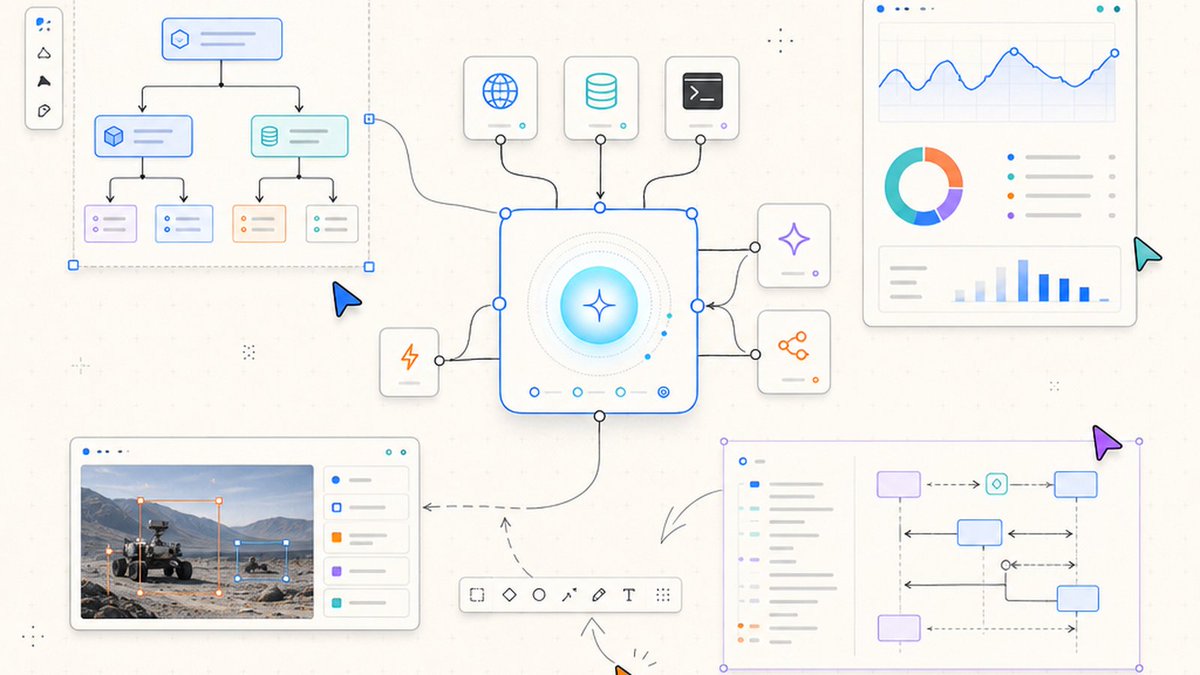 Most people meet tldraw as a polished online whiteboard. That is the least interesting way to think about it. The public tldraw SDK is a programmable React-based infinite canvas. Its shapes can be live application components. Its editor can be driven through code. Its tools, bindings, storage, synchronization, files, and interface can all be extended. That makes it a foundation for an entire class of spatial software. > If your product benefits from arranging interactive things in space, connecting them, collaborating on them, or letting an AI manipulate them visually, tldraw deserves a serious look. ## 1. Build serious whiteboards and diagram editors The obvious starting point is still a strong one. tldraw gives you the interaction model expected from a modern canvas: pan, zoom, selection, grouping, snapping, alignment, resize, rotation, rich text, arrows, frames, pages, undo and redo, keyboard controls, drag and drop, and clipboard behavior. - Products: collaborative whiteboards, flowchart tools, mind maps, architecture diagrams, project-planning boards, network maps, database designers, storyboards, and process editors - Why it matters: you start from a mature editor instead of rebuilding years of difficult pointer, camera, selection, and geometry behavior ## 2. Turn React components into canvas shapes This is the conceptual unlock. A custom tldraw shape can be a live React component rather than a painted rectangle. It can contain application state, controls, media, charts, status, or data from your backend while still participating in selection, movement, resizing, grouping, history, export, and collaboration. - Custom shape ideas: database tables, code cards, workflow nodes, live dashboards, image viewers, maps, videos, forms, game pieces, server monitors, model endpoints, and mini application windows - Deep control: custom geometry, resize behavior, handles, selection indicators, text extraction, accessibility descriptions, migrations, and exported appearance At that point, the infinite canvas stops being a drawing surface and becomes a spatial application shell. ## 3. Invent entirely new tools tldraw tools are state-machine interactions. You can create domain-specific ways of adding and manipulating content instead of forcing every workflow through the default pointer and drawing tools. - Interaction patterns: click-to-place, drag-to-create, multi-step connectors, measurement, floor-plan walls, timeline authoring, port wiring, guided annotation, lasso analysis, and game controls - Input: pointer, touch, keyboard, focus, edge scrolling, click detection, and camera behavior can participate in the experience ## 4. Model real relationships with bindings Objects that only look connected will break the moment users move them. Bindings preserve semantic relationships between shapes. - Examples: arrows attached to boxes, workflow edges attached to ports, UML relationships, anchored labels, parent-child systems, map annotations, constraints, dependencies, and electrical connections Bindings let a canvas represent a real graph, not just a picture of one. ## 5. Build visual workflow and automation products The official Workflow starter kit demonstrates drag-and-drop nodes, connections, routing, and a replaceable execution engine. It is a strong foundation for products in the territory of n8n, ComfyUI, Langflow, or Node-RED, especially when the domain needs a purpose-built interface. - Use cases: AI agent pipelines, ETL systems, no-code automation, data transformations, deployment workflows, creative pipelines, and domain-specific visual programming - Execution: the canvas can be the editor while your own engine validates and runs the graph ## 6. Give an AI eyes and hands on the canvas A canvas can become structured visual context for an AI. Instead of producing a flat image, an agent can inspect objects and issue controlled actions that create, update, connect, move, group, or explain them. - Experiences: prompt-to-diagram, prose-to-architecture, sketch recognition, automatic layout, diagram critique, visual planning, selection-based transformations, and canvas-aware assistants - Official foundations: Agent, Chat, Branching Chat, Workflow, and Image Pipeline starter kits cover several of these patterns Provider-backed behavior still depends on the model, credentials, quotas, and deployment environment. The SDK provides the visual foundation; it does not guarantee model quality. ## 7. Add real-time multiplayer With tldraw sync, the same canvas can become a persistent multi-user room. Users can edit together while seeing cursors, presence, identities, camera-following behavior, and custom collaboration state. - Products: shared whiteboards, remote classrooms, design reviews, incident rooms, planning boards, multiplayer tabletop surfaces, and living documentation - Production concerns: room isolation, authentication, asset storage, explicit origins, persistence, permissions, and treating sync metadata as untrusted input The production path is self-hosted. You do not need private tldraw.com internals to build it. ## 8. Treat the canvas as durable application data The editor sits on a reactive store containing shapes, bindings, pages, assets, and other records. Applications can observe state, validate it, attach side effects, maintain history, and persist it locally or remotely. - Persistence: IndexedDB-backed local persistence, cross-tab synchronization, backend storage, snapshots, room storage, and custom records - Evolution: schema migrations let custom shapes and metadata survive product changes - Navigation: deep links can target pages, shapes, or canvas positions ## 9. Use .tldr as a real document format Applications can parse and serialize official .tldr documents using the active application schema. This supports import, export, backups, document libraries, and round trips through a fresh editor. The important detail is to use tldraw's official serializers and parser rather than hand-writing JSON. A document containing custom shapes is only portable to another host that registers the same schema and shape utilities. ## 10. Turn Mermaid into editable native objects The @tldraw/mermaid package converts Mermaid syntax into native tldraw shapes and connections instead of flattening it into a static SVG. - What that enables: diagram-as-code editors, architecture documentation, sequence flows, paste-Mermaid-to-canvas, repository visualization, and AI-generated diagrams that humans can continue editing Mermaid can be an interchange format while tldraw remains the interactive editing environment. ## 11. Export, present, and embed Canvas content can become SVG or raster images for thumbnails, reports, previews, documentation, print workflows, and social graphics. Custom shapes can define how they appear in exports. - Presentation modes: read-only viewers, controlled camera experiences, slide decks, fixed-camera presentations, and embedded interactive diagrams - Product integration: the canvas can sit inside a larger React application with your own sidebars, inspectors, commands, dialogs, and data model ## 12. Build annotation and education tools Spatial markup is useful wherever text alone is not enough. - Examples: image annotation, screenshot feedback, PDF-page markup, exam grading, visual tutoring, design review, medical-image annotation, lesson planning, and remote classrooms Custom shapes can expose semantic text and accessibility descriptions, making visual content more searchable and useful to assistive technology. ## 13. Replace the entire interface You can keep the familiar canvas behavior while replacing the surrounding product UI. Menus, toolbars, context menus, overlays, actions, shortcuts, panels, and preferences can be customized or removed. - Modes: minimal editor, read-only viewer, permission-aware workspace, branded SaaS product, focused annotation tool, or full domain-specific application - Platform details: themes, internationalization, user preferences, reduced motion, focus, keyboard access, and custom UI primitives are part of the public feature surface ## 14. Make things that do not resemble whiteboards at all The official examples are the best proof of how far the model can stretch. They include a D3 map, PDF editor pattern, image annotator, exam marking, slideshows, fog of war, tower defense, a gravity simulation, shader backgrounds, a snowstorm, a timeline scrubber, and hundreds of Mermaid diagrams. tldraw is DOM-based, so it is not a replacement for a high-frame-rate game engine. It is exceptionally good, however, at spatial interfaces, simulations, tabletop systems, visual tools, and products where interactive objects matter more than raw rendering throughput. ## The opportunities I would build for local AI - Agent trace debugger: visualize tool calls, handoffs, token use, latency, failures, and retries as a living graph - Local AI architecture lab: drag models, GPUs, vector stores, routers, tools, and agents onto the canvas, then simulate requests through them - Visual inference router: connect local and cloud models through conditional routing nodes and inspect execution live - Benchmark arena: compare model outputs, metrics, prompts, and artifacts spatially instead of burying them in tables - Training-data pipeline: connect ingestion, filtering, deduplication, scoring, review, and export stages - DGX Spark control room: represent active models, ports, memory pressure, queues, and workloads as live shapes - AI system-design board: let an agent read the architecture and identify missing dependencies, bottlenecks, or security boundaries ## Where the Hermes tldraw skill fits I built a Hermes skill to give agents version-aware guidance for the public tldraw SDK. It covers project inspection, Editor and store APIs, custom shapes, tools, bindings, .tldr files, migrations, export, Mermaid, sync, browser automation, starter evaluation, security, and deployment boundaries. Install it with: hermes skills install r0b0tlab/tldraw-skill/skills/tldraw Repository: https://github.com/r0b0tlab/tldraw-skill ## The practical boundary tldraw is strongest for React web applications whose core interaction is arranging and connecting interactive objects in space. Use documented public SDK APIs rather than private tldraw.com internals, inspect the version installed in your project, and test the complete browser experience rather than trusting types alone. The SDK is source-available under the tldraw license, not MIT. Production projects need to review current license-key and attribution requirements. Official starter code may have its own license, but that does not relicense the SDK dependency. ## The takeaway The infinite canvas is becoming a new application surface. It is where diagrams become executable, AI gets visual context, multiplayer becomes spatial, and application objects can be arranged as naturally as ideas on a wall. > tldraw is not merely a place to draw software diagrams. It is a toolkit for turning diagrams into software. ## 相关链接 - [tldraw reposted](https://x.com/tldraw) - [mr-r0b0t](https://x.com/mr_r0b0t) - [@mr_r0b0t](https://x.com/mr_r0b0t) - [7.4K](https://x.com/mr_r0b0t/status/2079001367109382439/analytics) - [tldraw.com](https://tldraw.com/) - [@tldraw/mermaid](https://x.com/@tldraw/mermaid) - [https://github.com/r0b0tlab/tldraw-skill](https://github.com/r0b0tlab/tldraw-skill) - [tldraw.com](https://tldraw.com/) - [Upgrade to Premium](https://x.com/i/premium_sign_up) - [8:32 AM · Jul 20, 2026](https://x.com/mr_r0b0t/status/2079001367109382439) - [7,427 Views](https://x.com/mr_r0b0t/status/2079001367109382439/analytics) - [View quotes](https://x.com/mr_r0b0t/status/2079001367109382439/quotes) --- *导出时间: 2026/7/20 21:55:39* --- ## 中文翻译 # tldraw 不仅仅是一个白板:你可以构建的 14 种东西 **作者**: mr-r0b0t **日期**: 2026-07-20T00:32:06.000Z **来源**: [https://x.com/mr_r0b0t/status/2079001367109382439](https://x.com/mr_r0b0t/status/2079001367109382439) ---  大多数人把 tldraw 当作一个精美的在线白板来认识。这是看待它最无趣的方式。 公开的 tldraw SDK 是一个可编程的、基于 React 的无限画布。它的形状可以是实时的应用程序组件。它的编辑器可以通过代码驱动。它的工具、绑定、存储、同步、文件和界面都可以进行扩展。这使其成为一类全新空间软件的基础。 > 如果你的产品受益于在空间中排列交互式事物、连接它们、协作处理它们,或者让 AI 在视觉上操作它们,那么 tldraw 值得你认真考虑。 ## 1. 构建专业的白板和图表编辑器 显而易见的起点依然是一个强有力的出发点。tldraw 为你提供了现代画布所预期的交互模型:平移、缩放、选择、分组、吸附、对齐、调整大小、旋转、富文本、箭头、框架、页面、撤销和重做、键盘控制、拖放以及剪贴板行为。 - 产品:协作白板、流程图工具、思维导图、架构图、项目规划板、网络地图、数据库设计器、故事板和流程编辑器 - 为何重要:你是从一个成熟的编辑器起步,而不是重新构建多年来困难的指针、相机、选择和几何行为 ## 2. 将 React 组件转变为画布形状 这是概念上的解锁。一个自定义的 tldraw 形状可以是一个实时的 React 组件,而不是一个绘制的矩形。它可以包含应用程序状态、控件、媒体、图表、状态或来自后端的数据,同时仍然参与选择、移动、调整大小、分组、历史记录、导出和协作。 - 自定义形状构想:数据库表、代码卡片、工作流节点、实时仪表板、图像查看器、地图、视频、表单、游戏棋子、服务器监视器、模型端点和微型应用程序窗口 - 深度控制:自定义几何形状、调整大小行为、手柄、选择指示器、文本提取、可访问性描述、迁移和导出外观 在这一点上,无限画布不再是绘图表面,而变成了一个空间应用程序外壳。 ## 3. 发明全新的工具 tldraw 工具是状态机交互。你可以创建特定于领域的添加和操作内容的方法,而不是强迫每个工作流都通过默认的指针和绘图工具。 - 交互模式:点击放置、拖拽创建、多步连接器、测量、平面图墙壁、时间轴创作、端口布线、引导式注释、套索分析和游戏控制 - 输入:指针、触摸、键盘、焦点、边缘滚动、点击检测和相机行为都可以参与体验 ## 4. 使用绑定对真实关系进行建模 那些仅看起来相连的对象,在用户移动它们的那一刻就会断开。绑定保留了形状之间的语义关系。 - 示例:附加到框的箭头、附加到端口的工作流边缘、UML 关系、锚定标签、父子系统、地图注释、约束、依赖关系和电气连接 绑定让画布能够表示一个真实的图,而不仅仅是一张图片。 ## 5. 构建可视化的工作流和自动化产品 官方的 Workflow 入门套件展示了拖放节点、连接、路由和可替换的执行引擎。它是 n8n、ComfyUI、Langflow 或 Node-RED 领域产品的坚实基础,特别是当该领域需要专门构建的界面时。 - 用例:AI 代理管道、ETL 系统、无代码自动化、数据转换、部署工作流、创意管道和特定领域的可视化编程 - 执行:画布可以是编辑器,而你自己的引擎负责验证和运行该图 ## 6. 让 AI 在画布上拥有眼睛和双手 画布可以成为 AI 的结构化视觉上下文。代理可以检查对象并发出受控的操作,而不是生成一张扁平的图像,这些操作可以创建、更新、连接、移动、分组或解释对象。 - 体验:提示词生成图表、散文生成架构、草图识别、自动布局、图表批评、视觉规划、基于选择的转换以及具有画布感知能力的助手 - 官方基础:Agent、Chat、Branching Chat、Workflow 和 Image Pipeline 入门套件涵盖了其中的几种模式 提供商支持的行为仍然取决于模型、凭据、配额和部署环境。SDK 提供视觉基础;它不保证模型质量。 ## 7. 添加实时多人游戏 使用 tldraw sync,同一个画布可以成为一个持久的多用户房间。用户可以在看到光标、在线状态、身份、跟随相机行为和自定义协作状态的同时一起编辑。 - 产品:共享白板、远程教室、设计评审、事故室、规划板、多人桌面游戏表面和活文档 - 生产注意事项:房间隔离、身份验证、资产存储、显式来源、持久性、权限以及将同步元数据视为不受信任的输入 生产路径是自托管的。你不需要私有的 tldraw.com 内部组件来构建它。 ## 8. 将画布视为持久的应用程序数据 编辑器位于一个包含形状、绑定、页面、资产和其他记录的反应式存储之上。应用程序可以观察状态、验证状态、附加副作用、维护历史记录并在本地或远程持久化它。 - 持久性:支持 IndexedDB 的本地持久化、跨标签页同步、后端存储、快照、房间存储和自定义记录 - 演变:模式迁移让自定义形状和元数据可以在产品更改中幸存下来 - 导航:深度链接可以定位页面、形状或画布位置 ## 9. 将 .tldr 用作真实的文档格式 应用程序可以使用活动的应用程序模式解析和序列化官方的 .tldr 文档。这支持导入、导出、备份、文档库以及通过全新编辑器进行的往返操作。 重要的细节是使用 tldraw 的官方序列化器和解析器,而不是手写 JSON。包含自定义形状的文档只能移植到注册了相同模式和形状实用程序的另一个主机。 ## 10. 将 Mermaid 转变为可编辑的本机对象 @tldraw/mermaid 包将 Mermaid 语法转换为本机 tldraw 形状和连接,而不是将其扁平化为静态 SVG。 - 它启用了什么:图表即代码编辑器、架构文档、序列流、将 Mermaid 粘贴到画布、存储库可视化以及人类可以继续编辑的 AI 生成图表 Mermaid 可以成为一种交换格式,而 tldraw 仍然是交互式编辑环境。 ## 11. 导出、演示和嵌入 画布内容可以变成 SVG 或栅格图像,用于缩略图、报告、预览、文档、打印工作流和社交图形。自定义形状可以定义它们在导出中的外观。 - 演示模式:只读查看器、受控的相机体验、幻灯片、固定相机的演示和嵌入的交互式图表 - 产品集成:画布可以位于更大的 React 应用程序内部,并带有你自己的侧边栏、检查器、命令、对话框和数据模型 ## 12. 构建注释和教育工具 只要有单靠文本是不够的地方,空间标记就有用武之地。 - 示例:图像注释、屏幕截图反馈、PDF 页面标记、考试评分、视觉辅导、设计评审、医学图像注释、课程规划和远程教室 自定义形状可以暴露语义文本和可访问性描述,使视觉内容对辅助技术更具可搜索性和实用性。 ## 13. 替换整个界面 你可以保留熟悉的画布行为,同时替换周围的产品 UI。菜单、工具栏、上下文菜单、覆盖层、操作、快捷键、面板和首选项都可以自定义或删除。 - 模式:最小编辑器、只读查看器、具有权限感知的工作区、品牌 SaaS 产品、专注的注释工具或完整的特定领域应用程序 - 平台细节:主题、国际化、用户首选项、减少动作、焦点、键盘访问和自定义 UI 基元是公共功能表面的一部分 ## 14. 制作根本不像白板的东西 官方示例是该模式可以延伸多远的最佳证明。它们包括 D3 地图、PDF 编辑器模式、图像注释器、考试标记、幻灯片放映、战争迷雾、塔防、重力模拟、着色器背景、暴风雪、时间轴擦洗器和数百个 Mermaid 图表。 tldraw 是基于 DOM 的,因此它不是高帧率游戏引擎的替代品。然而,它在空间界面、模拟、桌面系统、可视化工具以及交互式对象比原始渲染吞吐量更重要的产品方面表现得异常出色。 ## 我会为本地 AI 构建的机会 - 代理跟踪调试器:将工具调用、交接、令牌使用、延迟、失败和重试可视化为一个动态图 - 本地 AI 架构实验室:将模型、GPU、向量存储、路由器、工具和代理拖到画布上,然后通过它们模拟请求 - 可视化推理路由器:通过条件路由节点连接本地和云模型,并实时检查执行情况 - 基准竞技场:在空间上比较模型输出、指标、提示词和工件,而不是将它们埋在表格中 - 训练数据管道:连接摄取、过滤、去重、评分、审查和导出阶段 - DGX Spark 控制室:将活动模型、端口、内存压力、队列和工作负载表示为实时形状 - AI 系统设计板:让代理读取架构并识别缺失的依赖项、瓶颈或安全边界 ## Hermes tldraw 技能的适用之处 我构建了一个 Hermes 技能,为代理提供针对公共 tldraw SDK 的具有版本感知的指导。它涵盖了项目检查、Editor 和 store API、自定义形状、工具、绑定、.tldr 文件、迁移、导出、Mermaid、同步、浏览器自动化、入门评估、安全和部署边界。 使用以下命令安装:hermes skills install r0b0tlab/tldraw-skill/skills/tldraw 代码库:https://github.com/r0b0tlab/tldraw-skill ## 实际边界 tldraw 最适用于核心交互是在空间中排列和连接交互式对象的 React Web 应用程序。使用记录在案的公共 SDK API,而不是私有的 tldraw.com 内部组件,检查项目中安装的版本,并测试完整的浏览器体验,而不仅仅是信任类型。 SDK 在 tldraw 许可证下是源代码可用的,而不是 MIT。生产项目需要审查当前的许可证密钥和归属要求。官方入门代码可能有自己的许可证,但这不会重新许可 SDK 依赖项。 ## 结论 无限画布正成为一个新的应用程序表面。在这里,图表变得可执行,AI 获得视觉上下文,多人游戏变得空间化,应用程序对象可以像墙上的想法一样自然排列。 > tldraw 不仅仅是绘制软件图表的地方。它是将图表转化为软件的工具包。 ## 相关链接 - [tldraw reposted](https://x.com/tldraw) - [mr-r0b0t](https://x.com/mr_r0b0t) - [@mr_r0b0t](https://x.com/mr_r0b0t) - [7.4K](https://x.com/mr_r0b0t/status/2079001367109382439/analytics) - [tldraw.com](https://tldraw.com/) - [@tldraw/mermaid](https://x.com/@tldraw/mermaid) - [https://github.com/r0b0tlab/tldraw-skill](https://github.com/r0b0tlab/tldraw-skill) - [tldraw.com](https://tldraw.com/) - [Upgrade to Premium](https://x.com/i/premium_sign_up) - [8:32 AM · Jul 20, 2026](https://x.com/mr_r0b0t/status/2079001367109382439) - [7,427 Views](https://x.com/mr_r0b0t/status/2079001367109382439/analytics) - [View quotes](https://x.com/mr_r0b0t/status/2079001367109382439/quotes) --- *导出时间: 2026/7/20 21:55:39*
有 有趣的交互式科学应用创意 Part 2 文章展示了作者开发的系列交互式科学应用 Demo,包括黑洞时空扭曲可视化、达芬奇扑翼机机制实现以及科幻彗星探测器等。作者结合了 GPT Images、Nano Banana 2 进行设计,并使用 Gemini 3.1 Pro 编写代码。文章还分享了设计灵感和前端控件交互示例,旨在打造儿时向往的科学杂志风格的互动体验。 技术 › 前端 Dilum Sanjaya 2026-05-07 前端可视化AI编程设计灵感科学交互设计GeminiReactUI/UX开源
越 越改越烂!为什么 AI 自动修改 UI 总是翻车?「附终极解法」 作者分享用 AI 复刻页面时踩过的坑,搭建了渲染、截图、逐像素比对、模型诊断再修改的自动工作流。实测发现模型并非每轮都变好,有时越改越烂,最终保留历史最佳。作者总结三个关键坑:尺寸不一致、动画未播完、在坏版本上叠补丁,并给出三条规则:统一尺寸、固定渲染环境、每轮从历史最佳继续。 技术 › 前端 Lonely 2026-09-14 AI前端UI复刻工作流视觉模型截图对比自动化LLM提示词踩坑
我 我做了一个开源的设计工作台:管理 & 编辑 & 生成 DESIGN.md 作者开源了 RICOUI DESIGN,一个基于 DESIGN.md 的设计系统工作台。DESIGN.md 是一种结构化 Markdown 文档,集中记录品牌的颜色、字体、间距、组件规则与设计约束,人和 AI 都能读取。工作台支持创建、编辑、预览 DESIGN.md,浏览内置品牌设计参考库,可通过 AI 从公开网站生成初稿,并将文档派生为 Design Tokens、CSS 和 ZIP 供前端与 AI 工具使用。文章详细介绍了 DESIGN.md 的结构约定、从品牌参考到自有设计库的使用流程、AI 生成与安全边界、派生检查机制及云端存储方案,强调以 DESIGN.md 作为唯一源文件维护设计规范。 技术 › 前端 RicoUI 2026-09-03 DESIGN.md设计系统开源Design TokensCSSAI前端品牌设计工作台Markdown
3 30个开源仓库,助力AI业务自动化 本文介绍了30个开源仓库,用于构建自动化AI业务的各个层面,包括市场研究、潜在客户生成、内容创作、销售、支持、自动化、分析和安全。作者强调,没有单一工具能完全自动化业务,而是需要组合多个工具形成系统。文章按功能分类列出每个仓库的GitHub星标、用途和典型应用场景,并提醒读者开源不等于免费,且需注意合规性。 技术 › 工具与效率 Rexei 2026-08-20 开源AI自动化业务LLMAgentCRM爬虫TTS工作流
本 本地部署:0成本的数字人口播教程 本文介绍了一套基于本地显卡的数字人口播视频生成方案,旨在替代成本较高的云端服务。文章详细讲解了从电脑配置检查、一键启动工作流,到接入 Duix.Avatar 本地数字人、调整动画画风的完整步骤,并分享了如何构建长期复用的工作流及多平台内容变现策略。 技术 › 工具与效率 黄小木 2026-08-17 数字人本地部署视频制作AICodexDuix.Avatar工作流开源教程自动化
D Deep Agents vs LangChain vs LangGraph 本文对比了构建AI智能体的三个开源框架层级:Deep Agents、LangChain和LangGraph。它们提供不同层级的控制力与抽象程度:Deep Agents是开箱即用的智能体套件,专注于最佳上下文工程实践;LangChain是高度可定制的智能体核心抽象与集成框架;LangGraph则是基于图的底层运行时,适用于混合确定性与动态步骤的复杂工作流。三者完全可组合,开发者可在自主性与确定性之间灵活平衡。 技术 › Agent Sydney Runkle 2026-08-07 AIAgentLangChainLangGraphDeep Agents智能体框架上下文工程工作流开源
C Codex 口播视频 Skill 开源发布 作者开源了两个基于 Codex 的口播视频 Skill,分别是 9:16 竖屏数字人口播和 16:9 产品演示加数字人画中画。工作流整合了脚本、配音、剪映换音色、数字人生成等功能,重点解决了跨语言口音和“AI 味”问题。 技术 › Codex Tuola Ge (@Mayii0205) 2026-08-05 开源数字人视频生成AI工作流剪映HeyGenMiniMaxHyperFrames音色替换
个 个人IP形象构建和插图Skills开源 作者分享了一套个人IP形象构建和插图制作的工作流,包含两个Skill:个人IP形象制作和个人IP插图制作。这套方法通过固定人物形象和画风,高效生成统一风格的插图,提升文章配图效率和个人IP辨识度,已开源至GitHub。 技术 › Agent 金尘马 2026-08-05 个人IP插图AI开源工作流形象设计
提 提升学习和工作效率,这2个GitHub热门开源项目千万不要错过 文章介绍了两个提升效率的GitHub开源项目:OmniGet整合下载、播放、阅读和笔记功能,一站式管理内容资源;Microsoft的Flint Chart是专为AI智能体设计的图表描述语言,简化图表生成流程。 技术 › 工具与效率 DaoYi.林 2026-07-27 OmniGetFlint Chart开源效率AI知识管理可视化
用 用 Skills 给 AI Agent 注入设计品味 介绍了开源技能库 emilkowalski/skills,它能为 AI 编程 Agent 注入设计品味,解决 AI 生成 UI 动画和交互时缺乏质感的问题。文章详解了其核心功能、安装方法、实操流程,并对比了 Taste-Skill、Hallmark 等类似工具的差异。 技术 › 前端 sitin 2026-07-15 AI设计前端Agent工具Claude CodeCursor开源交互UI
设 设计师专用的 AI Agent Skills 库开源 MengTo 开源了一个名为 Skills 的项目,包含 75+ 个专为设计师和前端开发者准备的 Agent Skills。这些 Markdown 格式的操作手册可加载到 Codex、Claude、Cursor 等 AI 工具中,将优秀工作流和规范固化,使 AI Agent 能按最佳实践完成设计任务,输出更稳定专业。 技术 › Skill 0xCrypto Tied (@CryptoTied) 2026-07-11 AI AgentUI设计前端开源SkillClaudeCursor工作流提示词
C Codex 插件:AI-Canvas全能无限画布终极版发布! 作者发布了 Codex 插件“AI-Canvas”的终极版,这是一款基于 tldraw 的全能无限画布工具。插件不仅支持图片标注与二次编辑,更集成了六大 Skill 工作流,覆盖小红书/YouTube 封面、电商套图、Logo 设计、营销宣传册及跨平台适配等场景,旨在解决高效率生图与业务可视化需求。 技术 › Codex 冰河 2026-06-25 AI-Canvas无限画布生图电商设计插件开发工作流CodexClaude Code开源营销物料