Graph Engineering with Claude. What It Is and How to Actually Use It Mahax 2026-08-15 20.0 KB 3M 769 ☆ 收藏 𝕏 文章列表 本文介绍了AI工作流中的图工程(Graph Engineering)概念,解释了节点(node)和边(edge)的基本定义,并指出大多数现有工作流本质上就是图,但效率低下。文章重点介绍了如何通过“假边测试”识别并移除不必要的依赖,以及“菱形”模式(并行处理+汇聚)如何显著提升效率。同时,文章也指出了图工程中常见的失败模式(坏节点未被发现和错误级联),并提出了使用检查节点(checker node)作为解决方案。最后,文章展示了如何使用Claude快速构建一个图工作流。 图工程工作流Claude并行处理依赖节点边检查节点效率优化AI 82 强烈推荐 ▶ 文章清晰解释了图工程的核心概念,提供了可操作的检测方法和构建步骤,兼具深度与实用性,但时效性因技术迭代较快而略受影响。 # Graph Engineering with Claude. What It Is and How to Actually Use It **作者**: Mahax **日期**: 2026-07-29T12:27:21.000Z **来源**: [https://x.com/Mahaximus_/status/2082442856417956173](https://x.com/Mahaximus_/status/2082442856417956173) --- 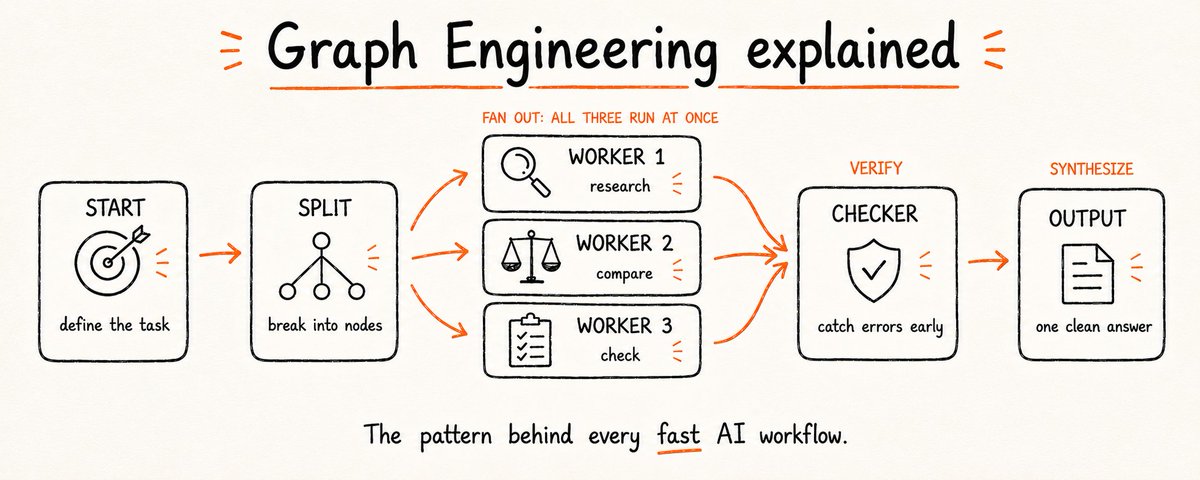 A few weeks ago the whole AI field was talking about loops. Then graphs showed up on everyone's timeline and loops were suddenly old news overnight. The shift happened fast. But most of what gets posted about graph engineering is either too vague to be useful or too technical to actually follow. Nobody explains what a graph actually is before they start telling you to build one. By the end of this article you will know what a graph actually is, how to recognize one hiding inside your current workflow. The single pattern that makes them powerful, where they quietly fail, and how to build one yourself with Claude in a couple of minutes. ## What a graph actually is Most people hear "graph" and think of a chart with bars or lines. That's not this. A graph in the context of AI work is simpler than it sounds: it's a map of which jobs need to happen and what each one depends on. Two things make up the whole thing. A node is a unit of work. One agent, one task, one thing going in and one thing coming out. Not "research everything about this topic and then write a summary and also check the sources." Just one of those. The smaller and more defined the job, the more useful the node. An edge is a dependency. It connects two nodes when the second one genuinely needs what the first one produced. Not "these two things happen in sequence." Only when the output of one actually feeds the input of the other. 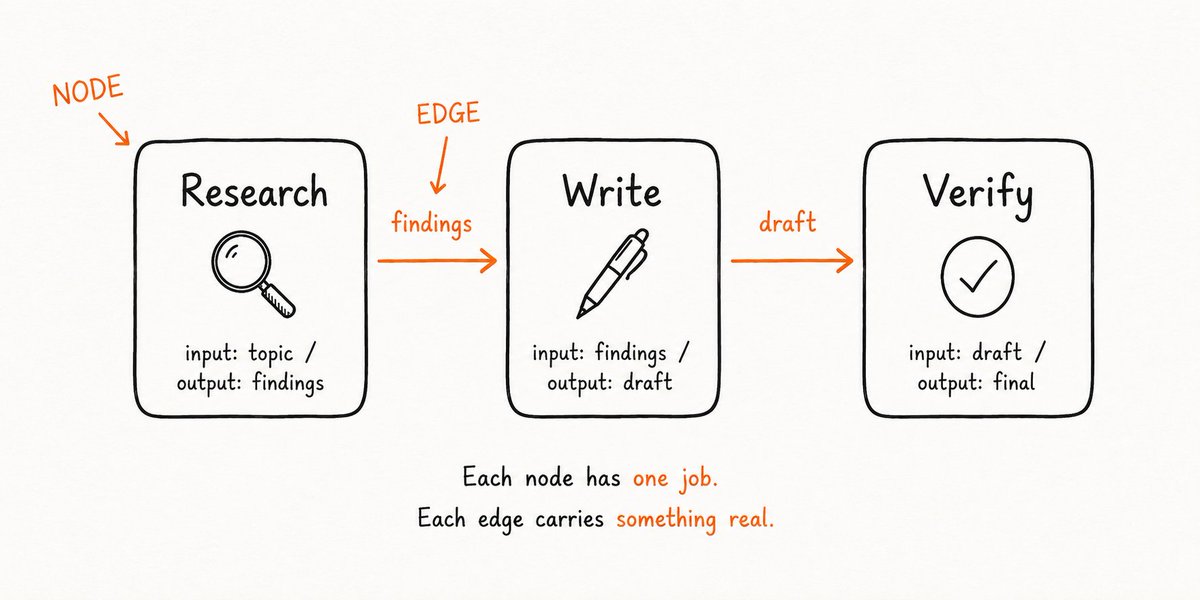 That's it. Nodes do the work. Edges carry what moves between them. Everything else in graph engineering is just applying those two ideas at different scales. ## Your current workflow is already a graph Here is the thing most people miss when they first hear about graph engineering: you are already doing it. Just badly. When you write a prompt like "research this topic, then summarize what you find, then write a draft based on the summary" - that is a graph. A single unbranching chain where every step waits for the one before it to finish. One head, one line, one thing at a time. It runs correctly. It also runs slowly, and it breaks easily. If the summary step produces something unusable, the draft step fails. If the research step takes too long, everything behind it waits. A chain has no redundancy and no flexibility - it is the simplest possible graph, and simple is not the same as efficient. The first move in graph engineering is not learning something new. It is looking at what you already have and asking: does every step actually need to wait for the one before it? Because most of the time, it doesn't. ❌ Linear chain: > Research → Summarize → Write → Check sources → Format → Publish Six steps in a line. Each one waiting. Total time: the sum of all six. ✅ Redrawn as a graph: > Research + Check sources (run at the same time) → Summarize → Write + Format (run at the same time) → Publish Same work. Less waiting. Finishes faster because independent jobs stop queuing behind each other. ## The fake-edge test Once you can see your workflow as a graph, the next move is finding the edges that shouldn't be there. Look at your current workflow step by step. At each arrow, ask one question: does this step actually need the result of the one before it? Not "does it come after it" - does it genuinely use what the previous step produced? If yes, the edge is real. Keep the order. If no, there is no edge. Those two jobs have nothing to do with each other and the wait between them is pure waste. Take a simple example: "review file A for bugs, then review file B for bugs." It reads like a sequence. But the review of file B never looks at what file A returned. They only run one after the other because that is the order you typed them in. Run them at the same time and the whole thing finishes in the time of the slower one - not the two added together. Run this test on any workflow in under five minutes: 1. Write out every step as a box 2. Draw an arrow between each pair of consecutive steps 3. For each arrow, ask: does data from step A actually go into step B? 4. If yes - keep the arrow. Real dependency 5. If no - delete the arrow. That's a fake edge 6. Everything with no incoming arrow can start immediately 7. Everything with no outgoing arrow is a final output > You will find two or three fake edges in almost any workflow you draw. Each one is time you are giving away for free. ## The Diamond Once you start removing fake edges, one pattern shows up more than any other. It's called the diamond and it's the shape that makes graphs worth using. The idea is simple. One node fans out into several parallel nodes. Those parallel nodes all feed into one final node that pulls their outputs together. Draw it out and it looks like a diamond. 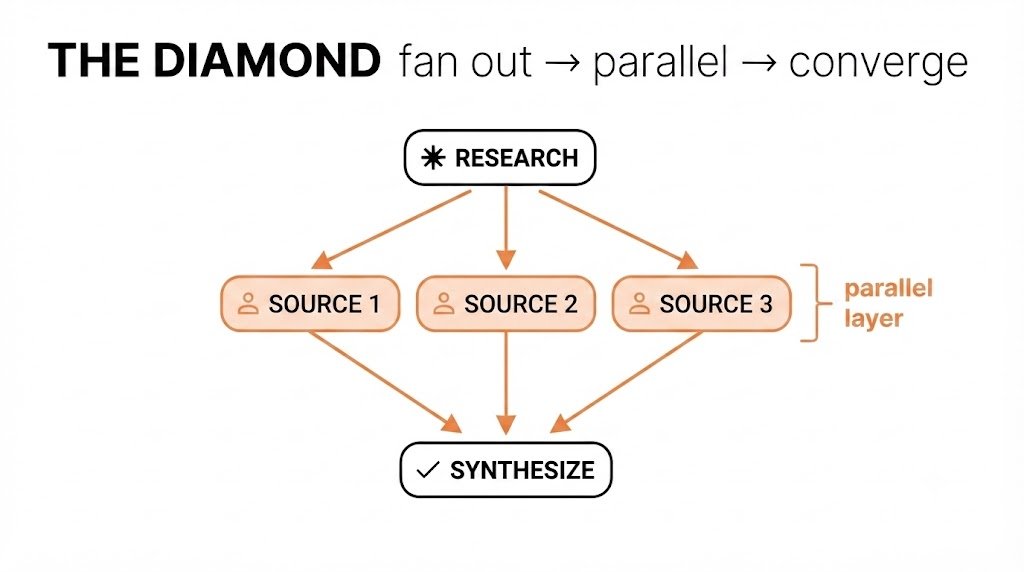 Here is what that looks like in practice. Say you are researching a topic to write about. The linear version looks like this: search → read source 1 → read source 2 → read source 3 → synthesize. The diamond version: search → [read source 1 + read source 2 + read source 3 in parallel] → synthesize. The final synthesis node gets the same inputs either way. But the time it waits is the length of the slowest source read - not all three added together. The diamond works because synthesis genuinely depends on all three reads. Those are real edges. But the three reads have no dependency on each other. Those connections don't exist. So you run them at the same time and the only wait is at the end, where the wait is unavoidable anyway. This is why the diamond shows up everywhere once you start looking. Research pipelines. Code review. Market analysis. Any time you have a "gather from multiple places, then combine" shape in your work, you have a diamond. The gathering is parallel. The combining is the convergence point. The pattern has two rules. First, the parallel nodes must be genuinely independent - no fake edges disguised as real ones. Second, the convergence node must actually need all of them. If it only needs one, the others are wasted work. Get both of those right and the diamond is the fastest shape a workflow can take. ## Where graphs quietly fail The diamond is clean in theory. In practice it breaks in two specific places, and both are easy to miss. The first is a bad node going undetected. When three sources run in parallel and one of them returns garbage - a hallucination, an empty result, a misread file, that bad output flows straight into your synthesis node alongside the two good ones. The synthesis node doesn't know one of its inputs is wrong. It combines everything and produces a confident answer built on bad material. The parallel structure that made things fast also removed the natural checkpoints where you would have noticed the problem. The second is a cascade. In a linear chain, a bad step produces a bad output and you see it immediately. In a graph with converging paths, the bad output gets mixed with good outputs and the error becomes harder to trace. By the time the final node responds, the damage is diluted and invisible. Both problems have the same fix: a checker node. A checker node sits between your parallel layer and your convergence point. Its only job is to evaluate each output before it moves forward. It doesn't synthesize, doesn't write, doesn't do any of the main work. It asks: is this output usable? If yes, pass it through. If no, flag it, retry, or drop it before it poisons the next step. The five things a checker node should catch: 1. Empty or null outputs - a node that returned nothing useful 2. Outputs that contradict each other in ways that can't both be true 3. Outputs that are off-topic relative to the original task 4. Confidence signals that are too low to be reliable 5. Format errors that will break the synthesis node's parsing > A graph without a checker node is a graph that assumes everything upstream worked. That assumption fails more often than you'd expect. ## Static graphs vs. dynamic graphs Everything so far has assumed you know the shape of your graph before you start. You define the nodes, draw the edges, and run it. That works for repeatable workflows where the structure doesn't change. But a lot of real work doesn't fit that shape. You start a research task and discover halfway through that one source requires three additional lookups. You start a code review and find that one file needs deeper analysis than the others. The structure you needed wasn't knowable at the start - it only became clear once the work was underway. That's where dynamic graphs come in. Instead of a fixed structure defined upfront, the graph builds itself as it runs. A node completes its work, looks at what it found, and decides what nodes should come next. The graph isn't planned - it's grown. The difference matters in practice. A static graph is fast and predictable. You know exactly what will run, in what order, and how long it should take. A dynamic graph is flexible and handles the unexpected. But it's harder to debug when something goes wrong, because the structure that ran isn't the one you originally drew. Knowing which one you need before you start saves a lot of backtracking: 1. Use a static graph when the task is repeatable and the structure is the same every time 2. Use a static graph when speed and predictability matter more than flexibility 3. Use a dynamic graph when the scope of the work depends on what you find along the way 4. Use a dynamic graph when some nodes need to decide what comes next based on their output 5. Use a static graph first, always - switch to dynamic only when you hit a wall the static version can't handle 6. Never use a dynamic graph for anything where you need to audit exactly what ran and why Most workflows that feel like they need a dynamic graph actually just need a better-designed static one. The dynamic version is more powerful and harder to control. Reach for it second, not first. ## What the difference actually looks like Theory is easy to follow in the abstract. Here is the same task run two ways so you can see what actually changes. The task: analyze three competitor products and write a comparison. Without a graph: Research competitor A → Research competitor B → Research competitor C → Compare all three → Write draft → Check facts → Format output Seven steps, all sequential. Total time is the sum of every step. If step two takes longer than expected, everything behind it waits. With a graph: [Research A + Research B + Research C] → Checker node → Compare → [Write draft + Format output] → Final check Five logical stages. The three research steps run at the same time. The write and format steps run at the same time. The checker catches bad research before it reaches the comparison. Total time collapses. The output is the same. The structure is not. Here is where each approach wins and loses: | | Linear | Graph | | --- | --- | --- | | Setup time | Low | Higher | | Total runtime | Slow | Fast | | Easy to debug | Yes | Harder | | Handles errors mid-run | Poorly | Well (checker node) | | Works for one-off tasks | Yes | Overkill | | Works for repeatable workflows | Yes | Better | | Scales as task grows | No | Yes | The table makes it look like graphs win everywhere except setup and debugging. That's roughly true for anything you run more than once. For a one-off task you'll never repeat, the linear version is almost always faster to build and run. The graph is worth it when the task is big enough that the time savings compound, or when errors in the middle are expensive enough that the checker node pays for itself. ## How to build one with Claude Everything above is still just a mental model until you give Claude something it can execute. This is where it becomes practical. Claude Code has a workflow keyword that changes how it processes your instructions. Without it, Claude reads your prompt as a sequence and runs each step one after another. With it, Claude parses the structure, identifies which nodes have no dependencies on each other, and runs those in parallel automatically. You describe the graph. Claude figures out the execution order. A basic workflow looks like this: ``` workflow: research-and-compare nodes: research_a: task: "Research competitor A's pricing, features, and recent news" output: competitor_a.md research_b: task: "Research competitor B's pricing, features, and recent news" output: competitor_b.md research_c: task: "Research competitor C's pricing, features, and recent news" output: competitor_c.md checker: task: "Review each research file. Flag any that are incomplete or off-topic." depends_on: [research_a, research_b, research_c] output: checker_report.md compare: task: "Using the research files, write a structured comparison across price, features, and positioning." depends_on: [checker] output: comparison.md ``` 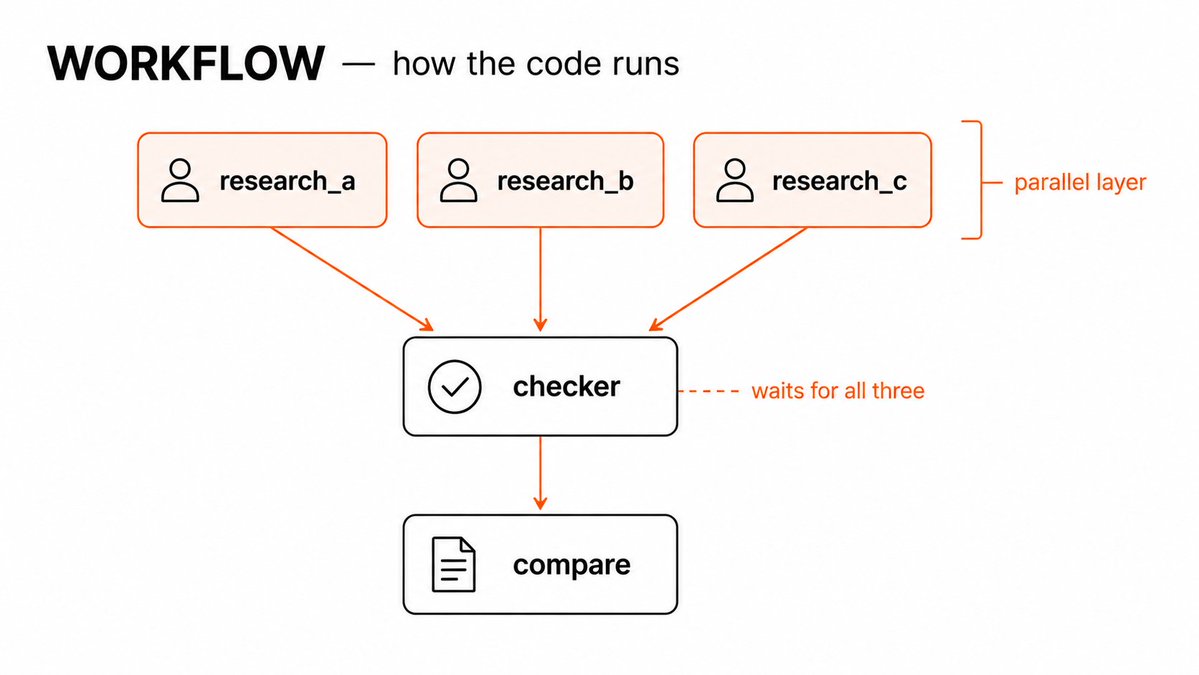 Three things to notice. First, research_a, research_b, and research_c have no depends_on - Claude runs all three at the same time the moment the workflow starts. Second, checker lists all three as dependencies, so it waits until all three finish before it runs. Third, compare depends only on checker, not directly on the research nodes - the checker is the gatekeeper That depends_on line is the only thing you need to understand to design any graph. No dependencies means parallel. A dependency means wait. Everything else is just deciding which nodes need what. ## Ready-to-paste prompts The workflow syntax from the last section works across any repeatable task. Here are four you can drop straight into Claude Code and adapt. Competitive research: ``` workflow: competitive-research nodes: research_a: task: "Research [Company A]. Cover: pricing, core features, recent product changes, public sentiment. Output a structured summary." output: company_a.md research_b: task: "Research [Company B]. Cover: pricing, core features, recent product changes, public sentiment. Output a structured summary." output: company_b.md research_c: task: "Research [Company C]. Cover: pricing, core features, recent product changes, public sentiment. Output a structured summary." output: company_c.md synthesize: task: "Using company_a.md, company_b.md, company_c.md — write a comparison table and a one-paragraph positioning summary for each." depends_on: [research_a, research_b, research_c] output: comparison.md ``` Multi-file code review: ``` workflow: code-review nodes: review_auth: task: "Review auth.py for security issues, edge cases, and code quality. Be specific." output: review_auth.md review_api: task: "Review api.py for security issues, edge cases, and code quality. Be specific." output: review_api.md review_db: task: "Review db.py for security issues, edge cases, and code quality. Be specific." output: review_db.md checker: task: "Read all three review files. Flag any issues that appear in more than one file. Note cross-file dependencies that could cause problems." depends_on: [review_auth, review_api, review_db] output: checker.md summary: task: "Using all review files and checker.md, write a prioritized list of fixes — critical first, then medium, then low." depends_on: [checker] output: final_review.md ``` Article research and draft: ``` workflow: article-research nodes: angle_a: task: "Research [topic] from the angle of [audience A]. What do they care about most? What are the common misconceptions?" output: angle_a.md angle_b: task: "Research [topic] from the angle of [audience B]. What do they care about most? What are the common misconceptions?" output: angle_b.md examples: task: "Find 3 specific real-world examples of [topic] that most people haven't heard of. No generic case studies." output: examples.md draft: task: "Using angle_a.md, angle_b.md, and examples.md — write a draft that speaks to both audiences and opens with one of the specific examples." depends_on: [angle_a, angle_b, examples] output: draft.md ``` > Replace anything in brackets. The structure stays the same regardless of what you put inside the nodes. ## What changes when you think in graphs The workflows in the last two sections are useful immediately. But the bigger shift is what happens after you use them for a few weeks. You stop reading a task as a list of things to do and start reading it as a set of dependencies. The first question stops being "what do I do first?" and becomes "what actually needs to wait for what?" Most of the time the answer is: less than you assumed. The change shows up in how you write prompts too. A linear prompt tells Claude what to do in order. A graph prompt tells Claude what each piece needs and lets it figure out the order. That's a smaller prompt, easier to edit, and it doesn't break when you swap out one node. The last thing worth adding to any workflow you run more than twice is a CLAUDE.md entry. This tells Claude how you want graphs handled in that project - your defaults for output format, checker behavior, and error handling, so you don't rebuild that context every session: ``` # Workflow defaults When running a workflow: - All nodes without depends_on run in parallel by default - Checker nodes should flag incomplete outputs, not silently pass them - Output files go to /outputs with the node name as filename - If a node fails, pause and report before continuing - Never merge outputs from flagged nodes into the final synthesis ``` > One file, set once. Every workflow you run in that project inherits it. The graphs you draw now will look obvious in six months. Not because they were easy - because once you see dependencies clearly, you can't unsee them. The linear version of any workflow starts to look like what it is: a graph with all its edges faked. At the start of this article I said most of what gets posted about graph engineering is either too vague or too technical. I meant it, and I tried to thread the gap. You now know what a graph is. You know how to find the one hiding inside your current workflow. You know the fake-edge test, the diamond, the checker node, and when to reach for a dynamic graph instead of a static one. You have the syntax to build one in Claude Code and four prompts you can use today. That is the whole thing. There is no deeper layer of graph theory you need before any of this is useful. The one thing I'd push back on if someone told me not to include it: the fake-edge test. Run it on one workflow this week. Just one. Draw out the steps, go through the arrows, and ask which ones are actually carrying data. You will find at least one that isn't. That's the moment the whole model clicks. Not when you understand the theory - when you find the first fake edge in something you built yourself and realize you've been waiting on it for months. The rest follows from there. ## 相关链接 - [Mahax](https://x.com/Mahaximus_) - [@Mahaximus_](https://x.com/Mahaximus_) - [1.6M](https://x.com/Mahaximus_/status/2082442856417956173/analytics) - [Upgrade to Premium](https://x.com/i/premium_sign_up) - [8:27 PM · Jul 29, 2026](https://x.com/Mahaximus_/status/2082442856417956173) - [1.6M Views](https://x.com/Mahaximus_/status/2082442856417956173/analytics) - [View quotes](https://x.com/Mahaximus_/status/2082442856417956173/quotes) --- *导出时间: 2026/8/15 21:11:32* --- ## 中文翻译 # 使用Claude进行图工程(Graph Engineering)。它是什么以及如何实际应用 **作者**: Mahax **日期**: 2026-07-29T12:27:21.000Z **来源**: [https://x.com/Mahaximus_/status/2082442856417956173](https://x.com/Mahaximus_/status/2082442856417956173) ---  几周前,整个AI领域都在谈论循环(loops)。然后图(graphs)突然出现在每个人的时间线上,循环一夜之间就成了旧闻。 转变发生得很快。但大多数关于图工程的帖子要么过于模糊而无法实用,要么过于技术化而难以实际遵循。没有人会在告诉你构建一个图之前,先解释图到底是什么。 读完这篇文章,你将知道图到底是什么,如何识别隐藏在当前工作流程中的图。让它们变得强大的单一模式,它们在哪里悄然失效,以及如何用Claude在几分钟内自己构建一个图。 ## 图到底是什么 大多数人听到“图”会想到柱状图或折线图。不是那个。在AI工作的语境中,图比听起来更简单:它是一个映射,显示哪些工作需要完成,以及每个工作依赖什么。 整个概念由两个东西组成。 **节点(Node)** 是一个工作单元。一个智能体、一个任务、一个输入和一个输出。不是“研究关于这个主题的一切,然后写一个摘要,还要检查来源。”只是其中之一。工作越小、越明确,节点就越有用。 **边(Edge)** 是一种依赖关系。当第二个节点确实需要第一个节点产生的东西时,它连接两个节点。不是“这两件事按顺序发生。”只有当其中一个的输出真正成为另一个的输入时才算。  就是这样。节点做工作。边传递节点之间流动的东西。图工程中的其他一切只是在不同规模上应用这两个概念。 ## 你当前的工作流程已经是一个图 这是大多数人第一次听说图工程时会忽略的事情:你已经在做这件事了。只是做得不好。 当你写一个提示词,比如“研究这个主题,然后总结你的发现,然后根据摘要写一份草稿”——那就是一个图。一个单一的不分支的链条,每一步都等待前一步完成。一个头,一条线,一次一件事。 它能正确运行。但它也运行缓慢,而且容易断裂。如果摘要步骤产生了不可用的东西,草稿步骤就会失败。如果研究步骤耗时太长,后面的一切都要等待。链条没有冗余,也没有灵活性——它是最简单的图,而简单不等于高效。 图工程的第一步不是学习新东西。而是审视你已有的东西并问:每一步真的需要等待前一步吗?因为大多数时候,并不需要。 ❌ 线性链条: > 研究 → 总结 → 写作 → 检查来源 → 格式化 → 发布 六个步骤排成一条线。每一步都在等待。总时间:六步的总和。 ✅ 重新绘制为图: > 研究 + 检查来源(同时运行)→ 总结 → 写作 + 格式化(同时运行)→ 发布 同样的工作。更少的等待。因为独立的工作不再互相排队,完成得更快。 ## 伪边测试 一旦你能把你的工作流程看作一个图,下一步就是找出那些不应该存在的边。 逐步审视你当前的工作流程。在每个箭头处,问一个问题:这一步真的需要前一步的结果吗?不是“它是否在其之后”——它是否真正使用了前一步产生的东西? 如果是,这条边是真实的。保持顺序。 如果不是,就不存在边。这两个工作彼此无关,它们之间的等待纯粹是浪费。 举个简单的例子:“检查文件A的bug,然后检查文件B的bug。”读起来像是一个序列。但检查文件B的过程从不查看文件A返回了什么。它们一个接一个地运行,只是因为那是你输入的顺序。让它们同时运行,整个事情在较慢的那个所需的时间内完成——而不是两者相加。 在五分钟内对任何工作流程运行这个测试: 1. 把每一步写成一个方框 2. 在每对连续步骤之间画一个箭头 3. 对每个箭头,问:步骤A的数据真的会进入步骤B吗? 4. 如果是——保留箭头。这是真实的依赖 5. 如果不是——删除箭头。那是伪边 6. 所有没有入箭头的都可以立即开始 7. 所有没有出箭头的都是最终输出 > 在你绘制的几乎任何工作流程中,你都会发现两三条伪边。每一条都是你白白送出的时间。 ## 菱形(The Diamond) 一旦你开始移除伪边,一个模式比其他任何模式都更频繁地出现。它被称为菱形,它是让图值得使用的形状。 这个想法很简单。一个节点扇出到几个并行节点。这些并行节点都汇入一个最终节点,该节点将它们的输出整合在一起。画出来看起来就像一个菱形。  这是它在实践中的样子。假设你在研究一个主题来写作。线性版本看起来像这样:搜索 → 阅读来源1 → 阅读来源2 → 阅读来源3 → 综合。 菱形版本:搜索 → [阅读来源1 + 阅读来源2 + 阅读来源3 并行] → 综合。 无论哪种方式,最终的综合节点都得到相同的输入。但它等待的时间是最慢的来源阅读的长度——而不是三者相加。 菱形之所以有效,是因为综合确实依赖所有三个阅读。那些是真实的边。但三个阅读之间没有相互依赖。那些连接不存在。所以你可以同时运行它们,唯一的等待在最后,而那里的等待无论如何都是不可避免的。 这就是为什么一旦你开始寻找,菱形无处不在。研究流程。代码审查。市场分析。任何时候你的工作中出现“从多个地方收集,然后合并”的形状,你就有一个菱形。收集是并行的。合并是汇聚点。 这个模式有两条规则。第一,并行节点必须真正独立——不能有伪装成真实边的伪边。第二,汇聚节点必须真正需要所有并行节点。如果它只需要一个,其他的就是浪费的工作。 两条都做对了,菱形就是工作流程能采取的最快形状。 ## 图在哪里悄然失效 菱形在理论上是干净的。在实践中,它在两个特定的地方断裂,而且两个都容易被忽略。 第一个是坏节点未被检测到。当三个来源并行运行,其中一个返回了垃圾——一个幻觉、一个空结果、一个误读的文件——那个坏输出会直接流入你的综合节点,与两个好输出一起。 综合节点不知道它的一个输入是错误的。它合并所有内容,产生一个建立在坏材料上的自信答案。让事情变快的并行结构也移除了你本来会注意到问题的自然检查点。 第二个是级联。在线性链条中,一个坏步骤产生一个坏输出,你立即看到它。在具有汇聚路径的图中,坏输出与好输出混合在一起,错误变得更难追踪。等到最终节点响应时,损害已经被稀释且不可见了。 两个问题都有相同的修复方法:一个检查器节点(checker node)。 检查器节点位于你的并行层和汇聚点之间。它唯一的工作是在每个输出继续前进之前评估它。它不综合、不写作、不做任何主要工作。它问:这个输出可用吗?如果是,放行。如果不是,标记它、重试它,或者在它污染下一步之前丢弃它。 检查器节点应该捕获的五件事: 1. 空或null输出——一个没有返回任何有用内容的节点 2. 相互矛盾、不可能同时为真的输出 3. 与原始任务偏离主题的输出 4. 置信度信号太低而不可靠的输出 5. 会破坏综合节点解析的格式错误 > 没有检查器节点的图是一个假设上游一切正常的图。这个假设失败的频率比你预期的要高。 ## 静态图 vs. 动态图 到目前为止的一切都假设你在开始之前就知道图的形状。你定义节点、绘制边,然后运行它。这适用于结构不变的可重复工作流程。 但很多实际工作并不符合这种形状。你开始一个研究任务,中途发现一个来源需要三次额外的查找。你开始一个代码审查,发现一个文件需要比其他文件更深入的分析。你需要的结构在开始时是无法知道的——只有在工作进行中才变得清晰。 这就是动态图的用武之地。图不是在开始时定义固定结构,而是在运行时自我构建。一个节点完成工作,查看它发现了什么,然后决定接下来应该有哪些节点。图不是被计划的——它是被生长的。 这种差异在实践中很重要。静态图快速且可预测。你确切知道什么会运行、以什么顺序运行、应该花多长时间。动态图灵活且能处理意外情况。但当出错时更难调试,因为实际运行的结构不是你最初绘制的那个。 在开始之前知道你需要哪一个,可以节省大量返工: 1. 当任务可重复且结构每次都相同时,使用静态图 2. 当速度和可预测性比灵活性更重要时,使用静态图 3. 当工作范围取决于你沿途发现的内容时,使用动态图 4. 当某些节点需要根据其输出决定下一步时,使用动态图 5. 始终先使用静态图——只有当你遇到静态版本无法处理的障碍时才切换到动态 6. 永远不要对需要审计确切运行了什么以及为什么的内容使用动态图 大多数感觉需要动态图的工作流程实际上只需要一个设计更好的静态图。动态版本更强大但也更难控制。把它作为第二选择,而不是第一选择。 ## 差异实际看起来是什么样 理论在抽象层面很容易理解。这里是同一个任务以两种方式运行,让你看到实际变化了什么。 任务:分析三个竞品并写一份对比。 没有图: 研究竞品A → 研究竞品B → 研究竞品C → 对比三者 → 写草稿 → 检查事实 → 格式化输出 七个步骤,全部串行。总时间是每一步的总和。如果第二步花费的时间比预期长,后面的一切都要等待。 有图: [研究A + 研究B + 研究C] → 检查器节点 → 对比 → [写草稿 + 格式化输出] → 最终检查 五个逻辑阶段。三个研究步骤同时运行。写作和格式化步骤同时运行。检查器在坏研究到达对比之前捕获它。总时间大幅缩短。 输出是一样的。结构不一样。 这里是每种方法的优劣: | | 线性 | 图 | | --- | --- | --- | | 设置时间 | 低 | 较高 | | 总运行时间 | 慢 | 快 | | 易于调试 | 是 | 更难 | | 运行中处理错误 | 差 | 好(检查器节点) | | 适用于一次性任务 | 是 | 过度设计 | | 适用于可重复工作流程 | 是 | 更好 | | 随任务增长而扩展 | 否 | 是 | 表格看起来图在除设置和调试之外的所有地方都胜出。对于任何你运行超过一次的内容,这大致是正确的。对于你永远不会重复的一次性任务,线性版本几乎总是构建和运行更快。 当任务足够大以至于节省的时间可以累积,或者中间的错误足够昂贵以至于检查器节点能收回成本时,图是值得的。 ## 如何用Claude构建一个图 以上所有内容仍然只是一个心智模型,直到你给Claude一些它可以执行的东西。这就是它变得实用的地方。 Claude Code有一个工作流关键字,可以改变它处理你的指令的方式。没有它,Claude把你的提示词读作一个序列,并一个接一个地运行每一步。有了它,Claude解析结构,识别哪些节点彼此没有依赖关系,并自动并行运行它们。你描述图。Claude找出执行顺序。 一个基本的工作流看起来像这样: ``` workflow: research-and-compare nodes: research_a: task: "研究竞品A的定价、功能和近期新闻" output: competitor_a.md research_b: task: "研究竞品B的定价、功能和近期新闻" output: competitor_b.md research_c: task: "研究竞品C的定价、功能和近期新闻" output: competitor_c.md checker: task: "审查每个研究文件。标记任何不完整或偏离主题的文件。" depends_on: [research_a, research_b, research_c] output: checker_report.md compare: task: "使用研究文件,写一份涵盖价格、功能和定位的结构化对比。" depends_on: [checker] output: comparison.md ```  有三件事需要注意。第一,research_a、research_b和research_c没有depends_on——Claude在工作流启动的那一刻同时运行这三个。第二,checker将三个都列为依赖,所以它等待三个都完成才运行。第三,compare只依赖checker,不直接依赖研究节点——检查器是守门人。 那个depends_on行是你设计任何图唯一需要理解的东西。没有依赖意味着并行。有依赖意味着等待。其他一切都只是决定哪些节点需要什么。 ## 可直接粘贴的提示词 上一节的工作流语法适用于任何可重复的任务。这里有四个你可以直接放入Claude Code并调整的提示词。 竞品研究: ``` workflow: competitive-research nodes: research_a: task: "研究[公司A]。涵盖:定价、核心功能、近期产品变更、公众情绪。输出结构化摘要。" output: company_a.md research_b: task: "研究[公司B]。涵盖:定价、核心功能、近期产品变更、公众情绪。输出结构化摘要。" output: company_b.md research_c: task: "研究[公司C]。涵盖:定价、核心功能、近期产品变更、公众情绪。输出结构化摘要。" output: company_c.md synthesize: task: "使用company_a.md、company_b.md、company_c.md——写一个对比表格和每个公司的一段定位摘要。" depends_on: [research_a, research_b, research_c] output: comparison.md ``` 多文件代码审查: ``` workflow: code-review nodes: review_auth: task: "审查auth.py的安全问题、边界情况和代码质量。要具体。" output: review_auth.md review_api: task: "审查api.py的安全问题、边界情况和代码质量。要具体。" output: review_api.md review_db: task: "审查db.py的安全问题、边界情况和代码质量。要具体。" output: review_db.md checker: task: "阅读所有三个审查文件。标记出现在多个文件中的问题。注意可能导致问题的跨文件依赖。" depends_on: [review_auth, review_api, review_db] output: checker.md summary: task: "使用所有审查文件和checker.md,写一个按优先级排序的修复列表——关键优先,然后中等,然后低。" depends_on: [checker] output: final_review.md ``` 文章研究和草稿: ``` workflow: article-research nodes: angle_a: task: "从[受众A]的角度研究[主题]。他们最关心什么?常见的误解是什么?" output: angle_a.md angle_b: task: "从[受众B]的角度研究[主题]。他们最关心什么?常见的误解是什么?" output: angle_b.md examples: task: "找到3个大多数人没听过的[主题]的具体现实世界例子。不要泛泛的案例研究。" output: examples.md draft: task: "使用angle_a.md、angle_b.md和examples.md——写一份面向两个受众的草稿,并以其中一个具体例子开头。" depends_on: [angle_a, angle_b, examples] output: draft.md ``` > 替换方括号中的任何内容。无论你在节点中放入什么,结构都保持不变。 ## 用图的思维思考会改变什么 最后两节中的工作流立即可用。但更大的转变是在你使用它们几周后发生的事情。 你不再把一个任务读作一系列要做的事情,而是开始把它读作一组依赖关系。第一个问题不再是“我先做什么?”而是“什么真正需要等待什么?”大多数时候答案是:比你假设的要少。 这种变化也体现在你写提示词的方式上。线性提示词告诉Claude按顺序做什么。图提示词告诉Claude每个部分需要什么,让它自己找出顺序。那是一个更小的提示词,更容易编辑,而且当你替换一个节点时它不会崩溃。 最后一件值得添加到任何你运行超过两次的工作流中的东西是一个CLAUDE.md条目。这告诉Claude你希望在该项目中如何处理图——你的输出格式默认值、检查器行为和错误处理,这样你就不必在每个会话中重建那个上下文: ``` # 工作流默认值 运行工作流时: - 默认情况下,所有没有depends_on的节点并行运行 - 检查器节点应标记不完整的输出,而不是静默放行 - 输出文件以节点名称作为文件名放到/outputs - 如果节点失败,暂停并报告后再继续 - 永远不要将被标记节点的输出合并到最终综合中 ``` > 一个文件,设置一次。你在该项目中运行的每个工作流都继承它。 你现在绘制的图在六个月后会看起来很显而易见。不是因为它们容易——而是因为一旦你清楚地看到依赖关系,你就无法再看不见它们。任何工作流程的线性版本开始看起来像它本来的样子:一个所有边都是伪造的图。 在这篇文章的开头,我说大多数关于图工程的帖子要么过于模糊,要么过于技术化。我是认真的,我试图填补这个空白。 你现在知道图是什么了。你知道如何找到隐藏在当前工作流程中的图。你知道伪边测试、菱形、检查器节点,以及何时使用动态图而不是静态图。你有在Claude Code中构建一个图的语法,还有四个你今天就可以使用的提示词。 这就是全部。在这一切变得有用之前,你不需要更深的图论层。 如果有人告诉我不该包含某部分,我会坚持保留的是:伪边测试。这周在一个工作流程上运行它。就一个。画出步骤,检查箭头,问哪些实际上在传递数据。你会发现至少一个不是。 那就是整个模型开始融会贯通的时刻。不是当你理解理论时——而是当你发现自己构建的东西中的第一条伪边,并意识到你已经等待它好几个月了。 其余的都从那里展开。 ## 相关链接 - [Mahax](https://x.com/Mahaximus_) - [@Mahaximus_](https://x.com/Mahaximus_) - [1.6M](https://x.com/Mahaximus_/status/2082442856417956173/analytics) - [Upgrade to Premium](https://x.com/i/premium_sign_up) - [8:27 PM · Jul 29, 2026](https://x.com/Mahaximus_/status/2082442856417956173) - [1.6M Views](https://x.com/Mahaximus_/status/2082442856417956173/analytics) - [View quotes](https://x.com/Mahaximus_/status/2082442856417956173/quotes) --- *导出时间: 2026/8/15 21:11:32*
G Graph Engineering explained: what it is, when to use it and when not to 文章介绍了图工程的概念及其在AI工作流优化中的应用。图是由节点和边组成的计划,通过识别和消除伪依赖,可以显著提高工作流的并行性和效率。文章重点介绍了“钻石模式”,即扇出、归约和合成的模式,这是提升AI系统性能的关键技巧。 技术 › Agent Anatoli Kopadze 2026-07-25 图工程工作流优化AI钻石模式并行计算节点边伪依赖扇出归约
高 高级 Skill 不是更长的提示词,而是一套组合技 文章探讨了高级 AI Skill 的本质:不是把更多指令塞进一份文件,而是把多个单点能力按任务关系编排组合。作者通过分析 GitHub 上多个热门 Skill 仓库,总结出五种组合模式:路由(判断调用哪个 Skill)、顺序(强制工作流程)、选择(按需分诊组合)、流水线(专业能力交接)和分层(Skill 与系统能力分工)。文章提出组合 Skill 的五个核心零件:路由、输入输出契约、顺序与并行、上下文状态、验证反馈,并建议从真实返工中逐步长出组合关系。核心观点:Prompt 让 AI 听懂一次需求,Skill 固化一类做法,而组合 Skill 才能把复杂任务交付出来。 技术 › Skill Wattter 2026-09-16 SkillAgentLLM提示词工作流编排Claude自动化GitHubAI
7 70 Ideas to Reimagine Your Product Process With AI 文章详细介绍了70种将AI融入产品管理流程的进阶实践,涵盖了从上下文管理、PRD撰写、原型设计到用户反馈与团队工作流的方方面面。作者指出,使用先进的AI工具(如Cursor、Claude和MCP)不仅能提升效率,其背后的核心逻辑在于:模块化加载上下文、预先定义成功标准、将倾听用户与产品迭代闭环、将设计决策转化为文件与测试,并像监控产品一样监控系统。 技术 › 工具与效率 George from prodmgmt.world 2026-08-08 AI产品管理工作流CursorClaudeMCP效率PRD自动化
C Claude Graph Engineering 101: A Practical Guide to Graph Engineering 文章介绍了图工程的概念及其相对于循环工程的优势。循环工程在复杂任务中受限于线性执行,无法并行处理。图工程通过构建节点和路径的网络结构,实现任务的并行执行和分支管理,显著提高效率。文章提供了构建图的四步法:审计现有循环、识别可并行任务、绘制图结构、使用提示词在Claude中部署图。 技术 › Agent AI Edge 2026-08-06 图工程Claude并行处理子代理工作流优化Loop EngineeringAgent并行节点
构 构建 24/7 运行的 AI 智能第二大脑 本文介绍了如何利用 Obsidian 和 Claude 构建一个无需编写代码的智能第二大脑系统。文章提供了详细的分步指南,包括设置文件夹结构、创建核心模板、建立日常记录习惯以及利用 Claude 进行笔记总结和关联,旨在帮助用户建立一个能持续增值的个人知识管理系统。 技术 › 工具与效率 Kanika 2026-08-05 AIObsidian个人知识管理效率工具Claude笔记方法第二大脑工作流
A AI 七宗罪全网最全审判指南:从入门到榨干 文章总结了 AI 在执行任务时的七大常见毛病:抢答、脑补、独断、加戏、话痨、失忆和报喜。针对每一宗罪,作者提供了具体的提示词和解决策略,旨在通过规范流程让 AI 问清需求、抓住重点、精准执行并凭据交付,最终提升工作效率。 技术 › 工具与效率 诺鸭船长3 2026-08-02 AI提示词工作流效率技巧ClaudeAgent方法论最佳实践
从 从循环到图:如何运行真实的 AI 代理团队 文章阐述了如何利用图结构而非简单的循环来管理 AI 代理团队。核心在于“钻石模式”:任务并行分发、执行、独立验证与汇总。这种模式通过分散推理过程,提升了效率和准确性,并强调了人工检查节点的重要性。 技术 › Agent shmidt 2026-07-24 AI Agent多智能体LangGraphClaude架构设计工作流并行处理验证机制
G Graph Engineering with Claude: 14-Step roadmap from 0 to graph architect 本文介绍了如何使用 Claude 构建图结构的 Agent,替代传统的线性执行模式。文章详细阐述了节点与边的定义、契约设计、并行化执行等核心概念,通过动态工作流实现任务的分发、验证与聚合,从而提升效率与系统的鲁棒性。 技术 › Claude Codez 2026-07-21 ClaudeAgent图工程并行化工作流编程架构设计JavaScript
I Inside Claude: AI Anime Factory 作者分享了如何利用 Claude 结合 Vidfield MCP、GPT Image 2.0 和 Seedance 2.0,通过简单的对话流程生成完整的动漫短片。文章详细介绍了从角色设计、故事板创建到最终动画生成的完整步骤和具体提示词。 技术 › LLM Abhishek 2026-07-18 ClaudeAI动画生成视频制作MCP工作流提示词
O Obsidian+AI:如何搭建自动化内容生产线 本文介绍了如何利用 Obsidian 结合 AI(Copilot/Claude)搭建一套高效的内容生产流水线。通过“先积累后分类”的方法,利用本地文件确保数据安全,并借助插件和自动化脚本实现素材的自动归类、整理与选题生成。文章详细阐述了从零开始的安装步骤、避坑指南、实用分类法(PARA/Zettelkasten)以及具体的 AI 工作流配置,帮助内容创作者解决素材管理混乱和选题枯竭的问题。 技术 › 工具与效率 宋 宋宋 2026-07-10 ObsidianAI知识管理内容创作DeepSeekClaude工作流笔记法自动化素材库
O Obsidian 进阶指南:30个与 Claude 结合的工作流、插件与配置 本文介绍了如何将 Obsidian 与 Claude 深度集成,打造 2026 年最强大的个人知识系统。内容涵盖 10 个核心插件(如 Smart Connections、Templater)、10 个关键工作流(如每日综合、会议处理、研究摄入管线)以及 10 个高级设置(如将 Vault 作为持久化记忆)。文章旨在帮助用户突破基础笔记用法,通过 AI 实现知识的自动化管理、检索与深度连接。 技术 › 工具与效率 Khairallah AL-Awady 2026-05-31 ObsidianClaude插件工作流PKMRAG自动化效率AI教程
利 利用 Obsidian 和 Claude 替代高薪内容团队的实战指南 文章阐述了如何构建“四区域”知识库系统,通过 Obsidian 管理知识资产,利用 Claude 进行内容自动化生成。文中详细介绍了 3 个信息捕获面、5 个工作流引擎(如夜间处理器、简报生成器)以及包含 N8N、Cursor 在内的技术栈。核心观点在于从“只收集不产出”转变为以交付为导向的资产复用,将笔记转化为高价值的内容产品,从而实现个人商业收益的最大化。 技术 › 工具与效率 ZEUS 2026-05-30 ObsidianClaude个人知识库自动化工作流AI内容生产知识管理N8N提示词