# Hermes Agent + Polymarket - how i built self-learning weather trading bot $100 → $5,000 ( guide )
**作者**: Movez
**日期**: 2026-04-17T10:00:55.000Z
**来源**: [https://x.com/0xMovez/status/2045080054917476451](https://x.com/0xMovez/status/2045080054917476451)
---
My last article on how I built the Weather Clawdbot agent for Polymarket trading reached 2.5M views and helped many Polymarket traders and developers.
A month ago, @NousResearch released the Hermes agent, I started using it daily for research & Polymarket trading - and I can confidently say it’s the best agent on the market.
It’s no secret that agents and bots on Polymarket earn millions of dollars daily in areas like weather trading, crypto, and sports markets.
In these fields, the right algorithm and execution speed are everything - that’s why automated, self-learning AI agents have such a strong edge. They don’t sleep, they don’t have emotions, and they remember everything.
> Example of such agents/bots:
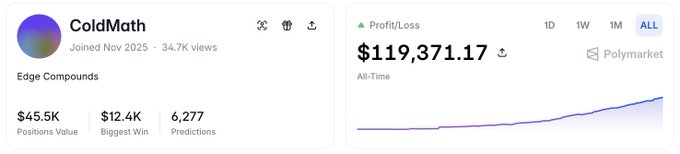
• ColdMath - weather trading bot that turned $300 → $219K in 3 months.
> Profile: https://polymarket.com/@coldmath?via=following
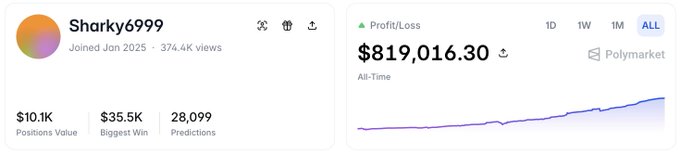
• Sharky6999 - crypto trading bot with $819K PnL and a 99,3% win-rate >Profile: https://polymarket.com/@sharky6999?via=following
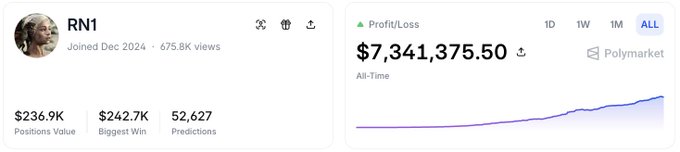
• RN1 - best Polymarket sports bot, turned a $1.2K deposit into $7.3M
> Profile: https://polymarket.com/@rn1?via=following
> In this article we will discorever: what Hermes Agent is, why it replaced OpenClaw, step-by-step install, where to find 700+ skills, and a complete walkthrough of building a Polymarket weather trading agent.
Lets start !
What Is Hermes Agent ?

Hermes Agent is an open-source, self-hosted AI agent built by Nous Research - the team behind YaRN, Nomos, and the Psyche model families, that was released on February 25, 2026.
Here's the simplest way to understand it.
When you hear "AI," your brain imagines a chatbot. Hermes is not a chatbot. It's more like hiring a staff member who never sleeps, remembers everything you've ever told them, gets better at their job every single day, and is always available through your phone - even when your computer is off.
## 3 things that make Hermes different:
Hermes through a three-layer model that resonated widely in the community - and it's the clearest way to understand what Hermes actually does for you.
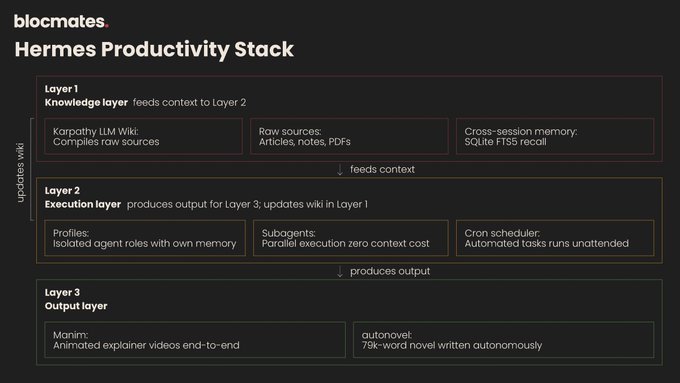
screenshot is taken from @blockmates article about Hermes agent
- Knowledge Layer: Built-in memory, session search, LLM-Wiki skill, optional Honcho integration. Agent doesn't just answer - it accumulates knowledge over time
- Execution Layer: Multi-agent profiles, child agents, tool system, MCP support, persistent machine access. Agent doesn't just respond - it decomposes tasks, runs them in parallel, and delegates
- Output Layer: Cron jobs, gateway delivery to Telegram/Slack/Discord, Web UI, file outputResults flow back into your real workflow - not trapped in a chat window.
Here are the top 3 things that make it the #1 agent in the market for me:
> 1. Persistent Memory

Hermes doesn't forget you when you close the tab. It stores two core memory files: MEMORY.md (environment facts, conventions, experiences) and USER.md (your preferences, communication style, expectations).
These are loaded as a frozen snapshot into every new session. It also stores full conversation history in a SQLite database with full-text search. Past conversations are searchable, summarizable, and retrievable on demand.
> 2. Self-Improving Skills

This is the killer feature. After completing a complex task (roughly 5+ tool calls), Hermes automatically creates a "skill" -a structured markdown file that captures the procedure, known pitfalls, and verification steps.
Next time it encounters a similar task, it loads that skill and executes faster, better, and the way you prefer. The longer you run Hermes, the smarter it gets at your specific workflows.
> 3. Always-On Execution

Hermes runs on your server 24/7. It connects to Telegram, Discord, Slack, WhatsApp, Signal, Email, and 15+ other platforms through a single gateway process.
You message it whenever. It has built-in cron scheduling - you can write natural-language schedules like "Every morning at 8am, scan these GitHub repos and summarize changes to my Telegram." It runs unattended.
> The practical impact is of those features:
As @0xJeff described in his article after three weeks of using Hermes as a personal analyst: instead of opening Telegram, X, Rabby wallet, and Coingecko every morning.
He just open Discord, check what Hermes has prepared, give feedback, and the agent improves. Total cost: $5–$10/month.
## Why Hermes is winning over OpenClaw
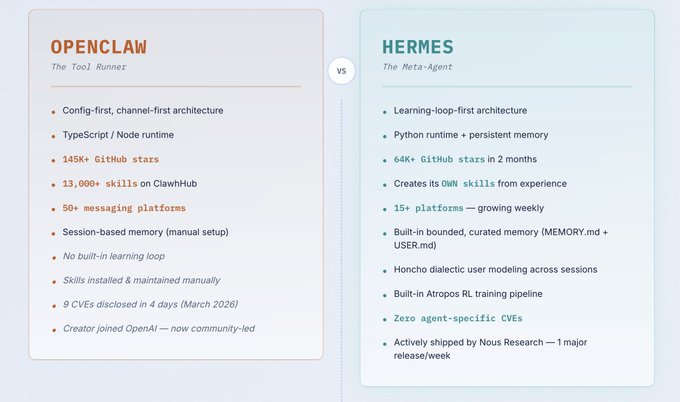
OpenClaw (formerly Clawdbot, then Moltbot) was the breakout AI agent of early 2026. It hit 145,000+ GitHub stars, gained 20,000 stars in a single 24-hour period, and even drove Mac Mini sales to sell-out levels. It was the project that proved personal AI agents are possible and desirable.
But users who've tried both are migrating to Hermes. Here is two mains points for me:
> 1. Learning Loop: fundamental difference
OpenClaw is a static agent framework.
You install skills manually. They don't improve. Your agent on day 30 performs identically to your agent on day 1 -unless you manually update its configuration.
Hermes has a closed learning loop.
Every ~15 tool calls, it pauses, reviews what worked and what failed, and writes a reusable skill. These skills aren't hidden - they're readable, editable markdown files in ~/.hermes/skills/. You can review them, tweak them, delete bad ones. But the default behavior is: the agent gets measurably better with use.
> 2. Memory: Bounded vs. Manual
OpenClaw's memory between sessions requires manual setup and third-party tools (QMD or similar augmentation). Without these add-ons, each session starts with limited context from prior work.
Hermes has built-in bounded, curated memory. The key word is bounded - Hermes doesn't blindly stuff everything into context. It keeps high-value, low-change information persistent, and retrieves historical sessions on demand via full-text search. It also actively manages its own memory, including intelligent context compression during long sessions.
## Complete comparison openclaw/hermes
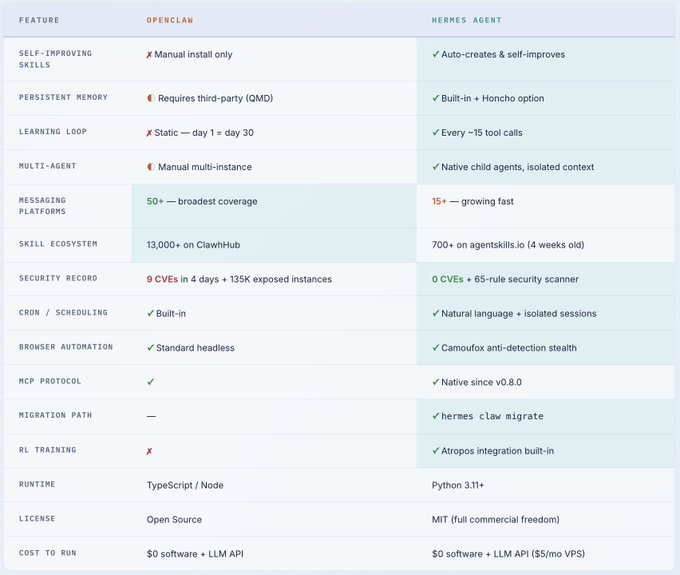
OpenClaw proved the concept. Hermes perfected the architecture. If you need 50+ platform integrations and don't care about self-improvement, OpenClaw still has broader coverage.
But if you want an agent that compounds in capability, has stronger security, and gets smarter the more you use it - Hermes is the clear choice in April 2026.
How to install hermes agent ( guide )
The install takes under 5 minutes. Hermes supports Linux, macOS, and WSL2. Native Windows is not supported - use WSL2 (Ubuntu) if you're on Windows.
> Step 1 - prepare VPS
I want my agent to run 24/7, so I will be deploying it on a Hetzner VPS server.
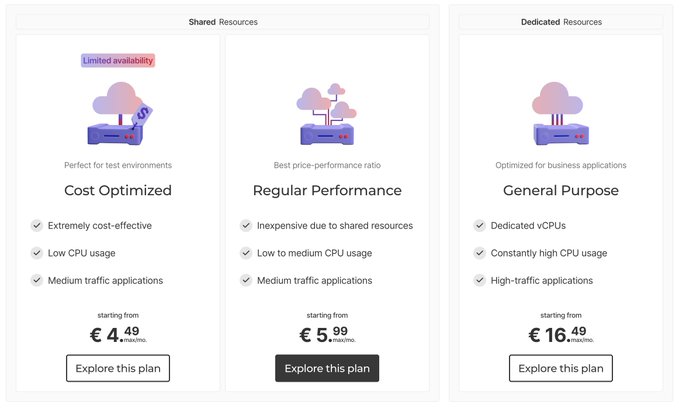
Create an account at hetzner .com → pass simple KYC verification and rent a VPS server (regular performance) in the admin panel.
> Step 2 - connect to VPS
Run the command below in your Mac Terminal or use "Termius" for Windows.
> Step 3 - install Hermes
Run one command below. The installer handles platform-specific setup automatically.
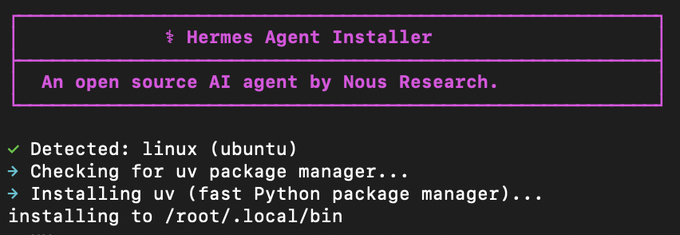
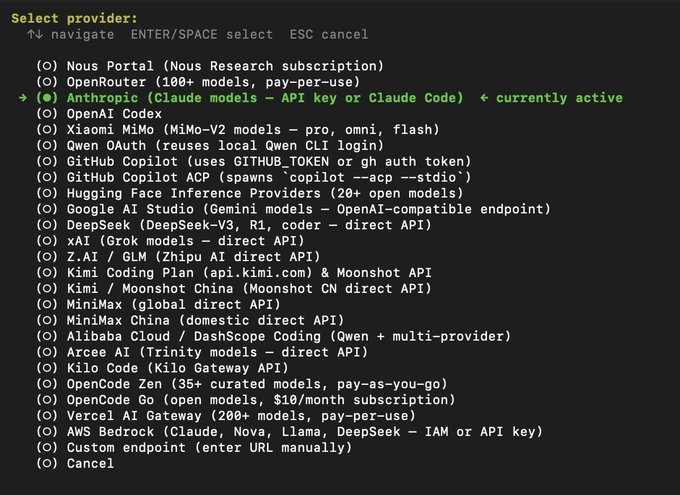
> Step 4 - choose model
After installation is done, the guide will prompt you to choose a model. I recommend using ChatGPT (Codex) or Anthropic (Claude).
> Step 5 - set up messaging gateway
Run command below to connects Hermes to your messaging platform - so you can talk to it from your phone.

I'm choosing Telegram myself, so I created a new bot at @BotFather and provided its token to my Hermes agent.
> Step 6 - start Hermes
That's it. You now have a running agent with an interactive CLI. Start giving it tasks or message it from Telegram.
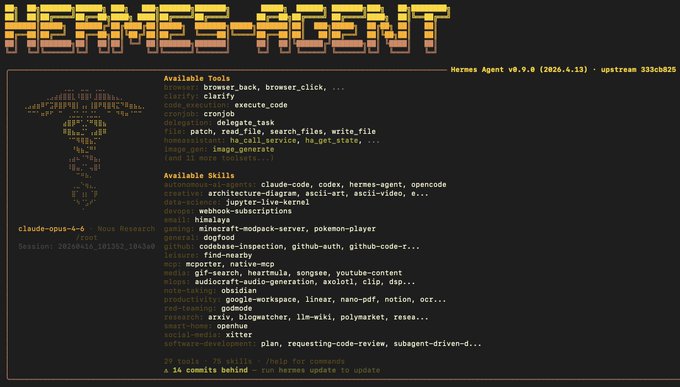
We have installed the Hermes agent on our VPS server so it can trade and learn 24/7. Now let's apply the full power of this framework to trading on Polymarket weather markets.
## Hermes - weather trading agent ( guide )
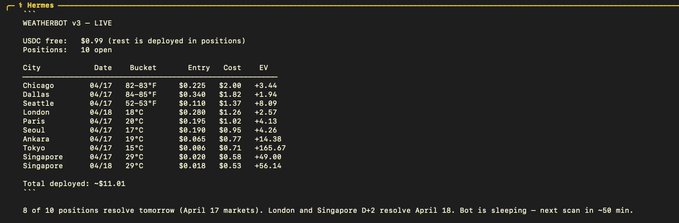
Now the payoff. We're going to deploy a production-grade, open-source Polymarket weather Hermes Agent so it runs 24/7, alerts you via Telegram, and self-calibrates over time.
This is the exact setup I use to run scans across 20 cities across 4 continents with three forecast sources feeding into Expected Value and Kelly Criterion position sizing.
- we will use the logic of a weather trading bot made by @AlterEgo_eth
This step-by-step guide - just copy-paste these prompts to your Hermes agent. You don't need to code anything. Total time: ~30 minutes.
> PROMPT 1 - Clone and setup
We will use an open-source bot made by AlterEgo to set up basic logic for our Hermes agent, so we send this command to our agent's CLI or TG bot.
> PROMPT 2 - Create wallet
I recommend setting up a separate wallet for your weather bot. It's better to ask Hermes to set up a wallet for itself, then fund it.
Save the private key & wallet address that the bot will send you
> PROMPT 3 - Fund the wallet (you do this yourself)
Send to your wallet address on Polygon network: $ USDC.e - your trading capital ($10 min, $50 recommended), $ POL - about 2 POL for gas (~$1)
Once funded, tell your agent:
> PROMPT 4 - Approve Polymarket contracts
Approve all contracts so the bot can use your funds for real trading
> PROMPT 5 - Configure and connect weather API
Create an account at visualcrossing.com and get free API here, then send this prompt to your agent.
> PROMPT 6 - Test scan
Run a test scan or a paper-trading mode before starting with real money.
> PROMPT 7 - Start real trading
To start real trading, just send this command to your Hermes agent and witness the magic of a self-learning weather trading agent happening right in front of you.
As a result, you will see such a dashboard with your trade executions, and you may also ask your weather trading agent to send reports to your TG bot.
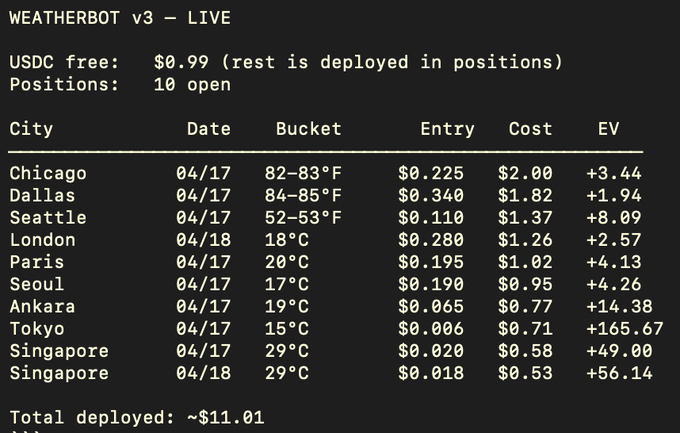
The result is a fully functional, self-learning weather trading agent that improves with each trade rather than following a fixed script.
Your next task is to give the bot enough trades to learn from and clear self-adjustment instructions based on that data.
## 相关链接
- [Movez](https://x.com/0xMovez)
- [@0xMovez](https://x.com/0xMovez)
- [18K](https://x.com/0xMovez/status/2045080054917476451/analytics)
- [@NousResearch](https://x.com/@NousResearch)
- [@blockmates](https://x.com/@blockmates)
- [@0xJeff](https://x.com/@0xJeff)
- [@BotFather](https://x.com/@BotFather)
- [@AlterEgo_eth](https://x.com/@AlterEgo_eth)
- [visualcrossing.com](https://visualcrossing.com/)
- [Upgrade to Premium](https://x.com/i/premium_sign_up)
- [6:00 PM · Apr 17, 2026](https://x.com/0xMovez/status/2045080054917476451)
- [18.2K Views](https://x.com/0xMovez/status/2045080054917476451/analytics)
- [View quotes](https://x.com/0xMovez/status/2045080054917476451/quotes)
---
*导出时间: 2026/4/17 22:34:18*
---
## 中文翻译
# Hermes Agent + Polymarket - 我如何打造一个自我学习的天气交易机器人,从 $100 → $5,000(指南)
**作者**: Movez
**日期**: 2026-04-17T10:00:55.000Z
**来源**: [https://x.com/0xMovez/status/2045080054917476451](https://x.com/0xMovez/status/2045080054917476476451)
---

我上一篇关于如何打造用于 Polymarket 交易的 Weather Clawdbot 智能体的文章达到了 250 万浏览量,帮助了许多 Polymarket 交易者和开发者。
一个月前,@NousResearch 发布了 Hermes agent,我开始每天用它进行研究和 Polymarket 交易——我可以自信地说,它是市场上最好的智能体。
众所周知,Polymarket 上的智能体和机器人每天在天气交易、加密货币和体育市场等领域赚取数百万美元。
在这些领域,正确的算法和执行速度就是一切——这就是为什么自动化、自我学习的 AI 智能体拥有如此强大的优势。它们不睡觉、没有情绪,并且记得一切。
> 此类智能体/机器人的例子:
• ColdMath - 天气交易机器人,3 个月内将 $300 变成了 $219K。
> 主页: https://polymarket.com/@coldmath?via=following

• Sharky6999 - 加密货币交易机器人,盈亏 $819K,胜率 99.3% >主页: https://polymarket.com/@sharky6999?via=following

• RN1 - 最强的 Polymarket 体育机器人,将 $1.2K 本金变成了 $7.3M
> 主页: https://polymarket.com/@rn1?via=following

> 在本文中,我们将了解:Hermes Agent 是什么,为什么它取代了 OpenClaw,逐步安装教程,在哪里可以找到 700+ 技能,以及构建 Polymarket 天气交易智能体的完整演练。
让我们开始吧!
什么是 Hermes Agent?

Hermes Agent 是一个开源、自托管的 AI 智能体,由 Nous Research 打造——他们是 YaRN、Nomos 和 Psyche 模型系列背后的团队,该智能体于 2026 年 2 月 25 日发布。
这是理解它最简单的方式。
当你听到"AI"时,你的大脑会想到聊天机器人。Hermes 不是聊天机器人。它更像是雇了一个永不睡觉的员工,记住你告诉过他的一切,每天都在工作中变得更出色,并且随时可以通过你的手机联系——即使你的电脑已经关机。
## 让 Hermes 与众不同的 3 件事:
Hermes 通过一个在社区中引起广泛共鸣的三层模型运作——这也是理解 Hermes 实际为你做什么的最清晰方式。

截图来自 @blockmates 关于 Hermes agent 的文章
- 知识层:内置记忆、会话搜索、LLM-Wiki 技能、可选的 Honcho 集成。智能体不只是回答——它随时间积累知识
- 执行层:多智能体配置、子智能体、工具系统、MCP 支持、持久的机器访问。智能体不只是响应——它分解任务、并行运行并进行委派
- 输出层:定时任务(Cron jobs)、通过网关投递到 Telegram/Slack/Discord、Web UI、文件输出。结果回流到你的真实工作流中——而不是被困在聊天窗口里。
以下是让它成为我心中市场第一智能体的三大关键:
> 1. 持久记忆

当你关闭标签页时,Hermes 不会忘记你。它存储两个核心记忆文件:MEMORY.md(环境事实、惯例、经验)和 USER.md(你的偏好、沟通风格、期望)。
这些文件以冻结快照的形式加载到每个新会话中。它还将完整的对话历史存储在 SQLite 数据库中,支持全文搜索。过去的对话可搜索、可总结、可按需检索。
> 2. 自我改进的技能

这是杀手级功能。在完成一个复杂任务(大约 5 次以上的工具调用)后,Hermes 会自动创建一个“技能”——一个结构化的 markdown 文件,记录该流程、已知的陷阱以及验证步骤。
下次遇到类似任务时,它会加载该技能,执行得更快、更好,并按照你偏好的方式。你运行 Hermes 的时间越长,它在你的特定工作流程中就变得越聪明。
> 3. 全天候执行

Hermes 在你的服务器上 24/7 运行。它通过一个网关进程连接到 Telegram、Discord、Slack、WhatsApp、Signal、电子邮件以及 15 个以上的其他平台。
你随时给它发消息。它内置了定时调度功能——你可以用自然语言编写计划,比如“每天早上 8 点,扫描这些 GitHub 仓库并将变更摘要发送到我的 Telegram。”它可以无人值守运行。
> 这些功能的实际影响:
正如 @0xJeff 在使用 Hermes 作为个人分析师三周后的文章中所描述的:不再需要每天早上打开 Telegram、X、Rabby 钱包和 Coingecko。
他只需打开 Discord,查看 Hermes 准备的内容,给出反馈,然后智能体就会不断改进。总成本:每月 $5–$10。
## 为什么 Hermes 正在胜过 OpenClaw

OpenClaw(前身为 Clawdbot,后称 Moltbot)是 2026 年初爆火的 AI 智能体。它获得了 145,000+ GitHub 星标,在单个 24 小时内增加了 20,000 个星标,甚至推动 Mac Mini 销量达到售罄水平。它是证明个人 AI 智能体既可行又值得拥有的项目。
但两类都试用过的用户正在迁移到 Hermes。以下是对我而言的两个主要要点:
> 1. 学习循环:根本性差异
OpenClaw 是一个静态的智能体框架。
你手动安装技能。它们不会改进。你在第 30 天的智能体与第 1 天的智能体表现完全相同——除非你手动更新其配置。
Hermes 拥有一个闭环学习机制。
每进行约 15 次工具调用,它就会暂停一下,复盘哪些做法有效、哪些失败了,并编写一个可复用的技能。这些技能并非隐藏的——它们是 ~/.hermes/skills/ 目录下可读、可编辑的 markdown 文件。你可以查看、微调或删除不好的技能。但默认行为是:智能体随着使用会显著变强。
> 2. 记忆:有界记忆 vs. 手动配置
OpenClaw 的跨会话记忆需要手动配置和第三方工具(QMD 或类似的增强工具)。没有这些插件,每次会话只能从之前的工作中获得有限的上下文。
Hermes 内置了有界的、经过筛选的记忆。关键词是"有界"——Hermes 不会盲目地把所有东西塞进上下文。它持久保存高价值、低变化的信息,并通过全文搜索按需检索历史会话。它还会主动管理自己的记忆,包括在长会话期间进行智能上下文压缩。
## openclaw/hermes 完整对比

OpenClaw 证明了这一概念。Hermes 完善了这一架构。如果你需要 50 多个平台集成,且不在乎自我改进能力,OpenClaw 的覆盖面仍然更广。
但如果你想要一个能力持续复利、安全性更强、而且越用越聪明的智能体——Hermes 是 2026 年 4 月的明确之选。
如何安装 Hermes 智能体(指南)
安装只需不到 5 分钟。Hermes 支持 Linux、macOS 和 WSL2。不支持原生 Windows——如果你使用 Windows,请使用 WSL2(Ubuntu)。
> 第 1 步 - 准备 VPS
我希望我的智能体能全天候运行,所以我将它部署在 Hetzner VPS 服务器上。

在 hetzner.com 创建账户 → 完成简单的 KYC 验证,然后在管理面板租用一台 VPS 服务器(普通性能)。
> 第 2 步 - 连接到 VPS
在 Mac 终端中运行下面的命令,或使用 Windows 上的 "Termius"。
> 第 3 步 - 安装 Hermes
运行下面的一条命令。安装程序会自动处理特定平台的设置。

> 第 4 步 - 选择模型
安装完成后,向导会提示你选择模型。我推荐使用 ChatGPT(Codex)或 Anthropic(Claude)。

> 第 5 步 - 设置消息网关
运行下面的命令,将 Hermes 连接到你的消息平台——这样你就可以从手机上与它对话。

我自己选择的是 Telegram,所以我在 @BotFather 创建了一个新机器人,并将其 token 提供给我的 Hermes 智能体。
> 第 6 步 - 启动 Hermes
就是这样。你现在拥有一个带有交互式 CLI 的运行中的智能体。开始给它分配任务,或者从 Telegram 给它发消息。

我们已将 Hermes 智能体安装在 VPS 服务器上,使其可以全天候交易和学习。现在让我们将这个框架的全部能力应用到 Polymarket 天气市场的交易中。
## Hermes - 天气交易智能体(指南)

现在是收获的时刻。我们将部署一个生产级的开源 Polymarket 天气 Hermes 智能体,让它全天候运行、通过 Telegram 向你发送警报,并随时间自我校准。
这正是我用来横跨 4 大洲 20 个城市进行扫描的配置,接入三个预报数据源,用于计算期望值和凯利准则仓位管理。
- 我们将使用 @AlterEgo_eth 制作的天气交易机器人的逻辑
这份分步指南——只需将这些提示词复制粘贴给你的 Hermes 智能体。你不需要编写任何代码。总耗时:约 30 分钟。
> 提示词 1 - 克隆并设置
我们将使用 AlterEgo 制作的开源机器人为我们的 Hermes 智能体搭建基础逻辑,因此我们将这条命令发送到智能体的 CLI 或 TG 机器人。
> 提示词 2 - 创建钱包
我建议为你的天气机器人设置一个独立的钱包。最好让 Hermes 为自己设置一个钱包,然后再为其充值。
保存机器人发送给你的私钥和钱包地址
> 提示词 3 - 为钱包充值(你自己操作)
向你在 Polygon 网络上的钱包地址发送:$ USDC.e——你的交易资金(最低 10 美元,建议 50 美元),$ POL——大约 2 个 POL 作为 gas 费(约 1 美元)
充值完成后,告诉你的智能体:
> 提示词 4 - 授权 Polymarket 合约
授权所有合约,以便机器人可以使用你的资金进行真实交易
> 提示词 5 - 配置并连接天气 API
在 visualcrossing.com 创建账户并在此获取免费 API,然后将这条提示词发送给你的智能体。
> 提示词 6 - 测试扫描
在投入真金白银之前,先运行一次测试扫描或模拟交易模式。
> 提示词 7 - 开始真实交易
要开始真实交易,只需将这条命令发送给你的 Hermes 智能体,然后亲眼见证一个自我学习的天气交易智能体在你面前施展魔力。
最终,你会看到一个包含交易执行记录的仪表盘,你也可以让天气交易智能体向你的 TG 机器人发送报告。

最终结果是一个功能齐全、自我学习的天气交易智能体,它会随着每一笔交易不断改进,而不是遵循固定的脚本。
你的下一个任务是给机器人足够多的交易供其学习,并基于这些数据提供清晰的自我调整指令。
## 相关链接
- [Movez](https://x.com/0xMovez)
- [@0xMovez](https://x.com/0xMovez)
- [18K](https://x.com/0xMovez/status/2045080054917476451/analytics)
- [@NousResearch](https://x.com/@NousResearch)
- [@blockmates](https://x.com/@blockmates)
- [@0xJeff](https://x.com/@0xJeff)
- [@BotFather](https://x.com/@BotFather)
- [@AlterEgo_eth](https://x.com/@AlterEgo_eth)
- [visualcrossing.com](https://visualcrossing.com/)
- [升级到 Premium](https://x.com/i/premium_sign_up)
- [2026年4月17日 下午6:00](https://x.com/0xMovez/status/2045080054917476451)
- [18.2K 次浏览](https://x.com/0xMovez/status/2045080054917476451/analytics)
- [查看引用](https://x.com/0xMovez/status/2045080054917476451/quotes)
---
*导出时间: 2026/4/17 22:34:18*