# Claude For Dummies.
**作者**: Ruben Hassid
**日期**: 2026-04-19T03:56:12.000Z
**来源**: [https://x.com/rubenhassid/status/2045713046065283435](https://x.com/rubenhassid/status/2045713046065283435)
---

98.75% of all humans have never tried Claude.
Not even once.
This free guide solves this gap. Claude For Dummies.
> Skip this if you know Claude and have tried it. For the “pros”, I added a very last section “How pros use Claude”, at the end.
You never tried Claude because you either:
- Don’t really use AI.
- Or you just use ChatGPT.
- Or worst (!!!), you only use the FREE ChatGPT.
This guide is the easiest way to get started with Claude.
I will assume you don’t know how to use AI. And by the end of this (very long) guide, you will know more than 98.75% of the world.
Sounds like a good deal? Cool.
Two things before we start:
Save this guide. Block 10 min this week & try Claude for the first time.
Send it to anyone who has never tried Claude (& still thinks it’s a guy’s name).
1. What is Claude?
Claude is an AI you talk to.
You type something, it types back. It can write, think, summarize, analyze documents, work with your files, and help you make decisions.
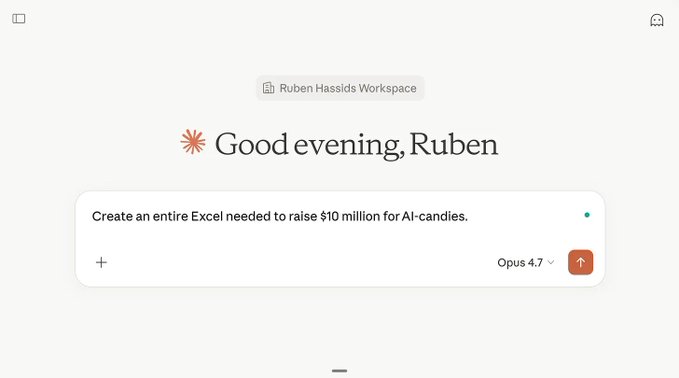
You type something you need. You select the model at the bottom right. They just announced the new Claude Opus 4.7 by the way.

It created an entire Excel, with 12 (!!!) tabs, real formulas, everything. And you can preview the Excel right inside your Claude chat. So good.
It’s made by a company called Anthropic.
If you’ve used ChatGPT before, Claude is the same kind of thing. If you’ve never used any AI, Claude is a great place to start.
How it actually works (in 30 seconds)
You don’t need to understand the engineering.
But 3 concepts will save you from the most common beginner frustrations.
## 1 - Auto-complete at scale.
Claude predicts the next word, billions of times per response.
That’s how all AI assistants like this work. It’s pattern-matching at a speed that feels like thinking, but it’s not thinking the way you do.
This is why Claude sounds confident even when it’s wrong.
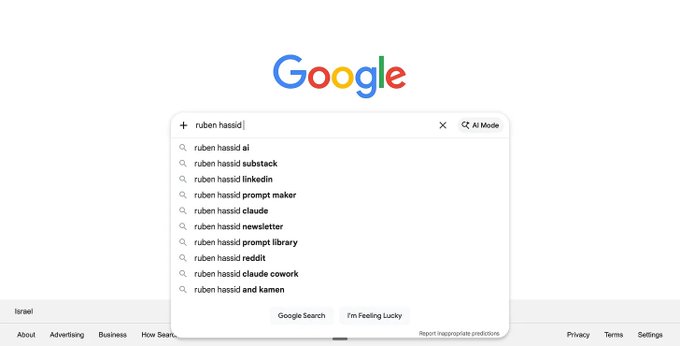
Auto-complete is like when Google or your phone predicts the next word.
## 2 - Sycophancy.
Claude is trained to be helpful and agree with you (= sycophancy).
Side effect: if you say something false, Claude might nod along instead of correcting you. Don’t trust agreement. You are the one deciding directions.

Claude repeating “You’re absolutely right” even became a meme.
## 3 - Tokens.
Claude reads and writes in chunks called tokens.
A token is roughly a word. Every conversation has a limit on how many tokens fit. This is why long conversations eventually becomes too much: the memory fills up.
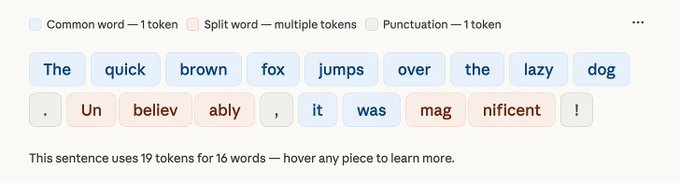
The simplest way to explain a token is that it’s roughly one word.
> ★ Remember. Claude is an auto-complete machine at superhuman scale. It sounds sure of itself because it’s made to agree with you. It uses tokens to understand you and memorize your conversation (until it can’t anymore).
2. Claude vs. ChatGPT
Everyone’s heard of ChatGPT, even people who don’t use it.
So let’s take it as the reference point.
Claude and ChatGPT are the same species. You talk to both of them the same way. You can ask both of them the same questions. But they have different personalities and strengths (and trainings).
Here’s what’s actually different:
- Writing voice. Claude’s default writing is less AI-flavored than ChatGPT’s. If you’ve ever noticed ChatGPT sounding like a corporate memo nobody asked for, you’ll notice Claude does it better.
- Long documents. Claude can read a 200-page document in one go without losing track. ChatGPT has been catching up, but Claude still wins here.
- File work. Claude’s desktop app can see your local folder (from your computer) and work with your files directly. ChatGPT can’t (yet 👀).
- Multi-step jobs. Claude has a mode called Cowork (we’ll get there in section 8) that runs tasks for minutes to hours. ChatGPT has agents. But they don’t match Cowork’s scope yet, and they are too technical. Cowork is simple.
And here’s where ChatGPT still wins:
- Voice mode. ChatGPT’s voice experience is infinitely better right now.
- Image generation. Use ChatGPT or Gemini. Claude doesn’t generate images.
- Search. ChatGPT with search feels faster than Claude with search.
- Research. The extended-thinking version of ChatGPT is better suited for research. Pros search with ChatGPT + Grok → and give the results to Claude.
- Multilangual. ChatGPT is better than Claude. But Gemini is probably even better. It depends heavily on the needed language. I assume English here.
> ✓ Tip. You don’t have to pick one. Most people I know use both for different jobs. Claude for writing and long work. ChatGPT for voice, images, and quick search. Grok and ChatGPT for extended research. Gemini for images.
Bottom line:
1 - Both AIs are average by default. What you feed them matters more than which one you pick. Your taste, your examples, your context. How to use them.
2 - Both AIs are infinitely better when you pay for them. And I am (obviously) not paid to say that. Free models are not smart enough & have too many limitations.
3. How to get Claude (and what it costs)
Go to claude.ai. Sign up with your email.
Three plans exist:
Free. Works in the browser. Limited messages per day. No Cowork. Good for 2 weeks of testing to decide if Claude is for you.
Pro ($20 per month). Best model (called Opus), more usage, Cowork, Claude Code, Projects. Same price as ChatGPT Plus. This is where most people land.
Max ($100 or $200 per month). Heavy usage of everything. For people who hit Pro’s ceiling week after week. I pay $100 and use it every day without any problem.
> Team and Enterprise plans exist too. If your team has over 500+ employees and needs help to set up Claude for the entire org, send me ‘TEAM’ on Linkedin.
My rule for picking:
Free if you’re still deciding.
Pro if you plan to use Claude more than 3 times a week.
Max if Pro keeps running out, or you’re running Cowork on long tasks daily.
> ✓ Tip. Pay monthly, not annually. Test for 30 days. If you don’t reach for Claude by week 3, cancel. You’ve lost $20, not $240.
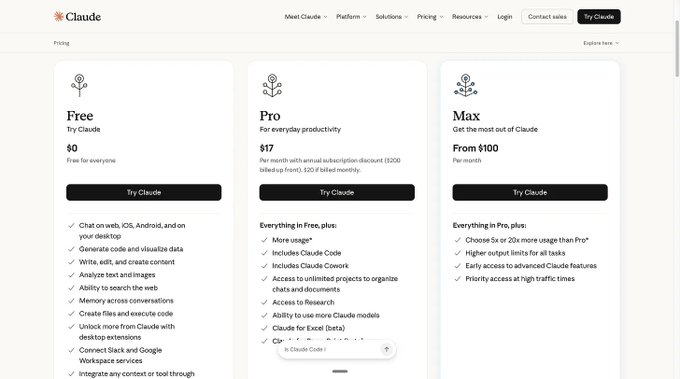
That’s what the pricing table looks like. The link: https://claude.com/pricing.
That’s what the pricing table looks like. The link: https://claude.com/pricing.📷
4. The Three Claudes
This is where most beginners get lost.
“Claude” shows up in several places. 3 of them matter.
The rest you can ignore (for now), but subscribe so you don't miss the next guide!
## #1. Browser Claude (claude.ai)
You type, you get an answer.
Works on the free plan. Best for quick drafts, summaries, thinking out loud. This is the closest experience to ChatGPT. If you’re brand new, start here.
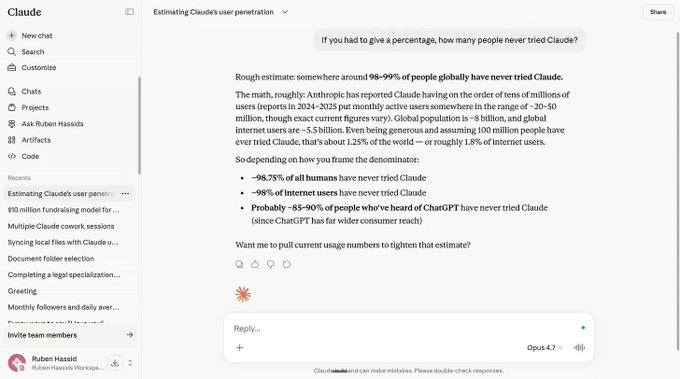
It’s the classic chatbot experience. Works also in the browser (like Google Chrome). But the best Claude is on their app, not your browser.
## #2. Desktop Claude (Mac or Windows app)
Same account as the browser, but installed on your computer. Why it matters: it can see your local files, and you unlock the three modes: Chat, Cowork, and Code.
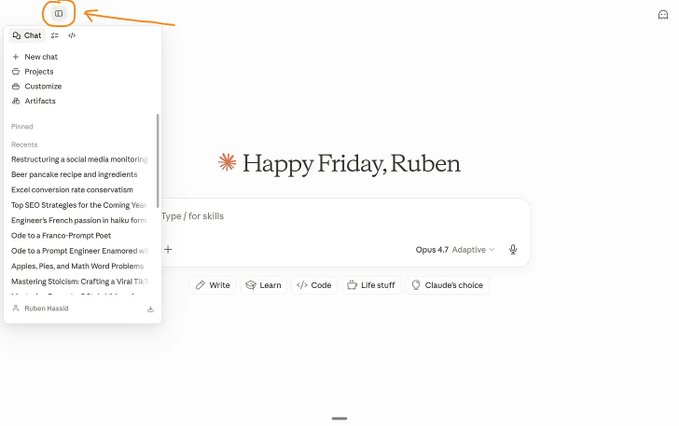
We are still in Chat mode, but this time on the Claude app (desktop). Pro trick: you have the menu selection with the top left button.
## #3. Cowork (inside the desktop app)
Claude Cowork is the next level of AI.
It’s the best thing to happen to AI since ChatGPT.
It does real work for minutes to hours while you do something else. You give it a task, it plans the steps, reads your files, writes outputs, and asks you questions along the way. Paid plans only and desktop only.

Top left menu → Choose Cowork → Pick a folder so it delivers anything you want inside (presentations, PDF, docx, excels, websites… sky is the limit!).
Top left menu → Choose Cowork → Pick a folder so it delivers anything you want inside (presentations, PDF, docx, excels, websites… sky is the limit!).📷
> ★ Remember. Browser = ask. Desktop = ask + access to your files. Cowork = ask + access + do the work while you get coffee. Cowork is the real magic.
Other surfaces exist too: the mobile app, Claude in Chrome (a browsing agent), Claude in Excel. They are (sometimes) useful once you know the basics. Not where you start.
5. How to talk to Claude
If you’ve never typed a prompt before, this section is for you. Five rules.
> a prompt is the text query you send to an AI, like:“what’s the capital of France?”, or any text really.
## Rule 1: be specific
“Write me an email” is vague. Claude will give you something generic.
“Write a follow-up email to a client named Sarah who missed our Tuesday call. Tone: friendly but firm. 4 sentences max.” That gets you something you can actually send.
The more specific your input, the more specific the output.
## Rule 2: give examples
This is the single best thing you can do. Paste something you wrote that you liked. Tell Claude: “write like this.”
Claude learns fast from examples. Faster than from instructions.
## Rule 3: say what you want, not what you don’t want
“Don’t make it too formal” is weaker than “write it like a text to a colleague.”
Tell Claude what TO do. It’s always more effective than telling it what to avoid.
> The pro do both: what we love and what we hate, especially if Claude does it all of the time. For eg, I hate certain writing styles from Claude, so I tell him I hate it.
## Rule 4: start short, add detail
Don’t write a 500-word prompt on your first try.
Start with 2 sentences. See what comes back. Then add: “make it shorter,” “change the tone,” “add a section about X.”
Building up is easier than getting it right in one shot.
That’s why it’s a chatbot - you need to chat with it.
## Rule 5: if it gets confused, start a new chat
Long conversations get messy. Claude’s memory (the context window) fills up.
When responses start feeling off, open a fresh chat and paste in the key context.
A fresh start is free.
> ⚠ Warning. Claude will always give you an answer. That doesn’t mean the answer is right. Check anything.Treat Claude as a partner, not the single source of truth of the universe.
6. What Claude is good at
This is a non-exhaustive list for absolute beginners:
- Writing. First drafts, rewrites, editing, adapting to your voice if you give it examples of your writing. This is where Claude shines.
- Summarizing. Drop a 50-page PDF into the chat. Ask for a 1-page summary with page references so you can verify.
- Thinking with you. Structuring a messy idea. Pressure-testing a decision. Claude is a good thinking partner if you push back on it instead of accepting the first answer. Ask it to zip, and then zap the opposite way.
- Working with your files. On the desktop app and in Cowork, Claude can read your local folder & create files (PPT, XCL, DOCX) directly on your computer.
- Long documents. Upload 200-page files, full context, nothing lost. This is Claude’s biggest technical advantage. It can digest massive things.
- Reasoning step by step. Give it a complex question. Ask it to think step by step. It’s good at breaking down problems you throw at it.
7. What Claude is bad at
It will save you from disappointment.
Real-time information. Claude doesn’t know what happened today unless it has a search tool connected. It will guess, and it will sound confident doing it.
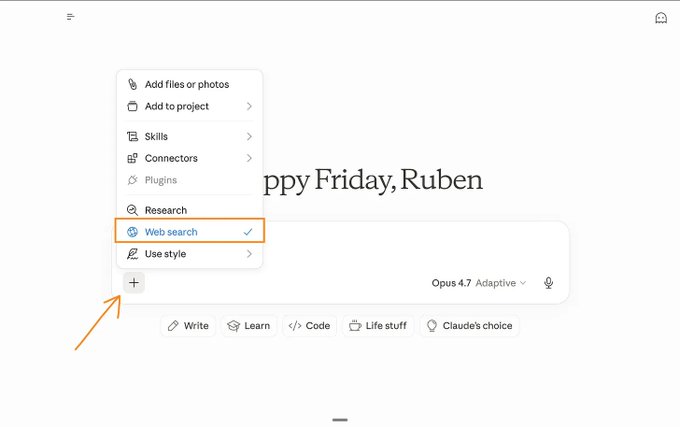
When you click on the “+”, you can see the Web search button. Click on it to activate it, and it becomes blue. Now Claude has access to the internet.
I prefer Grok, or ChatGPT (Extended Thinking), to search online.
Precise math. Don’t use Claude as a calculator for anything that matters, unless it’s running code to compute the answer. It’s not meant to be a math expert.
Vague prompts. If you say “write something good,” you’ll get something generic. Claude needs specificity. You get what you give.

This is a good prompt: 1/ an example attached 2/ exactly what is and what I want 3/ the steps to get 4/ pick the latest model (Opus 4.7).
Being a source of truth. Claude sounds authoritative even when it’s wrong. Always verify facts, dates, quotes, and names.
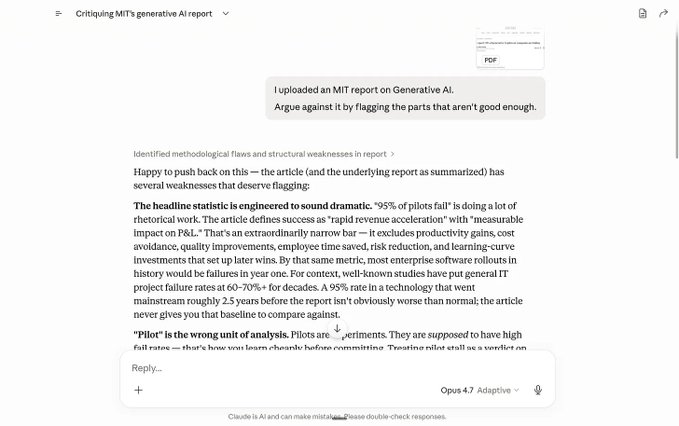
Pro tip: you can use it to argue against everything. Super useful when done right! Beware, Claude is very convincing (even when it’s wrong).
Image generation. Claude can read and analyze images. It cannot create them. Use ChatGPT or Gemini for that. But professionals still make images 👀

Technically, you can make images if you ask Claude to code in HTML what you need (like this gastroenterology infographic for my sister).
> ⚠ Warning. The most common beginner mistake: vague requests by assuming Claude is some otherworld god that will solve everything. No, it’s a very good employee - probably your best - that needs the direction of a boss, you.
8. The 3 words that matter
Only three.
If you learn these, you’ll use Claude better than 90% of the people paying for it.
## Token
The unit Claude thinks in. Every word you type, every file you upload, every response Claude gives gets chopped into tokens.
Why you care:
- Your usage limits are counted in tokens.
- A page of text is roughly 500 tokens. A long chat can hit millions.
- Long chats hit a ceiling because the context window is finite (in tokens).
> ★ Remember. A page is about 500 tokens. If Claude starts acting dumb after a long conversation, because context window is full. So start a fresh chat.
Once you understand tokens, you will cheer up with us “professionals” when a new model drops and they say, “We double the token limit window”.
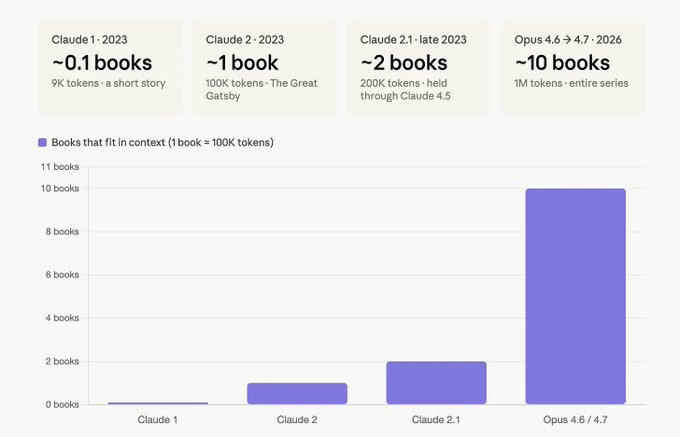
Today, you can upload the equivalent of 10 full books and Claude is still capable to process, think and execute after reading it.
## Cowork
Cowork is Claude running for minutes to hours on your computer, doing a real task while you do something else.
A concrete example. You have a folder of 40 messy invoices. Different formats. Different fonts. Some PDFs, some screenshots. You want them cleaned up, grouped by client, with a drafted follow-up email for each overdue one.
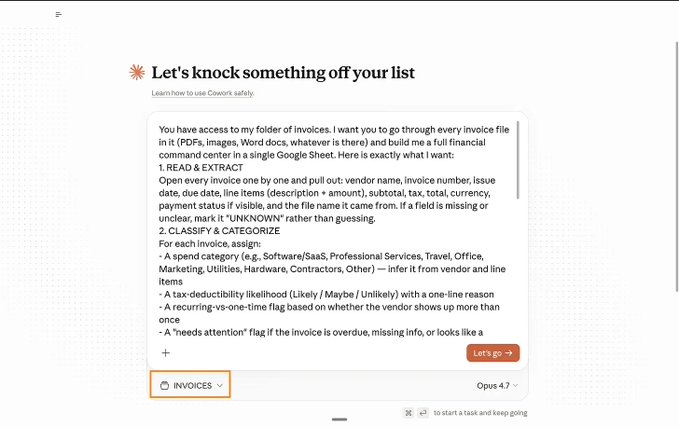
I gave Cowork all of my invoices (that live in my folder called INVOICES, duh). Yes, your prompt can be this long, by the way.
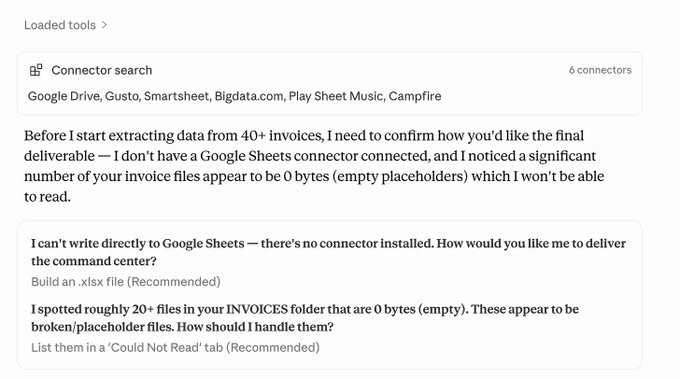
Cowork is connecting to my tools automatically, and even asking me clarifying questions before working. Like… a coworker.
✦ With ChatGPT: copy-paste each invoice, ask, get an answer, copy the next, repeat 40 times. An afternoon.
✦ With Cowork: open the desktop app, point it at the folder, describe the task in one sentence, walk away. Come back 15 minutes later. The folder has cleaned files, a summary spreadsheet, and 40 drafted emails. All on your computer.
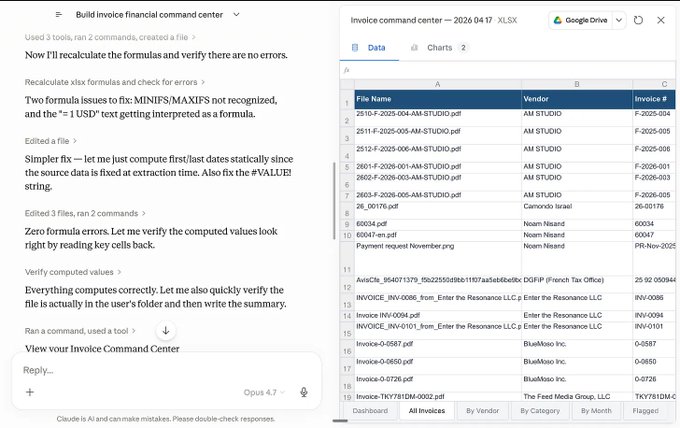
The entire Excel file has been generated. Every tab. Every formula. Every-freaking-thing.
Cowork gets sharper when you point it at a folder that includes your context.
> context is information before completeling a task
My folder has 3 subfolders:
- about-me: who you are, how you work, what you write.
- outputs: so that I can easily find again what Claude did in the past.
- templates: my favorite work with Claude, so it can do it again easily.
Once that folder exists, your prompts get short. Your outputs get sharper. The prompting treadmill goes away. But this newsletter is “Claude For Dummies”, so I won’t give you all of the details here.
## Claude Code
Claude running inside your terminal. Built for developers.
If you don’t code, you don’t need it. But you’ll see “Claude Code” mentioned everywhere, so now you know what it is. Cowork does 80% of what Claude Code does for non-developers, with a visual interface.
Quick summary:
- Token = what you’re paying for.
- Cowork = Claude working for you.
- Claude Code = Claude for devs.
> ✓ Next level.You want the full set up for Cowork? It’s here.
> You want to master Claude Code still? Go here.I usually don’t like pointing to another newsletter. Because it feels like an endless series of articles to read one after the other. But these two are of my best newsletters. So worth reading :) only when have the time!
9. The words you can ignore (for now)
You’ll see these words thrown around a lot.
They don’t matter until you’re using Claude daily.
But here’s what they mean in plain English, so you can stop wondering:
- Projects. A folder inside Claude that remembers context across chats. Nice once you’re repeating the same kind of work.
- Artifacts. The side pane where Claude opens documents, code, or mini-apps it creates for you. You’ll recognize it when you see it.
- Skills. Reusable prompts (instructions) you trigger by name inside Cowork or Chat. Think of them as saved workflows. For example: /negotiation.
- Connectors. How Claude talks to Slack, Gmail, Google Drive, Granola, Notion. Set them up when you need them. It pulls info from your apps.
- MCP. It’s very technical, but basically, to connect stuff to Claude (Connectors are MCPs, for example). But you’ll never have to do anything yourself.
- Plugins. Bundles of Skills and Connectors for Cowork. Like a small app store.
If you skipped this section, you skipped the right section.
Come back when you need it.
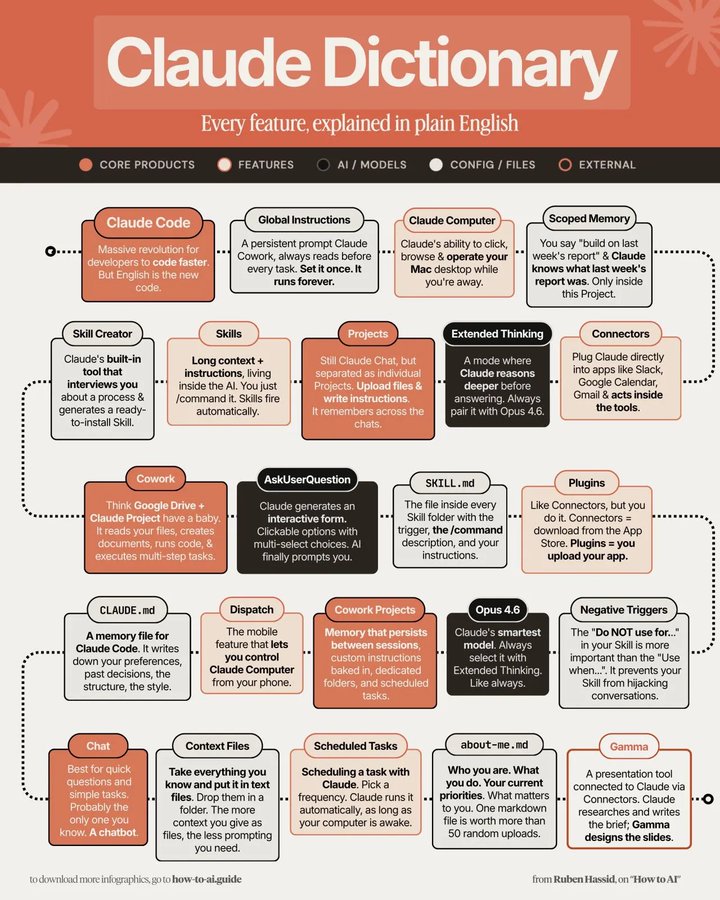
I made a Claude Dictionary for those in need of visualization.
10. 10 things to try in Claude your first week
You have the map. Now here are 10 concrete things to actually do.
Pick 3 this week. Each one teaches you something the last one didn’t.
Copy-paste 3 of your LinkedIn posts. Then ask Claude to write 3 new ones in the same voice. Then ask it to search for new topics on the web.
Upload a 50-page PDF. Ask for a 1-page summary with page references so you can verify.
Upload your last 5 meeting notes. Ask for a decisions log: what got decided, who owns each action, what’s still open.
Point Cowork at your Downloads folder. Ask what’s in there and what you could safely delete.
Paste a messy email thread. Ask for the 3 next actions and who owes what.
Connect your Gmail to Claude. Now the same task for the messy email thread, but no need to paste anything. Claude reads your Gmail automatically.
Give it a Google Doc you’ve been meaning to edit. Ask for a sharper rewrite with a diff of what changed and why. Be precise.
Feed it a spreadsheet. Ask what patterns it notices that you might have missed. Heck, ask for a completely new spreadsheet with [what’s missing].
Paste a competitor’s pricing page. Ask how yours compares and what’s missing. You can even ask to create an HTML new version to see it live.
Give it your calendar for the week. Ask what to decline, and why.
> ✓ Tip. Keep a note file called prompts-that-worked. Every time a prompt gives you something useful, save it. In 2 weeks you’ll have a personal library worth more than any prompt pack you could buy. Soon, you’ll turn them into Skills.
11. Your test drive
You don’t have to change anything. You don’t have to cancel ChatGPT.
Just pick one of these two paths tonight.
## The free path (no payment, no commitment)
Go to claude.ai and sign up.
Paste something you wrote recently.
Ask Claude: “Rewrite this in the same voice but sharper, and tell me what you changed and why.”
Run the same prompt in ChatGPT.
Compare. Make up your own mind.
## The Cowork path ($20 for 1 month)
Go to claude.ai and sign up.
Upgrade to Pro ($20).
Install the desktop app (Mac or Windows).
Open Cowork.
Point it at a folder you care about. Your Downloads. A stack of PDFs. Your client notes.
Ask it: “Look through this folder, tell me what’s in it, and suggest 3 useful things you could do with it.”
Watch. Don’t type again. Let it work.
If, after either test, you don’t see why Claude’s the best, cancel Pro, no hard feelings, go back to whatever you were using.
Because most people reading this guide will feel smarter for 20 minutes and never open Claude. Don’t be that person. Open it tonight.
Be part of the 1.25% who (actually) tried Claude.
How pros use Claude.
I did my best to stay as simple as possible.
For all the new people trying Claude for the first time, you can stop the newsletter here. Thanks for reading! If you enjoyed it, share it with your team, your mom, your butcher, your dog. Anyone who needs to start with Claude.
…
And if you are still here, let’s forget “for dummies” for a minute. I wanted to show you what pushing Claude to its limit (without coding) looks like in practice.
Because this newsletter is called How to AI.
## It all starts with the simplest prompt
The pros don’t write prompts. They have skills.
I just typed the command /negotiation-prep and a one-liner:
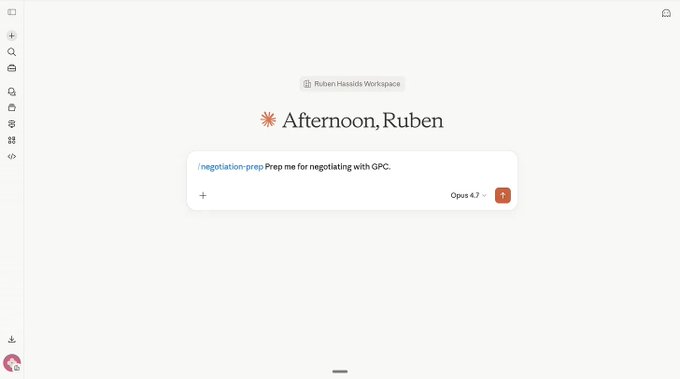
This is the entire prompt. And you will, it triggers a LOT of stuff.
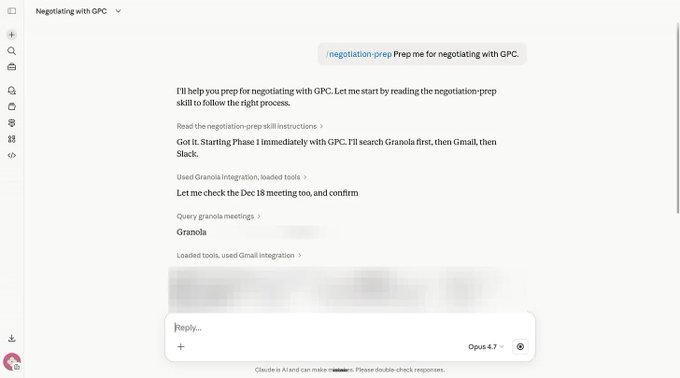
It went on my Granola (meeting notes), Gmail (emails), Drive (Google docs & contracts), Slack (messages) to get every piece of information needed.
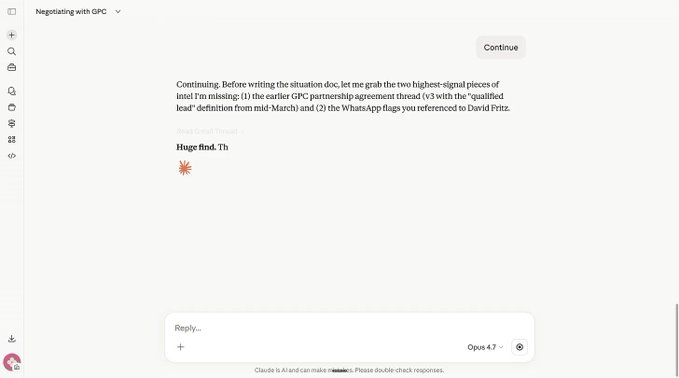
It pulled so much information that it had to stop, and I had to say Continue.
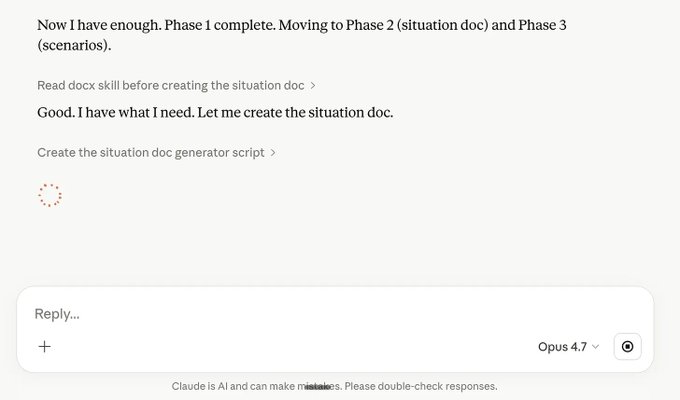
It is still working autonomously. I am writing content as I’m waiting.
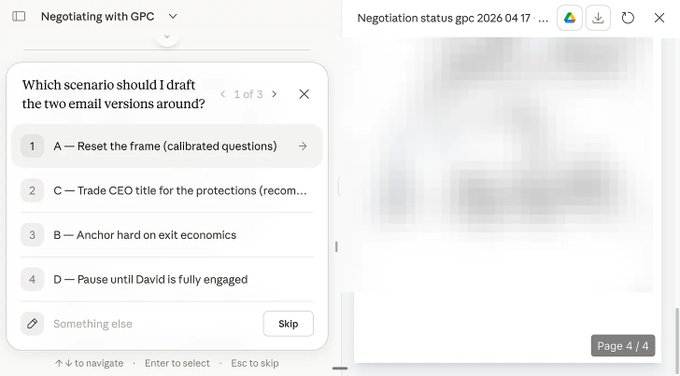
I had to blur the image. I clicked on the Q&A generated by Claude.
in total, I only typed 1 prompt and clicked on some Q&A Claude asked me…
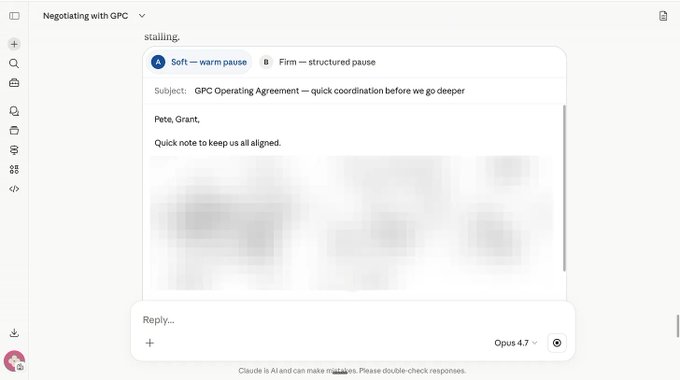
And I now have two drafts ready. If I select one, it will already be in my Gmail, with the right people CC’ed. You don’t believe me?
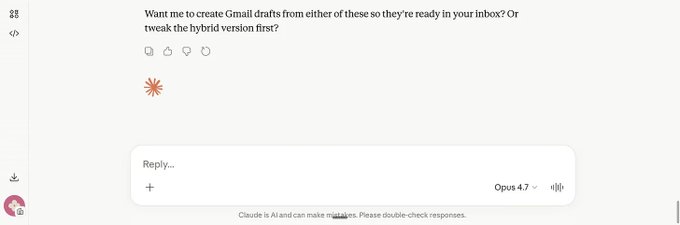
Claude literally asked me if I wanted to.
## Ok wait. What just happened?
In short:
- I have a Claude Skills that knows exactly how I negotiate.
- I then asked Claude to use the skills /negotiation-prep with GPC.
- Claude went on Granola, my notetakers, to read every single meeting I had with (1) my lawyers (2) my future partners.
- Claude then went to Gmail to extract all of our discussions AND contract drafts AND partnership agreement AND whatever we sent to each others.
- Claude then went on Slack to check our latest discussions.
- Claude then aggregated everything, with its own timeline, to understand what’s at stake, what’s needed, and at which stage I am in the negotiation.
- Claude then (finally) asked me some questions about the deal itself.
- Yes, you read that right. Claude asked me to click on a Q&A Claude generated, for me. Basically, Claude is the one prompting me.
- Claude then created two potential drafts, a soft and an aggressive one, assuming it would create a thread between my partners and my lawyer (it was part of its Q&A, so it just executed what I asked).
- Claude ends up asking me to pick one, so it can create a Gmail draft inside my own Gmail. Magic.
And it’s executing. Going inside my Gmail and working for me at lightspeed.
I believe you now understand Claude is much more than what you think.
And remember. It is the worst it has ever been. Ever.
Where to start.
You can’t master Claude in one day.
Instead, book 20 minutes this week & open this newsletter.
Download the Claude app to start.
Play with the Chat mode first. Try to copy your voice.
Pay for one month of the $20 plan to get Claude Cowork.
Ask for a tough deliverable. An Excel, a PDF, an HTML, something.
Be amazed. Start your rabbit hole journey on how to master it completely.
A message from the author, Ruben.
This article exists because 70,000+ people decided AI is too important to leave aside. Not only that, but they shared it around them. They understand they are the sum of the 5 people around them. So better have them using AI.
If this helped you — or if it’ll help someone you know — forward it to them. That’s how this grew. Just readers like you sending it to people like them.
And if you're new here, follow me on X →@rubenhassid (also free!)
## 相关链接
- [Ruben Hassid](https://x.com/rubenhassid)
- [@rubenhassid](https://x.com/rubenhassid)
- [28K](https://x.com/rubenhassid/status/2045713046065283435/analytics)
- [claude.ai](https://claude.ai/)
- [Linkedin](https://www.linkedin.com/in/ruben-hassid)
- [https://claude.com/pricing](https://claude.com/pricing)
- [https://claude.com/pricing](https://claude.com/pricing)
- [subscribe](https://ruben.substack.com/)
- [claude.ai](https://claude.ai/)
- [level.You](https://level.you/)
- [here](https://ruben.substack.com/p/claude-cowork-20)
- [here](https://ruben.substack.com/p/claude-code)
- [claude.ai](https://claude.ai/)
- [claude.ai](https://claude.ai/)
- [How to AI.](https://ruben.substack.com/)
- [@rubenhassid](https://x.com/@rubenhassid)
- [Upgrade to Premium](https://x.com/i/premium_sign_up)
- [11:56 AM · Apr 19, 2026](https://x.com/rubenhassid/status/2045713046065283435)
- [28.1K Views](https://x.com/rubenhassid/status/2045713046065283435/analytics)
- [View quotes](https://x.com/rubenhassid/status/2045713046065283435/quotes)
---
*导出时间: 2026/4/19 20:17:39*
---
## 中文翻译
# Claude 小白入门指南。
**作者**:Ruben Hassid
**日期**:2026-04-19T03:56:12.000Z
**来源**:[https://x.com/rubenhassid/status/2045713046065283435](https://x.com/rubenhassid/status/2045713046065283435)
---

全人类中有 98.75% 从未尝试过 Claude。
连一次都没有。
这份免费指南就是要弥补这个空白。Claude 小白入门指南。
> 如果你已经了解并试用过 Claude,可以跳过。至于“高手”们,我在最后加了一节“高手如何使用 Claude”。
你之所以没试过 Claude,是因为你属于以下其中一种:
- 根本不怎么用 AI。
- 或者你只用 ChatGPT。
- 或者最糟的是(!!!),你只用免费版 ChatGPT。
这份指南是上手 Claude 最简单的方式。
我会假设你完全不懂怎么用 AI。读完这份(很长的)指南后,你将比世界上 98.75% 的人懂得更多。
听起来不错吧?好。
开始之前,先做两件事:
收藏这份指南。这周抽出 10 分钟,第一次试试 Claude。
把它转发给任何从没试过 Claude 的人(以及那些还以为它是个男人名字的人)。
1. Claude 是什么?
Claude 是一个可以对话的 AI。
你输入内容,它回复你。它可以写作、思考、总结、分析文档、处理你的文件,并帮助你做决策。

你输入需要的内容,然后在右下角选择模型。顺便说一句,他们刚发布了全新的 Claude Opus 4.7。

它创建了一个完整的 Excel 文件,有 12 个(!!!)工作表、真实的公式,应有尽有。而且你可以直接在 Claude 对话窗口里预览这个 Excel。太棒了。
它由一家叫 Anthropic 的公司开发。
如果你用过 ChatGPT,那 Claude 就是同类产品。如果你从没用过任何 AI,Claude 是一个绝佳的起点。
它是如何工作的(30 秒速览)
你不需要理解背后的工程原理。
但有 3 个概念能帮你避开新手最常见的困惑。
## 1 - 大规模自动补全。
Claude 通过预测下一个词来工作,每次回复要预测数十亿次。
所有这类 AI 助手都是这样运作的。这是一种速度堪比思考的模式匹配,但它并不像你那样真正在思考。
这就是为什么 Claude 即使错了,听起来也很自信。

自动补全就像 Google 或你的手机预测下一个词那样。
## 2 - 讨好性。
Claude 被训练得乐于助人并赞同你(即“讨好性”)。
副作用是:如果你说了错误的话,Claude 可能会随声附和而不是纠正你。不要轻信它的赞同。决定方向的人是你。

Claude 反复说“你说得太对了”甚至成了一个梗。
## 3 - Token(词元)。
Claude 以称为“token(词元)”的块来读取和写入。
一个 token 大约相当于一个词。每段对话都有 token 数量上限。这就是为什么长对话最终会变得难以承受:记忆空间被填满了。

解释 token 最简单的方式:它大约相当于一个词。
> ★ 记住。Claude 是一台超人类规模的自动补全机器。它听起来对自己很有把握,因为它被设计成赞同你。它用 token 来理解你并记住你们的对话(直到记不住为止)。
2. Claude 对比 ChatGPT
每个人都听说过 ChatGPT,连不用它的人也一样。
所以我们就拿它作为参照物。
Claude 和 ChatGPT 是同一物种。你用同样的方式和它们对话,可以问它们同样的问题。但它们有不同的个性和优势(以及不同的训练)。
实际的区别在于:
- 写作文风。Claude 的默认写作比 ChatGPT 更少“AI 味”。如果你曾觉得 ChatGPT 的口吻像一份没人想看的公司备忘录,你会发现 Claude 在这方面做得更好。
- 长文档。Claude 可以一口气读完一份 200 页的文档而不迷失重点。ChatGPT 一直在追赶,但这方面 Claude 仍然胜出。
- 文件处理。Claude 的桌面应用可以查看你电脑上的本地文件夹,直接处理你的文件。ChatGPT 还做不到(暂时 👀)。
- 多步骤任务。Claude 有一个叫 Cowork 的模式(我们会在第 8 节讲到),可以运行持续数分钟到数小时的任务。ChatGPT 也有智能体(agent),但它们还达不到 Cowork 的能力范围,而且太技术化。Cowork 很简单。
而以下是 ChatGPT 仍然胜出的地方:
- 语音模式。目前 ChatGPT 的语音体验好得多。
- 图像生成。用 ChatGPT 或 Gemini。Claude 不能生成图像。
- 搜索。带搜索功能的 ChatGPT 感觉比带搜索的 Claude 更快。
- 研究。ChatGPT 的扩展思考版本更适合做研究。高手们用 ChatGPT + Grok 搜索 → 然后把结果交给 Claude。
- 多语言。ChatGPT 比 Claude 强。但 Gemini 可能更强。这在很大程度上取决于所需的语言。我这里假设是英语。
> ✓ 小贴士。你不必二选一。我认识的大多数人会根据不同任务两者都用。写作和长任务用 Claude。语音、图像和快速搜索用 ChatGPT。深度研究用 Grok 和 ChatGPT。图像用 Gemini。
结论:
1 - 两个 AI 默认表现都平平。你喂给它们的内容,比选哪一个更重要。你的品味、你的示例、你的背景信息,以及使用方法。
2 - 付费之后,两个 AI 都会好上无数倍。我(显然)没有收钱才这么说的。免费模型不够聪明,限制也太多。
3. 如何获取 Claude(以及费用)
访问 claude.ai,用你的邮箱注册。
共有三种套餐:
免费版。在浏览器中使用。每天消息数量有限。无 Cowork。适合用两周来测试,判断 Claude 是否适合你。
Pro 版(每月 20 美元)。最好的模型(称为 Opus)、更多使用额度、Cowork、Claude Code、Projects。与 ChatGPT Plus 价格相同。这是大多数人的选择。
Max 版(每月 100 或 200 美元)。所有功能的高强度使用。适合每周都触及 Pro 上限的人。我付的是 100 美元,每天使用毫无问题。
> 还有团队版和企业版。如果你的团队有超过500名员工,需要帮助为整个组织部署Claude,请在LinkedIn上给我发送“TEAM”。
我的选择原则:
还在犹豫不决,就选免费版。
计划每周使用Claude超过3次,就选Pro。
如果Pro总是不够用,或者你每天都要在Cowork上运行长时间任务,就选Max。
> ✓ 小贴士。按月付费,不要按年付费。先测试30天。如果到第3周你都没怎么用Claude,就取消。你只损失了20美元,而不是240美元。

这就是价格表的样式。链接:https://claude.com/pricing。
这就是价格表的样式。链接:https://claude.com/pricing。📷
4. 三种Claude
这是大多数初学者感到困惑的地方。
“Claude”出现在多个地方。其中3个很重要。
其余的你可以暂时忽略,但要订阅以免错过下一篇指南!
## #1. 浏览器版Claude(claude.ai)
你输入,它回答。
免费版即可使用。最适合快速起草、摘要、边想边说。这是最接近ChatGPT的体验。如果你是完全的新手,从这里开始。

这是经典的聊天机器人体验。也可以在浏览器(如Google Chrome)中使用。但最好的Claude是在他们的应用上,而不是浏览器里。
## #2. 桌面版Claude(Mac或Windows应用)
与浏览器版是同一个账户,但安装在你的电脑上。为什么它重要:它可以看到你的本地文件,并且你可以解锁三种模式:Chat(聊天)、Cowork(协作)和Code(代码)。

我们仍然处于Chat模式,但这次是在Claude应用(桌面版)上。专业技巧:你可以通过左上角按钮打开菜单选择。
## #3. Cowork(在桌面应用内)
Claude Cowork是更上一层的AI。
这是自ChatGPT以来AI领域最好的东西。
它可以为你做几分钟到几小时的实际工作,而你可以去做别的事情。你给它一个任务,它会规划步骤、读取你的文件、写出成果,并在过程中向你提问。仅限付费版,且仅限桌面端。

左上角菜单 → 选择Cowork → 指定一个文件夹,让它把任何你想要的东西放进去(演示文稿、PDF、docx、Excel、网站……一切皆有可能!)。
左上角菜单 → 选择Cowork → 指定一个文件夹,让它把任何你想要的东西放进去(演示文稿、PDF、docx、Excel、网站……一切皆有可能!)。📷
> ★ 记住。浏览器版 = 提问。桌面版 = 提问 + 访问你的文件。Cowork = 提问 + 访问 + 在你喝咖啡时完成工作。Cowork才是真正的魔法。
还有其他平台:移动应用、Chrome中的Claude(一个浏览代理)、Excel中的Claude。掌握基础之后,它们(有时)会有用。但不是入门的地方。
5. 如何与Claude对话
如果你从未输入过提示词,这一节就是为你准备的。五条规则。
> 提示词就是你发送给AI的文本查询,比如:“法国的首都是什么?”,或者任何文本。
## 规则1:要具体
“给我写封邮件”太模糊了。Claude会给你一些泛泛而谈的东西。
“给一位名叫Sarah的客户写一封跟进邮件,她错过了我们周二的电话。语气:友好但坚定。最多4句话。”这样你才能得到一封真正可以发送的邮件。
你的输入越具体,输出就越具体。
## 规则2:给出示例
这是你能做的最有效的一件事。粘贴一段你自己写的、你满意的内容。告诉Claude:“照这样写。”
Claude从示例中学习得很快,比从指令中学习更快。
## 规则3:说你想要什么,而不是你不想要什么
“不要太正式”比“像给同事发消息那样写”效果更差。
告诉Claude该做什么。这总是比告诉它要避免什么更有效。
> 专业人士两者都用:说出我们喜欢的和我们讨厌的,尤其是当Claude总是犯同样的毛病时。比如,我讨厌Claude的某些写作风格,所以我直接告诉它我讨厌。
## 规则4:从简短开始,逐步添加细节
第一次不要写500字的提示词。
从2句话开始。看看结果如何。然后再添加:“写短一点”、“换一种语气”、“加一段关于X的内容”。
逐步完善比一次到位更容易。
这就是为什么它是聊天机器人——你需要和它聊天。
## 规则5:如果它搞混了,就开一个新对话
过长的对话会变得混乱。Claude的记忆(上下文窗口)会被填满。
当回答开始变得不对劲时,打开一个新的聊天,粘贴关键的背景信息。
重新开始是免费的。
> ⚠ 警告。Claude总会给你一个答案。但这并不意味着答案是正确的。务必核实。把Claude当作合作伙伴,而不是宇宙中唯一的真理来源。
6. Claude擅长什么
这是为完全新手准备的非详尽清单:
- 写作。初稿、改写、编辑,如果你给它你的写作示例,它还能模仿你的风格。这是Claude大放异彩的地方。
- 摘要。把一份50页的PDF拖入聊天中。要求生成一份带页码引用的1页摘要,以便你核实。
- 和你一起思考。梳理混乱的想法。压力测试一个决策。如果你不轻易接受它的第一个答案而是提出反驳,Claude是一个很好的思考伙伴。让它往东,再让它往西。
- 处理你的文件。在桌面应用和Cowork中,Claude可以读取你的本地文件夹并直接在你的电脑上创建文件(PPT、Excel、DOCX)。
- 长文档。上传200页的文件,完整保留上下文,不丢失任何内容。这是Claude最大的技术优势。它可以消化海量内容。
- 逐步推理。给它一个复杂的问题。让它一步步思考。它很擅长拆解你抛给它的难题。
7. Claude不擅长什么
这能帮你避免失望。
实时信息。除非连接了搜索工具,否则Claude不知道今天发生了什么。它会猜测,而且听起来非常自信。

当你点击“+”时,可以看到“网页搜索”按钮。点击它以启用,它会变成蓝色。现在Claude就可以访问互联网了。
在线搜索我更推荐用 Grok 或 ChatGPT(扩展思考模式)。
精确的数学计算。凡是重要的事情,都不要把 Claude 当计算器用,除非是让它运行代码来计算答案。它本来就不是数学专家。
模糊的提示词。如果你说“写点好东西”,你只会得到泛泛而谈的内容。Claude 需要具体明确的指令。你给什么,就得到什么。

这是一个好的提示词:1/ 附上示例 2/ 准确说明背景和我想要什么 3/ 说明实现的步骤 4/ 选择最新的模型(Opus 4.7)。
作为事实来源。即使说错了,Claude 听起来也很权威。务必核实事实、日期、引文和名字。

小技巧:你可以用它来反驳一切。用得好的话超级有用!不过要小心,Claude 非常有说服力(即使它是错的)。
图像生成。Claude 可以读取和分析图片,但不能创建图片。要用图像生成的话,请用 ChatGPT 或 Gemini。不过专业人士依然在用它做图 👀

严格来说,你可以让 Claude 用 HTML 代码画出你需要的东西来“生成图片”(比如这张给我妹妹做的胃肠病学信息图)。
> ⚠ 警告。新手最常犯的错误:提出模糊的请求,以为 Claude 是什么无所不能的神仙,能解决一切问题。不,它是一个非常优秀的员工——可能是你最好的员工——需要老板的指引,而老板就是你。
8. 真正重要的 3 个词
只有三个。
学会了这几个词,你使用 Claude 的水平就会超过 90% 为它付费的人。
## Token(词元)
Claude 思考的基本单位。你输入的每个词、上传的每个文件、Claude 给出的每个回复,都会被切分成 token。
为什么你要在乎:
- 你的用量限制是按 token 计算的。
- 一页文本大约是 500 个 token。一段长对话可能达到数百万。
- 长对话会撞到上限,因为上下文窗口是有限的(以 token 计)。
> ★ 记住。一页大约是 500 个 token。如果 Claude 在一段长对话后开始变笨,那是因为上下文窗口满了。所以要开一个新对话。
一旦理解了 token,当新模型发布、官方宣布“我们把 token 上限窗口翻倍”时,你就会和我们这些“专业人士”一起欢呼了。

如今,你可以上传相当于 10 本完整书籍的内容,Claude 在读完之后仍然能够处理、思考并执行任务。
## Cowork(协作工作)
Cowork 是让 Claude 在你的电脑上运行几分钟到几小时,在你忙别的事情的同时完成一项真实任务。
举个具体的例子。你有一个文件夹,里面有 40 张乱七八糟的发票。格式不同,字体不同。有的是 PDF,有的是截图。你想把它们清理干净、按客户分组,并为每张逾期的发票起草一封跟进邮件。

我把所有的发票(它们放在一个叫 INVOICES 的文件夹里,是的,就是这么直白)都交给了 Cowork。顺便说一句,你的提示词可以写这么长。

Cowork 会自动连接我的工具,甚至在开始工作之前还会向我提出澄清问题。就像……一个同事。
✦ 用 ChatGPT:逐张复制粘贴发票,提问,得到答案,再复制下一张,重复 40 次。一下午就没了。
✦ 用 Cowork:打开桌面应用,指向那个文件夹,用一句话描述任务,然后走开。15 分钟后回来。文件夹里已经有了清理好的文件、一份汇总表格和 40 封起草好的邮件。全都在你的电脑上。

整个 Excel 文件都生成好了。每个工作表。每个公式。所有的一切。
当你把 Cowork 指向一个包含你上下文信息的文件夹时,它会变得更强大。
> 上下文就是完成任务之前已有的信息
我的文件夹有 3 个子文件夹:
- about-me:你是谁、你怎么工作、你写什么。
- outputs:方便我随时找回 Claude 过去做过的工作成果。
- templates:我最喜欢与 Claude 合作完成的作品,方便它轻松复现。
一旦建立了这个文件夹,你的提示词就会变短,输出结果也会更精准。反复调教提示词的苦差事就此消失。不过这份通讯是“Claude 小白入门”,所以细节我就不在这里全部展开了。
## Claude Code
在你的终端里运行的 Claude。为开发者打造。
如果你不写代码,就不需要它。但你会在各处看到“Claude Code”被提及,所以现在你知道它是什么了。对于非开发者,Cowork 能完成 Claude Code 80% 的功能,还带有可视化界面。
快速总结:
- Token = 你花钱买的东西。
- Cowork = Claude 为你工作。
- Claude Code = 面向开发者的 Claude。
> ✓ 更进一步。想要 Cowork 的完整设置方法?看这里。
> 想彻底掌握 Claude Code?去这里。我通常不喜欢推荐另一份通讯,因为感觉就像要没完没了地一篇接一篇读下去。但这两篇是我最好的通讯,值得一读 :) 等你有空的时候再看!
9. 你可以暂时忽略的词
你会经常看到这些词被抛来抛去。
在你每天使用 Claude 之前,它们并不重要。
不过这里用大白话解释一下它们的含义,让你不用再疑惑:
- Projects(项目)。Claude 内部的一个文件夹,可以跨对话记住上下文。当你重复做同类工作时很有用。
- Artifacts(产物)。Claude 为你打开它创建的文档、代码或小应用的侧边栏。看到你就认出来了。
- Skills(技能)。可在 Cowork 或 Chat 中按名称调用的可复用提示词(指令)。可以把它们看作保存好的工作流程。例如:/negotiation。
- Connectors(连接器)。Claude 与 Slack、Gmail、Google Drive、Granola、Notion 通信的方式。需要时再设置即可。它可以从你的应用中提取信息。
- MCP。非常技术性,简单说就是用来把各种东西连接到 Claude 的(比如连接器就是 MCP)。但你永远不需要自己动手操作。
- Plugins(插件)。面向 Cowork 的技能和连接器组合包。就像一个小型应用商店。
如果你跳过了这一节,那你跳对了。
需要的时候再回来。

我为需要可视化的人做了一份 Claude 词典。
10. 第一周可以在 Claude 里尝试的 10 件事
你已经有地图了。现在这里有 10 件具体可以去做的事。
本周挑 3 件。每一件都会教你上一件没能教到的东西。
把你发过的 3 条 LinkedIn 帖子复制粘贴过去。然后让 Claude 用同样的风格写 3 条新的。再让它到网上搜索新话题。
上传一份 50 页的 PDF。要求生成一页带页码引用的摘要,方便你核实。
上传你最近 5 次会议的笔记。要求生成一份决策日志:决定了什么、每项行动由谁负责、还有什么悬而未决。
把 Cowork 指向你的下载文件夹。问里面有什么、哪些可以安全删除。
粘贴一团乱糟糟的邮件往来。问接下来该做的 3 件事是什么、谁欠谁什么。
把你的 Gmail 连接到 Claude。同样处理那堆乱糟糟的邮件往来,但这次什么都不用粘贴,Claude 会自动读取你的 Gmail。
给它一份你一直想修改的 Google 文档。要求更精炼的改写,并列出改了什么、为什么改。要说得精确。
喂给它一份电子表格。问它注意到了哪些你可能遗漏的模式。甚至可以要求它生成一份全新的表格,内容是[缺失了什么]。
粘贴一个竞争对手的定价页面。问你的与之相比如何、缺了什么。你甚至可以要求生成一个 HTML 新版本,实时预览效果。
把这一周的日程表给它。问哪些该拒绝、为什么。
> ✓ 小提示。建一个名为 prompts-that-worked 的笔记文件。每当某个提示词给你带来有用的东西,就存下来。两周后,你将拥有一个比任何买来的提示词合集都更有价值的个人提示词库。很快,你就能把它们变成 Skills(技能)。
11. 你的试驾
你不必改变任何东西。你也不必取消 ChatGPT。
今晚只需从这两条路里挑一条。
## 免费路线(无需付款,无需承诺)
前往 claude.ai 并注册。
粘贴一段你最近写的东西。
让 Claude:“用同样的风格改写这段话,但更精炼,并告诉我你改了什么、为什么。”
在 ChatGPT 里运行同样的提示词。
对比。自己下结论。
## Cowork 路线(1 个月 20 美元)
前往 claude.ai 并注册。
升级到 Pro(20 美元)。
安装桌面应用(Mac 或 Windows)。
打开 Cowork。
把它指向一个你在乎的文件夹。你的下载文件夹。一堆 PDF。你的客户笔记。
问它:“看看这个文件夹,告诉我里面有什么,并建议 3 件你可以用它做的有用的事。”
看着。不用再打字。让它干活。
如果在这两种测试之后,你仍然不明白为什么 Claude 是最好的,那就取消 Pro,不必有心理负担,回去继续用你原来的工具就行。
因为大多数读到这篇指南的人只会聪明 20 分钟,然后就再也不打开 Claude 了。别做那种人。今晚就打开它。
成为那 1.25%(真正)尝试过 Claude 的人中的一员。
专业人士如何使用 Claude。
我已尽力保持简单。
对于所有第一次尝试 Claude 的新手,你可以在这里停止阅读本期通讯。感谢阅读!如果你喜欢,请分享给你的团队、你妈妈、你的肉贩、你的狗。任何需要入门 Claude 的人。
……
如果你还读到了这里,那我们暂时忘掉“傻瓜指南”这回事。我想让你看看,把 Claude 推到极限(不用写代码)在实践中是什么样子。
因为这份通讯的名字叫 How to AI。
## 一切都从最简单的提示词开始
专业人士不写提示词。他们有技能(Skills)。
我刚刚输入了命令 /negotiation-prep 和一句话:

这就是全部的提示词。你会看到,它触发了大量操作。

它访问了我的 Granola(会议笔记)、Gmail(邮件)、Drive(Google 文档和合同)、Slack(消息),获取了所有需要的信息。

它拉取的信息太多,以至于不得不停下来,我不得不对它说“继续”。

它仍在自主工作。我在等待的同时写内容。

我不得不对图片做了模糊处理。我点击了 Claude 生成的问答(Q&A)。
总之,我只输入了 1 个提示词,并点击了 Claude 向我提问的一些问答……

现在我手里有两个现成的草稿。如果我选中其中一个,它已经在我 Gmail 里了,抄送了该抄送的人。你不信?

Claude 真的问我要不要这样做。
## 好等等。刚才发生了什么?
简而言之:
- 我有一个 Claude Skills,它确切知道我是如何谈判的。
- 然后我让 Claude 使用 GPC 运行 /negotiation-prep 技能。
- Claude 打开了 Granola(我的会议记录工具),阅读了我和(1)我的律师、(2)我未来的合作伙伴之间的每一次会议记录。
- Claude 随后打开 Gmail,提取了我们所有的讨论、合同草案、合作协议,以及我们之间发送的所有内容。
- Claude 然后打开 Slack,查看我们最近的讨论。
- Claude 随后汇总所有信息,按它自己的时间线,理解利害关系、需要什么,以及我在谈判中处于哪个阶段。
- Claude 随后(终于)问了我几个关于交易本身的问题。
- 是的,你没看错。Claude 让我点击它为我生成的问答选项。基本上,是 Claude 在给我提示。
- Claude 随后创建了两个潜在草稿,一个温和的、一个强硬的,并假设它会在我的合作伙伴和我的律师之间创建一个邮件往来(这是它问答环节的一部分,所以它只是执行了我的要求)。
- Claude 最后让我选一个,这样它就可以在我自己的 Gmail 里创建一封 Gmail 草稿。太神奇了。
而且它正在执行。进入我的 Gmail,以光速为我工作。
我相信你现在明白了,Claude 远比你想象的更强大。
而且记住。这是它有史以来最差的版本。最差的。
从哪里开始。
你不可能在一天之内精通 Claude。
不如这样:本周预约 20 分钟,打开这份通讯。
下载 Claude 应用开始使用。
先玩聊天模式。试着让它复制你的文风。
花 20 美元订阅一个月,解锁 Claude Cowork。
让它交付一个有难度的成果。一份 Excel、一份 PDF、一份 HTML,随便什么。
请对此感到惊叹。开启你深入钻研、完全掌握它的旅程吧。
来自作者 Ruben 的一段话。
这篇文章的存在,是因为超过 7 万人认定 AI 太重要,不能置之不理。不仅如此,他们还把它分享给了身边的人。他们明白,自己是身边最亲近的 5 个人的总和。所以,最好让他们也用上 AI。
如果这篇文章对你有帮助——或者会帮助到你认识的人——请把它转发给他们。它就是这样成长起来的:不过是像你一样的读者,把它发给像他们一样的人。
如果你是新来的读者,请在 X 上关注我 → @rubenhassid(也是免费的!)
## 相关链接
- [Ruben Hassid](https://x.com/rubenhassid)
- [@rubenhassid](https://x.com/rubenhassid)
- [28K](https://x.com/rubenhassid/status/2045713046065283435/analytics)
- [claude.ai](https://claude.ai/)
- [Linkedin](https://www.linkedin.com/in/ruben-hassid)
- [https://claude.com/pricing](https://claude.com/pricing)
- [https://claude.com/pricing](https://claude.com/pricing)
- [订阅](https://ruben.substack.com/)
- [claude.ai](https://claude.ai/)
- [level.You](https://level.you/)
- [这里](https://ruben.substack.com/p/claude-cowork-20)
- [这里](https://ruben.substack.com/p/claude-code)
- [claude.ai](https://claude.ai/)
- [claude.ai](https://claude.ai/)
- [How to AI.](https://ruben.substack.com/)
- [@rubenhassid](https://x.com/@rubenhassid)
- [升级到高级版](https://x.com/i/premium_sign_up)
- [2026年4月19日 上午11:56](https://x.com/rubenhassid/status/2045713046065283435)
- [2.81万次浏览](https://x.com/rubenhassid/status/2045713046065283435/analytics)
- [查看引用](https://x.com/rubenhassid/status/2045713046065283435/quotes)
---
*导出时间: 2026/4/19 20:17:39*