# How I Built a Viral Video Factory That Runs 24/7
**作者**: Elvar
**日期**: 2026-10-02T09:27:59.000Z
**来源**: [https://x.com/elvar_official/status/2105952926317326791](https://x.com/elvar_official/status/2105952926317326791)
---

$13,286 last month. 4 tools. Every video I build has already proven itself before I open the editor.
Somewhere in your niche a video is crossing 2,370,000 views this week. You probably saw it. You probably kept scrolling. The people getting paid saw the skeleton under it, dressed it in a new subject and posted before the format went stale.
A format lives 12 days. After that everyone copies it and the feed buries it. Whoever moves first takes the views.
This is the whole build.
## The Mistake That Kills Faceless Channels
The usual path: pick a topic you enjoy, make the video you would watch yourself, post it, collect 370 views, quit.
People blame the edit. The edit was fine. The input was wrong.
A video goes viral because its format already worked somewhere else and now carries a subject nobody has seen in it yet. The format is what you keep. The subject gets thrown away after one use.

Find the format winning this week. Hand it a new subject before the 12 days run out.
That's the whole model.
## The Line
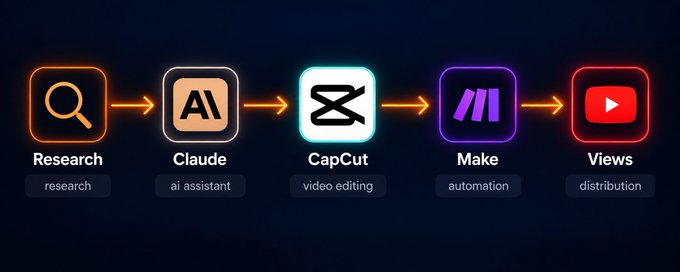
Research → Claude → CapCut → Make → Views
4 tools. Research goes first, every single time.
## Step 1: The Research Engine (85% of the result lives here)
Skip this step and the other 3 hand you clean, well-cut videos with no audience.
I stopped asking "what should I post today." The question is "what is beating its own channel right now and why."
Here is how I answer it.
Build the watchlist
Follow 35 faceless channels in one lane: AI stories, history facts, motivation edits, pet clips, whatever you plan to ship. Keep one Google Sheet. Every day, add a row for each video that broke out.
Score every breakout
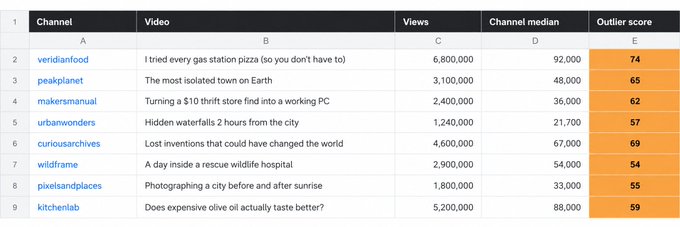
An outlier is a video that pulls far more than its own channel usually does. The math:
> outlier score = video views ÷ channel median views
A channel with a 21,700 median posts a video that reaches 1,240,000. Score: 57. That upload found something the rest of the channel never touched. Above 12 is a signal. Above 35 is a format you build on this week.
Raw views lie. A 1,800,000-view video on a channel that averages 4,600,000 is a bad day for that channel. A 1,240,000-view video on a 21,700 channel is a map.
Split the subject from the shape
The subject is what a video is about. The shape is how it is built. Subjects burn out in days. Shapes keep paying for months.
Take "POV: you're the last human on Earth." The subject is loneliness. The shape is "POV: you're the last [X] in [Y]." One row in the sheet gives you the last lighthouse keeper, the last Blockbuster clerk, the last dragon, the last person who remembers the Wi-Fi password. A whole season off one outlier.
Log the first 3 seconds
The opening decides whether anyone sees the rest. For each outlier, write down 2 things: the first frame and the first line of on-screen text. Those 2 cells stopped the scroll. Everything after them only has to keep the promise.
Hand the pattern to Claude
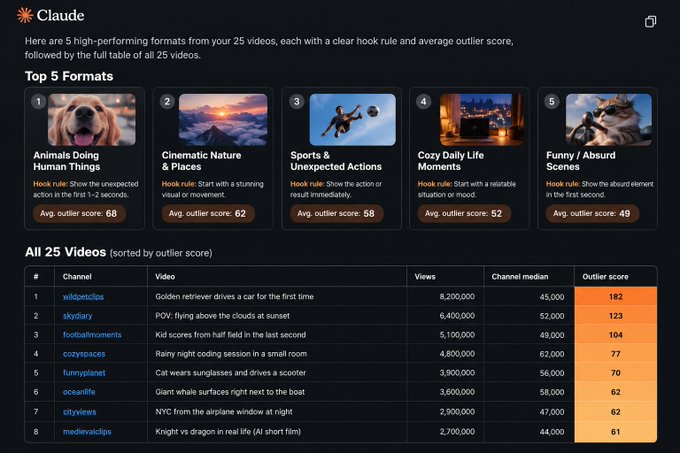
Paste 25 outlier titles and hooks into Claude. It pulls out the shared shape and spins new concepts on your subject.
Pattern extraction prompt:
```
You are a short-form video strategist.
Below are 25 videos that beat their channel's median by 12x or more.
Each row has the title, the first line of on-screen text and the outlier score.
[paste your 25 rows]
Do 3 things:
1. Sort them into 5 repeatable FORMATS (the structure, never the topic).
2. Write the hook rule for each format in one sentence.
3. Rank the 5 formats by how easily they take a new subject.
Skip general advice. Only patterns that show up in this exact data.
```
Idea generation prompt:
```
Take format #1 from your last answer.
My subject is [your lane: e.g. deep-sea creatures].
Write 36 video concepts in that exact format.
For each: the on-screen hook line (7 words max) and the one image
or moment that holds the first 3 seconds.
Rank them 1-36 by how hard they stop the scroll. Drop anything generic.
```
You end up with 36 concepts built on a skeleton that already worked. Zero guessing.
## Step 2: The Shapes That Keep Coming Back
The same shapes surface every month. Write them down once and reuse them all year.
> POV: you're the [role] when [event] Drops the viewer inside the scene with one line.
> What if [familiar thing] but [twist] A curiosity gap that needs zero setup.
> The invisible hand Things start moving on their own and the reveal lands at the end.
> The satisfying build One process from raw material to finished object, no voice.
> 1 vs the ladder 1 vs 50, level 1 vs level 99, a small bet that keeps doubling.
> The last-second flip An ordinary scene, then the final 3 seconds turn it upside down.
> A day as [something that shouldn't have a day] A pebble, a medieval farmhand, a fish at the bottom of the ocean.
Last month each of these carried a different subject past 1,300,000 views. The shape is the part you keep. The subject is the part you swap.
## Step 3: Claude Writes Shots, Not Paragraphs
Once a concept is picked, Claude writes for the cut. A script built for reading dies on screen.
Script prompt:
```
You are writing a 24-second vertical short in this format:
"POV: you're the last lighthouse keeper on Earth."
Write in shots, never in paragraphs. Output:
- on-screen hook text for the first 3 seconds (7 words max)
- 6 shots, one line each, written for AI image generation
- one narration line per shot, at speaking pace
- a final 3-second beat that makes people rewatch or comment
Tone: quiet, uneasy, zero filler. End on an open question, never a bow.
```
If the concept is thin, Claude asks before it writes. What comes back is a shot list you can build straight from.
## Step 4: CapCut Builds the Video
CapCut's AI tools turn the shot list into a finished vertical: generate the frames, animate them, add an AI voice and captions, export at 9:16.
Build instruction:
```
Build a 24-second vertical (9:16) short from this 6-shot list.
Generate each shot as a moving clip, 4 seconds each, back to back.
Put the hook text over shot 1 for the first 3 seconds, large and high contrast.
Auto-caption the narration with word-by-word highlight in the bottom third.
Lay a low, uneasy ambient bed under it that never covers the voice.
Hold the last shot on the open question. Export for TikTok and Shorts.
```
Save your recurring characters and locations as assets. A one-off clip becomes a series: same cast, new plot every episode.
## Step 5: Make Posts It and Reports Back
The research only compounds when your own results flow back into it. Make closes that loop.
The scenario runs on a schedule:
Trigger: a finished video lands in a Google Drive folder
1. Read the concept, the format tag and the hook line from its row in the sheet
2. Post the vertical to TikTok, YouTube Shorts and Instagram Reels
3. Write titles and tags off the format tag
4. Wait 72 hours, then pull view counts back through each platform's API
5. Write the new outlier score into the same sheet you research from
6. Flag every one of your videos that beat your median by 12x
7. Send a Telegram message naming the format that won this week
Your own hits turn into research. The formats that work for your account rise to the top. The factory learns.
Setup takes 5 hours, once. After that it runs 24/7.
## How the Factory Pays
1. Platform payouts Shorts funds and AdSense pay per view. A faceless channel pulling 3,500,000 to 6,800,000 views a month clears $2,300 to $6,700. The research engine is what lifts you off a 17,000-view floor.
2. Selling the channel A channel with 120,000 followers and a proven format sells for $3,500 to $11,000. Grow it on the format library, then sell it.
3. Shorts for clients Creators and small brands pay $90 to $270 per short. One intake form, 12 shorts a month per client on retainer, 2 clients: $2,160 to $6,480 a month. Your cost per short rounds to cents.
4. The sheet as a subscription The most valuable thing you make is the watchlist itself. Package the outlier tracker and the format library as a monthly report. 47 subscribers at $27 is $1,269 a month for research you already run for yourself.
5. Prompt packs Put the Claude prompts and the Make scenario on Gumroad as a "Breakout Finder Kit" at $39. It keeps selling with zero extra work.
## The Numbers
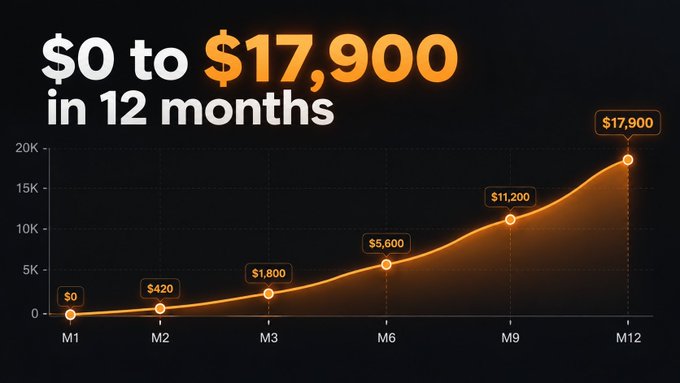
- Month 1: setup, $0
- Month 2: $700 to $1,300
- Month 3: $2,100 to $3,600
- Month 6: $5,100 to $7,800
- Month 9: $7,900 to $11,200
- Month 12: $12,400 to $17,900
The loop compounds. The sheet gets sharper every month and the hit rate climbs with it.
## The Bill
> Claude Pro: $20/month CapCut Pro: $14/month Make Core: $9/month Google Workspace: $6/month
$49 a month in. $13,286 out last month.
## The Short Version
Most people make the video and then go looking for an audience.
This factory runs in reverse. Find the format that is already winning, give it a fresh subject, then build.
4 tools. One loop. The sheet decides what gets made.
## 相关链接
- [Elvar](https://x.com/elvar_official)
- [@elvar_official](https://x.com/elvar_official)
- [4.3M](https://x.com/elvar_official/status/2105952926317326791/analytics)
- [Upgrade to Plus](https://x.com/i/premium_sign_up)
- [5:27 PM · Oct 2, 2026](https://x.com/elvar_official/status/2105952926317326791)
- [4.3M Views](https://x.com/elvar_official/status/2105952926317326791/analytics)
- [View quotes](https://x.com/elvar_official/status/2105952926317326791/quotes)
---
*导出时间: 2026/10/20 13:28:12*
---
## 中文翻译
# 我如何打造了一个 24/7 全天候运转的爆款视频工厂
**作者**: Elvar
**日期**: 2026-10-02T09:27:59.000Z
**来源**: [https://x.com/elvar_official/status/2105952926317326791](https://x.com/elvar_official/status/2105952926317326791)
**阅读**: 4.3M
**点赞**: 329
**转发**: 58
**回复**: 18
---

上个月收入 $13,286。只用 4 个工具。我制作的每个视频在打开剪辑软件之前就已经被验证过有效。
在你的细分领域里,这周有一个视频正在突破 2,370,000 次播放。你可能看到过它。你可能只是继续刷了下去。而那些真正赚到钱的人看到了它底下的骨架,给它换上了一个新主题,在这个形式过气之前发布了出去。
一个形式的寿命是 12 天。之后所有人都会模仿它,信息流会把它埋掉。谁先行动,谁就拿走流量。
这就是完整的构建方法。
## 杀死无人出镜频道的错误
通常的路径是:选一个你喜欢的话题,做一个你自己会看的视频,发布,收获 370 次播放,然后放弃。
人们会怪剪辑。剪辑没问题。是输入错了。
一个视频会爆,是因为它的形式在其他地方已经被验证有效,而现在被套上了一个从未有人用过的主题。形式是你保留的部分。主题是用一次就丢掉的部分。

找到本周正在获胜的形式。在 12 天耗尽之前给它一个新主题。
这就是整个模式。
## 流水线

调研 → Claude → CapCut → Make → 播放量
4 个工具。调研永远排在第一位。
## 第 1 步:调研引擎(85% 的成果在这里产生)
跳过这一步,另外 3 步只会给你做出干净、剪辑精良却没有观众的视频。
我不再问“今天该发什么”。问题应该是“现在什么视频正在碾压它自己的频道,为什么。”
以下是我如何回答这个问题的。
建立观察清单
在同一赛道关注 35 个无人出镜频道:AI 故事、历史冷知识、励志剪辑、宠物视频,或任何你打算做的方向。建一个 Google 表格。每天,为每一个表现突出的视频添加一行。
给每个爆款打分

离群视频是指播放量远超其频道平时水平的视频。公式是:
> 离群分 = 视频播放量 ÷ 频道中位数播放量
一个中位数为 21,700 的频道发了一个达到 1,240,000 播放的视频。得分:57。这条视频找到了该频道其他内容从未触及的东西。超过 12 是一个信号。超过 35 是一个你本周就该用来制作的形式。
原始播放量会撒谎。在一个平均播放量 4,600,000 的频道上,一个 1,800,000 播放的视频对它来说是糟糕的一天。而在一个中位数 21,700 的频道上,一个 1,240,000 播放的视频是一张地图。
把主题从形式中剥离出来
主题是视频讲什么。形式是视频怎么讲。主题几天内就会过气。形式能持续数月带来收益。
拿“POV:你是地球上最后一个人类”来说。主题是孤独。形式是“POV:你是【某处】最后一个【某种角色】。”表格里的一行可以衍生出:最后一个灯塔看守人、最后一个百视达店员、最后一条龙、最后一个记得 Wi-Fi 密码的人。一个离群视频撑起一整季内容。
记录开头 3 秒
开头决定了是否有人会看剩下的部分。对每个离群视频,记下 2 件事:第一帧画面和第一行屏幕文字。这 2 个单元格止住了用户的滑动。之后的任何内容只需兑现这个承诺。
把模式交给 Claude
把 25 个离群视频的标题和钩子粘贴给 Claude。它提取出共同的形式,并为你的主题生成新创意。
模式提取提示词:

```
You are a short-form video strategist.
Below are 25 videos that beat their channel's median by 12x or more.
Each row has the title, the first line of on-screen text and the outlier score.
[paste your 25 rows]
Do 3 things:
1. Sort them into 5 repeatable FORMATS (the structure, never the topic).
2. Write the hook rule for each format in one sentence.
3. Rank the 5 formats by how easily they take a new subject.
Skip general advice. Only patterns that show up in this exact data.
```
创意生成提示词:
```
Take format #1 from your last answer.
My subject is [your lane: e.g. deep-sea creatures].
Write 36 video concepts in that exact format.
For each: the on-screen hook line (7 words max) and the one image
or moment that holds the first 3 seconds.
Rank them 1-36 by how hard they stop the scroll. Drop anything generic.
```
你最终会得到 36 个建立在已验证有效的骨架上的创意。零猜测。
## 第 2 步:反复奏效的形式
同样的形式每个月都会浮现。把它们记下来一次,全年复用。
> POV:当【某事件】发生时你是【某个角色】—— 用一句话把观众扔进场景里。
> 如果【熟悉的事物】但是【反转】呢 —— 一个无需任何铺垫的好奇缺口。
> 看不见的手 —— 事物开始自行运转,揭晓放在最后。
> 令人满足的构建 —— 从原材料到成品的完整过程,无需配音。
> 1 对阶梯 —— 1 对 50,1 级对 99 级,一个不断翻倍的小赌注。
> 最后一秒反转 —— 平凡的场景,最后 3 秒把它彻底颠覆。
> 作为【不该有一天的东西】的一天 —— 一颗鹅卵石、一个中世纪农夫、一条海底深处的鱼。
上个月,这些形式各自带着不同的主题突破了 1,300,000 次播放。形式是你保留的部分。主题是你替换的部分。
## 第 3 步:Claude 写的是镜头,不是段落
选定创意后,Claude 为剪辑而写。为阅读而写的脚本在屏幕上是活不下去的。
脚本提示词:
```
You are writing a 24-second vertical short in this format:
"POV: you're the last lighthouse keeper on Earth."
Write in shots, never in paragraphs. Output:
- on-screen hook text for the first 3 seconds (7 words max)
- 6 shots, one line each, written for AI image generation
- one narration line per shot, at speaking pace
- a final 3-second beat that makes people rewatch or comment
Tone: quiet, uneasy, zero filler. End on an open question, never a bow.
```
如果创意太单薄,Claude 会在动笔前先发问。它产出的就是一份可以直接照做的镜头清单。
## 第 4 步:CapCut 制作视频
CapCut 的 AI 工具把镜头清单变成一条完整的竖屏视频:生成画面、添加动画、加上 AI 语音和字幕,以 9:16 导出。
制作指令:
```
Build a 24-second vertical (9:16) short from this 6-shot list.
Generate each shot as a moving clip, 4 seconds each, back to back.
Put the hook text over shot 1 for the first 3 seconds, large and high contrast.
Auto-caption the narration with word-by-word highlight in the bottom third.
Lay a low, uneasy ambient bed under it that never covers the voice.
Hold the last shot on the open question. Export for TikTok and Shorts.
```
把你的常驻角色和场景保存为素材。一次性的短片就能变成系列:同样的角色阵容,每集新剧情。
## 第 5 步:Make 负责发布和汇报
只有当你自己的数据回流到调研中,整个体系才能产生复利。Make 负责闭合这个循环。
场景按计划运行:
触发器:一条完成的视频进入 Google Drive 文件夹
1. 从表格中的对应行读取创意、形式标签和钩子文案
2. 将竖屏视频发布到 TikTok、YouTube Shorts 和 Instagram Reels
3. 根据形式标签撰写标题和标签
4. 等待 72 小时,然后通过各平台的 API 拉回播放数据
5. 把新的离群分写进你用来调研的同一张表格
6. 标记每一个超出你自身中位数 12 倍的视频
7. 发送 Telegram 消息,指出本周获胜的形式
你自己的爆款变成调研素材。对你账号有效的形式会浮到顶部。工厂会自我学习。
搭建只需 5 个小时,一次性。之后它 24/7 全天候运转。
## 工厂如何赚钱
1. 平台分成 Shorts 基金和 AdSense 按播放量付费。一个每月有 3,500,000 到 6,800,000 播放的无人出镜频道可以净赚 $2,300 到 $6,700。调研引擎是把你从 17,000 播放的地板拉起来的关键。
2. 出售频道 一个拥有 120,000 粉丝且形式经过验证的频道可以卖到 $3,500 到 $11,000。用形式库养大它,然后卖掉。
3. 为客户做 Shorts 创作者和小品牌为每条短片支付 $90 到 $270。一份需求表,每个包月客户每月 12 条短片,2 个客户:每月 $2,160 到 $6,480。你的单条成本几乎可以忽略不计。
4. 表格订阅化 你做出的最有价值的东西就是观察清单本身。把离群追踪器和形式库打包成月度报告。47 个订阅者每人 $27,就是每月 $1,269——而这份调研你本来就在为自己做。
5. 提示词包 把 Claude 提示词和 Make 场景放到 Gumroad 上,作为"Breakout Finder Kit"卖 $39。它可以零额外工作持续销售。
## 数据

- 第 1 个月:搭建期,$0
- 第 2 个月:$700 到 $1,300
- 第 3 个月:$2,100 到 $3,600
- 第 6 个月:$5,100 到 $7,800
- 第 9 个月:$7,900 到 $11,200
- 第 12 个月:$12,400 到 $17,900
这个循环会产生复利。表格每个月都变得更精准,命中率也随之攀升。
## 账单
> Claude Pro:$20/月 CapCut Pro:$14/月 Make Core:$9/月 Google Workspace:$6/月
每月投入 $49。上个月产出 $13,286。
## 简短版本
大多数人先做视频,再去找观众。
这座工厂反过来运转。找到已经在获胜的形式,给它一个新主题,然后制作。
4 个工具。一个循环。表格决定做什么。
## 相关链接
- [Elvar](https://x.com/elvar_official)
- [@elvar_official](https://x.com/elvar_official)
- [4.3M](https://x.com/elvar_official/status/2105952926317326791/analytics)
- [升级到 Plus](https://x.com/i/premium_sign_up)
- [2026年10月2日 下午5:27](https://x.com/elvar_official/status/2105952926317326791)
- [4.3M 次浏览](https://x.com/elvar_official/status/2105952926317326791/analytics)
- [查看引用](https://x.com/elvar_official/status/2105952926317326791/quotes)
---
*导出时间: 2026/10/20 13:28:12*