# How to Create Massive AI Influencer Content at Scale (Step-by-Step Guide & Case Study)
**作者**: Alex Nguyen
**日期**: 2026-05-17T17:14:09.000Z
**来源**: [https://x.com/alexcooldev/status/2056060717942677643](https://x.com/alexcooldev/status/2056060717942677643)
---
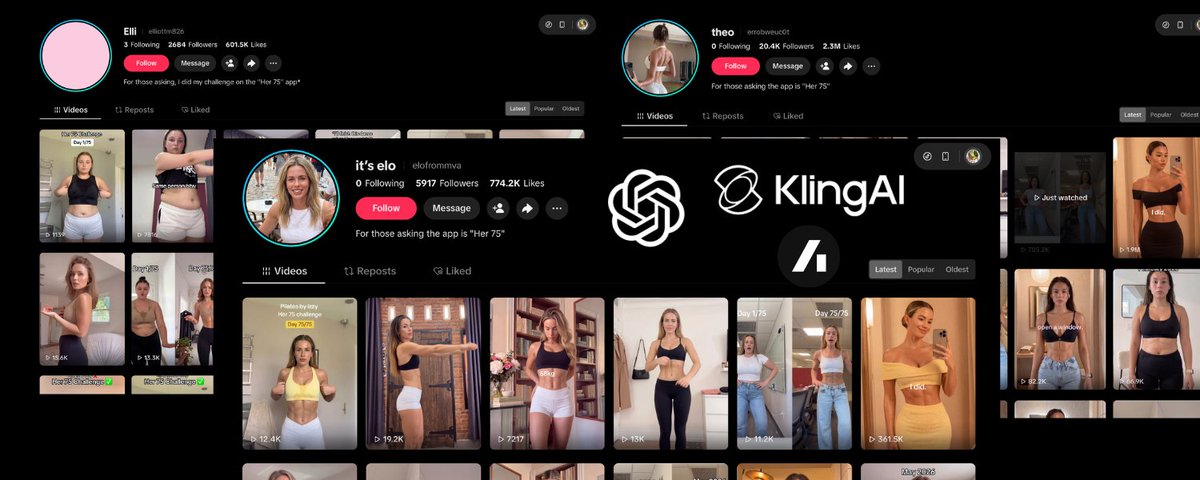
Currently, there are a lot of self-improvement apps using AI influencers to promote their apps on TikTok, and they’re going extremely viral. You can check out these AI influencer accounts.
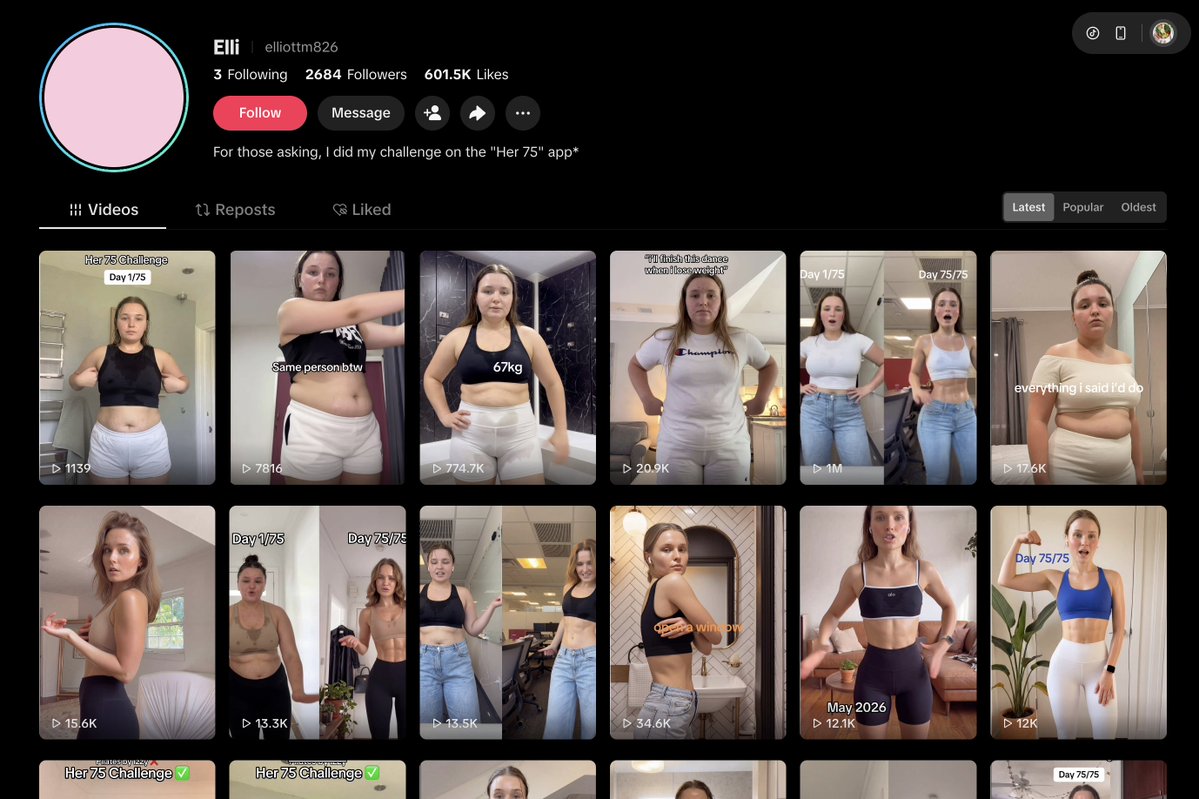
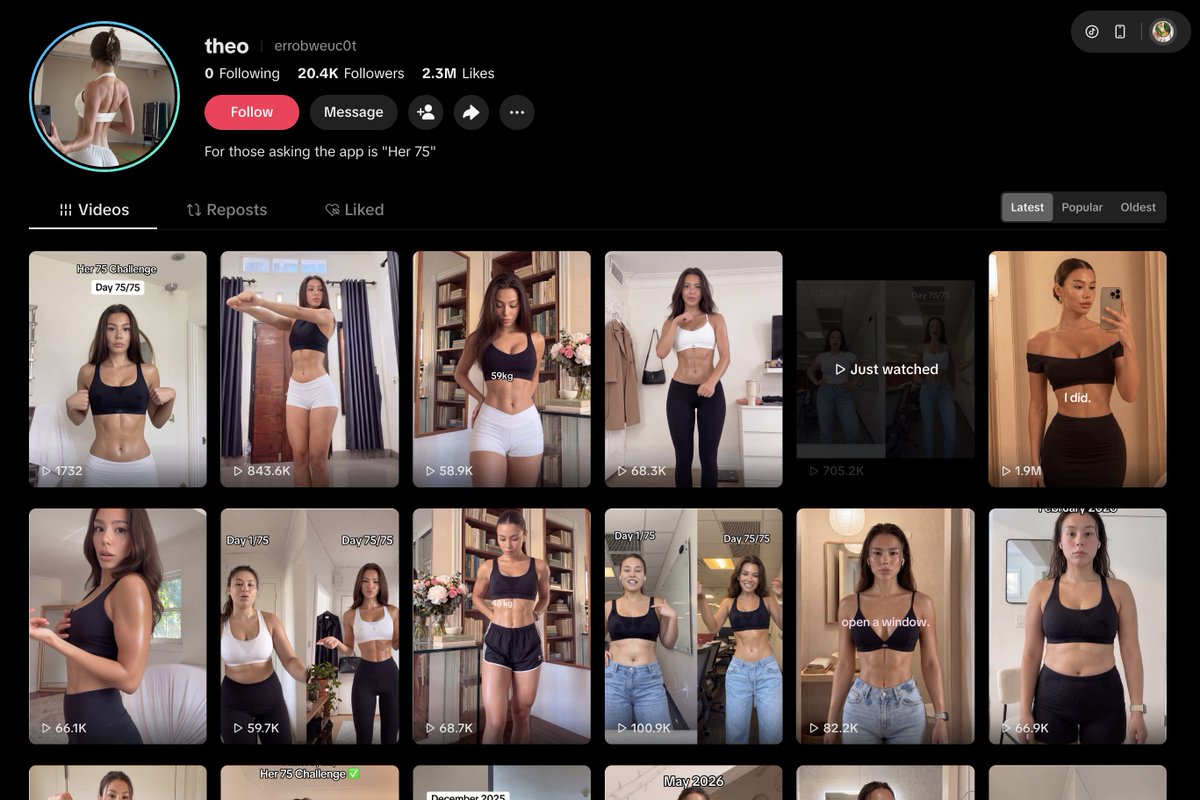
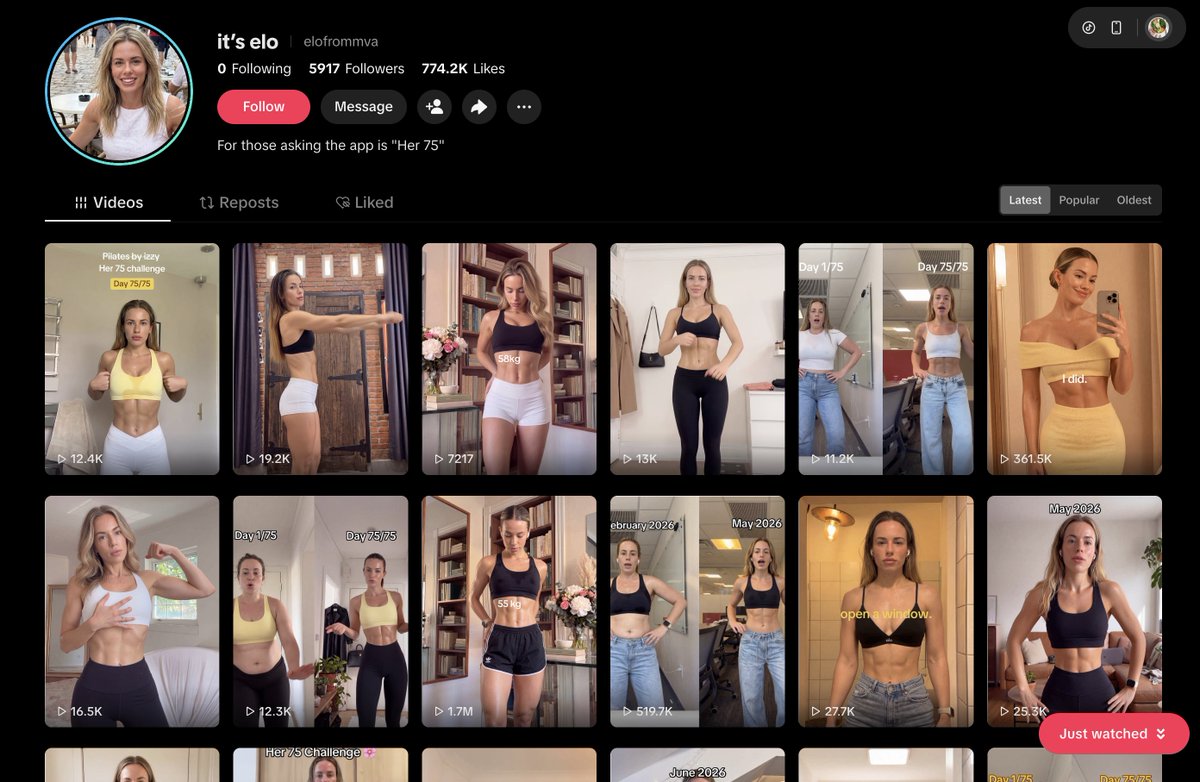
And yeah, all of these TikTok accounts are promoting one app called Her 75. It’s 100% organic with no paid ads, and the app is making over $40k/month. (Like I mentioned before, those analytics platforms usually underestimate real revenue by around 50–150%, meaning the actual revenue could be closer to $60k–$70k/month with extremely high profit margins.)
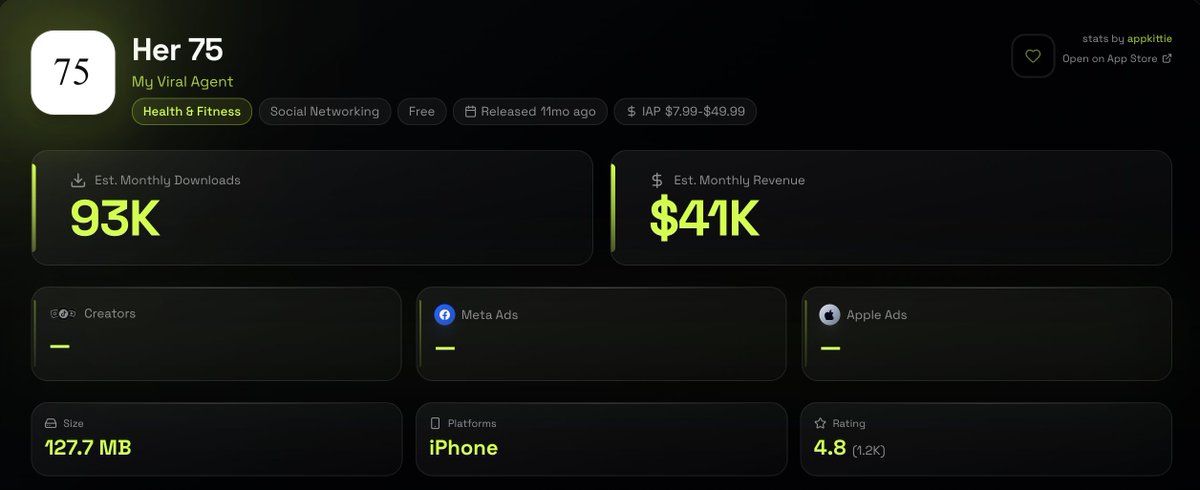
And now I’m going to guide you step by step on how to create AI influencers like this using Arcads. (Why Arcads? Because Arcads is partnering with me and sponsoring unlimited credits so I can create bulk AI influencer videos. But you can absolutely use any AI tools that fit your workflow.)
Now let's get starting.
## Step 1: Create highly realistic AI influencers using GPT Images 2 or Nano Banano with JSON format prompts.
Why JSON format instead of normal prompts? Because JSON gives you a clear structure and makes the output much more consistent. Instead of writing a random paragraph prompt every time, you can define the influencer’s face, hairstyle, outfit, camera angle, lighting, background, expression, and visual style in separate fields. This makes it easier to create multiple variations while keeping the same identity across different videos. It also helps AI tools understand exactly what you want and reduces random results.
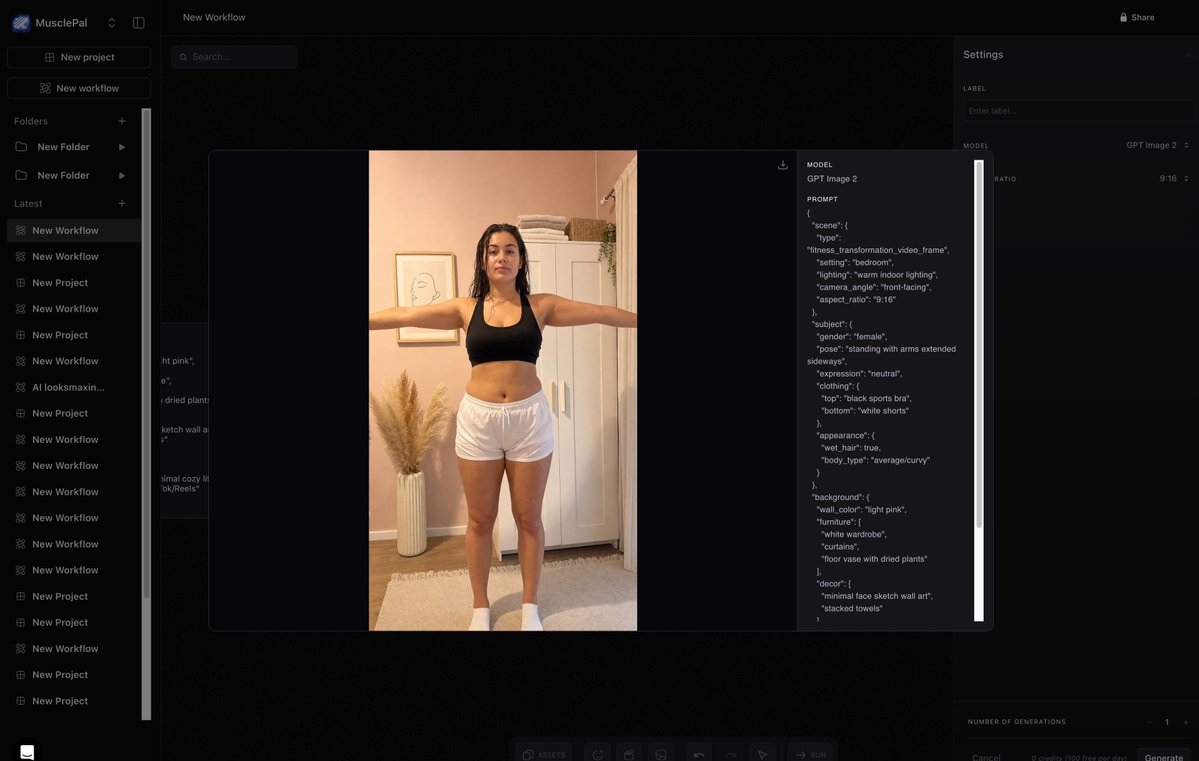
JSON Image (worked very well with GPT Image 2):
```
{
"scene": {
"type": "fitness_transformation_video_frame",
"setting": "bedroom",
"lighting": "warm indoor lighting",
"camera_angle": "front-facing",
"aspect_ratio": "9:16"
},
"subject": {
"gender": "female",
"pose": "standing with arms extended sideways",
"expression": "neutral",
"clothing": {
"top": "black sports bra",
"bottom": "white shorts"
},
"appearance": {
"wet_hair": true,
"body_type": "average/curvy"
}
},
"background": {
"wall_color": "light pink",
"furniture": [
"white wardrobe",
"curtains",
"floor vase with dried plants"
],
"decor": [
"minimal face sketch wall art",
"stacked towels"
]
},
"style": {
"aesthetic": "minimal cozy lifestyle",
"platform": "TikTok/Reels"
}
}
```
## Step 2: Build the full AI video workflow inside Arcads
After creating the AI influencer image, I don’t want to jump between 10 different tools.
I want one workflow where I can create, test, remix, and scale the whole ad format.
That’s why I use Arcads as the main creative workspace.
Inside Arcads, I can use tools like GPT Image, Nano Banana, Kling, Seedance, Swap Actor, Camera Angle, Captions, Translate Video, Transcribe, Extract Frame, Extend Videos, Talking Actors, UGC Studio, and Create Workflow.
So instead of thinking:
“Let me generate one random AI video.”
I think:
“How do I build a repeatable content engine?”
For this case study, the goal is to recreate a TikTok-style fitness transformation video.
The format is simple:
Before body → after body → same person feeling → short text overlay → app as the system behind the transformation.
Something like:
“same person btw”
This format works because the hook is visual.
People don’t need to read a long caption.
They instantly understand the story in 1 second.
## Step 3: Start with a proven reference video
The next thing I need is a real reference video.
This is important because I’m not asking AI to randomly invent movement.
I want to use a real TikTok motion pattern and apply it to my AI character.
For this type of video, I look for a reference that has:
- one person
- vertical 9:16 format
- clear body visibility
- simple body-check movement
- stable phone-camera framing
- no dancing
- no fast cuts
- no complex motion
The best reference videos are usually very simple.
A girl standing in a bedroom, extending her arms, turning slightly, and showing a fitness progress angle.
That’s it.
The more native the reference video feels, the better the final AI video feels.
## Step 4: Use Kling Motion Control inside Arcads
Now I upload the reference video into Kling Motion Control inside Arcads.
This is the key part.
The reference video controls the motion.
The AI character controls the identity.
So the workflow becomes:
Reference video + AI character image = realistic AI influencer video
This is much better than normal image-to-video because the movement already comes from a real video.
For this fitness transformation format, that matters a lot.
Small details like breathing, arm movement, body posture, and phone-camera motion are what make the video feel real.
## Step 5: Match the AI character to the reference video
This is where most people fail.
They upload a reference video with one pose, then upload an AI image with a totally different pose.
Then the output looks weird.
For better results, I try to match:
- same gender
- similar outfit
- similar pose
- similar camera angle
- similar framing
- similar lighting
- similar body visibility
For example, if the reference video shows a girl wearing workout clothes with her arms extended, my AI character should also be wearing workout clothes with a similar pose.
The closer the AI image is to the reference video, the cleaner the motion transfer becomes.
## Step 6: Keep the prompt simple
Since the motion already comes from the reference video, I don’t need a complicated prompt.
I only use the prompt to guide realism and avoid common AI mistakes.
Example prompt:
“Create a realistic vertical TikTok fitness transformation video using the uploaded reference video as the motion guide. Replace the original person with the uploaded AI character. Keep the same body-check pose, camera framing, and casual phone-camera style. Natural blinking, subtle breathing, realistic skin texture, stable body proportions, no face distortion, no body distortion, no extra fingers, no unnatural hands.”
Simple prompts usually work better here.
The goal is not cinematic perfection.
The goal is TikTok-native realism.
## Step 7: Generate multiple versions, not just one
Never generate only one video.
AI video is a numbers game.
Sometimes the first output has weird hands.
Sometimes the second output has an unstable face.
Sometimes the third output looks fake.
Then version four suddenly looks almost perfect.
That’s why I generate multiple variations inside Arcads.
Same reference video.
Same AI character.
Same basic prompt.
Different outputs.
Then I pick the most realistic one.
This is the real workflow:
Generate in bulk → review → select the best → remix → scale.
## Step 8: Create both “before” and “after” versions
For this transformation format, I need two AI character assets.
The first one is the “before” version.
This should look like a normal beginner fitness body.
Relatable, realistic, and not too perfect.
The second one is the “after” version.
Same person, but leaner, more toned, and more confident.
The important thing is identity consistency.
The face, hair, outfit, pose, camera angle, and lighting should feel similar.
If the after version looks like a completely different person, the video loses trust.
The transformation should feel believable.
Not extreme.
Believable.
Step 9: Run both versions through the same motion workflow
Now I run both images through Kling Motion Control.
First:
Reference motion + before character = before clip
Then:
Reference motion + after character = after clip
This gives me two clips with similar movement.
That’s what makes the transformation feel stronger.
The viewer sees the same pose, same motion, same person feeling, but a different body result.
That creates the “same person btw” effect.
## Step 10: Use Arcads to create more variations
Once I have the core video, I can use other Arcads tools to create more variations.
For example:
I can use Captions to add subtitles.
I can use Translate Video to localize the creative into other markets.
I can use Swap Actor or Replace Actor to test another AI influencer.
I can use Camera Angle to create a different visual version.
I can use Extract Frame to pull strong still images from the video.
I can use Extend Videos if I want a longer version.
I can use UGC Studio or Talking Actors if I want to turn the same concept into a talking-style creator ad.
This is why Arcads is useful.
It’s not just one AI video tool.
It becomes the creative production system.
One idea can quickly become many ad variations.
## Step 11: Create multiple hooks from the same visual
The visual format can stay the same, but the hook changes everything.
For example, I can test:
“same person btw”
“75 days later…”
“this is what consistency did”
“she didn’t need motivation, she needed a system”
“I stopped restarting every Monday”
“POV: you finally stayed consistent”
“not a diet, just a system”
Same video style.
Different hook.
Different audience psychology.
This is how I find the winning angle.
Most people try to create a completely new video every time.
But the better approach is to find one working format, then remix the hook, character, CTA, and app angle.
## Step 12: Add the app as the reason behind the result
The app should not feel like a random ad at the end.
It should feel like the system behind the transformation.
For example:
“She didn’t need more motivation. She needed a system.”
Then show the app:
- workout tracker
- daily plan
- habit streak
- progress calendar
- AI coach
- meal reminder
- 75-day challenge
This makes the app feel natural.
The structure is:
Visual transformation → curiosity → app as the system → CTA
That’s much stronger than just saying:
“Download this app now.”
## Step 13: Export the best versions and prepare them for posting
After generating and testing enough variations inside Arcads, I export only the strongest versions.
Not every output is worth posting.
I only keep the ones that look:
- realistic
- native to TikTok
- easy to understand
- emotionally clear
- believable as a transformation
- strong enough to stop the scroll
At this point, the core production is done.
Arcads helped me create the AI character workflow, apply real motion with Kling Motion Control, generate multiple variations, test different hooks, and prepare the final creative assets.
Then I can move into the final editing / posting stage.
Final workflow:
1. Create the AI influencer image
2. Build the workflow inside Arcads
3. Find a proven TikTok reference video
4. Use Kling Motion Control to transfer the motion
5. Match the AI character with the reference video
6. Generate multiple versions
7. Create both before and after character clips
8. Remix hooks and creative angles
9. Use Arcads tools to create more variants
10. Export the best versions
11. Add the app naturally as the system behind the transformation
12. Post and track which version converts best
This is the real power of AI influencer content.
It’s not about creating one AI video.
It’s about building a repeatable creative engine.
One viral format can become 10, 20, or 50 different variations.
And when you combine AI characters, real reference motion, Kling Motion Control, and Arcads workflow, you can create TikTok-native AI influencer videos at scale without hiring UGC creators for every single test.
This post is sponsored by Arcads AI, so you can still look for similar tools that fit your needs. 💪
## 相关链接
- [Alex Nguyen](https://x.com/alexcooldev)
- [@alexcooldev](https://x.com/alexcooldev)
- [10K](https://x.com/alexcooldev/status/2056060717942677643/analytics)
- [Upgrade to Premium](https://x.com/i/premium_sign_up)
- [Paid partnership](https://help.x.com/rules-and-policies/paid-partnerships-policy)
- [1:14 AM · May 18, 2026](https://x.com/alexcooldev/status/2056060717942677643)
- [10K Views](https://x.com/alexcooldev/status/2056060717942677643/analytics)
- [View quotes](https://x.com/alexcooldev/status/2056060717942677643/quotes)
---
*导出时间: 2026/5/18 14:54:53*
---
## 中文翻译
# 如何大规模创建 AI 网红内容(分步指南与案例研究)
**作者**: Alex Nguyen
**日期**: 2026-05-17T17:14:09.000Z
**来源**: [https://x.com/alexcooldev/status/2056060717942677643](https://x.com/alexcooldev/status/2056060717942677643)
---

目前,有很多自我提升类应用正在利用 AI 网红在 TikTok 上推广他们的应用,并且传播得非常火爆。你可以去看看这些 AI 网红账号。



是的,所有这些 TikTok 账号都在推广一个名为 Her 75 的应用。这完全是 100% 的自然流量,没有投放付费广告,而该应用每月的收入超过 4 万美元。(正如我之前提到的,那些数据分析平台通常会将实际收入低估约 50–150%,这意味着实际收入可能接近每月 6 万到 7 万美元,并且利润率极高。)

现在我将一步步指导你如何使用 Arcads 创建像这样的 AI 网红。(为什么选择 Arcads?因为 Arcads 正与我合作,并赞助了无限积分,这样我就可以批量创建 AI 网红视频。但你绝对可以使用任何适合你工作流程的 AI 工具。)
现在让我们开始吧。
## 第一步:使用 GPT Images 2 或 Nano Banano 配合 JSON 格式提示词,创建高度逼真的 AI 网红。
为什么使用 JSON 格式而不是普通提示词?因为 JSON 给了你清晰的结构,并使输出结果更加一致。你不必每次都写一段随机的段落提示词,而是可以在不同的字段中定义网红的脸型、发型、服装、拍摄角度、光线、背景、表情和视觉风格。这使得在保持跨视频身份一致性的同时,创建多个变体变得更加容易。这也有助于 AI 工具准确理解你的需求,减少随机结果的出现。

JSON 图像提示(与 GPT Image 2 配合得非常好):
```
{
"scene": {
"type": "fitness_transformation_video_frame",
"setting": "bedroom",
"lighting": "warm indoor lighting",
"camera_angle": "front-facing",
"aspect_ratio": "9:16"
},
"subject": {
"gender": "female",
"pose": "standing with arms extended sideways",
"expression": "neutral",
"clothing": {
"top": "black sports bra",
"bottom": "white shorts"
},
"appearance": {
"wet_hair": true,
"body_type": "average/curvy"
}
},
"background": {
"wall_color": "light pink",
"furniture": [
"white wardrobe",
"curtains",
"floor vase with dried plants"
],
"decor": [
"minimal face sketch wall art",
"stacked towels"
]
},
"style": {
"aesthetic": "minimal cozy lifestyle",
"platform": "TikTok/Reels"
}
}
```
## 第二步:在 Arcads 内部构建完整的 AI 视频工作流
在创建 AI 网红图像后,我不想在 10 个不同的工具之间跳来跳去。
我想要一个工作流,可以在其中创建、测试、混合和扩展整个广告形式。
这就是为什么我使用 Arcads 作为主要的创意工作区。
在 Arcads 内部,我可以使用 GPT Image、Nano Banana、Kling、Seedance、Swap Actor、Camera Angle、Captions、Translate Video、Transcribe、Extract Frame、Extend Videos、Talking Actors、UGC Studio 和 Create Workflow 等工具。
所以我不再想:
“让我生成一个随机的 AI 视频。”
而是想:
“我如何构建一个可重复的内容引擎?”
对于这个案例研究,目标是重新创建一个 TikTok 风格的健身变身视频。
格式很简单:
身材前 → 身材后 → 同一个人的感觉 → 简短文字叠加 → 应用作为变身背后的系统。
就像这样:
“顺便说一句,是同一个人”
这种格式之所以有效,是因为“钩子”(吸引点)是视觉化的。
人们不需要阅读长篇大论的标题。
他们在 1 秒钟内就能瞬间理解这个故事。
## 第三步:从一个经过验证的参考视频开始
接下来我需要的是一个真实的参考视频。
这很重要,因为我不是要求 AI 随机发明动作。
我想使用真实的 TikTok 运动模式并将其应用到我的 AI 角色上。
对于这种类型的视频,我会寻找具有以下特征的参考:
- 一个人
- 竖屏 9:16 格式
- 清晰的身体可见度
- 简单的身材展示动作
- 稳定的手机摄像头构图
- 没有跳舞
- 没有快速剪辑
- 没有复杂的运动
最好的参考视频通常非常简单。
一个女孩站在卧室里,伸出手臂,稍微转一下身,展示一个健身进度的角度。
就是这样。
参考视频越“原生”(native),最终的 AI 视频感觉就越好。
## 第四步:在 Arcads 内部使用 Kling 运动控制
现在我将参考视频上传到 Arcads 内的 Kling 运动控制中。
这是关键部分。
参考视频控制动作。
AI 角色控制身份。
因此工作流变成了:
参考视频 + AI 角色图像 = 逼真的 AI 网红视频
这比普通的图像转视频要好得多,因为动作已经来自真实的视频。
对于这种健身变身格式,这一点至关重要。
呼吸、手臂动作、身体姿势和手机摄像头运动等小细节正是让视频感觉真实的原因。
## 第五步:将 AI 角色与参考视频匹配
这是大多数人失败的地方。
他们上传了一个姿势的参考视频,然后上传了一个姿势完全不同的 AI 图像。
然后输出结果看起来就很奇怪。
为了获得更好的结果,我尝试匹配:
- 相同的性别
- 相似的服装
- 相似的姿势
- 相似的拍摄角度
- 相似的构图
- 相似的光线
- 相似的身体可见度
例如,如果参考视频显示一个女孩穿着运动服,双臂伸展,我的 AI 角色也应该穿着类似的运动服并保持类似的姿势。
AI 图像与参考视频越接近,动作转移就越干净。
## 第六步:保持提示词简单
既然动作已经来自参考视频,我就不需要复杂的提示词。
我只用提示词来指导逼真度并避免常见的 AI 错误。
提示词示例:
“使用上传的参考视频作为运动指南,创建一个逼真的竖屏 TikTok 健身变身视频。用上传的 AI 角色替换原人物。保持相同的身材展示姿势、相机构图和随意的手机摄像头风格。自然的眨眼、微妙的呼吸、逼真的皮肤纹理、稳定的身体比例、没有面部扭曲、没有身体扭曲、没有多余的手指、没有不自然的手。”
在这里,简单的提示词通常效果更好。
目标不是电影般的完美。
目标是 TikTok 原生的逼真感。
## 第七步:生成多个版本,不仅仅是一个
永远不要只生成一个视频。
AI 视频是一场数字游戏。
有时第一个输出会有奇怪的手。
有时第二个输出会有不稳定的人脸。
有时第三个输出看起来很假。
然后第四个版本突然看起来几乎完美。
这就是为什么我在 Arcads 内生成多个变体。
相同的参考视频。
相同的 AI 角色。
相同的基本提示词。
不同的输出。
然后我选择最逼真的那个。
这才是真正的工作流:
批量生成 → 审核 → 选择最佳 → 混音 → 扩展。
## 第八步:创建“之前”和“之后”两个版本
对于这种变身格式,我需要两个 AI 角色素材。
第一个是“之前”的版本。
这应该看起来像一个正常的健身初学者的身材。
有共鸣感、逼真,不要太完美。
第二个是“之后”的版本。
同一个人,但更苗条、更紧致、更自信。
重要的是身份的一致性。
脸型、头发、服装、姿势、拍摄角度和光线应该感觉相似。
如果“之后”的版本看起来像完全不同的人,视频就会失去信任感。
变身应该让人觉得可信。
不极端。
但可信。
## 第九步:将两个版本通过相同的运动工作流运行
现在我将这两张图片都通过 Kling 运动控制运行。
首先:
参考动作 + 之前角色 = 之前片段
然后:
参考动作 + 之后角色 = 之后片段
这给了我两个具有相似动作的片段。
这就是让变身感觉更强的原因。
观众看到相同的姿势、相同的动作、同一个人的感觉,但身体结果不同。
这就创造了“顺便说一句,是同一个人”的效果。
## 第十步:使用 Arcads 创建更多变体
一旦我有了核心视频,我可以使用其他 Arcads 工具来创建更多变体。
例如:
我可以使用 Captions 添加字幕。
我可以使用 Translate Video 将创意本地化到其他市场。
我可以使用 Swap Actor 或 Replace Actor 来测试另一个 AI 网红。
我可以使用 Camera Angle 创建不同的视觉版本。
我可以使用 Extract Frame 从视频中提取出色的静态图像。
如果我想要更长的版本,我可以使用 Extend Videos。
如果我想将相同的概念转换为说话风格的创作者广告,我可以使用 UGC Studio 或 Talking Actors。
这就是 Arcads 有用的原因。
它不仅仅是一个 AI 视频工具。
它成为了创意制作系统。
一个想法可以迅速成为许多广告变体。
## 第十一步:从相同的视觉效果创建多个钩子
视觉格式可以保持不变,但钩子改变一切。
例如,我可以测试:
“顺便说一句,是同一个人”
“75 天后……”
“这就是坚持的效果”
“她不需要动力,她需要的是一个系统”
“我不再在每个星期一重新开始”
“POV:你终于坚持下来了”
“不是节食,只是一个系统”
相同的视频风格。
不同的钩子。
不同的受众心理。
这就是我找到制胜角度的方法。
大多数人每次都尝试创建一个全新的视频。
但更好的方法是找到一个有效的格式,然后混合钩子、角色、CTA(行动号召)和应用角度。
## 第十二步:将应用作为结果背后的原因添加进去
应用不应该感觉像是结尾处的一个随机广告。
它应该感觉是变身背后的系统。
例如:
“她不需要更多的动力。她需要的是一个系统。”
然后展示该应用:
- 健身追踪器
- 每日计划
- 习惯打卡
- 进度日历
- AI 教练
- 饮食提醒
- 75 天挑战
这使得应用感觉自然。
结构是:
视觉变身 → 好奇心 → 应用作为系统 → CTA
这比仅仅说:
“现在下载这个应用。”
要强得多。
## 第十三步:导出最佳版本并准备发布
在 Arcads 内生成并测试足够的变体后,我只导出最强的版本。
并非每个输出都值得发布。
我只保留那些看起来:
- 逼真的
- TikTok 原生的
- 容易理解的
- 情感清晰的
- 作为变身可信的
- 足够强以让人停下滚动的内容
在这一点上,核心制作已经完成。
Arcads 帮助我创建了 AI 角色工作流,应用了真实的 Kling 运动控制,生成了多个变体,测试了不同的钩子,并准备了最终的创意素材。
然后我可以进入最终的编辑/发布阶段。
最终工作流:
1. 创建 AI 网红图像
2. 在 Arcads 内构建工作流
3. 找到一个经过验证的 TikTok 参考视频
4. 使用 Kling 运动控制转移动作
5. 将 AI 角色与参考视频匹配
6. 生成多个版本
7. 创建之前和之后角色片段
8. 混音钩子和创意角度
9. 使用 Arcads 工具创建更多变体
10. 导出最佳版本
11. 自然地将应用添加为变身背后的系统
12. 发布并跟踪哪个版本转化率最高
这就是 AI 网红内容的真正力量。
它不是关于创建一个 AI 视频。
它是关于构建一个可重复的创意引擎。
一个爆款格式可以变成 10、20 或 50 个不同的变体。
当你结合 AI 角色、真实参考动作、Kling 运动控制和 Arcads 工作流时,你可以大规模创建 TikTok 原生的 AI 网红视频,而无需为每次测试雇佣 UGC 创作者。
这篇文章由 Arcads AI 赞助,所以你仍然可以寻找适合你需求的类似工具。💪
## 相关链接
- [Alex Nguyen](https://x.com/alexcooldev)
- [@alexcooldev](https://x.com/alexcooldev)
- [10K](https://x.com/alexcooldev/status/2056060717942677643/analytics)
- [升级到高级版](https://x.com/i/premium_sign_up)
- [付费合作](https://help.x.com/rules-and-policies/paid-partnerships-policy)
- [1:14 AM · May 18, 2026](https://x.com/alexcooldev/status/2056060717942677643)
- [1万次观看](https://x.com/alexcooldev/status/2056060717942677643/analytics)
- [查看引用](https://x.com/alexcooldev/status/2056060717942677643/quotes)
---
*导出时间: 2026/5/18 14:54:53*