AI App 省钱指南:如何将月度账单控制在 1700 美元以内 Alex Nguyen 2026-04-16 54.2 KB 13.4K 173 ☆ 收藏 𝕏 文章列表 作者分享了运营两个拥有 39 万用户的 AI 应用的实战经验,通过模型路由策略和智能缓存技术,成功将 AI 成本控制在每月 1700 美元。文章详细剖析了不同 OpenAI 模型的成本差异,并提供了针对简单、中等和复杂任务的最佳模型选择指南。 AI成本模型优化OpenAIGPT-5架构设计独立开发缓存策略AffordableAI 82 强烈推荐 ▶ 文章基于2026年4月的最新模型与定价,提供了极具实操性的LLM降本策略(如模型分层路由),数据详实,但核心观点较为常规且文末存在截断。 # My 2 apps have 390K Users With AI and My Total Bill Is Only $1,679/Month. Here's My Entire Playbook. **作者**: Alex Nguyen **日期**: 2026-04-14T15:16:59.000Z **来源**: [https://x.com/alexcooldev/status/2044454751556014113](https://x.com/alexcooldev/status/2044454751556014113) --- 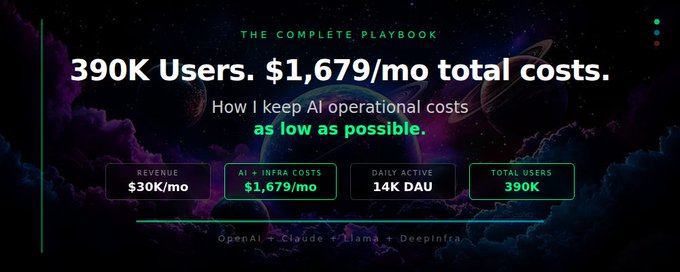 I shared my operational bill: $1,679/month running apps that serve 390K users and generate $30K/month in revenue. People lost their minds. "How is your AI cost so low?" "You're running OpenAI + Claude + Llama for under $900?" "What's the trick?" There's no single trick. It's a system. And I learned most of it the hard way - by burning money first. Here's everything I know about keeping AI costs as low as humanly possible. ## The Mistake Everyone Makes When I first integrated AI into my apps, I did what every developer does: I picked the biggest, most capable model available - GPT-5 - routed every single request through it, and watched my bill climb like a rocket. Let me give you some context. GPT-5 costs $1.25 per million input tokens and $10.00 per million output tokens. That sounds cheap until you multiply it by thousands of requests per day. Every classification, every summary, every "extract this one field from a JSON" - all going through a $10/M output model. $2,400 in the first month. For maybe 2,000 daily active users. That's $1.20 per DAU per month. At that rate, scaling to 14K DAU would cost me $16,800/month just on AI. More than half my revenue - gone. I panicked. Started thinking about removing AI features entirely. Then I stepped back and actually studied what my users were doing. ## Step 1: Not Every Request Deserves a Big Model This is the single highest-impact change you can make. And in 2025/2026, OpenAI has made it embarrassingly easy with their model lineup. I audited every AI call in my app and categorized them: - Simple tasks (60% of requests): Classification, extraction, formatting, short summaries - Medium tasks (30%): Conversational responses, content generation, moderate reasoning - Complex tasks (10%): Long-form analysis, multi-step reasoning, creative writing I was sending 100% of these to GPT-5. The fix was embarrassingly simple: route simple tasks to smaller, cheaper models. Let me break down the current OpenAI model lineup and what each one actually costs, because this is where most developers leave money on the table: GPT-5 - The flagship. $1.25/M input, $10.00/M output. This is the smartest model OpenAI offers. It handles text, images, structured output - the works. But it's also the most expensive. You do NOT need this for "extract the user's name from this sentence." GPT-5 Mini - The sweet spot. $0.25/M input, $2.00/M output. This is 5x cheaper than full GPT-5 on input and 5x cheaper on output. For most medium-complexity tasks - chatbot responses, content generation, summarization - GPT-5 Mini is indistinguishable from the full model. I route about 30% of my traffic here. GPT-4.1 Nano - The workhorse. $0.10/M input, $0.40/M output. This tiny model is absurdly cheap. For simple classification, entity extraction, formatting, and anything that doesn't require deep reasoning - Nano handles it perfectly. I route 50-60% of all my AI requests through Nano. At $0.10/M input tokens, you'd have to process 10 million tokens to spend a single dollar on input. GPT-4.1 Mini - The middle ground. $0.40/M input, $1.60/M output. Sits between Nano and GPT-5 Mini. Good for tasks that need a bit more intelligence than Nano but don't justify GPT-5 Mini pricing. Here's roughly what my routing looks like in practice: 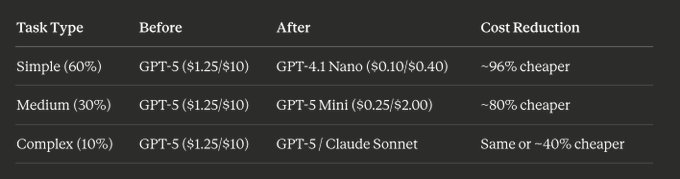 Just this one change cut my AI bill by about 60%. And here's the thing people miss: OpenAI also offers prompt caching now. If you send the same system prompt repeatedly (which you do - every request to the same feature has the same system prompt), cached input tokens cost only 10% of the normal price. So that $0.10/M for Nano? It becomes $0.01/M for the cached portion. Essentially free. On top of that, I also use Claude Haiku ($0.25/M input, $1.25/M output) from Anthropic for certain tasks where I want a different "personality" in responses, and Llama (self-hosted, $0/token) for background processing. The multi-provider approach isn't just about redundancy - it's about matching each request to the cheapest model that can handle it well. The key insight: your users cannot tell the difference on simple tasks. Nobody notices that their text got summarized by a $0.10/M token model instead of a $10/M token model. The output is identical for 90% of use cases. Here's a practical example. I have a feature that classifies user input into one of 8 categories. The prompt is simple: "Classify this text into one of the following categories: [list]. Respond with only the category name." - Running this on GPT-5: costs ~$10 per million outputs - Running this on GPT-4.1 Nano: costs ~$0.40 per million outputs - Accuracy difference: literally 0%. Both get it right 99%+ of the time. That's a 25x cost reduction on a single feature. Multiply that across every simple task in your app, and you start to understand why model routing is step #1. A rant I need to get off my chest: Stop using Opus for everything. I see this constantly in indie dev communities. Someone builds an app, plugs in Claude Opus - the most powerful (and most expensive) model Anthropic offers - and uses it for everything. Summarizing a paragraph. Extracting a name from a string. Classifying a support ticket. Formatting a date. That's like hiring a $500/hour lawyer to proofread your grocery list. Claude Opus costs $15/M input and $75/M output. GPT-5 is $1.25/$10. These are frontier models designed for the hardest problems: deep research, complex multi-step reasoning, nuanced creative work, tasks where the quality difference between a top-tier model and a mid-tier model actually matters. But here's the uncomfortable truth: for 80-90% of tasks in a typical app, the quality difference between Opus and Haiku is zero. Not small. Zero. Your classification task doesn't get "more classified" because you used a $75/M output model instead of a $1.25/M one. I made this exact mistake. Early on, I had Claude Opus handling some conversational features because I wanted "the best quality." I was spending roughly $400/month on those calls alone. Then I ran a blind comparison - I routed the same 1,000 requests through Opus and through Haiku, had users rate the responses, and the satisfaction scores were statistically identical. Same user happiness. 60x price difference. Here's my rule of thumb for choosing models: Use frontier models (Opus, GPT-5, o3) when: - The task requires genuine multi-step reasoning or deep analysis - You're building a product where AI quality IS the product (writing tools, research assistants) - Errors are expensive (medical, legal, financial contexts) - You're prototyping and need to figure out if AI can even solve the problem Use mid-tier models (Sonnet, GPT-5 Mini) when: - Conversational responses that need to sound natural - Content generation (blog drafts, social posts, descriptions) - Moderate reasoning tasks (comparisons, recommendations) Use cheap models (Haiku, Nano, Llama) when: - Classification, tagging, categorization - Data extraction and formatting - Simple summarization - Any task with a deterministic or near-deterministic answer - Background processing users never see The model you choose should match the complexity of the task - not your ego, not your anxiety about quality, not your assumption that "bigger is always better." Use the right tool for the right job. Your margin will thank you. ## Step 2: Cache Like Your Wallet Depends on It Because it does. I found that roughly 25-30% of my AI requests were nearly identical. Users asking the same types of questions, requesting the same transformations, generating similar content. My caching strategy: Semantic caching - I hash the core intent of a request (not the exact wording) and check if I've seen something similar in the last 24 hours. If the similarity score is above 0.92, I serve the cached response. Result caching - For deterministic tasks (classification, extraction, formatting), I cache the output keyed to the input. Same input = same output = no reason to call the API again. Template caching - For common workflows, I pre-generate responses during off-peak hours and serve them instantly. Users think the AI is fast. It is - because it already ran 3 hours ago. This saved me another 20-25% on API costs. And it made the app faster, which users actually noticed and loved. ## Step 3: Self-Host Where It Makes Sense This is where Llama enters the picture. I run Llama for a specific subset of tasks that are: - High volume - Low complexity - Latency-tolerant (user isn't staring at a loading spinner) Background processing, batch summarization, content tagging - these all run on self-hosted Llama. The marginal cost per request is essentially zero after the server cost. My Railway server ($289/month) handles both my application backend AND local Llama inference for lightweight tasks. That's a fixed cost regardless of how many requests I process. Compare that to paying per-token for every single request. At 14K DAU, the math is brutal if you're using only API-based models. When to self-host vs. use APIs: - Self-host: High volume, simple tasks, background processing, when you need data privacy - Use APIs: Complex reasoning, low volume, when you need cutting-edge quality, when you can't afford GPU infra Don't self-host everything. Don't API everything. Mix and match based on the actual workload. ## Step 4: Your Infrastructure Stack Is a Cost Decision Too People obsess over AI model pricing but completely ignore the infrastructure underneath. Let me break down my actual infra stack because these numbers matter just as much. Railway: $289/month Railway is where my entire backend lives. NestJS API server, background workers, cron jobs, Redis for queuing, and lightweight Llama inference. All on one platform. Why Railway and not AWS or GCP? Because I'm a solo developer, not a DevOps team. Railway gives me one-click deploys from GitHub, automatic scaling, built-in logging, and zero infrastructure management. I push code, it deploys. That's it. Could I run the same thing on a $50/month VPS? Technically yes. But I'd spend 10-15 hours a month managing servers, debugging Docker issues, handling SSL certificates, setting up monitoring, and dealing with downtime at 2am. My time is worth more than $239/month. Railway lets me focus on building the product instead of babysitting servers. That said, here's my honest take on Railway's pricing: it's not the cheapest option. If you're running a very compute-heavy workload or you need GPU instances, Railway gets expensive fast. For those cases, look at alternatives like Fly.io (great for edge deployments), Coolify on Hetzner (self-hosted PaaS on cheap European servers, as low as $4-5/month for a decent VPS), or just a raw VPS from DigitalOcean or Hetzner if you're comfortable with server management. My rule: if your time is expensive and your server bill is under $500/month, use a managed platform. If your server bill crosses $500/month, it's time to consider self-hosting on cheaper hardware. Supabase: $187/month Supabase is my database, auth, and file storage. All in one. PostgreSQL under the hood, which means I get a real database with real SQL, not some proprietary NoSQL thing I'll regret later. Here's why Supabase is a steal at $187/month for what I'm getting: - PostgreSQL database handling 390K users and 10-14K DAU with zero issues - Built-in auth (email, OAuth, magic links) that would cost me $100+/month on Auth0 at my scale - File storage for user uploads that would be another $20-30/month on S3 + CloudFront - Realtime subscriptions for live features - Edge functions for lightweight serverless logic - Row Level Security built into the database layer, not bolted on as middleware If I built all of this separately: managed PostgreSQL on AWS RDS ($100-200/month), Auth0 or Clerk ($100+/month), S3 + CloudFront ($20-50/month), a realtime service like Pusher ($50-100/month)... I'd easily be paying $300-500/month for the same functionality. Supabase bundles it all for $187. The Pro plan ($25/month) covers most startups. I'm on a higher tier because of my database size and bandwidth, but even at $187 it's one of the best deals in my entire stack. My infra advice for different stages: Just starting out (0-1K users, $0-50/month budget): - Supabase free tier (generous limits, 500MB database, 1GB storage) - Railway free tier or a $5/month starter plan - Total: $0-30/month. Seriously. You can launch a real product for the cost of a Netflix subscription. Growing (1K-10K users, $50-200/month budget): - Supabase Pro at $25/month - Railway at $50-100/month - Start separating your background workers from your API server - Total: $75-125/month. Still incredibly lean for thousands of active users. Scaling (10K+ users, $200-500/month budget): - Supabase Pro + usage-based scaling ($100-200/month) - Railway with dedicated resources ($200-300/month) - Consider adding a caching layer (Redis on Railway or Upstash) - This is where I am. Total infra: $476/month serving 14K DAU. The trap to avoid: Don't over-engineer your infra from day one. I've seen solo devs set up Kubernetes clusters, multi-region databases, and load balancers for apps with 50 users. That's not engineering, that's procrastination. Start simple. Supabase + Railway. Two services. One database. One server. Ship the product. You can always migrate later when the revenue justifies it. And here's something nobody tells you: most infra costs scale sub-linearly with users. Going from 1K to 10K users doesn't 10x your server bill. My Railway cost barely changed when I went from 5K to 14K DAU because most of the compute is AI inference (which scales with API calls, not server size). Your database gets bigger, your bandwidth goes up, but the base infrastructure cost stays relatively flat. That's the beauty of building on managed platforms. You pay for what you use, and the pricing scales way more gracefully than "I need a bigger server." ## Step 5: Prompt Engineering Is Cost Engineering Nobody talks about this enough. A badly written prompt doesn't just give worse results - it costs more. Longer prompts = more input tokens = higher bills. Verbose outputs you don't need = more output tokens = higher bills. Things I did: Trimmed system prompts. My original system prompts were 800-1,200 tokens each. I got them down to 200-400 without losing quality. That's a 60% reduction in input cost on every single request. Specified output format. Instead of letting the model ramble, I tell it exactly what format I want. "Respond in JSON with these 3 fields." No preamble, no explanation, no fluff. Shorter outputs = cheaper outputs. Removed redundant context. I was stuffing conversation history into every request "just in case." Now I only include what's relevant to the current query. This alone cut input tokens by 40%. Used structured outputs. When I need JSON back, I use the structured output features (function calling, JSON mode). The model generates less garbage, which means fewer retries, which means fewer API calls. ## Step 6: Batch and Debounce Everything Real-time AI is expensive. Not-quite-real-time AI is cheap. If your feature doesn't need a response in under 2 seconds, batch it. - User uploads 5 images? Don't make 5 separate API calls. Batch them into one. - User is typing a message? Don't call the AI on every keystroke. Debounce and wait until they stop typing. - User generates content and then immediately regenerates? Queue the second request and cancel the first. - Background analytics and tagging? Run them in a nightly batch job, not on every user action. OpenAI's Batch API gives you 50% off for non-real-time workloads. That applies to every model - GPT-5, GPT-5 Mini, Nano, all of them. I route all my background processing through it. That's a straight 50% discount for literally the same output, just delivered within 24 hours instead of seconds. Let me do the math for you. GPT-5 Mini normally costs $0.25/M input. Through the Batch API, that drops to $0.125/M. Combined with prompt caching (which gives you 90% off on cached input tokens), your effective cost for repeated batch operations becomes almost negligible. I'm talking fractions of a cent per request. I batch everything I can: nightly content tagging, user behavior analysis, bulk summarization of user-generated content, automated moderation. None of these need real-time responses. Users don't even know these processes run. But they make the product better - and they cost almost nothing through batch processing. ## Step 7: Switch to DeepInfra for Speech Models - This Was My Biggest "Why Didn't I Do This Sooner" Moment Let me tell you about the $190/month line item on my bill: Speech-to-text. I was using a combination of ElevenLabs and OpenAI's Whisper API for transcription and text-to-speech. Both are great products. Both are also expensive when you're processing thousands of audio minutes per month. OpenAI's Whisper API costs around $0.006 per minute. ElevenLabs charges based on characters with subscription tiers - and once you exceed your plan's limits, the overages add up fast. My TTS costs alone were creeping toward $300/month. Then I discovered DeepInfra. Here's the thing - I use Whisper v3 for all my speech-to-text. It's the same model whether I call it through OpenAI's API or through DeepInfra. Literally the same open-source Whisper Large v3 model, same weights, same accuracy, same everything. The only difference? OpenAI charges $0.006 per minute. DeepInfra charges $0.00045 per minute. That's 13x cheaper. For the exact same model. Same transcription quality. I switched and not a single user noticed - because nothing changed except the bill. DeepInfra also hosts a bunch of great TTS models - Kokoro TTS, Qwen3-TTS, Inworld TTS, and more. Instead of paying ElevenLabs' per-character rates, I switched to open-source TTS models on DeepInfra like Kokoro (82M parameters, surprisingly good quality) and Inworld TTS for multilingual needs. The cost dropped from dollars to cents per thousand characters. Here's what the migration looked like: 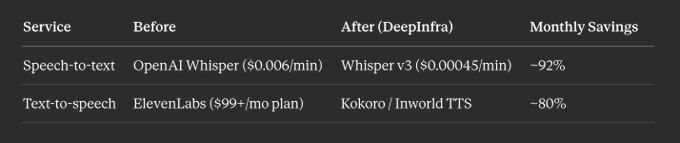 The best part? DeepInfra's API is OpenAI-compatible. Literally change the base URL and API key in your code. That's it. A 5-minute migration that saved me over $150/month. The quality tradeoff? For speech-to-text, there is none - it's literally the same Whisper model. For TTS, the open-source models are maybe 90% as natural-sounding as ElevenLabs' premium voices. But for my use case - in-app audio feedback and content narration - that 90% is more than enough. My users never noticed the switch. If you're spending $100+/month on speech APIs through premium providers, check DeepInfra (or similar inference platforms like Groq, Fireworks, Together.ai). The open-source speech model ecosystem has gotten incredibly good, and these platforms let you use them without managing your own GPU infrastructure. This single switch brought my speech-related costs from $190/month down to roughly $30/month. That's $160/month saved by changing two lines of code. (Quick note: I'm not sponsored by DeepInfra. Nobody's paying me to say this. I'm sharing it because I'm actually using it and the pricing is absurdly cheap. That's it.) ## Step 8: Monitor, Measure, and Kill Waste You can't optimize what you don't measure. I track: - Cost per feature: Which AI features cost the most? Are users actually using them? - Cost per user: What's my average AI cost per DAU? (Currently around $0.06/day) - Cache hit rate: Am I caching effectively? (Target: >30%) - Error/retry rate: Failed requests that get retried are pure waste I found one feature that cost $180/month and was used by 12 people. Killed it. Nobody complained. I found another feature with a 15% retry rate because of bad prompt design. Fixed the prompt, saved $80/month in wasted calls. Small leaks sink big ships. Audit your costs monthly. ## Step 9: Negotiate and Use Credits This one is straightforward but people forget: - Startup credits: Anthropic, OpenAI, Google - they all have startup programs. Apply. I've received thousands in free credits. - Committed use discounts: If you're spending $500+/month on an API, reach out and ask for volume pricing. The worst they can say is no. - Multi-provider strategy: I use OpenAI, Claude, AND Llama. Not because I love complexity - because I can route each request to whichever provider offers the best price-to-quality ratio for that specific task. Let me be real about the 2026 landscape - it's a buyer's market and you should take advantage: OpenAI has GPT-5 at $1.25/$10, but Nano at $0.10/$0.40 for bulk work. Anthropic has Claude Haiku at $0.25/$1.25 which is excellent for lightweight tasks. Google has Gemini Flash at $0.30/M which is competitive for high-volume use. And then there's DeepSeek V3 at $0.14/$0.28 per million tokens - absurdly cheap for tasks that don't need frontier intelligence. The point isn't to use every provider. The point is to know what's available so you can make informed routing decisions. I personally stick to OpenAI (GPT-5 Mini + Nano) for most tasks, Claude Sonnet for complex creative/analytical work, Llama for self-hosted background jobs, and DeepInfra for speech. Four providers, zero loyalty, maximum savings. Competition between providers is your leverage. Use it. ## The Full Picture Here's what my AI cost optimization looks like as a system: Route by complexity → Right model for the right task Cache aggressively → Never pay twice for the same answer Self-host commodity tasks → Fixed cost beats per-token at scale Pick the right infra stack → Railway + Supabase, lean and managed Engineer lean prompts → Every token costs money Batch non-urgent work → 50% off for patience Use inference platforms for speech → Same models, 10x cheaper Monitor and kill waste → Audit monthly, cut ruthlessly Negotiate and diversify → Use credits, volume pricing, multi-provider The result: $703/month in AI costs (OpenAI + Claude + Llama + DeepInfra speech) serving 14K daily active users. That's about $0.05 per DAU per month. Down from $1.20 when I started. A 96% reduction. ## The Real Lesson Here's what I want you to take away from this: Don't optimize prematurely. When I had 200 users, I should have been focused on getting to 2,000 users - not shaving $50 off my AI bill. The time I spent optimizing at small scale was time I could have spent on marketing and product. My original post said it: Marketing + build first, optimize costs later. That's still true. But "later" eventually arrives. And when it does - when you're at 10K+ DAU and your AI bill is eating your margins - this playbook is how you fix it. Build first. Grow first. Then optimize like your profitability depends on it. Because it does. ## A Note for Indie Hackers, Solo Founders, and Small Teams This part is specifically for you - because I was you not that long ago. When you're a solo founder or running a 2-3 person team with a tight budget, you don't have the luxury of a VC-funded runway to burn through. Every dollar matters. You're not optimizing for "nice to have" efficiency - you're optimizing for survival. And here's the thing that took me way too long to understand: when your budget is small, cutting costs IS increasing profit. They're the same thing. Think about it. If your app makes $5,000/month and your AI costs are $1,200/month, that's 24% of your revenue gone before you even pay for hosting, domains, and your own rent. Cut that AI bill to $300/month using the strategies in this article, and you just gave yourself a $900/month raise. That's $10,800/year back in your pocket - without acquiring a single new user. Big companies can afford to be wasteful. They have entire finance teams to figure it out later. You don't. For indie hackers, operational cost optimization is the most underrated growth lever there is. It's not glamorous. Nobody posts on X about "I switched from Opus to Haiku and saved $400/month." But that $400 can fund your marketing budget for the month. Or buy you another month of runway. Or let you hire a part-time contractor to build that feature you've been putting off. Here's what I'd tell my past self: Month 1-3: Use whatever model works. Ship fast. Validate the idea. Don't even think about costs yet - you have bigger problems (like finding users). Month 3-6: You have users now. Look at your AI bill for the first time. Implement model routing (Step 1). Switch simple tasks to Nano or Haiku. This alone will cut your bill by 50-60% in a single afternoon. Month 6-12: Implement caching, switch to DeepInfra for speech, set up the Batch API for background jobs. By now, your cost per user should be low enough that scaling doesn't scare you anymore. Month 12+: You're printing money. Your operational costs are lean. Every new user is almost pure profit on the AI side. Now you can reinvest those savings into marketing, new features, or - wild idea - paying yourself more. The indie hackers who win aren't the ones with the biggest budgets. They're the ones who squeeze the most value out of every dollar. Optimizing AI costs isn't boring backend work - it's a competitive advantage. It's the difference between running out of money in month 8 and being profitable in month 6. Every dollar you save on infrastructure is a dollar that goes straight to your bottom line. For a solo founder, that's not just a number on a spreadsheet. That's rent. That's freedom. That's another month you get to keep building. Don't sleep on this. Good luck guys 🫡 ## 相关链接 - [Alex Nguyen](https://x.com/alexcooldev) - [@alexcooldev](https://x.com/alexcooldev) - [6.8K](https://x.com/alexcooldev/status/2044454751556014113/analytics) - [Apr 14](https://x.com/alexcooldev/status/2044072432814960863) - [43K](https://x.com/alexcooldev/status/2044072432814960863/analytics) - [Fly.io](https://fly.io/) - [Together.ai](https://together.ai/) - [Upgrade to Premium](https://x.com/i/premium_sign_up) - [12:36 AM · Apr 16, 2026](https://x.com/alexcooldev/status/2044454751556014113) - [6,848 Views](https://x.com/alexcooldev/status/2044454751556014113/analytics) - [View quotes](https://x.com/alexcooldev/status/2044454751556014113/quotes) --- *导出时间: 2026/4/16 17:03:19* --- ## 中文翻译 # 我的 2 款应用拥有 39 万用户,全靠 AI,而我的总账单每月只有 1,679 美元。这是我的完整攻略。 **作者**: Alex Nguyen **日期**: 2026-04-14T15:16:59.000Z **来源**: [https://x.com/alexcooldev/status/2044454751556014113](https://x.com/alexcooldev/status/2044454751556014113) ---  我分享了我的运营账单:每月 1,679 美元,运行着服务 39 万用户、月收入 3 万美元的应用。 人们都惊呆了。 “你的 AI 成本怎么这么低?” “你用不到 900 美元就跑起了 OpenAI + Claude + Llama?” “有什么秘诀?” 没有单一的秘诀。这是一套系统。而且大部分都是我吃了亏才学会的——先烧钱,再学乖。 以下是我关于如何把 AI 成本压到极限的全部经验。 ## 所有人都犯的错误 当我第一次把 AI 集成到我的应用中时,我做了每个开发者都会做的事:我选择了最强大、能力最强的模型——GPT-5,把每一个请求都路由到它上面,然后眼睁睁看着我的账单像火箭一样飙升。 让我给你一些背景。GPT-5 的价格是每百万输入 token 1.25 美元,每百万输出 token 10 美元。听起来很便宜,直到你把它乘以每天数千次请求。每一次分类、每一次摘要、每一次“从这个 JSON 中提取这一个字段”——全都通过一个每百万输出 10 美元的模型。 第一个月就花了 2,400 美元。而日活用户可能只有 2,000。 也就是每个 DAU 每月 1.20 美元。按这个比例,扩展到 1.4 万 DAU,仅 AI 一项我每月就要花 16,800 美元。超过一半的收入——没了。 我慌了。开始考虑干脆砍掉 AI 功能。 然后我退后一步,认真研究了一下我的用户到底在做什么。 ## 第一步:不是每个请求都值得用大模型 这是你能做的影响最大的一个改变。而在 2025/2026 年,OpenAI 用它们的模型阵容把这件事变得简单得令人发指。 我审查了应用中的每一个 AI 调用,并将它们分类: - 简单任务(占请求的 60%):分类、提取、格式化、简短摘要 - 中等任务(30%):对话式回复、内容生成、中等复杂度推理 - 复杂任务(10%):长篇分析、多步推理、创意写作 我把其中 100% 都发给了 GPT-5。 解决方法简单得让人脸红:把简单任务路由到更小、更便宜的模型。 让我详细介绍一下 OpenAI 目前的模型阵容以及每个模型的实际成本,因为这正是大多数开发者白白浪费钱的地方: GPT-5——旗舰款。输入 1.25 美元/百万,输出 10 美元/百万。这是 OpenAI 提供的最聪明的模型。它能处理文本、图像、结构化输出——一应俱全。但它也是最贵的。对于“从这句话中提取用户名”这种任务,你完全不需要它。 GPT-5 Mini——甜点位。输入 0.25 美元/百万,输出 2 美元/百万。这比完整版 GPT-5 输入便宜 5 倍,输出也便宜 5 倍。对于大多数中等复杂度的任务——聊天机器人回复、内容生成、摘要——GPT-5 Mini 与完整版模型没什么区别。我把大约 30% 的流量路由到这里。 GPT-4.1 Nano——主力干将。输入 0.10 美元/百万,输出 0.40 美元/百万。这个小模型便宜得离谱。对于简单分类、实体提取、格式化,以及任何不需要深度推理的任务——Nano 都能完美处理。我把 50-60% 的 AI 请求都路由到 Nano。在每百万输入 token 0.10 美元的价格下,你得处理 1,000 万个 token 才会在输入上花掉 1 美元。 GPT-4.1 Mini——中间选项。输入 0.40 美元/百万,输出 1.60 美元/百万。介于 Nano 和 GPT-5 Mini 之间。适合那些需要比 Nano 更聪明一点、但又不足以用上 GPT-5 Mini 价格的任务。 以下大致是我实际的路由方式:  仅仅这一个改变,就把我的 AI 账单削减了约 60%。 还有一个大家容易忽略的点:OpenAI 现在还提供提示词缓存(prompt caching)。如果你反复发送相同的系统提示词(你肯定会——同一个功能的每个请求都带相同的系统提示词),缓存部分的输入 token 只需正常价格的 10%。所以 Nano 的 0.10 美元/百万?缓存部分就变成 0.01 美元/百万。几乎是免费的。 除此之外,我还会用 Anthropic 的 Claude Haiku(输入 0.25 美元/百万,输出 1.25 美元/百万)来处理某些我希望回复有不同“个性”的任务,并用 Llama(自托管,0 美元/token)做后台处理。多供应商方案不只是为了冗余——更是为了让每个请求匹配到能胜任它的最便宜的模型。 关键洞察:在简单任务上,你的用户根本分辨不出区别。没人会注意到他们的文本是被一个 0.10 美元/百万 token 的模型摘要的,而不是 10 美元/百万 token 的模型。在 90% 的用例中,输出是完全一样的。 举个实际的例子。我有一个功能,将用户输入分类到 8 个类别之一。提示词很简单:“把这段文本分类到以下类别之一:[列表]。只回复类别名称。” - 在 GPT-5 上运行:每百万输出约 10 美元 - 在 GPT-4.1 Nano 上运行:每百万输出约 0.40 美元 - 准确率差异:0%。两者在 99% 以上的情况下都分类正确。 这是单个功能上 25 倍的成本削减。把它乘以你应用中的每一个简单任务,你就明白为什么模型路由是第一步了。 我要发泄一下憋了很久的抱怨:别什么都用 Opus。 我在独立开发者社区里 constantly 看到这种情况。有人做了个应用,接上 Claude Opus——Anthropic 最强大(也最贵)的模型——然后什么都用它。给一段话做摘要。从字符串里提取名字。给客服工单分类。格式化日期。 这就像雇一个时薪 500 美元的律师来校对你的购物清单。 Claude Opus 的价格是输入 15 美元/百万、输出 75 美元/百万。GPT-5 是 1.25/10 美元。这些是为最难的问题设计的前沿模型:深度研究、复杂的多步推理、细腻的创意工作,以及那些顶级模型与中端模型之间的质量差异真正重要的任务。 但这里有一个令人不适的事实:在一个典型应用中,80-90% 的任务,Opus 和 Haiku 之间的质量差异是零。不是很小,是零。你的分类任务不会因为你用了每百万输出 75 美元的模型而不是 1.25 美元的模型就“分类得更准确”。 我就犯过这个错误。早期,我让 Claude Opus 处理一些对话功能,因为我想要“最好的质量”。仅这些调用我每月就花费大约 400 美元。后来我做了一次盲测对比——我把同样的 1000 个请求分别路由给 Opus 和 Haiku,让用户给回复打分,结果满意度得分在统计上完全相同。同样的用户满意度,60 倍的价格差异。 以下是我选择模型的经验法则: 在以下情况使用前沿模型(Opus、GPT-5、o3): - 任务需要真正的多步推理或深度分析 - 你在开发一个 AI 质量本身就是产品的产品(写作工具、研究助手) - 出错的代价很高(医疗、法律、金融场景) - 你在做原型,需要弄清楚 AI 到底能不能解决这个问题 在以下情况使用中档模型(Sonnet、GPT-5 Mini): - 需要听起来自然的对话回复 - 内容生成(博客草稿、社交帖子、描述文案) - 中等难度的推理任务(比较、推荐) 在以下情况使用廉价模型(Haiku、Nano、Llama): - 分类、打标签、归类 - 数据提取和格式化 - 简单摘要 - 任何答案确定或接近确定的任务 - 用户永远看不到的后台处理 你选择的模型应该与任务的复杂度相匹配——而不是匹配你的自尊心,不是你对质量的焦虑,也不是“越大越好”的假设。用对的工具做对的事。你的利润率会感谢你的。 ## 第二步:像你的钱包性命攸关一样使用缓存 因为确实是。 我发现我大约 25-30% 的 AI 请求几乎完全相同。用户问着同样类型的问题,请求着同样的转换,生成着相似的内容。 我的缓存策略: 语义缓存——我对请求的核心意图(而非确切措辞)进行哈希,并检查过去 24 小时内是否见过类似内容。如果相似度得分高于 0.92,我就直接返回缓存响应。 结果缓存——对于确定性任务(分类、提取、格式化),我以输入为键缓存输出。相同输入 = 相同输出 = 没有理由再调用 API。 模板缓存——对于常见的工作流,我在非高峰时段预先生成响应,然后即时返回。用户觉得 AI 很快。确实快——因为它 3 小时前就已经运行过了。 这又为我节省了 20-25% 的 API 成本。而且它让应用更快,用户实实在在地注意到了并很喜欢。 ## 第三步:在合理的地方使用自托管 这就是 Llama 登场的地方。 我用 Llama 跑一个特定的任务子集,这些任务是: - 高吞吐量 - 低复杂度 - 对延迟不敏感(用户不是在盯着加载转圈) 后台处理、批量摘要、内容打标签——这些都运行在自托管的 Llama 上。扣除服务器成本后,每个请求的边际成本基本为零。 我的 Railway 服务器(每月 289 美元)同时承载我的应用后端和轻量级任务的本地 Llama 推理。这是一个固定成本,与我处理多少请求无关。 对比一下为每个请求按 token 付费的方式。在 1.4 万日活用户的规模下,如果你只用基于 API 的模型,账单会非常吓人。 什么时候自托管 vs. 使用 API: - 自托管:高吞吐量、简单任务、后台处理、需要数据隐私时 - 使用 API:复杂推理、低吞吐量、需要顶尖质量时、负担不起 GPU 基础设施时 不要把所有东西都自托管,也不要把所有东西都走 API。根据实际工作负载混合搭配。 ## 第四步:你的基础设施技术栈也是一个成本决策 人们执着于 AI 模型的定价,却完全忽略了底层的基础设施。让我拆解一下我实际的基础设施技术栈,因为这些数字同样重要。 Railway:每月 289 美元 Railway 上运行着我的整个后端。NestJS API 服务器、后台 worker、定时任务、用于排队的 Redis,以及轻量级的 Llama 推理。全部在一个平台上。 为什么选 Railway 而不是 AWS 或 GCP?因为我是独立开发者,不是 DevOps 团队。Railway 给我提供从 GitHub 一键部署、自动扩缩容、内置日志,以及零基础设施管理。我推送代码,它就部署。就这么简单。 我能不能在每月 50 美元的 VPS 上跑同样的东西?技术上可以。但我每月得花 10-15 个小时管理服务器、调试 Docker 问题、处理 SSL 证书、搭建监控,还得在凌晨 2 点处理宕机。我的时间不止每月 239 美元的价值。Railway 让我专注于打造产品,而不是看管服务器。 话虽如此,这是我对 Railway 定价的诚实看法:它不是最便宜的选择。如果你运行的是计算量非常大的工作负载,或者需要 GPU 实例,Railway 的成本会快速飙升。对于这些情况,可以考虑 Fly.io(非常适合边缘部署)这样的替代方案、Hetzner 上的 Coolify(廉价欧洲服务器上的自托管 PaaS,一台像样的 VPS 低至每月 4-5 美元),或者如果你熟悉服务器管理,直接用 DigitalOcean 或 Hetzner 的裸 VPS。 我的规则:如果你的时间很贵,而且服务器账单低于每月 500 美元,就用托管平台。如果服务器账单超过每月 500 美元,就该考虑在更便宜的硬件上自托管了。 Supabase:每月 187 美元 Supabase 是我的数据库、身份验证和文件存储,全都在一个平台上。底层是 PostgreSQL,这意味着我得到的是一个支持真正的 SQL 的真正数据库,而不是以后会后悔的某种专有 NoSQL。 以下是为什么就我所得到的东西而言,每月 187 美元的 Supabase 简直是超值: - PostgreSQL 数据库处理 39 万用户和 1 万到 1.4 万日活跃用户,零问题 - 内置认证(邮箱、OAuth、魔法链接),以我的规模在 Auth0 上每月要花 100 多美元 - 用户上传的文件存储,如果用 S3 + CloudFront 每月还要再花 20-30 美元 - 用于实时功能的 Realtime 订阅 - 用于轻量级无服务器逻辑的 Edge Functions - 行级安全(Row Level Security)内置于数据库层,而不是作为中间件硬加上去的 如果我分别购买所有这些服务:AWS RDS 上的托管 PostgreSQL(每月 100-200 美元)、Auth0 或 Clerk(每月 100 多美元)、S3 + CloudFront(每月 20-50 美元)、像 Pusher 这样的实时服务(每月 50-100 美元)……同样的功能我每月很容易就要支付 300-500 美元。而 Supabase 把这一切打包只需 187 美元。 Pro 计划(每月 25 美元)能覆盖大多数初创公司的需求。因为我的数据库大小和带宽,我用的更高档位,但即使是每月 187 美元,它也是我整个技术栈中最划算的服务之一。 我针对不同阶段的 infra 建议: 刚起步阶段(0-1K 用户,预算每月 0-50 美元): - Supabase 免费层(额度慷慨,500MB 数据库,1GB 存储) - Railway 免费层或每月 5 美元的入门计划 - 总计:每月 0-30 美元。真的。你可以用一份 Netflix 订阅的成本上线一个真正的产品。 增长阶段(1K-10K 用户,预算每月 50-200 美元): - Supabase Pro,每月 25 美元 - Railway,每月 50-100 美元 - 开始把后台工作进程从 API 服务器中分离出来 - 总计:每月 75-125 美元。对于数千活跃用户来说,这已经非常精简了。 扩展阶段(10K+ 用户,预算每月 200-500 美元): - Supabase Pro + 按用量扩展(每月 100-200 美元) - Railway 配置专用资源(每月 200-300 美元) - 考虑添加缓存层(Railway 上的 Redis 或 Upstash) - 这就是我目前所处的阶段。基础设施总计:每月 476 美元,服务 1.4 万日活跃用户。 要避免的陷阱:不要从第一天起就过度设计你的基础设施。我见过独立开发者为一个只有 50 个用户的应用搭建 Kubernetes 集群、多区域数据库和负载均衡器。那不是工程,那是拖延。从简单开始。Supabase + Railway。两个服务。一个数据库。一台服务器。把产品发布出去。等收入足以支撑时,你随时可以迁移。 还有一件没人告诉你的事:大多数基础设施成本随用户数的增长是次线性的。用户从 1K 增加到 10K,你的服务器账单并不会翻 10 倍。当我从 5K 日活增长到 1.4 万日活时,我的 Railway 成本几乎没有变化,因为大部分计算是 AI 推理(它随 API 调用量扩展,而不是随服务器大小)。你的数据库会变大,带宽会上升,但基础基础设施成本基本保持平稳。 这就是在托管平台上构建的美妙之处。你按使用量付费,而且定价的增长远比“我需要一台更大的服务器”要温和得多。 ## 第 5 步:提示词工程就是成本工程 这件事没人给予足够的重视。 一个写得糟糕的提示词不只是给出更差的结果——它还会花更多的钱。更长的提示词 = 更多的输入 token = 更高的账单。你不需要的冗长输出 = 更多的输出 token = 更高的账单。 我做了这些事: 精简系统提示词。我原来的系统提示词每个有 800-1,200 个 token。我把它降到了 200-400 个,而没有损失质量。这意味着每个请求的输入成本降低了 60%。 指定输出格式。与其让模型滔滔不绝,我明确告诉它我想要的格式。“用 JSON 回复,包含这 3 个字段。”没有前言,没有解释,没有废话。更短的输出 = 更便宜的输出。 移除冗余上下文。我以前“以防万一”地把对话历史塞进每个请求里。现在我只包含与当前查询相关的内容。仅这一项就把输入 token 减少了 40%。 使用结构化输出。当我需要 JSON 返回时,我会使用结构化输出功能(函数调用、JSON 模式)。模型生成的垃圾更少,这意味着更少的重试,也就意味着更少的 API 调用。 ## 第 6 步:对所有任务进行批处理和防抖 实时 AI 很贵。准实时 AI 很便宜。 如果你的功能不需要在 2 秒内得到响应,就把它批量处理。 - 用户上传 5 张图片?不要发 5 个单独的 API 调用。把它们合并成一个。 - 用户正在输入消息?不要每次按键都调用 AI。做防抖处理,等他们停止输入。 - 用户生成内容后立刻重新生成?把第二个请求排入队列,取消第一个。 - 后台分析和打标签?放在每夜批处理任务中运行,而不是在每次用户操作时运行。 OpenAI 的 Batch API 对非实时工作负载提供 50% 的折扣。这适用于所有模型——GPT-5、GPT-5 Mini、Nano,全部都行。我把我所有的后台处理都走这条路。这等于输出完全相同的直降 50% 折扣,只是交付时间从几秒变成 24 小时以内。 让我给你算笔账。GPT-5 Mini 正常价格是每百万输入 token 0.25 美元。通过 Batch API,降到 0.125 美元。再结合提示词缓存(缓存输入 token 享 90% 折扣),重复批处理操作的实际成本几乎可以忽略不计。我说的是每个请求只需几分之一美分。 我把所有能批处理的都批处理:每夜的内容打标签、用户行为分析、用户生成内容的批量摘要、自动审核。这些都不需要实时响应。用户甚至不知道这些流程在运行。但它们让产品变得更好——而且通过批处理几乎不花钱。 ## 第 7 步:切换到 DeepInfra 的语音模型——这是我最大的“为什么我没有早点这么做”时刻 让我说说账单上每月 190 美元的那一项:语音转文字。 我之前用的是 ElevenLabs 和 OpenAI 的 Whisper API 的组合来做转录和文字转语音。两者都是优秀的产品。但当你每月要处理数千分钟的音频时,两者也都很贵。 OpenAI 的 Whisper API 大约每分钟 0.006 美元。ElevenLabs 按字符收费,并有订阅档位——一旦超出计划的限额,超额费用累积得很快。光是 TTS 的费用就悄悄逼近每月 300 美元。 然后我发现了 DeepInfra。 事情是这样的——我所有的语音转文字都用 Whisper v3。无论是通过 OpenAI 的 API 还是通过 DeepInfra 调用,用的都是同一个模型。就是同一个开源的 Whisper Large v3 模型,相同的权重、相同的准确率、一切都一样。唯一的区别是什么?OpenAI 收费每分钟 $0.006,而 DeepInfra 只收每分钟 $0.00045。便宜了 13 倍,模型完全相同,转录质量也一样。我切换过去后,没有一个用户察觉到——因为除了账单,什么都没变。 DeepInfra 还托管了许多优秀的 TTS 模型——Kokoro TTS、Qwen3-TTS、Inworld TTS 等等。我没有继续支付 ElevenLabs 按字符计费的高价,而是切换到了 DeepInfra 上的开源 TTS 模型,比如 Kokoro(8200 万参数,质量出奇地好)和满足多语言需求的 Inworld TTS。成本从每千字符几美元降到了几美分。 迁移过程是这样的:  最棒的是?DeepInfra 的 API 与 OpenAI 兼容。只需在代码中修改 base URL 和 API key,就这么简单。一次 5 分钟的迁移,每月为我省下了超过 $150。 质量上有什么损失?语音转文字完全没有——用的就是同一个 Whisper 模型。至于 TTS,开源模型的自然度大概是 ElevenLabs 高级语音的 90%。但对于我的使用场景——应用内语音反馈和内容旁白——这 90% 绰绰有余。我的用户完全没有察觉到切换。 如果你每月在高级供应商的语音 API 上花费 $100 以上,去看看 DeepInfra(或类似的推理平台,如 Groq、Fireworks、Together.ai)。开源语音模型生态已经变得非常出色,这些平台让你无需自己管理 GPU 基础设施就能使用它们。 仅这一项切换就把我的语音相关成本从每月 $190 降到了大约 $30。改两行代码,每月省下 $160。 (说明一下:DeepInfra 没有赞助我。没有人付钱让我说这些。我分享这个是因为我自己真的在用,而且价格便宜得离谱。就这么简单。) ## 第 8 步:监控、衡量、消灭浪费 没有衡量的东西就无法优化。 我追踪这些指标: - 每个功能的成本:哪些 AI 功能成本最高?用户真的在用吗? - 每个用户的成本:我的 DAU 平均 AI 成本是多少?(目前约 $0.06/天) - 缓存命中率:我的缓存是否有效?(目标:>30%) - 错误/重试率:被重试的失败请求就是纯粹的浪费 我发现有一个功能每月花费 $180,却只有 12 个人在用。砍掉了。没人抱怨。 我还发现另一个功能因为糟糕的提示词设计导致 15% 的重试率。修复提示词后,每月在浪费的调用上省了 $80。 小漏洞能沉大船。每月审计你的成本。 ## 第 9 步:谈判和利用额度 这一条很简单,但人们总是忘记: - 初创公司额度:Anthropic、OpenAI、Google——它们都有初创企业计划。去申请。我已经收到了数千美元的免费额度。 - 承诺用量折扣:如果你在某家 API 上每月花费 $500 以上,主动联系并要求批量定价。最坏的结果也不过是被拒绝。 - 多供应商策略:我同时使用 OpenAI、Claude 和 Llama。不是因为我喜欢复杂——而是因为我可以把每个请求路由到对该特定任务而言性价比最高的供应商。 让我坦率地谈谈 2026 年的格局——这是买方市场,你应该好好利用: OpenAI 有定价 $1.25/$10 的 GPT-5,但用于批量工作的 Nano 只要 $0.10/$0.40。Anthropic 有定价 $0.25/$1.25 的 Claude Haiku,对轻量级任务来说非常出色。Google 有每百万 token $0.30 的 Gemini Flash,对高用量场景很有竞争力。还有每百万 token 仅 $0.14/$0.28 的 DeepSeek V3——对不需要前沿智能的任务来说便宜得离谱。 重点不是使用每一家供应商。重点是了解有哪些选择,这样你才能做出明智的路由决策。我个人大部分任务坚持用 OpenAI(GPT-5 Mini + Nano),复杂的创意/分析工作用 Claude Sonnet,自托管的后台任务用 Llama,语音用 DeepInfra。四家供应商,零忠诚度,最大节省。 供应商之间的竞争就是你的筹码。用好它。 ## 全局图景 以下是我作为一个系统的 AI 成本优化全貌: 按复杂度路由 → 为合适的任务选合适的模型 激进缓存 → 永远不为同一个答案付两次钱 自托管通用任务 → 规模化后固定成本胜过按 token 计费 选对基础设施 → Railway + Supabase,精简且托管 精简提示词工程 → 每个 token 都要花钱 批量处理非紧急工作 → 用耐心换 5 折优惠 语音用推理平台 → 同样的模型,便宜 10 倍 监控并消灭浪费 → 每月审计,果断砍掉 谈判并多元化 → 利用额度、批量定价、多供应商 结果:每月 $703 的 AI 成本(OpenAI + Claude + Llama + DeepInfra 语音),服务 1.4 万日活用户。 折合每个 DAU 每月约 $0.05。相比起步时的 $1.20 大幅下降。 降低了 96%。 ## 真正的教训 我希望你从这篇文章中带走的是: 不要过早优化。 当我还只有 200 个用户时,我应该专注于增长到 2000 个用户——而不是在 AI 账单上省 $50。我在小规模阶段花在优化上的时间,本可以用来做营销和产品。 我最初的文章就说过:先营销 + 开发,之后再优化成本。 这依然成立。但“之后”终究会到来。当它到来时——当你达到 1 万以上 DAU、AI 账单正在侵蚀你的利润时——这份指南就是你的解决之道。 先开发。先增长。然后再像你的盈利能力取决于此一样去优化。 因为确实如此。 ## 写给独立开发者、一人创始人和小团队 这一部分是专门写给你们的——因为不久之前,我就是你们。 当你是一个独立创始人,或者运行着一个预算紧张的2-3人团队时,你没有VC资助的漫长跑道可以挥霍。每一美元都很重要。你优化的不是“锦上添花”的效率——你优化的是生存。 而这里是我花了太长时间才明白的一点:当你的预算很小时,削减成本就是在增加利润。它们是同一回事。 想想看。如果你的应用每月赚5,000美元,而你的AI成本是每月1,200美元,那就是你收入的24%,在你支付托管、域名和你自己的房租之前就已经没了。使用本文中的策略把AI账单削减到每月300美元,你就等于给自己加了每月900美元的薪水。这意味着每年有10,800美元回到你的口袋——而且不需要获取一个新用户。 大公司可以承受浪费。他们有整个财务团队来事后解决问题。而你没有。对于独立开发者来说,运营成本优化是最被低估的增长杠杆。它不光鲜。没有人在X上发帖说“我从Opus换到了Haiku,每月省了400美元”。但这400美元可以支付你当月的营销预算。或者给你多买一个月的跑道时间。或者让你雇一个兼职承包商来构建你一直推迟的那个功能。 以下是我想告诉过去的自己的话: 第1-3个月:用任何可用的模型。快速发布。验证想法。甚至不要考虑成本——你有更大的问题(比如寻找用户)。 第3-6个月:你现在有用户了。第一次看看你的AI账单。实现模型路由(步骤1)。把简单任务切换到Nano或Haiku。仅这一项就能在一个下午把你的账单削减50-60%。 第6-12个月:实现缓存,语音切换到DeepInfra,为后台任务设置Batch API。到这时,你的每用户成本应该已经低到扩展不再让你害怕了。 第12个月以后:你在印钞票了。你的运营成本很精简。在AI方面,每个新用户几乎都是纯利润。现在你可以把这些节省下来的钱再投资到营销、新功能上,或者——疯狂的想法——给自己多发点工资。 胜出的独立开发者不是预算最大的那些。而是从每一美元中榨取最多价值的那些。优化AI成本不是无聊的后端工作——它是一种竞争优势。它决定了你是在第8个月耗尽资金,还是在第6个月实现盈利。 你在基础设施上省下的每一美元,都是直接进入你利润的一美元。对于一个独立创始人来说,这不仅仅是电子表格上的一个数字。那是房租。那是自由。那是你可以继续构建的又一个月。 别忽视这一点。 祝大家好运 🫡 ## 相关链接 - [Alex Nguyen](https://x.com/alexcooldev) - [@alexcooldev](https://x.com/alexcooldev) - [6.8K](https://x.com/alexcooldev/status/2044454751556014113/analytics) - [4月14日](https://x.com/alexcooldev/status/2044072432814960863) - [43K](https://x.com/alexcooldev/status/2044072432814960863/analytics) - [Fly.io](https://fly.io/) - [Together.ai](https://together.ai/) - [升级到 Premium](https://x.com/i/premium_sign_up) - [2026年4月16日 12:36 AM](https://x.com/alexcooldev/status/2044454751556014113) - [6,848 次浏览](https://x.com/alexcooldev/status/2044454751556014113/analytics) - [查看引用](https://x.com/alexcooldev/status/2044454751556014113/quotes) --- *导出时间: 2026/4/16 17:03:19*
O OpenAI Dots: 7x24小时运行GPT-6 Astra,成为只做监督的独立开发者完整指南 文章介绍如何在OpenAI发布Dots常驻Agent和GPT-6 Astra(百万token记忆)后,搭建一个24/7自主运行的AI工作流。核心难题是常驻Agent会高频产生大量简单决策,用前沿模型成本高昂。解决方案是TypeSafe推出的System One模型Jev:它只能输出结构化决策(是/否、选择、评分)并附带置信度,单价仅$0.042/百万token,使百万次决策成本约$42。文章展示了将Jev作为低层决策器、Astra作为高阶思考引擎的组合架构,让独立开发者从写代码转变为定义任务、设限并审核产出的监督者角色。 技术 › Agent Noisy 2026-10-26 OpenAIGPT-6Agent常驻AI成本优化架构设计独立开发JevDots自动化
H How to Build a Multi-Model Team of AI Agents in 2026 本文介绍 2026 年构建多模型 AI Agent 团队的完整方法。作者指出使用单一模型会导致高成本低效、专业能力受限以及单供应商故障/盲点风险,主张按任务步骤选择合适模型。文章梳理了 2026 年 9 月的主流模型阵容(Claude Opus/Sonnet/Haiku/Fable 5.1、GPT-6 Astra、TypeSafe Jev)及定价,提出五层架构:路由器、编排器、专家模型、评审者(critic)和纯代码层,并讲解如何先对工作负载分类(决策、简单生成、真实工作、难题),再为每层选择最划算的模型。文中附有统一封装多供应商 API 的示例代码,涵盖 effort 参数与 thinking block 处理细节。 技术 › Agent Khairallah AL-Awady 2026-10-10 多模型Agent路由模型编排ClaudeOpenAI成本优化LLM架构设计
H How to build a full game with Blender and GPT-6 Astra (not just a demo) 作者分享了在四天内用 GPT-6 Astra 编写代码、Blender 生成模型,开发完整可玩的游戏 PaperRoute(一款 Paperboy 风格的送报游戏)的完整流程。文章详细介绍了从撰写可信的项目简报、分离游戏方向与美术方向两条工作流、用 GPT 生成概念图与情绪板、通过 Python 让 Blender 无头运行生成 3D 资源,到使用 Meshy 制作自定义角色模型的方法。作者强调单次演示与完整游戏的差距,并记录了每个 prompt 与 token 的消耗,附有完整 devlog。 技术 › LLM Emm Tee 2026-09-13 GPT游戏开发Blender3D建模提示词工程独立开发OpenAI游戏设计
深 深度拆解 OpenAI 自研推理芯片 Jalapeño:英伟达 GPU 的推理瓶颈与软硬协同解法 本文深度拆解 OpenAI 自研推理芯片 Jalapeño 的设计哲学。首先指出英伟达 GPU 在推理场景的三大缺陷:访存密集型任务下 SIMT 掩盖延迟失效、UMA 与庞大 L2 Cache 导致高延迟、全局同步与网络 I/O 瓶颈。接着分析 Jalapeño 的激进重构:砍掉全局 L2 Cache 采用去中心化 Core Slice 架构、在 SM 内塞入超标量控制核心、实现网络直达核心缓存。最后提出行业三大结论:别盲目搞 CUDA 兼容、训练与推理算力格局将两极分化、AI 设计芯片的闭环正在到来。 技术 › LLM lifcc 2026-09-09 OpenAIJalapeño推理芯片英伟达GPU软硬协同TransformerASICAI芯片架构设计
3 38家大模型11个实现就够了:拆解LLM协议层 本文剖析了开源Coding Agent的内核架构,重点讲解LLM协议层的精巧设计。一方面,通过分离API协议与服务商配置,仅用11个协议实现便覆盖了38家大模型,新增支持仅需十几行配置代码;另一方面,确立了“模型调用永不抛出异常”的核心契约,将网络中断、鉴权失败等异常情况统一降级为带有stopReason的普通事件流。这种设计不仅保持了上层Agent循环代码的优雅,还能在发生错误时保留已生成的部分内容,极大提升了系统的鲁棒性与用户体验。 技术 › Agent Yanhua 2026-08-09 AgentLLMOpenAI架构设计异常处理流式处理开源代码重构
B BestBlogs 精选周刊 | 第 106 期:1% 法则 本期周刊探讨 AI 产品从演示到落地的距离。引用 Jeff Dean 的“1%法则”,将焦点从模型能力转移到系统工程细节。文章深入分析了规格定义、评测验证、任务成本、系统记忆、Skill 治理等关键问题,强调通过工程化手段实现智能体的稳定交付与闭环。 技术 › Agent ginobefun 2026-08-03 Agent工程化LLM评测架构设计ClaudeOpenAI
A Agent工程架构解析:Harness、Loop与Graph的区别 本文深入解析Agent工程中常被混淆的三个架构层级:Harness工程构建模型运行环境与基础能力;Loop工程设计工作反馈循环,通过验证与迭代提升质量;Graph工程则显式定义工作流拓扑,控制节点分支与状态转换。文章强调理清环境、反馈与流的关系对构建生产级Agent至关重要。 技术 › Harness Engineering beamnxw 2026-07-26 Agent架构设计工程化工作流LangChainOpenAIAgent HarnessLoop Engineering
T The architect's guide to harness engineering: How to choose or build the one for you. 本文是一篇关于 AI 架构工程(Harness Engineering)的指南,探讨了如何根据角色(非工程师 vs 工程师)选择或定制 AI 马具。文章分析了购买、定制和自建三种策略,并提出了评估有用马具的八大属性,涵盖上下文管理、工具支持、标准遵循等维度,旨在帮助读者做出最佳技术决策。 技术 › Harness Engineering Alex Ker 2026-07-14 AI架构设计模型优化工具链Agent开发指南
构 构建优秀的垂直领域 Agent:以 Shortcut 为例 本文探讨了如何构建一个在实际应用中表现卓越的垂直领域 Agent。作者结合开发 Shortcut 电子表格 Agent 的经验,提出核心原则是“对任务分布的忠实压缩”。文章详细介绍了“分层缓存”架构,将上下文分为 L1(常驻核心)、L2(按需规格)和 L3(兜底参考),以平衡效率与准确性。同时强调了“单工具优于多工具”的策略,主张通过代码执行来统一能力,降低模型决策复杂度,从而在长尾任务中实现高准确率。 技术 › Agent Peter Wang 2026-06-12 AgentLLM架构设计上下文管理垂直领域性能优化Tool Use代码执行缓存策略
H How to Build LLM Architectures From Scratch 本文是一篇关于从零构建大型语言模型(LLM)架构的深度指南。文章详细解释了 LLM 的工作原理,包括从原始数据收集、清洗、分词,到 Transformer 架构的核心组件(如自注意力机制、位置编码)。同时涵盖了预训练、微调、基于人类反馈的强化学习(RLHF)以及推理优化等关键技术环节,旨在帮助读者理解 ChatGPT 和 Claude 等模型背后的系统构建全流程。 技术 › LLM Shabnam Parveen 2026-05-25 LLMTransformer架构设计RLHF深度学习人工智能模型训练OpenAIChatGPT技术原理
A Agent Harness 拆解:AI Agent 的工程化基础设施 本文深入探讨了 Agent Harness 的概念,即包裹在 LLM 外部、将无状态模型转化为可用智能体的完整软件基础设施。文章引用了 Anthropic、OpenAI 和 LangChain 的实践,详细拆解了生产级 Harness 的 12 个核心组件(如编排循环、记忆系统、上下文管理、验证循环等),并阐述了如何通过优化这层“操作系统”来解决遗忘、工具调用失败和上下文腐烂等工程难题。 技术 › Harness Engineering 土豆本豆 2026-05-21 AgentHarnessLLM架构设计LangChainClaudeOpenAI上下文管理工程化Agent拆解
C Codex CLI 内存机制详解 文章深入解析了 OpenAI Codex CLI 的内存架构,该工具通过本地 Markdown 文件异步生成和汇总记忆。文章详细介绍了记忆的写入与加载流程,指出其缺乏向量数据库、仅依赖关键词匹配及受限于本地文件系统等局限。最后,文章引入 Mem0 作为解决方案,通过 MCP 协议提供跨机器、跨工具的持久化智能记忆层,解决原生功能在扩展性和同步方面的不足。 技术 › OpenAI mem0 2026-05-14 CodexCli内存管理MCPAgentMem0架构设计开发工具OpenAILLM