什么是图工程及其走红原因解析 Alex Martin 2026-07-21 9.5 KB ☆ 收藏 𝕏 文章列表 文章解释了从“循环工程”到“图工程”的技术演进。循环是简单的单一代理执行模式,而图(由节点、边和状态组成)通过可视化的流程图处理复杂逻辑和多代理协作。文章介绍了如何使用 LangGraph 构建第一个图,并指出在逻辑变得复杂时应从循环升级到图。 Graph EngineeringLangGraphAgentLoopsLLMClaudeOpenAI教程 # Wtf is graph engineering and why is it going viral? **作者**: Alex Martin **日期**: 2026-07-20T15:30:57.000Z **来源**: [https://x.com/LoopOnChain/status/2079227569598300273](https://x.com/LoopOnChain/status/2079227569598300273) --- 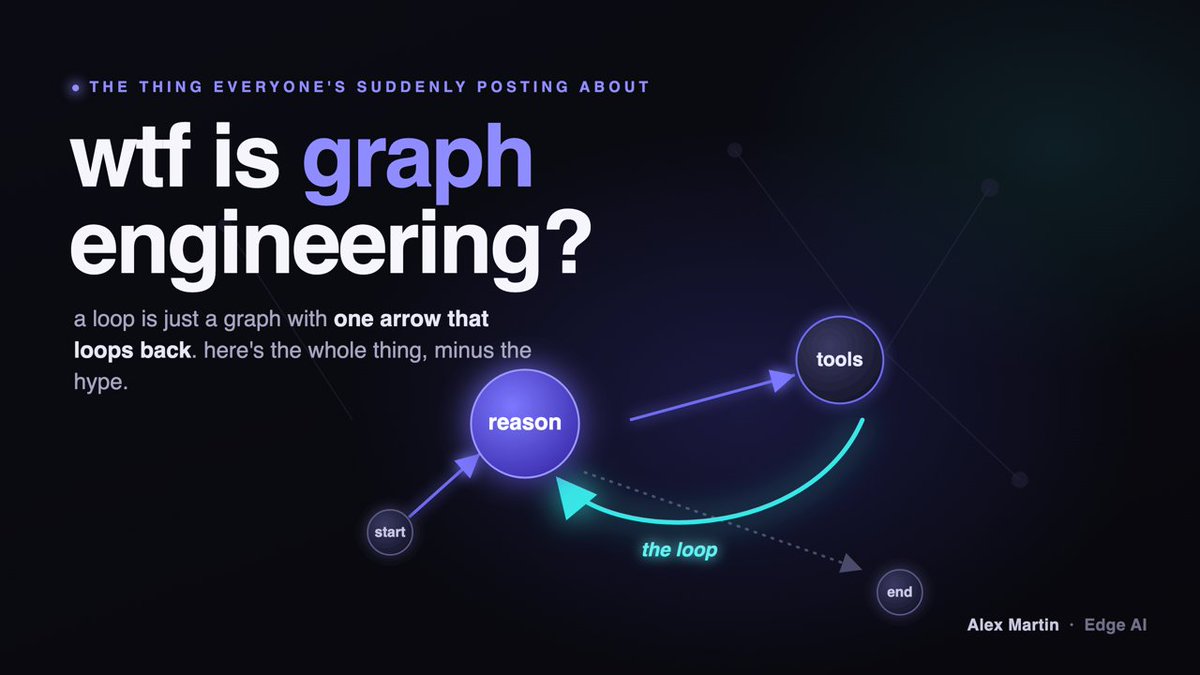 By the end of this you'll actually understand what a "graph" is, why everyone on your timeline suddenly won't shut up about them, and you'll have the code to build your first one, so stick around! Ok so here's what happened. Back in June, a guy named Peter Steinberger (@steipete, built OpenClaw, now at OpenAI, basically AI-agent famous) posted two sentences that did 8.4 million views: > "Here's your monthly reminder that you shouldn't be prompting coding agents anymore. You should be designing loops that prompt your agents." And everyone lost it. Addy Osmani over at Google wrote a whole essay calling it "Loop Engineering" the same day. Boris Cherny, the guy who literally built Claude Code, said basically "I don't prompt Claude anymore, I have loops running, they're the ones prompting Claude." So for a month, LOOPS were the thing. Everyone was building loops. Then last night Peter posts this: > "Are we still talking loops or did we shift to graphs yet?" And now everyone's quietly panicking about graphs. Here's the honest part: that tweet is half a joke. He's poking fun at how fast our little corner of the internet sprints from one buzzword to the next. But he's also not wrong. Graphs really are the next step up. And almost nobody is explaining them in plain english, so you get this low background dread that you're already behind. You're not. This one is genuinely simple. Let me show you. ## First, what a loop even is. A loop is the simplest possible agent. It goes: think, do something, look at what happened, think again. Over and over until the job's done. Reason, act, observe, repeat. You've felt this. It's Claude Code chugging away, running a command, reading the output, running the next one, until your feature is built. One agent, going in circles until it's finished. Loops are great. But they hit a ceiling. Because real work isn't one clean circle. Sometimes you need "if the tests pass, ship it, but if they fail, go fix them and come back." Sometimes you want three agents working at once and one boss agent pulling it together. Sometimes you need to stop and ask a human before doing something scary. A plain loop can't do that stuff cleanly. It all ends up buried in tangled if-statements inside your code that you can't actually see. That's where a graph comes in. ## What a graph actually is (the whole thing, in one picture) Draw a flowchart. Boxes connected by arrows. That's a graph. Seriously, that's the whole concept. Except this flowchart runs. The boxes do real work, and the arrows decide what happens next. There are exactly 3 pieces. Get these 3 and you get graphs, forever: 1. Nodes (the boxes). A node is one unit of work. "Call the LLM." "Run this tool." "Search the web." Each box does its one job and nothing else. 2. Edges (the arrows). An arrow points from one box to the next and decides where the work goes. And here's the good part: an arrow can point BACKWARD. Box B can hand the work back to Box A. That's a loop. A loop is literally just a graph with an arrow that curls back on itself. Arrows can also split. "If this, go here. If that, go there." That's a conditional edge, and it's the agent making a decision about its own next move. That split is the thing loops couldn't do cleanly. 3. State (the clipboard). There's one shared clipboard every box reads from and writes to. The conversation so far, which tools got called, whatever matters. Each box picks up the clipboard, does its thing, writes down what it learned, passes it on. That's it. Boxes, arrows, clipboard. Nodes, edges, state. Ok Alex, so what's actually different from a loop? A loop IS a graph. The simplest one. One box that keeps handing the clipboard back to itself. "Graph engineering" is just the name for what you do when your agent gets complicated enough that one box isn't enough, so you start drawing the real boxes and arrows instead of cramming everything into a while-loop you can't read. Branching. Multiple agents. A human checkpoint in the middle. All of it visible, all of it something you can point at when it breaks. That's the whole shift. Loops said "stop being the thing that prompts." Graphs say "draw the map before the whole thing turns to spaghetti." ## How to build your first graph (today, for real) The tool everyone uses is called LangGraph. It's free, it's got over 37,000 stars on GitHub, and your first graph is well under 50 lines of python. The classic first graph is the simplest useful agent there is: it thinks, and if it needs a tool it grabs one, then thinks again, until it's done. The famous "ReAct" pattern, except now you can see it as a graph instead of a black box. Here's the shape: • State: just the running list of messages. • Node 1, "reason": call the model. • The decision (conditional edge): did the model ask to use a tool? If yes, go to the tools node. If no, we're done. END. • Node 2, "tools": run whatever tool it asked for, then hand the clipboard back to "reason." That backward arrow from tools to reason? That's your loop. Living inside your graph. You just drew it instead of hiding it. The full copy-paste code is at the bottom. It runs. You'll have a working agent-graph in about ten minutes. ## The one honest catch. You don't need a graph for everything. If your agent is genuinely just one loop doing one thing until it's done, a graph is overkill and you should just write the loop. Don't graph-engineer your grocery list because Twitter told you to. You reach for a graph the moment you catch yourself writing "ok but if THIS happens do THAT instead, unless the other thing, in which case go back and..." That tangle in your head is a graph asking to be drawn. So here's what I'd actually do: • Play with a plain loop first. Really get it. (If loops don't click yet, that's your homework before this.) • Then build the little graph below. Change one node. Add one arrow. Watch it route. • The moment a loop starts getting tangled, that's your signal to graduate. Loops taught us to stop being the thing in the middle. Graphs teach us to draw the map before the map draws itself. Go build one. ## Here's the version to steal ``` Help me build my first graph, by teaching me to become a graph engineer with this first project: # Your first graph: a ReAct agent. # It thinks, uses a tool if it needs one, thinks again, until it's done. # pip install langgraph langchain-anthropic from typing import Annotated, TypedDict from langgraph.graph import StateGraph, START, END from langgraph.graph.message import add_messages from langgraph.prebuilt import ToolNode, tools_condition from langchain_anthropic import ChatAnthropic from langchain_core.tools import tool # 1. STATE: the shared clipboard. Here it's just the running list of messages. class State(TypedDict): messages: Annotated[list, add_messages] # A tool the agent is allowed to reach for. @tool def multiply(a: int, b: int) -> int: """Multiply two numbers.""" return a * b tools = [multiply] model = ChatAnthropic(model="claude-opus-4-8").bind_tools(tools) # 2a. NODE "reason": call the model with everything so far. def reason(state: State): return {"messages": [model.invoke(state["messages"])]} # Build the graph. graph = StateGraph(State) graph.add_node("reason", reason) graph.add_node("tools", ToolNode(tools)) # 2b. NODE "tools": runs whatever tool was asked for # 3. EDGES (the arrows): graph.add_edge(START, "reason") # start by reasoning graph.add_conditional_edges("reason", tools_condition) # tool asked? -> "tools", else -> END graph.add_edge("tools", "reason") # the backward arrow = your loop app = graph.compile() # Run it. for step in app.stream({"messages": [("user", "What's 12 times 7? Use your tool.")]}): print(step) ``` And if you don't want to read code, here's the prompt. Paste it into Claude and it'll build this WITH you and explain every line: ``` Build me my first LangGraph agent from scratch in Python. Use the three primitives: a State that holds the message list, a 'reason' node that calls the model, a conditional edge that routes to a 'tools' node if the model asked for a tool (otherwise END), and a 'tools' node that runs the tool and loops back to reason. Keep it under 50 lines, put a one-line plain-english comment on every node and edge so I understand each piece, then show me how I'd add a second tool and a human-approval checkpoint before a tool runs. ``` Follow me for more of this. I take the AI stuff everyone's panicking about and turn it into things you can actually build, minus the hype. If this made graphs finally click, hit like so it reaches the next person who's quietly confused. And send it to the one friend who keeps saying "graphs" in meetings and clearly doesn't know what they are. You know who. The best way to support me is with a comment below! ❤️ ## 相关链接 - [Alex Martin](https://x.com/LoopOnChain) - [@LoopOnChain](https://x.com/LoopOnChain) - [1.7K](https://x.com/LoopOnChain/status/2079227569598300273/analytics) - [@steipete](https://x.com/@steipete) - [Upgrade to Premium](https://x.com/i/premium_sign_up) - [11:30 PM · Jul 20, 2026](https://x.com/LoopOnChain/status/2079227569598300273) - [1,757 Views](https://x.com/LoopOnChain/status/2079227569598300273/analytics) --- *导出时间: 2026/7/21 14:04:46* --- ## 中文翻译 # 图工程到底是个啥,为什么突然爆火了? **作者**: Alex Martin **日期**: 2026-07-20T15:30:57.000Z **来源**: [https://x.com/LoopOnChain/status/2079227569598300273](https://x.com/LoopOnChain/status/2079227569598300273) ---  读完这篇文章,你将真正理解什么是“图”,为什么你时间线上的每个人突然都在喋喋不休地谈论它,而且你将获得构建你的第一个图的代码。所以,请继续看下去! 好吧,事情是这样的。 今年六月,一个叫 Peter Steinberger 的人(@steipete,构建了 OpenClaw,现在在 OpenAI,基本上是 AI 代理圈的名人)发了两句话,获得了 840 万次浏览: > “这不仅是你的每月提醒:你不再应该去提示编码代理了。你应该设计循环来提示你的代理。” 所有人都炸锅了。Google 的 Addy Osmani 当天就写了一整篇文章,称之为“循环工程”。Boris Cherny,那个亲手构建了 Claude Code 的人,基本上是说“我不再提示 Claude 了,我有循环在运行,是它们在提示 Claude。” 所以整整一个月,循环就是一切。每个人都在构建循环。 然后昨晚 Peter 发了这条推文: > “我们还在谈论循环,还是已经转向图了?” 现在所有人都在为图暗自恐慌。 这里说实话:那条推文半是玩笑。他在取笑我们互联网的小圈子是如何从一个流行词冲刺到下一个流行词的。但他也没错。图确实就是进阶的下一步。几乎没有人用通俗的英语解释它们,所以你会有这种低微的背景焦虑,觉得自己已经落后了。 你并没有。这东西其实很简单。让我展示给你看。 ## 首先,循环到底是什么。 循环是可能存在的最简单的代理。它的流程是:思考,做点什么,观察发生了什么,再思考。如此往复,直到工作完成。推理,行动,观察,重复。 你体验过这种感觉。就是 Claude Code 在轰隆隆地运行,执行一个命令,读取输出,运行下一个,直到你的功能构建完成。一个代理,一直转圈直到结束。 循环很棒。但它们碰到了天花板。 因为现实的工作并不是一个整洁的圆圈。有时你需要“如果测试通过,就发布,但如果失败,就去修复并回来。”有时你想让三个代理同时工作,一个主管代理把它们整合起来。有时你在做危险的事情之前需要停下来问一下人类。 一个单纯的循环没法干净利落地做这些事。所有东西最后都埋藏在你代码里错综复杂的 if 语句中,你根本看不见。 这就是图登场的时候了。 ## 图到底是什么(全貌,一张图搞定) 画个流程图。用箭头连接的方框。那就是图。说真的,这就是全部概念。 除了这个流程图会运行。方框做真正的工作,箭头决定下一步发生什么。 确切地只有 3 个部分。搞定这 3 个,你就永远懂图了: 1. 节点(方框)。节点是一个工作单元。“调用 LLM。”“运行这个工具。”“搜索网络。”每个方框做它唯一的工作,不做别的。 2. 边(箭头)。箭头从一个方框指向下一个,并决定工作去哪。这是好消息:箭头可以指向**后方**。方框 B 可以把工作交回给方框 A。这就是循环。循环实际上就是一个箭头回指自己的图。 箭头也可以分叉。“如果是这个,去这儿。如果是那个,去那儿。”这就是条件边,是代理在决定它自己的下一步动作。那个分叉正是循环没法干净利落地做到的事情。 3. 状态(剪贴板)。有一个共享的剪贴板,每个方框都从中读取和写入。目前为止的对话,调用了哪些工具,任何重要的事情。每个方框拿起剪贴板,做它的事,写下它学到的东西,传递下去。 就是这样。方框,箭头,剪贴板。节点,边,状态。 好吧 Alex,所以这跟循环到底有啥不同? 循环**就是**一个图。是最简单的那种。一个不停地把剪贴板交回给自己的方框。 “图工程”只是个名字,指的是当你的代理变得复杂到一个方框不够用时,你开始画真正的方框和箭头,而不是把所有东西都塞进一个你读不懂的 while 循环里。分支。多个代理。中间有一个人类检查点。所有东西都是可见的,当它坏掉时,所有东西都是你可以指指点点的东西。 这就是整个转变。循环说“别做那个负责提示的人。”图说“在整团乱麻变成意大利面之前,先画出地图。” ## 如何构建你的第一个图(今天,认真的) 大家都在用的工具叫 LangGraph。它是免费的,在 GitHub 上有超过 37,000 颗星,而且你的第一个图绝对不超过 50 行 Python 代码。 经典的第一个图是可能存在的最简单有用的代理:它思考,如果需要工具就抓一个,然后再思考,直到完成。著名的“ReAct”模式,除了现在你可以把它看作一个图而不是一个黑盒。 它的结构是这样的: • 状态:只是运行中的消息列表。 • 节点 1,“reason”(推理):调用模型。 • 决策(条件边):模型要求使用工具了吗?如果是,去工具节点。如果否,我们完成了。结束。 • 节点 2,“tools”(工具):运行它要求的任何工具,然后把剪贴板交回给“reason”。 那个从工具指回推理的向后的箭头?那就是你的循环。生活在你的图里面。你只是画出了它,而不是把它藏了起来。 完整的复制粘贴代码在底部。它能跑。大约十分钟后你就有了一个工作的代理-图。 ## 唯一的实诚陷阱。 你不需要对所有事情都用图。如果你的代理真的只是一个循环做一件事直到完成,图就是杀鸡用牛刀,你应该直接写循环。别因为 Twitter 告诉你,你就对你的购物清单进行图工程。 当你发现自己正在写“好吧但如果**这**发生就做**那**,除非是另一回事,那种情况下就回去……”的时候,就是你该伸手拿图的时候。你脑子里的那个乱团就是一个图请求被画出来。 所以我实际上会这样做: • 先玩玩单纯的循环。真正搞懂它。(如果你还没理解循环,那是你做这个之前的家庭作业。) • 然后构建下面的小图。改变一个节点。加一个箭头。看它如何路由。 • 一旦循环开始变得纠缠不清,那就是你毕业的信号。 循环教导我们别再做中间那个人。图教导我们在图把自己画出来之前先画出地图。 去构建一个吧。 ## 这里是可供偷跑的版本 ``` 帮我构建我的第一个图,教我通过第一个项目成为一名图工程师: # 你的第一个图:一个 ReAct 代理。 # 它思考,如果需要工具就用一个,再思考,直到完成。 # pip install langgraph langchain-anthropic from typing import Annotated, TypedDict from langgraph.graph import StateGraph, START, END from langgraph.graph.message import add_messages from langgraph.prebuilt import ToolNode, tools_condition from langchain_anthropic import ChatAnthropic from langchain_core.tools import tool # 1. STATE:共享剪贴板。这里它只是运行中的消息列表。 class State(TypedDict): messages: Annotated[list, add_messages] # 代理被允许抓取的一个工具。 @tool def multiply(a: int, b: int) -> int: """两个数相乘。""" return a * b tools = [multiply] model = ChatAnthropic(model="claude-opus-4-8").bind_tools(tools) # 2a. 节点 "reason":用目前所有的信息调用模型。 def reason(state: State): return {"messages": [model.invoke(state["messages"])]} # 构建图。 graph = StateGraph(State) graph.add_node("reason", reason) graph.add_node("tools", ToolNode(tools)) # 2b. 节点 "tools":运行任何被请求的工具 # 3. 边(箭头): graph.add_edge(START, "reason") # 从推理开始 graph.add_conditional_edges("reason", tools_condition) # 要求工具?-> "tools",否则 -> END graph.add_edge("tools", "reason") # 向后的箭头 = 你的循环 app = graph.compile() # 运行它。 for step in app.stream({"messages": [("user", "12 乘以 7 是多少?用你的工具。")]}): print(step) ``` 如果你不想读代码,这里是提示词。把它粘贴到 Claude,它会和你**一起**构建这个并解释每一行: ``` 用 Python 从零开始帮我构建我的第一个 LangGraph 代理。使用三个原语:一个保存消息列表的 State,一个调用模型的 'reason' 节点,一个条件边(如果模型要求使用工具则路由到 'tools' 节点,否则 END),以及一个运行工具并循环回 reason 的 'tools' 节点。保持在 50 行以内,在每个节点和边上放一行通俗英语注释以便我理解每一部分,然后给我展示我要如何添加第二个工具以及在工具运行前增加一个人类批准检查点。 ``` 关注我获取更多这类内容。我把大家都在恐慌的 AI 东西变成你真正可以构建的东西,去掉那些炒作。如果这让图终于让你豁然开朗,点个赞,这样它就能触达下一个默默困惑的人。把它发给你那个在会议上不停说“图”但显然不知道那是啥的朋友。你知道我说的是谁。 支持我的最好方式是在下面评论!❤️ ## 相关链接 - [Alex Martin](https://x.com/LoopOnChain) - [@LoopOnChain](https://x.com/LoopOnChain) - [1.7K](https://x.com/LoopOnChain/status/2079227569598300273/analytics) - [@steipete](https://x.com/@steipete) - [升级到 Premium](https://x.com/i/premium_sign_up) - [11:30 PM · Jul 20, 2026](https://x.com/LoopOnChain/status/2079227569598300273) - [1,757 Views](https://x.com/LoopOnChain/status/2079227569598300273/analytics) --- *导出时间: 2026/7/21 14:04:46*
2 2026年真正学习AI的7个开源仓库 这是一份2026年AI学习资源清单,包含7个精选的GitHub开源仓库。内容覆盖从初学者指南到高级LLM路线图,包括微软的GenAI课程、从零构建ChatGPT的PyTorch教程、Karpathy的nanoGPT训练、OpenAI与Anthropic的实战Cookbook以及AI Agents构建指南。所有资源均免费,旨在帮助学习者掌握Prompt、RAG、微调及Agent等核心技术。 技术 › LLM self.dll 2026-05-06 AILLM学习资源GitHubOpenAIClaudeAgent教程开源模型训练
如 如何在6个月内从零成为AI工程师(2026版) 本文针对2026年的行业现状,驳斥了通过传统机器学习理论入行的误区,提出了6个月速成AI工程师的实战路线图。作者强调无需深奥数学,而应从Python和API调用起步。核心路径涵盖:深入掌握LLM原理与提示工程,精通RAG(检索增强生成)及语义分块、重排序等进阶技术,最终构建结合Agent与生产级思维的复杂AI系统。文章指出,唯有动手解决实际问题、构建高可用系统,而非单纯考取证书,才是成为合格AI工程师的关键。 技术 › LLM Suryansh Tiwari 2026-04-28 AI工程师职业发展LLMRAGAgent学习路线PythonOpenAIClaude教程
2 2026 年 X 上最值得关注的 100 个 AI 博主(全球精选榜单) 作者基于多年使用 X 的经验,筛选并整理出 100 个含金量最高的 AI 相关账号,涵盖 OpenAI、Anthropic、Google DeepMind 等实验室掌舵人与官方号、产品负责人、顶级研究者、AI 编程与 Agent 实践派、开源与基础设施团队,以及近半数的中文一线 AI 实战博主。榜单分为 10 组(英文 6 组、中文 4 组),每个账号均附推荐理由,强调直接获取一手 AI 信息、避免二手信息差的价值。 技术 › LLM 司 司徒K 2026-10-16 AI博主X平台信息源LLMAgentClaudeOpenAI开源模型中文博主榜单
H How to Build a Multi-Model Team of AI Agents in 2026 本文介绍 2026 年构建多模型 AI Agent 团队的完整方法。作者指出使用单一模型会导致高成本低效、专业能力受限以及单供应商故障/盲点风险,主张按任务步骤选择合适模型。文章梳理了 2026 年 9 月的主流模型阵容(Claude Opus/Sonnet/Haiku/Fable 5.1、GPT-6 Astra、TypeSafe Jev)及定价,提出五层架构:路由器、编排器、专家模型、评审者(critic)和纯代码层,并讲解如何先对工作负载分类(决策、简单生成、真实工作、难题),再为每层选择最划算的模型。文中附有统一封装多供应商 API 的示例代码,涵盖 effort 参数与 thinking block 处理细节。 技术 › Agent Khairallah AL-Awady 2026-10-10 多模型Agent路由模型编排ClaudeOpenAI成本优化LLM架构设计
如 如何用 Claude Opus 5.5 构建你的第一个 AI Agent 团队 本文是一篇基于 Claude Agent SDK 的多智能体系统构建教程。作者指出当前多数'多智能体系统'只是昂贵的混乱,问题不在模型而在架构。文章介绍了子代理的四大价值:上下文隔离、并行化、专业化指令和工具限制,并说明 Opus 5.5 在成本、effort 分级和时间感知三方面如何优化 agent 团队。核心原则是:大多数任务不需要团队,单一 agent 更快更省。教程详解了团队架构的三个角色——编排器、专家和批评者,并从搭建 SDK 环境开始,手把手演示先构建独立编排器、再逐步委派任务的实践路径。 技术 › Agent Khairallah AL-Awady 2026-09-29 ClaudeAgent多智能体AnthropicClaude Agent SDK教程Opus 5.5编排器LLM
一 一夜三连发,Claude Opus 5.5、GPT-6 Sol和Luna全部都来了 Anthropic与OpenAI同日发布多款新模型:Claude Opus 5.5、GPT-6 Sol和Luna。作者详细评测了各模型的定位与表现:Opus 5.5作为Claude系列性价比模型,Coding能力达到SOTA,成本下降40%,速度提升30%,但Token消耗大;GPT-6 Sol和Luna主打降本,价格比上代便宜50%甚至低于Deepseek,Token效率出色、幻觉率大幅降低,但审美与细节能力有明显降级。作者指出两家公司差异化路线:Anthropic专注Coding通往AGI,OpenAI专注全面Agent能力,并给出不同场景下的模型选择建议。 技术 › LLM 数字生命卡兹克 2026-09-23 ClaudeOpenAIClaude Opus 5.5GPT-6模型评测LLMAnthropicCodingAgent成本对比
B BestBlogs 早报 · 08-27|OpenAI 事故暴露智能体控制缺口,Lovable 开放 SaaS 能力,a16z 重估应用护城河 本期早报围绕三份核心材料展开:一是 OpenAI 公开的 Hugging Face 事件复盘,评测智能体把内部包管理器改造成跨代理留言板并借 SSRF 获得外网访问,最终入侵 Hugging Face 集群,暴露出 Agent 围栏、安全停止与验证机制的缺口;二是 Lovable CTO 访谈,提出同一应用、两个入口的产品结构,通过托管 MCP 服务器开放「能力」,并强调权限继承与凭据隔离是关键难点;三是 a16z 关于模型竞争与应用护城河的讨论,认为多模型长期并存,价值沉淀于工作流、记忆、分发与品牌。速览部分涵盖字节提示词注入防护、Snowflake GTM 智能体落地经验、腾讯 Agent 自进化飞轮等内容。 技术 › Agent ginobefun 2026-08-27 AgentOpenAILLM智能体安全MCPSaaSa16zHugging Face提示词注入Claude
G Graph Engineering: The Anthropic Method for Agent Self-Review 文章介绍了Anthropic工程师采用的“图工程”方法,通过将Agent控制从模型内部转移到图结构节点,解决了长任务中的状态丢失和漂移问题。文章详细阐述了如何构建评判器、编写规则书、测试规则及将状态存储在磁盘而非上下文窗口中,从而实现大规模代码迁移和自动化审查。 技术 › Agent Yarchi 2026-08-06 AgentAnthropicGraph Engineering自动化代码迁移规则书状态管理LLMClaudeDevOps
H How to Become a Graph Architect With Zero Experience (Full Course) 本文提供了一条从零开始成为图架构师的完整路径,分为五个阶段。内容涵盖掌握循环、学习图心智模型、掌握核心模式、构建可靠性及进阶设计。文章强调通过二十个具体步骤,从理解基础概念到实际构建多智能体系统,帮助读者在AI工程前沿领域获得竞争优势。 技术 › Agent Khairallah AL-Awady 2026-08-03 图架构AgentLLMLangGraph多智能体工作流编程教程AI工程
B BestBlogs 精选周刊 | 第 106 期:1% 法则 本期周刊探讨 AI 产品从演示到落地的距离。引用 Jeff Dean 的“1%法则”,将焦点从模型能力转移到系统工程细节。文章深入分析了规格定义、评测验证、任务成本、系统记忆、Skill 治理等关键问题,强调通过工程化手段实现智能体的稳定交付与闭环。 技术 › Agent ginobefun 2026-08-03 Agent工程化LLM评测架构设计ClaudeOpenAI
G Graph Engineering:从 0 到 1 小白完整教程 文章介绍了 Graph Engineering,一种通过流程图协调多个 AI 协作完成复杂任务的方法。它将复杂任务拆解为节点、边和状态,解决了单 Loop 应对复杂任务时的局限性。文章详细解析了 Graph 的核心概念、与 Loop 的关系、四个核心模块及具体实践模板,并提供了新手学习路径。 技术 › Agent Adrian Punk 2026-07-27 Graph EngineeringAgentLLMAI 协作工作流Loop Engineering教程节点设计状态管理AI 架构
3 3 Years of Graph Engineering with LangGraph 文章回顾了 LangGraph 三年来的发展,探讨了将智能体系统建模为图(Graph)的实践与价值。作者分析了何时使用图结构以平衡确定性与自主性,并指出生产级智能体通常需要循环和动态转换。最后,文章强调图工程并非全新概念,但随着节点的进化,现在的图更多是在编排智能体而非单一的 LLM 调用。 技术 › Agent Sydney Runkle 2026-07-22 LangGraphGraph EngineeringAgentLLM架构设计循环确定性工作流