# The new rules of context engineering for Claude 5 models
**作者**: Thariq
**日期**: 2026-07-24T17:45:27.000Z
**来源**: [https://x.com/trq212/status/2080710971228918066](https://x.com/trq212/status/2080710971228918066)
---
I’ve written previously about how to best prompt the newest generation of Claude 5 models and work with them iteratively to discover what you want to build.
But when you send a message to Claude, the prompt is only a small part of the context it gets. Much of your context is assembled from your system prompt, Skills, CLAUDE.md files, memory, and other sources. We call this context engineering, and it makes a big impact on the results you generate when using Claude Code or in building your own agents.
Unlike a prompt, context is used generally across many requests, so it cannot be as specific. How do you build these general prompts and guidance for Claude, especially when you don’t know what a user’s prompt might be?
This can be surprisingly difficult as Claude’s own capabilities evolve. Most recently, we noticed a large jump in the way we prompt the newest generation of Claude models. We removed over 80% of Claude Code’s system prompt for models like Claude Opus 5 and Claude Fable 5 with no measurable loss on our coding evaluations.
Here’s what we’ve learned about prompting this new class of models, and how you can utilize it to update your context engineering. We’ve put these best practices in `claude doctor`, use the command /doctor in Claude Code to rightsize your skills, and CLAUDE.md files.
## Unhobbling Claude
Overall, we found that we were over-constraining Claude Code, both through our system prompt and in our CLAUDE.md files and skills.
For example, when we read transcripts of our own internal usage of Claude Code, we see several conflicting messages in a single request like “leave documentation as appropriate,” or “DO NOT add comments” as our system prompt, skills, and user requests clash with each other.
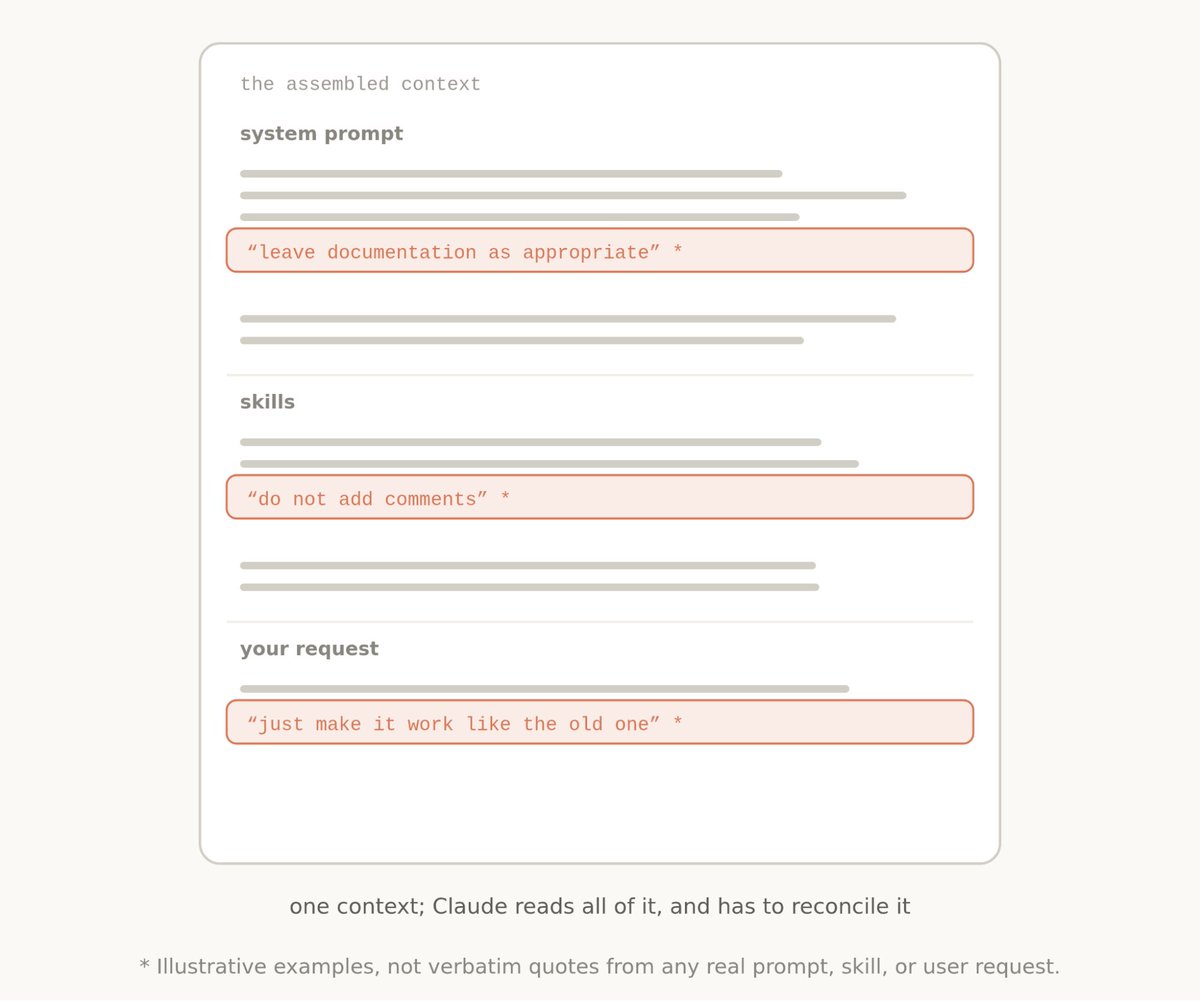
Generally, Claude can interpret the user’s intent to get to the right answer, but Claude must think more carefully about these overlapping and conflicting messages before deciding what to do.
And while these constraints were once needed to avoid worst case scenarios, we have since found we can delete many of them and let the model use surrounding context and judgement instead.
Additionally, Claude Code now has many more tools. Claude used to rely on CLAUDE.md as a source of memory, information, and guidance. Now we have memory, artifacts, and skills, which Claude can use to create new ways of loading and sharing context across sessions.
## Then and now
There were a number of previous context engineering best practices that had become myths. Including:
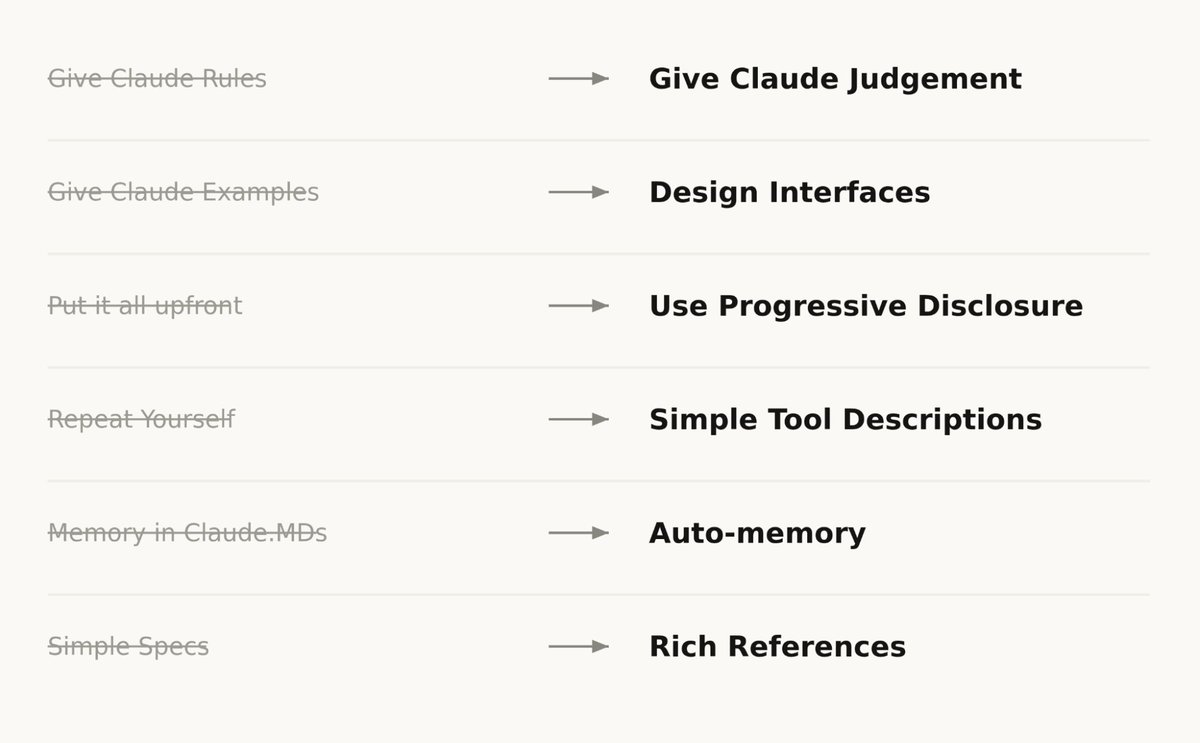
Then: Give Claude rules
Now: Let Claude use judgement
When we first rolled out Claude Code, we needed to be sure that Claude avoided worst case scenarios, such as deleting files. This meant we would give particularly strong guidance that might not always be true, For example, in the system prompt we used to say:
In code: default to writing no comments. Never write multi-paragraph docstrings or multi-line comment blocks — one short line max. Don't create planning, decision, or analysis documents unless the user asks for them — work from conversation context, not intermediate files.
But for a certain subset of prompts, this guidance would be wrong. In the case of documentation, the user may have their own preferences, or specific parts of very complex code might need multi-line comment blocks.
Still, without these guardrails for older models, the comments Claude wrote would be incorrect in many cases and we had to accept this tradeoff. But newer models have better judgement and can handle these decisions well without explicit rules.
In the new system prompt we say: Write code that reads like the surrounding code: match its comment density, naming, and idiom.
Then: Give Claude examples
Now: Design interfaces
The number one rule for tool usage was to give Claude examples on how to use them. With our newest models, we’ve found that giving examples actually constrains them to a certain exploration space.
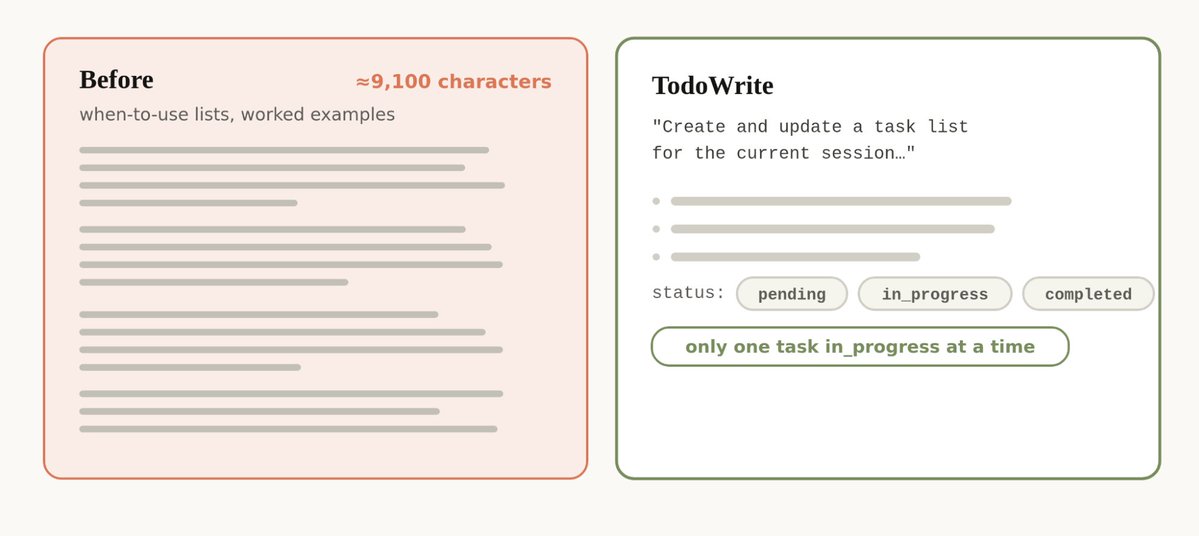
Instead of using examples, think more about the design of your tools, scripts and files- what parameters does Claude have and how can they be more expressive?
For example, in the Todo tool example, just listing status as an enumeration between pending, in_progress, and completed, hints to Claude about how to use it. The instruction on keeping one item in_progress helps define our requested behavior.
Then: Put it all upfront
Now: Use progressive disclosure
Because Claude Code was focused on coding, our system prompt included detailed information on how to do code review and verification. These were not always needed, but when they were, it was crucial information.
Since then, Claude Code has gotten very competent at using progressive disclosure- loading the right context at the right times. For example, we moved verification and code review into their own skills that Claude Code could selectively call.
But progressive disclosure is not just for skills, we also use it for tools. Some of our tools are ‘deferred loading,’ which means the agent must search for their full definitions using ToolSearch before using them. This allows us to have more tools (such as our Task tools) that don’t take up context until they’re needed.
The same can be applied to your own CLAUDE.md and Skill.md files. A common myth is that you want to make these a central repository for every known practice that you might run into, because Claude would not find it otherwise. Instead, consider having a tree of files that can be loaded at the right time.
Then: Repeat yourself
Now: Simple tool descriptions
Earlier Claude models could sometimes need repeated instructions or be more likely to listen to instructions at the end of their context window than at the start. This meant our system prompt would sometimes have references to tools in the main system prompt as well as instructions in the tool description.
We found we could delete these repeat examples and put instructions on how to use tools in the tool descriptions rather than the system prompt.
Then: Memory in CLAUDE.md files
Now: Auto-memory
We used to encourage users to save things to Claude’s memory, by using the # hotkey to write to their CLAUDE.md automatically. Instead, Claude now automatically saves memories that are relevant to the work and to you.
Then: Simple specs
Now: Rich references
In plan mode, Claude Code has heavily relied on markdown files with plans. Storing these files as plans helped Claude refer to them when needed. Another similar best practice was to store specs in the codebase for Claude to refer to while working across longer projects.
But we’ve found that Claude can handle increasingly more complicated references. Instead of simple markdown files, Claude can reference HTML artifacts created by our new artifacts feature.
You may also give Claude references in the form of code. A spec may also be a detailed test suite, or a function in a different codebase that Claude might port.
Rubrics are another form of references. Rubrics allow Claude to try and verify your taste in a particular field (e.g. what does a good API design look like) by using dynamic workflows and spinning up verifier agents with those rubrics.
## Applying this to your context
Pulling this all together, what does this look like when you assemble your context?
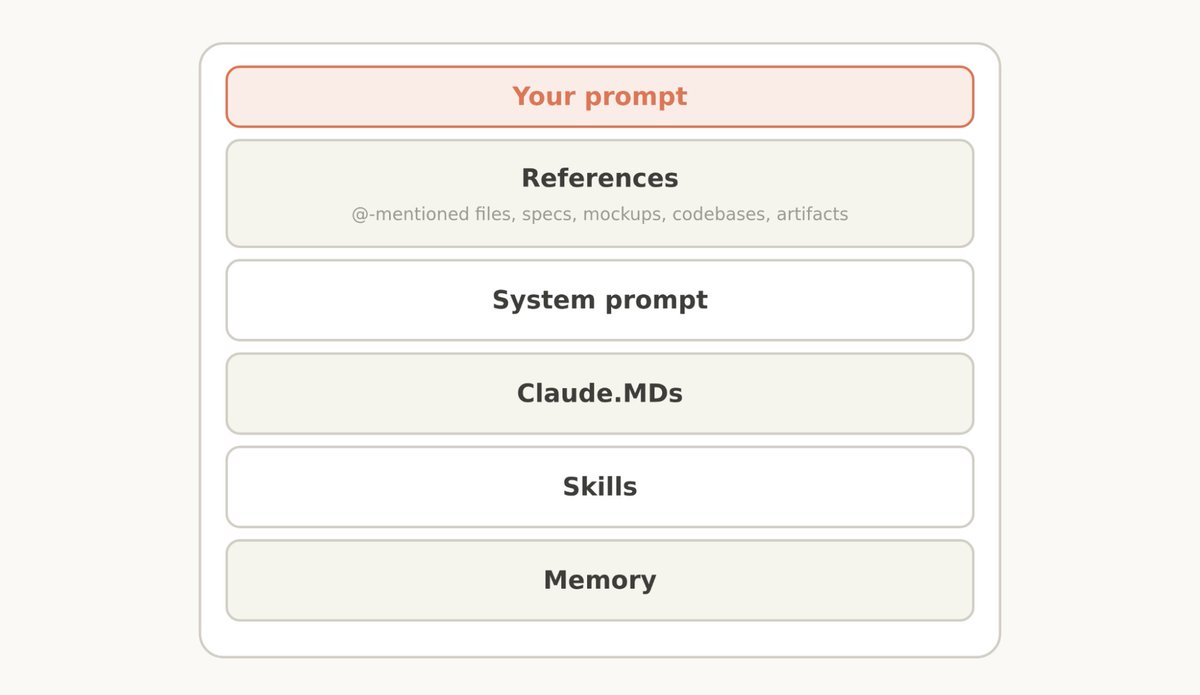
System Prompt
A system prompt is heavily tied to the product context. It tells Claude what product it’s operating in and what it’s doing. For Claude Code, you will likely never modify this, but if you are building your own agent harness, this is where you should spend a lot of time.
CLAUDE.md
Keep your CLAUDE.md lightweight and briefly describe what your repo is for, but spend most of the tokens on gotchas inside of the codebase. For example, you may organize your code to keep types in one monolithic file and nowhere else. Avoid stating ‘the obvious’ things Claude should know by looking at your file system or your repo.
Use progressive disclosure for more details, for example if you have several unique instructions on how to verify your work, create a verification skill and reference it from your CLAUDE.md.
Skills
Think of skills as lightweight guides to let Claude find information when needed. Avoid making them overconstrained, except in highly important areas.
For long skills, try and use progressive disclosure as much as possible- divide it into many files and split them out.
It’s best when skills encode particular opinions, knowledge, or best practices that are particular to you, your team, or product.
References
You can @ mention files to include them as references. References allow Claude to refer to in-depth information about the current plan.
This might be in specs files, mockups, or even entire codebases. Generally you should prefer files that are in code as it provides clear, high-fidelity instructions to Claude in a language it knows very well. For example, a HTML mockup of a design will generally produce better results than a description of the design or a screenshot.
## Try simplifying
Across your system prompt, skills, and CLAUDE.md files, you may need to simplify just like we did. We rolled out a new command called `claude doctor,` which will help you do this automatically as well. For more details on prompting more advanced models specifically, check out our Fable field guide.
## 相关链接
- [Thariq](https://x.com/trq212)
- [@trq212](https://x.com/trq212)
- [1.2M](https://x.com/trq212/status/2080710971228918066/analytics)
- [prompt the newest generation of Claude 5 models](https://x.com/trq212/status/2073100352921215386)
- [context engineering](https://www.anthropic.com/engineering/effective-context-engineering-for-ai-agents)
- [consider having a tree of files that can be loaded at the right time](https://claude.com/blog/a-harness-for-every-task-dynamic-workflows-in-claude-code)
- [CLAUDE.md](http://claude.md/)
- [dynamic workflows](https://claude.com/blog/a-harness-for-every-task-dynamic-workflows-in-claude-code)
- [Fable field guide](https://claude.com/blog/a-field-guide-to-claude-fable-finding-your-unknowns)
- [Upgrade to Premium](https://x.com/i/premium_sign_up)
- [1:45 AM · Jul 25, 2026](https://x.com/trq212/status/2080710971228918066)
- [1.2M Views](https://x.com/trq212/status/2080710971228918066/analytics)
- [View quotes](https://x.com/trq212/status/2080710971228918066/quotes)
---
*导出时间: 2026/7/25 10:42:51*
---
## 中文翻译
# 针对 Claude 5 模型的上下文工程新规则
**作者**: Thariq
**日期**: 2026-07-24T17:45:27.000Z
**来源**: [https://x.com/trq212/status/2080710971228918066](https://x.com/trq212/status/2080710971228918066)
---

我之前写过关于如何最佳地提示最新一代 Claude 5 模型并与它们迭代合作,以发现你想要构建的内容。
但是,当你向 Claude 发送消息时,提示词只是它获得的上下文的一小部分。你的大部分上下文是由系统提示词、技能、CLAUDE.md 文件、记忆和其他来源组装而成的。我们称之为上下文工程,它对你在使用 Claude Code 或构建自己的代理时产生的结果有重大影响。
与提示词不同,上下文通常在许多请求中使用,因此它不能那么具体。你如何为 Claude 构建这些通用的提示词和指导,尤其是在你不知道用户的提示词可能是什么的情况下?
随着 Claude 自身能力的演进,这可能会出乎意料地困难。最近,我们注意到在提示最新一代 Claude 模型的方式上有了巨大的飞跃。对于像 Claude Opus 5 和 Claude Fable 5 这样的模型,我们删除了 Claude Code 系统提示词中超过 80% 的内容,而在我们的编码评估中却没有造成任何可衡量的损失。
以下是我们在提示这一类新模型时学到的经验,以及你可以如何利用它来更新你的上下文工程。我们已将这些最佳实践放入 `claude doctor` 中,在 Claude Code 中使用命令 /doctor 来调整你的技能和 CLAUDE.md 文件的大小。
## 解除 Claude 的束缚
总的来说,我们发现我们过度限制了 Claude Code,无论是通过我们的系统提示词,还是在我们的 CLAUDE.md 文件和技能中。
例如,当我们阅读我们自己内部使用 Claude Code 的记录时,我们会看到在单个请求中有几条相互冲突的信息,例如“适当保留文档”或“不要添加注释”,因为我们的系统提示词、技能和用户请求相互冲突。

通常情况下,Claude 可以通过解读用户的意图来找到正确的答案,但在决定做什么之前,Claude 必须更仔细地思考这些重叠且相互冲突的信息。
虽然这些约束曾经是避免最坏情况所必需的,但我们后来发现,我们可以删除其中的许多内容,让模型利用周围的上下文和判断力来代替。
此外,Claude Code 现在拥有更多的工具。Claude 以前依赖 CLAUDE.md 作为记忆、信息和指导的来源。现在我们有了记忆、工件和技能,Claude 可以利用它们来创建跨会话加载和共享上下文的新方式。
## 过去与现在
有许多以前的上下文工程最佳实践已经变成了神话。包括:

过去:给 Claude 制定规则
现在:让 Claude 运用判断力
当我们首次推出 Claude Code 时,我们需要确保 Claude 避免最坏的情况,例如删除文件。这意味着我们会给出可能并不总是正确的特别强烈的指导。例如,在系统提示词中,我们以前常说:
在代码中:默认不写注释。永远不要写多段式文档字符串或多行注释块——最多一行短句。除非用户要求,否则不要创建规划、决策或分析文档——从对话上下文工作,而不是从中间文件。
但对于某些提示词子集,这种指导是错误的。就文档而言,用户可能有他们自己的偏好,或者非常复杂的代码的特定部分可能需要多行注释块。
尽管如此,如果没有这些针对旧模型的防护栏,Claude 编写的注释在许多情况下会是不正确的,我们不得不接受这种权衡。但较新的模型具有更好的判断力,可以在没有明确规则的情况下很好地处理这些决策。
在新的系统提示词中,我们说:编写读起来像周围代码的代码:匹配其注释密度、命名和习惯用法。
过去:给 Claude 例子
现在:设计接口
工具使用的第一条规则是给 Claude 关于如何使用它们的例子。对于我们最新的模型,我们发现提供例子实际上会将它们限制在特定的探索空间内。

与其使用例子,不如更多地考虑你的工具、脚本和文件的设计——Claude 拥有哪些参数,以及它们如何更具表现力?
例如,在 Todo 工具示例中,仅将 status 列为 pending、in_progress 和 completed 之间的枚举,就会向 Claude 暗示如何使用它。关于保持一个项目处于 in_progress 状态的指令有助于定义我们请求的行为。
过去:一次性展示所有内容
现在:使用渐进式披露
因为 Claude Code 专注于编码,我们的系统提示词包含有关如何进行代码审查和验证的详细信息。这些并不总是需要的,但当需要时,它们是至关重要的信息。
从那时起,Claude Code 在使用渐进式披露方面变得非常熟练——在正确的时间加载正确的上下文。例如,我们将验证和代码审查移到了 Claude Code 可以选择性调用的各自的技能中。
但渐进式披露不仅适用于技能,我们也将其用于工具。我们的一些工具是“延迟加载”的,这意味着代理必须在使用前使用 ToolSearch 搜索它们的完整定义。这允许我们拥有更多的工具(例如我们的任务工具),它们在被需要之前不会占用上下文。
同样的原则也可以应用于你自己的 CLAUDE.md 和 Skill.md 文件。一个常见的误区是你想让这些成为你可能遇到的每一个已知实践的中央存储库,因为否则 Claude 找不到它。相反,考虑拥有一组可以在正确时间加载的文件树。
过去:重复你自己
现在:简单的工具描述
早期的 Claude 模型有时可能需要重复的指令,或者比上下文窗口开头的指令更有可能听从上下文窗口末尾的指令。这意味着我们的系统提示词有时会在主系统提示词中引用工具,并在工具描述中包含指令。
我们发现我们可以删除这些重复的例子,并将关于如何使用工具的指令放在工具描述中,而不是系统提示词中。
过去:记忆在 CLAUDE.md 文件中
现在:自动记忆
我们以前鼓励用户通过使用 # 热键自动写入他们的 CLAUDE.md 来将内容保存到 Claude 的记忆中。相反,Claude 现在会自动保存与工作和你相关的记忆。
过去:简单的规范
现在:丰富的引用
在计划模式下,Claude Code 严重依赖包含计划的 markdown 文件。将这些文件存储为计划有助于 Claude 在需要时参考它们。另一个类似的最佳实践是在代码库中存储规范,以便 Claude 在跨越较长的项目工作时参考。
但我们发现,Claude 可以处理越来越复杂的引用。除了简单的 markdown 文件,Claude 还可以引用由我们新的工件功能创建的 HTML 工件。
你也可以以代码的形式向 Claude 提供引用。规范也可以是详细的测试套件,或者是 Claude 可能移植的不同代码库中的函数。
评分标准是另一种形式的引用。评分标准允许 Claude 尝试通过使用动态工作流并启动具有这些评分标准的验证代理,来验证你在特定领域的品味(例如,一个好的 API 设计是什么样的)。
## 将其应用到你的上下文中
综上所述,当你组装你的上下文时,这看起来是什么样的?

系统提示词
系统提示词与产品上下文紧密相关。它告诉 Claude 它在什么产品中运行以及它在做什么。对于 Claude Code,你可能永远不需要修改它,但如果你正在构建自己的代理系统,这是你应该花费大量时间的地方。
CLAUDE.md
保持你的 CLAUDE.md 轻量级,简要描述你的仓库是用于什么的,但将大部分标记(token)花在代码库中的注意事项上。例如,你可能会组织代码,将类型保存在一个单体文件中,而放在其他任何地方。避免陈述 Claude 通过查看文件系统或仓库应该知道的“显而易见”的事情。
对于更多细节使用渐进式披露,例如,如果你有几条关于如何验证工作的独特指令,请创建一个验证技能并从你的 CLAUDE.md 中引用它。
技能
将技能视为轻量级指南,让 Claude 在需要时找到信息。避免让它们过度受限,除非在非常重要的领域。
对于较长的技能,请尽可能使用渐进式披露——将其分为许多文件并将它们拆分出来。
当技能编码了特定的观点、知识或对你、你的团队或产品特有的最佳实践时,效果最好。
引用
你可以 @ 提及文件以将它们作为引用包含在内。引用允许 Claude 参考有关当前计划的深入信息。
这可能在规范文件、模型,甚至是整个代码库中。通常你应该更喜欢代码中的文件,因为它以 Claude 非常熟悉的语言向 Claude 提供清晰、高保真的指令。例如,设计的 HTML 模型通常会产生比设计的描述或截图更好的结果。
## 尝试简化
在你的系统提示词、技能和 CLAUDE.md 文件中,你可能需要像我们一样进行简化。我们推出了一个名为 `claude doctor,` 的新命令,它也将帮助你自动完成此操作。有关专门提示更高级模型的更多详细信息,请查看我们的 Fable 现场指南。
## 相关链接
- [Thariq](https://x.com/trq212)
- [@trq212](https://x.com/trq212)
- [1.2M](https://x.com/trq212/status/2080710971228918066/analytics)
- [prompt the newest generation of Claude 5 models](https://x.com/trq212/status/2073100352921215386)
- [context engineering](https://www.anthropic.com/engineering/effective-context-engineering-for-ai-agents)
- [consider having a tree of files that can be loaded at the right time](https://claude.com/blog/a-harness-for-every-task-dynamic-workflows-in-claude-code)
- [CLAUDE.md](http://claude.md/)
- [dynamic workflows](https://claude.com/blog/a-harness-for-every-task-dynamic-workflows-in-claude-code)
- [Fable field guide](https://claude.com/blog/a-field-guide-to-claude-fable-finding-your-unknowns)
- [Upgrade to Premium](https://x.com/i/premium_sign_up)
- [1:45 AM · Jul 25, 2026](https://x.com/trq212/status/2080710971228918066)
- [1.2M Views](https://x.com/trq212/status/2080710971228918066/analytics)
- [View quotes](https://x.com/trq212/status/2080710971228918066/quotes)
---
*导出时间: 2026/7/25 10:42:51*