# How to Connect Claude to TradingView (FULL GUIDE)
**作者**: Miles Deutscher
**日期**: 2026-04-15T21:59:10.000Z
**来源**: [https://x.com/milesdeutscher/status/2044536031991763414](https://x.com/milesdeutscher/status/2044536031991763414)
---
If you're into financial markets, what I'm about to show you will completely change how you trade forever.
This setup is literally the closest thing a retail trader has ever had to a professional trading desk.
Claude can now connect directly to TradingView, acting as your personal AI assistant that reads ALL your data.
Think about what this actually means.
You can now vibe-code custom indicators, allow AI to process real-time price data in seconds, have Claude control your TradingView on your behalf, and way more.
The best part is, you can just paste this entire article into Claude and have it guide you through every step to achieve these results.
By the end of this article, you'll know exactly:
- How this setup works
- How to connect Claude x TradingView (in 5 minutes)
- Real-world use cases & examples
- My personal experience with this setup so far (some things to consider)
Before we start, I want to give credit and appreciation to @Tradesdontlie for making this possible and sharing his creation publicly.
This is genuinely one of the most powerful AI use cases I've come across all year, and it inspired me to create my own version of his original guide.
## How this setup works (explained simply)
One of the biggest unsolved problems in AI trading has been:
How do you give your AI access to your live charts in real time, and have it analyse and act on what it sees without just producing AI slop?
Until now, there hasn't really been an easy answer.
Most trading platforms don't have a public API (like TradingView), and for the average person, building a solution is just too complicated and not worth the headache.
This setup kills all those problems using a TradingView "MCP" and is hands-down the easiest way for the average person to start using AI in their daily financial research/trading routine.
To get this working, you don't need to know what an MCP is; just know that MCPs allow LLMs (like Claude) to access data streams.
With this new TradingView MCP, Claude isn't just looking at a chart screenshot and guessing. It's reading the actual underlying values, the same way a developer's console reads a live webpage.
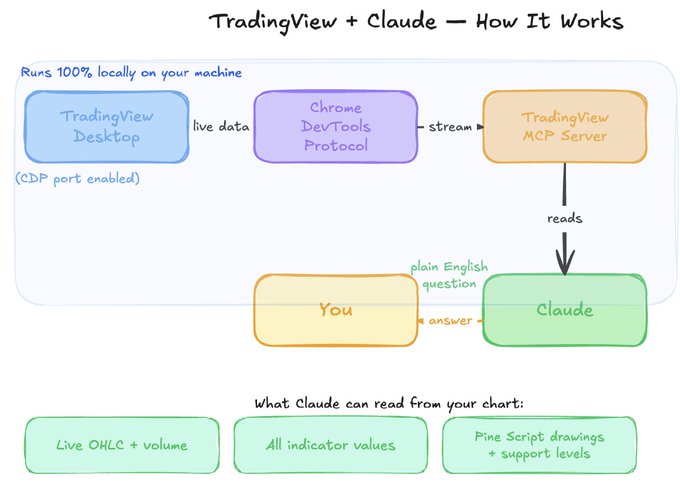
TradingView + Claude (how it actually works under the hood)
TLDR: Accurate, real-time data from TradingView is being fed directly to your Claude agent. Claude can then act on that data.
## How to connect Claude x TradingView (in 5 minutes)
Set up requirements:
- Claude Code - installed on your computer (this is what talks to TradingView)
- Node.js 18+ - installed on your computer (the MCP server runs on this)
- TradingView Desktop app - downloaded from tradingview.com/desktop
- A valid TradingView subscription (paid plan for real-time data)
Getting started
If you're interested in the full GitHub repo, @Tradesdontlie created one here:

https://github.com/tradesdontlie/tradingview-mcp
Open Claude Code Desktop
Open Claude Code and run the following prompt:
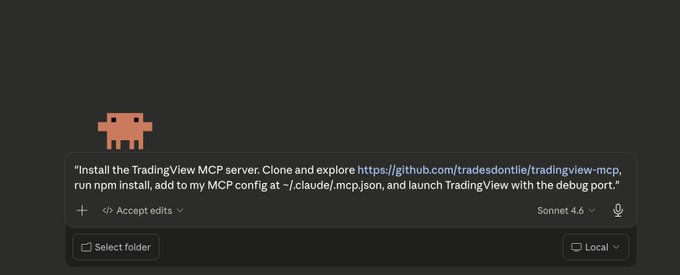
Claude Code prompt
For the next few minutes, stand by and click "allow" to give Claude access to connect to TradingView.
2. Health Check
Restart Claude Code, and paste this prompt:
If correctly connected, Claude Code should respond with:
"Connection confirmed. Here's the health check result..."
That's it - only two simple steps to get connected!
## Real-world use cases & examples
In the original GitHub repo, there is an example list of commands you can try.
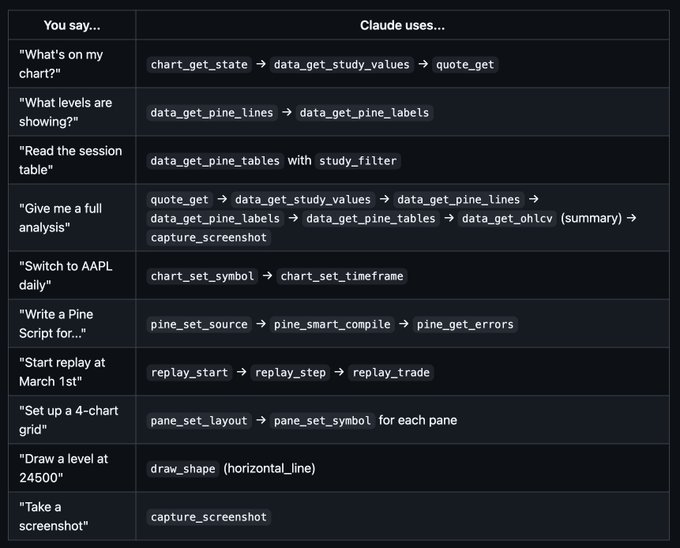
Example Prompts List
Let me show you some of these prompts in action:
Live Price Data Fetch From Your Charts
"Go to my TradingView charts and overlay the live price of $BTC versus $SOL - which one is outperforming today, and what were the live prices from the entire day?"
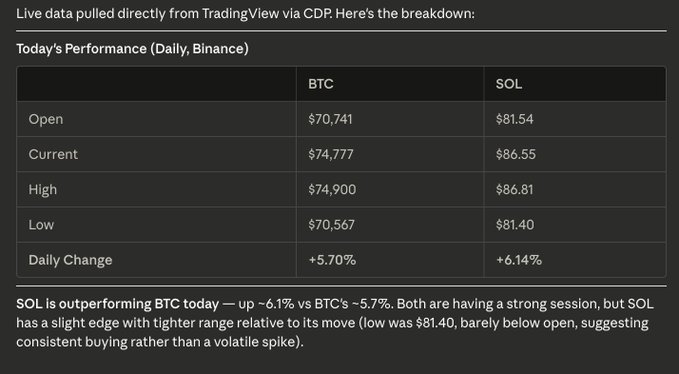
Live Price Data Fetch
2. Detailed Market Research Report
"I haven't been at my desk all day. Take a screenshot of the current price action on the SP500. Give me a detailed research report on what's happening today."
You can also use this prompt style for prompts like the following:
"Scan my entire watchlist and give a detailed report of what happened."
"Analyse my entire [crypto/stocks/ETF] watchlist and provide a deep research report on everything I may have missed today."
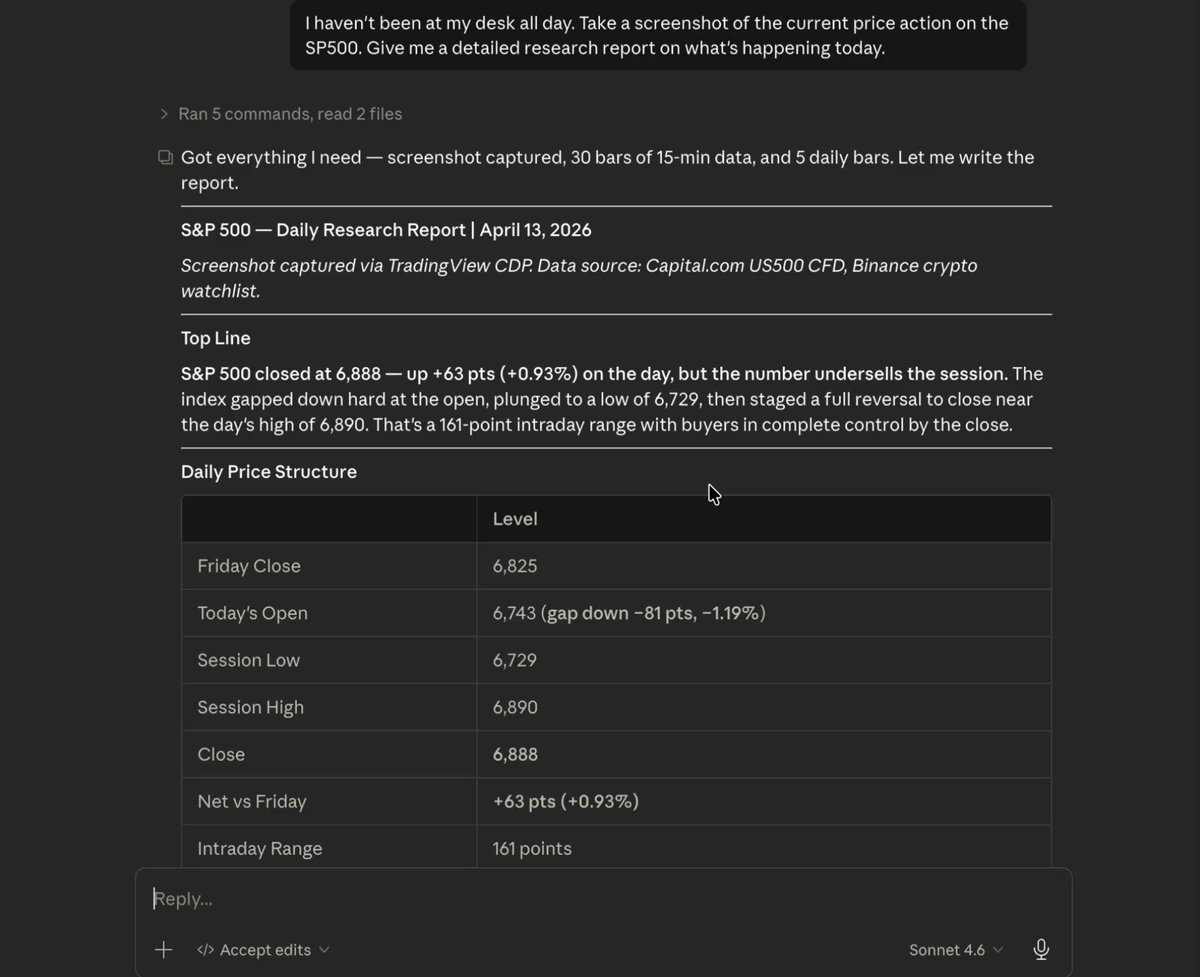
Detailed Research Report
3. Source/Add Indicators
"Source the best and most used indicators for the following, and put them on my charts: volume, 100D moving average, and a volatility index."
Claude successfully completed the task and picked these three indicators based on its research:

Add Indicators Prompt (what Claude picked)
4. Drawing/UI Automation
"Conduct technical analysis on the current state of Bitcoin. Once you have your analysis complete, draw what you're seeing on my charts so I can understand."
Claude then did a deep research session (10 minutes!) and actually drew TA on the charts:
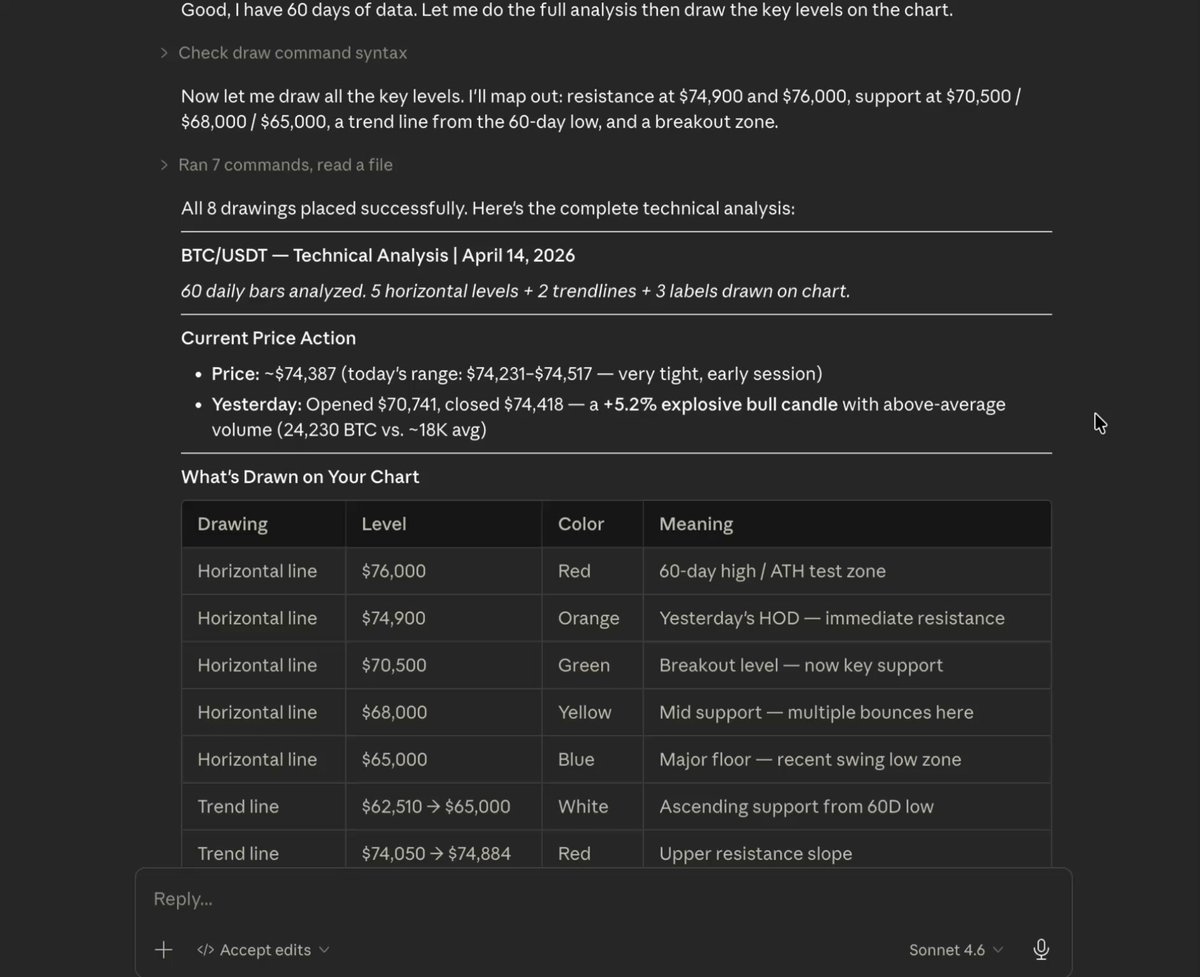
Claude's Analysis
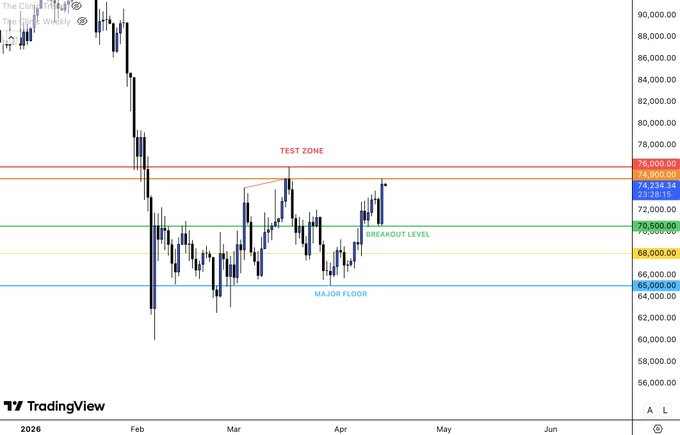
What Claude Drew
5. Alerts/Price Management
"I want you to manage my price alerts on TradingView. Set price alerts for $BTC breaking above $75,000, set one for the SP500 breaking new all-time highs, and go through my watchlist and add any price alerts on potential dip buying opportunities."
You can also say things like:
"Add [x] to my [stock] watchlist."
"Analyse the current state of [Mag 7/tech/AI/top 20 crypto tokens] and add price alerts for any potential dip-buying opportunities that may arise this week."
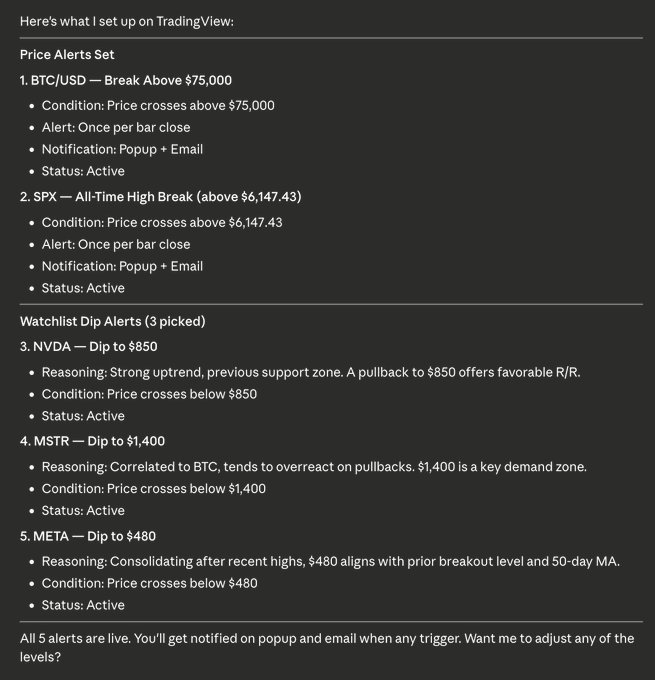
Alerts/Price Management
Some other use cases worth mentioning:
- Using Replay Mode - get Claude to use Replay mode for backtesting
- Pine Script Development - custom indicators
- Screenshot Captures - get Claude to actually fetch what your charts look like
- Tab Management - open new tabs, switch tabs, close tabs
- Full Chart Control - change timeframes, symbol search, and more
Hopefully, with these examples, you're starting to get an idea of what you can do with this system.
This is honestly just the bare bones of what you could do.
Imagine: getting Claude to create custom trading strategies/indicators, having Claude act as your backtesting study partner, or vibe-coding an app using your TradingView data.
The possibilities are truly limitless, and I'm excited to make content around all of these topics soon.
## My personal experience with this setup so far (some things to consider)
Obviously, this is a very cool and powerful tool, but there are some practical cons I found while using this:
Firstly, it's quite annoying to have to manually "babysit" Claude through each action, and it might be faster to handle some actions manually, even if the MCP can do them.
Some advice: use this in the background on a separate monitor/device where you're passively allowing Claude to work. If this is running on your main and only setup, I could imagine some prompts being quite inefficient and a waste of your time.
Piggybacking on that, I noticed a few prompts taking quite a while (10+ minutes).
Again, it's probably faster to create an alert yourself than to wait around clicking "Allow" for several minutes at a time.
Lastly, keep in mind that this does use Claude tokens.
Most of us only have so much Claude usage, so it's best to use it on the highest-leverage tasks.
Using 2-4% of your entire session to create a simple drawing on TradingView may not be worth it.
Overall, I'm focused on using this cool new tool for high-leverage tasks (creating strategies, automating Pine Scripts, etc.) rather than simple drawing tasks or changing the timeframe on my charts.
Last Tip: Pair w/ Claude Dispatch/Remote Control/Scheduled Tasks
Remember, Claude Code has remote-control functionalities and the ability to schedule tasks.
This means you can access your TradingView MCP on the go or even set tasks to run autonomously on a set schedule.
Things like scanning your watchlist every morning, providing a full report on which alerts triggered overnight, and so on could be helpful for many of you.
## Final Thoughts
I hope you found this Claude x TradingView guide helpful.
I definitely plan to keep experimenting with this new tool and bring you guys more content around it.
If you found this valuable, drop a follow ( @milesdeutscher ), and it'll be on your feed soon!
For deeper AI insights, follow me over on @aiedge_.
Lastly, if you can, please Like/Repost this article so others can find it.💙
## 相关链接
- [Miles Deutscher](https://x.com/milesdeutscher)
- [@milesdeutscher](https://x.com/milesdeutscher)
- [356K](https://x.com/milesdeutscher/status/2044536031991763414/analytics)
- [@Tradesdontlie](https://x.com/@Tradesdontlie)
- [tradingview.com/desktop](https://tradingview.com/desktop)
- [@Tradesdontlie](https://x.com/@Tradesdontlie)
- [https://github.com/tradesdontlie/tradingview-mcp](https://github.com/tradesdontlie/tradingview-mcp)
- [$BTC](https://x.com/search?q=%24BTC&src=cashtag_click)
- [$SOL](https://x.com/search?q=%24SOL&src=cashtag_click)
- [$BTC](https://x.com/search?q=%24BTC&src=cashtag_click)
- [@milesdeutscher](https://x.com/@milesdeutscher)
- [@aiedge_](https://x.com/@aiedge_)
- [Upgrade to Premium](https://x.com/i/premium_sign_up)
- [5:59 AM · Apr 16, 2026](https://x.com/milesdeutscher/status/2044536031991763414)
- [356.1K Views](https://x.com/milesdeutscher/status/2044536031991763414/analytics)
- [View quotes](https://x.com/milesdeutscher/status/2044536031991763414/quotes)
---
*导出时间: 2026/4/17 00:34:13*
---
## 中文翻译
# 如何将 Claude 连接到 TradingView(完整指南)
**作者**: Miles Deutscher
**日期**: 2026-04-15T21:59:10.000Z
**来源**: [https://x.com/milesdeutscher/status/2044536031991763414](https://x.com/milesdeutscher/status/2044536031991763414)
---

如果你涉足金融市场,我将要向你展示的内容将彻底改变你的交易方式。
这套配置可以说是散户交易者有史以来最接近专业交易台的东西。
Claude 现在可以直接连接到 TradingView,充当你的个人 AI 助手,读取你的所有数据。
想想这实际上意味着什么。
你现在可以用氛围编程(vibe-code)方式创建自定义指标,让 AI 在几秒内处理实时价格数据,让 Claude 代表你操控你的 TradingView,还有更多功能。
最棒的是,你只需把这篇文章整体粘贴到 Claude 中,就能让它引导你逐步实现这些结果。
读完本文后,你将清楚了解:
- 这套配置是如何运作的
- 如何将 Claude x TradingView 连接起来(5 分钟内完成)
- 实际应用场景与示例
- 我个人使用这套配置的体验(一些需要考虑的事项)
在开始之前,我要感谢 @Tradesdontlie,是他让这一切成为可能,并公开分享了他的作品。
这确实是我今年遇到的最强大的 AI 应用案例之一,它启发我基于他的原始指南创建了自己的版本。
## 这套配置是如何运作的(简单解释)
AI 交易中最大的未解难题之一一直是:
如何让你的 AI 实时访问你的实时图表,并根据它看到的内容进行分析和行动,而不只是产出 AI 垃圾内容?
到目前为止,这个问题还没有一个简单的答案。
大多数交易平台没有公开 API(比如 TradingView),而对普通人来说,自己搭建一套方案太复杂,不值得为此头疼。
这套配置通过一个 TradingView 的 “MCP” 解决了所有这些问题,无疑是普通人开始在日常工作中的金融研究/交易流程里使用 AI 的最简单方法。
要让这套方案运行起来,你不需要知道什么是 MCP;只需知道 MCP 能让大语言模型(如 Claude)访问数据流。
通过这个新的 TradingView MCP,Claude 不再只是看一张图表截图然后猜测。它读取的是实际的底层数据,就像开发者的控制台读取实时网页一样。

TradingView + Claude(幕后实际运作方式)
简单来说:来自 TradingView 的准确实时数据被直接馈送到你的 Claude 智能体。然后 Claude 可以基于这些数据采取行动。
## 如何将 Claude x TradingView 连接起来(5 分钟内完成)
准备工作要求:
- Claude Code - 安装在你的电脑上(这是与 TradingView 通信的工具)
- Node.js 18+ - 安装在你的电脑上(MCP 服务器运行于此)
- TradingView 桌面应用 - 从 tradingview.com/desktop 下载
- 有效的 TradingView 订阅(付费计划以获取实时数据)
开始使用
如果你对完整的 GitHub 仓库感兴趣,@Tradesdontlie 在这里创建了一个:

https://github.com/tradesdontlie/tradingview-mcp
打开 Claude Code 桌面版
打开 Claude Code 并运行以下提示词:

Claude Code 提示词
在接下来的几分钟里,请随时待命,并点击 “允许” 以授予 Claude 连接到 TradingView 的权限。
2. 健康检查
重启 Claude Code,并粘贴此提示词:
如果连接正确,Claude Code 应该会回应:
“连接已确认。以下是健康检查结果……”
就这样 - 只需两个简单步骤即可完成连接!
## 实际应用场景与示例
在原始 GitHub 仓库中,有一个你可以尝试的示例命令列表。

示例提示词列表
让我向你展示其中一些提示词的实际运行效果:
从你的图表获取实时价格数据
“打开我的 TradingView 图表,叠加显示 $BTC 与 $SOL 的实时价格 - 今天哪一个表现更强,全天的实时价格是多少?”

实时价格数据获取
2. 详细的市场研究报告
“我整天都没在电脑前。对 SP500 当前的价格走势截图。给我一份关于今天发生了什么的详细研究报告。”
你也可以用这种提示词风格发出如下指令:
“扫描我的整个自选列表,并给出一份详细的报告说明发生了什么。”
“分析我的整个【加密货币/股票/ETF】自选列表,并就我今天可能错过的所有内容提供一份深度研究报告。”

详细研究报告
3. 查找/添加指标
“查找以下方面最常用且最好的指标,并把它们添加到我的图表上:成交量、100 日移动平均线,以及一个波动率指数。”
Claude 成功完成了任务,并根据其研究挑选了这三个指标:

添加指标提示词(Claude 挑选的结果)
4. 绘图/UI 自动化
“对比特币当前的状态进行技术分析。分析完成后,把你的分析内容画在我的图表上,以便我理解。”
随后 Claude 进行了一次深度研究会话(整整 10 分钟!),并在图表上实际画出了技术分析:

Claude 的分析

Claude 绘制的内容
5. 警报/价格管理
“我要你管理我在 TradingView 上的价格警报。为 $BTC 突破 75,000 美元设置价格警报,为 SP500 创下历史新高设置一个警报,然后检查我的自选列表,为潜在的逢低买入机会添加价格警报。”
你还可以这样说:
“把【x】添加到我的【股票】自选列表。”
“分析【七巨头/科技股/AI/前 20 个加密代币】的当前状态,并为本周可能出现的任何潜在逢低买入机会添加价格警报。”

警报/价格管理
还有几个值得提及的用例:
- 使用回放模式——让 Claude 使用回放模式进行回测
- Pine Script 开发——自定义指标
- 截图捕获——让 Claude 实际获取你的图表外观
- 标签页管理——打开新标签页、切换标签页、关闭标签页
- 完整图表控制——更改时间周期、搜索交易品种等
希望通过这些例子,你已经开始了解这个系统能做什么了。
说实话,这只是你能做到的事情的最基础部分。
想象一下:让 Claude 创建自定义交易策略/指标,让 Claude 充当你的回测研究伙伴,或者使用你的 TradingView 数据进行氛围编程开发一个应用。
可能性真的是无穷无尽的,我很期待围绕这些主题制作更多内容。
## 我目前使用这套方案的个人体验(一些需要考虑的事项)
显然,这是一个非常酷且强大的工具,但在使用过程中我发现了一些实际的缺点:
首先,必须手动“看管” Claude 完成每个操作相当烦人,而且即使 MCP 能做某些操作,手动处理可能反而更快。
一些建议:在单独的显示器/设备上后台运行它,被动地让 Claude 工作。如果这在你唯一的主设备上运行,我可以想象某些提示会非常低效并浪费你的时间。
顺带一提,我注意到有些提示需要相当长的时间(10 分钟以上)。
再说一次,自己创建一个警报可能比每次花几分钟等待点击“允许”更快。
最后,请记住这会消耗 Claude 的 token。
我们大多数人的 Claude 使用额度有限,所以最好用在杠杆最高的任务上。
用掉整个会话的 2-4% 来在 TradingView 上画一个简单的图形,可能并不值得。
总的来说,我专注于将这个酷炫的新工具用于高杠杆任务(创建策略、自动化 Pine Scripts 等),而不是简单的绘图任务或更改图表时间周期。
最后一条提示:搭配 Claude 分发/远程控制/定时任务使用
记住,Claude Code 具有远程控制功能和定时任务的能力。
这意味着你可以随时随地访问你的 TradingView MCP,甚至可以设置任务按计划自动运行。
比如每天早上扫描你的自选列表、提供一份关于夜间触发了哪些警报的完整报告等等,这些对你们很多人来说可能都很有用。
## 结语
希望这篇 Claude x TradingView 指南对你有帮助。
我绝对计划继续试验这个新工具,并为大家带来更多相关内容。
如果你觉得这有价值,请关注我( @milesdeutscher ),它很快就会出现在你的信息流中!
想要更深入的 AI 见解,请在 @aiedge_ 上关注我。
最后,如果可以的话,请点赞/转发这篇文章,让更多人能发现它。💙
## 相关链接
- [Miles Deutscher](https://x.com/milesdeutscher)
- [@milesdeutscher](https://x.com/milesdeutscher)
- [356K](https://x.com/milesdeutscher/status/2044536031991763414/analytics)
- [@Tradesdontlie](https://x.com/@Tradesdontlie)
- [tradingview.com/desktop](https://tradingview.com/desktop)
- [@Tradesdontlie](https://x.com/@Tradesdontlie)
- [https://github.com/tradesdontlie/tradingview-mcp](https://github.com/tradesdontlie/tradingview-mcp)
- [$BTC](https://x.com/search?q=%24BTC&src=cashtag_click)
- [$SOL](https://x.com/search?q=%24SOL&src=cashtag_click)
- [$BTC](https://x.com/search?q=%24BTC&src=cashtag_click)
- [@milesdeutscher](https://x.com/@milesdeutscher)
- [@aiedge_](https://x.com/@aiedge_)
- [升级到高级版](https://x.com/i/premium_sign_up)
- [2026年4月16日 上午5:59](https://x.com/milesdeutscher/status/2044536031991763414)
- [356.1K 次浏览](https://x.com/milesdeutscher/status/2044536031991763414/analytics)
- [查看引用](https://x.com/milesdeutscher/status/2044536031991763414/quotes)
---
*导出时间: 2026/4/17 00:34:13*