# How To Master Fable (Fundamentals Guide)
**作者**: Miles Deutscher
**日期**: 2026-07-01T18:13:20.000Z
**来源**: [https://x.com/milesdeutscher/status/2072383064031023497](https://x.com/milesdeutscher/status/2072383064031023497)
---
TL;DR: Everything you need to do to get maximum value from Fable.
I guarantee that after you're done reading, you'll have all the necessary tools to quite literally 10x your AI productivity with Claude Fable.
These are the exact principles that Anthropic is telling you to use - sourced straight from the Claude Docs themselves.
Table of Contents
Differences with Fable 5
Loop Engineering 101
Fable 5 + Skills
Vision Capabilities
Building A Context System w/ Fable (memory)
Let's get right into things:
## Differences with Fable 5 (based on what we know)
I want to preface by saying I'm writing this before the official Fable 5 re-release, and this is only the best information I have available - things may be subject to change.
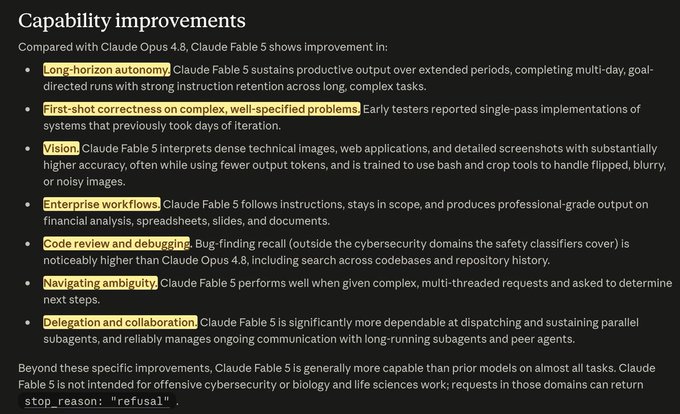
Based on the official Anthropic docs, there are 6 core differences between Fable and all other Claude models:
1. Run Time
Every Claude model before Fable 5 worked in relatively short bursts.
Claude Fable 5 is meant to sustain output over extended periods to complete multi-day, goal-directed tasks.
This is one of the biggest shifts. Fable 5 is meant for fully autonomous work (paired with /goal or /loop).
2. It Gets Things Right First Time
One of the most reported early observations from people using Fable 5 is how rarely they need to iterate. Early testers reported single-pass implementations of systems that previously took days of iteration.
3. Clarifying Questions
To execute autonomous work loops accurately, Fable 5 may ask a series of clarifying questions before it kicks off its autonomous run.
4. Agent Management
Fable 5 is built to manage multiple parallel subagents at once (spinning up 50+ agents for complex tasks).
5. It "Sees" Better
Claude Fable 5 interprets dense technical images, web applications, and detailed screenshots with substantially higher accuracy (more on this later).
6. Coding + Security Audits
It's no secret that Fable is a coding genius. This new model is especially powerful for codebase review and debugging (though it seems the re-release will nerf Fable's abilities in these areas).
## Loop Engineering 101
The first thing you need to understand about Fable is that it was built for fully autonomous work.
This means that if you're going to use this model, you need to understand loop engineering.
Loop engineering sounds complex, but you actually don't need to be technical at all to launch fully autonomous loops.
wtf is a /loop?
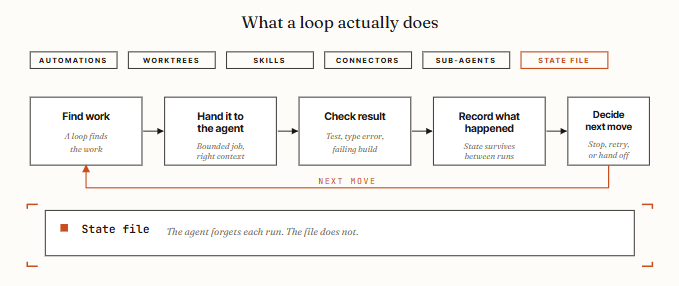
In simple terms, think of loops as a way for AI agents to prompt themselves.
Instead of you being the barrier between every prompt and every iteration, you design a loop once, and your AI agents handle all the back-and-forth - only coming to you when the success criteria have been met.
I really like this Loop Anatomy graphic from @0xCodez.
@0xCodez
There are two primary ways to launch loops inside of Claude Code:
1. /goal: How you launch tasks that run until they're done.
Example:
"/goal keep researching until you can answer these 5 questions."
2. /loop: How to run intervals that don't stop until you cancel them.
"/loop every 30 minutes, flag any email that actually needs me."
Both of these strategies have their place, and if you're going to run Fable 5, you need to use these two basic loop engineering commands inside Claude Code.
Barbell Strategy (model selection)
To save on token costs, I'm running a "barbell" strategy approach, and I think most people should replicate it.
Planning the loop (initial 10%): Fable 5
Gruntwork & execution (middle 80%): Subagents like Sonnet, Haiku & Opus
Final verification (last 10%): Switch back to Fable 5 to verify the spec
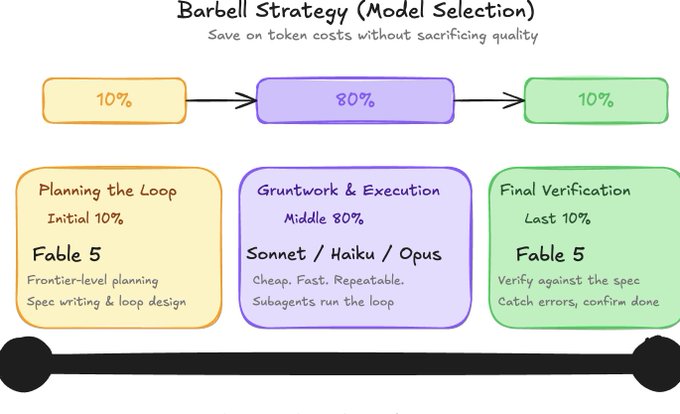
Barbell Strategy Approach for Fable 5
## Fable 5 + Skills
Loop engineering within Fable is extremely powerful, but without the necessary skills, Claude lacks the context, data, and information needed to produce viable outputs.
This is where Claude Skills come in, and if you plan to use Fable for any repetitive workflows, you'll want to pay attention here.
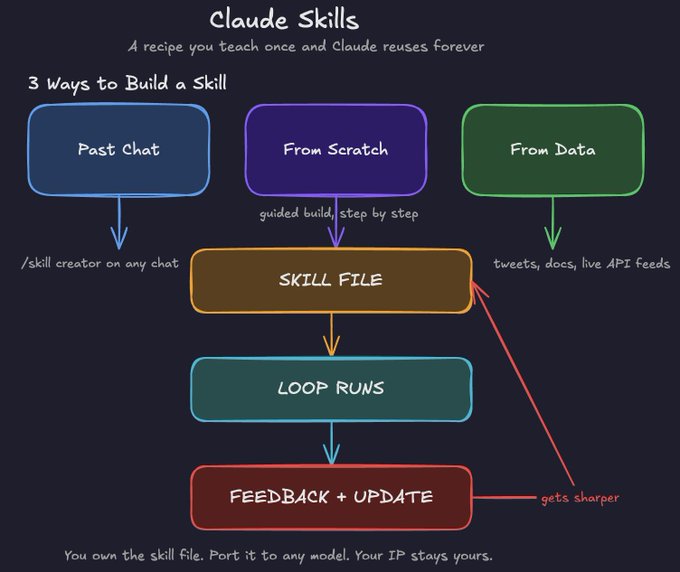
Claude Skills *summary*
What Is a Skill?
The way to think about a skill is simple: it's a recipe you teach once, and Claude reuses forever.
There are three primary ways I like to build skills for Fable:
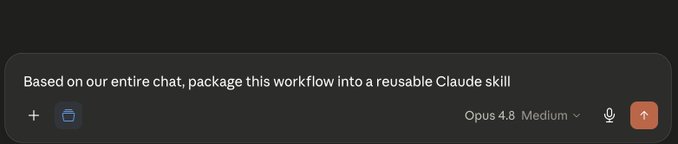
1. From a past chat
This is the fastest way to start.
If you've done any kind of work in Claude (financial analysis, writing, research, video scripting, etc.), you can simply ask Claude to analyze that entire chat, extract your preferences and patterns, and turn it into a reusable skill.
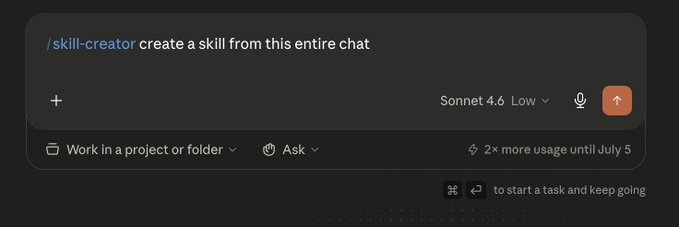
Open a chat, type /skill creator, and let Claude do the work.
2. From scratch
Go into Claude Code, select skill creator, hit enter, and Claude walks you through building a skill from the ground up.
A good way to start: open a Google Sheet, list everything you do on a regular basis, and use that as your starting point for creating Fable Skills.
3. From data
This is the high-leverage move, and my favorite way to create Claude Skills in general.
If you're building an X account, for example, you could pull thousands of tweets from creators in your niche, feed them into a skill, and tell Claude to mimic the tone, the thought patterns, the structure.
Every tweet it writes for you becomes training data. You give it feedback on what landed, what flopped, what's working on the current meta, and the skill updates.
Why Skills Matter More on Fable
Fable 5 is specifically built to be thorough and proactive about testing its own work.
That makes it the best Claude model ever for iterating on skills, because it doesn't just execute the skill, it actively looks for ways to improve it.
One thing worth knowing: you own your skills. They live in your local folder, not inside Claude's memory. That means you can port them to GPT, to Gemini, or whatever model comes next.
## Fable 5 Visual Capabilities
This is something I haven't seen any other creator talk about.
Vision is one of the most underrated things Fable 5 does well, and most people aren't using it anywhere near its ceiling.
For example, when Fable 5 was originally released, Claude posted a video where Fable beat the entire Pokémon Red game - only using visual capabilities!

Some creative ways that I plan to use Fable 5's visual capabilities:
Document & Data
- Extract exact data points from charts, graphs, and scientific figures in PDFs
Design & UI
- Drop a screenshot of any UI and get detailed critique and improvement suggestions
Development
- Screenshot a dashboard and get the underlying logic reverse-engineered
Content & Creative
- Drop screenshots to replicate creatives
Agentic / Computer Use
- Read live interfaces and act on them without helper tools
If you want to get the most out of Fable, take advantage of its amazing visual abilities!
## Building A Context System w/ Fable (memory)
All of this, loops, skills, vision, none of it reaches its ceiling without one thing: context.
I strongly encourage everyone reading to set up a context memory system for their Fable workflows.
Here's what I personally recommend:
Step 1: Create a Local Folder
Start simple. Create a folder on your machine called (something like /claude-context). This is your AI brain. Everything you put in here becomes context that Fable can reference in every session.
What goes in it:
- A company map (who's in the business, what each person does, current priorities)
- Production SOPs for anything you do repeatedly
- One-pagers for important clients, projects, or meetings
- Any strategic documents you've created (launch plans, content systems, distribution strategies)
- A running log of decisions made and outcomes
Pro Tip: Use Wispr Flow to mass dump context here.
Step 2: Create a Memory File
Inside your folder, create a file called claude-memory.md. This is where Fable stores and updates what it learns about you over time.
Add one instruction to your setup (very important):
"Every time I give you major context about my business or situation,
update claude-memory.md with the key details."
Now it becomes a self-updating system. Every material change you share is automatically written to the memory file.
Step 3: Create an Instructions File
Create a claude-instructions.md file that tells Fable how to behave.
This is where you set the rules for how it stores memory, how it formats responses, what it should always or never do. Think of it as the standing brief it reads before every engagement.
A simple starting template:
```
Every time I share major context, update claude-memory.md.
Always reference past decisions before making new recommendations.
When I ask for strategy, assume you know everything in this folder.
Format all outputs in markdown unless I say otherwise.
```
Step 4: Connect It
Point Claude Code at your context folder using /add or reference it in your CLAUDE.md. Once it's connected, every loop, every skill, every session starts with Fable already knowing your world.
This is the base memory system that I think everyone should set up and run with Fable 5. The good thing is you can also transfer it across tools immediately.
## Final Thoughts
I hope you've found this article helpful.
I'm extremely excited about the Fable 5 re-release, and I think that if you master these principles, you'll get the most out of Fable.
I plan to make a ton more Fable 5 content, so be sure to follow me here @milesdeutscher and @aiedge_ for deeper AI insights.
If you enjoy written AI content, feel free to subscribe to my AI newsletter.
It's 100% free, and I genuinely believe we've built the best AI newsletter in the game (we also never spam).
Get started here:
https://www.aiedgehq.co/

Thanks for reading!
## 相关链接
- [Miles Deutscher](https://x.com/milesdeutscher)
- [@milesdeutscher](https://x.com/milesdeutscher)
- [216K](https://x.com/milesdeutscher/status/2072383064031023497/analytics)
- [@0xCodez](https://x.com/@0xCodez)
- [@0xCodez](https://x.com/@0xCodez)
- [@milesdeutscher](https://x.com/@milesdeutscher)
- [@aiedge_](https://x.com/@aiedge_)
- [https://www.aiedgehq.co/](https://www.aiedgehq.co/)
- [https://www.aiedgehq.co/](https://www.aiedgehq.co/)
- [Upgrade to Premium](https://x.com/i/premium_sign_up)
- [2:13 AM · Jul 2, 2026](https://x.com/milesdeutscher/status/2072383064031023497)
- [216.6K Views](https://x.com/milesdeutscher/status/2072383064031023497/analytics)
- [View quotes](https://x.com/milesdeutscher/status/2072383064031023497/quotes)
---
*导出时间: 2026/7/2 13:19:58*
---
## 中文翻译
# 如何掌握 Fable(基础指南)
**作者**: Miles Deutscher
**日期**: 2026-07-01T18:13:20.000Z
**来源**: [https://x.com/milesdeutscher/status/2072383064031023497](https://x.com/milesdeutscher/status/2072383064031023497)
---

TL;DR: 从 Fable 中获取最大价值所需的一切操作。
我保证,在读完本文后,你将拥有所有必要的工具,利用 Claude Fable 真正实现你的 AI 生产力提升 10 倍。
这些正是 Anthropic 告诉你要使用的原则——直接来源于 Claude 官方文档。
目录
Fable 5 的差异
循环工程入门 (Loop Engineering 101)
Fable 5 + 技能 (Skills)
视觉能力
使用 Fable 构建上下文系统(记忆)
让我们直接进入正题:
## Fable 5 的差异(基于我们所知)
我想先说明一点,我是在 Fable 5 官方重新发布之前写这篇文章的,这仅是我目前掌握的最佳信息——情况可能会有变动。
根据 Anthropic 的官方文档,Fable 与所有其他 Claude 模型之间存在 6 个核心差异:
1. 运行时间
在 Fable 5 之前,每个 Claude 模型都在相对短的时间内爆发式工作。
Claude Fable 5 旨在在长时间内持续输出,以完成为期多天的、目标导向的任务。
这是最大的转变之一。Fable 5 专为完全自主的工作而设计(配合 /goal 或 /loop 使用)。
2. 一次就把事情做对
使用 Fable 5 的人们最早报告的观察结果之一,就是他们很少需要反复迭代。早期测试人员报告称,以前需要几天迭代才能实现的系统,现在只需单次运行即可完成。
3. 厘清问题
为了准确地执行自主工作循环,Fable 5 在启动自主运行之前,可能会提出一系列厘清性质的问题。
4. 代理管理
Fable 5 旨在同时管理多个并行子代理(为复杂任务启动 50+ 个代理)。
5. 它“看”得更清楚
Claude Fable 5 在解释密集的技术图像、Web 应用程序和详细截图方面,准确率要高得多(稍后详述)。
6. 编程 + 安全审计
Fable 是编程天才,这早已不是秘密。这个新模型在代码库审查和调试方面特别强大(尽管看来重新发布可能会削弱 Fable 在这些领域的能力)。

## 循环工程入门
关于 Fable,你需要理解的第一件事是,它是为完全自主的工作而构建的。
这意味着如果你打算使用这个模型,你需要了解循环工程。
循环工程听起来很复杂,但实际上你根本不需要懂技术就能启动完全自主的循环。
/wtf 是 /loop?
简单来说,把循环看作是 AI 代理自我提示的一种方式。
你不再需要充当每次提示和每次迭代之间的障碍,而是只需设计一次循环,你的 AI 代理就会处理所有的来回交互——只有在满足成功标准时才会来找你。
我非常喜欢 @0xCodez 制作的这张“循环解剖图”。

@0xCodez
在 Claude Code 内部启动循环主要有两种方式:
1. /goal:你启动任务并让其运行直到完成的方式。
示例:
“/goal 继续研究,直到你能回答这 5 个问题。”
2. /loop:如何运行不会停止的间隔循环,直到你取消它们。
“/loop 每 30 分钟,标记任何真正需要我处理的邮件。”
这两种策略都有其用武之地,如果你打算运行 Fable 5,你需要在 Claude Code 中使用这两个基本的循环工程命令。
杠铃策略(模型选择)
为了节省 Token 成本,我采用“杠铃策略”方法,我认为大多数人都应该复制它。
规划循环(最初的 10%):Fable 5
繁重工作与执行(中间的 80%):像 Sonnet、Haiku 和 Opus 这样的子代理
最终验证(最后的 10%):切换回 Fable 5 以验证规格

针对 Fable 5 的杠铃策略方法
## Fable 5 + 技能
Fable 内部的循环工程非常强大,但如果没有必要的技能,Claude 就缺乏产生可行输出所需的上下文、数据和信息。
这就是 Claude Skills 发挥作用的地方,如果你计划将 Fable 用于任何重复性的工作流程,你需要注意这里。

Claude Skills *摘要*
什么是技能?
理解技能的方法很简单:这是你教一次、Claude 永久复用的配方。
我喜欢为 Fable 构建技能主要有三种方式:
1. 从过去的聊天中开始
这是开始的最快方式。
如果你在 Claude 中做过任何类型的工作(财务分析、写作、研究、视频脚本等),你可以简单地要求 Claude 分析整个聊天,提取你的偏好和模式,并将其转化为可重复使用的技能。
打开一个聊天,输入 /skill creator,让 Claude 完成工作。

2. 从零开始
进入 Claude Code,选择 skill creator(技能创建器),按回车,Claude 会引导你从头开始构建技能。
一个好的开始方式是:打开一个 Google Sheet,列出你定期做的所有事情,并将其作为创建 Fable Skills 的起点。

3. 基于数据
这是高杠杆操作,也是我最喜欢的创建 Claude Skills 的方式。
例如,如果你正在构建一个 X 账号,你可以从你的细分领域的创作者那里提取数千条推文,将它们输入到一个技能中,并告诉 Claude 模仿语气、思维模式、结构。
它为你撰写的每条推文都会变成训练数据。你给它反馈,告诉它哪些引起了共鸣,哪些失败了,当前的主流趋势是什么,技能就会随之更新。
为什么技能在 Fable 上更重要
Fable 5 专门用于彻底并主动地测试其自身工作。
这使其成为有史以来迭代技能的最佳 Claude 模型,因为它不仅执行技能,还积极寻找改进的方法。
有一点值得知道:你拥有你的技能。它们存在于你的本地文件夹中,而不是在 Claude 的记忆中。这意味着你可以将它们移植到 GPT、Gemini 或任何未来的模型中。
## Fable 5 视觉能力
这是我没见过其他创作者讨论的事情。
视觉能力是 Fable 5 擅长但最被低估的功能之一,大多数人远未发挥其潜力。
例如,当 Fable 5 最初发布时,Claude 发布了一段视频,其中 Fable 仅使用视觉能力就通关了整个《宝可梦 红》游戏!

我计划使用 Fable 5 视觉能力的一些创造性方式:
文档与数据
- 从 PDF 中的图表、图形和科学图中提取精确的数据点
设计与 UI
- 截取任何 UI 的屏幕截图,获得详细的批评和改进建议
开发
- 截取仪表板的屏幕截图,并对底层逻辑进行逆向工程
内容与创意
- 放入截图以复刻创意素材
代理 / 计算机使用
- 读取实时界面并对其执行操作,无需辅助工具
如果你想最大化利用 Fable,请充分利用其惊人的视觉能力!
## 使用 Fable 构建上下文系统(记忆)
所有这些——循环、技能、视觉——没有一样能发挥其最大潜力,除非具备一件事:上下文。
我强烈建议每位读者为他们的 Fable 工作流程建立一个上下文记忆系统。
以下是我个人的建议:
第 1 步:创建一个本地文件夹
从简单开始。在你的机器上创建一个名为(类似 /claude-context)的文件夹。这是你的 AI 大脑。你在这里放入的所有内容都成为 Fable 可以在每个会话中引用的上下文。
里面放什么:
- 公司地图(谁在业务中,每个人做什么,当前优先事项)
- 你重复做的任何事情的 SOP(生产标准作业程序)
- 重要客户、项目或会议的单页摘要
- 你创建的任何战略文件(发布计划、内容系统、分发策略)
- 决策和结果的持续日志
专家提示:使用 Wispr Flow 将上下文批量转储到这里。
第 2 步:创建一个记忆文件
在你的文件夹中,创建一个名为 claude-memory.md 的文件。这是 Fable 存储和更新它随时间了解到的关于你的信息的地方。
给你的设置添加一条指令(非常重要):
“每当我给你关于我的业务或情况的主要上下文时,
请用关键细节更新 claude-memory.md。”
现在它变成了一个自我更新的系统。你分享的每一个重大变化都会自动写入记忆文件。
第 3 步:创建一个指令文件
创建一个 claude-instructions.md 文件,告诉 Fable 如何表现。
这是你设置规则的地方:它如何存储记忆、如何格式化响应、它应该总是做什么或绝不做什么。把它看作是每次接触前阅读的常备简报。
一个简单的起始模板:
```
每当我分享主要上下文时,更新 claude-memory.md。
在提出新建议之前,请务必参考过去的决策。
当我询问策略时,假设你了解这个文件夹中的所有内容。
除非我另有说明,否则以 markdown 格式化所有输出。
```
第 4 步:连接起来
使用 /add 将 Claude Code 指向你的上下文文件夹,或者在 CLAUDE.md 中引用它。一旦连接,每个循环、每个技能、每个会话都会以 Fable 已经了解你的世界为起点。
这是我认为每个人都应该使用 Fable 5 建立并运行的基础记忆系统。好消息是,你也可以立即将其跨工具迁移。
## 最后的想法
我希望你觉得这篇文章有帮助。
我对 Fable 5 的重新发布感到非常兴奋,我认为如果你掌握了这些原则,你将从 Fable 中获得最大的收益。
我计划制作更多关于 Fable 5 的内容,所以请务必在这里关注我 @milesdeutscher 和 @aiedge_ 以获得更深入的 AI 见解。
如果你喜欢文字形式的 AI 内容,欢迎订阅我的 AI 时事通讯。
它是 100% 免费的,我真心相信我们建立了业界最好的 AI 时事通讯(我们也绝不发送垃圾邮件)。
从这里开始:
https://www.aiedgehq.co/

感谢阅读!
## 相关链接
- [Miles Deutscher](https://x.com/milesdeutscher)
- [@milesdeutscher](https://x.com/milesdeutscher)
- [216K](https://x.com/milesdeutscher/status/2072383064031023497/analytics)
- [@0xCodez](https://x.com/@0xCodez)
- [@0xCodez](https://x.com/@0xCodez)
- [@milesdeutscher](https://x.com/@milesdeutscher)
- [@aiedge_](https://x.com/@aiedge_)
- [https://www.aiedgehq.co/](https://www.aiedgehq.co/)
- [https://www.aiedgehq.co/](https://www.aiedgehq.co/)
- [升级到 Premium](https://x.com/i/premium_sign_up)
- [2:13 AM · Jul 2, 2026](https://x.com/milesdeutscher/status/2072383064031023497)
- [21.6万 次观看](https://x.com/milesdeutscher/status/2072383064031023497/analytics)
- [查看引用](https://x.com/milesdeutscher/status/2072383064031023497/quotes)
---
*导出时间: 2026/7/2 13:19:58*