# I deleted 224 of 247 Claude Skills I tested. Here are the 23 I kept.
**作者**: Mnimiy
**日期**: 2026-05-05T16:31:54.000Z
**来源**: [https://x.com/Mnilax/status/2051701429987897712](https://x.com/Mnilax/status/2051701429987897712)
---
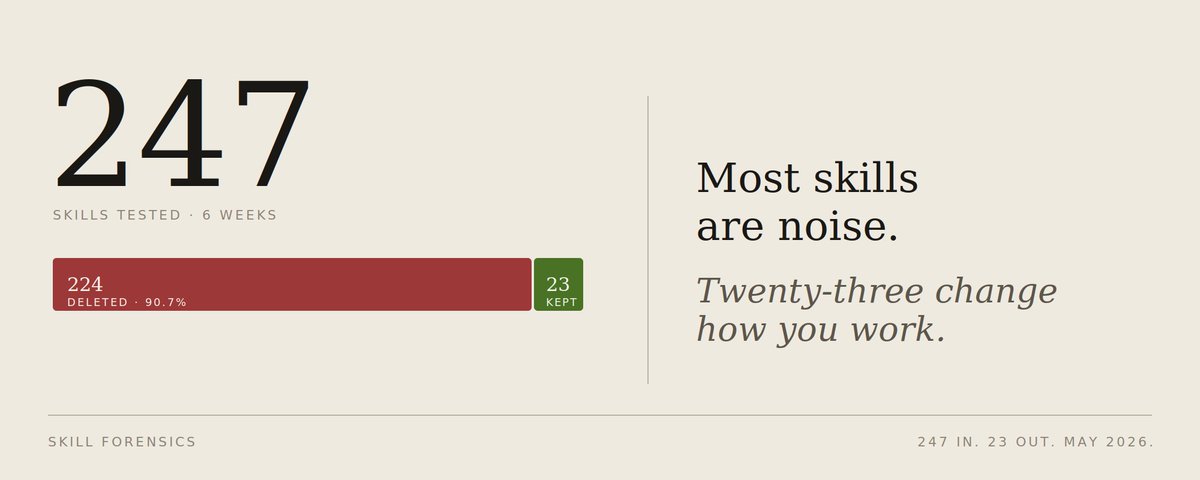
The Claude Skills marketplace went from 16 official skills in October 2025 to 900,000+ community skills by May 2026. Most of them are noise. A handful changed how I work permanently. The rest broke my context window, conflicted with each other, or did literally nothing.
I spent 6 weeks installing skills, running each on real projects, and timing the difference.
247 in. 23 kept. Everything else uninstalled.
Each skill: what it does, what surprised me, when to install it, when to skip it.
Plus the install order, because if you install all 23 at once, you'll burn through your context window before Claude generates a single useful token.
# The methodology (so you can trust the ranking)
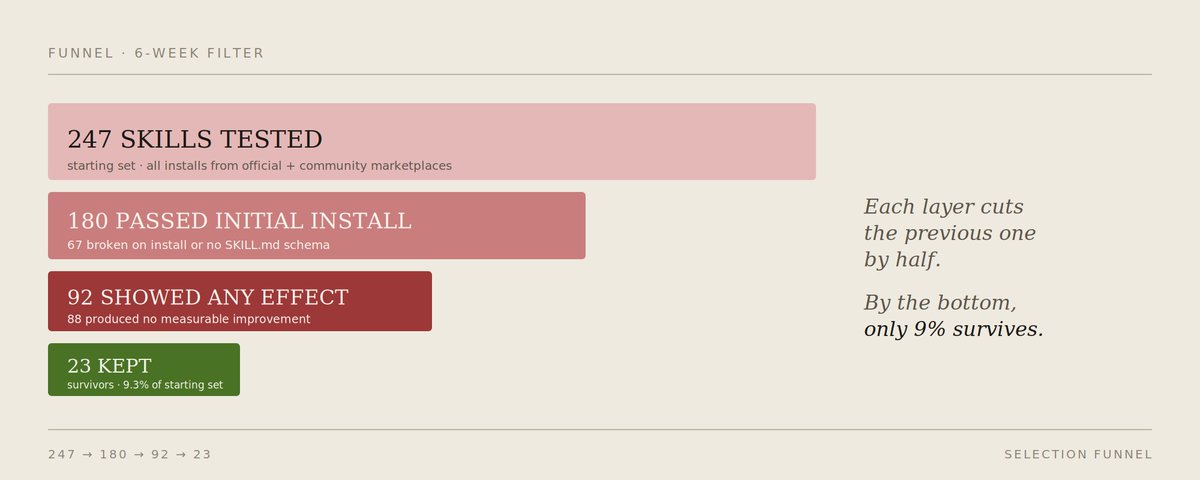
I didn't trust install counts. Half of the high-install skills I tested produced nothing measurable. Here's what I actually did:
## For each skill:
1. Installed in isolation on a fresh ~/.claude/ directory
2. Ran 5 representative tasks the skill claims to handle
3. Timed each run against a baseline (no skill)
4. Counted output quality manually on a 1-5 scale
5. Tracked context overhead (tokens injected per session)
Pass criteria:
- Quality improvement of at least 1.5 points on the 5-scale
- Time savings of at least 30% on its core task
- Made possible something the baseline genuinely could not do
Fail criteria:
- No measurable improvement
- Adds more context than it returns in value
- Conflicts with another already-installed skill (cascade detected via the lock-file diagnostic)
- Hasn't been updated since February 2026
That's how 247 became 23.
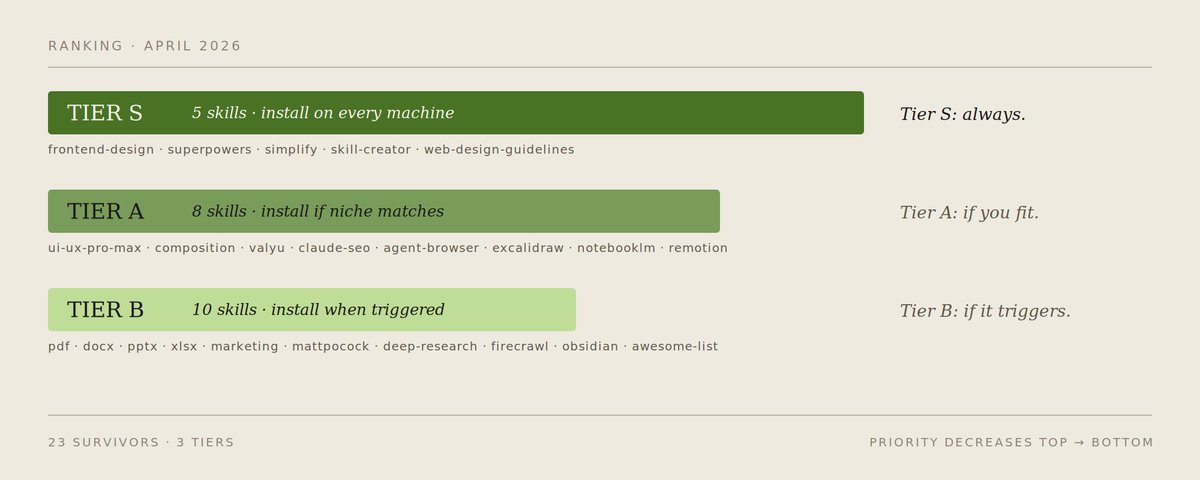
# Tier S: install on every machine, every project (5 skills)
These five gave the largest measurable lift. If you install nothing else from this article, install these.
## 1. frontend-design (Anthropic, 277K+ installs, ~66K repo stars)
What it does: forces Claude into a real design direction — brutalist, editorial, retro-futurist, whatever, before writing any code. Eliminates the AI-slop look (Inter font, purple gradient on white, grid cards) that signals "this was generated."
Install: /plugin marketplace add anthropics/skills && /plugin install frontend-design
Surprise: the biggest gain wasn't visual. It was that Claude stopped second-guessing aesthetic decisions. Once a direction is committed, every subsequent component matches.
When to install: any project with a UI surface. Even internal tools.
When to skip: pure backend / API work.
Worth knowing: pbakaus/impeccable is now a serious alternative, it's 23 commands instead of one auto-trigger, two distinct modes (brand vs product), and a Chrome overlay that highlights anti-patterns directly on the page. Install one or the other, not both. They fight on the same task.
## 2. superpowers (obra, 177K+ stars)
What it does: replaces ad-hoc prompting with a 7-phase workflow — brainstorm -> spec -> plan -> TDD -> subagent execution -> review -> finalize.
The TDD enforcement isn't a suggestion: the skill literally refuses to write implementation before a failing test exists.
Install: /plugin marketplace add obra/superpowers-marketplace && /plugin install superpowers
Or, since January 15, 2026, directly from the official Anthropic marketplace: /plugin install superpowers@claude-plugins-official
Surprise: I expected this to slow me down. It didn't. The 20 minutes of upfront brainstorming saved 3 hours of unwinding wrong directions. Simon Willison called the underlying ideas "genuinely fascinating" — and the repo went from 94K stars in early March to 177K by end of April. Fastest growing Claude Code project of 2026 by a margin.
When to install: any feature that takes more than one session to build.
When to skip: small fixes, exploratory prototyping, single-file scripts.
## 3. simplify (Anthropic, ~133K weekly installs)
What it does: takes recently-modified code and cleans it without changing behavior. Specifically targets nested ternaries, three-jobs-in-one functions, abstractions that "made sense at the time."
Install: /plugin marketplace add anthropics/claude-plugins-official && /plugin install code-simplifier@claude-plugins-official
Surprise: the rule it enforces — "never change behavior, only how behavior is expressed" — kept me from accidentally refactoring my logic. Most "AI cleanups" silently change semantics. This one doesn't.
When to install: every project. Run after every coding session.
When to skip: never.
## 4. skill-creator (Anthropic)
What it does: walks you through building your own skills properly —describes the workflow, proposes a SKILL.md, runs 3-5 test prompts, refines instructions based on failures. Meta-skill that makes every other skill better.
Install: enabled by default in Claude Code v2.1+.
If disabled: /plugin install skill-creator@anthropics/claude-code.
Surprise: writing your own skill took ~5 minutes once I had this. Without it, I burned an afternoon on my first attempt. The hidden value: most "this skill should exist but doesn't" gaps in your workflow are 10-minute fixes once you know how to scaffold a SKILL.md properly.
When to install: as soon as you find yourself writing the same CLAUDE.md instruction twice.
When to skip: only if you're genuinely a Claude consumer, never a producer.
## 5. web-design-guidelines (vercel-labs/agent-skills, 19.5K stars)
What it does: 100+ rules covering accessibility, performance, UX. Reviews UI code against the latest Vercel guidelines and outputs violations in file:line format.
Install: /plugin marketplace add vercel-labs/agent-skills && /plugin install web-design-guidelines
Surprise: caught an accessibility violation (visible focus state) that ESLint's a11y plugin missed entirely. Turns out "technically valid HTML" and "actually usable" are different bars.
When to install: pair with frontend-design, that one creates, this one audits.
When to skip: not building UIs.
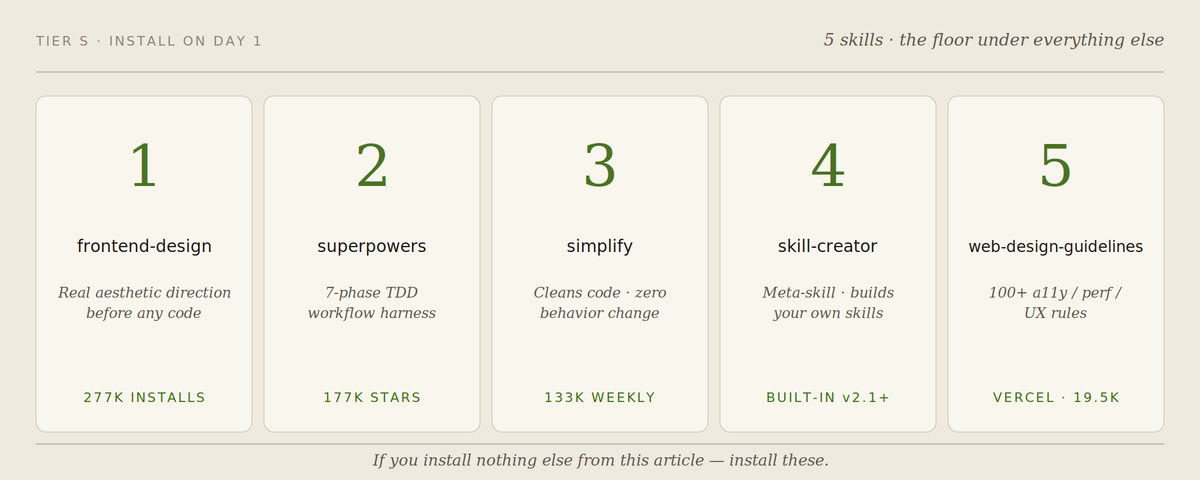
# Tier A: install if your work matches the niche (8 skills)
Strong, focused. Install if your daily work touches the niche. Skip if not.
## 6. ui-ux-pro-max (nextlevelbuilder, 29.6K stars)
50+ UI styles, 97 color palettes, 57 font pairings, 99 UX guidelines, 25 chart types, 9 stacks. Ships with a Python CLI to query the design database. Install when starting from a blank Figma.
Skip when the design system already exists.
## 7. composition-patterns (vercel-labs)
Teaches Claude compound components, context providers, explicit variants. The single rule that justifies install: architecture-avoid-boolean-props. If you've inherited a component with 15 boolean props, install this. If you write modern React from scratch, optional.
## 8. valyu (valyuAI/skills)
Connects Claude to web search + 36+ specialized data sources: SEC filings, PubMed, ChEMBL, ClinicalTrials.gov, FRED economic indicators, academic publishers.
79% on FreshQA benchmark vs Google's 39%.
On finance-specific questions: 73% vs Google's 55%. Install if your work touches any of those domains.
## 9. claude-seo (AgriciDaniel/claude-seo)
Full-stack SEO audits with live DataForSEO data, schema validation, GEO-first optimization (citability scoring for AI crawlers).
12 sub-skills. Install if SEO is part of your job.
## 10. agent-browser
Lets Claude control any web interface through stable element refs — no clean API required.
Clicks, fills, screenshots, parallel sessions. The Playwright MCP alternative for when Playwright is overkill.
## 11. excalidraw-diagram
Generates Excalidraw-style diagrams from natural language. Install if architecture diagrams are part of your communication.
Skip if you live in code only.
## 12. notebooklm-integration
Bridges Claude with NotebookLM. Upload specs / API references / research papers once, query them from Claude with citations.
Install for documentation-heavy projects.
## 13. remotion-best-practices (remotion-dev/skills, 117K weekly installs)
Programmatic video generation in React. Install if you need product demos / release videos / explainers without a separate video workflow.
Skip if you don't.
# Tier B: useful but specific (10 skills)
Worth installing if the trigger condition matches.
14. pdf (Anthropic) - forms, invoices, table extraction
15. docx (Anthropic) - word doc generation/editing with tracked changes
16. pptx (Anthropic) - slide decks from natural language
17. xlsx (Anthropic) - spreadsheet generation, formulas, charts
18. marketing-skills (coreyhaines) - CRO, copywriting, email sequences, growth
19. mattpocock/skills - TypeScript daily, type safety, migrations
20. claude-deep-research-skill - 8-phase research with auto-continuation
21. firecrawl - sraping hostile/JS-heavy sites
22. obsidian-skills (kepano, by Obsidian's CEO) - auto-tagging, auto-linking, vault-native
23. awesome-claude-skills (travisvn) - meta-catalog 22k stars, browse before building
# The 224 I deleted (and why)
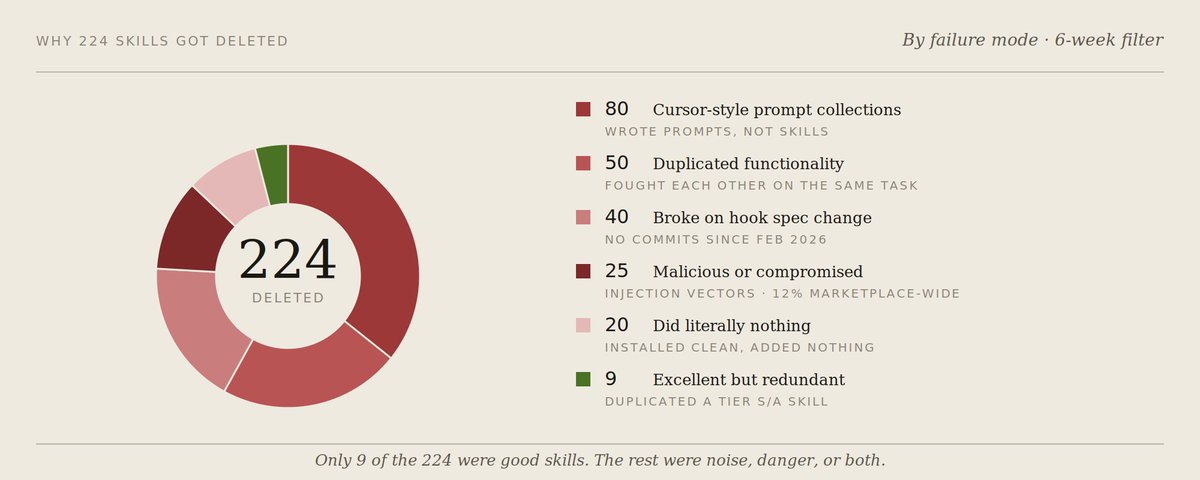
I won't list them all. Here's the pattern of why most failed:
~80 skills were "Cursor-style" prompt collections.
A markdown file with 50 generic rules. No SKILL.md schema. Installs as documentation. Provides nothing the model couldn't already do with CLAUDE.md.
~50 skills duplicated functionality of better-maintained skills.
Two TDD frameworks. Three security scanners. Five "code reviewers." When I instrumented hooks, they fired in series and produced contradictory output. Pick one per category.
~40 skills had no commits since February 2026.
Claude Code's hook spec changed in v2.1 (added 21 lifecycle events), and these skills broke silently. The PostToolUseFailure event in particular invalidates a lot of older "auto-fix" skills that assumed the old failure model.
~25 skills were straight-up malicious or compromised.
Pattern: high stars (500+), repo created after February 2026, no contributor history, dependency on a sketchy package. ECC's AgentShield documented 341 malicious skills out of 2,857 scanned on one major marketplace in January 2026 alone 12% compromised, in a single month.
Treat new high-star skills like new high-yield wallets — too clean usually means farmed or worse.
~20 skills did basically nothing.
They installed cleanly, didn't conflict, didn't break — but didn't measurably improve anything. Net effect zero, with a small context tax.
~9 skills were excellent but redundant with one of the 23 above.
Honorable mentions: spartan-ai-toolkit, artifacts-builder, tdd-guard, Plannotator, claude-mem. If you're already on the 23 list, these don't add. If you want a substitute, fine.
# The install order (this matters more than the list)
Installing all 23 at once will destroy you. Each skill adds context overhead. 23 active skills will hit Claude's context window before you finish typing your first prompt. Worse, they conflict (web-design-guidelines and ui-ux-pro-max will fight on the same task).

The install order I tested:
Week 1 — Foundation (4 skills, install all):
1. skill-creator (so you can build your own when gaps appear) already enabled by default in Claude Code v2.1+
2. simplify / code-simplifier (cleans every output)
3. superpowers (the workflow harness)
4. Pick ONE of frontend-design or backend equivalent based on your domain
Week 2 — Add based on the gap (1-2 more):
- If UI work -> web-design-guidelines + maybe ui-ux-pro-max
- If TypeScript work -> mattpocock/skills
- If research / data work -> valyu
- If SEO / content -> claude-seo
Week 3+ — Domain-specific (1-2 more):
- Document-heavy -> pdf, docx, pptx, xlsx (one of, rarely all four)
- Diagrams -> excalidraw-diagram
- Video -> remotion-best-practices
Stop at 5-7 active skills. That's the sweet spot. Beyond that, context overhead exceeds value. Disable inactive skills with /plugin disable <name>.
There's a deeper reason for this cap. Each skill loads its SKILL.md into context whenever Claude detects relevance.
With 9+ active skills running on conservative "load when in doubt" detection, you're paying ~13,500 tokens of skill overhead per task that needs none of them, before Claude reads your actual prompt. The same logic that caps your CLAUDE.md to 1,200 words caps your active skills to 5-7. Both are baseline tax. Both compound.
If you want a moving target: every two weeks, run an audit. Which skills did Claude actually invoke? The ones that didn't fire — disable. The gap that opened, install one new skill to fill it.
# What didn't work
Installing skills via npx skills add blindly.
Half didn't have proper SKILL.md frontmatter. They installed but Claude never invoked them. Always verify with /plugin list after install, if it shows up but isn't activating on the tasks you expect, the skill is broken.
Trusting install counts as quality signals.
Two of the top-30 by install count produced literally no measurable improvement on my benchmark tasks. Install counts measure marketing reach, not skill quality.
Mass-installing from "awesome-claude-skills" lists.
Same problem as above × 50. The curated lists optimize for breadth. You want depth in the skills you actually use.
Skipping the audit step.
I gave myself 6 weeks. The first 2 weeks I was installing without measuring. I had no idea what was helping until I started timing tasks. Without a baseline, you can't tell if Claude got better or worse.
Installing both web-design-guidelines and ui-ux-pro-max at the same time. Conflict. They both want to drive the design phase.
Pick one based on whether you need creation help (ui-ux-pro-max) or audit help (web-design-guidelines).
Installing both frontend-design and impeccable at the same time.
Same problem, different layer. Both encode aesthetic taste. Pick one.
Installing skills that haven't been updated in 2+ months.
Hook spec changed. PostToolUseFailure event was added. Skills that weren't updated for it produce silent failures. Check last commit before install.
Using Search and Tools feature alongside skills like valyu.
Both invoke web search. They overlap, both consume tokens, neither gets a clean signal. Disable Anthropic's built-in Search when using a search-specialist skill like valyu.
## How to maintain your stack
The marketplace ships ~50-100 new skills per week now. Your stack will go stale.
A 10-minute weekly ritual:
```
# 1. Which skills did Claude actually use this week?
grep -h "skill_invoked" ~/.claude/logs/*.log | sort | uniq -c | sort -rn
# 2. Which skills haven't fired in 14 days?
# (anything in your ~/.claude/skills that's not in the output above)
ls ~/.claude/skills/ > /tmp/installed.txt
# manually compare — disable anything not invoked
# 3. Run an audit on remaining skills
npx ecc-agentshield scan # if you have ECC installed
# 4. Check the official marketplace for new skills in your domain
# claude.com/plugins
```
Disable, don't uninstall. Easier to re-enable later if you find a use.
If a skill hasn't fired in 30 days, uninstall. Context tax doesn't justify keeping it on shelf.
# The mental model
There are two types of skills, and you need both:
Capability skills — give Claude new abilities it didn't have.
firecrawl (scraping hostile sites), valyu (paywalled data), pdf (form extraction), agent-browser (UI automation). Without these, Claude literally can't do the task.
Discipline skills — make Claude execute the way you want, in your style, with your conventions.

frontend-design (aesthetic taste), simplify (code style), superpowers (process), web-design-guidelines (audit). Without these, you get generic AI output.
Most people install only capability skills and wonder why their output looks like everyone else's. Most quality improvement comes from discipline skills. That's why 4 of the Tier S 5 are discipline skills, not capability skills.
If you have time for one more thought exercise for each of the next 5 tasks you do with Claude, ask: "Did the output look generic, or did it look like me?"
If generic, you're missing discipline skills. Install one, retry the same task, compare.
# T H E _ E N D
The skills marketplace is the most undervalued part of the Claude ecosystem. Most people are still using vanilla Claude Code in May 2026. They feel like the model got "smarter slower" than the headlines suggested. It didn't. They didn't install the skills.
23 of the right skills, installed in the right order, is more important than which Claude version you're on.
If this saved you a weekend of marketplace browsing, repost.
> If this saves you a weekend of marketplace browsing, bookmark and pass it on. Part 3 next days.
> Telegram for weekly skill audits and new releases worth knowing: https://t.me/+_ZWrQN7GuDA3ZDEy
## 相关链接
- [Mnimiy](https://x.com/Mnilax)
- [@Mnilax](https://x.com/Mnilax)
- [25K](https://x.com/Mnilax/status/2051701429987897712/analytics)
- [ClinicalTrials.gov](https://clinicaltrials.gov/)
- [https://t.me/+_ZWrQN7GuDA3ZDEy](https://t.me/+_ZWrQN7GuDA3ZDEy)
- [Upgrade to Premium](https://x.com/i/premium_sign_up)
- [12:31 AM · May 6, 2026](https://x.com/Mnilax/status/2051701429987897712)
- [25K Views](https://x.com/Mnilax/status/2051701429987897712/analytics)
- [View quotes](https://x.com/Mnilax/status/2051701429987897712/quotes)
---
*导出时间: 2026/5/6 09:38:27*
---
## 中文翻译
# 我测试了 247 个 Claude Skills,删除了其中 224 个。这是我保留的 23 个。
**作者**: Mnimiy
**日期**: 2026-05-05T16:31:54.000Z
**来源**: [https://x.com/Mnilax/status/2051701429987897712](https://x.com/Mnilax/status/2051701429987897712)
---

Claude Skills 市场从 2025 年 10 月的 16 个官方技能,发展到 2026 年 5 月的 90 万+ 社区技能。其中大部分都是噪音。少数几个彻底改变了我的工作方式。其余的要么撑爆了我的上下文窗口,要么彼此冲突,要么干脆毫无作用。
我花了 6 周时间安装技能,在真实项目上逐一运行,并统计时间差异。
247 个进入测试。23 个保留。其余全部卸载。
每个技能:它做什么、什么让我惊讶、何时安装、何时跳过。
另外还有安装顺序,因为如果你一次性安装全部 23 个,在 Claude 生成一个有用的 token 之前,你的上下文窗口就会被耗尽。

# 测试方法(让你能信任这份排名)
我不信任安装量。我测试的高安装量技能中,有一半没有产生任何可衡量的效果。以下是我实际做的事情:
## 对每个技能:
1. 在全新的 ~/.claude/ 目录中单独安装
2. 运行 5 个该技能声称能处理的代表性任务
3. 将每次运行与基线(无技能)进行计时对比
4. 以 1-5 分制手动评估输出质量
5. 追踪上下文开销(每个会话注入的 token 数量)
通过标准:
- 在 5 分制上质量提升至少 1.5 分
- 在其核心任务上节省至少 30% 的时间
- 实现了基线真正做不到的事情
失败标准:
- 没有可衡量的提升
- 注入的上下文超过其带来的价值
- 与另一个已安装的技能冲突(通过 lock-file 诊断检测到级联冲突)
- 自 2026 年 2 月以来未更新
247 就是这么变成 23 的。

# S 级:在每台机器、每个项目上都安装(5 个技能)
这五个带来了最大的可衡量提升。即使你从这篇文章中不安装任何其他东西,也请安装这几个。
## 1. frontend-design (Anthropic,277K+ 安装量,仓库约 66K stars)
它做什么:在编写任何代码之前,强制 Claude 确定一个真正的设计方向——粗野主义、杂志风、复古未来主义,随便什么。消除了那种标志着“这是 AI 生成的”的 AI 垃圾审美(Inter 字体、白底紫色渐变、网格卡片)。
安装:/plugin marketplace add anthropics/skills && /plugin install frontend-design
惊讶之处:最大的收益不是视觉上的。而是 Claude 不再对美学决策反复纠结。一旦方向确定,后续的每个组件都保持一致。
何时安装:任何有 UI 界面的项目。即使是内部工具。
何时跳过:纯后端 / API 工作。
值得了解:pbakaus/impeccable 现在是一个有力的替代品,它包含 23 个命令而非一个自动触发器,有两种截然不同的模式(品牌 vs 产品),还有一个 Chrome 覆盖层,可以直接在页面上高亮反模式。二者装一个即可,不要都装。它们会在同一任务上冲突。
## 2. superpowers (obra,177K+ stars)
它做什么:用 7 阶段工作流取代临时提示——头脑风暴 -> 规格说明 -> 计划 -> TDD -> 子代理执行 -> 评审 -> 定稿。
TDD 强制执行不是建议:该技能真的会在不存在失败测试的情况下拒绝编写实现代码。
安装:/plugin marketplace add obra/superpowers-marketplace && /plugin install superpowers
或者,自 2026 年 1 月 15 日起,可以直接从 Anthropic 官方市场安装:/plugin install superpowers@claude-plugins-official
惊讶之处:我以为这会拖慢我的速度。并没有。前期 20 分钟的头脑风暴节省了 3 小时的错误方向返工。Simon Willison 称其底层理念“真正引人入胜”——而且该仓库从 3 月初的 94K stars 增长到 4 月底的 177K。是 2026 年增长最快的 Claude Code 项目,遥遥领先。
何时安装:任何需要超过一个会话才能构建的功能。
何时跳过:小修复、探索性原型、单文件脚本。
## 3. simplify (Anthropic,每周约 133K 安装量)
它做什么:对最近修改的代码进行清理,而不改变行为。专门针对嵌套三元表达式、一个函数干三件事、“当时觉得合理”的抽象。
安装:/plugin marketplace add anthropics/claude-plugins-official && /plugin install code-simplifier@claude-plugins-official
惊讶之处:它强制执行的规则——“绝不改变行为,只改变行为的表达方式”——让我避免不小心重构了自己的逻辑。大多数“AI 清理”会悄悄改变语义。这个不会。
何时安装:每个项目。每次编码会话之后运行。
何时跳过:从不。
## 4. skill-creator (Anthropic)
它做什么:引导你正确构建自己的技能——描述工作流、提出 SKILL.md、运行 3-5 个测试提示词、根据失败调整指令。这是一个能让其他所有技能变得更好的元技能。
安装:在 Claude Code v2.1+ 中默认启用。
如果被禁用:/plugin install skill-creator@anthropics/claude-code。
惊讶之处:有了它之后,编写自己的技能只花了约 5 分钟。没有它,我的第一次尝试浪费了一下午。隐藏的价值:一旦你知道如何正确搭建 SKILL.md,工作流中大多数“这个技能应该存在但没有”的空缺,都能在 10 分钟内解决。
何时安装:当你发现自己第二次写同一条 CLAUDE.md 指令时。
何时跳过:只有当你纯粹是 Claude 的消费者、从不生产内容时。
## 5. web-design-guidelines (vercel-labs/agent-skills,19.5K stars)
它做什么:100+ 条规则,涵盖无障碍、性能、用户体验。根据最新的 Vercel 指南审查 UI 代码,并以 file:line 格式输出违规项。
安装:/plugin marketplace add vercel-labs/agent-skills && /plugin install web-design-guidelines
惊喜:发现了一个 ESLint 的 a11y 插件完全漏掉的无障碍违规问题(可见焦点状态)。原来“技术上合法的 HTML”和“真正可用”是两个不同的标准。
什么时候安装:与 frontend-design 搭配使用,一个负责创建,这个负责审计。
什么时候跳过:不做 UI 开发。

# A 级:如果你的工作符合该领域就安装(8 个技能)
强大且聚焦。如果你的日常工作涉及该领域就安装,否则跳过。
## 6. ui-ux-pro-max(nextlevelbuilder,29.6K 星)
50+ UI 风格、97 个配色方案、57 组字体搭配、99 条 UX 准则、25 种图表类型、9 种技术栈。附带一个 Python CLI 用于查询设计数据库。从空白的 Figma 开始时安装。
设计系统已存在时跳过。
## 7. composition-patterns(vercel-labs)
教 Claude 复合组件、context provider、显式变体。一个足以证明值得安装的规则:architecture-avoid-boolean-props(架构上避免布尔属性)。如果你继承过一个有 15 个布尔属性的组件,就安装它。如果你从零编写现代 React,可选。
## 8. valyu(valyuAI/skills)
将 Claude 连接到网络搜索 + 36+ 个专业数据源:SEC 文件、PubMed、ChEMBL、ClinicalTrials.gov、FRED 经济指标、学术出版商。
在 FreshQA 基准测试上得分 79%,而 Google 为 39%。
在金融类特定问题上:73% 对 Google 的 55%。如果你的工作涉及这些领域,就安装。
## 9. claude-seo(AgriciDaniel/claude-seo)
使用实时 DataForSEO 数据进行全栈 SEO 审计、schema 验证、GEO 优先优化(针对 AI 爬虫的可引用性评分)。
12 个子技能。如果 SEO 是你工作的一部分,就安装。
## 10. agent-browser
让 Claude 通过稳定的元素引用控制任何网页界面——无需干净的 API。
点击、填写、截图、并行会话。当 Playwright 杀鸡用牛刀时的替代方案。
## 11. excalidraw-diagram
从自然语言生成 Excalidraw 风格的图表。如果架构图是你沟通的一部分,就安装。
如果你只活在代码里,跳过。
## 12. notebooklm-integration
连接 Claude 与 NotebookLM。上传一次规格文档 / API 参考 / 研究论文,就能在 Claude 中带引用地查询它们。
文档繁重的项目就安装。
## 13. remotion-best-practices(remotion-dev/skills,每周 11.7 万次安装)
在 React 中进行程序化视频生成。如果你需要产品演示 / 发布视频 / 讲解视频而没有单独的视频工作流,就安装。
不需要就跳过。
# B 级:有用但特定(10 个技能)
触发条件匹配就值得安装。
14. pdf(Anthropic)— 表单、发票、表格提取
15. docx(Anthropic)— 带修订追踪的 Word 文档生成/编辑
16. pptx(Anthropic)— 从自然语言生成幻灯片
17. xlsx(Anthropic)— 电子表格生成、公式、图表
18. marketing-skills(coreyhaines)— CRO、文案、邮件序列、增长
19. mattpocock/skills — TypeScript 日常、类型安全、迁移
20. claude-deep-research-skill — 8 阶段研究,支持自动续接
21. firecrawl — 抓取有防护/重 JS 的网站
22. obsidian-skills(kepano,Obsidian CEO 出品)— 自动打标签、自动链接、库原生
23. awesome-claude-skills(travisvn)— 元目录,2.2 万星,构建前先浏览
# 被我删掉的 224 个(以及原因)

我不会全部列出。以下是大多数失败的规律:
约 80 个技能是“Cursor 风格”的提示词合集。
一个包含 50 条通用规则的 markdown 文件。没有 SKILL.md schema。作为文档安装。提供不了模型用 CLAUDE.md 做不到的任何东西。
约 50 个技能与维护得更好的技能功能重复。
两个 TDD 框架。三个安全扫描器。五个“代码审查器”。当我给 hooks 插桩测试时,它们串行触发并产生矛盾的输出。每个类别只挑一个。
约 40 个技能自 2026 年 2 月以来没有提交记录。
Claude Code 在 v2.1 中更改了 hook 规范(新增 21 个生命周期事件),这些技能悄无声息地坏掉了。PostToolUseFailure 事件尤其让大量基于旧失败模型的“自动修复”技能失效。
约 25 个技能是彻头彻尾的恶意或被入侵的。
模式:高星数(500+)、仓库创建于 2026 年 2 月之后、没有贡献者历史、依赖可疑的包。ECC 的 AgentShield 记录到,仅 2026 年 1 月,某个主要市场上扫描的 2,857 个技能中就有 341 个是恶意的——12% 被入侵,仅仅一个月。
把新的高星技能当作新的高收益钱包对待——太干净通常意味着刷出来的,或者更糟。
约 20 个技能基本啥也没干。
它们安装顺利、不冲突、不报错——但也没有可衡量的改进。净效果为零,还占一点上下文税。
约 9 个技能很优秀但与上面 23 个之一重复。
荣誉提名:spartan-ai-toolkit、artifacts-builder、tdd-guard、Plannotator、claude-mem。如果你已经在 23 个列表里,这些不会增加价值。想找替代品的话,可以。
# 安装顺序(这比列表本身更重要)
一次性安装全部 23 个会毁了你。每个技能都会增加上下文开销。23 个激活的技能会在你打完第一个提示词之前就撑爆 Claude 的上下文窗口。更糟的是,它们会互相冲突(web-design-guidelines 和 ui-ux-pro-max 会在同一个任务上打架)。

我测试过的安装顺序:
第 1 周 — 基础(4 个技能,全部安装):
1. skill-creator(出现空白时你可以构建自己的技能)在 Claude Code v2.1+ 中已默认启用
2. simplify / code-simplifier(清理每个输出)
3. superpowers(工作流骨架)
4. 根据你的领域,在 frontend-design 或对应的后端技能中选一个
第 2 周 — 根据空白补齐(再加 1-2 个):
- 做 UI -> web-design-guidelines,也许加上 ui-ux-pro-max
- 做 TypeScript -> mattpocock/skills
- 做研究 / 数据 -> valyu
- 做 SEO / 内容 -> claude-seo
第 3 周起 — 领域专属(再加 1-2 个):
- 文档密集 -> pdf、docx、pptx、xlsx(选其一,很少四个全装)
- 图表 -> excalidraw-diagram
- 视频 -> remotion-best-practices
保持在 5-7 个活跃技能。这是最佳区间。超过这个数,上下文开销就会超过价值。用 /plugin disable <name> 禁用不活跃的技能。
这个上限背后有更深的原因。每当 Claude 检测到相关性时,每个技能都会把它的 SKILL.md 加载进上下文。
当 9 个以上的活跃技能以保守的“拿不准就加载”检测方式运行时,在一个完全用不到它们的任务上,在 Claude 读取你的实际提示词之前,你就要付出约 13,500 token 的技能开销。把 CLAUDE.md 限制在 1,200 词以内的逻辑,同样适用于把活跃技能限制在 5-7 个。两者都是基础税。两者都会叠加。
如果你想要一个动态调整的目标:每两周做一次审计。Claude 实际调用了哪些技能?没有触发的——禁用。出现的能力空缺,安装一个新技能来填补。
# 哪些做法没有用
盲目地用 npx skills add 安装技能。
一半都没有规范的 SKILL.md frontmatter。装上了,但 Claude 从不调用它们。安装后务必用 /plugin list 验证,如果它显示在列表里却没有在你预期的任务上激活,那这个技能就是坏的。
把安装量当作质量信号。
安装量排名前 30 的技能中有两个,在我的基准任务上完全没有产生可衡量的提升。安装量衡量的是营销覆盖面,不是技能质量。
从 "awesome-claude-skills" 之类的清单里批量安装。
同样的问题 × 50。这些精选清单优化的是广度。你要的是在真正使用的技能上获得深度。
跳过审计步骤。
我给了自己 6 周时间。前 2 周我只安装不测量。直到开始给任务计时,我才知道什么在起作用。没有基准,你无法判断 Claude 是变好了还是变差了。
同时安装 web-design-guidelines 和 ui-ux-pro-max。冲突。两者都想主导设计阶段。
根据你是需要创建帮助(ui-ux-pro-max)还是审计帮助(web-design-guidelines)来选其一。
同时安装 frontend-design 和 impeccable。
同样的问题,不同的层面。两者都编码了审美品味。选一个。
安装超过 2 个月未更新的技能。
Hook 规范变了。新增了 PostToolUseFailure 事件。未针对它更新的技能会产生静默失败。安装前检查最后一次提交。
在 valyu 这类技能之外同时使用 Search 和 Tools 功能。
两者都会调用网页搜索。它们重叠,都消耗 token,且都得不到干净的信号。使用 valyu 这类搜索专家技能时,禁用 Anthropic 内置的 Search。
## 如何维护你的技能栈
市场现在每周新增约 50-100 个技能。你的技能栈会过时。
一个每周 10 分钟的仪式:
```
# 1. Claude 这周实际用了哪些技能?
grep -h "skill_invoked" ~/.claude/logs/*.log | sort | uniq -c | sort -rn
# 2. 哪些技能 14 天内没触发过?
# (你 ~/.claude/skills 里不在上面输出中的任何技能)
ls ~/.claude/skills/ > /tmp/installed.txt
# 手动对比 —— 禁用未被调用的
# 3. 对剩余技能做一次审计
npx ecc-agentshield scan # 如果你装了 ECC
# 4. 去官方市场查看你领域的新技能
# claude.com/plugins
```
禁用,而不是卸载。以后发现有用处时重新启用更方便。
如果一个技能 30 天没有触发过,卸载它。上下文税不值得让它留在架子上。
# 心智模型
技能有两种类型,两种你都需要:
能力型技能 —— 赋予 Claude 原本没有的新能力。
firecrawl(抓取有防护的网站)、valyu(付费墙数据)、pdf(表单提取)、agent-browser(UI 自动化)。没有这些,Claude 根本做不了任务。
纪律型技能 —— 让 Claude 按你想要的方式、你的风格、你的规范来执行。

frontend-design(审美品味)、simplify(代码风格)、superpowers(流程)、web-design-guidelines(审计)。没有这些,你得到的是千篇一律的 AI 输出。
大多数人只装能力型技能,然后纳闷为什么自己的输出和别人的看起来一样。大部分质量提升来自纪律型技能。这就是为什么 Tier S 的 5 个中有 4 个是纪律型技能,而非能力型技能。
如果你接下来用 Claude 做的 5 个任务中,每个任务还有时间做一次思维练习,就问自己:“输出看起来千篇一律,还是看起来像我?”
如果是千篇一律,说明你缺纪律型技能。装一个,重做同样的任务,对比一下。
# T H E _ E N D
技能市场是 Claude 生态系统中被最低估的部分。到了 2026 年 5 月,大多数人仍在使用原版的 Claude Code。他们感觉模型比标题党宣传的“变聪明的速度更慢”。其实不是。只是他们没有安装那些技能。
用正确的顺序安装 23 个对的技能,比你用的是哪个 Claude 版本更重要。
如果这为你省下了一个逛市场的周末,请转发。
> 如果这为你省下了一个逛市场的周末,请收藏并转发。第三部分几天后发布。
> Telegram,用于每周技能审计和值得了解的新发布:https://t.me/+_ZWrQN7GuDA3ZDEy
## 相关链接
- [Mnimiy](https://x.com/Mnilax)
- [@Mnilax](https://x.com/Mnilax)
- [25K](https://x.com/Mnilax/status/2051701429987897712/analytics)
- [ClinicalTrials.gov](https://clinicaltrials.gov/)
- [https://t.me/+_ZWrQN7GuDA3ZDEy](https://t.me/+_ZWrQN7GuDA3ZDEy)
- [升级到 Premium](https://x.com/i/premium_sign_up)
- [上午 12:31 · 2026年5月6日](https://x.com/Mnilax/status/2051701429987897712)
- [2.5万次浏览](https://x.com/Mnilax/status/2051701429987897712/analytics)
- [查看引用](https://x.com/Mnilax/status/2051701429987897712/quotes)
---
*导出时间: 2026/5/6 09:38:27*