# GPT-5.6 + blender MCP: describe the thing, the model builds it and fixes itself.
**作者**: explos1ve
**日期**: 2026-07-10T18:54:11.000Z
**来源**: [https://x.com/explosss1ve/status/2075654835597164769](https://x.com/explosss1ve/status/2075654835597164769)
---
Everyone's demo is a game character. That's the narrow read. The wider one is that a model can now open Blender, build almost any 3d thing you describe, look at the render it produced, notice it's off, and correct it, without you touching the viewport once.
For most people the wall in front of 3d was never the idea. It was Blender itself, the years it takes to make the software do what's in your head. A model driving it through MCP doesn't remove the craft, but it removes the part where you had to be fluent in the interface before you could make anything at all.
This is the wider tour. What the bridge actually is, the range of things it opens up, what a real session looks like, and the exact spot where describing it stops being enough.
## what the bridge actually is
Blender MCP is two pieces. An addon runs inside Blender and opens a socket. An MCP server relays a model's tool calls to it. Once they're talking, a model can create and modify objects, apply materials, set up lighting and cameras, pull in real assets, run arbitrary Python against Blender's whole API, and take a screenshot or render to see the result.
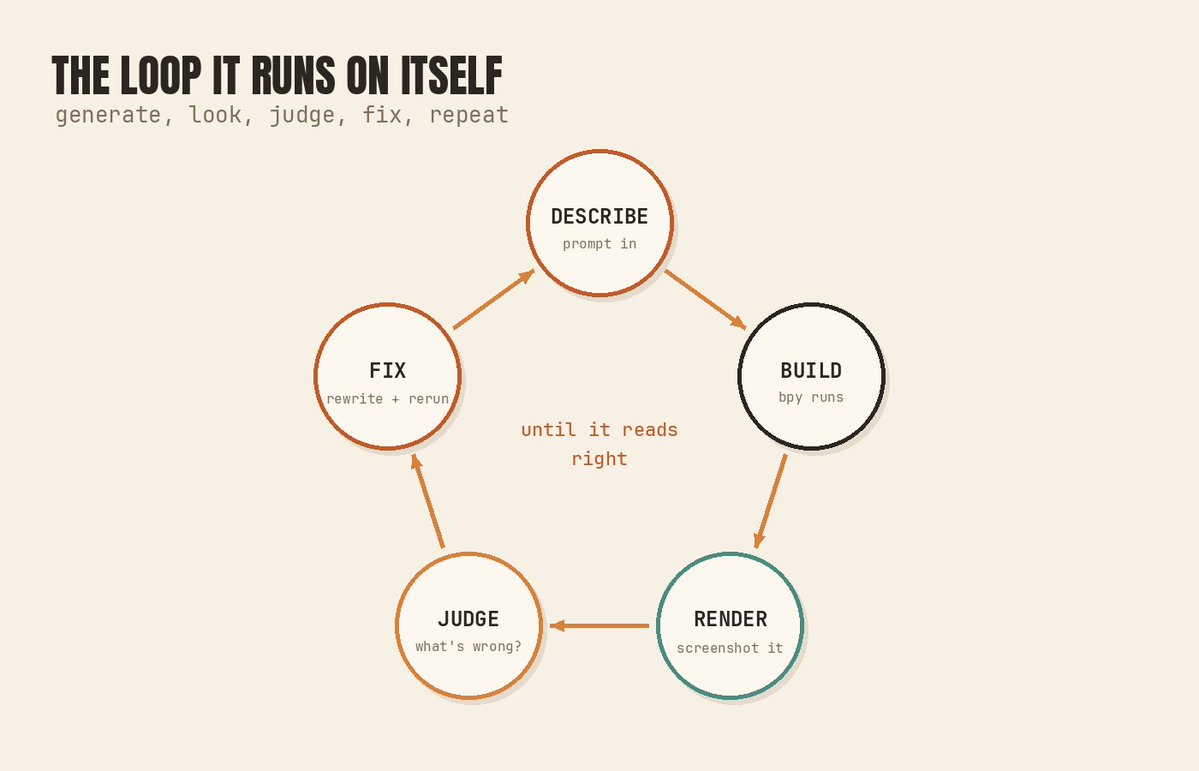
That last capability is the one that matters, and it's the one that separates this from plain code generation. The model isn't firing commands into the dark and hoping. It builds something, renders it, looks at the image, and reacts to what it sees. That single loop is what turns "generate a Blender script" into "do 3d work."
## the range, not the demo
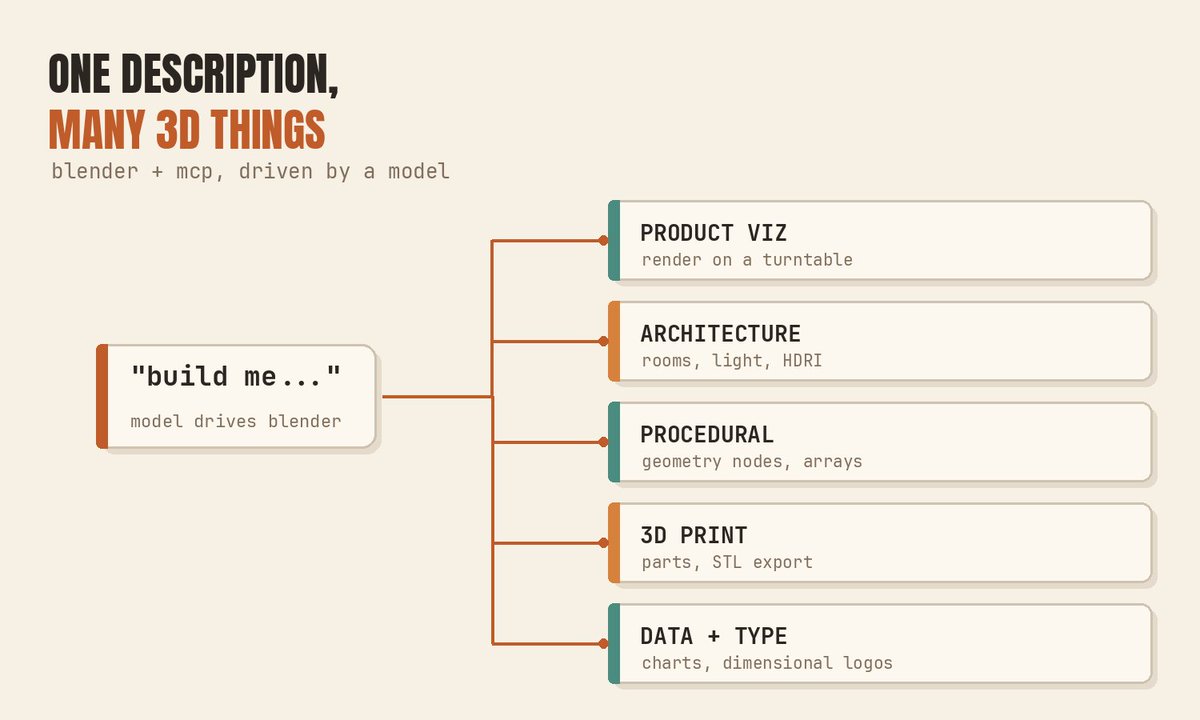
Once a model can drive Blender, "make a 3d thing" stops being a specialist job and becomes a conversation. Game assets are just the loudest example. A few of the other directions it opens:
Product visualization. Describe an object, get a clean model, then ask for studio lighting, a turntable, a matte or glossy pass. The kind of render an agency charges a few hundred dollars a shot for, roughed out from a sentence and refined by the model looking at its own output and adjusting the light.
Architectural and interior scenes. Block out a room, place furniture, set the sun angle, drop in an HDRI for realistic lighting. Blender MCP can even pull real models and textures from Poly Haven, so the model isn't hand-building every chair, it's assembling a scene from a real asset library on request.
Procedural and motion pieces. Geometry nodes, arrays, modifiers, driven by description instead of by hand-wiring a node graph. The abstract loop, the satisfying grid of shapes, the title animation, the stuff that used to mean an afternoon lost in the node editor.
3d-printable parts. Describe a bracket, a phone stand, a replacement clip, get a mesh, check the dimensions, export an STL. Functional modeling, where the right measurement matters far more than the prettiest render.
3d data and type. Turn a dataset into a physical-looking field of bars, extrude a logo into dimensional type, build a title card in actual 3d instead of faking depth in 2d.
None of these is a game. All of them used to demand knowing Blender's interface cold. That requirement is exactly what softened.
## what a real session looks like
The heart of it is one small tool, execute_blender_code, which runs Python against Blender's bpy API. Anything Blender can do, the model can drive through it. Here's the shape of a real call, the model building and lighting a simple product scene:
```
# what the model sends through execute_blender_code
import bpy
# a clean backdrop
bpy.ops.mesh.primitive_plane_add(size=20, location=(0, 0, 0))
# the subject
bpy.ops.mesh.primitive_cylinder_add(radius=0.6, depth=1.4, location=(0, 0, 0.7))
obj = bpy.context.object
# a soft studio material
mat = bpy.data.materials.new("matte")
mat.use_nodes = True
bsdf = mat.node_tree.nodes["Principled BSDF"]
bsdf.inputs["Roughness"].default_value = 0.4
obj.data.materials.append(mat)
# key light + camera
bpy.ops.object.light_add(type="AREA", location=(4, -4, 6))
bpy.context.object.data.energy = 800
bpy.ops.object.camera_add(location=(6, -6, 4), rotation=(1.1, 0, 0.78))
```
On its own that's just a script. What makes it a workflow is the loop wrapped around it:
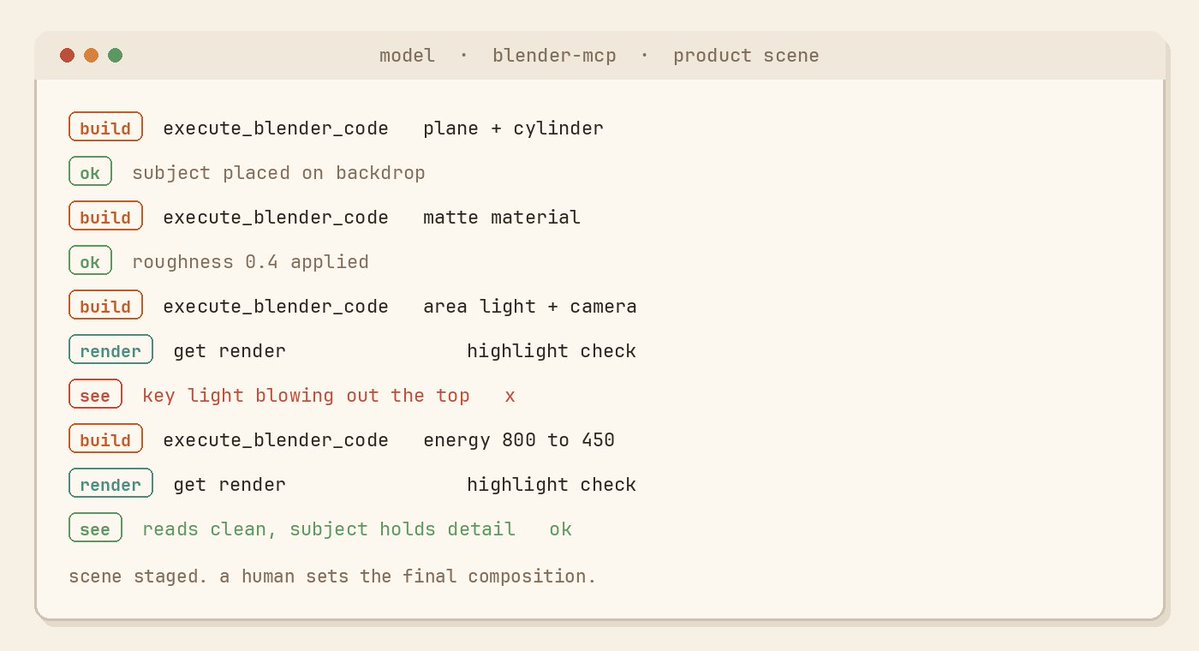
The model runs the code. It calls the render tool and looks at the image. It notices the key light is blowing out the highlight and the camera is clipping the top of the object. It rewrites the light energy and nudges the camera, renders again, and checks. It repeats until the frame reads the way the description asked for.
That is the thing a 3d artist does every time they hit render and squint, except the model never gets bored on the tenth pass. It's the same maker-then-checker pattern good agent loops run, pointed at pixels instead of code.
One thing that belongs in plain text, outside any code block: execute_blender_code runs whatever the model writes, with no guardrails, on your machine. The project's own docs say to keep it in a VM or on a system with nothing sensitive on it. An agent with a Python socket into your desktop is exactly as powerful, and as risky, as that sounds. Treat it that way.
## where describing it stops being enough
A model can build the scene. Whether the scene is any good is a different question, and it's the one a prompt doesn't answer on its own.
Precision is the first wall. Hard-surface work where exact dimensions matter, a bracket that has to fit a real part, a mechanism with real tolerances, needs verification the model can't fully do by eye. It will build something that looks like a bracket. Whether it's the right bracket, to the millimeter, is still on you to measure.
Organic complexity is the second. Simple primitives and clean staged scenes are where it's strongest. Intricate organic forms, believable creatures, natural surface detail, are where it approximates rather than nails, because it's reasoning about geometry it can only partly see in a flat screenshot.
And a still frame hides most of what matters in motion. If you're making anything animated, the model can't feel that the movement is stiff or the timing is a beat late. It sees frames. Feel lives between them, and that judgment stays with you.
So the honest shape of it: the model gets you to a rough, often surprisingly good starting point in minutes, on things that used to cost hours of interface wrangling. The last stretch, the precision, the polish, the taste, is still human work. That's not a small caveat. But it's a completely different bottleneck than "you have to master Blender before you can make anything."
## the barrier was the interface. that's what dropped.
The wall in front of 3d, for almost everyone, was the software. The years it takes to make Blender do what's in your head. That wall is what just got a door cut into it.
You describe the thing. The model builds a first version and checks its own render. You direct from there, instead of starting at a blank viewport with a tutorial you've paused forty times. The precision and the taste are still your job, which is fine, because that was always the part actually worth doing.
So pick something small and un-game-like. A product on a turntable. A room at golden hour. A logo with real depth. Describe it, let the model build and self-correct, then take the wheel for the last twenty percent. You'll learn where the tool ends faster than any demo will ever show you.
## 相关链接
- [explos1ve](https://x.com/explosss1ve)
- [@explosss1ve](https://x.com/explosss1ve)
- [309K](https://x.com/explosss1ve/status/2075654835597164769/analytics)
- [Upgrade to Premium](https://x.com/i/premium_sign_up)
- [2:54 AM · Jul 11, 2026](https://x.com/explosss1ve/status/2075654835597164769)
- [309.5K Views](https://x.com/explosss1ve/status/2075654835597164769/analytics)
- [View quotes](https://x.com/explosss1ve/status/2075654835597164769/quotes)
---
*导出时间: 2026/7/20 13:11:36*
---
## 中文翻译
# GPT-5.6 + blender MCP: 描述你想要的东西,模型会构建它并自我修正。
**作者**: explos1ve
**日期**: 2026-07-10T18:54:11.000Z
**来源**: [https://x.com/explosss1ve/status/2075654835597164769](https://x.com/explosss1ve/status/2075654835597164769)
---

每个人的演示都是游戏角色。这只是狭隘的理解。更广泛的视角是,模型现在可以打开 Blender,构建你描述的几乎任何 3D 物体,查看它生成的渲染图,发现不对劲的地方,并进行修正——而你无需触碰视口哪怕一次。
对大多数人来说,横亘在 3D 面前的墙壁从来不是“想法”。而是 Blender 本身,是那些为了让软件呈现你脑中画面所耗费的经年累月。由模型通过 MCP 驱动它,并没有消除“技艺”,但它消除了那个“必须先熟练掌握界面才能做出任何东西”的环节。
这是更广泛的视角。关于这个桥梁究竟是什么,它开启了怎样的可能性范围,真实的工作流程是怎样的,以及“描述它”不再奏效的确切临界点在哪里。
## 这个桥梁究竟是什么
Blender MCP 分为两部分。一个插件运行在 Blender 内部并打开一个套接字。一个 MCP 服务器将模型的工具调用中继给它。一旦它们建立连接,模型就可以创建和修改对象、应用材质、设置灯光和摄像机、导入真实资产、针对 Blender 的整个 API 运行任意 Python 代码,并截取屏幕截图或进行渲染以查看结果。
最后一项能力才是关键,也正是它将这一方案与单纯的代码生成区分开来。模型并不是在黑暗中盲目发送命令并祈祷好运。它构建某物,进行渲染,查看图像,并对其所见做出反应。正是这单一的循环将“生成一个 Blender 脚本”转变成了“进行 3D 工作”。
## 范围,而非演示
一旦模型能够驱动 Blender,“做一个 3D 东西”就不再是专业工作,而变成了一场对话。游戏资产只是最显眼的例子。它开启的其他几个方向包括:
产品可视化。描述一个物体,得到一个干净的模型,然后要求影棚灯光、转盘展示、哑光或高光通道。这种代理商一次收费数百美元的渲染图,现在可以通过一句话粗略生成,再由模型查看自己的输出并调整光线来加以完善。
建筑和室内场景。搭建房间,摆放家具,设置太阳角度,放入 HDRI 以实现逼真光照。Blender MCP 甚至可以从 Poly Haven 拉取真实的模型和纹理,所以模型不需要手工制作每一把椅子,它是根据要求从真实的资产库中组装场景。
程序化和动态作品。几何节点、阵列、修改器,通过描述来驱动,而不是手工连接节点图。抽象的循环、令人愉悦的形状网格、标题动画,那些过去意味着在节点编辑器里耗费整个下午才能完成的东西。
可 3D 打印的部件。描述一个支架、手机支架、替换夹扣,得到网格,检查尺寸,导出 STL。功能性建模,在这里正确的尺寸远比漂亮的渲染图重要。
3D 数据和字体。将数据集转化为具有实体感的条形图,将徽标挤出为立体字,构建真正的 3D 标题卡片,而不是在 2D 中伪造深度。
这些都不是游戏。但所有这些以前都要求对 Blender 界面了如指掌。而这一要求正是被削弱的地方。

## 真实的工作流程是什么样的
其核心是一个小工具 `execute_blender_code`,它针对 Blender 的 `bpy` API 运行 Python。Blender 能做的任何事,模型都可以通过它驱动。下面是一个真实调用的示例,模型正在构建和布置一个简单的产品场景:
```
# 模型通过 execute_blender_code 发送的内容
import bpy
# 一个干净的背景
bpy.ops.mesh.primitive_plane_add(size=20, location=(0, 0, 0))
# 主体对象
bpy.ops.mesh.primitive_cylinder_add(radius=0.6, depth=1.4, location=(0, 0, 0.7))
obj = bpy.context.object
# 柔和的影棚材质
mat = bpy.data.materials.new("matte")
mat.use_nodes = True
bsdf = mat.node_tree.nodes["Principled BSDF"]
bsdf.inputs["Roughness"].default_value = 0.4
obj.data.materials.append(mat)
# 主光 + 摄像机
bpy.ops.object.light_add(type="AREA", location=(4, -4, 6))
bpy.context.object.data.energy = 800
bpy.ops.object.camera_add(location=(6, -6, 4), rotation=(1.1, 0, 0.78))
```
这本身只是一个脚本。让它成为工作流程的是包裹在它外面的循环:

模型运行代码。它调用渲染工具并查看图像。它注意到主光把高光曝光过度了,而且摄像机切掉了物体的顶部。它重写灯光强度,微调摄像机,再次渲染,然后检查。它不断重复,直到画面符合描述的要求。
这就是 3D 艺术家每次点击渲染并眯起眼睛时做的事情,只不过模型在第十遍时永远不会感到厌倦。这是优秀的 Agent 循环所运行的相同的“制造者-检查者”模式,只是把目标从代码变成了像素。

有一件事必须用纯文本说明,放在任何代码块之外:`execute_blender_code` 会在你的机器上运行模型编写的任何内容,没有任何护栏。项目自己的文档也建议将其保持在虚拟机中,或在一个没有任何敏感信息的系统上运行。一个拥有通往你桌面的 Python 套接字的 Agent,正如听起来那样强大,也正如听起来那样危险。请 accordingly 对待它。
## 描述不再奏效的地方
模型可以构建场景。但场景好不好是另一个问题,这也是提示词本身无法回答的问题。
精确度是第一道墙。那些精确尺寸至关重要的硬表面工作,必须适配真实零件的支架,具有真实公差的机构,需要模型无法仅凭目测完全完成的验证。它会构建一个看起来像支架的东西。但它是否是正确的支架,精确到毫米,仍然需要你去测量。
有机复杂性是第二道墙。简单的几何体和干净的布景场景是它最强的地方。复杂的有机形态、可信的生物、自然的表面细节,是它只能近似而无法完美胜任的领域,因为它在推理它只能在平面屏幕截图中部分看到的几何结构。
而且静止帧掩盖了运动中最重要的部分。如果你在做任何动画,模型无法感觉动作僵硬或节奏慢了半拍。它看到的是帧。感觉存在于帧与帧之间,而这种判断力仍然掌握在你手中。
所以诚实的真相是:在那些过去需要耗费数小时界面操作才能开始的事情上,模型可以在几分钟内让你得到一个粗略的、往往惊人的良好起点。最后一段路,精确度、打磨、品味,仍然是人类的工作。这不是一个小的说明。但这与“你必须先掌握 Blender 才能做任何东西”是完全不同的瓶颈。
## 壁垒是界面。这才是被打破的东西。
对几乎所有人来说,横亘在 3D 面前的墙壁就是软件本身。是让 Blender 呈现你脑中画面所耗费的经年累月。这堵墙上刚刚被切开了一扇门。
你描述你想要的东西。模型构建第一个版本并检查自己的渲染图。你从那里开始指挥,而不是面对一个空白的视口,伴随着一个你已经暂停了四十次的教程。精确度和品味仍然是你的工作,这没关系,因为那才是真正值得做的部分。
所以选一些小的、非游戏类的东西。一个放在转台上的产品。一个处于黄金时刻的房间。一个具有真实深度的徽标。描述它,让模型构建并自我修正,然后接过控制权完成最后百分之二十。你会比任何演示都更快地学会这个工具的边界在哪里。
## 相关链接
- [explos1ve](https://x.com/explosss1ve)
- [@explosss1ve](https://x.com/explosss1ve)
- [309K](https://x.com/explosss1ve/status/2075654835597164769/analytics)
- [升级到 Premium](https://x.com/i/premium_sign_up)
- [2:54 AM · Jul 11, 2026](https://x.com/explosss1ve/status/2075654835597164769)
- [309.5K 次观看](https://x.com/explosss1ve/status/2075654835597164769/analytics)
- [查看引用](https://x.com/explosss1ve/status/2075654835597164769/quotes)
---
*导出时间: 2026/7/20 13:11:36*