# Designing for Agents
**作者**: Teddy Riker
**日期**: 2026-04-23T13:53:47.000Z
**来源**: [https://x.com/teddy_riker/status/2047312986696454584](https://x.com/teddy_riker/status/2047312986696454584)
---

If you spend time in the same corner of X as I do, scrolling past the "How I built a second brain with Obsidian" and "Anthropic just KILLED [insert industry] FOREVER" posts, you've probably also seen the take that UI is dead. And unless a product can be used by agents via an MCP, API, CLI, or something in between, it won't survive.
The trend is real at Ramp. Over the past three months, weekly active users on our MCP have grown 10x as more customers reach into the product through Claude, ChatGPT, and other agents.
Last week, Salesforce became one of the first incumbents to lean into this thesis.
From VentureBeat:
> Salesforce on Wednesday unveiled the most ambitious architectural transformation in its 27-year history, introducing "Headless 360" — a sweeping initiative that exposes every capability in its platform as an API, MCP tool, or CLI command so AI agents can operate the entire system without ever opening a browser.
> The announcement, made at the company's annual TDX developer conference in San Francisco, ships more than 100 new tools and skills immediately available to developers. It marks a decisive response to the existential question hanging over enterprise software: In a world where AI agents can reason, plan, and execute, does a company still need a CRM with a graphical interface?
> Salesforce's answer: No — and that's exactly the point.
This is a smart move by Salesforce, and one that I can't imagine was easy to make. Ask most salespeople, and they'll tell you how much they dislike using Salesforce. But the product is pervasive because of the familiarity of its UX. Sales leaders aren't interested in ramping up their teams on new technology, and consistency frequently trumps functionality.
Benioff and team are accepting that this moat is eroding and leaning into the reality that a majority of usage will be driven through agents like Claude, ChatGPT, and other background processes that users never see.
I don't think UI is dying. Humans still want to point and click, see their configurations, and verify completed work. But the 80/20 has flipped: the new 80% of interaction with software will be through agents. That changes not only what you need to build, but how you build it.
## The new interaction pattern
For the past twenty years, the primary way people have interacted with software has been:
User → Interface → Database
You open a product, click around, get things done. The interface is how you experience the software. For most people, the interface is the product.
As agents take on more of the work, a new layer has emerged:
User → User's Agent (e.g. Claude) → Database
The agent acts on the user's behalf. It reads, writes, and navigates the product so they don't have to. And suddenly the interface is gone. The agent is talking directly to the system underneath.
But even this is rapidly changing. Software companies are (and should be) designing their own agents and capabilities. So the new pattern looks more like this:
User → User's Agent → Software's Agent → Database
In this model, the software's agent handles complexity on behalf of the user's agent: applying business logic, enforcing rules, pulling in context the latter doesn't have. Two LLMs working together to drive toward an outcome.
## Teach agents how to succeed
I do a majority of my brainstorming, writing, and ideating with LLMs. When a draft is ready to share, I push it to Notion through their MCP server. I was a Google Docs loyalist for years; Notion's MCP flipped me.
One thing I appreciate as a Notion MCP user is how every time I ask an agent to write something, it nails it. Tables, bullets, italics, lists, you name it — the agent never fails.
This is by design.
The notion-create-pages tool's description opens with: "For the complete Markdown specification, always first fetch the MCP resource at notion://docs/enhanced-markdown-spec. Do NOT guess or hallucinate Markdown syntax." When I ask my agent to write to a page, that's the first thing it does. It fetches the spec, then writes. Every Notion-specific assumption gets explicitly called out against the general model's defaults.
In an old world, that spec would've lived in API docs, and a developer integrating with Notion would read it, internalize it, and write a transformation layer. Now Notion hands the spec directly to the agent, at the moment it's needed.
If you've ever used the Slack MCP, you've probably experienced the inverse of this. Your agent assumes standard markdown and doesn't adhere to Slack's specific formatting. You end up spending more time editing the formatting than you would have writing the message:
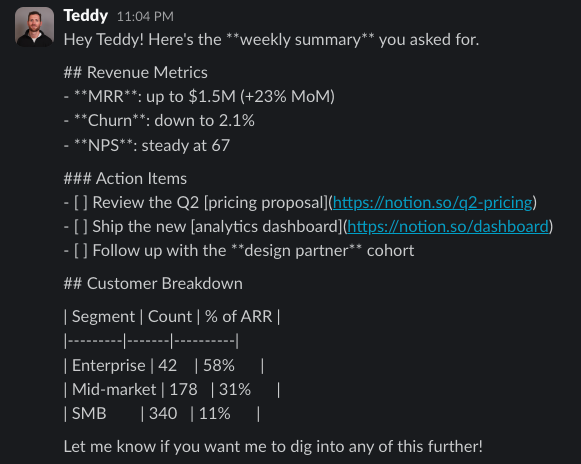
Sure, the formatting guidelines are online and you could save them somewhere and teach your agent how to use them. But that's annoying, and it shouldn't be necessary.
Think about what your agent's callers need to know to succeed, and give it to them proactively. Don't make them figure it out.
## Build feedback loops
When we first launched our MCP at Ramp, observability was our largest problem. We could see tool call volume, but we couldn't see the surrounding chat context that produced those calls. Volume alone didn't tell us what was working, what was breaking, or what people were actually trying to accomplish.
We've addressed this in a few ways:
Require a 'rationale' on every tool call. Every MCP or CLI tool call requires the agent to include a rationale parameter explaining why it's making the request. We can't see the chat, but the rationale reconstructs intent. Patterns in the rationales tell us what people are actually trying to do.
A feedback tool. We shipped a standalone tool the agent can call when it gets blocked or runs into a pattern that isn't working. The agent submits what it was trying to do, what it tried, and where it got stuck.
Tool-specific seeds. We add purpose-built parameters to individual tools to capture context we'd want later: things the agent has access to that we'd otherwise have to infer.
Imagine you're building a customer support platform, and you offer tools for customers to fetch tickets. Over time, you start noticing the same phrase in rationale logs: "building an incident report," "drafting incident summary," "gathering tickets for an outage postmortem."
That's a new product feature! A build-incident-report tool could identify related tickets, score severity, pull the affected customer segment, and draft a summary in a strongly opinionated format.
Once that's live, you might start receiving feedback on the tool: "the report pulled in tickets from three days ago that weren't part of this incident" or "it keeps including tickets from free-tier users who don't belong in postmortems." All of a sudden you've got agents telling your agents exactly what to build. Agents hallucinate, sure. But they're also more specific and more consistent in their feedback than most humans you'd ever ship to.
If the report pulls irrelevant tickets, you add a date range parameter. If it shouldn't include free-tier customers, you add a segment filter. Each feedback loop becomes a new way for the product to improve.
## Mind the context gap
In any agent interaction, your system has context the calling agent doesn't have, and the calling agent has context your system doesn't have. When designing these interactions, you should have an opinion about where each has a leg up.
Let's say Diego goes on a business trip. Diego's AI chief of staff picks up a Slack nudge from the expense management system's agent: he has incomplete expenses from his recent trip. Two agents are now pointed at the same outcome: submit these expenses correctly.
These two agents bring their own context.
What Diego's chief of staff brings:
- Diego's calendar: knows which meetings happened, when, and with whom
- Diego's email: has the hotel and flight confirmation as attachments
- Diego's Slack: can correlate the Kokkari dinner to a thread where he invited the Acme team
- Diego's receipts (pulled from email attachments and photo library)
What the expense management system brings:
- The raw transaction data (e.g., merchant, time of transaction)
- The company's policies around submission
- The company's GL accounts
- The company's historical coding patterns
A traditional API would dump the problem back on the user. "Here is a transaction that needs a GL code. Use this endpoint to fetch the 150 GL code options, and pick one."
A well-designed agent interaction flips this — it doesn't ask for a GL code. It asks for context: was this a client meal, a team meal, or personal travel? The chief of staff agent pulls the answer from a calendar entry or a Slack thread. The EM system applies the correct code based on the context it was missing.
Diego and his agent never need to know what the GL codes are, and the finance team gets accurate categorization. Each side contributes what it knows, and delivers an outcome that is better for Diego — and his accountant.
As you design these agent-to-agent interactions, be mindful of the context gap. It's ok to admit where your agent falls short — you're both serving the same user.
The interface used to sit between Diego and his expense system. Now it sits between his agent and yours.
That shift reframes the product team's job. You used to design for a human who wanted to move fast, avoid mistakes, and see their work. Now you're designing for that same person through an intermediary whose instincts, context, and limitations are different from theirs. Teaching agents how to succeed, building feedback loops, and minding the context gap all ask the same underlying question: what does your agent's caller need to do its job well, and are you giving it to them?
Most companies will ship an MCP, check the box, and move on. Their usage will grow for a few quarters, then stall. Over time, customers will route toward products that sweated the details and around the ones that didn't.
Build for the agent with the same care you spent on the human. Before you know it, it'll be the one writing the check.
## 相关链接
- [Teddy Riker](https://x.com/teddy_riker)
- [@teddy_riker](https://x.com/teddy_riker)
- [133K](https://x.com/teddy_riker/status/2047312986696454584/analytics)
- [Salesforce](https://www.salesforce.com/)
- [Headless 360](https://www.salesforce.com/news/stories/salesforce-headless-360-announcement/)
- [TDX developer conference](https://www.salesforce.com/tdx/)
- [Upgrade to Premium](https://x.com/i/premium_sign_up)
- [9:53 PM · Apr 23, 2026](https://x.com/teddy_riker/status/2047312986696454584)
- [133K Views](https://x.com/teddy_riker/status/2047312986696454584/analytics)
- [View quotes](https://x.com/teddy_riker/status/2047312986696454584/quotes)
---
*导出时间: 2026/4/24 10:46:10*
---
## 中文翻译
# 为智能体设计(Designing for Agents)
**作者**:Teddy Riker
**日期**:2026-04-23T13:53:47.000Z
**来源**:[https://x.com/teddy_riker/status/2047312986696454584](https://x.com/teddy_riker/status/2047312986696454584)
---

如果你和我一样常泡在 X 的同一个角落,刷过那些“我如何用 Obsidian 打造第二大脑”和“Anthropic 刚刚永远干掉了【某个行业】”的帖子,你大概也见过这样一种观点:UI 已死。如果一个产品无法通过 MCP、API、CLI 或类似方式被智能体使用,它就活不下去。
这股趋势在 Ramp 是真实存在的。过去三个月里,我们 MCP 的周活跃用户增长了 10 倍,越来越多的客户通过 Claude、ChatGPT 和其他智能体来使用我们的产品。
上周,Salesforce 成为最早拥抱这一论点的老牌企业之一。
来自 VentureBeat 的报道:
> Salesforce 周三公布了其 27 年历史上最雄心勃勃的架构转型,推出"Headless 360"——一项全面的计划,将其平台上的所有能力以 API、MCP 工具或 CLI 命令的形式暴露出来,让 AI 智能体无需打开浏览器即可操作整个系统。
> 这一公告在该公司于旧金山举行的年度 TDX 开发者大会上发布,提供了 100 多个开发者可立即使用的新工具和技能。这是对企业软件头顶那个关乎存亡问题的果断回应:在一个 AI 智能体能够推理、规划和执行的世界里,公司还需要一个带图形界面的 CRM 吗?
> Salesforce 的回答是:不需要——而这正是重点所在。
这是 Salesforce 的一步妙棋,而且我难以想象做出这个决定有多难。问大多数销售人员,他们都会告诉你有多讨厌使用 Salesforce。但这个产品之所以无处不在,正是因为其 UX 的熟悉度。销售主管们不想让团队重新学习新技术,而一致性往往比功能性更重要。
Benioff 和他的团队正在接受这道护城河正在被侵蚀的现实,并拥抱一个新事实:大部分使用将通过 Claude、ChatGPT 等用户永远看不见的智能体和后台进程来驱动。
我不认为 UI 正在消亡。人类仍然想要点击和指向,想看到自己的配置,想验证已完成的工作。但 80/20 已经反转了:与软件交互的新 80% 将通过智能体完成。这不仅改变了你需要构建什么,也改变了你构建它的方式。
## 新的交互模式
过去二十年,人们与软件交互的主要方式是:
用户 → 界面 → 数据库
你打开一个产品,四处点击,把事情做完。界面是你体验软件的方式。对大多数人来说,界面就是产品。
随着智能体承担更多工作,一个新层级出现了:
用户 → 用户的智能体(如 Claude)→ 数据库
智能体代表用户行事。它替用户读取、写入和浏览产品。突然之间,界面消失了。智能体直接与底下的系统对话。
但即便如此也在迅速变化。软件公司正在(也应该)设计自己的智能体和能力。所以新的模式看起来更像这样:
用户 → 用户的智能体 → 软件的智能体 → 数据库
在这个模型中,软件的智能体代表用户的智能体处理复杂事务:应用业务逻辑、执行规则、获取后者不具备的上下文。两个 LLM 协同工作,共同推动达成结果。
## 教会智能体如何成功
我的大部分头脑风暴、写作和构思都是与 LLM 一起完成的。当一份草稿准备好分享时,我会通过 Notion 的 MCP 服务器把它推送过去。我曾多年忠于 Google Docs,是 Notion 的 MCP 让我转变了。
作为 Notion MCP 的用户,我欣赏的一点是:每次我让智能体写点什么,它都能完美搞定。表格、项目符号、斜体、列表,应有尽有——智能体从不失误。
这是刻意设计的。
notion-create-pages 工具的描述开头写道:“如需完整的 Markdown 规范,请始终先获取 MCP 资源 notion://docs/enhanced-markdown-spec。不要猜测或虚构 Markdown 语法。”当我让我的智能体写入一个页面时,它做的第一件事就是这个。它先获取规范,然后再写入。每一个 Notion 特有的假设都会被明确地对照通用模型的默认行为标注出来。
在旧世界里,这份规范会躺在 API 文档里,集成 Notion 的开发者需要阅读它、消化它,然后编写一个转换层。现在,Notion 在需要的那一刻直接把规范交给智能体。
如果你用过 Slack 的 MCP,你大概体验过相反的情况。你的智能体假定使用标准 Markdown,而不遵循 Slack 特定的格式要求。结果你花在编辑格式上的时间比自己写这条消息还多:

当然,格式指南在网上有,你可以把它存在某个地方,教你的智能体如何使用。但这很烦人,而且本来不应该需要这样做。
想一想你的智能体调用方需要知道什么才能成功,并主动提供给他们。不要让他们自己去摸索。
## 构建反馈回路
当我们最初在 Ramp 推出 MCP 时,可观测性是我们最大的问题。我们能看到工具调用量,但看不到产生这些调用的周边聊天上下文。仅凭调用量,我们无法知道什么在起作用、什么出了问题,以及人们到底想完成什么。
我们通过几种方式解决了这个问题:
在每次工具调用时要求提供"rationale"(理由)。每次 MCP 或 CLI 工具调用都要求智能体包含一个 rationale 参数,解释它为什么发出这个请求。我们看不到聊天内容,但 rationale 能重构意图。这些理由中的模式告诉我们人们实际上想做什么。
反馈工具。我们发布了一个独立的工具,供智能体在遇到阻碍或陷入某种无效模式时调用。智能体会提交它想要做什么、尝试过什么、以及在哪里卡住了。
工具专属的种子。我们为个别工具添加了专门设计的参数,以捕捉之后可能需要的上下文:即智能体能获取到、而我们原本只能靠推断的信息。
假设你正在构建一个客户支持平台,你为客户提供获取工单的工具。随着时间推移,你开始在推理日志中注意到同样的短语:“构建事故报告”、“起草事故摘要”、“为宕机复盘收集工单”。
这就是一个新产品功能!一个“构建事故报告”工具可以识别相关工单、评估严重程度、拉取受影响的客户群,并以一种高度定制的格式起草摘要。
一旦该功能上线,你可能就会开始收到针对该工具的反馈:“报告把三天前不属于这次事故的工单也拉进来了”,或者“它总是把不属于复盘范围的免费层用户的工单包含进来”。突然之间,你就有了智能体在告诉你的智能体该构建什么。当然,智能体会产生幻觉。但它们的反馈比你要面向发布的大多数人类用户都更具体、更一致。
如果报告拉取了不相关的工单,你就增加一个日期范围参数。如果不应该包含免费层客户,你就增加一个客户群过滤器。每一个反馈循环都成为产品改进的新途径。
## 注意上下文差距
在任何智能体交互中,你的系统拥有调用方智能体不具备的上下文,而调用方智能体也拥有你的系统不具备的上下文。在设计这些交互时,你应该对各自在哪些方面占优有自己的判断。
假设 Diego 要出差。Diego 的 AI 参谋长收到了费用管理系统的智能体发来的 Slack 提醒:他最近一次出差的费用还未提交完整。现在两个智能体都指向同一个目标:正确提交这些费用。
这两个智能体各自带来了自己的上下文。
Diego 的参谋长带来的:
- Diego 的日历:知道哪些会议发生过、何时发生、与谁
- Diego 的电子邮件:有酒店和航班的确认单作为附件
- Diego 的 Slack:能将 Kokkari 的晚餐关联到他邀请 Acme 团队的那个讨论串
- Diego 的收据(从邮件附件和照片库中提取)
费用管理系统带来的:
- 原始交易数据(例如商户、交易时间)
- 公司关于提交的政策
- 公司的总账(GL)科目
- 公司的历史记账模式
传统 API 会把问题抛回给用户。“这里有一笔需要 GL 科目的交易。请使用此端点获取 150 个 GL 科目选项,然后选择一个。”
设计良好的智能体交互则反其道而行之——它不要求 GL 科目,而是要求上下文:这是客户餐、团队餐,还是个人差旅?参谋长智能体会从日历条目或 Slack 讨论串中找出答案。费用管理系统再根据它之前缺失的上下文应用正确的科目。
Diego 和他的智能体完全不需要知道 GL 科目是什么,而财务团队则获得了准确的分类。每一方都贡献了自己所知的信息,共同为 Diego——以及他的会计——交付了更好的结果。
在你设计这些智能体之间的交互时,请留意上下文差距。承认你的智能体在哪些方面不足并没关系——你们双方服务于同一个用户。
过去,界面存在于 Diego 和他的费用系统之间。现在它存在于他的智能体和你的智能体之间。
这种转变重新定义了产品团队的职责。你过去是为一个想快速行动、避免错误、并看到自己工作成果的人做设计。现在你是在通过一个中介为同一个人做设计,而这个中介的直觉、上下文和局限性都与那个人不同。教会智能体如何成功、构建反馈循环、注意上下文差距,这些都在问同一个底层问题:你的智能体的调用方需要什么才能把工作做好,而你是否把这些给了它?
大多数公司会发布一个 MCP,打上勾,然后继续前进。它们的使用量会增长几个季度,然后停滞。随着时间推移,客户会涌向那些在细节上下足功夫的产品,而绕开那些没有下功夫的。
请用你花在人类用户身上的同等用心为智能体而构建。不知不觉间,签字付钱的就是它了。
## 相关链接
- [Teddy Riker](https://x.com/teddy_riker)
- [@teddy_riker](https://x.com/teddy_riker)
- [13.3 万](https://x.com/teddy_riker/status/2047312986696454584/analytics)
- [Salesforce](https://www.salesforce.com/)
- [Headless 360](https://www.salesforce.com/news/stories/salesforce-headless-360-announcement/)
- [TDX 开发者大会](https://www.salesforce.com/tdx/)
- [升级到 Premium](https://x.com/i/premium_sign_up)
- [2026年4月23日 晚上9:53](https://x.com/teddy_riker/status/2047312986696454584)
- [13.3 万次浏览](https://x.com/teddy_riker/status/2047312986696454584/analytics)
- [查看引用](https://x.com/teddy_riker/status/2047312986696454584/quotes)
---
*导出时间: 2026/4/24 10:46:10*