# How to Ship your First Product using AI in 2026 (Builder's Guide)
**作者**: Avid
**日期**: 2026-05-15T17:20:34.000Z
**来源**: [https://x.com/Av1dlive/status/2058951175236727025](https://x.com/Av1dlive/status/2058951175236727025)
---
AI is making millionaires every week.
I am shipping products using AI this year
This is what i learned and how you can get started
## Here is why it matters
I am in the process of shipping a SaaS platform.
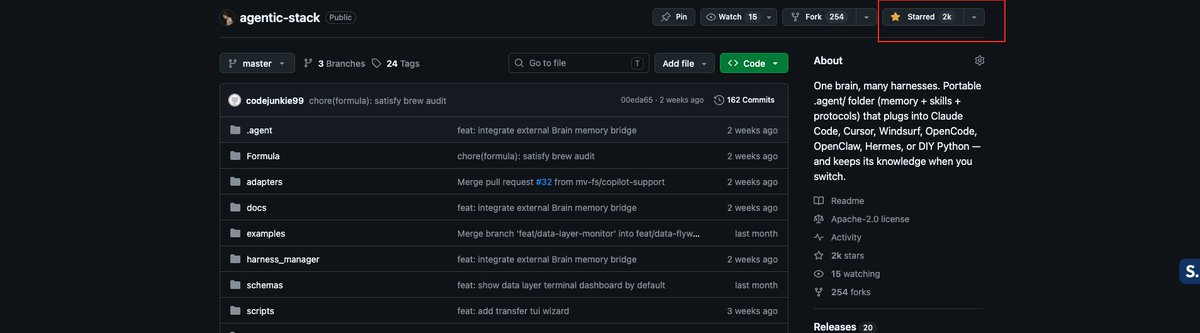
I've already shipped an MCP server and a GitHub repo which got 2,000 stars.
I'm in the process of also shipping an iOS mobile app.
In the end I've also given you workflow files. If you are building an MCP server, a SaaS web app, or an iOS mobile app or any mobile app, these are the skill files and workflows that you can use to make all of this in one single flow.
> **Avid@Av1dlive**: [原文链接](https://x.com/Av1dlive/status/2055337557140046242)
>
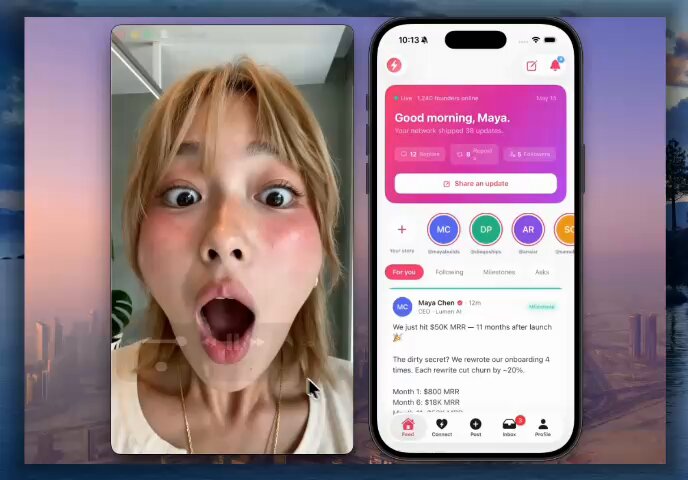
> Stop Swiping on Tinder Today
> I built Tinder for startup founders and it took me less than an hour
> Swipe on founders in your niches. Match. Get icebreakers. DM without cringe
> Apps like SuperappAI make building ios apps super easy
>
> 
# Introduction
Most people are using AI coding tools like smarter autocomplete.
That works for tiny tasks.
It breaks the moment the work becomes multi-step, stateful, or spread across frontend, backend, tests, docs, and release notes.
The real shift is not just using a better model.
The shift is wrapping the model in a repeatable system of instructions, tools, files, and verification so it can work like a reliable software operator instead of a chaotic chat session.
That system is the harness.
This article is a practical playbook for builders.
It shows how to set up a lightweight agent harness inside any repo, how to structure AGENTS.md, how to define reusable skill files, and how that setup should change depending on whether you are building a SaaS web app, a CLI tool, an MCP server, or a mobile app.
The goal is simple.
Turn vague “use agents” advice into a workflow that actually helps people ship products.
## Why most people use agents badly
The common failure mode is obvious.
A builder opens an AI coding tool, pastes a feature request, watches it edit twelve files, and then spends an hour cleaning up the mess.
The problem is usually not just the model.
The problem is that the agent was given no structure, no memory outside the prompt, no stopping conditions, and no real way to verify whether the result was actually correct.
That means the right question is no longer, “What prompt should I use?”
The right question is, “What environment should I build so the agent can work safely, incrementally, and verifiably?”
## What a harness actually is
A useful harness has five parts.
- A working directory the agent can read and modify.
- A durable set of instructions that lives in files, not only in chat history.
- A small library of reusable skills for recurring workflows.
- A verification layer made of tests, QA steps, and output artifacts.
- A stop-and-review loop so the human stays in control.
For builders, that is enough.
You do not need enterprise infrastructure.
You do not need custom orchestration servers.
You do not need a research lab budget.
You need a clean repo structure and clear operating rules.
Here is the minimum layout.
```
project/
.agent/ # Everything the agent uses to operate
AGENTS.md # Global rules, roles, guardrails, and stopping conditions
SKILLS/ # Reusable playbooks for recurring workflows
spec-to-plan/
SKILL.md # Turns a task or spec into an ordered implementation plan
implementation/
SKILL.md # Tells the agent how to execute approved work in small chunks
verification/
SKILL.md # Defines how to test, inspect, and validate the result
release/
SKILL.md # Prepares release notes, migration notes, and handoff docs
docs/ # Working memory shared between you and the agent
TASK.md # The original task, spec, or feature request
PLAN.md # The step-by-step plan generated before coding starts
QA.md # Verification notes, bugs found, screenshots, and test results
RELEASE.md # Final release summary, rollout notes, and upgrade guidance
tests/ # Your safety net; unit, integration, or fixture tests live here
CHANGELOG.md # Running log of meaningful changes across iterations
README.md # Human-facing setup, usage, and project context
```
This structure externalizes memory and procedure.
Instead of trying to keep everything in one giant prompt, the agent reads the right file at the right time and writes its outputs back into the repo.
That is the core idea.
## The core loop
Every product type in this article uses the same loop.
1. Write the task in docs/TASK.md.
2. Ask the agent to convert it into a plan in docs/PLAN.md.
3. Review and approve the plan.
4. Let the agent implement a small chunk.
5. Run verification.
6. Write a QA report.
7. Prepare release notes or next steps.
A good TASK.md is simple and concrete.
```
TASK
Add email and password login to the product.
Requirements:
- Keep existing OAuth login working.
- Add frontend form validation.
- Add backend auth endpoint.
- Add tests for successful and failed login.
- Do not change the billing flow.
```
The Planner converts that into a file-based plan.
The human edits the plan if needed.
Only after approval does the Implementer start writing code.
## The one file every repo should have
Every repo should have one base contract that defines how the agent works.
This file is the difference between random edits and predictable operations.
Paste this into .agent/AGENTS.md.
```
# AGENTS.md
## Mission
Turn product specs into working software through a repeatable loop:
spec -> plan -> implementation -> verification -> release prep.
## Global rules
- Never start coding before writing a plan to `docs/PLAN.md`.
- Never implement more than 3 plan steps before stopping for review.
- Always update `CHANGELOG.md` after meaningful work.
- Prefer existing patterns in the codebase over inventing new abstractions.
- If a task touches auth, payments, database migrations, production infra, or destructive actions, stop and ask for approval before proceeding.
- If uncertain, reduce scope rather than guessing.
- Keep outputs concise, structured, and file-based.
## Standard loop
1. Read `docs/TASK.md`
2. Write `docs/PLAN.md`
3. Wait for approval
4. Implement in small chunks
5. Run relevant verification
6. Write `docs/QA.md`
7. Summarize next actions
## Required artifacts
- `docs/PLAN.md`
- `docs/QA.md`
- `CHANGELOG.md`
## Roles
### Planner
Turns specs into implementation plans with risks, files touched, and acceptance criteria.
### Implementer
Executes approved plan steps, writes code, adds tests, and updates changelog.
### Verifier
Runs checks, reviews outputs, and writes QA notes.
### Release Assistant
Prepares release notes, setup docs, migration notes, and operational handoff.
## Stopping conditions
Stop and escalate when:
- tests fail repeatedly
- the same action loops twice
- required context is missing
- the task requires secrets or production credentials
```
This file gives the agent a durable operating contract.
It also gives the builder something more important.
A way to reason about the agent’s behaviour when things go wrong.
## One harness, four product types
The harness skeleton stays the same across products.
What changes is the meaning of implementation and verification.
This is the key idea.
The harness is not one magic prompt.
It is a repeatable operating model that adapts to the product surface.
## Skill files are the real workflow
A skill file is a small procedural document that tells the agent how to perform a recurring kind of work.
For builders, skill files do three things.
- They reduce repeated prompting.
- They standardize output structure.
- They let the same repo support multiple product workflows cleanly.
The rest of this article is a ready-to-copy skill library.
## SaaS web app starter pack
A SaaS web app harness needs to coordinate frontend, backend, tests, and UI verification.
It also needs stronger guardrails because features often cross auth, billing, data validation, and release surfaces.
Recommended skill folders:
```
.agent/SKILLS/
saas-spec-to-plan/
saas-implement-feature/
saas-browser-qa/
saas-regression-guard/
saas-release-notes/
```
.agent/SKILLS/saas-spec-to-plan/SKILL.md
```
name: saas-spec-to-plan
description: Turn a SaaS product request into an implementation plan covering frontend, backend, data, auth, and rollout risk.
triggers:
- "Plan this SaaS feature"
- "Break down this product spec"
- "Write implementation plan"
instructions:
1. Read `docs/TASK.md`.
2. Extract:
- user goal
- UI surface
- backend/API changes
- data model impact
- auth/permissions impact
- analytics/logging implications
3. Write `docs/PLAN.md` with:
- feature summary
- assumptions
- files likely affected
- ordered implementation steps
- risks and unknowns
- acceptance criteria
4. If auth, billing, or schema changes are involved, mark the plan as HIGH RISK.
5. Do not edit code.
```
.agent/SKILLS/saas-implement-feature/SKILL.md
```
name: saas-implement-feature
description: Implement an approved SaaS feature in small increments.
triggers:
- "Implement this SaaS feature"
- "Execute the approved plan"
instructions:
1. Read `docs/PLAN.md` and confirm approval.
2. Implement at most 3 steps per cycle.
3. For each step:
- update frontend and backend consistently
- preserve existing API contracts unless the plan says otherwise
- add or update tests
- add concise notes to `CHANGELOG.md`
4. After each cycle:
- run unit tests
- run integration tests if present
- summarize changed files and remaining work
5. Stop after the cycle and wait.
```
.agent/SKILLS/saas-browser-qa/SKILL.md
```
name: saas-browser-qa
description: Verify core SaaS UI flows in a browser.
triggers:
- "Check this in the browser"
- "Run SaaS QA"
- "Verify the UI flow"
instructions:
1. Start the app with the standard local command.
2. Open the relevant route in a browser.
3. Verify:
- page loads
- primary CTA works
- form validation works
- success state renders
- error state renders if possible
4. Inspect DOM and console for obvious issues.
5. Write results to `docs/QA.md`:
- tested route
- happy path result
- broken states
- console errors
- screenshots captured
```
.agent/SKILLS/saas-regression-guard/SKILL.md
```
name: saas-regression-guard
description: Expand tests around changed product areas to reduce regressions.
triggers:
- "Add regression coverage"
- "Guard this feature"
instructions:
1. Read recent entries in `CHANGELOG.md`.
2. Identify changed routes, handlers, and business rules.
3. Add focused tests for:
- previous happy path
- one invalid input
- one permission/auth case if relevant
4. Run the relevant test suites.
5. Append test summary to `docs/QA.md`.
```
.agent/SKILLS/saas-release-notes/SKILL.md
```
name: saas-release-notes
description: Prepare a clean product-facing and developer-facing release summary.
triggers:
- "Write release notes"
- "Prepare rollout notes"
instructions:
1. Read `CHANGELOG.md`, `docs/PLAN.md`, and `docs/QA.md`.
2. Write:
- user-facing release notes
- technical changes summary
- migration/setup notes
- rollback concerns
3. Save to `docs/RELEASE.md`.
```
## SaaS Example Run
A builder can now run a full feature loop like this.
1. Write a task in docs/TASK.md.
2. Prompt the Planner: “Use saas-spec-to-plan and write the implementation plan.”
3. Approve the plan manually.
4. Prompt the Implementer: “Use saas-implement-feature for the next 3 steps.”
5. Prompt the Verifier: “Use saas-browser-qa and then saas-regression-guard.”
6. Prompt the Release Assistant: “Use saas-release-notes.”
That is already a meaningful agent workflow.
It is file-based, reviewable, and reusable.
## CLI Tool Starter Pack
A CLI harness is different because the terminal is the product surface.
Good CLI agents need to think about commands, arguments, output formats, error messages, and exit codes, not browser flows.
Recommended skill folders:
```
.agent/SKILLS/
cli-spec-to-plan/
cli-command-implementer/
cli-fixture-validator/
cli-release-packager/
```
.agent/SKILLS/cli-spec-to-plan/SKILL.md
```
name: cli-spec-to-plan
description: Turn a CLI request into a command-oriented implementation plan.
triggers:
- "Plan this CLI feature"
- "Break down this command"
instructions:
1. Read `docs/TASK.md`.
2. Extract:
- command name
- input flags/options
- expected output
- exit codes
- error cases
- files/configs touched
3. Write `docs/PLAN.md` with:
- CLI contract
- example invocations
- step-by-step implementation
- test cases
4. Do not write code yet.
```
.agent/SKILLS/cli-command-implementer/SKILL.md
```
name: cli-command-implementer
description: Implement CLI commands with predictable UX and test coverage.
triggers:
- "Implement the CLI command"
- "Build this CLI feature"
instructions:
1. Read approved `docs/PLAN.md`.
2. Implement command behavior in small steps.
3. Ensure:
- help text exists
- invalid flags fail clearly
- stdout is reserved for intended output
- stderr is used for failures
- exit codes are meaningful
4. Add tests for:
- success case
- invalid input
- edge case
5. Update `CHANGELOG.md`.
```
.agent/SKILLS/cli-fixture-validator/SKILL.md
```
name: cli-fixture-validator
description: Validate CLI behavior using repeatable fixture inputs and output snapshots.
triggers:
- "Validate CLI behavior"
- "Run CLI QA"
instructions:
1. Create or use fixtures under `tests/fixtures/`.
2. Run the CLI against representative inputs.
3. Verify:
- output text
- structured output formatting if JSON
- error text
- exit status
4. Record findings in `docs/QA.md`.
```
.agent/SKILLS/cli-release-packager/SKILL.md
```
name: cli-release-packager
description: Prepare a CLI tool for shipping.
triggers:
- "Prepare CLI release"
- "Package this CLI"
instructions:
1. Ensure README usage examples are current.
2. Ensure `--help` text matches actual behavior.
3. Write install instructions, upgrade notes, and breaking changes to `docs/RELEASE.md`.
4. Include 3 copy-paste examples.
```
## CLI example prompt flow
- “Read docs/TASK.md and use cli-spec-to-plan.”
- “Implement the approved plan with cli-command-implementer.”
- “Run cli-fixture-validator and write the QA file.”
- “Run cli-release-packager and update docs.”
This section lands because it shows that agentic coding is not just for web apps.
The same harness pattern can drive a clean terminal product workflow.
## MCP server starter pack
MCP servers need an even stricter design discipline because the product is made of tools and schemas.
If the tool boundaries are vague, the whole system becomes hard to reason about.
Recommended skill folders:
```
.agent/SKILLS/
mcp-spec-to-plan/
mcp-tool-designer/
mcp-schema-validator/
mcp-example-client/
```
.agent/SKILLS/mcp-spec-to-plan/SKILL.md
```
name: mcp-spec-to-plan
description: Turn an MCP server idea into a tool-by-tool implementation plan.
triggers:
- "Plan this MCP server"
- "Break down these MCP tools"
instructions:
1. Read `docs/TASK.md`.
2. Extract:
- server purpose
- tools/resources/prompts to expose
- required auth
- external APIs/services
- failure modes
3. Write `docs/PLAN.md` with:
- server overview
- tool inventory
- input/output schema expectations
- transport/runtime decisions
- testing plan
4. Flag any missing auth or security assumptions.
```
.agent/SKILLS/mcp-tool-designer/SKILL.md
```
name: mcp-tool-designer
description: Implement MCP tools with strict boundaries and schemas.
triggers:
- "Implement MCP tools"
- "Build the MCP server"
instructions:
1. Read approved `docs/PLAN.md`.
2. For each tool:
- define a clear name
- define strict input schema
- define predictable output shape
- keep scope narrow
3. Avoid multi-purpose tools when two simpler tools would be clearer.
4. Add example payloads or fixtures for each tool.
5. Update `CHANGELOG.md`.
```
.agent/SKILLS/mcp-schema-validator/SKILL.md
```
name: mcp-schema-validator
description: Validate MCP tool schemas and behavior.
triggers:
- "Validate MCP schemas"
- "Test the MCP server"
instructions:
1. Check that each tool has:
- clear description
- required inputs
- sensible defaults
- explicit error responses
2. Run local calls or fixture-based invocations.
3. Verify schema compliance and output consistency.
4. Write findings to `docs/QA.md`.
```
.agent/SKILLS/mcp-example-client/SKILL.md
```
name: mcp-example-client
description: Produce copy-paste examples so users can actually use the MCP server.
triggers:
- "Write MCP usage examples"
- "Add client setup examples"
instructions:
1. Create a short setup section.
2. Add 3 example tool calls.
3. Add one failure-mode example.
4. Save to `docs/USAGE.md`.
```
## Why this matters
Most MCP content stays abstract.
A better builder article makes the point that schemas are part of product UX.
A narrow, well-described tool is better than a vague “do everything” tool because it is easier for both humans and agents to use correctly.
## Mobile app starter pack
A mobile harness is about screens, state transitions, navigation, and device behavior.
The challenge is not only whether the code compiles.
The challenge is whether the flow feels coherent across loading, success, error, permission, and retry states.
Recommended skill folders:
```
.agent/SKILLS/
mobile-spec-to-plan/
mobile-screen-implementer/
mobile-flow-qa/
mobile-state-guard/
.agent/SKILLS/mobile-spec-to-plan/SKILL.md
```
```
name: mobile-spec-to-plan
description: Turn a mobile product request into a screen-and-flow implementation plan.
triggers:
- "Plan this mobile feature"
- "Break down this app flow"
instructions:
1. Read `docs/TASK.md`.
2. Extract:
- target screens
- navigation changes
- state transitions
- permissions/device APIs involved
- loading/empty/error states
3. Write `docs/PLAN.md` with:
- screen inventory
- navigation flow
- component/state changes
- testing approach
4. Do not implement yet.
```
.agent/SKILLS/mobile-screen-implementer/SKILL.md
```
name: mobile-screen-implementer
description: Implement mobile app changes screen by screen.
triggers:
- "Implement mobile feature"
- "Build the mobile screens"
instructions:
1. Read approved `docs/PLAN.md`.
2. Implement one screen or flow segment at a time.
3. Ensure every screen includes:
- loading state
- empty state if relevant
- error state
4. Keep shared UI patterns consistent.
5. Add or update tests where possible.
6. Update `CHANGELOG.md`.
```
.agent/SKILLS/mobile-flow-qa/SKILL.md
```
name: mobile-flow-qa
description: Verify mobile flows with user-centric QA notes.
triggers:
- "Run mobile QA"
- "Verify the app flow"
instructions:
1. Launch the app or preview.
2. Walk the primary user path.
3. Verify:
- first screen clarity
- primary CTA visibility
- back navigation behavior
- keyboard/input behavior
- permission prompt behavior if relevant
4. Write findings to `docs/QA.md`.
```
.agent/SKILLS/mobile-state-guard/SKILL.md
```
name: mobile-state-guard
description: Protect mobile app quality by hardening states and transitions.
triggers:
- "Harden mobile states"
- "Check loading and error states"
instructions:
1. Read recent changes from `CHANGELOG.md`.
2. For impacted screens, verify:
- loading state exists
- empty state exists where needed
- error state is actionable
- navigation cannot dead-end the user
3. Add missing state handling.
4. Update `docs/QA.md`.
```
## The mobile lesson
Some products are not test-heavy in the same way as backend systems.
So the harness has to force state quality and flow quality explicitly.
## How to run this in practice
The article should not stop at file dumps.
Builders need to see how the loop feels in real use.
A minimal operator workflow looks like this.
Step 1: Write the task
Create docs/TASK.md and describe one real feature.
Step 2: Ask for a plan
Prompt:
```
Read `docs/TASK.md`. Use the correct planning skill for this project type. Write a detailed implementation plan to `docs/PLAN.md`. Do not edit code yet.
```
Step 3: Approve the plan
The human edits the plan, narrows scope if necessary, and marks it approved.
Step 4: Implement in chunks
Prompt:
```
Use the correct implementation skill. Execute the next 3 approved steps from `docs/PLAN.md`. Update tests and `CHANGELOG.md`. Stop after the chunk and summarize what changed.
```
Step 5: Verify
Prompt:
```
Use the relevant verification skill for this project type. Write results to `docs/QA.md`. Highlight broken states, regressions, or missing coverage.
```
Step 6: Prepare release notes
Prompt:
```
Use the release skill. Read the plan, QA notes, and changelog. Write release notes and rollout notes.
```
This gives the reader a copy-paste control loop they can actually use with any competent coding agent that can read and write files, run commands, and follow instructions.
## Why this works better than prompt-only workflows
Three things improve immediately.
First, the agent stops improvising its entire operating model on every task.
The repo now contains the operating model in durable files.
Second, the builder gets better observability.
Instead of wondering what happened, the builder can inspect TASK.md, PLAN.md, QA.md, RELEASE.md, and CHANGELOG.md to see exactly how the work progressed.
Third, the workflow becomes transferable.
Once the harness exists, it can be copied from one repo to another, extended with new skills, and adapted for different product categories without rethinking the whole system each time.
## What to tell readers to do this week
The easiest way to get adoption is to give builders a short setup path.
- Pick one real project.
- Add the .agent/ folder and AGENTS.md.
- Add the skill files for the relevant product type.
- Create docs/TASK.md, docs/PLAN.md, and docs/QA.md.
- Run one real feature through the loop.
- Keep the feature small enough to finish in one sitting.
- Compare the result to the usual chat-based workflow.
## Final point
The future of builder workflows is probably not one giant autonomous agent that does everything perfectly.
It is more likely a compact harness where humans steer, agents execute, and the repo itself becomes the control plane.
That is good news for builders.
A useful agent workflow does not start with a new foundation model.
It starts with a folder, a few Markdown files, a clean loop, and the discipline to make the system repeatable.
## 相关链接
- [Avid](https://x.com/Av1dlive)
- [@Av1dlive](https://x.com/Av1dlive)
- [21K](https://x.com/Av1dlive/status/2058951175236727025/analytics)
- [May 16](https://x.com/Av1dlive/status/2055337557140046242)
- [Paid partnership](https://help.x.com/rules-and-policies/paid-partnerships-policy)
- [1.9K](https://x.com/Av1dlive/status/2055337557140046242/analytics)
- [Upgrade to Premium](https://x.com/i/premium_sign_up)
- [12:39 AM · May 26, 2026](https://x.com/Av1dlive/status/2058951175236727025)
- [21.3K Views](https://x.com/Av1dlive/status/2058951175236727025/analytics)
- [View quotes](https://x.com/Av1dlive/status/2058951175236727025/quotes)
---
*导出时间: 2026/5/26 12:26:00*
---
## 中文翻译
# 如何在 2026 年用 AI 交付你的第一个产品(构建者指南)
**作者**: Avid
**日期**: 2026-05-15T17:20:34.000Z
**来源**: [https://x.com/Av1dlive/status/2058951175236727025](https://x.com/Av1dlive/status/2058951175236727025)
---

AI 每周都在造就百万富翁。
今年我也在用 AI 交付产品。
这是我学到的东西,以及你如何入门的方法
## 为什么这很重要
我目前正在交付一个 SaaS 平台。
我已经交付了一个 MCP 服务器和一个获得了 2,000 星标的 GitHub 仓库。
我还正在交付一款 iOS 移动应用。
最后,我还给你提供了工作流文件。如果你正在构建 MCP 服务器、SaaS Web 应用、iOS 移动应用或任何移动应用,这些技能文件和工作流可以让你在同一个流程中完成所有这些工作。

> **Avid@Av1dlive**: [原文链接](https://x.com/Av1dlive/status/2055337557140046242)
>
> 今天就别再刷 Tinder 了
> 我为初创公司创始人做了一个 Tinder,用时不到一小时
> 在你所在领域的创始人之间滑动匹配。配对。获取破冰话题。不尴尬地私信
> 像 SuperappAI 这样的应用让构建 iOS 应用变得超级简单
>
> 
# 简介
大多数人把 AI 编程工具当作更聪明的自动补全来用。
这对微小的任务有效。
但一旦工作变成多步骤、有状态,或者横跨前端、后端、测试、文档和发布说明,这种方式就会崩溃。
真正的转变不仅仅是使用更好的模型。
真正的转变是把模型包裹在一个可重复的系统中——包括指令、工具、文件和验证——让它像一个可靠的软件操作员那样工作,而不是一场混乱的聊天会话。
这个系统就是“工具链”(harness)。
本文是一份面向构建者的实用指南。
它展示了如何在任何仓库中搭建一个轻量级的智能体工具链,如何组织 AGENTS.md,如何定义可复用的技能文件,以及这套设置应如何根据你构建的是 SaaS Web 应用、CLI 工具、MCP 服务器还是移动应用而变化。
目标很简单。
把模糊的“使用智能体”的建议,变成一个真正能帮助人们交付产品的工作流。
## 为什么大多数人用不好智能体
常见的失败模式显而易见。
构建者打开一个 AI 编程工具,粘贴一个功能需求,看着它修改了十二个文件,然后花一个小时清理烂摊子。
问题通常不仅仅在于模型。
问题在于智能体没有得到任何结构,除了提示词之外没有记忆,没有停止条件,也没有真正的方法来验证结果是否正确。
这意味着正确的问题不再是:“我该用什么提示词?”
正确的问题是:“我应该构建什么样的环境,让智能体能够安全地、增量地、可验证地工作?”
## 工具链究竟是什么
一个有用的工具链包含五个部分。
- 一个智能体可以读取和修改的工作目录。
- 一组持久化的指令,存放在文件中,而不仅仅是聊天记录里。
- 一个小型可复用技能库,用于重复性的工作流。
- 一个验证层,由测试、QA 步骤和输出产物组成。
- 一个停止与审查的循环,让人保持掌控。
对于构建者来说,这就够了。
你不需要企业级基础设施。
你不需要自定义编排服务器。
你不需要研究实验室级别的预算。
你只需要一个干净的仓库结构和清晰的运行规则。
以下是最小化的目录布局。
```
project/
.agent/ # 智能体运行所需的一切
AGENTS.md # 全局规则、角色、护栏和停止条件
SKILLS/ # 用于重复性工作流的可复用操作手册
spec-to-plan/
SKILL.md # 将任务或规格转化为有序的实施计划
implementation/
SKILL.md # 告诉智能体如何分小块执行已批准的工作
verification/
SKILL.md # 定义如何测试、检查和验证结果
release/
SKILL.md # 准备发布说明、迁移说明和交接文档
docs/ # 你和智能体之间共享的工作记忆
TASK.md # 原始任务、规格或功能需求
PLAN.md # 编码开始前生成的分步计划
QA.md # 验证笔记、发现的 bug、截图和测试结果
RELEASE.md # 最终发布摘要、上线说明和升级指引
tests/ # 你的安全网;单元测试、集成测试或夹具测试放在这里
CHANGELOG.md # 跨迭代的有意义变更的持续记录
README.md # 面向人类的安装、使用说明和项目背景
```
这种结构将记忆和流程外化。
智能体不再试图把所有内容塞进一个巨大的提示词里,而是在正确的时间读取正确的文件,并把输出写回仓库。
这就是核心理念。
## 核心循环
本文中的每种产品类型都使用同一个循环。
1. 在 docs/TASK.md 中写下任务。
2. 让智能体把它转化为 docs/PLAN.md 中的计划。
3. 审查并批准该计划。
4. 让智能体实现一小块。
5. 运行验证。
6. 撰写 QA 报告。
7. 准备发布说明或下一步计划。
一份好的 TASK.md 简洁而具体。
```
TASK
为产品添加邮箱和密码登录。
要求:
- 保持现有的 OAuth 登录正常工作。
- 添加前端表单验证。
- 添加后端认证接口。
- 为登录成功和失败添加测试。
- 不要改动计费流程。
```
规划者(Planner)将其转化为基于文件的计划。
人类在需要时修改计划。
只有在获得批准后,实现者(Implementer)才开始编写代码。
## 每个仓库都应该有的一个文件
每个仓库都应该有一份基础契约,定义智能体的工作方式。
这个文件就是随机改动与可预测操作之间的区别。
将其粘贴到 `.agent/AGENTS.md` 中。
```
# AGENTS.md
## Mission
通过可重复的循环将产品规格转化为可运行的软件:
spec -> plan -> implementation -> verification -> release prep。
## Global rules
- 在将计划写入 `docs/PLAN.md` 之前,绝不开始编码。
- 在停下进行审查之前,实现的计划步骤绝不超过 3 步。
- 每次有意义的工作之后,始终更新 `CHANGELOG.md`。
- 优先使用代码库中已有的模式,而不是发明新的抽象。
- 如果任务涉及认证、支付、数据库迁移、生产基础设施或破坏性操作,先停下并请求批准后再继续。
- 如果不确定,宁可缩小范围,也不要猜测。
- 保持输出简洁、结构化,并以文件为基础。
## Standard loop
1. 阅读 `docs/TASK.md`
2. 编写 `docs/PLAN.md`
3. 等待批准
4. 以小块方式实现
5. 运行相关验证
6. 编写 `docs/QA.md`
7. 总结下一步行动
## Required artifacts
- `docs/PLAN.md`
- `docs/QA.md`
- `CHANGELOG.md`
## Roles
### Planner
将规格转化为实施计划,包括风险、涉及的文件和验收标准。
### Implementer
执行已批准的计划步骤,编写代码,添加测试,并更新变更日志。
### Verifier
运行检查,审查输出,并撰写 QA 笔记。
### Release Assistant
准备发布说明、设置文档、迁移说明和运维交接材料。
## Stopping conditions
出现以下情况时停下并上报:
- 测试反复失败
- 同一操作循环出现两次
- 所需的上下文缺失
- 任务需要密钥或生产凭据
```
这个文件给了智能体一份持久的行为契约。
它还给构建者提供了更重要的东西。
一种在出现问题时对智能体行为进行推理的方法。
## 一套骨架,四种产品类型
不同产品使用的骨架保持一致。
变化的是实现与验证的含义。
这就是关键思想。
这个骨架不是一段神奇的提示词。
它是一个可重复、并能适应不同产品形态的运行模型。
## 技能文件才是真正的工作流
技能文件是一个小型程序化文档,告诉智能体如何执行某种经常出现的工作。
对构建者来说,技能文件有三点作用。
- 减少重复的提示。
- 标准化输出结构。
- 让同一个仓库能够干净地支持多种产品工作流。
本文其余部分是一套可直接复制的技能库。
## SaaS Web 应用入门包
一个 SaaS Web 应用骨架需要协调前端、后端、测试和 UI 验证。
它还需要更强的防护栏,因为功能常常跨越认证、计费、数据校验和发布等多个层面。
推荐的技能文件夹:
```
.agent/SKILLS/
saas-spec-to-plan/
saas-implement-feature/
saas-browser-qa/
saas-regression-guard/
saas-release-notes/
```
.agent/SKILLS/saas-spec-to-plan/SKILL.md
```
name: saas-spec-to-plan
description: 将 SaaS 产品需求转化为覆盖前端、后端、数据、认证和上线风险的实施计划。
triggers:
- "Plan this SaaS feature"
- "Break down this product spec"
- "Write implementation plan"
instructions:
1. 阅读 `docs/TASK.md`。
2. 提取:
- 用户目标
- UI 层面
- 后端/API 变更
- 数据模型影响
- 认证/权限影响
- 分析/日志相关影响
3. 编写 `docs/PLAN.md`,包含:
- 功能摘要
- 假设条件
- 可能受影响的文件
- 有序的实现步骤
- 风险与未知项
- 验收标准
4. 如果涉及认证、计费或数据库结构变更,将计划标记为 HIGH RISK。
5. 不要修改代码。
```
.agent/SKILLS/saas-implement-feature/SKILL.md
```
name: saas-implement-feature
description: 以小步增量实现已批准的 SaaS 功能。
triggers:
- "Implement this SaaS feature"
- "Execute the approved plan"
instructions:
1. 阅读 `docs/PLAN.md` 并确认已获批准。
2. 每个周期最多实现 3 个步骤。
3. 对每个步骤:
- 保持前端和后端的一致更新
- 除非计划中另有说明,保持现有 API 契约不变
- 添加或更新测试
- 在 `CHANGELOG.md` 中添加简洁说明
4. 每个周期结束后:
- 运行单元测试
- 如有集成测试,运行集成测试
- 总结已更改的文件和剩余工作
5. 周期结束后停下并等待。
```
.agent/SKILLS/saas-browser-qa/SKILL.md
```
name: saas-browser-qa
description: 在浏览器中验证核心 SaaS UI 流程。
triggers:
- "Check this in the browser"
- "Run SaaS QA"
- "Verify the UI flow"
instructions:
1. 使用标准的本地命令启动应用。
2. 在浏览器中打开相关路由。
3. 验证:
- 页面可加载
- 主 CTA 正常工作
- 表单校验正常工作
- 成功状态正常渲染
- 尽可能验证错误状态是否正常渲染
4. 检查 DOM 和控制台是否有明显问题。
5. 将结果写入 `docs/QA.md`:
- 测试的路由
- 正常路径的结果
- 异常状态
- 控制台错误
- 已捕获的截图
```
.agent/SKILLS/saas-regression-guard/SKILL.md
```
name: saas-regression-guard
description: 围绕发生变更的产品区域扩展测试,以减少回归。
triggers:
- "Add regression coverage"
- "Guard this feature"
instructions:
1. 阅读 `CHANGELOG.md` 中最近的条目。
2. 识别变更的路由、处理函数和业务规则。
3. 针对以下内容添加有针对性的测试:
- 原有的正常路径
- 一个无效输入
- 一个权限/认证用例(如相关)
4. 运行相关的测试套件。
5. 将测试摘要附加到 `docs/QA.md`。
```
.agent/SKILLS/saas-release-notes/SKILL.md
```
name: saas-release-notes
description: 准备一份面向产品和面向开发者的清晰发布摘要。
triggers:
- "Write release notes"
- "Prepare rollout notes"
```
instructions:
1. 阅读 `CHANGELOG.md`、`docs/PLAN.md` 和 `docs/QA.md`。
2. 编写:
- 面向用户的发布说明
- 技术变更摘要
- 迁移/安装说明
- 回滚注意事项
3. 保存至 `docs/RELEASE.md`。
```
## SaaS 示例运行
构建者现在可以像这样运行一个完整的功能循环。
1. 在 docs/TASK.md 中写一个任务。
2. 提示规划者:"使用 saas-spec-to-plan 并编写实施计划。"
3. 手动批准该计划。
4. 提示实现者:"使用 saas-implement-feature 执行接下来的 3 个步骤。"
5. 提示验证者:"使用 saas-browser-qa,然后使用 saas-regression-guard。"
6. 提示发布助手:"使用 saas-release-notes。"
这已经是一个有意义的智能体工作流了。
它基于文件、可审查且可复用。
## CLI 工具入门包
CLI 工具集有所不同,因为终端就是产品界面。
优秀的 CLI 智能体需要考虑命令、参数、输出格式、错误消息和退出代码,而不是浏览器流程。
推荐的技能文件夹:
```
.agent/SKILLS/
cli-spec-to-plan/
cli-command-implementer/
cli-fixture-validator/
cli-release-packager/
```
.agent/SKILLS/cli-spec-to-plan/SKILL.md
```
name: cli-spec-to-plan
description: 将 CLI 需求转化为面向命令的实施计划。
triggers:
- "Plan this CLI feature"
- "Break down this command"
instructions:
1. 阅读 `docs/TASK.md`。
2. 提取:
- 命令名称
- 输入标志/选项
- 预期输出
- 退出代码
- 错误情况
- 涉及的文件/配置
3. 编写 `docs/PLAN.md`,包含:
- CLI 契约
- 示例调用
- 分步实施
- 测试用例
4. 暂不编写代码。
```
.agent/SKILLS/cli-command-implementer/SKILL.md
```
name: cli-command-implementer
description: 实现具有可预期用户体验和测试覆盖的 CLI 命令。
triggers:
- "Implement the CLI command"
- "Build this CLI feature"
instructions:
1. 阅读已批准的 `docs/PLAN.md`。
2. 以小步骤实现命令行为。
3. 确保:
- 存在帮助文本
- 无效标志能清晰地报错
- stdout 仅用于预期输出
- stderr 用于失败信息
- 退出代码有意义
4. 为以下情况添加测试:
- 成功用例
- 无效输入
- 边缘用例
5. 更新 `CHANGELOG.md`。
```
.agent/SKILLS/cli-fixture-validator/SKILL.md
```
name: cli-fixture-validator
description: 使用可重复的固定输入和输出快照验证 CLI 行为。
triggers:
- "Validate CLI behavior"
- "Run CLI QA"
instructions:
1. 在 `tests/fixtures/` 下创建或使用固定数据。
2. 使用代表性输入运行 CLI。
3. 验证:
- 输出文本
- 如果是 JSON,验证结构化输出格式
- 错误文本
- 退出状态
4. 将结果记录在 `docs/QA.md` 中。
```
.agent/SKILLS/cli-release-packager/SKILL.md
```
name: cli-release-packager
description: 为 CLI 工具的发布做准备。
triggers:
- "Prepare CLI release"
- "Package this CLI"
instructions:
1. 确保 README 中的用法示例是最新的。
2. 确保 `--help` 文本与实际行为一致。
3. 将安装说明、升级说明和破坏性变更写入 `docs/RELEASE.md`。
4. 包含 3 个可复制粘贴的示例。
```
## CLI 示例提示流程
- "阅读 docs/TASK.md 并使用 cli-spec-to-plan。"
- "使用 cli-command-implementer 实现已批准的计划。"
- "运行 cli-fixture-validator 并编写 QA 文件。"
- "运行 cli-release-packager 并更新文档。"
这一节之所以有价值,是因为它表明智能体编程不仅仅适用于 Web 应用。
同样的工具集模式也可以驱动一个整洁的终端产品工作流。
## MCP 服务器入门包
MCP 服务器需要更严格的设计规范,因为产品是由工具和模式(schema)构成的。
如果工具边界模糊不清,整个系统就会变得难以推理。
推荐的技能文件夹:
```
.agent/SKILLS/
mcp-spec-to-plan/
mcp-tool-designer/
mcp-schema-validator/
mcp-example-client/
```
.agent/SKILLS/mcp-spec-to-plan/SKILL.md
```
name: mcp-spec-to-plan
description: 将 MCP 服务器的想法转化为逐工具的实施计划。
triggers:
- "Plan this MCP server"
- "Break down these MCP tools"
instructions:
1. 阅读 `docs/TASK.md`。
2. 提取:
- 服务器目的
- 要暴露的工具/资源/提示
- 所需的身份验证
- 外部 API/服务
- 失败模式
3. 编写 `docs/PLAN.md`,包含:
- 服务器概述
- 工具清单
- 输入/输出 schema 预期
- 传输/运行时决策
- 测试计划
4. 标记任何缺失的身份验证或安全假设。
```
.agent/SKILLS/mcp-tool-designer/SKILL.md
```
name: mcp-tool-designer
description: 以严格的边界和 schema 实现 MCP 工具。
triggers:
- "Implement MCP tools"
- "Build the MCP server"
instructions:
1. 阅读已批准的 `docs/PLAN.md`。
2. 对于每个工具:
- 定义清晰的名称
- 定义严格的输入 schema
- 定义可预期的输出形状
- 保持范围狭窄
3. 当两个更简单的工具会更清晰时,避免使用多用途工具。
4. 为每个工具添加示例载荷或固定数据。
5. 更新 `CHANGELOG.md`。
```
.agent/SKILLS/mcp-schema-validator/SKILL.md
```
name: mcp-schema-validator
description: 验证 MCP 工具的 schema 和行为。
triggers:
- "Validate MCP schemas"
- "Test the MCP server"
instructions:
1. 检查每个工具是否具备:
- 清晰的描述
- 必需的输入
- 合理的默认值
- 明确的错误响应
2. 运行本地调用或基于固定数据的调用。
3. 验证 schema 合规性和输出一致性。
4. 将结果写入 `docs/QA.md`。
```
.agent/SKILLS/mcp-example-client/SKILL.md
```
name: mcp-example-client
description: 生成可复制粘贴的示例,让用户能够真正使用该 MCP 服务器。
triggers:
- "Write MCP usage examples"
- "Add client setup examples"
```
instructions:
1. 创建一个简短的 setup 部分。
2. 添加 3 个示例工具调用。
3. 添加一个失败模式示例。
4. 保存到 `docs/USAGE.md`。
```
## 为什么这很重要
大多数 MCP 相关内容都停留在抽象层面。
一篇更好的构建者文章应该指出:schema 是产品用户体验的一部分。
一个范围狭窄、描述清晰的工具,比一个模糊的“什么都做”的工具更好,因为无论是对人类还是智能体来说,它都更容易被正确使用。
## 移动应用入门包
移动端测试框架关注的是屏幕、状态转换、导航和设备行为。
挑战不仅仅在于代码能否编译通过。
挑战在于整个流程在加载、成功、错误、权限和重试等各种状态下是否连贯一致。
推荐的技能文件夹:
```
.agent/SKILLS/
mobile-spec-to-plan/
mobile-screen-implementer/
mobile-flow-qa/
mobile-state-guard/
.agent/SKILLS/mobile-spec-to-plan/SKILL.md
```
```
name: mobile-spec-to-plan
description: 将移动端产品需求转化为屏幕与流程的实现计划。
triggers:
- "Plan this mobile feature"
- "Break down this app flow"
instructions:
1. 阅读 `docs/TASK.md`。
2. 提取:
- 目标屏幕
- 导航变更
- 状态转换
- 涉及的权限/设备 API
- 加载/空/错误状态
3. 编写 `docs/PLAN.md`,包含:
- 屏幕清单
- 导航流程
- 组件/状态变更
- 测试方案
4. 暂不进行实现。
```
.agent/SKILLS/mobile-screen-implementer/SKILL.md
```
name: mobile-screen-implementer
description: 逐个屏幕地实现移动应用的变更。
triggers:
- "Implement mobile feature"
- "Build the mobile screens"
instructions:
1. 阅读已批准的 `docs/PLAN.md`。
2. 每次实现一个屏幕或一段流程。
3. 确保每个屏幕都包含:
- 加载状态
- 相关时的空状态
- 错误状态
4. 保持共享 UI 模式的一致性。
5. 尽可能添加或更新测试。
6. 更新 `CHANGELOG.md`。
```
.agent/SKILLS/mobile-flow-qa/SKILL.md
```
name: mobile-flow-qa
description: 以用户为中心的 QA 记录来验证移动端流程。
triggers:
- "Run mobile QA"
- "Verify the app flow"
instructions:
1. 启动应用或预览。
2. 走一遍主要的用户路径。
3. 验证:
- 首屏是否清晰
- 主要 CTA 是否可见
- 返回导航行为
- 键盘/输入行为
- 相关时的权限弹窗行为
4. 将发现的问题写入 `docs/QA.md`。
```
.agent/SKILLS/mobile-state-guard/SKILL.md
```
name: mobile-state-guard
description: 通过加固状态与状态转换来保护移动应用质量。
triggers:
- "Harden mobile states"
- "Check loading and error states"
instructions:
1. 从 `CHANGELOG.md` 读取最近的变更。
2. 对受影响的屏幕,验证:
- 是否存在加载状态
- 需要时是否存在空状态
- 错误状态是否可操作
- 导航不会让用户陷入死胡同
3. 补充缺失的状态处理。
4. 更新 `docs/QA.md`。
```
## 移动端的启示
有些产品不像后端系统那样适合重度测试。
因此,测试框架必须显式地强制保证状态质量和流程质量。
## 如何在实践中运行
文章不应停留在堆砌文件上。
构建者需要看到这个循环在实际使用中的感受。
一个最简的操作者工作流如下。
第 1 步:编写任务
创建 docs/TASK.md,描述一个真实的功能。
第 2 步:请求制定计划
提示词:
```
Read `docs/TASK.md`. Use the correct planning skill for this project type. Write a detailed implementation plan to `docs/PLAN.md`. Do not edit code yet.
```
第 3 步:批准计划
由人来编辑计划,必要时缩小范围,并将其标记为已批准。
第 4 步:分块实现
提示词:
```
Use the correct implementation skill. Execute the next 3 approved steps from `docs/PLAN.md`. Update tests and `CHANGELOG.md`. Stop after the chunk and summarize what changed.
```
第 5 步:验证
提示词:
```
Use the relevant verification skill for this project type. Write results to `docs/QA.md`. Highlight broken states, regressions, or missing coverage.
```
第 6 步:准备发布说明
提示词:
```
Use the release skill. Read the plan, QA notes, and changelog. Write release notes and rollout notes.
```
这为读者提供了一个可复制粘贴的控制循环,他们可以在任何有能力的编码智能体上实际使用,只要该智能体能够读写文件、运行命令并遵循指令。
## 为什么这比仅靠提示词的工作流效果更好
有三点会立即得到改善。
首先,智能体不再需要为每个任务即兴发挥出一整套操作模型。
仓库现在将操作模型保存在持久化的文件中。
其次,构建者获得了更好的可观测性。
构建者不必猜测发生了什么,而是可以查看 TASK.md、PLAN.md、QA.md、RELEASE.md 和 CHANGELOG.md,确切地了解工作是如何推进的。
第三,整个工作流变得可迁移。
一旦测试框架建立起来,就可以从一个仓库复制到另一个仓库,通过新技能进行扩展,并适配不同的产品类别,而无需每次都重新思考整个系统。
## 本周可以告诉读者去做什么
推广的最简单方式,就是为构建者提供一条简短的搭建路径。
- 选择一个真实项目。
- 添加 .agent/ 文件夹和 AGENTS.md。
- 添加对应产品类型的技能文件。
- 创建 docs/TASK.md、docs/PLAN.md 和 docs/QA.md。
- 让一个真实功能跑完整个循环。
- 保持功能足够小,能一次性完成。
- 将结果与通常基于聊天的工作流进行比较。
## 最后一点
构建者工作流的未来,很可能不是一个完美完成所有事情的巨型自主智能体。
更可能的是一个紧凑的测试框架:人来掌舵,智能体执行,而仓库本身成为控制平面。
这对构建者来说是个好消息。
一个有用的智能体工作流,并不是从新的基础模型开始的。
一切从一个文件夹、几个 Markdown 文件、一个简洁的循环,以及让系统可重复的纪律开始。
## 相关链接
- [Avid](https://x.com/Av1dlive)
- [@Av1dlive](https://x.com/Av1dlive)
- [21K](https://x.com/Av1dlive/status/2058951175236727025/analytics)
- [May 16](https://x.com/Av1dlive/status/2055337557140046242)
- [付费合作](https://help.x.com/rules-and-policies/paid-partnerships-policy)
- [1.9K](https://x.com/Av1dlive/status/2055337557140046242/analytics)
- [升级到 Premium](https://x.com/i/premium_sign_up)
- [12:39 AM · 2026年5月26日](https://x.com/Av1dlive/status/2058951175236727025)
- [21.3K 次浏览](https://x.com/Av1dlive/status/2058951175236727025/analytics)
- [查看引用](https://x.com/Av1dlive/status/2058951175236727025/quotes)
---
*导出时间: 2026/5/26 12:26:00*