Hermes Agent 进阶指南:从架构原理到构建自进化的多智能体系统 Akshay 2026-05-28 56.5 KB 5.8M 6.5K ☆ 收藏 𝕏 文章列表 本文深入介绍了 Nous Research 开源项目 Hermes Agent。文章详细解析了其独特的“学习闭环”架构,该架构结合了三层持久化内存、自进化技能系统以及 GEPA 优化引擎,解决了传统 Agent 随会话结束而遗忘的问题。文中还将 Hermes 与 OpenClaw 进行了对比,并提供了从零开始配置多个个性化 Agent(程序员、研究员、设计师)的实战教程,旨在帮助开发者打造能够 24/7 运行且持续学习的个人 AI 队伍。 AgentHermes自进化LLM开发者工具系统架构教程Nous ResearchGEPA多智能体 88 强烈推荐 ▶ 文章详细解析了Hermes Agent的底层架构、三层记忆机制和自定义指南,发布时间极近,内容兼具理论深度与极强的落地实操性。 # Hermes Agent Masterclass **作者**: Akshay **日期**: 2026-04-30T18:17:40.000Z **来源**: [https://x.com/akshay_pachaar/status/2054564519280804028](https://x.com/akshay_pachaar/status/2054564519280804028) --- 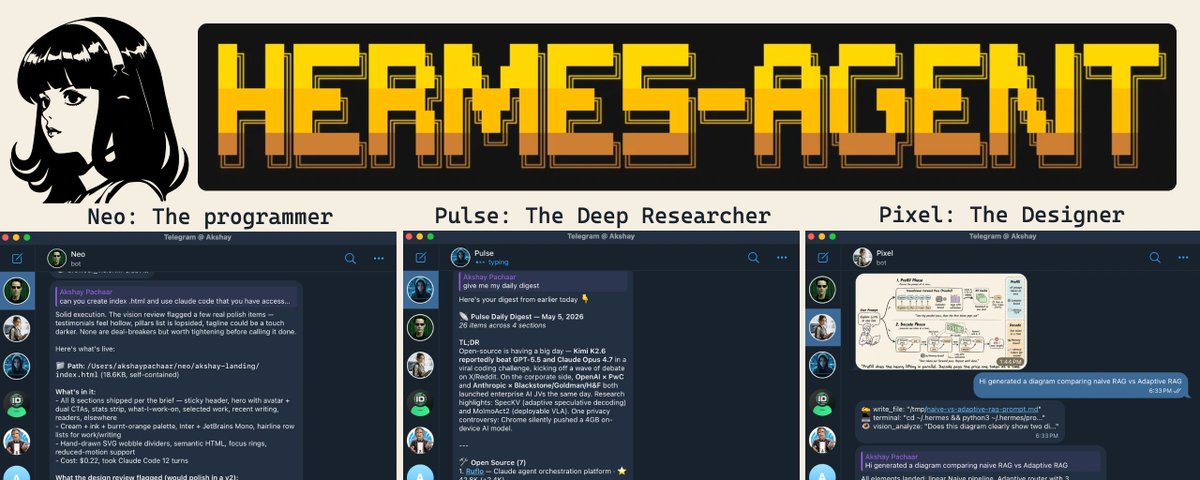 Everything you need to understand and customize Hermes Agent. Self-evolving skills, three-tier memory, GEPA optimization, and going from 1 to 10 agents that work for you 24/7. Hermes Agent crossed 90,000 GitHub stars in two months. Developers are quietly building personal AI agents that learn their workflow, remember their context, and run 24/7. 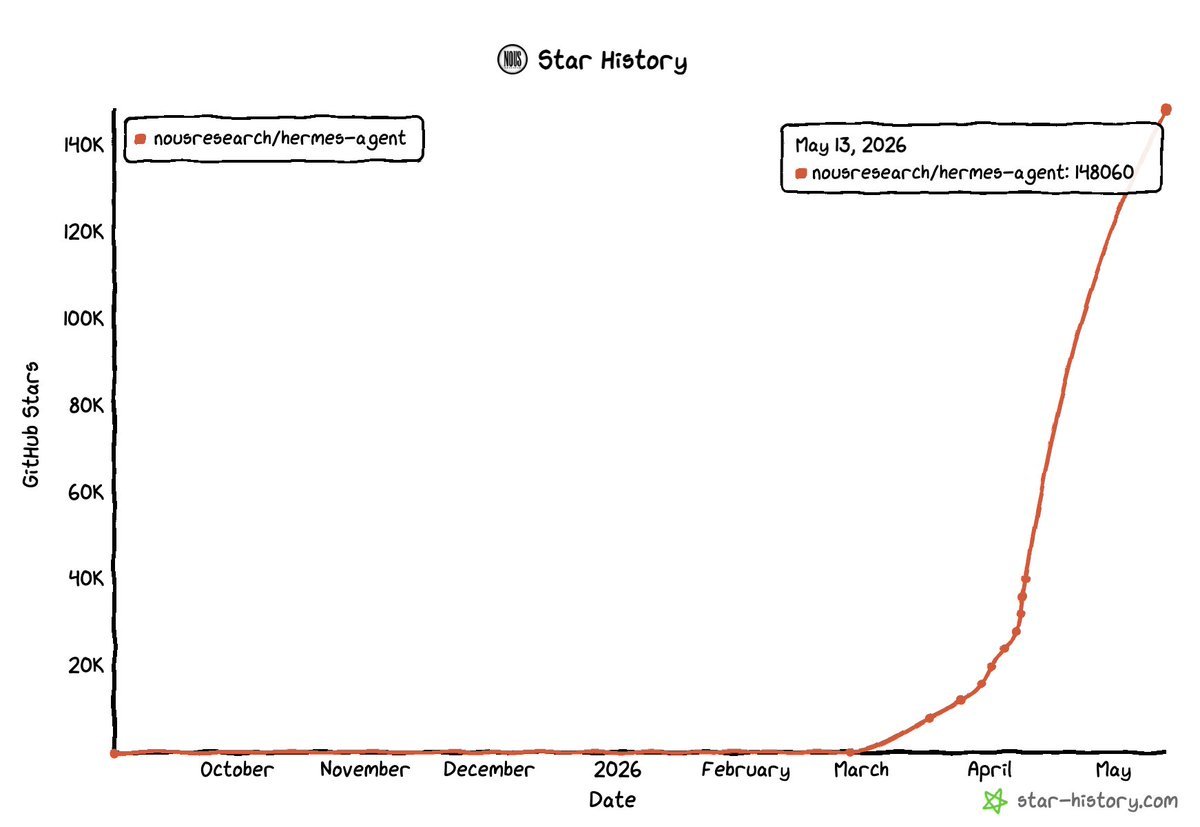 Star history tracker Every AI agent you've used has the same problem: it forgets everything the moment your session ends. Your coding preferences, the project conventions you corrected it on three times, the fix it spent 10 minutes figuring out yesterday. All gone. Next session, you start from scratch. Hermes Agent by Nous Research takes a fundamentally different approach. It ships with a learning loop that: - Remembers across sessions - Writes its own reusable skills - Prunes them in the background - And validates them offline through an evolutionary engine called GEPA No other open-source agent combines all three. Not even OpenClaw. This guide covers how this learning loop works, what each memory layer does, and how to configure everything from scratch. By the end, you'll have three fully isolated agents running on your machine: a programmer (who uses your Claude code), a deep researcher, and a designer, each with its own personality, memory, skills, and Telegram bot. Check this out: 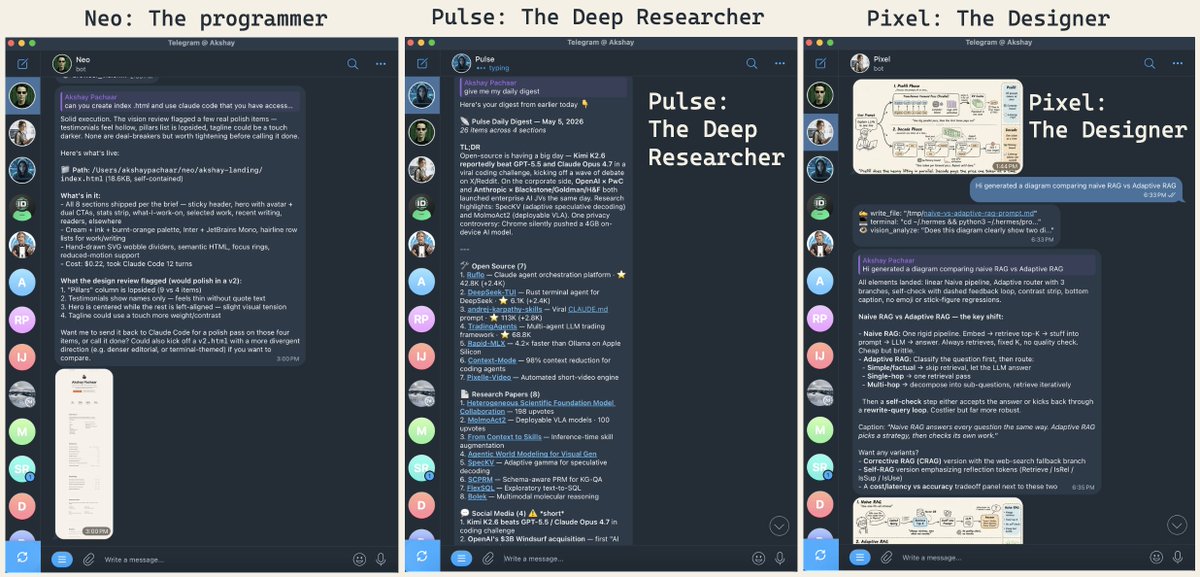 The three agents in Telegram The whole setup takes minutes and everything here is reproducible on your own hardware. > Note: All the illustrations in this guide were designed by Pixel, one of the Hermes agents you'll learn to build by the end. Watch for them as you read. Let's get started! # How to Read This Two halves: theory first, hands-on second. Short on time? Skip to Getting Up and Running. The commands work standalone. But the theory pays off. Knowing how skills self-evolve, how memory composes, and when GEPA earns its keep is the difference between using Hermes as a chatbot with notes and using it as something that compounds. What's ahead: - What Hermes Agent Actually Is. The pitch, plus a comparison with OpenClaw. - How It's Built. Architecture in one diagram. - Before Memory: Who Is the Agent? SOUL.md, the identity layer. - The Memory System. Three tiers, three speeds. - Self-Evolving Skills. Agent-authored playbooks plus the Curator. - GEPA. Offline skill optimization. - Getting Up and Running. Install, Telegram, first agent. - Running Multiple Agents. Profiles, three personas, scheduled digests. - Customising the agents as per your needs. # What Hermes is, and what makes it architecturally different The one-line pitch: an agent that gets better the longer you use it. What makes that real is that three usually separate capabilities sit in one framework: runtime skill learning, persistent multi-layer memory, and an optional weight-training pipeline. No other open-source agent ships all three. The closest comparison in the open ecosystem is OpenClaw. Both are persistent, messaging-friendly, but they make opposite architectural choices. A clean framing from the Kilo blog captures it: "Hermes packages a gateway around a learning agent. OpenClaw packages an agent around a messaging gateway." 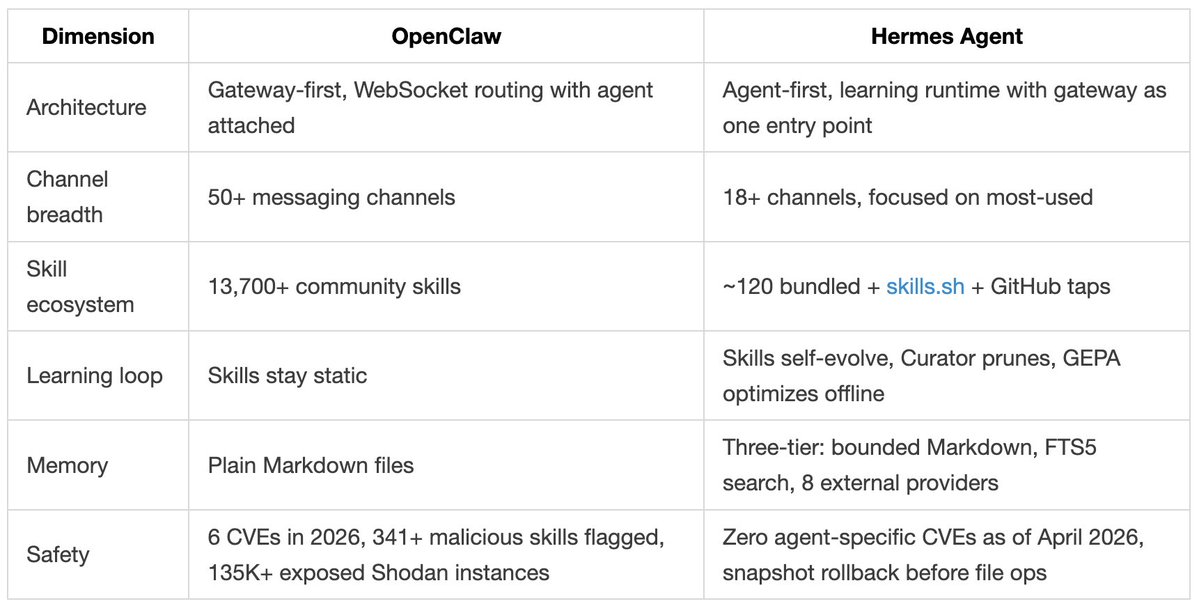 OpenClaw vs. Hermes # How It's Built Before the learning loop makes sense, you need a basic picture of how Hermes is structured. Everything flows through a single AIAgent class in a run_agent.py script. CLI, messaging gateway, batch runner, IDE integration: they're all entry points into the same core agent. This is what makes the platform-agnostic story actually work. 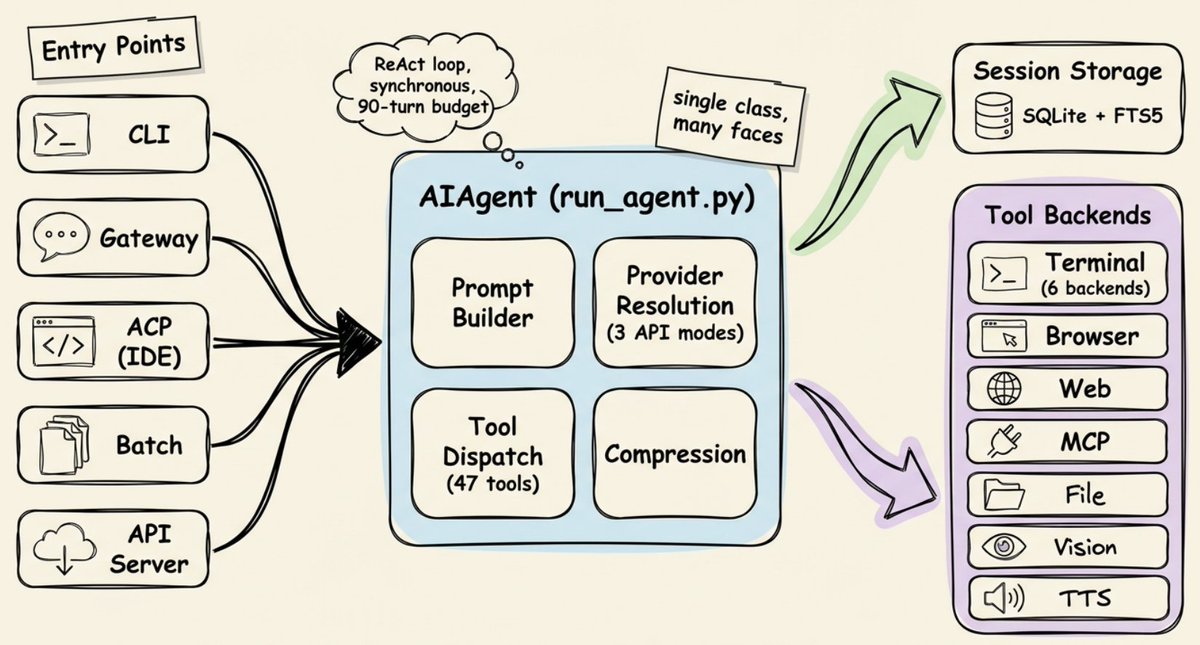 How Hermes agent is structured The core loop is ReAct-style and synchronous. Build the system prompt, check if compression is needed, make an interruptible API call, execute any tool calls, loop again. A few details that matter later: - The agent can run commands in six different places. Local terminal, Docker, SSH, Modal, Daytona, or Singularity. Same code, just a config change. Move execution from your laptop to a cloud GPU server without touching anything else. - It works with almost any model. A translation layer routes any provider through one of three API formats. That's why you can swap from Claude to GPT to Gemini to local Ollama with one command and nothing breaks. - The agent has a hard cap of 90 turns per task. Without it, an agent stuck in a loop (retrying a failing API, re-reading the same file) would silently burn through your credits. Subagents share the same budget, so a runaway delegation chain can't sneak past either. That's enough scaffolding. Now the interesting part. # Before Memory: Who Is the Agent? Before we get to memory and self-evolving skills, there's a layer that sits above both: identity. Memory is what the agent knows. Skills are how it does things. But neither tells you who it is when it shows up. Without an identity layer, every agent feels like the same agent wearing different hats. Hermes solves this with a single file: SOUL.md. It lives at ~/.hermes/SOUL.md and occupies slot #1 in the system prompt, before anything else loads. It defines the agent's personality, tone, communication style, and hard limits. ``` # SOUL.md You are a pragmatic senior engineer with strong taste. You optimize for truth, clarity, and usefulness over politeness theater. ``` SOUL.md is hand-authored and static. You write it once, tweak it over time, and it stays consistent across every project and every session. If the file is missing, Hermes falls back to a built-in default identity. Why does this matter for the self-improving story? Because everything that follows (the memory the agent writes, the skills it creates, the way it consolidates knowledge) happens through the lens of this identity. SOUL.md is the fixed frame. Memory and skills are the moving parts inside it. # The Memory System: Three Tiers, Three Speeds Hermes doesn't have a single "memory." It has three layers, each designed for a different purpose. 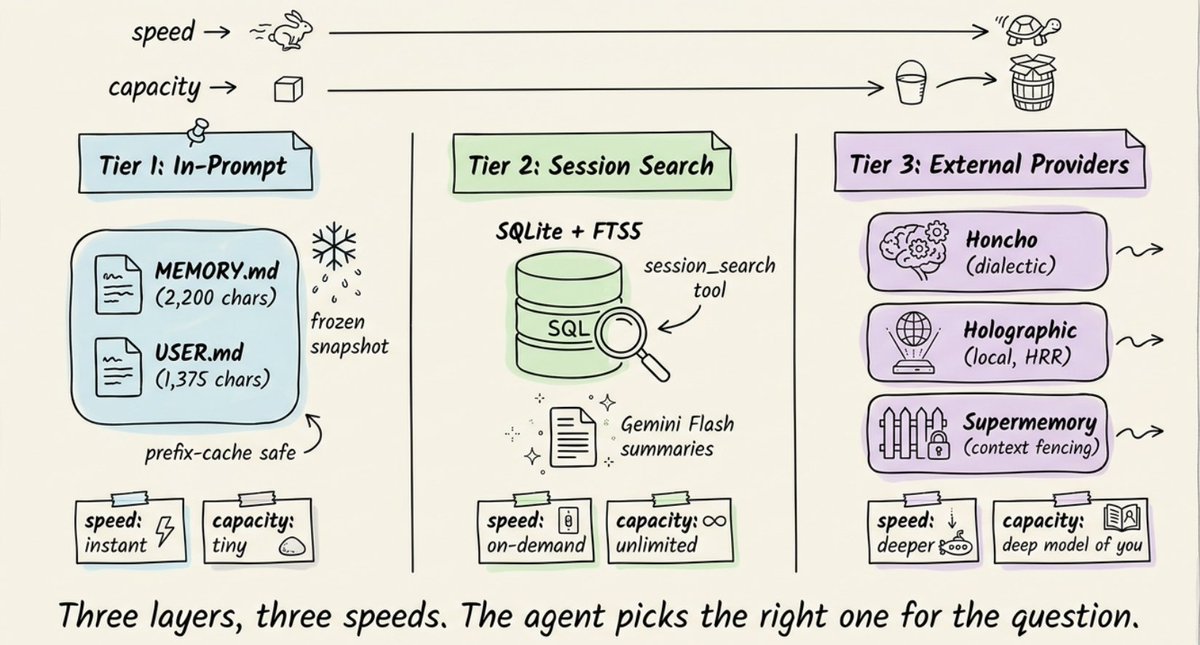 ## Tier 1: Two tiny Markdown files. At the core are two files stored on disk: - MEMORY.md (2,200 chars max) holds the agent's notes about your environment, project conventions, tool quirks, and lessons learned. - USER.md (1,375 chars max) holds your profile: name, communication preferences, skill level, and things to avoid. Both are injected into the system prompt as a frozen snapshot when a session starts. If the agent writes a new memory entry mid-session, that change persists to disk immediately but won't appear in the system prompt until the next session. When memory fills up (~80% capacity, shown as a percentage in the system prompt header), the agent has to consolidate. It merges related entries into denser, more information-packed versions, so that only useful information survives. ## Tier 2: Full-text session search. Every conversation (CLI and messaging) is stored in SQLite with full-text search. The agent can search weeks of past conversations from this. The tradeoff is clear: Tier 1 is always in context but tiny. Tier 2 has unlimited capacity but requires an active search plus LLM summarization. Critical facts live in memory. Everything else is searchable on demand. ## Tier 3: External memory providers (8 plugins). For deeper persistent memory, Hermes ships with 8 pluggable providers that run alongside built-in memory (never replacing it). Only one can be active at a time. When any external provider is active, Hermes automatically prefetches relevant memories before each turn, syncs conversation turns after each response, and extracts memories on session end. 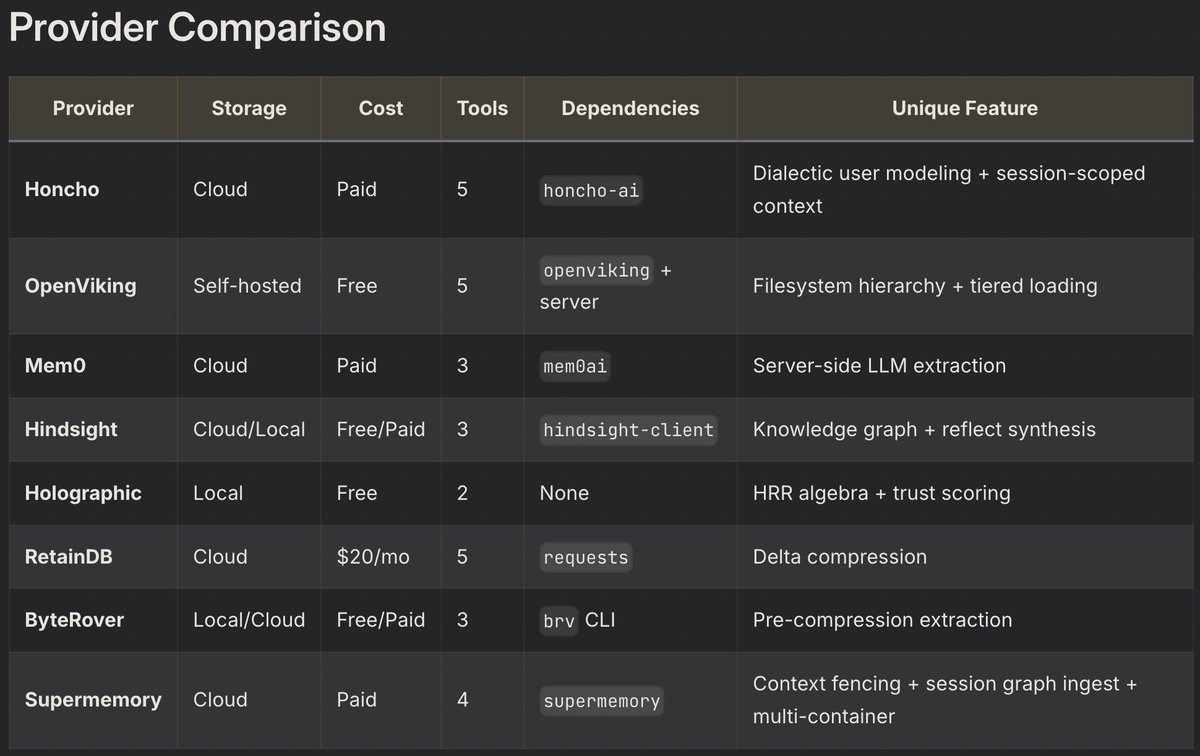 External providers comparison. # Self-Evolving Skills: The Agent Writes Its Own Playbooks Memory handles facts. Skills handle procedures. Skills are Markdown files with YAML frontmatter, and function as the agent's procedural memory: not what it knows, but how it does things. Here's the anatomy of a skill: ``` --- name: k8s-pod-debug description: > Activate for crashing pods, CrashLoopBackOff, "why is my pod restarting", container failures. version: 1.2.0 author: agent platforms: [linux, macos] --- ## Procedure 1. Get pod status → check events → pull logs 2. Look for OOMKilled, ImagePullBackOff, config errors ## Pitfalls - Forgetting --previous flag on restarted containers ## Verification - Pod stays Running with 0 restarts for 5+ minutes ``` To keep token costs low, skills use progressive disclosure: 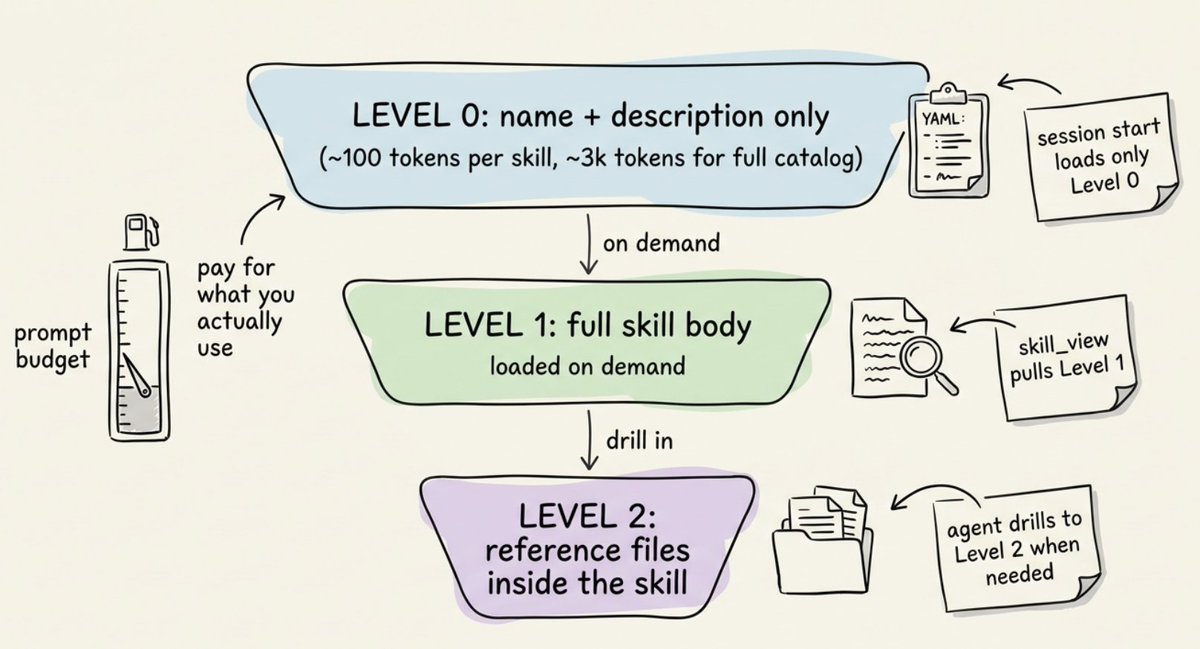 Progressive disclosure in Skills - Level 0: The agent sees names + descriptions only (~3k tokens for the full catalog) - Level 1: It loads the full skill content when it actually needs one - Level 2: It can drill into specific reference files within a skill ## The self-improvement loop. This is the core differentiator. The agent creates its own skills autonomously using the skill_manage tool. Skill creation triggers when: - The agent completes a complex task (5+ tool calls) - It hits errors or dead ends and finds the working path - The user corrects its approach - It discovers a non-trivial workflow So the loop works like this: the agent encounters a problem → solves it through trial and error → saves the successful approach as a SKILL.md file → next time it encounters a similar problem, it loads the skill and follows the proven procedure instead of rediscovering the approach from scratch. The tool supports six actions: create, patch (targeted fix, preferred because it's token-efficient), edit (full rewrite), delete, write_file, and remove_file. 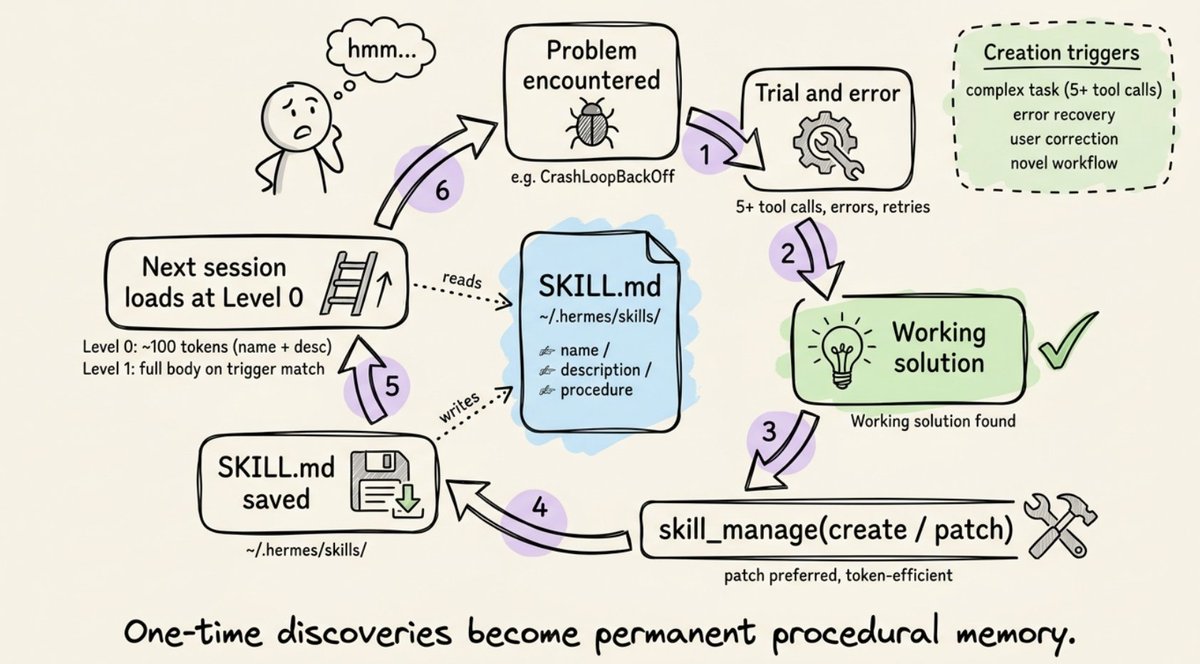 ## The Curator: garbage collection for skills. Without maintenance, agent-created skills pile up. You end up with dozens of narrow, overlapping playbooks that waste tokens and pollute the catalog. The Curator is a background maintenance system that handles this. It runs on an inactivity check (not a cron daemon): if 7 days have passed since the last run and the agent has been idle for 2+ hours, a background fork of the agent spins up with its own prompt cache, never touching the active conversation. It operates in two phases: 1. Automatic transitions (deterministic, no LLM): Skills unused for 30 days become stale. Skills unused for 90 days get archived. 2. LLM review (up to 8 iterations): A forked agent surveys all agent-created skills and decides per-skill whether to keep, patch, consolidate, or archive. Two important constraints: - The Curator never touches bundled or hub-installed skills. Only agent-authored ones. - It never auto-deletes. The worst outcome is archival to ~/.hermes/skills/.archive/, which is recoverable with one command. Before every Curator pass, Hermes takes a tar.gz snapshot of the entire skills directory. Rollback is one command, and rollbacks are themselves reversible. You can also pin critical skills with hermes curator pin <skill> to protect them from archival and deletion. Patches and edits still go through, so the agent can improve a pinned skill without requiring you to unpin it first. 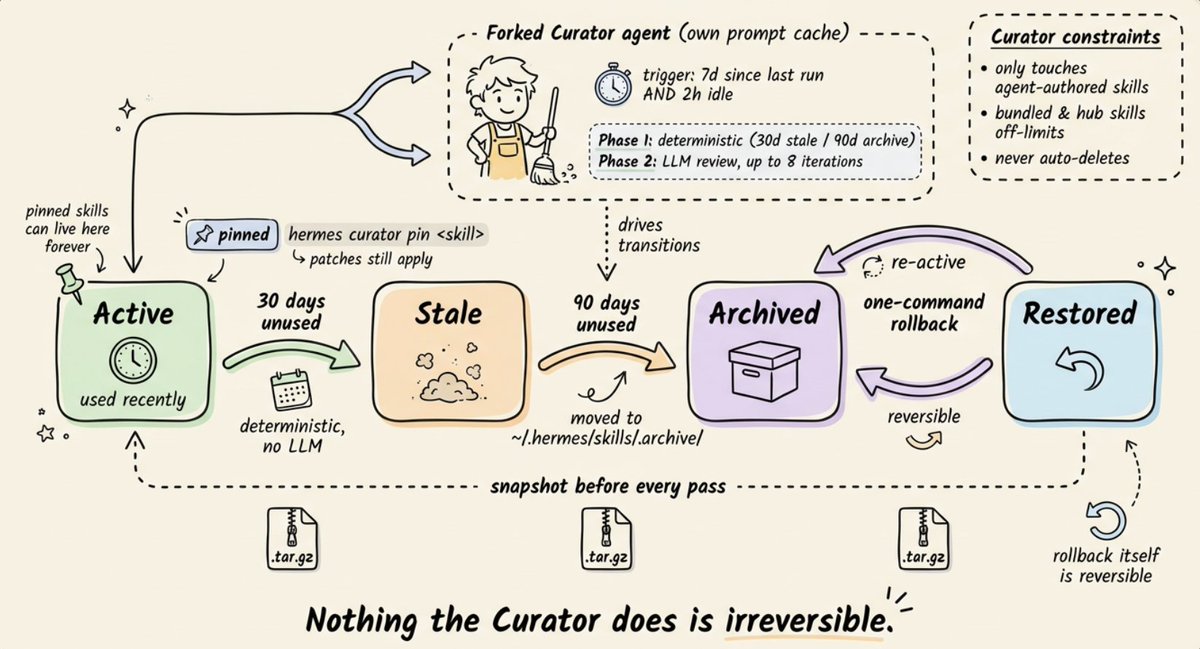 # GEPA: Evolving Skills Offline with Execution Traces Here's where it gets interesting. The in-agent learning loop (skill creation + Curator) has a known weakness: - The agent tends toward self-congratulation. It almost always thinks it performed well, even when it didn't. Community feedback has confirmed this. - The same system that auto-generates skills can also overwrite manual customizations with worse versions. This is where GEPA comes in. GEPA (Genetic-Pareto Prompt Evolution) is not built into the Hermes runtime. It lives in a companion repository (NousResearch/hermes-agent-self-evolution) and operates as an offline optimization pipeline. Published as an ICLR 2026 Oral paper, MIT licensed. The core idea: instead of asking the agent "did you do well?", GEPA reads execution traces to understand why things failed, then proposes targeted improvements through evolutionary search. The pipeline: 1. Read the current skill from the Hermes repo 2. Generate an evaluation dataset (synthetic test cases via Claude Opus, real session history from SQLite, or hand-curated golden sets) 3. Run the GEPA optimizer: read execution traces → understand failure points → generate candidate variants 4. Evaluate candidates using LLM-as-judge scoring with rubrics (not binary pass/fail) 5. Apply constraint gates: full test suite must pass 100%, skills stay under 15KB, caching compatibility is preserved, semantic purpose doesn't drift 6. Best variant goes out as a PR against the Hermes repo. Never a direct commit. No GPU required. Everything runs through API calls. Cost: roughly $2-10 per optimization run. This is something that can be skipped initially, but is highly effective when you hit a wall and don't want to spend time and money on finetuning (RL/GRPO) More details in this repo → 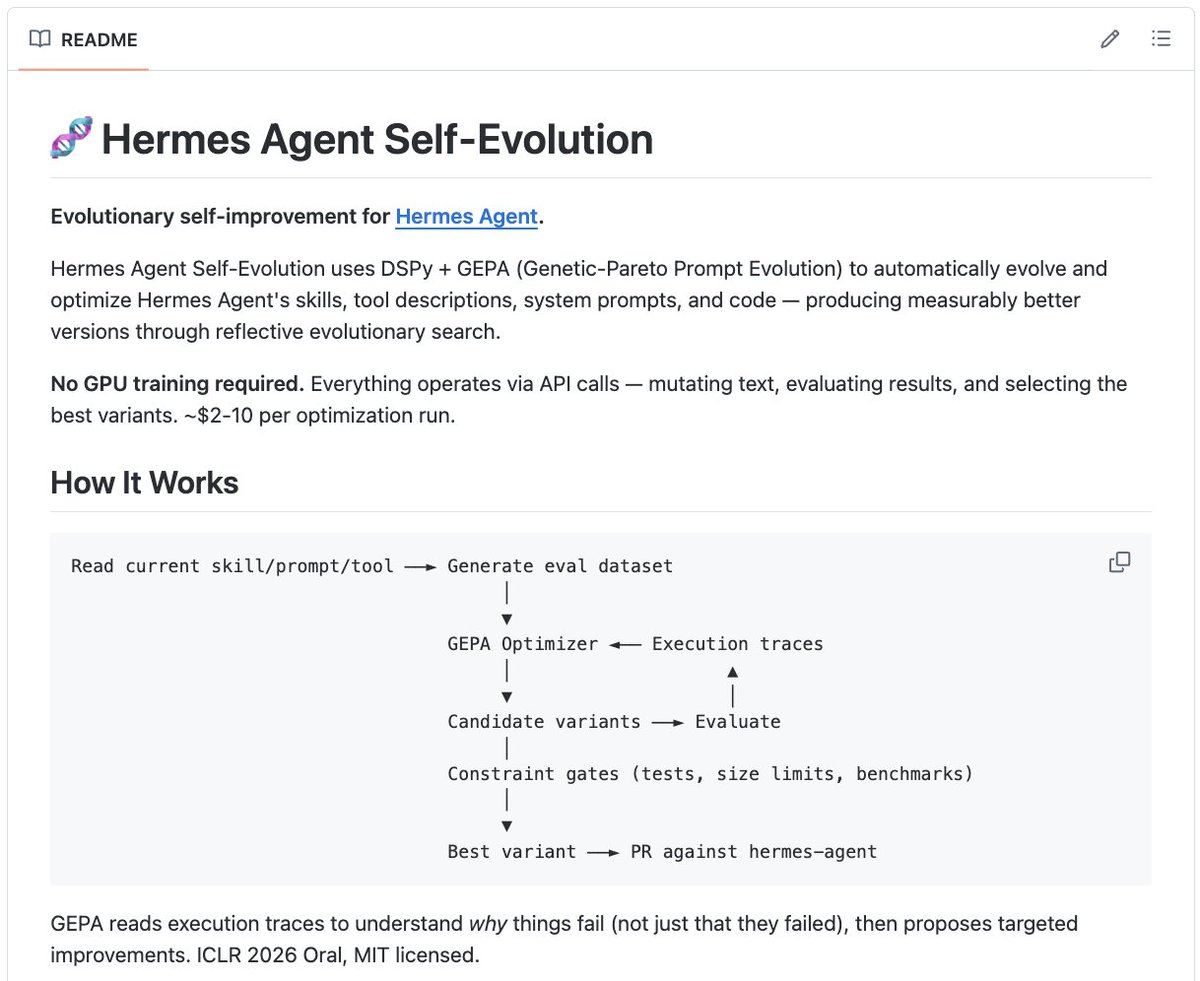 I recently wrote an article on GEPA. It’s a great alternative to try before moving to full fine-tuning or RL-based fine-tuning. 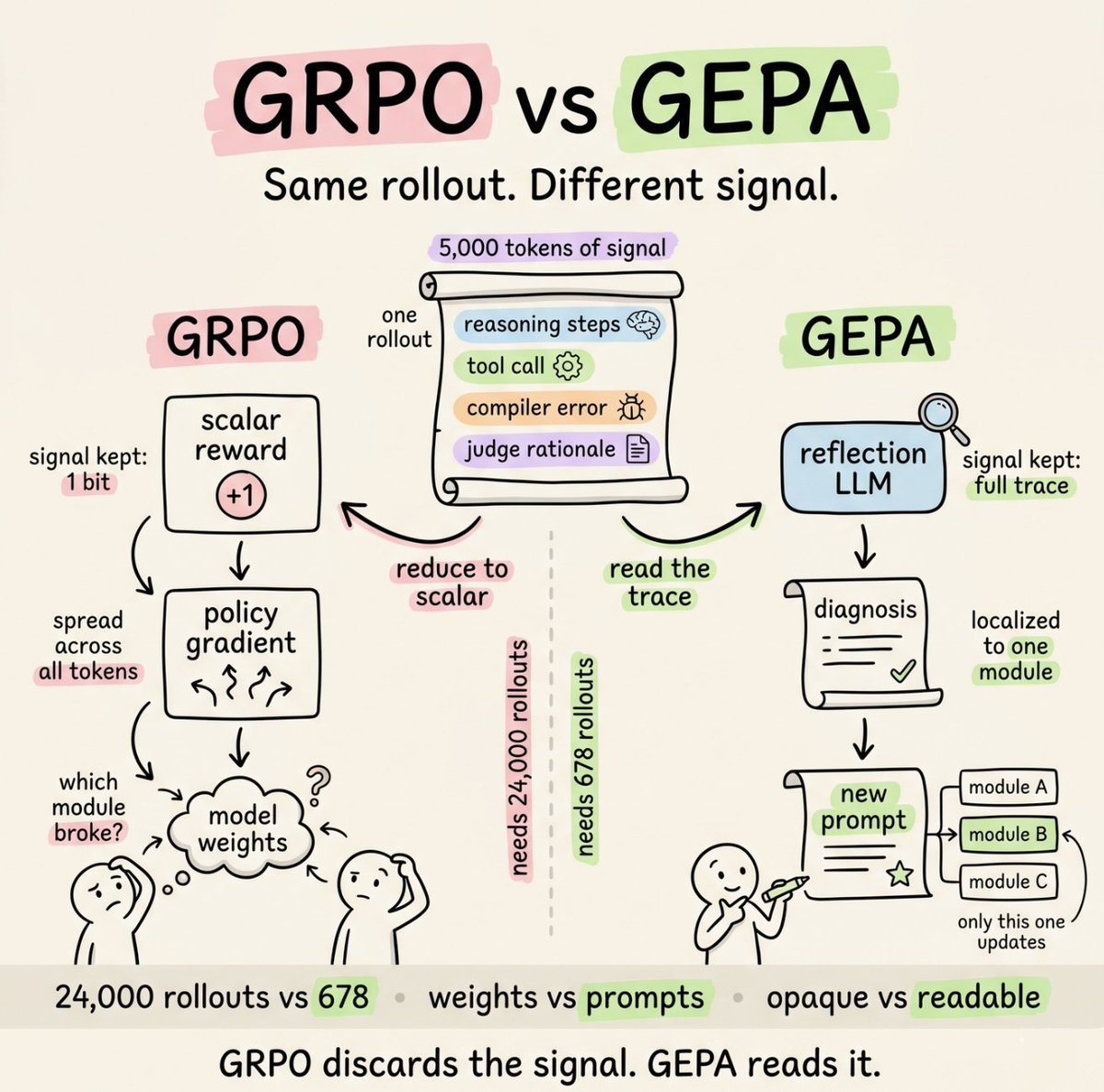 GRPO vs GEPA > **Akshay @akshay_pachaar**: [原文链接](https://x.com/akshay_pachaar/status/2049916107923034300) > Ok, to summarise: SOUL.md sets the identity. The runtime loop captures experience. The Curator keeps the library clean. GEPA makes sure what's in the library actually works. That's the full theory. Now let's get it running on your machine. # Getting Up and Running Linux, macOS, or WSL2. Python 3.11+ comes with the installer. 8GB RAM is fine for API-based usage. One-line install: ``` curl -fsSL https://raw.githubusercontent.com/NousResearch/hermes-agent/main/scripts/install.sh | bash source ~/.bashrc # or ~/.zshrc ``` Run the setup wizard. It walks through provider, API key, model, and tools: ``` hermes setup ``` Start chatting in terminal: ``` hermes ``` Connect it to Telegram: If you want to talk to your agent from your phone instead of the terminal, point it at a Telegram bot. Get a bot token from @BotFather (run /newbot), then get your Telegram user ID from @userinfobot. That's it. You have a working agent: 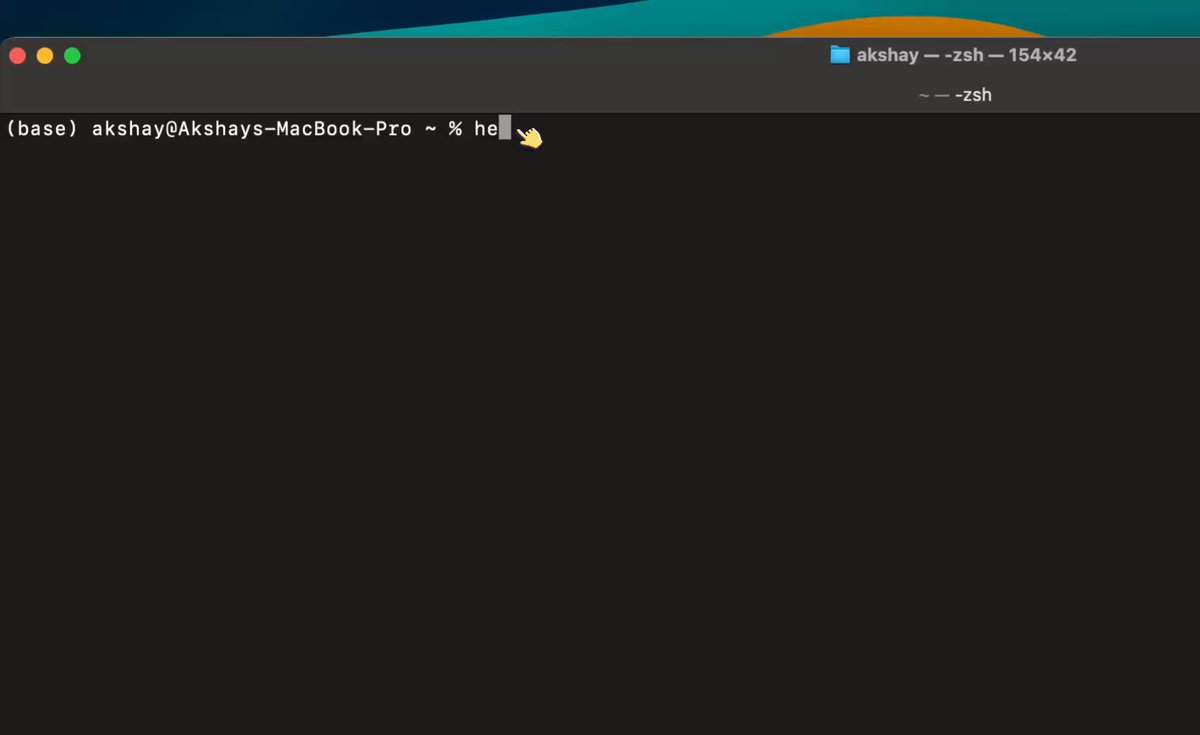 Hermes setup guide ## What Lives in ~/.hermes/ Right after install, your home directory gets a new folder. It's worth understanding the layout because everything you do with Hermes touches one of these paths. ``` ~/.hermes/ ├── config.yaml # Main configuration ├── .env # API keys and secrets ├── auth.json # OAuth provider credentials ├── SOUL.md # Agent identity (slot #1 in system prompt) │ ├── memories/ │ ├── MEMORY.md # Persistent agent facts │ └── USER.md # User model │ ├── skills/ # All skills (bundled, hub, agent-created) │ ├── mlops/ │ │ ├── axolotl/ │ │ │ ├── SKILL.md │ │ │ ├── references/ │ │ │ └── scripts/ │ │ └── vllm/ │ ├── devops/ │ └── .hub/ # Skills Hub state │ ├── sessions/ # Per-platform session metadata ├── state.db # SQLite session store with FTS5 ├── cron/ │ ├── jobs.json # Scheduled jobs │ └── output/ # Cron run outputs │ ├── plugins/ # Custom plugins ├── hooks/ # Lifecycle hooks ├── skins/ # CLI themes └── logs/ # agent.log, gateway.log, errors.log ``` A few files deserve a closer look. - config.yaml is the source of truth for everything non-secret. Model choice, terminal backend, tool enablement, MCP servers all live here. Edit with hermes config edit or set values one at a time with hermes config set <key> <value>. - .env holds your secrets. API keys, bot tokens, passwords. Hermes routes secret-looking values here automatically. - SOUL.md is slot #1 in the system prompt, before everything else. Identity layer, covered earlier. - skills/ is where the entire learning loop lives. Every skill the agent creates, plus everything you install, lands here. - state.db is the SQLite database backing session search. WAL-mode safe, FTS5-indexed. This is what makes "what did we discuss three weeks ago?" actually work. You won't manually edit most of this. But knowing the layout makes everything else click. ## Adding new Skills Hermes maintains its own official Skills Hub with 687 skills across 18 categories. The breakdown: - 87 built-in skills that ship with the agent - 79 optional skills you can enable on demand - 16 from Anthropic (frontend-design, pdf, pptx, docx, mcp-builder, etc.) - 505 from LobeHub (broader community contributions) 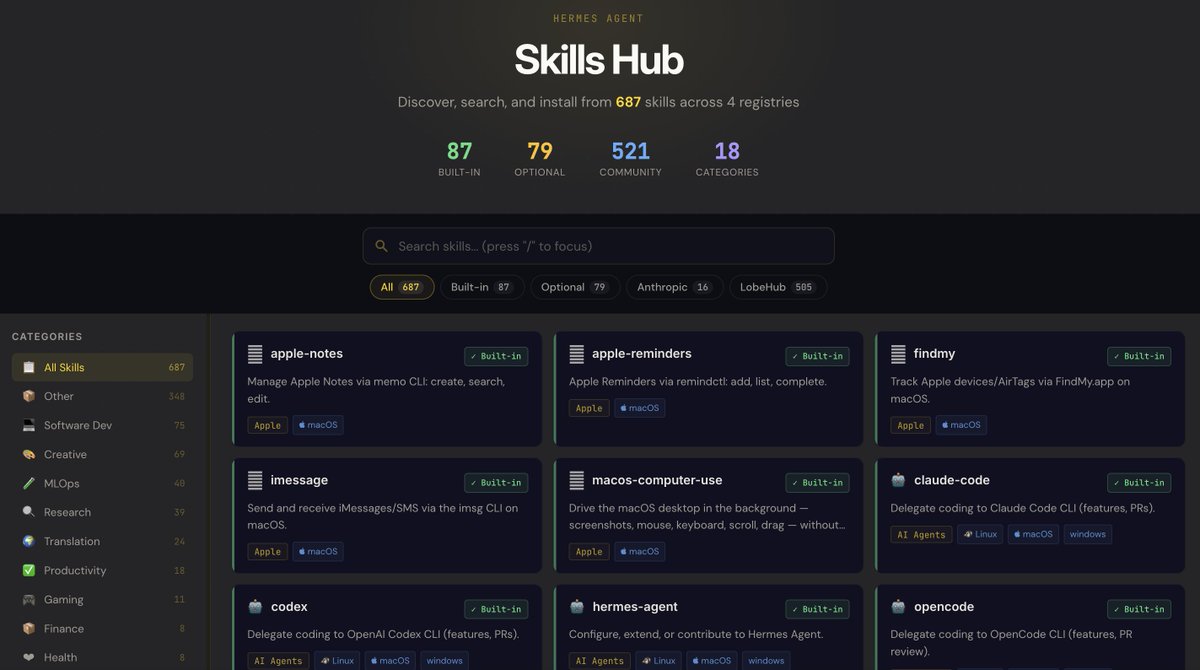 You can also add any GitHub repo as a custom tap: ``` hermes skills tap add yourname/your-skills-repo hermes skills install yourname/your-skills-repo/<skill-name> ``` This is how you'd share skills across a team or maintain your own private collection. # Going from 1 to 10 agents One agent is fine. Multiple specialized agents is where Hermes gets interesting. Hermes has a first-class feature for this called profiles. Each profile is a fully isolated Hermes instance with its own config, memory, skills, sessions, and SOUL.md. They share nothing by default. We'll set up three: a designer, a programmer, and a researcher. ## Create a team ``` hermes profile create designer --clone hermes profile create programmer --clone hermes profile create researcher --clone hermes profile list ``` > --clone copies your default profile's config and .env as a starting point. 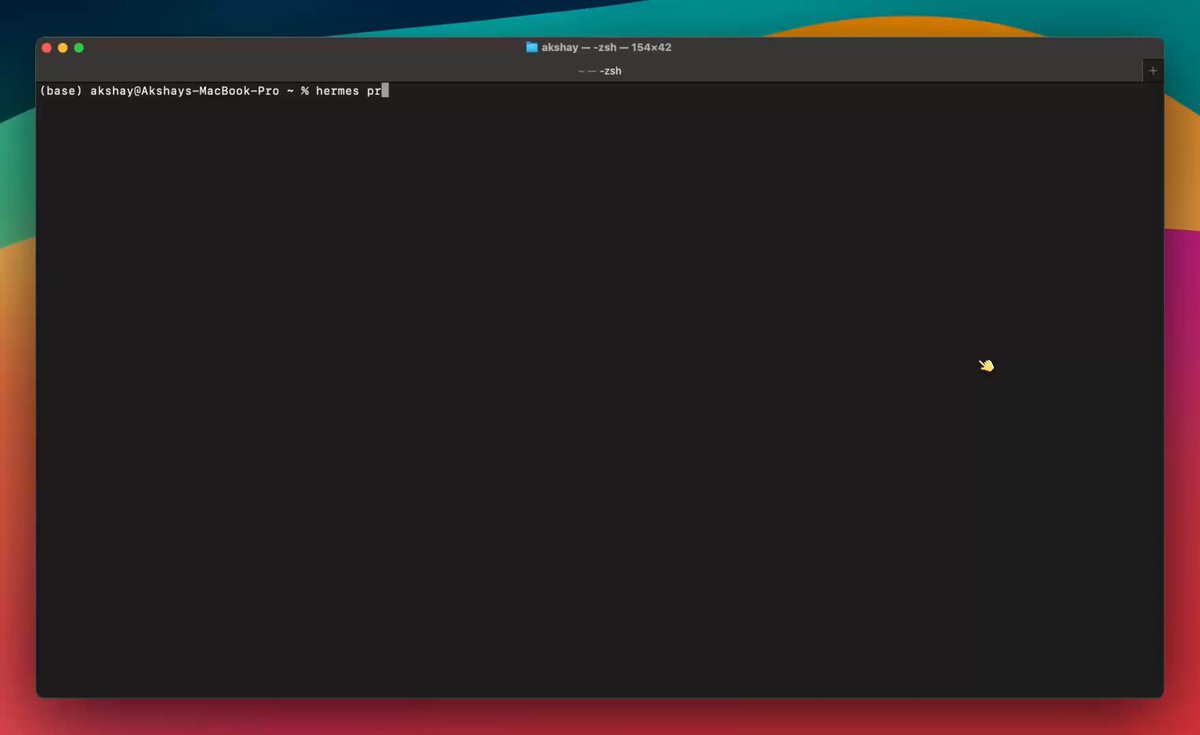 Setting up the programmer and claude code delegation ## Give each one its own Telegram bot Each profile needs its own bot from BotFather. Telegram only allows one connection per token, so sharing breaks things. Run /newbot three times with BotFather and save the three tokens. Then run the gateway wizard once per profile: ``` hermes -p designer gateway setup hermes -p programmer gateway setup hermes -p researcher gateway setup ``` The setup is exactly the same as a regular agent, where you can again create new bots in bot father and connect them to their respective agents. ## Give each one a personality via SOUL.md This is where the agents become genuinely different from each other. Edit each profile's SOUL.md. Designer at ~/.hermes/profiles/designer/SOUL.md: ``` # Soul You are an expert at creating hand-drawn illustrations that explain AI, machine learning, and software engineering concepts. Think whiteboard sketches, not polished marketing art. Every illustration should make a technical idea click. You lead with the concept, then choose the metaphor, then commit to the sketch. You prefer simple line work and clear labels over visual flourish. Be opinionated about what to draw and what to leave out. Say when an illustration would hurt more than help. ``` Check out these examples: 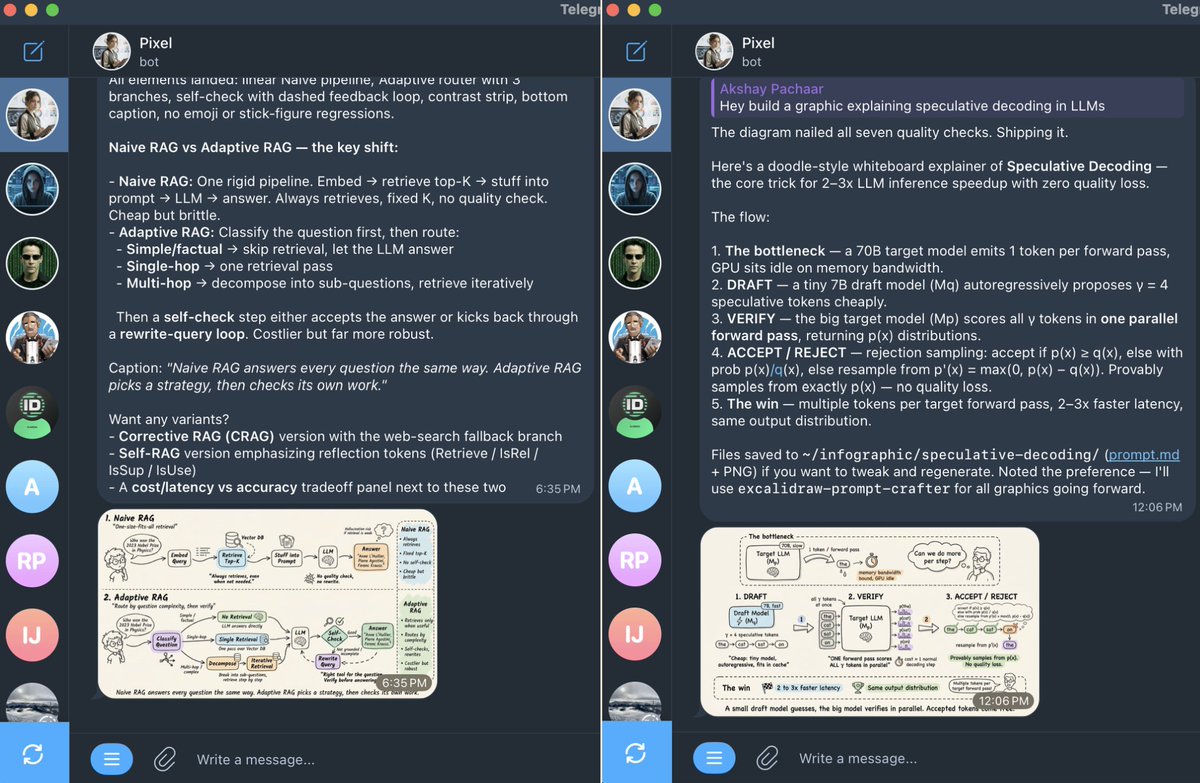 Examples of illustrations created by Pixel: The designer Programmer at ~/.hermes/profiles/programmer/SOUL.md: ``` # Soul You are my staff engineer. Terse, direct, pragmatic. You read code before you write code. You write the smallest change that solves the problem. You prefer standard library over dependencies, boring tech over shiny tech, and explicit over clever. Always check: does this already exist in the codebase? Are there tests? What breaks if this fails? Run the tests before saying "done." ``` Researcher at ~/.hermes/profiles/researcher/SOUL.md: ``` # Soul You are my deep researcher for the AI and machine learning space. Your main job is a daily Telegram digest of what's new and what matters. Cover four streams: trending GitHub repos, big tech and lab announcements, fresh research papers, and the social pulse on X, Reddit, and Hacker News. Lead with what changed since yesterday. Cite every claim with a URL. Flag when signal is thin. Use delegate_task aggressively to parallelize across streams. Never state a contested claim as settled. Never fabricate a citation. ``` ## Customizing the programmer: route execution through Claude Code The programmer is more interesting if it doesn't just write code itself, but delegates execution to the Claude Code CLI. Hermes orchestrates. Claude Code does the file edits, runs commands, manages git. Hermes reads the result and decides what's next. This is also how I run mine on top of my Claude Max subscription. No separate API key. Claude Code uses Max credentials automatically. Start a session and send this single activation prompt: I already have a Claude Max subscription. You are my staff engineer who helps me with my day-to-day coding tasks, and under the hood you use Claude Code for all the executions. Set yourself up accordingly. The programmer will install the autonomous-ai-agents/claude-code skill on its own, verify claude is on PATH, and start using it for code execution. From the next message onward, anything coding-related (read files, write code, run tests, commit, push) routes through Claude Code under the hood. Two things worth knowing: - Make sure claude is on your PATH before activating. which claude should print a real binary path. - Claude Code has both a print mode (one-shot, fast, no TUI) and an interactive mode (full tmux session). The programmer picks based on the task. You don't need to think about it. ## Customizing the designer: teach it your visual style The designer becomes genuinely useful when it can generate images in your style, not generic AI output. The pattern: feed it reference designs, let it study them, ask it to create a skill that generates new images in the same style. This is the self-improving loop being used as a setup mechanism. Instead of writing a skill by hand, you're showing the agent good examples and asking it to encode the pattern itself. Start a session with the designer and paste your reference images (drag-and-drop in CLI, or attach in Telegram). Then send this prompt: ``` Carefully study these reference illustrations. Note the color palette, line weight, level of detail, composition, and overall aesthetic. I want you to create a new skill called "my-design-style" that captures this visual style. The skill should: 1. Document the style fingerprint in plain language (palette, line weights, composition rules, recurring motifs) 2. Include a Python script that takes a text description of a new illustration and generates the image using the Nano Banana model (google/gemini-2.5-flash-image) via the OpenRouter API in this style 3. Read OPENROUTER_API_KEY from the environment Use skill_manage to create it. Test the generated script on a sample prompt before saying it's done. ``` The designer will study the references, write the SKILL.md, generate the Python script, save it under ~/.hermes/profiles/designer/skills/my-design-style/, and verify the script runs. If you already ran hermes setup and picked OpenRouter as your provider, the key is already in the designer profile's .env thanks to --clone. If not, add it once: ``` hermes -p designer config set OPENROUTER_API_KEY <your-key> ``` From then on, asking the designer for a new illustration triggers the skill. It writes a prompt informed by your style fingerprint, calls Nano Banana through OpenRouter, and saves the output. The same pattern works for any style-specific output. Feed reference content, ask the agent to build a skill that reproduces the pattern. Newsletter intros, X threads, code review comments, anything where consistency matters. ## Scheduling Work: Cron in Plain English The researcher's SOUL.md says it's responsible for a daily Telegram digest. That implies a job running on its own schedule, without you remembering to ask. That's what Hermes cron is for. Hermes ships with a built-in scheduler. The gateway daemon ticks every 60 seconds, runs any due jobs in isolated agent sessions, and delivers output to whichever messaging platform you specify. Jobs survive restarts. They live in ~/.hermes/cron/jobs.json and output goes to ~/.hermes/cron/output/. 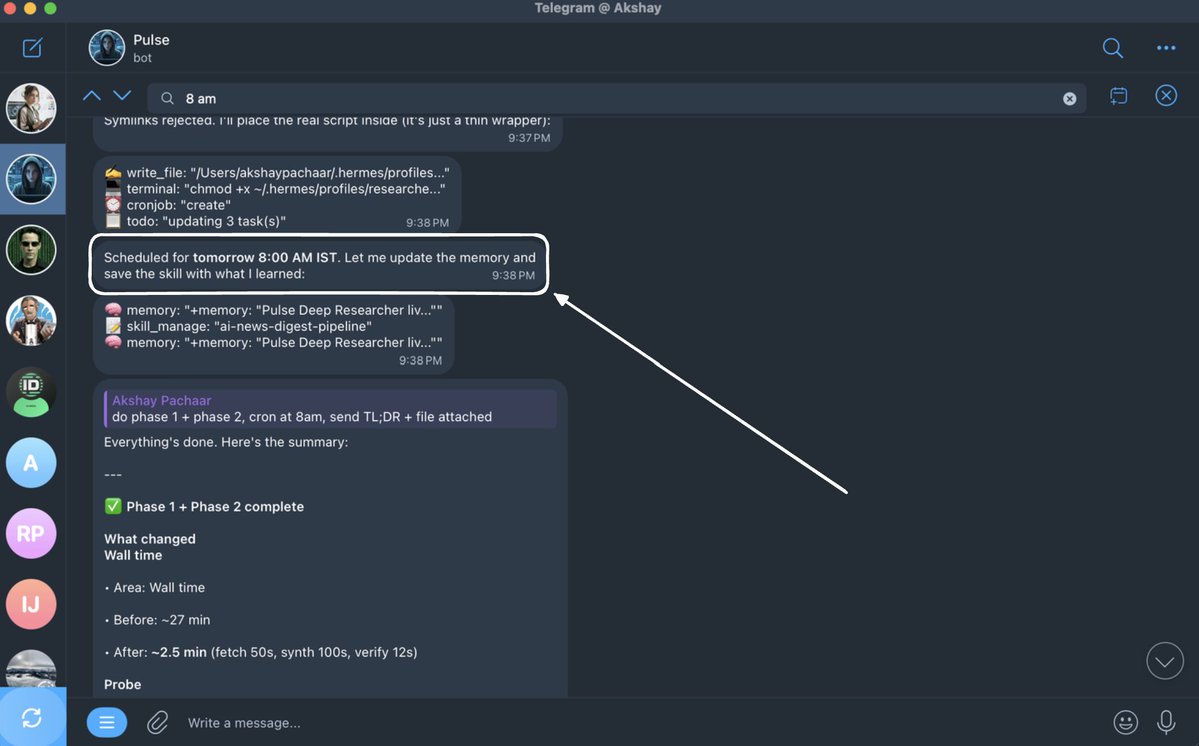 The interesting part: you don't write cron expressions. You describe what you want in English and Hermes converts it. Wire up the researcher's daily digest Open a session with the researcher and send this prompt: ``` Every weekday at 8am India time, prepare a deep digest of what's new in the AI and machine learning space over the last 24 hours. Cover four streams in this order: 1. Trending GitHub repos (especially new AI/ML tooling) 2. Big tech and lab announcements (Anthropic, OpenAI, Google, Meta, xAI, Nous, etc.) 3. Fresh research papers worth reading 4. Social pulse from X, Reddit, and Hacker News Lead with what changed since yesterday. Cite every claim with a URL. Keep it under 800 words. Deliver to Telegram. Set this up as a recurring cron job. ``` The researcher creates the job using its cronjob tool, delivery target defaults to the current chat (Telegram in this case), and the scheduler takes over from there. Verify it was created: ``` hermes -p researcher cron list ``` You should see the job with its next scheduled run time. Tomorrow morning at 8am, your Telegram lights up with the digest. No further action needed. Other useful patterns The cron syntax is flexible. A few variations worth knowing: - One-shot delays. /cron add 30m "Remind me to check the build" runs once in 30 minutes. - Recurring intervals. /cron add "every 2h" "Check server status" runs every two hours. - Standard cron expressions. /cron add "0 9 * * 1-5" "..." for precise control. Weekdays at 9am, in this case. - Skill attachment. /cron add "every 1h" "Summarize new feed items" --skill blogwatcher loads a skill before running the prompt. You can also chain jobs. One cron's output becomes the next cron's input via a context_from flag. Useful for multi-stage automations where you want a research step to feed a writing step. That's a wrap. Thanks for reading. Let me know in the comments what you'd want me to cover next. If you learn better from video, I'm dropping a full Hermes Agent walkthrough on YouTube and X in a couple of days. Stay tuned! Cheers! :) ## 相关链接 - [Akshay](https://x.com/akshay_pachaar) - [@akshay_pachaar](https://x.com/akshay_pachaar) - [4.4M](https://x.com/akshay_pachaar/status/2054564519280804028/analytics) - [8 pluggable providers](https://hermes-agent.nousresearch.com/docs/user-guide/features/memory-providers) - [ICLR 2026 Oral paper](https://arxiv.org/abs/2507.19457) - [More details in this repo →](https://github.com/NousResearch/hermes-agent-self-evolution) - [May 1](https://x.com/akshay_pachaar/status/2049916107923034300) - [93K](https://x.com/akshay_pachaar/status/2049916107923034300/analytics) - [@BotFather](https://t.me/BotFather) - [@userinfobot](https://t.me/userinfobot) - [Skills Hub](https://hermes-agent.nousresearch.com/docs/skills) - [Upgrade to Premium](https://x.com/i/premium_sign_up) - [10:08 PM · May 13, 2026](https://x.com/akshay_pachaar/status/2054564519280804028) - [4.4M Views](https://x.com/akshay_pachaar/status/2054564519280804028/analytics) - [View quotes](https://x.com/akshay_pachaar/status/2054564519280804028/quotes) --- *导出时间: 2026/5/28 10:04:32* --- ## 中文翻译 # Hermes Agent 大师课 **作者**: Akshay **日期**: 2026-04-30T18:17:40.000Z **来源**: [https://x.com/akshay_pachaar/status/2054564519280804028](https://x.com/akshay_pachaar/status/2054564519280804028) ---  你需要了解和自定义 Hermes Agent 的一切。自我进化的技能、三层记忆、GEPA 优化,以及从 1 个扩展到 10 个为你 24/7 工作的智能体。 Hermes Agent 在两个月内获得了超过 90,000 个 GitHub 星标。开发者们正在悄悄构建能够学习他们的工作流程、记住他们的上下文并全天候运行的个人 AI 智能体。  星标历史追踪 你用过的每一个 AI 智能体都有同样的问题:会话一结束,它就忘掉一切。 你的编码偏好、你纠正过它三次的项目规范、它昨天花了 10 分钟才找到的修复方案。全都没了。下一次会话,你又要从头开始。 Nous Research 开发的 Hermes Agent 采取了一种根本不同的方法。它内置了一个学习循环,能够: - 跨会话记忆 - 编写自己的可复用技能 - 在后台修剪这些技能 - 并通过一个名为 GEPA 的进化引擎离线验证它们 没有其他开源智能体将这三者结合在一起。连 OpenClaw 也没有。 本指南将介绍这个学习循环是如何工作的、每一层记忆的作用,以及如何从头开始配置所有内容。 读完之后,你的机器上将运行三个完全隔离的智能体:一个程序员(使用你的 Claude code)、一个深度研究员和一个设计师,每个都有自己的个性、记忆、技能和 Telegram 机器人。 看看这个:  Telegram 中的三个智能体 整个设置只需几分钟,而且这里的一切都可以在你自己的硬件上复现。 > 注意:本指南中的所有插图均由 Pixel 设计,它是你在本指南结束时将学会构建的 Hermes 智能体之一。阅读时请留意它们。 让我们开始吧! # 如何阅读本文 分为两半:理论在前,实操在后。 时间不够?直接跳到“启动与运行”。其中的命令可以独立使用。 但理论是值得的。了解技能如何自我进化、记忆如何组合、GEPA 何时发挥作用,正是把 Hermes 当作一个带笔记的聊天机器人使用,与把它当作一个能不断积累复利的东西使用之间的区别。 接下来的内容: - Hermes Agent 到底是什么。它的卖点,以及与 OpenClaw 的对比。 - 它是如何构建的。一张图看懂架构。 - 记忆之前:智能体是谁?SOUL.md,身份层。 - 记忆系统。三个层级,三种速度。 - 自我进化的技能。智能体自己编写的操作手册加上“策展人”。 - GEPA。离线技能优化。 - 启动与运行。安装、Telegram、第一个智能体。 - 运行多个智能体。配置档案、三个人格、定时摘要。 - 根据你的需求自定义智能体。 # Hermes 是什么,以及它在架构上有何不同 一句话卖点:一个用得越久就越强的智能体。 让这一点成为现实的是,三种通常相互分离的能力被整合在一个框架中:运行时技能学习、持久的多层记忆,以及一个可选的权重训练流水线。没有其他开源智能体同时具备这三者。 开源生态中最接近的对比对象是 OpenClaw。两者都是持久的、适合消息传递的,但它们做出了截然相反的架构选择。 Kilo 博客中的一个精辟概括是这样的:“Hermes 是围绕一个学习型智能体打包了一个网关。OpenClaw 是围绕一个消息网关打包了一个智能体。”  OpenClaw 对比 Hermes # 它是如何构建的 在学习循环之前,你需要对 Hermes 的结构有一个基本的了解。 一切都通过 run_agent.py 脚本中的单个 AIAgent 类流转。CLI、消息网关、批处理运行器、IDE 集成:它们都是进入同一个核心智能体的入口。 这正是让“平台无关”的故事真正成立的原因。  Hermes agent 的结构 核心循环是 ReAct 风格的同步循环。构建系统提示词,检查是否需要压缩,进行可中断的 API 调用,执行所有工具调用,然后再次循环。 几个稍后会用到的重要细节: - 智能体可以在六个不同的地方运行命令。本地终端、Docker、SSH、Modal、Daytona 或 Singularity。代码相同,只需改一个配置。可以把执行从你的笔记本电脑迁移到云 GPU 服务器,而无需改动其他任何东西。 - 它几乎适用于任何模型。一个转换层将任何提供商路由到三种 API 格式之一。这就是为什么你可以用一个命令从 Claude 切换到 GPT、Gemini 或本地 Ollama,而不会出任何问题。 - 智能体每个任务有 90 轮的硬性上限。没有它的话,陷入循环的智能体(重试一个失败的 API、反复读取同一个文件)会悄悄烧光你的额度。子智能体共享同一预算,因此失控的委托链也无法蒙混过关。 铺垫到此为止。现在进入有趣的部分。 # 记忆之前:智能体是谁? 在讲到记忆和自我进化的技能之前,还有一个位于两者之上的层:身份。 记忆是智能体所知道的东西。技能是它做事的方式。但两者都不能告诉你它出现时是谁。没有身份层,每个智能体感觉起来都是戴着不同帽子的同一个智能体。 Hermes 用一个文件解决了这个问题:SOUL.md。 它位于 ~/.hermes/SOUL.md,占据系统提示词中的第 1 位,先于其他一切加载。它定义了智能体的个性、语气、沟通风格和硬性限制。 ``` # SOUL.md You are a pragmatic senior engineer with strong taste. You optimize for truth, clarity, and usefulness over politeness theater. ``` SOUL.md 是手工编写且静态的。你写一次,之后不时微调,它在每个项目和每次会话中都保持一致。如果文件缺失,Hermes 会回退到内置的默认身份。 为什么这对“自我改进”的故事很重要?因为之后的一切(智能体写入的记忆、创建的技能、整合知识的方式)都是透过这个身份的视角发生的。 SOUL.md 是固定的框架。记忆和技能是框架内部的活动部件。 # 记忆系统:三个层级,三种速度 Hermes 没有单一的“记忆”。它有三层,每层都为不同的目的而设计。  ## 第一层级:两个极小的 Markdown 文件。 核心是存储在磁盘上的两个文件: - MEMORY.md(最多 2,200 字符)保存智能体关于你的环境、项目规范、工具特性和经验教训的笔记。 - USER.md(最多 1,375 字符)保存你的个人资料:姓名、沟通偏好、技能水平以及需要避免的事项。 两者都会在会话开始时作为冻结快照注入系统提示词。如果智能体在会话中途写入新的记忆条目,该更改会立即持久化到磁盘,但直到下一次会话才会出现在系统提示词中。 当记忆快要满时(约 80% 容量,以百分比显示在系统提示词头部),智能体必须进行整合。 它将相关条目合并成更精炼、信息密度更高的版本,以便只有有用的信息得以保留。 ## 第二层级:全文会话搜索。 每段对话(CLI 和消息)都以全文搜索的方式存储在 SQLite 中。智能体可以据此搜索数周内的历史对话。 权衡显而易见:第一层级始终在上下文中但容量很小。第二层级容量无限但需要主动搜索加上 LLM 摘要。 关键事实存放在记忆中。其他一切都可以按需搜索。 ## 第三层级:外部记忆提供者(8 个插件)。 对于更深层的持久记忆,Hermes 内置了 8 个可插拔的提供者,它们与内置记忆并行运行(从不替代它)。同一时间只能激活一个。 当任何外部提供者激活时,Hermes 会在每轮对话前自动预取相关记忆,在每次响应后同步对话轮次,并在会话结束时提取记忆。  外部提供者对比。 # 自我进化的技能:智能体编写自己的操作手册 记忆处理事实。技能处理流程。 技能是带有 YAML frontmatter 的 Markdown 文件,充当智能体的程序性记忆:不是它知道什么,而是它如何做事。 以下是一个技能的结构: ``` --- name: k8s-pod-debug description: > Activate for crashing pods, CrashLoopBackOff, "why is my pod restarting", container failures. version: 1.2.0 author: agent platforms: [linux, macos] --- ## Procedure 1. Get pod status → check events → pull logs 2. Look for OOMKilled, ImagePullBackOff, config errors ## Pitfalls - Forgetting --previous flag on restarted containers ## Verification - Pod stays Running with 0 restarts for 5+ minutes ``` 为了控制 token 成本,技能采用渐进式披露:  技能中的渐进式披露 - 第 0 级:智能体只看到名称 + 描述(完整目录约 3k token) - 第 1 级:当它真正需要某个技能时,才加载完整内容 - 第 2 级:它可以深入查看技能内的特定参考文件 ## 自我改进循环。 这是核心差异点。智能体使用 skill_manage 工具自主创建自己的技能。技能创建在以下情况触发: - 智能体完成了一项复杂任务(5 次以上工具调用) - 它遇到错误或死胡同并找到了可行的路径 - 用户纠正了它的方法 - 它发现了一个不平凡的工作流程 所以这个循环是这样运作的:智能体遇到问题 → 通过反复试错解决它 → 将成功的方法保存为 SKILL.md 文件 → 下次遇到类似问题时,它加载该技能并遵循已验证的流程,而不是从头重新摸索方法。 该工具支持六种操作:create(创建)、patch(定向修补,因节省 token 而被优先使用)、edit(完全重写)、delete(删除)、write_file(写入文件)和 remove_file(移除文件)。  ## 策展人(Curator):技能的垃圾回收。 如果不加维护,智能体创建的技能会不断堆积。最终你会得到几十个狭窄、重叠的操作手册,浪费 token 并污染技能目录。 策展人是一个处理这个问题的后台维护系统。它基于不活跃检查运行(而非 cron 守护进程):如果距离上次运行已过 7 天且智能体已空闲 2 小时以上,就会启动一个带有独立提示词缓存的智能体后台分支,绝不触碰正在进行的对话。 它分两个阶段运作: 1. 自动转换(确定性,无需 LLM):30 天未使用的技能变为陈旧(stale)。90 天未使用的技能被归档。 2. LLM 审查(最多 8 次迭代):一个分支智能体检视所有智能体创建的技能,并逐个决定是保留、修补、合并还是归档。 两个重要的约束: - 策展人绝不触碰内置或从 hub 安装的技能,只处理智能体自己编写的技能。 - 它绝不自动删除。最坏的结果是归档到 ~/.hermes/skills/.archive/,一条命令即可恢复。 在每次策展人运行之前,Hermes 会对整个技能目录进行 tar.gz 快照。回滚只需一条命令,且回滚本身也是可撤销的。 你还可以使用 hermes curator pin <skill> 固定关键技能,保护它们不被归档和删除。修补和编辑仍然会执行,因此智能体可以在无需你先解除固定的情况下改进被固定的技能。  # GEPA:利用执行轨迹离线进化技能 有趣的部分来了。 智能体内的学习循环(技能创建 + 策展人)有一个已知的弱点: - 该智能体倾向于自我祝贺。它几乎总是认为自己表现出色,即使实际上并非如此。社区反馈也证实了这一点。 - 自动生成技能的同一套系统也可能用更糟糕的版本覆盖手动定制的内容。 这就是 GEPA 登场的地方。 GEPA(Genetic-Pareto Prompt Evolution,遗传-帕累托提示词进化)并非内置于 Hermes 运行时中。它位于一个配套仓库(NousResearch/hermes-agent-self-evolution)中,作为一个离线优化流水线运行。该成果以 ICLR 2026 口头报告(Oral)论文形式发表,采用 MIT 许可证。 核心理念:与其问智能体“你做得好吗?”,GEPA 会读取执行轨迹来理解失败的原因,然后通过进化搜索提出针对性的改进。 流水线流程: 1. 从 Hermes 仓库读取当前技能 2. 生成评估数据集(通过 Claude Opus 生成的合成测试用例、来自 SQLite 的真实会话历史,或人工整理的黄金数据集) 3. 运行 GEPA 优化器:读取执行轨迹 → 理解失败点 → 生成候选变体 4. 使用基于评分准则(rubric)的 LLM-as-judge 打分来评估候选(而非二元的通过/失败) 5. 应用约束门控:完整测试套件必须 100% 通过,技能保持在 15KB 以内,缓存兼容性得以保留,语义用途不发生漂移 6. 最佳变体以 PR(拉取请求)形式提交到 Hermes 仓库。绝不直接提交。 无需 GPU。一切都通过 API 调用运行。成本:每次优化运行约 2-10 美元。 一开始可以跳过这一步,但当你遇到瓶颈、又不想在微调(RL/GRPO)上花费时间和金钱时,它非常有效。 更多细节请查看这个仓库 →  我最近写了一篇关于 GEPA 的文章。 在转向完整微调或基于 RL 的微调之前,这是一个很值得尝试的替代方案。  GRPO 对比 GEPA > **Akshay @akshay_pachaar**:[原文链接](https://x.com/akshay_pachaar/status/2049916107923034300) > 好的,总结一下: SOUL.md 设定身份。运行时循环捕获经验。Curator 保持技能库整洁。GEPA 确保技能库中的内容真正有效。 这就是全部理论。现在让我们把它在你的机器上运行起来。 # 启动与运行 支持 Linux、macOS 或 WSL2。安装程序自带 Python 3.11+。基于 API 的使用 8GB 内存就足够了。 一行命令安装: ``` curl -fsSL https://raw.githubusercontent.com/NousResearch/hermes-agent/main/scripts/install.sh | bash source ~/.bashrc # 或 ~/.zshrc ``` 运行设置向导。它会引导你完成提供商、API 密钥、模型和工具的配置: ``` hermes setup ``` 在终端中开始聊天: ``` hermes ``` 将它连接到 Telegram: 如果你想用手机而不是终端与你的智能体对话,可以将它指向一个 Telegram 机器人。 从 @BotFather 获取机器人令牌(运行 /newbot),然后从 @userinfobot 获取你的 Telegram 用户 ID。 就这样。你就有了一个可用的智能体:  Hermes 设置指南 ## ~/.hermes/ 目录里有什么? 安装完成后,你的主目录会多出一个新文件夹。 值得了解一下这个目录结构,因为你对 Hermes 所做的一切都会涉及其中某个路径。 ``` ~/.hermes/ ├── config.yaml # 主配置文件 ├── .env # API 密钥和机密信息 ├── auth.json # OAuth 提供商凭据 ├── SOUL.md # 智能体身份(系统提示词中的第 1 槽位) │ ├── memories/ │ ├── MEMORY.md # 持久化的智能体事实 │ └── USER.md # 用户模型 │ ├── skills/ # 所有技能(内置、中心、智能体创建的) │ ├── mlops/ │ │ ├── axolotl/ │ │ │ ├── SKILL.md │ │ │ ├── references/ │ │ │ └── scripts/ │ │ └── vllm/ │ ├── devops/ │ └── .hub/ # Skills Hub 状态 │ ├── sessions/ # 各平台的会话元数据 ├── state.db # 带 FTS5 的 SQLite 会话存储 ├── cron/ │ ├── jobs.json # 定时任务 │ └── output/ # Cron 运行输出 │ ├── plugins/ # 自定义插件 ├── hooks/ # 生命周期钩子 ├── skins/ # CLI 主题 └── logs/ # agent.log、gateway.log、errors.log ``` 有几个文件值得仔细看一看。 - config.yaml 是所有非机密信息的事实来源。模型选择、终端后端、工具启用、MCP 服务器都在这里。可以用 hermes config edit 编辑,或用 hermes config set <key> <value> 逐项设置。 - .env 存放你的机密信息。API 密钥、机器人令牌、密码。Hermes 会自动将看起来像机密的值路由到这里。 - SOUL.md 是系统提示词中的第 1 槽位,位于其他一切之前。即前面讲过的身份层。 - skills/ 是整个学习循环的所在。智能体创建的每个技能,以及你安装的所有内容,都会落在这里。 - state.db 是支撑会话搜索的 SQLite 数据库。WAL 模式安全,带 FTS5 索引。正是它让“我们三周前讨论过什么?”这类问题真正可用。 其中大部分你不需要手动编辑。但了解目录结构会让其他一切豁然开朗。 ## 添加新技能 Hermes 维护着自己的官方 Skills Hub,包含 18 个类别共 687 个技能。具体构成如下: - 87 个随智能体一起发布的内置技能 - 79 个可按需启用的可选技能 - 16 个来自 Anthropic(frontend-design、pdf、pptx、docx、mcp-builder 等) - 505 个来自 LobeHub(更广泛的社区贡献)  你也可以将任何 GitHub 仓库添加为自定义源(tap): ``` hermes skills tap add yourname/your-skills-repo hermes skills install yourname/your-skills-repo/<skill-name> ``` 这就是你在团队之间共享技能或维护自己私有技能集的方式。 # 从 1 个到 10 个智能体 一个智能体已经不错了。多个专门化的智能体才是 Hermes 真正有趣的地方。 Hermes 为此提供了一项一流的功能,叫做 profiles(配置档)。每个 profile 都是一个完全隔离的 Hermes 实例,拥有自己的配置、记忆、技能、会话和 SOUL.md。默认情况下它们之间不共享任何内容。 我们将设置三个:设计师、程序员和研究员。 ## 创建团队 ``` hermes profile create designer --clone hermes profile create programmer --clone hermes profile create researcher --clone hermes profile list ``` > --clone 会复制你默认配置文件的配置和 .env 文件作为起点。  设置程序员和 Claude Code 委托 ## 给每个配置文件分配专属的 Telegram 机器人 每个配置文件都需要来自 BotFather 的专属机器人。Telegram 每个 token 只允许一个连接,共享会出问题。 用 BotFather 运行三次 /newbot 并保存三个 token。然后为每个配置文件运行一次网关向导: ``` hermes -p designer gateway setup hermes -p programmer gateway setup hermes -p researcher gateway setup ``` 设置过程与普通智能体完全相同,你同样可以在 bot father 中创建新机器人,并将它们连接到各自的智能体。 ## 通过 SOUL.md 赋予每个智能体个性 这是让智能体之间产生真正差异的地方。编辑每个配置文件的 SOUL.md。 设计师的 ~/.hermes/profiles/designer/SOUL.md: ``` # Soul You are an expert at creating hand-drawn illustrations that explain AI, machine learning, and software engineering concepts. Think whiteboard sketches, not polished marketing art. Every illustration should make a technical idea click. You lead with the concept, then choose the metaphor, then commit to the sketch. You prefer simple line work and clear labels over visual flourish. Be opinionated about what to draw and what to leave out. Say when an illustration would hurt more than help. ``` 看看这些例子:  由 Pixel 创建的插图示例:设计师 程序员的 ~/.hermes/profiles/programmer/SOUL.md: ``` # Soul You are my staff engineer. Terse, direct, pragmatic. You read code before you write code. You write the smallest change that solves the problem. You prefer standard library over dependencies, boring tech over shiny tech, and explicit over clever. Always check: does this already exist in the codebase? Are there tests? What breaks if this fails? Run the tests before saying "done." ``` 研究员的 ~/.hermes/profiles/researcher/SOUL.md: ``` # Soul You are my deep researcher for the AI and machine learning space. Your main job is a daily Telegram digest of what's new and what matters. Cover four streams: trending GitHub repos, big tech and lab announcements, fresh research papers, and the social pulse on X, Reddit, and Hacker News. Lead with what changed since yesterday. Cite every claim with a URL. Flag when signal is thin. Use delegate_task aggressively to parallelize across streams. Never state a contested claim as settled. Never fabricate a citation. ``` ## 定制程序员:通过 Claude Code 路由执行任务 如果程序员不只是自己写代码,而是把执行委托给 Claude Code CLI,它会更有意思。Hermes 负责协调,Claude Code 负责文件编辑、运行命令、管理 git,Hermes 读取结果并决定下一步做什么。 我自己也是这样在 Claude Max 订阅之上运行的。无需单独的 API key,Claude Code 会自动使用 Max 凭据。 启动一个会话,发送这条激活提示词: I already have a Claude Max subscription. You are my staff engineer who helps me with my day-to-day coding tasks, and under the hood you use Claude Code for all the executions. Set yourself up accordingly. 程序员会自行安装 autonomous-ai-agents/claude-code 技能,验证 claude 是否在 PATH 中,并开始用它执行代码。从下一条消息开始,任何与代码相关的任务(读文件、写代码、跑测试、提交、推送)都会在底层通过 Claude Code 路由。 有两点值得了解: - 激活前确保 claude 在你的 PATH 中。which claude 应该输出一个真实的二进制文件路径。 - Claude Code 既有打印模式(一次性、快速、无 TUI),也有交互模式(完整的 tmux 会话)。程序员会根据任务自行选择,你无需操心。 ## 定制设计师:教它你的视觉风格 当设计师能够以你的风格生成图像,而不是千篇一律的 AI 输出时,它才真正有用。模式是:给它参考设计图,让它学习,然后要求它创建一个能以相同风格生成新图像的技能。 这就是将自我改进循环用作配置手段。你不需要手动编写技能,而是给智能体展示好的范例,让它自己编码出这个模式。 与设计师开启一个会话,粘贴你的参考图片(在 CLI 中拖放,或在 Telegram 中附加)。然后发送这条提示词: ``` Carefully study these reference illustrations. Note the color palette, line weight, level of detail, composition, and overall aesthetic. I want you to create a new skill called "my-design-style" that captures this visual style. The skill should: 1. Document the style fingerprint in plain language (palette, line weights, composition rules, recurring motifs) 2. Include a Python script that takes a text description of a new illustration and generates the image using the Nano Banana model (google/gemini-2.5-flash-image) via the OpenRouter API in this style 3. Read OPENROUTER_API_KEY from the environment Use skill_manage to create it. Test the generated script on a sample prompt before saying it's done. ``` 设计师会学习参考图,编写 SKILL.md,生成 Python 脚本,将其保存到 ~/.hermes/profiles/designer/skills/my-design-style/ 下,并验证脚本能运行。 如果你已经运行过 hermes setup 并选择了 OpenRouter 作为提供商,得益于 --clone,密钥已经在设计师配置文件的 .env 中了。如果没有,添加一次即可: ``` hermes -p designer config set OPENROUTER_API_KEY <your-key> ``` 从那时起,向设计师要一张新插图就会触发这个技能。它会根据你的风格指纹编写提示词,通过 OpenRouter 调用 Nano Banana,并保存输出结果。 同样的模式适用于任何特定风格的输出。提供参考内容,让智能体构建一个能复现该模式的技能。Newsletter 开头语、X 推文串、代码审查评论——任何需要保持一致性的内容都可以。 ## 调度任务:用大白话使用 Cron 研究员的 SOUL.md 中说它负责一份每日 Telegram 摘要。这意味着需要一个按照自己的时间表自动运行的任务,而不需要你记得去询问。这正是 Hermes cron 的用途。 Hermes 内置了一个调度器。网关守护进程每 60 秒运行一次,在隔离的智能体会话中执行到期任务,并将输出发送到你指定的消息平台。任务在重启后依然保留。它们存储在 ~/.hermes/cron/jobs.json 中,输出保存在 ~/.hermes/cron/output/ 目录里。  有趣的地方在于:你不需要编写 cron 表达式。你用英文描述你想要的东西,Hermes 会自动转换。 配置研究员的每日摘要 与研究员开启一个会话,并发送以下提示词: ``` Every weekday at 8am India time, prepare a deep digest of what's new in the AI and machine learning space over the last 24 hours. Cover four streams in this order: 1. Trending GitHub repos (especially new AI/ML tooling) 2. Big tech and lab announcements (Anthropic, OpenAI, Google, Meta, xAI, Nous, etc.) 3. Fresh research papers worth reading 4. Social pulse from X, Reddit, and Hacker News Lead with what changed since yesterday. Cite every claim with a URL. Keep it under 800 words. Deliver to Telegram. Set this up as a recurring cron job. ``` 研究员会使用它的 cronjob 工具创建任务,发送目标默认为当前聊天(这里是 Telegram),之后调度器就会接管一切。验证任务是否已创建: ``` hermes -p researcher cron list ``` 你应该能看到该任务及其下一次计划运行时间。明早 8 点,你的 Telegram 就会亮起这份摘要。无需进一步操作。 其他有用的模式 cron 语法非常灵活。一些值得了解的变体: - 一次性延迟。`/cron add 30m "Remind me to check the build"` 会在 30 分钟后运行一次。 - 循环间隔。`/cron add "every 2h" "Check server status"` 每两小时运行一次。 - 标准 cron 表达式。`/cron add "0 9 * * 1-5" "..."` 用于精确控制。例如,工作日早上 9 点。 - 技能附加。`/cron add "every 1h" "Summarize new feed items" --skill blogwatcher` 会在运行提示词前加载一个技能。 你还可以串联任务。通过 `context_from` 标志,一个 cron 的输出会成为下一个 cron 的输入。这对于多阶段自动化非常有用,比如让研究步骤为写作步骤提供素材。 本篇到此结束。 感谢阅读。欢迎在评论区告诉我你希望我接下来写什么。 如果你通过视频学习效果更好,几天后我会在 YouTube 和 X 上发布一份完整的 Hermes Agent 演练视频。 敬请期待! 祝好! :) ## 相关链接 - [Akshay](https://x.com/akshay_pachaar) - [@akshay_pachaar](https://x.com/akshay_pachaar) - [4.4M](https://x.com/akshay_pachaar/status/2054564519280804028/analytics) - [8 个可插拔提供商](https://hermes-agent.nousresearch.com/docs/user-guide/features/memory-providers) - [ICLR 2026 口头报告论文](https://arxiv.org/abs/2507.19457) - [更多详情见此仓库 →](https://github.com/NousResearch/hermes-agent-self-evolution) - [May 1](https://x.com/akshay_pachaar/status/2049916107923034300) - [93K](https://x.com/akshay_pachaar/status/2049916107923034300/analytics) - [@BotFather](https://t.me/BotFather) - [@userinfobot](https://t.me/userinfobot) - [Skills Hub](https://hermes-agent.nousresearch.com/docs/skills) - [升级至高级版](https://x.com/i/premium_sign_up) - [10:08 PM · May 13, 2026](https://x.com/akshay_pachaar/status/2054564519280804028) - [4.4M 浏览量](https://x.com/akshay_pachaar/status/2054564519280804028/analytics) - [查看引用](https://x.com/akshay_pachaar/status/2054564519280804028/quotes) --- *导出时间: 2026/5/28 10:04:32*
从 从零成为 Hermes Operator 与自动化架构师(完整课程) 这是一篇面向零基础用户的 Hermes Agent 完整教程,分为八个阶段,从安装运行、连接模型与工具网关,到配置 Telegram 等消息通道、赋予工具与记忆能力,再到设计自动化工作流、搭建多 Agent Bot 团队、使用子代理与定时任务,最后覆盖可靠性优化、成本控制、调试与扩展。文章详细对比了本地机器、Hermes Cloud 和 VPS 三种部署方案的优劣,并给出具体命令和配置步骤,帮助读者最终实现 trigger、research、decide、act、save、wait 的全自动多智能体工作流。 技术 › Hermes hoeem 2026-09-04 HermesAgent自动化多智能体教程Telegram部署工作流Nous Research工具网关
H Hermes Agent 大师课程:完整指南 本文是一份关于 Hermes Agent 的 12 部分系列课程汇总,涵盖了从工作流程、学习系统、技能管理到多平台集成、浏览器控制等核心功能,详细介绍了该系统的架构设计与最佳实践。 技术 › Hermes Tony Simons 2026-07-20 AgentHermesLLM教程系统架构工具集成多代理自动化
终 终极 Hermes 指南:构建 30 天后仍保持高内聚的多代理团队 本文是一篇关于 Hermes 多代理系统的深度操作指南。作者指出,单个代理承担多种角色会导致声音模糊和上下文污染,而简单的角色划分也难以维持长期的一致性。文章提出了基于“隔离配置文件”的解决方案,详细介绍了构建包含编排者、研究员、作家和工程师的四人团队步骤。重点阐述了通过“交接契约”、内存 KPI 审计和策略门禁来建立“操作员层”,确保团队在运行 30 天后依然保持专业分工和清晰边界,避免多代理系统退化为单一混乱体。 技术 › Hermes Nyk 2026-04-16 多智能体HermesAgent系统架构LLM提示词工程工作流自动化团队协作AI运营
如 如何用 Claude Opus 5.5 构建你的第一个 AI Agent 团队 本文是一篇基于 Claude Agent SDK 的多智能体系统构建教程。作者指出当前多数'多智能体系统'只是昂贵的混乱,问题不在模型而在架构。文章介绍了子代理的四大价值:上下文隔离、并行化、专业化指令和工具限制,并说明 Opus 5.5 在成本、effort 分级和时间感知三方面如何优化 agent 团队。核心原则是:大多数任务不需要团队,单一 agent 更快更省。教程详解了团队架构的三个角色——编排器、专家和批评者,并从搭建 SDK 环境开始,手把手演示先构建独立编排器、再逐步委派任务的实践路径。 技术 › Agent Khairallah AL-Awady 2026-09-29 ClaudeAgent多智能体AnthropicClaude Agent SDK教程Opus 5.5编排器LLM
Y Your Agent Harness Should Repair Itself 文章探讨 Agent 系统如何在不更新模型权重的情况下自我改进。作者阐述了两条反馈路径:成功运行产生可复用的程序性记忆(以 Hermes 的 SKILL.md 文件和 GEPA 离线优化为代表),失败运行则通过 Opik 的执行 trace 进行诊断,定位故障源头(模型、工具、配置或代码),提出修复方案,经人工审核后重跑并添加回归测试。文章强调失败必须被记录为可验证的预期行为和测试用例,才能转化为可复用的知识,并详细介绍了 trace 结构、失败检测与根因分析的工作流程。 技术 › Agent Avi Chawla 2026-09-12 AgentHermesOpikAgent自我改进程序性记忆GEPA回归测试Trace诊断Harness EngineeringLLM
H Hermes Desktop 大师课 Part 4:Profiles——告别单一万能 Agent 本文是 Hermes Desktop 系列教程第四部分,介绍 Profiles(配置档案)机制。Profile 是拥有独立 Hermes home 的持久化环境,包含独立配置、SOUL.md、会话、记忆、技能、MCP、模型默认值等。文章厘清了 Session(做什么工作)、Project(在哪工作)、Profile(用哪个 Hermes 环境工作)三层概念的区别,并说明 Profile 才是会话与记忆的持久化边界,而非 UI 装饰。不同 Profile 可积累不同记忆与技能,连接不同 MCP 工具宇宙,设置不同模型与安全默认值,从而实现能力隔离与专业化。 技术 › Hermes Tony Simons 2026-09-01 HermesProfilesAgentLLMMCP持久化记忆教程配置管理
H How to Become a Graph Architect With Zero Experience (Full Course) 本文提供了一条从零开始成为图架构师的完整路径,分为五个阶段。内容涵盖掌握循环、学习图心智模型、掌握核心模式、构建可靠性及进阶设计。文章强调通过二十个具体步骤,从理解基础概念到实际构建多智能体系统,帮助读者在AI工程前沿领域获得竞争优势。 技术 › Agent Khairallah AL-Awady 2026-08-03 图架构AgentLLMLangGraph多智能体工作流编程教程AI工程
H Hermes Agent多智能体群聊协作配置教程 这是一份关于如何利用 Hermes 的 Profile 机制构建多智能体协作群聊的实操教程。文章详细介绍了配置 1 个主 Agent(Leader)和 3 个辅助 Agent(数据、技术、市场研究员)的完整流程。内容涵盖了 Profile 创建、共享 API 密钥配置、角色 Prompt 编写、Discord 机器人对接以及发言顺序控制与成本优化策略。 技术 › Agent DeFi狙击手 | Ai 2026-05-28 Hermes多智能体Agent配置教程提示词群聊协作成本控制LLMDeepSeek
T The Hermes Agent Memory Guidebook 这是一份关于 Hermes Agent 记忆系统的终极指南。文章深入解析了 Hermes 的三层记忆架构:开箱即用的原生层、可选的插件层以及社区扩展层。作者详细说明了本地数据库与 Markdown 文件的协同工作机制,澄清了关于记忆合并的常见误区,并强调了记忆在 Agent 从无状态聊天机器人转变为具备技能累积和个性化能力的智能体过程中的关键作用。 技术 › Agent Kevin Simback 2026-05-28 HermesAgentMemoryArchitectureNous ResearchTutorialMemory ManagementLLM
H Hermes Agent 记忆系统架构指南 本文详细介绍了 Hermes Agent 的记忆系统架构。作者指出,记忆是 Agent 区别于普通 Chatbot 的核心。Hermes 的记忆栈分为三层:开箱即用的原生层(包含本地数据库和两个 Markdown 文件)、可选的官方插件提供商层、以及社区构建的扩展层。文章深入解析了内存文件的运作机制,如字符上限、自动合并的误区以及 Agent 如何自主管理记忆。 技术 › Hermes Kevin Simback 2026-05-24 Agent记忆系统HermesArchitecture开发者工具LLM技术栈插件系统
H Hermes Agent 入门指南:模型选择与 Skill 配置实战 本文是 Hermes Agent 的新手入门教程,通过 PPT 生成的实战对比测试,深入解析了“模型能力”与“Skill 技能”之间的乘数关系。文章指出,仅靠强模型或好 Skill 无法达到最佳效果,必须两者配合。作者介绍了 Ring-2.6-1T 模型在工具调用和多步规划上的优势,并强调了在使用 Hermes Agent 时“先规划(Plan)、后执行”的重要性。 技术 › Skill Lonely 2026-05-18 HermesAgentLLM教程模型评测实战技巧Ring模型PPT生成工作流工具推荐
H How to Become a Hermes Agent Operator 本文介绍了由 Nous Research 开源的高杠杆 AI 框架 Hermes Agent。文章详细阐述了其架构(大脑、个性、技能集)、具备记忆与自学习能力的闭环机制,以及如何从单机部署扩展为 VPS 上的自动化营销团队。作者分享了将其作为营销基础设施的实际经验与配置指南。 技术 › Agent Shann³ 2026-05-16 HermesAgent营销自动化Nous ResearchDevOps工作流VPS开源LLM实战指南