# I want to create a personal Bloomberg terminal (full course):
**作者**: hoeem
**日期**: 2026-04-16T11:23:43.000Z
**来源**: [https://x.com/hooeem/status/2046675573305409893](https://x.com/hooeem/status/2046675573305409893)
---
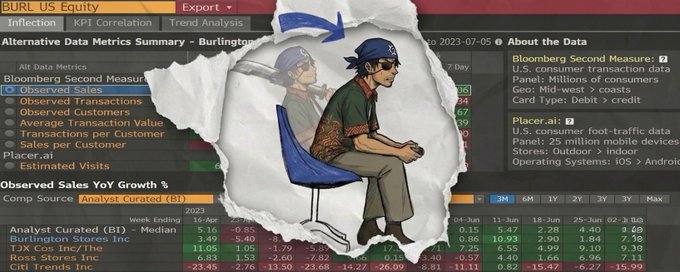
this guide is going to build you a personal Bloomberg terminal that updates with live data on your life, and business. all you need is 20 mins to setup connectors and two prompts:
before we begin... wataaafaaack (what the fack) are we building?
a live artifact is a dashboard that lives inside claude. you describe it once. it rebuilds itself with fresh data every time you open it.
here's what we're looking at with cowork and live artifacts:
> reads your local files. not just cloud apps. your obsidian vault. your downloads folder. your finance csv exports. your meeting transcripts. it treats your hard drive like a data source.
> runs on a schedule. you can tell it "every weekday at 06:00, rebuild this dashboard and drop a summary to my desktop." it executes whilst you're still asleep.
> takes real actions. not just reads. it can reply to emails, create hubspot tasks, open github issues, rename files, run scripts.
we're building two:
> personal os > your brain's dashboard. calendar, inbox, slack, notion, working memory. one screen.
> founder's daily brief > one screen that tells you what happened to your company yesterday and what matters today. revenue, deals, team status, last night's commits.
## what you need before you start
plan. claude pro, max, team, or enterprise. cowork is paid-only.
surface. claude desktop app (mac or windows). cowork is not on web or mobile. click the cowork tab at the top of the app.
the access:
> connectors read-only to start (gmail, stripe, slack, github, hubspot, notion, calendar)
> local folder access for the files cowork should read (downloads, documents, obsidian, finance exports)
> a cowork project for each dashboard. projects hold persistent memory and files across sessions. this is where the artifact will live.
the time. 20 minutes setup. two prompts.
the tool list:
> personal os: notion, gmail, google calendar, slack
> founder's brief: stripe, hubspot, slack, gmail, github
## 1: connect your tools
inside claude (web or desktop):
> open settings → connectors
> find each tool, click connect
> authorise on the tool's login page
> grant read-only first (you can upgrade to write later)
repeat for every tool. you'll see each one go green when it's live.
a real word on permissions. you're handing claude the same access a new hire with those credentials would have. treat connectors like hires. review them quarterly. revoke anything you've stopped using.
if a tool isn't in the native connector list, install it from claude.com/plugins (cowork) or via the official mcp server. stripe, github, notion and slack all ship their own first-party servers.
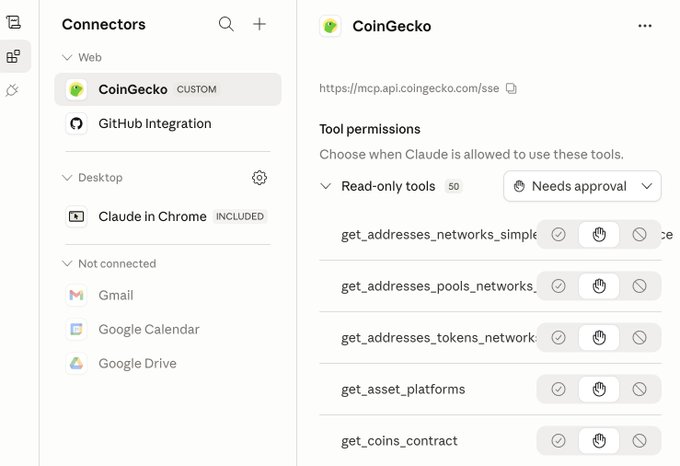
Here's a list of useful MCPs you might want to add:
## 2: build - the personal os
what you'll have when it works: one artifact. you open it and you see today's schedule, the inbox that needs you, the slack threads where you went silent, today's notion tasks, and a rolling memory of what you were working on yesterday.
then you ask it: "what should i focus on this morning?"
it answers with live context. not guesses.
the prompt. open a new chat in cowork. paste this. don't change the structure, just swap the bracketed bits.
IF YOU HAVE OTHER MCPs OR OTHER TOOLS OR FILES OR APPS THAT YOU UTILISE THEN EDIT THE FOLLOWING PROMPT APPROPRIATELY.
fill in your paths, your domain, your vip contacts, your notion database name.
You will get something like this (customise it to your taste):

what happens next. claude generates the artifact. first time it pulls from each connector it'll ask you to authorise. approve it.
open the artifact. that's your dashboard.
iterate it. the first version won't be perfect. stay in the same chat and feed it tweaks…
> "hide tentative meetings."
> "show yesterday's last 3 events too. i want to see what i walked out of."
> "add a section at the top: today's first commitment, with a countdown."
> "de-prioritise newsletters and no-reply senders."
> "filter out slack dms from bots."
each tweak updates the artifact in place. it stays live.
the part nobody nails is the working memory card is the one most second-brain apps have shipped badly. by asking claude to carry it forward, you get a rolling context of your week that compounds.
run this for 30 days. your morning catch-up collapses from 20 minutes of tab-switching to 4 minutes of one screen.
## 3: build - the founder's daily brief
what you'll have when it works. one screen. every morning. answers five questions:
> how much money did we make yesterday, and is that good
> what's moving in the pipeline
> what is the team blocked on
> what's the worst support issue right now
> did anything ship last night
no tabs. no dashboards-of-dashboards. no "let me pull that up."
create a cowork project called "founder's brief." grant local folder access to your finance folder, contracts folder, and meeting notes folder (if you want to, make sure you have safe copies as well) and then paste:
(Make this relevant to your business and what you utilise).
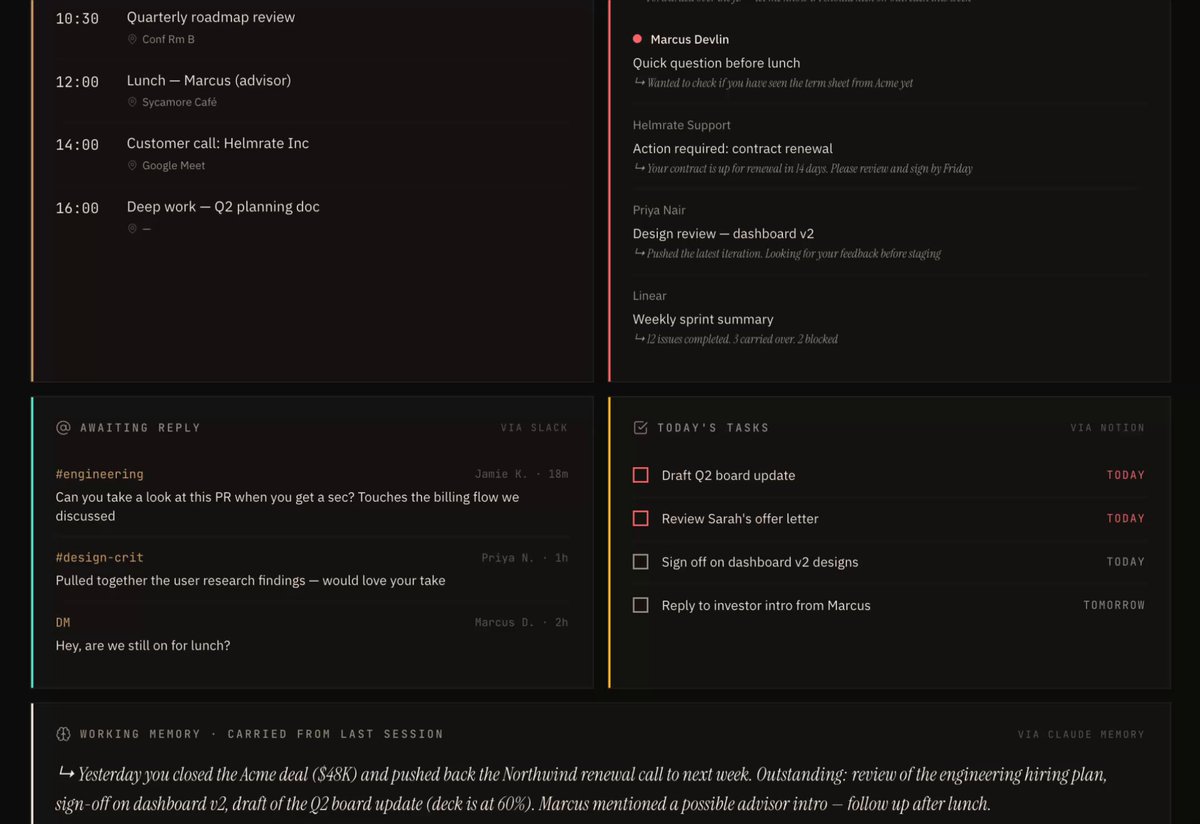
You will get something that looks like this (you can edit this as you please):
fill in the blanks:
> slack channels → your real channel names
> support email → your shared support inbox
> github repos → owner/repo-name format, e.g. yourcompany/backend
iterate it. typical tweaks after v1…
> "add a cash card at the top: current stripe balance + 30-day forecast based on mrr."
> "pipeline only shows deals over £10k. anything smaller is noise."
> "skip dependabot and renovate-bot commits."
> "support: ignore auto-responses and out-of-office."
> "add a card: biggest customer by mrr, are they healthy. last login, last ticket, last invoice paid."
advanced: make it write back.
> "snooze this hubspot deal 3 days."
> "reply to sarah saying i'll handle it after lunch."
> "open a github issue from that slack complaint."
start read-only. graduate to write-back once you trust it. don't skip that order.
## 4: when something breaks
connector failed? re-authenticate. settings → connectors → reconnect.
claude can't see your data? check permissions. read-only might be too tight. on enterprise google workspace, an admin may need to approve.
cowork can't see your files? you didn't grant folder access. open the cowork project, check permissions, add the folder.
scheduled task didn't run? cowork scheduled tasks only run when your computer is awake and the desktop app is open. set your machine to not sleep overnight, or schedule for a time you know you're on.
numbers look wrong? ask claude: "show me the exact query you're running to pull yesterday's revenue." it'll tell you. then correct it: "yesterday means 00:00 to 23:59 in my local timezone, not utc."
it's slow? narrow the scope. three channels not all of them. one repo not the whole org.
stopped refreshing? check if a connector dropped. if it's caching, add this line to your prompt: "every time i open this, re-query all sources. don't cache."
## 5: the level above
once both dashboards are live, the real skill is designing new ones. here are some ideas worth running…
> weekly review artifact: same inputs, aggregated over 7 days. your best hour for deep work. the customer who wrote in most. the repo with most activity.
> one-on-one prep artifact: pick a teammate. pull their github activity, slack signal, tickets, notion goals. drafts your talking points before the 1:1.
> investor update artifact: stripe + hubspot + github + slack into a monthly narrative draft.
every variation runs the same recipe. pick your data sources, describe the layout, tell claude the logic, iterate.
the skill isn't technical. it's knowing what join of data gives you an unfair edge.
## 6: the takeaway
most people who read this won't build either dashboard.
the ones who do will spend the next 12 months looking at their work through a lens tailored to their actual life. one screen. live data. compounding context.
everyone else will be clicking between six browser tabs trying to remember what mattered yesterday.
the connectors exist. the prompts are above. claude is already in your browser.
your move… pick one. set aside 30 minutes today. drop version one. iterate it tomorrow morning when you sit down to use it.
drop a screenshot of your build in the replies. i'll read every one and call out the sharpest setup.
## 相关链接
- [hoeem](https://x.com/hooeem)
- [@hooeem](https://x.com/hooeem)
- [43K](https://x.com/hooeem/status/2046675573305409893/analytics)
- [claude.com/plugins](https://claude.com/plugins)
- [Apr 16](https://x.com/the_smart_ape/status/2044738504286974459)
- [1.9M](https://x.com/the_smart_ape/status/2044738504286974459/analytics)
- [Upgrade to Premium](https://x.com/i/premium_sign_up)
- [3:40 AM · Apr 22, 2026](https://x.com/hooeem/status/2046675573305409893)
- [43.6K Views](https://x.com/hooeem/status/2046675573305409893/analytics)
- [View quotes](https://x.com/hooeem/status/2046675573305409893/quotes)
---
*导出时间: 2026/4/22 12:42:17*
---
## 中文翻译
# 我想创建一个个人版 Bloomberg 终端(完整教程):
**作者**: hoeem
**日期**: 2026-04-16T11:23:43.000Z
**来源**: [https://x.com/hooeem/status/2046675573305409893](https://x.com/hooeem/status/2046675573305409893)
---

本教程将教你搭建一个个人版 Bloomberg 终端,用实时数据更新你的生活和业务。你只需要 20 分钟设置连接器,外加两个提示词:
在开始之前……我们到底(wataaafaaack,what the fack)在搭建什么?
一个实时 artifact 是一个存在于 Claude 内部的仪表板。你只需描述一次。每次打开时,它都会用最新数据自动重建。
以下是我们将通过 cowork 和实时 artifacts 实现的功能:
> 读取你的本地文件。不仅仅是云端应用。你的 Obsidian 仓库、下载文件夹、财务 CSV 导出、会议记录。它把你的硬盘当作数据源。
> 按计划运行。你可以告诉它“每个工作日早上 06:00,重建这个仪表板,并把摘要放到我的桌面上。”它会在你还在睡觉时执行。
> 执行实际操作。不只是读取。它可以回复邮件、创建 HubSpot 任务、打开 GitHub issue、重命名文件、运行脚本。
我们要搭建两个:
> 个人操作系统:你大脑的仪表板。日历、收件箱、Slack、Notion、工作记忆。一屏搞定。
> 创始人每日简报:一屏告诉你公司昨天发生了什么、今天什么最重要。收入、交易、团队状态、昨晚的代码提交。
## 开始之前你需要准备的东西
订阅计划。Claude Pro、Max、Team 或 Enterprise。cowork 仅限付费用户。
设备。Claude 桌面应用(Mac 或 Windows)。cowork 不支持网页端或移动端。点击应用顶部的 cowork 标签页。
访问权限:
> 连接器:先从只读开始(Gmail、Stripe、Slack、GitHub、HubSpot、Notion、日历)
> 本地文件夹访问权限:让 cowork 读取的文件(下载、文档、Obsidian、财务导出)
> 为每个仪表板创建一个 cowork 项目。项目可以在会话之间保持持久的记忆和文件。artifact 将存放在这里。
时间。20 分钟设置。两个提示词。
工具清单:
> 个人操作系统:Notion、Gmail、Google 日历、Slack
> 创始人简报:Stripe、HubSpot、Slack、Gmail、GitHub
## 1:连接你的工具
在 Claude 内部(网页端或桌面端):
> 打开设置 → 连接器
> 找到每个工具,点击连接
> 在该工具的登录页面上授权
> 先授予只读权限(之后可以升级为写入权限)
对每个工具重复此操作。你会看到每个工具连接成功后变成绿色。
关于权限的一点真心话。你交给 Claude 的访问权限,等同于把这些凭证交给一名新员工。像对待员工一样对待连接器。每季度审查一次。撤销任何你已不再使用的权限。
如果某个工具不在原生连接器列表中,可以从 claude.com/plugins(cowork)安装,或通过官方 MCP 服务器安装。Stripe、GitHub、Notion 和 Slack 都有自己的一方可信服务器。

以下是你可能想添加的实用 MCP 列表:
## 2:搭建——个人操作系统
搭建成功后你会得到什么:一个 artifact。打开它,你就能看到今天的日程、需要你处理的收件箱、你沉默未回复的 Slack 讨论串、今天的 Notion 任务,以及关于你昨天在做什么的滚动记忆。
然后你问它:“我今天早上应该专注做什么?”
它会结合实时上下文回答。而不是猜测。
提示词。在 cowork 中打开一个新聊天。粘贴以下内容。不要改变结构,只需替换括号里的部分。
如果你使用其他 MCP 或其他工具、文件或应用,请相应地编辑以下提示词。
填入你的路径、你的域名、你的 VIP 联系人、你的 Notion 数据库名称。
你会得到类似这样的结果(按你的喜好自定义):

接下来会发生什么。Claude 会生成 artifact。第一次从每个连接器拉取数据时,它会要求你授权。批准即可。
打开 artifact。那就是你的仪表板。
迭代优化。第一版不会完美。留在同一个聊天中,不断提出调整……
> “隐藏暂定的会议。”
> “也显示昨天的最后 3 个日程。我想看看我中途离场了什么。”
> “在顶部添加一个部分:今天的第一个承诺,带倒计时。”
> “降低新闻邮件和无回复发件人的优先级。”
> “过滤掉机器人发来的 Slack 私信。”
每次调整都会就地更新 artifact。它始终保持实时。
最容易被搞砸的部分是工作记忆卡片——大多数第二大脑应用都在这一点上做得很糟糕。通过让 Claude 持续传递这一信息,你会得到一个不断累积的本周滚动上下文。
坚持运行 30 天。你的晨间信息整理将从 20 分钟的切换标签页,缩减为 4 分钟的一屏浏览。
## 3:搭建——创始人每日简报
搭建成功后你会得到什么。一屏内容。每天早上。回答五个问题:
> 我们昨天赚了多少钱,这个数字算好吗
> 销售管道中有什么进展
> 团队被什么卡住了
> 现在最严重的客服问题是什么
> 昨晚有没有发布任何东西
不需要切换标签页。不需要“仪表板中的仪表板”。不需要“让我查一下”。
创建一个名为“创始人简报”的 cowork 项目。授予对你财务文件夹、合同文件夹和会议记录文件夹的本地访问权限(如果需要,请确保你也有安全备份),然后粘贴:
(请根据你的业务和你使用的工具进行调整)。

你会得到类似这样的结果(你可以随意编辑):
填写空白处:
> Slack 频道 → 你的真实频道名称
> 客服邮箱 → 你的共享客服收件箱
> GitHub 仓库 → 所有者/仓库名格式,例如 yourcompany/backend
迭代优化。第一版之后常见的调整……
> “在顶部添加一张现金卡片:当前 Stripe 余额 + 基于 MRR 的 30 天预测。”
> “销售管道只显示超过 1 万英镑的交易。更小的都是噪音。”
> “跳过 dependabot 和 renovate-bot 的提交。”
> “客服:忽略自动回复和外出自动答复。”
> “添加一张卡片:按 MRR 排序的最大客户,他们是否健康。最近登录时间、最近工单、最近已付发票。”
进阶:让它能写回。
> “把这个 HubSpot 交易推迟 3 天。”
> “回复 Sarah,说我午饭后处理。”
> “根据那条 Slack 投诉创建一个 GitHub issue。”
从只读开始。等你信任它之后,再升级到写回。不要跳过这个顺序。
## 4:出问题怎么办
连接器失败了?重新认证。设置 → 连接器 → 重新连接。
Claude 看不到你的数据?检查权限。只读可能限制太紧。在企业版 Google Workspace 上,可能需要管理员批准。
Cowork 看不到你的文件?你没有授予文件夹访问权限。打开 cowork 项目,检查权限,添加文件夹。
定时任务没运行?cowork 定时任务只在你电脑处于唤醒状态且桌面应用打开时才会运行。把你的机器设置为整夜不休眠,或者安排在你确定在电脑前的时间。
数字看起来不对?问 Claude:“给我看你提取昨天收入所运行的确切查询。”它会告诉你。然后纠正它:“昨天指的是我本地时区的 00:00 到 23:59,不是 UTC。”
它很慢?缩小范围。三个频道,而不是全部。一个仓库,而不是整个组织。
停止刷新了?检查是否有连接器掉线。如果是缓存问题,在你的提示中加入这一行:“每次我打开这个时,重新查询所有数据源。不要缓存。”
## 5:更上一层楼
一旦两个仪表盘都上线,真正的技能是设计新的仪表盘。以下是一些值得尝试的点子……
> 每周回顾仪表盘:相同的输入,聚合 7 天的数据。你进行深度工作的最佳时段。写信最多的客户。活动最多的仓库。
> 一对一会议准备仪表盘:选一位团队成员。拉取他们的 GitHub 活动、Slack 动态、工单、Notion 目标。在 1:1 之前起草你的谈话要点。
> 投资人更新仪表盘:将 Stripe + HubSpot + GitHub + Slack 整合为一份月度叙述草稿。
每个变体都运行同样的配方。选择你的数据源,描述布局,告诉 Claude 逻辑,然后迭代。
这项技能不是技术性的。而是知道什么样的数据联接能给你带来不对称优势。
## 6:要点
读到这篇文章的大多数人都不会构建这两个仪表盘中的任何一个。
而会构建的那些人,将在接下来的 12 个月里通过一个为他们的实际生活量身定制的透镜来审视自己的工作。一块屏幕。实时数据。不断累积的上下文。
其他人则会在六个浏览器标签页之间来回点击,试图回忆昨天什么最重要。
连接器已经有了。提示就在上面。Claude 已经在你的浏览器里了。
该你了……选一个。今天留出 30 分钟。先做出第一个版本。明天早上坐下来使用时再迭代。
在回复中贴出你构建成果的截图。我会逐条阅读,并点评最出色的方案。
## 相关链接
- [hoeem](https://x.com/hooeem)
- [@hooeem](https://x.com/hooeem)
- [43K](https://x.com/hooeem/status/2046675573305409893/analytics)
- [claude.com/plugins](https://claude.com/plugins)
- [4月16日](https://x.com/the_smart_ape/status/2044738504286974459)
- [1.9M](https://x.com/the_smart_ape/status/2044738504286974459/analytics)
- [升级到 Premium](https://x.com/i/premium_sign_up)
- [2026年4月22日 凌晨3:40](https://x.com/hooeem/status/2046675573305409893)
- [43.6K 次浏览](https://x.com/hooeem/status/2046675573305409893/analytics)
- [查看引用](https://x.com/hooeem/status/2046675573305409893/quotes)
---
*导出时间: 2026/4/22 12:42:17*