Hermes Agent 会话管理指南 Neo 2026-04-16 26.5 KB ☆ 收藏 𝕏 文章列表 文章详细介绍了 Hermes Agent 的会话管理功能。Hermes 将对话视为持久化的会话,支持从 CLI、Telegram、Discord 等多平台恢复。文章阐述了会话作为“工作单元”的重要性,介绍了如何通过 ID 或标题恢复会话、利用分支功能探索不同路径,以及通过命名和整理习惯来优化工作流。 HermesAgent会话管理CLI工作流教程上下文恢复数据持久化 80 强烈推荐 ▶ 文章提供了丰富的Hermes会话管理细节与可落地操作命令,结构清晰且发布时间极具时效性,但在原理解读与深度分析上略显不足。 # Working With Sessions in Hermes Agent **作者**: Neo **日期**: 2026-04-15T20:35:47.000Z **来源**: [https://x.com/NeoAIForecast/status/2044515050057281808](https://x.com/NeoAIForecast/status/2044515050057281808) ---  A lot of AI tools give you a conversation. Hermes gives you a session you can actually manage. That sounds small at first, but it changes a lot. Because once sessions are persistent, searchable, renameable, resumable, exportable, and organizable, Hermes starts behaving less like a disposable chat window and more like a real working environment. If you are new to Hermes, understanding sessions is one of the fastest ways to get more value out of it. ## What a session is in Hermes In Hermes, every conversation is automatically saved as a session. That includes conversations from: - CLI - Telegram - Discord - Slack - WhatsApp - Signal - Matrix - cron jobs - API/server surfaces - other supported platforms A session is not just a transcript. It is the unit Hermes uses for continuity. It tracks things like: - the message history - the title - the source platform - model and config details - timestamps - parent session relationships when a session continues through compression That means when you come back later, Hermes is not guessing what happened before. It can resume from a real stored conversation history. Takeaway: A session is Hermes’ persistent container for a conversation, not a temporary chat tab. ## Why sessions matter Most new users treat AI chats as disposable. That works for one-off questions, but it falls apart when you are doing real work: - debugging over multiple passes - writing something over several sittings - revisiting research - managing a project thread - continuing work from one device or platform to another Sessions solve that. Instead of starting over every time, you can keep a thread alive, return to it later, organize it with a name, branch it into a new direction, and search older work when you need it. This is one of the practical differences between “chatting with a model” and “working with an agent runtime.” Takeaway: Sessions are what let Hermes support continuity instead of forcing restart-by-default behavior. ## How Hermes stores sessions Hermes tracks sessions in two complementary systems. First: SQLite database at ~/.hermes/state.db This stores the structured session data, including metadata and full-text search support. Second: JSONL transcripts under ~/.hermes/sessions/ These preserve raw conversation transcripts, including tool calls in the gateway flow. In practice, what matters for users is simple: Hermes keeps both the structure and the history. So you are not only getting a visible transcript. You are getting something Hermes can list, resume, search, filter, and manage. Takeaway: Hermes sessions are real stored objects with metadata and history, not just a UI convenience. ## How to resume sessions This is one of the first session workflows new users should learn. To continue your most recent CLI session: hermes --continue or hermes -c To resume a specific session by ID: hermes --resume 20250305_091523_a1b2c3d4 To resume by title: hermes -c "my project" This is especially useful once you start naming sessions properly. Hermes also supports lineage behavior. If your session became: - my project - my project #2 - my project #3 then: hermes -c "my project" will resume the most recent one in that line. That is a very practical feature, because it means you can think in terms of project names instead of memorizing IDs. Takeaway: For day-to-day work, resume by title is usually the cleanest session habit. ## What happens when you resume When you resume a session, Hermes reloads the prior conversation history and can show a compact recap before you continue. That recap is meant to quickly reorient you: - recent user messages - recent assistant responses - collapsed tool call summaries - truncated long content - hidden internal/system noise This matters because the resume experience is not just “open old log file.” It is designed to put you back into the working thread quickly. If you want a lighter resume display, Hermes also supports a minimal mode through config. Takeaway: Resume is built for re-entry, not just archival access. ## Why naming sessions matters If you do only one thing to improve your Hermes workflow, name your important sessions. Hermes can auto-generate titles after the first exchange, and that helps. But the real upgrade is setting intentional titles yourself. Inside a session, use: /title my research project 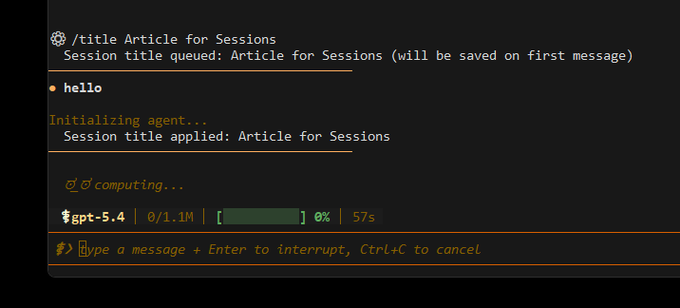 From the CLI, you can rename an existing session: hermes sessions rename 20250305_091523_a1b2c3d4 "debugging auth flow"  A good session title makes the session easier to: - resume later - distinguish from similar conversations - organize by project - search mentally before you even search technically Bad session habit: having 40 unnamed threads that all begin with “help me…” Better session habit: naming them by project, decision, or workstream. Examples: - auth migration plan - review tasks for PR - daily recap workflow - hermes sessions article draft Takeaway: Titles turn sessions from saved chats into manageable working threads. ## How to list and browse sessions Once you have more than a handful of sessions, listing and browsing becomes important. Use: hermes sessions list You can also filter by source: hermes sessions list --source telegram Or show more: hermes sessions list --limit 50 Hermes also has: hermes sessions browse  That is useful when you want a more deliberate session-picking workflow instead of remembering IDs manually. For new users, this is the practical pattern: - use sessions list when you roughly know what you want - use sessions browse when you want to inspect and choose Takeaway: Listing is for quick access. Browsing is for session management at scale. ## How to organize sessions well The simplest system is best. A good Hermes session organization strategy usually looks like this: 1. One session per real thread of work Do not pile unrelated topics into one giant conversation if you know they are separate projects. 2. Name durable threads early If the conversation will matter tomorrow, title it today. 3. Resume instead of restarting If you are continuing the same project, continue the same session. 4. Branch when you want to explore a different direction Do not wreck a clean thread just to test an alternative path. 5. Prune and export occasionally Keep your session store useful, not messy. This is less about neatness and more about keeping the agent context aligned with the work. Takeaway: Good session hygiene improves both your own recall and Hermes’ continuity. ## How branching works Branching is one of the most underappreciated session tools. Hermes includes: /branch also available as: /fork Its purpose is simple: take the current session and fork it into a new independent copy so you can explore a different path without losing the original thread. That is extremely useful when: - you want to try a different plan - you are comparing two implementations - you want a safer drafting branch - you are about to take the conversation in a very different direction Instead of mutating your main thread into a confusing hybrid, you create a branch and keep both paths clean. Takeaway: Use branch when the work is diverging, not just continuing. ## How compression affects sessions Hermes can compress context manually or automatically. When that happens, Hermes may create a continuation session in the same lineage. If the original session had a title, the follow-on sessions get numbered automatically: - my project - my project #2 - my project #3 This is important for two reasons. First, it preserves continuity without pretending the context window is infinite. Second, it keeps the lineage understandable. So if a long-running thread needs to keep going across compressed boundaries, Hermes gives you a structured continuation instead of a vague reset. Takeaway: Compression does not mean losing the thread. It means continuing it in an organized lineage. ## Best Practice for renaming sessions A few useful title rules: - titles must be unique - they are capped at 100 characters - Hermes sanitizes control characters and similar junk automatically The practical advice is: rename sessions based on the work they represent, not the first sentence you typed. Takeaway: Rename sessions around outcomes, projects, or threads of work, not random opening prompts. ## How to export sessions Sometimes you want portability, backup, or analysis. Hermes supports exporting all sessions, a filtered set, or one specific session. Examples: hermes sessions export backup.jsonl 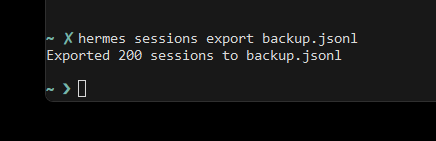 hermes sessions export telegram-history.jsonl --source telegram hermes sessions export session.jsonl --session-id 20250305_091523_a1b2c3d4 That gives you a structured record with metadata and messages. This is useful when you want to: - back up history - move data - inspect old work outside Hermes - build your own archive - preserve a project thread before cleanup Takeaway: Export is your backup and portability layer for session history. ## How to delete and prune sessions Not every session deserves to live forever. For one specific session: hermes sessions delete 20250305_091523_a1b2c3d4 For general cleanup: hermes sessions prune hermes sessions prune --older-than 30 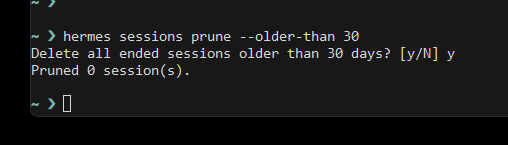 I had no older sessions than 30 days hermes sessions prune --source telegram --older-than 60 Important detail: pruning only deletes ended sessions. Active sessions are not pruned. That makes pruning safer than people often assume. The right mental model is not “delete everything old.” It is: remove stale finished threads so the session store stays manageable. Takeaway: Pruning is maintenance, not destruction. Use it to keep your session history useful. ## How to inspect session health at a high level Hermes also gives you: hermes sessions stats 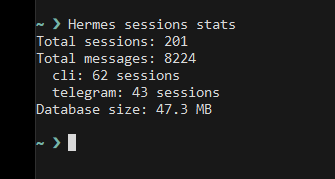 That helps you understand things like: - total sessions - total messages - source breakdown - database size This is especially useful once Hermes becomes part of your daily workflow and you want to understand how much history is accumulating. If you want deeper usage patterns, Hermes has separate insights tooling, but sessions stats is the first health check. Takeaway: Stats helps you understand the shape of your session history before it becomes invisible clutter. ## Sessions vs session_search New users often confuse these. A session is the stored conversation itself. session_search is the retrieval layer that helps Hermes look back across past conversations. So: - sessions are the underlying stored threads - session_search is how Hermes finds relevant prior threads when needed That distinction matters because good session organization improves both your manual workflow and Hermes’ ability to retrieve useful past context later. Takeaway: Sessions are the archive. session_search is the recall mechanism. ## What new Hermes users should do first If you are just starting with Hermes, these are the session habits worth building immediately: 1. Resume ongoing work instead of starting fresh every time Use: hermes -c or hermes -c "project name" 2. Name important sessions early Use: /title my project 3. Use one session per meaningful workstream Do not mix unrelated tasks into one endless thread. 4. Branch when exploring alternatives Use: /branch 5. List and prune occasionally Use: hermes sessions list hermes sessions prune These five habits alone make Hermes feel much more coherent over time. Takeaway: Session discipline is one of the easiest ways to make Hermes more useful without changing any model settings. ## Final takeaway If skills explain how Hermes stores reusable procedures, sessions explain how Hermes stores continuity. They are the working memory structure that lets Hermes act like an environment you return to, not a blank page you reopen. For a new user, learning how to create, name, resume, branch, export, prune, and organize sessions is not optional side knowledge. It is one of the core operational habits that makes Hermes feel powerful. ## 相关链接 - [Neo](https://x.com/NeoAIForecast) - [@NeoAIForecast](https://x.com/NeoAIForecast) - [21K](https://x.com/NeoAIForecast/status/2044515050057281808/analytics) - [Upgrade to Premium](https://x.com/i/premium_sign_up) - [4:35 AM · Apr 16, 2026](https://x.com/NeoAIForecast/status/2044515050057281808) - [21.4K Views](https://x.com/NeoAIForecast/status/2044515050057281808/analytics) - [View quotes](https://x.com/NeoAIForecast/status/2044515050057281808/quotes) --- *导出时间: 2026/4/16 17:07:10* --- ## 中文翻译 # 在 Hermes Agent 中使用会话 **作者**: Neo **日期**: 2026-04-15T20:35:47.000Z **来源**: [https://x.com/NeoAIForecast/status/2044515050057281808](https://x.com/NeoAIForecast/status/2044515050057281808) ---  很多 AI 工具给你的只是一次对话。Hermes 给你的则是一个可以真正管理的会话。 这听起来微不足道,但实际上意义重大。因为一旦会话可以持久化、可搜索、可重命名、可恢复、可导出、可组织管理,Hermes 的表现就不再像一个用完即弃的聊天窗口,而更像一个真正的工作环境。 如果你刚接触 Hermes,理解会话是快速发挥其价值的途径之一。 ## Hermes 中什么是会话 在 Hermes 中,每次对话都会自动保存为一个会话。 这包括来自以下渠道的对话: - CLI - Telegram - Discord - Slack - WhatsApp - Signal - Matrix - cron 任务 - API/服务端接口 - 其他支持的平台 会话不仅仅是一份对话记录。它是 Hermes 用来实现连续性的基本单元。 它会追踪诸如: - 消息历史 - 标题 - 来源平台 - 模型和配置详情 - 时间戳 - 当会话经过压缩延续时的父会话关系 这意味着当你稍后回来时,Hermes 不会去猜测之前发生了什么。它可以从真实存储的对话历史中恢复。 要点:会话是 Hermes 为对话提供的持久化容器,而不是一个临时的聊天标签页。 ## 会话为什么重要 大多数新用户把 AI 聊天当作一次性的东西。 对于一次性问题这样没问题,但当你做真正的工作时就不适用了: - 多轮反复调试 - 分多次完成一篇写作 - 回顾之前的研究 - 管理一个项目线程 - 从一台设备或平台切换到另一台继续工作 会话正是为此而设计的。 你无需每次从头开始,而是可以让一个线程保持活跃、稍后回来继续、给它命名以便整理、把它分支到新的方向,并在需要时搜索以前的工作。 这是“与模型聊天”和“与智能体运行时协作”之间的实际区别之一。 要点:会话让 Hermes 能够支持连续性,而不是默认强制每次重新开始。 ## Hermes 如何存储会话 Hermes 通过两个互补的系统来追踪会话。 第一: 位于 ~/.hermes/state.db 的 SQLite 数据库 这里存储结构化的会话数据,包括元数据和全文搜索支持。 第二: 位于 ~/.hermes/sessions/ 目录下的 JSONL 对话记录 这些文件保留了原始的对话记录,包括网关流程中的工具调用。实际上,对用户来说重要的是很简单: Hermes 同时保存了结构和历史。 所以你得到的不仅仅是一份可见的对话记录,而是 Hermes 可以列出、恢复、搜索、过滤和管理的东西。 要点:Hermes 的会话是带有元数据和历史记录的真实存储对象,而不只是 UI 层面的便利功能。 ## 如何恢复会话 这是新用户应该学习的第一个会话工作流程。 要继续你最近的 CLI 会话: hermes --continue 或 hermes -c 要按 ID 恢复特定会话: hermes --resume 20250305_091523_a1b2c3d4 要按标题恢复: hermes -c "my project" 一旦你开始认真为会话命名,这会特别有用。 Hermes 还支持谱系行为。如果你的会话变成了: - my project - my project #2 - my project #3 那么: hermes -c "my project" 会恢复这一系列中最新的一个。 这是一个非常实用的功能,因为它意味着你可以用项目名称来思考,而不必记住 ID。 要点:在日常工作中,按标题恢复通常是最简洁的会话习惯。 ## 恢复时会发生什么 当你恢复一个会话时,Hermes 会重新加载之前的对话历史,并可以在你继续之前显示一个简明的回顾。 这个回顾的目的是让你快速重新进入状态: - 最近的用户消息 - 最近的助手回复 - 折叠的工具调用摘要 - 截断的长内容 - 隐藏的内部/系统噪音 这很重要,因为恢复体验并不只是“打开旧的日志文件”。它的设计目的是让你快速回到工作线程中。 如果你想要更轻量的恢复显示,Hermes 还支持通过配置启用极简模式。 要点:恢复功能是为重新进入工作而设计的,而不只是用于查阅存档。 ## 为什么为会话命名很重要 如果要为改善 Hermes 工作流程只做一件事,那就是为重要的会话命名。Hermes 可以在第一次交流后自动生成标题,这有帮助。但真正的提升是你自己有意识地设置标题。 在会话中,使用: /title my research project  在 CLI 中,你可以重命名现有会话: hermes sessions rename 20250305_091523_a1b2c3d4 "debugging auth flow"  一个好的会话标题能让会话更容易: - 稍后恢复 - 与相似的对话区分开 - 按项目整理 - 在技术搜索之前先进行心理检索 不好的会话习惯: 有 40 个未命名的线程,全都以“帮我……”开头。 更好的会话习惯: 按项目、决策或工作流来命名。 示例: - auth migration plan - review tasks for PR - daily recap workflow - hermes sessions article draft 要点:标题让会话从保存下来的聊天记录变成可管理的工作线程。 ## 如何列出和浏览会话 一旦你的会话多了起来,列出和浏览就变得重要了。 使用: hermes sessions list 你还可以按来源过滤: hermes sessions list --source telegram 或显示更多: hermes sessions list --limit 50 Hermes 还有: hermes sessions browse  当你想要一个更从容的会话挑选流程,而不是手动记住 ID 时,这很有用。 对于新用户来说,实用的模式是: - 当你大致知道自己想要什么时,使用 sessions list - 当你想要查看并挑选时,使用 sessions browse 要点:列表用于快速访问。浏览用于大规模的会话管理。 ## 如何做好会话组织 最简单的系统就是最好的系统。 一个好的 Hermes 会话组织策略通常是这样的: 1. 每个真实的工作线索对应一个会话 如果你知道它们是不同的项目,就不要把不相关的主题堆进一个巨大的对话里。 2. 尽早为长期线程命名 如果这个对话明天还会重要,今天就给它起个标题。 3. 恢复而不是重新开始 如果你在继续同一个项目,就继续使用同一个会话。 4. 想探索不同方向时就使用分支 不要仅仅为了测试另一条路径就毁掉一个干净的线程。 5. 偶尔清理和导出 保持你的会话存储有用而不是杂乱。这不在于整洁本身,而在于让代理的上下文与工作保持一致。 要点:良好的会话管理习惯既能提升你自己的记忆追溯能力,也能保持 Hermes 的连续性。 ## 分支是如何工作的 分支是最被低估的会话工具之一。 Hermes 提供了: /branch 也可以使用: /fork 它的目的很简单: 获取当前会话并将其分叉为一个独立的新副本,这样你就可以探索不同的路径,而不会丢失原始线程。 这在以下情况下极其有用: - 你想尝试一个不同的计划 - 你在比较两种实现 - 你想要一个更安全的草稿分支 - 你即将把对话带向一个完全不同的方向 与其把你的主线程变成一个令人困惑的混合体,不如创建一个分支,让两条路径都保持清晰。 要点:当工作在分化而不仅仅是延续时,使用 branch。 ## 压缩如何影响会话 Hermes 可以手动或自动压缩上下文。 当这种情况发生时,Hermes 可能会在同一谱系中创建一个延续会话。如果原始会话有标题,后续会话会自动编号: - my project - my project #2 - my project #3 这很重要,原因有二。 首先,它在延续性的同时,不会假装上下文窗口是无限的。 其次,它使谱系保持清晰可辨。 因此,如果一个长期运行的线程需要跨越压缩边界继续进行,Hermes 会给你一个结构化的延续,而不是一个模糊的重置。 要点:压缩并不意味着丢失线程。它意味着在一个有组织的谱系中继续它。 ## 重命名会话的最佳实践 一些实用的标题规则: - 标题必须唯一 - 标题最长为 100 个字符 - Hermes 会自动清理控制字符和类似的垃圾字符 实用建议是: 根据会话所代表的工作来重命名,而不是根据你输入的第一句话。 要点:围绕成果、项目或工作线索来重命名会话,而不是随机的开场提示。 ## 如何导出会话 有时你会需要可移植性、备份或分析。Hermes 支持导出所有会话、过滤后的会话集或某个特定会话。 示例: hermes sessions export backup.jsonl  hermes sessions export telegram-history.jsonl --source telegram hermes sessions export session.jsonl --session-id 20250305_091523_a1b2c3d4 这样你就能得到一个包含元数据和消息的结构化记录。 当你想要: - 备份历史记录 - 迁移数据 - 在 Hermes 之外检查旧的工作 - 建立自己的归档 - 在清理前保留一个项目线程时,这非常有用 要点:导出是会话历史的备份和可移植层。 ## 如何删除和清理会话 并不是每个会话都值得永远保留。 删除某个特定会话: hermes sessions delete 20250305_091523_a1b2c3d4 进行常规清理: hermes sessions prune hermes sessions prune --older-than 30  我没有超过 30 天的旧会话 hermes sessions prune --source telegram --older-than 60 重要细节: 清理只会删除已结束的会话。活跃的会话不会被清理。这使得清理比人们通常想象的更安全。 正确的思维模式不是“删除所有旧东西”。 而是: 移除陈旧的已完成线程,使会话存储保持易于管理。 要点:清理是维护,不是破坏。用它来保持你的会话历史有用。 ## 如何在高层检查会话健康状况 Hermes 还提供了: hermes sessions stats  这可以帮助你了解: - 会话总数 - 消息总数 - 来源分布 - 数据库大小 当 Hermes 成为你日常工作流的一部分,而你想了解累积了多少历史时,这尤其有用。 如果你想要更深入的使用模式分析,Hermes 有单独的洞察工具,但 sessions stats 是第一个健康检查。 要点:Stats 帮助你在会话历史变成无形的杂物之前了解它的整体形态。 ## Sessions 与 session_search 的区别 新用户经常混淆这两者。 会话是存储的对话本身。 session_search 是检索层,帮助 Hermes 回溯查看过去的对话。 所以: - sessions 是底层存储的线程 - session_search 是 Hermes 在需要时查找相关先前线程的方式 这一区别很重要,因为良好的会话组织既能改善你的手动工作流,也能提升 Hermes 之后检索有用历史上下文的能力。 要点:Sessions 是归档。session_search 是回忆机制。 ## 新 Hermes 用户应该首先做什么 如果你刚开始使用 Hermes,以下是值得立即建立的会话习惯: 1. 恢复正在进行的工作,而不是每次都从头开始 使用: hermes -c 或 hermes -c "project name" 2. 尽早为重要的会话命名 使用: /title my project 3. 每个有意义的工作流使用一个会话 不要把不相关的任务混进一个无休止的线程里。 4. 探索替代方案时使用分支 使用: /branch 5. 偶尔列出和清理会话 使用: hermes sessions list hermes sessions prune 仅这五个习惯就能让 Hermes 在长期使用中感觉更加连贯。 要点:会话纪律是在不更改任何模型设置的情况下让 Hermes 更实用的最简单方法之一。 ## 最终要点 如果技能解释了 Hermes 如何存储可复用的流程,那么会话就解释了 Hermes 如何存储连续性。 它们是让 Hermes 像一个你可以随时回归的环境而非一页重新打开的空白纸那样运作的工作记忆结构。 对于新用户来说,学习如何创建、命名、恢复、分支、导出、精简和整理会话,并不是可有可无的边缘知识。 它是让 Hermes 感觉强大的核心操作习惯之一。 ## 相关链接 - [Neo](https://x.com/NeoAIForecast) - [@NeoAIForecast](https://x.com/NeoAIForecast) - [21K](https://x.com/NeoAIForecast/status/2044515050057281808/analytics) - [升级至 Premium](https://x.com/i/premium_sign_up) - [4:35 AM · Apr 16, 2026](https://x.com/NeoAIForecast/status/2044515050057281808) - [21.4K 次浏览](https://x.com/NeoAIForecast/status/2044515050057281808/analytics) - [查看引用](https://x.com/NeoAIForecast/status/2044515050057281808/quotes) --- *导出时间: 2026/4/16 17:07:10*
从 从零成为 Hermes Operator 与自动化架构师(完整课程) 这是一篇面向零基础用户的 Hermes Agent 完整教程,分为八个阶段,从安装运行、连接模型与工具网关,到配置 Telegram 等消息通道、赋予工具与记忆能力,再到设计自动化工作流、搭建多 Agent Bot 团队、使用子代理与定时任务,最后覆盖可靠性优化、成本控制、调试与扩展。文章详细对比了本地机器、Hermes Cloud 和 VPS 三种部署方案的优劣,并给出具体命令和配置步骤,帮助读者最终实现 trigger、research、decide、act、save、wait 的全自动多智能体工作流。 技术 › Hermes hoeem 2026-09-04 HermesAgent自动化多智能体教程Telegram部署工作流Nous Research工具网关
多 多模型整合指南:用 Hermes Desktop 统一管理 ChatGPT、Grok 与 DeepSeek 本文介绍如何使用 Hermes Desktop 将 ChatGPT、Grok、DeepSeek 和 MiniMax 等多个 AI 模型接入同一个桌面应用。文章详细讲解了通过图形界面一键配置模型账号、连接 Telegram/Discord 消息通道、以及设置 10 个实用的自动化工作流(如每日简报、竞品监控)的步骤,旨在无需编程即可实现多模型协同与自动化任务处理。 技术 › Hermes Wei 2026-07-03 HermesAgentDeepSeekChatGPTGrok工作流教程自动化工具与效率多模型
零 零成本打造全模态 AI 工作流指南 本文介绍了如何利用 Agnes 平台的免费 API 和 Hermes Agent,零成本构建支持文本、图像和视频生成的全模态 AI 工作流。文章详细讲解了从部署环境、配置模型到自定义生图 Skill 的全过程,并展示了批量生成绘本等实际应用场景,验证了免费模型在高质量任务中的可用性。 技术 › Hermes A AFei Liang 2026-06-18 AI免费API全模态HermesAgnesAgent教程生图工作流
H Hermes Agent 入门指南:模型选择与 Skill 配置实战 本文是 Hermes Agent 的新手入门教程,通过 PPT 生成的实战对比测试,深入解析了“模型能力”与“Skill 技能”之间的乘数关系。文章指出,仅靠强模型或好 Skill 无法达到最佳效果,必须两者配合。作者介绍了 Ring-2.6-1T 模型在工具调用和多步规划上的优势,并强调了在使用 Hermes Agent 时“先规划(Plan)、后执行”的重要性。 技术 › Skill Lonely 2026-05-18 HermesAgentLLM教程模型评测实战技巧Ring模型PPT生成工作流工具推荐
我 我看谁不学Grok bot -Day0 本文是零基础 Grok Bot 全流程教学。作者介绍了 Grok Bot 与 Codex、Claude Code 等项目型 Agent 的区别:每个 Bot 像有独立身份、职责和 Skill 的个人助手。文章讲解了 Grok Bot 的核心特性——每个账号配备一台云电脑,Bot 之间可互相传话、拉群协作;并给出四类 Bot 搭建方向:固定任务型(定时任务)、专业领域型(安装 Skill)、工具型(接入 Codex、飞书等 CLI)、连接器型(打通推特、密码管理器、邮箱等)。文中还包含安全提醒和额度消耗技巧,是一份实用的 personal AI 入门指南。 技术 › Agent 麦当mdldm 2026-10-14 Grok BotPersonal AISkillAgentClaude CodeCodexCLI云电脑教程自动化
W Windows 搭建 ComfyUI 环境 | 小白也能直接上手 本文介绍如何在 Windows 系统上快速搭建 ComfyUI 环境,适合零基础用户。作者使用 B站UP主秋葉aaaki 提供的整合包,只需解压和双击两步即可完成安装,一键启动后浏览器自动打开本地界面。模型下载与配置、工作流搭建(文生图、图生图、图生视频)等操作均可交给 WorkBuddy(AI Agent)完成,用户只需修改提示词点击生成即可,甚至可通过 API 让 Agent 全程自动完成并返回结果。文中还提供了 qwen-image-2.1-turbo 模型的下载示例及相关资源链接,遇到问题可将报错截图发给 AI 解决。 技术 › 工具与效率 sugar 2026-10-12 ComfyUIWindowsAI绘图WorkBuddyAgent工作流qwen-image教程整合包文生图
我 我把 Muse 接进了微信:从扫码连接到让它执行任务 作者分享了将 Meta 的个人 AI Agent「Muse」接入微信的完整实践教程。通过微信 ClawBot 插件与桥接程序,用户可以直接在微信里给 Muse 交代任务,Muse 执行后把结果回传微信。文章详细讲解了接入流程:启用 ClawBot、向 Muse 发送提示词完成配置、扫码登录、发送第一条消息完成收发测试,以及用真实任务验证执行效果。作者还总结了常见卡点:扫码后需在微信发消息才算完成、聊天记录不会自动同步、收到回复不等于任务执行完成等,并附上了可复制的完整提示词。 技术 › Agent Drunk 2026-10-10 Muse微信AgentAI实战工作流ClawBotMeta任务自动化教程
A AI偷学破局上万条实战帖,生成12周个性化学习计划 作者利用破局俱乐部官方CLI和自己服务器上运行的Hermes Agent,搭建了一个名为"AI路径诊断"的公益网站。用户通过答题卡形式的访谈(精简模式12题或深入模式24题),网站会检索破局社群中与用户情况相近的真实实战案例,生成包含推荐方向、12周学习计划、真实案例参考的个性化报告,支持生成分享卡片、长图和Excel导出。文章详细介绍了技术架构:为网站单独创建受限的Hermes profile、通过白名单调用破局CLI只读不写、接入飞书CLI读取完整复盘文档、以及两个核心Skill(访谈skill和报告skill)的设计规则,后端采用Python FastAPI,前端使用原生HTML/CSS/JS,数据库使用SQLite。 技术 › Agent zhouluobo 2026-10-08 HermesAgentSkillFastAPICLI飞书AI副业学习路径网站搭建后端
D DeepSeek Harness 实战教程:从安装到跑通可复用的内容工作流 本文是 DeepSeek Harness 的实战教程。Harness 是一个可扩展的智能体运行环境,基于 Cordis 构建,一切皆插件。文章介绍了准备工作(Node.js、API 密钥、测试目录)、启动方式(npx 或源码运行 Web UI)、模型配置与工作区选择,并以生成可审核的小说推广文案为例,演示了素材分析、结构化任务指令、执行检查、人工审核到文件保存的完整闭环。还扩展了团队内容初稿、资料整理、插件接入等方向,给出批量处理的分阶段建议和常见问题排查,并强调最小权限、独立环境等安全边界。 技术 › Harness Engineering Kelvin 2026-10-03 DeepSeekAgentHarness教程智能体工作流内容生成安全边界
装 装了几个 Agent 之后,我发现它们根本不适合我的电脑 作者分享了自己搭建个人远程工作流的经验:通过 Telegram 连接本地 Eagle 资产库和电脑开发工具,实现手机发指令、家里电脑自动执行任务的闭环。作者认为通用 Agent 不适合有固定规矩的本地环境,转而采用任务分流架构:图片归档直接调用 Eagle API,轻量任务用轻量模型,复杂工程交给 CLI 无头模式执行。文章还解决了 Telegram 相册消息拆分、远程唤醒阻塞前台等实际问题,用标准输入传任务、保存会话 ID、文件夹记录状态等细节保证流程稳定,强调 Agent 应安静接入工作流,而非做万能的电子宠物。 技术 › Agent VoxCat 2026-09-24 AgentTelegramEagle工作流任务分流远程控制WSL2个人自动化CLI
别 别让素材吃灰!手把手教你搭建「爆款视频创意生产线」 文章介绍如何利用豆包工作(Doubao Work)搭建AI视频创意生产线,解决收藏了大量AI视频却做不出来的问题。作者通过四个步骤演示完整流程:先用目标模式建立AI视频素材库,自动下载并拆解视频到飞书多维表格;再用计划模式拆解参考视频的创意机制(如敦煌飞天Demo的'正常—意外—补救—破绽—装没事'结构);然后修改计划换成原创方向(冰箱小精灵偷吃饼干);最后确认后用Seedream和Seedance模型生成成片。文章总结了目标模式与计划模式的区别、减少动作复杂度等实用技巧,并指出该方法同样适用于报告、PPT、数据表等场景。 技术 › Agent Lonely 2026-09-23 豆包工作AI视频Agent工作流视频生成Seedance素材管理教程创意拆解飞书多维表格
一 一个文科生,怎么让AI每天自动替我找选题 作者作为AI博主,分享了自己搭建「选题雷达」系统的完整流程。系统包含两个AI编辑:一个负责AI大新闻选题,通过AIHOT热点榜、精选流和Follow Builders追踪正在爆的事件;另一个负责实战心法选题,通过best-skills排行榜和GitHub Trending筛选值得亲测的工具。每条选题需经过48小时时效、目标用户相关度、一小时内可执行动作等多重过滤,并由Agent打分排序。作者强调AI只决定「值得看」,最终「值得写」的判断仍靠人的体感。整个系统跑在HermesAgent和GrokBot上,让作者把重复性工作交给AI,只保留判断、体验和表达。 技术 › Agent 写手李大魔 2026-09-18 Agent自动化选题系统内容创作AI工具Skill工作流GitHub Trending信息筛选Hermes