# Graph Engineering replaced RAG at Microsoft, Stanford and Anthropic. Here's how it works.
**作者**: Sprytix
**日期**: 2026-07-19T09:47:42.000Z
**来源**: [https://x.com/Sprytixl/status/2078778799064584535](https://x.com/Sprytixl/status/2078778799064584535)
---
Right now anyone can build an AI system that answers complex questions with 18% better accuracy and 85% lower costs than regular RAG. No PhD. No million dollar budget. No team of researchers.
The only thing standing between you and that result is one concept that Microsoft, Stanford and Anthropic all independently discovered - and which most developers still haven't caught up with.
Regular RAG finds text. Graph Engineering finds relationships. Here's the full system behind it.
> Bookmark This and follow - I'm Sprytix, a developer who builds AI systems and automation pipelines that turn technology into real income. DMs open.
Why regular RAG hits a ceiling
Regular RAG works like this:
```
Question
↓
Search documents for matching text
↓
Return most relevant chunks
↓
Model generates answer from chunks
```
This works well for simple questions. It breaks completely for complex ones.
Ask "why did our product sales drop in March?" and RAG finds documents with the words "sales" and "March." It finds fragments. It does not find the chain of causation.
```
RAG answer:
Here are 5 documents mentioning sales in March.
Graph Engineering answer:
Sales dropped because of a release delay
caused by a supplier dependency
triggered by a warehouse problem
which generated negative reviews
which reduced conversion by 23%.
```
Same model. Same data. Completely different result - because one system searches text and the other searches reality.
This is what Microsoft, Stanford and Anthropic all independently discovered. And it's why all three of them moved to Graph Engineering.
Document 1 - Microsoft GraphRAG
1. github.com/microsoft/graphrag
2. github.com/microsoft/graphrag/blob/main/docs/index/architecture.md
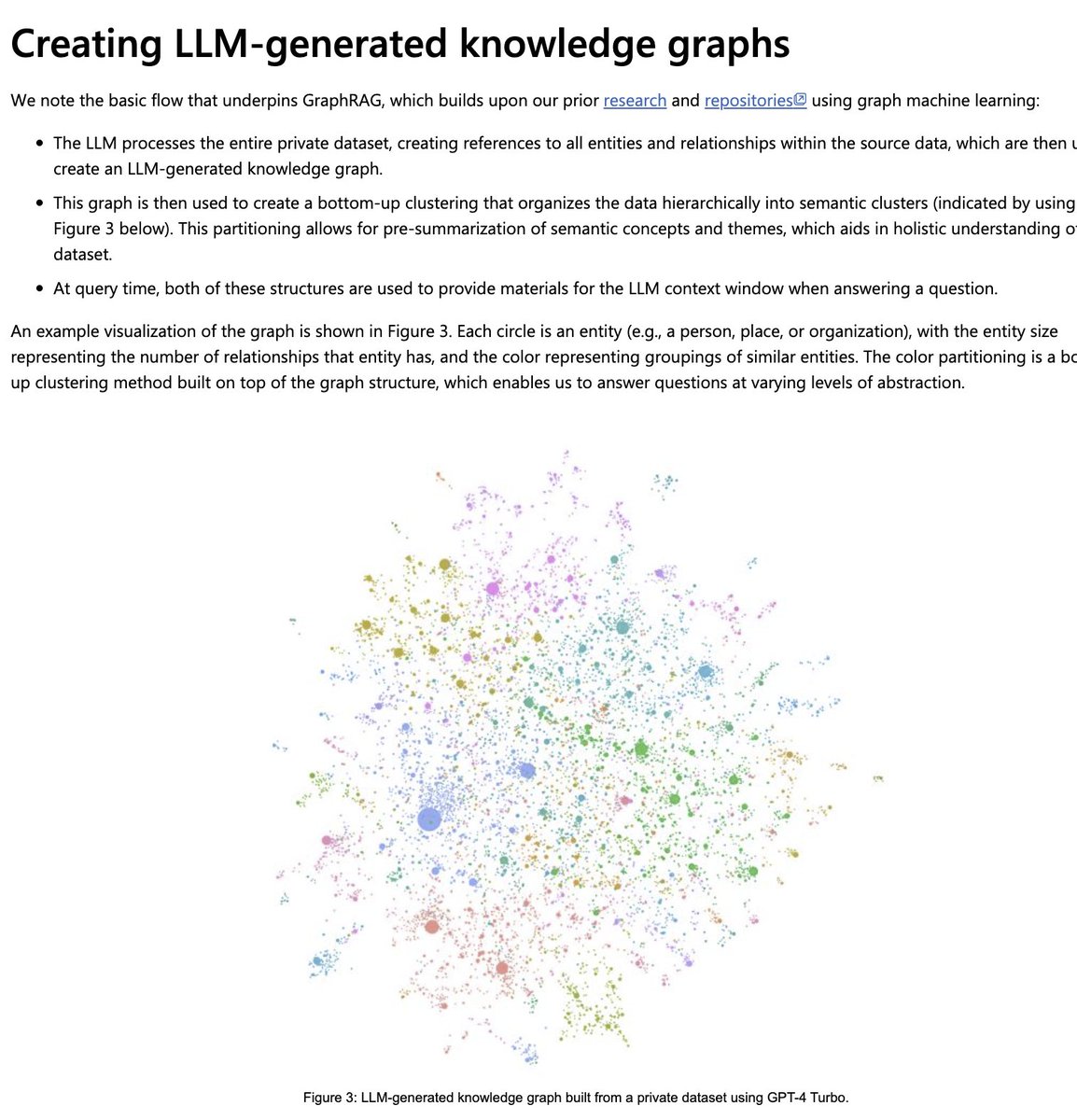
Microsoft built GraphRAG and open-sourced it. The results from their research are the most concrete numbers available on what Graph Engineering actually delivers versus regular RAG.
The architecture converts unstructured text into a full knowledge graph:
```
Load Documents
↓
Chunk Documents
↓
Extract Entities and Relations
↓
Build Graph
↓
Detect Communities
↓
Generate Community Reports
↓
Embed Entities and Reports
↓
Local Search / Global Search
```
The key insight Microsoft documented: regular RAG answers local questions well - find me information about this specific entity. It fails on global questions - what are the main themes across this entire dataset, what patterns connect these 10,000 documents.
Graph Engineering answers both.
```
Local Search | what happened with supplier X in March
| finds specific node and its connections
Global Search | what are the main risk patterns across
| all our supplier relationships
| finds patterns across entire graph
```
Practical results from Microsoft's GraphRAG research:
```
Accuracy improvement | 18% higher than raw document approach
Token cost reduction | 85% lower than loading structured files directly
Cost per task | approximately $0.004 in tested configuration
```
> arxiv.org/abs/2603.22528
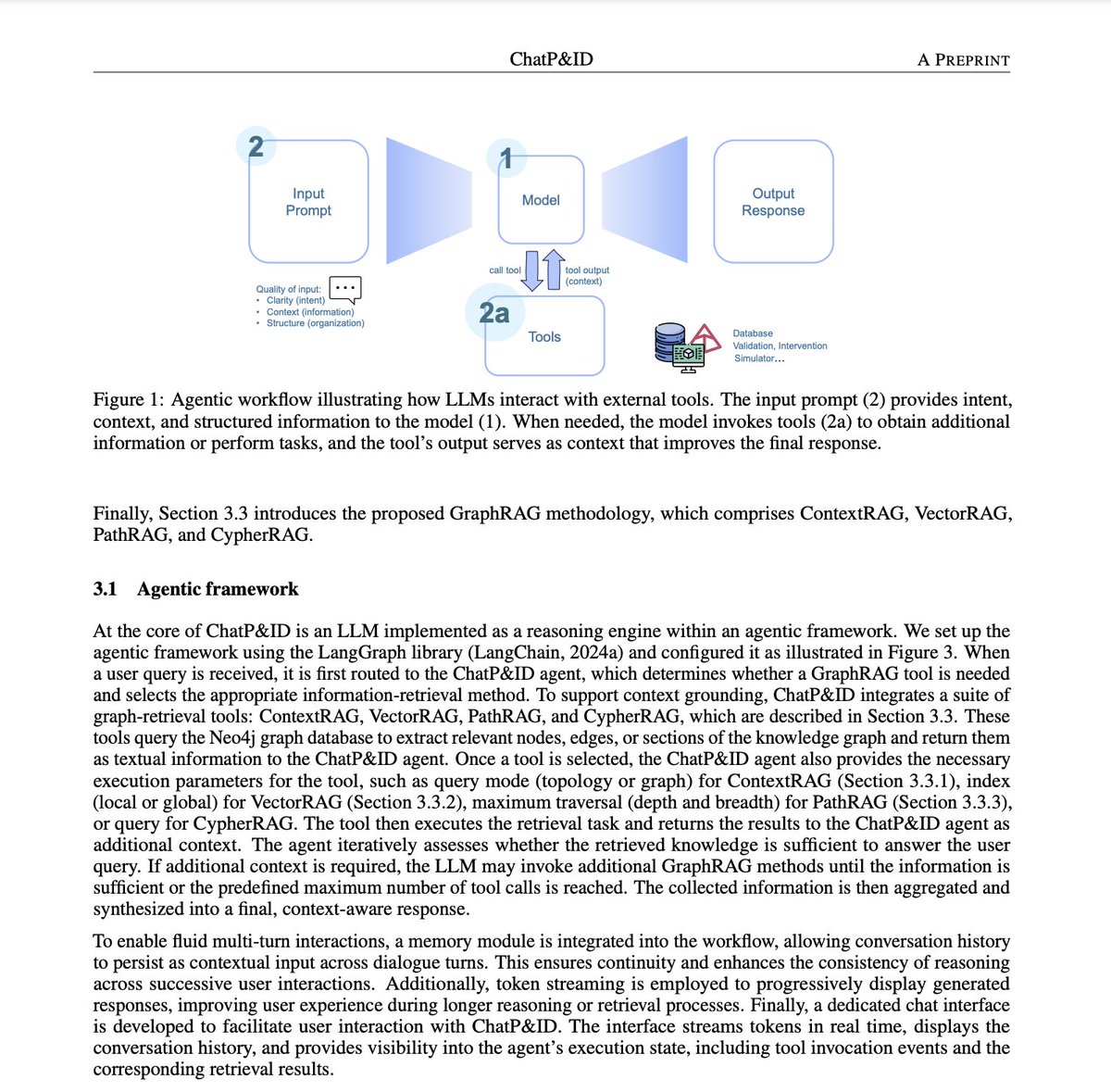
These numbers come from the ChatP&ID paper - GraphRAG applied to industrial engineering diagrams. The same principles apply across domains.
Document 2 - Stanford DSPy and the graph connection
1. github.com/stanfordnlp/dspy
2. arxiv.org/abs/2310.03714
Stanford's DSPy paper established that the model is a node in a graph - not the center of the universe. This is the theoretical foundation that connects directly to Graph Engineering.
DSPy treats the AI pipeline as a graph of modules:
```
Question
↓
Retriever - finds relevant information
↓
Reasoning - processes and connects
↓
Verifier - checks the result
↓
Answer
```
The connection to Graph Engineering is direct: DSPy optimizes the pipeline graph, GraphRAG optimizes the knowledge graph. Both treat the model as one component in a larger structure rather than the entire solution.
Stanford's STORM paper goes further:
1. github.com/stanford-oval/storm
2. arxiv.org/abs/2402.14207
STORM builds knowledge from scratch through a structured graph of research steps before writing a single word. Research, source collection, outline, writing, verification, revision - each step informed by the relationships discovered in the previous one.
The shared insight across all Stanford research: complex tasks need a system of connected steps, not a single model call. The graph is the system.
Document 3 - Stanford scaling laws for knowledge graphs
> arxiv.org/abs/2505.16276
This paper compared 26 open-source models on knowledge graph engineering tasks. The conclusion is one of the most important in the field:
```
Larger model + bad graph | worse results
Smaller model + good graph | better results
```
The right graph beats the bigger model. Every time.
This is the same conclusion Microsoft reached with GraphRAG and Anthropic reached with Claude Code - the system around the model determines the output more than the model itself. Graph Engineering is the most concrete implementation of that principle.
Document 4 - MIT Press research on relational memory
direct.mit.edu/tacl/article/doi/10.1162/tacl_a_00476
Published in Transactions of the Association for Computational Linguistics.
The research shows what happens when you connect a language model to relational memory - a knowledge graph of relationships rather than just text chunks.
```
Text Context
↓
Retrieve Relevant Relations from Graph
↓
Relational Memory
↓
Language Model
↓
More coherent, more accurate generation
```
The key finding: models with access to explicit relationship structures produce more coherent text and make fewer logical errors than models working from text alone.
This is the scientific explanation for why Graph Engineering works. The model doesn't have to infer relationships from text. The relationships are explicit in the graph. The model uses them directly.
Document 5 - KEPLER
1. direct.mit.edu/tacl/article-abstract/doi/10.1162/tacl_a_00360/98089
2. github.com/THU-KEG/KEPLER
KEPLER combines language model training with knowledge graph embeddings. Instead of treating language understanding and factual knowledge as separate problems - KEPLER optimizes both simultaneously.
```
Language Model
+
Knowledge Embeddings
+
Knowledge Graph
=
Model that understands both language and facts
```
The practical implication: a model that has access to a properly structured knowledge graph doesn't have to guess at relationships between entities. It looks them up. The accuracy difference on factual questions is significant.
Document 6 - Anthropic and Claude in the graph
1. www.anthropic.com/customers/graph
2. github.com/anthropics/anthropic-cookbook
3. github.com/modelcontextprotocol
Anthropic doesn't have a product called "Graph Engineering." What they have is three layers where Claude integrates directly into graph architecture.
Layer 1 - Claude extracts the graph from text
```
Documents
↓
Claude extracts entities and relationships
↓
JSON triples:
{
"subject": "Anthropic",
"relation": "created",
"object": "Claude"
}
↓
Knowledge Graph
```
Claude handles entity extraction, relation extraction, deduplication, normalization and ontology drafting. The tasks that used to require specialized NLP pipelines now run through one API call.
Layer 2 - Claude queries the graph
```
User Question
↓
Claude
↓
Cypher / SPARQL query
↓
Knowledge Graph
↓
Result
↓
Claude explanation in plain language
```
Claude translates natural language into graph queries, runs them against Neo4j or any graph database and explains the results. No query language knowledge required from the user.
Layer 3 - MCP connects Claude to the graph
github.com/modelcontextprotocol
```
Claude
↓
MCP Protocol
↓
Graph Database
↓
Entities + Relationships
↓
Claude with full graph context
```
MCP is the transport layer that gives Claude permanent access to any knowledge graph without rebuilding the connection for every session.
The LaunchNotes case - real production numbers
www.anthropic.com/customers/graph
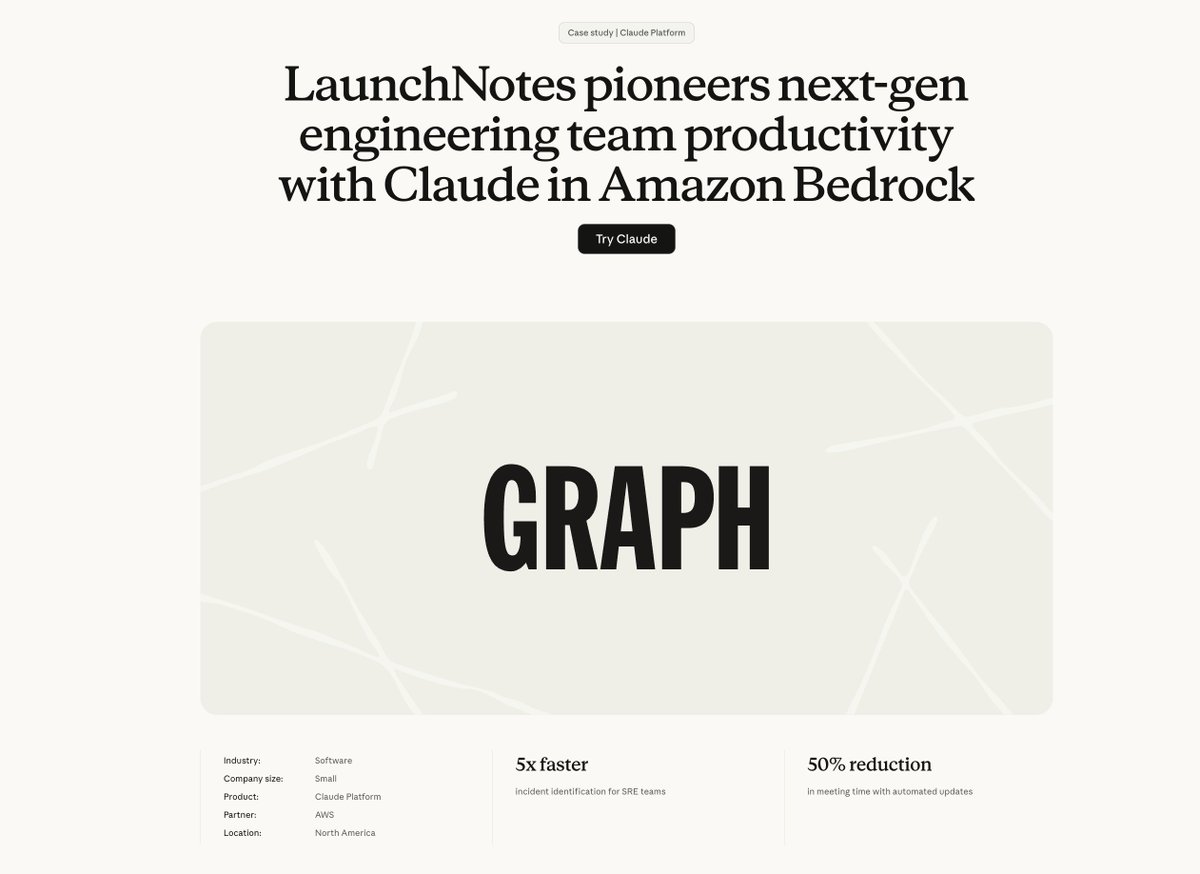
LaunchNotes built a product called Graph that connects GitHub, Jira and Linear. Claude analyzes the relationships between engineering work across all three systems.
```
GitHub commits
+
Jira tickets
+
Linear tasks
↓
Graph of Engineering Work
↓
Claude
↓
Incident Detection + Project Insights
```
Results from the Anthropic case study:
```
Incident detection | up to 5x faster
Meeting time | approximately 50% reduction
Release notes | generated automatically in seconds
```
These numbers come from connecting structured relationship data - not just searching documents.
What a knowledge graph actually is
Before building one - the fundamental concept.
A knowledge graph stores information as triples:
```
Subject → Relation → Object
```
Examples:
```
Anthropic → created → Claude
Claude → supports → MCP
MCP → connects → external tools
Microsoft → built → GraphRAG
GraphRAG → reduces token cost by → 85%
```
Every piece of information is an explicit relationship between two entities. Not a paragraph of text that might contain this information - an explicit, structured, queryable fact.
```
Regular database:
Table of companies
Table of products
No explicit relationships between them
Knowledge graph:
Company → created → Product
Product → competes with → Other Product
Other Product → owned by → Other Company
Company → invested in → Other Company
```
The graph doesn't just store facts. It stores how facts connect to each other. That's what makes complex reasoning possible.
The full Graph Engineering pipeline
```
Step 1 | Collect raw documents
| PDFs, emails, reports, database exports
Step 2 | Extract entities
| people, companies, products, events, concepts
Step 3 | Extract relationships
| who did what to whom, when, why, how
Step 4 | Build schema
| define entity types and relationship types
Step 5 | Deduplicate and normalize
| "Microsoft Corp" and "MSFT" are the same entity
Step 6 | Store in graph database
| Neo4j, Amazon Neptune, PostgreSQL with graph extension
Step 7 | Build retrieval layer
| local search for specific entities
| global search for patterns across entire graph
Step 8 | Connect model
| Claude queries graph via MCP or direct API
Step 9 | Update continuously
| new documents expand the graph
| contradictions get flagged for review
```
The LLM-assisted Knowledge Graph Engineering paper at arxiv.org/abs/2307.06917 benchmarks how well language models handle each of these steps. The honest finding: LLMs are excellent assistants for extraction and normalization but zero-shot graph generation is not yet reliable enough for production without human review on the schema and deduplication steps.
The five prompts that run the entire pipeline
Graph Engineering doesn't eliminate prompts. It uses them at each specific stage of the graph pipeline.
Prompt 1 - Extraction
```
Extract all organizations, people, products and events.
For each entity return:
- canonical_name
- type
- description
- source
For each relationship return:
- source_entity
- relation_type
- target_entity
- evidence
- confidence_score
```
Prompt 2 - Normalization
```
Compare the following entities.
Determine whether they refer to:
- the same entity
- related but different entities
- unrelated entities
Return canonical name and explanation.
Do not merge entities without clear evidence.
```
Prompt 3 - Graph query
```
Translate the user question into a Cypher query.
Use only relationships present in the schema.
Do not invent labels or properties.
Return the query and a short explanation of the logic.
```
Prompt 4 - Grounded answer
```
Answer using only the retrieved graph paths.
For every conclusion:
- identify the supporting nodes
- identify the relationship path
- state uncertainty clearly
- do not infer causation from correlation
```
Prompt 5 - Graph maintenance
```
Compare new facts with the existing graph.
Classify each fact as:
- new
- duplicate
- contradiction
- update
- uncertain
Do not overwrite existing facts without evidence.
```
As Microsoft's GraphRAG documentation shows - prompts handle extraction, relationship identification, summarization and community report generation internally. Prompt engineering is the mechanism inside graph engineering, not its competitor.
Five businesses you can build on a knowledge graph
1 - Due diligence platform
```
Corporate reports + founders + investors
+ legal cases + subsidiaries + transactions
↓
Knowledge Graph
↓
Claude
↓
Risk analysis + hidden connections + conflict of interest detection
```
Clients: investment funds, law firms, banks, M&A consultants. Monthly retainer $2,000-10,000 per client.
2 - Sales intelligence
```
Contacts + companies + roles
+ previous emails + company problems + product
↓
Knowledge Graph
↓
Who influences the decision
Which objections repeat
Which case study to show this specific client
Where the deal is blocked
```
3 - Engineering intelligence
```
GitHub commits + Jira tickets + Linear tasks
↓
Graph of Engineering Work
↓
5x faster incident detection
50% less meeting time
Automatic release notes
```
LaunchNotes already sells this. The market is every engineering team that uses more than one project management tool.
4 - Research intelligence
```
Papers + authors + institutions
+ methods + datasets + results + contradictions
↓
Knowledge Graph
↓
Which GraphRAG methods use community detection
On which datasets they were tested
Which papers contradict each other
```
5 - Personal knowledge OS
```
Obsidian notes + emails + calendar
+ PDFs + contacts + tasks
↓
Personal Knowledge Graph
↓
Who did I discuss this idea with
Which tasks depend on one person's response
Which decisions contradict previous agreements
What did I promise to do this month
```
The shift that connects Microsoft, Stanford and Anthropic
```
Prompt Engineering | how to ask the right question
RAG | which document to find
Graph Engineering | which entities exist
| how they connect
| which path leads to the answer
| what changes if one node changes
```
LLM knows words. Knowledge graph knows relationships. The most powerful AI systems appear when both work together.
Microsoft proved this in production with GraphRAG - 18% better accuracy, 85% lower costs. Stanford proved it in research with DSPy, STORM and the scaling laws paper. Anthropic proved it in the LaunchNotes case - 5x faster incident detection, 50% less meeting time.
Three organizations. Three independent paths. One conclusion.
The model finds text. The graph finds reality. Build the graph.
Most developers will keep improving their prompts and wonder why complex questions still give bad answers. A few will spend one weekend building their first knowledge graph and never go back to searching documents.
/ If this was useful - follow, the next one drops here first.
## 相关链接
- [Sprytix](https://x.com/Sprytixl)
- [@Sprytixl](https://x.com/Sprytixl)
- [65K](https://x.com/Sprytixl/status/2078778799064584535/analytics)
- [github.com/microsoft/graphrag](https://github.com/microsoft/graphrag)
- [github.com/microsoft/graphrag/blob/main/docs/index/architecture.md](https://github.com/microsoft/graphrag/blob/main/docs/index/architecture.md)
- [arxiv.org/abs/2603.22528](https://arxiv.org/abs/2603.22528)
- [github.com/stanfordnlp/dspy](https://github.com/stanfordnlp/dspy)
- [arxiv.org/abs/2310.03714](https://arxiv.org/abs/2310.03714)
- [github.com/stanford-oval/storm](https://github.com/stanford-oval/storm)
- [arxiv.org/abs/2402.14207](https://arxiv.org/abs/2402.14207)
- [arxiv.org/abs/2505.16276](https://arxiv.org/abs/2505.16276)
- [direct.mit.edu/tacl/article/doi/10.1162/tacl_a_00476](https://direct.mit.edu/tacl/article/doi/10.1162/tacl_a_00476)
- [direct.mit.edu/tacl/article-abstract/doi/10.1162/tacl_a_00360/98089](https://direct.mit.edu/tacl/article-abstract/doi/10.1162/tacl_a_00360/98089)
- [github.com/THU-KEG/KEPLER](https://github.com/THU-KEG/KEPLER)
- [www.anthropic.com/customers/graph](https://www.anthropic.com/customers/graph)
- [github.com/anthropics/anthropic-cookbook](https://github.com/anthropics/anthropic-cookbook)
- [github.com/modelcontextprotocol](https://github.com/modelcontextprotocol)
- [github.com/modelcontextprotocol](https://github.com/modelcontextprotocol)
- [www.anthropic.com/customers/graph](https://www.anthropic.com/customers/graph)
- [arxiv.org/abs/2307.06917](https://arxiv.org/abs/2307.06917)
- [Upgrade to Premium](https://x.com/i/premium_sign_up)
- [5:47 PM · Jul 19, 2026](https://x.com/Sprytixl/status/2078778799064584535)
- [65K Views](https://x.com/Sprytixl/status/2078778799064584535/analytics)
- [View quotes](https://x.com/Sprytixl/status/2078778799064584535/quotes)
---
*导出时间: 2026/7/20 11:42:05*
---
## 中文翻译
# 图工程在微软、斯坦福和 Anthropic 取代了 RAG。以下是它的工作原理。
**作者**: Sprytix
**日期**: 2026-07-19T09:47:42.000Z
**来源**: [https://x.com/Sprytixl/status/2078778799064584535](https://x.com/Sprytixl/status/2078778799064584535)
---

现在,任何人都可以构建一个 AI 系统,以比普通 RAG 高 18% 的准确率和低 85% 的成本来回答复杂问题。不需要博士学位。不需要百万美元预算。不需要研究团队。
阻碍你获得这一结果的唯一原因,是微软、斯坦福和 Anthropic 都独立发现的一个概念——而大多数开发者至今仍未跟上。
普通 RAG 查找的是文本。图工程查找的是关系。这就是其背后的完整系统。
> 收藏本文并关注我——我是 Sprytix,一名开发者,致力于构建能将技术转化为真实收入的 AI 系统和自动化管道。私信开放。
为什么普通 RAG 会触碰到天花板
普通 RAG 的工作原理如下:
```
Question
↓
Search documents for matching text
↓
Return most relevant chunks
↓
Model generates answer from chunks
```
这对于简单问题效果很好。但对于复杂问题,它完全失效。
问“为什么我们的产品销量在三月份下降了?”,RAG 会找到包含“销量”和“三月”这两个词的文档。它找到的是碎片。它找不到因果链。
```
RAG answer:
Here are 5 documents mentioning sales in March.
Graph Engineering answer:
Sales dropped because of a release delay
caused by a supplier dependency
triggered by a warehouse problem
which generated negative reviews
which reduced conversion by 23%.
```
同样的模型。同样的数据。完全不同的结果——因为一个系统搜索的是文本,而另一个搜索的是现实。
这正是微软、斯坦福和 Anthropic 独立发现的。这也是为什么他们三者都转向了图工程。
文档 1 - Microsoft GraphRAG
1. github.com/microsoft/graphrag
2. github.com/microsoft/graphrag/blob/main/docs/index/architecture.md

微软构建了 GraphRAG 并将其开源。他们的研究结果是关于图工程相比普通 RAG 实际效能最具体的数据来源。
该架构将非结构化文本转换为完整的知识图谱:
```
Load Documents
↓
Chunk Documents
↓
Extract Entities and Relations
↓
Build Graph
↓
Detect Communities
↓
Generate Community Reports
↓
Embed Entities and Reports
↓
Local Search / Global Search
```
微软记录的关键见解:普通 RAG 擅长回答局部问题——帮我找到关于这个特定实体的信息。但在全局问题上会失败——整个数据集的主要主题是什么,哪些模式连接了这 10,000 份文档。
图工程两者都能回答。
```
Local Search | what happened with supplier X in March
| finds specific node and its connections
Global Search | what are the main risk patterns across
| all our supplier relationships
| finds patterns across entire graph
```
微软 GraphRAG 研究的实际结果:
```
Accuracy improvement | 18% higher than raw document approach
Token cost reduction | 85% lower than loading structured files directly
Cost per task | approximately $0.004 in tested configuration
```
> arxiv.org/abs/2603.22528

这些数据来自 ChatP&ID 论文——应用于工业工程图表的 GraphRAG。同样的原则适用于所有领域。
文档 2 - Stanford DSPy 和图连接
1. github.com/stanfordnlp/dspy
2. arxiv.org/abs/2310.03714
斯坦福的 DSPy 论文确立了模型是图中的一个节点——而不是宇宙的中心。这是直接连接图工程的理论基础。
DSPy 将 AI 管道视为模块组成的图:
```
Question
↓
Retriever - finds relevant information
↓
Reasoning - processes and connects
↓
Verifier - checks the result
↓
Answer
```
与图工程的联系是直接的:DSPy 优化管道图,GraphRAG 优化知识图谱。两者都将模型视为更大结构中的一个组件,而不是整个解决方案。
斯坦福的 STORM 论文走得更远:
1. github.com/stanford-oval/storm
2. arxiv.org/abs/2402.14207
STORM 在写下第一个字之前,通过一个结构化的研究步骤图从零开始构建知识。研究、源材料收集、大纲、写作、验证、修订——每一步都受到在上一步中发现的关系的指引。
所有斯坦福研究的共同见解:复杂任务需要一个相互连接的步骤系统,而不是单一的模型调用。图就是系统。
文档 3 - Stanford 知识图谱缩放定律
> arxiv.org/abs/2505.16276
这篇论文在知识图谱工程任务上比较了 26 个开源模型。其结论是该领域最重要的发现之一:
```
Larger model + bad graph | worse results
Smaller model + good graph | better results
```
正确的图胜过更大的模型。每一次。
这与微软通过 GraphRAG 得出的结论以及 Anthropic 通过 Claude Code 得出的结论相同——围绕模型的系统比模型本身更能决定输出。图工程是该原则最具体的实现。
文档 4 - MIT Press 关于关系记忆的研究
direct.mit.edu/tacl/article/doi/10.1162/tacl_a_00476
发表于《计算语言学协会汇刊》。
该研究展示了当你将语言模型连接到关系记忆——即关于关系的知识图谱而不仅仅是文本块——时会发生什么。
```
Text Context
↓
Retrieve Relevant Relations from Graph
↓
Relational Memory
↓
Language Model
↓
More coherent, more accurate generation
```
关键发现:能够访问显式关系结构的模型,比仅基于文本工作的模型生成的文本更连贯,且逻辑错误更少。
这是图工程为何有效的科学解释。模型不必从文本中推断关系。关系在图中是显式的。模型直接使用它们。
文档 5 - KEPLER
1. direct.mit.edu/tacl/article-abstract/doi/10.1162/tacl_a_00360/98089
2. github.com/THU-KEG/KEPLER
KEPLER 结合了语言模型训练与知识图谱嵌入。KEPLER 不是将语言理解和事实知识视为独立的问题,而是同时优化两者。
```
Language Model
+
Knowledge Embeddings
+
Knowledge Graph
=
Model that understands both language and facts
```
实际意义:能够访问结构良好的知识图谱的模型不必猜测实体之间的关系。它直接查找。在事实性问题上的准确率差异是显著的。
文档 6 - Anthropic 和 Claude 在图中的应用
1. www.anthropic.com/customers/graph
2. github.com/anthropics/anthropic-cookbook
3. github.com/modelcontextprotocol
Anthropic 没有一款名为“图工程”的产品。他们拥有的是 Claude 直接集成到图架构中的三个层级。
第一层 - Claude 从文本中提取图
```
Documents
↓
Claude extracts entities and relationships
↓
JSON triples:
{
"subject": "Anthropic",
"relation": "created",
"object": "Claude"
}
↓
Knowledge Graph
```
Claude 处理实体提取、关系提取、去重、规范化和本体草拟。过去需要专门 NLP 管道的任务现在只需一次 API 调用即可运行。
第二层 - Claude 查询图
```
User Question
↓
Claude
↓
Cypher / SPARQL query
↓
Knowledge Graph
↓
Result
↓
Claude explanation in plain language
```
Claude 将自然语言翻译为图查询,针对 Neo4j 或任何图数据库运行它们,并解释结果。用户无需掌握查询语言。
第三层 - MCP 将 Claude 连接到图
github.com/modelcontextprotocol
```
Claude
↓
MCP Protocol
↓
Graph Database
↓
Entities + Relationships
↓
Claude with full graph context
```
MCP 是传输层,它赋予 Claude 对任何知识图谱的永久访问权限,而无需为每次会话重建连接。
LaunchNotes 案例——真实的生产数据
www.anthropic.com/customers/graph

LaunchNotes 构建了一个名为 Graph 的产品,连接了 GitHub、Jira 和 Linear。Claude 分析跨越这三个系统的工程工作之间的关系。
```
GitHub commits
+
Jira tickets
+
Linear tasks
↓
Graph of Engineering Work
↓
Claude
↓
Incident Detection + Project Insights
```
来自 Anthropic 案例研究的结果:
```
Incident detection | up to 5x faster
Meeting time | approximately 50% reduction
Release notes | generated automatically in seconds
```
这些数据来自于连接结构化的关系数据——而不仅仅是搜索文档。
知识图谱实际上是什么
在构建之前——基本概念。
知识图谱以三元组的形式存储信息:
```
Subject → Relation → Object
```
示例:
```
Anthropic → created → Claude
Claude → supports → MCP
MCP → connects → external tools
Microsoft → built → GraphRAG
GraphRAG → reduces token cost by → 85%
```
每一条信息都是两个实体之间的显式关系。不是一段可能包含该信息的文本段落——而是一个显式的、结构化的、可查询的事实。
```
Regular database:
Table of companies
Table of products
No explicit relationships between them
Knowledge graph:
Company → created → Product
Product → competes with → Other Product
Other Product → owned by → Other Company
Company → invested in → Other Company
```
图不仅存储事实。它存储事实如何相互连接。这就是使复杂推理成为可能的原因。
完整的图工程管道
```
Step 1 | Collect raw documents
| PDFs, emails, reports, database exports
Step 2 | Extract entities
| people, companies, products, events, concepts
Step 3 | Extract relationships
| who did what to whom, when, why, how
Step 4 | Build schema
| define entity types and relationship types
Step 5 | Deduplicate and normalize
| "Microsoft Corp" and "MSFT" are the same entity
Step 6 | Store in graph database
| Neo4j, Amazon Neptune, PostgreSQL with graph extension
Step 7 | Build retrieval layer
| local search for specific entities
| global search for patterns across entire graph
Step 8 | Connect model
| Claude queries graph via MCP or direct API
Step 9 | Update continuously
| new documents expand the graph
| contradictions get flagged for review
```
arxiv.org/abs/2307.06917 上的《LLM 辅助知识图谱工程》论文对语言模型处理这些步骤的能力进行了基准测试。诚实的发现是:LLM 是提取和规范化的优秀助手,但在没有人工介入模式和去重步骤的情况下,零样本图生成尚不足以用于生产环境。
运行整个管道的五个提示词
图工程并没有消除提示词。它在图管道的每个特定阶段使用它们。
提示词 1 - 提取
```
Extract all organizations, people, products and events.
For each entity return:
- canonical_name
- type
- description
- source
For each relationship return:
- source_entity
- relation_type
- target_entity
- evidence
- confidence_score
```
提示词 2 - 规范化
```
Compare the following entities.
Determine whether they refer to:
- the same entity
- related but different entities
- unrelated entities
Return canonical name and explanation.
Do not merge entities without clear evidence.
```
提示词 3 - 图查询
```
Translate the user question into a Cypher query.
Use only relationships present in the schema.
Do not invent labels or properties.
Return the query and a short explanation of the logic.
```
提示词 4 - 有依据的答案
```
Answer using only the retrieved graph paths.
For every conclusion:
- identify the supporting nodes
- identify the relationship path
- state uncertainty clearly
- do not infer causation from correlation
```
提示词 5 - 图维护
```
Compare new facts with the existing graph.
Classify each fact as:
- new
- duplicate
- contradiction
- update
- uncertain
Do not overwrite existing facts without evidence.
```
正如微软的 GraphRAG 文档所示——提示词在内部处理提取、关系识别、总结和社区报告生成。提示词工程是图工程内部的机制,而不是其竞争对手。
你可以基于知识图谱构建的五项业务
1 - 尽职调查平台
```
Corporate reports + founders + investors
+ legal cases + subsidiaries + transactions
↓
Knowledge Graph
↓
Claude
↓
Risk analysis + hidden connections + conflict of interest detection
```
客户:投资基金、律师事务所、银行、并购顾问。每位客户月度预付费 2,000-10,000 美元。
2 - 销售情报
```
Contacts + companies + roles
+ previous emails + company problems + product
↓
Knowledge Graph
↓
Who influences the decision
Which objections repeat
Which case study to show this specific client
Where the deal is blocked
```
3 - 工程情报
```
GitHub commits + Jira tickets + Linear tasks
↓
Graph of Engineering Work
↓
5x faster incident detection
50% less meeting time
Automatic release notes
```
LaunchNotes 已经在销售这个产品。市场是所有使用不止一种项目管理工具的工程团队。
4 - 研究情报
```
Papers + authors + institutions
+ methods + datasets + results + contradictions
↓
Knowledge Graph
↓
Which GraphRAG methods use community detection
On which datasets they were tested
Which papers contradict each other
```
5 - 个人知识操作系统
```
Obsidian notes + emails + calendar
+ PDFs + contacts + tasks
↓
Personal Knowledge Graph
↓
Who did I discuss this idea with
Which tasks depend on one person's response
Which decisions contradict previous agreements
What did I promise to do this month
```
连接微软、斯坦福和 Anthropic 的转变
```
Prompt Engineering | how to ask the right question
RAG | which document to find
Graph Engineering | which entities exist
| how they connect
| which path leads to the answer
| what changes if one node changes
```
LLM 懂文字。知识图谱懂关系。当两者协同工作时,最强大的 AI 系统便诞生了。
微软通过 GraphRAG 在生产中证明了这一点——准确率提高 18%,成本降低 85%。斯坦福通过 DSPy、STORM 和缩放定律论文在研究中证明了这一点。Anthropic 通过 LaunchNotes 案例证明了这一点——事故检测速度快 5 倍,会议时间减少 50%。
三个机构。三条独立的路径。一个结论。
模型寻找文本。图寻找现实。构建图谱。
大多数开发者将继续优化他们的提示词,并纳闷为什么复杂问题仍然给出糟糕的答案。少数人会花一个周末构建他们的第一个知识图谱,并且再也不会回到搜索文档的方式。
/ 如果这篇文章对你有用——请关注,下一篇将在这里首发。
## 相关链接
- [Sprytix](https://x.com/Sprytixl)
- [@Sprytixl](https://x.com/Sprytixl)
- [65K](https://x.com/Sprytixl/status/2078778799064584535/analytics)
- [github.com/microsoft/graphrag](https://github.com/microsoft/graphrag)
- [github.com/microsoft/graphrag/blob/main/docs/index/architecture.md](https://github.com/microsoft/graphrag/blob/main/docs/in