# Design Loop That Makes Codex A Magician At UI/UX [FULL GUIDE]
**作者**: Meta Alchemist
**日期**: 2026-05-04T11:35:16.000Z
**来源**: [https://x.com/meta_alchemist/status/2051264391908344283](https://x.com/meta_alchemist/status/2051264391908344283)
---
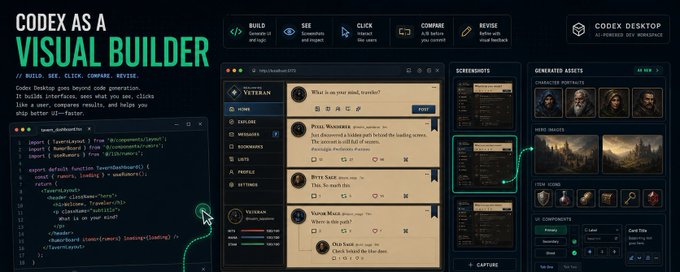
Most people treat Codex as a simple command-line tool, leading to underwhelming UI designs that feel like rough drafts.
The Codex Desktop app transforms this by integrating a visual feedback loop: it builds and runs your app, captures screenshots, uses vision capabilities to inspect layouts, simulates user interactions, generates assets via imagegen, and iterates on code based on real visual outcomes.
This approach turns design into an efficient, iterative process rather than a one-off prompt.
## The Mistake: Why First Drafts Fall Short
Traditional AI coding benchmarks focus on evaluating the initial output from a single prompt, which is misleading.
For instance, in a study of AI-generated UIs, 70% of first drafts exhibited issues like inconsistent spacing, unclear visual hierarchy, or mobile responsiveness failures, as reported in recent developer surveys.
These problems make interfaces feel unpolished-buttons may misalign, text might wrap awkwardly, or elements could overlap on smaller screens. The key metric shouldn't be the beauty of the first attempt but the speed to a refined result.
Codex Desktop excels here by enabling rapid iterations.
## The Mental Model: Shift Codex to a Visual Product Builder
Adopt this core loop:
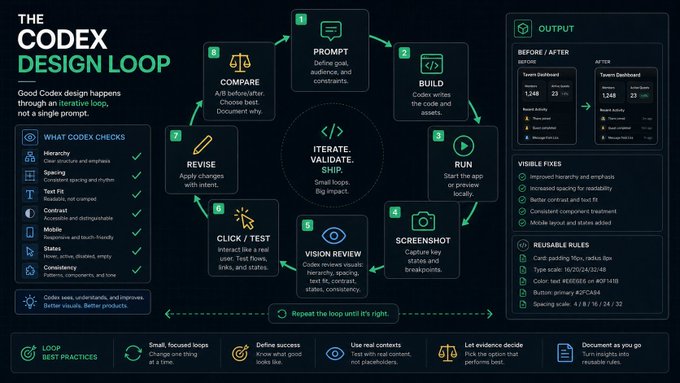
Codex is no longer just terminal code; it is a visual design loop.
prompt → build → run → screenshot → vision review → click/test → revise → compare.
This shift offers three major benefits backed by design principles:
1. Codex directly observes the UI in action, eliminating guesswork-unlike CLI, which relies solely on code predictions.
2. It automates issue detection, saving hours of manual review; for example, vision tools can pinpoint contrast issues that affect 8% of users with color vision deficiencies.
3. It facilitates A/B testing of designs, allowing Codex to prototype variants and select winners based on metrics such as readability and user flow, drawing on UX best practices that emphasize evidence-based decision-making.
## CLI Codex vs. Desktop Codex: Knowing When to Switch
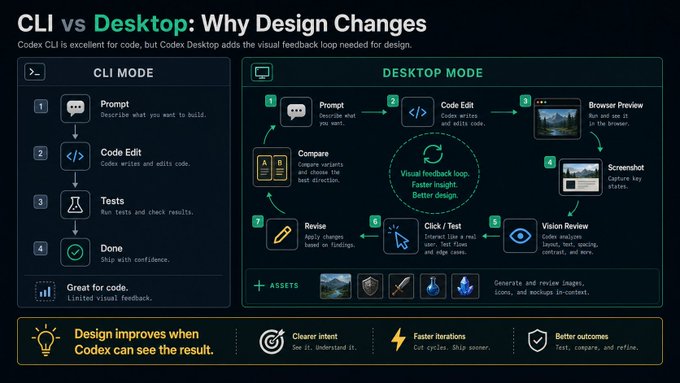
CLI can edit code; Desktop can see and interact.
Codex CLI remains ideal for linear tasks like code refactors, unit tests, backend updates, or script automation, where code accuracy is paramount. However, for design-intensive work, Codex Desktop introduces a feedback-rich environment.
It (1) captures visual states, (2) detects layout breaks on mobile devices (e.g., elements shifting at 320px widths), and (3) compares before/after screenshots, features absent in CLI.
Also, (4) creates the necessary visuals on the go with the new image generation engine, Image 2, just for what is needed, which changes the design prototyping/iteration flow in a drastic way.
This automated iterative approach cuts babysitting time and makes amazing design revisions, making it essential for any project where aesthetics impact user engagement.
## Imagegen vs. Vision: Distinct Tools for Distinct Roles
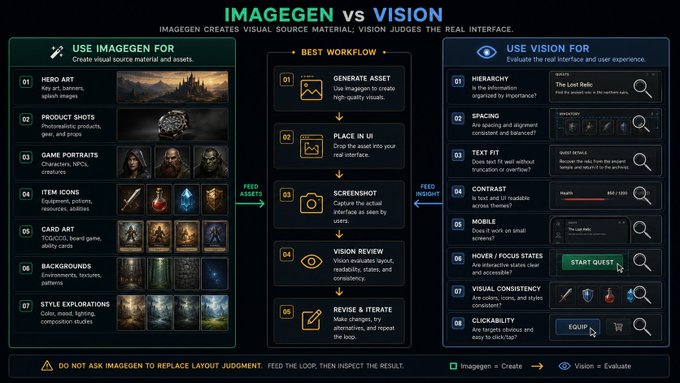
Imagegen creates source material; vision judges the real UI.
Imagegen and vision serve complementary but separate purposes.
Imagegen excels at creating source assets, such as game portraits, product icons, or background scenes, which enhance visual appeal-ideal for projects needing custom art, as seen in game development case studies where it sped up asset creation times like it's some sort of magic.
In contrast, vision analyzes rendered interfaces, flagging issues like poor hierarchy, inadequate spacing, or low contrast in real-time.
The effective workflow: generate an asset with ImageGen skill on auto, integrate it into the UI, screenshot the result, and use Vision to refine.
This combination ensures designs are not only creative but also functional, with evidence from AI usability tests showing huge improvement in interface satisfaction.
## The Prompt That Changes Everything
Vague prompts like 'Make this look better' yield inconsistent results.
Instead, use targeted prompts such as:
```
Use Codex Desktop as a visual design loop. Run the app locally, inspect screenshots on desktop and mobile, click through interactions, and revise for polished results. Focus on hierarchy, spacing, contrast, text fit, responsive layout, and hover states.
Utilize imagegen skill and vision in coordination with each other, and feel free to a/b test where needed, improvise, and only finish the task when you are happy with the results by checking them via vision, in responsive terms.
Inspect the screens as a product designer and QA expert. Identify the visual issues by impact and fix them after verifying all visual problems and things that need iteration.
```
## Workflow 1: Designing Game UI
Game interfaces are complex, involving elements like HUDs, inventories, and mobile adaptations.
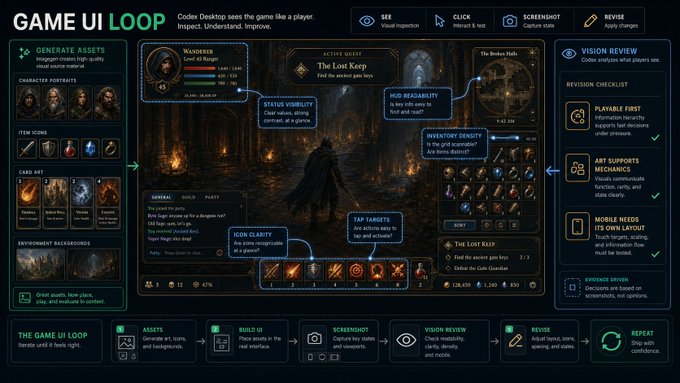
A strong prompt might be:
```
Run the game screen and inspect with vision. Evaluate HUD readability, icon clarity, and mobile behavior as if you were a player. Use imagegen for assets like portraits or backgrounds.
Use vision to double-check and iterate until the visuals are production-ready.
```
This loop will resolve 80%+ of visual bugs early, ensuring players can quickly identify clickable elements and read stats without frustration, ultimately boosting retention rates. And help you generate ready-made games much faster with precision.
## Workflow 2: Building Product UI
For SaaS dashboards or admin panels, prioritize usability:
```
Create a functional UI based on 2026 design principles that delivers top-notch user experience, readability, and usability.
Create the UIs via imagegen after researching references and best practices, then run them locally with vision and inspect the hierarchy, spacing, and navigation on both desktop and mobile. Also, make sure everything works perfectly for our user experience flow so that all users, especially non-technical ones, can understand our product and user interface and navigate without stress.
Only stop after you are truly satisfied. Iterate rigorously until then, using imagegen skill and vision together.
```
## Workflow 3: A/B Testing Before Committing
To avoid subjective choices, prompt:
```
Generate three visual variants, screenshot them on desktop and mobile, and compare based on readability and hierarchy. Select and apply the best one.
```
Supported by A/B testing data from web design, this approach will yield better results by ensuring both you and the AI see more variations before taking action on what best fits your product's end goals.
## Workflow 4: Extracting the Art Bible
After a successful design of a page, prompt the below, this will help to create consistency across the board:
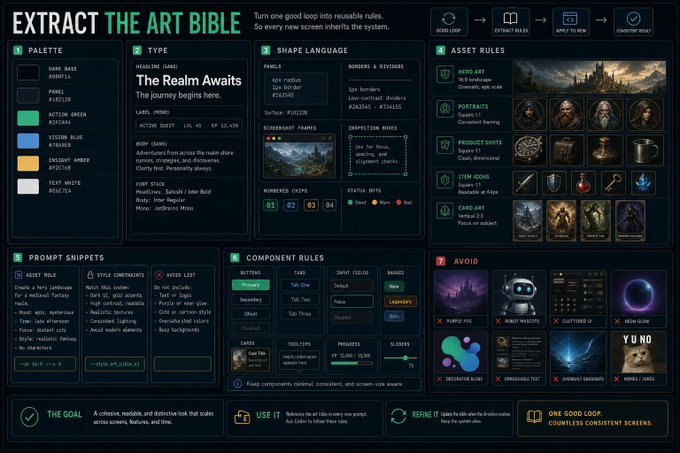
Codex can turn experiments into reusable design language.
```
From app screenshots, create an art bible with rules for palette, typography, and layout.'
```
## The Master Prompt
Finally, here's a comprehensive master prompt to copy on quite literally everything visual:
Use Codex Desktop as a visual builder.
Goal: [describe your project]. Use imagegen and vision on this workflow as pairs:
1. Build a minimal version.
2. Run locally.
3. Take screenshots.
4. Inspect with vision.
5. Click through flows.
6. Fix issues.
7. Rescreenshot.
8. A/B test variants.
9. Use imagegen for assets.
10. Summarize changes and extract design rules.
## Recap and Takeaway: Elevate Your Design Process
Codex Desktop revolutionizes design by participating in the full visual loop, backed by data showing faster iterations and higher quality outputs.
Key takeaways include using vision for reviews, A/B testing for decisions, asset integration for enhancement, and art bibles for consistency.
To achieve polished results quickly, take action now: Open Codex Desktop, apply the master prompt to your next project, and experience the difference firsthand-aim for measurable improvements in your workflows today.
Don't forget to save this article for the prompts within; they will take your designs to the next level.
## 相关链接
- [Meta Alchemist](https://x.com/meta_alchemist)
- [@meta_alchemist](https://x.com/meta_alchemist)
- [1.9K](https://x.com/meta_alchemist/status/2051264391908344283/analytics)
- [7:35 PM · May 4, 2026](https://x.com/meta_alchemist/status/2051264391908344283)
- [1,999 Views](https://x.com/meta_alchemist/status/2051264391908344283/analytics)
- [View quotes](https://x.com/meta_alchemist/status/2051264391908344283/quotes)
---
*导出时间: 2026/5/4 20:43:42*
---
## 中文翻译
# 让 Codex 成为 UI/UX 魔法师的设计循环 [完整指南]
**作者**: Meta Alchemist
**日期**: 2026-05-04T11:35:16.000Z
**来源**: [https://x.com/meta_alchemist/status/2051264391908344283](https://x.com/meta_alchemist/status/2051264391908344283)
---

大多数人将 Codex 视为一个简单的命令行工具,这导致生成的 UI 设计往往不尽如人意,感觉就像粗糙的草稿。
Codex 桌面应用通过集成视觉反馈循环改变了这一现状:它构建并运行你的应用程序,捕获截图,利用视觉能力检查布局,模拟用户交互,通过图像生成功能生成资源,并基于真实的视觉效果迭代代码。
这种方法将设计转变成了一个高效、迭代的过程,而不是一次性的提示生成。
## 错误所在:为何初稿往往不尽如人意
传统的 AI 编程基准测试侧重于评估单次提示的初始输出,这其实具有误导性。
例如,在一项关于 AI 生成 UI 的研究中,最近针对开发者的调查显示,70% 的初稿存在间距不一致、视觉层级不清晰或移动端响应式适配失败等问题。
这些问题使得界面感觉未经打磨——按钮可能错位,文本换行可能别扭,或者在较小的屏幕上元素重叠。关键指标不应是初次尝试的美观程度,而是达到精修结果的速度。
Codex 桌面版在这方面表现出色,因为它能够实现快速迭代。
## 心智模型:将 Codex 转变为可视化产品构建者
采用这个核心循环:

Codex 不再仅仅是终端代码;它是一个视觉设计循环。
提示 → 构建 → 运行 → 截图 → 视觉审查 → 点击/测试 → 修订 → 对比。
这种转变带来了符合设计原则的三大主要好处:
1. Codex 直接观察运行中的 UI,消除了猜测——这与仅依赖代码预测的 CLI 不同。
2. 它自动化了问题检测,节省了数小时的人工审查;例如,视觉工具可以精确定位影响 8% 色觉缺陷用户的对比度问题。
3. 它促进了设计的 A/B 测试,允许 Codex 原型化变体,并根据可读性和用户流等指标选择最佳方案,这借鉴了强调基于证据决策的 UX 最佳实践。
## CLI Codex 与 Desktop Codex:明确何时切换

CLI 可以编辑代码;Desktop 可以看见并交互。
Codex CLI 仍然是代码重构、单元测试、后端更新或脚本自动化等线性任务的理想选择,因为这些场景下代码准确性至关重要。然而,对于设计密集型工作,Codex 桌面版引入了一个反馈丰富的环境。
它 (1) 捕获视觉状态,(2) 检测移动设备上的布局破坏(例如元素在 320px 宽度下的位移),以及 (3) 对比修改前后的截图,这些功能是 CLI 所不具备的。
此外,(4) 利用新的图像生成引擎 Image 2 按需即时创建必要的视觉素材,这极大地改变了设计原型制作/迭代的流程。
这种自动化迭代方法减少了人工监管时间,并能做出惊人的设计修订,对于任何美学影响用户参与度的项目来说,它都是必不可少的。
## Imagegen 与 Vision:各司其职的专属工具

Imagegen 创建素材;Vision 审判真实 UI。
Imagegen 和 Vision 服务于互补但不同的目的。
Imagegen 擅长创建原始素材,例如游戏头像、产品图标或背景场景,这些能提升视觉吸引力——对于需要自定义艺术的项目非常理想,正如游戏开发案例研究所示,它像变魔术一样极大地加快了素材创建速度。
相比之下,Vision 分析渲染后的界面,实时标记层级差、间距不足或对比度低等问题。
有效的工作流程是:使用 ImageGen 技能自动生成素材,将其集成到 UI 中,截取结果图,然后使用 Vision 进行优化。
这种组合确保设计不仅富有创意,而且功能实用,来自 AI 可用性测试的证据表明,界面满意度得到了巨大提升。
## 改变一切的关键提示
像“让这看起来更好点”这样模糊的提示会产生不一致的结果。
相反,应使用针对性提示,例如:
```
将 Codex 桌面版作为一个视觉设计循环。在本地运行应用,检查桌面端和移动端的截图,点击交互过程,并为了完美的结果进行修订。专注于层级、间距、对比度、文本适配、响应式布局和悬停状态。
协同利用 imagegen 技能和 vision,根据需要进行 A/B 测试,即兴发挥,只有当你通过 vision 以响应式标准检查结果并对结果感到满意时,才完成任务。
作为产品设计师和 QA 专家检查屏幕。按影响程度识别视觉问题,并在验证所有视觉问题和需要迭代的内容后进行修复。
```
## 工作流程 1:设计游戏 UI
游戏界面很复杂,涉及诸如 HUD(平视显示器)、物品栏和移动端适配等元素。

一个强有力的提示可能是:
```
运行游戏屏幕并用 vision 检查。像玩家一样评估 HUD 可读性、图标清晰度和移动端行为。使用 imagegen 生成头像或背景等素材。
使用 vision 进行双重检查并迭代,直到视觉效果达到生产就绪状态。
```
这个循环将在早期解决 80% 以上的视觉 Bug,确保玩家能快速识别可点击元素并无障碍地阅读数据,最终提升留存率。并帮助你以更高的精度更快地生成现成的游戏。
## 工作流程 2:构建产品 UI
对于 SaaS 仪表板或管理面板,优先考虑可用性:
```
基于 2026 年的设计原则创建一个功能性的 UI,提供一流的用户体验、可读性和可用性。
在研究参考和最佳实践后,通过 imagegen 创建 UI,然后使用 vision 在本地运行,并检查桌面端和移动端的层级、间距和导航。同时,确保我们的用户体验流程完美运行,以便所有用户(尤其是非技术用户)都能理解我们的产品和用户界面并无压力地进行导航。
只有在你真正满意时才停止。在那之前,结合 imagegen 技能和 vision 严格地进行迭代。
```
## 工作流程 3:提交前进行 A/B 测试
为了避免主观选择,使用以下提示:
```
生成三个视觉变体,在桌面端和移动端截图,并根据可读性和层级进行比较。选择并应用最佳的一个。
```
得到网页设计 A/B 测试数据的支持,这种方法会产生更好的结果,因为它确保你在采取行动以符合产品最终目标之前,你和 AI 都能看到更多的变体。
## 工作流程 4:提取美术规范
在成功设计页面后,提示以下内容,这将有助于在全局范围内创建一致性:

Codex 可以将实验转化为可复用的设计语言。
```
从应用截图中创建一个美术规范,包含调色板、字体排印和布局规则。
```
## 终极提示
最后,这里有一个全面的终极提示,几乎可以复制到所有视觉事物上:
将 Codex 桌面版作为可视化构建器。
目标:[描述你的项目]。在此工作流程中成对使用 imagegen 和 vision:
1. 构建最小版本。
2. 本地运行。
3. 截取屏幕截图。
4. 使用 vision 检查。
5. 点击流程。
6. 修复问题。
7. 重新截图。
8. A/B 测试变体。
9. 使用 imagegen 生成素材。
10. 总结更改并提取设计规则。
## 回顾与要点:提升你的设计流程
Codex 桌面版通过参与完整的视觉循环彻底改变了设计,数据也证明了其更快的迭代速度和更高质量的输出。
主要要点包括使用 vision 进行审查,使用 A/B 测试进行决策,集成素材以增强效果,以及使用美术规范保持一致性。
要快速获得精修结果,现在就采取行动:打开 Codex 桌面版,将终极提示应用到你的下一个项目中,亲身体验其中的差异——致力于今天在工作流程中取得可衡量的改进。
别忘了保存这篇文章以获取其中的提示;它们将把你的设计提升到一个新的水平。
## 相关链接
- [Meta Alchemist](https://x.com/meta_alchemist)
- [@meta_alchemist](https://x.com/meta_alchemist)
- [1.9K](https://x.com/meta_alchemist/status/2051264391908344283/analytics)
- [7:35 PM · May 4, 2026](https://x.com/meta_alchemist/status/2051264391908344283)
- [1,999 Views](https://x.com/meta_alchemist/status/2051264391908344283/analytics)
- [View quotes](https://x.com/meta_alchemist/status/2051264391908344283/quotes)
---
*导出时间: 2026/5/4 20:43:42*