# /goal - Ultimate Guide
**作者**: AI Edge
**日期**: 2026-05-11T11:59:28.000Z
**来源**: [https://x.com/aiedge_/status/2054569766418108797](https://x.com/aiedge_/status/2054569766418108797)
---

Learning this single slash command will completely change how you use AI.
Anthropic, OpenAI, and other major AI players are all shipping the same feature right now.
That's not a coincidence; the /goal command is fundamentally changing how we interact with AI agents in real time.
By learning this command, you're essentially activating a 24/7 AI agent that can work on your behalf with zero manual intervention.
It's genuinely one of the most powerful AI features that's shipped recently.
In this guide, I'll teach you exactly what /goal is, how it works, how to optimize it, & show you some real-world examples to get you started.
By the time you're done reading, you'll have a 24/7 mini AI employee that completes any task for you autonomously.
Note: I'll focus on using /goals in Codex as the primary tool for this article, but many of the principles discussed can be applied to other AI tools, such as Claude Code.
## What even is /goal?
In one line: /goal allows AI agents to work in a "loop" to complete tasks without needing permission (like the Ralph loop that went viral months ago).
Example: You tell Claude Code "/goal create a landing page," and it completes the entire task on your behalf. The research, coding, debugging & so on, and then it returns a final product to you.
It's like telling an employee to complete a task and only return when it's done.
Without /goal, we are the "bottleneck," as we have to approve, send prompts, tell the agent to continue, and that loop repeats.
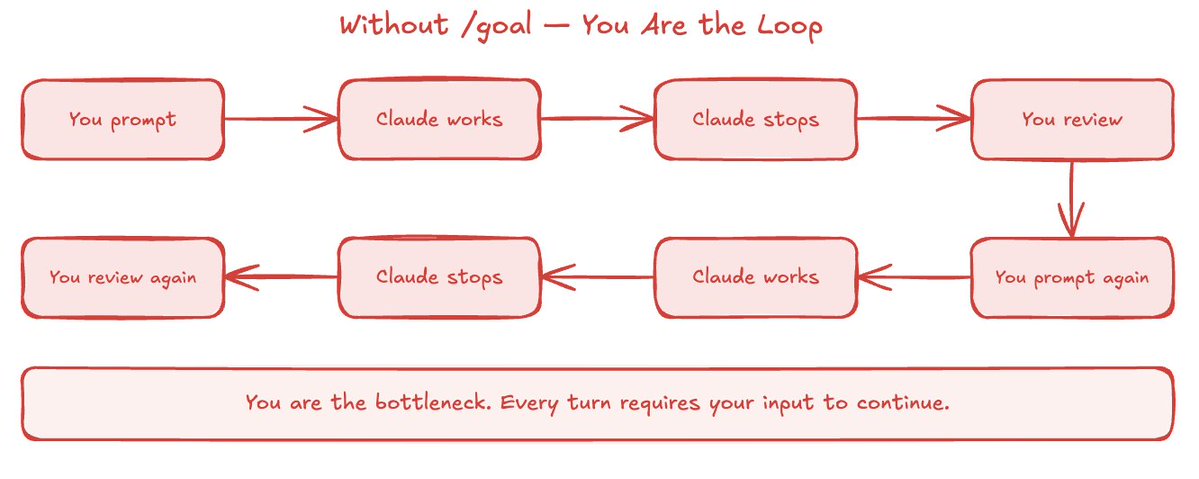
Without /goal
With the introduction of /goal, Claude validates everything on its own and "closes" the loop.
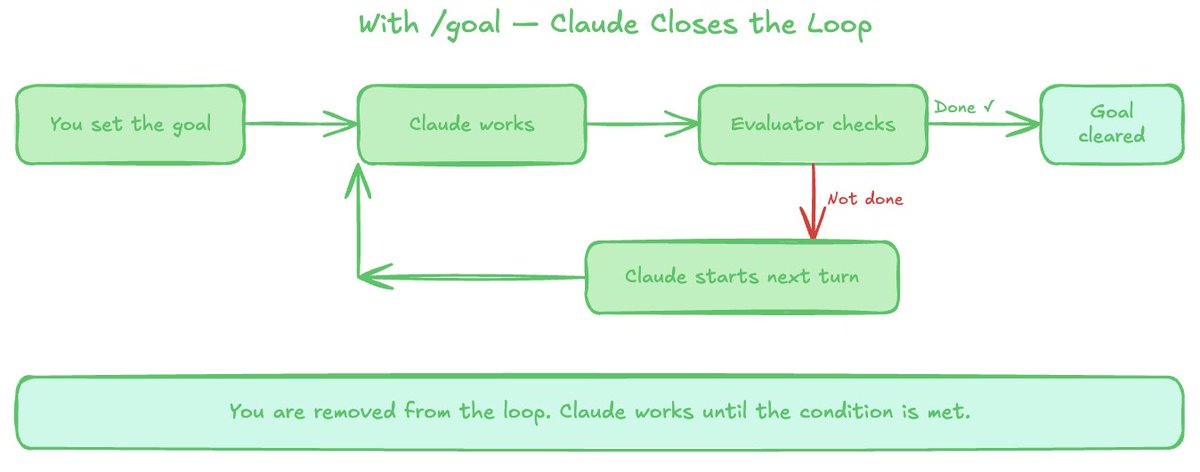
With /goal
This works because a fast, small model validates whether the conditions are met to proceed to the next step.
## How to use /goals
Using /goals is extremely simple.
You just type: /goal [your task/goal] inside your AI tool of choice (CLI/desktop), and it actively works towards the new goal you set.
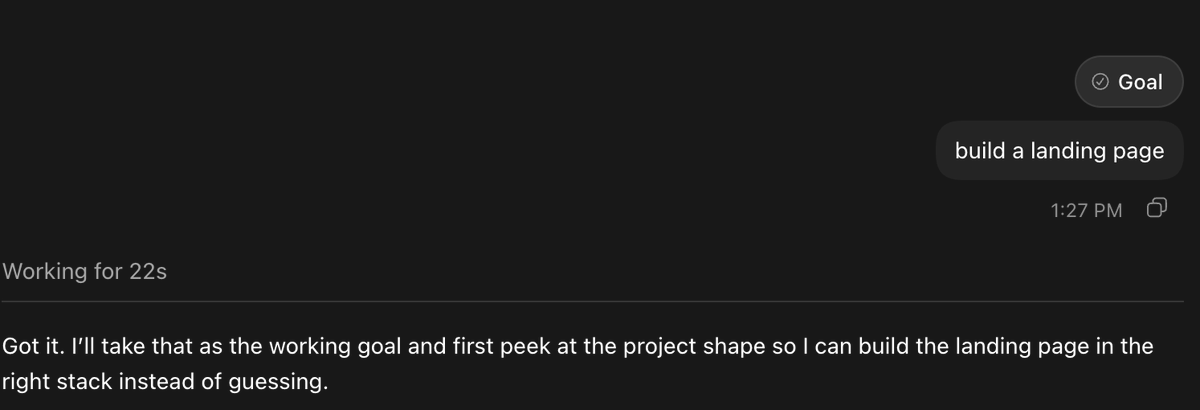
/goal at its core
Once you set your goal, you'll receive confirmation that it was set, and in this case, Codex will begin working toward completion.
This works in the Claude Code CLI, Codex CLI, Hermes agent, and now even in the Codex app (as shown above).
I recommend most non-technical people start with /goal inside the Codex desktop, but if you're setting it up in Codex CLI, follow these steps:
1. Enable goals
Codex desktop → Settings → Configuration and ensure goals = true
2. Open Terminal & launch Codex in full-auto mode if you want fewer approval prompts
```
codex --approval-mode full-auto
```
3. Start prompting
```
/goal [insert goal]
```
If you're using Claude Code, just make sure to launch Claude Code CLI and start prompting for the /goal you want to set (the steps are similar to Codex):
https://code.claude.com/docs/en/goal
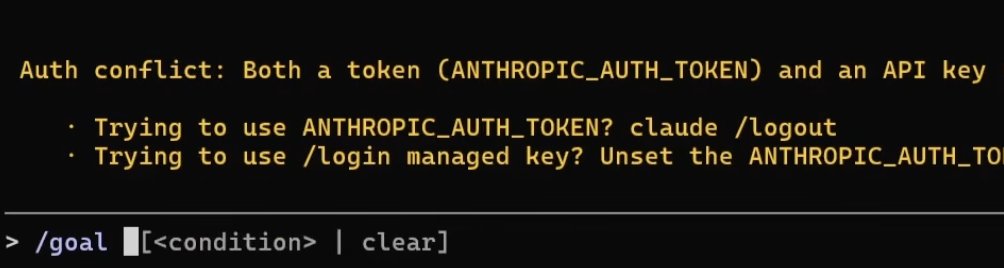
Setting goals in Claude Code CLI (very similar to Codex)
Keep in mind: if you run into issues during setup, you can ask Codex/Claude Code for help.
Building effective /goal prompts
The difficult part isn't writing the syntax - it's writing good prompts so that your AI tools actually come back to you with the result you want.
At the bare bones, your /goal prompts should have three things:
1. Your goal: your task/goal in one line
2. Measurable end state: define what done actually looks like
3. Constraints: rules and constraints the model must abide by
Putting these three things together, your /goal prompts should look like this:
/goal [do the work] until [measurable end state] without [constraints that must hold]
Real example:
"/goal fix every failing test until npm test exits 0 without modifying any file outside the /auth directory."
Of course, you can make your prompts much more detailed by adding context, success criteria, and other details.
For complex projects, I recommend following this advanced /goal prompting structure (save this):

/goal prompting for advanced projects
At its core, this is how you use /goal, and it's relatively simple!
## /goal examples + prompting examples
You can use /goal for a variety of tasks (not just coding).
This section should give you some good ideas for what you can use /goal for - specifically in Codex.
1. Research
"/goal research everything recent about the new /goal command"
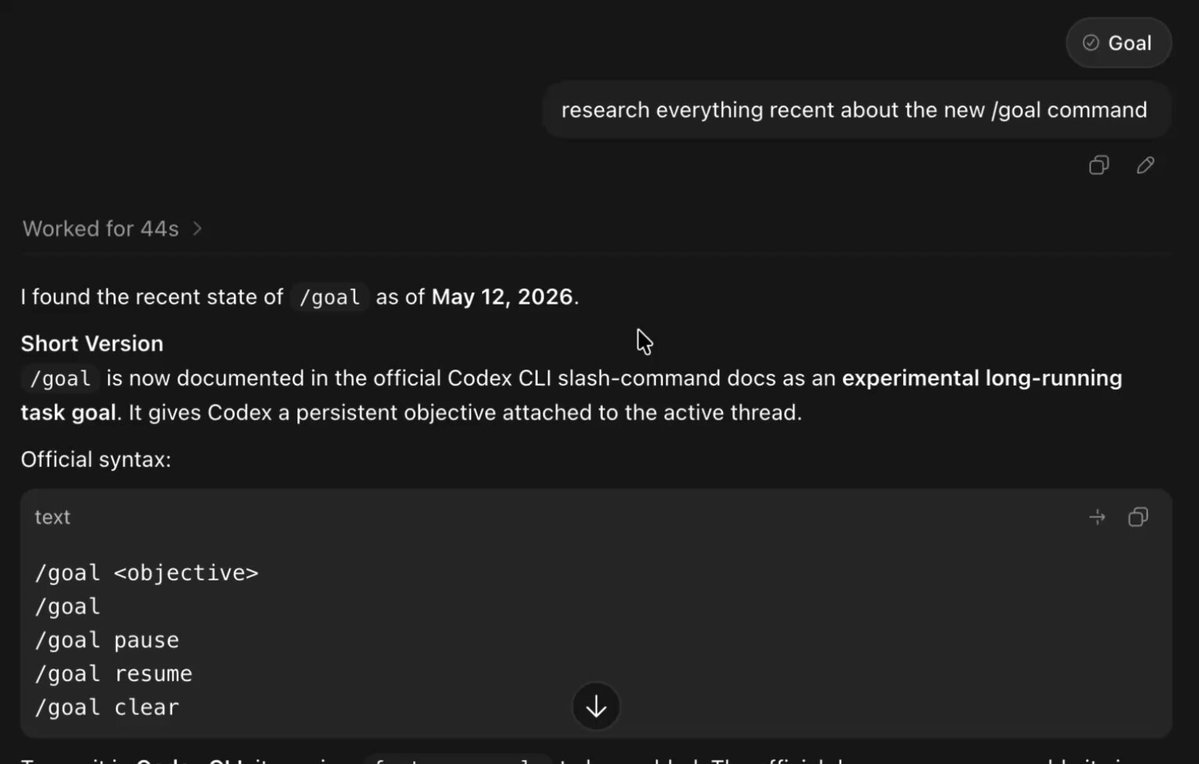
/goal for research
2. Visuals
"/goal create a cool visual for everything related to the new /goal command."
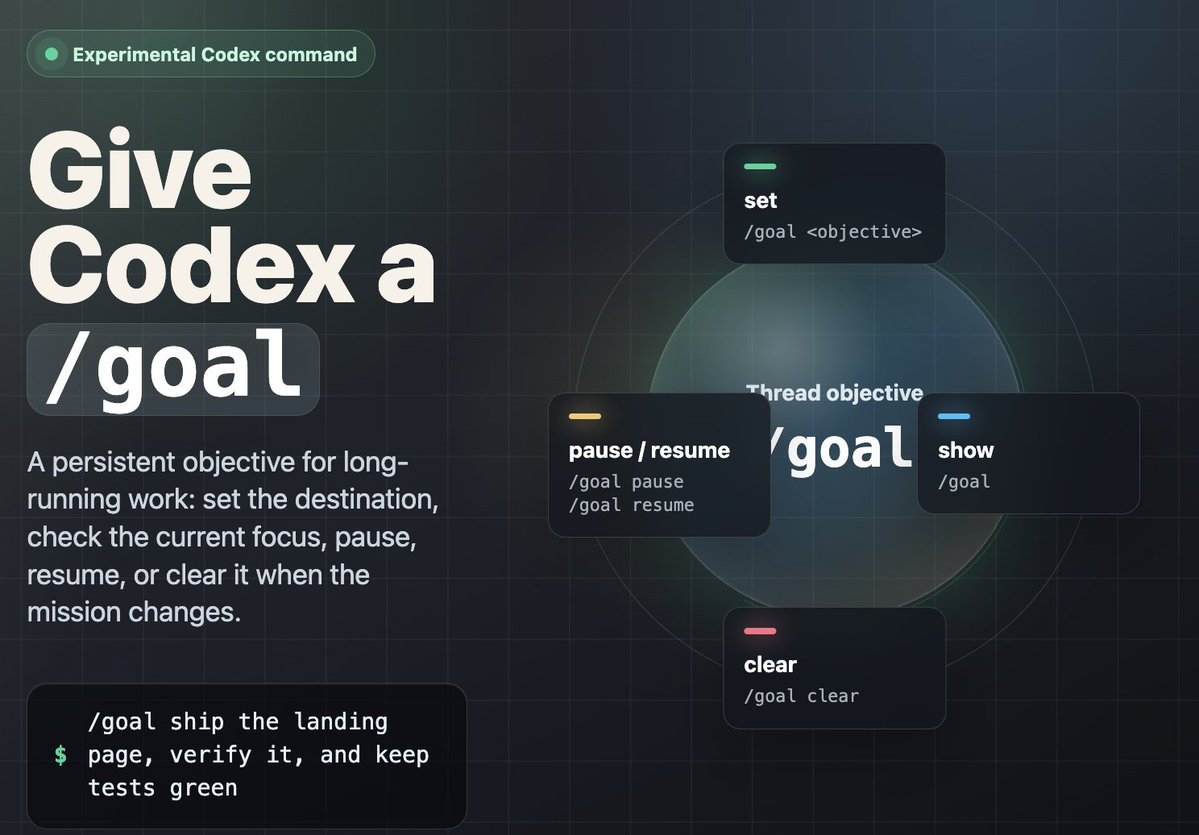
Visuals
3. Local Files
Some cool prompts I experimented with for accessing local files/folders:
"/goal Improve the README so a new contributor can install, run, test, and understand the project."
"/goal Find dead code, unused dependencies, and stale files, then propose what can be safely removed."
"/goal Turn the current notes and markdown files into a clean one-page summary document."
4. Coding
"/goal Add a dark/light theme toggle to this project, persist the choice in localStorage, update the UI styles to support both themes, and verify it works in the browser."
"/goal Add a command palette that can search pages/actions and open with Cmd+K."
Essentially, any project or task you have can now be handed to Codex/Claude Code/Hermes for autonomous completion.
## Pro Tips
A section on /goal pro tips:
- Only one /goal can be set at a time - use it wisely
- In Claude Code, you can see how many tokens the goal is actively taking up, and the progress bar of the task
- /goal shines on long-running work. For a small one-off, a normal prompt is enough.
- Pair it with /plan. A nice workflow is /goal → /plan → /goal clear
- Utilize /pause to pause goals, and /goal clear to reset your goals
- Don't be afraid to use /goal for unconventional use cases - you'd do yourself a disservice by only using /goal for coding/technical work
- You can get the model to set its own /goal (it will likely write better prompts than you anyway)
- Provide a "checklist" in your prompts
- Give your agent .md files for tracking
This is a good article to read on optimizing /goal inside Codex for those interested:
> **Chris Hayduk@ChrisHayduk**: [原文链接](https://x.com/ChrisHayduk/status/2053807198870880743)
>
## Closing
I hope you found this /goals quickstart guide valuable.
If you did, be sure to follow me @aiedge_ - I post AI articles just like this 2-3x/week!
If you enjoy written AI content, feel free to subscribe to my free weekly newsletter.
https://www.aiedgehq.co/
100% free, no spam ever & unsub anytime
Lastly, if you can, please Like/Repost this article so others can find it.💙
## 相关链接
- [AI Edge](https://x.com/aiedge_)
- [@aiedge_](https://x.com/aiedge_)
- [458K](https://x.com/aiedge_/status/2054569766418108797/analytics)
- [https://code.claude.com/docs/en/goal](https://code.claude.com/docs/en/goal)
- [May 11](https://x.com/ChrisHayduk/status/2053807198870880743)
- [184K](https://x.com/ChrisHayduk/status/2053807198870880743/analytics)
- [@aiedge_](https://x.com/@aiedge_)
- [https://www.aiedgehq.co/](https://www.aiedgehq.co/)
- [https://www.aiedgehq.co/](https://www.aiedgehq.co/)
- [Upgrade to Premium](https://x.com/i/premium_sign_up)
- [10:29 PM · May 13, 2026](https://x.com/aiedge_/status/2054569766418108797)
- [458K Views](https://x.com/aiedge_/status/2054569766418108797/analytics)
- [View quotes](https://x.com/aiedge_/status/2054569766418108797/quotes)
---
*导出时间: 2026/5/14 16:42:48*
---
## 中文翻译
# /goal 终极指南
**作者**: AI Edge
**日期**: 2026-05-11T11:59:28.000Z
**来源**: [https://x.com/aiedge_/status/2054569766418108797](https://x.com/aiedge_/status/2054569766418108797)
---

学会这一个斜杠命令,将彻底改变你使用 AI 的方式。
Anthropic、OpenAI 和其他主要的 AI 参与者目前都在推出同样的功能。
这并非巧合;/goal 命令正在从根本上改变我们与 AI 智能体实时交互的方式。
通过学习这个命令,你 essentially 相当于激活了一个 7x24 小时工作的 AI 智能体,它可以代表你工作,且无需任何人工干预。
这确实是近期推出的最强大的 AI 功能之一。
在本指南中,我将教你 /goal 到底是什么,它是如何工作的,如何优化它,并向你展示一些真实世界的例子以便你开始使用。
当你读完本文时,你将拥有一个 7x24 小时的小型 AI 员工,它能自主为你完成任何任务。
注意:我将主要在 Codex 中使用 /goals 作为本文的主要工具,但讨论的许多原则也可以应用于其他 AI 工具,例如 Claude Code。
## /goal 到底是什么?
用一句话概括:/goal 允许 AI 智能体在“循环”中工作以完成任务,而无需请求许可(就像几个月前疯传的 Ralph 循环一样)。
示例:你告诉 Claude Code “/goal 创建一个落地页(landing page)”,它会代表你完成整个任务。包括研究、编码、调试等等,最后它会将最终成品交付给你。
这就像告诉员工去完成一项任务,只有做完后才回来汇报。
如果没有 /goal,我们就是“瓶颈”,因为我们需要批准、发送提示词、告诉智能体继续,而这个循环会不断重复。

没有 /goal
随着 /goal 的引入,Claude 会自行验证一切并“闭合”循环。

有了 /goal
之所以能实现这一点,是因为一个快速的小型模型会验证是否满足进入下一步的条件。
## 如何使用 /goals
使用 /goals 非常简单。
只需在你选择的 AI 工具(CLI/桌面版)中输入:/goal [你的任务/目标],它就会积极致力于实现你设定的新目标。

/goal 的核心
一旦你设定了目标,你会收到已设定的确认,在这种情况下,Codex 将开始朝着完成的方向努力。
这在 Claude Code CLI、Codex CLI、Hermes 智能体以及现在的 Codex 应用程序(如上所示)中都可以使用。
我建议大多数非技术人员从 Codex 桌面版中的 /goal 开始,但如果你要在 Codex CLI 中设置,请按照以下步骤操作:
1. 启用 goals
Codex 桌面版 → 设置 → 配置,并确保 goals = true
2. 打开终端并在全自动模式下启动 Codex,如果你希望减少批准提示
```
codex --approval-mode full-auto
```
3. 开始提示
```
/goal [插入目标]
```
如果你使用的是 Claude Code,只需确保启动 Claude Code CLI 并开始提示你想要设置的 /goal(步骤与 Codex 类似):
https://code.claude.com/docs/en/goal

在 Claude Code CLI 中设置目标(与 Codex 非常相似)
请记住:如果你在设置过程中遇到问题,可以向 Codex/Claude Code 寻求帮助。
构建有效的 /goal 提示词
困难的部分不在于编写语法——而在于编写好的提示词,以便你的 AI 工具真正能带回你想要的结果。
最起码,你的 /goal 提示词应包含三件事:
1. 你的目标:一句话概括你的任务/目标
2. 可衡量的最终状态:定义完成实际上是什么样子的
3. 约束条件:模型必须遵守的规则和限制
将这三件事结合起来,你的 /goal 提示词应该如下所示:
/goal [执行工作] 直到 [可衡量的最终状态] 不违反 [必须遵守的约束]
真实示例:
“/goal 修复所有失败的测试,直到 npm test 退出码为 0,且不修改 /auth 目录之外的任何文件。”
当然,你可以通过添加上下文、成功标准和其他细节来使你的提示词更加详细。
对于复杂的项目,我建议遵循这种高级 /goal 提示结构(保存此图):

用于高级项目的 /goal 提示
本质上,这就是你使用 /goal 的方式,它相对简单!
## /goal 示例 + 提示示例
你可以将 /goal 用于各种任务(不仅仅是编码)。
这一节应该能给你一些关于 /goal 用途的好主意——特别是在 Codex 中。
1. 研究
“/goal 研究有关新 /goal 命令的所有近期动态”

用于研究的 /goal
2. 视觉设计
“/goal 为与新 /goal 命令相关的所有内容创建一个很酷的视觉图。”

视觉设计
3. 本地文件
我尝试过一些用于访问本地文件/文件夹的很酷的提示词:
“/goal 改进 README,以便新贡献者可以安装、运行、测试并理解该项目。”
“/goal 找出死代码、未使用的依赖项和过时的文件,然后提出可以安全删除的建议。”
“/goal 将当前的笔记和 markdown 文件转换成整洁的单页摘要文档。”
4. 编码
“/goal 为此项目添加深色/浅色主题切换,将选择保存在 localStorage 中,更新 UI 样式以支持这两种主题,并在浏览器中验证其有效。”
“/goal 添加一个命令面板,可以搜索页面/操作并通过 Cmd+K 打开。”
从本质上讲,你现在可以将任何项目或任务交给 Codex/Claude Code/Hermes 进行自主完成。
## 专业提示
关于 /goal 专业提示的部分:
- 一次只能设置一个 /goal —— 请明智地使用它
- 在 Claude Code 中,你可以看到目标当前占用了多少 token,以及任务的进度条
- /goal 在长时间运行的工作中大放异彩。对于一次性的小任务,普通的提示就足够了
- 将其与 /plan 配对使用。一个不错的工作流程是 /goal → /plan → /goal clear
- 利用 /pause 来暂停目标,利用 /goal clear 来重置你的目标
- 不要害怕将 /goal 用于非传统的用例 —— 如果你只将 /goal 用于编码/技术工作,那你就亏了
- 你可以让模型自己设置 /goal(无论如何它可能比你写得更好)
- 在你的提示词中提供一个“检查清单”
- 为你的智能能提供用于跟踪的 .md 文件
这是关于在 Codex 中优化 /goal 的一篇好文章,供感兴趣的人阅读:
> **Chris Hayduk@ChrisHayduk**: [原文链接](https://x.com/ChrisHayduk/status/2053807198870880743)
>
## 结语
我希望你觉得这个 /goals 快速入门指南很有价值。
如果觉得有用,请务必关注我 @aiedge_ —— 我每周发布 2-3 次这样的 AI 文章!
如果你喜欢文字版的 AI 内容,欢迎订阅我的免费每周通讯。
https://www.aiedgehq.co/

100% 免费,绝无垃圾邮件 & 随时可以退订
最后,如果可以的话,请点赞/转发这篇文章,以便其他人也能看到。💙
## 相关链接
- [AI Edge](https://x.com/aiedge_)
- [@aiedge_](https://x.com/aiedge_)
- [458K](https://x.com/aiedge_/status/2054569766418108797/analytics)
- [https://code.claude.com/docs/en/goal](https://code.claude.com/docs/en/goal)
- [May 11](https://x.com/ChrisHayduk/status/2053807198870880743)
- [184K](https://x.com/ChrisHayduk/status/2053807198870880743/analytics)
- [@aiedge_](https://x.com/@aiedge_)
- [https://www.aiedgehq.co/](https://www.aiedgehq.co/)
- [https://www.aiedgehq.co/](https://www.aiedgehq.co/)
- [升级到 Premium](https://x.com/i/premium_sign_up)
- [10:29 PM · May 13, 2026](https://x.com/aiedge_/status/2054569766418108797)
- [458K 次观看](https://x.com/aiedge_/status/2054569766418108797/analytics)
- [查看引用](https://x.com/aiedge_/status/2054569766418108797/quotes)
---
*导出时间: 2026/5/14 16:42:48*