# Claude Prompting Masterclass: How to Get Elite Outputs
**作者**: AI Edge
**日期**: 2026-03-16T14:10:14.000Z
**来源**: [https://x.com/aiedge_/status/2033546384172056751](https://x.com/aiedge_/status/2033546384172056751)
---

Prompt engineering is the #1 AI skill to learn right now - and it's not even close.
Get it right, and you literally have 24/7 access to any piece of information, strategy, or idea you could ever think of.
Just a couple of years ago, people had no choice but to pay thousands to consultants, strategists, and other experts for the kind of information AI can now synthesize in minutes.
The problem is, 95% of people never properly learned how to communicate with AI, and because of that, they're leaving a ridiculous amount of value, insights, and productivity on the table.
With that said, mastering this guide is literally life-changing, and it's why I can't think of an AI skill more impactful.
I've been prompting AI models for the past two years, and I'm at the point where I get exactly what I want from LLMs 99% of the time.
This article will hopefully help you achieve the same.
Let's get into it.
Article Contents
l: Common Pitfalls
II: The Foundations (What Every Good Claude Prompt Needs)
III: Advanced Techniques
IV: Anthropics Tips & Tricks
Closing
## Common Pitfalls
Before we get into what works, let's talk about what doesn't.
I could literally make this section 2000 words long, but for the sake of length, I've highlighted the three most common pitfalls.
Fix these alone, and you'll immediately notice a difference in your outputs.
1. No Context
This is the biggest mistake I see.
When you prompt Claude without context, you're essentially asking a world-class expert to help you with zero background information.
The output will always be generic because the input was generic.
Think of it like hiring the best consultant in the world and just saying, "give me advice."
Advice about what? For who? In what situation?
Context is everything. The more relevant information you feed Claude upfront (your goal, your audience, your constraints, your situation), the more surgical and useful the output becomes.
We'll get into how to correct this common mistake in section two, below.
2. Being Too Vague
Vague prompts produce vague answers. It's that simple.
Most people write prompts the way they'd type a Google search: short, broad, and keyword-driven. Claude isn't a search engine; it's a reasoning model that predicts the next logical output based on the inputs you provide.
The more specific your input, the more precise your output.
If you want a specific result, you need to ask a specific question. Define the format you want, the length, tone, etc.
TLDR: Leave nothing open to interpretation.
3. Not Iterating
The biggest misconception about prompting is that a great output should come from a single prompt.
It rarely does.
The best prompters treat Claude like an ongoing conversation. They get an initial output, identify what's missing, and refine. Each iteration gets closer to exactly what they need.
## The Foundations
Luckily for us, we don't have to guess which prompting fundamentals work with Claude models; Anthropic has outlined them all for us.
According to the Anthropic team, ten steps make a Claude prompt great:
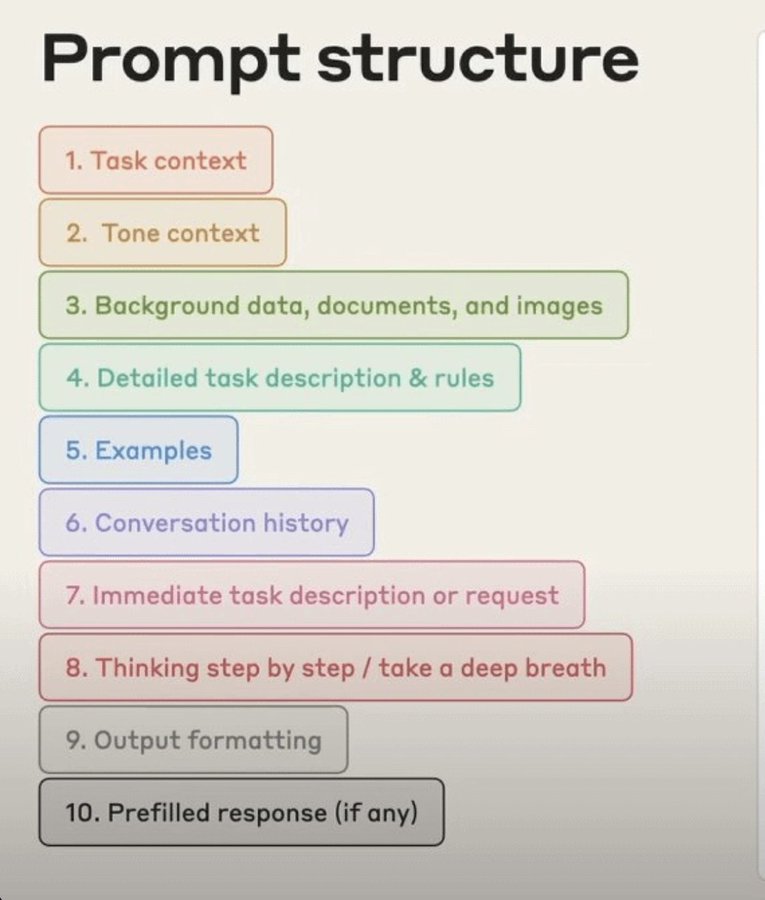
TL;DR - Prompting Structure
We can boil this prompting structure down to five essential components:
1. Task Context
Set the role and task upfront. This is the foundation of every good prompt. Claude needs to know who it is and what it is doing before anything else.
Example: you are [insert role] and your job is to [insert task]
2. Background Data
Give Claude something to work with. Upload relevant docs, files, or context profiles. The more relevant information you provide, the more precise the output.
3. Detailed Task Description & Rules
Expand on your goal with specific constraints and guidelines. Don't just say what you want - say exactly how you want it done.
I like to explain my end goal to Claude and have the model propose a plan to get there.
4. Examples
The single biggest unlock for output quality. If you have a desired output format or a previous response you loved, show it to Claude using the <example> tag (more on this later). Nothing calibrates Claude models faster than a concrete reference point.
5. Output Formatting
Tell Claude exactly how you want the response structured before it replies.
Some examples I like: bullet points, infographics (I share many on this page), table format, and phrases like "condense your response to less than 500 words."
Out of the ten steps outlined, these are the absolute essentials for every single prompt you send to a Claude model.
If you want to add more of the ten steps, great, but at a minimum, include these five.
Bringing it all together:
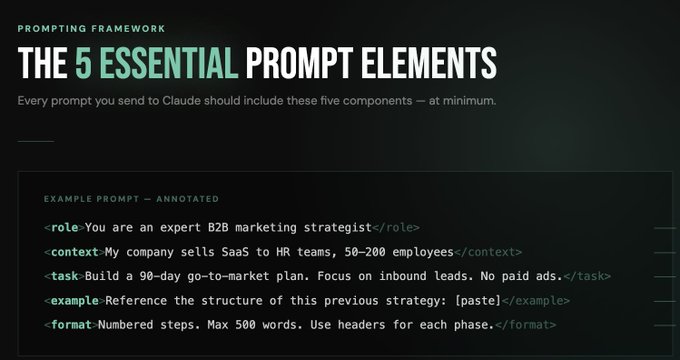
Essential Prompt Elements
## Advanced Prompting Techniques
There are a million advanced prompting techniques available.
These are the only methods worth noting - and they genuinely work VERY well inside Cladue (you'll want to save these somewhere).
1. Structured Prompting (JSON & XML Tags)
Structured prompting is the single biggest upgrade you can make to your LLM inputs.
Instead of writing prompts in plain English text, you organize them using XML tags or JSON formatting.
Think of this as speaking the same "language" as Claude.
Tag formats provide a structured map of exactly what you want - and the outputs reflect that precision.
For XML tags, you put all your text inside < > tags.
It looks like this
JSON formatting looks like this:
2. Reverse Prompting
Most people tell Claude what to do. Reverse prompting flips that entirely.
Instead of writing the prompt yourself, you ask Claude to question you to gather the context it needs.
Example: "Ask me 10 questions to gather all the context necessary to build me a personalized business plan."
This is one of the most underrated techniques in prompting. Use it whenever you're stuck, whenever the outputs feel off, or whenever you're approaching a new type of task for the first time.
3. Deep Thinking Triggers
Claude has extended reasoning capabilities, but most people never activate them.
By default, Claude gives you a fast response. That's great for simple tasks, but for complex problems, strategy, analysis, or anything that requires genuine reasoning, you want Claude to think more deeply before it responds.
Add any of these to your prompts:
4. Chain Prompting
Chain prompting is the art of breaking one big task into a sequence of smaller, connected prompts.
Instead of asking Claude to do everything in one go, you build toward the final output step by step.
Each prompt feeds into the next, and the quality compounds with every exchange.
Instead of just giving Claude instructions, you're actually communicating with the models back and forth.
Example:
This works because each step gives Claude full context from the previous one. The final output is almost always sharper, more coherent, and more detailed than anything you'd get from a single prompt.
5. Feedback Looping
Most people accept the first output they get. This is wrong.
Feedback looping is the practice of actively critiquing Claude's output and asking it to improve, until the result is exactly what you need.
It looks like this:
## IV: Anthropics Tips & Tricks
I read every single Claude prompting doc and sourced every Anthropic prompting resource, so you don't have to.
Here is the summary of how to properly prompt Claude models.
Claude Prompting Best Practices Doc:
https://platform.claude.com/docs/en/build-with-claude/prompt-engineering/claude-prompting-best-practices
- Be clear and direct
- Context is key
- Use examples (3-5 is ideal)
- Claude was trained on XML tags - use them
- Put longform data at the top: Place your long documents and inputs near the top of your prompt, above your query, instructions, and examples.
TLDR of the entire handbook:
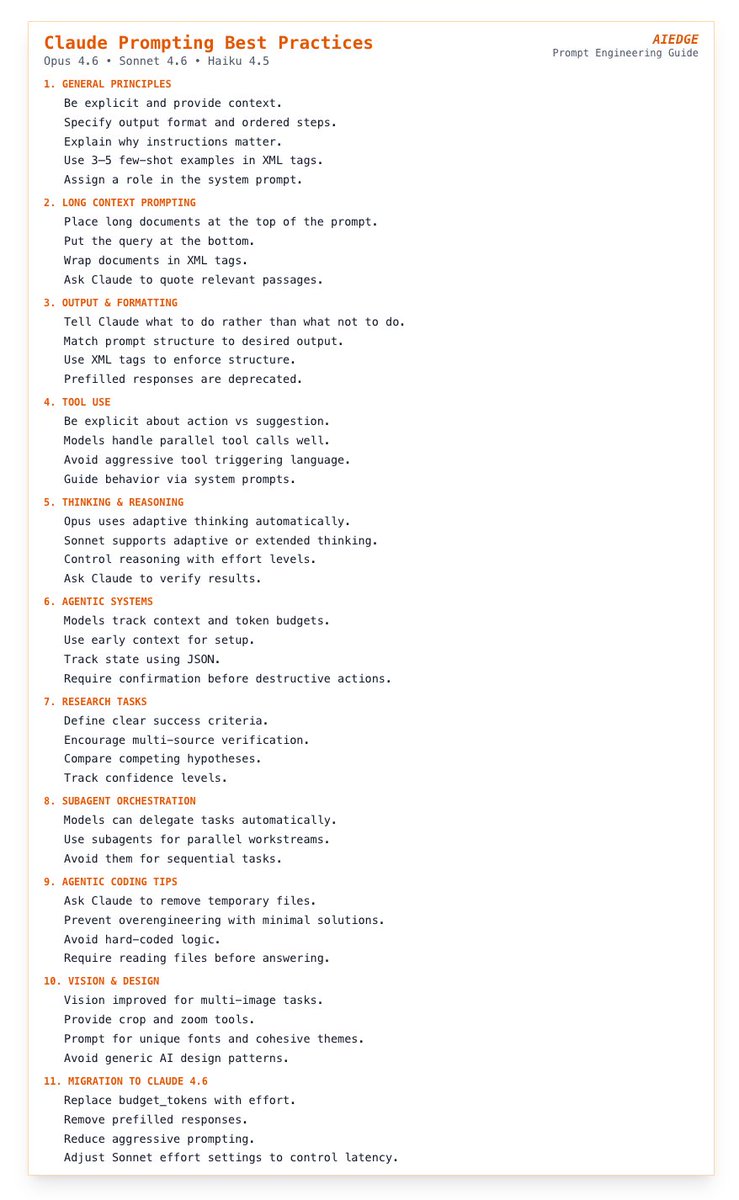
TLDR of Anthropic's Best Practices Doc
How to Prompt Engineer:
https://platform.claude.com/docs/en/build-with-claude/prompt-engineering/overview
- Ask Claude to quote sources before answering
- Keep context tight - more isn't always better
- Have Claude self-check before finishing
- Bad latency? Switch models, don't switch your prompt
Prompt Generator Tool:
A tool to build Claude prompts
https://platform.claude.com/dashboard
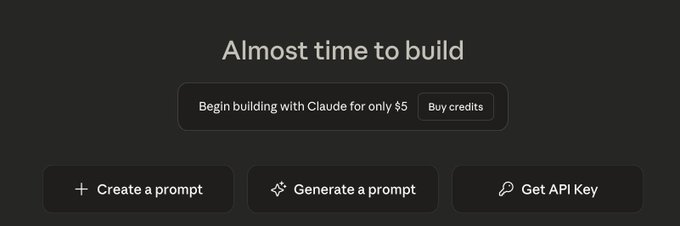
Prompt Generator by Anthropic
Anthropic Interactive Prompting Guide:
A GitHub guide to learn prompt engineering
https://github.com/anthropics/prompt-eng-interactive-tutorial
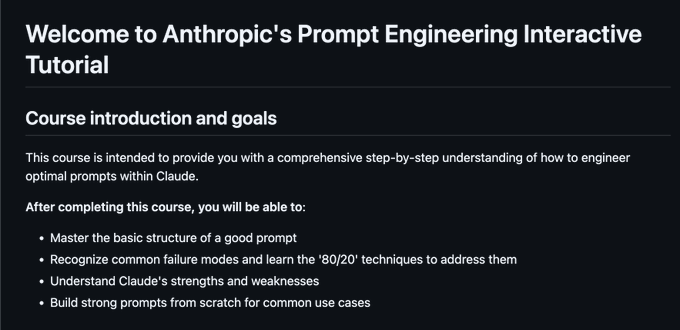
Anthropic Interactive Prompting Guide
Other Anthropic prompting tips (from various sources):
- Build system prompts
- Tools should be minimal
- Use a Scratchpad: Telling Claude to use a scratchpad to show its work improves accuracy. End users do not need to see the scratchpad, but it helps Claude reason more carefully before producing its final answer.
- Define success criteria: Tell Claude exactly what success looks like (like you would with an employee)
## Closing
Hopefully, you found this guide helpful.
My goal was to make this complex topic practical and actionable for you.
If you found this article valuable, be sure to follow me @aiedge_ - I'm posting articles 3x/week just like this one.
I'm curious to know - what are your best Claude prompting tips? Leave them in the comments below, I'm sure others will find it valuable.
Lastly, please Like/Repost this article to support💙
## 相关链接
- [AI Edge](https://x.com/aiedge_)
- [@aiedge_](https://x.com/aiedge_)
- [179K](https://x.com/aiedge_/status/2033546384172056751/analytics)
- [https://platform.claude.com/docs/en/build-with-claude/prompt-engineering/claude-prompting-best-practices](https://platform.claude.com/docs/en/build-with-claude/prompt-engineering/claude-prompting-best-practices)
- [https://platform.claude.com/docs/en/build-with-claude/prompt-engineering/overview](https://platform.claude.com/docs/en/build-with-claude/prompt-engineering/overview)
- [https://platform.claude.com/dashboard](https://platform.claude.com/dashboard)
- [https://github.com/anthropics/prompt-eng-interactive-tutorial](https://github.com/anthropics/prompt-eng-interactive-tutorial)
- [@aiedge_](https://x.com/@aiedge_)
- [Upgrade to Premium](https://x.com/i/premium_sign_up)
- [10:10 PM · Mar 16, 2026](https://x.com/aiedge_/status/2033546384172056751)
- [179.9K Views](https://x.com/aiedge_/status/2033546384172056751/analytics)
- [View quotes](https://x.com/aiedge_/status/2033546384172056751/quotes)
---
*导出时间: 2026/3/18 20:43:16*
---
## 中文翻译
# Claude 提示词大师课:如何获得顶级输出
**作者**: AI Edge
**日期**: 2026-03-16T14:10:14.000Z
**来源**: [https://x.com/aiedge_/status/2033546384172056751](https://x.com/aiedge_/status/2033546384172056751)
---

提示词工程是当下最值得学习的第一大 AI 技能——而且遥遥领先。
掌握好它,你就等于全天候拥有获取任何信息、策略或想法的入口,无所不包。
就在短短几年前,人们还不得不花费数千美元请顾问、战略家和其他专家,才能获得如今 AI 几分钟内就能综合整理出来的信息。
问题在于,95% 的人从未真正学会如何与 AI 沟通,因此他们错失了海量的价值、洞见和生产力。
话虽如此,掌握本指南真的能改变人生,这也是为什么我想不出还有哪个 AI 技能比它更具影响力。
过去两年我一直在为 AI 模型编写提示词,如今我几乎在 99% 的情况下都能从大语言模型中获得我确切想要的东西。
希望这篇文章也能帮助你做到同样的事。
让我们开始吧。
文章目录
I:常见误区
II:基础要素(每个优秀的 Claude 提示词都需要什么)
III:进阶技巧
IV:Anthropic 的提示与窍门
结语
## 常见误区
在讨论什么有效之前,先谈谈什么无效。
这一部分我本可以写上 2000 字,但为了控制篇幅,我只列出了三个最常见的误区。
仅仅改掉这些,你就会立刻发现输出质量的不同。
1. 没有上下文
这是我所见到的最大的错误。
在没有上下文的情况下向 Claude 提问,本质上就是请一位世界级专家帮你,却不提供任何背景信息。
输出永远是泛泛而谈的,因为输入本身就是泛泛的。
这就好比雇了世界上最好的顾问,却只说一句:“给我点建议。”
关于什么的建议?给谁的?在什么情况下?
上下文就是一切。你预先提供给 Claude 的相关信息越多(你的目标、受众、限制条件、处境),输出就越精准、越有用。
我们会在下面的第二部分讲如何纠正这个常见错误。
2. 提问过于模糊
模糊的提示词产生模糊的回答。就这么简单。
大多数人写提示词的方式就像在谷歌搜索:简短、宽泛、依赖关键词。Claude 不是搜索引擎;它是一个推理模型,根据你提供的输入预测下一个最合逻辑的输出。
你的输入越具体,输出就越精确。
想要特定的结果,就得问特定的问题。明确你想要的格式、长度、语气等等。
一句话总结:不要给任何内容留下解释空间。
3. 不做迭代
关于提示词最大的误解,就是认为一次出色的输出应该来自单个提示词。
很少如此。
最会写提示词的人把 Claude 当作一场持续的对话。他们先得到初步输出,找出缺失之处,然后改进。每一次迭代都让他们离真正需要的结果更近一步。
## 基础要素
幸运的是,我们不必去猜哪些提示词基本功对 Claude 模型有效;Anthropic 已经为我们全部列出来了。
根据 Anthropic 团队的说法,有十个步骤能让 Claude 提示词变得出色:

TL;DR - 提示词结构
我们可以把这套提示词结构浓缩为五个核心组成部分:
1. 任务上下文
开头就设定角色和任务。这是每个优秀提示词的基础。Claude 首先需要知道它是谁、它在做什么。
示例:你是[插入角色],你的任务是[插入任务]
2. 背景数据
给 Claude 一些可用的素材。上传相关文档、文件或上下文资料。你提供的相关信息越多,输出就越精确。
3. 详细的任务描述与规则
用具体的限制条件和指导方针展开你的目标。不要只说你要什么——要说清楚你希望它如何完成。
我喜欢先向 Claude 解释我的最终目标,然后让模型提出一个实现方案。
4. 示例
这是提升输出质量的最大关键。如果你有一个期望的输出格式,或某次你非常满意的回复,就用 <example> 标签展示给 Claude(后面会详细讲)。没有什么比一个具体的参照物更能快速校准 Claude 模型了。
5. 输出格式
在 Claude 回复之前,明确告诉它你希望回复以什么结构呈现。
一些我喜欢的例子:要点列表、信息图(我在这个页面上分享过很多)、表格格式,以及诸如“把你的回答压缩到 500 字以内”这样的指令。
在上面列出的十个步骤中,这些是你发送给 Claude 模型的每条提示词都绝对必需的部分。
如果你想加入十个步骤中的更多内容,很好,但至少要包含这五项。
把它们整合起来:

必备提示词要素
## 进阶提示词技巧
进阶提示词技巧成千上万。
以下这些是唯一值得注意的方法——而且它们在 Claude 中真的非常有效(你最好把它们保存在某个地方)。
1. 结构化提示词(JSON 与 XML 标签)
结构化提示词是你能对大语言模型输入做出的最大升级。
不用纯英文文本来写提示词,而是用 XML 标签或 JSON 格式来组织它们。
可以把它理解为用和 Claude 相同的“语言”交流。
标签格式提供了你确切想要的内容的结构化图谱——而输出也会体现这种精确性。
对于 XML 标签,你把所有文本放在 < > 标签内。
它看起来像这样
JSON 格式看起来像这样:
2. 反向提示词
大多数人告诉 Claude 该做什么。反向提示词则完全反过来。
不是你自己写提示词,而是让 Claude 向你提问,以收集它所需的上下文。
示例:"向我提 10 个问题,以收集构建个性化商业计划所需的所有背景信息。"
这是提示词中最被低估的技巧之一。每当你卡住时、每当输出感觉不对劲时,或者每当第一次接触某种新类型任务时,都可以使用它。
3. 深度思考触发器
Claude 具备扩展推理能力,但大多数人从未激活过它。
默认情况下,Claude 会给你快速响应。这对简单任务很有用,但对于复杂问题、战略、分析或任何需要真正推理的任务,你需要 Claude 在响应之前进行更深入的思考。
在提示词中加入以下任意一项:
4. 链式提示
链式提示是将一个大任务拆解为一系列相互关联的小提示词的艺术。
不要让 Claude 一次性完成所有事情,而是一步一步地朝着最终输出推进。
每个提示词的输出会输入到下一个提示词中,质量随着每次交互不断提升。
你不只是给 Claude 下达指令,而是在与模型进行来回交流。
示例:
之所以有效,是因为每一步都让 Claude 从上一步获得完整上下文。最终输出几乎总是比单次提示得到的结果更敏锐、更连贯、更详尽。
5. 反馈循环
大多数人接受得到的第一个输出。这是错误的。
反馈循环是指主动批评 Claude 的输出并要求它改进,直到结果完全符合你的需求。
它是这样的:
## IV:Anthropic 的技巧与窍门
我阅读了每一份 Claude 提示词文档,搜集了每一个 Anthropic 提示词资源,这样你就不必亲自去做。
以下是正确提示 Claude 模型的方法总结。
Claude 提示词最佳实践文档:
https://platform.claude.com/docs/en/build-with-claude/prompt-engineering/claude-prompting-best-practices
- 表达清晰直接
- 上下文是关键
- 使用示例(3-5 个最理想)
- Claude 是基于 XML 标签训练的——善用它们
- 将长篇数据放在顶部:将你的长文档和输入放在提示词顶部,位于查询、指令和示例之上。
整本手册的 TLDR(简明摘要):

Anthropic 最佳实践文档的 TLDR(简明摘要)
如何进行提示词工程:
https://platform.claude.com/docs/en/build-with-claude/prompt-engineering/overview
- 让 Claude 在回答前引用来源
- 保持上下文紧凑——多并不总是更好
- 让 Claude 在完成前自我检查
- 延迟过高?切换模型,而不是更改提示词
提示词生成器工具:
一个用于构建 Claude 提示词的工具
https://platform.claude.com/dashboard

Anthropic 的提示词生成器
Anthropic 交互式提示词指南:
一个用于学习提示词工程的 GitHub 指南
https://github.com/anthropics/prompt-eng-interactive-tutorial

Anthropic 交互式提示词指南
其他 Anthropic 提示词技巧(来自各种来源):
- 构建系统提示词
- 工具应保持精简
- 使用草稿板:让 Claude 使用草稿板展示其思考过程可以提高准确性。最终用户无需看到草稿板,但它能帮助 Claude 在给出最终答案前更仔细地进行推理。
- 定义成功标准:明确告诉 Claude 成功是什么样的(就像对待员工一样)
## 结语
希望这份指南对你有所帮助。
我的目标是让这个复杂的主题对你来说实用且可操作。
如果你觉得这篇文章有价值,请务必关注我 @aiedge_——我每周发布 3 篇这样的文章。
我很想知道——你有哪些最佳的 Claude 提示词技巧?请在下方评论中留言,我相信其他人也会觉得有价值。
最后,请点赞/转发这篇文章以表支持💙
## 相关链接
- [AI Edge](https://x.com/aiedge_)
- [@aiedge_](https://x.com/aiedge_)
- [179K](https://x.com/aiedge_/status/2033546384172056751/analytics)
- [https://platform.claude.com/docs/en/build-with-claude/prompt-engineering/claude-prompting-best-practices](https://platform.claude.com/docs/en/build-with-claude/prompt-engineering/claude-prompting-best-practices)
- [https://platform.claude.com/docs/en/build-with-claude/prompt-engineering/overview](https://platform.claude.com/docs/en/build-with-claude/prompt-engineering/overview)
- [https://platform.claude.com/dashboard](https://platform.claude.com/dashboard)
- [https://github.com/anthropics/prompt-eng-interactive-tutorial](https://github.com/anthropics/prompt-eng-interactive-tutorial)
- [@aiedge_](https://x.com/@aiedge_)
- [升级到 Premium](https://x.com/i/premium_sign_up)
- [2026年3月16日 22:10](https://x.com/aiedge_/status/2033546384172056751)
- [17.99万次浏览](https://x.com/aiedge_/status/2033546384172056751/analytics)
- [查看引用](https://x.com/aiedge_/status/2033546384172056751/quotes)
---
*导出时间: 2026/3/18 20:43:16*