将 Hermes Agent 打造为个人助手的完整指南 AI Edge 2026-07-23 10.4 KB 170.6K 273 ☆ 收藏 𝕏 文章列表 文章介绍了如何将 Hermes Agent 变成一个功能强大的个人 AI 助手。通过安装 Hermes、配置 Composio 连接日历和邮件等应用、设置消息网关(如 WhatsApp)以及进行个性化提示词和模型选择,用户可以在 10 分钟内让 AI 帮助管理日程、任务和沟通,实现全天候的自动化协助。 AI助手AgentHermesComposio自动化工具教程个人效率WhatsApp日历管理任务追踪 # Full Guide: Turn Hermes Agent Into Your Personal Assistant **作者**: AI Edge **日期**: 2026-06-24T00:24:16.000Z **来源**: [https://x.com/aiedge_/status/2079952442712834514](https://x.com/aiedge_/status/2079952442712834514) ---  This is the most underrated Hermes use case that 99% of people haven't set up yet. I've spent the last few weeks running Hermes as my personal assistant - and it's extremely powerful. My agent manages my calendar, email, tracks all my tasks (and more), and reports everything back to me via WhatsApp. I can text it 24/7, and it's my own mini AI employee. If I were to hire a personal assistant, it would cost me $4000+ USD, but this AI setup is practically free, and the ROI it delivers is insane. By the end of this, you'll have Hermes fully set up and managing real parts of your life in under 10 minutes. This setup is relatively easy, and broken down into 5 steps: Step 1: Installing Hermes Step 2: Composio Setup + Config. Step 3: Messaging Gateway Step 4: Prompting (and how to use your agent) Step 5: Customizing Your Assistant Let's get right into things. ## Step 1: Installing Hermes If you already have Hermes installed, jump straight to step two below. If you're completely new to Hermes, you're in luck because it's never been easier to get it set up. You've got two main options here, and both take under a minute: 1. Desktop App If you want the easiest path, grab the Hermes Desktop app - no terminal, no commands, just download and open. Head here and select your software (Mac, Windows, Linux): https://hermes-agent.nousresearch.com/  2. Terminal Install If you're comfortable in a terminal, you can run the one-line installer instead. It works on all Mac, Linux, and Windows: curl -fsSL https://hermes-agent.nousresearch.com/install.sh | bash Once it's done, open Hermes and you'll land straight in the chat interface. This is your control center for everything that comes next. ## Step 2: Composio Setup + Config. This is the step that most people don't know about, and it's what transforms Hermes into your full-blown assistant. On its own, Hermes can't touch your calendar or your inbox. Composio is what bridges that gap and plugs 1,000+ apps straight into Hermes. 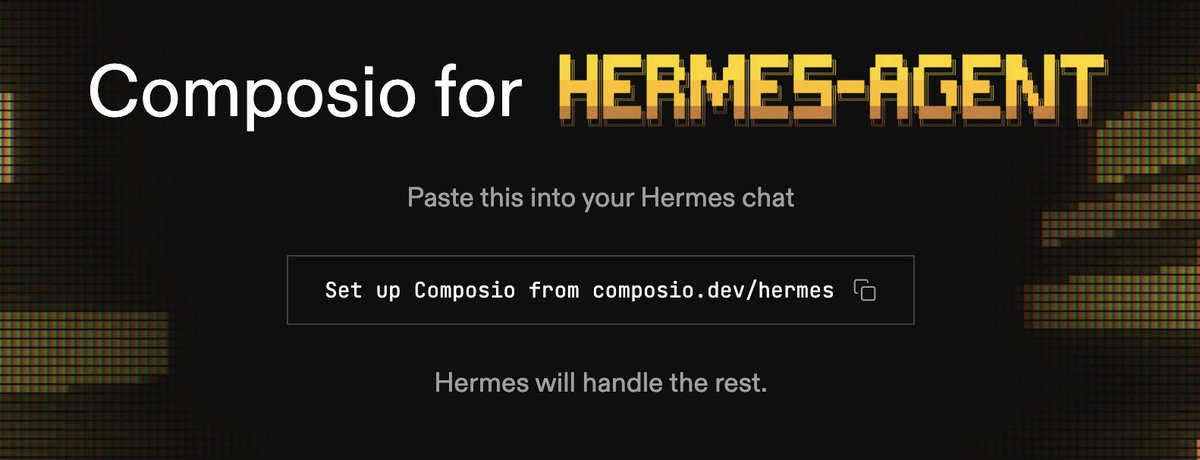 Composio for Hermes-Agent Paste this into your Hermes chat box: ``` https://composio.dev/hermes ``` This will install the connector automatically with no manual intervention needed. From here, you'll want to tell Hermes which apps you want connected. Some good ones to start with: - Google Calendar - Gmail or Outlook - Google Tasks - Slack - GitHub Basically, ask Hermes to set up any tool you'd tell a real-life personal assistant to monitor. Hermes will prompt you to authorize each one as you go. Once they're connected, Hermes can actually act on your behalf. Config. (turn on memory & skills) One of the most powerful things about Hermes is its persistent memory. It remembers anything and everything about you - far better than even tools like Claude. To get the most out of your Composio setup, go into your configuration and make sure persistent memory and skill generation are both switched on. A brief explanation of both: Memory: Hermes recalls past conversations and context across sessions. (aka ask it about something you discussed last week, and it actually remembers, instead of starting from zero). Skills: Every task Hermes completes gets saved as a reusable skill. The next time you ask for something similar, Hermes will use your saved SOP. ## Step 3: Connecting a Messaging Gateway Right now, Hermes only talks to you through the desktop app. That's fine if you're at your computer all day, but the real unlock is being able to access it from anywhere. You can get Hermes to connect to Discord, Telegram, Slack, WhatsApp, Signal, and more - pick whichever one you already live in and link it. Each has different capabilities across video, images, files, reactions, and so on. 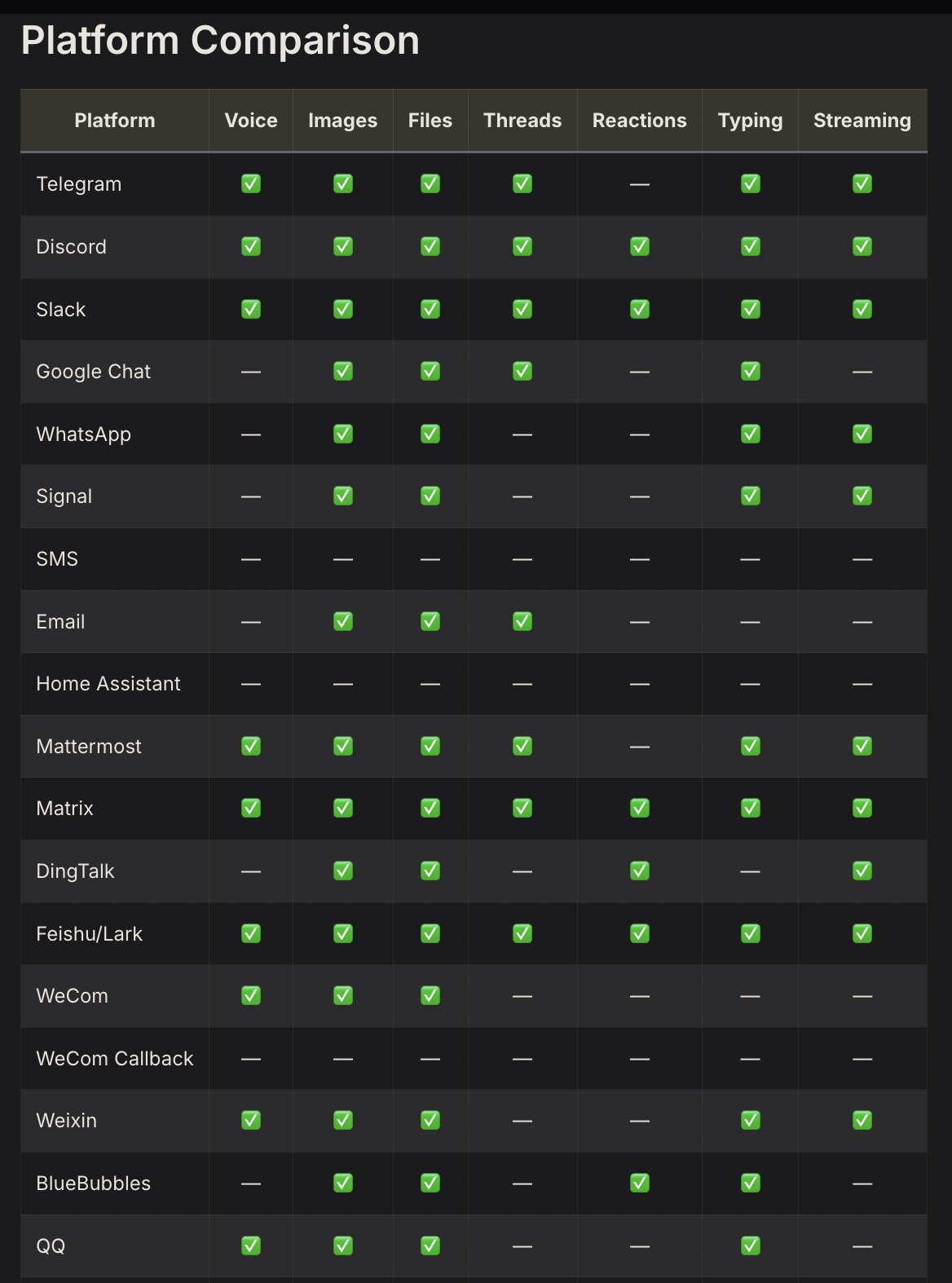 Platform Comparison (Personally, I've picked Telegram & WhatsApp). This prompt will get you started: ``` Set up my messaging gateway. I want to connect [Telegram/Slack/WhatsApp/Signal/Discord] so I can reach you from my phone. Walk me through authorizing it and confirm once it's live. ``` Alternatively, you can also opt for a quick setup in the terminal: ``` hermes gateway setup # Interactive setup for all messaging platforms ``` Depending on the exact platform you pick, the next steps may vary. For example, for Telegram, you'll have to set up a bot via BotFather: 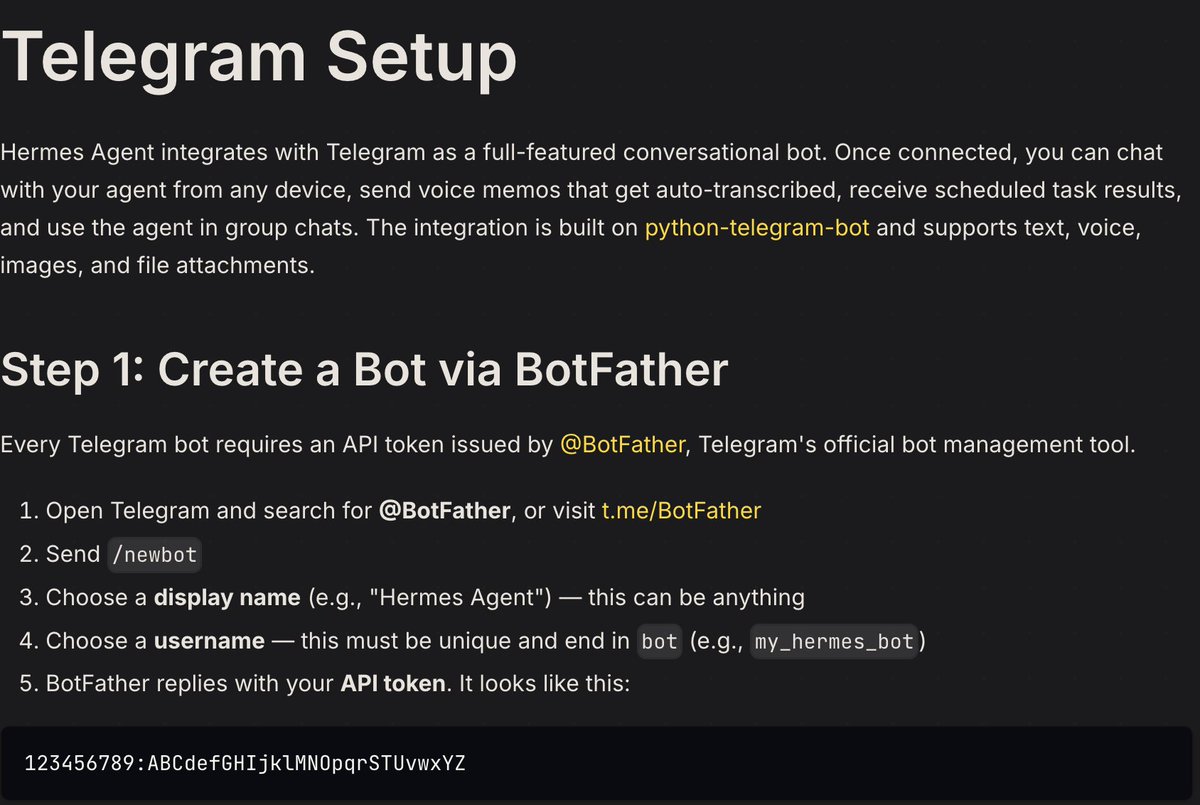 Telegram Setup For WhatsApp, you'll pair through a QR code scan: 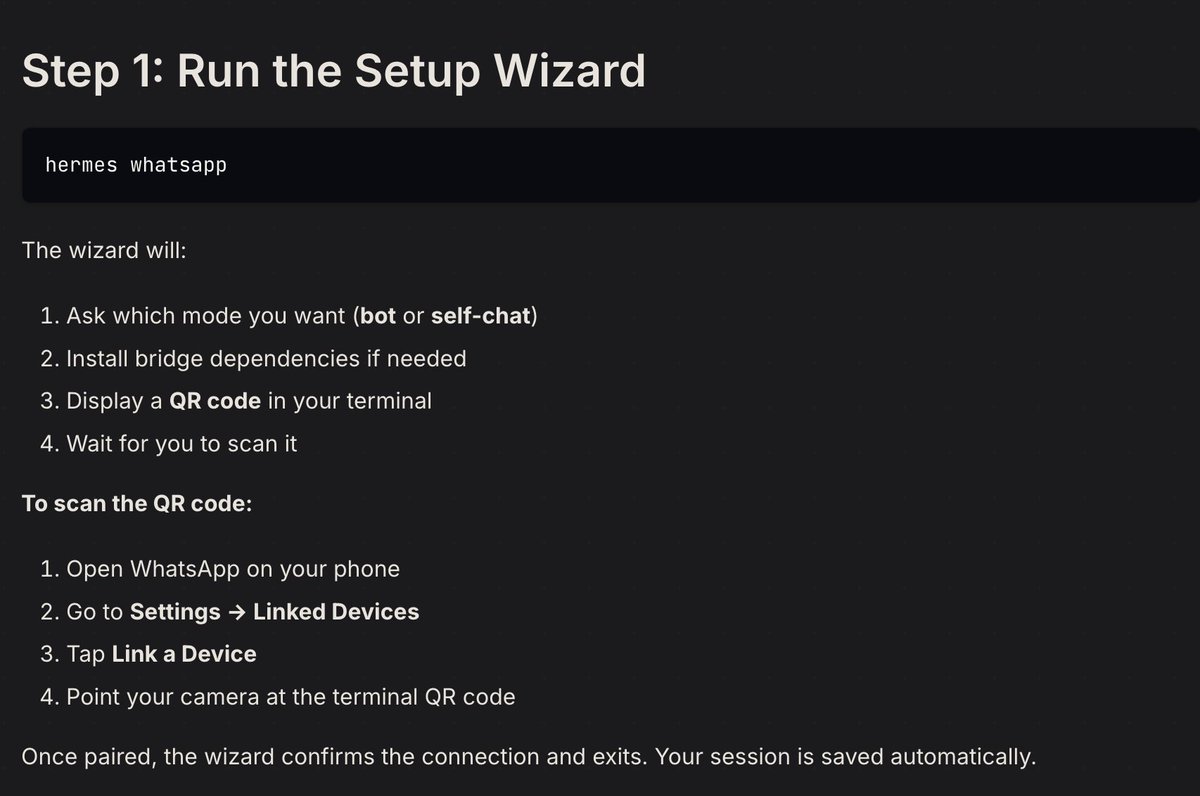 Whatsapp Setup A few things worth noting: - Security default: Hermes locks down to an allowlist by default, so randoms can't message your bot or run commands. - Background tasks: Once a platform's connected, you can fire off /background tasks and it'll report back to that chat when done. This pairs - Messaging Commands (save this): 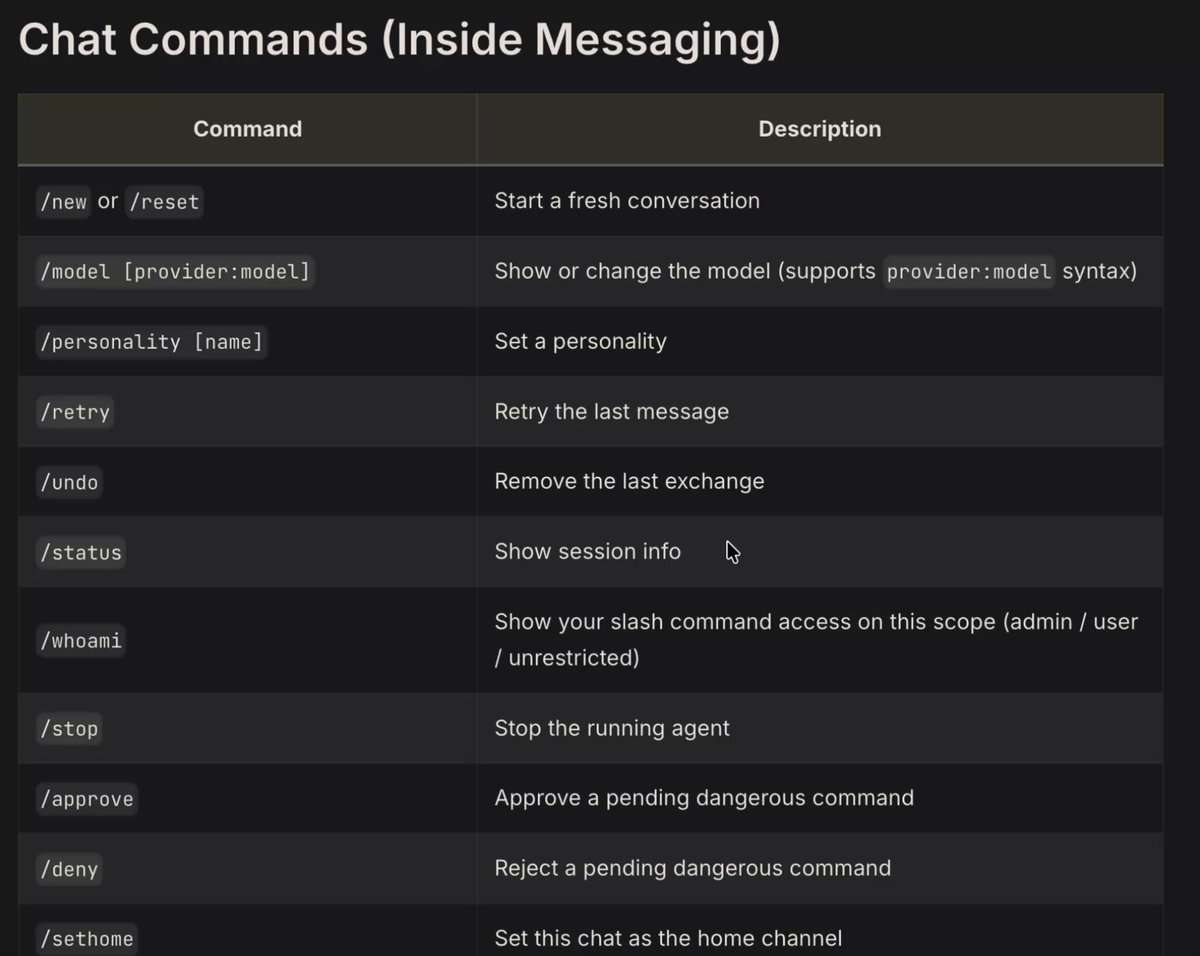 Chat Commands (inside messaging) ## Step 4: Prompting (and how to use your agent) At this point, you should have Hermes fully set up as your personal assistant, whom you can text 24/7 and who has complete access to your tools. I've been running this setup for the past couple of weeks, and these are my favorite prompts so far: Google Calendar ``` What's on my calendar today? Flag any conflicts and let me know if I'm double booked. ``` ``` Block off 2 hours every weekday morning for deep work. Find the next open slot if something's already there. ``` Notion ``` Pull my task database and tell me what's overdue or due in the next 3 days. ``` ``` Go through my Notion notes from this week and pull out anything that looks like an action item I haven't completed yet. ``` Slack ``` Check my Slack DMs and unread channels. Summarize anything that actually needs a response from me. ``` ``` Draft a reply to the last message in [channel/person] and show it to me before sending. ``` Scheduling Recurring Tasks This is one of my favorite Hermes use cases, and I don't see people talking about it enough. Hermes has a built-in cron scheduler that allows you to schedule tasks. Things like: "Every day at 9 am, scan my Slack and ping me with a summarized report." "Before I go to bed, send me a quick update on my to-do list so I can set priorities for tomorrow." Interrupt Control You can message Hermes mid-task to redirect it instead of waiting for it to finish. Use "/stop." ## Step 5: Customizing Your Assistant Out of the box, Hermes is capable but generic. This step is where you actually shape it into something that feels like yours. Personality Selection Hermes isn't locked into one tone. You can swap between built-in personalities depending on what you're using it for, direct and no-nonsense for work, more relaxed for personal tasks. Use "/personality direct." Model Selection This is one of the biggest factors for your agent's personality. In my opinion, Claude models have the warmest personality (human-like responses), and GPT models are best if you want a robotic feel to your agent. You can swap models anytime using "model provider:model" or by just asking your agent to switch in real time. Set Home Use "/sethome" to create a chat as your home channel. Pets This is a new feature. By using "/pet," you can assign your Hermes agent an avatar. > **Nous Research@NousResearch**: [原文链接](https://x.com/NousResearch/status/2069577310055846267) > > Your Hermes Agent can now adopt an animated pet: a small sprite that reacts to what the agent is doing (idle, running a tool, thinking, waiting, finishing, failing) in the GUI or TUI. > You have nearly 3000 pets to choose from via the petdex gallery, or you can submit your own. > >  Discord Hubs One last thing. I've experimented around, and I've found that Discord is best if you want to set up a "hub" for your AI agents. WhatsApp and Telegram are great for quick messaging, but with Discord, you can create various channels dedicated to various subagents and monitor them in real time. It provides a "home" like feel to Hermes, instead of just texting an AI agent, and it's also pretty cool to have a dedicated Discord server for your AI workflows. ## Closing So, there you have it. My full guide for turning Hermes into a dedicated personal assistant. I hope you found it valuable. If you have any questions, leave them down below, and I'll do my best to respond as quickly as possible. If you enjoy AI content like this, be sure to follow me @aiedge_ - I post articles just like this multiple times a week. If you enjoy written AI content, feel free to subscribe to my free newsletter. We never spam you (only weekly deliveries), and I genuinely believe it's the best all-around AI newsletter in the game right now: https://newsletter.aiedgehq.co/  Thank you for reading💙 ## 相关链接 - [AI Edge](https://x.com/aiedge_) - [@aiedge_](https://x.com/aiedge_) - [62K](https://x.com/aiedge_/status/2079952442712834514/analytics) - [https://hermes-agent.nousresearch.com/](https://hermes-agent.nousresearch.com/) - [https://hermes-agent.nousresearch.com/](https://hermes-agent.nousresearch.com/) - [https://hermes-agent.nousresearch.com/install.sh](https://hermes-agent.nousresearch.com/install.sh) - [Jun 24](https://x.com/NousResearch/status/2069577310055846267) - [318K](https://x.com/NousResearch/status/2069577310055846267/analytics) - [@aiedge_](https://x.com/@aiedge_) - [https://newsletter.aiedgehq.co/](https://newsletter.aiedgehq.co/) - [https://newsletter.aiedgehq.co/](https://newsletter.aiedgehq.co/) - [Upgrade to Premium](https://x.com/i/premium_sign_up) - [11:31 PM · Jul 22, 2026](https://x.com/aiedge_/status/2079952442712834514) - [62.6K Views](https://x.com/aiedge_/status/2079952442712834514/analytics) - [View quotes](https://x.com/aiedge_/status/2079952442712834514/quotes) --- *导出时间: 2026/7/23 12:51:04* --- ## 中文翻译 # 全指南:将 Hermes Agent 变成你的私人助理 **作者**: AI Edge **日期**: 2026-06-24T00:24:16.000Z **来源**: [https://x.com/aiedge_/status/2079952442712834514](https://x.com/aiedge_/status/2079952442712834514) ---  这是 Hermes 最被低估的用例,99% 的人还没有设置它。 在过去几周里,我一直将 Hermes 作为我的私人助理使用——它的功能非常强大。 我的代理管理着我的日历、电子邮件,追踪我所有的任务(以及更多),并通过 WhatsApp 向我汇报所有情况。 我可以全天候 24 小时给它发短信,它就像我自己的迷你 AI 员工。 如果我聘请一位私人助理,每月至少需要花费 4000 多美元,但这个 AI 设置几乎是免费的,而且它带来的投资回报率高得惊人。 读完这篇文章,你将在 10 分钟内完全设置好 Hermes,并让它管理你生活中真实的部分。 这个设置相对简单,分为 5 个步骤: 步骤 1:安装 Hermes 步骤 2:Composio 设置 + 配置。 步骤 3:消息网关 步骤 4:提示词(以及如何使用你的代理) 步骤 5:自定义你的助理 让我们直接开始吧。 ## 步骤 1:安装 Hermes 如果你已经安装了 Hermes,请直接跳到下面的第二步。 如果你对 Hermes 完全陌生,那你很幸运,因为现在的设置比以往任何时候都容易。 这里有两个主要选择,两者都不到一分钟: 1. 桌面应用程序 如果你想走最简单的路,下载 Hermes 桌面应用程序——无需终端,无需命令,只需下载并打开。 前往这里并选择你的软件: https://hermes-agent.nousresearch.com/  2. 终端安装 如果你习惯使用终端,可以改用单行安装程序。 它适用于所有 Mac、Linux 和 Windows: curl -fsSL https://hermes-agent.nousresearch.com/install.sh | bash 完成后,打开 Hermes,你将直接进入聊天界面。 这是你接下来所有操作的控制中心。 ## 步骤 2:Composio 设置 + 配置。 这是大多数人不知道的一步,也正是这一步将 Hermes 转变成了你全能的助理。 仅靠 Hermes 本身无法访问你的日历或收件箱。 Composio 弥补了这一差距,将 1000 多个应用程序直接插入 Hermes。  适用于 Hermes-Agent 的 Composio 将此粘贴到你的 Hermes 聊天框中: ``` https://composio.dev/hermes ``` 这将自动安装连接器,无需任何人工干预。 在这里,你需要告诉 Hermes 你想要连接哪些应用程序。 一些不错的起步选择: - Google Calendar - Gmail 或 Outlook - Google Tasks - Slack - GitHub 基本上,要求 Hermes 设置任何你会让现实生活中的私人助理监控的工具。 当你进行操作时,Hermes 会提示你授权每一个应用程序。一旦连接,Hermes 就可以真正代表你行事。 配置。(开启记忆和技能) Hermes 最强大的功能之一是它的持久记忆。 它能记住关于你的任何和所有事情——比像 Claude 这样的工具要好得多。 为了充分利用你的 Composio 设置,请进入你的配置,确保持久记忆和技能生成都已开启。 两者的简要说明: 记忆:Hermes 会跨会话回忆过去的对话和上下文。 (也就是问它你上周讨论过的某件事,它真的会记得,而不是从头开始)。 技能:Hermes 完成的每项任务都会保存为可重复使用的技能。下次你提出类似的请求时,Hermes 将使用你保存的标准作业程序(SOP)。 ## 步骤 3:连接消息网关 目前,Hermes 只能通过桌面应用程序与你交谈。如果你整天都在电脑前,这没问题,但真正的解放在于能够从任何地方访问它。 你可以让 Hermes 连接到 Discord、Telegram、Slack、WhatsApp、Signal 等——选择你已经习惯使用的平台并连接它。 每个平台在视频、图像、文件、反应等方面都有不同的功能。  平台比较 (就我个人而言,我选择了 Telegram 和 WhatsApp)。 这个提示词可以帮你开始: ``` 设置我的消息网关。我想连接 [Telegram/Slack/WhatsApp/Signal/Discord],以便我可以通过手机联系到你。 引导我完成授权过程,并在上线后确认。 ``` 或者,你也可以选择在终端中进行快速设置: ``` hermes gateway setup # 所有消息平台的交互式设置 ``` 根据你选择的具体平台,接下来的步骤可能会有所不同。 例如,对于 Telegram,你必须通过 BotFather 设置一个机器人:  Telegram 设置 对于 WhatsApp,你将通过扫描二维码进行配对:  Whatsapp 设置 有几点值得注意: - 安全默认设置:Hermes 默认锁定为白名单模式,这样陌生人就不能给你的机器人发信息或运行命令。 - 后台任务:一旦平台连接完成,你就可以发出 /background 任务,完成后它会向该聊天汇报。这搭配 - 消息命令(保存这个):  聊天命令(在消息中) ## 步骤 4:提示词(以及如何使用你的代理) 此时,你应该已经将 Hermes 完全设置为你的私人助理,你可以全天候 24 小时给它发短信,并且它可以完全访问你的工具。 我在过去几周里一直在运行这个设置,这些是我目前最喜欢的提示词: Google Calendar ``` 我今天日历上有什么安排?标记任何冲突,并告诉我是否重复预订了。 ``` ``` 在每个工作日的早上留出 2 小时进行深度工作。如果已有安排,找到下一个空闲时段。 ``` Notion ``` 拉取我的任务数据库,告诉我哪些是逾期或在未来 3 天内到期的。 ``` ``` 查看我这周在 Notion 上的笔记,找出任何我尚未完成的、看起来像行动项的内容。 ``` Slack ``` 检查我的 Slack 私信和未读频道。总结任何真正需要我回复的内容。 ``` ``` 为 [频道/个人] 中的最后一条消息起草回复,并在发送前给我看。 ``` 安排定期任务 这是我最喜欢的 Hermes 用例之一,我觉得人们对此讨论得还不够。 Hermes 有一个内置的 cron 调度器,允许你安排任务。 比如: “每天早上 9 点,扫描我的 Slack 并向我发送一份总结报告。” “在我睡觉前,向我发送一份待办事项清单的快速更新,以便我确定明天的优先事项。” 中断控制 你可以在任务执行过程中向 Hermes 发送消息来重定向它,而不是等待它完成。 使用“/stop”。 ## 步骤 5:自定义你的助理 开箱即用,Hermes 功能强大但比较通用。 这一步是你真正将其塑造成属于你的东西的时候。 个性选择 Hermes 不局限于一种语气。你可以根据它的用途在内置个性之间切换,工作时直接且严肃,处理个人任务时则更放松。 使用“/personality direct”。 模型选择 这是影响代理个性的最大因素之一。 在我看来,Claude 模型的个性最温暖(类似人类的回复),而如果你希望你的代理有一种机械的感觉,GPT 模型是最好的。 你可以随时使用“model provider:model”切换模型,或者直接要求你的代理实时切换。 设置主页 使用“/sethome”创建一个聊天作为你的主页频道。 宠物 这是一个新功能。通过使用“/pet”,你可以为你的 Hermes 代理分配一个头像。 > **Nous Research@NousResearch**: [原文链接](https://x.com/NousResearch/status/2069577310055846267) > > 你的 Hermes Agent 现在可以领养一个动画宠物:一个小精灵,它会对代理在 GUI 或 TUI 中正在做的事情(空闲、运行工具、思考、等待、完成、失败)做出反应。 > 你可以通过 petdex 图库选择近 3000 种宠物,或者提交你自己的宠物。 > >  Discord 枢纽 最后一件事。 我做过一些实验,我发现如果你想为你的 AI 代理建立一个“枢纽”,Discord 是最好的选择。 WhatsApp 和 Telegram 非常适合快速消息传递,但在 Discord 中,你可以创建各种专门用于不同子代理的频道,并实时监控它们。 这给 Hermes 提供了一种“家”的感觉,而不仅仅是给 AI 代理发短信,而且拥有一个专门用于 AI 工作流的 Discord 服务器也非常酷。 ## 结语 就是这样。 我将 Hermes 变成专用私人助理的完整指南。 我希望你觉得它有价值。 如果你有任何问题,请在下面留言,我会尽快回复。 如果你喜欢这样的 AI 内容,请务必关注我 @aiedge_——我每周都会多次发布这样的文章。 如果你喜欢书面形式的 AI 内容,欢迎订阅我的免费时事通讯。 我们绝不会向你发送垃圾邮件(仅每周投递),我真心认为它是目前市面上最好的综合性 AI 时事通讯: https://newsletter.aiedgehq.co/  感谢阅读💙 ## 相关链接 - [AI Edge](https://x.com/aiedge_) - [@aiedge_](https://x.com/aiedge_) - [62K](https://x.com/aiedge_/status/2079952442712834514/analytics) - [https://hermes-agent.nousresearch.com/](https://hermes-agent.nousresearch.com/) - [https://hermes-agent.nousresearch.com/](https://hermes-agent.nousresearch.com/) - [https://hermes-agent.nousresearch.com/install.sh](https://hermes-agent.nousresearch.com/install.sh) - [Jun 24](https://x.com/NousResearch/status/2069577310055846267) - [318K](https://x.com/NousResearch/status/2069577310055846267/analytics) - [@aiedge_](https://x.com/@aiedge_) - [https://newsletter.aiedgehq.co/](https://newsletter.aiedgehq.co/) - [https://newsletter.aiedgehq.co/](https://newsletter.aiedgehq.co/) - [升级到 Premium](https://x.com/i/premium_sign_up) - [11:31 PM · Jul 22, 2026](https://x.com/aiedge_/status/2079952442712834514) - [62.6K Views](https://x.com/aiedge_/status/2079952442712834514/analytics) - [View quotes](https://x.com/aiedge_/status/2079952442712834514/quotes) --- *导出时间: 2026/7/23 12:51:04*
H Hermes Agent 保姆级安装使用指南 这是一篇关于 Hermes Agent 的完整部署与使用教程。文章首先介绍了该工具作为终端命令行 AI 智能体的特点,随后详细讲解了在 macOS、Linux 及 Windows (WSL2) 环境下的一键安装方法、环境自检与修复技巧,并以 DeepSeek 为例演示了模型配置步骤。最后,文章深入解析了全自动任务执行、交互式对话及会话续接三种运行模式的实际操作。 技术 › Hermes Suu 2026-04-21 Agent安装指南命令行DeepSeek开发工具AI助手自动化教程TerminalHermes
终 终于不用学飞书了!直接用豆包工作口喷! 本文是一篇从零开始的飞书 CLI 接入教程,讲解如何让豆包工作(AI Agent)真正“动手”操作飞书,实现文档、表格、日历、消息的自动化处理。文章介绍两条接入路线:适合新手的飞书插件安装方式,以及需要 Node.js 环境的手动安装 CLI 方式,并详细说明登录授权、权限管理与验证步骤。作者强调运行环境需选“本地电脑”才能调用本机 CLI,并以“把本地 Markdown 转成飞书文档并归档”的完整案例演示全流程。飞书 CLI 覆盖 16+ 业务域、2500+ API,让 AI 助手从只会聊天进化为能直接办事的工具。 技术 › Agent Hytidel聊商业 2026-10-16 飞书CLI豆包工作AI助手Agent教程自动化Node.js插件飞书工具与效率
M Manus 2.0 + Cue 万字长文:从抢码到让 agent 替你打工,这一篇就够了 文章全面解读 Manus 2.0 与新推出的独立 App Cue。作者梳理了发布背景:Meta 收购后 Manus 停更九个月,恢复独立后推出 2.0,包含自研 agent 框架 Cascade、Manus Studio 桌面端和 Cue。核心亮点是 Cue 的'身份四件套'——每个 agent 拥有独立邮箱、手机号、钱包和电脑,与 Meta 的分身式 Muse 形成对立定位。文章涵盖保姆级注册教程、邀请码获取、设备与地区限制说明,并基于实测给出使用建议:第一天先给 agent 立规矩,明确职责边界、审批流程和花钱上限。作者还拆解了邮箱、电话、钱包三大能力的实际体验、坑点与适用场景,指出邮件易进推广栏、美国号码不能收短信等局限。 技术 › Agent 雨哥向前冲 2026-09-29 ManusCueAgentAI助手Manus 2.0Cascade自动化产品评测注册教程使用指南
一 一个文科生,怎么让AI每天自动替我找选题 作者作为AI博主,分享了自己搭建「选题雷达」系统的完整流程。系统包含两个AI编辑:一个负责AI大新闻选题,通过AIHOT热点榜、精选流和Follow Builders追踪正在爆的事件;另一个负责实战心法选题,通过best-skills排行榜和GitHub Trending筛选值得亲测的工具。每条选题需经过48小时时效、目标用户相关度、一小时内可执行动作等多重过滤,并由Agent打分排序。作者强调AI只决定「值得看」,最终「值得写」的判断仍靠人的体感。整个系统跑在HermesAgent和GrokBot上,让作者把重复性工作交给AI,只保留判断、体验和表达。 技术 › Agent 写手李大魔 2026-09-18 Agent自动化选题系统内容创作AI工具Skill工作流GitHub Trending信息筛选Hermes
H How we built Hermes to support our entire team Artie 团队(17人)分享了如何将 Hermes——NousResearch 的开源 AI agent harness——部署为全团队共享的 AI 助手。文章讲述了从工程师个人 WhatsApp 使用的起步,到选择 Hermes 而非 OpenClaw 并加入护栏的决策;用每年 60 美元的 Hetzner 物理服务器承载全部运行。团队为每个部门设计了独立 profile:工程(Plan 分派任务、Code 执行开 PR)、销售、设计、BizOps 等,并强调人类始终在环节中审核。Skills 以代码形式版本化进 Git 仓库,严控数量以省 token。受人类 REM 睡眠启发,Hermes 每晚'做梦'复盘当日工作,将有价值内容晋升到长期记忆。 技术 › Hermes Jacqueline Cheong 2026-09-17 HermesAgentNousResearchSkillOpenClaw团队协作基础设施成本优化记忆管理自动化
H How to Become a Marketing Engineer 文章介绍如何成为一名营销工程师(Marketing Engineer),即用 Agent、连接的数据和业务上下文构建自动化营销系统的人。作者分享了在 Agent 开发环境(ADE,如 Orca)中完成约 70% 营销工作的经验,包括市场研究、活动策划、内容生产和落地页搭建。文章讲解了模型、harness、ADE 等核心概念,提出按营销垂直领域组织工作区的目录结构(知识、工作流、技能、产出、结果),并建议从自己熟悉的一个任务或领域入手,逐步连接研究、简报、生产与结果反馈,形成可持续迭代的营销工作流系统。 技术 › Agent Shann³ 2026-09-10 Agent营销工程工作流ADEOrcaHermes自动化内容营销知识管理GTM
微 微信聊天框还能这么用?发段文字,自动存进 Obsidian 笔记 作者金尘马分享了一个实用方案:通过 Hermes 为微信单独配置一个专用 Agent,在微信聊天框发送文字即可自动保存到 Obsidian 笔记库,并同步到 GitHub。文章详细介绍了准备工作、Agent 规则配置、微信 ClawBot 连接步骤,并提供了一套完整的一键配置提示词,可交给 Codex 或 WorkBuddy 自动完成配置。整个方案成本低、操作简单,大幅降低了随手记录的摩擦。 技术 › 工具与效率 金尘马 2026-09-10 微信ObsidianHermesAgent笔记同步GitHub自动化效率工具ClawBot提示词
手 手把手保姆级教程教你如何使用 Hermes Agent 自动管理 X 账号 本文是一篇详细教程,介绍如何使用 Hermes Agent 自动管理 X 账号。作者从准备工作开始,逐步讲解在 X Developer Console 创建应用、启用 OAuth 2.0 并设置回调地址、让 Hermes 准备配置脚本、在 SSH 终端完成授权,以及后续让 Hermes 检查账号和试发布。文章还分享了在聊天中改稿排版、读取私信、搜索内容等常见用例,并建议添加费用计算和提醒。最后推荐了 HermesCN 中文社区供进一步交流。 技术 › Agent brucexu.eth 2026-09-08 HermesX账号管理自动化OAuth2.0教程社交媒体AgentAPI集成
H Hermes+微信,实现远程操控:小白保姆级教程 本文是一篇面向小白的保姆级教程,介绍如何将 Hermes(一个常驻电脑或服务器的 AI 执行助手)安装到 Linux/macOS 上,接入 openai-codex 模型和个人微信,实现通过手机微信远程给家里的机器派任务。文章详细讲解了整条链路:安装 Hermes、登录 Codex 订阅并选择模型、扫码连接微信、审批配对、验收测试等步骤,并提供了常见问题的排查方法。作者还分享了自己的实际用例,如定时读取邮件生成日报、操作远端文件、执行终端任务等,并提醒用户注意安全,避免使用 root 运行、不交出敏感密钥。 技术 › Hermes Adrian Punk 2026-09-07 Hermes微信AI助手Codex远程操控SSHLinux自动化定时任务教程
用 用机器人自动化你的生活 作者分享了一套通过 AI Agent 自动化个人生活的实用方案。文章提供了一份可直接复制使用的 Markdown 提示词,角色为「AI Agent 架构师」,用于对用户的生活和工作做全面审计与访谈。核心原则是最小化有用的 Agent 编制(通常 1-3 个即可),遵循从手动任务到一次性 AI 任务、技能、例行程序、命名专家 Agent、多 Agent 协作再到定时自动化的渐进升级层级。文章详细给出工作流决策漏斗、Agent 拆分测试的六个维度(所有权、上下文、工具、工作风格、审批边界、触发节奏)、Agent ROI 评估方法,以及 Grok Bot 与 Hermes 两个运行时平台的选型指导。 技术 › Agent hoeem 2026-09-07 AI Agent自动化GrokHermes提示词生活自动化工作流Agent架构个人效率
从 从零成为 Hermes Operator 与自动化架构师(完整课程) 这是一篇面向零基础用户的 Hermes Agent 完整教程,分为八个阶段,从安装运行、连接模型与工具网关,到配置 Telegram 等消息通道、赋予工具与记忆能力,再到设计自动化工作流、搭建多 Agent Bot 团队、使用子代理与定时任务,最后覆盖可靠性优化、成本控制、调试与扩展。文章详细对比了本地机器、Hermes Cloud 和 VPS 三种部署方案的优劣,并给出具体命令和配置步骤,帮助读者最终实现 trigger、research、decide、act、save、wait 的全自动多智能体工作流。 技术 › Hermes hoeem 2026-09-04 HermesAgent自动化多智能体教程Telegram部署工作流Nous Research工具网关
T The Hermes Agent FAQ 本文是 Hermes Agent 的常见问题解答合集。作者在首次发布后收集了社区 100 多条回复中最常出现的问题,结合 Reddit、X 和 Discord 上的高频提问,整理成一篇 FAQ。内容涵盖核心概念(session、project、profile、bot)、四大配置文件(SOUL.md、AGENTS.md、MEMORY.md、USER.md)、模型选择与切换、首次使用建议、远程服务器连接、成本优化、记忆机制、本地部署的硬件要求与常见问题(工具调用失效、首条消息慢、上下文窗口过小导致遗忘)以及子代理使用不同模型等高级用法。所有答案均经过官方文档核对,适合新老用户快速上手和排障。 技术 › Hermes witcheer 2026-09-01 HermesAgentAI助手FAQ本地部署LLM模型配置记忆系统远程连接子代理