# Jev Engineering: Full 10-Step Roadmap to Set Up and Use a New Brain for AI (from scratch)
**作者**: codila
**日期**: 2026-09-17T02:26:36.000Z
**来源**: [https://x.com/0xCodila/status/2100984487802708306](https://x.com/0xCodila/status/2100984487802708306)
---
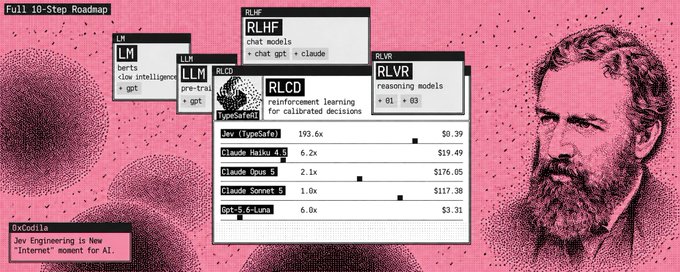
The Jevons Paradox (he's on picture) is a rule stating that an increase in the efficiency of a resource's use does not reduce, but rather increases, its overall consumption - That's the global problem for AI: LLMs and Agents And Jev by [@typesafeai](https://x.com/@typesafeai) is built to save 101% of your money, time and will improve your efficiency of using AI So trust me - this is the 2030 setup that you need to install right now before the alpha - subscribe to my substack for more fresh alpha - [https://substack.com/@0xcodila](https://substack.com/@0xcodila)
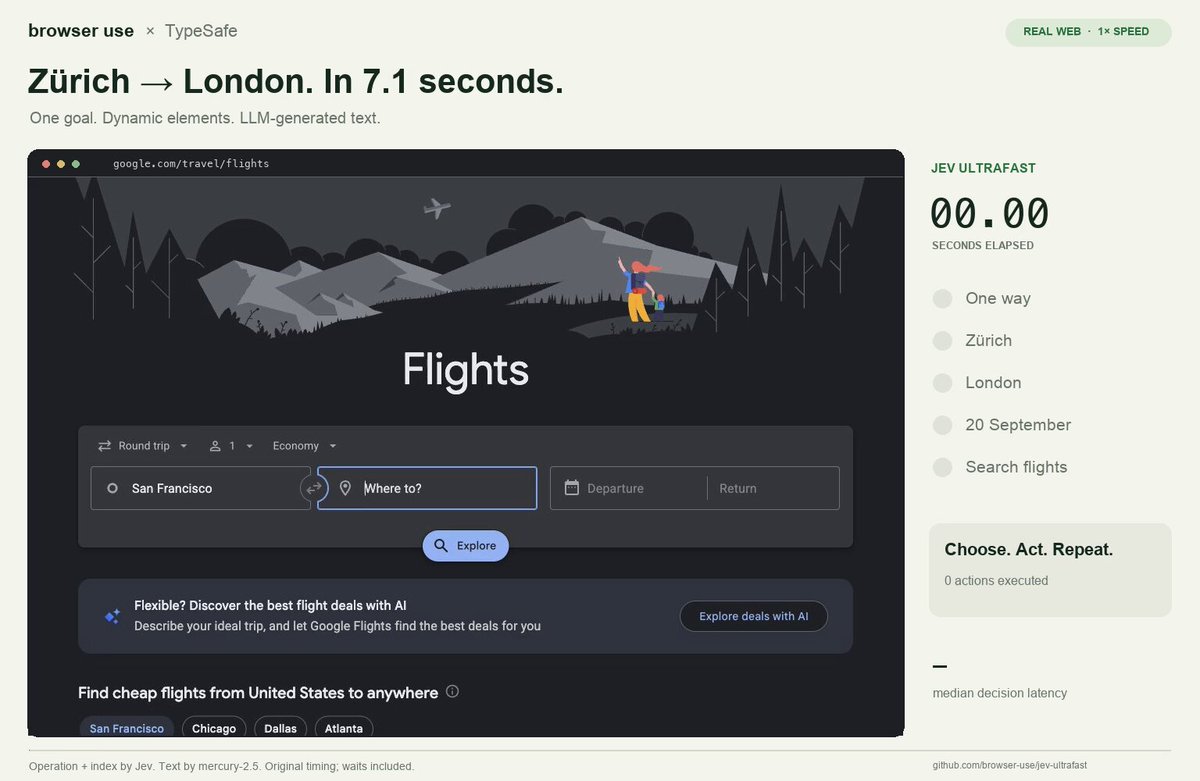
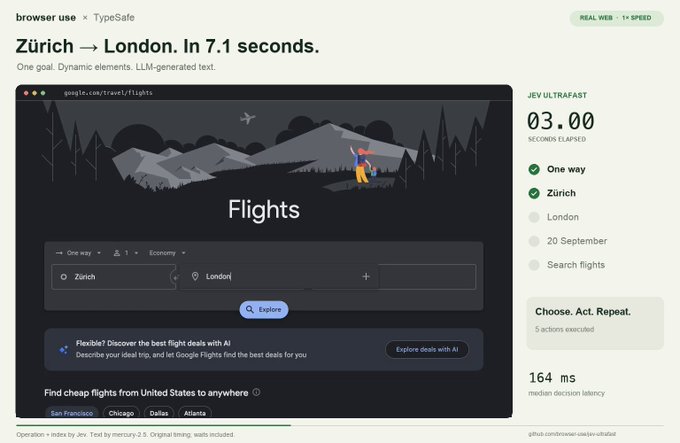
"Browser Use put Jev inside an agent that found flights in 7 seconds for $0.0039"
> **Gregor Zunic@gregpr07**: [原文链接](https://x.com/gregpr07/status/2100411066966749359)
>
> Breaking: Browser Use + Jev = Ultrafast
> Findings flights took 7s and cost only $0.0039
> > new action space every step
> > DOM state space
> > small LLM fallback to type
> (this video is at 1x speed btw)
> Built a tiny open source browser agent. try it below ↓
>
> 
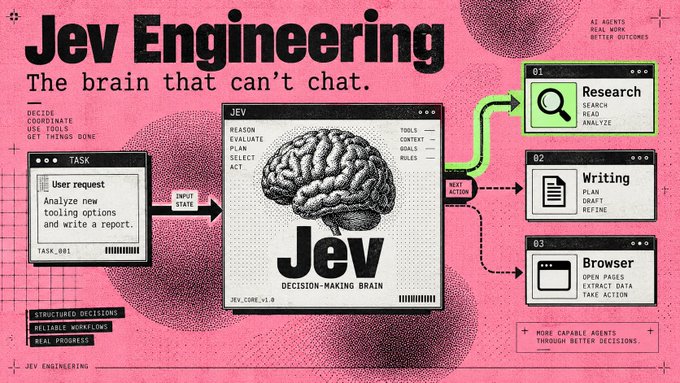
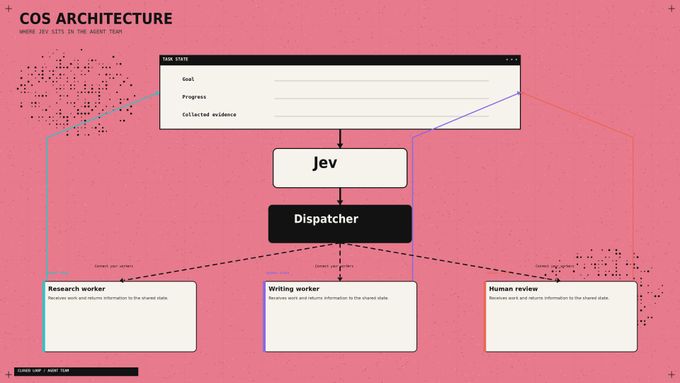
That gets interesting when you look at what your Chief of Staff does all day: choose a worker, check a result, decide whether to continue. Each fork can become another model call before any useful work happens
> Jev gives those decisions their own model Your writing agent keeps writing. Your research agent keeps researching. The small judgments between them become a separate component you can inspect, price, and change.
Start with a standalone task router: enter a job, let Jev choose its destination, and save the handoff on your computer. Then run Browser Use's complete browser agent. (The first needs one API key; the browser project needs two)
## 01. Find the part of your agent Jev can take over
Jev is TypeSafe AI's System One model: you provide information and predefined questions, it returns typed answers with probabilities. It cannot write your briefing, generate code, or explain its reasoning in prose. [TypeSafe's launch essay](https://typesafe.ai/blog/introducing-system-one-models-and-jev)
Start with a job like this:
> Research three new AI-agent tools and draft tomorrow's briefing. Save the draft for my review.
That job contains several decisions: Do we have enough sources? Which worker goes next? Is the draft ready for review?
Those are candidates for Jev. Fetching sources, writing paragraphs, and saving files still belong to your tools and generative models. An exact rule, such as stopping after ten actions, belongs in code.
For a GrokBot-style Chief of Staff, the saved handoff can feed an existing worker. Connecting that worker comes after the standalone setup below; you can complete the first run without an agent team.
## 02. Give it one decision in the Playground
- Open the [TypeSafe Playground](https://console.typesafe.ai/playground). Sign in and complete the access process if your account requires it.
Use this as your state:
```
Goal: Compare three AI-agent tools in a morning briefing.
Completed work: No sources collected yet.
Available workers: Researcher, Writer.
Constraint: Save drafts for review. Do not publish.
```
Add a Choice question: "Which worker should act next?"
Define three options: research for missing evidence, write for drafting from sufficient evidence, and review for unclear requests or completed work.
Run it. Then replace the completed-work field with actual research notes and compare the decision. This is the basic interaction described in the [official Quickstart](https://docs.typesafe.ai/introduction/quickstart).
## 03. Connect the API once
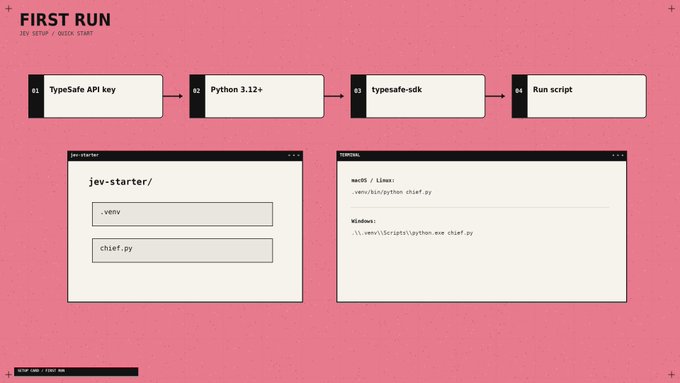
You need a TypeSafe account with API access enabled and a key from [key settings](https://console.typesafe.ai/settings/keys). API calls are billed to that account. Install [Python](https://www.python.org/downloads/) 3.12 or newer, then open Terminal on macOS/Linux or PowerShell on Windows.
macOS / Linux:
```
mkdir jev-starter
cd jev-starter
python3 -m venv .venv
.venv/bin/python -m pip install --upgrade typesafe-sdk
```
Windows PowerShell:
```
mkdir jev-starter
cd jev-starter
py -3 -m venv .venv
.\.venv\Scripts\python.exe -m pip install --upgrade typesafe-sdk
```
These commands create an isolated environment and install the [official Python SDK](https://docs.typesafe.ai/sdk/python). Keep your key outside source files; the script below asks for it privately.
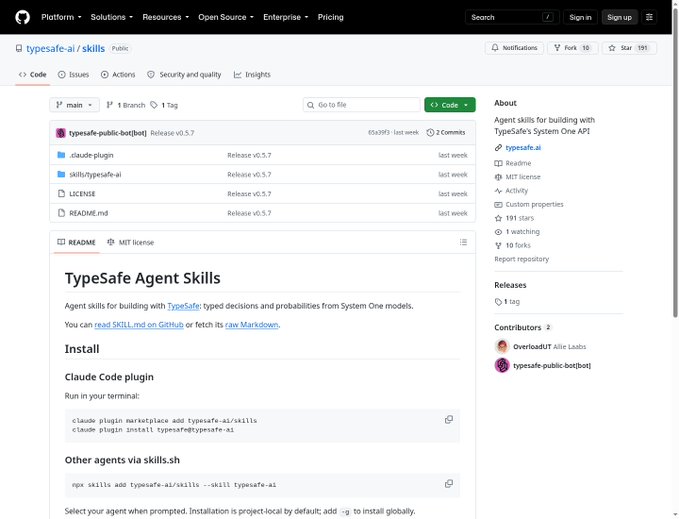
Using a coding agent? With Node.js/npm installed, add TypeSafe's official skill:
```
npx skills add typesafe-ai/skills --skill typesafe-ai
```
Select your supported agent when prompted. The skill gives it integration instructions; Jev itself runs through the API. [Official repository](https://github.com/typesafe-ai/skills)
## 04. Turn a request into a saved handoff
Create [chief.py](//chief.py) inside jev-starter, outside .venv. Use a plain-text editor and save the exact filename, not [chief.py](//chief.py).txt.
```
import json
import os
from getpass import getpass
from pathlib import Path
from uuid import uuid4
from typesafe_sdk import Choice, TypeSafeAPIError, TypeSafeClient
if not os.environ.get("TYPESAFE_API_KEY"):
os.environ["TYPESAFE_API_KEY"] = getpass("TypeSafe API key: ").strip()
goal = input("Goal: ").strip()
if not goal:
raise SystemExit("Enter a goal.")
notes = input("Completed work: ").strip() or "Nothing yet."
state = {"goal": goal, "completed_work": notes}
try:
with TypeSafeClient(model="jev-1.13.0") as client:
result = client.system_one(
state=state,
questions={
"next_worker": Choice(
instructions="Choose the next step for a research briefing.",
criteria={
"research": "Collect evidence still needed for the goal.",
"write": "Draft the briefing from sufficient evidence.",
"review": "Goal unclear, outside scope, or work complete.",
},
)
},
)
except TypeSafeAPIError as error:
raise SystemExit(f"API error {error.status}; see Step 8.")
answer = result.choices["next_worker"]
destination = "review"
if answer.choice in {"research", "write"} and answer.confidence >= 0.85:
destination = answer.choice
folder = Path(__file__).resolve().parent / "queue" / destination
folder.mkdir(parents=True, exist_ok=True)
job = folder / f"{uuid4().hex}.json"
payload = dict(state, choice=answer.choice, confidence=answer.confidence,
destination=destination, status="queued")
job.write_text(json.dumps(payload, indent=2, ensure_ascii=False), encoding="utf-8")
print("Saved handoff:", job)
```
Run on macOS/Linux:
```
.venv/bin/python chief.py
```
Run on Windows:
```
.\.venv\Scripts\python.exe chief.py
```
Paste your API key when asked - the terminal hides it. For Goal, enter Compare three AI-agent tools for tomorrow's briefing. For Completed work, enter No sources collected yet.
Your result: a Saved handoff: message with a full file path. Open that JSON file: it contains your request, progress, Jev's choice, confidence, and destination. Each run creates a new file under queue/research, queue/write, or queue/review. These are local task queues; a saved job waits for a worker to consume it
The API call and error handling follow the [SDK usage guide](https://docs.typesafe.ai/sdk/python/usage). I set the initial review threshold to 0.85 - adjust it using labeled examples from your workflow. Confidence is not an accuracy percentage. [Confidence guidance](https://docs.typesafe.ai/confidence)
## 05. Ask questions that lead somewhere
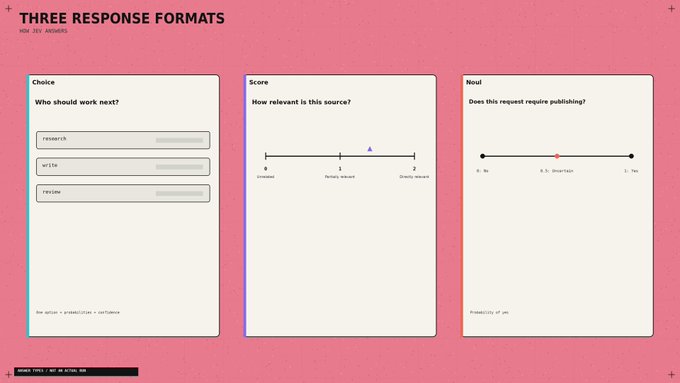
Three answer types cover different jobs:
Jev gives you three question types, each built for a different kind of decision:
- Choice selects one option from a list. Use it for questions like: "Who should work next?" It returns the selected option, its probability distribution, and confidence.
- Score evaluates something against a scale you define. Use it for questions like: "How relevant is this source?" It returns a value on that scale, plus probabilities and confidence.
- Noul answers a yes-or-no question. Use it for questions like: "Does this request require publishing?" It returns the probability of “yes” from 0 to 1.
Define a relevance Score with three descriptions: unrelated, partially relevant, directly addresses the question. Its numeric result runs from 0 to 2, including fractions. A Noul near 0.5 means uncertainty about yes/no. [Score](https://docs.typesafe.ai/primitives/score) · [Noul](https://docs.typesafe.ai/primitives/noul)
A useful detail: Jev does not see your question ID. Naming a field safe_to_publish contributes no instructions. Put the actual requirement in the question and describe each option clearly. [Choice documentation](https://docs.typesafe.ai/primitives/choice)
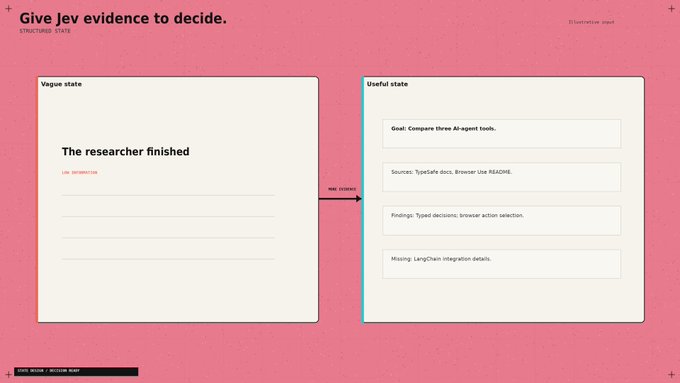
Also supply evidence. "The researcher finished" tells Jev less than the sources, findings, and remaining gaps. Keep those fields separate from the original request. [State documentation](https://docs.typesafe.ai/concepts/state)
## 06. Steal Browser Use's best idea: rebuild the menu
A browser's available actions change after every click. Browser Use builds a fresh list of observed controls and lets Jev choose from that list. A small LLM generates text when an input field needs filling. [Decision implementation](https://github.com/browser-use/jev-ultrafast/blob/main/jev_ultrafast/model.py)
Apply that design to your Chief of Staff. Build the choices from workers that exist and are available now. Include the current source IDs when selecting research material. Refresh the options after a tool changes the state.
- Otherwise your decision model is choosing from yesterday's menu.
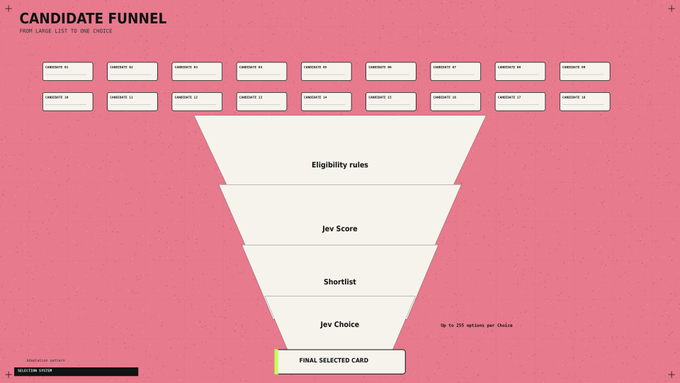
For large candidate lists, filter obvious mismatches in code, score the remaining items, then choose among the shortlist. Choice supports up to 255 options; TypeSafe describes this scoring-then-selection approach in its [launch examples](https://typesafe.ai/blog/introducing-system-one-models-and-jev)
## 07. Stop paying for questions to wait on each other
Your dispatcher may need a worker, an urgency score, and an approval check. If all three can inspect the same state, send them together.
TypeSafe supports parallel questions and speculative branches: ask about possible next actions, then use only the answer relevant to the selected branch. Questions cannot read one another's answers. If a decision needs a fresh search result, perform the search first. [Parallel evaluation pattern](https://docs.typesafe.ai/patterns/fan-out)
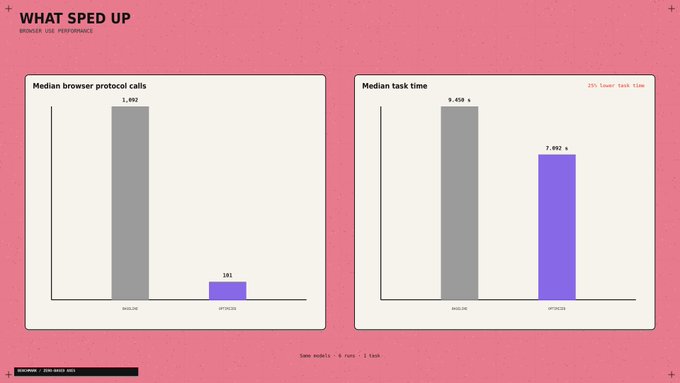
The browser example exposes another bottleneck. Its optimized runtime reduced median browser protocol calls from 1,092 to 101, while median task time fell 25% across three matched pairs. Both versions used the same models.
The changes included collecting the page state in one read and avoiding fresh predictions for irrelevant animations. Inspect repeated tool calls before paying for a faster model. [Performance report](https://github.com/browser-use/jev-ultrafast/blob/main/docs/performance.md)
## 08. Give overnight work somewhere to stop
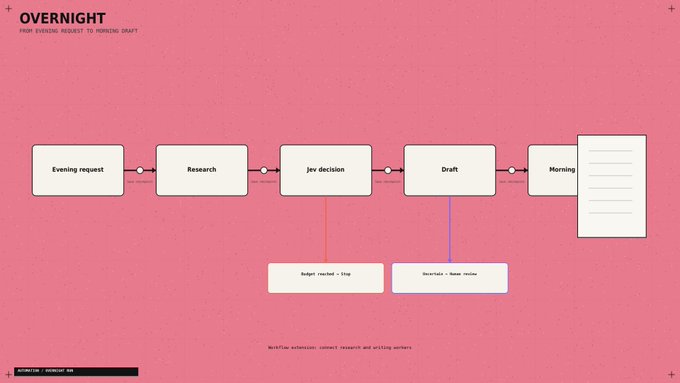
For a morning briefing, I'd allow source collection and draft creation, then stop at review. Publishing should require a separate permission check.
The application also needs an action limit, a spending limit, and saved progress. After an interruption, it should inspect the last completed action before repeating anything. A confident answer cannot prove that a file was saved or a message was sent.
Browser Use independently checks the outcome after Jev selects DONE. Borrow that separation for your own completion checks. [Agent loop](https://github.com/browser-use/jev-ultrafast/blob/main/jev_ultrafast/agent.py)
Once the local router works, use this brief to connect your existing agents:
> Read the TypeSafe skill and inspect my worker interfaces. Connect [chief.py](//chief.py)'s JSON queues to existing research and writing handlers. Prevent duplicate processing. Save progress after each action. Add call and spending limits, review on uncertainty, and a draft-exists completion check. Keep publishing behind approval. Identify missing connectors explicitly.
If the starter fails, use the error to choose the fix:
- Python command missing: finish Python installation and reopen the terminal.
- Module missing: repeat the SDK install with the same .venv interpreter.
- 401: replace the API key and rerun.
- 422: check the named request field against the pasted code.
- 429 / 529: allow backoff; retry later if rate limiting or overload persists.
The SDK supplies retries; the script stops if an API error remains. [API reference](https://docs.typesafe.ai/api)
## 09. Know what the headline price actually buys
Jev 1.13 costs $0.042 per million input tokens, with no output-token charge. At 1,000 billed input tokens per decision, 10,000 decisions cost $0.42 for Jev inference. [Pricing](https://docs.typesafe.ai/models)
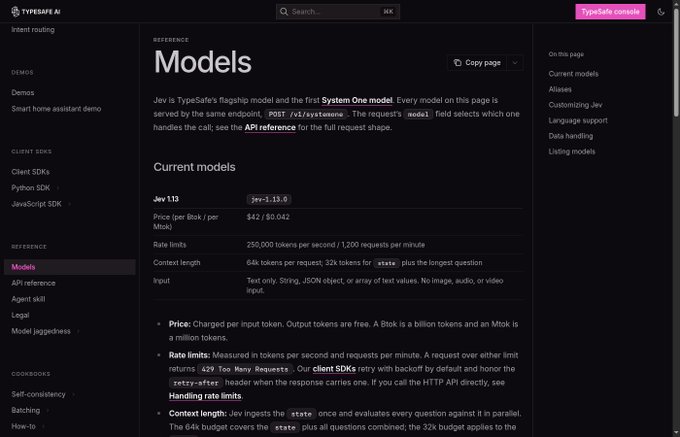
The flight demo's reported $0.0039 fits its recorded 90,558 Jev input tokens plus the text helper's reported charge. Browser costs sit outside that calculation. Its roughly seven-second clock starts after the initial page observation and excludes fresh post-run verification - So it finds flight results; it does not book tickets. [Run measurements](https://github.com/browser-use/jev-ultrafast/blob/main/docs/performance.md)
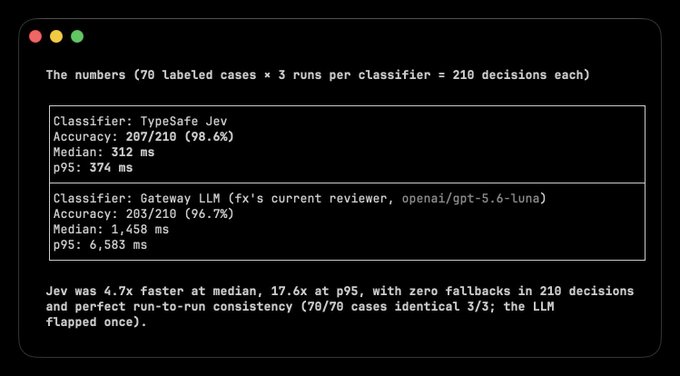
For a different workload, Vercel's fx team reported roughly 5-18x faster safety classification than GPT-5.6-luna, alongside improved accuracy. That comparison concerns the classifier, not the duration of an entire agent run. [Original benchmark](https://x.com/fazxes/status/2100300097695232164)
Track the bill per completed task. A cheap decision that sends a worker down the wrong branch can cost more than the decision itself.
## 10. Examples of Use
After the basic setup, Jev can already read the state of a task and choose between predefined options. Now you only need to decide which repeated decision to automate.
1. Control a Browser
Browser Use used Jev to select the next action and the correct page element. The agent found flights in 7 seconds for $0.0039.
> **Gregor Zunic@gregpr07**: [原文链接](https://x.com/gregpr07/status/2100411066966749359)
>
> Breaking: Browser Use + Jev = Ultrafast
> Findings flights took 7s and cost only $0.0039
> > new action space every step
> > DOM state space
> > small LLM fallback to type
> (this video is at 1x speed btw)
> Built a tiny open source browser agent. try it below ↓
>
> 
[Open the code](https://github.com/browser-use/jev-ultrafast)
How to repeat it: run the official project, add your TypeSafe and OpenRouter keys, then give the agent a website and a goal. Jev selects the action and target, while the browser executes the decision.
2. Classify Research
Hassan used Jev to classify 1,018 AI research papers. The entire classification cost $0.08, with 256ms median end-to-end latency per paper
> **Hassan@nutlope**: [原文链接](https://x.com/nutlope/status/2100426999546184123)
>
> I used Jev to classify 1,018 AI research papers.
> The result: $0.08 total cost and 256ms median end-to-end latency per paper.
> The pipeline was:
> 1. Summarize each paper with DeepSeek V4 Flash
> 2. Send the title + summary + 24 possible topics to Jev
> 3. Use Jev to classify each
>
> 
How to repeat it: send the title and summary of each paper to Jev, then define your topics as Choice options. Save the selected category and send the strongest papers to your writing agent.
3. Triage Your Inbox
Riley Brown demonstrated how Jev can classify incoming emails and decide what should happen next.
> **Riley Brown@rileybrown**: [原文链接](https://x.com/rileybrown/status/2100404532119269426)
>
> Yeah Jev by @typesafeai is very cool. It classified 500 emails in seconds. And it costed 3.5 cents.
>
> 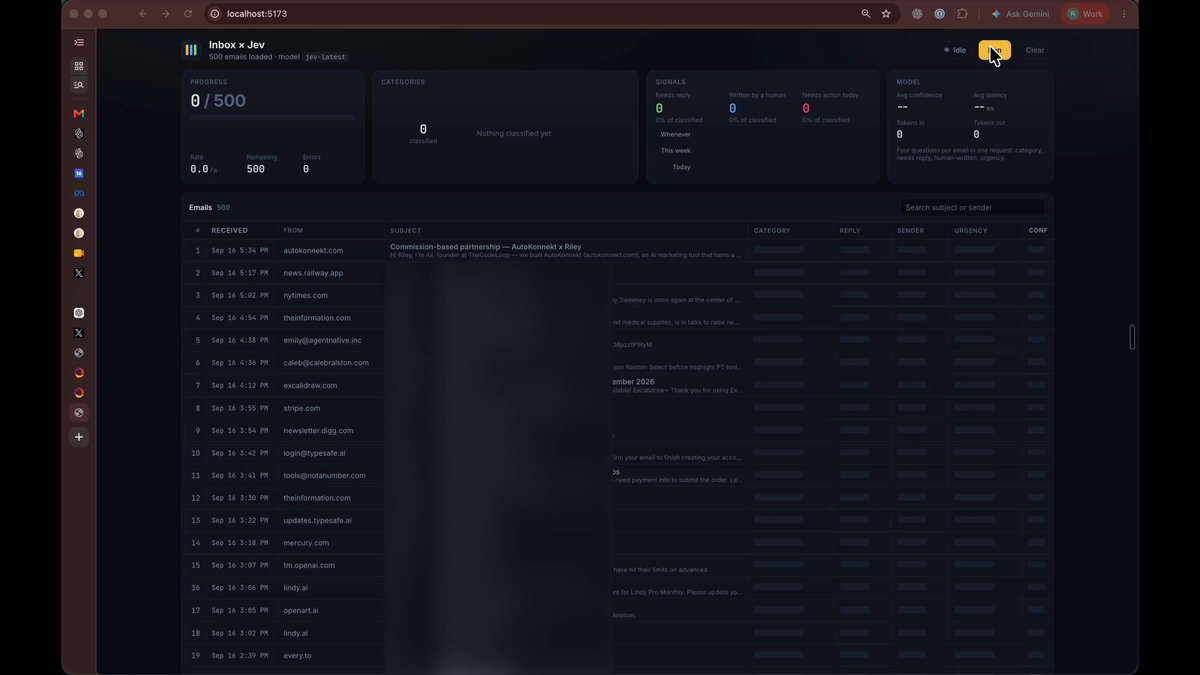
How to repeat it: pass each email as the state, then add reply, research, wait, and review as Choice options. Connect each answer to the corresponding folder or email agent.
4. Route Tasks Between Models
LangChain uses Jev to choose between cheaper and more capable models based on the task
[Open the LangChain guid](https://www.langchain.com/blog/building-a-harness-with-jev)
How to repeat it: connect several models, describe what each one is best at, and send the incoming request to Jev. Route simple tasks to a cheaper model and complex tasks to a reasoning model.
And other cases:
> **Alex Volkov@altryne**: [原文链接](https://x.com/altryne/status/2100739055923425589)
>
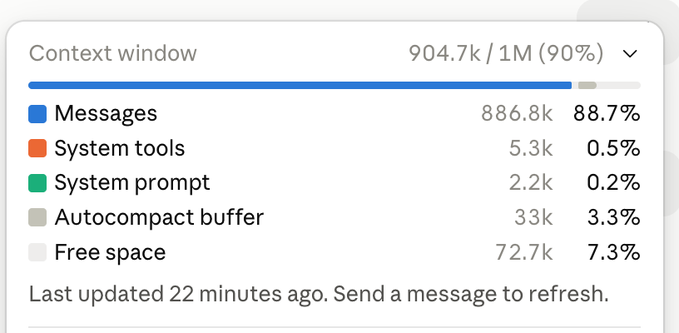
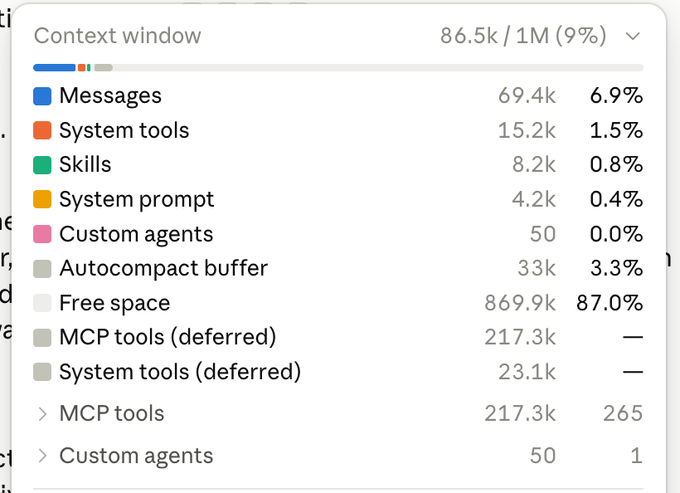
> This is actually insane. This uses @typesafeai Jev model, as a plugin in Claude to review all the un-nesseasary tool calls, and it takes 1s to run!
> Like, literally, 1 second to take my Claude session from nearly 1M to ... 86K tokens!
> Ask your claude to install it and be
>
> 
> 
> 
> **tamara@tamarajtran**: [原文链接](https://x.com/tamarajtran/status/2100694549362553153)
>
> found the perfect use case for @typesafeai Jev:
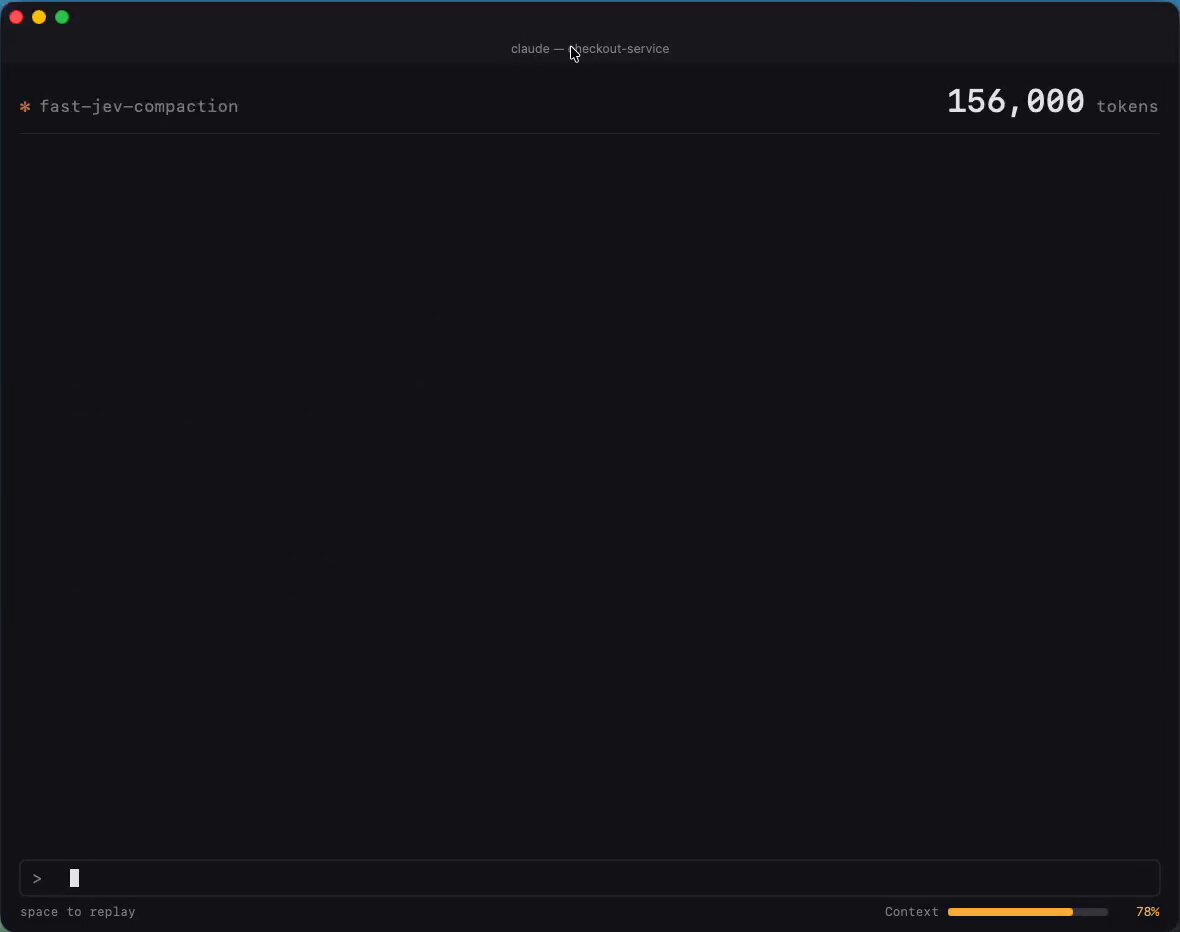
> instant compaction
> in 2026, why is compaction still a summarization prompt?
> Jev can make it instant by scoring every tool call and dropping what’s irrelevant
>
> 
## The shift
> An LLM creates the work → Jev decides what happens next.
Jev is not another chatbot
It is a fast decision layer that reads the current state of your system and chooses between the options you define
And the real alpha is not the 7-second flight demo or the $0.08 paper classification
The real alpha is realizing how many expensive LLM calls inside your agents never needed generation:
- Let the LLM research, plan, and write
- Let Jev route, score, approve, or escalate
- Let code execute the decision
That split changes the entire agent stack
You now have the setup, the working decision router, and four real ways to deploy it. Start with one repeated decision. Measure it. Then replace the next one.
Most builders will keep spending frontier-model tokens on every yes, no, route, and score
The few who separate thinking from deciding will build faster agents at a fraction of the cost.
> Bookmark this playbook before your next agent → [@0xCodila](https://x.com/@0xCodila)
## 相关链接
- [codila](https://x.com/0xCodila)
- [@0xCodila](https://x.com/0xCodila)
- [76K](https://x.com/0xCodila/status/2100984487802708306/analytics)
- [@typesafeai](https://x.com/@typesafeai)
- [https://substack.com/@0xcodila](https://substack.com/@0xcodila)
- [Sep 17](https://x.com/gregpr07/status/2100411066966749359)
- [2.6M](https://x.com/gregpr07/status/2100411066966749359/analytics)
- [TypeSafe's launch essay](https://typesafe.ai/blog/introducing-system-one-models-and-jev)
- [TypeSafe Playground](https://console.typesafe.ai/playground)
- [official Quickstart](https://docs.typesafe.ai/introduction/quickstart)
- [key settings](https://console.typesafe.ai/settings/keys)
- [Python](https://www.python.org/downloads/)
- [official Python SDK](https://docs.typesafe.ai/sdk/python)
- [Official repository](https://github.com/typesafe-ai/skills)
- [chief.py](https://chief.py/)
- [chief.py](https://chief.py/)
- [SDK usage guide](https://docs.typesafe.ai/sdk/python/usage)
- [Confidence guidance](https://docs.typesafe.ai/confidence)
- [Score](https://docs.typesafe.ai/primitives/score)
- [Noul](https://docs.typesafe.ai/primitives/noul)
- [Choice documentation](https://docs.typesafe.ai/primitives/choice)
- [State documentation](https://docs.typesafe.ai/concepts/state)
- [Decision implementation](https://github.com/browser-use/jev-ultrafast/blob/main/jev_ultrafast/model.py)
- [launch examples](https://typesafe.ai/blog/introducing-system-one-models-and-jev)
- [Parallel evaluation pattern](https://docs.typesafe.ai/patterns/fan-out)
- [Performance report](https://github.com/browser-use/jev-ultrafast/blob/main/docs/performance.md)
- [Agent loop](https://github.com/browser-use/jev-ultrafast/blob/main/jev_ultrafast/agent.py)
- [chief.py](https://chief.py/)
- [API reference](https://docs.typesafe.ai/api)
- [Pricing](https://docs.typesafe.ai/models)
- [Run measurements](https://github.com/browser-use/jev-ultrafast/blob/main/docs/performance.md)
- [Original benchmark](https://x.com/fazxes/status/2100300097695232164)
- [Sep 17](https://x.com/gregpr07/status/2100411066966749359)
- [2.6M](https://x.com/gregpr07/status/2100411066966749359/analytics)
- [Open the code](https://github.com/browser-use/jev-ultrafast)
- [Sep 17](https://x.com/nutlope/status/2100426999546184123)
- [160K](https://x.com/nutlope/status/2100426999546184123/analytics)
- [Sep 17](https://x.com/rileybrown/status/2100404532119269426)
- [@typesafeai](https://x.com/typesafeai)
- [247K](https://x.com/rileybrown/status/2100404532119269426/analytics)
- [Open the LangChain guid](https://www.langchain.com/blog/building-a-harness-with-jev)
- [Sep 18](https://x.com/altryne/status/2100739055923425589)
- [@typesafeai](https://x.com/typesafeai)
- [Sep 18](https://x.com/tamarajtran/status/2100694549362553153)
- [@typesafeai](https://x.com/typesafeai)
- [@0xCodila](https://x.com/@0xCodila)
- [Upgrade to Premium](https://x.com/i/premium_sign_up)
- [12:25 AM · Sep 19, 2026](https://x.com/0xCodila/status/2100984487802708306)
- [76K Views](https://x.com/0xCodila/status/2100984487802708306/analytics)
- [View quotes](https://x.com/0xCodila/status/2100984487802708306/quotes)
---
*导出时间: 2026/9/19 10:04:48*
---
## 中文翻译
# Jev 工程:从零开始为 AI 设置并使用新“大脑”的完整 10 步路线图
**作者**: codila
**日期**: 2026-09-17T02:26:36.000Z
**来源**: [https://x.com/0xCodila/status/2100984487802708306](https://x.com/0xCodila/status/2100984487802708306)
---

杰文斯悖论(就是图中这位)是一条规律:资源使用效率的提升并不会减少、反而会增加其总体消耗——这正是 AI 面临的全球性难题:LLM 和 Agent。而由 [@typesafeai](https://x.com/@typesafeai) 推出的 Jev,旨在帮你节省 101% 的金钱和时间,并提升你使用 AI 的效率。相信我——这就是你现在就该在 alpha 之前装好的 2030 年配置——订阅我的 substack 获取更多一手 alpha:[https://substack.com/@0xcodila](https://substack.com/@0xcodila)

"Browser Use 把 Jev 放进了一个 agent 里,7 秒找到航班,只花了 $0.0039"
> **Gregor Zunic@gregpr07**: [原文链接](https://x.com/gregpr07/status/2100411066966749359)
>
> 突发:Browser Use + Jev = 超高速
> 找航班只花了 7 秒,成本仅 $0.0039
> > 每一步都是新的动作空间
> > DOM 状态空间
> > 小型 LLM 兜底进行文本输入
> (顺便说一句,这个视频是 1 倍速)
> 做了一个小型开源浏览器 agent。在下方试试 ↓
>
> 
当你观察你的“参谋长”(Chief of Staff)整天在做什么时,事情就变得有趣了:挑选一个工作者、检查一个结果、决定是否继续。每个分叉点都可能变成一次额外的模型调用,而此时还没有任何有用的工作发生。
> Jev 让这些决策拥有自己的模型。你的写作 agent 继续写作,你的研究 agent 继续研究。它们之间的小判断则变成一个你可以检查、计价和更换的独立组件。
先从一个独立的任务路由器开始:输入一个任务,让 Jev 选择去向,并把交接结果保存到你的电脑上。然后再运行 Browser Use 的完整浏览器 agent。(前者只需要一个 API key;浏览器项目需要两个)
## 01. 找出你的 agent 中 Jev 可以接管的部分
Jev 是 TypeSafe AI 的 System One 模型:你提供信息和预定义的问题,它返回带概率的类型化答案。它无法为你撰写简报、生成代码,也无法用文字解释它的推理。[TypeSafe 的发布文章](https://typesafe.ai/blog/introducing-system-one-models-and-jev)
从这样一个任务开始:
> 研究三个新的 AI-agent 工具,并起草明天的简报。保存草稿供我审阅。
这个任务包含多个决策:我们是否有足够的资料来源?下一个由哪个工作者来干?草稿是否已准备好审阅?
这些就是 Jev 的候选对象。获取资料来源、撰写段落、保存文件仍然属于你的工具和生成式模型。而精确的规则(例如十个动作后停止)应写在代码里。
对于 GrokBot 风格的参谋长,保存的交接结果可以喂给已有的工作者。连接那个工作者在下面独立设置完成之后进行;你无需 agent 团队即可完成第一次运行。

## 02. 在 Playground 里给它一个决策
- 打开 [TypeSafe Playground](https://console.typesafe.ai/playground)。如果账户需要,请登录并完成访问流程。
将以下内容作为你的状态:
```
Goal: Compare three AI-agent tools in a morning briefing.
Completed work: No sources collected yet.
Available workers: Researcher, Writer.
Constraint: Save drafts for review. Do not publish.
```
添加一个 Choice 问题:"Which worker should act next?"(下一个由哪个工作者行动?)
定义三个选项:research(针对缺失证据进行研究)、write(基于足够证据进行起草)、review(针对请求不明确或工作已完成的情况)。
运行它。然后把“已完成工作”字段替换为实际的研究笔记,比较决策的变化。这是[官方 Quickstart](https://docs.typesafe.ai/introduction/quickstart) 中描述的基本交互。
## 03. 一次性接好 API
你需要一个启用了 API 访问权限的 TypeSafe 账户,并在[密钥设置](https://console.typesafe.ai/settings/keys)中获取一个 key。API 调用会计费到该账户。安装 [Python](https://www.python.org/downloads/) 3.12 或更高版本,然后在 macOS/Linux 上打开 Terminal,或在 Windows 上打开 PowerShell。
macOS / Linux:
```
mkdir jev-starter
cd jev-starter
python3 -m venv .venv
.venv/bin/python -m pip install --upgrade typesafe-sdk
```
Windows PowerShell:
```
mkdir jev-starter
cd jev-starter
py -3 -m venv .venv
.\.venv\Scripts\python.exe -m pip install --upgrade typesafe-sdk
```
这些命令会创建一个隔离环境并安装[官方 Python SDK](https://docs.typesafe.ai/sdk/python)。不要把 key 放在源码文件里;下面的脚本会以私密方式向你询问。

在使用编码 agent?只要装好了 Node.js/npm,添加 TypeSafe 的官方技能:
```
npx skills add typesafe-ai/skills --skill typesafe-ai
```
在提示时选择你支持的 agent。该技能会为它提供集成说明;Jev 本身则通过 API 运行。[官方仓库](https://github.com/typesafe-ai/skills)

## 04. 把请求变成已保存的交接
在 jev-starter 内、.venv 之外创建 [chief.py](//chief.py)。使用纯文本编辑器,并确保保存的文件名正是 chief.py,而不是 chief.py.txt。
```
import json
import os
from getpass import getpass
from pathlib import Path
from uuid import uuid4
from typesafe_sdk import Choice, TypeSafeAPIError, TypeSafeClient
if not os.environ.get("TYPESAFE_API_KEY"):
os.environ["TYPESAFE_API_KEY"] = getpass("TypeSafe API key: ").strip()
goal = input("Goal: ").strip()
if not goal:
raise SystemExit("Enter a goal.")
notes = input("Completed work: ").strip() or "Nothing yet."
state = {"goal": goal, "completed_work": notes}
try:
with TypeSafeClient(model="jev-1.13.0") as client:
result = client.system_one(
state=state,
questions={
"next_worker": Choice(
instructions="Choose the next step for a research briefing.",
criteria={
"research": "Collect evidence still needed for the goal.",
"write": "Draft the briefing from sufficient evidence.",
"review": "Goal unclear, outside scope, or work complete.",
},
)
},
)
except TypeSafeAPIError as error:
raise SystemExit(f"API error {error.status}; see Step 8.")
answer = result.choices["next_worker"]
destination = "review"
if answer.choice in {"research", "write"} and answer.confidence >= 0.85:
destination = answer.choice
folder = Path(__file__).resolve().parent / "queue" / destination
folder.mkdir(parents=True, exist_ok=True)
job = folder / f"{uuid4().hex}.json"
payload = dict(state, choice=answer.choice, confidence=answer.confidence,
destination=destination, status="queued")
job.write_text(json.dumps(payload, indent=2, ensure_ascii=False), encoding="utf-8")
print("Saved handoff:", job)
```
在 macOS/Linux 上运行:
```
.venv/bin/python chief.py
```
在 Windows 上运行:
```
.\.venv\Scripts\python.exe chief.py
```
在提示时粘贴你的 API key——终端会将其隐藏。Goal 输入 Compare three AI-agent tools for tomorrow's briefing。Completed work 输入 No sources collected yet。
你的结果:一条 "Saved handoff:" 消息以及完整的文件路径。打开那个 JSON 文件:里面包含你的请求、进度、Jev 的选择、置信度和去向。每次运行都会在 queue/research、queue/write 或 queue/review 下创建一个新文件。这些是本地任务队列;保存的任务会等待工作者来消费。
API 调用和错误处理遵循 [SDK 使用指南](https://docs.typesafe.ai/sdk/python/usage)。我把初始 review 阈值设为 0.85——你可以根据工作流中的标注样本进行调整。置信度并不是准确率百分比。[置信度指南](https://docs.typesafe.ai/confidence)
## 05. 提出有意义的问题
三种答案类型覆盖不同的工作:
Jev 提供三种问题类型,每种都为不同类型的决策而设计:
- Choice 从列表中选择一个选项。用于类似"下一个由谁工作?"的问题。它会返回所选选项、其概率分布以及置信度。
- Score 根据你定义的量表对某事物进行评估。用于类似"这个来源有多相关?"的问题。它会返回量表上的一个值,以及概率和置信度。
- Noul 回答一个是/否问题。用于类似"这个请求需要发布吗?"的问题。它会返回"是"的概率,范围从 0 到 1。
定义一个相关度 Score,包含三个描述:无关、部分相关、直接回答问题。其数值结果从 0 到 2,包括小数。Noul 接近 0.5 意味着对是/否的不确定。[Score](https://docs.typesafe.ai/primitives/score) · [Noul](https://docs.typesafe.ai/primitives/noul)

一个有用的细节:Jev 看不到你的问题 ID。把字段命名为 safe_to_publish 不会提供任何指令。请把实际要求写在问题里,并清楚地描述每个选项。[Choice 文档](https://docs.typesafe.ai/primitives/choice)
同时也要提供证据。"研究员完成了"告诉 Jev 的信息,比不上来源、发现和剩余缺口。把这些字段与原始请求分开保存。[State 文档](https://docs.typesafe.ai/concepts/state)

## 06. 偷学 Browser Use 最好的点子:重建菜单
浏览器中可用的动作在每次点击后都会改变。Browser Use 会根据观察到的控件构建一份全新列表,让 Jev 从中挑选。当输入框需要填写时,一个小型 LLM 负责生成文本。[决策实现](https://github.com/browser-use/jev-ultrafast/blob/main/jev_ultrafast/model.py)
把这种设计应用到你的参谋长上。从当前真实存在且可用的工作者构建选项。在选择研究材料时包含当前的来源 ID。在工具改变状态之后刷新选项。
- 否则,你的决策模型是在用昨天的菜单点菜。

对于大型候选列表,先在代码里过滤明显不匹配的项,对剩余项打分,然后在入围名单中选择。Choice 最多支持 255 个选项;TypeSafe 在其[发布示例](https://typesafe.ai/blog/introducing-system-one-models-and-jev)中描述了这种先打分后选择的方法。

## 07. 别再为互相等待的问题买单
你的调度器可能需要一个工作者、一个紧急度评分和一个审批检查。如果三者都能检查同一个状态,就一起发送。
TypeSafe 支持并行问题和投机分支:先询问可能的下一步动作,然后只使用与所选分支相关的答案。问题之间无法读取彼此的答案。如果某个决策需要新鲜的搜索结果,就先执行搜索。[并行评估模式](https://docs.typesafe.ai/patterns/fan-out)
浏览器示例还暴露了另一个瓶颈。其优化后的运行时将浏览器协议调用的中位数从 1,092 次降到 101 次,同时在三组匹配对比中任务时间中位数下降了 25%。两个版本使用的是相同的模型。
这些改动包括在一次读取中收集页面状态,以及避免为无关的动画做新的预测。在为更快的模型付费之前,先检查重复的工具调用。[性能报告](https://github.com/browser-use/jev-ultrafast/blob/main/docs/performance.md)

## 08. 给过夜运行的工作一个停止点
对于晨间简报,我会允许收集资料和创建草稿,然后在 review 处停止。发布应该需要单独的权限检查。
应用程序还需要动作上限、消费上限和已保存的进度。中断之后,它应在重复任何操作之前检查最后完成的动作。一个高置信度的答案无法证明文件已保存或消息已发送。
Browser Use 在 Jev 选择 DONE 之后会独立核验结果。为你的完成检查借用这种分离方式。[Agent 循环](https://github.com/browser-use/jev-ultrafast/blob/main/jev_ultrafast/agent.py)

本地路由器跑通之后,用这段简报来连接你已有的 agent:
> 阅读 TypeSafe 技能并检查我的工作者接口。把 chief.py 的 JSON 队列连接到已有的研究和写作处理器。防止重复处理。每个动作之后保存进度。添加调用与消费上限、不确定时转入 review、以及“草稿存在”的完成检查。发布保持在审批之后。明确指出缺失的连接器。
如果入门脚本失败,根据错误选择修复方式:
- 找不到 Python 命令:完成 Python 安装并重新打开终端。
- 找不到模块:用同一个 .venv 解释器重复安装 SDK。
- 401:更换 API key 并重跑。
- 422:对照粘贴的代码检查报错字段。
- 429 / 529:允许退避;如限流或过载持续,稍后重试。
SDK 自带重试;如果 API 错误仍然存在,脚本会停止。[API 参考](https://docs.typesafe.ai/api)
## 09. 弄清标题价格的真正含义
Jev 1.13 的价格是每百万输入 token $0.042,不收取输出 token 费用。按每次决策 1,000 个计费输入 token 计算,10,000 次决策的 Jev 推理成本为 $0.42。[定价](https://docs.typesafe.ai/models)

航班演示报告的 $0.0039 与其记录的 90,558 个 Jev 输入 token 加上文本助手的报告费用相符。浏览器成本不在这个计算范围内。其约七秒的计时从初始页面观察之后开始,且不包括运行后的重新核验——所以它是找到航班结果,而不是预订机票。[运行测量](https://github.com/browser-use/jev-ultrafast/blob/main/docs/performance.md)
在另一个工作负载上,Vercel 的 fx 团队报告其安全分类速度比 GPT-5.6-luna 快约 5-18 倍,同时准确率有所提升。该对比针对的是分类器,而不是整个 agent 运行的时长。[原始基准测试](https://x.com/fazxes/status/2100300097695232164)

按完成的任务追踪账单。一个廉价的决策如果把工作者送上错误的分支,其代价可能超过决策本身。
## 10. 使用示例
在完成基础设置后,Jev 已经能够读取任务状态并在预定义选项之间做出选择。现在你只需要决定要自动化哪个重复出现的决策。
1. 控制浏览器
Browser Use 用 Jev 来选择下一步动作和正确的页面元素。该 agent 在 7 秒内找到航班,成本 $0.0039。
> **Gregor Zunic@gregpr07**: [原文链接](https://x.com/gregpr07/status/2100411066966749359)
>
> 突发:Browser Use + Jev = 超高速
> 找航班只花了 7 秒,成本仅 $0.0039
> > 每一步都是新的动作空间
> > DOM 状态空间
> > 小型 LLM 兜底进行文本输入
> (顺便说一句,这个视频是 1 倍速)
> 做了一个小型开源浏览器 agent。在下方试试 ↓
>
> 
[打开代码](https://github.com/browser-use/jev-ultrafast)
如何复现:运行官方项目,添加你的 TypeSafe 和 OpenRouter 密钥,然后给 agent 一个网站和一个目标。Jev 选择动作和目标,浏览器执行决策。
2. 分类研究
Hassan 用 Jev 对 1,018 篇 AI 研究论文进行分类。整个分类花费 $0.08,每篇论文端到端延迟中位数为 256ms。
> **Hassan@nutlope**: [原文链接](https://x.com/nutlope/status/2100426999546184123)
>
> 我用 Jev 对 1,018 篇 AI 研究论文进行了分类。
> 结果:总成本 $0.08,每篇论文端到端延迟中位数 256ms。
> 流程是:
> 1. 用 DeepSeek V4 Flash 总结每篇论文
> 2. 把标题 + 摘要 + 24 个可能的主题发给 Jev
> 3. 用 Jev 对每篇进行分类
>
> 
如何复现:把每篇论文的标题和摘要发给 Jev,然后把你的主题定义为 Choice 选项。保存选中的类别,并把最强的论文发给你的写作 agent。
3. 邮件分流
Riley Brown 演示了 Jev 如何对收到的邮件分类并决定下一步的处理。
> **Riley Brown@rileybrown**: [原文链接](https://x.com/rileybrown/status/2100404532119269426)
>
> Yeah,@typesafeai 的 Jev 非常酷。它在几秒钟内分类了 500 封邮件,只花了 3.5 美分。
>
> 
如何复现:把每封邮件作为状态传入,然后把 reply、research、wait 和 review 添加为 Choice 选项。把每个答案连接到对应的文件夹或邮件 agent。
4. 在模型之间路由任务
LangChain 用 Jev 根据任务在更便宜和更强的模型之间做选择。

[打开 LangChain 指南](https://www.langchain.com/blog/building-a-harness-with-jev)
如何复现:连接几个模型,描述每个模型最擅长什么,然后把进来的请求发给 Jev。把简单任务路由给更便宜的模型,把复杂任务路由给推理模型。
还有其他用例:
> **Alex Volkov@altryne**: [原文链接](https://x.com/altryne/status/2100739055923425589)
>
> 这真的太疯狂了。这用的是 @typesafeai 的 Jev 模型,作为 Claude 中的插件来审查所有不必要的工具调用,而且运行只要 1 秒!
> 没错,字面意义上的 1 秒,就把我的 Claude 会话从近 100 万 token 减到……86K token!
> 让你的 Claude 安装它,然后就是
>
> 
> 
> 
> **tamara@tamarajtran**: [原文链接](https://x.com/tamarajtran/status/2100694549362553153)
>
> 找到了 @typesafeai Jev 的完美用例:
> 即时压缩
> 都 2026 年了,为什么压缩还是一个总结式提示词?
> Jev 可以通过给每次工具调用打分并丢弃无关内容,让它变得即时
>
> 
## 转变
> LLM 创造工作 → Jev 决定接下来发生什么。
Jev 不是又一个聊天机器人。
它是一个高速决策层,读取你系统的当前状态,并在你定义的选项之间做出选择。
而真正的 alpha 不是那个 7 秒航班演示,也不是 $0.08 的论文分类。
真正的 alpha 是意识到:你的 agent 内部有多少昂贵的 LLM 调用,其实根本不需要生成:
- 让 LLM 去研究、规划和写作
- 让 Jev 去路由、打分、批准或上报
- 让代码去执行决策
这种分工改变整个 agent 技术栈。
现在你已经有了配置、能跑的决策路由器,以及四种真实的部署方式。从一个重复出现的决策开始。测量它。然后替换下一个。
大多数构建者会继续为每一个“是”、“否”、路由和评分花费前沿模型的 token。
而少数把“思考”和“决策”分开的人,将以极小的成本构建更快的 agent。
> 在你的下一个 agent 之前收藏这份行动手册 → [@0xCodila](https://x.com/@0xCodila)
## 相关链接
- [codila](https://x.com/0xCodila)
- [@0xCodila](https://x.com/0xCodila)
- [76K](https://x.com/0xCodila/status/2100984487802708306/analytics)
- [@typesafeai](https://x.com/@typesafeai)
- [https://substack.com/@0xcodila](https://substack.com/@0xcodila)
- [Sep 17](https://x.com/gregpr07/status/2100411066966749359)
- [2.6M](https://x.com/gregpr07/status/2100411066966749359/analytics)
- [TypeSafe's launch essay](https://typesafe.ai/blog/introducing-system-one-models-and-jev)
- [TypeSafe Playground](https://console.typesafe.ai/playground)
- [official Quickstart](https://docs.typesafe.ai/introduction/quickstart)
- [key settings](https://console.typesafe.ai/settings/keys)
- [Python](https://www.python.org/downloads/)
- [official Python SDK](https://docs.typesafe.ai/sdk/python)
- [Official repository](https://github.com/typesafe-ai/skills)
- [chief.py](https://chief.py/)
- [chief.py](https://chief.py/)
- [SDK usage guide](https://docs.typesafe.ai/sdk/python/usage)
- [Confidence guidance](https://docs.typesafe.ai/confidence)
- [Score](https://docs.typesafe.ai/primitives/score)
- [Noul](https://docs.typesafe.ai/primitives/noul)
- [Choice documentation](https://docs.typesafe.ai/primitives/choice)
- [State documentation](https://docs.typesafe.ai/concepts/state)
- [Decision implementation](https://github.com/browser-use/jev-ultrafast/blob/main/jev_ultrafast/model.py)
- [launch examples](https://typesafe.ai/blog/introducing-system-one-models-and-jev)
- [Parallel evaluation pattern](https://docs.typesafe.ai/patterns/fan-out)
- [Performance report](https://github.com/browser-use/jev-ultrafast/blob/main/docs/performance.md)
- [Agent loop](https://github.com/browser-use/jev-ultrafast/blob/main/jev_ultrafast/agent.py)
- [chief.py](https://chief.py/)
- [API reference](https://docs.typesafe.ai/api)
- [Pricing](https://docs.typesafe.ai/models)
- [Run measurements](https://github.com/browser-use/jev-ultrafast/blob/main/docs/performance.md)
- [Original benchmark](https://x.com/fazxes/status/2100300097695232164)
- [Sep 17](https://x.com/gregpr07/status/2100411066966749359)
- [2.6M](https://x.com/gregpr07/status/2100411066966749359/analytics)
- [Open the code](https://github.com/browser-use/jev-ultrafast)
- [Sep 17](https://x.com/nutlope/status/2100426999546184123)
- [160K](https://x.com/nutlope/status/2100426999546184123/analytics)
- [Sep 17](https://x.com/rileybrown/status/2100404532119269426)
- [@typesafeai](https://x.com/typesafeai)
- [247K](https://x.com/rileybrown/status/2100404532119269426/analytics)
- [Open the LangChain guid](https://www.langchain.com/blog/building-a-harness-with-jev)
- [Sep 18](https://x.com/altryne/status/2100739055923425589)
- [@typesafeai](https://x.com/typesafeai)
- [Sep 18](https://x.com/tamarajtran/status/2100694549362553153)
- [@typesafeai](https://x.com/typesafeai)
- [@0xCodila](https://x.com/@0xCodila)
- [Upgrade to Premium](https://x.com/i/premium_sign_up)
- [12:25 AM · Sep 19, 2026](https://x.com/0xCodila/status/2100984487802708306)
- [76K Views](https://x.com/0xCodila/status/2100984487802708306/analytics)
- [View quotes](https://x.com/0xCodila/status/2100984487802708306/quotes)
---
*导出时间: 2026/9/19 10:04:48*