利用12个工具集成将Hermes打造为超级Agent Ole Lehmann 2026-05-18 8.2 KB 86.6K 331 ☆ 收藏 𝕏 文章列表 文章指出,Hermes本身只是一个被隔离的“大脑”,只有通过集成工具(感官和四肢)才能发挥威力。作者提出了将Hermes转化为超级智能体的四大任务类别:研究、行动、工作区(Workspace)和记忆,并详细介绍了12个核心工具(如Firecrawl、Browserbase、Stripe、Obsidian等)的具体应用。文章通过展示赞助商筛选、客户支持自动化等实际工作流,说明了多工具协同如何释放Agent的巨大潜能。 HermesAgent工作流自动化集成StripeGitHubAI应用效率工具BrowserbaseFirecrawl 82 强烈推荐 ▶ 文章提供了丰富且实用的Agent集成清单与自动化工作流,结构清晰、落地性极强,且发布时间距今较近,时效性表现良好。 # Turn Hermes into a Superagent with these 12 integrations. **作者**: Ole Lehmann **日期**: 2026-05-18T11:56:55.000Z **来源**: [https://x.com/itsolelehmann/status/2056343273023688989](https://x.com/itsolelehmann/status/2056343273023688989) --- 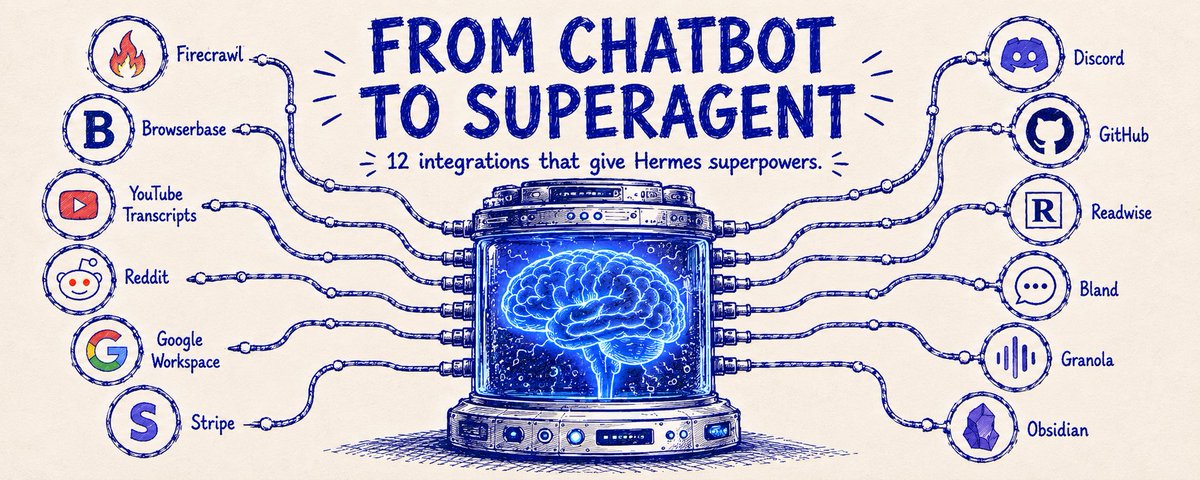 You open Hermes for the first time. After 20 minutes you close it and think "wait, this is just Claude or ChatGPT inside Telegram, what’s the f*cking difference??" That was me a few weeks ago. But the reason it felt that way wasn't Hermes' fault. It felt underwhelming because I hadn't plugged anything into Hermes yet. Think of an agent like a brain floating in a jar. It's smart, fast, happy to talk for hours, but completely cut off from your actual life. It can't really do much. All talk, no walk. Integrations are the senses and limbs you bolt onto that brain. The more senses you plug in, the more it can actually do for you. Firecrawl gives it enhanced eyesight on the web, Reddit becomes its ear to the streets, Bland gives it a voice that can pick up a phone, Stripe puts eyes on your business, Obsidian holds its long-term memory, and so on and so forth. Connect 2 and you've got a chatbot with context on all your Gmails. Connect 12 and the first thing you'll see when you unlock your phone in the morning is a list of complex workflows Hermes already ran for you overnight (broke my brain the first time I saw it). This article will give you my top 12 integrations to turn Hermes from a basic chatbot into a superagent. # The 4 jobs every useful agent setup covers Every Hermes setup that actually works ends up doing 4 things for you: research, action, workspace, and memory. Miss one and the agent goes blind in that direction. Cover all four and you've got something that feels like a coworker. Here's what I run in each bucket and why. ## Job 1: Research (eyes and ears on the world) So Hermes can find things out on its own without you having to spoon-feed it the context. Firecrawl is web search built specifically for agents. You get cleaner data and faster responses than the native Hermes search, and it burns way fewer tokens doing it. I keep it on by default. Reddit gives you the best read you can find on what people actually think about a product, niche, or problem. I run it whenever I'm scoping a new idea (you find out in about 5 minutes if people are quietly furious about something in that space). YouTube transcripts pulls captions from any video, so long podcasts, tutorials, and conference talks become searchable notes in seconds. Very high-leverage integration and almost nobody plugs it in. ## Job 2: Action (hands and voice in the world) This is the bucket that lets Hermes do stuff in the world instead of just describing what it would do. Browserbase is actual browser access, which means logging in, clicking buttons, and navigating sites that block scrapers. If you plug both Firecrawl and Browserbase in, Hermes picks between them automatically depending on the task. Bland (or Twilio) gives Hermes a phone voice so it can place live calls for things. You can literally have your agent call and book a reservation for you, so you don’t have to be on the call yourself. I love listening to the recordings haha. Stripe handles payments, customers, failed charges, and refunds. Which means you can ask Hermes "why did this customer churn" and get a straight answer with the receipts attached. Also Stripe is rolling out agentic payments, so soon Hermes will be able to actually book things with your card. Hyped for this! ## Job 3: Workspace (where you actually live) This is the bucket that lets Hermes operate inside your business. Without it, the agent can talk about your work, but it can't touch it or understand it fully. Google Workspace covers Gmail, Calendar, Drive, Docs, and Sheets in one connector. Absolutely essential. If your agent can't read your inbox or write to your docs, it can't really work for you, so plug this in before anything else. Discord is huge for me because I host my whole business there. I plug Hermes into different channels and have it run different workflows in each. For example, my customer support channel has Hermes scan email every morning, pull out support tickets, and drop them in organized with priority tagged. GitHub covers code, issues, and PRs, which turns Hermes into an engineering teammate that can open a PR, review code, and triage issues. Non-negotiable if you ship code. ## Job 4: Memory (the long-term brain) So Hermes never forgets the things you've already read, learned, said, or written down. Readwise pulls every highlight you've ever saved from books, articles, tweets, and podcasts into one queryable place. Solves the "dead knowledge" problem, which is when you highlight something brilliant once and never see it again because it's buried in 47 PDFs you'll never reopen. Granola gives you searchable transcripts of every meeting you've had. So Hermes can answer "what did that client say about pricing last month" instantly. Obsidian is for Karpathy-style LLM wiki second-brain maxxing. If you keep notes in Obsidian, Hermes can read across your whole vault and connect ideas you forgot you had. Where all of this gets really awesome: chaining them together. Plugged in alone, each of these integrations is useful. But when you stack them together, they start to do things you probably didn't realize were possible. A few of my actual workflows: - The sponsor filter. When someone DMs on X or emails me about sponsorships, Hermes auto-reads it, scrapes their site through Firecrawl, scans Reddit and YouTube for any real chatter about the company, and drops a one-pager in Discord with a fit-rating for my audience. - The customer support agent. Every morning Hermes scans Gmail for incoming support emails, categorizes each one by issue type, and logs them in my Discord support channel with priority tagged. Once a week it drops a summary in Obsidian with the 5 recurring problems I should actually fix at the root. - The Monday business dashboard. Every Monday at 8am, Hermes pulls revenue, new subs, refunds, and churn from Stripe, grabs my follower growth and post views from X and LinkedIn through Browserbase, and posts a week-vs-last-week breakdown in Discord. 10 seconds to read instead of an hour of dashboard hopping. Each of these takes 3 or 4 integrations talking to each other. None of them are possible with one plugged in. ## How to plug them in (10 minutes) Step 1: Open Hermes and ask it "how do I connect [tool]?" Just type: "Hey Hermes, I want to connect my Gmail. What do I need?" It tells you how and walks you through it (OAuth, API key, MCP, whatever) all in the same conversation. Step 2: Test it before moving on. Ask something that requires the tool to be connected to give a real answer: - "What's on my calendar today?" - "Find the last email from that client about the contract." - "Pull the last 5 failed Stripe charges." If you get a clean answer from the tool, it's live. Step 3: Stack them. Two tools are useful. Twelve tools are where the workflows above start working. So go pick your favorites and connect them inside Hermes. Then go ask it to do one thing it couldn't do an hour ago. The first time it just does the thing, the chatbot dies and the superagent shows up. I'm building new Hermes automations every day, and always on the hunt for new inspiration, so if you have any loved workflows you've built, drop them below! P.S. If you want highly practical AI workflows that help you get more customers and more views... I send them to 37k readers every single week. Join here for free: aisolo.beehiiv.com/subscribe ## 相关链接 - [The AI Solopreneur reposted](https://x.com/aisolopreneur) - [Ole Lehmann](https://x.com/itsolelehmann) - [@itsolelehmann](https://x.com/itsolelehmann) - [2.1K](https://x.com/itsolelehmann/status/2056343273023688989/analytics) - [aisolo.beehiiv.com/subscribe](https://aisolo.beehiiv.com/subscribe) - [Upgrade to Premium](https://x.com/i/premium_sign_up) - [7:56 PM · May 18, 2026](https://x.com/itsolelehmann/status/2056343273023688989) - [2,177 Views](https://x.com/itsolelehmann/status/2056343273023688989/analytics) - [View quotes](https://x.com/itsolelehmann/status/2056343273023688989/quotes) --- *导出时间: 2026/5/18 20:54:03* --- ## 中文翻译 # 通过这 12 个集成将 Hermes 打造成超级智能体 **作者**: Ole Lehmann **日期**: 2026-05-18T11:56:55.000Z **来源**: [https://x.com/itsolelehmann/status/2056343273023688989](https://x.com/itsolelehmann/status/2056343273023688989) ---  你第一次打开 Hermes。20 分钟后你关掉了它,心想:“等等,这不就是 Telegram 里的 Claude 或 ChatGPT 吗,这到底有什么*区别??” 这就是几周前的我。 之所以会有这种感觉,并不是 Hermes 的错。之所以觉得平平无奇,是因为我还没有把任何东西接入 Hermes。 把智能体想象成漂浮在罐子里的大脑。 它很聪明、反应很快、喜欢聊天,但它与现实生活完全隔绝。它实际上做不了什么。只会说,不会做。 集成就是你安装在那个大脑上的感官和四肢。 你接入的感官越多,它实际上能为你做的事情就越多。 Firecrawl 赋予它敏锐的网页视觉,Reddit 成为它听取街头巷议的耳朵,Bland 赋予它能接电话的声音,Stripe 让它能看清你的业务,Obsidian 保存它的长期记忆,诸如此类。 连接 2 个,你就能得到一个掌握你所有 Gmail 上下文的聊天机器人。 连接 12 个,当你早上解锁手机时,你看到的第一样东西就是 Hermes 为你连夜运行的一列复杂工作流(我第一次看到时,大脑都要宕机了)。 这篇文章将分享我的 12 个顶级集成,把 Hermes 从一个基础的聊天机器人变成超级智能体。 # 每个实用智能体配置都涵盖的 4 项职能 每个真正好用的 Hermes 配置最终都会为你做 4 件事:研究、行动、工作空间和记忆。 缺了其中一项,智能体在这个方向上就会变“瞎”。覆盖了这四项,你就拥有了一个感觉像同事一样的东西。 以下是我在每个类别中使用的工具及其原因。 ## 职能 1:研究(观察世界的眼睛和耳朵) 让 Hermes 能够自行发现信息,而无需你像喂饭一样把上下文喂给它。 Firecrawl 是专为智能体构建的网络搜索。 与 Hermes 原生搜索相比,你可以获得更干净的数据和更快的响应,而且消耗的 token 要少得多。我默认保持开启。 Reddit 能让你找到关于人们对产品、利基市场或问题真实看法的最佳参考。 每当我构思一个新点子时都会用到它(你可以在大约 5 分钟内发现人们是否在这个领域对某些事情感到愤怒)。 YouTube 字幕(Transcripts)可以提取任何视频的字幕,因此长播客、教程和会议演讲会在几秒钟内变成可搜索的笔记。 这是一个高杠杆的集成,但几乎没人接入它。 ## 职能 2:行动(在这个世界中的手和声音) 这是让 Hermes 能在现实世界中做事的一类工具,而不仅仅是描述它要做什么。 Browserbase 提供真正的浏览器访问权限,这意味着可以登录、点击按钮以及导航那些阻止爬虫的网站。 如果你同时接入 Firecrawl 和 Browserbase,Hermes 会根据任务在它们之间自动选择。 Bland(或 Twilio)赋予 Hermes 电话语音,因此它可以进行实时通话。 你真的可以让你的代理打电话为你预订,这样你就不用亲自接听了。我喜欢听录音,哈哈。 Stripe 处理支付、客户、失败扣款和退款。 这意味着你可以问 Hermes “这个客户为什么流失”并获得附有凭证的直接答案。 此外 Stripe 正在推出智能体支付,所以 Hermes 很快就能用你的卡实际预订东西。我很期待这个功能! ## 职能 3:工作空间(你真正生活的地方) 这是让 Hermes 能够在你的业务内部运作的一类工具。没有它,代理可以谈论你的工作,但它无法触及或完全理解它。 Google Workspace 通过一个连接器覆盖 Gmail、日历、云端硬盘、文档和表格。 绝对必不可少。如果你的代理无法读取你的收件箱或写入你的文档,它就无法真正为你工作,所以请优先接入这个。 Discord 对我来说非常重要,因为我的整个业务都托管在那里。 我将 Hermes 接入不同的频道,并让它在每个频道中运行不同的工作流。 例如,我的客户支持频道会让 Hermes 每天早上扫描邮件,提取支持工单,并按优先级标记整理后放入其中。 GitHub 涵盖代码、问题和 PR(拉取请求),这将 Hermes 变成了一个可以打开 PR、审查代码和处理问题的工程队友。 如果你要发布代码,这是没得商量的必选项。 ## 职能 4:记忆(长期大脑) 让 Hermes 永远不会忘记你已经阅读、学习、说过或写下的东西。 Readwise 将你从书籍、文章、推文和播客中保存的每一个高亮部分提取到一个可查询的地方。 解决了“死知识”问题,即你曾经高亮了一个精彩的内容,却因为它埋在 47 个你永远不会重新打开的 PDF 中而再也看不到它。 Granola 为你参加的每一次会议提供可搜索的转录稿。 因此 Hermes 可以立即回答“那个客户上个月关于定价是怎么说的”。 Obsidian 是为了 Karpathy 风格的 LLM wiki 第二大脑最大化。 如果你在 Obsidian 中做笔记,Hermes 可以读取你的整个库并连接你忘记自己拥有的想法。 所有这一切真正变得牛逼的地方在于:将它们链接在一起。 单独接入时,这些集成中的每一个都很有用。 但当你把它们堆叠在一起时,它们开始做你可能没想到的事情。 我的一些实际工作流: - **赞助过滤器**。当有人在 X 上私信我或发邮件给我谈赞助时,Hermes 会自动阅读,通过 Firecrawl 抓取他们的网站,扫描 Reddit 和 YouTube 上关于该公司的真实讨论,并在 Discord 中放入一份单页报告,其中包含针对我受众的匹配度评分。 - **客户支持代理**。每天早上,Hermes 扫描 Gmail 中的新支持邮件,按问题类型对每封邮件进行分类,并将它们记录在我的 Discord 支持频道中并标记优先级。每周它会在 Obsidian 中生成一份摘要,列出 5 个我实际上应该从根源解决的反复出现的问题。 - **周一商业仪表板**。每周一早上 8 点,Hermes 从 Stripe 拉取收入、新订阅、退款和流失数据,通过 Browserbase 从 X 和 LinkedIn 获取我的粉丝增长和帖子浏览量,并在 Discord 中发布本周与上周的对比细分。阅读只需 10 秒,而不是跳转仪表板的一小时。 这些工作流每一个都需要 3 或 4 个集成相互通信。如果只接入一个,它们都不可能实现。 ## 如何接入它们(10 分钟) 第 1 步:打开 Hermes 并问它“我该如何连接 [工具]?” 只需输入: “嘿 Hermes,我想连接我的 Gmail。我需要做什么?” 它会告诉你方法并在同一次对话中引导你完成操作(OAuth、API 密钥、MCP 等)。 第 2 步:在继续之前先进行测试。 问一个需要连接该工具才能给出真实答案的问题: - “我今天的日历上有什么?” - “找到那个客户关于合同的最后一封邮件。” - “拉取过去 5 次失败的 Stripe 扣款。” 如果你从工具那里得到了干净的答案,它就上线了。 第 3 步:堆叠它们。 两个工具有用。十二个工具才是上述工作流开始发挥作用的地方。 所以去挑选你喜欢的工具并在 Hermes 内部连接它们。然后去要求它做一小时前它做不到的一件事。 当它第一次直接完成任务时,聊天机器人就“死”了,超级智能体就出现了。 我每天都在构建新的 Hermes 自动化,并且一直在寻找新的灵感,所以如果你有任何你构建的心爱工作流,请在下面分享! P.S. 如果你想要高度实用的 AI 工作流来帮助你获得更多客户和更多浏览量... 我每周都会向 37k 读者发送这些内容。在此处免费加入:aisolo.beehiiv.com/subscribe ## 相关链接 - [The AI Solopreneur reposted](https://x.com/aisolopreneur) - [Ole Lehmann](https://x.com/itsolelehmann) - [@itsolelehmann](https://x.com/itsolelehmann) - [2.1K](https://x.com/itsolelehmann/status/2056343273023688989/analytics) - [aisolo.beehiiv.com/subscribe](https://aisolo.beehiiv.com/subscribe) - [Upgrade to Premium](https://x.com/i/premium_sign_up) - [7:56 PM · May 18, 2026](https://x.com/itsolelehmann/status/2056343273023688989) - [2,177 Views](https://x.com/itsolelehmann/status/2056343273023688989/analytics) - [View quotes](https://x.com/itsolelehmann/status/2056343273023688989/quotes) --- *导出时间: 2026/5/18 20:54:03*
微 微信聊天框还能这么用?发段文字,自动存进 Obsidian 笔记 作者金尘马分享了一个实用方案:通过 Hermes 为微信单独配置一个专用 Agent,在微信聊天框发送文字即可自动保存到 Obsidian 笔记库,并同步到 GitHub。文章详细介绍了准备工作、Agent 规则配置、微信 ClawBot 连接步骤,并提供了一套完整的一键配置提示词,可交给 Codex 或 WorkBuddy 自动完成配置。整个方案成本低、操作简单,大幅降低了随手记录的摩擦。 技术 › 工具与效率 金尘马 2026-09-10 微信ObsidianHermesAgent笔记同步GitHub自动化效率工具ClawBot提示词
想 想用Hermes和Openclaw白嫖全网数据又不想被反爬的收藏着10个仓库就够了 文章推荐了10个用于全网数据采集和规避反爬虫策略的优质GitHub仓库。这些工具包括Firecrawl、Crawl4AI、browser-use等,涵盖了网页爬取、数据清洗、模拟真人操作、指纹伪装及移动端控制等功能,旨在帮助用户高效获取AI训练所需的干净数据。 技术 › Openclaw 鸟哥 | 蓝鸟会 2026-07-01 数据采集反爬虫GitHub爬虫工具AI数据AgentFirecrawlCrawl4AI效率工具资源推荐
G Grok Bot 应用指南实操案例:闲鱼上架、小红书做图、找工具、做短视频、整理收藏 本文通过五个独立实操案例,介绍如何用 Grok Bot(自定义 Bot + 提示词)解决日常内容生产任务:1)闲鱼上架员——把商品照片和信息整理成标题、描述、补图清单和咨询回复;2)小红书编辑——围绕一个选题自动生成六张风格统一的知识图卡及发布正文;3)工具情报员——把工具链接整理成可筛选的网页简报;4)视频教程师——先做一个魔方教学小工具,再录成带中文配音字幕的教学视频;5)收藏整理员——把收藏帖子按主题分类,提炼观点与写法并生成选题清单。每个案例均附可直接照用的提示词。 技术 › Agent Miles Ma 2026-09-12 GrokAgentBot提示词小红书内容创作实操教程效率工具AI应用
豆 豆包越来越像 Codex:手机远程操控与 GUI 电脑操作体验 作者分享了豆包近期更新带来的 Agent 体验提升,认为其设计思路颇像 Codex,部分功能甚至实现本土化超越。核心亮点包括:手机远程操控电脑,可随时查看任务进度、指挥家中电脑执行工作,实现跨设备协作;Windows 版 GUI 电脑操作通过虚拟桌面让人和 AI 同时操作电脑互不干扰,优于 Claude Code 的 Computer Use 体验。作者列举了办公、桌面整理、长尾应用等场景,并分享让 Agent 自检自验的使用技巧。该功能需会员,Mac 目前仅支持内置浏览器 GUI 操作。 技术 › Agent 宝玉 (@dotey) 2026-08-18 豆包CodexAgentComputer Use远程操控GUI操作虚拟桌面效率工具AI应用手机操控电脑
H How to Build a Shared AI Harness for Your Team 本文详细介绍了如何使用HQ工具为团队构建共享的AI Harness系统,将分散的模型、技能和自动化流程整合为协同工作机制。文章从环境搭建出发,强调从单一高频工作流(如周报)验证有效性,并逐步扩展。通过赋予AI持久的公司记忆和明确的工作策略,将团队经验转化为可复用的资产,实现跨工具的上下文共享与团队协作能力跃升。 技术 › Harness Engineering J.B. 2026-08-10 AI团队协作工作流自动化HQAI Harness知识管理效率工具Agent
五 五个被低估的 Hermes Agent 技能 本文介绍了能将 Hermes Agent 提升为操作系统的五个强大且常被低估的技能。grounded-citations 通过要求提供可验证来源来确保研究准确性;dogfood 作为测试代理,以真实用户视角发现产品交互缺陷;systematic-debugging 强调在修改代码前先进行结构化调查以找到根本原因;hermes-agent-skill-authoring 将重复工作转化为可复用的记忆技能。这些技能大幅提升了 AI 工作流的可靠性、可扩展性和操作效率。 技术 › Agent Hermes Agent Super-Intel 2026-08-08 HermesAgentAI代理自动化工作流调试质量保证技能开发数据溯源可靠性效率工具
别 别再装了就忘:十个用得上的SKILL 本文介绍了十个实用的AI Skill,重点讲解了三个安全审查工具(SkillSpector、AgentSeal、Semia)以确保安装安全,以及一个多平台内容聚合工具last30days。文章提供了详细的安装方法、使用门槛及实际应用场景,帮助读者避免盲目安装带来的风险,提升工作效率。 技术 › Skill 宋宋 2026-08-06 Skill安全审查效率工具Agent开源工具实用技巧内容聚合GitHub自动化
H Herdr + Hermes: 多智能体配置中的三个日常技巧 文章介绍了作者使用 Herdr 和 Hermes Agent 构建的多智能体工作流。Herdr 作为类似 tmux 的多路复用器统一管理多个 AI 编程代理,Hermes 则作为开源的总部代理负责驱动其他代理。作者分享了三个实用技巧:基础编排、技能创建以及状态检查汇报,从而将混乱的终端窗口转化为高效的系统。 技术 › Agent tonbi 2026-07-27 多智能体HermesHerdrClaude Code工作流自动化开源DevOps效率工具Agent编排
如 如何高效运行 Hermes:内存、技能与自动化 文章介绍了如何通过配置内存(MEMORY.md 和 USER.md)、技能和 cron 任务,将 Hermes 从简单的聊天机器人转变为高效的自进化智能体。通过合理设置记忆、流程自动化和自检机制,用户可以大幅提升工作效率,实现真正的复利效应。 技术 › Hermes Tom 2026-07-27 HermesAgent自动化内存管理技能Cron效率工具智能体
从 从选题到写作再到发布,我把几十个 skill 串成了一条自动流水线 作者分享了自己如何利用 Hermes、Codex 和 Claude 中的数十个 Skill,搭建了一条从素材抓取、选题分析、风格润色到图文排版的内容自动生成流水线。文章详细介绍了自动化流程的设计思路、遇到的痛点以及如何通过拆分 Prompt 保持文风一致性,同时也反思了人机协作中人工审核与决策的重要性。 技术 › Skill 得否 2026-07-23 自动化工作流AI写作AgentHermesCodexClaude效率工具内容生产prompt工程人机协作
C Claude Code 开源神器:用场景检测实现完整视频精准分析 文章介绍了一个名为 claude-video 的开源插件,利用 FFmpeg 场景检测和 Whisper 转录,解决了 Claude Code 无法精准看视频的痛点。该工具摒弃了随机抽帧,仅在画面变化时截帧,能准确理解图表、PPT 和 UI 变化。文中详细介绍了插件在 Claude Code、Cursor 等平台的安装方法、参数配置及会议纪要、Bug 复盘等七大实战场景。 技术 › Claude Code J JonathanHu26 2026-07-08 Claude Code视频分析开源工具Whisper效率工具Agent场景检测教程AI应用
别 别再把收藏夹当知识库了:用 Hermes 和 AutoCLI 搭建自动整理链路 针对“收藏即遗忘”的痛点,文章提出了一套本地化知识管理方案。作者建议结合 AutoCLI(采集层)、Hermes Agent(处理层)和 Obsidian(存储层),构建一条自动化流水线。通过定时抓取网页、清洗摘要并生成 Markdown,将杂乱信息转化为可检索的本地知识库,从而提升资料利用率。 技术 › 工具与效率 AFei Liang 2026-07-06 知识管理HermesAutoCLIObsidian自动化工作流AgentMarkdown效率工具