# Give your Openclaw the Memory it Needs (Full Guide)
**作者**: Kevin Simback
**日期**: 2026-02-18T17:52:21.000Z
**来源**: [https://x.com/ksimback/status/2024180197910864182](https://x.com/ksimback/status/2024180197910864182)
---
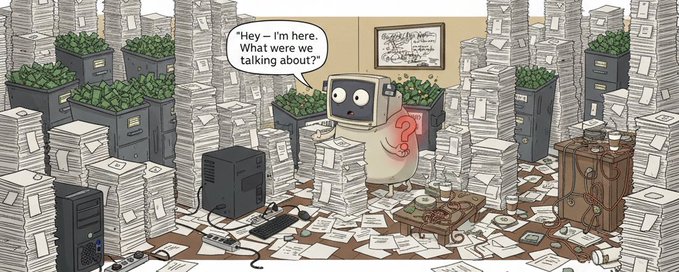
This guide covers the three common ways memory fails, the configuration changes that fix most issues, and the advanced tools (QMD, Mem0, Cognee, Obsidian) that make memory production-grade. Feed this article to your agent and it will thank you later because it remembers.
## Introduction
Over the past month running multiple instances of @openclaw I've had my agents forget basic information, lose critical project context mid-conversation, and completely blank on decisions we made 24 hours earlier.
If you've used OpenClaw for more than a day, you've probably hit this too. Your agent "knows" things, then suddenly doesn't. You've told it your preferences multiple times. You've watched it write something to memory, then fail to recall it the next day. You start wondering if memory is actually broken.
The good news is that it can be easily fixed. It just needs a proper setup and this guide will walk you through it.
## The Three Common Memory Failures in OpenClaw
Before you can fix memory, you need to understand why it breaks. OpenClaw treats memory as a suggestion, not a requirement. The agent decides what to save, when to search, and what to recall. Without explicit configuration, it forgets by default.
There are three common failure modes, and each requires a different solution.
Failure Mode 1: Memory Is Never Saved
When you tell your agent something important like your name, your preferences, a critical project decision, etc. OpenClaw doesn't force it to disk. The LLM decides whether it's worth saving.
Think about that. Your agent doesn't automatically save to memory, it's actually a judgment call made by the model in real-time.
Sometimes it saves and sometimes it doesn't, and it's not clear when it does or doesn't save. That means important context can slip through constantly because the model deemed it not worth storing.
This is like having an employee who decides on their own which meeting notes to keep and which to throw away.
Failure Mode 2: Memory Is Saved But Never Retrieved
Even when facts make it to disk, recall isn't guaranteed. OpenClaw provides a memory_search tool, but the agent has to decide to use it.
In practice, when you ask about something stored in memory, the model frequently answers from its current context window instead of searching. From your perspective, it "forgot" but in reality, it never looked.
This is like an employee who saved a document to Google Drive, but when you ask for it, they answer from memory instead of checking the actual document.
Failure Mode 3: Context Compaction Destroys Knowledge
This is the killer. To avoid hitting token limits, OpenClaw compacts context so as the context window fills up, older messages get summarized or removed. Any information that only existed in the active conversation (not yet saved to disk) is destroyed.
This applies even to MEMORY.md content, which loads at session start, and can get summarized away during a long session. The agent literally forgets mid-conversation because compaction removed context and nothing triggered a reload.
Imagine having an employee with a stack of papers on their desk. When the stack gets too tall, they throw out the oldest papers to make room without saving the important ones.
## Basic Fixes: What Everyone Should Configure
Before reaching for plugins or external databases, there's a lot you can fix with configuration alone. Most cases of "my agent forgets everything" come from running the default config without any basic optimizations.
Below are 4 basic fixes to the default config that can greatly improve how your OpenClaw memory performs.
1. Enable Memory Flush (This Is Critical)
Memory flush triggers a silent turn before compaction that prompts the agent to write durable memories to disk. This is the single most impactful change you can make.
The key insight is to customize the prompt in the compaction section of your config. The default prompt is generic. Tell it exactly what to capture and specifically include decisions, state changes, lessons, blockers.
Also advisable to raise softThresholdTokens to 40000 to trigger flushes earlier, before the good stuff gets compacted.
2. Configure Context Pruning
Context pruning controls how old messages are removed before full compaction. Use TTL mode as a simple fix. This will also help save on your token costs as I mentioned as one of the tips in my previous article on how to reduce token costs by up to 90%.
The above config keeps messages from the last 6 hours and always preserves the 3 most recent assistant responses. This eliminates the annoying situation where you have to repeat recent messages following a context flush.
3. Enable Hybrid Search
Memory search combines vector similarity (conceptual matching) with BM25 keyword search (exact tokens), you want to enable both.
If you're not running hybrid search, you're leaving accuracy on the table. BM25 catches exact matches (error codes, project names) that vector search misses.
4. Index Past Sessions
The last simple fix is to enable session transcript indexing to recall conversations from weeks ago.
This chunks and indexes past conversations alongside your memory files. "What did we decide about the content template last Tuesday?" becomes answerable.
## Advanced Memory Solutions: When Basic Config Isn't Enough
For agents running more demanding workloads like multi-day projects, multi-agent team coordination, or complex knowledge management, the built-in system can still hit limitations. Here's where to go next.
QMD: Superior Retrieval Backend
QMD, developed by @tobi the CEO of Shopify, is an opt-in replacement for the built-in SQLite indexer. It runs as a local sidecar that combines BM25 + vectors + reranking. The retrieval quality is noticeably better - this is what I'm currently using.
The easiest way to get started is have your agent review the QMD Github and talk through it before implementing, then it should be fairly easy to have your agent install it. Note: whenever installing something like a new memory system, beware of issues and make sure to have a backup before proceeding.
The killer feature with QMD is you can index external document collections. Your Obsidian vault (more on this below), project documentation, Notion exports, etc. becomes searchable via memory_search.
Mem0: Compaction-Proof External Memory
Mem0 is a YC-backed company that markets itself as the "memory layer for AI apps." Mem0 stores memories outside the context window entirely so compaction literally cannot destroy them.
Two processes run every turn:
Auto-Capture detects information and stores it without depending on the LLM's judgment.
Auto-Recall searches and injects relevant memories before the agent responds.
This solves Failure Modes 1 and 3 completely since memory is captured automatically and survives any compaction.
Mem0 installs as an OpenClaw plug-in - see this article for the 30-second installation steps.
Cognee: Knowledge Graphs
When you need to query relationships between people, places and things, then vector search isn't going to be enough. Cognee builds a knowledge graph from your data.
Cognee ingests OpenClaw's memory files to construct a graph of entities and relationships. This allows for structured representation of concepts and their connections (e.g., "Alice owns the auth module" which creates nodes for Alice with a "owns" edge for auth).
Cognee is good for scenarios requiring deep understanding of relationships and structured knowledge like enterprise settings or multi-agent teams. It might be overkill for more basic OpenClaw setups.
Installing Cognee is not trivial unless you're familiar with Docker. This article walks you through it and you can probably figure it out with the help of your agent.
Obsidian Integration
Obsidian is a popular choice as an external brain for agent memory. There are two ways to integrate it:
Symlink your memory folder
Now your agent's daily notes appear in Obsidian on all devices allowing you to review, edit, and annotate easily from your phone.
2. Index your vault via QMD (my approach)
Everything I capture in Obsidian becomes searchable by my agents. One knowledge base, multiple access patterns. This is the most robust approach I've found so far.
It also saves you on token costs as Obsidian 1.12 shipped a CLI with commands so instead of the agent reading entire files (expensive), it can query metadata and properties.
Connecting Obsidian to your QMD for use in OpenClaw is also not trivial but your agent should be able to walk you through the steps. You can also refer to this article for connecting Claude and Obsidian for a Second Brain.
## My Multi-Agent Memory Setup
I run a team of specialized agents across several instances of OpenClaw. Here's how memory works across them:
Layer 1: Private memory per agent. Each agent has its own workspace with MEMORY.md and daily notes. Private context stays private.
Layer 2: Shared reference files with a symlinked _shared/ directory containing user profile, agent roster, and team conventions. Every agent sees the same ground truth and operates from a shared set of principles.
Layer 3: QMD with shared paths. Each agent's QMD config includes the shared directory, so they can all search the same reference docs while maintaining private memory.
Layer 4: Coordination. My "Chief of Staff" agent is responsible for reading core files at session start and maintaining consistency. The specialists focus on their domains.
The key is to treat agent memory like you'd treat a human team's documentation. Some things are shared (handbook, org chart, project docs). Some things are private (personal notes, work in progress). Just build the same structure with your OpenClaw memory if using a team of agents.
## The Real Fix
The basic configuration in the first part of this article really helps and the external tools help more, but the main concept is to stop expecting memory to be automatic because it just isn't - you have to configure it to be.
Once I understood that OpenClaw treats memory as suggestions, I started testing different options and researching more which led to all the recommendations in this article. What I found is that many are struggling with memory issues but the good news is that a number of tools and options exist. Now I hope you remember to feed this to your agent.
This is the latest guide in my OpenClaw series. Previously: Cost Optimization Guide (500k+ views) and Agent Teams Guide (250k+ views). Drop me a note @KSimback if you're building similar setups - always interested in how others are solving this.
## 相关链接
- [Kevin Simback](https://x.com/KSimback)
- [@KSimback](https://x.com/KSimback)
- [245K](https://x.com/KSimback/status/2024180197910864182/analytics)
- [@openclaw](https://x.com/@openclaw)
- [MEMORY.md](https://memory.md/)
- [how to reduce token costs by up to 90%](https://x.com/KSimback/status/2023362295166873743?s=20)
- [@tobi](https://x.com/@tobi)
- [QMD Github](https://github.com/tobi/qmd/releases/tag/v1.0.6)
- [Mem0](https://github.com/mem0ai/mem0)
- [article](https://mem0.ai/blog/mem0-memory-for-openclaw)
- [article](https://docs.cognee.ai/integrations/openclaw-integration)
- [Claude and Obsidian for a Second Brain](https://pub.towardsai.net/from-notes-to-knowledge-the-claude-and-obsidian-second-brain-setup-37af4f47486f)
- [MEMORY.md](https://memory.md/)
- [Cost Optimization Guide](https://x.com/KSimback/status/2023362295166873743)
- [Agent Teams Guide](https://x.com/KSimback/status/2019804584273657884)
- [@KSimback](https://x.com/@KSimback)
- [Upgrade to Premium](https://x.com/i/premium_sign_up)
- [1:52 AM · Feb 19, 2026](https://x.com/KSimback/status/2024180197910864182)
- [245.7K Views](https://x.com/KSimback/status/2024180197910864182/analytics)
- [View quotes](https://x.com/KSimback/status/2024180197910864182/quotes)
---
*导出时间: 2026/2/22 11:44:40*
---
## 中文翻译
# 为你的 Openclaw 提供它所需的记忆(完整指南)
**作者**:Kevin Simback
**日期**:2026-02-18T17:52:21.000Z
**来源**:[https://x.com/ksimback/status/2024180197910864182](https://x.com/ksimback/status/2024180197910864182)
---

本指南涵盖了记忆失效的三种常见方式、能解决大多数问题的配置更改,以及能让记忆达到生产级水平的进阶工具(QMD、Mem0、Cognee、Obsidian)。把这篇文章喂给你的智能体,它之后会感谢你的——因为它会记住。
## 简介
在过去一个月运行多个 @openclaw 实例的过程中,我遇到我的智能体忘记基本信息、在对话中途丢失关键项目上下文,甚至完全想不起我们 24 小时前刚做的决定。
如果你使用 OpenClaw 超过一天,你可能也遇到过这种情况。你的智能体“知道”某些事情,然后突然就不知道了。你告诉过它你的偏好很多次。你看着它把某些内容写入记忆,然后第二天却无法回想起来。你开始怀疑记忆功能是不是坏了。
好消息是,这个问题很容易修复。只需要正确的配置,本指南将带你逐步完成。
## OpenClaw 中三种常见的记忆失效模式
在修复记忆之前,你需要了解它为什么会失效。OpenClaw 把记忆当作一种建议,而非必需。由智能体决定保存什么、何时搜索、回想什么。在没有明确配置的情况下,它默认会遗忘。
有三种常见的失效模式,每种需要不同的解决方案。
失效模式 1:记忆从未被保存
当你告诉智能体一些重要信息,比如你的名字、你的偏好、一个关键的项目决定等,OpenClaw 并不会强制将其写入磁盘。是否值得保存由 LLM 决定。
想想看。你的智能体并不会自动保存到记忆,这实际上是模型实时做出的判断。
有时保存,有时不保存,而且你无法清楚知道它何时会保存、何时不会。这意味着重要的上下文可能不断漏掉,因为模型认为它不值得存储。
这就像有一个员工,自行决定保留哪些会议记录、丢弃哪些。
失效模式 2:记忆已保存但从未被检索
即使事实被写入了磁盘,回忆也不一定能保证。OpenClaw 提供了一个 memory_search 工具,但智能体必须主动决定使用它。
在实践中,当你询问存储在记忆中的内容时,模型经常直接从当前上下文窗口作答,而不是去搜索。从你的角度看,它“忘了”,但实际上它根本没查过。
这就像一个员工把文档存到了 Google Drive,但当你要求时,他们凭记忆回答,而不是去查看实际文档。
失效模式 3:上下文压缩摧毁知识
这是最致命的。为了避免达到 token 上限,OpenClaw 会压缩上下文,随着上下文窗口被填满,较早的消息会被摘要或移除。任何只存在于当前对话中(尚未写入磁盘)的信息都会被销毁。
这甚至适用于 MEMORY.md 内容,它在会话开始时加载,但在长时间会话中可能被摘要掉。智能体会在对话中途彻底忘记,因为压缩移除了上下文,而没有任何机制触发重新加载。
想象一个员工,桌上放着一叠文件。当这叠纸太高时,他们直接扔掉最旧的文件腾出空间,而不保存重要的内容。
## 基础修复:每个人都应该做的配置
在求助于插件或外部数据库之前,仅通过配置就能解决很多问题。大多数“我的智能体什么都不记得”的情况,都源于在没有做任何基础优化的情况下使用了默认配置。
以下是 4 项对默认配置的基础修复,可以大幅提升 OpenClaw 记忆的表现。
1. 启用记忆刷新(这一点至关重要)
记忆刷新会在压缩之前触发一个静默回合,提示智能体将持久记忆写入磁盘。这是你能做的影响最大的单项更改。
关键在于自定义配置中压缩部分的提示词。默认提示词很笼统。要明确告诉它需要记录什么,特别是包括决定、状态变化、经验教训和阻碍。
另外建议将 softThresholdTokens 提高到 40000,以便更早触发刷新,在重要内容被压缩之前。
2. 配置上下文修剪
上下文修剪控制在完全压缩之前如何移除旧消息。使用 TTL 模式是一种简单的修复方法。这还有助于节省 token 费用,正如我在上一篇文章中提到的如何将 token 成本降低多达 90% 的技巧之一。
上面的配置会保留最近 6 小时的消息,并始终保留最近的 3 条助手回复。这消除了那种烦人的情况:在上下文刷新后,你必须重复最近的消息。
3. 启用混合搜索
记忆搜索将向量相似度(概念匹配)与 BM25 关键词搜索(精确 token)结合,你应该同时启用两者。
如果你没有运行混合搜索,你就在损失准确性。BM25 能捕捉向量搜索遗漏的精确匹配(错误代码、项目名称)。
4. 索引过去的会话
最后一个简单的修复是启用会话记录索引,以回忆几周前的对话。
这会将过去的对话与你的记忆文件一起分块和索引。“我们上周二对内容模板做了什么决定?”就变得可以回答了。
## 进阶记忆方案:当基础配置不够用时
对于运行更繁重工作负载的智能体,例如多天项目、多智能体团队协作或复杂知识管理,内置系统仍可能遇到限制。以下是接下来的进阶方案。
QMD:卓越的检索后端
QMD 由 Shopify CEO @tobi 开发,是一种可选择性启用(opt-in)的替代方案,用于替换内置的 SQLite 索引器。它作为一个本地 sidecar 运行,结合了 BM25 + 向量 + 重排序。检索质量明显更好——这就是我目前正在使用的方案。
上手最简单的方法是让你的智能体先查阅 QMD 的 GitHub 并进行讨论,然后再实施,之后让智能体安装它应该相当容易。注意:每当安装类似新记忆系统这样的东西时,要提防问题,并在继续之前确保做好备份。
QMD 的杀手级功能是你可以索引外部文档集合。你的 Obsidian 仓库(下文会详述)、项目文档、Notion 导出文件等都可以通过 memory_search 进行搜索。
Mem0:免受压缩影响的外部记忆
Mem0 是一家获得 YC 投资的公司,将自己定位为"AI 应用的记忆层"。Mem0 将记忆完全存储在上下文窗口之外,因此压缩根本无法破坏它们。
每轮对话都会运行两个进程:
Auto-Capture 自动检测信息并存储,而不依赖 LLM 的判断。
Auto-Recall 在智能体响应之前搜索并注入相关记忆。
这完全解决了失败模式 1 和 3,因为记忆是自动捕获的,并且能在任何压缩中幸存。
Mem0 作为 OpenClaw 插件安装——安装步骤只需 30 秒,参见这篇文章。
Cognee:知识图谱
当你需要查询人、地点和事物之间的关系时,向量搜索是不够的。Cognee 会根据你的数据构建知识图谱。
Cognee 摄取 OpenClaw 的记忆文件,构建实体和关系图。这样可以结构化地表示概念及其关联(例如,"Alice 拥有 auth 模块"会为 Alice 创建节点,并为 auth 创建一条"owns"边)。
Cognee 适合需要深度理解关系和结构化知识的场景,比如企业环境或多智能体团队。对于较基础的 OpenClaw 设置,它可能有些大材小用。
除非你熟悉 Docker,否则安装 Cognee 并不容易。这篇文章会带你完成安装,在智能体的帮助下你应该也能搞定。
Obsidian 集成
Obsidian 是作为智能体记忆外部大脑的热门选择。有两种集成方式:
创建记忆文件夹的符号链接(symlink)
现在你的智能体每日笔记会出现在所有设备上的 Obsidian 中,让你可以在手机上轻松查看、编辑和标注。
2. 通过 QMD 索引你的仓库(我的做法)
我在 Obsidian 中捕获的所有内容都可以被我的智能体搜索到。一个知识库,多种访问模式。这是迄今为止我找到的最稳健的方法。
它还能节省你的 token 成本,因为 Obsidian 1.12 附带了一个带命令的 CLI,智能体不再需要读取整个文件(昂贵),而是可以查询元数据和属性。
将 Obsidian 连接到你的 QMD 以便在 OpenClaw 中使用同样不容易,但你的智能体应该能带你完成这些步骤。你也可以参考这篇关于连接 Claude 和 Obsidian 打造第二大脑的文章。
## 我的多智能体记忆设置
我在多个 OpenClaw 实例上运行着一支专业化智能体团队。以下是它们之间记忆的工作方式:
第 1 层:每个智能体的私有记忆。每个智能体都有自己的工作区,包含 MEMORY.md 和每日笔记。私有上下文保持私有。
第 2 层:带有符号链接的 _shared/ 目录的共享参考文件,其中包含用户画像、智能体名册和团队规范。每个智能体看到相同的基准事实,并基于一套共同原则运作。
第 3 层:配置了共享路径的 QMD。每个智能体的 QMD 配置都包含共享目录,因此它们都可以搜索相同的参考文档,同时保持私有记忆。
第 4 层:协调。我的"幕僚长"智能体负责在会话开始时读取核心文件并保持一致性。专家们专注于各自领域。
关键在于像对待人类团队的文档那样对待智能体记忆。有些东西是共享的(手册、组织架构图、项目文档)。有些东西是私有的(个人笔记、进行中的工作)。如果你使用智能体团队,只需用你的 OpenClaw 记忆构建相同的结构。
## 真正的解决方案
本文第一部分的基础配置确实很有帮助,外部工具则帮助更大,但核心概念是不要期望记忆是自动的,因为它根本不是——你必须把它配置成自动的。
当我理解了 OpenClaw 将记忆视为建议这一点后,我开始测试不同的方案并进行更多研究,这才有了本文中的所有推荐。我发现很多人都为记忆问题而苦恼,但好消息是有许多工具和选项可用。现在,我希望你记得把这些内容喂给你的智能体。
这是我 OpenClaw 系列的最新指南。此前的文章:成本优化指南(50 万+浏览量)和智能体团队指南(25 万+浏览量)。如果你也在搭建类似的设置,欢迎联系我 @KSimback——我总是很感兴趣别人是如何解决这个问题的。
## 相关链接
- [Kevin Simback](https://x.com/KSimback)
- [@KSimback](https://x.com/KSimback)
- [24.5万](https://x.com/KSimback/status/2024180197910864182/analytics)
- [@openclaw](https://x.com/@openclaw)
- [MEMORY.md](https://memory.md/)
- [如何将 token 成本降低最多 90%](https://x.com/KSimback/status/2023362295166873743?s=20)
- [@tobi](https://x.com/@tobi)
- [QMD Github](https://github.com/tobi/qmd/releases/tag/v1.0.6)
- [Mem0](https://github.com/mem0ai/mem0)
- [文章](https://mem0.ai/blog/mem0-memory-for-openclaw)
- [文章](https://docs.cognee.ai/integrations/openclaw-integration)
- [Claude 与 Obsidian 打造第二大脑](https://pub.towardsai.net/from-notes-to-knowledge-the-claude-and-obsidian-second-brain-setup-37af4f47486f)
- [MEMORY.md](https://memory.md/)
- [成本优化指南](https://x.com/KSimback/status/2023362295166873743)
- [智能体团队指南](https://x.com/KSimback/status/2019804584273657884)
- [@KSimback](https://x.com/@KSimback)
- [升级至 Premium](https://x.com/i/premium_sign_up)
- [凌晨 1:52 · 2026年2月19日](https://x.com/KSimback/status/2024180197910864182)
- [24.57万次浏览](https://x.com/KSimback/status/2024180197910864182/analytics)
- [查看引用推文](https://x.com/KSimback/status/2024180197910864182/quotes)
---
*导出时间: 2026/2/22 11:44:40*