# Claude Opus 4.7 Isn't a Drop-in Replacement for 4.6
**作者**: Akshay
**日期**: 2026-04-19T17:02:04.000Z
**来源**: [https://x.com/akshay_pachaar/status/2045910818450182526](https://x.com/akshay_pachaar/status/2045910818450182526)
---
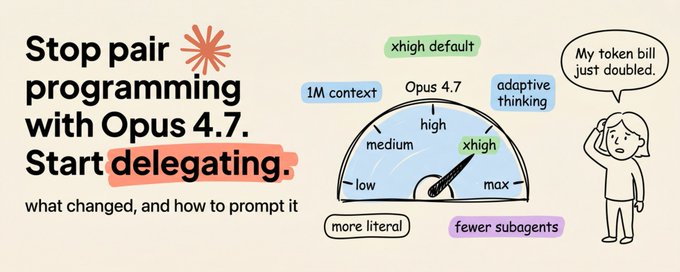
How the new xhigh effort level, adaptive thinking, and 1M context window change how you should prompt, delegate, and manage sessions with Claude's strongest model.
You just upgraded to Claude Opus 4.7. Your prompts are the same. Your harness is the same.
But your token bill doubled, and your code review recall dropped. What happened?
Opus 4.7 is not a drop-in replacement for 4.6. It thinks differently, follows instructions more literally, spawns fewer subagents, and reasons more aggressively after every user turn.
The patterns that worked before now cost you tokens without proportional quality gains. The fix is not complicated, but it requires understanding what changed and adjusting your workflow accordingly.
Let's walk through it.
The Delegation Mindset
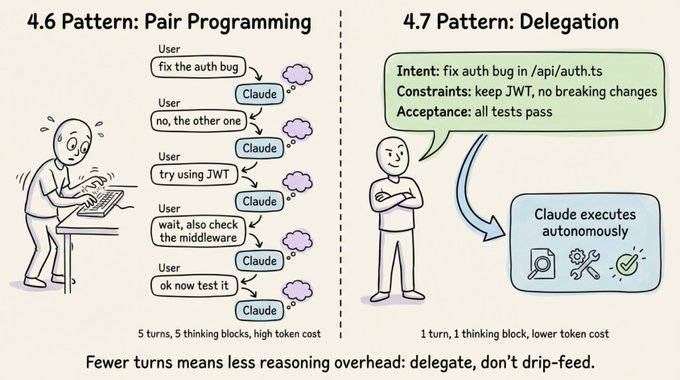
The single biggest shift with Opus 4.7 is how you frame your role. Treat Claude like a capable engineer you delegate to, not a pair programmer you guide line by line.
Every user turn in an interactive session triggers reasoning overhead. With 4.6, you could spread instructions across multiple turns without much penalty.
With 4.7, that pattern inflates token usage because the model reasons deeply after each message you send. You pay for reasoning on every turn, whether the turn deserves it or not.
Three concrete changes will fix this.
- First, specify the task upfront in the first turn. Include intent, constraints, acceptance criteria, and relevant file paths. Ambiguous prompts spread across many turns reduce both token efficiency and output quality.
- Second, batch your questions. Every user message adds reasoning overhead, so give the model enough context to keep moving without checking in.
- Third, use auto mode for trusted tasks. For long-running work where you've already provided full context, auto mode (Shift+Tab) cuts cycle time by removing unnecessary check-ins. It's available in research preview for Claude Code Max users.
You can also ask Claude to play a sound when it finishes a task. It will create its own hook-based notifications, so you don't have to watch it work.
The 5 Effort Levels and Why xhigh Is the New Default
Opus 4.7 introduces xhigh, a new effort level between high and max. It's now the default for Claude Code.
If you're an existing user who never manually set your effort level, you've been auto-upgraded to xhigh.
Here's how the five tiers break down.
- low is for latency-sensitive, tightly scoped work. The model won't go above and beyond, but it still outperforms Opus 4.6 at the same effort level.
- medium fits cost-sensitive tasks where you're willing to trade intelligence for speed.
- high balances intelligence and cost. It's a good pick for concurrent sessions or budget-conscious work without a large quality drop.
- xhigh is the default and the sweet spot for coding and agentic tasks. You get strong autonomy and intelligence without the runaway token usage that max can produce.
- max squeezes out extra performance on genuinely hard problems, but with diminishing returns. It's more prone to overthinking, so use it deliberately for eval ceiling testing or extremely intelligence-sensitive work.
> One practical tip: you can toggle effort mid-task. Start at xhigh for the complex design phase, drop to high for straightforward implementation, and bump to max for a tricky debugging session. This gives you fine-grained control over token spend.
Opus 4.7 respects effort levels more strictly than 4.6, so if a task at low or medium feels under-thought, raise the effort instead of prompting around it.

Adaptive Thinking Replaces Fixed Budgets
If you were using Extended Thinking with budget_tokens on Opus 4.6, that's gone. Opus 4.7 uses adaptive thinking instead.
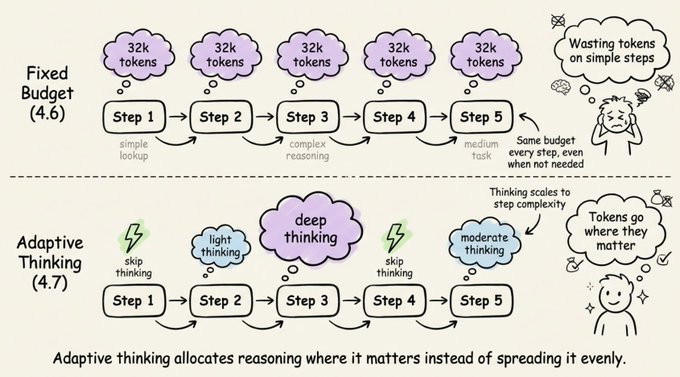
The difference matters. With fixed budgets, you allocated a set number of thinking tokens upfront, and the model used them whether it needed to or not.
With adaptive thinking, the model decides when and how much to think at each step.
Simple queries get fast responses, complex reasoning steps get deep thought, and steps that don't benefit from thinking skip it entirely.
Over a long agentic run, this adds up to faster responses and lower token usage compared to a blanket thinking budget.
The migration is straightforward:
You can still steer the thinking rate with prompts. To get more thinking, try something like "Think carefully and step-by-step before responding; this problem is harder than it looks."
To get less thinking, use "Prioritize responding quickly rather than thinking deeply. When in doubt, respond directly."
If you're running at max or xhigh effort, set a large max output token budget (start at 64k) so the model has room to think and act across subagents and tool calls.
Behavior Changes That Will Bite You
Opus 4.7 ships with several default behavior changes that will catch you off guard if you've tuned your prompts or harnesses for 4.6. Let's go through them.
## Response length
Opus 4.7 calibrates response length to task complexity. Simple lookups get short answers, open-ended analysis gets long ones.
If your use case depends on a specific length or style, state it explicitly. Positive examples of the voice you want work better than negative "don't do this" instructions.
## Fewer tool calls
The model calls tools less often and reasons more. This produces better results in many cases.
But if you need more aggressive tool use for search or file reading, provide explicit guidance about when and why tools should be used. Raising effort to high or xhigh also increases tool usage.
## Fewer subagents
Opus 4.7 is more judicious about delegating to subagents. If your workflow benefits from parallel fan-out, spell it out clearly:
> "Do not spawn a subagent for work you can complete directly in a single response. Spawn multiple subagents in the same turn when fanning out across items or reading multiple files."
## More literal instruction following
This is the change most likely to break existing setups. Opus 4.7 interprets prompts more literally, especially at lower effort levels.
It won't silently generalize an instruction from one item to another, and it won't infer requests you didn't make. The upside is precision and less thrash.
The downside is that if you need an instruction applied broadly, you must state the scope explicitly. For example: "Apply this formatting to every section, not just the first one."
## Tone shift
Opus 4.7 is more direct and opinionated, with less validation-forward phrasing and fewer emoji than 4.6's warmer style. If your product relies on a specific voice, re-evaluate your style prompts against the new baseline.
## Code Review
Opus 4.7 is meaningfully better at finding bugs. It shows 11 percentage points better recall on Anthropic's hardest bug-finding eval based on real PRs, with higher precision too.
But here's the catch. If your review harness says "only report high-severity issues" or "be conservative," Opus 4.7 follows that instruction more faithfully than 4.6 did.
It may investigate code just as thoroughly, identify bugs, then not report findings it judges below your stated bar. Precision rises, but measured recall drops.
The fix is to separate finding from filtering:
> Report every issue you find, including ones you are uncertain about or consider low-severity. Do not filter for importance or confidence at this stage. Your goal here is coverage: it is better to surface a finding that later gets filtered out than to silently drop a real bug. For each finding, include your confidence level and an estimated severity so a downstream filter can rank them.
If you need single-pass filtering, be concrete about where the bar is rather than using qualitative terms. For example: "Report any bugs that could cause incorrect behavior, a test failure, or a misleading result; only omit pure style or naming preferences."
Session Management with 1M Context
Claude Code now has a 1 million token context window. That's enough to build a full-stack app from scratch in a single session.
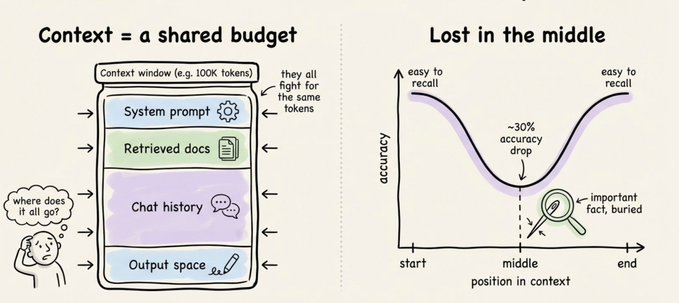
But more context doesn't always mean better results. Context rot is real.
As the context grows, attention spreads across more tokens. Older, irrelevant content starts to distract from the current task, and the model gets less intelligent as its context window fills up.
Lost in the middle effect:
You have five options at every turn.
- Continue means sending another message. Use this when everything in the window is still relevant.
- Rewind (double-Esc) jumps you back to a previous message to re-prompt from there. Failed attempts get dropped from context, which is often better than typing "that didn't work, try X instead," because you keep the useful file reads while dropping the failed approach.
- /compact with a hint summarizes the session and keeps going. It's lossy but low effort, and you can steer it with instructions like /compact focus on the auth refactor, drop the test debugging.
- /clear starts a fresh session. You write down what matters yourself, giving you zero rot and full control.
- Subagents delegate work that generates lots of intermediate output. The subagent gets its own fresh context window, and only the final result comes back.
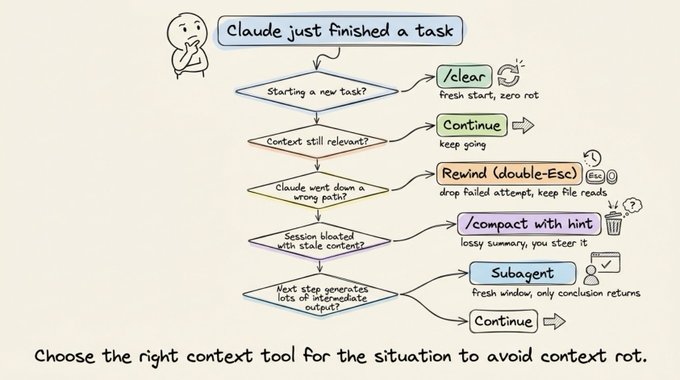
The mental test is simple: will you need the tool output again, or just the conclusion? If just the conclusion, use a subagent.
What causes bad auto-compaction
Auto-compaction fires when you're nearing the context limit. The problem is that this is exactly when the model is at its least intelligent point due to context rot.
A common failure looks like this: autocompact fires after a long debugging session and summarizes the investigation. Your next message references something that was dropped from the summary.
With one million context, you have more time to compact proactively with a description of what matters. Don't wait for auto-compaction to kick in.
Prompting Techniques That Still Matter
Several foundational prompting techniques remain effective with Opus 4.7, and you shouldn't abandon them just because the model is smarter.
- Use XML tags to structure complex prompts. Wrap instructions, context, examples, and inputs in their own tags (<instructions>, <context>, <input>) to reduce misinterpretation.
- Give Claude a role in the system prompt. Even a single sentence focuses behavior and tone.
- Use 3-5 examples wrapped in <example> tags, covering edge cases and varying enough that the model doesn't pick up unintended patterns.
- Put longform data at the top of your prompt, above your query. Queries at the end can improve response quality by up to 30% on complex, multi-document inputs.
- Ground responses in quotes. For long document tasks, ask Claude to quote relevant parts before carrying out its task.
Controlling tool use
Opus 4.7 calls tools less frequently by default. To increase tool use, raise effort or add explicit guidance: "Use [tool] when it would enhance your understanding of the problem."
Parallel tool calling is a strength worth leaning into. The model will run multiple searches, read several files at once, and execute bash commands in parallel.
You can boost parallel execution to near 100% with explicit guidance in XML tags.
Overthinking mitigation
At higher effort levels, Opus 4.7 can think extensively, inflating thinking tokens. Add this prompt to keep it focused:
> "When you're deciding how to approach a problem, choose an approach and commit to it. Avoid revisiting decisions unless you encounter new information that directly contradicts your reasoning."
Agentic Systems: State, Safety, and Multi-Window Workflows
For long-horizon agentic work, Opus 4.7 excels at state tracking across extended sessions. A few patterns make it even more effective.
Multi-context window workflows let you use the first context window to set up a framework (write tests, create setup scripts), then use future windows to iterate on a todo list. Have the model create tests in a structured format like tests.json and setup scripts like init.sh so fresh context windows can pick up where the last one left off.
State management works best when you match the format to the data. Use JSON for structured data like test results and task status, freeform text for progress notes, and git for checkpoints that can be restored.
Balancing autonomy and safety requires some guidance. Without it, Opus 4.7 may take actions that are hard to reverse, like deleting files or force-pushing.
Add a reversibility prompt to keep it in check:
> "You are encouraged to take local, reversible actions like editing files or running tests, but for actions that are hard to reverse or affect shared systems, ask the user before proceeding."
Reducing overengineering is also worth doing explicitly. Opus 4.7 can create extra files, add unnecessary abstractions, or build flexibility that wasn't requested.
Add guidance like: "Only make changes that are directly requested or clearly necessary. A bug fix doesn't need surrounding code cleaned up."
Minimizing hallucinations comes down to forcing investigation before answering: "Never speculate about code you have not opened. If the user references a specific file, you MUST read the file before answering."

Migration Checklist
If you're moving from Opus 4.6 to 4.7, here's what to update.
Switch to adaptive thinking by replacing thinking: {type: "enabled", budget_tokens: N} with thinking: {type: "adaptive"}.
Set effort to xhigh, which is the new default for coding work, and set max output tokens to 64k at xhigh or max effort.
Update code review prompts to separate finding from filtering so you preserve recall.
Reduce user turns by front-loading context into the first message, and add explicit subagent guidance so the model knows when to fan out.
Specify design preferences concretely rather than relying on generic instructions to override the house style.
Migrate away from prefilled responses. Starting with Claude 4.6 models, prefilled responses on the last assistant turn are deprecated, and on Mythos Preview they return a 400 error.
Computer use
Computer use works across resolutions up to a new maximum of 2576px or 3.75MP. Sending images at 1080p provides the best balance of performance and cost.
For cost-sensitive workloads, 720p or 1366x768 are strong lower-cost options.
The Bottom Line
Opus 4.7 rewards upfront specification and punishes incremental, multi-turn prompting. The model is more capable, more literal, and more autonomous than 4.6.
Give it a well-specified task, set effort to xhigh, and let it run. The developers who will get the most out of this model are the ones who stop guiding it step by step and start delegating like they would to a senior engineer.
Try this today: take your next coding task, write a single detailed prompt with intent, constraints, and acceptance criteria, and send it in one turn at xhigh. Compare the result and token usage to your old multi-turn pattern.
The difference will speak for itself.
References:
- https://platform.claude.com/docs/en/about-claude/models/whats-new-claude-4-7
- https://x.com/trq212/status/2044548257058328723?s=20
That's a wrap!
If you enjoyed reading this:
Find me →@akshay_pachaar ✔️
Every day, I share tutorials and insights on AI, Machine Learning, and vibe coding best practices.
## 相关链接
- [Akshay](https://x.com/akshay_pachaar)
- [@akshay_pachaar](https://x.com/akshay_pachaar)
- [13K](https://x.com/akshay_pachaar/status/2045910818450182526/analytics)
- [auto mode](https://code.claude.com/docs/en/permission-modes#available-modes)
- [init.sh](https://init.sh/)
- [https://platform.claude.com/docs/en/about-claude/models/whats-new-claude-4-7](https://platform.claude.com/docs/en/about-claude/models/whats-new-claude-4-7)
- [https://x.com/trq212/status/2044548257058328723?s=20](https://x.com/trq212/status/2044548257058328723?s=20)
- [@akshay_pachaar](https://x.com/@akshay_pachaar)
- [Upgrade to Premium](https://x.com/i/premium_sign_up)
- [1:02 AM · Apr 20, 2026](https://x.com/akshay_pachaar/status/2045910818450182526)
- [13.9K Views](https://x.com/akshay_pachaar/status/2045910818450182526/analytics)
- [View quotes](https://x.com/akshay_pachaar/status/2045910818450182526/quotes)
---
*导出时间: 2026/4/20 10:07:10*
---
## 中文翻译
# Claude Opus 4.7 并非 4.6 的即插即用替代品
**作者**: Akshay
**日期**: 2026-04-19T17:02:04.000Z
**来源**: [https://x.com/akshay_pachaar/status/2045910818450182526](https://x.com/akshay_pachaar/status/2045910818450182526)
---

新的 xhigh 努力级别、自适应思考以及 1M 上下文窗口,将如何改变你与 Claude 最强模型交互时提问、委派任务和管理会话的方式。
你刚刚升级到了 Claude Opus 4.7。提示词还是那些提示词,框架(harness)还是那个框架。
但你的 token 账单翻倍了,代码审查的召回率却下降了。这是怎么回事?
Opus 4.7 并不是 4.6 的即插即用替代品。它的思考方式不同,对指令的遵循更加字面化,生成的子代理(subagent)更少,并且在每次用户发言后都会进行更积极的推理。
以前行之有效的模式,现在只会消耗 token 却换不来相应的质量提升。解决方法并不复杂,但需要理解发生了什么变化,并相应地调整你的工作流。
让我们逐一来看。
## 委派思维
Opus 4.7 带来的最大转变在于你如何定位自己的角色。把 Claude 当作一位你委派任务的能力出众的工程师,而不是你逐行指导的结对程序员。
在交互式会话中,每一次用户发言都会触发推理开销。在 4.6 上,你可以把指令分散到多个回合中,几乎不会有太大代价。
而在 4.7 上,这种模式会推高 token 用量,因为你发送的每条消息之后模型都会进行深度推理。每一轮你都要为推理付费,无论这一轮是否值得。
三个具体的改变可以解决这个问题。
- 首先,在第一个回合就明确任务。包括意图、约束条件、验收标准以及相关文件路径。分散在多个回合中的模糊提示,既降低 token 效率,也降低输出质量。
- 其次,批量提出你的问题。每条用户消息都会增加推理开销,所以要给模型足够的上下文,让它无需反复确认就能持续推进。
- 第三,对可信任的任务使用 auto 模式。对于你已经提供了完整上下文的长时间运行的工作,auto 模式(Shift+Tab)通过省去不必要的确认环节来缩短周期时间。该功能目前以研究预览版形式面向 Claude Code Max 用户开放。
你还可以让 Claude 在完成任务时播放提示音。它会创建自己基于 hook 的通知机制,这样你就不必一直盯着它工作。

## 5 个努力级别,以及为什么 xhigh 成为新的默认值
Opus 4.7 引入了 xhigh,一个介于 high 和 max 之间的新努力级别。它现在已成为 Claude Code 的默认设置。
如果你是从未手动设置过努力级别的老用户,那么你已经被自动升级到了 xhigh。
以下是五个级别的具体说明。
- low 适用于对延迟敏感、范围紧凑的工作。模型不会额外发挥,但在相同努力级别下仍优于 Opus 4.6。
- medium 适用于成本敏感的任务,你愿意用智能换取速度。
- high 在智能与成本之间取得平衡。对于并发会话或预算敏感的工作来说是个不错的选择,且质量不会有大幅下降。
- xhigh 是默认级别,也是编码和代理类任务的最佳平衡点。你既能获得强大的自主性和智能,又不会出现 max 级别可能带来的 token 用量失控。
- max 能在真正困难的问题上榨取额外性能,但收益递减。它更容易过度思考,因此应有意识地将其用于评估上限测试或对智能极其敏感的工作。
> 一个实用技巧:你可以在任务进行中途切换努力级别。在复杂的设计阶段从 xhigh 开始,在简单的实现阶段降到 high,在棘手的调试会话中升到 max。这样你就能对 token 花费进行细粒度控制。
Opus 4.7 比 4.6 更严格地遵循努力级别,因此如果某个任务在 low 或 medium 下显得思考不足,应该提高努力级别,而不是反复调整提示词。

## 自适应思考取代固定预算
如果你在 Opus 4.6 上使用过带 budget_tokens 的扩展思考(Extended Thinking),那么它已经没有了。Opus 4.7 改用自适应思考。
区别很重要。在固定预算下,你预先分配一定数量的思考 token,模型无论是否需要都会用掉它们。
而在自适应思考下,模型自行决定每一步何时思考以及思考多少。
简单查询获得快速响应,复杂推理步骤获得深度思考,而不需要思考的步骤则完全跳过。
在长时间的代理运行中,与一刀切的思考预算相比,这会带来更快的响应和更低的 token 用量。
迁移很简单:
你仍然可以通过提示词来引导思考频率。想要更多思考,可以尝试类似“请仔细逐步思考后再回答;这个问题比看上去更难。”
想要更少思考,可以使用“优先快速回答而不是深度思考。拿不准时直接回答。”
如果你在 max 或 xhigh 努力级别下运行,请设置一个较大的最大输出 token 预算(建议从 64k 开始),以便模型有足够的空间在子代理和工具调用之间进行思考和行动。

## 会让你措手不及的行为变化
Opus 4.7 附带了几项默认行为变化,如果你曾针对 4.6 调优过提示词或框架,这些变化会让你措手不及。让我们逐一来看。
## 回复长度
Opus 4.7 会根据任务复杂度调整回复长度。简单的查询得到简短的回答,开放式的分析得到长篇的回答。
如果你的用例依赖于特定的长度或风格,请明确说明。用你想要的语言风格的正面示例,比“不要这样做”这类否定指令效果更好。
## 更少的工具调用
模型调用工具的频率更低,推理更多。这在许多情况下会产生更好的结果。
但如果你需要更积极的工具使用来进行搜索或文件读取,请提供关于何时以及为何使用工具的明确指引。将努力级别提升到 high 或 xhigh 也会增加工具使用。
## 更少的子代理
Opus 4.7 在委派子代理方面更加审慎。如果你的工作流程受益于并行扇出,请明确说明:
> "不要为单次回复中就能直接完成的工作生成子代理。当需要对多个项目进行扇出处理或读取多个文件时,在同一轮中生成多个子代理。"
## 更字面化的指令遵循
这是最有可能破坏现有设置的变化。Opus 4.7 对提示词的解读更加字面化,尤其是在较低的 effort 级别下。
它不会默默地将某一项的指令推广到另一项,也不会推断你没有提出的要求。好处是精准且更少折腾。
坏处是,如果你需要将某条指令广泛适用,就必须明确说明范围。例如:"将此格式应用到每一个部分,而不仅仅是第一个部分。"
## 语气转变
Opus 4.7 更加直接和有主见,相比 4.6 较为温暖的风格,它的认同性措辞更少、表情符号也更少。如果你的产品依赖特定的语气风格,请根据新基线重新评估你的风格提示词。
## 代码审查
Opus 4.7 在发现 bug 方面有显著提升。在 Anthropic 基于真实 PR 的最难的 bug 发现评估中,它的召回率提高了 11 个百分点,精确率也更高。
但有一个问题。如果你的审查框架说"只报告高严重性问题"或"保持保守",Opus 4.7 会比 4.6 更忠实地遵循该指令。
它可能会同样彻底地调查代码、识别出 bug,然后不报告那些它认为低于你设定标准的结果。精确率上升,但实测召回率下降。
解决方法是将发现问题与过滤问题分开:
> 报告你发现的每一个问题,包括你不确定的或认为严重性较低的问题。在此阶段不要按重要性或置信度进行过滤。你的目标是覆盖率:让一个稍后被过滤掉的结果浮现出来,总好过悄悄丢弃一个真实的 bug。对于每个发现,请附上你的置信度和估计的严重程度,以便下游过滤器可以对它们进行排序。
如果你需要单次遍历过滤,请具体说明标准在哪里,而不是使用定性词汇。例如:"报告任何可能导致错误行为、测试失败或误导性结果的 bug;只需省略纯粹的风格或命名偏好。"
## 100 万上下文的会话管理
Claude Code 现在拥有 100 万 token 的上下文窗口。这足以在单个会话中从头构建一个全栈应用。
但更多的上下文并不总是意味着更好的结果。上下文腐化是真实存在的。
随着上下文增长,注意力会分散到更多的 token 上。较旧的、无关的内容开始干扰当前任务,模型在其上下文窗口填满时会变得不那么聪明。
中间迷失效应:

每一轮你都有五个选项。
- Continue 意味着发送另一条消息。当窗口中的所有内容仍然相关时使用它。
- Rewind(双击 Esc)让你跳回到之前的消息,从那里重新提示。失败的尝试会从上下文中被移除,这通常比输入"那个不行,改用 X 试试"更好,因为你保留了有用的文件读取内容,同时丢弃了失败的方法。
- /compact 加上提示会对会话进行总结并继续。这是有损的但省力,你可以用指令来引导它,例如 /compact 专注于 auth 重构,丢弃测试调试内容。
- /clear 开启一个全新会话。你自己写下重要的内容,零腐化且完全可控。
- 子代理(Subagents)委派那些会产生大量中间输出的工作。子代理拥有自己全新的上下文窗口,只有最终结果会返回。

心理测试很简单:你会再次需要工具输出,还是只需要结论?如果只是结论,就使用子代理。
## 什么导致糟糕的自动压缩
当你接近上下文限制时,自动压缩会触发。问题在于,这恰恰是由于上下文腐化,模型处于最不聪明的时刻。
一个常见的失败场景是这样的:在长时间调试会话之后触发自动压缩,并对调查过程进行了总结。你的下一条消息引用了已被从摘要中删除的内容。
有了 100 万上下文,你有更多时间主动进行压缩,并附上对重要内容的描述。不要等到自动压缩被触发。
## 仍然重要的提示技术
几项基础的提示技术对 Opus 4.7 仍然有效,你不应仅仅因为模型更聪明就放弃它们。
- 使用 XML 标签来结构化复杂提示词。将指令、上下文、示例和输入分别包裹在各自的标签中(<instructions>、<context>、<input>),以减少误解。
- 在系统提示词中给 Claude 一个角色。即使只是一句话,也能聚焦行为和语气。
- 使用包裹在 <example> 标签中的 3-5 个示例,覆盖边界情况且足够多样,以免模型习得意外的模式。
- 将长篇数据放在提示词顶部、查询之上。在复杂的、多文档输入中,将查询放在末尾可将响应质量提高多达 30%。
- 用引文为响应提供依据。对于长文档任务,让 Claude 在执行任务前先引用相关部分。
## 控制工具使用
Opus 4.7 默认调用工具的频率更低。要增加工具使用,可以提高 effort 或添加明确指引:"当 [工具] 能增强你对问题的理解时,请使用它。"
并行工具调用是一个值得利用的优势。模型会运行多个搜索、同时读取多个文件,并并行执行 bash 命令。
你可以通过在 XML 标签中给出明确指引,将并行执行率提升到接近 100%。
## 缓解过度思考
在较高的 effort 级别下,Opus 4.7 可能会进行大量思考,导致思考 token 膨胀。添加这个提示词以保持其专注:
> “在决定如何解决问题时,选定一种方法并坚持执行。除非遇到直接与你推理相矛盾的新信息,否则不要重新审视已做的决定。”
智能体系统:状态管理、安全性与多窗口工作流
对于长周期的智能体工作,Opus 4.7 在跨长时间会话的状态跟踪方面表现出色。以下几个模式可以让它更加高效。
多上下文窗口工作流:你可以用第一个上下文窗口搭建框架(编写测试、创建初始化脚本),然后在后续窗口中基于待办事项列表进行迭代。让模型以结构化格式创建测试(如 tests.json)和初始化脚本(如 init.sh),这样新的上下文窗口就能从上一个窗口中断的地方继续。
状态管理在格式与数据类型匹配时效果最佳。对于测试结果和任务状态等结构化数据使用 JSON,进度记录使用自由文本,可恢复的检查点则使用 git。
平衡自主性与安全性需要一些引导。如果没有引导,Opus 4.7 可能会采取难以撤销的操作,比如删除文件或强制推送。
添加一个可逆性提示来约束它:
> “鼓励你采取本地、可逆的操作,比如编辑文件或运行测试,但对于难以撤销或影响共享系统的操作,请在执行前询问用户。”
减少过度工程也值得明确指出。Opus 4.7 可能会创建额外的文件、添加不必要的抽象,或构建并未被要求的灵活性。
添加类似这样的引导:“只做被直接要求或明确必要的更改。修复一个 bug 不需要顺手清理周围的代码。”
减少幻觉的关键在于强制先调查再回答:“绝不对你没有打开过的代码进行猜测。如果用户引用了某个特定文件,你必须先阅读该文件再回答。”

迁移清单
如果你正从 Opus 4.6 迁移到 4.7,以下是需要更新的内容。
切换到自适应思考:将 thinking: {type: "enabled", budget_tokens: N} 替换为 thinking: {type: "adaptive"}。
将 effort 设置为 xhigh(这是编程工作的新默认值),并将最大输出 token 在 xhigh 或 max effort 下设置为 64k。
更新代码审查提示,将“发现问题”与“筛选问题”分开,以保留召回率。
通过在第一条消息中前置加载上下文来减少用户轮次,并添加明确的子智能体引导,让模型知道何时进行任务分发。
具体地说明设计偏好,而不是依赖泛泛的指令来覆盖默认风格。
迁移 away from 预填充响应。从 Claude 4.6 模型开始,最后一轮助手消息的预填充响应已被弃用,在 Mythos Preview 上则会返回 400 错误。
计算机使用
计算机使用功能支持多种分辨率,新的最高上限为 2576px 或 3.75MP。以 1080p 发送图像可在性能和成本之间取得最佳平衡。
对于成本敏感的工作负载,720p 或 1366x768 是不错的低成本选择。
结论
Opus 4.7 奖励事前明确的规格说明,而惩罚渐进式、多轮次的提示。与 4.6 相比,这个模型能力更强、更按字面理解指令、也更自主。
给它一个规格清晰的任务,将 effort 设置为 xhigh,然后放手让它运行。能从这个模型中获得最大收益的开发者,是那些不再一步步引导它、而是像对待资深工程师一样进行任务委派的人。
今天就可以试试:拿你的下一个编程任务,写一条包含意图、约束和验收标准的详细提示,在 xhigh 下一次性发送。然后将结果和 token 用量与你原来的多轮模式进行比较。
差异自会说明一切。
参考文献:
- https://platform.claude.com/docs/en/about-claude/models/whats-new-claude-4-7
- https://x.com/trq212/status/2044548257058328723?s=20
本次分享就到这里!
如果你喜欢这篇文章:
找到我 →@akshay_pachaar ✔️
每天,我都会分享关于 AI、机器学习和 vibe coding 最佳实践的教程与见解。
## 相关链接
- [Akshay](https://x.com/akshay_pachaar)
- [@akshay_pachaar](https://x.com/akshay_pachaar)
- [13K](https://x.com/akshay_pachaar/status/2045910818450182526/analytics)
- [auto mode](https://code.claude.com/docs/en/permission-modes#available-modes)
- [init.sh](https://init.sh/)
- [https://platform.claude.com/docs/en/about-claude/models/whats-new-claude-4-7](https://platform.claude.com/docs/en/about-claude/models/whats-new-claude-4-7)
- [https://x.com/trq212/status/2044548257058328723?s=20](https://x.com/trq212/status/2044548257058328723?s=20)
- [@akshay_pachaar](https://x.com/@akshay_pachaar)
- [升级到 Premium](https://x.com/i/premium_sign_up)
- [凌晨 1:02 · 2026 年 4 月 20 日](https://x.com/akshay_pachaar/status/2045910818450182526)
- [13.9K 次浏览](https://x.com/akshay_pachaar/status/2045910818450182526/analytics)
- [查看引用](https://x.com/akshay_pachaar/status/2045910818450182526/quotes)
---
*导出时间: 2026/4/20 10:07:10*