LangGraph 生产环境最佳实践 Vikas gupta 2026-08-09 22.0 KB 8.5K 18 ☆ 收藏 𝕏 文章列表 本文总结了将 LangGraph 智能体从原型推向生产环境的最佳实践。针对高并发、连接池耗尽等线上常见故障,文章提出了四大核心支柱:状态与检查点管理、系统可靠性(含重试与人类介入)、可观测性及部署扩展。作者详细解析了如何科学设计状态结构、正确选择 Postgres 检查点策略与线程隔离,并提供了避免无限工具循环、实现幂等性恢复的健壮代码模式,助力构建稳定可靠的线上系统。 LangGraph生产环境Agent状态管理容错处理可观测性Checkpoint幂等性 92 强烈推荐 ▶ 文章发布于2026年8月8日极具时效性,深度剖析了LangGraph生产环境的真实痛点,并提供了非常硬核且可直接落地的最佳实践、配置指南和代码。 # LangGraph Best Practices for Production Systems **作者**: Vikas gupta **日期**: 2026-08-08T07:32:42.000Z **来源**: [https://x.com/vicky_grok/status/2085992582421913886](https://x.com/vicky_grok/status/2085992582421913886) --- 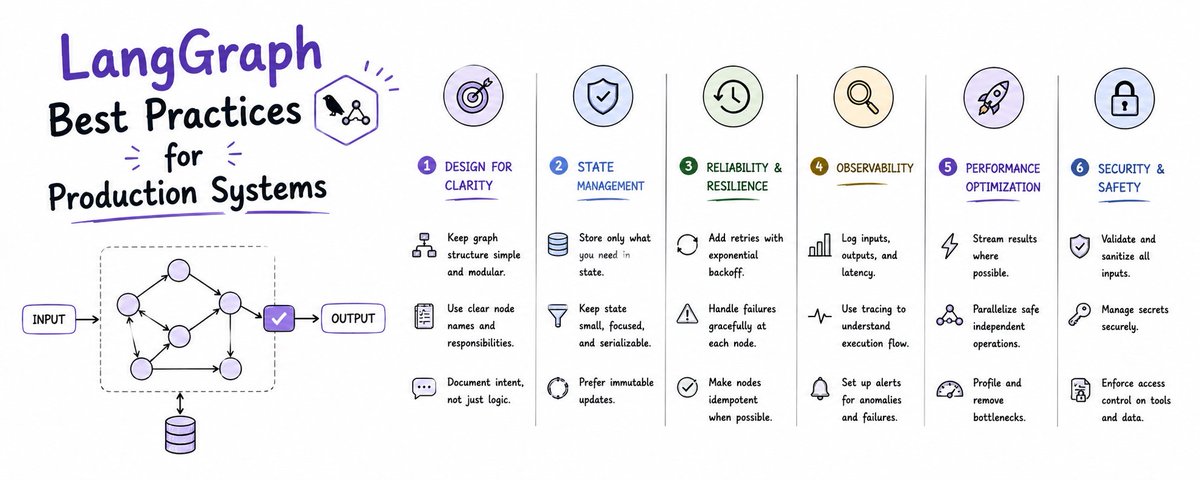 In prototype, your LangGraph agent works. You call app.invoke({"messages": [...]}), get a response, and demo it. In production, that same graph faces 1,000 concurrent threads, a Postgres connection pool that timed out at 3am, a tool that returned HTML instead of JSON, a user who sent a 12,000 token message, and a second deployment that restarted mid-execution. Prototype cares if the answer is correct. Production cares if the system resumes correctly after a failure, does not leak memory across threads, does not loop tools infinitely, and can be traced when finance asks why a run cost $4.20. This article is the checklist teams use to go from LangGraph demo to LangGraph production. It covers four pillars that actually break in prod: State and checkpointing, reliability and human-in-the-loop, observability and evaluation, and deployment and scaling. You will get code you can copy, tables for decision making, and prompts for debugging. ## Part 1: The Failure Modes That Only Appear in Production After reviewing 30+ production LangGraph deployments, these six issues cause 90 percent of incidents: 1. State bloat: You added full_tool_history to state without a reducer. After 40 turns, state is 180k tokens, LLM call fails or latency jumps from 2s to 14s. 2. Checkpointer loss: You used MemorySaver. On restart, all active threads are gone. Users see conversations reset. 3. Infinite tool loop: LLM keeps calling same tool with same args because tool response format confuses it. No guard, no max iterations. 4. No resume: Node fails after calling a paid API. Retry re-calls API and double charges. No checkpoint handling around idempotent boundaries. 5. No tracing: A run costs $3.50. You cannot tell if it was input tokens, tool retries, or a loop. No LangSmith trace, no cost attribution. 6. Thread cross-talk: You reused thread_id per user, not per conversation. User A's document leaks into User B's state because you stored file paths in global state. Best practice production systems fail safe on all six. ## Part 2: State Management and Checkpointing - The Foundation 2.1 Design Your State Schema Like a Database, Not a Dict Bad state example: ``` class State(TypedDict): messages: list data: dict # catches everything, grows forever full_history: list ``` Good state example with explicit reducers and bounded fields: ``` from typing import Annotated, List from typing_extensions import TypedDict from langgraph.graph import add_messages class State(TypedDict): messages: Annotated[List, add_messages] # reducer merges, does not replace user_id: str thread_summary: str # capped summary, not full history tool_calls_made: Annotated[int, lambda a, b: a + b] # counter reducer last_tool_error: str | None artifacts: Annotated[List[dict], lambda a, b: a + b[-5:]] # keep only last 5 ``` Rules: - Every list field must have a reducer. Use add_messages for messages. For counters, use sum. For capped lists, slice. - Do not store raw file bytes or large DataFrames in state. Store references or s3 keys. - Add private fields that never go to LLM: _internal_retry_count, _cost_so_far. Filter before model call. - Keep state under 8k tokens excluding messages. If larger, you pay latency tax on every checkpoint read and write. 2.2 Choose Your Checkpointer Based on Scale, Not Convenience 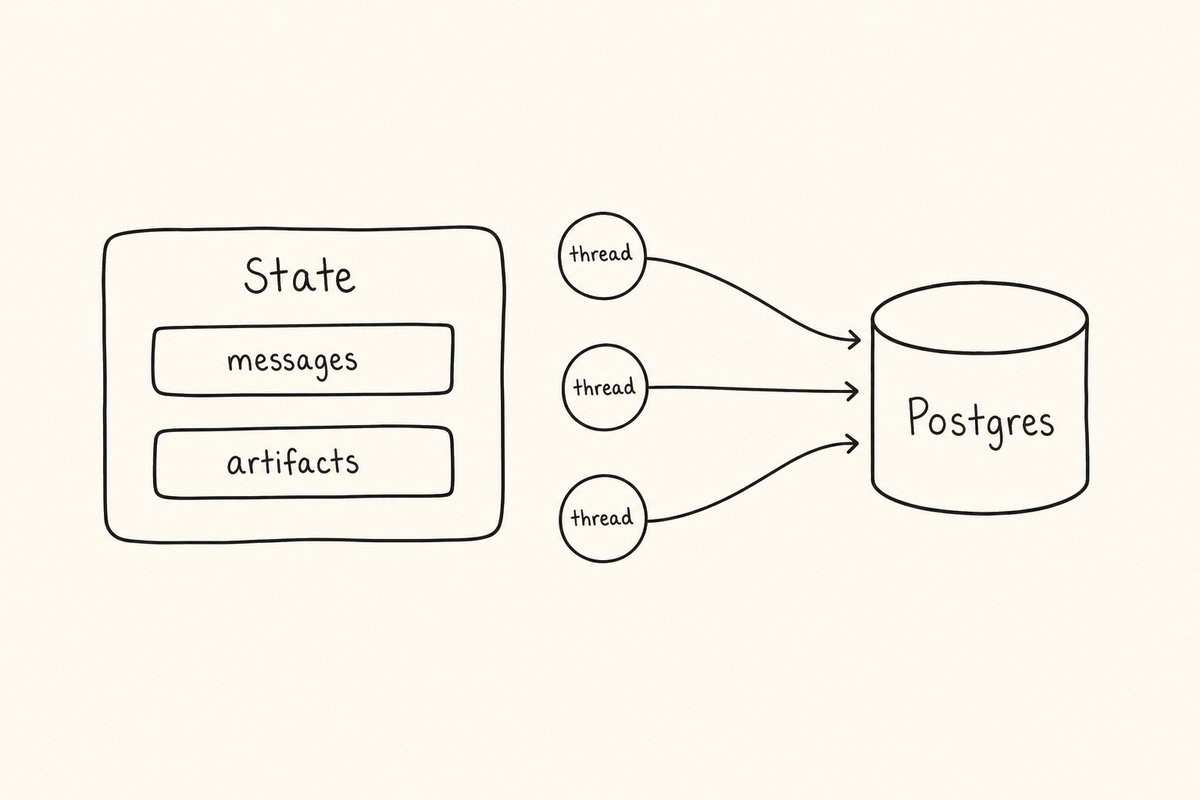 | Checkpointer | When to Use | Pros | Cons | Production Ready? | | --- | --- | --- | --- | --- | | InMemorySaver / MemorySaver | Unit tests only | Zero setup, fast | Lost on restart, not shared across workers | No | | SqliteSaver | Local dev, single instance demo | Persistent, file based | File lock issues, does not scale to multiple workers | Dev only | | PostgresSaver (LangGraph Checkpoint Postgres) | Production default | Shared across workers, transactional, time travel works, scales to 10k+ threads | Needs Postgres, connection pool tuning | Yes | | Custom Redis + Postgres hybrid | High throughput, custom TTL | Fast reads, configurable eviction | You maintain consistency | Yes if built right | For production, use PostgresSaver with PostgresStore for long-term memory. Code Example 1: Production Postgres Checkpointer Setup ``` import os from langgraph.checkpoint.postgres import PostgresSaver from langgraph.store.postgres import PostgresStore from psycopg_pool import ConnectionPool # Use connection pool, not single connection pool = ConnectionPool( conninfo=os.environ["POSTGRES_URI"], min_size=5, max_size=20, kwargs={"autocommit": True, "prepare_threshold": 0} ) # checkpointer for short-term thread state checkpointer = PostgresSaver(pool) # store for long-term semantic memory (user preferences, facts) store = PostgresStore(pool) # On first setup, create tables checkpointer.setup() store.setup() # Build graph with both from langgraph.graph import StateGraph builder = StateGraph(State) # ... add nodes graph = builder.compile( checkpointer=checkpointer, store=store, interrupt_before=["human_approval"], # production safety ) ``` Connection pool sizing rule: Pool max = (number of workers * avg concurrent threads per worker / 2). Start with 20 for 3 workers, monitor pool.get_stats(). 2.3 Thread Management - The Piece Teams Get Wrong Thread is a conversation, not a user. Never use thread_id = user_id. Best practice pattern: ``` thread_id = f"{user_id}:{session_id}:{task_id}" # Example: "usr_123:sess_abc:contract_review_01" config = { "configurable": { "thread_id": thread_id, "user_id": user_id, # for store namespace isolation } } # Invoke with resumability result = graph.invoke( {"messages": [HumanMessage(content=user_input)]}, config=config ) ``` Why this matters: - You can list all sessions per user by prefix scan - You can TTL threads independently (session expires in 7 days, user prefs persist forever) - You can time travel per task without affecting other tasks Time Travel and Resume Pattern: ``` # Get history history = list(graph.get_state_history(config)) # Resume from a past checkpoint (for human correction) past_checkpoint_id = history[2].config["configurable"]["checkpoint_id"] resume_config = { "configurable": { "thread_id": thread_id, "checkpoint_id": past_checkpoint_id } } graph.update_state(resume_config, {"messages": [HumanMessage(content="Actually, use v2 of the file") ]}) ``` Always expose time travel in internal admin UI. It saves you when debugging "why did agent do that" at 2am. ## Part 3: Reliability - Errors, Retries, Human-in-the-Loop 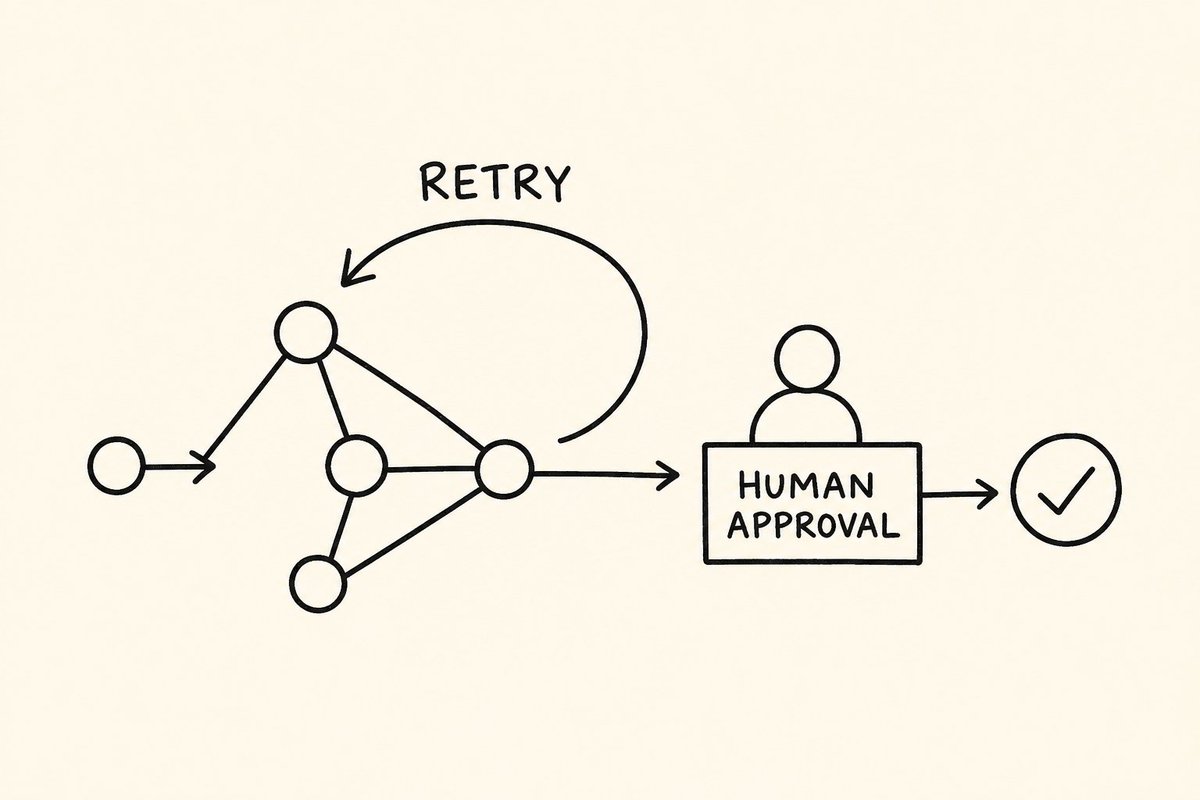 3.1 Never Let a Tool Exception Crash the Graph Wrap every external call in a retry node with idempotency guard. Code Example 2: Idempotent Retry Wrapper ``` from tenacity import retry, stop_after_attempt, wait_exponential from langgraph.graph import END MAX_TOOL_RETRIES = 3 @retry(stop=stop_after_attempt(MAX_TOOL_RETRIES), wait=wait_exponential(multiplier=1, min=2, max=10)) def call_paid_api_with_idempotency(payload, idempotency_key): # Check if we already called this key (from store) # If yes, return cached result instead of re-charging existing = store.get(("idempotency",), idempotency_key) if existing: return existing.value["result"] result = external_api.search(payload) # real call store.put(("idempotency",), idempotency_key, {"result": result}) return result def tool_node_with_recovery(state: State): try: result = call_paid_api_with_idempotency( payload=state["messages"][-1].content, idempotency_key=state["configurable"]["thread_id"] + ":" + str(state["tool_calls_made"]) ) return {"messages": [ToolMessage(content=result)], "last_tool_error": None} except Exception as e: # Do not crash - route to fallback return {"last_tool_error": str(e)[:500], "messages": [ToolMessage(content=f"Tool failed after retries: {e}")]} # Then in graph, conditional edge based on error def should_fallback(state: State): if state.get("last_tool_error"): return "fallback_llm" return "continue" ``` Rules: - Every API tool must have idempotency key derived from thread_id + turn number. Prevents double charge on retry. - Every tool node must return ToolMessage even on failure, so LLM can reason and not re-trigger same args. - Set recursion_limit per graph. Default 25 is dangerous for tool loops. Use 15 for production, 50 only for deep research agents with loop guard. Table: Error Handling Strategies | Failure Type | Best Practice | Code Location | What to Log | | --- | --- | --- | --- | | Transient API 500 | Retry 3x exponential backoff | Tool wrapper | attempt count, latency | | Tool returns invalid JSON | Validate with Pydantic, return corrective ToolMessage | Tool node | raw tool output sample (truncated) | | LLM outputs invalid tool args | Use tool_choice with strict schema, add guardrail node | LLM node | args, schema validation error | | Rate limit 429 | Queue with backoff, move to fallback model | Graph edge | rate limit headers, remaining quota | | User sent toxic / disallowed content | Guardrail node before LLM, interrupt | Entry node | flagged content hash, not raw content | 3.2 Human-in-the-Loop - Approval Gates That Actually Work Do not build human loop as afterthought. Build as node. ``` def human_approval_node(state: State): # This node will be interrupted, never runs auto return state builder.add_node("human_approval", human_approval_node) # Interrupt config graph = builder.compile( checkpointer=checkpointer, interrupt_before=["human_approval"] ) # Run until interrupt for event in graph.stream({"messages": [...]}, config, stream_mode="values"): if event.get("__interrupt__"): # Send to UI: Show tool calls planned, wait for approval pending_tool = event["__interrupt__"][0].value ui.show_approval_card(pending_tool) # Later, human approves graph.invoke( Command(resume={"approved": True, "edited_args": {...}}), config=config ) ``` Production tips: - Use interrupt_before for destructive tools (delete, send email, pay invoice). Use interrupt_after for summarizing after tool batch. - Store human approver ID in state for audit. - Timeout interrupts after 24h and route to fallback. Do not leave threads hanging forever - that leaks checkpoints. Prompt for Debugging Interrupts: > "Act as LangGraph debugger. Given this thread state history [paste history JSON], and current interrupt at node human_approval, explain: 1) What tool was about to run with args, 2) What was previous tool result that led here, 3) Whether state contains PII that should be redacted, 4) Suggest edited_args that would be safer. Format as table." ## Part 4: Observability, Testing, and Evaluation 4.1 LangSmith Tracing - Non-Negotiable for Production 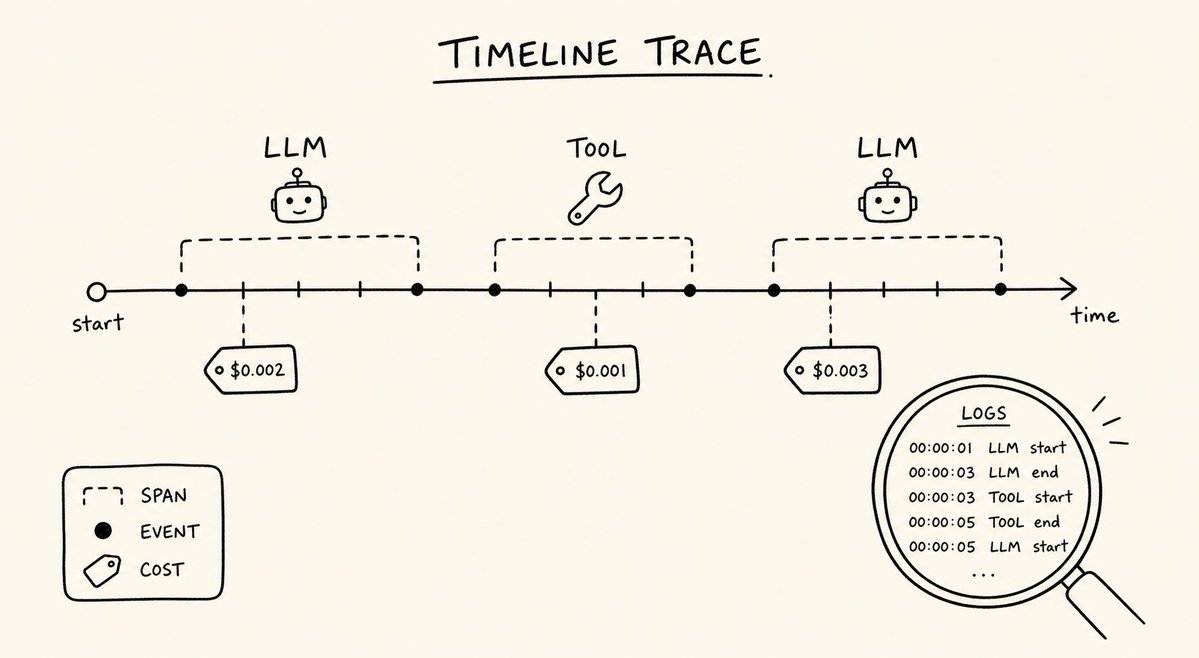 ``` import os os.environ["LANGCHAIN_TRACING_V2"] = "true" os.environ["LANGCHAIN_PROJECT"] = "prod-langgraph-agent-v2" # In graph compilation, add metadata graph = builder.compile( checkpointer=checkpointer, # ... add tags via config ) config = { "configurable": {"thread_id": thread_id}, "metadata": {"user_id": user_id, "version": "2.1.0", "env": "prod"}, "tags": ["invoice_flow", "high_value_user"], "run_name": f"invoice-{thread_id}" } ``` What to track per run: - Total tokens, cost, latency per node (enable via LangSmith) - State size in bytes before and after each node (log custom metric) - Tool call count and failure rate - Checkpoint read/write latency Custom span for state size guard: ``` from langsmith import traceable @traceable(name="state_size_check") def check_state_size(state: State): import json size = len(json.dumps(state, default=str)) if size > 50_000: # 50KB threshold # Log warning, consider summarizing print(f"WARNING: State size {size} bytes exceeds threshold for thread {state.get('thread_id')}") return size ``` 4.2 Testing Graphs - Unit Test the DAG, Not Just LLM Output Code Example 3: Pytest for LangGraph with Mocked Checkpointer ``` import pytest from langgraph.checkpoint.memory import MemorySaver from your_agent import build_graph @pytest.fixture def graph_with_memory(): checkpointer = MemorySaver() # use memory for tests, postgres for prod return build_graph(checkpointer) def test_graph_does_not_loop_on_bad_tool_output(graph_with_memory): # Simulate tool returning garbage initial_state = { "messages": [HumanMessage(content="Search invoices")], "tool_calls_made": 0, "last_tool_error": None } config = {"configurable": {"thread_id": "test_thread_1"}} # Run with recursion limit low to detect loops quickly result = graph_with_memory.invoke( initial_state, config={**config, "recursion_limit": 10} ) assert result["tool_calls_made"] <= 5, "Tool loop detected - should fail fast" assert "last_tool_error" in result or len(result["messages"]) > 1 def test_human_interrupt_route(graph_with_memory): config = {"configurable": {"thread_id": "test_interrupt"}} # First invoke should interrupt before human_approval for event in graph_with_memory.stream( {"messages": [HumanMessage(content="Pay invoice INV-100")]}, config ): if "__interrupt__" in event: assert event["__interrupt__"][0].id == "human_approval" break else: pytest.fail("Expected interrupt did not happen") ``` Add evaluation: ``` from langsmith import Client from langsmith.evaluation import evaluate def correctness_evaluator(run, example): # run.outputs["messages"] vs expected # Use LLM as judge or exact match for tool args return {"key": "correct_tool_chosen", "score": 1 if "search" in str(run.outputs) else 0} evaluate( lambda inputs: graph.invoke(inputs), data="invoice_test_dataset", evaluators=[correctness_evaluator], experiment_prefix="prod-eval-v2.1" ) ``` 4.3 Streaming - Choose The Right Mode | Stream Mode | What It Returns | Best For | Latency | | --- | --- | --- | --- | | values | Full state after each node | Debug, internal UI that needs full state | High | | updates | Only changed keys | Most prod UIs, lower bandwidth | Medium | | messages | Token stream from LLM | User-facing chat, ChatGPT style UX | Low, real-time | | custom | Your custom events via writer | Human approval cards, progress bars | Low | | debug | Detailed execution steps | Dev only, very verbose | Very high | 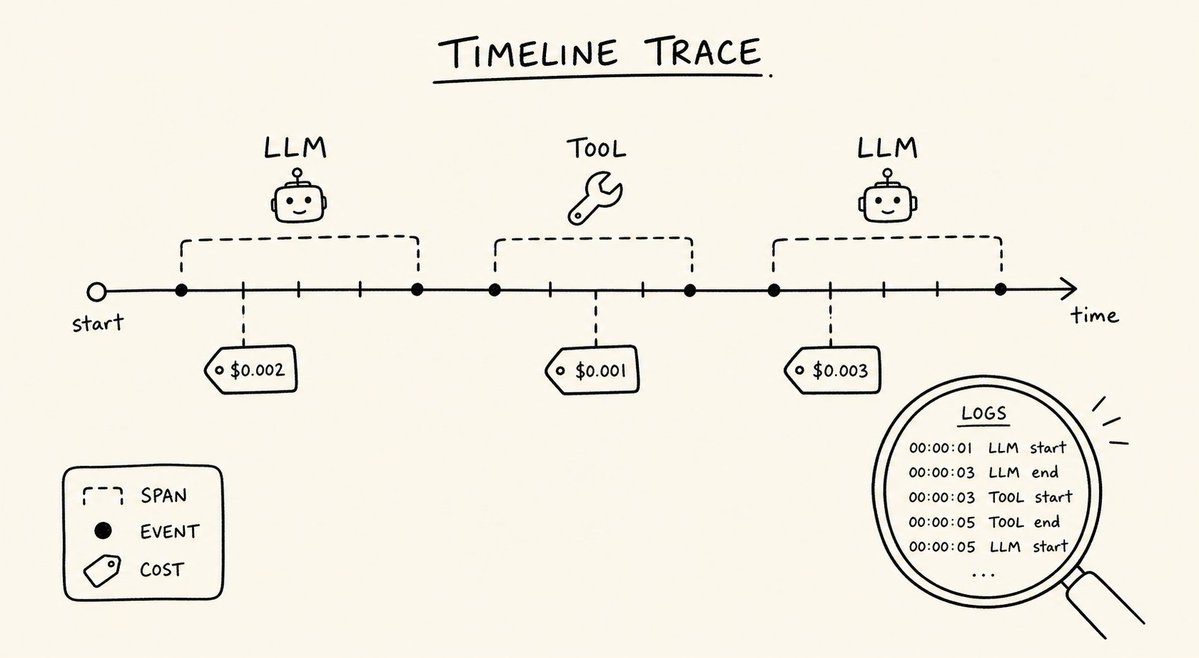 Production recommendation: Use messages + custom for frontend. Use updates for backend workers. Never use debug in prod - it logs full state including PII. ``` # Frontend stream async for chunk in graph.astream( {"messages": [HumanMessage(content="...")]}, config, stream_mode=["messages", "custom"] ): if chunk[0] == "messages": token = chunk[1] await websocket.send(token.content) elif chunk[0] == "custom": await websocket.send_json({"progress": chunk[1]}) ``` ## Part 5: Deployment and Scaling 5.1 LangGraph Platform vs Self-Hosted 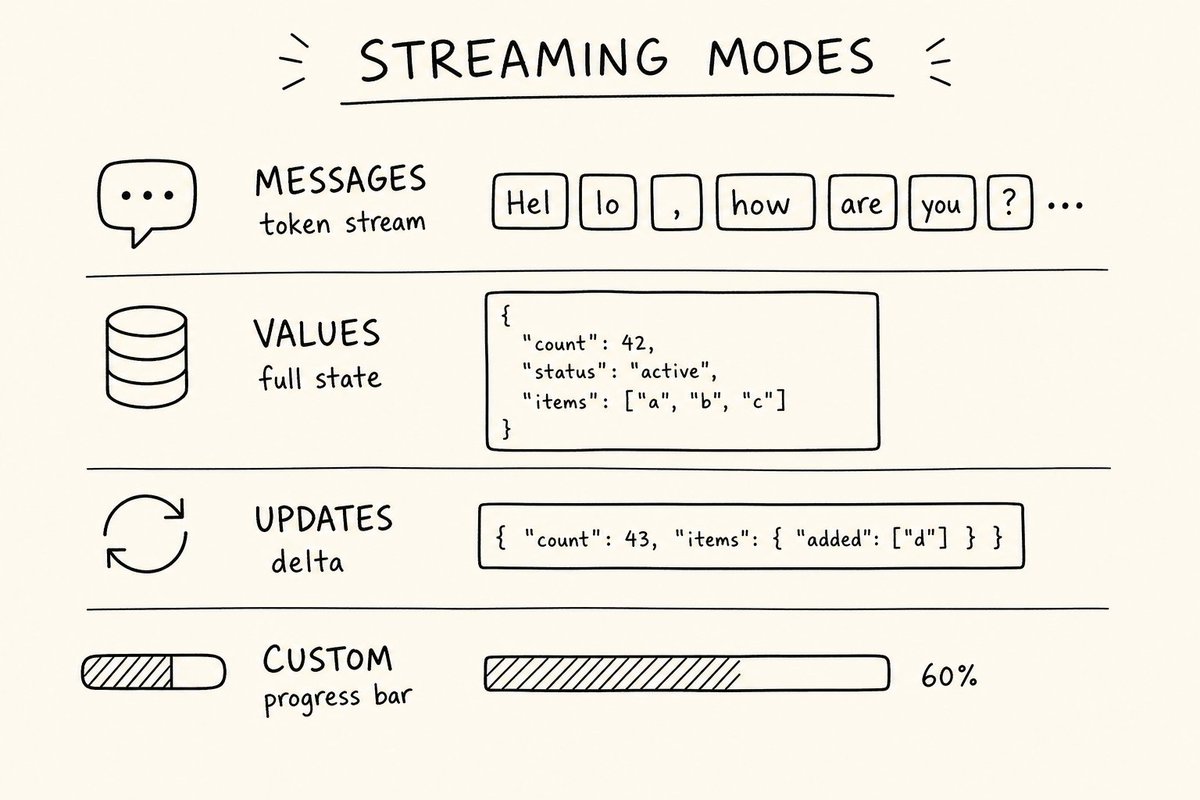 | Architecture | Pros | Cons | When to Choose | | --- | --- | --- | --- | | LangGraph Platform (Cloud / Self-hosted) | Managed checkpointer, workers, streaming, CRON jobs, no K8s expertise needed, versioned deploys | Less control, cost per run | Teams <10 eng, need fast go-live, want managed traces | | Self-Hosted Docker + FastAPI wrapper | Full control, reuse existing infra, custom auth | You manage scaling, checkpoint pool, queue, restarts | Enterprise with strict VPC, existing K8s | | Hybrid: Platform for dev, Custom worker for prod heavy tools | Best of both, isolate heavy tools | Two places to monitor | Need custom GPU / on-prem tool | Code Example 4: langgraph.json for Platform Deploy ``` { "dependencies": ["."], "graphs": { "agent": "./src/agent/graph.py:graph" }, "env": ".env", "python_version": "3.12", "store": { "index": { "embed": "openai:text-embedding-3-small", "dims": 1536, "fields": ["$value.summary"] } } } ``` Self-Hosted Dockerfile Essentials: ``` FROM python:3.12-slim WORKDIR /app COPY requirements.txt . RUN pip install --no-cache-dir -r requirements.txt COPY . . # Pre-create checkpoint tables on startup, not per request CMD ["sh", "-c", "python scripts/setup_checkpointer.py && uvicorn api:app --host 0.0.0.0 --port 8000 --workers 4"] ``` Critical: Run checkpointer.setup() once in init, not per request. Per-request setup causes migration lock contention. 5.2 Scaling Rules - Workers = CPU bound for graph orchestration. Each worker handles ~50 concurrent streaming connections if async. Use async nodes (async def) everywhere you do IO. - Pool size rule covered earlier. Monitor pg_stat_activity for idle in transaction - indicates you forgot to close transaction in checkpointer fork. - Use Redis as task queue only if you have fanout. LangGraph Platform already queues. For custom, use asyncio.Queue for in-process, Celery or Arq for cross-process. - Set recursion_limit + per-node timeout. Example: LLM node timeout 30s, tool node 15s. If timeout, route to fallback, do not hang thread. ## Part 6: Security, Guardrails, Cost Checklist Before production, verify: - Threads isolated by user_id namespace in store, not just thread_id - State does not contain raw PII that gets traced. Redact before tracing or set hide_inputs for sensitive nodes - Tool permission map: Which role can call send_email vs read_file? Enforce in node, not just UI - Rate limit per thread and per user (prevent prompt flooding) - Maximum state size guard, summarization node after every 20 messages - Cost guard: If cumulative cost > $2 per thread, interrupt for approval or summarize and close - Checkpoint TTL: Archive threads after 30 days, delete after 90 days per compliance - AuthZ: API that reads thread must verify caller owns thread_id prefix - Secrets not in state: Use env or secret manager, never store API keys in checkpoint Code Example 5: PII Redaction Before Tracing ``` def redact_pii(state: State): import re redacted_messages = [] for m in state["messages"]: content = re.sub(r"\b[A-Z0-9._%+-]+@[A-Z0-9.-]+\.[A-Z]{2,}\b", "[EMAIL]", m.content, flags=re.I) content = re.sub(r"\b\d{3}-\d{2}-\d{4}\b", "[SSN]", content) redacted_messages.append(m.model_copy(update={"content": content})) return {"messages": redacted_messages} ``` Use this as mapper before sending to LangSmith or logging. ## Part 7: Production Readiness Checklist - Copy This Use this as pull request template for any graph change: State and Checkpointer: - All list fields have reducers, capped where needed - No raw files or large DataFrames in state, only references - PostgresSaver with pool, setup() called once at startup - Thread_id format is user:session:task, not just user_id Reliability: - Every external tool has retry + idempotency key - Tool failures return ToolMessage, do not crash graph - recursion_limit set (15 default), loop guard with tool_calls_made counter - Human approval interrupts for destructive actions, with timeout fallback Observability: - LangSmith tracing with project, metadata, tags - Custom metric for state size and cost per thread - Tests with MemorySaver and recursion limit low - Streaming mode is messages+custom for frontend, not debug Deployment: - Stream modes audited, PII not in debug streams - Deployment manifest (langgraph.json or Dockerfile) versioned - Workers async, pool size tuned - Health endpoint that checks checkpointer pool and store connectivity If any box is unchecked, do not merge. ## Conclusion LangGraph makes building stateful multi-actor agents simple. Production makes keeping them reliable, observable, and cost controlled hard. The gap is not the graph definition - it is everything around the graph: checkpointers that survive restarts, threads that isolate users, retries that do not double charge, interrupts that have timeouts, streams that do not leak PII, and traces that tell you why a run cost what it did. Start with Postgres checkpointer with pool, implement idempotent retry for every tool, add interrupts for destructive actions, use messages+custom streaming, and enforce the checklist above as PR gate. Do that and your graph will handle 1,000 threads the same way it handled one in your notebook. Next steps are LangGraph memory deep dive and multi-agent supervisor hardening - both will reuse the patterns above. Bonus Prompt Pack for Debugging Production Graphs Use these three prompts during on-call: Prompt 1 - Loop Debugger: > "Given this LangGraph state and last 10 messages [paste], identify why the agent is looping on tool [tool_name] with same args. List 3 root causes and fix for each: tool response format, system prompt, or guardrail." Prompt 2 - State Bloat Analyzer: > "Analyze this state size report: size=68KB, messages=42, artifacts=18. Recommend which fields to cap, which to summarize, and write the reducer code for artifacts keeping only last 3." Prompt 3 - Cost Attribution: > "From this LangSmith trace with 24 steps, attribute cost per node and suggest where to add caching or summarization to cut cost by 40 percent without losing correctness." These prompts save 2 hours per incident. ## 相关链接 - [Vikas gupta](https://x.com/vicky_grok) - [@vicky_grok](https://x.com/vicky_grok) - [947](https://x.com/vicky_grok/status/2085992582421913886/analytics) - [Upgrade to Premium](https://x.com/i/premium_sign_up) - [3:32 PM · Aug 8, 2026](https://x.com/vicky_grok/status/2085992582421913886) - [947 Views](https://x.com/vicky_grok/status/2085992582421913886/analytics) --- *导出时间: 2026/8/9 14:50:56* --- ## 中文翻译 # 生产系统中的 LangGraph 最佳实践 **作者**: Vikas gupta **日期**: 2026-08-08T07:32:42.000Z **来源**: [https://x.com/vicky_grok/status/2085992582421913886](https://x.com/vicky_grok/status/2085992582421913886) ---  在原型阶段,你的 LangGraph 智能体运行良好。你调用 `app.invoke({"messages": [...]})`,获取响应,然后进行演示。 在生产环境中,同一个图(Graph)要面临 1,000 个并发线程、凌晨 3 点超时的 Postgres 连接池、返回 HTML 而非 JSON 的工具、发送了 12,000 个 token 消息的用户,以及在执行中途重启的第二个部署实例。 原型阶段关心的是答案是否正确。而生产环境关心的是:系统在发生故障后能否正确恢复、是否会在不同线程间发生内存泄漏、是否不会无限循环调用工具,以及当财务部询问“为什么这次运行花费了 4.20 美元”时,能否追踪到原因。 这篇文章是团队用来将 LangGraph 从演示阶段推向生产阶段的核对清单。它涵盖了在生产环境中真正容易崩溃的四大支柱:状态与检查点(State and checkpointing)、可靠性与人机交互(reliability and human-in-the-loop)、可观测性与评估(observability and evaluation),以及部署与扩展(deployment and scaling)。 你将获得可以直接复制的代码、用于决策的表格,以及用于调试的提示词。 ## 第一部分:仅在生产环境中出现的故障模式 在审查了 30 多个生产环境的 LangGraph 部署后,我们发现以下六个问题导致了 90% 的事故: 1. 状态膨胀:你在状态中添加了 `full_tool_history` 却没有使用 reducer。在 40 轮对话后,状态高达 18 万个 token,导致 LLM 调用失败,或者延迟从 2 秒激增至 14 秒。 2. 检查点丢失:你使用了 `MemorySaver`。重启后,所有活跃线程都消失了。用户看到对话被重置。 3. 无限工具循环:由于工具的响应格式让 LLM 产生困惑,它不断使用相同的参数调用同一个工具。没有防护措施,也没有最大迭代次数限制。 4. 无法恢复:节点在调用付费 API 后失败。重试再次调用 API 并导致了重复扣费。在幂等边界周围没有进行检查点处理。 5. 没有追踪:某次运行花费了 3.50 美元。你无法分辨这究竟是因为输入 token、工具重试,还是因为陷入了循环。没有 LangSmith 追踪记录,也没有成本归因。 6. 线程串扰:你为每个用户(而不是每次对话)重用了 `thread_id`。因为你将文件路径存储在全局状态中,导致用户 A 的文档泄漏到了用户 B 的状态中。 最佳的生产系统会对这六个问题全部实现故障安全。 ## 第二部分:状态管理与检查点 —— 基础 2.1 像设计数据库一样设计状态模式,而不是字典 糟糕的状态示例: ```python class State(TypedDict): messages: list data: dict # 承载了一切,且无限增长 full_history: list ``` 带有显式 reducer 和受限字段的良好状态示例: ```python from typing import Annotated, List from typing_extensions import TypedDict from langgraph.graph import add_messages class State(TypedDict): messages: Annotated[List, add_messages] # reducer 进行合并而不是替换 user_id: str thread_summary: str # 受限的摘要,而不是完整历史 tool_calls_made: Annotated[int, lambda a, b: a + b] # 计数器 reducer last_tool_error: str | None artifacts: Annotated[List[dict], lambda a, b: a + b[-5:]] # 只保留最后 5 个 ``` 规则: - 每个列表字段都必须有一个 reducer。消息使用 `add_messages`。计数器使用 `sum`。受限列表使用切片。 - 不要在状态中存储原始文件字节或大型 DataFrame。请存储引用或 S3 key。 - 添加永远不发送给 LLM 的私有字段:`_internal_retry_count`、`_cost_so_far`。在调用模型前进行过滤。 - 除消息外,将状态保持在 8k token 以下。如果过大,你会在每次读取和写入检查点时付出延迟代价。 2.2 根据规模选择检查点存储器,而不是图方便  | 检查点存储器 | 适用场景 | 优点 | 缺点 | 可用于生产环境? | | --- | --- | --- | --- | --- | | InMemorySaver / MemorySaver | 仅限单元测试 | 零配置,速度快 | 重启即丢失,无法在工作进程间共享 | 否 | | SqliteSaver | 本地开发,单实例演示 | 持久化,基于文件 | 存在文件锁问题,无法扩展到多个工作进程 | 仅限开发 | | PostgresSaver (LangGraph Checkpoint Postgres) | 生产环境默认选择 | 可在工作进程间共享,支持事务,支持时间旅行,可扩展至 1 万+ 线程 | 需要 Postgres,需调整连接池 | 是 | | 自定义 Redis + Postgres 混合架构 | 高吞吐量,自定义 TTL | 读取速度快,可配置淘汰策略 | 需自行维护一致性 | 如果构建得当则可以 | 对于生产环境,请将 `PostgresSaver` 与 `PostgresStore` 结合使用以实现长期记忆。 代码示例 1:生产环境 Postgres 检查点存储器设置 ```python import os from langgraph.checkpoint.postgres import PostgresSaver from langgraph.store.postgres import PostgresStore from psycopg_pool import ConnectionPool # 使用连接池,而不是单个连接 pool = ConnectionPool( conninfo=os.environ["POSTGRES_URI"], min_size=5, max_size=20, kwargs={"autocommit": True, "prepare_threshold": 0} ) # 用于短期线程状态的 checkpointer checkpointer = PostgresSaver(pool) # 用于长期语义记忆(用户偏好、事实)的 store store = PostgresStore(pool) # 首次设置时,创建表 checkpointer.setup() store.setup() # 将两者结合构建图 from langgraph.graph import StateGraph builder = StateGraph(State) # ... 添加节点 graph = builder.compile( checkpointer=checkpointer, store=store, interrupt_before=["human_approval"], # 生产安全保障 ) ``` 连接池大小设置规则:池最大值 =(工作进程数 * 每个工作进程的平均并发线程数 / 2)。对于 3 个工作进程,可以从 20 开始,并监控 `pool.get_stats()`。 2.3 线程管理 —— 团队最容易弄错的一环 线程是一场对话,而不是一个用户。永远不要使用 `thread_id = user_id`。 最佳实践模式: ```python thread_id = f"{user_id}:{session_id}:{task_id}" # 示例: "usr_123:sess_abc:contract_review_01" config = { "configurable": { "thread_id": thread_id, "user_id": user_id, # 用于 store 的命名空间隔离 } } # 带着可恢复性进行调用 result = graph.invoke( {"messages": [HumanMessage(content=user_input)]}, config=config ) ``` 为什么这很重要: - 你可以通过前缀扫描列出每个用户的所有会话 - 你可以独立地为线程设置 TTL(会话在 7 天后过期,用户偏好则永久保留) - 你可以针对特定任务进行时间旅行而不影响其他任务 时间旅行与恢复模式: ```python # 获取历史记录 history = list(graph.get_state_history(config)) # 从过去的检查点恢复(用于人工纠正) past_checkpoint_id = history[2].config["configurable"]["checkpoint_id"] resume_config = { "configurable": { "thread_id": thread_id, "checkpoint_id": past_checkpoint_id } } graph.update_state(resume_config, {"messages": [HumanMessage(content="Actually, use v2 of the file") ]}) ``` 务必在内部管理 UI 中开放时间旅行功能。当你在凌晨 2 点调试“为什么智能体会这样做”时,它会成为你的救命稻草。 ## 第三部分:可靠性 —— 错误、重试、人机交互  3.1 永远不要让工具异常导致图崩溃 使用带有幂等性防护的重试节点包装每一个外部调用。 代码示例 2:幂等重试包装器 ```python from tenacity import retry, stop_after_attempt, wait_exponential from langgraph.graph import END MAX_TOOL_RETRIES = 3 @retry(stop=stop_after_attempt(MAX_TOOL_RETRIES), wait=wait_exponential(multiplier=1, min=2, max=10)) def call_paid_api_with_idempotency(payload, idempotency_key): # 检查我们是否已经调用过此 key(从 store 中读取) # 如果是,则返回缓存的结果,而不是重新扣费 existing = store.get(("idempotency",), idempotency_key) if existing: return existing.value["result"] result = external_api.search(payload) # 实际调用 store.put(("idempotency",), idempotency_key, {"result": result}) return result def tool_node_with_recovery(state: State): try: result = call_paid_api_with_idempotency( payload=state["messages"][-1].content, idempotency_key=state["configurable"]["thread_id"] + ":" + str(state["tool_calls_made"]) ) return {"messages": [ToolMessage(content=result)], "last_tool_error": None} except Exception as e: # 不要崩溃 - 路由到备用流程 return {"last_tool_error": str(e)[:500], "messages": [ToolMessage(content=f"Tool failed after retries: {e}")]} # 然后在图中,根据错误设置条件边 def should_fallback(state: State): if state.get("last_tool_error"): return "fallback_llm" return "continue" ``` 规则: - 每个 API 工具都必须具有派生自 `thread_id` + 轮次号的幂等键。防止重试时重复扣费。 - 每个工具节点即使失败也必须返回 `ToolMessage`,以便 LLM 能够进行推理,而不是重新触发相同的参数。 - 为每个图设置 `recursion_limit`。默认的 25 对于工具循环来说很危险。在生产环境中请使用 15,只有在针对具有循环防护的深度研究智能体时才使用 50。 表格:错误处理策略 | 故障类型 | 最佳实践 | 代码位置 | 记录内容 | | --- | --- | --- | --- | | 瞬时 API 500 错误 | 重试 3 次,指数退避 | 工具包装器 | 尝试次数,延迟 | | 工具返回无效的 JSON | 使用 Pydantic 进行验证,返回纠正性的 ToolMessage | 工具节点 | 原始工具输出样本(截断) | | LLM 输出无效的工具参数 | 使用带严格模式约束的 tool_choice,添加护栏节点 | LLM 节点 | 参数,模式验证错误 | | 频率限制 429 | 排队并退避,切换到备用模型 | 图的边 | 频率限制响应头,剩余配额 | | 用户发送了有害/禁止内容 | LLM 前置护栏节点,中断执行 | 入口节点 | 标记的内容哈希,而不是原始内容 | 3.2 人机交互 —— 真正起作用的审批关卡 不要把人机交互作为事后补充。要将其构建为节点。 ```python def human_approval_node(state: State): # 该节点将被中断,永远不会自动运行 return state builder.add_node("human_approval", human_approval_node) # 中断配置 graph = builder.compile( checkpointer=checkpointer, interrupt_before=["human_approval"] ) # 运行直到中断 for event in graph.stream({"messages": [...]}, config, stream_mode="values"): if event.get("__interrupt__"): # 发送至 UI:显示计划好的工具调用,等待批准 pending_tool = event["__interrupt__"][0].value ui.show_approval_card(pending_tool) # 随后,人工批准 graph.invoke( Command(resume={"approved": True, "edited_args": {...}}), config=config ) ``` 生产环境提示: - 对破坏性工具(删除、发送电子邮件、支付发票)使用 `interrupt_before`。对工具批处理后的汇总操作使用 `interrupt_after`。 - 将人工审批者的 ID 存储在状态中以便审计。 - 24 小时后让中断超时并路由到备用流程。不要让线程永远挂起 —— 那会导致检查点泄漏。 用于调试中断的提示词: > “扮演 LangGraph 调试器。给定此线程状态历史 [粘贴历史 JSON],以及当前在节点 `human_approval` 处的中断,请解释:1) 即将运行什么工具及其参数是什么,2) 导致此情况的上一个工具结果是什么,3) 状态中是否包含应脱敏的 PII(个人身份信息),4) 建议更安全的 `edited_args`。以表格形式输出。” ## 第四部分:可观测性、测试与评估 4.1 LangSmith 追踪 —— 生产环境中不可妥协的要素  ```python import os os.environ["LANGCHAIN_TRACING_V2"] = "true" os.environ["LANGCHAIN_PROJECT"] = "prod-langgraph-agent-v2" # 在图编译时,添加元数据 graph = builder.compile( checkpointer=checkpointer, # ... 通过 config 添加标签 ) config = { "configurable": {"thread_id": thread_id}, "metadata": {"user_id": user_id, "version": "2.1.0", "env": "prod"}, "tags": ["invoice_flow", "high_value_user"], "run_name": f"invoice-{thread_id}" } ``` 每次运行需追踪的内容: - 每个节点的总 token 数、成本、延迟(通过 LangSmith 启用) - 每个节点前后以字节为单位的状态大小(记录自定义指标) - 工具调用次数和失败率 - 检查点读/写延迟 用于状态大小防护的自定义跨度: ```python from langsmith import traceable @traceable(name="state_size_check") def check_state_size(state: State): import json size = len(json.dumps(state, default=str)) if size > 50_000: # 50KB 阈值 # 记录警告,考虑进行摘要总结 print(f"WARNING: State size {size} bytes exceeds threshold for thread {state.get('thread_id')}") return size ``` 4.2 测试图 —— 对 DAG 进行单元测试,而不仅仅是 LLM 输出 代码示例 3:使用 Mock 检查点存储器的 LangGraph Pytest ```python import pytest from langgraph.checkpoint.memory import MemorySaver from your_agent import build_graph @pytest.fixture def graph_with_memory(): checkpointer = MemorySaver() # 测试用内存,生产用 Postgres return build_graph(checkpointer) def test_graph_does_not_loop_on_bad_tool_output(graph_with_memory): # 模拟工具返回垃圾数据 initial_state = { "messages": [HumanMessage(content="Search invoices")], "tool_calls_made": 0, "last_tool_error": None } config = {"configurable": {"thread_id": "test_thread_1"}} # 设置较低的递归限制以快速检测循环 result = graph_with_memory.invoke( initial_state, config={**config, "recursion_limit": 10} ) assert result["tool_calls_made"] <= 5, "检测到工具循环 - 应当快速失败" assert "last_tool_error" in result or len(result["messages"]) > 1 def test_human_interrupt_route(graph_with_memory): config = {"configurable": {"thread_id": "test_interrupt"}} # 第一次调用应该在 human_approval 之前中断 for event in graph_with_memory.stream( {"messages": [HumanMessage(content="Pay invoice INV-100")]}, config ): if "__interrupt__" in event: assert event["__interrupt__"][0].id == "human_approval" break else: pytest.fail("期望的中断未发生") ``` 添加评估: ```python from langsmith import Client from langsmith.evaluation import evaluate def correctness_evaluator(run, example): # run.outputs["messages"] 与预期进行对比 # 使用 LLM 作为裁判,或对工具参数进行精确匹配 return {"key": "correct_tool_chosen", "score": 1 if "search" in str(run.outputs) else 0} evaluate( lambda inputs: graph.invoke(inputs), data="invoice_test_dataset", evaluators=[correctness_evaluator], experiment_prefix="prod-eval-v2.1" ) ``` 4.3 流式传输 —— 选择正确的模式 | 流式模式 | 返回内容 | 最适用场景 | 延迟 | | --- | --- | --- | --- | | values | 每个节点后的完整状态 | 调试,需要完整状态的内部 UI | 高 | | updates | 仅变动过的键 | 大多数生产 UI,带宽需求低 | 中 | | messages | 来自 LLM 的 Token 流 | 面向用户的聊天,ChatGPT 风格的体验 | 低,实时 | | custom | 通过 writer 触发的自定义事件 | 人工审批卡片,进度条 | 低 | | debug | 详细的执行步骤 | 仅限开发,非常冗长 | 极高 |  生产环境建议:前端使用 `messages` + `custom`。后端工作进程使用 `updates`。绝不要在生产环境中使用 `debug` —— 它会记录包含 PII 在内的完整状态。 ```python # 前端流式传输 async for chunk in graph.astream( {"messages": [HumanMessage(content="...")]}, config, stream_mode=["messages", "custom"] ): if chunk[0] == "messages": token = chunk[1] await websocket.send(token.content) elif chunk[0] == "custom": await websocket.send_json({"progress": chunk[1]}) ``` ## 第五部分:部署与扩展 5.1 LangGraph 平台 vs 自托管  | 架构 | 优点 | 缺点 | 适用时机 | | --- | --- | --- | --- | | LangGraph 平台(云/自托管) | 托管型检查点存储器、工作进程、流式传输、CRON 定时任务,无需 K8s 专业知识,支持版本化部署 | 控制力较弱,按次运行计费 | 团队工程师少于 10 人,需要快速上线,希望获得托管型追踪服务 | | 自托管 Docker + FastAPI 包装器 | 完全掌控,复用现有基础设施,自定义鉴权 | 自行管理扩展、检查点池、队列和重启 | 严格 VPC 要求的企业,已有 K8s 环境 | | 混合模式:开发用平台,重度工具的生产环境用自定义 Worker | 集合两者优点,隔离重度工具 | 需在两处监控 | 需要自定义 GPU 或本地部署工具 | 代码示例 4:用于平台部署的 `langgraph.json` ```json { "dependencies": ["."], "graphs": { "agent": "./src/agent/graph.py:graph" }, "env": ".env", "python_version": "3.12", "store": { "index": { "embed": "openai:text-embedding-3-small", "dims": 1536, "fields": ["$value.summary"] } } } ``` 自托管 Dockerfile 要点: ```dockerfile FROM python:3.12-slim WORKDIR /app COPY requirements.txt . RUN pip install --no-cache-dir -r requirements.txt COPY . . # 在启动时预先创建检查点表,而不是在每次请求时创建 CMD ["sh", "-c", "python scripts/setup_checkpointer.py && uvicorn api:app --host 0.0.0.0 --port 8000 --workers 4"] ``` 关键:在初始化时运行一次 `checkpointer.setup()`,而不是在每个请求中运行。每次请求都设置会导致迁移锁争用。 5.2 扩展规则 - 工作进程在图编排方面受限于 CPU。如果使用异步,每个工作进程可处理约 50 个并发流连接。在任何进行 I/O 操作的地方使用异步节点(`async def`)。 - 前面提到的连接池大小规则。监控 `pg_stat_activity` 中的“事务空闲”状态 —— 这表明你忘记在检查点 fork 中关闭事务。 - 仅当存在扇出时才使用 Redis 作为任务队列。LangGraph 平台已经内置队列。对于自定义实现,进程内使用 `asyncio.Queue`,跨进程使用 Celery 或 Arq。 - 设置 `recursion_limit` + 每个节点的超时限制。例如:LLM 节点 30 秒,工具节点 15 秒。如果超时,路由到备用流程,不要让线程挂起。 ## 第六部分:安全性、护栏、成本核对清单 上线生产环境前,请验证: - store 中的线程通过 `user_id` 命名空间进行隔离,而不仅仅是 `thread_id` - 状态中不包含会被追踪的原始 PII。在追踪前进行脱敏,或针对敏感节点设置 `hide_inputs` - 工具权限映射表:哪个角色可以调用 `send_email`,哪个可以调用 `read_file`?在节点层强制执行,而不仅仅是 UI 层 - 为每个线程和每个用户设置速率限制(防止提示词刷屏) - 设置最大状态大小防护,每 20 条消息后执行一次摘要总结节点 - 成本防护:如果单线程累计成本 > 2 美元,触发中断等待批准,或进行总结后关闭 - 检查点 TTL:出于合规要求,30 天后归档线程,90 天后删除 - 授权:读取线程的 API 必须验证调用者是否拥有该 `thread_id` 前缀 - 状态中不得包含密钥:使用环境变量或密钥管理器,绝不在检查点中存储 API 密钥 代码示例 5:追踪前的 PII 脱敏 ```python def redact_pii(state: State): import re redacted_messages = [] for m in state["messages"]: content = re.sub(r"\b[A-Z0-9._%+-]+@[A-Z0-9.-]+\.[A-Z]{2,}\b", "[EMAIL]", m.content, flags=re.I) content = re.sub(r"\b\d{3}-\d{2}-\d{4}\b", "[SSN]", content) redacted_messages.append(m.model_copy(update={"content": content})) return {"messages": redacted_messages} ``` 在将数据发送给 LangSmith 或记录日志前,将其作为映射器使用。 ## 第七部分:生产环境就绪核对清单 —— 直接复制 将此作为任何图变更的 Pull Request 模板: 状态与检查点: - 所有列表字段均配备 reducer,并在必要时限制大小 - 状态中无原始文件或大型 DataFrame,仅存引用 - 使用带连接池的 `PostgresSaver`,`setup()` 仅在启动时调用一次 - `thread_id` 格式为 `user:session:task`,而不仅仅是 `user_id` 可靠性: - 每个外部工具均配备重试 + 幂等键 - 工具失败时返回 `ToolMessage`,不导致图崩溃 - 设置 `recursion_limit`(默认 15),使用 `tool_calls_made` 计数器作为循环防护 - 破坏性操作具备人工审批中断机制,并带有超时回退方案 可观测性: - 启用带项目、元数据和标签的 LangSmith 追踪 - 具备针对状态大小和每个线程成本的自定义指标 - 使用 `MemorySaver` 和较低递归限制进行测试 - 前端流式传输模式为 `messages`+`custom`,而非 `debug` 部署: - 审查流模式,确保 debug 流中不包含 PII - 部署清单(`langgraph.json` 或 `Dockerfile`)已版本化 - 工作进程采用异步,连接池大小已调优 - 具备健康检查端点,可检查检查点存储池和 store 连接 如果任何复选框未勾选,请勿合并。 ## 结论 LangGraph 让构建有状态的多角色智能体变得简单。而在生产环境中,要保持它们的可靠性、可观测性以及控制成本却十分困难。这中间的差距不在于图本身的定义 —— 而在于围绕图的一切:能够在重启后幸存的检查点存储器、能够隔离用户的线程、不会导致重复扣费的重试机制、带有超时限制的中断、不泄漏 PII 的流式传输,以及能告诉你为什么某次运行会产生如此花费的追踪记录。 从带有连接池的 Postgres 检查点存储器开始,为每个工具实现幂等重试,为破坏性操作添加中断机制,使用 `messages`+`custom` 流式传输,并将上述核对清单作为 PR 准入关卡强制执行。做到这些,你的图就能像在笔记本电脑上处理单个线程一样,从容应对生产环境中的 1,000 个并发线程。 下一步将深入探讨 LangGraph 内存机制及多智能体 Supervisor 强化 —— 两者都将复用上述模式。 附:用于调试生产环境图的高级提示词包 在值班待命时,请使用这三个提示词: 提示词 1 - 循环调试器: > “给定此 LangGraph 状态和最近 10 条消息 [粘贴内容],找出智能体为什么一直使用相同参数在工具 [tool_name] 上循环。列出 3 个根本原因及各自的修复方法:工具响应格式、系统提示词或护栏。” 提示词 2 - 状态膨胀分析器: > “分析此状态大小报告:size=68KB, messages=42, artifacts=18。建议应限制哪些字段,应总结哪些字段,并编写仅保留最后 3 个 artifacts 的 reducer 代码。” 提示词 3 - 成本归因: > “从这份包含 24 个步骤的 LangSmith 追踪记录中,计算每个节点的成本,并建议在何处添加缓存或摘要总结,以便在不损失准确性的前提下削减 40% 的成本。” 这些提示词每次事故可为你节省 2 小时的时间。 ## 相关链接 - [Vikas gupta](https://x.com/vicky_grok) - [@vicky_grok](https://x.com/vicky_grok) - [947](https://x.com/vicky_grok/status/2085992582421913886/analytics) - [Upgrade to Premium](https://x.com/i/premium_sign_up) - [3:32 PM · Aug 8, 2026](https://x.com/vicky_grok/status/2085992582421913886) - [947 Views](https://x.com/vicky_grok/status/2085992582421913886/analytics) --- *导出时间: 2026/8/9 14:50:56*
构 构建弹性生产级 Agent Harness 的 5 层架构 文章指出 Agent 可靠性的关键在于模型之外的确定性软件基础设施,即 Harness Engineering。作者提出构建弹性生产 harness 的 5 层方法:1)从模型优先转向系统优先架构,结构化工作流可将任务完成率从 31.7% 提升至 78.0%;2)实现持久化状态与检查点,避免长时间运行中丢失进度;3)通过角色分离(规划者、生成者、评估者)构建验证闭环;4)利用 hooks 和隔离运行时(如沙箱、网关)确保安全边界,防御提示注入;5)记录结构化追踪便于调试与自动化修复。文中结合 Google Antigravity、ADK 2.0、Gemini Enterprise 等工具给出实践建议。 技术 › Harness Engineering Google Cloud Tech 2026-08-29 AgentHarness EngineeringLLMGoogle可靠性沙箱可观测性DevOps状态管理工具编排
R Run Your Harness Outside of the Sandbox (Why and How) 本文探讨了2026年以来关于Agent运行位置的争论,指出行业趋势是将Agent运行在沙箱之外。作者详细解释了沙箱内运行的三个主要问题:爆炸半径、信任边界和沙箱的间歇性运行,并提出了将沙箱作为工具暴露的正确架构,最后提供了基于Vercel AI SDK的实现示例和生产环境中的挑战。 技术 › Agent Nathan Flurry 2026-07-28 Agent沙箱架构设计DevOps后端LLM安全性生产环境Vercel AI SDK状态管理
G Graph Engineering 101: When a Loop Isn’t Enough 文章探讨了AI Agent从简单的ReAct循环向图工程架构的演进。循环模式在处理复杂、多步骤及需人工介入的任务时存在状态持久化、错误处理和分支逻辑的局限性。图工程通过显式的节点、边和状态管理,解决了并发、暂停恢复及复杂流程控制问题,为构建更健壮的Agent系统提供了架构基础。 技术 › Agent Alex Prompter 2026-07-22 AgentGraph EngineeringReActLangGraph架构设计状态管理LLM
A Agent 高频面试题单(8.18–10.18) 本文基于牛客网 8 月 18 日至 10 月 18 日的一手面经,统计了 180 位作者、343 场面试、近 80 家公司的 Agent 岗高频面试题。统计显示,问得最多的是 RAG 链路和 AI Coding 工具使用(各占三成多),其次是多 Agent 拆分、Agent 评测、上下文压缩、Skill/MCP/Function Calling 边界、记忆设计、Harness 与 Agent Loop、LangGraph/LangChain 等。文章逐题列出问法、公司分布和轮次分布,并指出 Skill、MCP、Agent 评测和 Harness 在 9、10 月明显增多,手撕题仍以 LeetCode 为主。 技术 › Agent 码良 2026-10-19 Agent面试RAGSkillMCPHarnessAI CodingLangGraph上下文压缩秋招
等 等了7个月,WorkBuddy终于住进企微,太丝滑了! 作者分享了WorkBuddy与企业微信正式打通后的使用体验。7个月前WorkBuddy只能作为单向传话筒被拉进企微群,如今联合版本让AI真正融入企业:它能理解企微内的消息、文件、日程、会议等全部上下文,产出的PPT可直接发回群聊并沉淀为公司资产。文章介绍了开通步骤(需认证企微)、三种任务入口,并演示了项目管理催进度、选题日报等实用场景,还强调了数据不外流和权限统一管理的安全性。此外,作者重点介绍了企业版可观测中心的三层监控机制(实时观测、会话追踪、轨迹详情),并建议普通人应在平台内沉淀经验、构建Skill,而非与平台抢入口。 技术 › Agent 袋鼠帝 2026-10-16 WorkBuddy企业微信AgentSkill办公自动化企业版可观测性上下文效率工具AI助理
A AI 长篇小说长期记忆方案盘点:5 个开源项目解决剧情失忆吃书问题 作者分享了在番茄小说用 AI 写长篇的实践经验,指出大上下文窗口并不等于剧情逻辑连续性,核心在于状态锁、角色知识边界和改稿后的级联更新。文章深入分析了 5 个 GitHub 开源方案:oh-story(Codex 深度写手,追踪提交协议)、MuMuAINovel(中文 Web 工作台,可视化记忆管理)、Ani Book Skill(本地 YAML 工程化方案)、ainovel-cli(Go 语言多 Agent 引擎)、Webnovel Writer v6(Claude Code 插件),各自说明核心机制与实操避坑点。最后给出三个测试标准:道具连续性、角色知识隔离、改稿级联冲突检测。 技术 › LLM Passenger0522 2026-10-06 AI写作长篇小说LLM开源项目CodexClaude CodeAgent状态管理网文创作记忆管理
V Verification Engineering 时代 文章探讨 AI Native 组织中 Verification(验证工程)正成为关键工程环节。当 AI 和多个 agent 高频生成并提交代码时,验证速度和可靠性成为新瓶颈。作者提出设立专门的 Verification Engineer 岗位,并分享实践:用 Rust 工具链缩短反馈时间、程序化 E2E 分层、agent 定期真实操作巡检、使用 PGlite 减轻环境负担、merge queue 验证合并后代码、mutation testing 验证测试有效性,以及为验证系统本身建立可观测性指标(如反馈耗时、缓存命中率、flaky 测试跟踪),以实现更快、更可信的代码验证闭环。 技术 › DevOps Sanjin 2026-10-03 CI/CD测试Agent代码验证工程效率merge queuemutation testing可观测性PGliteAI Native
J JevOps: 决策模型正在改变 DevOps 的早期信号 文章探讨了决策模型 Jev 在 DevOps 领域的早期应用,提出“JevOps”概念。DevOps 充满大量小型语义决策(如日志是否值得调查、告警是否严重、修复是否有效等),传统依赖确定性规则、分类器或 LLM。Jev 以低成本、低延迟的方式将这些语义决策直接嵌入运维系统。文章列举了多个案例:Cribl 探索遥测管道中的语义决策、Jev Logs 实现日志分流、Jevernetes 应用于 Kubernetes 日志、Datadog 将 Jev 用于生产环境 Agent 评估、SREGym 在 SRE Agent 旁构建第二评估循环、以及 Jev 对高风险动作的语义门控审查,展示了决策模型在各运维环节的广阔前景。 技术 › DevOps Josh Rosen 2026-09-27 Jev决策模型DevOps遥测SREKubernetesOpenTelemetryLLMAgent可观测性
L LoopX 1.2:会话会结束,工作不该结束 LoopX 1.2 正式发布,重点打磨个人工作区、长程状态与恢复能力,并推进多 Agent 团队的实验功能。新版本引入管家模式,可统一管理运行在 Codex、Claude Code 等执行器上的多个 LoopX Agent,提供独立设置入口和预览式配置。状态内核方面,Todo、lease、quota 等收敛到共享类型化边界,支持 Goal 验收合同、跨 Agent 任务接续与恢复。实验性能力包括团队计划与分工、受控 CLI/MCP 委派、产物复核与版本追溯。LHTB 基准测试显示平均 reward 提升 10.6%。文章最后致谢 40 位社区贡献者的 264 个已合并 PR。 技术 › Agent Ruiteng Huang 2026-09-25 LoopXAgent多Agent协作长程任务发布更新Claude CodeCodex管家模式状态管理开源项目
U Use Jev to extract signals from millions of chat agent traces 本文介绍如何利用 Jev 类模型大规模分析数百万条聊天 Agent 生产轨迹,从中提取失败信号。传统 LLM-as-a-judge 评估依赖采样以控制成本,而 Jev 类模型可在同一上下文中并行回答多个问题,以极低成本对全部轨迹进行全面评估。文中讨论了显式反馈、行为追踪、事实结果和对话信号等不同类型的用户信号,并以航班改签客服对话为例,展示如何同时捕捉后续提问、用户挫败感和结果满意度等维度。文章最后介绍如何在 Langfuse 中配置基于 Jev 的批量评估模板,实现生产信号的监控与可视化。 技术 › LLM Annabell 2026-09-24 JevLLMAgentEvalsLangfuse可观测性对话信号LLM-as-a-judge生产监控
Y Your users are already evaluating your AI 文章介绍了在 LLM/Agent 产品中,除了搭建在线评估器之外,更应优先捕获用户评判信号(signals of judgment)。用户在使用过程中已通过行为在'评判'AI 输出质量,只需在应用中埋点捕获。信号分为四类:显式评分(点赞/星级,明确但稀少)、行为信号(复制、重新生成、放弃等,覆盖率高)、会话信号(改写问题、纠正、要求转人工等)和结果信号(草稿被原样发送、工单保持关闭等,最强但最难实现)。文章还讨论了信号解读方法:负信号值得逐条排查,正信号只看趋势;以及自我选择、幸存者偏差、界面曝光、群体差异等固有偏差,提醒不要单以正信号为优化目标。 技术 › LLM Lotte 2026-09-17 LLM评估用户反馈LangfuseAgent可观测性信号捕获质量评估产品埋点
如 如果你想做 AI 应用不妨考虑一下 Harness 开发 作者结合实际工作经验,整理出一份 AI Harness 开发的 11 条技能清单,涵盖后端与系统设计、RAG 与向量数据库、记忆与上下文管理、工具调用与 MCP、Agent 编排、护栏校验、评测、可观测性、模型路由降级、排队负载均衡以及推理部署引擎。作者指出 Harness 开发是硅谷热门方向(如 YC Demo Day 上大量项目),建议普通开发者从 AI 应用入手,把模型接入具体业务,并给出将清单交给 AI 逐项学习的 prompt 方法。 技术 › Harness Engineering 美研芒格君 (@Kay2289123) 2026-09-14 AI应用HarnessRAGAgentMCP模型部署可观测性向量数据库学习路线YC