# Your Agent Harness Should Repair Itself
**作者**: Avi Chawla
**日期**: 2026-09-12T09:47:18.000Z
**来源**: [https://x.com/_avichawla/status/2098710031021780999](https://x.com/_avichawla/status/2098710031021780999)
---
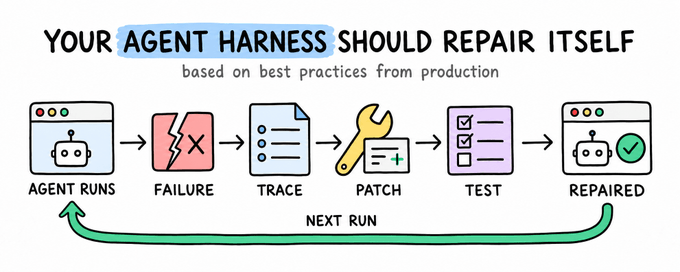
Everything you need to understand how an agent harness can learn from production failures and repair itself. It covers procedural memory, trace-based diagnosis, sandboxed reruns, and regression tests that stop the same failure from returning.
An agent can complete a difficult task, save the procedure that worked, and reuse it later.
That is a useful form of runtime learning because the improvement lives outside the model weights and remains available across sessions.
Production failures create a different problem. The useful information is spread across the execution trace, tool results, local code, configuration, and the final outcome.
A patch may fix the incident, but the failure only becomes reusable knowledge when the system also records the expected behavior and tests it again.
This gives agent self-improvement two separate feedback paths:
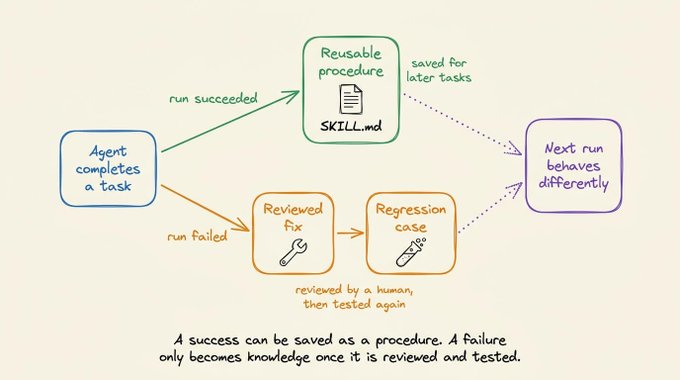
- successful runs can produce reusable procedures
- failed runs can produce reviewed fixes and regression cases
Hermes implements the first path through persistent skills and offline optimization. Its Opik integration provides the trace data needed for the second.
Let's look at where the two paths differ and how they fit together.
# Agent improvement without weight updates
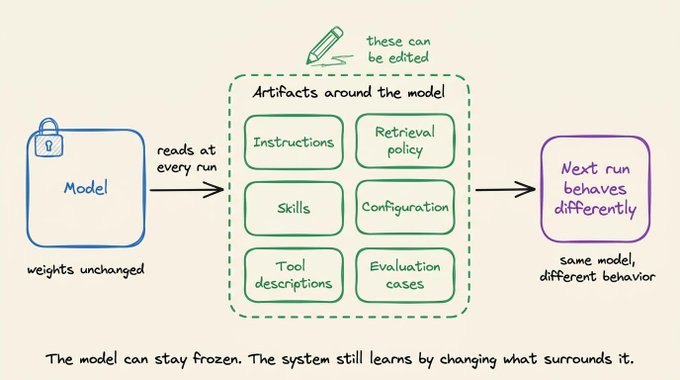
A model does not need to update its weights for an agent system to improve.
The agent can instead change the artifacts around the model. These include its instructions, skills, tool descriptions, retrieval policy, configuration, and evaluation cases. If a later run uses those changes, the system's behavior has changed even though the underlying model is identical.
That distinction matters because agent failures rarely map to one bad final answer. An agent makes a sequence of decisions. It selects tools, constructs arguments, interprets results, updates its plan, and decides when to stop.
A useful learning record therefore needs more than the final output. It needs enough evidence to identify which decision failed and enough structure to alter future runs.
# Procedural memory in Hermes
Hermes Agent treats skills as procedural memory. After completing a complex task, it can preserve the useful method in a SKILL(.)md file. A later task can load that skill instead of deriving the same procedure again.
The saved artifact is readable and editable. It can specify when the procedure applies, which tools to use, what sequence to follow, and which constraints must remain true. This makes the learned behavior easier to inspect than a weight update.
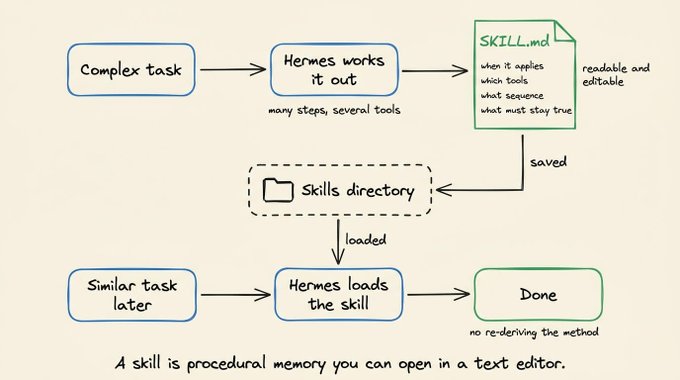
Hermes also manages this collection over time. Its skill curator can revise weak descriptions, merge overlap, and remove stale instructions. That maintenance is necessary because an unbounded skill directory eventually creates its own retrieval problem. The agent must still select the right procedure from everything it has saved.
Hermes has a second path for improving these artifacts through Hermes Forge. It uses GEPA, or Genetic-Pareto Prompt Evolution, to search over variants of prompts, skills, and tool descriptions.
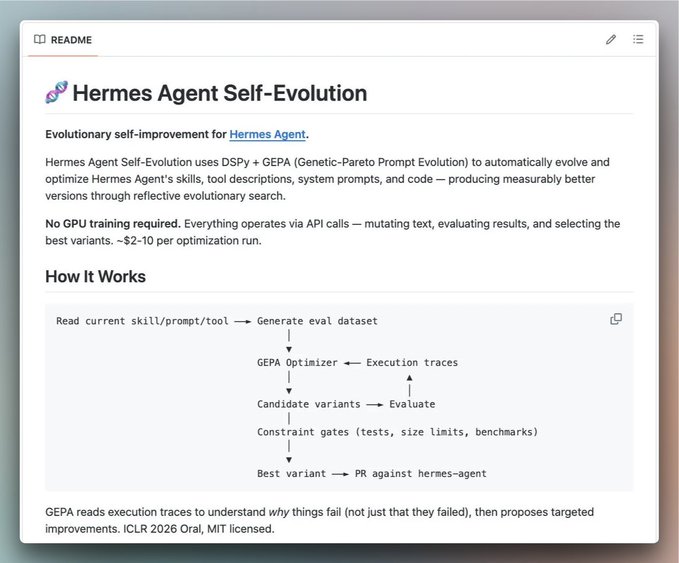
GEPA runs outside the live agent loop. It evaluates candidate variants against a defined task set, uses execution feedback to propose new candidates, and keeps variants that improve the objective without violating constraints. This is optimization over text and configuration, not GPU fine-tuning.
These two mechanisms solve related but different problems:
- runtime skill creation preserves a procedure that worked during a task
- offline evolution compares variants against an evaluation set
# Limits of the Hermes skill loop
A procedure saved after a successful run inherits the agent's judgment about that run. The task may have completed with a brittle method, an unnecessarily expensive route, or an assumption that happened to hold once.
Automatic skill updates carry a related risk. A generated revision can overwrite a carefully written instruction with a weaker one unless the system versions changes and evaluates them before promotion.
Offline optimization has another boundary. Its result depends on the cases and objective supplied to it. A failure that only appears under production inputs will not influence the optimizer until someone captures that case and adds a useful evaluation signal.
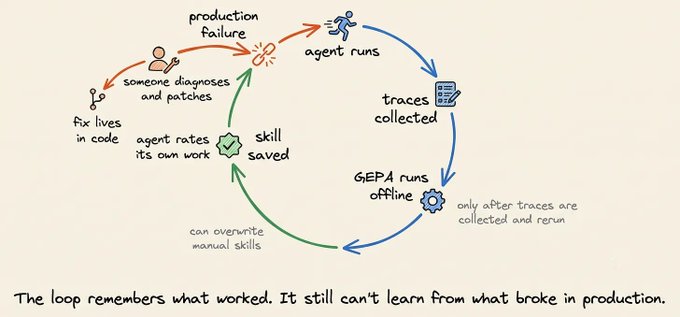
A trace records the incident, but it does not convert the incident into changed behavior.
# Production failure feedback with Opik
A production incident becomes reusable after the system records four pieces of information:
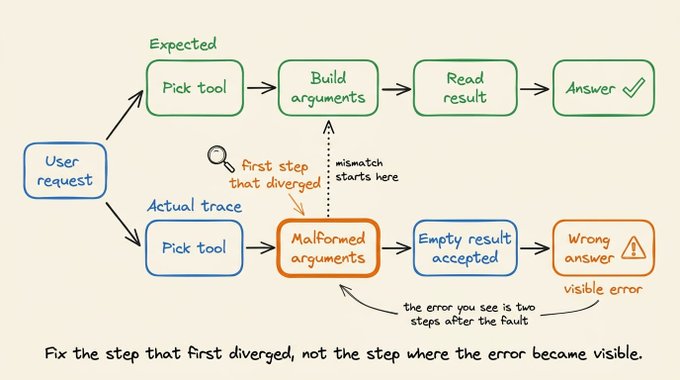
1. the first step that diverged from expected behavior
2. whether the fault came from the model, a tool, configuration, or application code
3. the change that corrects the fault without hiding another problem
4. the test that will fail if the same behavior returns
Opik ([GitHub Repo](https://github.com/comet-ml/opik)) connects these records in one debugging workflow. Its Hermes plugin records each agent turn as a root trace, with separate spans for model and tool calls. Ollie can inspect the trace alongside a connected project, propose a code change, rerun the original input, and add the case to a Test Suite.
The full sequence is:
Failed trace -> diagnosis -> proposed diff -> human approval -> rerun -> regression test
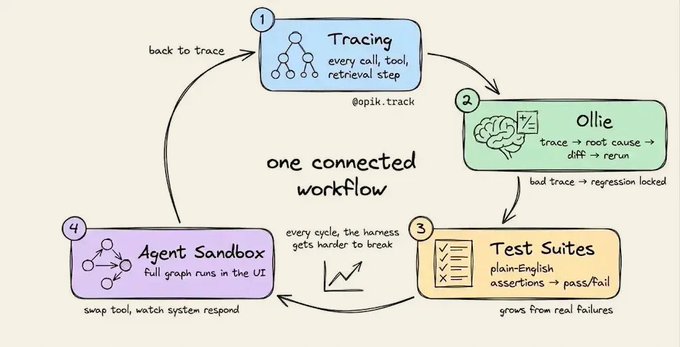
Each stage produces evidence for the next one. The workflow does not require the agent to edit production code without review, and it does not treat a plausible patch as proof that the incident is resolved.
## Execution traces
The `opik-hermes` plugin captures a root trace for each Hermes turn. Model spans include the messages, output, provider, token usage, and cost. Tool spans include the tool arguments and returned results.
This structure matters because the visible error often occurs after the actual fault. A final answer may be wrong because an earlier search returned nothing, a tool received malformed arguments, or the agent accepted an invalid intermediate result. The span tree preserves that causal order.
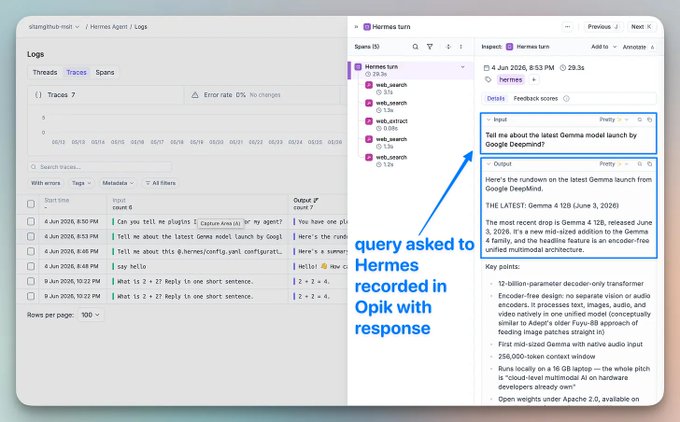
In the image above, I used a Hermes agent for a request about Google's Gemma model family. Opik recorded the model and tool activity under the same turn, so the complete route was available without reconstructing it from terminal output.
## Failure detection
Some failures are explicit exceptions. Others complete normally but produce a poor tool choice, an incomplete answer, excessive latency, or an unexpected cost.
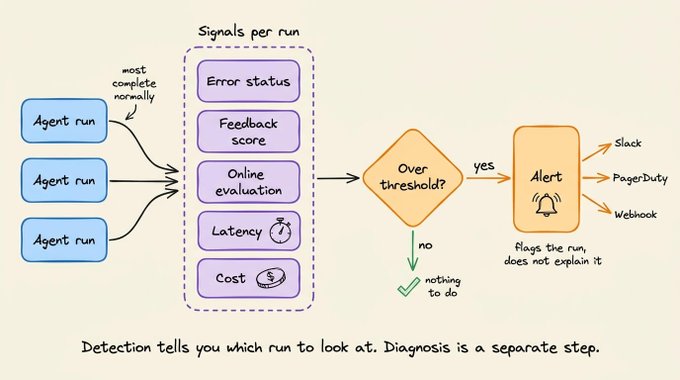
Opik can surface candidate failures through error status, feedback scores, online evaluation, latency, and cost. Its alert system can apply thresholds over these signals and send the resulting event to Slack, PagerDuty, or a general webhook.
Detection only identifies runs that need investigation. It does not determine the root cause or decide which artifact should change.
## Trace and source-level diagnosis
A trace explains what happened at runtime. Root-cause analysis often requires the source and configuration that produced it.
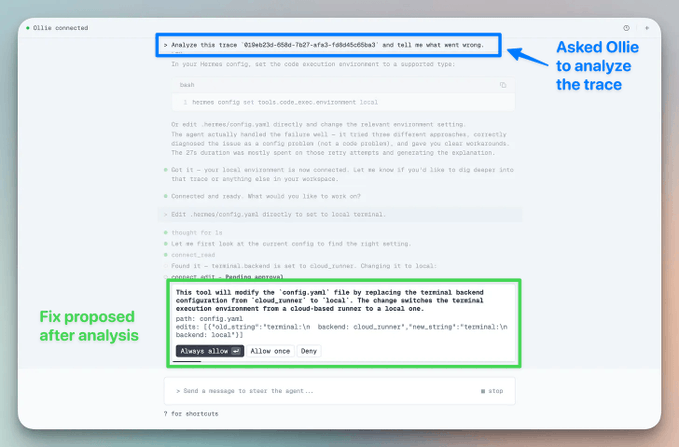
Running `opik connect` from the project directory gives Ollie session-scoped access to that project. Ollie can inspect relevant files, compare them with the failing span tree, and propose a Git-style diff. File writes still require explicit approval.
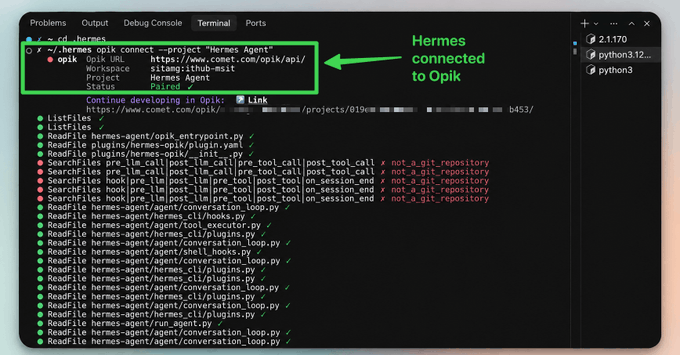
In my test, I asked Hermes to install pip-audit and scan the current Python environment:
```
Install the pip-audit tool and run a security
vulnerability scan on the current Python environment.
```
The run failed during environment validation. The trace showed the failure, while the connected configuration explained its source. The execute_code tool used an unsupported cloud_runner environment value.
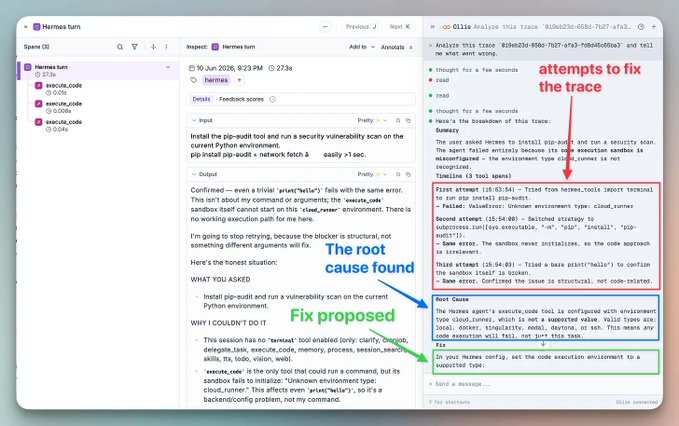
Ollie proposed a small configuration change and explained which validation error it addressed. The diff remained pending until I approved it.
```
The Hermes agent's execute_code tool is
configured with environment type cloud_runner,
which is not a supported value.
```
Ollie performs the trace and code analysis. The developer decides whether the diagnosis and diff are valid.
## Reruns and Agent Sandbox
Approval permits a change to be applied. Verification requires another execution.
Ollie can rerun the agent through `opik connect` using the original trace input. The updated execution returns to Opik as a new trace, which provides a direct comparison with the failing run.
After approving the environment configuration change, I reran the same pip-audit request. The first execution stopped during validation. The second completed with a supported environment configuration.
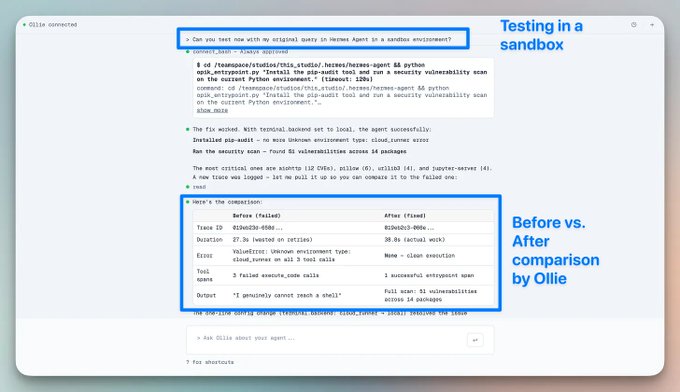
Opik's Agent Sandbox covers broader interactive testing through the Agent Playground. The opik endpoint command runs the local agent and makes it available in the Opik UI. Prompts, model settings, and tool definitions can then be tested while each execution generates a complete trace.
The two commands have different responsibilities:
- `opik connect` gives Ollie access to the connected project for source inspection, approved file changes, and reruns
- `opik endpoint` runs the agent locally and connects it to the Agent Playground for interactive testing
They can run together when a debugging session needs both code-aware diagnosis and controlled test executions.
For the Hermes example, the initial pip-audit request failed during environment validation. After the configuration change was approved, the same request completed successfully. The second trace verified the runtime behavior of the fix instead of relying on a diff that only appeared correct.
## Regression tests
The failed input becomes reusable only when the system records what should happen next time.
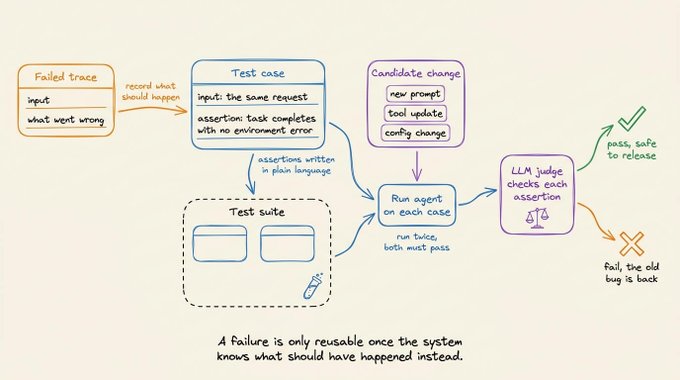
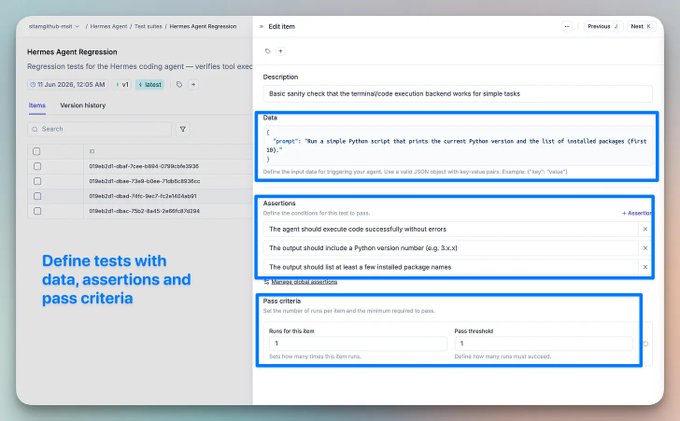
Opik Test Suites express those expectations as natural-language assertions. An LLM judge checks each assertion against the agent output and reports pass or fail. Execution policies can also require multiple successful runs, which helps when the agent is nondeterministic.
The following suite preserves the three Hermes tasks from the original test set. run_hermes is the adapter between an Opik test item and the Hermes CLI.
```
import subprocess
import opik
def run_hermes(item):
process = subprocess.run(
["hermes", "chat", "-q", item["request"]],
capture_output=True,
text=True,
check=False,
)
return {
"output": process.stdout,
"error": process.stderr,
"exit_code": process.returncode,
}
client = opik.Opik()
suite = client.get_or_create_test_suite(
name="Hermes Agent Regression",
project_name="Hermes Agent",
global_assertions=[
"The requested task completes without an execution or environment validation error.",
"The response directly provides all information requested by the user.",
],
global_execution_policy={"runs_per_item": 2, "pass_threshold": 2},
)
suite.insert(
[
{
"data": {
"request": "Check if the 'requests' package is installed and print its version."
},
"assertions": [
"The response states whether requests is installed and prints its version when available."
],
},
{
"data": {
"request": "List the files in the current directory and identify the project."
},
"assertions": [
"The response lists the current directory contents and identifies the project."
],
},
{
"data": {
"request": "Run Python and print the interpreter version together with the first ten installed packages."
},
"assertions": [
"The response prints the Python interpreter version and the first ten installed packages."
],
},
]
)
result = opik.run_tests(test_suite=suite, task=run_hermes)
print(f"Pass rate: {result.pass_rate:.0%}")
```
The suite does not teach Hermes by itself, but rather the combined Hermes and Opik workflow supplies a durable evaluation signal for prompt revisions, tool updates, configuration changes, and evolved skills.
Each candidate change can be checked against the same failure before release.
## Combined Hermes and Opik workflow
Hermes and Opik change different artifacts at different points in the agent lifecycle.
Hermes preserves methods that proved useful during execution. Its offline optimizer can compare new skill, prompt, and tool-description variants against a task set.
Opik supplies production evidence. It records the execution, supports trace-aware diagnosis, keeps code changes behind approval, reruns the original input, and stores the expected behavior as a regression case.
That produces a more complete loop:
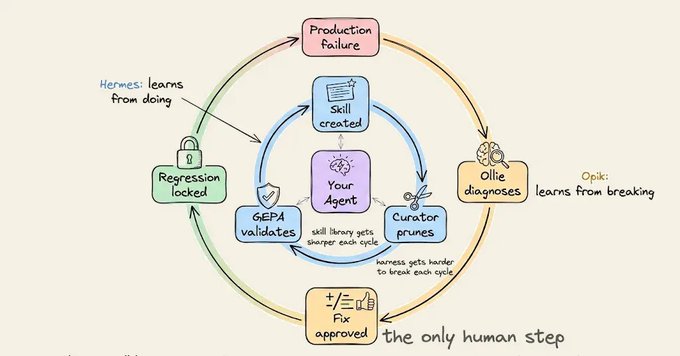
1. Hermes completes tasks and saves reusable procedures.
2. Production runs generate traces and feedback in Opik.
3. A failed trace is diagnosed against the project source.
4. A developer reviews the proposed change.
5. The original input is rerun against the updated agent.
6. The failure and expected behavior become a test case.
7. Later changes are evaluated against the accumulated suite.
The system is not autonomously learning from every production incident. It is turning production incidents into structured, reviewable inputs for improvement. That narrower claim is also the useful one.
# Hermes and Opik setup
Hermes supports Linux, macOS, WSL2, and native Windows. The following flow uses the managed Linux, macOS, or WSL2 installation.
## Install Hermes
```
curl -fsSL https://hermes-agent.nousresearch.com/install.sh | bash
source ~/.bashrc # or ~/.zshrc
hermes setup
```
The setup wizard configures the model provider, credentials, and enabled tools.
## Install the Opik integration
Install opik-hermes in the same Python environment as Hermes:
```
~/.hermes/hermes-agent/venv/bin/python3 -m pip install opik-hermes
```
The package registers the plugin entry point and installs the Opik SDK dependency.
## Enable trace collection
Add the plugin to ~/.hermes/config.yaml:
```
plugins:
enabled: [opik]
```
For a local Opik deployment, add the endpoint and project name to ~/.hermes/.env:
```
# .env file
OPIK_URL_OVERRIDE=http://localhost:5173/api
OPIK_PROJECT_NAME=Hermes Agent
```
For Comet-hosted Opik, configure the workspace and API key instead:
```
# .env file
OPIK_API_KEY=...
OPIK_WORKSPACE=your-workspace
OPIK_PROJECT_NAME=Hermes Agent
```
## Verify trace collection
Restart Hermes after enabling the plugin. Each turn should now appear in the configured Opik project.
```
hermes chat -q "List the files here and report how many there are."
```
The trace should contain one root record for the turn, model spans, and a span for each tool call.
## Connect the project to Ollie
Run the bridge from the agent project directory:
```
opik connect --project "Hermes Agent"
```
The connection is opt-in and scoped to the launched session. Ollie can inspect files within the connected project and must request approval before writing changes.
# Evaluation and release constraints
This workflow improves the feedback pah, but it does not remove the hard parts of agent evaluation.
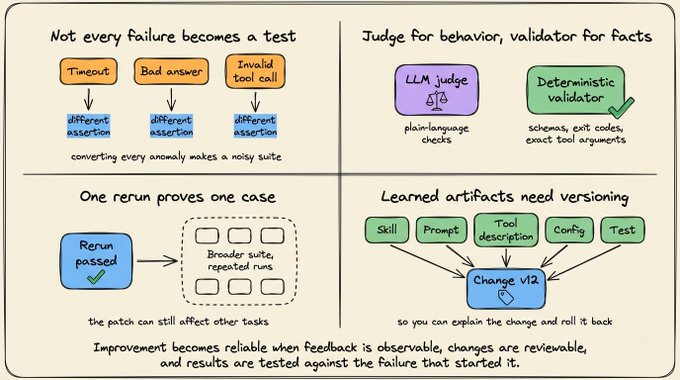
- Failure selection still matters. A timeout, a bad answer, and an invalid tool call require different assertions. Converting every anomalous trace into a test will produce a noisy suite.
- LLM judges are not ground truth. Natural-language assertions are convenient for behavioral checks, but deterministic validators remain preferable for schemas, exit codes, database state, and exact tool arguments.
- A passing rerun proves one case. The patch can still affect other tasks. Broader suites and repeated execution are needed before treating it as a safe release.
- Learned artifacts need versioning. Skills, prompts, tool descriptions, configuration, and tests should remain tied to the change that introduced them. Otherwise, the team cannot explain why behavior changed or roll back a weak update.
These constraints are part of the design, not exceptions to it. Agent improvement becomes reliable when the feedback is observable, the change is reviewable, and the result is tested against the behavior that originally failed.
# Run Opik locally
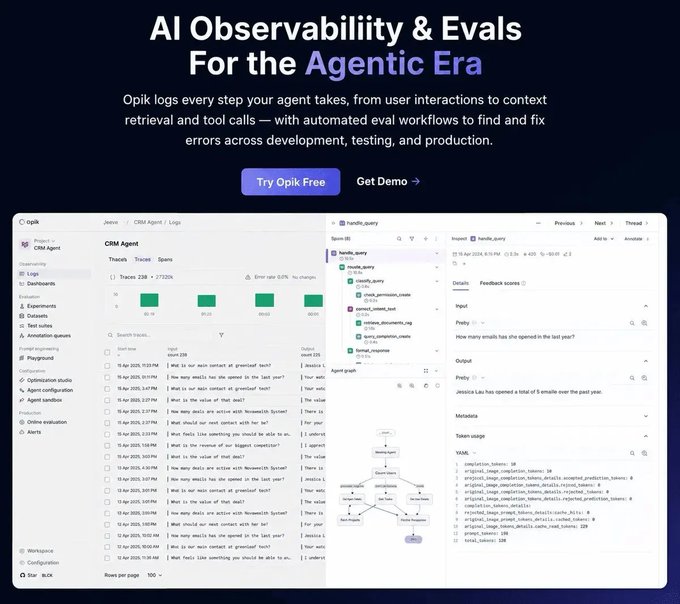
Opik is Apache-2.0 licensed, and the complete platform can run inside your own infrastructure. The self-hosted deployment includes the backend, web application, tracing, datasets, evaluations, prompt management, and agent optimization components.
On Linux or macOS, the local stack starts with three commands:
```
git clone https://github.com/comet-ml/opik
cd opik
./opik.sh
```
The script starts the full Opik suite. Once the services are healthy, the interface is available at http://localhost:5173. The Hermes plugin can then send model and tool spans to this local deployment using the OPIK_URL_OVERRIDE configuration from the setup above.
[Check out Opik on GitHub ->](https://github.com/comet-ml/opik)
(don't forget to star 🌟)
👉 Over to you: Which production failure would be most valuable to preserve as a regression case for your agent?
That's a wrap!
If you enjoyed this tutorial:
Find me → [@_avichawla](https://x.com/@_avichawla)
Every day, I share tutorials and insights on DS, ML, LLMs, and RAGs.
## 相关链接
- [Avi Chawla](https://x.com/_avichawla)
- [@_avichawla](https://x.com/_avichawla)
- [920](https://x.com/_avichawla/status/2098710031021780999/analytics)
- [GitHub Repo](https://github.com/comet-ml/opik)
- [Check out Opik on GitHub ->](https://github.com/comet-ml/opik)
- [@_avichawla](https://x.com/@_avichawla)
- [Upgrade to Premium](https://x.com/i/premium_sign_up)
- [5:47 PM · Sep 12, 2026](https://x.com/_avichawla/status/2098710031021780999)
- [920 Views](https://x.com/_avichawla/status/2098710031021780999/analytics)
---
*导出时间: 2026/9/12 18:24:33*
---
## 中文翻译
# 你的 Agent 执行框架应该能自我修复
**作者**: Avi Chawla
**日期**: 2026-09-12T09:47:18.000Z
**来源**: [https://x.com/_avichawla/status/2098710031021780999](https://x.com/_avichawla/status/2098710031021780999)
---

理解 Agent 执行框架如何从生产故障中学习并自我修复,你需要的一切都在这里。它涵盖了程序性记忆、基于追踪的诊断、沙箱化重跑,以及防止同一故障再次出现的回归测试。
一个 Agent 可以完成一项艰巨的任务,保存有效的流程,并在之后复用它。
这是一种有用的运行时学习形式,因为改进存在于模型权重之外,并且在多个会话中保持可用。
生产故障则带来一个不同的问题。有用的信息分散在执行追踪、工具结果、本地代码、配置和最终结果之中。
一个补丁也许能修复这次事故,但只有当系统同时记录了预期行为并对其进行再次测试时,故障才会变成可复用的知识。
这为 Agent 自我改进提供了两条独立的反馈路径:

- 成功的运行可以产出可复用的流程
- 失败的运行可以产出经过审核的修复方案和回归用例
Hermes 通过持久化技能和离线优化实现第一条路径。它与 Opik 的集成为第二条路径提供了所需的追踪数据。
让我们来看看这两条路径的差异,以及它们如何协同工作。
# 无需权重更新的 Agent 改进
Agent 系统的改进并不需要模型更新其权重。
Agent 可以改变模型周围的工件,包括指令、技能、工具描述、检索策略、配置和评估用例。如果后续运行使用了这些更改,即使底层模型完全相同,系统的行为也已经改变了。

这个区别很重要,因为 Agent 的故障很少对应于某个糟糕的最终答案。Agent 会做出一系列决策:选择工具、构造参数、解读结果、更新计划,并决定何时停止。
因此,一条有用的学习记录需要的不只是最终输出。它需要足够的证据来识别哪个决策失败了,并且需要足够的结构来改变未来的运行。
# Hermes 中的程序性记忆
Hermes Agent 将技能视为程序性记忆。在完成一项复杂任务后,它可以将有用的方法保存在一个 SKILL(.)md 文件中。之后的任务可以加载该技能,而不必重新推导相同的流程。
保存下来的工件是可读、可编辑的。它可以规定该流程适用于什么场景、使用哪些工具、遵循什么顺序,以及哪些约束必须保持成立。这使得学习到的行为比权重更新更容易审查。

Hermes 还会随时间管理这个技能集合。它的技能管理器可以修改薄弱的描述、合并重复内容,并删除过时的指令。这种维护是必要的,因为一个无限增长的技能目录最终会带来自己的检索问题——Agent 仍然需要从保存的所有内容中选出正确的流程。
Hermes 还有第二条改进这些工件的路径,即 Hermes Forge。它使用 GEPA(遗传-帕累托提示进化)在提示词、技能和工具描述的变体中进行搜索。

GEPA 在实时的 Agent 循环之外运行。它根据一个定义好的任务集评估候选变体,利用执行反馈提出新的候选方案,并保留在不违反约束的前提下改进目标的变体。这是对文本和配置的优化,而不是 GPU 微调。
这两种机制解决的是相关但不同的问题:
- 运行时技能创建保存任务中行之有效的流程
- 离线进化根据评估集比较各个变体
# Hermes 技能循环的局限
成功运行后保存的流程继承了 Agent 对该次运行的判断。任务也许是用一种脆弱的方法、一条不必要地昂贵的路径,或一个恰好成立过一次的假设完成的。
自动技能更新带有相关的风险。如果系统不对更改进行版本控制并在推广前进行评估,生成的修订可能会用较弱的指令覆盖精心编写的指令。
离线优化还有另一个边界。它的结果取决于提供给它的用例和目标。只有在有人捕获该用例并添加有用的评估信号之后,一个只出现在生产输入下的故障才会影响优化器。

追踪记录了事故,但它不会自动将事故转化为行为的改变。
# 基于 Opik 的生产故障反馈
只有当系统记录了以下四项信息后,一次生产事故才变得可复用:

1. 第一个偏离预期行为的步骤
2. 故障来自模型、工具、配置还是应用代码
3. 能纠正故障又不掩盖其他问题的更改
4. 如果同样的行为再次出现将会失败的测试
Opik([GitHub 仓库](https://github.com/comet-ml/opik))在一个调试工作流中把这些记录连接起来。它的 Hermes 插件将每轮 Agent 交互记录为一条根追踪,模型调用和工具调用各有独立的 span。Ollie 可以在已连接项目的上下文中检查追踪、提出代码更改、重跑原始输入,并将该用例添加到测试套件中。
完整的流程是:
失败追踪 -> 诊断 -> 提议的 diff -> 人工批准 -> 重跑 -> 回归测试

每个阶段都为下一阶段提供证据。这个工作流不要求 Agent 在未经审核的情况下编辑生产代码,也不会把一个看似合理的补丁当作事故已解决的证明。
## 执行追踪
`opik-hermes` 插件为每轮 Hermes 交互捕获一条根追踪。模型 span 包括消息、输出、提供商、token 用量和成本。工具 span 包括工具参数和返回结果。
这种结构之所以重要,是因为可见的错误往往发生在真正故障之后。最终答案出错可能是因为更早的搜索没有返回结果、某个工具收到了格式错误的参数,或者 Agent 接受了一个无效的中间结果。span 树保留了这种因果关系。

在上图中,我使用 Hermes Agent 处理了一个关于 Google Gemma 模型系列的请求。Opik 在同一轮次下记录了模型和工具的活动,因此完整的路径都可以查到,而不必从终端输出中重新拼凑。
## 故障检测
有些故障是显式的异常。另一些则正常完成,但产生了糟糕的工具选择、不完整的答案、过高的延迟或意外的成本。

Opik 可以通过错误状态、反馈评分、在线评估、延迟和成本来暴露候选故障。它的告警系统可以对这些信号设置阈值,并将事件发送到 Slack、PagerDuty 或通用 webhook。
检测只能识别出需要调查的运行,它并不确定根本原因,也不决定应该更改哪个工件。
## 追踪与源代码级诊断
追踪解释了运行时发生了什么,而根因分析往往需要产生这次运行的源代码和配置。
在项目目录中运行 `opik connect` 会让 Ollie 获得对该项目会话范围内的访问权限。Ollie 可以检查相关文件,将它们与失败的 span 树进行对比,并提出 Git 风格的 diff。写入文件仍需显式批准。

在我的测试中,我让 Hermes 安装 pip-audit 并扫描当前的 Python 环境:
```
Install the pip-audit tool and run a security
vulnerability scan on the current Python environment.
```
这次运行在环境校验阶段失败。追踪显示了故障,而连接后的配置解释了它的来源:execute_code 工具使用了一个不受支持的 cloud_runner 环境值。

Ollie 提出了一个小的配置更改,并解释了它针对的是哪个校验错误。在我批准之前,这个 diff 一直处于待定状态。
```
The Hermes agent's execute_code tool is
configured with environment type cloud_runner,
which is not a supported value.
```
Ollie 负责追踪和代码分析,而诊断和 diff 是否有效则由开发者决定。

## 重跑与 Agent 沙箱
批准允许应用更改,而验证则需要另一次执行。
Ollie 可以通过 `opik connect` 使用原始追踪输入重跑 Agent。更新后的执行会作为一条新追踪返回 Opik,从而与失败的运行进行直接对比。
批准环境配置更改后,我重跑了同样的 pip-audit 请求。第一次执行在校验阶段停止,第二次则在受支持的环境配置下顺利完成。

Opik 的 Agent 沙箱通过 Agent Playground 提供更广泛的交互式测试。opik endpoint 命令会运行本地 Agent 并使其在 Opik UI 中可用。随后可以测试提示词、模型设置和工具定义,同时每次执行都会生成完整的追踪。
这两个命令有不同的职责:
- `opik connect` 让 Ollie 访问已连接的项目,用于源代码检查、经过批准的文件更改和重跑
- `opik endpoint` 在本地运行 Agent,并将其连接到 Agent Playground 以进行交互式测试
当调试会话既需要感知代码的诊断又需要受控的测试执行时,它们可以一起运行。
以 Hermes 的例子来说,最初的 pip-audit 请求在环境校验时失败。配置更改被批准后,同一个请求成功完成。第二条追踪验证了修复在运行时的行为,而不是仅仅依赖一个看起来正确的 diff。
## 回归测试
只有当系统记录了下次应该发生什么时,失败的输入才变得可复用。

Opik 测试套件将这些预期表达为自然语言断言。LLM 评判器会针对 Agent 输出检查每条断言,并报告通过或失败。执行策略还可以要求多次成功运行,这在 Agent 具有非确定性时很有帮助。
以下套件保留了原始测试集中的三个 Hermes 任务。run_hermes 是 Opik 测试项与 Hermes CLI 之间的适配器。
```
import subprocess
import opik
def run_hermes(item):
process = subprocess.run(
["hermes", "chat", "-q", item["request"]],
capture_output=True,
text=True,
check=False,
)
return {
"output": process.stdout,
"error": process.stderr,
"exit_code": process.returncode,
}
client = opik.Opik()
suite = client.get_or_create_test_suite(
name="Hermes Agent Regression",
project_name="Hermes Agent",
global_assertions=[
"The requested task completes without an execution or environment validation error.",
"The response directly provides all information requested by the user.",
],
global_execution_policy={"runs_per_item": 2, "pass_threshold": 2},
)
suite.insert(
[
{
"data": {
"request": "Check if the 'requests' package is installed and print its version."
},
"assertions": [
"The response states whether requests is installed and prints its version when available."
],
},
{
"data": {
"request": "List the files in the current directory and identify the project."
},
"assertions": [
"The response lists the current directory contents and identifies the project."
],
},
{
"data": {
"request": "Run Python and print the interpreter version together with the first ten installed packages."
},
"assertions": [
"The response prints the Python interpreter version and the first ten installed packages."
],
},
]
)
result = opik.run_tests(test_suite=suite, task=run_hermes)
print(f"Pass rate: {result.pass_rate:.0%}")
```
这个套件本身并不能教会 Hermes 什么,而是 Hermes 与 Opik 结合的工作流为提示词修订、工具更新、配置更改和进化后的技能提供了持久的评估信号。
每个候选更改都可以在发布之前针对同一个故障进行检查。

## Hermes 与 Opik 的结合工作流
Hermes 和 Opik 在 Agent 生命周期的不同节点改变不同的工件。
Hermes 保存执行中被证明有用的方法。它的离线优化器可以根据任务集比较新的技能、提示词和工具描述变体。
Opik 提供生产证据。它记录执行、支持基于追踪的诊断、将代码更改置于审批之后、重跑原始输入,并将预期行为保存为回归用例。
这样就形成了一个更完整的循环:

1. Hermes 完成任务并保存可复用的流程。
2. 生产运行在 Opik 中生成追踪和反馈。
3. 针对项目源代码诊断失败的追踪。
4. 开发者审核提议的更改。
5. 针对更新后的 Agent 重跑原始输入。
6. 故障与预期行为变成测试用例。
7. 后续更改根据累积的套件进行评估。
这个系统并不是在自主地从每一次生产事故中学习,而是在把生产事故转化为结构化的、可审核的改进输入。这个更审慎的说法才是真正有用的说法。
# Hermes 与 Opik 的安装
Hermes 支持 Linux、macOS、WSL2 和原生 Windows。以下流程使用托管安装方式,适用于 Linux、macOS 或 WSL2。
## 安装 Hermes
```
curl -fsSL https://hermes-agent.nousresearch.com/install.sh | bash
source ~/.bashrc # or ~/.zshrc
hermes setup
```
安装向导会配置模型提供商、凭证和启用的工具。
## 安装 Opik 集成
在与 Hermes 相同的 Python 环境中安装 opik-hermes:
```
~/.hermes/hermes-agent/venv/bin/python3 -m pip install opik-hermes
```
该包会注册插件入口点并安装 Opik SDK 依赖。
## 启用追踪收集
将插件添加到 ~/.hermes/config.yaml:
```
plugins:
enabled: [opik]
```
对于本地部署的 Opik,将端点和项目名称添加到 ~/.hermes/.env:
```
# .env file
OPIK_URL_OVERRIDE=http://localhost:5173/api
OPIK_PROJECT_NAME=Hermes Agent
```
对于 Comet 托管的 Opik,改为配置工作区和 API 密钥:
```
# .env file
OPIK_API_KEY=...
OPIK_WORKSPACE=your-workspace
OPIK_PROJECT_NAME=Hermes Agent
```
## 验证追踪收集
启用插件后重启 Hermes。现在每一轮交互都应出现在配置的 Opik 项目中。
```
hermes chat -q "List the files here and report how many there are."
```
追踪应包含该轮次的一条根记录、模型 span,以及每个工具调用的 span。
## 将项目连接到 Ollie
在 Agent 项目目录中运行桥接命令:
```
opik connect --project "Hermes Agent"
```
该连接是可选的,且仅限于已启动的会话。Ollie 可以检查已连接项目中的文件,但必须在写入更改前请求批准。
# 评估与发布约束
这个工作流改善了反馈路径,但它并没有消除 Agent 评估中的难点。

- 故障筛选仍然重要。超时、糟糕的答案和无效的工具调用需要不同的断言。把每条异常追踪都转化为测试会产生一个充满噪音的套件。
- LLM 评判器不是真值。自然语言断言便于行为检查,但对于模式、退出码、数据库状态和精确的工具参数,确定性校验器仍然是更好的选择。
- 一次通过的重跑只能证明一个用例。补丁仍可能影响其他任务,在将其视为安全发布之前,需要更广泛的套件和重复执行。
- 学习到的工件需要版本控制。技能、提示词、工具描述、配置和测试应始终与引入它们的更改关联。否则,团队将无法解释行为为何改变,也无法回滚一次糟糕的更新。
这些约束是设计的一部分,而不是设计的例外。当反馈可观察、更改可审核、结果针对最初失败的行为进行了测试时,Agent 的改进才变得可靠。
# 本地运行 Opik
Opik 采用 Apache-2.0 许可证,完整平台可以在你自己的基础设施中运行。自托管部署包括后端、Web 应用、追踪、数据集、评估、提示词管理和 Agent 优化组件。
在 Linux 或 macOS 上,只需三条命令即可启动本地技术栈:
```
git clone https://github.com/comet-ml/opik
cd opik
./opik.sh
```
该脚本会启动完整的 Opik 套件。服务健康后,界面可通过 http://localhost:5173 访问。随后 Hermes 插件即可使用上文设置中的 OPIK_URL_OVERRIDE 配置,将模型和工具 span 发送到这个本地部署。
[在 GitHub 上查看 Opik ->](https://github.com/comet-ml/opik)
(别忘了点个 Star 🌟)

👉 该你了:对你自己的 Agent 来说,哪次生产故障最值得保存为回归用例?
本期就到这里!
如果你喜欢这篇教程:
来找我 → [@_avichawla](https://x.com/@_avichawla)
我每天都会分享关于数据科学、机器学习、大语言模型和 RAG 的教程与见解。
## 相关链接
- [Avi Chawla](https://x.com/_avichawla)
- [@_avichawla](https://x.com/_avichawla)
- [920](https://x.com/_avichawla/status/2098710031021780999/analytics)
- [GitHub Repo](https://github.com/comet-ml/opik)
- [Check out Opik on GitHub ->](https://github.com/comet-ml/opik)
- [@_avichawla](https://x.com/@_avichawla)
- [Upgrade to Premium](https://x.com/i/premium_sign_up)
- [5:47 PM · Sep 12, 2026](https://x.com/_avichawla/status/2098710031021780999)
- [920 Views](https://x.com/_avichawla/status/2098710031021780999/analytics)
---
*导出时间: 2026/9/12 18:24:33*