使用 Google Agents CLI 构建智能体评估内循环 Google Cloud Tech 2026-08-28 15.9 KB 31.9K 289 ☆ 收藏 𝕏 文章列表 本文是 Google 关于智能体质量飞轮的实操续篇,介绍如何用 agents-cli 手动运行评估内循环。作者构建了一个汇率转换智能体 fx-agent,并故意在指令中植入缺陷(未要求在回复末尾列出所使用的工具),通过六个测试用例的评估集验证:内置 AutoRaters 指标会遗漏此类缺陷,因此需要将关键行为提升为自定义指标(LLM 评审与正则代码检查双重视角)来单独度量。随后修复一行指令,并用分数变化证明修复有效。文章强调评估的意义在于检查智能体是否遵守规则,而非答案表面质量。 GoogleAgent评估agents-cliAutoRatersGeminiAgent Platform自定义指标质量飞轮LLM-as-judge教程 85 强烈推荐 ▶ 一篇发布于昨天的实操教程,完整展示 Agent 评估闭环(内置指标盲区→自定义指标→修复验证),步骤清晰、含真实运行数据与代码,洞察(内置评分会掩盖未声明行为)实用且结构优秀,但整体属于工具使用指南而非深度原创分析。 # Build the Agent Evaluation Inner Loop with Google Agents CLI **作者**: Google Cloud Tech **日期**: 2026-08-27T18:32:48.000Z **来源**: [https://x.com/GoogleCloudTech/status/2093044070926991653](https://x.com/GoogleCloudTech/status/2093044070926991653) ---  An agent can be right and wrong at the same time. The answer is correct, the tone is fine, and a rule you set was quietly skipped, and reading the reply will never show you. That is what an agent eval is for. It does not grade whether the answer looks good, it checks whether the agent followed your rule, and it catches the failure your own eyes would wave through. By [@Saboo_Shubham_](https://x.com/@Saboo_Shubham_) and [@lavinigam](https://x.com/@lavinigam) This post is the hands-on companion to our [last one](https://developers.googleblog.com/driving-the-agent-quality-flywheel-from-your-coding-agent/). There, the agent quality flywheel ran as a skill that picked the metric and drove the loop for you. Here you run the loop yourself with agents-cli and watch it work. You build a small agent, plant a real failure, catch it with an eval, fix it, and prove the fix moved the number you care about. Every command and score below came from a real run: the agent on Agent Platform, the built-in AutoRaters on the [Agent Platform evaluation service](https://docs.cloud.google.com/gemini-enterprise-agent-platform/optimize/evaluation/agent-evaluation), and a local code check for the footer. We want every answer to end with a line that lists the tools the agent used, like Tools used: get_exchange_rate, so a downstream system can audit tool calls. The agent's instruction never asks for it, so the model never writes it, and the answer still looks fine without it. We planted that gap on purpose. A rule the model already follows gives you nothing to measure, so for the flywheel to show you anything, you need a behavior that fails first. 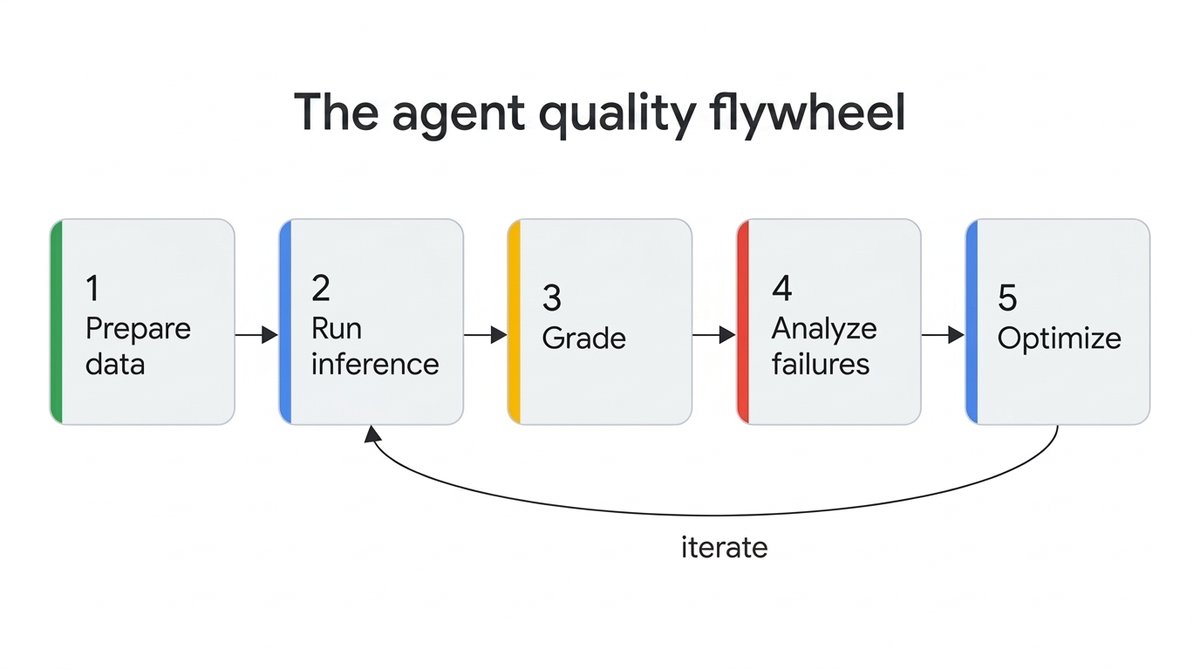 Here is the whole loop, start to finish: - Build a tiny agent with one deliberate gap. - Write a six-case eval set. - Grade the baseline with the built-in AutoRaters, and watch them miss the bug. - Promote the one behavior you care about to its own metric. - Fix one line, then prove the number moved. All the code is in the [companion repo](https://github.com/GoogleCloudPlatform/generative-ai/tree/main/agents/adk/agent-quality-flywheel): clone it, follow its README, and you have the whole loop running. To keep this post readable we show only the parts that matter, and each excerpt names its full file in the repo. ## Check this before you start - A Google Cloud project with Agent Platform access and the [Agent Platform evaluation service](https://docs.cloud.google.com/gemini-enterprise-agent-platform/optimize/evaluation/evaluate-agents) enabled, and application default credentials (gcloud auth application-default login). - Access to a current Gemini model on Agent Platform . This post uses gemini-3.7-flash. - [agents-cli](https://adk.dev/get-started/agents-cli/) and [uv](https://docs.astral.sh/uv/). Install the CLI with the uv tool install google-agents-cli. ## Step 1: Build the agent under test The agent is fx-agent, a currency converter with one tool, get_exchange_rate, backed by a fixed rate table so runs stay cheap and repeatable. Scaffold it with agents-cli create fx-agent, or clone the repo. The only part that matters for this walkthrough is the instruction, which has a deliberate gap: ``` # app/agent.py (excerpt) - full tool and rate table in the repo root_agent = Agent( name="root_agent", model=Gemini(model="gemini-3.7-flash"), instruction=( "You are a currency conversion assistant. When the user asks to convert " "an amount, call get_exchange_rate, multiply, and give the result. " "Keep your answer short and conversational." ), tools=[get_exchange_rate], ) ``` Read that instruction closely. It says nothing about a footer. We want every answer to end with a line that lists the tools the agent used, like Tools used: get_exchange_rate, so a downstream system can audit tool calls. The instruction never asks for it, so the model never writes it. That is the bug we planted, on purpose. A rule the model already follows gives you nothing to measure. To see the flywheel work, you need a behavior that fails first. ## Step 2: Author the eval set An eval set is a JSON file of test cases. Ours has six single-turn conversions in tests/eval/datasets/fx-dataset.json. One case shows the shape: ``` { "eval_cases": [ { "eval_case_id": "usd_to_eur", "prompt": {"role": "user", "parts": [{"text": "Convert 100 USD to EUR."}]} } ] } ``` The other five (USD to JPY, GBP to USD, and so on) follow the same shape. Six cases is enough to show the pattern and cheap enough to run in seconds. ## Step 3: Grade the baseline with built-in AutoRaters Run the agent over the dataset and grade it with three built-in metrics: ``` agents-cli eval run --dataset tests/eval/datasets/fx-dataset.json \ --metrics tool_use_quality,instruction_following,final_response_quality ``` eval run runs the agent on each case to produce a trace, then grades the traces with Google's [AutoRaters](https://docs.cloud.google.com/gemini-enterprise-agent-platform/optimize/evaluation/manage-metrics) on the Agent Platform evaluation service. These three are built-in [managed metrics](https://docs.cloud.google.com/gemini-enterprise-agent-platform/models/rubric-metric-details). Here is the baseline, on gemini-3.7-flash, as pass rate: 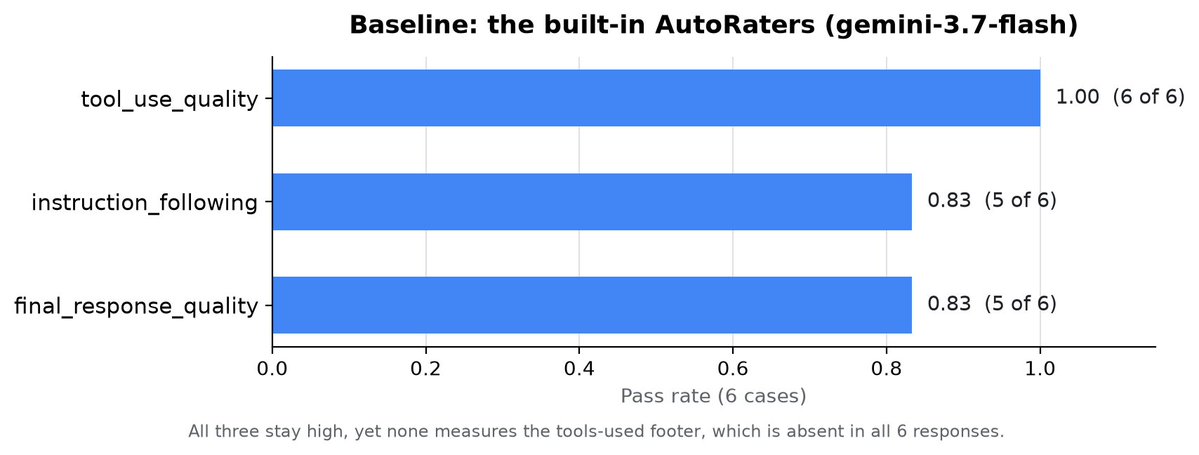 The agent picks the right tool every time, and the built-ins mostly pass. The two misses are on other criteria, not the footer. And that is the catch: the footer is absent from all six responses, yet these scores stay high. The built-ins grade against the agent's own instruction and fold many criteria into one blended score, so a behavior you have not specified yet, or one line among several, does not surface as its own number. You cannot threshold on it, and you cannot watch it move from run to run. (Scores from model-based graders shift a little between runs, which is one more reason to trust the delta over any single number.) ## Step 4: Isolate the behavior with a custom metric So promote the footer to a metric of its own. This is the move from the last post, made concrete: name the one behavior you care about and grade it directly. The [Metric Registry](https://docs.cloud.google.com/gemini-enterprise-agent-platform/optimize/evaluation/manage-metrics) takes both model-graded and code-based custom metrics. fx_footer_config.yaml defines two views of the same check; the model-judge one is the heart of it: ``` # fx_footer_config.yaml (excerpt) - full config, including the code metric, in the repo custom_metrics: - name: tools_footer_present # LLM-as-judge rubric prompt_template: | Grade whether the assistant's final response ends with a tool-usage footer: a line that explicitly lists the tools used, for example "Tools used: get_exchange_rate". A sentence that mentions a tool does not count. User prompt: {prompt} Assistant final response: {response} Full trajectory (for context): {agent_data} Return JSON: {"score": <1 if present else 0>, "explanation": "..."} . ``` Don’t set judge_model here. Passing an explicit model is rejected as "Invalid autorater model resource name", so the service default autorater is used. The repo also ships a second metric, tools_footer_present_code, a plain regex over the response text that costs nothing and needs no model. Running both means that when a cheap deterministic check agrees with the judge, you are not trusting the judge on faith. Grade the baseline traces against the config: ``` agents-cli eval generate --dataset tests/eval/datasets/fx-dataset.json --output artifacts/baseline_traces.json agents-cli eval grade --traces artifacts/baseline_traces.json --config fx_footer_config.yaml \ --output artifacts/baseline_footer/ ``` Both metrics agree, and the number is not blended or fuzzy: | Metric | Baseline | | --- | --- | | tools_footer_present (model judge) | 0 of 6 | | tools_footer_present_code (code) | 0 of 6 | Zero out of six. Now you have a signal you can act on. For the behavior you're about to touch, write it one dedicated metric, and back it with a code check whenever the rule is something a regex can decide. ## Step 5: Fix one line, then prove the number moved The fix is one instruction edit: replace the baseline's closing sentence ("keep your answer short and conversational") with a paragraph that makes the footer mandatory. The repo ships both versions, so you flip a single line (INSTRUCTION = FIXED_INSTRUCTION); the added paragraph is: ``` "You MUST end EVERY response with a footer on its own final line in " "exactly this format: 'Tools used: <comma-separated tool names>'. " "For a conversion this is 'Tools used: get_exchange_rate'. " "Never omit this footer line." ``` Set INSTRUCTION = FIXED_INSTRUCTION in app/agent.py, re-run the same commands into candidate/ folders, and compare: ``` agents-cli eval run --dataset tests/eval/datasets/fx-dataset.json \ --metrics tool_use_quality,instruction_following,final_response_quality \ --output artifacts/candidate_ootb/ agents-cli eval generate --dataset tests/eval/datasets/fx-dataset.json --output artifacts/candidate_traces.json agents-cli eval grade --traces artifacts/candidate_traces.json --config fx_footer_config.yaml \ --output artifacts/candidate_footer/ # eval grade writes a timestamped results_<ts>.json into each output dir and prints its path. # Pass the two result files to compare (this picks the newest in each folder): agents-cli eval compare \ "$(ls -t artifacts/baseline_footer/results_*.json | head -1)" \ "$(ls -t artifacts/candidate_footer/results_*.json | head -1)" . ``` The before and after, on gemini-3.7-flash: 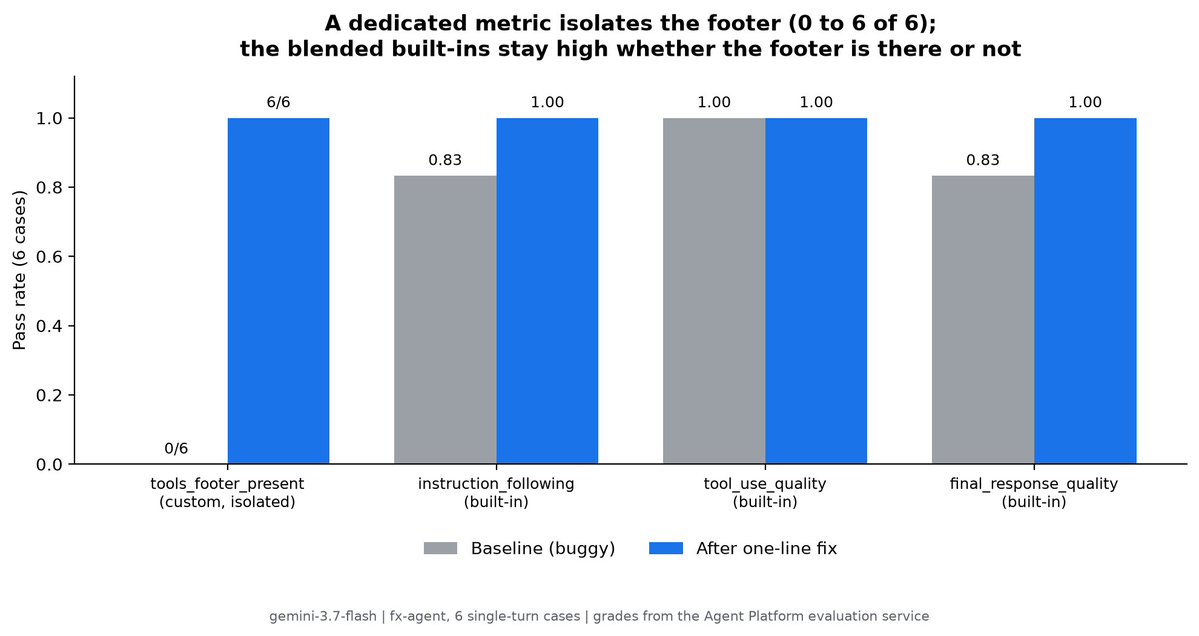 The metric you built for the behavior you changed went from zero to every case, and the code check confirms it. The built-ins rose too, but as a blended pass rate you cannot read the footer out of. instruction_following moved from 0.83 to 1.00, and only part of that is the footer, since its baseline miss was elsewhere. The footer metric answers the footer question on its own, 0 of 6 to 6 of 6. That is why the flywheel leans on one dedicated measure for the thing you touched and treats the adaptive built-ins as a broad health check. tool_use_quality held at 1.00 across the change, so the fix did not break tool selection. This echoes a case from the original post: a bug-triage agent that also skipped a tools-used footer went from 0 to 96 percent across fifteen cases with a one-paragraph instruction change. Our jump to a clean 6 of 6 is sharper only because the agent is tiny and single-purpose. ## Where this goes from here You just run the inner loop by hand: prepare a small dataset, grade it, read the result, change one thing, and grade again. Two extensions use the same commands. When you have no test cases yet, agents-cli eval dataset synthesize uses the [User Simulator](https://docs.cloud.google.com/gemini-enterprise-agent-platform/optimize/evaluation/evaluate-simulated) to generate scenarios and drive multi-turn conversations, so you can grade an agent before it sees real traffic. Treat synthetic scenarios as a starting point and read the rubrics they generate. A simulator can invent a rule your agent was never meant to follow, so a low score there can be an artifact of the generated test rather than a real defect. When the agent is in production, point the same graders at real traces instead of synthesized ones, and let [Online Monitors](https://docs.cloud.google.com/gemini-enterprise-agent-platform/optimize/evaluation/evaluate-online) score live traffic on a schedule and write the results to Cloud Monitoring. The dev loop and the production loop share one set of AutoRaters. When a run has many failures, [Automatic Loss Analysis](https://docs.cloud.google.com/gemini-enterprise-agent-platform/optimize/evaluation/view-results) groups them into patterns so you can see the dominant failure mode instead of reading every case. 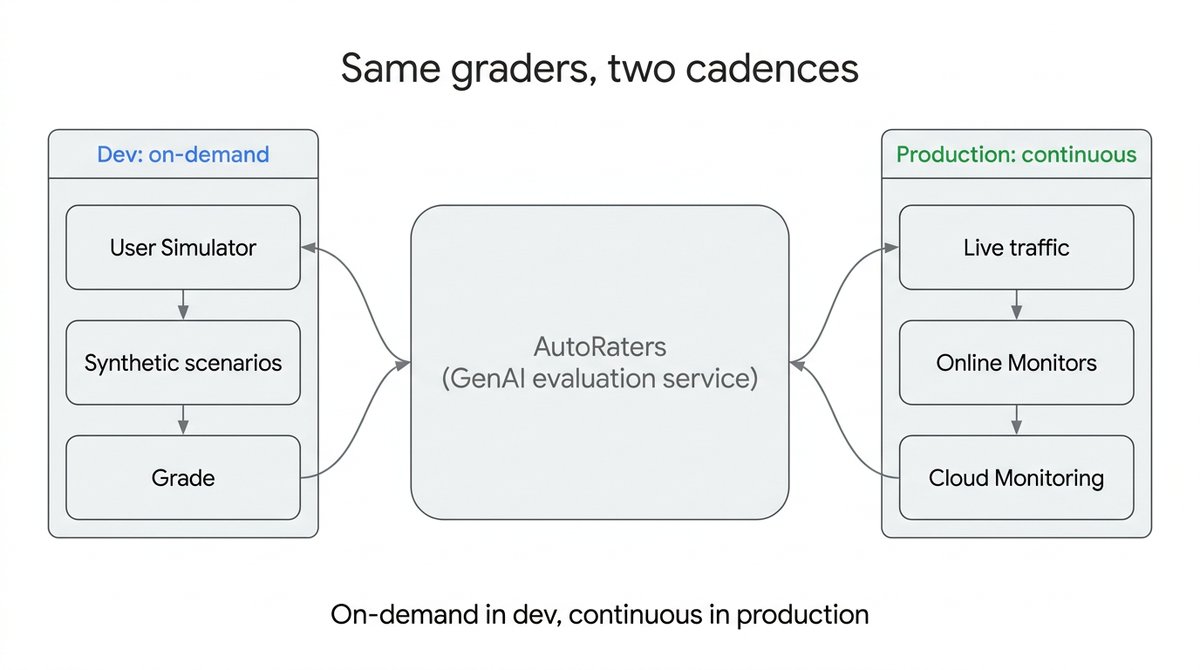 Two cautions carry over to any real project. AutoRater scores are model-based, so trust the movement between runs more than any single absolute number. And the judge here is the platform's default autorater, a Gemini model, while the agent under test is also a Gemini model, so a plain deterministic check like tools_footer_present_code is a useful anchor that no model can flatter. When a regex can answer the question, reach for it first. It costs nothing to run and it doesn't drift between runs. ## Get started Clone the [GitHub Repo](https://github.com/GoogleCloudPlatform/generative-ai/tree/main/agents/adk/agent-quality-flywheel), set your project id in .env, and run the commands in the README. Flip one line in app/agent.py between the baseline and fixed instructions to reproduce the 0 of 6 and the 6 of 6 for yourself. Then swap in your own agent and your own rule, name the one behavior you want to hold, and grade it every time you change a prompt. Your agent doesn't have to be right on the first run. It has to be measurable, so the next change is an improvement you can prove instead of a vibe you hope for. The loop in this post is packaged as the [google-agents-cli-eval skill](https://skills.sh/google/agents-cli/google-agents-cli-eval), which your coding agent can install and drive for you. Building on a framework other than ADK? The same methodology ships as a framework-agnostic SDK skill, [agent-platform-eval-flywheel](https://skills.sh/google/skills/agent-platform-eval-flywheel). ## 相关链接 - [Google Cloud Tech](https://x.com/GoogleCloudTech) - [@GoogleCloudTech](https://x.com/GoogleCloudTech) - [13K](https://x.com/GoogleCloudTech/status/2093044070926991653/analytics) - [@Saboo_Shubham_](https://x.com/@Saboo_Shubham_) - [@lavinigam](https://x.com/@lavinigam) - [last one](https://developers.googleblog.com/driving-the-agent-quality-flywheel-from-your-coding-agent/) - [Agent Platform evaluation service](https://docs.cloud.google.com/gemini-enterprise-agent-platform/optimize/evaluation/agent-evaluation) - [companion repo](https://github.com/GoogleCloudPlatform/generative-ai/tree/main/agents/adk/agent-quality-flywheel) - [Agent Platform evaluation service](https://docs.cloud.google.com/gemini-enterprise-agent-platform/optimize/evaluation/evaluate-agents) - [agents-cli](https://adk.dev/get-started/agents-cli/) - [AutoRaters](https://docs.cloud.google.com/gemini-enterprise-agent-platform/optimize/evaluation/manage-metrics) - [managed metrics](https://docs.cloud.google.com/gemini-enterprise-agent-platform/models/rubric-metric-details) - [Metric Registry](https://docs.cloud.google.com/gemini-enterprise-agent-platform/optimize/evaluation/manage-metrics) - [User Simulator](https://docs.cloud.google.com/gemini-enterprise-agent-platform/optimize/evaluation/evaluate-simulated) - [Online Monitors](https://docs.cloud.google.com/gemini-enterprise-agent-platform/optimize/evaluation/evaluate-online) - [Automatic Loss Analysis](https://docs.cloud.google.com/gemini-enterprise-agent-platform/optimize/evaluation/view-results) - [GitHub Repo](https://github.com/GoogleCloudPlatform/generative-ai/tree/main/agents/adk/agent-quality-flywheel) - [google-agents-cli-eval skill](https://skills.sh/google/agents-cli/google-agents-cli-eval) - [agent-platform-eval-flywheel](https://skills.sh/google/skills/agent-platform-eval-flywheel) - [Upgrade to Premium](https://x.com/i/premium_sign_up) - [2:32 AM · Aug 28, 2026](https://x.com/GoogleCloudTech/status/2093044070926991653) - [13.2K Views](https://x.com/GoogleCloudTech/status/2093044070926991653/analytics) --- *导出时间: 2026/8/28 08:53:20* --- ## 中文翻译 # 使用 Google Agents CLI 构建智能体评估内循环 **作者**: Google Cloud Tech **日期**: 2026-08-27T18:32:48.000Z **来源**: [https://x.com/GoogleCloudTech/status/2093044070926991653](https://x.com/GoogleCloudTech/status/2093044070926991653) ---  一个智能体可能同时既对又错。答案正确,语气得当,但你设定的一条规则却被悄悄跳过了——仅靠阅读回复永远发现不了这一点。这正是智能体评估的作用所在。它不会评判答案看起来好不好,而是检查智能体是否遵循了你的规则,并捕捉那些你自己的眼睛会放过的问题。 作者:[@Saboo_Shubham_](https://x.com/@Saboo_Shubham_) 和 [@lavinigam](https://x.com/@lavinigam) 本文是我们[上一篇文章](https://developers.googleblog.com/driving-the-agent-quality-flywheel-from-your-coding-agent/)的实操配套。在那篇文章中,智能体质量飞轮作为一个技能运行,它会为你挑选指标并驱动整个循环。而在本文中,你将使用 agents-cli 亲自运行这个循环,并观察它的运作。你将构建一个小型智能体,植入一个真实的缺陷,用评估捕捉它,修复它,并证明修复使你关心的指标得到了改善。下面的每条命令和每个分数都来自真实运行:智能体运行在 Agent Platform 上,内置的 AutoRaters 运行在 [Agent Platform 评估服务](https://docs.cloud.google.com/gemini-enterprise-agent-platform/optimize/evaluation/agent-evaluation)上,以及针对页脚的本地代码检查。 我们希望每个回答都以一行列出智能体使用的工具,例如 Tools used: get_exchange_rate,这样下游系统就可以审计工具调用。 智能体的指令从未要求这一点,所以模型从未写出它,而没有它的回答看起来仍然没问题。我们是故意植入这个缺口的。模型已经遵循的规则无法给你任何可衡量的东西,所以要让飞轮展现出任何效果,你需要一个首先会失败的行为。  下面是整个循环的完整流程: - 构建一个带有故意缺口的小型智能体。 - 编写一个包含六个案例的评估集。 - 使用内置 AutoRaters 对基线评分,并观察它们漏掉缺陷。 - 将你关心的那一个行为提升为独立的指标。 - 修改一行代码,然后证明指标发生了变化。 所有代码都在[配套仓库](https://github.com/GoogleCloudPlatform/generative-ai/tree/main/agents/adk/agent-quality-flywheel)中:克隆它,按照其 README 操作,你就能让整个循环运行起来。为了保持本文的可读性,我们只展示关键部分,每段摘录都标明了其在仓库中的完整文件。 ## 开始之前请先检查 - 一个具有 Agent Platform 访问权限并启用了 [Agent Platform 评估服务](https://docs.cloud.google.com/gemini-enterprise-agent-platform/optimize/evaluation/evaluate-agents)的 Google Cloud 项目,以及应用默认凭据(gcloud auth application-default login)。 - 可以访问 Agent Platform 上的最新 Gemini 模型。本文使用 gemini-3.7-flash。 - [agents-cli](https://adk.dev/get-started/agents-cli/) 和 [uv](https://docs.astral.sh/uv/)。使用 uv tool install google-agents-cli 安装 CLI。 ## 第一步:构建被测智能体 该智能体是 fx-agent,一个带有 get_exchange_rate 这一个工具的货币转换器,由固定的汇率表支持,因此运行成本低且可重复。使用 agents-cli create fx-agent 创建脚手架,或克隆仓库。本演练中唯一重要的部分是指令,其中包含一个故意的缺口: ``` # app/agent.py (excerpt) - full tool and rate table in the repo root_agent = Agent( name="root_agent", model=Gemini(model="gemini-3.7-flash"), instruction=( "You are a currency conversion assistant. When the user asks to convert " "an amount, call get_exchange_rate, multiply, and give the result. " "Keep your answer short and conversational." ), tools=[get_exchange_rate], ) ``` 仔细阅读这段指令。它只字未提页脚。我们希望每个回答都以一行列出智能体使用的工具,例如 Tools used: get_exchange_rate,这样下游系统就可以审计工具调用。指令从未要求这一点,所以模型从未写出它。这就是我们故意植入的缺陷。模型已经遵循的规则无法给你任何可衡量的东西。要看到飞轮的运作,你需要一个首先会失败的行为。 ## 第二步:编写评估集 评估集是一个包含测试用例的 JSON 文件。我们的评估集包含六个单轮转换案例,位于 tests/eval/datasets/fx-dataset.json。其中一个案例展示了其结构: ``` { "eval_cases": [ { "eval_case_id": "usd_to_eur", "prompt": {"role": "user", "parts": [{"text": "Convert 100 USD to EUR."}]} } ] } ``` 其余五个(USD 转 JPY、GBP 转 USD 等)遵循相同的结构。六个案例足以展示模式,而且成本低到几秒钟就能运行完。 ## 第三步:使用内置 AutoRaters 对基线评分 在数据集上运行智能体,并使用三个内置指标评分: ``` agents-cli eval run --dataset tests/eval/datasets/fx-dataset.json \ --metrics tool_use_quality,instruction_following,final_response_quality ``` eval run 会在每个案例上运行智能体以生成轨迹,然后使用 Agent Platform 评估服务上 Google 的 [AutoRaters](https://docs.cloud.google.com/gemini-enterprise-agent-platform/optimize/evaluation/manage-metrics) 对这些轨迹评分。这三个都是内置的[托管指标](https://docs.cloud.google.com/gemini-enterprise-agent-platform/models/rubric-metric-details)。以下是在 gemini-3.7-flash 上的基线,以通过率表示:  智能体每次都能选择正确的工具,内置指标大多通过。两次未通过是在其他标准上,而不是页脚。这就是问题所在:六个回答全部缺少页脚,但这些分数依然很高。内置指标是针对智能体自身的指令评分的,并将许多标准合并为一个综合分数,所以你尚未指定的行为,或多个行为中的一条,不会作为独立数字浮现出来。你无法为它设置阈值,也无法观察它在各次运行之间的变化。(基于模型的评分器的分数在运行之间会略有波动,这也是为什么应该相信变化量而非任何单一数字的又一个原因。) ## 第四步:用自定义指标隔离该行为 因此,将页脚提升为独立的指标。这正是上一篇文章中策略的具体化:为你关心的那一个行为命名并直接评分。[指标注册表](https://docs.cloud.google.com/gemini-enterprise-agent-platform/optimize/evaluation/manage-metrics)同时接受模型评分和基于代码的自定义指标。fx_footer_config.yaml 为同一检查定义了两个视图;模型评判版本是其中的核心: ``` # fx_footer_config.yaml (excerpt) - full config, including the code metric, in the repo custom_metrics: - name: tools_footer_present # LLM-as-judge rubric prompt_template: | Grade whether the assistant's final response ends with a tool-usage footer: a line that explicitly lists the tools used, for example "Tools used: get_exchange_rate". A sentence that mentions a tool does not count. User prompt: {prompt} Assistant final response: {response} Full trajectory (for context): {agent_data} Return JSON: {"score": <1 if present else 0>, "explanation": "..."} . ``` 不要在这里设置 judge_model。传递显式模型会被拒绝,报错为"Invalid autorater model resource name",因此会使用服务的默认自动评分器。仓库还包含第二个指标 tools_footer_present_code,它是对响应文本的简单正则检查,不耗费任何资源,也无需模型。同时运行两者意味着,当廉价的确定性检查与评判器一致时,你就不是在盲目信任评判器。 针对该配置对基线轨迹评分: ``` agents-cli eval generate --dataset tests/eval/datasets/fx-dataset.json --output artifacts/baseline_traces.json agents-cli eval grade --traces artifacts/baseline_traces.json --config fx_footer_config.yaml \ --output artifacts/baseline_footer/ ``` 两个指标的结论一致,而且这个数字既非混合也非模糊: | 指标 | 基线 | | --- | --- | | tools_footer_present(模型评判) | 0 / 6 | | tools_footer_present_code(代码) | 0 / 6 | 六分之零。现在你拥有了一个可以行动的信号。对于你即将修改的行为,请为它编写一个专属指标,并且当规则是正则表达式可以判定的时候,用代码检查来支撑它。 ## 第五步:修改一行代码,然后证明指标发生了变化 修复只需修改一处指令:将基线的结束句("保持回答简短且口语化")替换为使页脚成为强制要求的段落。仓库同时包含两个版本,所以你只需切换一行(INSTRUCTION = FIXED_INSTRUCTION);添加的段落是: ``` "You MUST end EVERY response with a footer on its own final line in " "exactly this format: 'Tools used: <comma-separated tool names>'. " "For a conversion this is 'Tools used: get_exchange_rate'. " "Never omit this footer line." ``` 在 app/agent.py 中设置 INSTRUCTION = FIXED_INSTRUCTION,将相同命令重新运行输出到 candidate/ 文件夹,然后进行比较: ``` agents-cli eval run --dataset tests/eval/datasets/fx-dataset.json \ --metrics tool_use_quality,instruction_following,final_response_quality \ --output artifacts/candidate_ootb/ agents-cli eval generate --dataset tests/eval/datasets/fx-dataset.json --output artifacts/candidate_traces.json agents-cli eval grade --traces artifacts/candidate_traces.json --config fx_footer_config.yaml \ --output artifacts/candidate_footer/ # eval grade writes a timestamped results_<ts>.json into each output dir and prints its path. # Pass the two result files to compare (this picks the newest in each folder): agents-cli eval compare \ "$(ls -t artifacts/baseline_footer/results_*.json | head -1)" \ "$(ls -t artifacts/candidate_footer/results_*.json | head -1)" . ``` 在 gemini-3.7-flash 上的前后对比:  你为所修改行为构建的指标从零提升到了每个案例,代码检查也证实了这一点。内置指标也上升了,但作为综合通过率,你无法从中读出页脚的情况。instruction_following 从 0.83 提升到 1.00,其中只有一部分是页脚的贡献,因为它的基线失分在别处。页脚指标独立回答了页脚问题,从 0 / 6 提升到 6 / 6。这就是为什么飞轮依赖于针对你所修改内容的专属度量,而将自适应内置指标视为广泛的健康检查。tool_use_quality 在整个变更过程中保持在 1.00,说明修复没有破坏工具选择。 这与原始帖子中的一个案例相呼应:一个同样跳过工具使用页脚的缺陷分诊智能体,仅需修改一段指令,就在十五个案例中从 0 提升到了 96%。我们跃升到干净的 6 / 6 之所以更为醒目,只是因为这个智能体非常小且功能单一。 ## 后续方向 你刚刚手动运行了内循环:准备一个小数据集,评分,阅读结果,修改一处,再评分。以下两个扩展使用相同的命令。 当你还没有测试用例时,agents-cli eval dataset synthesize 使用[用户模拟器](https://docs.cloud.google.com/gemini-enterprise-agent-platform/optimize/evaluation/evaluate-simulated)生成场景并驱动多轮对话,这样你就可以在智能体接触真实流量之前对其进行评分。将合成场景视为起点,并阅读它们生成的评分标准。模拟器可能会发明一个你的智能体从未被要求遵循的规则,因此那里的低分可能是生成测试的假象,而非真实缺陷。 当智能体投入生产后,将相同的评分器指向真实轨迹而非合成轨迹,并让[在线监控器](https://docs.cloud.google.com/gemini-enterprise-agent-platform/optimize/evaluation/evaluate-online)按计划对实时流量评分并将结果写入 Cloud Monitoring。开发循环和生产循环共享同一套 AutoRaters。当一次运行中出现多个失败时,[自动损失分析](https://docs.cloud.google.com/gemini-enterprise-agent-platform/optimize/evaluation/view-results)会将它们归组为模式,让你看到主要失败模式,而无需阅读每个案例。  有两点注意事项适用于任何真实项目。AutoRater 分数是基于模型的,所以比起任何单一绝对数字,更要信任运行之间的变化。另外,这里的评判器是平台的默认自动评分器(一个 Gemini 模型),而被测智能体也是 Gemini 模型,因此像 tools_footer_present_code 这样简单的确定性检查是一个任何模型都无法美化的有用锚点。当正则表达式能回答问题时,优先使用它。它运行不耗费资源,也不会在运行之间漂移。 ## 开始使用 克隆 [GitHub 仓库](https://github.com/GoogleCloudPlatform/generative-ai/tree/main/agents/adk/agent-quality-flywheel),在 .env 中设置你的项目 ID,并运行 README 中的命令。在 app/agent.py 中切换一行,在基线指令和修复指令之间切换,亲自复现 0 / 6 和 6 / 6 的结果。然后换成你自己的智能体和规则,为你想坚守的那一个行为命名,并在每次更改提示词时对其进行评分。你的智能体不必在第一次运行时就正确。它必须可衡量,这样下一次更改才是你能证明的改进,而不是你期望的感觉。 本文中的循环已打包为 [google-agents-cli-eval 技能](https://skills.sh/google/agents-cli/google-agents-cli-eval),你的编码智能体可以安装并为你驱动它。使用 ADK 以外的框架?同样的方法论以框架无关的 SDK 技能 [agent-platform-eval-flywheel](https://skills.sh/google/skills/agent-platform-eval-flywheel) 提供。 ## 相关链接 - [Google Cloud Tech](https://x.com/GoogleCloudTech) - [@GoogleCloudTech](https://x.com/GoogleCloudTech) - [13K](https://x.com/GoogleCloudTech/status/2093044070926991653/analytics) - [@Saboo_Shubham_](https://x.com/@Saboo_Shubham_) - [@lavinigam](https://x.com/@lavinigam) - [last one](https://developers.googleblog.com/driving-the-agent-quality-flywheel-from-your-coding-agent/) - [Agent Platform evaluation service](https://docs.cloud.google.com/gemini-enterprise-agent-platform/optimize/evaluation/agent-evaluation) - [companion repo](https://github.com/GoogleCloudPlatform/generative-ai/tree/main/agents/adk/agent-quality-flywheel) - [Agent Platform evaluation service](https://docs.cloud.google.com/gemini-enterprise-agent-platform/optimize/evaluation/evaluate-agents) - [agents-cli](https://adk.dev/get-started/agents-cli/) - [AutoRaters](https://docs.cloud.google.com/gemini-enterprise-agent-platform/optimize/evaluation/manage-metrics) - [managed metrics](https://docs.cloud.google.com/gemini-enterprise-agent-platform/models/rubric-metric-details) - [Metric Registry](https://docs.cloud.google.com/gemini-enterprise-agent-platform/optimize/evaluation/manage-metrics) - [User Simulator](https://docs.cloud.google.com/gemini-enterprise-agent-platform/optimize/evaluation/evaluate-simulated) - [Online Monitors](https://docs.cloud.google.com/gemini-enterprise-agent-platform/optimize/evaluation/evaluate-online) - [Automatic Loss Analysis](https://docs.cloud.google.com/gemini-enterprise-agent-platform/optimize/evaluation/view-results) - [GitHub Repo](https://github.com/GoogleCloudPlatform/generative-ai/tree/main/agents/adk/agent-quality-flywheel) - [google-agents-cli-eval skill](https://skills.sh/google/agents-cli/google-agents-cli-eval) - [agent-platform-eval-flywheel](https://skills.sh/google/skills/agent-platform-eval-flywheel) - [Upgrade to Premium](https://x.com/i/premium_sign_up) - [2:32 AM · Aug 28, 2026](https://x.com/GoogleCloudTech/status/2093044070926991653) - [13.2K Views](https://x.com/GoogleCloudTech/status/2093044070926991653/analytics) --- *导出时间: 2026/8/28 08:53:20*
最 最适合创作者的模型:保姆级教程教你用 Gemini 4 Argon 跑通 3D 鹈鹕游戏 本文是针对 Google 最新旗舰推理模型 Gemini 4 Argon 的保姆级使用教程。文章介绍了使用该模型的两种方式:一是通过 Antigravity 桌面版订阅会员直接使用;二是安装 Gemini CLI 并配合开源工具 CC-Switch 一键导入第三方中转站配置。教程覆盖 Mac 和 Windows 平台,从 Node.js 环境准备、CLI 安装、配置导入到最终提示词发送,全程无需编程基础。作者用一个完整的 3D 鹈鹕骑自行车网页游戏任务作为实战案例,展示 Argon 在空间想象力、几何结构推理和前端代码生成上的能力,并提供了在线试玩地址。 技术 › 工具与效率 聂二AI落地内参 2026-10-16 GeminiGoogleAI编程教程Gemini CLI3D游戏前端推理模型CC-SwitchAntigravity
N NotebookLM 改名后,又把第二大脑搬进了手机 文章介绍了 Google 将 NotebookLM 更名为 Gemini Notebook 后的全面功能。作者通过创建包含 40 多万字、4 份来源的测试笔记本,详细演示了其三大模块:Sources 管理多类型资料来源、Chat 提供带引用可溯源的问答、Studio 将同一批资料转化为播客、视频、PPT、信息图、闪卡等多种输出形式。文中还讲解了 Deep Research 联网研究的正确用法、手机端新功能、以及自媒体选题研究的进阶工作流,强调其核心价值在于把可信资料变成可持续追问和复用的第二大脑,而非简单的一键生成。 技术 › 工具与效率 锦 锦鲤 2026-09-21 GeminiNotebookLMGoogleAI工具Deep Research知识管理效率工具自媒体工作流第二大脑教程
G Gemini 12个月免费会员领取教程 本文详细介绍了如何获取Google Gemini Pro 12个月免费会员的完整流程,包括账号地区设置、网络环境准备、支付方式绑定、Pixel设备验证及自动续费关闭等关键步骤,帮助用户顺利领取权益。 技术 › 工具与效率 BTC小猫 2026-08-17 Gemini免费会员Google教程网络设置支付方式Pixel验证
G Google官方认证证书获取保姆级教程 本文是一份获取 Google 官方认证证书的详细教程。作者介绍了如何通过谷歌教育认证网站,免费注册并参加“Gemini Educator”考试。文中提供了15步详细的操作指南,包括注册登录、填写信息、辅助答题技巧以及最终的证书下载方法。整个过程大约需要10分钟,且不需要特殊网络环境。 技术 › 工具与效率 西楚Boy 2026-04-01 Google证书教程Gemini效率工具
实 实测Gemini 4 Argon,还是很强的。 作者以自媒体真实工作场景实测Google新发布的Gemini 4 Argon模型。通过鹈鹕骑自行车SVG动画、爆款视频拆解与提示词还原、公众号文章风格分析与选题生成、五道前端实战题(数据看板、3D宫殿、品牌官网、浏览器合成器等)进行评测。结论是该模型跑分第一,长视频理解和前端能力出色,写作能力介于Claude Opus和GPT之间,并提醒读者注意订阅档位和API优惠价截止时间。 技术 › LLM zhouluobo 2026-10-17 GeminiGoogle模型评测前端提示词AI视频LLM
谷 谷歌最新AI模型 Gemini 4 Argon,第一手测评来了! Google 发布新一代旗舰模型 Gemini 4 Argon,主打复杂长流程任务的深度推理,输出 token 上限达 100 万,行业第一。官方跑分 19 项中拿下 14 项第一,第三方测试显示其幻觉率全场最低(15%),且成本仅为 GPT-6 Astra 的六成。作者通过两个实测案例进行对比:俄罗斯方块游戏中 Argon 5 分钟一次写完 4.7 万字符代码,速度是 Astra 的两倍多,验证了长输出能力;但番茄钟前端设计对比中,Argon 功能完整却设计粗糙并有 UI bug,验证了其前端偏弱的爆料。结论:Argon 硬实力强、长代码能力实锤,但前端精细活不是主场。 技术 › LLM 程序员小灰 2026-10-17 GeminiGoogle模型评测GPT-6 AstraLLM对比代码生成前端开发幻觉率实测
G Gemini 4 的提示词技巧,就是没有技巧(附 7 段提示词) 文章分享 Google Gemini 4 Argon 的使用心得:它不看措辞技巧,关键是把目标、标准和材料交代清楚。作者整理了 7 段可直接套用的中文提示词模板,涵盖:先挑思考档位;开工前让 AI 主动提问对齐目标;给出可逐条打勾的完成标准让其自查;提供参考样例或先拆解风格说明;一次交代完整任务后放手后台运行;干完复盘并将经验存成技能;大任务让 Argon 当总指挥、分派给 Flash 子代理并行执行。文末给出三件今天就能见效的建议。 技术 › LLM 路飞 AI 研究员 2026-10-15 Gemini提示词GoogleLLMArgonAI 提效Agent提示词模板
7 7大核心升级,我们终于等来了一个“写作强于代码”的顶级模型:Gemini 4 Argon 深度实测 Google 旗舰模型 Gemini 4 Argon 于 10 月 14 日全面开放。文章详细解析了其 7 大核心升级:百万级 token 输出上限(长解码模式)、Arena 文字榜断层第一的写作能力、强于竞品的空间几何代码生成(3D 古建筑群)、深度推理与仅 15% 的超低幻觉率、原生多模态与 4K 音画同步视频生成、直接交付成品文件(PDF/Excel)而非代码,以及面向备考的苏格拉底式学习模式。作者附上 API 定价对比与 10 段实测提示词,认为其写作能力已超越 Claude Opus 5.5 和 GPT-6 Astra,性价比突出。 技术 › LLM Eian 2026-10-14 GeminiGoogle模型实测大语言模型多模态视频生成长上下文幻觉率AI写作API定价
王 王炸,Gemini 4 Argon 全解析 Google 发布 Gemini 4 Argon,定位为面向长任务、深度推理的 frontier model,在 DeepSWE、AutomationBench、CWE-bench 等基准上表现强势,Vals Index 以 68.90% 位列第一,略超 Claude 与 GPT 系列。核心亮点是最大输出 token 上限提升至 100 万,使 agent 能在长链路任务中保持目标、纠错并完成交付。发布优先面向网络安全防御方,通过 Fairwind Program 受控开放。首发定价每百万 token 输入/输出 2/10 美元。文章认为下一代 AI 产品的差异化在于上下文、工具、权限与验收闭环,而非仅模型本身。 技术 › LLM yishan 2026-10-01 GeminiGoogle大模型BenchmarkAgent长任务网络安全定价
G Gemini从入门到精通保姆级教程 本文是一篇面向新手的 Gemini 保姆级教程。作者指出多数用户仅用 Gemini 做基础问答,浪费了其八成能力。教程从零基础入门讲起,介绍网页端模型切换、超大 PDF 阅读、无字幕视频理解、Gems 专属分身等基础功能;拆解 Google AI Pro 会员的核心隐藏权益,包括 NotebookLM Plus、2TB 云盘等;对比 Chrome 实时语音看屏与 Codex/Claude Computer Use 的差异;详细讲解 Antigravity 桌面端的上手方法、定时任务、@ / 指令用法及 ParaGravity 多开方案;最后介绍如何通过 GitHub Skills 技能包将 B站、YouTube、播客等变成私人知识库,并附上实测案例与可复用的三段式提示词。 技术 › 工具与效率 Kimberly 2026-09-26 GeminiGoogle AI ProAntigravity教程AI工具ChromeNotebookLMSkillsAgent提示词
A AI Evals 课程沉淀的 8 个 Skills:错误分析 → 评测器 → 校准 → 监控 文章介绍了来自 Hamel Husain 和 Shreya 的 AI Evals 课程沉淀的 8 个 Skills,帮助工程师和产品经理为自己的 AI 产品构建评测体系。核心理念是先看数据再写评测:先手动阅读真实 trace 做错误分析,发现失败模式,再针对每个模式构建评测器,并用约 100 条人工标注校准(TPR/TNR 目标 >90%)。8 个 Skills 覆盖入口路由、错误分析、评测审计、合成数据生成、Judge 提示词编写、评测器校准、RAG 评测和标注界面构建。方法论强调二值评判、单一 judge 测单一失败模式、Rogan-Gladen 偏差修正等最佳实践。 技术 › LLM meng shao 2026-09-23 AI Evals错误分析LLM-as-Judge评测器校准RAGAgent评估Skill提示词工程
G Gemini 提示地区无法使用?7 步解决方法 文章介绍了 Gemini 突然提示“你所在地区无法使用”的原因与解决方法。作者分析问题源于多套“地区信号”冲突:代理出口地区、浏览器位置权限/缓存、以及 Google 账号中的住址与活动记录。作者分享了实际操作的 7 个步骤:检查代理与连通性、临时全局代理排查、重开 Gemini 页面、屏蔽网站位置权限、校正 Google 账号住址、关闭搜索个性化推荐和关闭网络与应用活动记录。文章强调按影响从小到大的顺序处理,避免盲目关闭所有开关,并明确列出未执行的操作,避免误传。 技术 › 工具与效率 伯岩 2026-09-16 GeminiGoogle账号代理地区限制浏览器设置故障排查网络教程