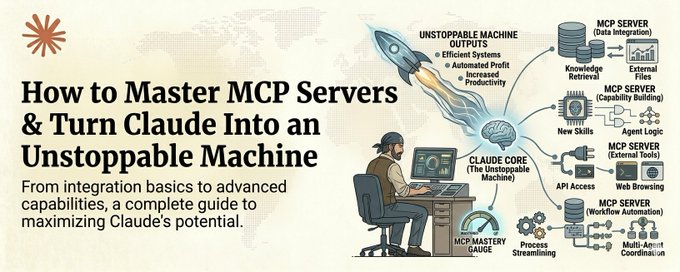
# How to Master MCP Servers & Turn Claude Into an Unstoppable Machine — The Complete Guide.
**作者**: Khairallah AL-Awady
**日期**: 2026-04-15T09:00:03.000Z
**来源**: [https://x.com/eng_khairallah1/status/2044339963316302313](https://x.com/eng_khairallah1/status/2044339963316302313)
---
Most people using Claude right now are using it with its hands tied behind its back.
Save this :)
They type a question. They get an answer. They copy it somewhere. They go find the data themselves. They paste it into another tool. They do the integration work manually.
That is not AI leverage. That is AI with training wheels.
MCP servers are what take the training wheels off.
MCP stands for Model Context Protocol. It is the system that lets Claude reach out and interact with the real world. Read your Google Drive. Search the web with real-time data. Pull from your Slack messages. Query your databases. Access your CRM. Interact with GitHub.
Without MCP, Claude is a brain in a jar. Incredibly intelligent but completely isolated.
With MCP, Claude becomes an operator. It does not just think about your work. It does your work.
And right now, less than 5% of Claude users have set up a single MCP server.
That is an insane competitive advantage sitting right there for anyone willing to spend an afternoon learning how it works.
Here is the full course.
What MCP Actually Is (The 60-Second Version)
Think of MCP servers as plugins that give Claude superpowers.
Each MCP server connects Claude to one external system. One server for Google Drive. One for web search. One for your database. One for Slack. One for GitHub.
Once connected, Claude can read from and write to those systems directly. No copy-pasting. No tab switching. No manual data transfer.
You tell Claude "find the Q3 report in my Drive, pull the revenue numbers, compare them to the industry benchmarks online, and draft a summary for my team in Slack."
Without MCP, that is 5 separate tasks across 4 different apps and probably 30 minutes of your time.
With MCP, Claude does all of it. In seconds.
That is the difference. And it is massive.
Part 1: The 5 MCP Servers Everyone Should Install First
You do not need 50 MCP servers. You need the right 5. These are the ones that cover 90% of real work.
1. Tavily — Real-Time Web Search
This is the one that makes Claude actually useful for current information.
Without Tavily, Claude's knowledge has a cutoff date. With Tavily, it can search the live web, extract clean structured data from any page, and bring real-time information directly into your conversation.
Not blue links like Google. Clean, structured, AI-ready data.
Use cases: market research, competitive analysis, finding current pricing, checking recent news, verifying facts before publishing content.
Setup takes under 5 minutes. One API key. One config file entry. Done.
2. Google Drive — Your Files, Accessible
This turns Claude from an outsider guessing about your work into a team member who has read all the docs.
Claude can search your Drive, read documents, pull data from spreadsheets, and reference your existing files when generating new work.
Instead of uploading files one at a time, Claude just accesses them directly.
3. Context7 — Always Up-To-Date Documentation
If you write any code at all, this one is non-negotiable.
Context7 injects the latest documentation for any library directly into Claude's context. No more hallucinated APIs. No more deprecated methods. No more wasting 30 minutes debugging code that Claude wrote using a function that does not exist anymore.
Just add "use context7" to your prompt and Claude gets the real, current docs for Next.js, React, Supabase, MongoDB, and thousands more.
4. Slack — Communication Access
Claude can read your Slack channels, search message history, and draft responses. For anyone managing a team or working across multiple channels, this is hours saved every week.
5. GitHub — Code and Project Access
Claude reads repos, reviews pull requests, searches issues, and understands your codebase in context. If you are building software, this is the bridge between Claude and your actual work.
Part 2: How to Install Your First MCP Server (Step by Step)
This is simpler than most people think. The complexity is a myth that keeps people from starting.
Step 1: Open your Claude Desktop app settings
Navigate to your config file. On Mac it lives at ~/.claude/ and on Windows in your user config directory.
Step 2: Find or create your MCP configuration file
This is a simple JSON file that tells Claude which servers to connect to.
Step 3: Add your first server
Each MCP server has a connection URL and usually an API key. The format looks like this:
Step 4: Restart Claude Desktop
The server connects automatically. You will see the tools appear in your available tools list.
Step 5: Test it
Ask Claude to use the tool. "Search the web for the latest AI news today" if you installed Tavily. "Find my Q3 report" if you installed Google Drive.
If it works, you just gave Claude its first superpower. The whole process takes about 10 minutes.
Part 3: Building Workflows That Chain Multiple MCP Servers Together
This is where it gets genuinely powerful.
One MCP server is useful. Multiple MCP servers working together in a single workflow is transformative.
Here is an example of a real workflow that chains three MCP servers:
The Weekly Competitive Intelligence Workflow
Tavily searches the web for your top 3 competitors' latest news, product updates, and pricing changes
Google Drive pulls your existing competitor tracking document
Claude compares the new data against your existing data, identifies what changed, and updates the document
The updated analysis lands back in your Drive, ready for your Monday meeting
That workflow used to take someone 2 to 3 hours every week. With MCP it runs in under 5 minutes and the output is more thorough than what a human typically produces because Claude does not get bored, does not skip sources, and does not forget to check last week's data.
The pattern is always the same:
- Pull data from the outside world (Tavily, web sources)
- Pull context from your existing work (Google Drive, GitHub)
- Process, analyze, and compare (Claude's brain)
- Output the result somewhere useful (Drive, Slack, a file)
Once you see this pattern, you start seeing MCP workflows everywhere. Content pipelines. Sales research. Code review. Report generation. Market monitoring.
Part 4: Building Your Own MCP Server
This is the advanced move. And it is simpler than it sounds.
If you have a tool, a database, or a system that does not have an existing MCP server, you can build one yourself using FastMCP.
FastMCP lets you create an MCP server in minimal Python. You define the tools Claude can use, what inputs they take, and what they return.
Here is what a basic custom MCP server looks like:
That is it. You now have an MCP server that gives Claude access to your internal client database.
The builders who are creating custom MCP servers for their specific workflows right now are building moats that will be extremely hard to replicate later. Because the server itself is simple. The domain knowledge baked into it is what makes it valuable.
Part 5: The MCP Mindset Shift
Here is the mental model that changes everything.
Stop thinking about Claude as a tool you ask questions to.
Start thinking about Claude as an operator that needs access to systems.
Every time you find yourself manually copying data from one app to another, that is a missing MCP connection. Every time you upload a file to Claude because it cannot access your file system, that is a missing MCP connection. Every time you type context that already exists somewhere in your digital life, that is a missing MCP connection.
The goal is zero manual data transfer between you and Claude.
When Claude can see everything you can see and reach everything you can reach, you stop being a middleman and start being a director. You give the instruction. Claude does the execution. Across all your tools. In parallel. In seconds.
That is what mastering MCP servers actually means.
Where to Start Right Now
If you have not installed a single MCP server yet, install Tavily today. It takes 5 minutes and the immediate payoff of having Claude search the live web is enough to convince you the rest is worth pursuing.
If you already have one or two servers running, build your first multi-server workflow this week. Pick a real task that touches multiple tools and chain them together.
If you are already comfortable with MCP, build a custom server for your specific niche. That is where the real competitive advantage lives.
The people who master MCP servers in the next 6 months are going to operate at a level that looks like magic to everyone else.
Not because the technology is magic. But because most people will still be copy-pasting between tabs.
Don't be that person.
The ones who connect Claude to their entire digital world will never go back to working in isolation.
Follow me @eng_khairallah1 for more tools, workflows, and systems. No fluff. Just what works.
hope this was useful for you, Khairallah ❤️
## 相关链接
- [Khairallah AL-Awady reposted](https://x.com/eng_khairallah1)
- [Khairallah AL-Awady](https://x.com/eng_khairallah1)
- [@eng_khairallah1](https://x.com/eng_khairallah1)
- [2.2K](https://x.com/eng_khairallah1/status/2044339963316302313/analytics)
- [@eng_khairallah1](https://x.com/@eng_khairallah1)
- [Upgrade to Premium](https://x.com/i/premium_sign_up)
- [5:00 PM · Apr 15, 2026](https://x.com/eng_khairallah1/status/2044339963316302313)
- [2,277 Views](https://x.com/eng_khairallah1/status/2044339963316302313/analytics)
---
*导出时间: 2026/4/15 19:30:12*
---
## 中文翻译
# 如何精通 MCP 服务器,把 Claude 变成势不可挡的机器 —— 完整指南。
**作者**: Khairallah AL-Awady
**日期**: 2026-04-15T09:00:03.000Z
**来源**: [https://x.com/eng_khairallah1/status/2044339963316302313](https://x.com/eng_khairallah1/status/2044339963316302313)
---

现在大多数使用 Claude 的人,都是在让它被捆着双手工作。
收藏这篇文章 :)
他们输入一个问题。得到一个答案。把答案复制到某个地方。自己去寻找数据。再把数据粘贴到另一个工具里。所有整合工作都靠手动完成。
这不是 AI 杠杆。这是装着辅助轮的 AI。
MCP 服务器就是拆掉那些辅助轮的东西。
MCP 代表 Model Context Protocol(模型上下文协议)。它是让 Claude 得以接触并与真实世界互动的系统。读取你的 Google Drive。用实时数据搜索网络。从你的 Slack 消息中提取内容。查询你的数据库。访问你的 CRM。与 GitHub 交互。
没有 MCP,Claude 就像一个罐子里的大脑。聪明绝顶,却完全与世隔绝。
有了 MCP,Claude 就变成了一个操作者。它不再只是思考你的工作,而是直接完成你的工作。
而目前,只有不到 5% 的 Claude 用户设置过哪怕一个 MCP 服务器。
这对任何愿意花一个下午学习其原理的人来说,都是一个触手可及的巨大竞争优势。
以下是完整课程。
MCP 究竟是什么(60 秒速览版)
把 MCP 服务器想象成赋予 Claude 超能力的插件。
每个 MCP 服务器将 Claude 连接到一个外部系统。一个连接 Google Drive。一个连接网络搜索。一个连接你的数据库。一个连接 Slack。一个连接 GitHub。
连接之后,Claude 就可以直接读取和写入这些系统。无需复制粘贴。无需切换标签页。无需手动传输数据。
你告诉 Claude:“在我的 Drive 里找到 Q3 报告,提取收入数据,与网上的行业基准进行对比,然后在 Slack 里为我的团队起草一份摘要。”
没有 MCP,这是横跨 4 个不同应用的 5 项独立任务,可能要花你 30 分钟。
有了 MCP,Claude 几秒钟就能全部完成。
这就是区别。而且巨大无比。
第 1 部分:每个人都应该首先安装的 5 个 MCP 服务器
你不需要 50 个 MCP 服务器。你需要的是合适的 5 个。这些服务器能覆盖 90% 的实际工作。
1. Tavily —— 实时网络搜索
这是让 Claude 在获取当前信息方面真正有用的那一个。
没有 Tavily,Claude 的知识有一个截止日期。有了 Tavily,它可以搜索实时网络,从任何页面提取干净的结构化数据,并将实时信息直接带入你的对话。
不是像 Google 那样的蓝色链接。而是干净、结构化、适合 AI 处理的数据。
使用场景:市场调研、竞争分析、查找当前价格、查看最新新闻、在发布内容前核实事实。
设置只需不到 5 分钟。一个 API 密钥。一条配置文件条目。搞定。
2. Google Drive —— 你的文件,触手可及
这让 Claude 从一个对你的工作一无所知的局外人,变成一个读过所有文档的团队成员。
Claude 可以搜索你的 Drive、阅读文档、从电子表格中提取数据,并在生成新内容时引用你的现有文件。
不需要一个一个上传文件,Claude 直接访问它们即可。
3. Context7 —— 始终最新的文档
只要你写任何代码,这个就必不可少。
Context7 会将任何库的最新文档直接注入 Claude 的上下文。不再有幻觉 API。不再有已弃用的方法。不再浪费 30 分钟调试 Claude 用一个早已不存在的函数写出的代码。
只需在提示中加入 "use context7",Claude 就能获得 Next.js、React、Supabase、MongoDB 以及数千个其他库的真实最新文档。
4. Slack —— 沟通渠道访问
Claude 可以阅读你的 Slack 频道、搜索消息历史并起草回复。对于管理团队或在多个频道工作的人来说,这每周能节省数小时。
5. GitHub —— 代码与项目访问
Claude 可以阅读仓库、审查拉取请求、搜索 issue,并在上下文中理解你的代码库。如果你在做软件开发,这就是 Claude 与你实际工作之间的桥梁。
第 2 部分:如何安装你的第一个 MCP 服务器(分步教程)
这比大多数人想象的要简单。复杂性只是一个阻止人们开始的迷思。
第 1 步:打开你的 Claude 桌面应用设置
导航到你的配置文件。Mac 上位于 ~/.claude/,Windows 上位于你的用户配置目录中。
第 2 步:找到或创建你的 MCP 配置文件
这是一个简单的 JSON 文件,告诉 Claude 要连接哪些服务器。
第 3 步:添加你的第一个服务器
每个 MCP 服务器都有一个连接 URL,通常还需要一个 API 密钥。格式如下:
第 4 步:重启 Claude 桌面应用
服务器会自动连接。你会在可用工具列表中看到这些工具出现。
第 5 步:测试它
让 Claude 使用该工具。如果你安装了 Tavily,就说“搜索今天最新的 AI 新闻”。如果你安装了 Google Drive,就说“找到我的 Q3 报告”。
如果成功了,你刚刚赋予了 Claude 它的第一个超能力。整个过程大约需要 10 分钟。
第 3 部分:构建串联多个 MCP 服务器的工作流
这才是它真正强大的地方。
一个 MCP 服务器很有用。多个 MCP 服务器在同一个工作流中协同工作,则具有变革性。
以下是一个串联三个 MCP 服务器的真实工作流示例:
每周竞争情报工作流
Tavily 搜索网络上你前 3 名竞争对手的最新新闻、产品更新和价格变动
Google Drive 提取你现有的竞争对手跟踪文档
Claude 将新数据与现有数据进行对比,识别变化之处,并更新文档
更新后的分析会存回你的 Drive,为你的周一会议做好准备
这个工作流程过去每周要占用某人2到3个小时。有了MCP,它在5分钟内就能完成,而且输出比人工通常做得更全面,因为Claude不会感到厌倦,不会跳过任何来源,也不会忘记检查上周的数据。
这个模式总是一样的:
- 从外部世界拉取数据(Tavily、网络来源)
- 从你现有的工作中拉取上下文(Google Drive、GitHub)
- 处理、分析和比较(Claude的大脑)
- 将结果输出到有用的地方(Drive、Slack、文件)
一旦你看到这个模式,你就会到处看到MCP工作流程。内容流水线。销售调研。代码审查。报告生成。市场监控。
第4部分:构建你自己的MCP服务器
这是进阶操作。而且它比听起来更简单。
如果你有一个工具、一个数据库或一个没有现成MCP服务器的系统,你可以使用FastMCP自己构建一个。
FastMCP让你能用最少的Python代码创建一个MCP服务器。你定义Claude可以使用的工具、它们接受哪些输入以及返回什么。
下面是一个基本的自定义MCP服务器的样子:
就是这样。你现在有了一个MCP服务器,让Claude可以访问你的内部客户数据库。
那些现在正在为自己的特定工作流程创建自定义MCP服务器的构建者,正在构筑日后极难复制的护城河。因为服务器本身很简单。而融入其中的领域知识才是让它有价值的地方。
第5部分:MCP思维转变
这里有一个能改变一切的思维模型。
不要再把Claude当作一个你向它提问的工具。
开始把Claude当作一个需要访问系统的操作员。
每当你发现自己在不同应用之间手动复制数据时,那就是一个缺失的MCP连接。每当你因为Claude无法访问你的文件系统而上传文件时,那就是一个缺失的MCP连接。每当你输入已经存在于你数字生活中的某个地方的上下文时,那就是一个缺失的MCP连接。
目标是在你和Claude之间实现零手动数据传输。
当Claude能看到你能看到的一切,并能触及你能触及的一切时,你就不再是中间人,而是成为了指挥者。你下达指令。Claude负责执行。跨你所有的工具。并行进行。在几秒钟内。
这就是掌握MCP服务器的真正含义。
现在从哪里开始
如果你还没有安装任何一个MCP服务器,今天就安装Tavily。只需5分钟,让Claude搜索实时网络的直接回报就足以让你相信追求其余部分是值得的。
如果你已经有一两个服务器在运行,本周就构建你的第一个多服务器工作流程。选一个涉及多个工具的真实任务,把它们串联起来。
如果你已经熟悉MCP,就为你的特定细分领域构建一个自定义服务器。那才是真正的竞争优势所在。
在接下来的6个月内掌握MCP服务器的人,将以一种在其他人看来如同魔法的方式运作。
不是因为这项技术有魔力。而是因为大多数人仍将在标签页之间复制粘贴。
不要成为那种人。
那些将Claude连接到整个数字世界的人,再也不会回到孤立工作的状态了。
关注我 @eng_khairallah1 获取更多工具、工作流程和系统。没有废话。只有真正有效的东西。
希望这对你有用,Khairallah ❤️
## 相关链接
- [Khairallah AL-Awady 转发了](https://x.com/eng_khairallah1)
- [Khairallah AL-Awady](https://x.com/eng_khairallah1)
- [@eng_khairallah1](https://x.com/eng_khairallah1)
- [2.2K](https://x.com/eng_khairallah1/status/2044339963316302313/analytics)
- [@eng_khairallah1](https://x.com/@eng_khairallah1)
- [升级到 Premium](https://x.com/i/premium_sign_up)
- [2026年4月15日下午5:00](https://x.com/eng_khairallah1/status/2044339963316302313)
- [2,277 次浏览](https://x.com/eng_khairallah1/status/2044339963316302313/analytics)
---
*导出时间: 2026/4/15 19:30:12*